INCLUDES FREE
WEB-BASED TESTING!
“Makers”) of this book (“the Work”) do not guarantee or warrant the results to be obtained from the Work. There is no guarantee of any kind, expressed or implied, regarding the Work or its contents.The Work is sold AS IS and WITHOUT WARRANTY.You may have other legal rights, which vary from state to state.
In no event will Makers be liable to you for damages, including any loss of profits, lost savings, or other incidental or consequential damages arising out from the Work or its contents. Because some states do not allow the exclusion or limitation of liability for consequential or incidental damages, the above limitation may not apply to you.
You should always use reasonable care, including backup and other appropriate precautions, when working with computers, networks, data, and files.
Syngress Media®, Syngress®, “Career Advancement Through Skill Enhancement®,” “Ask the Author UPDATE®,” and “Hack Proofing®,” are registered trademarks of Elsevier, Inc. “Syngress:The Definition of a Serious Security Library”™, “Mission Critical™,” and “The Only Way to Stop a Hacker is to Think Like One™”are trademarks of Elsevier, Inc. Brands and product names mentioned in this book are trademarks or service marks of their respective companies.
KEY SERIAL NUMBER
001 HJIRTCV764
002 PO9873D5FG
003 829KM8NJH2
004 BPOQ48722D
005 CVPLQ6WQ23
006 VBP965T5T5
007 HJJJ863WD3E
008 2987GVTWMK
009 629MP5SDJT
010 IMWQ295T6T
PUBLISHED BY Syngress Publishing, Inc. Elsevier, Inc.
30 Corporate Drive Burlington, MA 01803
Security+ Study Guide & DVD Training System, Second Edition
Copyright © 2007 by Elsevier, Inc. All rights reserved. Printed in the United States of America. Except as permitted under the Copyright Act of 1976, no part of this publication may be reproduced or distributed in any form or by any means, or stored in a database or retrieval system, without the prior written permission of the publisher, with the exception that the program listings may be entered, stored, and executed in a computer system, but they may not be reproduced for publication.
Printed in the United States of America 1 2 3 4 5 6 7 8 9 0
ISBN 10: 978-1-59749-154-9
Publisher: Amorette Pedersen Page Layout and Art: Patricia Lupien Acquisitions Editor: Andrew Williams Copy Editor: Judith Eby
Technical Editor: Ido Dubrawsky Indexer: Michael Ferreira Cover Designer: Michael Kavish
iii
Contributing Authors
Michael Cross(MCSE, MCP+I, CNA, Network+) is an Internet
Specialist/Computer Forensic Analyst with the Niagara Regional Police Service (NRPS). He performs computer forensic examinations on computers involved in criminal investigation. He also has consulted and assisted in cases dealing with computer-related/Internet crimes. In addition to designing and maintaining the NRPS Web site at www.nrps.com and the NRPS intranet, he has provided sup-port in the areas of programming, hardware, and network administration. As part of an information technology team that provides support to a user base of more than 800 civilian and uniform users, he has a theory that when the users carry guns, you tend to be more motivated in solving their problems.
Michael also owns KnightWare (www.knightware.ca), which provides com-puter-related services such as Web page design, and Bookworms (www.book-worms.ca), where you can purchase collectibles and other interesting items online. He has been a freelance writer for several years, and he has been published more than three dozen times in numerous books and anthologies. He currently resides in St. Catharines, Ontario, Canada, with his lovely wife, Jennifer, his darling daughter, Sara, and charming son, Jason.
Jeremy Faircloth(Security+, CCNA, MCSE, MCP+I, A+, etc.) is an IT
Manager for EchoStar Satellite L.L.C., where he and his team architect and main-tain enterprisewide client/server and Web-based technologies. He also acts as a technical resource for other IT professionals, using his expertise to help others expand their knowledge. As a systems engineer with over 13 years of real-world IT experience, he has become an expert in many areas, including Web development, database administration, enterprise security, network design, and project manage-ment. Jeremy has contributed to several Syngress books, including Microsoft Log Parser Toolkit (Syngress, ISBN: 1932266526),Managing and Securing a Cisco SWAN
(ISBN: 1932266917),C# for Java Programmers (ISBN: 193183654X),Snort 2.0 Intrusion Detection (ISBN: 1931836744), and Security+ Study Guide & DVD Training System (ISBN: 1931836728).
iv
Point Gold Partner and Nokia Authorized Partner. He was Assistant Technical Editor for Syngress’Configuring Check Point NGX VPN-1/Firewall-1 (ISBN: 1597490318) book and Contributing Author for Syngress’Building DMZs for the Enterprise (ISBN: 1597491004).Eli is the most experienced Check Point Certified Security Instructor and Nokia Instructor in the region, and has taught participants from over twenty different countries, in both English and Spanish. A 1993 grad-uate of the University of Pennsylvania’s Wharton School and Moore School of Engineering, he also received an MBA from Georgetown University in 1995. He has more than 8 years of Internet development and networking experience, starting with web development of the largest Internet portal in Panama in 1999 and 2000, managing a Verisign affiliate in 2001, and running his own company since then. Eli has written several articles for the local media and has been recog-nized for his contributions to Internet development in Panama. He can be reached at [email protected].
Michael Gregg(CISSP, CISA, MCSE, MCT, CTT+, A+, N+, Security+, CNA, CCNA, CIW Security Analyst, CCE, CEH, CHFI, DCNP, ES Dragon IDS, TICSA) is the founder and Chief Operating Officer of Superior Solutions, Inc., a Houston-based IT security consulting firm. Superior Solutions performs security assessments and penetration testing for Fortune 1000 firms. Michael is responsible for working with organizations to develop cost effective and innovative technology solutions to security issues and for evaluating emerging technologies. Michael supervises client engagements to ensure high quality solutions are developed for software design issues, systems administration concerns, policy development, and security systems testing.
Michael has more than 20 years experience in the IT field and holds two asso-ciate’s degrees, a bachelor’s degree, and a master’s degree. He has written or co-written a number of other books including Que’s Certified Ethical Hacker Exam Prep 2 and Inside Network Security Assessmentby Sam’s publishing. He is the author of Hack the Stack: Using Snort and Ethereal to Master the 8 Layers of an Insecure Network (Syngress, ISBN: 1597491098). He is a member of the American College of Forensic Examiners, the Independent Computer Consulting Association, and the Texas Association for Educational Technology.
v
Alun entered the security engineering field as more and more of WFTPD’s support needs indicated that few companies were trying to meet their needs for security on the Internet. His current day job is as an Information Systems Security Engineer at Premera Blue Cross, a health insurance provider based in the Pacific Northwest of the USA.
Alun has attended, but not completed, University at Corpus Christi College, Cambridge, and Bath University, and now lives in Seattle, Washington, with his wife, Debbie, and son, Colin.
Marc Perez(MCSE: Security, Security+) is a senior consultant of Networked Information Systems in Boston, MA. Representing Network Information Systems’ Microsoft practice, he provides strategic and technical consulting services to mid-size and enterprise-level clients located throughout the Northeast. Focusing on securely integrating directory services with messaging and collaboration solutions, he provides the guidance necessary for enterprises to leverage their technology investments toward more effective communication with an emphasis on presence.
Educated at the University of Southern Maine, Marc has consulted privately for several organizations in the Boston area and has held roles throughout New England, including four years as an Information Security Manager for MBNA America Bank. He currently lives on the North Shore with his wife, Sandra, and his two sons, Aidan and Lucas.
Ido Dubrawsky (CISSP, CCNA, CCDA) is the Chief Security Advisor for Microsoft’s Communication Sector North America, a division of the Mobile and Embedded Devices Group. Prior to working at Microsoft, Ido was the acting Security Consulting Practice Lead at AT&T’s Callisma subsidiary and a Senior Security Consultant. Before joining AT&T, Ido was a Network Security Architect for Cisco Systems, Inc., SAFE Architecture Team. He has worked in the systems and network administration field for almost 20 years in a variety of environments
Contributing Author
vi
from government to academia to private enterprise. He has a wide range of expe-rience in various networks, from small to large and relatively simple to complex. Ido is the primary author of three major SAFE white papers and has written, and spoken, extensively on security topics. He is a regular contributor to the
SecurityFocus website on a variety of topics covering security issues. Previously, he worked in Cisco Systems, Inc. Secure Consulting Group, providing network secu-rity posture assessments and consulting services for a wide range of clients. In addi-tion to providing penetraaddi-tion-testing consultaaddi-tion, he also conducted security architecture reviews and policy and process reviews. He holds a B.Sc. and a M.Sc. in Aerospace Engineering from the University of Texas at Austin.
Christopher A. Crayton(MCSE, MCP+I, A+, Network+), is a Certified
A+/Network+ Instructor, recognized as “Teacher of the Year” by Keiser College in 2000. He resides in Sarasota, Florida, where he serves as Network Administrator for Protocol, an ECRM company.
vii
Contents
Foreword . . . xv
Chapter 1 General Security Concepts: Access Control, Authentication, and Auditing . . . 3
Introduction . . . .4
Introduction to AAA . . . .4
What is AAA? . . . .5
Access Control . . . .6
Authentication . . . .6
Auditing . . . .7
Access Control . . . .7
MAC/DAC/RBAC . . . .8
MAC . . . .8
DAC . . . .9
RBAC . . . .9
Authentication . . . .12
Kerberos . . . .18
CHAP . . . .21
Certificates . . . .22
Username/Password . . . .24
Tokens . . . .25
Multi-factor . . . .26
Mutual Authentication . . . .27
Biometrics . . . .28
Auditing . . . .29
Auditing Systems . . . .29
Logging . . . .35
System Scanning . . . .36
Disabling Non-essential Services, Protocols, Systems and Processes . . . .38
Non-essential Services . . . .38
Non-essential Protocols . . . .39
Disabling Non-essential Systems . . . .39
Disabling Non-essential Processes . . . .40
Disabling Non-Essential Programs . . . .40
Summary of Exam Objectives . . . .44
Exam Objectives Fast Track . . . .45
Exam Objectives Frequently Asked Questions . . . .47
Self Test . . . .48
Self Test Quick Answer Key . . . .54
Chapter 2 General Security Concepts: Attacks . . . 55
Attacks . . . .56
Active Attacks . . . .57
DoS and DDoS . . . .57
Resource Consumption Attacks . . . .59
SYN Attacks . . . .60
DDoS Attacks . . . .61
Software Exploitation and Buffer Overflows . . . .65
MITM Attacks . . . .66
TCP/IP Hijacking . . . .67
Replay Attacks . . . .68
Spoofing Attacks . . . .68
IP Spoofing . . . .68
E-mail Spoofing . . . .71
Web Site Spoofing . . . .73
Phishing . . . .73
Wardialing . . . .74
Dumpster Diving . . . .75
Vulnerability Scanning . . . .77
Passive Attacks . . . .78
Sniffing and Eavesdropping . . . .79
Password Attacks . . . .79
Brute Force Attacks . . . .80
Dictionary-based Attacks . . . .81
Malicious Code Attacks . . . .81
Viruses . . . .82
Worms . . . .84
Trojan Horses . . . .85
Rootkits . . . .86
Back Doors . . . .86
Logic Bombs . . . .89
Spyware and Adware . . . .89
Summary of Exam Objectives . . . .91
Exam Objectives Fast Track . . . .91
Exam Objectives Frequently Asked Questions . . . .94
Self Test . . . .96
Self Test Quick Answer Key . . . .100
Chapter 3 Communication Security: Remote Access and Messaging . . . 103
Introduction . . . .104
The Need for Communication Security . . . .105
Communications-based Security . . . .106
Remote Access Security . . . .107
802.1x . . . .108
EAP . . . .111
Vulnerabilities . . . .111
Media Access Control Authentication . . . .113
VPN . . . .114
Site-to-site VPN . . . .115
Remote Access VPN . . . .117
RADIUS . . . .117
Authentication Process . . . .118
Vulnerabilities . . . .119
TACACS/+ . . . .120
TACACS . . . .120
XTACACS . . . .120
TACACS+ . . . .121
Vulnerabilities . . . .121
PPTP/L2TP . . . .122
PPTP . . . .123
L2TP . . . .127
SSH . . . .129
How SSH Works . . . .129
IPSec . . . .130
IPSec Authentication . . . .132
ISAKMP . . . .133
Vulnerabilities . . . .134
Eavesdropping . . . .134
Data Modification . . . .134
Identity Spoofing . . . .134
User Vulnerabilities and Errors . . . .135
Administrator Vulnerabilities and Errors . . . .135
E-mail Security . . . .136
MIME . . . .138
S/MIME . . . .139
PGP . . . .140
How PGP Works . . . .140
Vulnerabilities . . . .143
SMTP Relay . . . .143
Spoofing . . . .146
E-mail and Mobility . . . .147
Summary of Security+ Exam Objectives . . . .156
Exam Objectives Fast Track . . . .159
Exam Objectives Frequently Asked Questions . . . .161
Self Test . . . .162
Self Test Quick Answer Key . . . .166
Chapter 4 Communication Security: Wireless . . . 167
Introduction . . . .168
Wireless Concepts . . . .168
Understanding Wireless Networks . . . .168
Overview of Wireless Communication in a Wireless Network . . . .169
Radio Frequency Communications . . . .170
Spread Spectrum Technology . . . .171
Wireless Network Architecture . . . .173
CSMA/CD and CSMA/CA . . . .174
Wireless Local Area Networks . . . .176
WAP . . . .177
WTLS . . . .178
IEEE 802.11 . . . .178
IEEE 802.11b . . . .179
Ad-Hoc and Infrastructure Network Configuration . . . .181
WEP . . . .183
Creating Privacy with WEP . . . .184
Authentication . . . .186
Common Exploits of Wireless Networks . . . .193
Passive Attacks on Wireless Networks . . . .193
Active Attacks on Wireless Networks . . . .198
MITM Attacks on Wireless Networks . . . .199
Wireless Vulnerabilities . . . .200
WAP Vulnerabilities . . . .200
WEP Vulnerabilities . . . .201
Security of 64-Bit vs. 128-Bit Keys . . . .206
Acquiring a WEP Key . . . .206
Addressing Common Risks and Threats . . . .211
Finding a Target . . . .211
Finding Weaknesses in a Target . . . .215
Exploiting Those Weaknesses . . . .216
Sniffing . . . .217
Protecting Against Sniffing and Eavesdropping . . . .221
Spoofing (Interception) and Unauthorized Access . . . .221
Protecting Against Spoofing and Unauthorized Attacks . . . .223
Network Hijacking and Modification . . . .223
Protection against Network Hijacking and Modification . . . .225
Denial of Service and Flooding Attacks . . . .225
Protecting Against DoS and Flooding Attacks . . . .227
IEEE 802.1x Vulnerabilities . . . .228
Site Surveys . . . .229
Additional Security Measures for Wireless Networks . . . .229
Using a Separate Subnet for Wireless Networks . . . .230
Using VPNs for Wireless Access to Wired Networks . . . .230
Temporal Key Integrity Protocol . . . .232
Message Integrity Code (MIC) . . . .233
IEEE 802.11i Standard . . . .234
Implementing Wireless Security: Common Best Practices . . . .235
Summary . . . .238
Exam Objectives Fast Track . . . .240
Exam Objectives Frequently Asked Questions . . . .245
Self Test . . . .247
Self Test Quick Answer Key . . . .252
Chapter 5 Communication Security: Web Based Services . . . 253
Introduction . . . .254
Web Security . . . .254
Web Server Lockdown . . . .255
Performing Backups . . . .262
Maintaining Integrity . . . .263
Finding Rogue Web Servers . . . .263
Stopping Browser Exploits . . . .268
Exploitable Browser Characteristics . . . .269
Cookies . . . .269
Web Spoofing . . . .272
Web Server Exploits . . . .275
SSL and HTTP/S . . . .276
SSL and TLS . . . .277
HTTP/S . . . .279
TLS . . . .280
S-HTTP . . . .280
Instant Messaging . . . .281
Packet Sniffers and Instant Messaging . . . .283
Text Messaging and Short Message Service (SMS) . . . .284
Web-based Vulnerabilities . . . .286
Understanding Java-, JavaScript-, and ActiveX-based Problems . . . .286
Preventing Problems with Java, JavaScript, and ActiveX . . . .303
Programming Secure Scripts . . . .306
Code Signing: Solution or More Problems? . . . .308
Understanding Code Signing . . . .309
The Benefits of Code Signing . . . .309
Problems with the Code Signing Process . . . .310
Buffer Overflows . . . .312
Making Browsers and E-mail Clients More Secure . . . .313
Restricting Programming Languages . . . .314
Keep Security Patches Current . . . .314
Securing Web Browser Software . . . .316
Securing Microsoft IE . . . .316
CGI . . . .322
What is a CGI Script and What Does It Do? . . . .323
Typical Uses of CGI Scripts . . . .325
Break-ins Resulting from Weak CGI Scripts . . . .326
CGI Wrappers . . . .328
Nikto . . . .328
FTP Security . . . .330
Active and Passive FTP . . . .330
S/FTP . . . .331
Secure Copy . . . .332
Blind FTP/Anonymous . . . .332
FTP Sharing and Vulnerabilities . . . .333
Packet Sniffing FTP Transmissions . . . .335
Directory Services and LDAP Security . . . .338
LDAP . . . .340
LDAP Directories . . . .340
Organizational Units . . . .341
Objects, Attributes and the Schema . . . .342
Securing LDAP . . . .343
Summary of Exam Objectives . . . .346
Exam Objectives Fast Track . . . .346
Exam Objectives Frequently Asked Questions . . . .349
Self Test . . . .350
Self Test Quick Answer Key . . . .354
Chapter 6 Infrastructure Security: Devices and Media . . . 357
Introduction . . . .358
Device-based Security . . . .358
Firewalls . . . .359
Packet-filtering Firewalls . . . .361
Application-layer Gateways . . . .367
Stateful Inspection Firewalls . . . .369
Routers . . . .371
Telecom/PBX . . . .383
Virtual Private Network . . . .384
IDS . . . .389
Network Monitoring/Diagnostic . . . .392
Workstations . . . .393
Servers . . . .397
Mobile Devices . . . .399
Media-based Security . . . .400
Coax . . . .401
Thin Coax . . . .401
Thick Coax . . . .402
Vulnerabilities of Coax Cabling . . . .403
UTP/STP . . . .404
Fiber Optic . . . .407
Removable Media . . . .408
Magnetic Tape . . . .408
CDRs . . . .409
Hard Drives . . . .410
Diskettes . . . .411
Flashcards . . . .411
Smart Cards . . . .412
Summary of Exam Objectives . . . .414
Exam Objectives Fast Track . . . .417
Exam Objectives Frequently Asked Questions . . . .418
Self Test . . . .419
Self Test Quick Answer Key . . . .424
Chapter 7 Topologies and IDS . . . 425
Introduction . . . .426
Security Topologies . . . .427
Security Zones . . . .429
Introducing the Demilitarized Zone . . . .432
Intranet . . . .440
Extranet . . . .443
VLANs . . . .445
Network Address Translation . . . .447
Tunneling . . . .450
Intrusion Detection . . . .452
Characterizing IDSes . . . .454
Signature-based IDSes and Detection Evasion . . . .459
Popular Commercial IDS Systems . . . .461
Honeypots and Honeynets . . . .464
Judging False Positives and Negatives . . . .468
Incident Response . . . .469
Summary of Exam Objectives . . . .470
Exam Objectives Fast Track . . . .471
Exam Objectives Frequently Asked Questions . . . .473
Self Test . . . .474
Self Test Quick Answer Key . . . .479
Chapter 8 Infrastructure Security: System Hardening . . . 481
Introduction . . . .482
Concepts and Processes of OS and NOS Hardening . . . .483
File System . . . .485
Updates . . . .487
Hotfixes . . . .488
Service Packs . . . .488
Patches . . . .489
Network Hardening . . . .489
Updates (Firmware) . . . .490
Configuration . . . .490
Enabling and Disabling Services and Protocols . . . .492
ACLs . . . .498
Application Hardening . . . .499
E-mail Servers . . . .503
FTP Servers . . . .504
DNS Servers . . . .505
NNTP Servers . . . .506
File and Print Servers . . . .506
DHCP Servers . . . .508
Data Repositories . . . .509
Directory Services . . . .510
Network Access Control . . . .511
Databases . . . .512
Summary of Exam Objectives . . . .515
Exam Objectives Fast Track . . . .515
Exam Objectives Frequently Asked Questions . . . .516
Self Test . . . .517
Self Test Quick Answer Key . . . .522
Chapter 9 Basics of Cryptography . . . 525
Introduction . . . .526
Algorithms . . . .526
What Is Encryption? . . . .527
Symmetric Encryption Algorithms . . . .528
Data Encryption Standard and Triple Data Encryption Standard . . . .529
Advanced Encryption Standard (Rijndael) . . . .531
IDEA . . . .532
Asymmetric Encryption Algorithms . . . .533
Diffie-Hellman . . . .535
El Gamal . . . .537
RSA . . . .537
Hashing Algorithms . . . .538
Concepts of Using Cryptography . . . .541
Confidentiality . . . .541
Integrity . . . .542
Digital Signatures . . . .543
MITM Attacks . . . .544
Authentication . . . .546
Non-Repudiation . . . .547
Access Control . . . .547
One-time Pad . . . .547
Summary of Exam Objectives . . . .548
Exam Objectives Fast Track . . . .549
Exam Objectives Frequently Asked Questions . . . .550
Self Test . . . .552
Self Test Quick Answer Key . . . .556
Chapter 10 Public Key Infrastructure . . . 557
Introduction . . . .558
PKI . . . .558
Trust Models . . . .559
Web-of-trust Model . . . .561
Single Certificate Authority Model . . . .562
Hierarchical Model . . . .563
Certificates . . . .568
X.509 . . . .569
Certificate Policies . . . .572
Certificate Practice Statements . . . .573
Revocation . . . .574
Certificate Revocation List . . . .575
OCSP . . . .576
Standards and Protocols . . . .576
Key Management and Certificate Lifecycle . . . .579
Centralized vs. Decentralized . . . .579
Storage . . . .580
Hardware Key Storage vs. Software Key Storage . . . .580
Private Key Protection . . . .583
Suspension . . . .588
Status Checking . . . .588
Recovery . . . .589
Key Recovery Information . . . .589
M of N Control . . . .590
Renewal . . . .591
Destruction . . . .592
Key Usage . . . .593
Multiple Key Pairs (Single, Dual) . . . .593
Summary of Exam Objectives . . . .594
Exam Objectives Fast Track . . . .595
Exam Objectives Frequently Asked Questions . . . .596
Self Test . . . .597
Self Test Quick Answer Key . . . .602
Chapter 11 Operational and Organizational Security: Incident Response . . 605
Introduction . . . .606
Physical Security . . . .606
Access Control . . . .609
Physical Barriers . . . .615
Biometrics . . . .618
Tailgating . . . .619
Dumpster Diving . . . .620
Social Engineering . . . .620
Phishing . . . .622
Environment . . . .622
Wireless Cells . . . .625
Location . . . .626
Shielding . . . .627
Fire Suppression . . . .629
Forensics . . . .630
Awareness . . . .632
Conceptual Knowledge . . . .634
Understanding . . . .634
What Your Role Is . . . .636
Chain of Custody . . . .640
Preservation of Evidence . . . .641
Collection of Evidence . . . .645
Risk Identification . . . .647
Asset Identification . . . .649
Risk Assessment . . . .651
Threat Identification . . . .654
Vulnerabilities . . . .656
Summary of Exam Objectives . . . .659
Exam Objectives Fast Track . . . .659
Exam Objectives Frequently Asked Questions . . . .662
Self Test . . . .664
Self Test Quick Answer Key . . . .670
Chapter 12 Operational and Organizational Security: Policies and Disaster Recovery . . . 671
Introduction . . . .672
Policies and Procedures . . . .673
Security Policies . . . .675
Restricted Access Policies . . . .676
Workstation Security Policies . . . .677
Physical Security Policies . . . .680
Security Procedures . . . .682
Acceptable Use Policies . . . .682
Due Care . . . .685
Privacy . . . .687
Separation of Duties . . . .689
Need to Know . . . .690
Password Management . . . .691
SLA . . . .694
Disposal/Destruction . . . .695
HR Policy . . . .697
Code of Ethics . . . .699
Incident Response Policy . . . .699
Privilege Management . . . .704
User/Group/Role Management . . . .704
Single Sign-on . . . .708
Centralized vs. Decentralized . . . .709
Auditing . . . .711
Privilege . . . .712
Usage . . . .713
Escalation . . . .713
MAC/DAC/RBAC . . . .714
Education and Documentation . . . .715
Communication . . . .716
User Awareness . . . .717
Education . . . .719
Online Resources . . . .721
Documentation . . . .722
Standards and Guidelines . . . .722
Systems Architecture . . . .724
Change Documentation . . . .726
Logs and Inventories . . . .726
Classification . . . .727
Notification . . . .729
Retention/Storage . . . .729
Destruction . . . .730
Disaster Recovery . . . .731
Backups . . . .731
Rotation Schemes . . . .733
Offsite Storage . . . .735
Secure Recovery . . . .736
Alternate Sites . . . .738
Disaster Recovery Plan . . . .740
Business Continuity . . . .741
Utilities . . . .743
High Availability/Fault Tolerance . . . .744
Summary of Exam Objectives . . . .747
Exam Objectives Fast Track . . . .748
Exam Objectives Frequently Asked Questions . . . .753
Self Test . . . .755
Self Test Quick Answer Key . . . .760
Self Test Appendix . . . 761
Chapter 1: General Security Concepts: Access Control, Authentication, and Auditing . . . .761
Chapter 2: General Security Concepts: Attacks . . . .769
Chapter 3: Remote Access and Email . . . .773
Chapter 4: Communication Security: Wireless . . . .778
Chapter 5: Communication Security: Web Based Services . . . .783
Chapter 6: Infrastructure Security: Devices and Media . . . .787
Chapter 7:Topologies and IDS . . . .792
Chapter 8: Infrastructure Security: System Hardening . . . .797
Chapter 9: Basics of Cryptography . . . .803
Chapter 10: Public Key Infrastructure . . . .808
Chapter 11: Operational and Organizational Security: Incident Response . . . .814
Chapter 12: Operational and Organizational Security: Policies and Disaster Recovery . . . .821
This book’s primary goal is to help you prepare to take and pass CompTIA’s Security+ exam. Our sec-ondary purpose in writing this book is to provide exam candidates like you with knowledge and skills that go beyond the minimum requirements for passing the exam, and help to prepare you to work in the real world of computer and network security.
What Is CompTIA Security+?
Computer and network security is the hottest subspecialty in the IT field today, and a number of product vendors and vendor-neutral organizations offer certification exams to allow IT professionals to test their knowledge and skills in basic security practices and standards.The Computing Technology Industry Association (CompTIA) has positioned itself for the last two decades as a leading trade association devoted to promoting standards and providing IT education. One of CompTIA’s primary roles has been develop-ment of vendor-neutral certification exams to evaluate the skill sets of current and aspiring IT profes-sionals.
CompTIA’s certifications are well regarded within the IT community, particularly as validation of basic credentials that can be used by employers in screening candidates for entry-level positions. Microsoft, Cisco, Novell, and other vendors allow the use of CompTIA certifications in some of their own certifica-tion programs as electives or substitucertifica-tion for one of their exams. For example, the CompTIA A+ and Network+ certifications can be applied toward Microsoft’s MCSA certification.
One advantage of the CompTIA exams that make them especially popular is the fact that unlike most vendor-specific exams, they are considered to be lifetime certifications that do not expire; once you’ve obtained a CompTIA certification, you never have to renew it.
Path to Security+
Only one exam is required to obtain the certification; however, it is a relatively comprehensive exam that covers a wide range of security concepts, including:
■ General security concepts
■ Communications security
■ Infrastructure security
■ Basics of cryptography
■ Operational/organizational security
Foreword
Prerequisites and Preparation
In comparison to other security certifications, such as the CISSP and SANS GIAC, the Security+ is an entry-level certification, and there are no prerequisites (prior exams or certifications) required to take the exam. However, CompTIA specifies that the target audience for the exam consists of professionals with two years of networking experience. We recommend that test-takers have a good grasp of basic computer networking concepts, as mastering many of the topics—especially in the domains of communications and infrastructure security—requires a basic understanding of network topology, protocols, and services.
Passing the A+ and Network+ exams prior to pursuing the Security+ certification, although not required, provides an excellent foundation for a better understanding when studying security topics and is recommended by CompTIA. Because this is a vendor-neutral exam, it also helps to have some exposure to the computer operating systems most commonly used in a business environment: Windows and
Linux/UNIX.
Hands-on experience in working with the security devices and software covered in the exam (for example, firewalls, certificate services, virtual private networks [VPNs], wireless access, and so forth) is invaluable, although it is possible to pass the exam without direct hands-on experience.The Exercisesin each chapter are designed to walk readers through the practical steps involved in implementing the secu-rity measures discussed in the text.
Exam Overview
The structure of this book is designed to closely follow the exam objectives. It is organized to make it easy to review exam topics according to the objective domain in which they fall. Under each learning domain, we go into detail to provide a good overview of the concepts contained in each subsection of the
CompTIA objectives. Following is a brief overview of the specific topics covered:
■ General Security Concepts: Introduction This section introduces the “AAA” triad of security concepts: access control, authentication, and auditing. Readers are also introduced to the terminology used in the computer security field, and learn about the primary purposes of computer/network security: providing confidentiality of data, preserving integrity of data, and ensuring availability of data to authorized users.
■ General Security Concepts: Access Control This section focuses on ways that network security specialists can control access to network resources, and discusses three important types of access control: Mandatory Access Control (MAC), Discretionary Access Control (DAC), and Role-Based Access Control (RBAC).
■ General Security Concepts: Authentication This section covers the many available methods for authenticating users and computers on a network (that is, validating the identity of a user or computer before establishing a communication session). Industry standard protocols are covered, including Kerberos (used by both UNIX and newer Windows operating systems for authenticating users requesting access to resources), and the Challenge Handshake
Authentication Protocol, or CHAP, used for authenticating remote access users. Use of digital certificates, tokens, and user/password authentication is discussed. Multifactor authentication (use of more than one authentication method for added security), mutual authentication (two-way authentication between client and server), and biometric authentication (use of physiolog-ical characteristics to validate identity) are all thoroughly covered.
■ General Security Concepts: Attacks This section introduces readers to some of the more commonly used exploits used by hackers to attack or intrude upon systems, including Denial of Service (DoS), backdoor attacks, spoofing, man-in-the-middle attacks, replay,TCP/IP hijacking, weak key and mathematical exploits, password-cracking methods, and software exploits.The reader will not only learn the technical details of how these attacks work but also become aware of how to prevent, detect, and respond to such attacks.
■ General Security Concepts: Malicious Code This section deals with computer viruses, Trojan horse programs, logic bombs, worms, and other destructive “malware” that can be intro-duced—either deliberately or accidentally—into a system, usually via the network.
■ General Security Concepts: Social Engineering This section examines the phenomenon of using social skills (playacting, charisma, persuasive ability) to obtain information (such as pass-words and account names) needed to gain unauthorized access to a system or network. Readers will learn how these “human exploits” work and how to guard against them.
■ General Security Concepts: Auditing This section covers the ways that security profes-sionals can use logs and system scanning tools to gather information that will help detect attempted intrusions and attacks, and to detect security holes that can be plugged before out-siders have a chance to find and exploit them.
■ Communications Security: Remote Access This section deals with securing connections that come via phone lines, dedicated leased lines, wireless technology, and the Internet.The reader will learn about the 802.1xstandards that govern implementation of wireless networking and the use of VPNs to create a secure “tunnel” from one site to another through the Internet. Popular remote authentication methods, such as Remote Authentication Dial-In User Service (RADIUS) and Terminal Access Controller Access System(TACACS+) will be discussed, and readers will learn about tunneling protocols such as Point-to-Point Tunneling Protocol (PPTP) and Layer 2 Tunneling Protocol (L2TP), as well as Secure Shell (SSH). Readers will also learn about Internet Protocol Security (IPSec), which can be used either as a tunneling protocol or for encryption of data as it moves across the network (IPSec will be a standard part of the next generation of IP, IPv6). Vulnerabilities related to all these technologies will be covered, as well.
■ Communication Security: E-mail This section will discuss how e-mail can be secured, including both client-side and server-side technologies. Use of Secure Multipurpose Internet Mail Extensions (MIME) and Pretty Good Privacy (PGP) will be discussed, as will spam (unwanted e-mail advertising) and e-mail hoaxes.
■ Communications Security: Web This section discusses World Wide Web-based vulnerabili-ties and how Web transactions can be secured using Secure Sockets Layer/Transport Layer Security (SSL/TLS) and Secure Hypertext Transfer Protocol (HTTP/S).The reader will get a good background in how the Web works, including naming conventions and name resolution. Modern Web technologies that present security or privacy vulnerabilities will also be covered, including JavaScript, ActiveX, buffer overflows, cookies, signed applets, CGI script, and others.
■ Communications Security: Directory This section will introduce the reader to the con-cept of directory services and will discuss the X.500 and Lightweight Directory Access Protocol (LDAP) standards upon which many vendors’ directory services (including Novell’s NDS and Microsoft’s Active Directory) are built.
This section also addresses packet sniffing, the capture and examination of individual communi-cations packets using protocol analyzer tools.
■ Communications Security: Wireless This section goes into detail about various protocols used in wireless communication and security, including the Wireless Transport Layer Security (WTLS) protocol and the Wired Equivalent Privacy (WEP) protocol. We also discuss the Wireless Application Protocol (WAP), which is used for communications by wireless mobile devices such as mobile phones, and the 802.1xstandards for port-based authentication.
■ Infrastructure Security: Devices This section provides an overview of the plethora of hard-ware devices that are involved in implementing network security, including firewalls, routers, switches, wireless access points, modems, Remote Access Services (RAS) servers, telecom/PBX equipment, hardware-based VPNs, Intrusion Detection Systems (IDSes), network monitoring and diagnostic equipment, workstations, servers, and mobile communications devices.The role each plays in network security will be examined.
■ Infrastructure Security: Media This section reviews the types of physical media over which network communications can take place, including coaxial cable, unshielded and shielded twisted pair (UTP/STP), and fiber optic cabling. We also look at removable media on which computer data can be stored, including tape, recordable CD/DVD, hard disks, floppy diskettes, flash media (Compact Flash, SD cards, MMC, SmartMedia, and memory sticks), and smart cards (credit card sized devices that contain a tiny “computer on a chip” and are capable of both storing and processing information.
■ Infrastructure Security: Security Topologies This section explores the ways in which topological structure can impact security issues on a network, and it examines the concept of security zones and how the network can be divided into areas (including the DMZ, intranet, and extranet) for application of differing security levels. We also take a look at how virtual LANs (VLANs) can be used in a security context, and the advantages of Network Address Translation (NAT) and tunneling in creating an overall security plan.
■ Infrastructure Security: Intrusion Detection This section deals with IDS devices, both network-based and host-based. Readers will learn the differences between active and passive detection and where each fits into the security plan. We also discuss the role of honeypots and honeynets in distracting, detecting, and identifying attackers, and we provide information on incident response in relation to network intrusions and attacks.
■ Infrastructure Security: Security Baselines This section takes a three-pronged approach to overall system hardening. We discuss how to harden (secure) computer/network operating sys-tems, including the file system.The importance of applying hot fixes, service packs, patches, and other security updates is emphasized. Next, we discuss hardening of the network, with a focus on the importance of configuration/settings and use of access control lists (ACLs). Finally, we discuss application hardening, with specifics on how to secure Web servers, e-mail servers, FTP servers, DNS servers, Network News Transport Protocol (NNTP) servers, file and print servers, Dynamic Host Configuration Protocol (DHCP) servers, and data repositories (including direc-tory services and databases).
vali-dating identity through a trusted third party (certification server). Key management, certificate issuance, expiration and revocation, and other elements of a PKI are discussed.
■ Operational/Organizational Security This section deals with the important topic of phys-ical security and the environmental factors that affect security. We also cover disaster recovery plans, encompassing backup policies, off-site storage, secure recovery, and business continuity. Security policies and procedures are covered in detail, with a focus on acceptable use policies, due care, privacy issues, separation of duties, need to know, password management, service level agreements (SLAs), disposal/destruction policies, human resources policies, and incident response policies. Privilege management, computer forensics awareness (including chain of cus-tody and collection/preservation of evidence), risk identification, education and training of users, executives and HR personnel, and documentation standards and guidelines are also important components of this learning domain.
Test-Taking Tips
Different people work best using different methods. However, there are some common methods of prepa-ration and approach to the exam that are helpful to many test-takers. In this section, we provide some tips that other exam candidates have found useful in preparing for and actually taking the exam.
■ Exam preparation begins before exam day. Ensure that you know the concepts and terms well and feel confident about each of the exam objectives. Many test-takers find it helpful to make flash cards or review notes to study on the way to the testing center. A sheet listing acronyms and abbreviations can be helpful, as the number of acronyms (and the similarity of different acronyms) when studying IT topics can be overwhelming.The process of writing the material down, rather than just reading it, will help to reinforce your knowledge.
■ Many test-takers find it especially helpful to take practice exams that are available on the Internet and within books such as this one.Taking the practice exams not only gets you used to the computerized exam-taking experience but also can be used as a learning tool.The best practice tests include detailed explanations of why the correct answer is correct and why the incorrect answers are wrong.
■ When preparing and studying, you should try to identify the main points of each objective sec-tion. Set aside enough time to focus on the material and lodge it into your memory. On the day of the exam, you should be at the point where you don’t have to learn any new facts or concepts, but need simply to review the information already learned.
■ The Exam Warning sidebars in this book highlight concepts that are likely to be tested.You may find it useful to go through and copy these into a notebook as you read the book (remem-bering that writing something down reinforces your ability to remember it) and then review them just prior to taking the exam.
■ Know your own learning style and use study methods that take advantage of it. If you’re primarily a visual learner, reading, making diagrams, or watching video files on CD may be your best study methods. If you’re primarily auditory, listening to classroom lectures, playing audiotapes in the car as you drive, and repeating key concepts to yourself aloud may be more effective. If you’re a kines-thetic learner, you’ll need to actually do the exercises, implement the security measures on your own systems, and otherwise perform hands-on tasks to best absorb the information. Most of us can learn from all of these methods, but have a primary style that works best for us.
■ Use as many little mnemonic tricks as possible to help you remember facts and concepts. For example, to remember which of the two IPSec protocols (AH and ESP) encrypts data for confi-dentiality, you can associate the “E” in encryption with the “E” in ESP.
■ Although it may seem obvious, many exam-takers ignore the physical aspects of exam prepara-tion.You are likely to score better if you’ve had sufficient sleep the night before the exam, and if you are not hungry, thirsty, hot/cold, or otherwise distracted by physical discomfort. Eat prior to going to the testing center (but don’t indulge in a huge meal that will leave you uncomfort-able), stay away from alcohol for 24 hours prior to the test, and dress appropriately for the tem-perature in the testing center (if you don’t know how hot or cold the testing environment tends to be, you may want to wear light clothes with a sweater or jacket that can be taken off ).
■ Before you go to the testing center to take the exam, be sure to allow time to arrive on time, take care of any physical needs, and step back to take a deep breath and relax.Try to arrive slightly early, but not so far in advance that you spend a lot of time worrying and getting nervous about the testing process.You may want to do a quick last-minute review of notes, but don’t try to “cram” everything the morning of the exam. Many test-takers find it helpful to take a short walk or do a few calisthenics shortly before the exam, as this gets oxygen flowing to the brain.
■ Before beginning to answer questions, use the pencil and paper provided to you to write down terms, concepts, and other items that you think you may have difficulty remembering as the exam goes on. For example, you might note the differences between MAC, DAC, and RBAC. Then you can refer back to these notes as you progress through the test.You won’t have to worry about forgetting the concepts and terms you have trouble with later in the exam.
■ Sometimes the information in a question will remind you of another concept or term that you might need in a later question. Use your pen and paper to make note of this in case it comes up later on the exam.
■ It is often easier to discern the answer to scenario questions if you can visualize the situation. Use your pen and paper to draw a diagram of the network that is described to help you see the relationships between devices, IP addressing schemes, and so forth.This is especially helpful in questions dealing with how to set up DMZs and firewalls.
About the Security+
Study Guide and DVD Training System
In this book, you’ll find many interesting sidebars designed to highlight the most important concepts being presented in the main text.These include the following:
■ Exam Warnings focus on specific elements on which the reader needs to focus in order to pass the exam (for example, “Be sure you know the difference between symmetricand asymmetric
encryption”).
■ Test Day Tipsare short tips that will help you in organizing and remembering information for the exam (for example, “When preparing for the exam on test day, it may be helpful to have a sheet with definitions of abbreviations and acronyms handy for a quick last-minute review”).
■ Notes from the Underground contain background information that goes beyond what you need to know from the exam, providing a deep foundation for understanding the security con-cepts discussed in the text.
■ Damage and Defense relate real-world experiences to security exploits while outlining defensive strategies.
■ Head of the Class discussions are based on the author’s interactions with students in live classrooms, and the topics covered here are the ones students have the most problems with. Each chapter also includes hands-on exercises in planning and configuring the security measures dis-cussed. It is important that you work through these exercises in order to be confident you know how to apply the concepts you have just read about.
You will find a number of helpful elements at the end of each chapter. For example, each chapter con-tains a Summary of Exam Objectivesthat ties the topics discussed in that chapter to the specific objectives pub-lished by CompTIA. Each chapter also contains an Exam Objectives Fast Track,which boils all exam objectives down to manageable summaries that are perfect for last-minute review.The Exam Objectives Frequently Asked Questionsanswer those questions that most often arise from readers and students regarding the topics covered in the chapter. Finally, in the Self Testsection, you will find a set of practice questions written in a multiple-choice form similar to those you will encounter on the exam.You can use the Self Test Quick Answer Keythat follows the Self Testquestions to quickly determine what information you need to review again.The Self Test Appendixat the end of the book provides detailed explanations of both the correct and incorrect answers.
Additional Resources
There are two other important exam preparation tools included with this Study Guide. One is the DVD included in the back of this book.The other is the practice exam available from our Web site.
■ Training DVD-ROM.A complete Adobe PDF format version of the print Study Guide. A Practice Exam contain 60 questions, with detail answer explanations. Fast Tracks for quick topic review, provided in both HTML and PowerPoint format.
■ Web-based practice exams. Just visit us atwww.syngress.com/certification to access a complete Security + Exam Simulation.These exams are written to test you on all of
1
General
Security Concepts
3
General Security
Concepts: Access
Control, Authentication,
and Auditing
Exam Objectives in this Chapter:
■ Introduction to AAA
■ Access Control
■ Authentication
■ Disabling Non-essential Services, Protocols, Systems, and Processes
Chapter 1
S E C U R I T Y + 2 e
Exam Objectives Review:
Summary of Exam Objectives
Exam Objectives Fast Track
Exam Objectives Frequently Asked Questions
Self Test
Introduction
Security+ is a security fundamentals and concepts exam. No security concepts exam would be complete without questions on Access Control, Authentication, and Auditing (AAA). AAA comprises the most basic fundamentals of work in the Information Technology (IT) security field, and is critical to understand for any IT security practitioner. In this chapter, you will study CompTIA’s test objectives for Section 1, “General Security Concepts.”You will be introduced to AAA and its finer details, as well as the concepts and terminology that will be explored and developed in later chapters.We end this chapter with a discussion on removing non-essential services to secure any platform you may be working on.
E
XAMW
ARNINGIt is important to remember that the Security+ exam is based on general IT security best practices, and requires an understanding of a wide range of IT security concepts. This means that most of the information that you need to pass the exam can be gained through research of the var-ious Requests for Comments (RFCs) published by the Internet
Engineering Steering Group (IESG). While this book contains the infor-mation necessary to pass the exam, if you need more details on any spe-cific subject, the RFCs are a great resource. All of the RFCs can be found at the IESG RFC page located at http://tools.ietf.org/rfc/ or searched for using the search engine located at www.rfc.net.
Introduction to AAA
AAA are a set of primary concepts that aid in understanding computer and net-work security as well as access control.These concepts are used daily to protect property, data, and systems from intentional or even unintentional damage. AAA is used to support the Confidentiality, Integrity, and Availability (CIA) security con-cept, in addition to providing the framework for access to networks and equipment using Remote Authentication Dial-In User Service (RADIUS) and Terminal Access Controller Access Control System (TACACS/TACACS+) .
under-Head of the Class…
stand the specific details of these protocols.The AAA requirements themselves can be found in RFC 2989 located at http://tools.ietf.org/html/rfc2989.
Letters, Letters, and More Letters
It is important to understand the acronyms used in the Security+ exam. For purposes of the Security+ exam, two specific abbreviations need to be explained to avoid confusion. For general security study and the Security+ exam, AAA is defined as “Access Control, Authentication, and Auditing.” Do not confuse this with Cisco’s implementation and descrip-tion of AAA, which is “Authenticadescrip-tion, Auditing, and Accounting.” While similar in function and usage, the Security+ exam uses the first definition. The second abbreviation requiring clarification is CIA. For purposes of the Security+ exam, CIA is defined as “Confidentiality, Integrity, and Availability.” Other literature and resources such as the Sarbanes-Oxley Act and the Health Insurance Portability and Accountability Act of 1996 (HIPAA) guidelines may refer to CIA as “Confidentiality, Integrity, and Authentication.”
What is AAA?
AAA is a group of processes used to protect the data, equipment, and confiden-tiality of property and information. As mentioned earlier, one of the goals of AAA is to provide Confidentiality, Integrity, and Availability (CIA). CIA can be briefly described as follows:
■ Confidentiality The contents or data are not revealed
■ Integrity The contents or data are intact and have not been modified
■ Availability The contents or data are accessible if allowed
Head of the Class…
Let’s Talk About Access and Authentication
The difference between access control and authentication is a very important distinction, which you must understand in order to pass the Security+ exam. Access control is used to control the access to a resource through some means. This could be thought of as a lock on a door or a guard in a building. Authentication on the other hand is the process of verifying that the person trying to access whatever resource is being con-trolled is authorized to access the resource. In our analogy, this would be the equivalent of trying the key or having the guard check your name against a list of authorized people. So in summary, access control is the lock and authentication is the key.
Access Control
Access controlcan be defined as a policy, software component, or hardware compo-nent that is used to grant or deny access to a resource.This can be an advanced component such as a Smart Card, a biometric device, or network access hardware such as routers, remote access points such as Remote Access Service (RAS), and virtual private networks (VPNs), or the use of wireless access points (WAPs). It can also be file or shared resource permissions assigned through the use of a network operating system (NOS) such as Microsoft Windows using New Technology File System (NTFS) in conjunction with Active Directory, Novell NetWare in conjunc-tion with Novell Directory Services (NDS) or eDirectory, and UNIX systems using Lightweight Directory Access Protocol (LDAP), Kerberos, or Sun Microsystem’s Network Information System (NIS) and Network Information System Plus (NIS+). Finally, it can be a rule set that defines the operation of a soft-ware component limiting entrance to a system or network.We will explore a number of alternatives and possibilities for controlling access.
Authentication
presenta-tion of credentials (such as a username and password, Smart Card, or personal iden-tification number [PIN]) to a NOS (logging on to a machine or network), remote access authentication, and a discussion of certificate services and digital certificates. The authentication process uses the information presented to the NOS (such as username and password) to allow the NOS to verify the identity based on those credentials.
Auditing
Auditingis the process of tracking and reviewing events, errors, access, and authenti-cation attempts on a system. Much like an accountant’s procedure for keeping track of the flow of funds, you need to be able to follow a trail of access attempts, access grants or denials, machine problems or errors, and other events that are important to the systems being monitored and controlled. In the case of security auditing, you will learn about the policies and procedures that allow administrators to track access (authorized or unauthorized) to the network, local machine, or resources. Auditing is not enabled by default in many NOSes, and administrators must often specify the events or objects to be tracked.This becomes one of the basic lines of defense in the security and monitoring of network systems.Tracking is used along with regular reading and analysis of the log files generated by the auditing process to better understand if the access controls are working.
Access Control
As we further develop the concepts of AAA, we need to explore the subcompo-nents of the three parts. In the case of access control, we must further explore methods and groupings that apply to the area.We will look at new terminology and then explore, through examples, what the subcomponents control and how they are used to secure networks and equipment.
E
XAMW
ARNINGMAC/DAC/RBAC
In discussing access control, Mandatory Access Control (MAC), Discretionary Access Control (DAC), and Role-Based Access Control (RBAC) are individual areas that take on a new meaning.
■ MAC, in this context, is not a network interface card (NIC) hardware address, but rather a concept called Mandatory Access Control.
■ DAC is short for Discretionary Access Control, which is often referred to as the use of discretionary access control lists (DACLs).
■ RBAC should not be confused with rule-based access control, but is instead an access control method based on the use of the specific roles played by individuals or systems.
All three methods have varying uses when trying to define or limit access to resources, devices, or networks.The following sections explore and illustrate each of the three access control methods.
MAC
MAC is generally built into and implemented within the operating system being used, although it may also be designed into applications. MAC components are present in UNIX, Linux, Microsoft’s Windows operating systems, OpenBSD, and others. Mandatory controls are usually hard-coded and set on each object or resource individually. MAC can be applied to any object within an operating system, and allows a high level of granularity and function in the granting or denying of access to the objects. MAC can be applied to each object, and can con-trol access by processes, applications, and users to the object. It cannot be modified by the owner or creator of the object.
have to have intimate knowledge of each of the levels of access defined on the system to compromise it or make the Trojan horse viable within it.
To review briefly, MAC is:
■ Non-discretionary The control settings are hard-coded and not modifi-able by the user or owner
■ Multilevel Control of access privileges is definable at multiple access levels
■ Label-based May be used to control access to objects in a database
■ Universally Applied Applied to all objects
DAC
DAC is the setting of access permissions on an object that a user or application has created or has control of.This includes setting permissions on files, folders, and shared resources.The “owner” of the object in most operating system (OS) envi-ronments applies discretionary access controls.This ownership may be transferred or controlled by root or other superuser/administrator accounts. It is important to understand that DAC is assigned or controlled by the owner, rather than being hard coded into the system. DAC does not allow the fine level of control available with MAC, but requires less coding and administration of individual files and resources.
To summarize, DAC is:
■ Discretionary Not hard-coded and not automatically applied by the OS/NOS or application
■ Controllable Controlled by the owner of the object (file, folder, or other types)
■ Transferable The owner may give control away
RBAC
However, although the concept of RBAC is similar, it is not the exact same structure.With the use of groups, a general level of access based on a user or machine object grouping is created for the convenience of the administrator. However, when the group model is used, it does not allow for the true level of access that should be defined, and the entire membership of the group gets the same access.This can lead to unnecessary access being granted to some members of the group.
RBAC allows for a more granular and defined access level, without the gener-ality that exists within the group environment. A role definition is developed and defined for each job in an organization, and access controls are based on that role. This allows for centralization of the access control function, with individuals or processes being classified into a role that is then allowed access to the network and to defined resources.This type of access control requires more development and cost, but is superior to MAC in that it is flexible and able to be redefined more easily. RBAC can also be used to grant or deny access to a particular router or to File Transfer Protocol (FTP) or Telnet.
RBAC is easier to understand using an example. Assume that there is a user at a company whose role within the company requires access to specific shared
resources on the network. Using groups, the user would be added to an existing group which has access to the resource and access would be granted. RBAC on the other hand would have you define the role of the user and then allow that specific role access to whatever resources are required. If the user gets a promotion and changes roles, changing their security permissions is as simple as assigning them to their new role. If they leave the company and are replaced, assigning the appro-priate role to the new employee grants them access to exactly what they need to do their job without trying to determine all of the appropriate groups that would be necessary without RBAC.
In summary, RBAC is:
■ Job Based The role is based on the functions performed by the user
■ Highly Configurable Roles can be created and assigned as needed or as job functions change
■ More Precise Than Groups RBAC allows the application of the prin-ciple of least privilege, granting the precise level of access required to per-form a function.
E
XAMW
ARNINGBe careful! RBAC has two different definitions in the Security+ exam. The first is defined as Role-Based Access Control.A second definition of RBAC that applies to control of (and access to) network devices, is defined as Rule-Based Access Control. This consists of creating access control lists for those devices, and configuring the rules for access to them.
EXERCISE 1.01
V
IEWINGD
ISCRETIONARYA
CCESSC
ONTROLS
ETTINGSAlmost all current NOSes allow administrators to define or set DAC set-tings. UNIX and Linux accomplish this either by way of a graphical user interface (GUI) or at a terminal window as the superuser creating changes to the settings using the chmodcommand. Windows operating systems set DAC values using Windows Explorer.
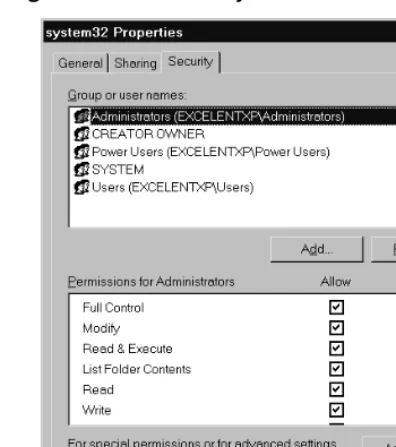
For this exercise, you will view the DAC settings in Windows XP Professional. Please note that if you try this in Windows XP Home edi-tion, the DAC settings will not be available. To start, open Windows Explorer. Navigate to the%systemroot%\system32folder (where %sys-temroot%is the folder Windows 2000 or XP Professional is installed in). Highlight this folder’s name and select Properties. Select the Security
Figure 1.1 Viewing the Discretionary Access Control Settings on a Folder
Notice that the administrator account is granted full control permis-sion for this folder. Check the access settings for other users and groups that are defined on your machine. You should notice that the system has full control, but that various other access settings are in place for different types of access permissions. Within the Windows OS, this is the area that allows you to control and modify the DAC settings for your resources.
Similar DAC settings are in place for all files and folders stored on NT File System (NTFS) partitions, as well as all objects that exist within Active Directory and all Registry keys.
A similar function is available in most other OSes. As mentioned, UNIX and Linux use the chmodprocess to control access through DAC. NetWare also has a file access system in place that is administered by the administrator (who has “Supervisor” rights).
Authentication
highly complex and secure methods, which may involve higher costs and more time, or can be very simple. For example, if someone you personally know comes to your door, you visually recognize them, and if you want them to enter, you open the door. In this case, you have performed the authentication process through your visual recognition of the individual. All authentication processes follow this same basic premise; that we need to prove who we are or who the individual, ser-vice, or process is before we allow them to use our resources.
Authentication allows a sender and receiver of information to validate each other as the appropriate entities with which they want to work. If entities wishing to communicate cannot properly authenticate each other, there can be no trust in the activities or information provided by either party. Only through a trusted and secure method of authentication can administrators provide for a trusted and secure communication or activity.
The simplest form of authentication is the transmission of a shared password between entities wishing to authenticate each other.This can be as simple as a secret handshake or a key. As with all simple forms of protection, once knowledge of the secret key or handshake is disclosed to non-trusted parties, there can no longer be trust in who is using the secrets.
Many methods can be used by an unauthorized person to acquire a secret key, from tricking someone into disclosing it, to high-tech monitoring of communica-tions between parties to intercept the key as it is passed between parties. However the code is acquired, once it is in a non-trusted party’s hands, it can be used to falsely authenticate and identify someone as a valid party, forging false communica-tions or utilizing the user’s access to gain permissions to the available resources.
Original digital authentication systems shared a secret key across the network with the entity with which they wanted to authenticate. Applications such as Telnet and FTP are examples of programs that simply transmit the username and password in cleartext to the party they are authenticating. Another area of concern is Post Office Protocol 3 (POP3) e-mail, which, in its default state, sends the complete username and password information in cleartext, with no protection.
The problem with this method of authentication is that anyone that monitors a network can possibly capture a secret key and use it to gain access to the services or to attempt to gain higher privileged access with your stolen authentication information.
Notes fr
om the Undergr
ound…
sections examine a number of methods that provide a better and more reliable authentication process.
Cleartext Authentication
Cleartext (non-encrypted) authentication is still widely used by many people who receive their e-mail through POP3. By default, POP3 client applications send the username and password unprotected in cleartext from the e-mail client to the server. There are several ways of protecting e-mail account passwords, including connection encryption.
Encrypting connections between e-mail clients and servers is the only way of truly protecting your e-mail authentication password. This pre-vents anyone from capturing your password or any e-mail you transfer to your client. Secure Sockets Layer (SSL) is the general method used to encrypt the connection stream from the e-mail client to a server.
If you protect a password using Message Digest 5 (MD5) or a similar crypto cipher, it is possible for anyone who intercepts your “protected” password to identify it through a “brute force attack.” A brute force attack is when someone generates every possible combination of charac-ters and runs each version through the same algorithm used to encrypt the original password until a match is made and a password is cracked.
Authentication POP (APOP) is used to provide password-only encryp-tion for e-mail authenticaencryp-tion. It employs a challenge/response method (defined in RFC 1725) that uses a shared time stamp provided by the authenticating server. The time stamp is hashed with the username and the shared secret key through the MD5 algorithm.
There are still some problems with this process. The first is that all values are known in advance except the shared secret key. Because of this, there is nothing provided to protect against a brute force attack on the shared key. Another problem is that this security method attempts to protect a password, but does nothing to prevent anyone from viewing e-mail as it is downloaded to an e-e-mail client.