-><
..
w
w
0EUROPEAN COMMISSION
INFORMATICS DIRECTORATE
User relations and informatics coherence
INFORMATICS ARCHITECTURE
Implementation
Table of Contents
CHAPTER 1 - INFRASTRUCTURE ... 7
Section 0 : Breakdown Into Domains ... 8
Section 1 :The Networks ... 11
1. The common domain network : IDnet ... 11
2. Networks within a local domain ... 12
3. Emergence of the SN et ... 13
4. Electronic mail infrastructure ... 16
5. The telecommunications centre ... 19
Section 2: Data Servers ... 21
1. Database servers ... 21
2. Application servers ... 22
3.The Computing Centre ... 22
3.1 Description of the role of the Computing Centre ... 22
3.2 Practical organisation ... ! ... 23
3.3 Migration of the remaining proprietary platforms ... 23
Section 3: Workstations and Document Servers ... 25
1. Pc ... 25
2. Document servers ... 26
3. Basic workstation tools ... 29
Section 4 : General ... 30
1. Multilingualism ... 30
2. Introduction to Chapters 2 and 3 ... 32
CHAPTER 2 - DOCUMENT FLOWS AND SHARED TODLS. ... 34
Section 1 :Administrative Document Flows ... 35
1. Needs ... 35
2. The electronic document management system ... 35
3. Handling of administrative correspondence ... 38
4. Managing transmission formats ... 41
Section 2 : Document Dissemination ... 43
I .Internet and the world wide web ... 43
2.1ntranets and enterprise-wide-webs ... 44
3. EWW typical architecture in the commission ... 44
4. Security ... 46
5. Evolution ... 46
6. EWW implementation guidelines ... 47
Section 3: Working Together ... 48
1. Interpersonal messaging ... 48
2. Workflow ... 48
3. Meetings support ... 48
4. Document sharing ... 49
5. Development tools ... 49
6.The architectural shortcoming of these collective tools ... 50
CHAPTER - INFORMATION SYSTEMS ... 51
Section 1 :Structured Information Representation ... , ... 52
1. Locating information ... 52
1.1 Links between objects ... 52
1.2 The problems of a centralised approach ... 52
1.3 The risks in the decentralised approach chosen ... 53
2. Classification of systems : ... 53
3.1 SAl ... 55
3.2 SIC ... 55
3.3 Workflow ... 56
4. SO (operational systems) ... 56
5. Inter-administrative systems ... 56
Section 2 : Structuring Information ... 58
1. Access to an object type ... 58
2. Replication of information ... 59
3. Extensions (classes and sub-classes) ... 59
4. Object repository ... 60
5. Common data ... 60
Section 3: The Structuring of Information Systems ... 61
1. Ongoing object information systems ... 61
1.1 Business logic ... 62
1.2 Display ... 63
1.3 Vertical and horizontal systems ... 64
2. Search and extraction ... 66
2.1 Lists (reports) ... 66
2.2 Data warehouses ... 66
Section 4: Informations Systems Support Infrastructure ... 67
1. Two-tier client/server architecture ... 67
2. Three-tier client/server architecture ... 69
3. Standard client (web browser) ... 70
4. The component-oriented approach ... 72
5. Communication between systems ... 73
Section 5 : Rational Use of Applicatons Packages ... 76
1. The forces involved ... 76
2. The architectural characteristics of the package approach ... 76
Management Summary
This document is a revised version of the document entitled "Informatics Architecture -Implementation" dated February 1994 (ISBN 92-826-7877-6). It sets out the technical principles which are at a stable level of operation for around three years. The points discussed remain technical, organisational aspects are considered only rarely.
A more detailed level considers the protocols and interfaces used, but also describes the products selected in the framework of "product management". The fact is that for operational implementation, it is workshops or working parties which make the selection of products within the framework of the architecture and develop reference instructions and platforms. Only exceptionally, therefore, does this document refer to products by name. These selections are listed in "product management" documents.
Finally, this document has been compiled for use by the Commission's information technology departments : it does not necessarily represent the Commission's official position. It sets out a reference framework for
• the construction of information systems • more efficient management of IT products
• the years 1997- 2000 (with the notion of technological thresholds)
The three major themes at the heart of the new architecture version are:
1. Modernisation of infrastructure
The technological threshold has been brought up to date to provide appropriate solutions to growing user needs and to keep pace with market developments.
Definition of this new technological threshold offers users a new degree of stability (not a wild technology chase) whilst at the same time offering a wide range of functions.
2. General simplification
Five lines of action can be identified:
• unification within the SNet (Seamless Network) of all types of traffic (computer data, voice, images) and the resulting management benefits;
• a uniform, multilingual and consistently-performing office information system built around the same family of operating systems for PCs, portables and servers;
• rationalisation of the information systems support platform, with the decommissioning of the last proprietary platforms and standardisation on a single development tool and a single database system;
• convergence of interfaces for access to information using the INTERNET paradigm for documentary access and separation of the display component for information systems;
• component re-usability within information systems
3. Improved integration of systems for
• administrative document flow, by integration of electronic mail and electronic document recording and management with the mail registry function, and the use of common mark-up and interfaces;
• coherent data models within information systems;
• specification of interfaces for exchanges between information systems.
This document is divided into three main chapters: infrastructure, document flow management and information systems.
The chapter on infrastructure is a "bottom-up" update of the former architecture, and covers the following sections:
• the network • database servers
• the workstation and document server
It will be noted that the notion of infrastructure is evolving upwards and now includes individual office information tools.
Applications servers under Windows NT will be brought into service gradually to support three-tier client-server information systems.
The two following chapters relate to relatively unstructured data (the document) and highly-structured data (information systems).
The chapter on "management of document flows and shared tools" is broken down into
• administrative document flows: administrative correspondence in electronic format, with the associated problem of archiving and exchange formats. The solutions implemented in the office information chain have been drawn from the market, but the products selected are optional in view of their specialised nature. Specific administrative characteristics still require extra developments.
• publication of documents: this is built on the Internet, a universal infrastructure of the IT market.
• work collaboration: a mixed set of technologies permitting groups of individuals to work better together informally. Such technologies are usually known as "groupware".
It may be noted that the solutions offered for the management of document flows (described above) and for information systems (described below) should be perfectly integrated into the underlying infrastructure, i.e. at three levels.
• at the workstatioBupporting the office systems platform and on document servers
• at database servers with the selected database and on applications servers for three-tier client-server
The success of the integration of these solutions with the underlying infrastructure is heavily dependent on an efficient policy of development and on appropriate user training for the tools. In particular it is important to avoid the proliferation, as a result of choosing the wrong development tool, of multi-user applications which would be inefficient from the network point of view.
The "information systems" chapter
• describes the general organisation of the information systems. This allows each Directorate-General the tools it needs for management purposes whilst retaining coherence across the institution;
• proposes a form of structure for information, leading to the use of a common reference framework for data across the Commission. Using it guarantees data consistency, facilitates list and report generation and, generally, simplifies the integration of different systems;
• defines an architecture for information systems based on the separation of the search or updating processes and the processes responsible for data display. The separation leads to the development of reusable modules, to the standardisation of the "display" processes and a simplification of the construction and use of such systems;
• describes how information systems use the underlying infrastructure. The database logic and programming language used permit the construction of three-tier client-server systems. This option lightens the processing burden on the PC, facilitates system control and maintenance and may in time lead to the standardisation of the part resident on the PC. This separation of the various modules makes the network less critical to the operation of information systems.
• proposes a rational use of applications packages.
Important note:
A number of technological concepts are omitted from this architecture despite their theoretical attractiveness. Their lack of maturity does not allow the construction of operational solutions within the lifetime of this document. The concepts thus omitted include inter aliathe "Network Computer", the client-agent-server model for users on the move, and use of the Internet infrastructure for the construction of complex or "mission critical" transactional systems.
CHAPTERl
SECTION
0 :
BREAKDOWN INTO DOMAINSOrganising the informatics (computing) infrastructure of the Commission is not a simple task. In order to overcome the complexity, the architecture is separated into domains which are essentially organisational in conception. The architecture recognises three types of domain :
• the local domain, managed and used by a single Directorate General (or equivalent independent department). This domain is capable of adapting to organisational change within the Directorate General and the institution.
• the common domain, which is the infrastructure common to Directorates General
and includes the Delegations, which are subjects to special considerations
• the external domain, linking the Commission to its partners : the other institutions, governments of the Member States, public and private-sector organisations within the Member States and individuals.
Each of the three domains corresponds . to a different technical and administrative situation and must be considered individually. Integrating them is the job of the communications networks, which form a vital link. Domains retain their own internal individuality, but at their boundaries they respect a series of pragmatic rules which permit interoperability and maintain security. In many cases, interoperability can be ensured only by the choice of agreed products.
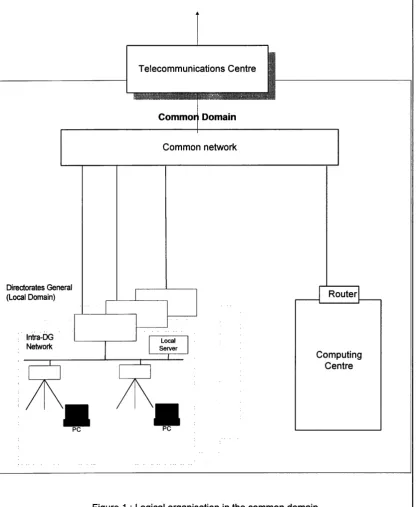
The frontier between the external domain and the common domain is specifically the responsibility of the Telecommunications Centre (see Fig. 1).
Within the common domain and each local domain, the use of hardware and software is managed by the domain administrative authority, with due respect to the multi-vendor policy, the rules of security and acquisition via a common Product List. Within the common domain the Computing Centre and the Telecommunications Centre are both the subject of a special definition in view of their pivotal role within the Commission's informatics infrastructure. The Computing Centre is a special domain within the common domain.
Within the framework of the Product List,
each Directorate General 1s autonomous for buying equipment including the common need of acquiring :• computers capable of running their
information systems
for producing or disseminating information (see database servers)• computers capable of running their
office automation tools
(document servers and workstations)The mandate of the Security Office is to define the regulations and the technical requirements concerning security and to monitor their implementation by the managers of local and common domains. These regulations are described in the
document "Information Systems Security Architecture" which links the
present document and the C(95)1510, 2lNovember 1995 decision of the
Commission concerning the protection of information systems.
For the pragmatic use of standards whose maturity has been demonstrated on the market, the architecture refers in priority to
de jure
standards, otherwise tode facto
Directorates General (Local Domain)
lntra-DG Network
External Domain
Telecommunications Centre
Commo Domain
Common network
Computing Centre
Figure 1 : Logical organisation in the common domain
[image:10.611.97.515.39.547.2]SECTION
1 :
THE NETWORKS1. THE COMMON DOMAIN NETWORK : IDNET
Since 1992 IDN et is the network connecting the local domains. . It is in effect the communications infrastructure of the common domain, and it possesses gateways (entries and exits) to the outside world via the Telecommunication Centre. IDNet, like the rest of the infrastructure, uses the TCPIIP communication protocol above an Ethernet type network (a migration is planned towards ATM, see paragraph 3 emergence of the SNet).
A service level agreement details the services provided, the supporting organisation , the quality level warranted by IDNet as well as usage requirements to be followed by users.
The protocols authorised on IDNet are, for batch services
• File transfer (FTP)
• Electronic mail (X400(1988)/ENV41214 and SMTP related protocols) • remote back-up
and for real-time services
• Interactive access
• Client server access (RPC, SQL, HTTP, ... )
File sharing protocols of the NFS type are required to comply with IDNet usage requirements, since they imply high volumes of data with a short response time and a fine control of security in the absence of passwords and connection controls. Traffic of this nature can be authorised only within a Directorate-General where such interactivity is permissible and in very specific cases where access is closely controlled.1 This is also the case for X11, TFTP, BOOTP and RIP.
Interactive protocols are being phased out to be replaced by client server type protocols. Their range of functions is too restricted (user-hostility, irrational use of network and CPU power).
Management ofiDNet is under the control of a central team responsible for deciding the network installation timetable and monitoring the installation process in cooperation with teams responsible for cabling the buildings. It is responsible for day-to-day operation of the network, ensuring the availability and security, and its optimal operation and management. It is also responsible for any re-location of network hardware.
The Commission has five official TCPIIP addresses. These are five suffixes which allow the creation within the Commission of 1024 sub-networks each with 256
addresses. These sub-networks are made available to Directorates-General according to needs, in such a way to identify each item of hardware unambiguously in a worldwide address structure of type B.
Network components connected to IDNet are managed using tools which rely on the SNMP protocol (Simple Network Management Protocol) to communicate. Associated with the protocol there is a description of objects being managed (hardware, statistics, alarms, etc .... ) and the management tools' access procedures for each of them. The network management protocol is currently being upgraded to SNMP2.
2.
NETWORKS WITHIN A LOCAL DOMAINFor computing purposes each Directorate-General corresponds to the notion of local domain. For purely practical management purposes, a Directorate-General operating on two sites could be given two local domains. Ideally, each local domain is connected to the Commission's private network by a router managed centrally as part of the general management of the IDNet network and in accordance with prevailing security rules. The IDNet router isolates intra-DG from inter-DG traffic. In practice, if a Directorate-General is spread over two or more buildings then there are multiple access points to the IDNet, and thus intra-DG traffic on the IDNet.
Within the local domain, the network is of the LAN-Ethernet type and, like IDNet, based on TCP/IP technology offering the basic data transport functions over the Ethernet. This intra-DG network and any internal routers attached to it are managed with due attention to the rules of addressing and security. To avoid applications proliferation and incompatibility, the methods and tools used for the administration of these networks must be consistent. These tools similarly rely on the SNMP protocol.
The local and capillary networks are segmented in such a way as to optimise traffic flows. In the past buildings were cabled using "fine" Ethernet cable. Current cabling uses twisted pair cables (10 Base T).
Across the intra-DG networks, workstations can recetve support from office automation servers for:
• file-sharing; • printer sharing;
• data back-up and extended storage capacity; • workstation configuration management;
• local network and access security administration.
The user in front of a PC also has access to
• real-time consultation or updating of databases (client/server or emulation) or hypertext files;
• batch-mode electronic mail and file transfer.
3. EMERGENCE OF THE SNET
The Commission has a number of network problems which are still open.
First, the coexistence on the market of two differing approaches:
• packet-switching networks (Ethernet) established to meet computing needs for reliable data transmission
• circuit-switching networks (e.g. the telephone and ISDN - Integrated Services Digital Network) set up to meet the needs of steady throughput such as voice and motion pictures.
Furthermore the splitting of Directorates-General over two or more buildings, and the consequent removals, raise serious problems of configuration and security, since both are organised on a physical basis. There is a high degree of correlation between the location of an access-point and the services available.
The solution to these problems lies in the SNet
(Seamless Network) based on TCPIIP for levels three and four, and on switched technologies for levels one and two. SNet offers• the services at constant and high speed required for motion pictures (multimedia)
• throughput-sharing services for the optimisation of conventional computer traffic (data)
• and above all the concept of the virtual LAN, permitting the logical definition of a group of users as members of a domain without any constraint of physical location. The fact of moving office then makes no difference as far as software or hardware are concerned: the networks are logical, constructed on a single physical network.
The SNet is implemented at three levels:
• Introduction of the switched Ethernet at 100 Mbps within the Directorates-Generals' local networks, to provide data flow at several tens of Mbps to the servers connected to the intra-DG networks. This migration has already begun in new buildings. The switched Ethernet also permits partial re-use of investments made for the basic Ethernet technology;
• Reduction of the number of PCs on the branches of the 10 Mbps capillary network;
• Gradual introduction of ATM (Asynchronous Transfer Mode - broadband digital technology) on the high-speed lines of the intra-DG and inter-DG network in the framework of modernisation of IDNet.
Two technical problems will nevertheless require solution before ATM
technology can be generalised on an SNet:
the general implementation of a LAN emulation level on ATM. Such a LAN emulation technique would complete level 2 of ATM;
• ATM is a technology which theoretically covers all networks, irrespective of their distance - short (LAN), medium (IDNet) or long (WAN). In practice, the market implementation of ATM is held up by "bottom-up" improvements to long- and short-distance technologies (e.g. switched Ethernet). For the present ATM is competitive only on medium-distance networks.
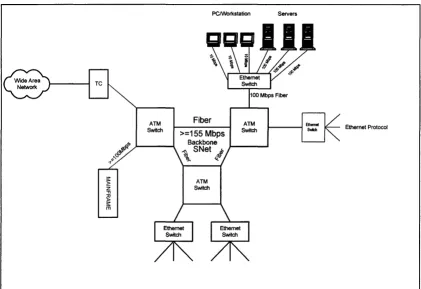
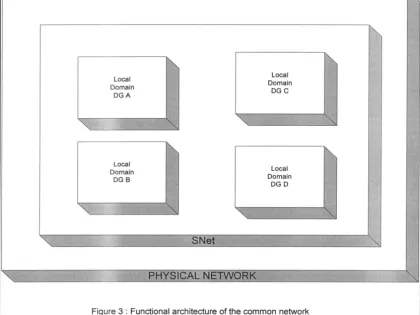
See figures 2 and 3 for a technical and functional description of the network at the horizon of the tum of the century.
PC/Workstation Servers
[image:14.613.111.532.239.528.2]Ethernet Protocol
Figure 2: SNET/TCP-IP ATM backbone and "Switched Ethernet" ramification
Local Domain
DGA
Local
Domain
[image:15.588.89.509.35.350.2]DGB
Figure 3 : Functional architecture of the common network
SNet is not merely the successor to IDNet (with the likely introduction of ATM); it is also the successor to the local networks based on an evolution of Ethernet.
When integrated into a complete SNet, management of the local domain network will become independent of the geographical location of its components. With each
local network will be associated a logical network, supported by the physical
infrastructure of the SN et common netwoftl.ese developments will lighten the
burden of managing and organising the network, and will allow resources to be concentrated on information systems and office applications solutions.
In conclusion, SN et represents a simplification of the common network and the local networks, permitting all types of traffic to be merged into a single infrastructure and offering greater flexibility to meet user mobility.
4. ELECTRONIC MAIL INFRASTRUCTURE
2
The fundamental aim of an electronic mail service2 is the natural and reliable exchange of electronic documents using services analogous to those offered by the postal service: mail boxes, recorded delivery, forwarding of mail in the event of absence or removal. Its advantages over the postal service reside in its speed and the richness of its format which (unlike paper) permits computer processing of the documents transmitted.
The Commission has selected a second-generation electronic mail system, INSEM2. It permits the transfer not only of documents but also the general exchange of electronic messages, in structured or unstructured form. INSEM2 operates on the common network and on the intra-DG networks.
INSEM2 is based on a single product implementing the
de jure
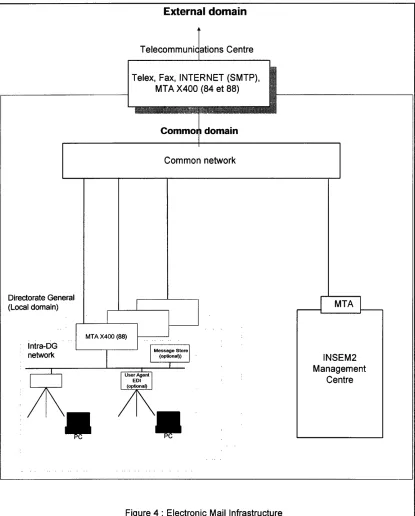
X.400 standard in its 1988 version (ENV41214 and ENV 41218 (P7) and 41219 (P3)). It in fact essential to have this single product, since X.400 covers only a part of the functions the Commission requires, and the others are product-specific. The single product forms the skeleton of the Commission's internal electronic mail system. It is resident on robust servers within the Directorates-Generals known, in the specific terminology of X.400, as Message Transfer Agents (MTAs).INSEM2 is connected to the outside world via a gateway at the Telecommuni-cations centre (Gateway EM in Figure 2,), the MTA boundary which is the only entry point to the Commission for official electronic mail, and a conversion centre towards other protocols including Fax, and also SMTP, X.400 (1984) (ENV 41201 and 41202), telex, and access to message switching via telephone line and PAD (See Figure 4).
INSEM2 offers a wide-base messaging service which can handle not only document tra1;1smission (the electronic mail side of its business) but also other messages in widely differing formats such as Edifact (EN29735) which describes message syntax to be used in the framework of EDI (Electronic Data Interchange). This service will become accessible through a PEDI type protocol (ENV 41120) and an API on the server.
INSEM2 manages its user directories in compliance with a
de facto
market standard as a temporary measure until the LDAP (Light Directoty Access Protocol) based on thede jure
X.500 (1993 version) becomes established on the market. Thisde jure
standard covers the same functions, i.e. provides access to an addressee's address from administrative data (institution or organisation), or geographical data (country, city).
Since the introduction of INSEM2, the electronic mail market has evolved considerably. The office automation upgrade (see section 3) and the breakthrough on the market of Internet protocols (at the expense of the X400 standard) has required a reassessment of the electronic mail strategy. A third generation, which should be
File transfer is a useful adjunct to electronic mail for the sending or collecting of large volumes o data potentially organised as records. File transfer is nevertheless more analogous to a removals or freight service than to the postal service
deployed by 1999, will support in addition to the X400 standard the following Internet protocols (and their natural evolution) :
• SMTP (Simple Mail Transfer Protocol) and MIME (Multimedia Internet Mail Encoding) : covering basic exchanges
• POP3 (Post Office Protocol) or IMAP4 (Internet Mail Access Protocol) covering mailbox access
•
Directorate General (Local domain)
lntra-DG network
External domain
Telecommuni ations Centre
Telex, Fax, INTERNET (SMTP), MT A X400 (84 et 88)
Commo domain
[image:18.612.112.527.51.567.2]Common network
Figure 4 : Electronic Mail Infrastructure
18
INSEM2 Management
5. THE TELECOMMUNICATIONS CENTRE
3
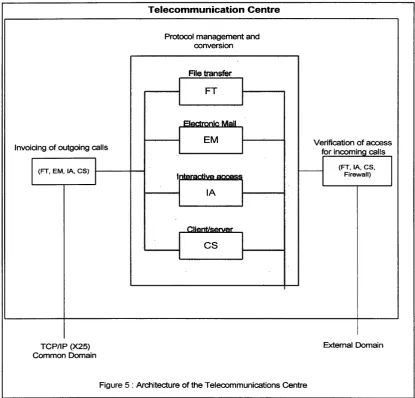
The Commission's common domain is separated from the outside world by a Telecommunications centre (see Figure 5). The Centre:
• offers a preliminary entry access
security
check ("firewall") at network level;• using applications gateways, provides
management services (directories, rights
of access, etc.) and protocol (and, where necessary, format) conversion
facilities between the choices made within the common domain and those effected outside;
• offers communications management at the point of exit from the network, particularly as regards
invoicing and statistics.
The existence of a telecommunications centre managed centrally for all Directorates-General is justified above all in terms of security and by the economics of scale which it generates. These are:
• the concentration of efforts in the quest for technical solutions;
• the aim of a high level of availability (analogous to that of the Computer Centre) under the management of telecommunications specialists;
• rationalisation of connections to external services.
The Telecommunications centre offers batch mode electronic mail and file transfer gateways via
• points of entry and exit for message switching (X.400, fax, telex, Simple Mail Transfer Protocol (SMTP), etc.)
• points of entry and exit for relay mode file transfer;
• points of entry and exit for sundry connections to value-added networks (VANs) whose services are then available to Directorates-General at the best possible pnce;
• services tailored to the environment of the Commission's delegations, which frequently have no more than the telephone network for their communications.
Real-time3 access is offered as follows:
• points of entry and exit for interactive access (lA) • points of entry and exit for client/server access (CS) • points of entry and exit for Internet access.
All communications between the exterior and the common domain pass through the telecommunications centre gateways. Apart from E-mail, incoming communications are also systematically screened including for the calling network address. The telecommunications centre E-mail gateway is the sole point of entry to the institution for electronic mail.
The telecommunications centre plays a leading role in inter-institutional exchanges. Priority will be given to optimising these communications and to respecting the EPHOS (European Procurement Handbook for Open Systems) specifications. Connectivity guidelines give further details of the interfaces to de respected and the level of services offered.
It should be noted that the Security Office prohibits the direct connection to an external network of any component of the common domain (e.g. an incoming modem or ISDN connection). Any exception is subject to individual security measures.
Invoicing of outgoing calls
I
(FT, EM, lA, CS)11---+---1
TCPIIP (X25) Common Domain
Telecommunication Centre
Protocol management and conversion
File transfer
FT
-EM
lA
cs
[image:20.611.94.510.258.656.2]I I
Figure 5 : Architecture of the Telecommunications Centre
20
Verification of access for incoming calls
(FT,IA, CS, Firewall)
SECTION
2 :
DATA SERVERS1. DATABASE SERVERS
4
For information systems, Directorates-General and the Computing Centre need database serversto hold all the data and the procedures giving access to them. The server needs to be few in number in order to concentrate the data (for reasons of administration, security and costs) and provide the means of coping with breakdowns.
The Computing centre strategy is to evolve towards Unix4 in compliance with the X/OPEN specifications. This is the operating system under which multi-processor machines may be obtained most easily with the required processing power (scalibility).
Unix allows easy adaptation to new processors without the need to re-write applications. Since Unix is also an operating system selected at local level, its adoption in the Computer Centre permits the creation of homogeneous systems within the Commission capable of communicating and collaborating efficiently. One of the criteria for server acquisition is the machine's compliance with Unix-type specifications based primarily on the Posix public-domain standards EN 29945 and and the specifications of the OPEN GROUP which are in the public domain, together with any other necessary detailed specifications.
The growing availability of servers complying with Unix-type specifications permits the Commission to select them principally on criteria of value for money, whilst allowing a running-in period for any new item. Quality can be evaluated as the machine's robustness (mean time between failures - MTBF) and the efficiency of the support (mean time to repair - MTTR). But this wider availability is still only relative, and there is every reason to limit server heterogeneity by restricting narrowly the choice of suppliers. The penetration of the server market achieved by Windows NTS is being monitored very closely. Unix remains the reference platform for database servers; Windows NTS may be used in accordance with product management procedures and with the relational database systems selected for the institution.
At institution level, a single database applications suite has been selected. This will facilitate management and eliminate all problems of compatibility. Likewise, a single documentary database system has been selected. New developments should adhere to this simplification objective. The selected database must be supported by packages acquired on the market.
2.
APPLICATION SERVERSWith the emergence of the three-tier client-server approach, part of the code (the "business logic") of each information system must reside on a server.
That server could be the Unix machine holding the data. But if the code is to be portable without recompilation and, for reasons of competition, remain independent of hardware suppliers, the server selected must be Windows NTS. For a more detailed explanation of this see Chapter 3, section 4, point 2.
3. THE COMPUTING CENTRE
3.1 Description of the role of the Computing Centre
The Computing Centre has a dual role as a high added-value production unit and as a resource for the dissemination of data.
In its role as a production unit
• The Computing Centre provides for the
management
of data and programs, with a daily back-up, a help desk service 24hours a day, seven
days a we$
and the running of a complex tape library and an authorisation and invoicing system capable of handling many thousands of users. All information systems capable of being run more economically by the Computing Centre than elsewhere should thus be found in it. Most frequently these are applications of major importance on account either of the number of users they support, or of the amount of resources (memory, processing power, or both) they require.• The Computing Centre also has the role of a
back-up service,
in particular for systems which are located within the Directorates-General but require a high level of availability. For systems such as these, the Computing Centre takes over the operations of a temporarily non-operational system, and is capable itself of being backed up by a fall-back system. This is the so-called "white room" concept.• Data stored at the Computing Centre also include those which require particularly high security (Class Bl or higher), and is becoming reputed as a specialist centre for the handling of confidential data.
• The Computing Centre offers a data management service for Directorates-General which do not wish themselves to manage the infrastructure of their information systems.
In its role as a data dissemination unit
• Data of importance to the entire institution, including data structured for an internal and/or external Web, should also be located within the Computing Centre. For this reason, the Commission's general distribution information systems are held at the Computer Centre.
3.2 Practical organisation
The Computing Centre is required to handle very large quantities of data and their associated access procedures.
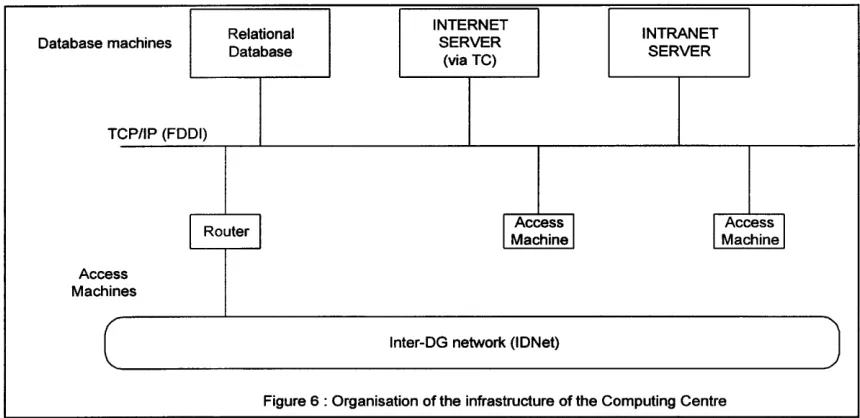
For the actual processing of data, the Computing Centre relies on very powerful multi-processor Unix database servers offering very large disk storage capacity and a high rate of data flow towards the Computing Centre's local network. This is a fibre optic network using FDDI technology (Fibre Distributed Data Interface - ISO 9314) supporting TCP/IP protocols until ATM over optical fibre becomes available using TCPIIP. Only a few machines are used, in order to keep the data together and simplify their management. These machines support both the data and the software for relational and documentary data bases.
In addition to the database application, in order to implement information systems in a three-tier client/server architecture (see Chapter 3) machines are needed which support search and update software (business logic). These can be the same machines as support the database software or other, cheaper systems. The Computing Centre has both, for which the operating systems may be Unix or Windows NTS.
Relational INTERNET INTRANET
Database machines
Database SERVER SERVER
(via TC)
TCP/IP (FDDI)
Router
I
AccessI
Machine
I
Machine AccessI
AccessMachines
c
lnter-DG network (IDNet)Figure 6 : Organisation of the infrastructure of the Computing Centre
3.3 Migration of the remaining proprietary platforms
The Computing Centre currently still runs a small number of proprietary platforms. Migration of the Commission's information systems assets from these platforms must be analysed jointly with the users, who are anxious to maintain continuity of the services they rely upon. Migration strategy changes with the type of information system and the infrastructure upon which it is
built. The turn of the year 2000 and its impact on date management is likely to accelerate this migration from old systems
[image:23.612.109.539.329.538.2]5
selected by the Commission. The emergence of Web servers will accelerate this migration;
• Information systems running under SAS and Acumen will be ported to Unix, where those products are available.
• Other information systems will be rewritten in the framework of their natural evolution, with priority going to critical and older systems whose maintenance costs have become particularly high. As regards internal information systems, see Chapter 3.5.
Migration5 of the last remaining proprietary systems represents a
simplification in the sense of unification of the platform supporting the major database servers.
The target of this migration may change to Windows NT5 .X and subsequent evolution, according to the evolution of the large database server market.
SECTION
3 :
WORKSTATIONS AND DOCUMENT SERVERS1. PC
6
For office systems, DirectoratesGeneral use open market software - the most commonly used on the hardware in question - offering inter alia word-processing, electronic mail and document archiving. This general public software is available on or via all workstations, that is, on the equipment which, by presenting data on screen, permits the user to interact with information technology. Data (text, mailbox) are generally resident on the servers which have the job of organising them, monitoring their integrity and controlling access to them. The data themselves shuttle between the server and the user's workstation where they are processed using office systems software.
The availability of state-of-the-art, integrated office systems software at low cost has hitherto required the workstation to be fitted with the Intel processor (manufactured by the Intel corporation) or a compatible processor, together with the Microsoft Windows 95 or Windows NTW operating systems, themselves the natural development of the Microsoft Windows which dominates the PC market·6 . These PCs are known generically as "Wintel'' PC. Windows 95 and Windows NT are 32-bit operating systems which share a strategic array of interfaces known as WIN32 API. Windows 95 was designed primarily to guarantee the compatibility of 16-bit applications; Windows NT offers a higher level of robustness and security, but inferior compatibility and performance.
Portable PC are becoming increasingly widely used when mobility is a significant factor in use of the machine. Such PCs are the subject of more particular instructions. Windows 95 is the operating system usually installed on portables, for its reduced power consumption and improved use of extension cards. Extensions to Windows NT nonetheless make this an alternative also for portables.
As a general rule, ink -jet printers are connected to PCs and laser printers are connected to servers or are directly accessible via the network.
To avoid all unnecessary diversity amongst PCs, strict configuration instructions are applied to the setting up of operating system and peripherals. These instructions form part of the reference configuration for office systems platforms and for the client side of information systems access.
The acquisition of Intel-based PC running Microsoft Windows has allowed the Commission to attain a high level of standardisation and workstation support on a technologically advanced base. Improvements have been achieved in particular in memory management and multilingual support. The Commission is capitalising on the maturity of this new level of technology to develop computing solutions and improved user training. The NTP project (New Technological Platform) tackles the
deployment of the 32 bits PC platform, the selection of management tools, the NT domain model implementation and their link with the organisational domains.
2. DOCUMENT SERVERS
7
Document servers' definition includes office automation servers, Web servers and MTA servers. The Commission's strategy has been centred on Unix servers. This strategy has encountered three problems. First, administration systems of Unix servers are not yet adequately standardised on the market. For the present this diversity is the biggest single barrier to total marketability of Unix; a solution would be the de facto implementation as soon as possible of the ISO/POSIX 1003.7 specifications which make good that shortcoming.
This diversity has been heightened in the administration of services to PC offered by office systems servers, such as sophisticated user management, network printer queue management, and disk space quota management. This diversity is the result of the lack of synergy between PC and server operating systems.
Finally, with the failure of ANDF (Architecture-Neutral Definition Format) Unix has, since it is multi-platform, become a "source" operating system constraining software suppliers to porting, which represents a heavy brake on the availability of Unix software.
In view of the problems suffered by Unix, the Commission's choice of
document server operating system has gone to Windows
7 Niftllits future
line. Its conception relies on the efficient (i.e. consistent) administration of
Intel/Windows
PC.
This choice is identical to that made for applications
servers.
The introduction of Windows NTS allows the prospect of a high level of server reliability through "clustering" techniques under which server failures can be recovered provided the software respect a series of interfaces known as "clustering API". This technique makes servers interchangeable, and they all become document servers theoretically capable of specialisation (file sharing, MTA for electronic mail, Web server, or application server) whilst their configuration can change dynamically.
For hardware management,
the emergence onto the market of an architecture along the lines prescribed by the DMTF (Desktop Management Task Force) group is awaited eagerly. It should• permit basic PC components (software and hardware) to identify themselves in a standardised manner;
• include a database containing those data (i.e. the PC's status) capable of being integrated with data describing the status of the network (SNMP database);
Operating system complying to POSIX for servers. Its specifications are the intellectual property of the Microsoft Corporation and, in contrast to those of the OPEN GROUP, not in the public domain
• offer a management system for that database which, through public and standard APis would provide a base service ("local agent") to administration systems.
In the absence of such standardisation, PC administration rely on the tools of
Windows NT, which is becoming the de facto standard for the markets for
office systems servers e-mail servers and Web document dissemination servers
For security
another important selection criterion for servers is their compliance with Information Technology Security Evaluation Criteria (ITSEC) F-C2-E2. When needs dictate, these machines can be configured to the next lower level (F-Cl-El). Security rules allow the appropriate level to be determined and any necessary complementary products to be added to the machines.printer
HP-PCL printer
UNIX95 (WINDOWS NTS)
Database server
PC
WINDOWS NTW
WINDOWSNTS
printer Document server (ex: file sharing electronic mail)
SERVERS
CLIENTS
l§
4~~!.1
HP-PCL
printer PC
WINDOWS NTW .
WINDOWSNTS
Application server (3 tiers client-server)
Hub
IN RA-DG NETWORK
:MANAGEMEN
Network Management
Workstation
WINDOWS NTW I
[image:28.790.49.767.84.411.2]+UNIX 95
Figure 7: Typical Organisation of the hardware infrastructure of a local domain (around a segment)
-28-IDNet TCP/IP
1. 3. BASIC WORKSTATION TOOLS
8
The users' basic needs are to create, process and print documents consisting of text (correspondence) or numeric data (spreadsheets), or presentations. To this end, they have:
• a suite of software8 and its logical evolution, comprising a well-integrated
word-processor, spreadsheet and presentations application with a consistent look and feel closely matching actual needs. The choice is in line with the majority trend on the market, focused on the purchase of the word-processor with which the spreadsheet and other items are bundled for a modest additional charge. The consistency of the suite ensures simple integration within the mechanisms described in the preceding section. Printing relies on a de facto standard.
• Text production should also to conform to Eurolook, a set of general norms aimed at giving a "house" style to documents, and certain specific instructions when the document is likely to be amended as it follows an inter-institutional circuit (DTD SGML structure to be followed;)
• a common programming language for the software 1n the suite, and for exchanges between them
• help utilities with similar characteristics in each application of the suite, which is a benefit for training
These components complete the office systems reference configuration. A framework agreement generally permits officials to use the same applications at home, which is a benefit in training and mobility.
An important characteristic of this office systems technological threshold is the
simplification it offers the similar look and feel of its components. The resulting
captivity remains limited and the selections are in line with the majority trend
on the market.
SECTION
4 :
GENERAL1. MULTILINGUALISM
The Commission's working environment being multilingual, simultaneous support is needed for all official Community languages within office systems documents and information systems. The same level of support is not widely available on the market, however, where the offer is generally limited to restricted multilingualism, in which the Greek language may not be supported, or support may be limited to Greek and English.
The Commission's earnest wish is to see the generalised adoption of the Unicode 1.1 standard (two-byte encoding under ISO 1 0646) for operating systems, office systems databases, user interfaces and information systems. This is the only complete solution to the problems of including support for Eastern European languages in a framework of extended multilingualism. In an increasingly multi-cultural world the disadvantages of this method of data-coding (the need for more memory) are more than offset by the facilities it offers. Partial solutions are being implemented until this standard becomes available.
The Commission's office systems workstatioperates under Microsoft Windows NTW and runs an office automation suite of UNICODE enabled software (see footnote n° 8). This configuration will provide a widely available solution for multilingualism after phase-in.
An associated problem is that of enriching standard keyboards to enable them either to display the full multilingual character set, or at a more reasonable cost to associate with them a range of keyboard simulations from which the user may choose. A multilingual kit is used for keyboard enrichment.
Multilingual data management systems were traditionally located in proprietary environments. Some of these environment were able to support both Roman and Greek alphabets in 8-bit bytes. The migration of these information systems towards Unix requires the definition of a code representing all Community languages. This is Unicode 1.1, which is supported by Windows NTS, the operating system selected for document and applications servers.
Independently of the NT !Unix problem, the combination of Oracle 7.3 and UTF-8 encoding, with SQL-NET 2.3 (or higher) access is the general-issue infrastructure supporting multilingualism under Unicode. This infrastructure will become the rule on all the Commission's information systems.
At client level, the fourth-generation language tool selected must also support Unicode.
Although specific solutions have been developed for the handling of multilingual data, it would be hazardous to introduce a specific multilingual support in directories such as the electronic mail directory. The fact is that any user can receive mail from a country where only the basic AS CIT character set (limited to the English language) is
2. INTRODUCTION TO CHAPTERS 2 AND 3
9
Office systems, whether they are conventional (word-processing, electronic mail) or diffusion-oriented (Web, multimedia), all manipulate more or less standard objects-documents, in which the possible structural type (chapter, paragraph, indent) is largely independent of the content. This means that it is possible to construct standard tool specialised either by type of structure (text, drawing, table, hypertext) or by function (document production, transmission, storage, dissemination). This in
turn means that office systems tools are applications sold in high volumes and at low
prices.
Shared office systems applications come in three categories, supporting
• administrative document flows (the "paperless" office) • document publication (Internet paradigm)
• team collaboration (ad hoc shared office automation tools).
Note that it is difficult even to define "shared office applications"- these may be seen as a simple extension of purely personal items (the shared diary) or a general issue infrastructure (electronic mail) or applications similar to those used in information systems (workflow applications).
Information systems seek to represent the specific objects which an organisation such as the Commission manipulates daily. Such objects must be highly structured- it is that structuring which allows them to be manipulated. Such structuring is most visible in cross-referencing between objects. It increases the specificity of objects, and makes them more difficult to standardise. For the purposes of this chapter, "object" means any concept manipulated in a manager's day-to-day work. For a personnel manager, that means that "people" and ''jobs" are the objects, for a financial manager, "appropriations" and "payments".
Information systems architecture must answer the following questions:
• How should representation of the structured information be organised?
• How should the systems which create, manipulate and restore the structured information be organised?
• What infrastructure is needed to construct such systems?
This distinction between office systems (poverty of structure but mass
distribution) and information systems (enriched structure but specific need) is
reflected in the market.
9This distinction between office products and
information systems is far from perfect, but it allows better analysis of the
problem and its solutions
Note nonetheless that office systems and management systems follow the same path when text is marked up semantically. This is the case when certain types of SGML marking-up are used.
Whether they form part of the shared office systems or of information systems, all the solutions made available must be perfectly integrated into the base infrastructure:
• the workstation supporting the office systems platform and the associated office systems servers
• the database servers with the selected database
CHAPTER2:
DOCUMENT FLOWS AND SHARED TOOLS
SECTION
1 :
ADMINISTRATIVE DOCUMENT FLOWS1. NEEDS
The arrival of a word-processing application which is open to all and seamlessly integrated into a general office system opens the possibility of significant gains in productivity in the creation of administrative documents. But the Commission's processes also give rise to numerous exchanges of documents within an administrative structure. Making these document exchanges electronic will also improve administrative efficiency, as a result of the gain in transmission speed and improved mail management.
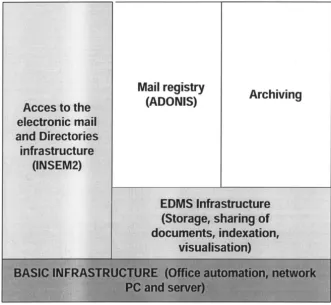
The links in this paperless administrative chain are the electronic mail infrastructure and the electronic document registry and archives, which work in tandem with applications such as a workflow management application and the ADONIS mail registry package. Provision must also be made for a historical archive of documents whose active service is over - see figure 9.
The level of functions on offer and, in some cases, their Commission-specific nature, mean that no general-market solution is yet available commercially. Systems must be constructed module by module from market products to be built into a paperless administrative environment.
These components fit harmoniously onto the basic infrastructure de base of PCs, document servers under Windows NT, the TCP-IP network and database servers under Unix and Oracle. Taken together they amount to a paperless circuit custom-built to meet the Commission's requirements.
2. THE ELECTRONIC DOCUMENT MANAGEMENT SYSTEM
A second generation of electronic document management system (EDMS) complements the basic computing infrastructure described in Chapter 1 with support for images and archiving applications.
In an administration service like the Commission, incoming documents from outside the service are mostly received on paper, and thus prima facie not capable of being incorporated into an electronic document flow.
Such documents can be integrated by means of an EDMS
• by digitising them (using scanners) to produce a file containing an image of the paper (as a facsimile does)
• by addressing storage media matched to the size of these documents and the potential need to retain them (optical disks)
EDMS storage and index management allow the documents to be presented in the form of files, folders and cabinets whose contents can be searched easily.
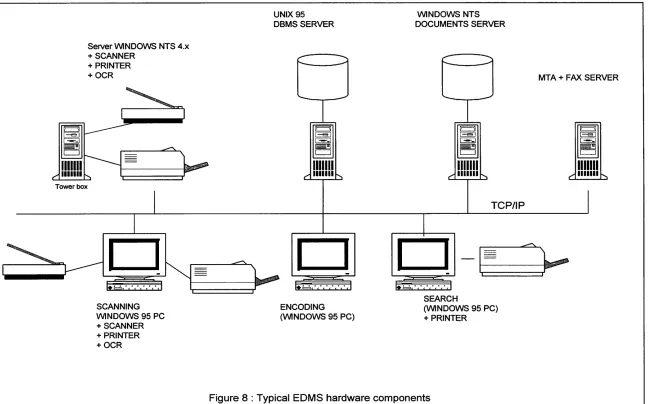
Figure 8 illustrates a typical configuration of EDMS hardware components. The implementation inside a local domain of an EDMS infrastructure is optional.
This example includes two scanners: one connected to a workstation for manual data entry, and the other connected to a server for an automatic process which places fewer demands on the network.
The document server is shown separately. This frequently involves digital optical disks; this server can be regarded as a "black box" with its own database system optimised to handle high volumes of data.
The database server, generally running under Unix, contains the base of indices which organise access to the documents.
The third type of server is an applications server, generally running under Windows NT. This server supports applications (workflow, search engines, links to information systems) permitting data to be processed close to the point at which they are stored. For in practice, a substantial proportion of documents are stored in image format, and their file size means they cannot be transported easily around the network without additional cost or loss of time.
Finally, Figure 8 illustrates a document scanning station, a station specialised in encoding stored images, and an example of various research and display workstations, which are top-of-the-range PCs also capable of running under Windows NTW.
Tower box
Server WINDOWS NTS 4.x +SCANNER
+PRINTER +OCR
D
SCANNING WINDOWS 95 PC +SCANNER +PRINTER +OCRUNIX 95 DBMS SERVER
D
ENCODING (WINDOWS 95 PC)
WINDOWS NTS DOCUMENTS SERVER
TCP/IP
SEARCH
[image:37.791.51.701.85.489.2](WINDOWS 95 PC) +PRINTER
Figure 8: Typical EDMS hardware components
1. 3. HANDLING OF ADMINISTRATIVE CORRESPONDENCE
The handling of administrative correspondence is built on the infrastructure of electronic mail, directories and electronic document management - see figure 9.
The success of an electronic mail service as a logistic support for administrative correspondence depends on a number of fundamental factors:
• The user interface must be integrated with the office system
This interface runs on the PC and is built on the de factomarket standard for PCs. It uses a highly efficient protocol for access to mail-boxes (remotely in the case of a user away on mission).
• Tailoring the application to the organisatibJl,offering concepts such as
• "chief/secretary" association for access to mail,
• the availability of functional, as well as personal, mailboxes
• association between groups of individuals likely to stand in for each other
• Efficient document flow management
• possibility of filtering unwanted mail ('junk mail" or "all addressees")
• automatic repeat transmissions making the user independent of network deficiencies
• accelerated transmission of urgent documents with better-than-average service quality
• Security, meaning the absolute guarantee of
• the origin and confidentiality of an accessible message, by means of digital signature and encryption mechanisms
• receipt and opening of mail acknowledged by clearly identifiable reports • The security measures implemented must be compatible with the smart
card selected as a means of identification, and must also comply with legislation on encryption.
• Integration with document management applications. This concerns
• Manual or automated registration of correspondence using the document structure elements described in SGML
• Use of the electronic mail infrastructure by workflow monitoring applications through standard interfaces
• Multilingual support, i.e.
• transmission, reception and display of multilingual documents, including support for Greek
• multilingualism in the message's envelope, with transliteration of personal names for directory management purposes.
-38-• support for complete and coherent directories
For incoming and outgoing mail it is essential to have a mail registry package
which records incoming and outgoing documents and monitors their circulation and follow-up. EUROLOOK structured documents possess identifiable elements (date, subject, signature, etc.) which can be used by ADONIS, the package used at the Commission.
Archiving software permits storage to be managed - of documents, parts of documents or entire dossiers. The storage may be seen as representing files, and cabinets, which are implemented by attaching data such as key-words and sundry dates to the objects needing to be stored. Without this system, the addressee must print electronic mail and archive it manually.
Mail registry and short- and medium term archiving packages are closely linked. The registry program records the events of the document's life; the archiving package is the dissemination database of registered documents.
Archiving programs have an essential task in management functions affecting documents or part-documents:
• managing access conflicts (multiple writing) • managing access rights
• administrative support (backup, management of multiple versions, management of language versions)
• ensuring security and confidentiality (encryption)
There are two main types of object to be stored
• documents in revisable format • documents in image format
Native format is used for "live" documents, i.e. drafts, standard letters, current documents, etc. It is used only for short- and medium-term storage.
Image format is used for
• documents originating in the outside world which arrived in paper format. They must be scanned before being accessible on a workstation;
• the long-term archiving of all documents which have reached the point at which they no longer require amendment, and for which it is preferable to use a format which can reasonably be assumed to be perennial.
The recommended image format is TIFF (16-colour bitmap) compressed In accordance with CCITT Group 4.
d~ces to thest' el~~-ronic
ma!!
.jw
anH Directories
infrastructure,,, '
:;;(INSEM2) 't*w '
Mail registry
[image:40.590.120.451.24.329.2](ADONIS) Archiving
Figure 9 : Software managing the exchange of documents
The Commission's aim is to offer a solution in which registry, archiving and lNSEM2
electronic mail work in harness in a modernised environment of electronic document
management.
A third generation of integrated electronic mail, directories and EDMS should
become widely available on the market. In practice the appearance of Windows NTS
as applications server is a catalyst for the development of shared office applications made more robust either by the elimination of application porting to servers, or by the more rational distribution of code between PC and server for performance,
security and updating. Evolution in this domain need to be monitored closely for the
next technological threshold.
2. 4. MANAGING TRANSMISSION FORMATS
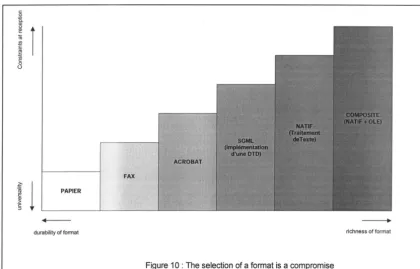
The exchange format should in an ideal world be as rich as possible, leaving the door open to the recipient to manipulate the incoming document in all the ways authorised to him. Document creation software (and native formats, consequently) are highly diverse, however, and this diversity dictates standardisation in a common transmission format. Failing this, the incoming document will be illegible or (at least potentially) deformed by a format conversion. A compromise has to be found between the richness of the chosen format and its universality. (see figure 10).
~
l
PAPIER~
"§
[image:41.590.86.506.222.491.2]durability of format richness of format
Figure 1 0 : The selection of a format is a compromise
For the revisable electronic sending oftext-type documents, the reference format selected is Microsoft Word 6 I Word 7 as customised for Eurolook, Word 97 becoming the target format at the end of the office automation migration. For the electronic exchange of more complex documents comprising a text, tabular material and graphics, and with guaranteed revisability of the text, the proposed format will in
all probability be based on OLE10 using Word as reference host format and Microsoft
Excel as host format for imported spreadsheet objects. Revisable interinstitutional exchanges are associated with procedures supported by information systems such as SEILEG
(System d
'
echanges informatises legislatifs).
The format used is reliant on a logical structure specific to the Commission (document table of description: DTD/SGML) to which are associated formats for representation of basic components.The document dissemination (see section 2) will create a growing usage of the HTML format based on SGML.
But most electronic document exchanges do not require revisability.
Theassociation of electronic mail and a non-revisable format, based on a universally-acknowledged printer language,
For graphics data the transmission formats recommended for use in exchanges with the exterior are CGM (Computer Graphics Metafile), GIF (Graphics Interchange Format) and TIFF (Tagged Image File Format). CGM complies with ISO 8632. GIF is widely used on the Internet and TIFF is the de facto standard for bitmapping (16-colour bitmap images) with which compression algorithms (e.g. Fax CCITT Group 4) are associated.
The principal lesson to be learned from the success of fax is the current strength of a format's universality compared with its richness. This observation will probably no longer hold true once the office systems chain is complete: the need to preserve a document's richness from start to finish in order to make it reusable will require mixed solutions: transmitting both revisable formats (native formats readable using free viewers) and leaner formats which are as universal as paper but of better quality, such as Acrobat (PDF).
To these technical considerations relating to format must be added:
• the cost problems arising from the volume of image formats
• the still unclarified legal issues arising from the use of electronic formats
Pending completion of the office systems chain, the current situation relies too heavily on the use of traditional postal services and fax. These two media have a number of disadvantages:
• their basic medium is still paper, which precludes rapid transmission and allows of virtually no further processing of incoming documents;
• they are not easy either to automate or to integrate. For this reason their acquisition should be contemplated with great prudence.