T E C H N I C A L N O T E
Open Access
BIFI: a Taverna plugin for a simplified and
user-friendly workflow platform
Ahmet Yildiz
1†, Erkan Dilaveroglu
1†, Ilhami Visne
1, Bilal Günay
1, Emrah Sefer
1, Andreas Weinhausel
1, Frank Rattay
2,
Carole A Goble
3, Ram Vinay Pandey
4and Albert Kriegner
1*Abstract
Background:Heterogeneity in the features, input-output behaviour and user interface for available bioinformatics tools and services is still a bottleneck for both expert and non-expert users. Advancement in providing common interfaces over such tools and services are gaining interest among researchers. However, the lack of (meta-) information about input-output data and parameter prevents to provide automated and standardized solutions, which can assist users in setting the appropriate parameters. These limitations must be resolved especially in the workflow-based solution in order to ease the integration of software.
Findings:We report a Taverna Workbench plugin: the XworX BIFI (Beautiful Interfaces for Inputs) implemented as a solution for the aforementioned issues. BIFI provides aGraphical User Interface(GUI) definition language used to layout the user interface and to define parameter options for Taverna workflows. BIFI is also able to submitGUI Definition Files(GDF) directly or discover appropriate instances from a configured repository. In the absence of a GDF, BIFI generates a default interface.
Conclusion:The Taverna Workbench is an open source software providing the ability to combine various services within a workflow. Nevertheless, users can supply input data to the workflow via a simple user interface providing only a text area to enter the input in text form. The workflow may contain meta-information in human readable form such as description text for the port and an example value. However, not all workflow ports are documented so well or have all the required information.
BIFI uses custom user interface components for ports which give users feedback on the parameter data type or structure to be used for service execution and enables client-side data validations. Moreover, BIFI offers user interfaces that allow users to interactively construct workflow views and share them with the community, thus significantly increasing usability of heterogeneous, distributed service consumption.
Findings
Background
The growing need for complex in-silicoexperiments on bioinformatics data leads to applications which are able to provide dynamic interfaces for automated analysis: workflow based software. Workflows are pre-defined series of tasks that are related to each other by the flow of data between them [1]. Workflow based systems are able to use various services deployed either on the local machine or on a remote device. Remote services utilized in Taverna [2]
are usually deployed using SOAP based web services which are characterized by their great interoperability and exten-sibility, as well as their machine-processable descriptions based on XML [3]. The description of web services in WSDL (Web Service Description Language) format enables the description of the abstract functionality offered by a service to be separated from concrete details of a service description such as“how”and“where”that functionality is offered [4]. This abstraction makes the platform used to deploy the services perfectly independent of the platform utilizing the service. Besides consuming SOAP based web services, Taverna supports Restful, BioMoby [5] and Soaplab [6] services. Moreover, it can locally utilize Java code snippets, Beanshell [7] scripts and R scripts (through RShell [8]).
* Correspondence:[email protected] †Equal contributors
1
Health & Environment Department, AIT Austrian Institute of Technology GmbH, Vienna, Austria
Full list of author information is available at the end of the article
The Taverna Workbench is a fully featured, extensible and scalable scientific workflow management system [2] built by The myGrid Team [9]. It has access to over 3,500 local and remote resources and analysis tools, web and grid services available on start-up [10].
The current scenario in Taverna
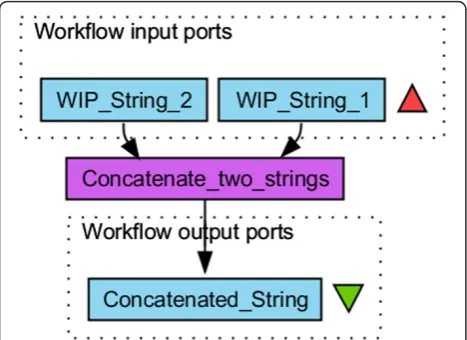
A simple workflow in Taverna consists of one or more Workflow Input Ports(WIP), a processor, itself consisting of input and output ports, executing the actual logic and an output port collecting the resulting analysis data. See Figure 1 for a simple workflow graph.
The creation (design) and the execution of the flow are two independent steps. After designing a work-flow, users specify data for the WIPs, which are then routed to the next processor during the execution time.
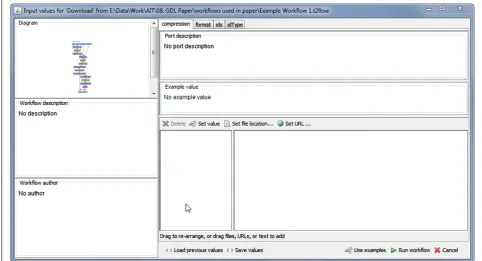
WIPs carry no metadata in a computer interpretable form, however, except information about the data dimen-sion. But this information is apparently not sufficient to provide the advanced, self-describing user interfaces, which give a sense of the type and format of the data to be en-tered for analysis. Figure 2 shows the Taverna dialog for setting input values of WIPs generated for the Example Workflow 1 as supplied as Additional file 1. This dialog provides users only with text areas to enter the input data in text form. This limitation is due partly to a shortage of remote services provided by autonomous third parties around the world having insufficient or non-existent meta-data. Examining SOAP based web services, which consti-tute the majority of remote services listed in Taverna, the metadata are often as simple as data type definitions like ‘string’which have no information about complex file for-mats [2]. This shortcoming may make the data type so un-predictable that users should basically execute the service using some data and see what happens. Erroneous results
can be expected which could easily lead to disappointment and deter users from using the system [11].
Solution projection
Enabling resource consumption from various local and remote sources brings great advantage in scalability, but also increases complexity in software development and use. This complexity not only decreases the usability level but also increases training times required to get used to the software.
We aim to provide interfaces that are intelligent enough to support users in entering the right data required by the service and thus improve the system’s trustworthiness and predictability.
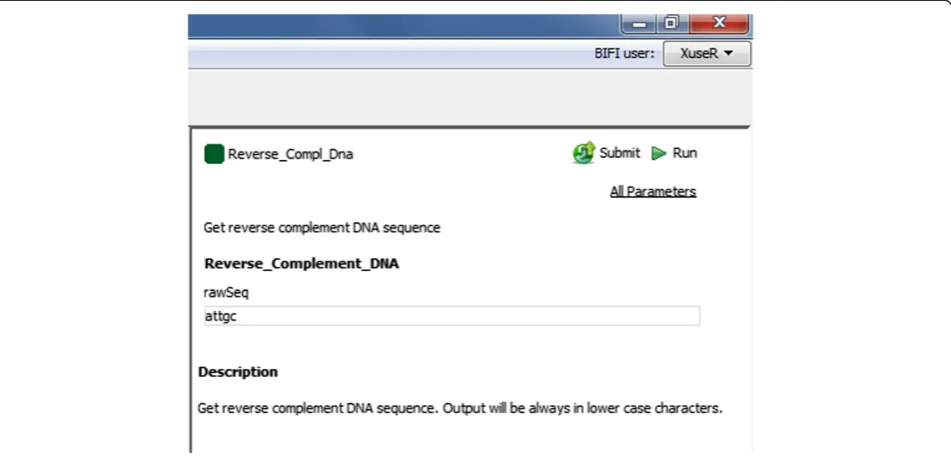
This was achieved by using a GUI definition language, mapping input ports to pre-installed GUI components and as a result showing a much user-friendly interface for workflow execution setup. See Figures 3 and 4 for an example.
This approach offers a great advantage in generating user interfaces, as we have experienced with R GUI Generator (RGG), a software tool which enables the easy generation of graphical user interfaces for the program-ming language R by adding a few Extensible Markup Language (XML) tags [12].
The Galaxy Project [13] uses a similar approach for local tool integration. But it provides a static description for the tool such as executables, command line syntax, ports, data type and format. However, these description files can only be modified by the server administrator. On the other hand the BIFI approach is a more dynamic, user interface centric approach that complements Taverna Workflow System where users interactively build and exchange information about user interfaces of workflows.
GUI descriptions may include meta information about what kind of data the service is waiting as input or param-eter, restrictions and default/example values. A workflow with GDF is therefore perfectly suitable for ready-to-run sample workflow arrangements (see Figure 5). Please see Additional file 2 for the full GDF syntax.
In absence of a GDF instance, we have implemented an algorithm to pick the most appropriate GUI for the port depending on the available meta-information on service descriptions.
Methods
[image:2.595.57.291.524.694.2]We have developed a BIFI plugin in Java 1.6 for the Taverna Workbench 2.4. Due to the diversity of the re-sources and especially because these rere-sources are usu-ally provided by autonomous third parties, it is hardly possible to implement a solution directly in the resource descriptions. We therefore map input ports to specific, pre-installed GUI-components using the graphical user interface description language we have defined.
Figure 1A simple Taverna workflow.The Graph of a simple workflow from The Taverna Workbench consisting of two workflow input ports, one processor and one workflow output port.
Yildizet al. BMC Research Notes2014,7:740 Page 2 of 9
A workflow in Taverna may have only one GDF in-stance in the configured GDF repository. In this system we assume that a workflow–GDF pair represents atool. The workflow and the user interface definition file are linked together using workflow identifiers. Each work-flow created in Taverna is automatically assigned a uni-versally unique identifier (UUID [14]) which will be kept unique even throughout the modifications.
The Workflow User Interface (WUI) for the workflow will be initiated immediately after the workflow is opened in the Taverna environment. BIFI searches for the appro-priate GDF in the configured repository and renders it. In case of absence of a suitable GDF instance, BIFI generates a default WUI and the corresponding description file using algorithms explained later in this paper. After open-ing the WUI, users may modify the workflow view or change default values for the ports interactively using the BIFI design component (see Figure 6).
Once the modification is complete, it is possible to submit the instance to the installed repositories using the Submitbutton at the top of the WUI component. If user wants to submit a GDF to the public repository should first login or register. This ensures building a collective experience for better and easier analysis.
To run a workflow using BIFI inputs, users should use the BIFI Run button placed on the top right corner of the WUI component (see Figure 7 for BIFI buttons).
Port mapping
[image:3.595.55.538.94.355.2]In Taverna each processor has its own input ports. Moreover, workflows should define their own WIPs which again are linked to specific processor input ports. As discussed earlier, users execute a workflow by serving the data to the WIPs which are then routed to the de-fined processor.
Figure 2Taverna dialog for WIP.A screenshot of the Taverna workbench shows the input dialog to enter the data for WIPs. It provides only a text area to enter the input in text form.
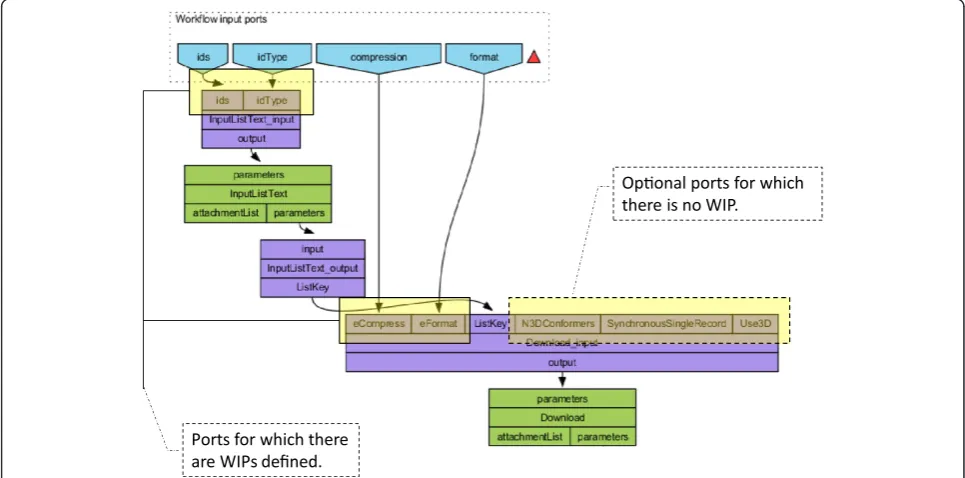
[image:3.595.57.292.527.693.2]As an example Figure 8 shows a portion of ourExample Workflow 1. The upper nodes - ids, idType, compression andformat- are WIPs. The former two WIPs serve user data to input ports ids and idType of the processor InputListText_inputand the latter two WIPs serve data to the eCompressand eFormatinput ports of the processor Download_input.
Different types of services tend to have lots of input ports for configurations, default values and data slots. WIPs en-able workflow developers to filter the required ports for successful workflow execution from the rest. As seen in Figure 8, the N3Dconformers, SynchronousSingleRecord and Use3D input ports of the processor Download_input are optional for the service and there are no WIPs defined for them. If workflow developers do not define WIPs for a port, however, users will have no possibility to use them even if they wanted to change some optional properties unless they knowingly add WIPs for it. Thus, WIPs bring one more level of complexity for users without an IT background or workflow design expertise.
Once installed, the BIFI plugin changes this approach and enables all the linkable processor input ports and ignores WIPs while keeping the ability to filter the re-quired ports.Linkable portsare ports having no statically declared value and ports that have no incoming data link from an upstream processor output port. This way, users can use all the linkable ports throughout the workflow without the need for any additional action.
To hide the complexity of non-required ports, BIFI by default shows only the ports for which there is a defined data link from a WIP or the ports, which are configured to be shown in the GDF. This is reasonable because the ports linked to a WIP are presumably important for suc-cessful processor execution. Even if not all ports are shown by default, it is always possible to display all the options via the all parameters button in the top right corner of the WUI component (see Figure 7).
[image:4.595.58.539.90.429.2]Before starting the execution, the BIFI adjusts the workflow and creates missing WIPs on the fly and in-vokes Taverna Execution Engine.
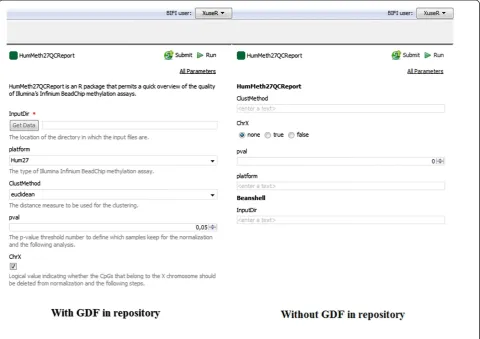
Figure 4Comparison of example workflow 2 opened with and without using GDF.Example Workflow 2 consists of an R script with 5 input ports. BIFI is able to generate user interfaces for two of the ports automatically (right) if no GDF is found in the repository. But other ports can be mapped to more meaningful components with appropriate options (left) using GDF.
Yildizet al. BMC Research Notes2014,7:740 Page 4 of 9
Algorithm to pick the best user interface component for a port
Our BIFI algorithm enables users to use workflows in an easy and straightforward way even if there is no GUI definition in the configured repository. This is only pos-sible if the data type of ports to be used is predictable and reasonable user interface components for the ports can be programmatically determined.
As a proof-of-concept implementation, we provide predictors for two Taverna processors: WSDL and R. Predictor implementations are responsible for providing
data types and additional information about processor input ports by examining the processors. Figure 9 shows the flow of automatic user interface generation for a specific input port.
[image:5.595.62.538.90.321.2]Although enrichment of web service description files with appropriate meta-information about input data is not a common practice, some description files contain such information. However, Taverna completely ignores XSD type information in description files, except base types. We have extended one of the Taverna core mod-ules to extract more information from these files. It is
[image:5.595.58.539.513.705.2]Figure 6The BIFI design component.The BIFI design component allows the user to modify the workflow view or change default values for the ports interactively.
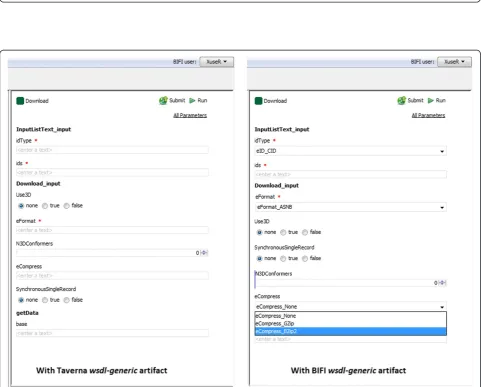
thus only possible to take full advantage of WSDL pro-cessor predictors by replacing the original wsdl-generic artifact with the extended version we providea. Figure 10 shows a comparison of user interfaces auto-generated using the Taverna version of thewsdl-genericartifact and the corresponding BIFI version.
Unlike the WSDL processor, the R processor has no de-scription file to parse. But workflow developers may set the following built-in data types for R processor input ports: Logical, Numeric, Integer, String, Logical Vector, Numeric Vector, Integer Vector, String Vector, Text-File. The R predictor uses this information for determining which user interface to use.
Furthermore, BIFI provides the required extension points over service provider interfaces [15] by which de-velopers can add their own Workflow Port Component (WPC) implementations as well as data type to WPC generator mappings. Given the properties (like simple type restrictions in XSD), generators create appropriate WPC objects to be shown in the workflow user interface.
Results
The XworX BIFI plugin brings great simplicity in the usage of the Taverna Workbench. To demonstrate these advantages, the differences between WSDL and R are highlighted using two workflows.
The first workflow consumes SOAP based web services from NCBI PubChem [16] and given a list key, prepares a file containing those records in the selected format for download [17]. The second workflow demonstrates usage of an R package for quality control and primary analysis of Illumina Infinium methylation data [18].
When using Taverna without BIFI, users must enter the workflow inputs for Example Workflow 1 using the pop-up dialog as shown in Figure 2. The same workflow opened with BIFI enabled Taverna will display a user interface as shown in Figure 10. All available input ports are directly accessible through the BIFI generated GUI.
For the Example Workflow 2.2 supplied as Additional file 3, BIFI finds an appropriate GDF in the repository and generates the view rendering the GDF. However, for the Example Workflow 2.1supplied as Additional file 4, there is no appropriate GDF in the repository. Input data
Ports for which there are WIPs defined.
[image:6.595.58.292.91.200.2]Oponal ports for which there is no WIP.
[image:6.595.56.539.466.705.2]Figure 8The first part of the workflow graph for Example Workflow 1.Some of the processor input ports have WIPs linked to them, some of them have not.
Figure 7Buttons of BIFI workflow user interface.BIFI provides tree buttons on top of WUI. Using theall parametersbutton users can enable all the ports in the workflow, not only defaults. To start execution using the BIFI Plugin inputs, users should useRunbutton provided by the BIFI Plugin. TheSubmitbutton shows the dialog to submit user interface options to the repository.
Yildizet al. BMC Research Notes2014,7:740 Page 6 of 9
Predictors
datatype(mime-type)
Pr
o
c
es
s
o
rs
text/plain ait.StringComponent
chemical/x-genbank ait.GBFileSelector
text/ xworx-int ait. SpinnerComp
text/xworx-boolean Ait.BooleanComp
Datatype-> WPC Mapping
foreach Processor in Dataflow
find appropriate predictor from installed predictor implementations
foreachinput port in Processor predict datatype
find appropriate WPC generator fordatatype
[image:7.595.58.540.89.272.2]generate user interface for port
Figure 9Mime-type to user interface mapping.Predictors determine which UI component to use for a specific port by using data from processors and predicting the corresponding data types (mime type). BIFI looks for the default UI for the given data type in the mapping table and creates it for the given port.
[image:7.595.57.539.307.694.2]for Workflow 2.1andWorkflow 2.2has been supplied as Additional file 5. Figure 4 shows the difference between the auto-generated view and the view generated using the GUI definition file prepared and submitted to the repository by the workflow creator.
Despite entering data in the string form via the stand-ard Taverna interface, users can use combo boxes, radio buttons with appropriate options or spinners for integer data types. As a result of all this, users are provided with easy-to-use, user-friendly interfaces.
Each port component has its own properties defining the valid data range. Depending on the implementation of the user interface component, it is possible to give instant feedback to the user about the validity of the input data.
Developers are able to implement their own UIs for mime types and install them in Taverna using flexible in-terfaces provided by Taverna and BIFI. Default properties for given UIs may be overwritten using the Properties component (see Figure 6). Users also have the possibility to set preferred installed user interfaces for certain mime types using thePreferenceswindow.
Providing intelligent user interfaces ensures that users enjoy easy-to-use software with fewer errors. As a result, users having found that expectations are met will con-tinue using the software environment.
Besides adding more user interface components for different mime types in the future, we plan to add more intelligence to the system to improve the level of auto-mation. Evaluating usage data and inspecting present GDFs in the repository would enable us to infer new in-formation about the mime type to UI component map-pings and/or even about the type of the data that should be fed to a certain processor.
Availability and requirements
Project name: The XworX BIFI Plugin for Taverna
Project home page: http://www.xworx.org/#!bifi-plugin/
c1tou
Operating system(s): All major platforms, such as
Linux, Windows and Mac OS X
Programming language: Java
Other requirements: Taverna 2.4, Java 1.6
License: LGPL
Restrictions to use by non-academics: None
Additional files
Additional file 1:Example workflow 1.t2flow format to be opened with Taverna 2.4.1.
Additional file 2:GDF Schema.GUI definition syntax used by the BIFI Plugin.
Additional file 3:Example workflow 2_2.t2flow format to be opened with Taverna 2.4.1. Taverna with BIFI plugin generates automatically a user interface by parsing GDF instance found in the repository. Additional file 4:Example workflow 2_1.t2flow format to be opened with Taverna 2.4.1. Taverna with BIFI plugin generates automatically a user interface by using processor input ports data types. For this workflow there is no GDF instance in the repository which BIFI can utilize. Additional file 5:Input Data for Example workflow 2_X.The data is taken from officialHumMeth27QCReportpage (http://biocore.crg.cat/wiki/ HumMeth27QCReport).
Abbreviations
BIFI:Beautiful interfaces for inputs; WUI: Workflow user interface; GDF: Graphical user interface definition file; WIP: Workflow input port; UI: User interface; WPC: Workflow port component; WDSL: Web Services Description Language.
Competing interests
The authors declare that they have no competing interests.
Authors’contributions
ED and AY architected and developed the core of the plugin. ED, RVP and AK wrote the draft of the manuscript. IV implemented R integration. BG and ES developed user interface components. AW created example workflows and tested the plugin. AK and FR supervised software implementation. CG helped with Taverna integration. FR, RVP and CG revised the manuscript. All the authors have read and approved the manuscript.
Acknowledgements
The project is funded by the Austrian Institute of Technology (AIT).
Author details
1Health & Environment Department, AIT Austrian Institute of Technology
GmbH, Vienna, Austria.2Institute for Analysis and Scientific Computing, Vienna University of Technology, 1040 Vienna, Austria.3Department of
computer Science, University of Manchester, Oxford Road, Manchester M13 9PT, UK.4Institut für Populationsgenetik, Vetmeduni Vienna, Veterinärplatz 1,
A-1210 Vienna, Austria.
Received: 5 September 2014 Accepted: 1 October 2014 Published: 20 October 2014
References
1. Li P, Castrillo JI, Velarde G, Wassink I, Soiland-Reyes S, Owen S, Withers D, Oinn T, Pocock MR, Goble C, Oliver SG, Kell DB:Performing statistical analyses on quantitative data in Taverna workflows: an example using R and maxdBrowse to identify differentially-expressed genes from microarray data.BMC Bioinformatics2008,9:334.
2. Hull D, Wolstencroft K, Stevens R, Goble C, Pocock MR, Li P, Oinn T:
Taverna: a tool for building and running workflows of services. Nucleic Acids Res2006,34:729–732.
3. Web Services Activity Statement.[http://www.w3.org/2002/ws/Activity] 4. Web Services Description Language (WSDL) Version 2.0 Part 1: Core
Language.http://www.w3.org/TR/wsdl20/.
5. Wilkinson MD, Links M:BioMOBY: an open source biological web services proposal.Brief Bioinformatics2002,3:331–341.
6. Senger M, Rice P, Oinn T:Soaplab - A Unified Sesame Door To Analysis Tools.InAll Hands Meeting. 2003.
7. BeanShell - Lightweight Scripting for Java.[http://www.beanshell.org/ home.html]
8. Wassink I, Rauwerda H, Neerincx PB, Vet PE, Breit TM, Leunissen JA, Nijholt A:
Using R in Taverna: RShell v1.2.BMC Res Notes2009,2:138. 9. myGrid » Home.[http://www.mygrid.org.uk/]
10. Taverna - open source and domain independent Workflow Management System.http://www.taverna.org.uk/.
11. Hartmann M:Challenges in Developing User-Adaptive Intelligent User Interfaces.InProceedings of the 17th Workshop on Adaptivity and User Modeling in Interactive Systems at Lernen Wissen Adaptivit (LWA). 2009:6–11.
Yildizet al. BMC Research Notes2014,7:740 Page 8 of 9
12. Visne I, Dilaveroglu E, Vierlinger K, Lauss M, Yildiz A, Weinhaeusel A, Noehammer C, Leisch F, Kriegner A:RGG: a general GUI Framework for R scripts.BMC Bioinformatics2009,10:74.
13. Goecks J, Nekrutenko A, Taylor J, Galaxy Team T:Galaxy: a comprehensive approach for supporting accessible, reproducible, and transparent computational research in the life sciences.Genome Biol2010,11:R86. 14. Universally Unique IDentifier (UUID).http://www.ietf.org/rfc/rfc4122.txt. 15. Seacord R, Wrage L:Replaceable Components and the Service Provider
Interface.Pittsburgh, Pennsylvania: Software Engineering Institute, Carnegie Mellon University; 2002.
16. The PubChem Project.http://pubchem.ncbi.nlm.nih.gov/.
17. myExperiment - Workflows - download (Peter Li) [Taverna 2 Workflow].
http://www.myexperiment.org/workflows/1435.html. 18. Mancuso FM, Montfort M, Carreras A, Alibes A, Roma G:
HumMeth27QCReport: an R package for quality control and primary analysis of Illumina Infinium methylation data.BMC Res Notes2011,4:546.
doi:10.1186/1756-0500-7-740
Cite this article as:Yildizet al.:BIFI: a Taverna plugin for a simplified and user-friendly workflow platform.BMC Research Notes20147:740.
Submit your next manuscript to BioMed Central and take full advantage of:
• Convenient online submission
• Thorough peer review
• No space constraints or color figure charges
• Immediate publication on acceptance
• Inclusion in PubMed, CAS, Scopus and Google Scholar
• Research which is freely available for redistribution