o
o
o
o
o
Apollo Computer Inc. 330 Billerica Road Chelmsford, MA 01824
DOMAIN/IX
User's Guide
,
Copyright © 1986 Apollo Computer Inc. All rights reserved. Printed in U.S.A.
First Printing: July, 1985
Latest Printing: December, 1986
This document was produced using the Interleaf Workstation Publishing Software (WPS). Interleaf and WPS are trademarks of Interleaf, Inc.
APOLLO and DOMAIN are registered trademarks of Apollo Computer Inc.
AEGIS, DGR, DOMAIN/BRIDGE, DOMAIN/DFL-100, DOMAIN/DQC-100, DOMAIN/Dialogue, DOMAIN/IX, DOMAIN/Laser-26, DOMAIN/PCI, DOMAIN/SNA, D3M, DPSS, OSEE, GMR, and GPR are trademarks of Apollo Computer Inc.
UNIX is a registered trademark of AT&T.
Apollo Computer Inc. reserves the right to make changes in specifications and other information contained in this publication without prior notice, and the reader should in all cases consult Apollo Computer Inc. to determine whether any such changes have been made.
THE TERMS AND CONDITIONS GOVERNING THE SALE OF APOLLO COMPUTER INC. HARDWARE PRODUCTS AND THE LICENSING OF APOLLO COMPUTER INC. SOFTWARE CONSIST SOLELY OF THOSE SET FORTH IN THE WRITTEN CONTRACTS BETWEEN APOLLO COMPUTER INC. AND ITS CUSTOMERS. NO REPRESENTATION OR OTHER AFFIRMATION OF FACT CONTAINED IN THIS PUBLICATION, INCLUDING BUT NOT LIMITED TO STATEMENTS REGARDING CAPACITY , RESPONSE-TIME PERFORMANCE , SUITABILITY FOR USE OR PERFORMANCE OF PRODUCTS DESCRIBED HEREIN SHALL BE DEEMED TO BE A WARRANTY BY APOLLO COMPUTER INC. FOR ANY PURPOSE, OR GIVE RISE TO ANY LIABILITY BY APOLLO COMPUTER INC. WHATSOEVER.
IN NO EVENT SHALL APOLLO COMPUTER INC. BE LIABLE FOR ANY INCIDENTAL, INDIRECT, SPECIAL OR CONSEQUENTIAL DAMAGES WHATSOEVER (INCLUDING BUT NOT LIMITED TO LOST PROFITS) ARISING OUT OF OR RELATING TO THIS PUBLICATION OR THE INFORMATION CONTAINED IN IT, EVEN IF APOLLO COMPUTER INC. HAS BEEN ADVISED, KNEW OR SHOULD HAVE KNOWN OF THE POSSIBILITY OF SUCH DAMAGES.
THE SOFTWARE PROGRAMS DESCRIBED IN THIS DOCUMENT ARE CONFIDENTIAL INFORMATION AND PROPRIETARY PRODUCTS OF APOLLO COMPUTER INC. OR ITS LICENSORS.
o
o
o
o
o
Preface
Audience
The DOMAINIIX User's Guide is based on various papers normally found in the UNIX Programmer's Manual supplied by AT&T and the University of California at Berkeley.
Although we've modified the papers where necessary to reflect the DOMAIN@ system operating environment, we remain aware of the history of the UNIX@ product as a multiuser system, and have included the more important references to operations con-ducted at terminals.
This User's Guide is intended for users who are familiar with UNIX software, AEGIS ™
software, and DOMAIN networks. We recommend that you read one of the following tutorial instructions if' you are not already familiar with the UNIX system:
• Bourne, Stephen W. The UNIX System. Reading: Addison-Wesley, 1982.
• Kernighan, Brian W. and Rob Pike. The UNIX Programming Environment, Englewood
Cliffs, N.J.: Prentice-Hall, 1984.
• Thomas, Rebecca and Jean Yates. A User's Guide to the UNIX System. Berkeley:
Os-borne/McGraw-Hill, 1982.
This document also assumes a basic familiarity with the DOMAIN system. The best introduction for those who want to use UNIX software on a DOMAIN node is Getting Started With Your DOMAIN/IX System (Order No. 008017). This manual explains how to
use the keyboard and display, read and edit text, and create and execute programs. It also shows how to request DOMAIN system services using interactive commands.
Structure of This Manual
The manual is organized as follows:Chapter 1 Provides an overview of important DOMAINIIX ™ system features.
Chapter 2 Briefly introduces the basic principles of using the shells available through the DOMAINIIX system.
Chapter 3 Supplies a detailed explanation of Bourne Shell (sh) usage, both System V and BSD4.2 versions.
Chapter 4 Describes how to use the C Shell (csh), both System V and BSD4.2 ver-sions.
Chapter 5 Tells how to use the BSD4.2 version of the mail program to communicate with other users.
Related Manuals
Getting Started With Your DOMAIN/IX System (Order No. 008017) is the first volume
you should read. It explains how to log in and out, manage windows and pads, and execute simple commands. It presents user-oriented examples and includes a glossary of important terms.
The DOMAIN/IX Support Tools Guide (Order No. 009413) describes the UNIX support tools and utilities available to DOMAlNIIX users. It contains exten,sive material on tools such as awk, sed, and yaee, which help process programs; lex and lint, which help analyze programs; and make and sees, which help maintain programs. It also de-scribes support tools that preprocess macros (m4) or FORTRAN code (ratfor), perform arbitrary precision arithmetic (be), operate an interactive desk calculator (de), and pro-vide terminal screen handling with optimal cursor motion (curses).
The DOMAIN/IX Text Processing Guide (Order No. 005802) describes the UNIX text edi-tors (ed, ex, and vi) supported by the DOMAlNIIX system. It also contains material on the formatters troff and nroff, the macro packages -ms, -me, and -mm, and the preprocessors eqn and tbl.
The DOMAINIIX Command Reference for System V (Order No. 005798) describes all the UNIX System V shell commands supported by the sys5 version of the DOMAlNIIX software. This manual documents various general purpose, communications, and graph-ics commands and application programs. It also describes games available to the Sys-tem V user.
The DOMAIN/IX Programmer's Reference for System V (Order No. 005799) describes all the UNIX System V system calls; C, standard I/O, and mathematical library subrou-tines; file formats; character set tables; and macro packages supported by the sys5 ver-sion of the DOMAlNIIX software.
The DOMAIN/IX Command Reference for BSD4.2 (Order No. 005800) describes all the BSD4.2 UNIX shell commands supported by the bsd4.2 version of the DOMAlNIIX software. This manual documents various general purpose, communications, and graph-ics commands and application programs. It also describes games available to the Sys-tem V user.
The DOMAIN/IX Programmer's Reference for BSD4.2 (Order No. 005801) describes all the BSD4.2 UNIX system calls; C, standard I/O, mathematical, internet network, and compatibility library subroutines; special files; file formats and conventions; and macro packages and language conventions supported by the bsd4.2 version of the DOMAlNIIX
software. '
System Administration for DOMAIN/IX BSD4.2 (Order No. 009355) and System Admini-stration for DOMAIN/IX Sys5 (Order No. 009356) describe the tasks necessary to
config-ure and maintain DOMAlNIIX system software services such as TCPIIP, line printer spoolers, and UNIX-to-UNIX communications processing. Also explains how to main-tain file system security, create user accounts, and manage servers and daemons. The DOMAIN C Language Reference (Order No. 002093) describes C program develop-ment on the DOMAlN system. It lists the features of C, describes the C library, and gives information about compiling, binding, and executing C programs.
The DOMAIN System Command Reference (Order No. 002547) gives information about using the DOMAlN system and describes the DOMAlN commands.
The DOMAIN System Call Reference (Order No. 007196) describes calls to operating system components that are accessible to user programs.
Preface ii
Documentation Conventions
C)
Unless otherwise noted in the text, this manual uses these symbolic conventions:o
command Command names and command-line options are set in bold type. These are commands, letters, or symbols that you must use literally.
output
filename
[ ]
< >
t
D
Typewriter font words in command examples represent literal system out-put, including prompts.
Italicized terms or characters represent generic, or metanames in example command lines. They may also represent characters that stand for other characters, as in dx, where x is a digit. In text, the names of files written or read by programs are set in italics.
Square brackets enclose optional items in formats and command descrip-tions.
Angle brackets enclose the name of a key on the keyboard.
The notation t followed by the name of a key indicates a control charac-ter sequence. Hold down <CTRL> while typing the characcharac-ter.
Horizontal ellipsis points indicate that the preceding item can be repeated one or more times.
Vertical ellipsis points mean that irrelevant parts of a figure or example have been omitted.
o
Problems, Questions, and Suggestions
o
We appreciate comments from the people who use our system. In order to make it easy for you to communiCate with us, we provide the User Change Request (UCR) sys-tem for software-related comments, and the Reader's Response form for documenta-tion comments. By using these formal channels, you make it easy for us to respond to your comments.
You can get more information about how to submit a UCR by consulting the DOMAIN
System Command Reference. You can view an on-line description of the command used to submit a UCR (lcom/crucr) by typing:
010 Icom/help crucr <RETURN>
(Although we use a C Shell prompt in our example, you may type this command from any type of shell available to users of the DOMAINIIX system.)
For your documentation comments, we've included a Reader's Response form at the back of each manual.
c
'\".--.~
o
Contents
Chapter 1 An Overview of the DOMAIN/IX System
1.1 DOMAIN System Architecture ... 1-1 1.2 The User Interface ... 1-2 1.3 Co-resident Software ... 1-2 1.4 The Display and the Display Manager . . . .. 1-2 1.4.1 Pads and Windows ... 1-3 1.4.2 Default Windows and Shells ... 1-4
o
1.4.3 DM Commands ... 1-4 1.4.4 Regions ... 1-5 1.4.5 Moving the Cursor ... 1-5 1.4.6 Keyboard Mapping ... 1-6 1.4.7 UNIX Key Definitions ... 1-6 1.4.8 DM Environment Variables ... 1-7 1.5 Support For Multiple UNIX Versions ... 1-101.5.1 Name Space Support ... 1-11
o
1.5.2 Environment Switching ... 1-13 1.6 Setting Up a UNIX-Style Login Sequence ... 1-14 1. 7 Message of the Day (motd) ... 1-14 1.8 Setting Up Server Processes ... 1-15 1.9 Getting Help ... 1-15 1.10 Other DOMAINIIX Features ... 1-15 1.10.1 The Process Model ... ~ ... 1-15 1.10.1 Case Mapping ... 1-16o
1.10.3 Password and User Identification ... 1-18 1.10.4 File Protection, Permissions, and Ownership ... 1-18 1.10.5 Use of the C Compiler ... 1-19Chapter 2 An Introduction to Shell Usage
2.1 UNIX Shells ... 2-1 2.1.1 Opening a Default UNIX Shell ... 2-1 2.1.2 Opening Additional UNIX Shells ... 2-3 2.1.3 Using a Terminal ... 2-3 2.2 Differences Between UNIX and AEGIS Shells ... 2-4 2.2.1 Command Search Rules ... 2-5 2.2.2 Shell Program Execution ... 2-5 2.2.3 Wildcards ... 2-6
o
2.2.4 Differences in Valid Pathnames ... 2-7 2.2.5 Inprocess vs. Forked Execution ... 2-7 2.2.6 Changes in Working Directory ... 2-7Chapter 3 U sing the Bourne Shell
3.1 Introduction ... 3-1 3.1.1 Special Key Definitions ... . . . .. 3-2 3.1.2 Simple Commands . . . .. 3-2 3.1.3 Background Commands . . . .. 3-3 3.1.4 Input/Output Redirection ... 3-3 3.1.5 Pipelines and Filters ... 3-3 3.1.6 Generating Filenames ... 3-4 3.1.7 Quotation ... 3-5 3.1.8 Prompting ... 3-6 3.2 Starting the Bourne Shell . . . .. 3-6 3.3 Shell Procedures ... 3-7 3.3.1 Control Flow Using "for" ... 3-8 3.3.2 Control Flow Using "case" ... 3-8 3.3.3 Here Documents . . . .. 3-10 3.3.4 Shell Variables ... 3-11 3.3.5 The "test" command ... 3-13 3.3.6 Control Flow Using "while" ... 3-14 3.3.7 Control Flow Using "if" ... 3-15 3.3.8 Command Grouping ... 3-16 3.3.9 Debugging Shell Procedures ... 3-17 3.4 Keyword Parameters . . . .. 3-17 3.4.1 Parameter Transmission ... 3-17 3.4.2 Parameter Substitution (bsd4.2) ... 3-18 3.4.3 Parameter Substitution (sys5) ... 3-19 3.4.4 Command Substitution ... 3-20 3.4.5 Evaluation and Quoting ... 3-21 3.4.6 Error Handling ... . . . .. 3-22 3.4.7 Fault Handling ... 3-23 3.4.8 Command Execution ... 3-25 3.5 Summary of Bourne Shell Grammar ... 3-26 3.6 Summary of Shell Metacharacters & Reserved Words ... 3-27 3.6.1 Syntactic ... 3-27 3.6.2 Patterns ... 3-28 3.6.3 Substitution ... 3-28 3.6.4 Quoting ... 3-28 3.6.5 Reserved Words ... 3-28
Chapter 4 Using the C Shell
4.1 Introduction ... 4-1 4.1.1 Special Key Definitions ... . . . .. 4-1 4.1.2 Starting the Shell ... 4-2 4.1.3 The Basic Notion of Commands ... 4-2 4.1.4 Flag Arguments ... 4-3 4.1.5 Output to Files . . . .. 4-3 4.1.6 Metacharacters in the C Shell ... 4-4 4.1.7 Input From Files; Pipelines ... 4-4
4.1.8 Filenames ... 4-5
o
4.1.9 Quotation ... 4-8 4.1.10 Terminating Commands ... 4-9 4.2 Starting, Stopping, and Modifying the C Shell ... 4-104.2.1 Opening a C Shell When You Log In ... 4-10 4.2.2 Login and Logout Scripts ... 4-10 4.2.3 Shell Variables ... 4-12 4.2.4 History ... 4-13 4.2.5 Aliases ... 4-15 4.2.6 More Redirection; » and« ... 4-16 4.2.7 Background, Foreground, and Suspended Jobs ... 4-17 4.2.8 Working Directories ... 4-21 4.2.9 Useful Built-In Commands ... 4-23 4.3 Shell Control Structures and Shell Scripts ... 4-24 4.3.1 Invocation and the "argv" Variable ... ~ ... 4-25
o
4.3.2 Variable Substitution ... 4-25 4.4 Expressions ... 4-26 4.4.1 A Sample Shell Script ... 4-27 4.4.2 Other Control Structures ... 4-28 4.4.3 Supplying Input to Commands ... . . . .. 4-30 4.4.4 Catching Interrupts ... 4-31 4.4.5 Additional Options ... 4-31 4.5 Other Shell Features ... 4-32o
4.5.1 Loops at the Terminal; Vadables as Vectors ... 4-32 4.5.2 Braces { ... } in Argument Expansion ... 4-33 4.5.3 Command Substitution ... 4-33 4.6 Summary of C Shell Metacharacters ... 4-33 4.6.1 Syntactic ... 4-34 4.6.2 Filename ... 4-34 4.6.3 Quotation ... 4-34 4.6.4 Input/Output ... 4-34o
4.6.5 Expansion/Substitution ... 4-34 4.6.6 Miscellaneous ... 4-35Chapter 5 Using the BSD4.2 Mail Program
5.1 Introduction ... 5-1 5.1.1 Sending Mail ... 5-2 5.1.2 Receiving Mail ... 5-3 5.2 Maintaining Folders ... 5-7 5.3 Tilde Escapes ... 5-8 5.4 Network Access ... 5-11
5.4.1 ARPANET ... 5-11 5.4.2 Special Recipients ... 5-12 5.4.3 Message Lists .. . . .. 5-12
o
5.5 Summary of Commands ... 5-14 5.6 Custom Options . . . .. 5-18 5.7 Command Line Options ... : ... 5-205.8 Format of Messages . ... 5-21
5.9 Summary of Commands, Options, and Escapes ... " 5-22 (~
5.9.1 Commands ... 5-22
'-....J
5.9.2 Options ... 5-235.9.3 Tilde Escapes ... 5-24 5.9.4 Command Line Flags ... 5-25 Glossary
Index
Contents viii
(~--\
\ "
o
o
o
o
o
Tables
Table Page
1-1 UNIX Key Definition Files ... 1-6 1-2 Summary of Environment Variables Used by the DOMAINIIX System ... 1-9 1-3 SYSTYPES Supported by the DOMAINIIX System ... 1-10 1-4 Top-Level DOMAINIIX Directory Organization ... 1-12 1-5 Filename Case Mapping ... 1-16 1-6 Other Filename Characteristics ... 1-1 7
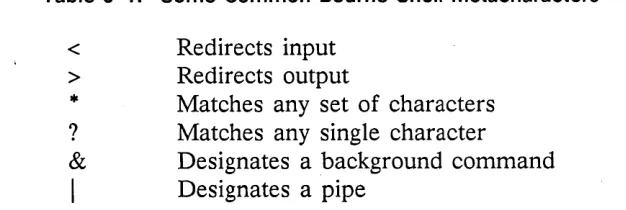
2~ 1 SIO Line Characteristics Affected by Running a UNIX Shell ... 2-3 2-2 Control Characters Defined in a C Shell ... 2-4 2-3 Control Characters Defined in a Bourne Shell . . . 2-4 3-1 Some Common Bourne Shell Metacharacters . . . 3-5 3-2 Evaluation of Bourne Shell Metacharacters by Quoting Mechanisms ... 3-22 3-3 UNIX Signals Commonly Used by DOMAINIIX Software ... 3-23
o
o
o
o
o
Chapter
An Overview of the
DOMAINIIX System
1
The DOMAlNIIX system is an implementation of the UNIX operating system that runs on DOMAlN nodes. It supports the DOMAlN distributed file system, and multiple net-works using bit-mapped, high-resolution displays. In addition to bringing the benefits of a networked architecture and a true single-level store to the UNIX system, the DO-MAlNIIX system offers many features seldom found on either time-sharing or worksta-tion implementaworksta-tions of software.
There are two versions of DOMAlNIIX software. The sys5 version is compatible with UNIX System V, Release 2 from AT&T Bell Laboratories; the bsd4.2 version is com-patible with 4.2BSD, from the University of California at Berkeley. We supply both versions to all DOMAlNIIX customers. In this chapter, we introduce those DOMAlN system features not found in other UNIX systems. We also explain how to use the
bsd4.2 and sysS UNIX versions concurrently.
1.1 DOMAIN System Architecture
A DOMAlN system comprises two or more nodes connected by a high-speed local area network. When we mention the term network in this manual, we generally refer to one that has a ring topology, and uses a token-passing protocol to prevent collisions between messages being sent from one node to another. However, DOMAlN systems may also run on other types of networks (e.g., an ETHERNET network). Each node is a functional workstation, with its own central processor, memory, and memory man-agement hardware. Programs and data required by processes running on a node may be demand-paged across the network.
This remote paging ability means, for example, that a process running on one node can invoke a program that resides on the disk of another node to manipulate data that reside on a third node. You may even create remote- processes (processes that run on other nodes in the network) that you can manipulate through a window on your node, thus distributing the computational workload over multiple processors.
Those nodes that have their own mass storage devices may be operated as standalone computers, and can support additional users (including those connected via serial com-munications ports). To take advantage of this networked architecture, all DOMAINIIX software supports a distributed file system. Data and programs on all mounted volumes in the network are accessible (given the necessary permission~) to any node in the net-work. The resultant system is one in which an arbitrary number of users can be serv-iced without adversely affecting performance. Users have the power of a dedicated processor, memory-management hardware, and a high-resolution bitmapped display at their disposal. (For more information on DOMAIN architecture, refer to the DO MAIN
System User's Guide.)
1.2 The User Interface
We provide for a more varied user interface by supplying features that significantly differ from those provided in other UNIX implementations. The most important differ-ence, from the user's point of view, is the ability of a DOMAIN node to display "win-dows" into many processes (shells, programs, etc.). These windows have some unique features not found on the "dumb" terminals largely used in the development of UNIX System V and 4.2BSD software'.
1.3 Co-resident Software
DOMAINIIX software is co-resident with the DOMAIN system's AEGIS operating sys-tem, sharing many of the same underlying kernel functions. As a result:
• UNIX programs supplied with the DOMAINIIX system have the same file format as AEGIS programs
• UNIX Shells provided with DOMAINIIX software can exist on the same screen with AEGIS Shells
• UNIX commands can be executed in an AEGIS Shell
• AEGIS commands can be executed in a UNIX Shell
Normally, there is no distinction between processes that run UNIX programs and those that run other DOMAIN programs. UNIX programs and AEGIS programs can coexist within the same process, even within the same pipeline. In rare cases, naming conflicts (Le., cases where UNIX and AEGIS programs have the same name) require that you rename or alias a command.
1.4 The Display and the Display Manager
Your node's display is your "window" into the DOMAIN system. Unlike most dumb terminals that dedicate their entire display to a single program or process, DOMAIN
Overview of the DOMAINIIX $ystem 1-2
- - - _ . _ . __ ._.---_._---_ ...
-(~
o
o
o
o
o
nodes let you divide the display screen into multiple environments for running pro-grams, and reading or editing files. With each new environment you create, the DO-MAIN system creates a set of display components through which yeu can enter input and view .output.
What yeu see threugh a window is either a "frame" containing graphics .or a "pad" centaining text. Refer te the DOMAIN System Command Reference fer mere infermatien
abeut frame mede and graphics. Our primary concern in this sectien is with pads. Get-ting Started With Your DOMAINIIX System has detailed infermatien en pads, windews,
and wind .ow legends.
1.4.1 Pads and Windows
There are twe principal types .of pads: "edit" pads and "transcript" pads. An edit pad is a wind .ow inte the buffer that the DM sets up when yeu want te edit a file. A read-.only edit pad is a special instance .of an edit pad that, either because yeu have .opened the pad in read-only mede .or because yeu have opened a wind .ow inte a file fer which yeu lack "write" permissien, deesn't allew yeu te medify the contents .of the buffer.
All shells run in a wind .ow that consists .of an "input pad" and a "transcript pad." The input pad echoes the standard input, and the transcript pad gives a running transcript .of the standard output. Because it is unwise (or even illegal) to edit histery, the tran-script pad is unalterably read-enly. (The .only legal writer is the pregram.) This cembi-natien .of an input pad and a transcript window is at least the equivalent .of a "termi-nal, " in the sense that the werd is used in much of this book. In additien, it has fea-tures that ge far beyend what mest terminals can manage.
An input pad is actually special instance of an edit pad. It can't be made read-only, and it "grows" as necessary when you type input faster than the shell (.or ether pre-gram) can use it. Pregrams using input pads read input sequentially, .one line at a time. As an input line is read, it is screlled up inte the transcript pad, where it re-mains until the shell is clesed. Even after text has screlled .out .of the tep .of the win-dew, the transcript pad never leses any infermatien. Using the pad screll keys, yeu can screll threugh the transcript pad te reviewer cepy text frem any part .of the transcript.
When you stop a shell .or ether pre gram running in a window, the DM nermally cleses beth the input and transcript pads and displays a
***
Pad Closed***
message in the windew. Yeu can then issue the DM cemmand we (windew clese, nor-mally mapped to tN) te remeve the wind .ow frem the screen.
Note: Te save the infermation centained in a transcript pad, de .one .of the following (see Getting Started With Your DOMAINIIX System fer details en either .of these):
• Cepy all .or part .of the pad inte an edit pad, paste buffer, .or file
• Use the DM's pn (pad name) cemmand te write the pad te a disk file.
Edit pads den't interact with pregrams; they are simply files that yeu can viewer edit using the DM editer. Yeu can alse .open an edit pad in "read-enly" mede if yeu want te read rather than te edit it.
At the top of every window is a "window legend" that displays the name (or number)
of the process running in the window. If the window opens onto a file (Le., if it is an
0
edit pad, read-only or otherwise), the window legend displays the full pathname of thefile and such additional information as the edit mode (insert or typeover), rights (read/ write or read-only), file line number of the top line in the window, and horizontal off-set if greater than
o.
1.4.2 Default Windows and Shells
In addition to the various shells and edit pads that you may open while logged in to a DOMAIN node, two windows are usually opened by default: one wheri the node is booted, and another when you log in.
When a node is booted, it normally loads the DM and opens a DM input pad, DM alarm window, and DM output pad. On a landscape display, these windows are each one line high and are placed side by side along the bottom of the screen. When no one is logged in, the DM input pad displays the login prompt:
login:
Note: If your node is not set up for a UNIX-style login (Le., UNIXLOGIN is not set to 'true'), your login prompt will be the slightly different AEGIS prompt:
please Log In:
(UNIXLOGIN is a DM environment variable that we later detail.) After you log in, the DM input pad displa'ys this prompt:
Command:
Pressing <CMD> brings the cursor to the DM input window.
The DM output pad (actually, a window into the file /sys/dm/output) is broken into two windows: the alarm window and the output window. The alarm window appears to the right of the input window on both landscape and portrait displays. Whenever the DM writes output to a partially obscured or hidden window, it alerts you by sounding the node's alarm beeper and displaying a visible alarm in the form of two "bell" charac-ters in the DM alarm window. The bells are cleared when you <POP> the obscured window to the top of the window stack.
The DM output window appears at the right of the alarm window on landscape dis-plays, or at the bottom of portrait displays. The output window displays DM messages and output from those DM commands (e.g., kd and "=") that generate output.
By default, the DM first opens an AEGIS Shell when you log in, and then executes your personal login script of DM commands (e.g., user _data/startup_dm.191 in your home directory). You may, of course, arrange for the DM to open a UNIX Shell in-stead. For more information about DM startup scripts, see the DOMAIN System User's Guide.
1.4.3 DM Commands
The DOMAIN System Command Reference documents all DM commands that we cur-rently support. The DOMAIN/IX Text Processing Guide also covers those used to edit text or examine transcripts. In general, all DM commands can be
Overview of the DOMAIN/IX System 1-4
c
o
o
o
o
• Entered in the DM input window
• Placed in a command file for execution as needed (e.g., at log-in)
• Bound to DOMAIN keyboard keys, via the DM's kd (key definition) command.
1.4.4 Regions
Some DM commands deal with the whole screen, although most pertain to an individ-ual window, or a region within the pad on which a window opens. Since the concept of a screen divided into regions may be new, we briefly introduce it here.
When you move the cursor to the DM input window, the DM first notes the cursor's location on the screen. Thus, it derives information such as the current working direc-tory of a shell, the location of the cursor in an edit pad, or the current location of a window that you intend to move or "grow". (Actually, the DM gets this "current con-text" information from the last place on the screen where an event took place.) The same is true when you press a key that has been defined to invoke a DM command sequence. For example, when you press <EDIT>, the DM first notes the current work-ing directory of the shell window that the cursor last occupied. If you type
edi t fi Ie: foo <RETURN>
the DM looks for a file named foo in the current working directory of that shell. If the
file exists, the DM opens an edit pad onto it. Otherwise, the DM creates foo and opens
a blank edit pad.
Even though you may have many windows open on your screen, the DM assumes that you can only be actively addressing one at a time. By keeping track of the cursor, the DM keeps track of your involvement with processes running in windows on your node. Since it also keeps track of what all processes (even those not occupied by the cursor) are doing, the DM can also alert you when something occurs in a hidden or partially obscured window. By operating in this manner, the DM can provide services to all processes running in windows on your node.
1.4.5 Moving the Cursor
While there are many ways to get the DM to move the cursor, the arrow keys at the left of the keyboard are the most obvious. Many keyboards are also equipped with a mouse (which has three programmable function keys) or a touchpad. Both are effective tools for large-scale cursor movements. See Getting Started With Your DOMAINIIX Sys-tem for more on the mouse and touchpad.
Explicit DM commands also move the cursor, although they rarely see interactive use. The arrow keys and the other keys that move the cursor are simply defined at startup so that these commands are executed. <CMD> moves the cursor to the DM input win-dow, and <NEXT WNDW> moves the cursor to the next unobscured shell input pad or read/write edit pad.
Note: The DM considers a window to be obscured if any part of it is covered by an-other window. If no unobscured shell windows or read/write edit pads appear on the display, <NEXT WNDW> has no effect. A read-only edit pad isn't a candi-date for <NEXT WNDW> either.
1.4.6 Keyboard Mapping
On DOMAlN nodes, nearly all key binding is programmable. The DM normally binds
0
the keys to a default function map when you log in. Although you can change these "-key bindings any time, it is usually best to begin with the default bindings, and then"customize" your key definitions as needed. For more information on the DM and keyboard mapping, see the DOMAIN System Command Reference.
The DOMAlN system supports three types of keyboards: the Low-Profile Model I key-board, the Low-Profile Model
n
keyboard, and the 880 (high-profile) keyboard. Note: The 880 keyboard is no longer shipped with new nodes.The directory /sys/dm contains the command files that define each type of keyboard:
• std_keys3 keyboard definitions for the Low-Profile Model
n
keyboard• std _ keys2 keyboard definitions for the Low-Profile Model I keyboard
• std _keys keyboard definitions for the 880 keyboard
1.4.7 UNIX Key Definitions
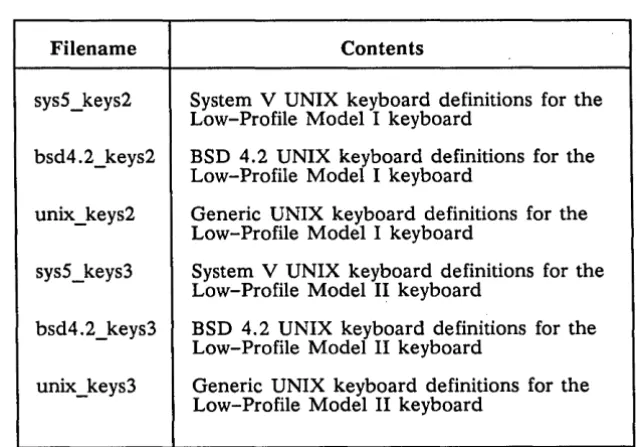
Alternate versions of the standard key definitions, modified to provide necessary UNIX functions, reside in the /sys/dm directory. These alternate versions are named as shown in Table 1-1. (Equivalent files for the 880 keyboard are sys5_keys and bsd4.2_keys.)
Table 1-1. UNIX Key Definition Files
Filename Contents
sys5_keys2 System V UNIX keyboard definitions for the Low-Profile Model I keyboard
bsd4.2_keys2 BSD 4.2 UNIX keyboard definitions for the Low-Profile Model I keyboard
unix_keys2 Generic UNIX keyboard definitions for the Low-Profile Model I keyboard
sys5_keys3 System V UNIX keyboard definitions for the Low-Profile Model II keyboard
bsd4.2_keys3 BSD 4.2 UNIX keyboard definitions for the Low-Profile Model II keyboard
unix_keys3 Generic UNIX keyboard definitions for the Low-Profile Model II keyboard
The BSD4.2 and the System V definitions files include commands that bind various keys to certain version-specific (or shell-specific) features. They are described in detail in Chapters 3 and 4 of this manual, which deal with the Bourne Shell and the C Shell, respectively. Initially, none of these key definitions files are automatically invoked, al-though you may arrange for them to be, as we shall explain later.
To put any key-definition file into effect, execute the cmdf (command file) command at the Display Manager prompt, where the filename argument is one of the key
[image:18.615.149.469.392.615.2]o
o
o
o
o
tions files mentioned earlier. For example, this invokes the BSD4.2 version UNIX key definitions on a Low-Profile Modell keyboard:
Command: cmdf Isys/dm/bsd4.2_keys2 <RETURN>
When the keyboard is remapped to bsd4. 2_keys2 , the following keys are redefined:
<SHELL> This DM function key executes the DM command cp Ibin/start_csh, which creates a C Shell and runs a personal UNIX log-in file (.login).
<TAB>
<READ>
<EDIT>
tl
t
D
tZ
tJ
When shifted, this key inserts a literal ASCn tab character.
This DM function key, which calls the DM to read a file, displays a dif-ferent prompt -- "read file: " rather than "Read file: ". Also, arguments supplied as input are treated with case-sensitivity.
This DM function key, which calls the DM editor, takes a different
prompt -- "edit file: " rather than "Edit file: ". Also, arguments supplied as input are treated with case-sensitivity.
This control-key sequence generates an interrupt signal.
This control-key sequence produces an end-of-file (EOP) signal.
This control-key sequence generates a suspend signal.
This control-key sequence breaks a previous suspend signal (produced by using tZ).
On a Low-Profile Model 1 keyboard, invoking the System V (sys5 _ keys2) or the generic
UNIX key definitions (unix_keys2) produces similar results. <TAB>, <READ>, and
<EDIT>, and the tl and tD control-key sequences, work as described above, but these other keys behave differently:
<SHELL> This key executes cp Ibin/start_sh, which creates a Bourne Shell and runs a personal UNIX log-in file (.profile).
t
Z
tJ
This control key sequence produces an EOP signal.
This control key sequence does nothing.
1.4.8 DM Environment Variables
UNIX users should be familiar with the concept of environment variables, process-wide ASCn strings that assume the general form
name = value
Environment variables are maintained by the kernel's process manager and are made available to AEGIS programs as well as to UNIX programs. Typically, you initialize these variables in one of the command files that the DM reads when the node is booted, and later when you log in.
For processes that use multiple program levels, environment variables are markreleased so that, while a new program level inherits all environment variables from a previous level, a new level can't affect the environment variables of a previous level. When a new process is created, all environment variables of the creating process are inherited
by the new process. All process creation mechanisms (e.g., pgm_Sinvoke, fork, vfork) provide for this inheritance.
Note: Environment variables still existing in a process when an AEGIS Shell is created are automatically inherited by that shell. The Bourne and C Shells handle envi-ronment variables as defined by UNIX semantics. (See Chapters 3 and 4.)
When a new process is created by the Display Manager, that process inherits all envi-ronment variables from the current context process. The DM also inherits envienvi-ronment variables when cv (read file) and ce (edit file) are used.
Environment variables defined in the DM startup file are inherited by all server proc-esses created during DM startup, and by the first process you create at login.
Note: After the first user process is created, the DM inherits environment variables from the current context process (and passes them to new processes) as de-scribed above.
o
A program interface for environment variable usage is defined in the /sys/ins/ev.ins.?*
C~
files. C language programs may manipulate environment variables. through these inter-faces. Alternatively, C programs may use the UNIX calls getenv(3) and putenv(3) or access the external environ variable. All interfaces are compatible with one another; e.g., a variable defined with putenv(3) may be read using ev_Sget_var.
Certain environment variables are well-known. Some are predefined by the system at login; others have special significance to system software or other special attributes.
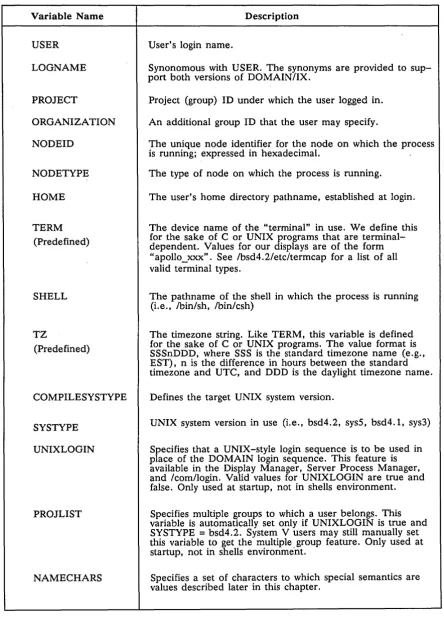
Table 1-2 shows the environment variables used by the DOMAINIIX system.
C\
C
i l...
,.-Overview of the DOMAINIIX System 1-8
-Table 1-2. Summary of Environment Variables Used by the DOMAIN/IX System
o
Variable Name Description
USER User's login name.
LOGNAME Synonomous with USER. The synonyms are provided to sup-port both versions of DOMAIN/IX.
PROJECT Project (group) ID under which the user logged in.
ORGANIZATION An additional group ID that the user may specify.
NODEID The unique node identifier for the node on which the process is running; expressed in hexadecimal.
o
NODETYPE The type of node on which the process is running. HOME The user's home directory pathname, established at login.TERM The device name of the "terminal" in use. We define this (Predefined) for the sake of C or UNIX programs that are terminal-dependent. Values for our displays are of the form
"apollo_xxx". See /bsd4.2/etc/termcap for a list of all valid terminal types.
o
SHELL The pathname of the shell in which the process is running (Le., /bin/sh, /bin/csh)TZ The timezone string. Like TERM, this variable is defined (Predefined) for the sake of C or UNIX programs. The value format is SSSnDDD, where SSS is the standard timezone name (e.g.,
EST), n is the difference in hours between the standard timezone and UTC, and DDD is the daylight time zone name.
o
COMPILESYSTYPE Defines the target UNIX system version.SYSTYPE UNIX system version in use (Le., bsd4.2, sys5, bsd4.1, sys3)
UNIXLOGIN Specifies that a UNIX -style login sequence is to be used in place of the DOMAIN login sequence. This feature is available in the Display Manager, Server Process Manager, and /com/login. Valid values for UNIXLOGIN are true and false. Only used at startup, not in shells environment.
PROJLIST Specifies multiple groups to which a user belongs. This variable is automatically set only if UNIXLOGIN is true and SYSTYPE = bsd4.2. System V users may still manually set this variable to get the multiple group feature. Only used at startup, not in shells environment.
NAMECHARS Specifies a set of characters to which special semantics are values described later in this chapter.
o
[image:21.615.76.521.104.723.2]1.5 Support For Multiple UNIX Versions
The two versions of the UNIX operating system supported by DOMAINIIX software provide a variety of similar - though seldom identical - system services through kernel and library functions. Often, while function x exists in both the sys5 and the bsd4.2 en-vironments, the semantics of the function, and sometimes even its arguments, may be subtly different.
Let's consider the kernel function setpgrp(2). AT&T Systems ill and V define it as: ,int setpgrp
0
to "set the process group id of the calling process to the process id of the calling proc-ess and return the new procproc-ess group id." 4.1BSD and 4.2BSD define a function with the same name and similar semantics, but a different calling sequence:
setpgrp (pid, pgrp) int pid, pgrp ;
"sets the process group of the specified pgrp. Zero is returned if successful; -1 is re-turned and errno is set on a failure."
Nearly every non-trivial C program written to run under the UNIX operating system assumes the run-time environment to be UNIX software of a certain lineage (AT&T or Berkeley), or even a specific version (AT&T System V or 4.2BSD). The UNIX version acts as a modifier of the compile-time environment, and, to a greater extent, of the environment in which the program executes. Our multiple version support is based on this assumption.
At compile time, you select the version of UNIX software for which your program is targeted. This version selector is an environment variable called SYSTYPE. The value of SYSTYPE determines, among other things, which version of lusrlinclude the compiler goes to when it needs an include file. The object module produced by the compiler is stamped with the SYSTYPE in effect when the module was compiled. When the pro-gram is executed, the loader checks this stamp and makes sure that the proper seman-tics and calling sequences are used when invoking system and library functions.
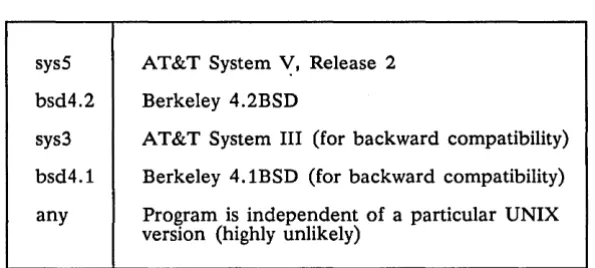
Table 1-3. SYSTYPES Supported by the DOMAINIIX System
sys5
bsd4.2
sys3
bsd4.1
any
AT&T System ~, Release 2 Berkeley 4.2BSD
AT&T System III (for backward compatibility)
Berkeley 4.1BSD (for backward compatibility)
Program is independent of a particular UNIX version (highly unlikely)
You may express the targeted version or "systype" to the C compiler by including it in the source file itself. Use the #systype directive (supported by DOMAIN C compiler) followed by one of the values in Table 1-3. The #systype statement should be the first non-comment statement in the source. Here's an example:
Overview of the DOMAINIIX System 1-10
C)
c~
()
, [image:22.615.156.454.537.671.2]o
o
o
o
o
#systype II SyS5"
mainO
{
setpgrp
0
}Note that the "systype" string is placed in double quotes; the C compiler complains if you don't follow this rule. You can also specify the "systype" on the compiler com-mand line. For the DOMAIN C compiler, Icorn/cc, use the form -systype value. For the DOMAINIIX system interface to Icorn/cc, Ibin/cc, use the form -Tvalue. For exam-ple, in an AEGIS Shell, type:
$ cc berkprog.c -systype bsd4.2 <RETURN> In a C Shell, enter this:
% cc - Tsys5 bellprog.c <RETURN>
If you specify one "systype" on the command line and a different one in the file, the compiler objects. If you don't explicitly specify a "systype" in the source text or on the command line, the value of SYSTYPE is inherited from an environment variable called COMPILESYSTYPE.
If the COMPILESYSTYPE environment variable exists, its value, which must be one of the strings listed above, is used. If COMPILESYSTYPE doesn't exist, the "systype" is inherited from the SYSTYPE environment variable. For example, to compile all pro-grams to run in a sys5 environment, set COMPILESYSTYPE in a sys5 Bourne Shell:
# COMPILESYSTYPE = sys5 <RETURN>
# export COMPILESYSTYPE <RETURN> In a C Shell, the line is:
% setenv COMPILESYSTYPE sys5 <RETURN>
As long as COMPILESYSTYPE is thus set, all C programs are compiled to run in the
sys5 environment. For backward compatibility, if neither COMPILESYSTYPE nor SYS-TYPE environment variables exist, the object file is stamped as having a SYSSYS-TYPE of
sys3 (AT&T System llI).
Note: Any newly-created process that takes its context from a process in which an en-vironment variable was defined and exported recognizes the new variable. Proc-esses already created (or those created later) that don't take their context from the process where the variable was defined won't apply the variable. See Chap-ters 3 and 4.
1.5.1 Name Space Support
The UNIX file system has traditionally contained a small number of system directories with well-known names (lusr, Ibin, letc, Ide v , and Itmp). The structure and content of these directories differ between versions of UNIX software. To support identical1y-named AT&T and Berkeley versions of these directories on the same DOMAIN file sys-tem, we use "variant" links. These links allow a portion of the link text to be replaced by an environment variable.
Symbolic links placed in your node's root directory during the installation procedure let programs use either the sysS or bsd4.2 versions of the Ibin, lete, and lusr directories
(/tmp and Idev are common to both). Normally, the links to Ibin, lusr, and lete are cre-ated by the installation script; if, at some time, you need to re-create them, use In(l).
For example, to create a SYSTYPE-dependent link for Ibin, type this:
% In -s '1$ (systype)lbin' Ibin
<RETURN>
Note: The single quotes around the link text are required, to prevent the dollar sign from being interpreted as a shell metacharacter.
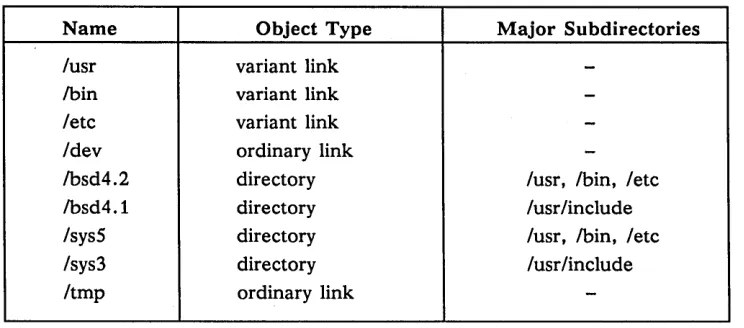
The SYSTYPE environment variable is used to select the UNIX file system variant, and therefore, commands, libraries, spool directories, and so on. Table 1-4 shows the top-level DOMAINIIX directory organization.
Table 1-4. Top-Level DOMAIN/IX Directory Organization
Name Object Type Major Subdirectories
fusr variant link
-!bin variant link
-fete variant link
-fdev ordinary link
-!bsd4.2 directory fusr, !bin, fete
!bsd4.1 directory fusrfinclude fsys5 directory fusr, !bin, fete
fsys3 directory fusrfinclude
Itmp ordinary link
-Note: In the table above, ordinary links are those that don't contain the name of an environment variable. In the case of Idev and Itmp, these should be links to your
0
1C:
c'
node's 'node_dataldev and 'node_dataltmp files respectively. ( \
,--,/
The variant links for sys3 and bsd4.1 are limited to lusrlinelude. References to other
sys3 directories are resolved as they would be for sysS. References to other bsd4.1 di-rectories are resolved as they would be for bsd4.2. This ensures that programs com-piled to run in the sys3 or bsd4.1 environments get the proper include files, but it means that when you invoke a sys3 or bsd4.1 environment for interactive use, you do not get the "old" versions of, for example, commands and macro packages.
Each node's Itmp directory is usually a link to 'node_dataltmp. One of the less obvious side effects of this can be easily illustrated. For example, the following two command lines executed on node l/foo both list the contents of l/foo' s 'node _ dataltmp directory:
% Is Itmp
cattoc
% Is Ilfoo/tmp
cattoc
%
<RETURN>
ipc.out
<RETURN>
ipc.out
Overview of the DOMAINIIX System 1-12
toc143
[image:24.612.117.489.292.456.2]o
o
o
(~
o
To list the contents of //foo/tmp, you need to be more explicit:
% Is IIfoo/sys/node_data/tmp <RETURN>
dirs In
%
1.5.2 Environment Switching
The object-module stamping scheme, described earlier, lets you execute System V pro-grams from any BSD4.2 shell and vice versa, without any knowledge of the UNIX ver-sion for which the program was targeted. When you invoke a program stamped with a
systype other than any, the SYSTYPE environment variable for the process in which the
program is running is set to the value found in the object module. This ensures that programs of one UNIX version that depend on certain system files continue to work when executed from a process running in another version. The /etc/systype program
dis-plays the version stamp of the specified object files.
A shell's SYSTYPE value defines the version (sys5, bsd4.2) of system directories that
are searched when a command name is given; hence, it defines the version of the command that is executed.
To simplify the execution of a version x command from a version y shell, we provide a "set-version" command. See ver(8) in the DOMAINIIX Command Reference for BSD4.2,
or ver(lM) in the DOMAINIIX Command Reference for System V. You can use ver in the
following three ways:
• To display the current value of SYSTYPE, execute ver with no arguments. For ex-ample, the following checks SYSTYPE and finds it to be set to bsd4.2:
% ver <RETURN> bsd4.2
• To change SYSTYPE to value, thereby changing the version of subsequently
exe-cuted commands, use the form ver value. For example, the first command line sets
the SYSTYPE to sys5, and the second command line executes a sys5 version of Is (SYSTYPE remains the same until it is reset):
% ver sysS
% Is prog.c prog.o testfile
%
<RETURN> <RETURN>
(Set SYSTYPE to sys5) (Do an Is)
Note: Using ver with a single argument of either sys5 or bsd4.2 simply changes the
value of SYSTYPE. If you execute the command
B $ ver sysS <RETURN>
in a bsd4.2 Bourne Shell, it is equiv,Hent to saying
B$ SYSTYPE=sysS <RETURN>
• To execute the value version of command without changing SYSTYPE, use the form
ver value command. For example, the first command executes the sysS version of ~
id{l), while the second command line executes the bsd4.2 version (the default, in ~/) this case) of Is{l):
% ver sys5 id <RETURN> uid=212(kate) gid=38(unix)
% Is <RETURN>
prog.c prog.o testfile
1.6 Setting Up a UNIX-Style Login Sequence
You may arrange for the OM, Server Process Manager, and Icomllogin to use a UNIX-style login sequence by including the following in a OM startup file:
# put this line in I node _ datal startup
# if you want to use a UNIX-style login sequence
C
env UNIXLOGIN true _,.
When UNIXLOGIN is true:
• the prompt is changed to "login: "
• the rejection message is changed to "login incorrect"
'. upon successful login, the file letcldmmsg is displayed in the OM output window BS04.2 users whose UNIXLOGIN is set to true are automatically placed in their pro-ject lists at login. Although multiple groups do not exist in other implementations of System V software, OOMAINIIX System V users can get the multiple group feature by manually setting the PROJLIST variable.
In addition, the "backup" group (%.backup) is special-cased out of the project list in UNIXLOGIN. This eliminates the possibility of login problems that would otherwise occur if you had multiple accounts (one of which is a backup account) and the shell you invoke with the login had no execute rights for %.backup. In such a case, you would not be allowed to invoke the shell if the first account matched was the
%.backup account. The "sys_admin" and "locksmith" accounts are also special-cased out of the project list to prevent similar problems.
1.7 Message of the Day (motd)
Regardless of how UNIXLOGIN is set, the specified UNIX Shell (/bin/sh or /bin/csh)
reads an acceptance message from /etc/motd and then displays it in the transcript pad of the shell window. To suppress the display of the /etc/motd file, use the -s (silent) switch when invoking a shell. The following key definition creates new windows with-out printing the message of the day:
kd 15s cp Ibin/start_sh '-s' ke
If letc is a variant link (the usual case), the SYSTYPE variable must be set to bsd4.2
or sysS; otherwise, the OM cannot locate /etclmotd. If etc/motd isn't found at startup, a
C)
standard AEGIS login acceptance message, minus the "project" and "organization"fields, appears in the OM output window.
o
o
1.8 Setting Up Server Processes
The /etc/rc file (normally a link to 'node_data/etc.rc) is a file of commands to be exe-cuted at boot time. Many of these commands invoke server processes that must be in-voked by the super-user ("root"). On DOMAIN systems, 'node_data/etc.rc is executed by the /etc/run_rc command. Note, however, that SYSTYPE must be set early in the startup, before trying to run /etc/run_rc.
# put this line in I node_data/startup if you want to run
# I node data/etc. rc whenever the node is booted
cps /etc/run _rc
The 'node_data/etc.rc file must be owned by "root" and have a UNIX file system mode of 4755 (Le., have the setuid bit on). The run_rc program runs this file as "root", then may exec another file, 'node_data/etc.rc.local, to which any user may add com-mands that do not have to run (and will not be run) with a user ID of "root". For more information, see the manual page for rc(8) or rc(lM).
1.9 Getting Help
For information about available UNIX commands, system calls, and functions, use the man(l) command. This command lets you select and display on-line versions of refer-ence material from the DOMAIN/IX Command Reference, the DOMAINIIX Programmer's Reference, and the DOMAINIIX System Administration manuals. For example, to display the manual page for the command who(l), type this in any UNIX Shell:
o
% man who <RETURN>o
o
The man command then opens a read window containing a formatted version of the manual page(s) on the who(l) command. See the DOMAINIIX Text Processing Guide for more information on how to scroll through and search for patterns (keywords) in these windows. While the manual page is displayed, you may continue to execute shell com-mands (including other man comcom-mands). When you're finished reading the manual page, type tN or press <EXIT> to close the window.
Note: The man command uses the symbolic links in effect for the SYSTYPE of the shell in which it is executed. When man is executed in a shell with a SYSTYPE of sysS, manual pages are read from /sysS/usrlcatman. When executed in a shell with a SYSTYPE of bsd4.2, they are taken from /bsd4.2/usr/man.
If no manual page is available for the particular command, call, or function that you specify, man outputs the message "No manual entry for ... "
1.10 Other DOMAINIIX Features
This section contains miscellaneous facts that will be especially helpful if you plan to develop applications software to run on your DOMAIN system.
1.10.1 The Process Model
Some implementations of UNIX versions use a one-program-per-process execution model. In this model, invocation of a new program causes a separate process to be
created using the fork(2) system call. The DOMAIN system, on the other hand, favors a mUltiple-programs-per-process model in which an invoked program runs at a new
program level in the invoking process. The DOMAINIIX C Shell includes support for a
0
shell variable called inprocess. When set, it specifies in-process execution (the standard.~
DOMAIN process model); when unset (the default value), it specifies the traditionalprocess model.
You can set inprocess as a DM environment variable. In fact, we recommend doing this if you plan to access, from the C Shell, objects managed under the DOMAIN Software Engineering Environment (DSEE). To set inprocess in the DM, put the following line in any DM command file read before the C Shell is started (e.g., 'node_data/startup):
env INPROCESS 'true'
If inprocess is set in this way, the C Shell runs as if your .cshrc contained this line: set INPROCESS
If an "env INPROCESS" line isn't present in a DM startup-file, or is not set to 'true'
or 'TRUE', the shell variable inprocess determines the process model used by a shell.
C
Remember, however, that the C Shell uses unset as the default value of inprocess. TheC Shell doesn't export inprocess to the DM if you set it in .cshrc or .login files. Each process model has certain advantages and disadvantages. Chapter 4, which de-scribes the C Shell, supplies details about the use of inprocess, including a summary of associated benefits and drawbacks.
1.10.2 Case Mapping
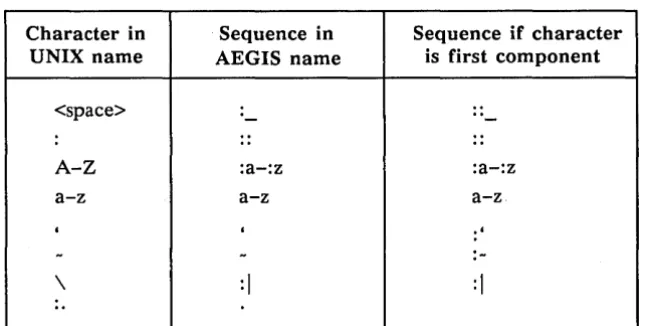
DOMAINIIX component names may contain any ASCII character except slash and null. Uppercase alphabetics and certain other characters are stored as two-character escape sequences. Component names are limited to 32 characters, including escape characters. A component name consisting exclusively of uppercase alphabetics is limited to 16 characters, since each character is stored as a two-character escape sequence. Table 1-5 shows filename case mapping considerations. Any character not listed in the first column is passed unchanged to the DOMAIN naming server.
Note: In some cases, a character requires an escape only if it is used as the first char-acter of a component name.
Table 1-5. Filename Case Mapping
Character in Sequence in Sequence if character UNIX name AEGIS name is first component
<space> : - 0 0
-: • 0
..
A-Z :a-:z :a-:z
a-z a-z a-z
, , .'
-
-
:-\
:1
:1
o.
[image:28.615.149.475.571.734.2]o
o
o
o
o
In addition to the mapping rules summarized thus far, the control characters t A - t_ (hex 01-lF) are mapped using the representation
:#xx
where
xx
is the hex value of the control character. For example, a pathname compo-nent AbtC is mapped as:ab:#03
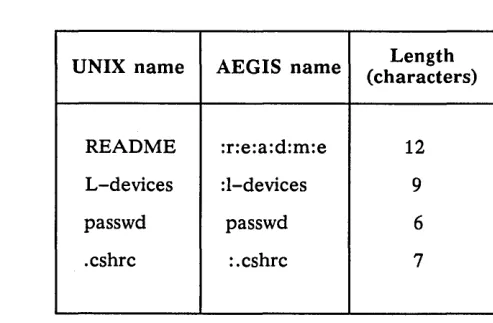
When a pathname component includes an uppercase alphabetic, backslash, colon, or initial dot/tilde, that character adds two characters to the total number of characters in the component. See Table 1-6 for some examples.
Table 1-6. Other Filename Characteristics
UNIX name AEGIS name (characters) Length
README :r:e:a:d:m:e 12
L-devices :l-devices 9
passwd passwd 6
.cshrc :.cshrc 7
An AEGIS Shell displays uppercase letters and other characters that require an escape in their escaped form. If you need to create an uppercase (or other escaped) character in an AEGIS Shell, you must escape it with a colon when you create the name.
By default, all characters except slash and null are mapped and stored in component names. We provide an additional feature of special meanings for the tilde (-), back-slash (\), and backquote ('). Use the NAME CHARS environment variable to ensure that any or all of these characters retain the following special meanings when read by the naming server:
tilde home directory (or "naming directory' ')
backs lash parent directory
backquote "this_node/sys" (e.g., 'node_data)
Note: Although the DOMAINIIX system kernel automatically sets
env NAMECHARS '-\1'
that default setting is overridden by any "env NAMECHARS" line that you in-clude in your DM startup file. Thus, to retain the ability to access the naming directory with a leading tilde and the parent directory with a backs lash, and to reference 'node_data, set NAME CHARS to the string -'\ by including the above line in a DM startup file. Also, remember not to begin filenames with a back-quote or tilde character.
[image:29.613.145.392.245.407.2]The most obvious symptoms of an undefined backquote relate to the naming server's inability to find the directory 'node_data. This results in such problems as the failure
of server daemons to start at boot time (they are invoked from 'node_dataletc.rc) and ( \
"'-_.,)
an inability to find Idev (a link to 'node_dataldev) and Itmp (a link to 'node_dataltmp).
Where references using special characters are coded into programs, we recommend that a network-wide standard be established for the value of NAMECHARS. For pro-grams that are to be transported to other networks or systems, take special care with respect to this feature.
1.10.3 Password and User Identification
The process of login verification and home-directory setting are always handled by the DOMAIN system's login mechanism, but we provide a way to generate an letclpasswd
file so that UNIX programs that need to access it can do so. To ensure that users at a site have accounts on both the DOMAIN network registry and in Ie tcIpasswd, your sys-tem administrator must invoke crpasswd(8) or crpasswd(lM) each time a new user account is added or changes must be made to letclpasswd. See System Administration for DOMAlNIIX BSD4.2 or System Administration for DOMAlNIIX Sys5 for further informa-tion on this.
Users should not tamper with the letclpasswd file themselves, because of the danger of removing it accidentally. If this happens, UNIX user IDs assigned by a subsequent run of crpasswd may not map correctly to system UIDs held in Isyslnode_datalacl_cache.
One result of such a mapping inconsistency is that chmod(l) changes the owner of a file as well as the access mode.
All DOMAIN network registry in~ormation must be case correct. Otherwise, case sensi-tive programs will report that your home directory cannot be found.
1.10.4 File Protection, Permissions, and Ownership
The normal protection mechanism in the DOMAIN environment is the access control list (ACL). Every object (file, directory, etc.) has an ACL associated with it. The ACL mechanism includes support for all of the access modes normally associated with the UNIX system, including directory search and delete-from-directory.
We provide a default_acl(2) system call that allows programs to specify either UNIX access mode or ACL as the means of object protection. When the default is to use ACLs, the system assigns all files, pipes, and directories created with creat(2), mknod(2) , open(2) , and mkdir(2) an ACL corresponding to the value of the mode specified in the call, modified by the current umask(l) value.
Note: If an object's ACL specifies more than one "group" owner, its UNIX access mode shows group rights for only one of the groups. In this case, ownership is determined by a uid sort (the "first" group owner in the access control list is given ownership) and is therefore non-deterministic.
Objects created in (or moved into) directories with a nil or unset initial file or initial directory ACL can have "DOMAINIIX ACLs" applied to them automatically. We pro-vide a special program, called sup, that converts the protection scheme of your
pre-Overview of the DO MAIN I IX System 1-18