201 West 103rd St., Indianapolis, Indiana, 46290 USA
Robert Lafore
Data Structures
and Algorithms
in
24
Hours
Sams Teach Yourself Data Structures and
Algorithms in 24 Hours
Copyright © 1999 by Sams Publishing
All rights reserved. No part of this book shall be reproduced, stored in a retrieval system, or transmitted by any means, electronic, mechanical, photo-copying, recording, or otherwise, without written permission from the pub-lisher. No patent liability is assumed with respect to the use of the information contained herein. Although every precaution has been taken in the preparation of this book, the publisher and author assume no responsibility for errors or omissions. Neither is any liability assumed for damages resulting from the use of the information contained herein.
International Standard Book Number: 0-672-31633-1
Library of Congress Catalog Card Number: 98-83221
Printed in the United States of America
First Printing: May 1999
01 00 99 4 3 2 1
Trademarks
All terms mentioned in this book that are known to be trademarks or service marks have been appropriately capitalized. Sams Publishing cannot attest to the accuracy of this information. Use of a term in this book should not be regarded as affecting the validity of any trademark or service mark.
Warning and Disclaimer
Every effort has been made to make this book as complete and as accurate as possible, but no warranty or fitness is implied. The information provided is on an “as is” basis. The authors and the publisher shall have neither liability or responsibility to any person or entity with respect to any loss or damages aris-ing from the information contained in this book or from the use of the CD-ROM or programs accompanying it.
EXECUTIVEEDITOR Brian Gill
DEVELOPMENTEDITOR Jeff Durham
MANAGINGEDITOR Jodi Jensen
PROJECTEDITOR Tonya Simpson
COPYEDITOR Mike Henry INDEXER Larry Sweazy PROOFREADERS Mona Brown Jill Mazurczyk
TECHNICALEDITOR Richard Wright
SOFTWAREDEVELOPMENT SPECIALIST
Dan Scherf
INTERIORDESIGN Gary Adair
COVERDESIGN Aren Howell
COPYWRITER Eric Borgert
Contents at a Glance
Introduction 1
PARTI INTRODUCINGDATASTRUCTURES ANDALGORITHMS 9
Hour 1 Overview of Data Structures and Algorithms 11
2 Arrays 31
3 Ordered Arrays 51
4 The Bubble Sort 75
5 The Insertion Sort 89
PARTII ABSTRACT DATATYPES 105
Hour 6 Stacks 107
7 Queues and Priority Queues 125
8 Linked Lists 145
9 Abstract Data Types 165
10 Specialized Lists 183
PARTIII RECURSION ANDQUICKSORT 205
Hour 11 Recursion 207
12 Applied Recursion 233
13 Quicksort 257
14 Improving Quicksort 279
PARTIV TREES 295
Hour 15 Binary Trees 297
16 Traversing Binary Trees 317
17 Red-Black Trees 337
18 Red-Black Tree Insertions 359
19 2-3-4 Trees 379
PARTV HASHTABLES 415
Hour 21 Hash Tables 417
22 Quadratic Probing 441
23 Separate Chaining 457
24 When to Use What 475
PARTVI APPENDIXES 487
Appendix A Quiz Answers 489
B How to Run the Workshop Applets and Sample Programs 505
C Further Reading 509
Table of Contents
INTRODUCTION 1
What This Book Is About ...1
What’s Different About This Book...2
Easy to Understand ...2
Workshop Applets ...2
C++ Sample Code ...3
Who This Book Is For ...3
What You Need to Know Before You Read This Book ...4
The Software You Need to Use This Book...4
How This Book Is Organized ...4
Enjoy Yourself! ...6
Conventions Used in This Book ...6
PARTI INTRODUCINGDATASTRUCTURES ANDALGORITHMS 9 HOUR1 OVERVIEW OFDATASTRUCTURES ANDALGORITHMS 11 Some Uses for Data Structures and Algorithms...12
Real-World Data Storage...12
Programmer’s Tools...14
Real-World Modeling ...14
Overview of Data Structures ...14
Overview of Algorithms ...15
Some Initial Definitions ...16
Datafile ...16
Record ...16
Field ...16
Key...16
Search Key...17
A Quick Introduction to Object-Oriented Programming ...18
Problems with Procedural Languages ...18
Objects in a Nutshell ...19
A Runnable Object-Oriented Program ...21
Inheritance and Polymorphism ...24
New C++ Features ...25
The stringClass...25
The vectorClass...26
Software Engineering ...26
Q&A ...28
Workshop ...28
Quiz ...28
Exercise ...29
HOUR2 ARRAYS 31 The Array Workshop Applet ...31
Deletion ...34
The Duplicates Problem ...35
Slow Array Algorithms ...37
An Array Example ...37
Inserting a New Item ...39
Searching for an Item ...39
Deleting an Item ...39
Displaying the Array Contents ...40
Program Organization ...40
Dividing a Program into Classes ...40
The LowArrayClass and main()...42
Class Interfaces ...43
Making main()’s Job Easier ...43
Who’s Responsible for What? ...44
The highArray.cppExample ...44
The User’s Life Made Easier...48
Abstraction...48
Summary ...48
Q&A ...49
Workshop ...49
Quiz ...49
Exercise ...50
HOUR3 ORDEREDARRAYS 51 The Ordered Workshop Applet ...51
Demonstrating the Linear Search ...52
Demonstrating the Binary Search ...53
C++ Code for an Ordered Array...55
Conducting a Binary Search with the find()Member Function ...56
Investigating the OrdArrayClass...57
The Advantages of Using Ordered Arrays ...60
Logarithms ...61
An Equation Relating Range Size and Number of Steps ...62
The Opposite of Raising Two to a Power ...63
Storing Objects ...64
Implementing the PersonClass...64
Examining the classDataArray.cppProgram ...65
Big O Notation ...69
Inserting into an Unordered Array: Constant ...69
Linear Searching: Proportional to N ...69
Binary Searching: Proportional to log(N) ...70
Eliminating the Constant K ...70
Why Not Use Arrays for Everything? ...72
Summary ...72
Q&A ...72
Workshop ...73
Quiz ...73
Exercise ...73
HOUR4 THEBUBBLESORT 75 Sorting...75
Inventing Your Own Sorting Algorithm ...76
Bubble-Sorting the Baseball Players ...77
The bubbleSort Workshop Applet...79
Sorting at Full Speed with the Run Button ...80
Starting a New Sort with the New Button...80
Single-Stepping with the Step Button ...81
Changing the Array Size with the Size Button ...81
Fixing the Picture with the Draw Button ...82
Implementing C++ Code for a Bubble Sort ...83
Invariants...86
Efficiency of the Bubble Sort ...86
Summary ...87
Q&A ...87
Workshop ...88
Quiz ...88
Exercise ...88
HOUR5 THEINSERTIONSORT 89 Insertion Sort on the Baseball Players ...90
Demonstrating Partial Sorting ...90
Inserting the Marked Player in the Appropriate Location ...90
The insertSort Workshop Applet...92
Implementing the Insertion Sort in C++...94
Invariants in the Insertion Sort ...97
Efficiency of the Insertion Sort...97
Sorting Objects ...98
Implementing C++ Code to Sort Objects ...98
Another Feature of Sorting Algorithms: Stability ...101
Comparing the Simple Sorts...102
Summary ...102
Q&A ...103
Workshop ...103
Quiz ...103
Exercise ...103
PARTII ABSTRACT DATATYPES 105 HOUR6 STACKS 107 A Different Way to Think About Data Structure ...107
Uses for Stacks and Queues: Programmer’s Tools ...108
Stacks and Queues: Restricted Access to Data ...108
Stacks and Queues: More Abstract ...108
Understanding Stacks ...109
Two Real-World Stack Analogies ...109
The Stack Workshop Applet ...111
Implementing a Stack in C++...113
StackXClass Member Functions...114
Error Handling...116
Stack Example 1: Reversing a Word ...116
Stack Example 2: Delimiter Matching ...118
Opening Delimiters on the Stack ...119
C++ Code for brackets.cpp...120
Using the Stack as a Conceptual Aid ...123
Efficiency of Stacks ...123
Summary ...123
Q&A ...124
Workshop ...124
Quiz ...124
Exercise ...124
HOUR7 QUEUES ANDPRIORITYQUEUES 125 Queues...125
The Queue Workshop Applet ...126
A Circular Queue...130
C++ Code for a Queue ...132
Efficiency of Queues ...137
Priority Queues ...137
The PriorityQ Workshop Applet ...138
C++ Code for a Priority Queue ...141
Efficiency of Priority Queues ...143
Summary ...143
Q&A ...144
Workshop ...144
Quiz ...144
Exercise ...144
HOUR8 LINKEDLISTS 145 Understanding Links...146
Structure Defined by Relationship, Not Position ...147
The LinkList Workshop Applet ...147
Inserting a New Link ...147
Using the Find Button ...148
Using the Del Button...149
Creating Unsorted and Sorted Lists ...149
Implementing a Simple Linked List ...149
The LinkClass...150
The LinkListClass ...151
The insertFirst()Member Function ...151
The removeFirst()Member Function ...153
The displayList()Member Function ...153
The linkList.cppProgram...155
Finding and Removing Specified Links ...157
The find()Member Function...160
The remove()Member Function ...161
Avoiding Memory Leaks ...162
The Efficiency of Linked Lists ...162
Summary ...163
Q&A ...163
Workshop ...164
Quiz ...164
Exercise ...164
HOUR9 ABSTRACTDATATYPES 165 A Stack Implemented By a Linked List ...166
Implementing push()and pop()...166
Implementing a Stack Based on a Linked List ...167
Focusing on Class Relationships...170
Double-Ended Lists ...170
Accessing Both Ends of a List ...170
Implementing a Double-Ended List ...171
Pointers to Both Ends of the List ...174
Insertion and Deletion Routines ...174
x Sams Teach Yourself Data Structures and Algorithms in 24 Hours
Implementing a Queue Using a Linked List ...175
Data Types and Abstraction ...178
What We Mean by Data Types ...178
What We Mean by Abstraction ...179
ADT Lists ...180
Using ADTs as a Design Tool ...180
Abstract is a Relative Term...181
Summary ...181
Q&A ...181
Workshop ...182
Quiz ...182
Exercise ...182
HOUR10 SPECIALIZEDLISTS 183 Sorted Lists ...183
The LinkList Workshop Applet ...184
Implementing an Insertion Function in C++...185
Implementing a Sorted List ...186
Efficiency of Sorted Linked Lists ...189
List Insertion Sort ...189
Doubly Linked Lists ...192
The Problem with Singly Linked Lists ...192
Implementing a Doubly Linked List ...193
C++ Code for a Doubly Linked List ...197
Summary ...202
Q&A ...203
Workshop ...203
Quiz ...203
Exercise ...203
PARTIII RECURSION ANDQUICKSORT 205 HOUR11 RECURSION 207 Demonstrating Recursion with Triangular Numbers ...208
Finding the nth Term Using a Loop ...208
Finding the nth Term Using Recursion ...209
The triangle.cppProgram...212
What the triangle()Function Is Really Doing...213
Characteristics of Recursive Functions ...215
Is Recursion Efficient? ...215
Contents xi
Demonstrating Recursion with Anagrams ...216
Conceptualizing the Anagram Process ...217
Implementing Anagramming in C++ ...220
Demonstrating Recursion in a Binary Search ...223
Using Recursion to Replace the Loop...223
Understanding Divide-and-Conquer Algorithms ...228
Recursion Versus Stacks ...228
Summary ...230
Q&A ...231
Workshop ...231
Quiz ...231
Exercise ...232
HOUR12 APPLIEDRECURSION 233 The Towers of Hanoi ...233
The Towers Workshop Applet ...234
Moving Subtrees ...235
The Recursive Algorithm ...236
Implementing the Towers of Hanoi in C++ ...238
Mergesort ...240
Merging Two Sorted Arrays ...240
Sorting by Merging ...243
The mergeSort Workshop Applet ...246
Implementing Mergesort in C++...247
Efficiency of the Mergesort ...251
Summary ...254
Q&A ...255
Workshop ...255
Quiz ...255
Exercise ...256
HOUR13 QUICKSORT 257 Partitioning ...258
The Partition Workshop Applet ...258
The partition.cppProgram...260
The Partition Algorithm...262
Efficiency of the Partition Algorithm ...264
Basic Quicksort...265
The Quicksort Algorithm...265
Choosing a Pivot Value ...266
The quickSort1 Workshop Applet ...272
Q&A ...278
Workshop ...278
Quiz ...278
Exercise ...278
HOUR14 IMPROVINGQUICKSORT 279 Problems with Inversely Sorted Data ...279
Median-of-Three Partitioning ...280
Implementing Median-of-Three Partitioning in C++ ...282
The quickSort2 Workshop Applet ...286
Handling Small Partitions...286
Using an Insertion Sort for Small Partitions ...286
Insertion Sort Following Quicksort ...290
Efficiency of Quicksort...290
Summary ...293
Q&A ...294
Workshop ...294
Quiz ...294
Exercise ...294
PARTIV TREES 295 HOUR15 BINARYTREES 297 Why Use Binary Trees? ...297
Slow Insertion in an Ordered Array ...298
Slow Searching in a Linked List ...298
Trees to the Rescue ...299
What Is a Tree? ...299
Tree Terminology ...300
A Tree Analogy in Your Computer ...303
Basic Binary Tree Operations...304
The Tree Workshop Applet ...304
Representing the Tree in C++ Code ...306
Finding a Node ...308
Using the Workshop Applet to Find a Node ...309
C++ Code for Finding a Node ...310
Efficiency of the Find Operation...311
Inserting a Node ...311
Using the Workshop Applet to Insert a Node ...311
C++ Code for Inserting a Node...312
Deleting a Node ...314
Summary ...314
Q&A ...315
Workshop ...315
Quiz ...315
Exercise ...316
HOUR16 TRAVERSINGBINARYTREES 317 Traversing the Tree ...317
Inorder Traversal ...318
C++ Code for Traversing...318
Traversing a 3-Node Tree ...319
Traversing with the Workshop Applet...320
Preorder and Postorder Traversals...322
Finding Maximum and Minimum Values...324
The Efficiency of Binary Trees...326
Duplicate Keys ...327
Implementing a Binary Search Tree in C++...328
Summary ...335
Q&A ...335
Workshop ...335
Quiz ...336
Exercise ...336
HOUR17 RED-BLACKTREES 337 Our Approach to the Discussion...338
Balanced and Unbalanced Trees...338
Performance Degenerates to O(N) ...339
Balanced Trees to the Rescue ...340
Red-Black Tree Characteristics ...341
The Actions ...342
Using the RBTree Workshop Applet ...343
Clicking on a Node ...343
The Start Button ...343
The Ins Button ...344
The Del Button ...344
The Flip Button ...344
The RoL Button...344
The RoR Button...345
The R/B Button ...345
Text Messages ...345
Where’s the Find Button? ...345
Experimenting...345
Experiment 1: Simple Insertions ...345
Experiment 2: Rotations ...347
Experiment 3: Color Flips ...348
Experiment 4: An Unbalanced Tree ...349
Experimenting on Your Own ...350
The Red-Black Rules and Balanced Trees ...350
Null Children ...350
Rotations ...351
Simple Rotations ...352
The Weird Crossover Node ...352
Subtrees on the Move ...354
Human Beings Versus Computers ...355
Summary ...356
Q&A ...356
Workshop ...357
Quiz ...357
Exercise ...357
HOUR18 RED-BLACKTREEINSERTIONS 359 Inserting a New Node ...360
Preview of Our Approach ...360
Color Flips on the Way Down ...361
Rotations After the Node Is Inserted...363
Rotations on the Way Down ...370
Deletion...373
Efficiency of Red-Black Trees ...374
Implementing the Insertion Process ...374
Other Balanced Trees ...375
AVL Trees ...375
Multiway Trees ...375
Summary ...376
Q&A ...376
Workshop ...376
Quiz ...377
Exercise ...377
HOUR19 2-3-4 TREES 379 Introduction to 2-3-4 Trees ...379
What’s in a Name? ...380
2-3-4 Tree Organization ...381
Searching for a Data Item ...383
Inserting a New Data Item ...383
Node Splits ...384
Splitting the Root...385
The Tree234 Workshop Applet ...387
The Fill Button ...388
The Find Button...388
The Ins Button ...389
The Zoom Button ...389
Viewing Different Nodes...390
Experimenting on Your Own ...392
Summary ...392
Q&A ...393
Workshop ...393
Quiz ...393
Exercise ...394
HOUR20 IMPLEMENTING2-3-4 TREES 395 Implementing a 2-3-4 Tree in C++...395
The DataItemClass ...396
The NodeClass...396
The Tree234Class ...396
The main()Function ...398
Listing for tree234.cpp ...398
2-3-4 Trees and Red-Black Trees ...405
Transformation from 2-3-4 to Red-Black ...406
Operational Equivalence ...406
Efficiency of 2-3-4 Trees ...409
Speed ...410
Storage Requirements ...411
B-Trees and External Storage ...412
Summary ...412
Q&A ...413
Workshop ...413
Quiz ...413
Exercise ...414
PARTV HASHTABLES 415 HOUR21 HASHTABLES 417 Introduction to Hashing ...417
Employee Numbers as Keys ...418
A Dictionary ...420
Hashing ...423
Collisions ...426
Linear Probing ...427
The Hash Workshop Applet...427
Duplicates Allowed? ...432
Clustering...432
C++ Code for a Linear Probe Hash Table ...432
Classes in hash.cpp...436
The find()Member Function...436
The insert()Member Function ...437
The remove()Member Function ...437
The main()Routine...437
Summary ...438
Q&A ...439
Workshop ...439
Quiz ...439
Exercise ...439
HOUR22 QUADRATICPROBING 441 Quadratic Probing ...442
The Step Is the Square of the Step Number ...442
The HashDouble Applet with Quadratic Probes ...442
The Problem with Quadratic Probes ...444
Double Hashing ...444
The HashDouble Applet with Double Hashing...445
C++ Code for Double Hashing ...446
Make the Table Size a Prime Number...451
Efficiency of Open Addressing...451
Linear Probing ...452
Quadratic Probing and Double Hashing ...452
Expanding the Array ...454
Summary ...455
Q&A ...455
Workshop ...456
Quiz ...456
Exercise ...456
HOUR23 SEPARATECHAINING 457 The HashChain Workshop Applet ...458
Insertion ...459
Load Factors ...460
Duplicates ...460
[image:17.720.150.460.86.575.2]Deletion ...460
Table Size ...461
C++ Code for Separate Chaining ...461
Efficiency of Separate Chaining ...466
Searching ...467
Insertion ...467
Open Addressing Versus Separate Chaining...468
Hash Functions ...469
Quick Computation ...469
Random Keys ...469
Non-Random Keys ...469
Hashing Strings ...471
Summary ...473
Q&A ...474
Workshop ...474
Quiz ...474
Exercise ...474
HOUR24 WHEN TOUSEWHAT 475 General-Purpose Data Structures ...476
Speed and Algorithms ...477
Libraries...478
Arrays ...478
Linked Lists ...478
Binary Search Trees...479
Balanced Trees...479
Hash Tables ...479
Comparing the General-Purpose Storage Structures...480
Special-Purpose Data Structures...481
Stack ...481
Queue...482
Priority Queue ...482
Comparison of Special-Purpose Structures...483
Sorting...483
Onward ...484
PARTVI APPENDIXES 487 APPENDIXA QUIZANSWERS 489 Hour 1, “Overview of Data Structures and Algorithms” ...489
Hour 2, “Arrays” ...490
Hour 3, “Ordered Arrays”...490
Hour 4, “The Bubble Sort” ...491
Hour 5, “The Insertion Sort” ...492
Hour 6, “Stacks” ...492
Hour 7, “Queues and Priority Queues” ...493
Hour 8, “Linked Lists” ...494
Hour 9, “Abstract Data Types” ...494
Hour 10, “Specialized Lists” ...495
Hour 11, “Recursion” ...496
Hour 12, “Applied Recursion” ...496
Hour 13, “Quicksort” ...497
Hour 14, “Improving Quicksort” ...498
Hour 15, “Binary Trees” ...498
Hour 16, “Traversing Binary Trees”...499
Hour 17, “Red-Black Trees”...500
Hour 18, “Red-Black Tree Insertions” ...500
Hour 19, “2-3-4 Trees” ...501
Hour 20, “Implementing 2-3-4 Trees” ...502
Hour 21, “Hash Tables” ...503
Hour 22, “Quadratic Probing” ...503
Hour 23, “Separate Chaining” ...504
APPENDIXB HOW TORUN THEWORKSHOPAPPLETS ANDSAMPLEPROGRAMS 505 The Workshop Applets ...506
Opening the Workshop Applets...506
Operating the Workshop Applets...506
Multiple Class Files...507
The Sample Programs...507
Running the Sample Programs ...508
Compiling the Sample Programs...508
Terminating the Sample Programs ...508
APPENDIXC FURTHERREADING 509 Data Structures and Algorithms ...509
Object-Oriented Programming Languages ...510
Object-Oriented Design and Software Engineering ...511
Programming Style ...512
INDEX 513
About the Author
Robert Lafore has degrees in Electrical Engineering and Mathematics, has worked as a
systems analyst for the Lawrence Berkeley Laboratory, founded his own software com-pany, and is a best-selling writer in the field of computer programming. Some of his cur-rent titles are C++ Interactive Course, Object-Oriented Programming in C++, and Data
Structures and Algorithms in Java by all Waite Group Press. Earlier best-selling titles
Dedication
This book is dedicated to Laurie Cameron, a friend since the Paleolithic era, and our English teacher Mrs. Mathews. Rule 22! Semicolons separate independent clauses!
Acknowledgments
Tell Us What You Think!
As the reader of this book, you are our most important critic and commentator. We value your opinion and want to know what we’re doing right, what we could do better, what areas you’d like to see us publish in, and any other words of wisdom you’re willing to pass our way.
As an Associate Publisher for Sams Publishing, I welcome your comments. You can fax, email, or write me directly to let me know what you did or didn’t like about this book— as well as what we can do to make our books stronger.
Please note that I cannot help you with technical problems related to the topic of this book, and that due to the high volume of mail I receive, I might not be able to reply to every message.
When you write, please be sure to include this book’s title and author as well as your name and phone or fax number. I will carefully review your comments and share them with the author and editors who worked on the book.
Fax: 317-581-4770
Email: [email protected]
Introduction
This introduction tells you briefly
● What this book is about
● Why it’s different
● Who might want to read it
● What you need to know before you read it
● The software and equipment you need to use it
● How this book is organized
What This Book Is About
This book is about data structures and algorithms as used in computer programming. Data structures are ways in which data is arranged in your computer’s memory (or stored on disk). Algorithms are the procedures a software program uses to manipulate the data in these structures.
Almost every computer program, even a simple one, uses data structures and algorithms. For example, consider a program that prints address labels. The program might use an array containing the addresses to be printed, and a simple forloop to step through the array, printing each address.
The array in this example is a data structure, and the forloop, used for sequential access to the array, executes a simple algorithm. For uncomplicated programs with small amounts of data, such a simple approach might be all you need. However, for programs that handle even moderately large amounts of data, or which solve problems that are slightly out of the ordinary, more sophisticated techniques are necessary. Simply know-ing the syntax of a computer language such as C++ isn’t enough.
2 Sams Teach Yourself Data Structures and Algorithms in 24 Hours
What’s Different About This Book
There are dozens of books on data structures and algorithms. What’s different about this one? Three things:
● Our primary goal in writing this book is to make the topics we cover easy to under-stand.
● Demonstration programs called Workshop applets bring to life the topics we cover, showing you step by step, with “moving pictures,” how data structures and algo-rithms work.
● The sample code is written as clearly and concisely as possible, using C++.
Let’s look at these features in more detail.
Easy to Understand
Typical computer science textbooks are full of theory, mathematical formulas, and abstruse examples of computer code. This book, on the other hand, concentrates on sim-ple explanations of techniques that can be applied to real-world problems. We avoid complex proofs and heavy math. There are lots of figures to augment the text.
Many books on data structures and algorithms include considerable material on software engineering. Software engineering is a body of study concerned with designing and implementing large and complex software projects.
However, it’s our belief that data structures and algorithms are complicated enough with-out involving this additional discipline, so we have deliberately de-emphasized software engineering in this book. (We’ll discuss the relationship of data structures and algorithms to software engineering in Hour 1, “Overview of Data Structures and Alogorithms.”)
Of course we use an oriented approach, and we discuss various aspects of object-oriented design as we go along, including a mini-tutorial on OOP in Hour 1. Our primary emphasis, however, is on the data structures and algorithms themselves.
Workshop Applets
The Workshop applets create graphic images that show you in “slow motion” how an algorithm works.
For example, in one Workshop applet, each time you push a button, a bar chart shows you one step in the process of sorting the bars into ascending order. The values of vari-ables used in the sorting algorithm are also shown, so you can see exactly how the com-puter code works when executing the algorithm. Text displayed in the chart explains what’s happening.
Another applet models a binary tree. Arrows move up and down the tree, so you can fol-low the steps involved in inserting or deleting a node from the tree. There is at least one Workshop applet for each of the major topics in the book.
These Workshop applets make it far more obvious what a data structure really looks like, or what an algorithm is supposed to do, than a text description ever could. Of course, we provide a text description as well. The combination of Workshop applets, clear text, and illustrations should make things easy.
These Workshop applets are standalone graphics-based programs. You can use them as a learning tool that augments the material in the book. (Note that they’re not the same as the C++ sample code found in the text of the book, which we’ll discuss next.)
C++ Sample Code
C++ is the programming language most often used today for major software projects. Its predecessor, C, combined speed and versatility, making it the first higher-level language that could be used for systems programming. C++ retains these advantages and adds the capability for object-oriented programming (OOP).
OOP offers compelling advantages over the old-fashioned procedural approach, and is quickly supplanting it for serious program development. Don’t be alarmed if you aren’t familiar with OOP. It’s not really that hard to understand. We’ll explain the basics of OOP in Hour 1.
Who This Book Is For
This book can be used as a text in a data structures and algorithms course, typically taught in the second year of a computer science curriculum. However, it is also designed for professional programmers and for anyone else who needs to take the next step up from merely knowing a programming language. Because it’s easy to understand, it is also appropriate as a supplemental text to a more formal course.
What You Need to Know Before You Read
This Book
The only prerequisite for using this book is a knowledge of some programming lan-guage. Although the sample code is written in C++, you don’t really need to know C++ to follow what’s happening. The text and Workshop applets will give you the big picture.
If you know C++, you can also follow the coding details in the sample programs. C++ is not hard to understand, and we’ve tried to keep the syntax as general as possible, avoid-ing dense or obscure usages.
The Software You Need to Use This Book
There are two kinds of software associated with this book: Workshop applets and sample programs.
To run the Workshop applets you need a Web browser or an applet viewer utility. The CD-ROM that accompanies this book includes a Web browser that will work in a Microsoft Windows environment. If you’re not running Windows, the browser on your system will probably work just as well.
Executable versions of the sample programs are provided on the CD-ROM in the form of .EXE files. To execute these files you can use the MS-DOS box built into Windows.
Source code for the sample programs is provided on the CD-ROM in the form of .CPP files. If you have a C++ compiler, you can compile the source code into an executable program. This allows you to modify the source code and experiment with it. Many manu-facturers, including Microsoft and Borland, supply excellent C++ compilers.
Appendix B provides details on how to run the Workshop applets and sample programs. Also, see the readmefile on the included CD-ROM for details on supported platforms and equipment requirements.
How This Book Is Organized
This section is intended for teachers and others who want a quick overview of the con-tents of the book. It assumes you’re already familiar with the topics and terms involved in a study of data structures and algorithms.
The first three hours are intended to ease the reader into data structures and algorithms as painlessly as possible.
Hour 1 presents an overview of the topics to be discussed and introduces a small number of terms that will be needed later on. For readers unfamiliar with object-oriented pro-gramming, it summarizes those aspects of this discipline that will be needed in the bal-ance of the book.
Hour 2, “Arrays,” and Hour 3, “Ordered Arrays,” focus on arrays. However, there are two subtexts: the use of classes to encapsulate data storage structures, and the class interface. Searching, insertion, and deletion in arrays and ordered arrays are covered. Linear searching and binary searching are explained. Workshop applets demonstrate these algo-rithms with unordered and ordered arrays.
In Hour 4, “The Bubble Sort,” and Hour 5, “The Insertion Sort,” we introduce basic sort-ing concepts with two simple (but slow) sortsort-ing techniques. Each sortsort-ing algorithm is demonstrated by a Workshop applet.
Hour 6, “Stacks,” and Hour 7, “Queues and Priority Queues,” cover three data structures that can be thought of as Abstract Data Types (ADTs): the stack, queue, and priority queue. Each is demonstrated by a Workshop applet. These structures will reappear later in the book, embedded in various algorithms.
Hour 8, “Linked Lists,” introduces the concepts behind lists. A Workshop applet shows how insertion, searching, and deletion are carried out. Hour 9, “Abstract Data Types,” uses implementations of stacks and queues with linked lists to demonstrate ADTs. Hour 10, “Specialized Lists,” describes sorted lists and doubly linked lists.
In Hour 11, “Recursion,” we explain recursion, and in Hour 12, “Applied Recursion,” we explore several examples of recursion, including the Towers of Hanoi puzzle and the mergesort.
Hour 13, “Quicksort,” delves into the most popular sorting technique: quicksort.
Workshop applets demonstrate partitioning (the basis of quicksort), and a simple version of quicksort. Hour 14, “Improving Quicksort,” focuses on some weaknesses of the sim-ple version and how to improve them. Two more Workshop apsim-plets demonstrate how it works.
In Hour 15, “Binary Trees,” we begin our exploration of trees. This hour covers the sim-plest popular tree structure: unbalanced binary search trees. A Workshop applet demon-strates insertion, deletion, and traversal. In Hour 16, “Traversing Binary Trees,” we discuss traversal and show C++ code for a binary tree.
Hour 17, “Red-Black Trees,” explains red-black trees, one of the most efficient balanced trees. The Workshop applet demonstrates the rotations and color switches necessary to
balance the tree. Hour 18, “Red-Black Tree Insertions,” shows how insertions are carried out using rotations and color changes.
In Hour 19, “2-3-4 Trees,” we cover 2-3-4 trees as an example of multiway trees. A Workshop applet shows how they work. Hour 20, “Implementing 2-3-4 Trees,” presents C++ code for a 2-3-4 tree and discusses the relationship of 2-3-4 trees to red-black trees.
Hour 21, “Hash Tables,” introduces this data structure, focusing on linear probing. Hour 22, “Quadratic Probing,” shows improvements that can be made to the linear probing scheme. Hour 23, “Separate Chaining,” shows a different approach to hash tables. Workshops applets demonstrate all three approaches.
In Hour 24, “When to Use What,” we summarize the various data structures described in earlier hours, with special attention to which structure is appropriate in a given situation.
Appendix B, explains how to Run the Workshop applets and sample programs. The
readmefile on the included CD-ROM has additional information on these topics.
Appendix C, “Further Reading,” describes some books appropriate for further reading on data structures and other related topics.
Enjoy Yourself!
We hope we’ve made the learning process as painless as possible. Ideally, it should even be fun. Let us know if you think we’ve succeeded in reaching this ideal, or if not, where you think improvements might be made.
Conventions Used in This Book
This book uses different typefaces to differentiate between code and regular English, and also to help you identify important concepts.
Text that you type and text that should appear on your screen is presented in monospace
type.
It will look like this to mimic the way text looks on your screen.
Placeholders for variables and expressions appear in monospace italicfont. You should replace the placeholder with the specific value it represents.
This arrow (➥) at the beginning of a line of code means that a single line of code is too long to fit on the printed page. Continue typing all characters after the ➥as though they were part of the preceding line.
New Term icons provide clear definitions of new, essential terms. The term appears in italic.
The Input icon identifies code that you can type in yourself. It usually appears next to a listing.
The Output icon highlights the output produced by running a program. It usually appears after a listing.
The Analysis icon alerts you to the author’s line-by-line analysis of a program.
The CD-ROM icon alerts you to information or items that appear on the CD-ROM that accompanies this book.
To Do tasks help you learn the topic by working hands-on. Follow these steps to create your own examples.
Introduction 7
A Note presents interesting pieces of information related to the surrounding discussion.
A Tip offers advice or teaches an easier way to do something.
A Caution advises you about potential problems and helps you steer clear of disaster.
NEWTERM
I
NPUTO
UTPUTANALYSIS
T
O
D
Hour
1 Overview of Data Structures and
Algorithms
2 Arrays
3 Ordered Arrays
4 The Bubble Sort
5 The Insertion Sort
P
ART
I
Introducing Data
H
OUR
1
Overview of Data
Structures and Algorithms
Welcome to Sams Teach Yourself Data Structures and Algorithms in 24
Hours! In this first hour you will
● Find out why you need to know about data structures and algorithms
● Discover what data structures and algorithms are
● Learn some terminology we’ll use in the rest of the book
● Review object-oriented programming
As you start this book, you might have some questions:
● What are data structures and algorithms?
● What good will it do me to know about them?
● Why can’t I use simple program features like arrays and forloops to
handle my data?
In this first hour we’ll attempt to answer these questions. We’ll also introduce some terms you’ll need to know and generally set the stage for the more detailed material to follow. Finally, for those of you who have not yet been exposed to object-oriented pro-gramming (OOP), we’ll briefly explain just enough about it to get you started.
Some Uses for Data Structures and
Algorithms
The subjects of this book are data structures and algorithms. A data structure is an arrangement of data in a computer’s memory (or sometimes on a disk). Data structures include linked lists, stacks, binary trees, and hash tables, among others.
Algorithms manipulate the data in these structures in various ways, such as inserting a
new data item, searching for a particular item, or sorting the items. You can think of an algorithm as a recipe: a list of detailed instructions for carrying out an activity.
What sorts of problems can you solve with a knowledge of these topics? As a rough approximation, we might divide the situations in which they’re useful into three cate-gories:
● Real-world data storage
● Programmer’s tools
● Modeling
These are not hard-and-fast categories, but they might help give you a feeling for the use-fulness of this book’s subject matter. You’ll look at them in more detail in the following sections.
Real-World Data Storage
Many of the structures and techniques you’ll learn are concerned with how to handle real-world data storage. By real-world data, we mean data that describes physical entities external to the computer. Some examples are a personnel record that describes an actual human being, an inventory record that describes an existing car part or grocery item, and a financial transaction record that describes, say, an actual check written to pay the gro-cery bill.
A non-computer example of real-world data storage is a stack of index cards. These cards can be used for a variety of purposes. If each card holds a person’s name, address, and phone number, the result is an address book. If each card holds the name, location, and value of a household possession, the result is a home inventory.
12 Hour 1
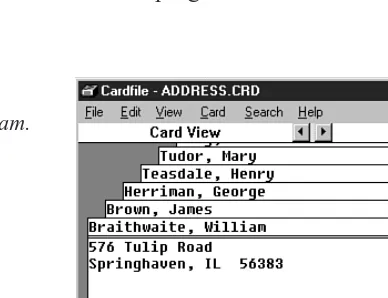
Some operating systems come with a utility program that simulates a box of index cards. Previous versions of Microsoft Windows, for example, included the Cardfile program. Figure 1.1 shows how this program looked with data on the cards creating an address book.
Overview of Data Structures and Algorithms 13
1
FIGURE1.1
The Cardfile program.
The filing cards are represented by rectangles. Above the double line is the card’s title, called the index line. Below is the rest of the data. In this example a person’s name is placed above the index line, with the address and phone number placed below.
You can find a card with a given name by selecting GoTo from the Search menu and typ-ing the name, as it appears on the index line, into a text field. Also, by selecttyp-ing Find from the Search menu, you can search for text other than that on the index line, and thus find a person’s name if you know his phone number or address.
This is all very nice for the program’s user, but suppose you wanted to write a card file program of your own. You might need to answer questions like this:
● How would you store the data in your computer’s memory?
● Would your method work for a hundred file cards? A thousand? A million?
● Would your method permit quick insertion of new cards and deletion of old ones?
● Would it allow for fast searching for a specified card?
● Suppose you wanted to arrange the cards in alphabetical order. How would you
sort them?
In this book, we will be focusing on data structures that might be used to implement the Cardfile program or solve similar problems.
[image:36.720.161.355.158.307.2]licenses, or an airline reservation system that stores passenger and flight information. Such systems might include many data structures. Designing such complex systems requires the application of software engineering, which we’ll mention toward the end of this hour. Now let’s look at the second major use for data structures and algorithms.
Programmer’s Tools
Not all data storage structures are used to store real-world data. Typically, real-world data is accessed more or less directly by a program’s user. However, some data storage struc-tures are not meant to be accessed by the user, but by the program itself. A programmer uses such structures as tools to facilitate some other operation. Stacks, queues, and prior-ity queues are often used in this way. We’ll see examples as we go along.
Real-World Modeling
The third use of data structures and algorithms is not as commonly used as the first two. Some data structures directly model a real-world situation. Stacks, queues, and priority queues are often used for this purpose. A queue, for example, can model customers wait-ing in line at a bank, whereas a priority queue can model messages waitwait-ing to be trans-mitted over a local area network.
Overview of Data Structures
Another way to look at data structures is to focus on their strengths and weaknesses. This section provides an overview, in the form of a table, of the major data storage structures discussed in this book. This is a bird’s-eye view of a landscape that we’ll be covering later at ground level, so don’t be alarmed if it looks a bit mysterious. Table 1.1 shows the advantages and disadvantages of the various data structures described in this book.
TABLE1.1 CHARACTERISTICS OFDATASTRUCTURES
Data Structure Advantages Disadvantages
Array Quick insertion, very Slow search, slow fast access if deletion, fixed size. index known.
Ordered array Quicker search than Slow insertion and unsorted array. deletion, fixed size.
Stack Provides last-in, Slow access to other first-out access. items.
Queue Provides first-in, Slow access to other
Data Structure Advantages Disadvantages
Linked list Quick insertion, quick Slow search. deletion.
Binary tree Quick search, insertion, Deletion algorithm is deletion (if tree complex.
remains balanced).
Red-black tree Quick search, insertion, Complex. deletion. Tree always
balanced.
2-3-4 tree Quick search, insertion, Complex. deletion. Tree always
balanced. Similar trees good for disk storage.
Hash table Very fast access if key Slow deletion, access known. Fast insertion. slow if key not known,
inefficient memory usage.
Heap Fast insertion, Slow access to other deletion, items.
access to largest item.
Overview of Algorithms
An algorithm can be thought of as the detailed instructions for carrying out some opera-tion. In a computer program these instructions take the form of program statements. Many of the algorithms we’ll discuss apply directly to specific data structures. For most data structures, you must know how to do the following:
● Insert a new data item.
● Search for a specified item.
● Delete a specified item.
You might also need to know how to traverse through all the items in a data structure, visiting each one in turn so as to display it or perform some other action on it.
Another important algorithm category is sorting. There are many ways to sort data, and we devote Hours 4, 5, 13, and 14 to this topic.
The concept of recursion is important in designing certain algorithms. Recursion involves a function calling itself. We’ll look at recursion in Hours 11 and 12.
Overview of Data Structures and Algorithms 15
1
NEWTERM
NEWTERM
Some Initial Definitions
Before we move on to a more detailed look at data structures and algorithms in the chap-ters to come, let’s look at a few terms that will be used throughout this book.
Datafile
We’ll use the term datafile to refer to a collection of similar data items. As an example, if you create an address book using the Cardfile program, the collec-tion of cards you’ve created constitutes a datafile. The word file should not be confused with the files stored on a computer’s hard disk. A datafile refers to data in the real world, which might or might not be associated with a computer.
Record
Records are the units into which a datafile is divided. They provide a format for
storing information. In the Cardfile program, each card represents a record. A record includes all the information about some entity, in a situation in which there are many such entities. A record might correspond to a person in a personnel file, a car part in an auto supply inventory, or a recipe in a cookbook file.
Field
A record is usually divided into several fields. A field holds a particular kind of data. In the Cardfile program there are really only two fields: the index line (above the double line) and the rest of the data (below the line); both fields hold text. Generally, each field holds a particular kind of data. In Figure 1.1, we show the index line field as holding a person’s name.
More sophisticated database programs use records with more fields than Cardfile has. Figure 1.2 shows such a record, where each line represents a distinct field.
In a C++ program, records are usually represented by objects of an appropriate class. (In C, records would probably be represented by structures.) Individual data members within an object represent fields within a record. We’ll return to this later in this hour.
Key
To search for a record within a datafile you must designate one of the record’s fields as a key. You’ll search for the record with a specific key. For example, in the Cardfile program you might search in the index-line field for the key Brown. When you find the record with that key, you’ll be able to access all its fields, not just the key. We might say that the key unlocks the entire record.
16 Hour 1
NEWTERM
NEWTERM
NEWTERM
In Cardfile you can also search for individual words or phrases in the rest of the data on the card, but this is actually all one field. The program searches through the text in the entire field even if all you’re looking for is the phone number. This kind of text search isn’t very efficient, but it’s flexible because the user doesn’t need to decide how to divide the card into fields.
In a more full-featured database program (Microsoft Access, for example), you can usu-ally designate any field as the key. In Figure 1.2, for example, you could search by, say, zip code, and the program would find all employees who live in that zip code.
Search Key
Every record has a key. Often you have a key (a person’s last name, for example) and you want the record containing that key. The key value you’re looking for in a search is called the search key. The search key is compared with the key field of each record in turn. If there’s a match, the record can be returned or displayed. If there’s no match, the user can be informed of this fact.
That’s all the definitions you’ll need for a while. Now we’ll briefly consider a topic that’s not directly related to data structures and algorithms, but is related to modern program-ming practice.
Overview of Data Structures and Algorithms 17
1
FIGURE1.2
A record with multiple fields.
Employee number: Social security number: Last name:
First name: Street address: City:
State: Zip code: Phone number: Date of birth:
Date of first employment: Salary:
A Quick Introduction to Object-Oriented
Programming
This section is for those of you who have not yet been exposed to object-oriented pro-gramming. However, caveat emptor. We cannot, in a few pages, do justice to all the inno-vative new ideas associated with OOP. Our goal is merely to make it possible for you to understand the sample programs in the text of this book. What we say here won’t trans-form you into an object-oriented C++ programmer, but it should make it possible for you to follow the sample programs. (If you know OOP, you can probably skip this section.)
If, after reading this section and examining some of the sample code in the following hours, you still find the whole OOP business as alien as quantum physics, you might need a more thorough exposure to OOP. See the reading list in Appendix C, “Further Reading,” for suggestions.
Problems with Procedural Languages
OOP was invented because procedural languages, like C, Pascal, and BASIC, were found to be inadequate for large and complex programs. Why was this? The problems have to do with the overall organization of the program. Procedural programs are organized by dividing the code into functions (called procedures or subroutines in some languages). Groups of functions could form larger units called modules or files.
Crude Organizational Units
One difficulty with this kind of function-based organization was that it focused on func-tions at the expense of data. There weren’t many opfunc-tions when it came to data. To sim-plify slightly, data could be local to a particular function, or it could be
global—accessible to all functions. There was no way (at least not a flexible way) to specify that some functions could access a data item and others couldn’t.
This caused problems when several functions needed to access the same data. To be available to more than one function, such variables had to be global, but global data could be accessed inadvertently by any function in the program. This led to frequent pro-gramming errors. What was needed was a way to fine-tune data accessibility, allowing variables to be available to functions with a need to access the data, but hiding it from others.
Poor Modeling of the Real World
It is also hard to conceptualize a real-world problem using procedural languages. Functions carry out a task, and data stores information, but most real-world objects do
the furnace on and off), but also stores information (the actual current temperature and the desired temperature).
If you wrote a thermostat control program, you might end up with two functions,
furnace_on()and furnace_off(). But you might also end up with two global variables,
currentTemp(supplied by a thermometer) and desiredTemp(set by the user). However,
these functions and variables wouldn’t form any sort of programming unit; there would be no unit in the program you could call thermostat. The only such unit would be in the programmer’s mind.
For large programs, which might contain hundreds of entities like thermostats, this pro-cedural approach made things chaotic, error-prone, and sometimes impossible to imple-ment at all.
Objects in a Nutshell
The idea of objects arose in the programming community as a solution to the problems we just discussed with procedural languages. In this section, we’ll discuss objects, classes, and several other topics.
Objects
Here’s the amazing breakthrough that is the key to OOP: An object contains both func-tions and variables. A Thermostatobject, for example, would contain not only
furnace_on()and furnace_off()functions, but also currentTempand desiredTemp
variables.
This new entity, the object, solves several problems simultaneously. Not only does a pro-gramming object correspond more accurately to objects in the real world, it also solves the problem engendered by global data in the procedural model. The furnace_on()and
furnace_off()functions can access currentTempand desiredTemp. However, these
variables are hidden from functions that are not part of thermostat, so they are less likely to be accidentally changed by a rogue function.
Overview of Data Structures and Algorithms 19
1
Classes
You might think that the idea of an object would be enough for one programming revolu-tion, but there’s more. Early on, it was realized that you might want to make several objects of the same type. Maybe you’re writing a furnace control program for an entire apartment house, for example, and you need several dozen Thermostatobjects in your program. It seems a shame to go to the trouble of specifying each one separately. Thus the idea of classes was born.
A class is a specification—a blueprint—for one or more objects. Listing 1.1 shows how a Thermostatclass, for example, might look in C++.
LISTING1.1 THEThermostatCLASS
class Thermostat {
private:
float currentTemp(); float desiredTemp();
public:
void furnace_on() {
// function body goes here }
void furnace_off() {
// function body goes here }
}; // end class Thermostat
The C++ keyword classintroduces the class specification, followed by the name you want to give the class; here it’s Thermostat. Enclosed in curly brackets are the data members and member functions (variables and functions) that make up the class. We’ve left out the body of the member functions; normally there would be many lines of pro-gram code for each one. C propro-grammers will recognize this syntax as similar to that of a structure.
Object Creation
Specifying a class doesn’t create any objects of that class. (In the same way specifying a structure in C doesn’t create any variables.) To actually create objects in C++ you must
20 Hour 1
define them as you do other variables. Here’s how we might create two objects of class
Thermostat:
Thermostat therm1, therm2;
Incidentally, creating an object is also called instantiating it, and an object is often referred to as an instance of a class.
Accessing Object Member Functions
After you’ve specified a class and created some objects of that class, other parts of your program must interact with these objects. How do they do that? Typically, other parts of the program interact with an object’s member functions, not with its data members. For example, to tell the therm2object to turn on the furnace, we would say
therm2.furnace_on();
The dot operator is simply a period (.). It associates an object with one of its member functions (or occasionally with one of its data members).
At this point we’ve covered (rather briefly) several of the most important features of OOP. To summarize:
● Objects contain both member functions and data members (variables).
● A class is a specification for any number of objects.
● To create an object, you must define it as you would an ordinary variable.
● To invoke a member (usually a function) for a particular object, you use the dot
operator.
These concepts are deep and far-reaching. It’s almost impossible to assimilate them the first time you see them, so don’t worry if you feel a bit confused. As you see more classes and what they do, the mist should start to clear.
A Runnable Object-Oriented Program
Let’s look at an object-oriented program that runs and generates actual output. It fea-tures a class called BankAccountthat models a checking account at a bank. The program creates an account with an opening balance, displays the balance, makes a deposit and a withdrawal, and then displays the new balance. Listing 1.2 is the code for bank.cpp.
Overview of Data Structures and Algorithms 21
1
LISTING1.2 BANK.CPP
//bank.cpp
//demonstrates basic OOP syntax #include <iostream>
using namespace std;
//////////////////////////////////////////////////////////////// class BankAccount
{
private:
double balance; //account balance public:
//---BankAccount(double openingBalance) //constructor
{
balance = openingBalance; }
//---void deposit(double amount) //makes deposit
{
balance = balance + amount; }
//---void withdraw(double amount) //makes withdrawal
{
balance = balance - amount; }
//---void display() //displays balance
{
cout << “Balance=” << balance << endl; }
}; //end class BankAccount
//////////////////////////////////////////////////////////////// int main()
{
BankAccount ba1(100.00); //create account
cout << “Before transactions, “;
ba1.display(); //display balance
ba1.deposit(74.35); //make deposit ba1.withdraw(20.00); //make withdrawal
cout << “After transactions, “;
ba1.display(); //display balance return 0;
} //end main()
22 Hour 1
Here’s the output from this program:
Before transactions, balance=100.00 After transactions, balance=154.35
There are two parts in bank.cpp: The first one is the declaration of the
BankAccountclass. It contains the member data and functions for our bank
account. We’ll examine it in detail in a moment. The second part is the function main(), where control goes when the program starts. The following sections describe each.
The
main()Function
The main()function is not part of any class; it stands alone. It creates an object of class
BankAccount, initialized to a value of 100.00, which is the opening balance, with this
statement:
BankAccount ba1(100.00); // create account
The BankAccountobject displays its balance with the statement:
ba1.display();
The program then makes a deposit to, and a withdrawal from, the account by calling the
BankAccountobject’s deposit()and withdraw()member functions:
ba1.deposit(74.35); ba1.withdraw(20.00);
Finally, the program displays the new account balance and terminates.
The
BankAccountClass
The only member data in the BankAccountclass is the amount of money in the account, called balance. There are three member functions. The deposit()function adds an amount to the balance,withdrawal()subtracts an amount, and display()displays the balance.
Constructors
The BankAccountclass also features a constructor. A constructor is a special
member function that’s called automatically whenever a new object is created. A constructor always has exactly the same name as the class, so this one is called
BankAccount(). This constructor has one argument, which is used to set the opening
bal-ance when the account is created.
A constructor allows a new object to be initialized in a convenient way. Without the con-structor in this program, you would have needed an additional call to deposit()to put the opening balance in the account.
Overview of Data Structures and Algorithms 23
1
O
UTPUTANALYSIS
Public and Private
Notice the keywords publicand privatein the BankAccountclass. These key-words are access modifiers and determine what members of an object can be accessed by other parts of the program. The balancedata member is preceded by pri-vate. A data member or member function that is private can only be accessed by mem-ber functions that are part of the same class. Thus,balancecannot be accessed by statements in main()because main()is not a member function of BankAccount.
However, all the member functions in BankAccounthave the access modifier public, so they can be accessed by functions in other classes or main(). That’s why statements in
main()can call deposit(),withdrawal(), and display().
Member data in a class is typically made private, whereas functions are made public. This protects the data; it can’t be accidentally modified by functions in other classes. Any outside entity that needs to access data in a class must do so using a member function of the same class. Data is like a queen bee, kept hidden in the middle of the hive, fed and cared for by worker-bee member functions.
Inheritance and Polymorphism
For completeness we’ll briefly mention two other key features of object-oriented pro-gramming: inheritance and polymorphism. We won’t be using them in our program examples, but they are important in OOP.
Inheritance is the creation of one class, called the derived (or child) class, from
another class called the base (or parent) class. The derived class has all the fea-tures of the base class, plus some additional feafea-tures. For example, a secretaryclass might be derived from a more general employeeclass, and include a data member called
typingSpeedthat the employeeclass lacked.
Inheritance makes it easy to add features to an existing class and is an important aid in the design of programs with many related classes. Inheritance thus makes it easy to reuse classes for a slightly different purpose—a key benefit of OOP.
Polymorphism involves treating objects of different classes in the same way. For
polymorphism to work, these different classes must be derived (inherited) from the same base class. In practice, polymorphism usually involves a function call that actu-ally executes different member functions for objects of different classes.
For example, a call to display()for a secretaryobject would invoke a display function in the secretaryclass, whereas the exact same call for a managerobject would invoke a different display function in the managerclass. Polymorphism simplifies and clarifies
24 Hour 1
NEWTERM
NEWTERM
For those not familiar with them, inheritance and polymorphism involve significant addi-tional complexity. To keep the focus on data structures and algorithms, we have avoided these features in our sample programs. Inheritance and polymorphism are important and powerful aspects of OOP, but are not necessary for the explanation of data structures and algorithms.
Now let’s turn our attention to some newer features of C++.
New C++ Features
If you learned C++ some time ago, you might not be acquainted with its latest capabili-ties. This book uses several features that were introduced with Standard C++: the string
class and the vectorclass from the Standard Template Library (STL). These features are a standard part of the C++ language specification, supported by all modern compilers. Using these features enables you to simplify our sample programs. They are fairly intu-itive even if you’re unfamiliar with them. In this section we’ll mention a few details about these features, but for a full description you should consult Appendix C, or access the help system in your compiler.
The
string
Class
In pre-standard C++, strings were represented by arrays of type char. This created many inconveniences. For example, you couldn’t compare strings using the comparison opera-tors (<, >, and ==), and you couldn’t set one string equal to another with the assignment operator (=). You also had to create the array yourself and manage its memory allocation.
The stringclass in Standard C++ solves these problems.
To use the stringclass you must include the STRING file in your program:
#include <string>
It’s easy to create objects of type string:
string str1, str2(“George”);
You can assign one string to another without worrying whether it’s big enough; it will obtain the necessary memory automatically:
string str3;
str3 = “amanuensis”;
You can use the []operator to access specific characters in a string object, just as you can with an array (provided you use a valid index number):
char ch1 = str2[3];
Overview of Data Structures and Algorithms 25
The stringclass includes a variety of member functions. For example,str1.size()
returns the number of characters in str1. In most other ways string objects behave simi-larly to basic C++ variables.
The
vector
Class
The STL is a group of data structures and algorithms implemented as templatized C++ classes. The data structures include lists, stacks, deques, and vectors. The algorithms allow you to perform almost any conceivable operation on the data structures.
We don’t use the STL for examples of the data structures and algorithms described in this book. The source code for the STL is highly specialized and difficult for all but advanced programmers. Instead, we use homemade classes whose code is easy to under-stand. However, after you’ve learned about data structures and algorithms, you will cer-tainly want to consider using the STL in your own programs. It is essentially as efficient as any code you write yourself, and of course far more convenient.
Although we don’t use the STL to demonstrate concepts, we do use it as a handy improvement to C++. For example, we frequently use objects of the vectorclass instead of arrays. Among other advantages, this allows us to handle the sizing of the vector in the class constructor.
To use the vector class you’ll need to include the VECTOR file:
#include <vector>
To create a vector you must use the template format, with the data type of the vector’s contents placed in angle brackets and the vector’s name in parentheses:
vector<double>(vect1);
From then on, you can treat the resulting vector much as you would an array, using bracket notation like the following to access individual elements in the vector:
vect1[13] = 3.14159;
The vector’s member functions can be used for a variety of purposes. For example,
vect1.empty()returns true if there is no data in a vector, and vect1.size()returns the
number of elements currently in the vector.
Let’s switch gears now from the details of C++ to a more theoretical topic.
Software Engineering
In recent years, it has become fashionable to begin a book on data structures and