
Efficient web based application development tools on XML enabled databases : a thesis presented in partial fulfilment of the requirements for the degree of Master of Information Sciences
81
0
0
Full text
(2) Efficient Web-based Application Development Tools on XML-enabled Databases. A thesis presented in partial fulfilment of the requirements for the degree of Master of Information Sciences. Yi Chen Massey University Palmerston North, New Zealand July 2008.
(3) Efficient Web-based Application Development Tools on XML-enabled Databases. Table of Content 1. Introduction ............................................................................................................................... 4 1.1 1.1.1 1.1.2 1.1.3 1.2 1.2.1 1.2.2 1.2.3. 2. Dynamic Content from XML Data ......................................................................................... 17 2.1 2.2 2.2.1 2.2.2 2.2.3 2.2.4 2.2.5 2.3 2.3.1 2.3.2 2.3.3 2.4 2.5. 3. Web-based Application Development .......................................................................... 4 Web-based Applications ............................................................................................... 4 Developing Web-based Applications............................................................................ 5 New Challenges and Opportunities with Web 2.0 ........................................................ 7 Web-based Application Development Tools ................................................................ 9 Oracle Application Express (APEX) .......................................................................... 11 WaveMaker (formerly ActiveGrid) ............................................................................ 12 Ruby on Rails ............................................................................................................. 14. XML ........................................................................................................................... 17 Processing XML Data with DBMS ............................................................................ 19 Native XML Databases .............................................................................................. 19 XML-Enabled Databases ........................................................................................... 19 Hybrid Databases ....................................................................................................... 20 Comparison ................................................................................................................ 21 Oracle’s XMLType ..................................................................................................... 22 Support for XMLType in Web-based Application Development Tools ...................... 23 Oracle Application Express (APEX) .......................................................................... 23 WaveMaker (formerly ActiveGrid) ............................................................................ 25 Ruby on Rails ............................................................................................................. 27 Research Question ...................................................................................................... 27 Research Methodology............................................................................................... 28. A Brief Outline of Three Popular Web-based Application Development Frameworks........... 30 3.1 3.1.1 3.1.2 3.1.3 3.2 3.2.1 3.2.2 3.2.3 3.3 3.3.1 3.3.2 3.3.3 3.4 3.4.1 3.4.2. Installation .................................................................................................................. 30 Installing Oracle Application Express (APEX) .......................................................... 30 Installing WaveMaker (formerly ActiveGrid) ............................................................ 30 Installing Ruby on Rails ............................................................................................. 30 Usability ..................................................................................................................... 31 Using Oracle Application Express (APEX) ............................................................... 31 Using WaveMaker (formerly ActiveGrid) .................................................................. 32 Using Ruby on Rails .................................................................................................. 33 Performance ............................................................................................................... 34 Rapid Developing with Oracle Application Express (APEX) .................................... 34 Rapid Developing with WaveMaker (formerly ActiveGrid) ...................................... 36 Rapid Developing with Ruby on Rails ....................................................................... 39 Deployment ................................................................................................................ 42 Rapid Deployment with Oracle Application Express (APEX)................................... 42 Rapid Deployment with WaveMaker (formerly ActiveGrid) ..................................... 42. Page 2 of 80.
(4) Efficient Web-based Application Development Tools on XML-enabled Databases. 3.4.3 3.5 3.5.1 3.5.2 3.5.3 4. Towards XML Data Processing .............................................................................................. 45 4.1 4.2 4.3 4.4 4.5 4.5.1 4.5.2 4.5.3. 5. Oracle XML DB ......................................................................................................... 45 APIs for XML Data Processing.................................................................................. 47 Enhancing PL/SQL for XMLType Processing ........................................................... 48 Incorporating XQuery for XMLType Processing ....................................................... 50 Programming Support for XMLType Processing ....................................................... 52 XMLType Processing with Java ................................................................................. 52 XMLType Processing with PHP ................................................................................. 54 XMLType Processing with Ruby ............................................................................... 55. Implementing Workarounds .................................................................................................... 57 5.1 5.2 5.3. 6. Rapid Deployment with Ruby on Rails ...................................................................... 43 Some Final Observations ........................................................................................... 43 Oracle Application Express (APEX) .......................................................................... 43 WaveMaker (formerly ActiveGrid) ............................................................................ 44 Ruby on Rails ............................................................................................................. 44. Oracle Application Express with PL/SQL.................................................................. 57 WaveMaker with JAVA .............................................................................................. 60 Ruby on Rails with ActiveRecord .............................................................................. 66. Comparison and Empirical Study ........................................................................................... 70 6.1 6.2. Native Query Languages vs. Programming Languages ............................................. 70 XMLType Processing Workarounds ........................................................................... 71. 7. Conclusions and Recommendations........................................................................................ 74. 8. References ............................................................................................................................... 76. Page 3 of 80.
(5) Efficient Web-based Application Development Tools on XML-enabled Databases. 1 Introduction 1.1 Web-based Application Development 1.1.1 Web-based Applications With the emergence of the World Wide Web also web-based applications became increasingly popular. Web-based applications bring together traditional software applications and traditional web sites. Software applications are computer programs that help users to perform specific tasks. They are often contrasted to system software that help to exploit and maintain the various capabilities of computers, and to programming software to assist a programmer in developing computer programs. Examples of software applications range from personal software (e.g., word processors, spreadsheets and media editors) to enterprise software (e.g., supply chain management systems, customer relationship management systems and executive information systems). Today, most software applications in enterprises are distributed systems: the software is spread over various computers. This is most natural for enterprise software that is accessed by many users across a variety of locations. But there is also an ongoing trend to design and implement personal software as distributed systems with personal web information systems, social and collaborative software, and software as a service being recent examples. Most distributed applications are client-server applications, that is, they are built using a client-server architecture that distinguishes client and server software and describes how the distributed programs communicate. This client-server model enables the joint usage of resources (e.g., databases, printers) through a network. For software applications, a major part of the software can be kept in dedicated application servers while small client programs are installed on client computers and function as interfaces to the users. This approach has obvious advantages when it comes to maintaining and upgrading software applications. Over time there evolved the desire to standardize these client programs, e.g. by using web browsers that are commonly available on most client computers and frequently used to access all kinds of web sites. Traditional web sites provide static content through a network such as the Internet or an intranet. Web sites are also based on a client-server model. The content is kept in web pages (mainly HTML files). Users can view the content through client programs called web browsers. For that the web browser sends a request to the web server that responds by delivering the requested web page. Communication between web browsers and web servers is based on the hypertext transfer protocol (HTTP). Examples of web browsers are Firefox, Internet Explorer, Netscape, Opera and Safari, to mention the most popular ones. Over time there emerged a desire for more involved interaction with the users. That is, web sites should be enhanced to provide dynamic content. Page 4 of 80.
(6) Efficient Web-based Application Development Tools on XML-enabled Databases. Both the aim to make distributed software applications web-based and the aim to make web sites interactive resulted in the development of web-based applications: software applications that can be accessed through a web browser. More precisely, Shklar and Rosen (2003, p. 5) define a web-based application as “a client/server application that uses a web browser as its client program, and performs an interactive service by connecting with servers over the Internet (or Intranet).” To emphasize the difference to traditional web sites, Baxley (2003, p. 1) notes that web-based applications “establish a unique session and relationship with each and every visitor” and “allow users to create, manipulate, and permanently store data”. Booch (2001, p. 2) gives a canonical architecture of web-based applications (see Figure 1) and discusses architectural differences to traditional client-server applications.. Figure 1: Canonical Web architecture (Booch, 2001). To conclude this section it should be noted that in text books and articles as well as in practice the terms web-based application and web application are almost always used interchangeably. 1.1.2 Developing Web-based Applications Web-based applications are typically developed for large numbers of users across various locations. In practise this implies the demand to be sufficiently adaptive to different users, technical environments and communication channels. In principle web-based applications can be open to arbitrary users or restricted to particular user groups. However, even in the latter case it is often unclear where, when and how users access the web-based application. Acknowledging this challenge Bhattacharya (2006, p. 1) states that web-based application “are the trickiest to manage and maintain” and concludes four key features that one must addressed in a good web-based application: scalability, availability, maintainability and reliability. (Bhattacharya, 2006) also proposes metrics for measuring the abilities of a web-based application in terms of these features and discusses best programming practises that promote these features. To provide dynamic content web-based applications originally used common gateway interface (CGI) scripts that were requested by the web browser and executed on the computer hosting the web server. Since then a large variety of technologies for Page 5 of 80.
(7) Efficient Web-based Application Development Tools on XML-enabled Databases. dynamic content delivery has been proposed for web-based applications. Most popular are scripts, that is, small fragments of code that are embedded in or referenced to by web pages. Scripts are interpreted and executed when the respective web pages is requested. Again this can be done by the web browser or by the web server. Server-side scripting is for example done with PHP, JSP and ASP. Client-side scripting is for example done with JavaScript or VBScript. To overcome common problems such as network latency, high interface complexity and slow server responsiveness, various proposals for improved client-server interaction have been introduced to provide developers more advanced capabilities in their effort to make web-based application more responsive, interactive and customizable. The most popular approach for achieving this purpose is AJAX (Garrett, 2005). AJAX stands for “Asynchronous JavaScript and XML”. It is entirely built on existing, well-established standards that are familiar to most web-application developers. Technologies that are recommended in the Ajax approach include HTML/XHTML, CSS, DOM, XML, XSLT, XMLHttp and JavaScript. (Garret, 2005) lists five key characteristics of applications built according to the AJAX approach: • a user interface constructed with open standards such as the dynamic hypertext markup language and cascading stylesheets, • a dynamic, interactive user experience enabled by the DOM, • data exchange and transformation using the Extensible Markup Language (XML) and extensible stylesheet language transformations, • asynchronous client/server communication via XMLHttpRequest, and • JavaScript as the lingua franca joining all the components together. The integration with JavaScript and XML proposed by AJAX, enables web-based applications to send a XML messages (small XML data fragments) describing their request instead of a complete page post-back, which generates a chunk of XML describing the matching information data as a response. This type of web application development techniques with client-side scripting language and semi-structured data format makes partial client-server data exchange more efficient than full browser and server communication which often requires rerendering the entire web page (Smith, 2006). A number of commercial web sites have been built according to the AJAX approach to improve the user experience. Examples include Google Maps, Google Suggest, Gmail, but also a variety of popular blogs on the Web. An alternative approach is to use special software components that extend the web browser or web server. Examples of web browser extensions are plugins that allow the execution of Java applets or Flash applets. Examples of web server extensions are web containers that allow the execution of Java servlets. Both client-side and server-side solutions have particular advantages and disadvantages when it comes to features such as scalability, maintainability, availability, and reliability, but also security. In practise one often finds a mixture of both client-side and server-side Page 6 of 80.
(8) Efficient Web-based Application Development Tools on XML-enabled Databases. technologies. For a detailed discussion, see for example (Shklar and Rosen, 2003) or (Doyle and Lopes, 2005). The fast emergence of new powerful technologies resulted in more and more complex web-based applications. Unfortunately the rapid development of such applications often abets bad programming practises. Generally speaking, web-based application development does not have rigour, systematic approach and quality control and assurance. Due to the complexity and sophistication of web-based application development, there is growing concern about the methods and tools in which applications are created and their quality and integrity. Since there is no disciplined process of web-based application development, developers may encounter various problems for successful development, deployment, operation and maintenance. In order to avoid such web crisis and achieve greater success in developing web-based applications, there is a pressing need for disciplined approaches and tools for development, deployment and evaluation of web-based systems, see (Murugesan et al., 2001). 1.1.3 New Challenges and Opportunities with Web 2.0 The toolbox of web-based application developers has undergone various reviews and changes over the last few years. Existing technologies and methods have been refined and new ones have been adopted. Often these new technologies and methods are the consequence of new approaches or paradigms that emerged in the community of web-based application developers. A recent idea that caused much attention and discussion is Web 2.0. The intention of Web 2.0 is to bring people on the Web together in a more dynamic, interactive space. It is originally described as “an attitude not a technology” (Davis, 2005). The truth is that Web 2.0 is a difficult term to define, even for web experts. The core idea is about enabling and encouraging user participation through open applications and services. The Web 2.0 movement combines a variety of new approaches for integrating services, application and their underlying databases that communicate with one another, exchange data and adapt to individual users. O'Reilly (2005) attempted to outline the concepts behind Web 2.0, see Figure 2.. Page 7 of 80.
(9) Efficient Web-based Application Development Tools on XML-enabled Databases. Figure 2: Web 2.0 ‘meme map’ (O’Reilly, 2005). O’Reilly (2005a) offers a widely adopted definition that regards Web 2.0 applications as “those that make the most of the intrinsic advantages of that platform: delivering software as a continually-updated service that gets better the more people use it, consuming and remixing data from multiple sources, including individual users, while providing their own data and services in a form that allows remixing by others, creating network effects through an architecture of participation, and going beyond the page metaphor of Web 1.0 to deliver rich user experiences”. Clearly, such Web 2.0 web-based applications require interactive user interface and effective model for application integration and deployment. The new Web 2.0 idea focuses on the benefits of easy to use and performance of web-based applications. A Web 2.0 application should promise to expand the functionality of a core business application, knit together multiple services and deliver a feature-rich user interface to enhance the customer experience and employee productivity. In order to fulfil those requirements along with application development processes, a variety of web-based application development tools have been released to make development process more effective and efficient. The recent emergence of Web 2.0 applications results in new challenges for web-based application development. At the time of writing, many of the most promising Web 2.0 applications are being published continuously. The future development of these Web 2.0 applications requires adopting these technologies and fulfilling the goals of applications. It also results in a number of fundamental changes in design patterns and programming models. O’Reilly (2005) listed core changes for Page 8 of 80.
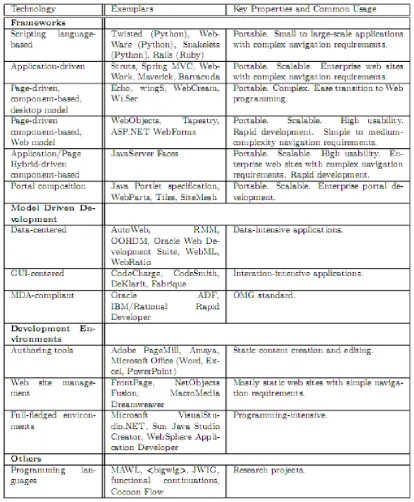
(10) Efficient Web-based Application Development Tools on XML-enabled Databases. business model of Web 2.0 applications: • Operations must become a core competency • Users must be treated as co-developers These changes of the business model have a number of significant consequences for the development of web-based applications. In particular the increasing availability of web services, leads more and more businesses to look for published web services that can be called from inside their applications. This approach calls for highly reliable programming environments that are able to communicate with and make use of a variety of heterogeneous services, applications, and components on the Web. (O’Reilly, 2005) mentions the following key criteria: • support lightweight programming models that allow for loosely coupled systems, • think syndication, not coordination, and • design for hackability and remixability. These criteria are crucial for the successful development of Web 2.0 applications Web-based application developers, both experienced and novice, are trying to find easy-to-use, flexible development tools that suits them best in developing web-based applications that meet these criteria. In my investigations of typical web-based application tools these key criteria played a central role.. 1.2 Web-based Application Development Tools Generally speaking, web-based application development does not have rigour, systematic approach and quality control and assurance. Due to the complexity and sophistication of web-based application development, there is growing concern about the methods and tools in which applications are created and their quality and integrity. Since there is no disciplined process of web-based application development, developers may encounter various problems for successful development, deployment, operation and maintenance. In order to avoid such web crisis and achieve greater success in developing web-based applications, there is a pressing need for disciplined approaches and tools for development, deployment and evaluation of web-based systems (Murugesan et al., 2001). This research paper explores different types of web-based application development tools and assesses potential problems during development process under new developing environment. It is expected is to find out possible workarounds and solutions to handle these problems. A variety of web-based application development tools are available in industry. They all have their specific abilities and features, which become their own advantages and disadvantages. Therefore, comparing these tools becomes significant to the success and satisfaction of a web-based application development.. Page 9 of 80.
(11) Efficient Web-based Application Development Tools on XML-enabled Databases. A recent survey paper (Doyle and Lopes, 2008) of technologies for web-based application development provides a state-of-the-art comparison of development approaches based on these web technologies. The following table shows how they classify the types of development approaches and technologies used for each type.. Figure 3: Development approaches and technologies (Doyle and Lopes, 2008). Following the classification of web-application development tools provided in (Doyle and Lopes, 2008), see Figure 3, we divide them into three classified types for better investigation and comparison. They are model-driven development tool (e.g. Oracle APEX), integrated development environment packages (e.g. ActiveGrid/WaveMaker Page 10 of 80.
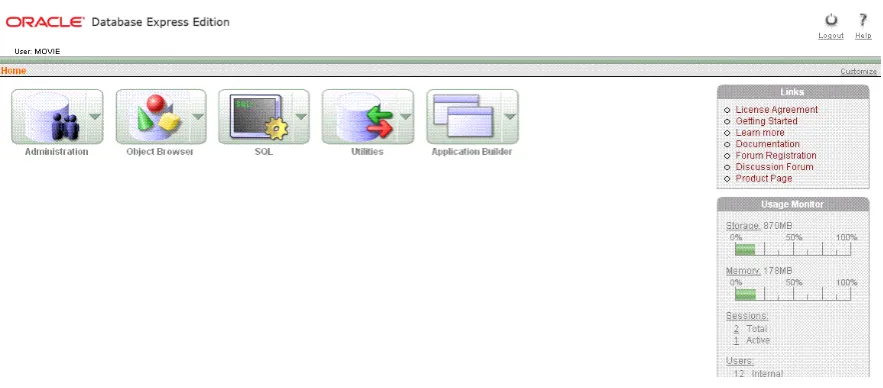
(12) Efficient Web-based Application Development Tools on XML-enabled Databases. Development Environment) and development framework on pure programming language (e.g. Ruby on Rails). Although they are not complete, they can briefly represent typical existing tools in the industry. This research paper focuses on those three types of development tools to deal with XMLType datatype in the following sections. 1.2.1 Oracle Application Express (APEX) The first type of web-based application development tools are model-driven development tools. The typical example is Oracle APEX. Several Oracle database distributions such as Oracle Database 10g Express Edition have APEX included as the prime tool for creating data-centric web-based applications. Oracle Application Express (Oracle APEX) was formerly called HTML DB, which is a rapid web application development tool for Oracle database. Oracle refers to HTML DB as a “declarative development tools” (Klaene, 2004). It is especially designed to meet simple application development requirements. This platform provides a variety of wizards that allow end users to operate on database tables, build forms and reports upon Oracle databases easily. It has become a promising web-based application development solution based on Oracle database. According to Oracle’s Developer’s Guide for the Oracle DBMS and APEX (Bak er, Romano, and Winters, 2008) APEX is divided into the following four major components: • Application Builder – Securely assemble web pages and business rules into applications • SQL Workshop – Create and manage database objects and use the Graphical Query Builder to create SQL queries – even if you have no knowledge of SQL • Utilities – Import and export data from the database, generate DDL, view object reports, and restore dropped database objects • Administration – Manage preferences, users, and view application reports. Page 11 of 80.
(13) Efficient Web-based Application Development Tools on XML-enabled Databases. Figure 4: Screenshot of Oracle APEX home page. The Oracle APEX provides a metadata repository where definitions of applications and APEX engine are stored. Similar with most web applications, the application express engine is accessed from a web browser through the HTTP Server (Apache). The application express engine is embedded in Oracle database. Within Oracle Database 11.1 or higher or Oracle Database 10g Express Edition, you can also remove Oracle HTTP Server (Apache) from the architecture and replace it with the embedded PL/SQL gateway. A remarkable difference between an Oracle APEX application and most other web applications is that it stores user session data or metadata into its own database rather than in an in-memory session object for each user. It enables rapid development by means of wizards and pre-built components. Furthermore, developers are capable of extending the functionality of an application with custom PL/SQL or JavaScript. The application builder, for example, allows developers to implement customized logic using PL/SQL or JavaScript or to call existing PL/SQL functions and procedures as well as JavaScript functions from an existing JavaScript library. This supports reuse and modularization during the application development process. 1.2.2 WaveMaker (formerly ActiveGrid) The second type of web-based application development tools are integrated development environment packages. ActiveGrid Enterprise Web 2.0 is a typical example of this type. It is intended to achieve short work of integrating existing services, applications and databases into rich, integrated Web 2.0 applications (ActiveGrid, 2006). ActiveGrid Studio and ActiveGrid Server are designed for developer to deliver rich, interactive Web 2.0 web applications. As claimed by ActiveGrid, installing ActiveGrid Studio takes less than 15 minutes. It’s delivered with everything developers need, including an integrated web server, embedded database and sample Web 2.0 applications. Recently (November 28, 2007) in San Francisco, ActiveGrid announced that it would change its name to WaveMaker, and released version 3.0 of its now renamed WaveMaker Rapid Deployment Framework Page 12 of 80.
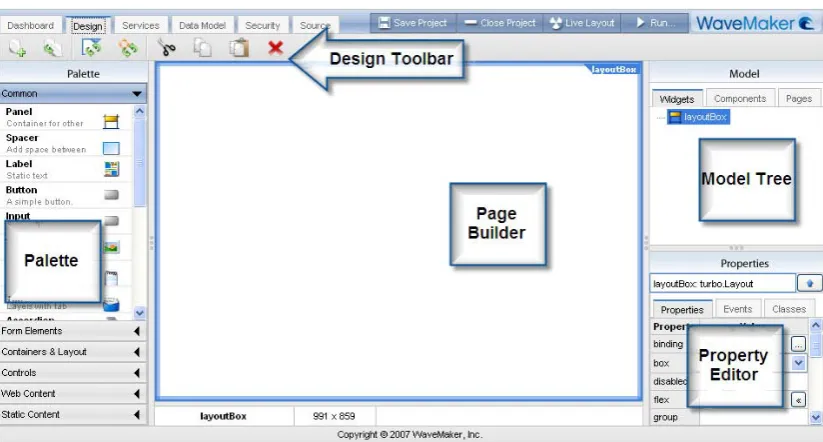
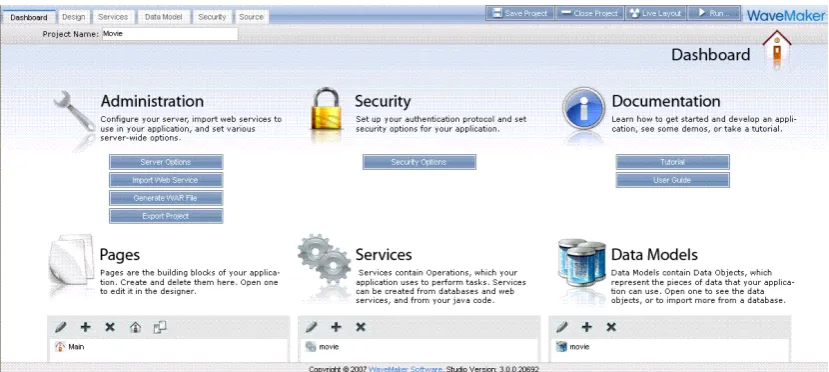
(14) Efficient Web-based Application Development Tools on XML-enabled Databases. the same day, together with a new product, called WaveMaker Visual Assembly Studio 3.0, see (Constantin, 2007). On this occasion the CEO of WaveMaker, Christopher Keene, emphasised that “they created WaveMaker’s new flagship product line to simplify the development process, accelerate assembly and deployment time, and dramatically improve business productivity—all directly impacting an enterprise’s bottom line”, see (Handy, 2007). The key point of both ActiveGrid and WaveMaker is to provide developers easy-to-use, data-driven, visual tool so that developers can build scalable web-based applications which meet CIO requirements. The chief components of ActiveGrid Studio and WaveMaker Studio are somehow changed. The new WaveMaker studio is a pure web-based application that can run on most web browsers while ActiveGrid studio was a standalone application development environment. In order to make the paper up-to-date, we focus on WaveMaker studio as application tool to investigate. The key parts of WaveMaker are editor tabs which cover of the main components of WaveMaker, see (WaveMaker, 2007), including: • Project dashboard: a user friendly overview of the project application including data objects and services operations and data model. • Page designer: main editor where developers use to build your application pages. • Service: allows you to edit existing services calls and add custom services calls • Data model: the place where all imported database information (tables, data types, values…) are listed and developers can import new data model from supported databases. • Security: shows authentication relative information about the web-based application. • Source: the area where all types of source codes are listed including script, CSS, markup, widgets and application source codes.. Figure 3: WaveMaker editor tabs. Page 13 of 80.
(15) Efficient Web-based Application Development Tools on XML-enabled Databases. Figure 5: Page Designer editor. Both ActiveGrid and WaveMaker provide developer different types of databases support. WaveMaker supports most of the popular databases such as MySQL, Oracle and SQL Server. By default, the installation also includes Hypersonic SQL DB (HSQLDB), as an embedded database. This database is included for demo and testing purposes. The data model is created as the data source used for web-based application development. All those data models are generated by importing external databases. WaveMaker provides user-friendly integrated development environment where services and operations can be easily generated by creating service components. Furthermore, both ActiveGrid and WaveMaker have alternative methods or script languages for creating custom services and operations. ActiveGird supports three types of scripting languages for defining custom services which are Python, PHP and Java. WaveMaker, however, reduced the number of choices to two which are Java and JavaScript. Whatever methods or languages those two web-based application tools provide; developers can create their own custom services and add service call components into the application. It enhances flexibility for this type of development tool when developing web-based applications for different levels of developers. 1.2.3 Ruby on Rails The third type of web-based application tool we study are frameworks based on pure programming languages. Typical examples are Java Struts and Ruby on Rails. The underlying programming languages (Java, Ruby) provide essential functionalities for web-based application development. With the development of those object-oriented scripting languages, those languages have more and more strengths including ease of use, short development time, and high performance. Moreover, those programming languages provide several built-in class libraries which are easy to be extended for putting the promise of reuse into immediate practice. Developers get the data source for a specific web-based application. Scripting languages also can connect with corresponding popular databases and retrieve data from database tables. They usually Page 14 of 80.
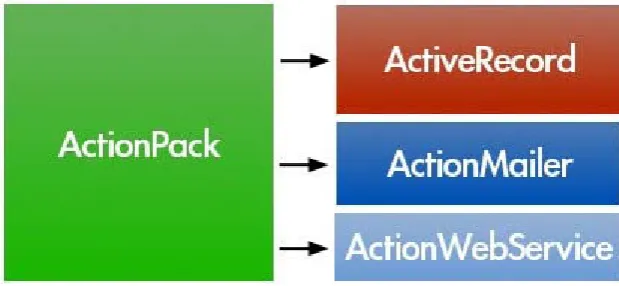
(16) Efficient Web-based Application Development Tools on XML-enabled Databases. have specific libraries to access corresponding databases through database APIs. With the great demanding of database-driven web-based application development, certain scripting language development environment framework is introduced. Rails is a full-stack framework for developing database-backed web-based applications according to the Model-View-Control pattern. Rails provides an integrated development environment for creating web-based application with Ruby. Ruby on Rails is the programming language framework for web-based application development I focus on in this paper. This framework was first released by David Heinemeier Hansson in July 2004. It is an offspring of his work on the web-based project management application Basecamp (for a web application company called 37 Signals). While developing Basecamp, Hansson realized that a lot of the code he was writing could be extracted into a framework that could be used as part of other future application, see (Herrán, 2006) or (Williams, 2007). That makes the design and development of web-based applications using Ruby easier based the MVC (Model-View-Control) architecture. It is expected to make the maintenance of the applications simpler than other frameworks. The Ruby on Rails’ MVC architecture is used for web-based applications giving like a result frameworks. It shows:. Figure 6: High level component/service view. • ActiveRecord: Rails M (Model) support which follows the standard Object/Relational Model (ORM) to communicate with the database. • ActionPack: Rails VC (View-Control) which handles dispatched requests, controllers and views. It contains ActionController and ActionView modules within it. • ActionMailer: A component that delivers and receives email. • ActionWebService: ActionWebService supports SOAP and XML-RPC web services. Rails serves as an add-on to the Ruby programming language. This add-on contains a library that is full of Ruby code, scripts for generating components of web-based applications. It provides Ruby more strengths and flexibilities for web-based application development including database connection and web services. Developers Page 15 of 80.
(17) Efficient Web-based Application Development Tools on XML-enabled Databases. can individually consider implementations of “Model” part and “View” part which enhance the reusability of the web-based application developed under Ruby on Rails. Rails also supports a wide range of databases, including all common production database platforms. Several different RDBMS systems are supported including MySQL, PostgreSQL, SQLite, IBM DB2, Oracle and Microsoft SQL Server. That makes the web-based application development more flexible on data source. Ruby, as a promising programming language, also makes development a positive strength on this Rails framework. After all, Ruby on Rails is a very good framework to start programming web applications because of the simplicity of learning about it and its efficiency.. Page 16 of 80.
(18) Efficient Web-based Application Development Tools on XML-enabled Databases. 2 Dynamic Content from XML Data 2.1 XML This research is motivated by the wide-spread acceptance of XML (the Extensible Markup Language) for data exchange, data modelling and data integration (XML, 2006). XML and related concepts are maintained by the World Wide Web Consortium (W3C) that develops and regularly releases standards (called W3C recommendations) that have been widely adopted by the industry. It was originally designed to be a markup language for flexible presentation of data in web environments. Meanwhile, XML has emerged as a general format for data exchange between multiple heterogeneous applications over the Internet. It has proved to be a useful and simple enough medium for generating, exchanging and retrieving data. Its usage has greatly expanded beyond its initial purpose and reached a wide range of implementations in a many (commercial and free) database tools as well as a huge number of web-based applications. Regarding the basic difference between XML and relational data, (Chamberlin, 2002) emphasises that “XML data are different from relational data in several important respects that influence the design of a query language. Relational data tend to have a regular structure, which allows the descriptive meta-data for these data to be stored in a separate catalog. XML data, in contrast, are often quite heterogeneous, and distribute their meta-data throughout the document. XML documents often contain many levels of nested elements, whereas relational data are “flat.” XML documents have an intrinsic order, whereas relational data are unordered except where an ordering can be derived from data values. Relational data are usually “dense” (nearly every column has a value), and relational systems often represent missing information by a special null value. XML data, in contrast, are often “sparse” and can represent missing information simply by the absence of an element. For these and other reasons, existing relational query languages are not directly suitable for querying XML data”. XML. Relational Data Model. Data in single hierarchical structure. Data in multiple tables. Nodes have element and/or attribute values. Cells have a single value. Elements can be nested. Atomic cell values. Elements are ordered. Row/column order not defined. Elements can be recursive. Little support for recursive elements. Schema optional. Schema required. Direct storage/retrieval of XML documents. Joins often necessary to retrieve data. Page 17 of 80.
(19) Efficient Web-based Application Development Tools on XML-enabled Databases. Query with XML standards (XQuery,. Query with SQL. XPath) Figure 7: Comparison of XML and Relational Data <Result> <Customer>Sebastian</Customer> <Item> <ID ItemId="01"/> <Title>Toyota Car</Title> </Item> <Bids> <Bid> <Bidder> <Name BidderName="Yi"/> <Email>[email protected]</Email> </Bidder> <Kind>Flat</Kind> <Amount FixAmount="50"/> </Bid> <Bid> <Bidder> <Name BidderName="Dagong"/> <Email>[email protected]</Email> </Bidder> <Kind>Range</Kind> <Amount MaxAmount="200"/> </Bid> </Bids> </Result> Figure 8: An XML data fragment with auction bid data. Due to the high flexibility of XML format, it can be used to present many kinds of information. For instance, the biologist generating DNA sequences data may make it available for other biological researchers using XML format stored in XML databases. As it is becoming more and more important, a variety of standards have come up around it, most of which are defined by the World Wide Web Consortium (W3C) such as XML Schema (XML Schema, 2004), XPath (XPath, 2007), XQuery (XQuery, 2007), and XSLT (XSLT, 2007). XML makes it possible to exchange data with a united format on applications regardless of storage dependence. Currently, possible persistent XML stores includes native XML database, XML files on a file system, or XML stored in SQL databases. Since XML has already been regarded as a standard for data exchange, it is obvious that it could be another type of data stored in traditional relational databases like other popular data types. Actually, there are a variety of popular relational databases which already provide XML data type support. In the Page 18 of 80.
(20) Efficient Web-based Application Development Tools on XML-enabled Databases. next section, we will investigate different types of XML databases and briefly look into some typical XML data support databases which could be used as back-end data storage for potential web-based application development.. 2.2 Processing XML Data with DBMS Nowadays, more and more business applications gradually regard XML as a universal medium. With the greatly increasing popularity of XML, it is natural that enormous XML data storage will merge. XML data can be stored into different kinds of persistent XML stores. Basically it is divided into different categories based on different methods that are native XML databases for document-centric applications and XML-enabled databases for data-centric applications or hybrid XML database for both types of applications. 2.2.1 Native XML Databases According to (Liotta and Preimesberger, 2003) a native XML database (NXD) first defines a model for an XML document and then stores and retrieves the document according to the model. The idea of native XML databases is based on is to use a specific data model that can store any XML document. This specific data model is a document-centric model which exploits a native XML database to store a huge number of XML documents in repositories for information retrieval. Bourret (2005) emphasises that “applications use document-centric documents in a variety of ways, but most uses falls into four broad categories: managing documents, finding documents, retrieving information, and reusing content”. Some developers prefer a native XML database as it offers more flexibility with storing, retrieving, and processing persistent data in the form of XML documents. It may understand the XML documents structure better and maintain the original data hierarchy. Staken (2001) points out that native XML databases “store XML documents as a unit and will create a model that is closely aligned with XML or one of XML's related technologies like the Infoset or DOM”. This model includes arbitrary levels of nesting and complexity, as well as complete support for mixed content and semi-structured data. This model is automatically mapped by the NXD into the underlying storage mechanism. The mapping used will insure that the XML specific model of the data is maintained”. Timber, eXist, and also Tamino are examples of native XML database management systems that are currently in use. They have been developed for the purpose of storing XML data directly with keeping the tree structure. 2.2.2 XML-Enabled Databases Another alternative approach to store XML data is using XML-enabled databases. It is normally used for data-centric applications. According to Bourret (2005) XML-enabled databases are “databases with extensions for transferring data between XML documents and themselves, primarily for data-centric applications”. That means XML-enabled databases are normally established based on another specific data model that is data-centric model. It is completely different from document-centric Page 19 of 80.
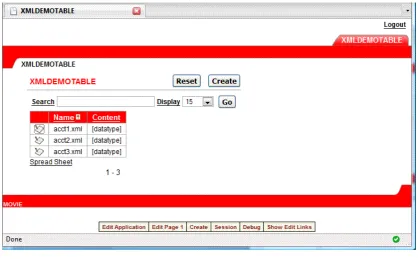
(21) Efficient Web-based Application Development Tools on XML-enabled Databases. model mentioned before for native XML databases. As Obasanjo (2001) expressed the data-centric model that “in a data-centric model where data is stored in a relational database or similar repository; one may want to extract data from a database as XML, store XML into a database or both. For situations where one only needs to extract XML from the database one may use a middleware application or component that retrieves data from the database and returns it as XML”. It describes the data structure used in XML-enabled databases which typically resides in relational databases. Those databases are supposed to serve as not only a central repository of XML-documents and DTD schema definition but also provide all necessary data management functionalities. Relational database system was proposed to satisfy those requirements by “devising ways to ‘shred’ XML documents into relations, and translate XML queries into SQL queries over these relations” (Tatarinov et al., 2002). They simply map all XML to a traditional database. DB2 XML extender, Oracle 9i/10g and SQL server 2000 are some typical sample database systems which are all integrate XML data processing into the relational databases even though the approaches are slightly different. 2.2.3 Hybrid Databases In some cases, both document-centric and data-centric models of XML usage could be used within the XML storage. The best data storage choice is usually considered to be native XML databases. However, the lines that many see between XML-enabled databases and native XML databases are becoming blurred. In the IBM DB2 documentation (Beyer and Cochrane, 2006) three key reasons are discussed that call for hybrid database systems that can handle both relational and native XML data: • XML and relational data coexist and complement each other in enterprise solution. • A successful XML repository requires much of the same infrastructure that already exists in a relational database management system. • XML query languages have considerable conceptual and functional overlap with SQL.. Tamino was originally built as a native XML database management system, but can now be regarded as a hybrid system. Thanks to its SQL engine, it provides means for storing and retrieving both kinds of data as well as for retrieving them with external data sources and applications. The major relational database systems have been providing some XML support for several years, predominantly by mapping XML to existing concepts such as CLOBs or relational and object-relational tables. The limitations of this approach are widely known in research and industry. In particular after the release of the W3C recommendation of XQuery (XQuery, 2007), a new generation of database management systems has been released that provide comprehensive native XML Page 20 of 80.
(22) Efficient Web-based Application Development Tools on XML-enabled Databases. support. Version 9 of IBM’s DB2 database management system is probably the most prominent example. "Native" means that XML documents are stored on disk pages in tree structures matching the XML data model. This avoids the mapping between XML and relational structures, and the corresponding limitations. That makes these DBMS true hybrid systems which places equal weight on XML and relational data management, see (Nicola and Van der Linden, 2005). 2.2.4 Comparison A detailed comparison of XML-enabled and native XML databases is given in (Thuraisingham, 2002), see also (Bansal and Alam, 2001). For XML-enabled databases one has the following advantages: • Once configured they are fast since most data processing is done by the DBMS. • Applications can use the functionality provided by DBMS extensions such as fuzzy searches, synonym searches, and searches by sentence or paragraph etc, and it is easy to add XML support to existing applications that already use the same backend database. On the other hand, one faces the following disadvantages: • Without adequate support of the DBMS a considerable amount of programming is needed before one can actually store, retrieve, or query XML documents. • Developers use proprietary extensions to SQL (provide by the respective DBMS) rather than XML or other standards to perform non-trivial operations and manipulations on the XML data. • As the database stores the document as a whole including tags etc., it consumes more space in the DBMS. In contrast, native XML databases observe the following advantages: • The DBMS provides comprehensive support for the management of XML documents, including storage, access and search (XPath, XQuery), specialized functions, etc. • There is no performance penalty during the runtime of the database caused by the translation of data structures to and from XML. • Developers save time with programming. In particular they are not concerned with non-XML data structures (like tables and transformations from and to XML) when the XML documents have to be stored. • A change in the XML schema may not require a corresponding change in the database schema and mapping. Schema independence guarantees high flexibility and makes application development easier. • They further provide a good temporary storage place for message queuing and other applications in which data needs to reside briefly in order to be queried or Page 21 of 80.
(23) Efficient Web-based Application Development Tools on XML-enabled Databases. reordered before being retransmitted in XML format to their final destination. • Querying in an unstructured document is easier than in a relational database. On the other hand, there are some disadvantages: • For the time being they need to be considered as not less reliable as they are not yet mature, but still under development. New methods need to undergo extensive testing (as done for relational data for ages). • Existing applications need to deal with yet another database. • Due to the heterogeneous nature of XML they provide a lower level of data integrity, such that it may be difficult to build standard database instances. Some of the disadvantages of native XML databases may disappear over time due to the ongoing efforts of the suppliers of database tools and DBMS. Currently, however, XML-enabled databases are often the only available choice for developers. Though native XML databases have the potential to save developers valuable time with developing and testing, almost all current web-based application development tools do not have database support on this type of XML databases. For this thesis several web-based application development tools with a backend database that supports XML have been investigated in order to find out an efficient method for those tools to deal with XML data residing in the database. For fair comparison, an identical database has been chosen and implemented such that it can be supported by all investigated web-based application development tools. Before describing this database in more details I will briefly introduce the XMLType data type defined in the Oracle 10g DBMS, see (Oracle, 2005a). 2.2.5 Oracle’s XMLType Since XML data becomes more and more popular as an information exchanging media, a variety of relational databases have already announced and released their latest version databases which allow database users and developers store XML data or document into them. In order to achieve efficient XML data storage, a new data type XMLType is introduced for storing XML data. As defined from Oracle, XMLType is a native server data type that allows the database to understand that a column or table contains XML (Oracle, 2005a). It is similar to the way that normal popular data types. End-users can use the XMLType data type like other data type such as creating a XMLType column, declaring PS/SQL variables or defining and calling PS/SQL procedures and functions. Since XMLType is also an object type, end-users can also create a table of XMLType. By default, an XMLType table or column can contain any well-formed XML document.. Page 22 of 80.
(24) Efficient Web-based Application Development Tools on XML-enabled Databases. 2.3 Support for XMLType in Web-based Application Development Tools After introducing new data type for information exchanging – XML and XML supported databases, we are going to investigate how recent web-based application development tools deal with this new data type stored in database and what are the potential problems from those implementations. In this implementation, we will try to use all three types of web-based application development tools to create web application on a simple Oracle database table with XMLType column. The table structure is as follows:. Figure 9: A table definition with an XMLType column. This table is mainly defined to store some XML documents. These XML documents contain data about bank account information. The “content” of an XMLType column is declared to hold XML data from these XML documents. All account related XML documents are inserted into this database and ready for application development.. Figure 10: A table with XMLType data. The main purpose of this application development investigation is exactly to observe how web-based application development tools deal with this XMLType column and what potential problems may occur. 2.3.1 Oracle Application Express (APEX) Oracle APEX, as an Oracle integrated primary tool for managing the database and building web-based applications, has inborn advantages which seems to be possible Page 23 of 80.
(25) Efficient Web-based Application Development Tools on XML-enabled Databases. for giving it enough supports on XMLType data. Since Oracle APEX directly use Oracle database as data source, there is no problems to import database for developing web application. However, it also reveals unavoidable problem when developers attempts to retrieve XML data from XMLType column for listing records. Oracle APEX is able to generate an application with basic functions by using wizards as follow:. Figure 11: XML demo page in Oracle APEX. Figure 12: XML demo form in Oracle APEX. As we can see, the wizard generated forms that use automated DML are not Page 24 of 80.
(26) Efficient Web-based Application Development Tools on XML-enabled Databases. XMLType-aware. In the table record listing page, all “content” column data are represented as “[datatype]” rather than the XML data from XML documents. When end-users enter wizard-generated insert/update form, XML document content is still not shown for data manipulation. Although we can retrieve XMLType data from Oracle database through simple SQL script, auto-generated web pages created in Oracle APEX cannot show XMLType data value within corresponding page element. That makes it hard to develop a web application by using Oracle APEX when there is XMLType data in back-end XML-enabled database without adding certain XML-specific retrieval methodologies. 2.3.2 WaveMaker (formerly ActiveGrid) WaveMaker has different methodology for dealing with back-end data model. Developers have to import external databases and save it as the data model for application development. As mentioned above, almost all popular databases are supported by WaveMaker including HSQLDB, MySQL, Oracle and SQL Server. In this case, we still import the Oracle database with the “Account” table storing XML documents. WaveMaker studio translates Oracle database table schema and save as a data model based on WaveMaker conventions. The final data model imported in WaveMaker is as follows:. Figure 13: XML demo table structure in WaveMaker. From the imported data model definition, we can see WaveMakers has its own conventions which follows OO programming variable types such as short type for number type and string type for varchar type in Oracle database. The column with XMLType data is treated as a CLOB (Character Large Object) in WaveMakers. Since WaveMaker is mainly programmed Java, by default drivers implement a CLOB object using an SQL locator (CLOB), which means that a CLOB object contains a logical pointer to the SQL CLOB data rather than the data itself. A CLOB object is valid for the duration of the transaction in which it was created. With the developing mechanisms, we expect to get a simple search function page on table. A test page with search function on person information table is created as follows: Page 25 of 80.
(27) Efficient Web-based Application Development Tools on XML-enabled Databases. Figure 14: Sample XML demo table in WaveMaker. However, when we attempt to search the table with account related XMLType data column and show account information, the auto-generated search page cannot display table data on the page and shows a rendering exception error:. Figure 15: XML demo table exception error in WaveMaker. The same problem happens for ActiveGrid which shows exception error of unsupported data type. Both of them show that XMLType data is not a natively supported data type in WaveMaker. It is mainly because this generation of JDBC driver does not support the JDBC XMLType or XML object. When developers want to retrieve XMLType data from XML supported databases, they also have to write vendor specific code and find out another methodology or workaround to handle this data type.. Page 26 of 80.
(28) Efficient Web-based Application Development Tools on XML-enabled Databases. Figure 16: XML demo page in WaveMaker. 2.3.3 Ruby on Rails Unlike Oracle APEX and WaveMaker, Ruby on Rails framework shows a clear structure of the whole application. Developers have the flexibility to work on Ruby on Rails including database connection driver. Ruby on Rails support Oracle database with the ruby-oci8 connection driver, see (Kubo, 2008). With the help of RubyGems, a Ruby application that allows you to install Ruby frameworks very easily, developers are able to install ruby-oci8 Oracle database adapter with it. Besides, developers also have to modify database configuration file (database.yml) in order to make the connection work. However, ruby-oci8 connection driver does not support XMLType natively. It results in exception error of unsupported data type and cannot generate web application to handle “Account” table with XMLType data type.. 2.4 Research Question Recent web-based application development tools are all mainly developed to build database-centric web application on popular relational database(s). They all provide own mechanism to handle back-end database connection in order to generate data model used for developing web application. After introducing new XMLType data type into XML-enabled relational databases, some popular databases such as Oracle, DB2, and SQL Server have already been capable of handing XML data and document within relational databases. Although these XML-enabled relational databases are ready for developers to make use of XML data or XML document, those web application development tools seems not to react to catch up with the new data type change within databases. Some of them cannot retrieve XMLType column data correctly from XML-enabled database; some of them cannot retrieve all column data and shown on the pages because of new XMLType; some of them even cannot generate the web application because of the unsupported data type. They become bottlenecks for those development tools. It requires web application developers to find out corresponding workarounds to deal with XMLType data processing. The key Page 27 of 80.
(29) Efficient Web-based Application Development Tools on XML-enabled Databases. objective of this research paper is to explore different potential types of technologies for XMLType processing and investigate into workable implementations with those web-based application development tools. It is expected to solve the unsupported new XMLType data type issues by means of some workarounds for more efficient web based application development on XML-enabled relational databases.. 2.5 Research Methodology In order to address the research problem and investigate possible solutions for achieving the objective, we will use different research methodologies. Theory – It is necessary and compulsory to give out all definitions of relevant terminologies including data-centric data model, document-centric data model, native XML databases, XML-enabled databases, declarative query languages, application programming interfaces (APIs), PL/SQL and all definitions for possible solutions of the research objective. They serve as the basics for further discussion in the research paper. Some of them have already mentioned and defined in above sections and the others will be stated afterwards. Comparison – Since the main purpose of the research is to investigate different types of web application development tools, it is essential to have comparison method. We need both comparisons before new XMLType data introduction and after new data type introduction. A general comparison on several criteria among three different types of web development tools will be implemented in order to investigate features and abilities of them. It is obvious that these web application development tools developing teams and lots of XML communities have already released a variety of proposals on either workarounds or approaches for XMLType data processing (both extraction and manipulation) for web application development. That makes comparison method be an essential procedure. Besides the general comparison, further comparison on these different workarounds or approaches becomes the key aspect for this research report. Only if compare different approaches can we find out their advantages and disadvantages in order that a better choice can be made based on the result from those comparison. Generalization/Specialization – Sometimes it is difficult to get the correct solution for new requirements immediately. Before we look into how to achieve the requirement of XMLType data handling within web development tools, we had better first explore all possible approaches when we are dealing with XML data in different situations. It may make it simpler if we can solve the XML data handling problems before we consider new XMLType data type integration within existing web application development tools. After we fully understand all features of XML data storage and processing, it may be better to consider how to fulfil the new data type requirement based on the previous acknowledgements. That is the generalization and specialization method.. Page 28 of 80.
(30) Efficient Web-based Application Development Tools on XML-enabled Databases. Examples – Only presenting the theories of workarounds or approaches is not efficient to thoroughly make sense to some extent. It is also necessary to implement these possible solutions into real web application example. They can also be applied when we do comparison between different approaches either for development with or without XMLType data. For basic comparison among tools uses ordinary back-end relational database without XML data as data source for web application development while key comparison on solutions and approaches uses database table with XMLType column as example data source. Those examples would be essential blocks to build up our discussion. We supposed to concentrate on these example application developments and observe their performances so that we can get a conclusion on sufficient XMLType handling with different web-based application development tools.. Page 29 of 80.
(31) Efficient Web-based Application Development Tools on XML-enabled Databases. 3 A Brief Outline of Three Popular Web-based Application Development Frameworks As we all seen above, we have a variety of choices for web-based application development tools. The three types of development tools we mentioned are some typical examples in the industry. They all provide developers necessary functionalities and tools for easy-to-use development environment. However, they also have their own unique features. In this section, we will briefly compare and evaluate them based on different criteria.. 3.1 Installation Easy installation and configuration is the first key aspect for end-users and developers. For those lower-level end-users or fresh users of the tool, this could be a big challenge for them to start using the tool. 3.1.1 Installing Oracle Application Express (APEX) Among these three tools, Oracle Application Express is the easiest one to setup because of its integrative feature. Certain entry level Oracle database such as Oracle Database 10g Express Edition has Application Express already integrated into it. Once Oracle Database EX has been installed, the web-based application development tool (APEX) is already installed and configured and ready for use. However, if there is a need to install and configure Oracle Application Express into an existing Oracle Database end-users must separately install Oracle HTTP Server and Oracle Application Express. Although Oracle offers end-users companion CD which includes installation package, they still have to modify PATH environment variable and configure HTTP server settings based on Oracle database to run APEX. That may relatively cost more extra time for entry-level web-based application developers. 3.1.2 Installing WaveMaker (formerly ActiveGrid) Both ActiveGrid and WaveMaker, on the other hand, can be easily installed by using software installation package. There is no need for end-users to post-configure the development environment after installation. Even if developers want to change the HTTP server settings, they can easily modify the server configuration under corresponding software menu item. Overall, this type of web-based application development tool is especially designed for those end-users who are looking for an efficient and flexible development solution. 3.1.3 Installing Ruby on Rails Lastly, the development framework on programming language (Ruby on Rails) is Page 30 of 80.
(32) Efficient Web-based Application Development Tools on XML-enabled Databases. somehow “manual” to setup. Programming language Ruby and web framework Rails is separately installed and configured. If end-users don't have the patience to get Ruby on Rails running manually, they can also try one of the pre-packaged solutions called Instant Rails. It includes everything in one bundle: web server, database, Ruby, and Rails.. 3.2 Usability Easy-to-use is another key factor that dramatically influences the comfort and efficiency of the web-based application development processes. All levels of web application developers want to find a user-friendly and comfortable development environment in order to increase the efficiency and have an enjoyable developing experience. Its easy to use browser based application builder enables developers and non-programmers to develop and deploy data driven web applications in very little time. 3.2.1 Using Oracle Application Express (APEX) Oracle APEX is relatively designed for entry-level end-users so that most of the development processes can be realized by using pre-defined wizards. For instance, a simple application can be simply created through “Create Application” wizard under “Application Builder” menu item. Seven steps are needed to fulfil the whole process of application generation including name, pages, tabs, shared components, attributes, user interface and confirmation. The application editor panel provides user-friendly interface where essential functionalities and indicators are located.. Figure 17: Screenshot of Oracle APEX application builder. Oracle APEX uses pre-defined methodology to render and process pages across the entire application, which speeds up the assembly of pages. Single page structure and definitions can be also declared and modified through “Page Definition” section.. Page 31 of 80.
(33) Efficient Web-based Application Development Tools on XML-enabled Databases. Figure 18: Oracle APEX page definition section. The way Oracle APEX uses is separation of user interface, application logic and data access. It uses templates for pages, regions, reports, labels and other elements of an application and encourages developers to separate the look of application from logics and functionalities. It makes maintenance easier since understanding how a page works does not require looking through code or scripts. In Oracle APEX, a developer can quickly tell what function a page performs and how it works, even if he’s never seen the application before. Developers can also work on the logic of the application before they decide on the user interface and the look of the application can be changed only by changing the templates rather than every page or component in the application because the separation of different components. 3.2.2 Using WaveMaker (formerly ActiveGrid) ActiveGird and WaveMaker are somehow similar with Oracle APEX to some extent. As shown in Figure 8 within Dashboard tab of WaveMaker, it also divided the application development into three separate parts which are “Pages”, “Services” and “Data models”.. Page 32 of 80.
(34) Efficient Web-based Application Development Tools on XML-enabled Databases. Figure 19: Dashboard editor tab of WaveMaker. Developers can add, modify and delete building blocks of application (pages), specifications of all operations (services) and definition of the connection to each database (data models) by only using the user-friendly functions within dashboard editor section. Similar with Oracle APEX, WaveMaker also provides “Design” editor for page definition as shown in Figure 4 where drag-and-drop feature is implemented for easy page layout definition and page elements allocation. Page element property and page model give developers an object-oriented application development environment, even though WaveMaker is intended for developing web-based applications. 3.2.3 Using Ruby on Rails Ruby on Rails, as an open-source web-based application development framework, is different from those integrated development environments above. It is more or less a conceptual structure which illustrates a method to develop web-based application. It provides developers essential components such as HTTP server, database connection and programming language support. Instant Rails is the typical example which we investigate in this paper. The central control panel look like as follow:. Figure 20: Instant Rails control panel. Page 33 of 80.
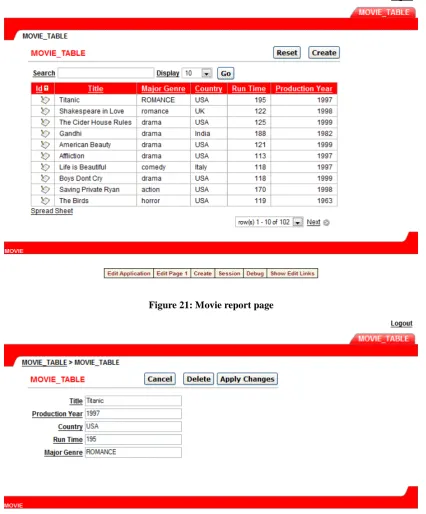
(35) Efficient Web-based Application Development Tools on XML-enabled Databases. The panel gives clear indicators for HTTP server and database status. All necessary developing methodologies and functions are available under “I” menu. Even if developers use one-stop Ruby on Rails runtime solution, they still have to use Rails command line to generate, modify or delete web-based applications and Ruby command to deal with database connection or application modifications. That makes it hard to get started quickly for entry-level developers or end-users such as staffs. Furthermore, there is no page designer interface or data model monitor. Since Ruby on Rails use MVC (Model-View-Controller) structure, ruby scripting files and rhtml web page files are created under corresponding folder (models, views and controllers folders) throughout the whole application development process. Developers have to manually use text editors to modify either web pages code, function code or controller code. That means developers have to look into and know back-end code and scripts, which is also not suitable for entry-level developers.. 3.3 Performance Performance is also a key factor which can greatly influence user’s choice especially because the duration of development circle is related to the cost of application development. In this case, developers should consider both developing and deployment period durations. In order for fair comparison of three different types of development tools, we make a small project task to observe which development tool can finish it better. The project task that we’re going to build in this case uses Oracle 10g Express Edition as data source for all three development tools. This simple task begins with a single search/list page. We have a database that contains movie related information. We want to create a simple page that allows users to search for a movie by certain key words; display a list of movies that match the search characters, add new movie, delete existing movie and modify certain movie information. Later we’ll add more functionality to this basic application. 3.3.1 Rapid Developing with Oracle Application Express (APEX) As we expected for Oracle APEX, developers only need to follow new application generation wizard steps and choose what contents (pages, components, etc.) within the initial layout. In this case, developers only need to add report and form pages to achieve the requirements. A basic application with CRUD (create-read-update-delete) and even search functions is automatically created. The whole developing process only takes 15 minutes.. Page 34 of 80.
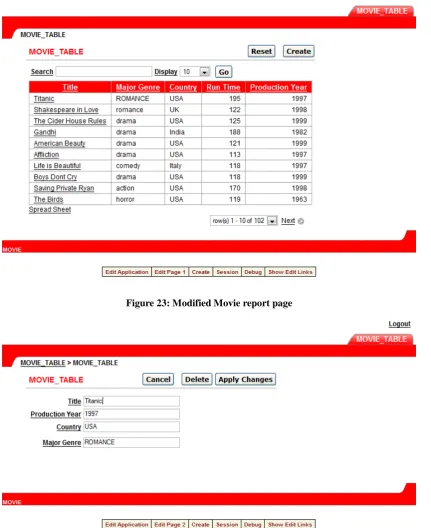
(36) Efficient Web-based Application Development Tools on XML-enabled Databases. Figure 21: Movie report page. Figure 22: Movie form page. The modification after developers create the application can be realized through page definition (Figure 9). For instance, developers only need to modify column attribute to change “modify” icon to “Title” text link within Movie report page definition. They can also make default field(s) (e.g. Run Time) to be hidden within Movie form page definition. The final application looks as follows:. Page 35 of 80.
(37) Efficient Web-based Application Development Tools on XML-enabled Databases. Figure 23: Modified Movie report page. Figure 24: Modified Movie form page. 3.3.2 Rapid Developing with WaveMaker (formerly ActiveGrid) The second tester, WaveMaker, looks much more sophisticated to use than Oracle APEX. Unlike Oracle APEX which directly reuse data model from its own database, developers have to import the data model from external databases (advantage to some extent) and created service calls. Due to the newly released development tool after ActiveGrid, it hasn’t already integrated some useful automated features in ActiveGrid. Page 36 of 80.
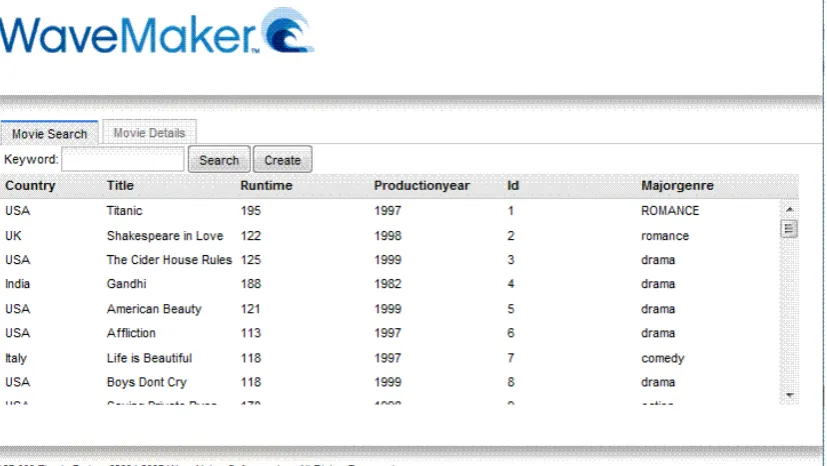
(38) Efficient Web-based Application Development Tools on XML-enabled Databases. For instance, developers only need to import data model from database and ActiveGrid 2.x automatically generates web pages with default basic functions provided (list, create, edit, delete, search) which are exactly what entry-level developers need. However, new WaveMaker 3.0 only generates basic "services" for imported data model, but not the actual pages. According to Geremy Cohen, the Community Development Manager of WaveMaker there are “plans for creating autogenerated CRUD pages in a future release” (Cohen, 2008). Although developers have to create web pages manually, user-friendly drag-and-drop Widget Palette feature makes layout designing pretty easy and rewarding according to the developers’ requirements. It gives web-based application developers a feeling that they are using a professional object-oriented development environment. Basic database-related service calls are already available for use after developers import the data model. For small applications a first running version can be produced in no more than 30 minutes.. Figure 25: Movie search page by WaveMaker. Page 37 of 80.
(39) Efficient Web-based Application Development Tools on XML-enabled Databases. Figure 26: Movie details page by WaveMaker. Compared with Oracle APEX application modification, WaveMaker application is somehow easier. During the development processes, developers have already familiar with existing page elements, service calls and operations. They can quickly find the item or place which or where they need to modify according to the requirements. In this case, we easily get rid of “Id” column from the movie list and re-order the sequence of table columns which only needs to modify the “dataFields” property belonging to the “movieList” item on the MovieSearch tab to be “title, majorGenre, country, runTime, productionYear”. As we did in Oracle APEX, we also remove the runtime attribute and re-order the sequence of form elements from the movie details form only by changing the “dataFields” of form property to be “title, productionYear, country, majorGenre”. The final application looks as follows:. Figure 27: Modified movie list page on WaveMaker Page 38 of 80.
Figure

+7
Related documents
Materials and Methods: The specificity of the assay was tested using reference strains of vancomycin-resistant and susceptible enterococci.. In total, 193
Spreadsheets that are informally created are harder to test than they should be. Simple cross-foot checks or being easily readable are modest but attainable goals for every
Mobile Link - A Theory-Based Messaging Intervention for Mobile Link - A Theory-Based Messaging Intervention for Improving Sexual and Reproductive Health of Female Improving
This activity is jointly provided by North Mississippi Medical Center, the Mississippi Department of Mental Health Division of Professional Development, the Alzheimer’s
Methods: To examine the relationship between severity of health status and monetary value of a QALY, we obtained willingness to pay (WTP) values for one additional QALY in
Commencing in 1998 as an experimental project, it has been recognised at the South Australian state level as a forward-thinking initiative that has radically transformed
The diagrams were generated using a modification of the classical Lloyd algorithm, in which the weights of the generators are fixed and only the locations are updated at each
This study proposed a systematic grounded theory approach to discover if students became motivated for reading by being given an opportunity to select reading content for
