T H E D E S I G N A N D
I M P L E M E N T A T I O N O F
Q
N E M U A N I N T E R A C T I V EQ U E U E I N G
NETWORK A N A L Y S I S P A C K A G E
b y
N e i l R a y L a d y m a n
A thesis presented in partial fulfulment of the
requirements for the degree of
Master of Science in Computer Science
at
Massey University
In this thesis a number of design objectives are discussed for the generation of interactive packages. Two of the most important are considered to be portability and user friendliness. Unfortunately these can at times produce conflicting design aims.
The objectives identified are incorporated into the design and implementation of a menu driven package that analyses networks of queues.
A brief description of the way the package was implemented is included, as is a discussion on the validation of the package so far carried out.
ACKNOWLEDGEMENTS
In presenting this thesis I would like to take this opportunity to express my thanks to the following people:
Firstly my supervisor, Tom Docker, for his guidance, and criticism throughout all stages of the work reported in this thesis.
To the numerous members of both the Computer Science Department and the Computer Centre at Massey University for their interest shown and support given especially in the final stages. Particular thanks to Walt Abell whose constructive criticism was invaluable in shaping this thesis ■
To my many friends whose encouragement provided much incentive towards the completion of this thesis ■
Table of Contents
0 INTRODUCTION •••••••••••••.•••••••••••••••••••••••••••••••••••••••••• 9 1 DESIGN of an INTERACTIVE PACKAGE ••••••••••••••• . ••••.•••••••••• 1 l 1.1 Introduction ••••••••••••••••• • •••••••••••••• • 11 1.2 Portability . . • . . • • . • . . . • . • . . . • 12 1.3 User Friendly . . . • • • . 14
1.3 .1 1.3.2 1.3.3 1.3.4 1.3.5
Menu Driven •••••••••••••.•••••••••••••••••••••••••••••••• 15 Help Facilities . . . • • . . . • . . 16 Commands ••••••• . . . • . . . • . . 18 Responses... ••••••••••••••••••••••••••19 Verification and Validation checks ••••••••••••••••••••••• 21 1.3.5.1
1.3.5.2
Scanning Semantic
Chee ks • ••••••••••••• Checks •••••••••••••• 1.3.5.3 User Checks ...•••..•••••..
..••...•.••...•• 21 •••••••••••••••• 2 2 • ••••••••••••••• 2 3 1.4 Program Structure •••••••••••••••••••••••••••••••••••••••••••••• 23 2 DESCRIPTION of the QNEMU PACKAGE ••••••••••••••••••••••••••••••••••• 25
2.1 2.2
Introduction .••.•..•..••••....•••.•••••...•.•.••••••.•.•••• 25 QNEMU
2.2.1 2.2.2 2.2.3 2.2.4 2.2.5
O·verview . ...•....••.••••.•....•••••••••••••..•••••••••••• 2 7
Commands ••• ....•.•••• Help Fae il it ies ••••••
.•.•••••••••••• 2 9 ••••••••••••••• 3 2 Networks .• • • • • . . . . • . . . • • . . . • • • • • • • . • • . . . . • • • • . • • • • 33 Current
Library
Network ...••...••.••.••••.•...•••••••••••• 34 Networks •••••••••
2.2.6 QNEMU Menus ••••••••••••••
•••••••••••••••••••••••••••• 3 7 • .•••••.•••••••••.••••••• 3 9 2.2.6.1 Prompt Menus •••••••••••••••••••..•••••••••••••••• 39 2.2.6.2 Display Menus •••••••••••••••••••••••••••••••••••• 43 2.2.7 QNEMU Responses •••••••••••••••••••••••••••••••••••••••••• 48 2.2.7.1 StatuS•••••••••••••••••••••••••••••••••••••••••••49 2.2.1.2 Warning••••••••••••••••••••••••••••••••••••••••••49 2.2.7.3 Error •••••••••••••••••••••••••••••••••••••••••••• 5O 3 IMPLEMENTATION •••
3.1 Introduction.
. •...•••••••••••••.•••.•••••.•••• 51 . . • . . . • 51 3.2 Initial isation ••••••••••
3.2.1 I/O Formats •••••••
• •••.•••••••••••••••••••• 5 3 . . . . 54
3.3 3.4 3.5 3.6 3.2.2 3.2.3 3.2.4 3.2.5 3.2.6
Date • . • . • . • . . . . • • . . . 54 Command Keywords and their Options.. • ••••••••••••• 55 Text files ••••••••••••••••••••••••••••••••••••••••••••••• 56 Current Network••••••••••••••••••••••••••••••••••••••••••6O Scanner ••...••.•• . . . • . . . • • . • 60
lle l p •••••••••••••••••••• ••• 61
••• 65 Prompt Scanner . . . • . • . .
QNEMU
3.8 Library File I/o ••••••
3.9 Network Node Details ••
• •••••••••••••••••••••• 7 4 .76
.77 3.10 Algorithms ••••••••••••••••••••••
4 VALIDATION of QNEMU ••••••••• • ••••••••••••••••••••••••••••••••• 7 9 ••••••••••••••••• 7 9
4 .1
4.2
Introduction ••••••••••••
Validation Exercise 1 •••••••••••••••••••••••• . ..•...•.••••••• 80
. . . • . . . • . . 80
. . . . • . . 81
. . . • 85
4.2.1 Introduction ••••••••• 4.2.2 The Models ••••••••••••••••••• 4.2.3 Experiments .•••••••••.•..•••. Experiment 1 . . • . . . • • • . • . • • • . • • . . • • • . . • • . • • . . • • • . • • 85
Experiment 2 . . . • . . . • . . • . • . • . • • • • 88
Experiment 3 . . . • . . . • . . . • 89
Experiment 4 ...•.••...•..••••••••••.••.••••••.••• 90
4.3 Validation Exercise 2 •••••••••••••••••••••••••••••••••••••••• 91 4.3.1 Introduction •••••.•.• ••••••••••••••••••••••••••••••••••91 4.4 Validation Exercise 3 •••••••••••••••••••••••••••••••••••••••••• 95 5 CONCLUSIONS and FURTHER RESEARCH ••••••••••••••••••••••••••••••••••• 98 5.1 Further Research ••••••••••••••••••••••••••••••••••••••••••••••• 99 APPENDIX A APPENDIX B APPENDIX C Check 1: Syntax Diagrams of the QNEMU Command Language •••••••• 101 Library File Record Formats •••••••••••••••••••••••••• 112 QNEMU Consistency Checks ••••••••••••••••••••••••••••• 116 Mean Server Utilisation ••.••.•.•••..••••••••••.••.•.••••• 116
Check 2: Sum of Mean Queue Lengths •••••••••••••••••••••••••••••••• 116 APPENDIX D - Sample QNEMU Sessions •••••••••••••••••••••••••••••••••• 118 APPENDIX E Selected QNEMU Subroutines ••••••••••••••••••••••••••• 128 APPENDIX F Fields in tl1e Display Menus ...•.•.••...••••••••.•• 137
APPENDIX G Structure Diagram Code Summary ••••••••••••••••••••••• 140 - Performance Evaluation •••• APPENDIX H H. l Introduction ••••••••• H.2 H.3 Measurement •••••••••••. Prediction ••••••••••••• ..•••••• • 141
•••••••• • 141 • •• 145 ••• 147 H.4 Models of Queueing Networks ••••••••••••••••••• . .••.•• 148 • •••••• 14 9 H.5 Simulation . . • . . . • . . . • • . • . • . . • . . . H.6 Hybrid • • • • • • • • . • . • . . . • . . . • . . • • . • . • • • • • • . • • • • 151 H • 7 Ana 1 y tic Mode 1 s ••••..•...•••...•.••••.•••••••••••••••• 15 2
H.7.1 H.7.2 H.7.3
Product Form ••••••••••
Operational Analysis ••
App ruxima t ion .•
H.8 Validation •••••••••••
•••••••• 15 3 • ••••••• 15 7 ....•...••.•••••••••• 15 8 • ••••••••••••••••••• 15 8
Figures and Tables
fig 1.1 Different Types of Package User••••••·••••••••••••••••••••••••••••••l7 fig 1.2 General Structure of an Interactive Package•••••••••••••••••••••••••24
fig 2.1 Initialisation Messages • • • • • • • • • • • • • • • • • • • • • • • • • • • • • • • • • • • • • • • • • • • • • 2 8
fig 2.2 A Typical Node in a Queueing Network•·••••··••··••••••••••••••••••••35 fig 2.3 FSM for the Current Network Commands •••••••••••••••••••••••••••••••• 36 fig 2.4 FSM for a Saved Network in the Library File ••••••••••••••••••••••••• 38 fig 2.5 General Layout of a Prompt Menu ••••••••••••••••••••••••••••••••••••• 40 fig 2.6 Full Prompt Menu for the QNEMU Command•••••••·••••••••••••••••••••••41 fig 2.7 Full Prompt Menu for the Queueing Discipline••••••••••••••••••••••••41 fig 2.8 Brief Prompt Menu for the Queueing Discipline•••••••••••••••••••••••42 fig 2.9 General Layout of Single Terminal Screen Display Menus •••••••••••••• 44 fig 2.10 General Layout of a Display Menu which is More than a Single Page •• 44 fig 2.11 Display Menu of the Directory Command •••••••••••••••••••••••••••••• 44 fig 2.12 First Display Menu of the LIST of a 23 Line Network •••••••••••••••• 46 fig 2.13 Second Display Menu of the LIST of a 23 Line Network ••••••••••••••• 47 fig 2.14 Third Display Menu of the LIST of a 23 Line Network •••••••••••••••• 48
QNEMU
fig 3.6 The Prompt Menu for the Help Command Option ••••••••••••••••••••••••• 62
fig 3.7 Display Menu of The SYN Option of the HELP Command ..•••••••••••••••• 63
fig J.8 Display Menu of the i-/allpaper Option of the HELP Command •••••••••••• 64
fig 3.9 Structure Diagram of the Prompt Scanner ...•••••.••••.•••••• 65
fig 3.10 Levels of Interaction in the Subroutine Getsym•••••••••••••••••••••66
tab 3.11 Getsym Parameter Table•••••••••••••••••••••••••••••••••••••••••••••68
fig 3.12 Structure Diagram of the Subroutine Listcn••··•·•••••••••••••••••••7O
fig 3.13 Layout of the Network Library File ••••••••••••••••••••••••••••••••• 75
fig 3.14 Layout of the Node Details Section for an N Node Network ••••••••••• 76
fig 4.1 Job Flow in the IBM System/36O-75 of UCSB ••••••••••••••••••••••••••• 81
fig 4.2 Cyclic Queue Model [Chiu 75) ••••••••••••••••••••••••••••••••••••••••82
fig 4.3 Central Server Model [Chiu 75) ••••••••••••••••••••••••••••••••••••••82
tab 4.4 Performance Figures Before and After Memory Upgrade ••••••••••••••••• 87
tab 4.5 Comparison of Measured and Modelled Results ••••••••••••••••••••••••• 88
tab 4.6 Model Comparison between [Chiu 75J and QNEMU •••••••••••••••••••••••• 89
tab 4.7 CPU Utilisation Comparison with the Load Factor= Q.5 ••••••••••••••• 9O
fig 4.8 Central Server Model used in [Bask 75) •···••··•••••··•••·•••••••92
tab 4.9 Results from Performance Comparison with [Bask 75) ·•••••••••••••••••93
tab 4 .10 QNEMU Input Parameters •... ....•.••.•..•••••••.••.••••..•••••••••••• 96
tab 4.11 GASP IV and QNEMU Results of Tanker Simulation ••••••••••••••••••••• 97
fig C.l Example for QNEMU Consistency Checks ••••••••••••••••••••••••••••••• 117
fig H.l Computer Performance Evaluation Techniques ••••••••••••••••••••••••• 144 fig H.2 Central Server Model •••.••••.•••••.•.•....••.•••.•.•••••.•••••••••• 155 fig H.3 Central Server Model with Terminals••·•••••••••••••••••••••••••••••lS6
QNEMU
0 INTRODUCTION
The widespread development of interactive systems has brought with it
a requirement for much improved interfaces which are not based on the concept of the card based interfaces of the earlier systems. The most
widespread form that this improved interface takes currently is the
menu. However menu driven interfaces have problems in satisfying
users with varying ranges of skill and experience. In addition many
menu driven systems contain a complex tree of menus which can cause
the user to become disorientated.
Users without a knowledge of interactive computer systems can be easily put off using a system if it is difficult to understand and
use. Our main interest lies within the area of statistics (analytic
modelling in particular), where many of the packages, such as Minitab
and SPSS, are little more than interactive batch entry, punched card
image systems. What is needed, is software which provides users with
an interface to translate their requirements into a simple set of
commands that produce clear results.
We begin in Chapter One with a general discussion of desirable design goals for interactive packages, with particular reference to those
packages that require complicated input and output.
Following on from this discussion, a description is given in Chapters
An important aspect of any modelling package is its validation, and so Chapter Four describes the validation exercises so far carried out on
the QNEMU package.
Chapter Five gives some indication of further areas of research related to the QNEMU package.
QNEMU
1 DESIGN of an INTERACTIVE PACKAGE
1.1 Introduction
There is a need for user friendly interactive interfaces in a wide
number of applications. This need is particularly true in the area of
statistical analysis where there are a number of interactive packages
available, but the level at which the software "fits the user" is very poor (such as SPSS, MINITAB and GASP IV). Quite often packages of
this type tend to look very much like a remote entry card based system, and provide a FORTRAN-orientated interface, both of which are
difficult for non-computing users to understand or use effectively.
Three papers which provide useful reading on the design of interactive systems are [Ledg 80, Ling 80, Pars 79].
Two important factors in the design of an interactive package are:
• Portability
• User friendliness
standard. In its turn the non-standard Cobol is likely to be more
portable than the same package written in IBM360, or any other,
Assembler.
The level of user friendliness of a package gives an indication of how
well the package "fits the user". The closer the package is to the
way the user wants it the more user friendly it is.
The level of portability of a package is in principle an objective
measure, compared to the level of user friendliness, which is largely
a subjective measure strongly related to the user's own ability
compared to the level of user the package is designed for. These two
design goals can at times compete, as improving the portability may
well mean omitting a feature that may be very useful, such as reverse
video, but which is system specific.
1.2 Portability
The rapidly increasing costs associated with software development and
maintenance are enough in themselves to suggest that serious
consideration should be given to the portability of any software
package. As suggested above, a major factor in the portability of a
QNEMU
There are a number of levels of software portability, with one of the
first levels being the transfer of software between computer systems
of the same manufacturer. This can be divided further, as there can
be different hardware and different system software on the systems
which impact heavily on the portability of software packages. This is
the case on the two Prime systems at Massey University, where some
software is only available on one of the systems as the two systems
run under different releases of the operating system. The problem of
portability becomes much worse as software is transferred between the
systems of different manufacturers.
One of the readily identifiable problem areas with the transferring of
software between two systems is the manner in which the I/0 is handled
on each system. Any differences can largely be overcome by using only
the standard I/0 routines of a language such as FORTRAN 77, and
resisting the temptation to use system dependent I/0 routines. A very
good review of guidelines for portable programming is found in [Wall
82). A useful guide to writing portable FORTRAN 77 is [Larm 81).
With a view to its portability, the decision was made early on in the
development of the QNEMU package [Oldf 82] to use FORTRAN 77 as the
1.3 User Friendly
The user friendliness of a package is an abstract term which can best
be judged by the use of the system, or at least the observations of
the users of the package. One useful guide to the user friendliness
of a system is how much the system is actually used. Unfortunately
this can only be judged once the package has been completed, and at
best indicates whether the package requires immediate modification.
Any computer package should be designed with the user as the most
important person to satisfy. Therefore i t is important to identify
the users and their particular requirements at the time a system is
being designed. This may be difficult if the package is new, but a
number of design iterations where modifications are made from user
feedback should be made [Norm 83).
The latest in user friendliness of systems seems to be in the areas of
direct manipulation and the provision of windows acting as scratchpads
for data. Direct manipulation is available on a very limited range of
current computer systems, with windows being more common.
Unfortunately the portability to date of such features is very low due
to their hardware dependence [Schn 82) .
The next level down in user friendliness is in intelligent,
interactive, menu-driven packages, where the user is guided through
QNEMU
The l~vels lower than menus include the batch style interactive input.
In packages of this type, the input data are entered on each run and
cannot be altered without reentering the complete set of input [Ling
80]. Most statistical packages, including Minitab and SPSS, have this
level of interface. Some have a provision for saving data, but the
interface is st i l l structured at a fairly low level.
Below this are the batch systems and the actual programming languages
used on the computer [Sand 78].
1.3.1 Menu Driven
A menu driven system can become annoying for an experienced user if
the menus cannot be reduced in some manner to remove the bulk of
the information. This is particularly noticable on a system with
slow screen refresh where the menus appear to take an unreasonable
time to be displayed.
In addition to varying the level of the prompt menu, the ability to
enter a number of commands in a single input line, without the
prompt menu for each entry being displayed to the user, is a useful
1.3.2 Help Facilities
In addition to the package being menu driven, the user should also
have available a comprehensive help facility. There are a number
of levels at which this can be provided.
There should be off-line user manuals with detailed reference
material on both the general operations of the software and the
commands. Having an off-line facility is important as it permits
the user to access the relevant information when a terminal is not
available. This feature is particularly pertinent in an University
environment where resources such as terminals are in heavy demand.
However, if it is the only source of reference, it may mean that
the user has the inconvenience of carrying the documentation about
at all times.
The major problem with off-line facilities is that of keeping the
material up-to-date. This can be made easier if the help
information is maintained on-line and is updated whenever a change
is made to the software, or when the help information is improved.
To facilitate this, help information should be read into the
software package as data, rather than being compiled as part of the
package.
Various levels of online help facility should be provided as users
- - -- --- - - -- - -
-QNEMU
and level of the awareness of the specific package influence the help level required by the user (See figure 1.1).
figure 1.1 Different Types of Package User
Application Skill
naive
expert
Package Use
naive
Full Help
Overview of package
expert
Overview of application
Reference material
The ability to tailor the help facility for particular installations or groups of users is considered a very useful feature.
1.3.3 Commands
Interactive command languages should be designed with the two objectives of ease-of-use and clarity of meaning in mind. The user should be able to express his requirements in a natural manner which bears a close relationship to the way the requirements would be specified if a computer was not being used. The language should be such that it can be seen what the meaning of a command is without further documentation. The command language and the menus are complementary, each should be consistent and reflect the structure of the other.
To help make a command language more acceptable to different users, the language should be designed to accept (user-defined) synonyms for the commands. (E.g. LIST or PRINT.)
QNEMU
that a user can easily determine an abbreviation without context
sensitive restrictions. For example, if an abbreviation can be
used to obtain help information throughout a menu-driven package,
it should not be a different abbreviation within different menus.
The use of free format commands, where the order of symbols is not
significant, can also be seen to improve the ease-of-use of an
interface. For example, "Print fredfile" or alternatively
"fredfile Print". There are a number of commands where the order
of the symbols contains information and cannot be entered in free
format. For example the numerical operation subtract, where "3
-5" and "5 - 3" do not represent the same operation.
1-3 .4 Responses
Responses to a user can be identified at three distinct levels:
error response, warning response, and status response. In essence,
they all serve to provide the user with retrospective information
on the user input and the operations of a package. The most
important is the error response which alerts the user to the fact
that an invalid event has occurred. Hopefully the user can
overcome the error using one or more of the information available
in the response, menu or help facility. An audio response as well
non-valid data has been made. If an error has not occurred there
are two further levels of response which can be identified.
There are cases where the user may well have entered a command
which is valid but is quite possibly not consistent with the state
of the package. For example a warning may be given if the user
attempts to overwrite an existing file with a new file. The
warning does not require an audio response as this should be
reserved for error responses. If a signal such as an audio
response is used too frequently i t will lose its significance to
the user.
The third type of response, and arguably the least important, is
the status response, which indicates to the user the current status
in the execution of a package.
Every attempt should be made to stop the user receiving meaningless
QNEMU
1.3.5 Verification and Validation checks
All user input should be verified which involves both checking of the input symbols and checking of the the input structures. The checking is to determine whether meaningful results can be produced by the semantic routines before entry to them. Without checks inconsistencies in the results and wastage of resources are likely to occur. The output should also have consistency checks, either inbuilt into the package or at least provided for the users to check if they feel the results may be incorrect.
In general the package should carry out automatic checking wherever it is required and not rely on the user, who may have little or no knowledge of the checking procedures.
1.3.5.1 Scanning Checks
one or more unprintable characters. If not detected as invalid
by the scanner the user will have difficulty in determining what
the name is at a later stage.
1.3.5.2 Semantic Checks
Semantic checks are important in most applications to ensure
that the input data and the structures they describe are
meaningful. Correct data means that the algorithms in the
semantic routines will be able to carry out their required
functions. Every possibility of abnormal termination, such as
divide by zero, should be checked for by the software and not by
the user, and a suitable response returned to the user. Any
attempt by the user to delete non-existent entities or create
QNEMU
1.3.5.3 User Checks
There are some situations where the software cannot easily
provide checks, or where the checks are only required a small
number of times. In these cases it may be more appropriate to provide well documented user checks,
1,4 Program Structure
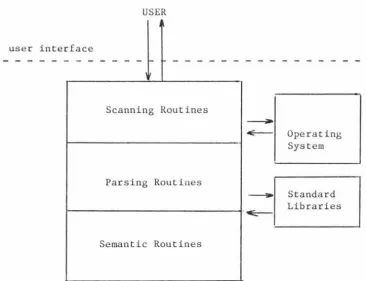
It is suggested that interactive packages can be well structured by using many of the techniques developed for compiler construction. The
essential program components of an interactive package are scanning, parsing and semantic layers, which are equivalent to the layers found
in an interactive compiler or interpreter, The user interface comprises of both input and output, with the input originating from the user and the output originating from all three layers of the
QNEMU
figure 1.2 General Structure of an Interactive Package
USER
user interface
-r---Scanning Routines~
E - - Operating
1---~
SystemParsing Routines
- Standard
Libraries
[image:24.564.83.449.147.428.2]~
-QNEMU
2 DESCRIPTION of the QNEMU PACKAGE
2.1 Introduction
QNEMU is a package designed for the analysis of networks of queues.
QNEMU (Queueing Network Evaluator of Massey University) which is
designed to be used interactively from terminals, incorporates the
design goals identified in Chapter 1. The first implementation of the
system is on the Prime 750 system at Massey University.
In QNEMU users are able to create permanent files, each of which is
capable of holding a library of queueing networks, and are able to
edit, save and analyze the networks held in these libraries.
The first design goal, portability, has been met in part by the use of
standard FORTRAN 77 I/0 routines for both disk I/0 and terminal 1/0.
This means that the I/0 may not be as efficient or as user friendly as
it could have been if specific system dependent routines of the Prime
system had been used, but hopefully it makes the package relatively
portable in this area. The portability design goal has also meant
restrictions in such areas as the provision of archiving of networks
which would use system dependent routines.
different levels of menu details, and a wide range of help facilities.
In addition to the different levels of menus, limited menu by-pass is
provided so that the user may skip the menus displayed at each
interaction. The commands have also been designed to include synonyms
and common mis-spellings, with the facility to completely tailor the
commands for each installation without the need to recompile the
program. This applies to the help facility and menu banners as well.
As an example, a German equivalent for all the commands can replace
QNEMU
2.2 QNEMU Overview
QNEMU is designed to be as terminal independent as possible. The
package is designed around a 24 line 80 column screen, but a command
exists by which the user can specify the number of lines on a screen.
In QNEMU terminolgy the information displayed on a screen is called a
~ - Screens with less than 80 columns are not suitable for the
running of QNEMU.
The process of starting QNEMU, manipulating networks and exiting is
called a session. A session is started as soon as the following PRIMOS command is entered:
RUN QNEMU
A QNEMU session is made up of three distinct phases, namely
• Initialisation
• Analysis
• Termination
In the initialisation phase, the variables in static common are
automatically set up. During this phase a series of messages is
printed to the terminal to indicate the progress of the initialisation
figure 2.1 Initialisation messages
1-1 1-1 1-1 1-1 1-1 1-1 1-1 1-1 1-1 1-1 1-1 1-1
1-1 1-1
1-1
1-1
Please be patient, QNEMU is initialisingl-1
1-1
1-1
1-1
1-1
* * * * * *
B L1-1
1-1 1-1
1-1
1-1
1-1
1-1 1-1 1-1
T E N
N I N E
E I G H T
s
E V E Ns
I XF I V E
F 0 u R
T H R E E
T W 0
0 N E
A S T 0 F F
* *
* * * *
Once this phase is completed the analysis phase commences. The
dialogue between the user and QNEHU begins with QNEMU requesting from
the user the file name of the library file to use during the session.
The second phase continues until the user terminates the session with
an EXIT command. The termination phase follows, and is similar to the
QNEMU
2.2.1 Commands
The QNEMU commands have been designed with the features described
in section 1.3.3, except that there is no provision for free format
commands. QNEMU commands begin with a keyword, usually a verb, and may be followed by a number of options that modify the effect of
the keyword. The keywords are chosen to represent the action
required as closely as possible, and where there are a number of
common synonyms for the same action each synonym is provided. Abbreviations are also provided to reduce the number of keystrokes and hopefully improve the ease of use. In using the full keyword
the clarity of a command may well be increased for the
inexperienced user.
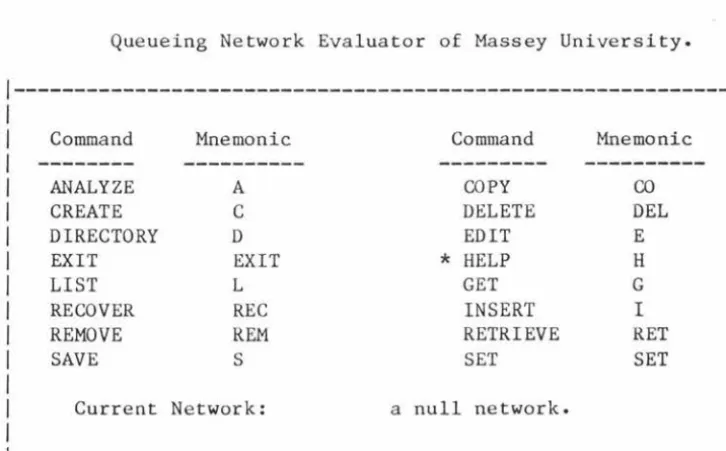
In most menus the* character can be used to indicate a default
command or option. The default option for each menu is indicated
in the menu by either a brief line of explanation (see figure 2.7) or as an* beside the default option in the menu (see figure 2.6).
The QNEMU commands can be divided into the following categories:
Session Command
EXIT
Change Commands
EDIT DELETE INSERT
Library Network Commands
DIRECTORY REMOVE RETRIEVE SAVE
Analyze Cornn.and
ANALYZE
Display Command
LIST
Information Command
HELP
The syntax of the QNEMU commands can be found in APPENDIX A.
A string of commands may be entered on a single line and can be
separated by semicolons, commas or blanks. Example:
GET prime750 EDIT SOT cpu * 3.0 Q , ANALYZE ALL 20
QNEMU
displayed information is no longer wanted. Three such commands are
LIST, DELETE and HELP, which all have display menus of information
for the user to view. Examples:
LIST NAME ALL
HELP SYN
All the commands and the command options can be entered in
lowercase or uppercase. Example:
get prime750 LisT
**
All commands except EXIT allow abbreviations, synonyms and common
mis-spellings. These cannot be used as names of nodes or networks
(see Appendix D). Example:
QNEMU
2.2.2 Help Facilities
The design of QNEMU incorporates a comprehensive help facility, so
that the user has on-line access to a range of information at any
time while running the package. The design of the on-line help
facility is such that the text in the help file can be altered
without recompiling the program. In addition to the on-line
information a hard-copy user manual is also available [QNEM 84).
The on-line HELP command allows the user to select from a range of
help information made up of:
QNEMU overview;
• quick index of the commands;
• detailed reference information on the commands;
• list of the reserved words ( abbreviations, synonyms and common mis-spellings );
• BNF description of the command syntax.
In addition, at any point when entering a command, the user can key
in an HSYM (i.e. H) and the help information for that command
will be displayed to the user. The help information of all the command~ are accessible at this point, by using the display
QNEMU
2.2.3 Networks
A network is classified either as a library network or as the
current network. There can only be one current network but there
may be a number of saved networks in a library file. The library
file can be archived or copied using the operating system commands
available at the installation the package is running on. Within
the library file the saved files can be backed up by saving the
network under a different network name in the library file.
Every network has a unique name within a library file which is c~se
independent; that is, a name in lowercase is the same as a network
name in uppercase or any other combination of upper and lowercase
characters. This reduces the confusion over upper and lowercase
strings having different meanings when most users tend to regard
them as interchangeable.
Examples of unique valid network names.
Networklongnameis.upto>26 SHORT-network
Example of names for the same network.
Examples of invalid network names.
)Network KILLER;THREE ONE NETWORK
2.2.4 Current Network
There is only ever one current network and its name is the name of the network referenced by the last CREATE, GET or SAVE command. Any changes made to the current network have no effect on a network of the same name in the library file should one exist, unless the
changed version is saved using the SAVE command.
Each node in the current network is made up of a queue and one or more servers (see figure 2.2). The input parameters for each node in the network are the queueing discipline, the service rate of
each server, and the routing probabilities to the other nodes in
the network. In figure 2.2 "Arrivals" represents the arrivals from the other nodes and "Departures" represent the departures to the
- - - -- - -- -- - - --- - --
-QNEMU
figure 2.2 A Typical Node in a Queueing Network
---1
1---1
Arrivals
--->
I I 1---> I
1---->
Departures--
-
---1
1---1
Queue X Servers
The calculated performance statistics are the mean server utilisation, mean queue length, mean wait time and mean node throughput at each node in the network for the specified workloads. The average workload can be a real or an integer value.
figure 2.3 FSM for the current network commands
8
Get <name> Create <name>
Remove *
Save <name> Save*
Create <name> Recover
Exit Exit
Note 1: Change command includes the QNEMU commands EDIT,
DELETE, and INSERT.
2: Commands not shown cause no state change.
QNEMU
2.2.s Library Networks
When the current network is saved with the SAVE command i t becomes
a library network in the library file, It remains in the library
file, under the saved name, until the network is removed with the REMOVE command. The contents of a library network can be changed
after the network is made the current network with the GET command,
then the network is both a saved library network and the current
network. The library network is not affected by the changes made
to the current network until the SAVE command is used again, After a SAVE the old library version is replaced with the new version, unless a new network name is used as the save option. The
following examples show the case of saving under the same name and under a new name, respectively,
Example 1
GET oldnetwork
EDIT rpb •• ,
SAVE*
Example 2
GET oldnetwork
EDIT rpb •••
SAVE newnetwork
In the second example a new network name is used, so the old library version of the network is left unchanged and a new network
The networks in the library file can be listed using the DIRECTORY
command. The date each network was last saved, and whether or not
[image:38.557.113.486.234.487.2]each network is tagged for removal, is also listed.
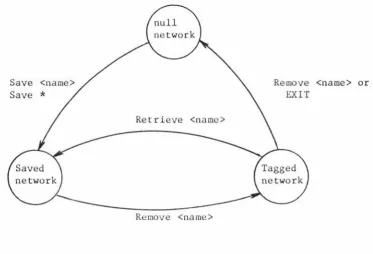
figure 2.4 FSM for a saved network in the library file
Save <name> Save*
Retrieve <name>
Remove <name>
Remove <name> or EXIT
Note that "null network" signifies that a saved version of the named network does not exist, and that a current network of a
2.2.6 QNEMU Menus
There are two types of menus used in the QNEMU package.
Respectively, they carry out the two distinct tasks of prompting
the user for input, and displaying information held by QNEMU for
the user to view on the terminal.
2.2.6.1 Prompt Menus
Prompt menus exist to indicate what type of input is required
next. They contain a brief description of all the options
available , plus helpful guidelines for the user. Abbreviations
of the options and commands are also contained in the menu.
There are two levels of prompt menus, aimed at the inexperienced user and the expert user respectively. The inexperienced user
menu level prompts the user with full menus (see for example
figures 2.6 and 2.7), while the more experienced user can restrict the display to the response and prompt lines (see figure 2.8). The response line is described in section 3.4, and
the prompt line is a summary of the full menu and normally
contains enough information for the more experienced user. To
The five regions in a prompt menu are <heading>, <prompt information>, <response>, <prompt> and <user input>, (see figure 2.5 for the general layout and figures 2.6 and 2.7 for actual examples).
figure 2.5 General Layout of a Prompt Menu
<heading>
1
---
-
-
--
---
-
---
-
---I
I
I
I
<prompt information>I
I
I
1
----
-
----
-
---
--
---
---
---
-
-
--
--
-
--
-
---
-
---I
<response> <prompt>
QNEMU
figure 2.6 Full Prompt Menu for the QNEMU Command
Queueing Network Evaluator of Massey University.
l---1
I
I
I
Command Mnemonic Command MnemonicI
I ---
---
---
---
I
I
ANALYZE A COPYco
I
I
CREATE C DELETE DELI
I
DIRECTORY D EDIT EI
I
EXIT EXIT * HELP HI
I
LIST L GET GI
I
RECOVER REC INSERT II
I
REMOVE REM RETRIEVE RETI
I
SAVEs
SET SETI
I
I
I
Current Network: a null network.I
I
I
l---1
Status: thesis.ch4.dam file of networks has been read.
[image:41.563.113.476.125.350.2] [image:41.563.85.476.465.711.2]Key in ••• QNEMU COMMAND,( e.g. HELP) ••• or M
figure 2.7 Full Prompt Menu for the Queueing Discipline
Queueing Network Evaluator of Massey University.
1---I
I
I
I
Specification by the user of the QUEUEING DISCIPLINE atI
I
the node named diskoneI
I
I
I
Queueing discipline MnemonicI
I---
---
I
I
First come first served FCFSI
I
Infinite server ISI
I
Last come first served pre-emptive resume LCFSI
I
Processor sharing PSI
I
I
I
*
leaves unalteredI
I
I
I
L :lists the current service details of the node.I
I
Q :leaves the entering of the service details.I
1---I
figure 2.8 Brief Prompt Menu for the Queueing Discipline
Status: Editing the service details of the nodes.
Key in ••• the QUEUEING DISCIPLINE ••• L ••• * ••• M ••• or Q
Prompt Menu By-pass
Prompt menus can be by-passed by the user typing in multiple
options and commands on a single input line. The prompt menus
are by-passed until either an error occurs (in which case the user must enter corrected input), or a display menu occurs (which requires the user to enter an acknowledgement once the information has been viewed). When either of these conditions
- - - -- -- - - -- - -- -
-QNEMU
2.2.6.2 Display Menus
The display menus supply information to the user on, among other things, the following:
the names of the networks held in the library file using the DIRECTORY command
• help information from the HELP command
• the information from the LIST command
The general layout of the display menus is given in figures 2.9 and 2.10, with an example of the first layout in figure 2.11 and examples of the second layout in figures 2.12, 2.13 and 2.14.
The total number of lines that can be displayed is called a page. A system default exists for the page size, but this can be altered by the user via the SET command. If, for example a page size of 24 is used, the maximum physical size of the <screen of Text Information> field in figures 2.9 and 2.10 is 17 lines.
figure 2.9 General Layout of Single Terminal Screen Display Menus
1---I
I
<Heading information>I
1---I
I
I
I
<Screen of Text Information>I
I
I
1---
t h e e n d---1
<prompt> <user input>
<QNEMU and display guideline>
figure 2.10 General Layout of a Display Menu which is More than a Single Page
1---I
I
<Heading information>I
1---I
I
I
I
<Screen of Text Information>I
I
I
l---1
<QNEMU and display guideline>Key in DISPLAY COMMAND,(i.e.H,B,P,T,N,D <int>,R,L <str>,Q to leave). <user input>
figure 2.11 Display Menu of the Directory Command
l---1
I
Saved network name Date saved dd/mm/yy Remove tag statusI
1---I
I
IBMPC 23/11/83I
I
NETl 11/12/83I
I
PR1ME550 9/10/83I
I
NETl.BACKUP 11/12/83 ** tagged for removal**I
1---
t h e e n d---1
QNEMU fil:Xqnemu.dam com:directory lines 1- 4 of 4
QNEMU
If the amount of information cannot fit on a single page then the
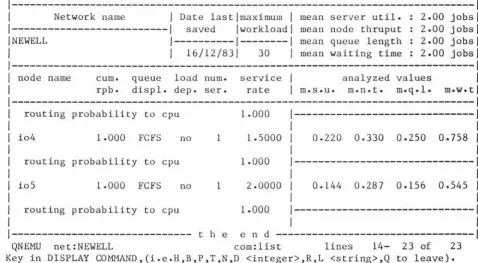
user may give one of a number of display subcommands which allows
any portion of the information to be displayed. Typically a user would use the subcommands to "scroll" through the information, as the three figures 2 .12, 2 .13 and 2 .14 show. The subcommands are:
B :The bottom command displays the bottom page of information.
F :The from <signed integer> command displays the page starting <signed integer> number of lines from the current line.
E.g. F -5 will start from 5 lines above the current line and
F 5 will start from 5 lines below the current line.
H :The help command displays a page of display command descriptions.
L :The locate <string> command displays the first page containing
<string>. The search starts from the current displayed line. Embedded blanks and case of the characters are significant.
E.g. L node name
P :The previous command displays the previous page of
information.
Q :The quit command leaves the display subcommand loop.
R :The repeat command carries out the last locate from the
current top line, plus one.
T :The top command displays the first page of information.
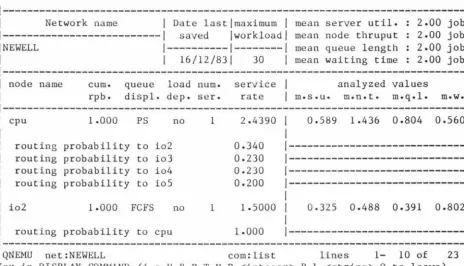
figure 2.12 First Display Menu of the LIST of a 23 Line Network
l---1
I
Network nameI
Date lastlmaximumI
mean server util. 2.00 jobs!1---1
saved lworkloadl mean node thruput 2.00 jobsl !NEWELL1---1---1
mean queue length 2.00 jobslI
I
16/12/83I
30I
mean waiting time 2.00 jobsI
1---I
I
node name cum. queue load num. serviceI
analyzed valuesI
I
rpb. displ. dep. ser. rateI
m.s.u. m.n.t. m.q.l. m.w.tll---1
I
cpu 1.000 PS no 1 2-4390I
0.589 1-436 o.804 0.560I
I
I
I
I
routing probability to io2 0.3401---1
I
routing probability to io3 0.2301---1
I
routing probability to io4 0.2301---1
I
routing probability to io5 0.2001---1
I
I
I
I
io2 1.000 FCFS no 1 1.soooI
0.325 0.488 0.391 Q.802I
I
I
I
I
routing probability to cpu 1.0001---1
l---1
QNEMU net:NEWELL com:list lines 1- 10 of 23
Key in DISPLAY COMMAND,(i.e.H,B,P,T,N,D <integer>,R,L <string>,Q to leave).
[image:46.564.67.531.404.670.2]QNEMU
figure 2.13 Second Display Menu of the LIST of a 23 Line Network
1---I
Network nameI
Date lastlmaximumI
mean server util. 2.00 jobs---1
saved !workloadI
mean node thruput 2.00 jobs NEWELL 1---1---1 mean queue length 2.00 jobsI
16/12/831 30I
mean waiting time 2.00 jobsnode name cum. rpb.
queue load num. displ. dep. ser.
service
I
rate
I
m.s.u.analyzed values m.n.t. m.q.l.
routing probability to cpu 1.000
1---1
io3 1.000 FCFS no 1 1.0000
I
0.330 0.330 0.398 1.20sI
routing probability to cpu 1.000 1--- ---1
io4 1.000 FCFS no 1 1.sooo
I
0.220 0.330 0.250 0.758I
routing probability to cpu 1.000
1---1 I
1---
-
---QNEMU net:NEWELL com:list lines 10- 19 of 23
Key in DISPLAY COMMAND,(i.e.H,B,P,T,N,D <integer>,R,L <string>,Q to leave).
QNEMU
figure 2.14 Third Display Menu of the LIST of a 23 Line Network
1---I
Network nameI
Date lastlmaximumI
mean server util. 2.00 jobs 1---1 saved !workload! mean node thruput 2.00 jobs !NEWELL 1---1---1 mean queue length 2.00 jobsI
I
16/12/831 30I
mean waiting time 2.00 jobs1---I
node name cum. queue load num. serviceI
analyzed valuesI
rpb. displ. dep. ser. rateI
m.s.u. m.n.t. m.q.l. m.w.tl---1 routing probability to cpu 1.000
1---1 I
I
io4 1.000 FCFS no 1 1.soooI
0.220 0.330 0.250 o.758I
I
I
routing probability to cpu 1.0001---1 I
I
io5 1.000 FCFS no 1 2.0000I
0.144 0.287 0.156 0.545I
I
I
routing probability to cpu 1.0001---1
I
1---
t h eend---QNEMU net:NEWELL com:list lines 14- 23 of 23
Key in DISPLAY COMMAND,(i.e.H,B,P,T,N,D <integer>,R,L <string>,Q to leave). Q
2.2.7 QNEMU Responses
[image:48.556.56.534.125.388.2]QNEMU
2.2.7.1 Status
A status response is purely to inform the user of the current
command being executed, or the last activity which QNEMU carried out. Below are listed example status responses.
Status: The altered current network is tagged for removal.
Status: Analyzed the statistics of the current network.
Status: Network0S360 has been tagged for removal.
2.2.7.2 Warning
A warning response is used to indicate to the user that the syntax of the input is correct, but that QNEMU is unable to
carry out the desired activity. For example, if the user attempts to list the directory of saved networks in the library file and none exist, the following warning is displayed:
Warning: There are no saved networks in the library file.
user:
Warning: There are no nodes in the network to edit.
2.2.7.3 Error
An error response indicates that an invalid command or option has been entered. This means the input syntax is invalid and should be retyped. There are also a number of system errors which can occur which are not the fault of the user. The error responses also cause an audible beep at the terminal to remind the user to re-enter the input. Below are listed two of the
most frequently met error responses!
When an invalid QNtMU command is entered the response is:
* Error: an invalid QNEMU command was entered.
When the user attempts to exit QNEMU after the current network has been changed but without saving or reraoving the current network, the response is:
-- ----- - - - -- - - - -- - - - - - -
-QNEMU
3 IMPLEMENTATION
3.1 Introduction
QN.EMU has been implemented with the portability of the package as a
prime goal. One of the o.=arly decisions made before this thesis was started was in the use of FORTRAN 77 as the implementation language of the underlying computational algorithms [Oldf 82]. Another earlier
decision was to use the NAG library [NAG 83] to provide two of the
subroutines used in the calculation of the normalisation constant, G.
Both these decisions were based on the general wide availability of both FORTRAN 77 and the NAG library. It would be a relatively simple
task to replace the NAG library routines by "in-built" routines if
this was required to improve portability.
The majority of the QNEMU package consists of the interface and
network handling routines, with the algorithms making up only one fifth of the code. In all, QNEMU comprises approximately 5000 lines
of source code. Structured programming techniques were followed
throughout the coding and separate subroutines were used whenever the
clarity of the code would be improved by so doing.
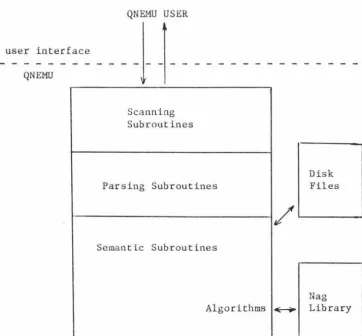
The subroutines in QNEMU can be divided into three groups which
• initialisation subroutine • interface subroutines • termination subroutine
The implementation description in the following sections follows this ordering, with the details of the interface implementation being further divided into a number of sub-sections that reflect the structure described in figure 3.1.
figure 3.1 Structure of the QNEMU Interface Software
QNEMU USER
user interface
QNEMU
--!-
1
-Scanning Subroutines
Parsing Subroutines
Semantic Subroutines
Algorithms
Disk Files
Nag
[image:52.564.82.445.387.723.2]QNEMU
3.2 Initialisation
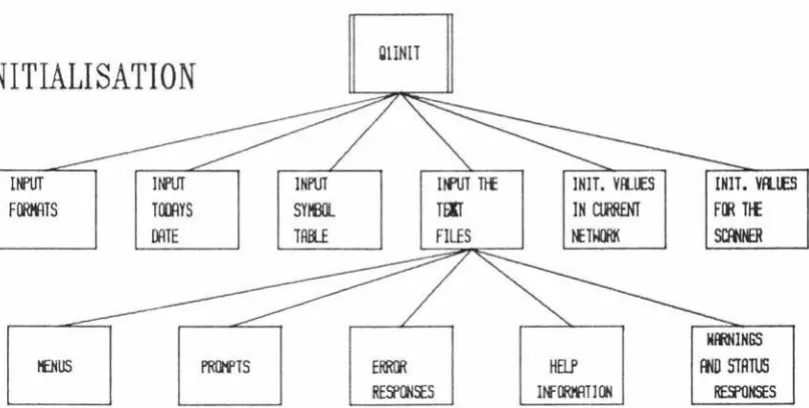
[image:53.555.89.494.266.470.2]Initialisation takes place in the subroutine Qlinit and involves a number of steps, as shown in the structure diagram in figure 3.2.
figure 3.2 Structure Diagram of the Subroutine Qlinit
INITIALISATION
Itf'UT
Fl»MlTS
UfUT HDlYS
INPUT
snm.
DATE TAllE
tEHUS PR!H'TS
ClINIT
Itftll Ttf
TFIT
FILES
!HIT. VII.JES
I N ~ NET~
HELP
!If IJMlT J (Jj
INlT. Vfl.lES
F~ TIE
SCfMR
MmNINGS
3.2.1 1/0 Formats
The FORTRAN I/0 formats are stored in a text file and read into QNEMU on each run. This enables alterations to the formats to be made very simply without the need to recompile the program. An
example use of the formats is:
write (termun, fmt(19)) prompt
where fmt(l9) '(A79)'.
3.2.2 Date
The date in QNEMU is obtained from a FORTRAN 77 extension provided in Salford F77 [SALF 83]. To keep QNEMU as portable as possible, code is also present to allow the date to be entered by the user.
QNEMU
3.2.3 Command Keywords and their Options
The command keywords and the command options are held as an ordered list within QNEMU, and are read in from a disk file during initialisation. Figure 3.3 describes a number of the entries in the current reserved word disk file.
figure 3.3 Section of the Disk File containing the Symbol Table
Reserved Word Symbol Value
BRIEF 68
C 44
CA 16
CAL 16
CALC 16
CALCULATE 16
co
53COM 45
COMMAND 45
COMMANDS 45
COPY 53
EVALUATE 16
would be inserted in alphabetical within the file, and the count increased. EVALUATE and CALCULATE are accepted as synonyms as they
have the same symbol value.
3.2.4 Text files
All the menus, prompts, responses, help information and menu information are held in sequential access disk files and read into data structures held in FORTRAN common blocks. The decision to hold these details in internal storage was taken to provide a faster response time, compared to reading sections from a disk file as required. This may not be much faster when using a virtual
memory system, due to the effect of paging, and if the system has a lack of internal storage then QNEMU could be modified to read in sections of the text files as required. As for command keywords, using text files allows modifications to be easily made without the need to recompile any source code.
QNEMU
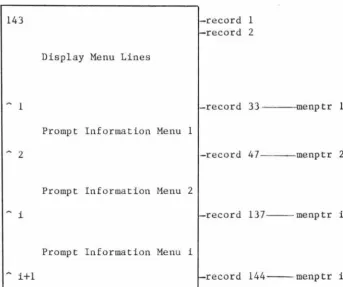
information available to the user. All the text files contain the number of text lines within the file as a three digit number in the
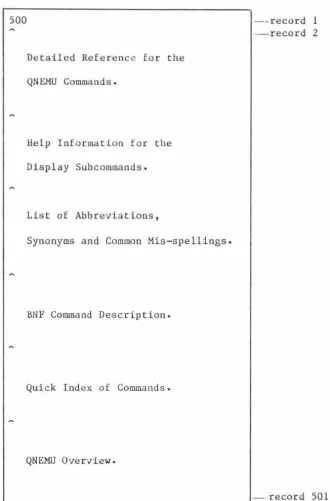
first record of the file. Figure 3.4 describes the structure of the D-MENU.F77 file, which is similar to the D-HELP.F77 file
described in figure J.5.
In figure 3.4 the Display Menu Lines immediately following the first record contain the headings of the display menus. Following these are the menus, separated by special flag records containing the character in the first column. All the lines of the D-MENU.F77 file, except the flag records, are read into the menlin array during initialisation. When a flag record is encountered,
figure 3.4 Layout of D-MENU.F77 File
143 -record 1
-record 2
Display Menu Lines
~ 1 -record 33- --menptr 1
Prompt Information Menu 1
~ 2 -record 47- --menptr 2
Prompt Information Menu 2
~ i -record 137--menptr i
Prompt Information Menu i
[image:58.558.122.466.138.425.2]QNEMU
figure J.5 Layout of D-HELP.F77 File
500
Detailed Reference for the QNEMU Commands.
Help Information for the
Display Subcommands.
List of Abbreviations,
Synonyms and Common Mis-spellings.
BNF Command Description.
Quick Index of Commands.
QNEMU Overview.
- record 1
- record 2
[image:59.561.121.452.136.638.2]3.2.5 Current Network
The initialisation for the current network results in the setting
up of null network values. These include a blank current network
name and a zero node count. This allows the user to get a saved
network or create a new network at the commencement of a new
session.
3.2.6 Scanner
The defaults are set so that full prompt menus are displayed and a
QNEMU
3.3 Help
The on-line help facilities are provided as text files which are
viewed using the display menus described in section 2.2.6.2. The D-HELP.F77 text file is read into an array by Qlinit (see figure 3.2).
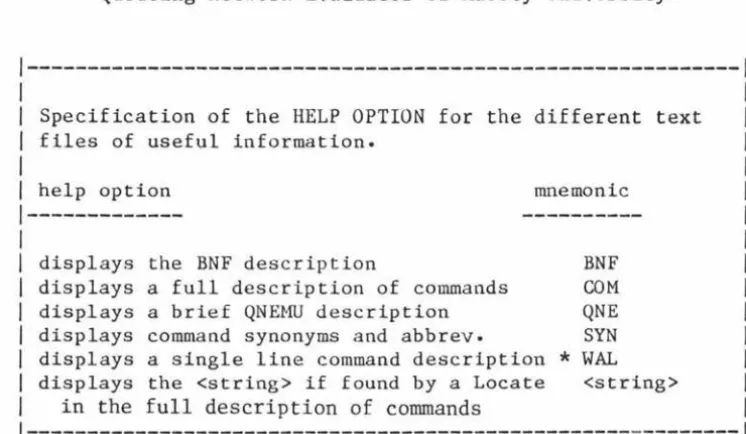
There are two basic points at which help information can be obtained in QNEMU. The first is if the user enters the QNEMU HELP command; depending on the help option entered, the required information is loaded into the array used for the display menus and is then made available for the user to view. The second point at which help information can be obtained is during the entry of any of the QNEMU commands. When entering a QNEMU command, the user can enter the character H and the first page of the help information pertaining to
that command will be displayed. This is implemented by keeping the current QNEMU command in a global variable. If an His entered, the complete help reference information is loaded and the uppercased command located. As the first occurrence of the uppercase command is
always in the first line of the help information for that command, the first page associated with that command is displayed.