IntRoDUCtIon
Since the introduction of Information and Communication Technologies (ICT) in schools in the early 1980s, considerable research relating to how ICT are used in schools to enhance student learning has been undertaken. A key trend has been the increasing access by students to computing, which has seen moves to 1:1 computing access as a desirable outcome. This presents challenges for schools and school systems, particularly in relation to the cost and funding of that level of access. Schools and schooling systems are also faced with an increasing range of options, including laptop computers, iPads, and netbooks. This article makes a contribution to the 1:1 computing research and provides insights for schools, by providing evidence-based research for the appropriateness of netbooks as a computing device for primary school students.
Project Context
DComputing in schools has been available since the early 1980s. Bialo and Sivkin-Kachala (1996) noted that the U.S. Office of Technology Assessment reported that the percentage of schools with one or more computers grew from approximately 18 percent in 1981 to 95 percent in 1987. While that trend of computing access has accelerated, the provision of opportunities to engage with school based digital technologies appears problematic, as reflected in the title of Cuban’s (2001) book Oversold and Underused: Computers in the Classroom. More recent studies have focused on the limitations of teacher education which primarily focuses on pedagogical content knowledge, given the context of rapid and dynamic technological changes. This has been evidenced by Mishra and Koehler’s influential Technological Pedagogical Content Knowledge (TPACK) conceptualisation (Mishra & Koehler, 2006).
To further increase access to computers, and to address the imbalance between access to computers in the home as opposed to in schools, the Federal government launched the ‘Digital Education Revolution’ (Department of Education, Employment and Workplace Relations, 2008)
which endeavoured to improve school computer usage. A component of this ‘revolution’ was the planned distribution of laptop computers to all Year 9 - 12 students, as a contribution to sustainable, meaningful change to teaching and learning, ensuring that students are “confident, creative and productive users of new technologies” (Curriculum Corporation, 2005, p. 14). As a consequence of the national scale of that project, as well as the broader political and educational interest in 1:1 computing, contemporary Australian research into 1:1 computing is required (Oxley, 2008).
A review of the literature retrieved over 100 business type reviews regarding processing power; cost versus benefit analysis; functionality issues; or maximising netbook performance, but no educational research. Likewise, no articles have been published regarding netbooks in computing journals including the Australasian Journal of Educational Technology (AJET), the British Journal of Educational Technology (BJET), Computers & Education, or Australian Educational Computing (AEC). The lack of research on netbooks may reflect assumptions in the literature that 1:1 computing implicitly refers to laptop computers. Current research is therefore required regarding sustainable and educationally appropriate models of computer usage, which includes a consideration of both the educational affordances of netbooks as a computing device as well as the relative advantage (Roblyer, 2006) of purchasing computers in a 1:1 ratio. This research will contribute knowledge regarding the use of netbooks as an appropriate classroom computing tool, maximising the benefits of handheld devices whilst limiting the problematic aspects of their use.
Netbook computers as an appropriate solution for 1:1
computer use in primary schools
ABstRACt
As schools increasingly move towards 1:1 computing, research is required to inform the design and provision of this access. Utilising the Activity Theory (AT) notion of contradictions and expansion as a theoretical underpinning, this article suggests netbooks as a viable option to provide 1:1 computing for primary school students. Decisions regarding the appropriateness of the netbooks were made using a modified version of Keegan’s (2005) functionality / mobility and eLearning / mLearning continuum which categories mobile computing devices. Based on data collected from 119 Year Seven students and their four classroom teachers, the study revealed that the netbooks were considered an appropriate computing device providing an ideal balance between functionality and mobility in meeting the computing needs of primary school students.
Kevin Larkin
University of Southern Queensland
Glenn Finger
Netb
ook c
om
put
ers a
s a
n a
ppr
opr
iate s
olu
tion
Review of Relevant Literature – Functionality, Mobility and Netbooks
The use of netbooks is examined in this study to assess whether or not they are an appropriate device for providing increased mobility without sacrificing a significant degree of functionality which occurs with the use of handheld devices such as Personal Digital Assistants (PDAs), iPads or iPhones (See Serif & Ghinea, 2005; Deegan & Rothwell, 2010).An appropriate starting point for this analysis is the literature concerning mLearning as it appears to offer learning opportunities unconstrained by time or place (Deegan & Rothwell, 2010). Sharples (2009) defines mLearning as “learning that happens across locations, or that takes advantage of learning opportunities offered by portable technologies” (p. 19). Although research in the use of handheld devices, which much of the mLearning literature discusses, indicates enhanced student motivation and engagement (Swan, Hooft, Kratcoski & Schenker, 2007; Tsai, Tsai & Hwang, 2010), handheld devices have yet to be used more broadly in primary school classrooms. Larkin (2007) investigated the use of PDAs as a mobile learning device appropriate for primary school students and suggested a range of positive impacts in relation to classroom communication, school structures and student learning. It was considered, at that point in time, that PDAs offered the best combination of mobility and functionality. This viewpoint was supported by Keegan’s (2005) positioning of PDAs as the most appropriate mLearning tool in terms of a functionality / mobility balance (see Figure 1).
Figure 1 Functionality and mobility in mobile learning Functionality Mobility
Computers Laptop Computers
PDAs Handhelds Palmtops
Smartphones Mobile Phones
e-Learning m-Learning
Figure 2 Functionality / Mobility and eLearning / mLearning continua reconceptualised as relational rather than dichotomous
Functionality Mobility
Computers Laptop Computers
PDAs Handhelds Palmtops
Smartphones e.g.
Blackberries or iPhones
Mobile Phones
e-Learning m-Learning
Subsequent research indicated that the educational potential of PDAs, and their applicability in schools is problematic due to factors including ergonomics, small screen size, slow processing speeds, lack of educational software, compatibility problems with desktop software,
and teacher unfamiliarity with the devices (Gaved, et al., 2010; Norris & Soloway, 2004; Oliver & Barrett, 2004; Serif & Ghinea, 2005). Since the earlier emergence of PDAs, there have been considerable developments in mobile devices, and the uptake of those mobile devices by young people in Australia has seen many young Australians use these devices in their personal lives and at home. Whilst significant obstacles identified in the literature would be applicable to these devices, it is unclear as to whether the factors related to PDA use are a similar obstacle to the use of netbooks in schools. The use of small, but more functional computing devices may be a significant factor in enhancing the educational integration of ICT (BECTA, 2004).
Netbooks – A Brief Description
The term ‘netbook’ was coined by Psion in 1999 (Monticello, 2008) as a generic term for small, portable computers with sufficient processing power for web browsing and other core computing functions such as word processing . Unlike other computer technologies, appropriated from the business world for use in education, netbooks are specifically tailored for student usage (Gaved et al., 2010). Netbooks are envisaged as an essential mobile computing device for primary school students or a secondary device for students in secondary or tertiary education (Merritt, 2008). To indicate where netbooks are positioned in relation to laptops and Smartphones, we have adapted Keegan’s (2005) diagrammatic representation of eLearning and mLearning (see Figure 2).
In positioning functionality/mobility and eLearning / mLearning on a continua rather than as discrete constructs, we argue that the eLearning / mLearning and functionality / mobility perspectives are relational, not dichotomous. Thus, “tool selection” in classrooms is based on the needs of the user in specific contexts rather than predetermined by notions of functionality vs. mobility. From this viewpoint, a desktop computer has limited mobility but high functionality, while a mobile phone has high mobility and might have more limited functionality. However, both devices have aspects of both perspectives. The use of netbooks in classrooms affords the positive aspects of PDA use, for example, mobility, sense of ownership, and 1:1 access (Abernathy, 2001; Roschelle, 2003), whilst minimising many of the negative aspects of their use noted earlier. An additional advantage of the netbooks is their similarity to the desktop or laptop computers already used by teachers and students. This minimises the amount of time which teachers need to spend teaching students how to use the computing devices (Bick, 2005; Gaved, et al., 2010).
Netbooks and Second Order Barriers
Netb
ook c
om
put
ers a
s a
n a
ppr
opr
iate s
olu
tion
technological innovations have proven difficult to use by a wide variety of teachers (Blumenfeld, Fishman, Krajcik, Marx, & Soloway, 2000). Implementation difficulties can occur because schools lack either the technological or social capacity to implement them well; school policies are incongruent with technology use; or the school culture is unsupportive of technology adoption (Franklin, 2007). These barriers to school technology usage are conceptualised by Ertmer (1999) as First or Second Order Barriers. First Order Barriers relate specifically to technical issues surrounding computer usage (bandwidth, access to hardware and software, technical support), whilst Second Order Barriers relate to the individual response of teachers to these challenges and the degree to which classroom teachers implement computing innovations. As this article addresses the appropriateness of netbooks as a computing device, and, given that second order barriers apply equally to netbooks or laptops, Second Order Barriers are not discussed further. The following sections detail the methodology employed, and the resultant findings, which indicate the affordances of the netbooks that suggest their appropriateness for use by primary school students.
Theoretical Framework – Activity Theory
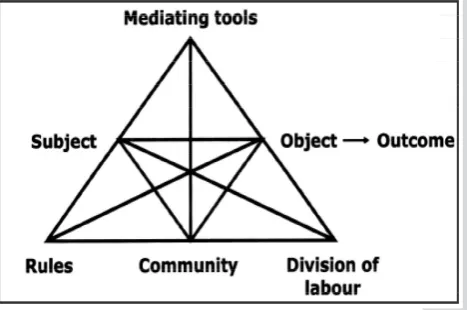
Activity Theory, and, in particular, 3rd Generation Activity Systems, is utilised as the conceptual and methodological framework in this study. Activity Systems enable a systematic analysis of the different elements in the research context, and an examination of the relationships between these elements, to arrive at a holistic understanding from which future action was planned. The elements of any Activity System include Subject (students and teachers), Object (searching the Internet), Tool (Netbooks), Rules, (when the netbooks can be used), Community (the school) and Division of Labour (what students and teacher were responsible for). Activity Systems theory has been used in a range of educational research (Latheef & Romeo, 2010; Lloyd & Cronin, 2002; Romeo & Walker, 2002 Sweeney, 2010; Zevenbergen & Lerman, 2007) to explore the use of ICT in classrooms.
[image:3.595.280.514.100.255.2]The use of an Activity Systems framework provided a structure for the examination of the activities occurring in the classrooms which were supported or distorted by the use of the netbooks (Subject, Community and Object), and how the conduct of these activities was mediated by contextual elements in these environments (Rules, Tool Use and Division of Labour). The use of netbooks caused contradictions, i.e. misfits between elements within the system (Kuutti, 1996) for the teachers. The concept of contradictions is a useful analytical tool, enabling the identification and classification of particular instances of change and development in an activity system (Waycott, Jones & Scanlon, 2005). In this research each classroom is conceived of as a similar, but separate, Activity System. As the focus of this article is the appropriateness of the netbooks as a tool for students and teachers to achieve their object, this article focuses on the Subject, Tools, Object component of the activity systems triangle (See Figure 3).
Figure 3 An Activity System (Engestrom, 1987, p.37)
Data Collection
Data were collected throughout the 2009 school year from four classroom teachers and 119 Year Seven students with pseudonyms for students and teachers used throughout. Student home access to and usage of computers was high, with over 95% of the students indicating that they had access to both computers and the Internet at home. Each of the four teachers was competent in the use of computers, but none had been involved in 1:1 computing contexts. Although expressing their willingness to be involved, the four teachers were not specifically chosen to be part of the project and became involved because they were the Year 7 teachers in 2009 when the study was conducted. The project was conducted as a trial to determine whether the school would embark on a more substantive 1:1 program in subsequent years.
The following data collection methods were used:
n Classroom Observations – (Prior to, during,
and after netbook use)
n Semi – structured interviews with teachers
and students, student forums, and surveys
n Data Logging Software installed on each
netbook
A brief explanation of the three data collection methods is presented below.
Classroom observations
Netb
ook c
om
put
ers a
s a
n a
ppr
opr
iate s
olu
tion
Interviews
Each teacher was interviewed four times; namely, prior to, during and immediately after their netbook usage period, and again approximately six weeks later. Three pairs of students were interviewed from each class; prior to, during and at the conclusion of their netbook usage period. The six students in each class were randomly chosen and interviewed in pairs to minimise potential issues of power imbalance. These six students also took part in a forum at the end of the period of netbook usage. Specific questions were asked during the interviews and in the forum regarding the appropriateness of the netbooks. Examples of these questions included, “Were the netbooks an appropriate device for Year Seven students?” or “Was there anything you wanted to do on the netbooks that the netbooks were not capable of?” In addition, all students completed an anonymous survey at the completion of their netbook usage period.
Data logging software
Spy Keylogger software was installed on each netbook. This tool collected information on every keystroke and provided a range of information indicating precisely how often the netbooks were used and for what purposes. The data revealed that the netbooks were used across a range of curriculum areas and also that a range of software was used; e.g. Google Earth, GIMP, Microsoft Office Products, PhotoStory. Spy Keylogger also functioned as a pro-active research tool by providing entry points into the experiences of the students. The use of Spy Keylogger is considered a particular powerful research tool as it proved difficult to manually observe, with a high degree of accuracy, the computer usage of 30 students working simultaneously on the netbooks.
Summary of the Results and Findings
The findings presented here, are a subset of the broader findings of the project and concern only the functionality and mobility of the netbooks, establishing that they were highly appropriate for these Year 7 students and teachers. Such findings concur with Gaved et al. (2010) who reported the suitability of netbooks in lower secondary schools. These findings relate to the affordances provided by the netbooks and will assist schools in deciding whether netbooks are an appropriate solution to previously identified problems with laptops; size, weight, battery life and cost (Hill & Reeves, 2002; Rockman, 1997) and whether the enhanced mobility of the netbooks does not diminish their functionality as a computing device. Students and teachers commented:
The netbooks have been spot on. We have not wanted for anything. They have been great.
(Vernon, Teacher, Class A, April 2009)
We have been able to do everything I have wanted to do with them from a technical perspective. They have been fine. (Neville, Teacher, Class C, June 2009)
I think they are fine for Year 7 to use. We did PowerPoint, watched videos on the Internet and made brochures. (Belinda, Student, Class C, July 2009)
Table 1 presents data from the final surveys completed by all students at the end of netbook usage. The data is drawn from the following three questions: What were the benefits of using the netbooks?; What were the difficulties of using the netbooks?; and Was there anything you wanted to do but the netbooks could not do? The data excludes any information which could apply to alternative digital devices (laptops, tablet PCs). For example, student comments such as “the netbooks meant we did not have to go to the lab” were excluded. For these students, the netbooks were clearly appropriate in assisting them to complete set tasks.
Table 1: Frequency data from post-use survey regarding capabilities of netbooks
Class Netbooks were appropriate to use
There were problems using the netbooks
7A 21 4
7B 25 5
7C 28 3
7D 32 4
The Microsoft Office Suite (Word, PowerPoint, Publisher, and Excel) was used extensively by the students as were Internet Explorer, Microsoft Media Player and Microsoft PhotoStory. Spy KeyLogger software indicated no technical problems during the widespread usage of these programs. The devices were also able to successfully load Google Earth, Gimp, Java, Shockwave and QuickTime with no reported issues in watching embedded videos from various educational websites. What became apparent during the use of the netbooks, from a device management perspective, was the necessity to ensure that all Internet ‘plug-ins’ were installed prior to the distribution of the netbooks. The teachers in this study were very wary of installing any software from the Internet, preventing student use of a variety of sites until approval from ICT personnel was attained.
Student feedback indicated that netbooks were popular with the students due to their mobility, size, and reduced impact on desk space. There were 22 specific comments in the interview and survey data in relation to the portability and weight of the netbooks and 18 specific comments regarding their size in relation to desk space. A further eight students commented that they could store the netbooks in their tidy trays. For example:
I like the netbooks because you can take it, you can walk back to your desk and the netbooks are really fast and easy to carry around. I will be a bit sad that we don’t have the computers to use every day.
(Student, Class A, April 2009)
becomes critical in Year Seven as they take up much more space as they grow through the year.
(Jasmine, Teacher, Class D, October 2009)
Minor issues with the 85% keyboard were reported by six students (all of whom were fluent typists) as they were accustomed to the location of the keys on a full size keyboard. Approximately 20% of students preferred to bring a mouse from home rather than use the track pad on the devices. The netbooks have some ornamental elements, such as rubber stoppers and silver caps on the hinges, which many of the students removed. The on / off wireless switch is located next to where user’s hands are positioned to type. On occasions, the students absent-mindedly turned off the wireless by fiddling with the switch. These were minor issues which were easily resolved by the teachers.
Discussion
In relation to the broader scope of the project, the deployment of the netbooks caused a distinct dislocation in how the classrooms functioned. In Activity Theory terminology, these dislocations are referred to as tensions or contradictions. These tensions included pressures to integrate the netbooks into the existing curriculum, how to manage the classroom in a 1:1 environment, and the need to develop an appropriate pedagogy for 1:1 use. However, these tensions were a consequence of computer usage in general, rather than a consequence of the particular affordances of the netbooks and many of the tensions evident in relation to the use of the netbooks would likely be present regardless of the computing device. Cognisant of this, in discussing the appropriateness of the netbooks for school use, the focus for the remainder of the article concerns the appropriateness of the netbooks as a computing device. This discussion is framed in terms of the functionality/ mobility and eLearning / mLearning continua as depicted earlier in Figure 2.
The netbooks were appropriate for the goals and motives of the teachers, and for most of the students, in this study. These motives included productivity, social interaction, online research and enhanced communication. The netbooks were considered valuable by the teachers because they facilitated changes to classroom practices which enhanced student learning and challenged pedagogic practices in ways which were not evident prior to their use (Bateman & Oakley, 2009; Sarker & Wells, 2003). Improvements were noted in relation to the quality and depth of student activities:
I think the quality of their work has definitely improved. (Jasmine, Teacher, Class D, October 2009)
Absolutely, the increased depth of the ideas has been very noticeable. (Wendy, Teacher, Class B, June 2009)
In this context, students were able to use the netbooks to assist them in the completion of a variety of learning tasks ranging from basic word processing to the use of more advanced software such as Google Earth, Gimp or Microsoft Photostory. In terms of functionality, the devices were similar to laptops, and also there were minimal reports of technical problems. These findings differ from the problematic
findings reported earlier in laptop-based projects such as battery life and device mobility (see Dunleavy, et al., 2007), or reported in projects using handheld devices such as compatible software and input limitations (see Oliver & Barrett, 2004; Serif & Ghinea, 2005). One student was very impressed with the netbooks and commented:
These computers have been great to use so it’s going to be hard without them. I feel like buying one myself! (Tenille, Student, Class B, June 2009) As reported in the findings, in terms of mobility, the devices were highly mobile and utilised in a variety of learning spaces, for instance, in the Languages Other Than English (LOTE) classroom, the library, and in the students’ ‘buddy’ classrooms. Based on the survey feedback, a significant student preference for netbooks rather than laptops due to their mobility, size, and reduced use of desk space was evident. Many students had prior experience with laptops either at home or via the use of the school’s trolley of six laptops. Teachers also preferred the size of the netbooks as they left space on students’ desks for workbooks and text books. The teachers were also more comfortable allowing the devices to be carried around the school. A student commented:
With the netbooks a good thing is that you can stash them somewhere when you are not using them. It would be really hard to fit 32 laptops in a classroom. Already with the netbooks you only just have enough room for your exercise books. (Joe, Student, Class D, October, 2009) In Figure 2, netbooks were situated as more mobile, but less functional, than laptops. Evidence presented in this study confirms this positioning in terms of mobility, but the netbooks were found to be almost as functional as laptops for primary school computing tasks. The combination of mobility and functionality suggests that netbooks are highly appropriate devices for primary school students. This finding corroborates the similar findings of Gaved et al. (2010) who noted the positive impact of netbooks in their research of student netbook usage in lower secondary schools. Additionally, from a human computer interaction perspective, the netbooks’ size and mobility also affected how the students perceived the devices with students exhibiting a sense of ‘ownership’ of a particular netbook. Strategies by students for locating the same netbook which they wished to use each time were in evidence and mirror the findings of Fairman (2004) in relation to student attachment to mobile devices. The emotional experience of using handheld technologies, due to their size and mobility, seemed to be more personal than the experience of using larger computing devices and, consequently, usage of such devices increases (Alexander, 2004; Swenson, Young, McGrail, Rozema, & Whitin, 2006). Teachers commented on the enthusiasm of the students in using the netbooks in a range of learning activities.
Netb
ook c
om
put
ers a
s a
n a
ppr
opr
iate s
olu
Netb
ook c
om
put
ers a
s a
n a
ppr
opr
iate s
olu
tion
The overall positive perspective on the netbooks is tempered by two issues noted by a small percentage of students; namely, the keyboard size (85% of the size of a normal keyboard) and the screen size. In relation to keyboard size, the following was noted:
When you try and touch type the keys are not the same as on a normal computer. (Christina, Student, Class B, June 2009)
The problem of the smaller keyboard was only an initial issue for the few students who knew how to touch type and they quickly adjusted to the netbook keyboard size. In contrast, many students who did not previously know how to touch type reported a preference for the smaller keyboard due to the size of their hands and the relative
closeness of the keys:
I like typing on the netbooks because the keys are a little smaller and it suits our hands, the keys are a lot closer and you can reach all the letters easily. I can type more quickly on the netbook and you get used to the keys very quickly. (Bob, Student, Class D, October 2009)
The size of the screen, particularly whilst web browsing, was the second concern reported by some students. Because many web pages are not formatted for viewing on smaller screens, there were occasions when the students had to scroll side to side to read text or view images:
With the netbooks you have to scroll a lot because of the smaller screen. (Mitch, Student, Class B, August 2009)
ConClUsIons AnD ImPlICAtIons
The evidence from this study suggests that netbooks are appropriate for use by primary school students, particularly when supported by a strong school based ICT infrastructure. The netbooks were found to be robust, practical, and cost effective devices. The students
completed word processing, presentations, publications and research tasks on the netbooks, and incorporated sound and images into their work. While the study noted minor technical issues with the netbooks, they related more to the existing school infrastructure, rather than the actual netbooks. In cost analysis terms, netbooks are an attractive proposition for primary schools, particularly those excluded from government ICT funding. The 2010 Acer Inspires cost $550 each in comparison to ACER or DELL laptops ($900 - $1100) per device. In large-scale rollouts of 1:1 computing devices such as those noted by Dawson, Cavanaugh, & Ritzhaupt (2008: 2009), the decision to purchase netbooks results in significant financial savings with only a minimal decrease in functionality.
Two caveats are noted in relation to recommending netbooks. Firstly, the netbooks were viewed positively by these students and the teachers due to their reliability. Such reliability, critical for a mobile, wireless device, is only deliverable in a school context, if there is a strong technical infrastructure structure in place providing wireless connectivity, sufficient and stable bandwidth, online data management, wireless printing and on-site technical support (see Roschelle, 2003). A strong infrastructure is critical in overcoming the First Order Barriers (Ertmer, 1999) which often derail computer based activities (Bateman & Oakley, 2009). Secondly, although the netbooks performed all computing tasks, these teachers did not ‘push the envelope’ in terms of higher end computing; e.g. the creation of digital movies, music clips or video conferencing. As the netbooks were untested for more technically difficult purposes, it is not possible to comment on the technical abilities of the netbooks to complete tasks requiring greater processing power. However, Gaved et al. (2010), who reported on usage of the netbooks by lower secondary students, reported no technical problems with the netbooks. It is suggested that further research should be conducted to determine the appropriateness of the netbooks for ‘higher end’ computing tasks which may be required in some school contexts.
.
BIogRAPhy
Dr. Kevin larkin is a Lecturer in Information and Communication Technology (ICT) and Mathematics Education at the University of Southern Queensland. He teaches Maths Education, Technology and ICT courses and his research interests include mLearning, eLearning, ICT in Education, Activity Theory, and 1:1 Computing. His doctoral thesis investigated 1:1 computing use in primary schools. Correspondence regarding this article should be addressed to Kevin Larkin, Faculty of Education, Springfield Campus, USQ. PO Box 4196, Springfield Central, Queensland, Australia, 4300. Email : [email protected]
Netb
ook c
om
put
ers a
s a
n a
ppr
opr
iate s
olu
tion
RefeRenCes
Alexander, B. (2004). Going Nomadic: Mobile Learning in Higher Education. EDUCAUSE Review, 39(5), 28-35.
Bateman, D., & Oakley, C. (2009). Research Report - The Classmate PC 1:1 eLearning Project in Australia. Deakin University, Faculty of Arts and Education.
Bialo, E.R. & Sivin-Kachala, J. (1996). The Effectiveness of Technology in Schools: A Summary Report. SLMQ, 25(1). Retrieved on June 6, 2011 from http://www.ala.org/ala/ mgrps/divs/aasl/aaslpubsandjournals/slmrb/ editorschoiceb/infopower/slctbialohtml.cfm Deegan, R., & Rothwell, P. (2010). A Classification
of M-Learning Applications from a Usability Perspective. Journal of the Research Center for Educational Technology, 6(1), 16-27.
BECTA. (2004). What the Research says about portable ICT devices in teaching and learning. Retrieved on September 12, 2007 from http:// www.becta.org.uk/page_documents/research/ wtrs_porticts.pdf.
Bick, A. (2005). The Impact of Personal Digital Assistants on Academic Achievement.
Retrieved on June 12, 2006 from http://eric. ed.gov/ERICDocs/data/ericdocs2sql/content_ storage_01/0000019b/80/1b/bf/37.pdf.
Blumenfeld, P., Fishman, B., Krajcik, J., Marx, R., & Soloway, E. (2000). Creating usable innovations in systemic reform: Scaling up technology-embedded project-based science in urban schools. Educational Psychologist, 35(3), 149-164. Retrieved on January 1. 2009 from http:// pdfserve.informaworld.com.libraryproxy.griffith. edu.au/584527_775647534_784755057.pdf. Corporation, C. (2005). Pedagogy Strategy. Learning
in an online world., 12. Retrieved on March 29, 2006 from http://www.mceetya.edu.au/verve/_ resources/pedagogy_strategy_file.pdf
Cuban, L. (2001). Oversold and Underused: Computers in the Classroom. Cambridge, Massachusetts: Harvard University Press Dawson, K., Cavanaugh, C., & Ritzhaupt, A. D.
(2008/2009). Florida’s EETT Leveraging Laptops Initiative and Its Impact on Teaching Practices.
Journal of Research on Technology in Education, 41(2), 143 - 159.
Department of Education, Employment and Workplace Relations (2008). Digital Education Revolution. Retrieved on January 5, 2009 from www.digitaleducationrevolution.gov.au.
Dunleavy, M., Dexter, S., & Heinecke, W. F. (2007). What added value does a 1:1 student to laptop ratio bring to technology-supported teaching and learning? Journal of Computer Assisted Learning(23), 440-452.
Ertmer, P. A. (1999). Addressing first- and second-order barriers to change: Strategies for
technology integration. Educational Technology, Research and Development, 47(4), 47-61. Retrieved on August 29, 2009 from http:// libraryproxy.griffith.edu.au/login?url=http:// proquest.umi.com.libraryproxy.griffith.edu.au/ pqdweb?
Fairman, J. (2004). Trading roles: Teachers and students learn with technology. Maine Learning Technology Initiative, Research Report #3. University of Maine Maine Education Policy Research Institute. Retrieved on December 30, 2008 from http://www.usm.maine.edu/cepare/ Reports/MLTI_Report3.pdf.
Franklin, C. (2007). Factors That Influence Elementary Teachers Use of Computers. Journal of Technology and Teacher Education, 15(2), 267-294.
Gaved, M., Collins, T., Mulholland, P., Kerawalla, C., Jones, A., Paxton, M., et al. (2010). Using netbooks to support mobile learners’ investigations across activities and places. Open Learning. Special Edition. Mobile learning: using portable technologies to create new learning., 25(3), 187-200.
Hill, J., & Reeves, T. (2002). The impact of portable technologies on teaching and learning: Year three report. Retrieved on December 30, 2008 from http://lpsl.coe.uga.edu/Projects/AAlaptop/ pdf/EvalPropoal.pdf.
Keegan, D. (2005). The Incorporation Of Mobile Learning Into Mainstream Education And Training. Paper presented at the mLearn 2005 4th World conference on mLearning Conference theme: Mobile technology: The future of learning in your hands, Capetown, South Africa.
Kuutti, K. (1996). Activity Theory as a potential framework for human-computer interaction research. In B. Nardi (Ed.), Context and Consciousness: Activity Theory and Human Computer Interaction (3rd ed., pp. 17-44). Cambridge: MIT Press.
Latheef, I., & Romeo, G. (2010). Using Cultural Historical Activity Theory to Investigate Interactive Whiteboards. Paper presented at the ACEC 2010: Digital Diversity Conference, 6-9 April 2010, Melbourne Convention Centre, Victoria.
Larkin, K. (2007). Using Wireless-enabled Personal Digital Assistants (PDA) to Access Information and Create Communication Patterns:
Constructing and transforming knowledge in a Year Seven classroom. In R. Brown, Finger, G. & Rushton, C. (Ed.), Educational Research: Who Needs It? Proceedings from the inaugural, 2006 Research Higher Degree Conference held at the School of Education and Professional Studies,
Netb
ook c
om
put
ers a
s a
n a
ppr
opr
iate s
olu
tion
Lloyd, M., & Cronin, R. (2002). A community of teachers: Using Activity Theory to investigate the implementation of ICTE in a remote Indigenous school. Paper presented at the AARE, Brisbane, Queensland.
Lowther, D., Ross, S., & Morrison, G. (2003). When each one has one: The influences on teaching strategies and student achievement of using laptops in the classroom. Educational Technology, Research and Development, 51(3), 23 - 44. Retrieved on January 1, 2009 from http://libraryproxy.griffith.edu. au/login?url=http://proquest.umi.com.
libraryproxy.griffith.edu.au/pqdweb?did=4495 45651&sid=3&Fmt=4&clientId=13713&RQT= 309&VName=PQD.
Merritt, R (2008) Notebooks surpass desktops in strong quarter. EE Times. Retrieved on December 26, 2008 from http://www. eetimessupplynetwork.com/212501850. Mishra, P., & Koehler, M. (2006). Technological
pedagogical Content Knowledge: A framework for teacher knowledge. Teachers College Record, 108 (6), 1017 – 1054.
Monticello, P. (2008). Diminutive netbooks sends large ripples on digital pond. Business World.
Retrieved on October 14, 2008 from http:// proquest.umi.com.libraryproxy.griffith.edu.au. Norris, C., & Soloway, E. (2004). Envisioning
the Handheld-Centric Classroom. Journal of Educational Computing Research, 30(4), 281-294.
Oliver, B., & Barrett, C. (2004). Comfort + ubiquity = adoption : enhancing first year students’ communication skills with handheld computers. Paper presented at the ‘Beyond the comfort zone : proceedings of the 21st Annual Conference of the Australasian Society for Computers in Learning in Tertiary Education (ASCILITE). Retrieved from http:// www.ascilite.org.au/conferences/perth04/ procs/oliver-b.htmlhttp://www.ascilite.org.au/ conferences/perth04/procs/pdf/oliver-b.pdf. Oxley, J. (2008). Open Letter to Deputy Prime
Minister Julie Gillard. QUICK - Official Magazine of QSITE, 107, 23.
Rockman. (1997). Report of a Laptop Program Pilot. A Project for Anytime Anywhere Learning by Microsoft Corporation Notebooks for Schools by Toshiba America Information Systems. Retrieved on January 1, 2009 from www.microsoft.com/education/downloads/aal/ resrch_1.rtf.
Roblyer, M. D. (2006). Integrating Educational Technology into Teaching, 4th edition. Upper
Saddle River, New Jersey: Pearson Merrill Prentice Hall.
Romeo, G., & Walker, I. (2002). Activity Theory to Investigate the Implementation of ICTE.
Education and Information Technologies, 7(4), 323-332.
Roschelle, J. (2003). Unlocking the learning value of wireless mobile devices. Journal of Computer Assisted Learning, 19, 260-272. Sarker, S., & Wells, J. D. (2003). Understanding
Mobile Handheld Device Use and Adoption.
COMMUNICATIONS OF THE ACM, 46(12),
35-40.
Serif, T., & Ghinea, G. (2005). HMD versus PDA: a comparative study of the user out-of-box experience. Personal and Ubiquitous Computing, 9(4), 238 - 249.
Sharples, M. (2009). Methods for Evaluating Mobile Learning. In G. N. Vavoula, N. Pachler & A. Kukulska-Hulme (Eds.), Researching Mobile Learning: Frameworks,Tools and Research Designs (pp. 17-39). Oxford: Peter Lang Publishing Group.
Swan, K., Hooft, M. V. t., Kratcoski, A., & Schenker, J. (2007). Ubiquitous Computing and Changing Pedagogical Possibilities: Representations, Conceptualizations and Uses of Knowledge. Journal of Educational Computing Research, 36(4), 481-515. Sweeney, T. (2010). Quality Teaching and
Interactive Whiteboards: Using Activity Theory to Improve Practice. Paper presented at the ACEC 2010: Digital Diversity Conference, 6-9 April 2010, Melbourne Convention Centre, Victoria.
Swenson, J., Young, C. A., McGrail, E., Rozema, R., & Whitin, P. (2006). Extending the Conversation: New Technologies, New Literacies, and English Education. English Education, 38(4), 351.
Tsai, P.-S., Tsai, C.-C., & Hwang, G.-H. (2010). Elementary school students’ attitudes and self-efficacy of using PDAs in a ubiquitous learning context. Australasian Journal of Educational Technology, 26(3), 297-308.
Waycott, J., Jones, A., & Scanlon, E. (2005). PDAs as lifelong learning tools: an activity theory based analysis. Learning, Media and Technology, 30(2), 107 -130.