CodeWarrior
®
C, C++, and Assembly
Language Reference
Because of last-minute changes to CodeWarrior, some of the information in this manual may be inaccurate. Please read the
Metrowerks CodeWarrior copyright ©1993–1996 by Metrowerks Inc. and its licensors. All rights reserved.
Documentation stored on the compact disk(s) may be printed by licensee for personal use. Except for the foregoing, no part of this documentation may be reproduced or trans-mitted in any form by any means, electronic or mechanical, including photocopying, recording, or any information storage and retrieval system, without permission in writing from Metrowerks Inc.
Metrowerks, the Metrowerks logo, CodeWarrior, and Software at Work are registered trademarks of Metrowerks Inc. PowerPlant and PowerPlant Constructor are trademarks of Metrowerks Inc.
All other trademarks and registered trademarks are the property of their respective owners.
ALL SOFTWARE AND DOCUMENTATION ON THE COMPACT DISK(S) ARE SUBJECT TO THE LICENSE AGREEMENT IN THE CD BOOKLET.
How to Contact Metrowerks:
U.S.A. and international Metrowerks Corporation 2201 Donley Drive, Suite 310 Austin, TX 78758
U.S.A.
Canada Metrowerks Inc.
1500 du College, Suite 300 Ville St-Laurent, QC Canada H4L 5G6
Mail order Voice: (800) 377–5416 Fax: (512) 873–4901
World Wide Web http://www.metrowerks.com
Registration information [email protected]
Technical support [email protected]
Sales, marketing, & licensing [email protected]
America Online keyword: Metrowerks
Table of Contents
1 Introduction . . . 13
Overview of the C/C++/ASM Reference . . . 13
Conventions Used in This Manual . . . 14
The C/C++ Project Settings Panels . . . 14
What’s New . . . 17
The long long type . . . 17
Turning off register coloring in the 68K compiler . . . 17
More information on enumerated types . . . 17
New pragmas . . . 17
New intrinsic functions . . . 18
Improved documentation . . . 18
2 C and C++ Language Notes . . . 19
Overview of C and C++ Language Notes . . . 19
The Metrowerks Implementation of C and C++ . . . 20
Identifiers . . . 21
Include files . . . 21
The sizeof() operator . . . 22
Register variables . . . 23
Register coloring. . . 24
Volatile variables . . . 25
Limits on variable sizes . . . 26
Declaration specifiers . . . 27
Enumerated types . . . 28
Number Formats . . . 30
68K Macintosh integer formats . . . 30
68K Macintosh floating-point formats . . . 32
PowerPC Macintosh, Magic Cap, and Win32/x86 integer formats 33 PowerPC Macintosh and Win32/x86 floating-point formats . 34 Magic Cap Floating-Point Formats . . . 34
Calling Conventions . . . 35
68K Macintosh calling conventions . . . 35
Magic Cap calling conventions . . . 39
Win32/x86 calling conventions. . . 39
Extensions to C or C++ . . . 40
ANSI extensions you can’t disable . . . 42
Multibyte characters (Macintosh Only) . . . 43
Declaring variables by address (Macintosh Only) . . . . 43
Opcode inline functions (68K Macintosh Only) . . . 43
Inline data (68K Macintosh Only) . . . 44
Specifying the registers for arguments (68K Macintosh Only) 45 64-bit integers . . . 46
ANSI extensions you disable with ANSI Strict . . . 47
C++-style comments . . . 48
Unnamed arguments in function definitions . . . 48
A # not followed by argument in macro definition . . . . 48
An identifier after #endif . . . 48
Using typecasted pointers as lvalues . . . 49
Disabling trigraph characters . . . 49
Additional keywords . . . 50
Macintosh and Magic Cap keywords . . . 50
Win32/x86 keywords. . . 51
Enumerated constants of any size . . . 51
Chars always unsigned . . . 52
Inlining functions . . . 52
Using multibyte strings and comments . . . 53
Using prototypes . . . 54
Requiring prototypes . . . 54
Relaxing pointer checking. . . 56
Storing strings (Macintosh only) . . . 56
Pooling strings . . . 56
Using PC-relative strings . . . 57
Reusing strings . . . 58
Warnings for Common Mistakes . . . 59
Treat warnings as errors . . . 60
Illegal pragmas . . . 60
Possible unwanted side effects . . . 61
Unused variables. . . 62
Unused arguments . . . 63
Extra commas . . . 64
Extended type checking . . . 65
Function hiding . . . 66
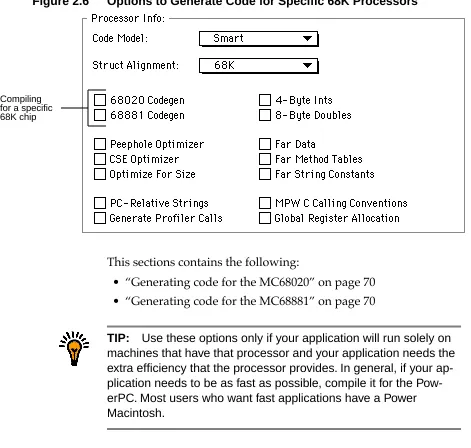
Generating Code for Specific 68K Processors (Macintosh Only) . 67 Generating code for the MC68020 . . . 70
Generating code for the MC68881 . . . 70
Using the Extended data type . . . 71
Using floating-point registers . . . 72
Calling MPW Functions . . . 72
Adding an MPW library to a CodeWarrior project . . . 73
Declaring MPW C functions (Macintosh Only) . . . 75
Using MPW C newlines . . . 76
Calling Macintosh Toolbox Functions (Macintosh Only) . . . . 77
Passing string arguments . . . 78
Using the pascal keyword in PowerPC code . . . 79
Intrinsic PowerPC Functions (Macintosh Only) . . . 80
Low-level processor synchronization . . . 80
Floating-point functions. . . 81
Byte-reversing functions . . . 81
Setting the floating-point environment . . . 82
Floating-point instructions for the 603 and 604 . . . 82
Rotating the contents of a variable . . . 83
3 C++ Language Notes . . . 85
Overview of C++ Language Notes . . . 85
Unsupported Extensions. . . 86
Metrowerks Implementation of C++ . . . 86
Which keywords to put first . . . 87
Additional keywords . . . 87
Conversions in the conditional operator . . . 87
Default arguments in member functions. . . 88
Local class declarations with inline functions. . . 89
Checking for resources to initialize static data . . . 90
Calling an inherited member function. . . 91
Setting C++ Options . . . 92
Using the C++ compiler always . . . 93
Enforcing strict ARM conformance . . . 94
Adding C++ extensions . . . 95
Allowing exception handling . . . 96
Using the bool type . . . 96
Using Run-Time Type Information (RTTI) . . . 96
Using the dynamic_cast operator . . . 97
Using the typeid operator . . . 98
Using Templates . . . 99
Declaring and defining templates. . . . 100
Instantiating templates . . . . 101
Using Exceptions . . . . 103
Declaring MPW-Compatible Classes . . . . 104
Creating Direct-to-SOM Code . . . . 105
SOM class restrictions. . . . 106
Using SOM headers . . . . 109
Automatic SOM error checking . . . . 109
Using SOM pragmas . . . . 111
Declaring the release order . . . . 112
Declaring the class’s version. . . . 112
Declaring the metaclass for a class . . . . 113
Declaring the call style for a class . . . . 113
4 68K Assembler Notes . . . 115
Overview of 68K Assembler Notes . . . . 115
Writing an Assembly Function for 68K. . . . 116
Defining a Function for 68K Assembly . . . . 116
Using Global Variables in 68K Assembly . . . . 119
Using Local Variables and Arguments in 68K Assembly . . . 119
Using Structures in 68K Assembly . . . . 120
Using the Preprocessor in 68K Assembly . . . . 121
Returning From a Function in 68K Assembly. . . . 121
dc . . . . 122
ds . . . . 122
entry . . . . 123
fralloc . . . . 123
frfree . . . . 123
machine . . . . 124
opword. . . . 124
5 PowerPC Assembler Notes . . . 125
Overview of PowerPC Assembler Notes . . . . 125
Writing an Assembly Function for PowerPC . . . . 126
Defining a Function for PowerPC Assembly . . . . 126
Creating Labels for PowerPC Assembly . . . . 128
Using Comments for Power PCAssembly . . . . 129
Using the Preprocessor for PowerPC Assembly. . . . 129
Creating a Stack Frame for PowerPC Assembly. . . . 129
Using Local Variables and Arguments for PowerPC Assembly130 Specifying Instructions for PowerPC Assembly. . . . 131
Specifying Operands for PowerPC Assembly . . . . 132
Using registers . . . . 132
Using labels . . . . 132
Using variable names as memory locations . . . . 133
Using immediate operands . . . . 134
PowerPC Assembler Directives . . . . 134
entry . . . . 134
fralloc . . . . 135
frfree . . . . 136
machine . . . . 136
smclass . . . . 137
PowerPC Assembler Instructions . . . . 138
6 MIPS Assembler Notes . . . 161
Overview of MIPS Assembler Notes. . . . 161
Writing an Assembly Function . . . . 161
Creating labels . . . . 163
Using the preprocessor . . . . 164
Creating a stack frame . . . . 164
Specifying operands . . . . 164
Using registers . . . . 164
Using parameters . . . . 165
Using global variables . . . . 165
Using immediate operands . . . . 165
Assembler Directive. . . . 166
.set . . . . 166
7 Win32/x86 Assembler Notes . . . 167
Overview of Win32/x86 Assembler Notes . . . . 167
Writing an Assembly Function . . . . 167
8 Pragmas and Predefined Symbols . . . 169
Overview of Pragmas and Predefined Symbols . . . . 169
Pragmas . . . . 169
Pragma Syntax . . . . 170
The Pragmas. . . . 170
a6frames (68K Macintosh and Magic Cap). . . . 171
align (Macintosh and Magic Cap) . . . . 171
align_array_members (Macintosh and Magic Cap only) . . 172 ANSI_strict . . . . 173
ARM_conform . . . . 174
auto_inline . . . . 175
bool (C++ only) . . . . 176
check_header_flags (precompiled headers only) . . . . . 176
code_seg (Win32/x86 only) . . . . 177
code68020 (68K Macintosh and Magic Cap only) . . . . . 177
code68349 (Magic Cap only). . . . 178
code68881 (68K Macintosh and Magic Cap only) . . . . . 178
cplusplus . . . . 179
cpp_extensions . . . . 180
d0_pointers (68K Macintosh only) . . . . 180
data_seg (Win32/x86 only) . . . . 182
direct_to_som (Macintosh and C++ only) . . . . 182
disable_registers (PowerPC Macintosh only). . . . 183
dont_inline . . . . 183
dont_reuse_strings . . . . 184
enumsalwaysints . . . . 184
exceptions (C++ only) . . . . 185
export (Macintosh only) . . . . 186
extended_errorcheck . . . . 187
far_code, near_code, smart_code (68K Macintosh and Magic Cap only) . . . . 189
far_data (68K Macintosh and Magic Cap only) . . . . 189
far_strings (68K Macintosh and Magic Cap only) . . . . . 190
far_vtables (68K Macintosh only) . . . . 190
force_active (68K Macintosh only) . . . . 190
fourbyteints (68K Macintosh only) . . . . 191
fp_contract (PowerPC Macintosh only) . . . . 191
function (Win32/x86 only) . . . . 192
global_optimizer, optimization_level (PowerPC Macintosh only) . . . . 192
IEEEdoubles (68K Macintosh only) . . . . 193
ignore_oldstyle . . . . 194
import (Macintosh only) . . . . 195
init_seg (Win32/x86 only). . . . 196
inline_depth (Win32/x86 only) . . . . 197
internal (Macintosh only) . . . . 197
lib_export (Macintosh only) . . . . 198
longlong . . . . 198
longlong_enums . . . . 199
macsbug, oldstyle_symbols (68K Macintosh and Magic Cap only) . . . . 199
mark . . . . 200
mpwc (68k Macintosh only) . . . . 200
mpwc_newline . . . . 201
mpwc_relax . . . . 202
oldstyle_symbols (68K Macintosh and Magic Cap only) . . 204
only_std_keywords . . . . 204
optimization_level (PowerPC Macintosh only) . . . . 204
optimize_for_size (Macintosh and Magic Cap only) . . . 204
pack (Win32/x86 only) . . . . 205
parameter (68K Macintosh and Magic Cap only) . . . . . 205
pcrelstrings (68K Macintosh only) . . . . 206
peephole (PowerPC Macintosh and Win32/x86 only) . . . 207
pointers_in_A0, pointers_in_D0 (68K Macintosh only) . . 207 pool_strings . . . . 208
pop, push . . . . 209
precompile_target . . . . 210
profile (Macintosh only) . . . . 211
readonly_strings (PowerPC Macintosh only) . . . . 211
require_prototypes . . . . 211
RTTI . . . . 212
scheduling (PowerPC Macintosh only) . . . . 212
segment (Macintosh and Magic Cap only) . . . . 213
side_effects (Macintosh only) . . . . 213
SOMCallOptimization (Macintosh and C++ only) . . . . 214
SOMCallStyle (Macintosh and C++ only) . . . . 214
SOMCheckEnvironment (Macintosh and C++ only) . . . 215
SOMClassVersion (Macintosh and C++ only) . . . . 216
SOMMetaClass (Macintosh and C++ only) . . . . 217
SOMReleaseOrder (Macintosh and C++ only) . . . . 217
static_inlines . . . . 218
sym . . . . 218
toc_data (PowerPC Macintosh only) . . . . 219
trigraphs . . . . 219
traceback (PowerPC Macintosh only) . . . . 219
unsigned_char. . . . 220
unused . . . . 220
warn_emptydecl . . . . 221
warning_errors . . . . 221
warn_extracomma . . . . 222
warn_illpragma . . . . 223
warn_possunwant . . . . 223
warn_unusedarg. . . . 224
warn_unusedvar. . . . 225
warning (Win32/x86 only) . . . . 225
Predefined Symbols . . . . 226
ANSI Predefined Symbols. . . . 226
Metrowerks Predefined Symbols . . . . 228
Options Checking . . . . 229
Options table . . . . 230
1
Introduction
This manual describes how the Metrowerks C and C++ compilers implement the C and C++ standards and its in-line assembler.
Overview of the C/C++/ASM Reference
This manual describes how the Metrowerks C and C++ compilers implement the C and C++ standards and its in-line assembler. Each chapter begins with an overview.
Table 1.1 What’s in this manual
This chapter… Documents…
Overview of C and C++ Language Notes
How Metrowerks C implements the C standard. It also de-scribes the parts of C++ that it shares with C.
Overview of C++ Lan-guage Notes
How Metrowerks C++ implements the parts of the C++ standard that are unique to C++. It also describes how to use templates and exception handling.
Overview of 68K Assem-bler Notes
How to use the 68K inline assembler, which is part of Metrowerks C and C++, to include assembly code in your program.
Overview of PowerPC Assembler Notes
How to use the PowerPC inline assembler, which is part of Metrowerks C and C++, to include assembly code in your program.
Overview of MIPS As-sembler Notes
I n t ro d u c t i o n
Conventions Used in This Manual
Conventions Used in This Manual
This manual includes syntax examples that describe how to use cer-tain statements, such as the following:
#pragma parameter [return-reg] func-name [param-regs] #pragma optimize_for_size on | off | reset
Table 1.2 describes how to interpret these statements.
Table 1.2 Understanding Syntax Examples
The C/C++ Project Settings Panels
This section describes where to find information on the C/C++ Lan-guage and C/C++ Warnings settings panels.
Overview of Win32/x86 Assembler Notes
How to use the Win32/x86 inline assembler, which is part of Metrowerks C and C++, to include assembly code in your program.
Overview of Pragmas and Predefined Symbols
The pragma statement, which lets you change your pro-gram’s options from your source code. It also describes the preprocessor function __option(), which lets you test the setting of many pragmas and options, and the predefined symbols that Metrowerks C and C++ use.
This chapter… Documents…
If the text
looks like… Then…
literal Include it in your statement exactly as it’s printed.
metasymbol Replace the symbol with an appropriate value. The text after the syntax example describes what the appropriate values are.
a | b | c Use one and only one of the symbols in the statement: either a, b, or c.
I n t ro d u c t i o n
The C/C++ Project Settings Panels
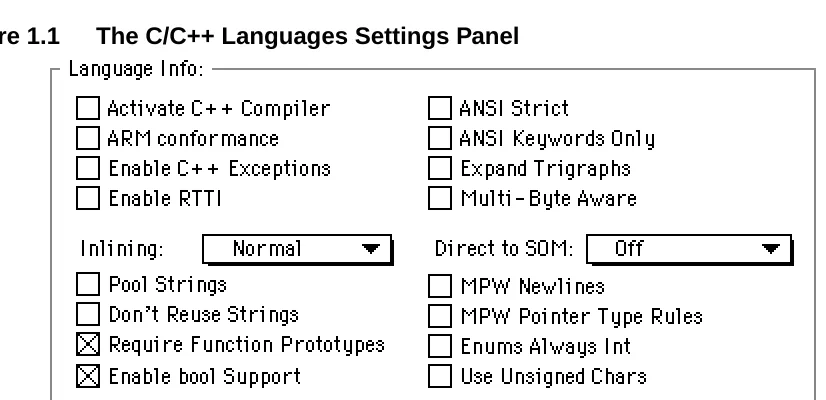
[image:15.612.150.563.144.344.2]This is the C/C++ Language settings panel:
Figure 1.1 The C/C++ Languages Settings Panel
This table describes where to find more information on its options:
This option… Is described here…
Activate C++ Compiler “Using the C++ compiler always” on page 93
ARM Conformance “Enforcing strict ARM conformance” on page 94
Enable C++ Exceptions “Allowing exception handling” on page 96
Enable RTTI “Using Run-Time Type Information (RTTI)” on page 96
Inlining “Inlining functions” on page 52
Pool Strings “Pooling strings” on page 56
Don’t Reuse Strings “Reusing strings” on page 58
Require Function Proto-types
“Requiring prototypes” on page 54
Enable bool Support “Using the bool type” on page 96
ANSI Strict “ANSI extensions you disable with ANSI Strict” on page 47
ANSI Keywords Only “Additional keywords” on page 50
I n t ro d u c t i o n
The C/C++ Project Settings Panels
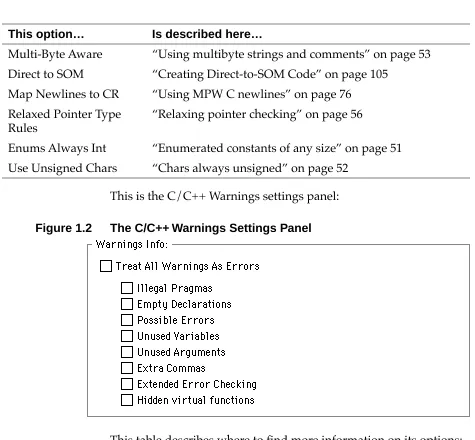
[image:16.612.52.527.102.542.2]This is the C/C++ Warnings settings panel:
Figure 1.2 The C/C++ Warnings Settings Panel
This table describes where to find more information on its options: Multi-Byte Aware “Using multibyte strings and comments” on page 53
Direct to SOM “Creating Direct-to-SOM Code” on page 105
Map Newlines to CR “Using MPW C newlines” on page 76
Relaxed Pointer Type Rules
“Relaxing pointer checking” on page 56
Enums Always Int “Enumerated constants of any size” on page 51
Use Unsigned Chars “Chars always unsigned” on page 52
This option… Is described here…
This option… Is described here…
Treat All Warnings As Errors
“Treat warnings as errors” on page 60
Illegal Pragmas “Illegal pragmas” on page 60
Empty Declarations “Empty declarations” on page 61
I n t ro d u c t i o n
What’s New
What’s New
This section describes the new documentation in this manual.
The long long type
Metrowerks C/C++ now has a 64-bit integer, the long long. See “64-bit integers” on page 46.
Turning off register coloring in the 68K compiler
You can now turn off register coloring in the 68K Mac OS compiler. This is useful when you’re debugging code. See “Register coloring” on page 24.
More information on enumerated types
This manual now explains how the compiler implements enumer-ated types and on how to use enumerators that are large enough to be a long long. See “Enumerated types” on page 28.
New pragmas
There are three new pragmas:
• “longlong” on page 198
• “longlong_enums” on page 199
• “no_register_coloring (68K Macintosh and Magic Cap only)” on page 202
Unused Variables “Unused variables” on page 62
Unused Arguments “Unused arguments” on page 63
Extra Commas “Extra commas” on page 64
Extended Error Check-ing
“Extended type checking” on page 65
Hidden virtual functions “Function hiding” on page 66
New intrinsic functions
There are three new PowerPC intrinsic functions, described on “Ro-tating the contents of a variable” on page 83.
Improved documentation
There is new documentation on the MIPS and Win32/x86 inline as-semblers. For more information, see “Overview of MIPS Assembler Notes” on page 161 and “Overview of Win32/x86 Assembler Notes” on page 167.
And there’s improved documentation on these pragmas:
C and C++
Language Notes
This chapter describes how Metrowerks handles the C program-ming language. Since many of the features in C are also in C++, this chapter is where you’ll find basic information on C++ also.
Overview of C and C++ Language Notes
This chapter describes how Metrowerks handles the C program-ming language, and basic information on C++. For more informa-tion on the parts of the C++ language that are unique to C++, see “Overview of C++ Language Notes” on page 85.
In the margins of this chapter are references to K&R §A, which is Appendix A, “Reference Manual,” of The C Programming Language,
Second Edition (Prentice Hall) by Kernighan and Ritchie. These
refer-ences show you where to look for more information on the topics discussed in the corresponding section.
This chapter contains the following sections:
• “The Metrowerks Implementation of C and C++” on page 20 explains how Metrowerks C and C++ implement certain parts of the standard.
• “Number Formats” on page 30 describes how C and C++ use store integers and floating-point numbers. This section has separate explanations for the 68K compiler and the PowerPC compiler.
• “Extensions to C or C++” on page 40 describe some of Metrowerks C and C++’s extensions to the C and C++ stan-dards. You can disable most of these extensions with options in the C/C++ Language settings panel.
• “Warnings for Common Mistakes” on page 59 explains some options that check for common typographical mistakes. These options are in the C/C++ Warnings settings panel. • “Generating Code for Specific 68K Processors (Macintosh
Only)” on page 67 describes how to generate code optimized for the MC68020 and MC68881.
• “Calling MPW Functions” on page 72 describes how to use an MPW library in a CodeWarrior project.
• “Calling Macintosh Toolbox Functions (Macintosh Only)” on page 77 explains CodeWarrior’s support for the Macintosh Toolbox.
• “Intrinsic PowerPC Functions (Macintosh Only)” on page 80 explains some functions that are built into Metrowerks C/ C++ for PowerPC.
The Metrowerks Implementation of C and C++
This section describes how Metrowerks implements many parts of the C and C++ programming languages. For information on the parts of the C++ language that are specific to C++, see “Overview of C++ Language Notes” on page 85.
This section contains the following:
• “Identifiers” on page 21 • “Include files” on page 21
Identifiers
(K&R, §A2.3) The C and C++ compilers let you create identifiers of any size. However, only the first 255 characters are significant for in-ternal and exin-ternal linkage.
The C++ compiler creates mangled names in which all the charac-ters in are significant. You do not need to keep your class and class member names artificially short to prevent the compiler from creat-ing mangled names that are too long.
Include files
(K&R, §A12.4) The C and C++ compilers can nest #include files up to 32 times. An include file is nested if another #include file uses it in an #include statement. For example, if Main.c includes the file MyFunctions.h, which includes the file MyUtilities.h, the file MyUtilities.h is nested once.
You can use full path names in #include directives, as in this ex-ample:
#include "HD:Tools:my headers:macros.h"
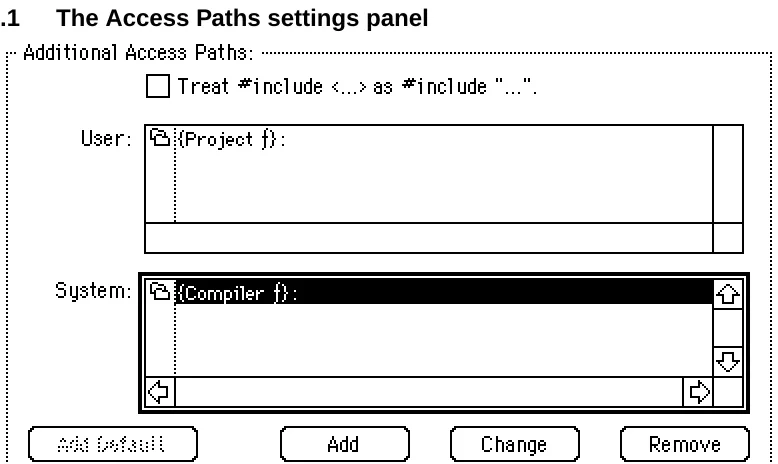
TIP: To add folders to the Access Paths settings panel, see the CodeWarrior IDE User’s Guide.
Figure 2.1 The Access Paths settings panel
The compiler searches for an #include file in either the System list or both the User and System lists, depending on which characters en-close the file. If you enen-close the file in brackets (#include
<stdio.h>), the compiler looks for the file in the System lists’ fold-ers section. If you enclose the file in quotes (#include
"myfuncs.h"), the compiler looks for the file in the User list’s fold-ers and then in the System list’s foldfold-ers. In general, use brackets for include files that are for a large variety of projects and use quotes for include files that are for a specific project.
TIP: If you’re using the compilers under MPW, you can specify where to find #include files with the -i compiler option and the
{CIncludes} variable, described in Command-Line Tools Manual and MPW Command Reference.
The sizeof() operator
your code assumes that sizeof() returns a number of type int, it may not work correctly.
Register variables
(K&R, §A4.1, §A8.1) The C and C++ compilers automatically allo-cate local variables and parameters to registers according to how frequently they’re used and how many registers are available. If you’re optimizing for speed, the compilers give preference to vari-ables used in loops.
The PowerPC and 68K Macintosh compilers give preference to vari-ables declared to be register, but do not automatically assign them to registers. For example, the compilers are more likely to place a variable from an inner loop in a register than a variable de-clared register.
The Win32/x86 compiler ignores the register declaration and de-cides on its own which variables to place in registers.
The PowerPC Macintosh compiler can use these registers for local variables:
• GPR13 through GPR31 for integers and pointers • FPR14 through FPR31 for floating point variables.
The 68K Macintosh and Magic Cap compilers can use these registers for local variables:
• A2 through A4 for pointers
• D3 through D7 for integers and pointers.
If you turn on the 68881 Codegen option, the 68K compilers also use these registers:
• FP4 through FP7 for 96-bit floating-point numbers
The Win32/x86 compiler can use these registers for local variables:
• EDX • ESI • EDI
Register coloring
The Macintosh and Magic Cap compilers can also perform an addi-tional register optimization, called register coloring. In this optimiza-tion, the compiler lets two or more variables share a register: it assigns different variables or parameters to the same register if you do not use the variables at the same time. In this example, the com-pilers could place i and j in the same register:
short i; int j;
for (i=0; i<100; i++) { MyFunc(i); } for (j=0; j<1000; j++) { OurFunc(j); }
However, if a line like the one below appears anywhere in the func-tion, the compiler would realize that you’re using i and j at the same time and place them in different registers:
int k = i + j;
To let the PowerPC compiler perform register coloring, turn on the Global Optimizer option in the PPC Processor settings panel and set the Level to 1 or more. To let the 68K Macintosh and Magic Cap compilers perform register coloring, turn on the Global Register Allocation option in the 68K Processor settings panel. The Global Optimizer option corresponds to the global_optimizer pragma, described on “global_optimizer, optimization_level (PowerPC Mac-intosh only)” on page 192. The Global Register Allocation option corresponds to the no_register_coloring pragma, described on “no_register_coloring (68K Macintosh and Magic Cap only)” on page 202.
changes, i changes in the same way. To avoid this confusion while debugging, turn off register coloring or declare the variables you want to watch as volatile.
Volatile variables
(K&R, §A4.4) When you declare a variable to be volatile, both the C or C++ compilers take the following precautions:
• It does not store the variable in a register.
• It computes the variable’s address every time a piece of code references the variable.
Listing 2.1 shows an example of volatile variables.
Listing 2.1 volatile variables
void main(void) {
int i[100];
volatile int a, b;
a = 5; b = 20;
i[a + b] = 15; i[a + b] = 30; }
Limits on variable sizes
(K&R, §A4.3, §A8.3, §A8.6.2) The Macintosh and Magic Cap C/C++ compilers let you declare structs and arrays to be any size, but place some limits on how you allocate space for them:
• A function cannot contain more than 32K of local variables. To avoid this problem, do one of the following:
– Dynamically allocate large variables.
– Declare large variables to be static. Note that if you’re using a 68K compiler, you may run into the 32K limit on global variables, described below.
• If you’re using a 68K compiler, you cannot declare a global variable that is over 32K unless you use far data. You must do one of the following:
– Dynamically allocate the variable.
– Use the far qualifier when declaring the variable. – Turn on the Far Data option in the Processor settings
panel or use the pragma far_data.
The example below shows how to declare a large struct or array.
int i[50000]; // USUALLY OK.
// Wrong only when you use // 68K compiler and turn off // the Far Data option in the // Processor settings panel
far int j[50000]; // ALWAYS OK.
int *k;
&k = malloc(50000 * sizeof(int)); // ALWAYS OK.
• Bitfields can be only 32 bits or less.
Declaration specifiers
CodeWarrior lets you choose how to implement a function or vari-able with the declaration specifier __declspec(arg), where arg specifies how to implement it. The Macintosh and Win32/x86 have different sets of arguments
For 68K and PowerPC Macintosh code, arg can be one of the follow-ing values:
• __declspec(internal) lets you specify that this variable or function is internal and not imported. It corresponds to the pragma internal, described at “internal (Macintosh only)” on page 197.
• __declspec(import) lets you import this variable or func-tion which is in another code fragment or shared library. It corresponds to the pragma import, described at “import (Macintosh only)” on page 195.
• __declspec(export) lets you export this variable or func-tion from this code fragment or shared library. It corresponds to the pragma export, described at “export (Macintosh only)” on page 186.
• __declspec(lib_export) ignores the pragmas export, import, and internal for this variable or function. It corre-sponds to the pragma lib_export, described at “lib_export (Macintosh only)” on page 198.
For Win32/x86 code, arg can be one of the following values:
• __declspec(dllexport) specifies that this function or variable is exported from the executable or DLL that defines it.
• __declspec(dllimport) specifies that this function or variable is imported from another DLL or executable.
• __declspec(naked) specifies that this function is entirely implemented with assembler code and the compiler does not need to produce any prefix or suffix code. It’s the same as using the asm keyword.
multi-threaded applications, since this is a reentrant way to refer to global storage. Note these restrictions on
__declspec(thread):
– You cannot use it in a DLL that’s dynamically loaded (that is, your program specifically makes a runtime request for the DLL). You can use it in DLLs that are statically linked to your application and are implicitly loaded when your application is launched.
– If you declare a variable as __declspec(thread) , you cannot use its address as an initializer, since the program can determine the address only at run-time.
Enumerated types
This section describes how the C/C++ selects the underlying inte-ger type for an enumerated type. There are two different different strategies, depending on the setting of the Enum Always Int option in the C/C++ Language settings panel, which corresponds to the enumsalwaysint pragma.
If Enums Always Int is on, the underlying type is always signed int. All enumerators must be no larger than a signed int. How-ever, if the ANSI Strict option is off, enumerators that can be repre-sented as an unsigned int are implicitly converted to signed int. (The ANSI Strict option is in the C/C++ Language settings panel and corresponds to the ANSI_strict pragma.)
Listing 2.2 Turning on the Enums Always Int option
#pragma enumsalwaysint on #pragma ANSI_strict on
enum foo { a=0xFFFFFFFF }; // ERROR. a is 4,294,967,295:
// too big for a signed int #pragma ANSI_strict off
enum bar { b=0xFFFFFFFF }; // OK: b can be represented as an
If Enums Always Int is off, the compiler picks one of the following:
• If all enumerators are positive, it picks the smallest unsigned integral base type that is large enough to represent all enu-merators
• If at least one enumerator is negative, it picks the smallest signed integral base type large enough to represent all enu-merators.
Listing 2.3 Turning off the Enums Always Int option
#pragma enumsalwaysint off
enum { a=0,b=1 }; // base type: unsigned char enum { c=0,d=-1 }; // base type: signed char enum { e=0,f=128,g=-1 }; // base type: signed short
The compiler will only use long long base types if is the
longlong_enums pragma is on. (There is no settings panel option corresponding to the longlong_enums pragma)
Listing 2.4 Turning on longlong_enums pragma
#pragma enumsalwaysint off #pragma longlong_enums off
enum { a=0x7FFFFFFFFFFFFFFF }; // ERROR: a is too large #pragma longlong_enums on
enum { b=0x7FFFFFFFFFFFFFFF };// OK: base type: signed long long enum { c=0x8000000000000000 };// OK: base type: unsigned long long enum { d=-1,e=0x80000000 }; // OK: base type: signed long long
When the longlong_enums pragma is off and ANSI strict is on, you cannot mix huge unsigned 32-bit enumerators (greater than
0x7FFFFFFF) and negative enumerators. If both the
Listing 2.5 Turning off the longlong_enums pragma
#pragma enumsalwaysint off #pragma longlong_enums off #pragma ANSI_strict on
enum { a=-1,b=0xFFFFFFFF }; // error #pragma ANSI_strict off
enum { c=-1,d=0xFFFFFFFF }; // base type: signed int (b==-1)
For more information on Enums Always Int, see “Enumerated con-stants of any size” on page 51. For more information on ANSI Strict, see “ANSI extensions you disable with ANSI Strict” on page 47. For more information on the longlong_enums pragma, see
“longlong_enums” on page 199.
Number Formats
(K&R, §A4.2) This section describes how the C and C++ compilers implement integer and floating-point types. You can also read lim-its.h for more information on integer types and float.h for more information on floating-point types.
This section contains the following:
• “68K Macintosh integer formats” on page 30
• “68K Macintosh floating-point formats” on page 32
• “PowerPC Macintosh, Magic Cap, and Win32/x86 integer formats” on page 33
• “PowerPC Macintosh and Win32/x86 floating-point for-mats” on page 34
• “Magic Cap Floating-Point Formats” on page 34
68K Macintosh integer formats
PowerPC compiler, which always uses 4-byte ints. However, 2-byte ints are slightly more efficient on the 68K, so you may want to turn this option off when efficiency is more important.
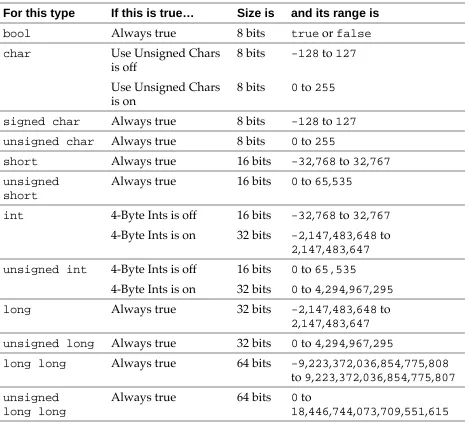
[image:31.612.93.561.245.668.2]Table 2.1 shows the size and range of the integer types for a 68K compiler.
Table 2.1 68K Macintosh integer types
For this type If this is true… Size is and its range is
bool Always true 8 bits true or false
char Use Unsigned Chars
is off
8 bits -128 to 127
Use Unsigned Chars is on
8 bits 0 to 255
signed char Always true 8 bits -128 to 127
unsigned char Always true 8 bits 0 to 255
short Always true 16 bits -32,768 to 32,767
unsigned short
Always true 16 bits 0 to 65,535
int 4-Byte Ints is off 16 bits -32,768 to 32,767
4-Byte Ints is on 32 bits -2,147,483,648 to 2,147,483,647
unsigned int 4-Byte Ints is off 16 bits 0 to 65,535
4-Byte Ints is on 32 bits 0 to 4,294,967,295
long Always true 32 bits -2,147,483,648 to 2,147,483,647
unsigned long Always true 32 bits 0 to 4,294,967,295
long long Always true 64 bits -9,223,372,036,854,775,808 to 9,223,372,036,854,775,807
unsigned long long
Always true 64 bits 0 to
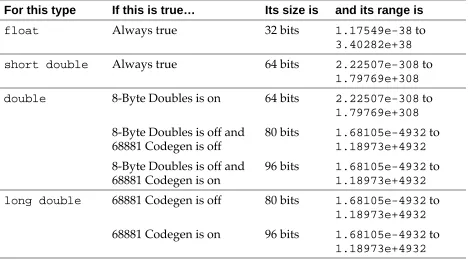
68K Macintosh floating-point formats
You can choose the size of a double with the 8-Byte Doubles option. In general, turn this option off since 8-byte (or 64-bit) doubles are less efficient than others. However, if you are porting code that re-lies on 8-byte doubles, turn this option on.
[image:32.612.56.524.416.676.2]You can also choose to create code that is optimized for machines with a 68040 processor or a 68881 floating point unit. If you turn on the 68881 Codegen option in the Processor settings panel, the com-piler uses floating-point operations and types that are designed spe-cifically for those chips. If you create code with the 68881 Codegen option on and try to run it on a machine that does not have a 68040 or 68881, the code will crash. Turn on the 68881 Codegen option only if the code contains lots of floating-point operations, must be as fast as possible, and you’re sure the code will be used only on ma-chines that contain a 68040 or 68881. Table 2.2 shows the size and range of the floating-point types for a 68K compiler.
Table 2.2 68K Macintosh floating point types
For this type If this is true… Its size is and its range is
float Always true 32 bits 1.17549e-38 to
3.40282e+38
short double Always true 64 bits 2.22507e-308 to 1.79769e+308
double 8-Byte Doubles is on 64 bits 2.22507e-308 to 1.79769e+308
8-Byte Doubles is off and 68881 Codegen is off
80 bits 1.68105e-4932 to 1.18973e+4932
8-Byte Doubles is off and 68881 Codegen is on
96 bits 1.68105e-4932 to 1.18973e+4932
long double 68881 Codegen is off 80 bits 1.68105e-4932 to 1.18973e+4932
PowerPC Macintosh, Magic Cap, and Win32/
x86 integer formats
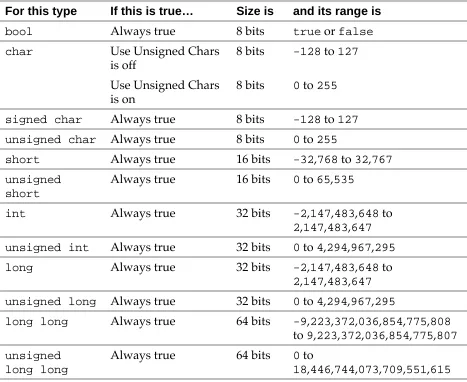
The PowerPC Macintosh, Magic Cap, and Win32/x86 compilers do not let you change the sizes of integers. The size of a shortint is always 2 bytes and the size of int or longint is always 4 bytes.
[image:33.612.91.558.291.673.2]Table 2.3 shows the size and range of the integer types for the Pow-erPC Macintosh, Magic Cap, and Win32/x86 compilers.
Table 2.3 PowerPC, Magic Cap, and Win32/x86 Integer Types
For this type If this is true… Size is and its range is
bool Always true 8 bits true or false
char Use Unsigned Chars
is off
8 bits -128 to 127
Use Unsigned Chars is on
8 bits 0 to 255
signed char Always true 8 bits -128 to 127
unsigned char Always true 8 bits 0 to 255
short Always true 16 bits -32,768 to 32,767
unsigned short
Always true 16 bits 0 to 65,535
int Always true 32 bits -2,147,483,648 to 2,147,483,647
unsigned int Always true 32 bits 0 to 4,294,967,295
long Always true 32 bits -2,147,483,648 to 2,147,483,647
unsigned long Always true 32 bits 0 to 4,294,967,295
long long Always true 64 bits -9,223,372,036,854,775,808 to 9,223,372,036,854,775,807
unsigned long long
Always true 64 bits 0 to
WARNING! Do not turn off the 4-Byte Ints option in Magic Cap code. Although the Magic Cap compiler lets you change the set-ting of this option, your code will not run correctly if it’s off. It is on by default.
PowerPC Macintosh and Win32/x86
floating-point formats
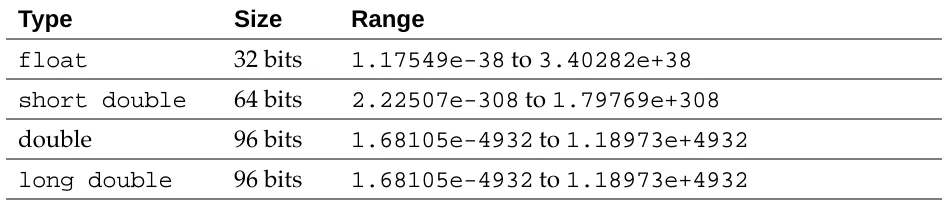
[image:34.612.55.524.333.432.2]Table 2.4 shows the sizes and ranges of the floating point types for the PowerPC Macintosh and Win32/x86 compilers.
Table 2.4 PowerPC Macintosh and Win32/x86 floating point types
Magic Cap Floating-Point Formats
[image:34.612.51.523.546.646.2]Table 2.5 shows the size and range of the floating-point types for the Magic Cap compiler.
Table 2.5 Magic Cap floating point types Type Size Range
float 32 bits 1.17549e-38 to 3.40282e+38
short double 64 bits 2.22507e-308 to 1.79769e+308
double 64 bits 2.22507e-308 to 1.79769e+308
long double 64 bits 2.22507e-308 to 1.79769e+308
Type Size Range
float 32 bits 1.17549e-38 to 3.40282e+38
short double 64 bits 2.22507e-308 to 1.79769e+308
double 96 bits 1.68105e-4932 to 1.18973e+4932
WARNING! Do not turn on the 8-Byte Doubles option in Magic Cap code. Although the Magic Cap compiler lets you change the setting of this option, your code will not run correctly if it’s on. It is off by default.
Calling Conventions
(K&R, §A8.6.3) This section describes the C and C++ calling conven-tions for both the Macintosh, Magic Cap, and Win32/x86 compilers. It contains the following:
• “68K Macintosh calling conventions” on page 35 • “PowerPC calling conventions” on page 36 • “Win32/x86 calling conventions” on page 39 • “Magic Cap calling conventions” on page 39
68K Macintosh calling conventions
The 68K Macintosh and Magic Cap compilers pass all parameters on the stack in reverse order. This list describes where the compiler places a return value:
• It returns an integer values in register D0. • It returns a pointer value in register A0.
• If it returns a value of any other type, the caller reserves tem-porary storage area for that type in the caller's stack and passes a pointer to that area as the last argument. The callee returns its value in the temporary storage area.
There are two options which can change how the compiler returns a value:
• If you turn on either the pragma pointers_in_D0 or
• If the 68881 Codegen option is on, the compiler returns 96-bit floating-point values in register FP0.
Figure 2.2 shows what the stack looks like when you call a C func-tion with the 68K Macintosh and Magic Cap compiler.
Figure 2.2 Calling a C function
PowerPC calling conventions
The consortium behind the PowerPC dictates a standard set of call-ing conventions that Metrowerks C/C++ for PowerPC follows. For more information on these calling conventions, see Inside Macintosh:
PowerPC System Software. The rest of this section describes how
Metrowerks C/C++ implements these standards.
The compiler reserves space for a function’s parameters in two places: it reserves space for all parameter values in a structure in the caller’s parameter area, and then it copies as many parameters as possible in registers. If the compiler copies a parameter into a regis-ter, it does not also copy it onto the parameter stack, but the com-piler still reserves space for it on the stack. Placing parameters in registers avoids memory references to the parameter area and speeds up your programs.
NOTE: A word is eight bytes on the PowerPC.
In the parameter area, parameters are laid out in the order they ap-pear, with the left-most parameter at the lowest offset. Each parame-ter starts at a word boundary regardless of size. For example,
characters take up a word and doubles may not be on a double
Stack pointer return address
first argument
last argument
pointer to return value (if needed)
word boundary. Signed integers smaller than a word are sign-byte extended to a word. Unsigned chars are zero-extended.
In the registers, the compiler maps the first eight words of the pa-rameter area — excluding floating point values — to the general purpose registers r3 through r10. Integers and pointers take up one register each. Composite parameters (such as structs, classes, and arrays) take up as many consecutive registers as they need. Note that the compiler maps composite parameters are to the registers as raw data, not as individual members or elements. For example, an array of six chars uses two registers: all of the first and the top half of the second.
NOTE: A composite parameter may be both in registers and the parameter stack. If the parameter starts in or before the eighth word and ends after the eighth word, the compiler stores part of it in registers and the rest on the parameter stack.
Floating-point values are mapped to the floating point registers fp1 through fp13. The compiler maps only free variables and not float-ing-point values contained in composite types. If the floatfloat-ing-point parameter appears within the first eight words, the compiler does not use the corresponding general register or pair of registers. The compiler does not use the register but simply skips it. The compiler does not skip floating-point registers but uses them consecutively.
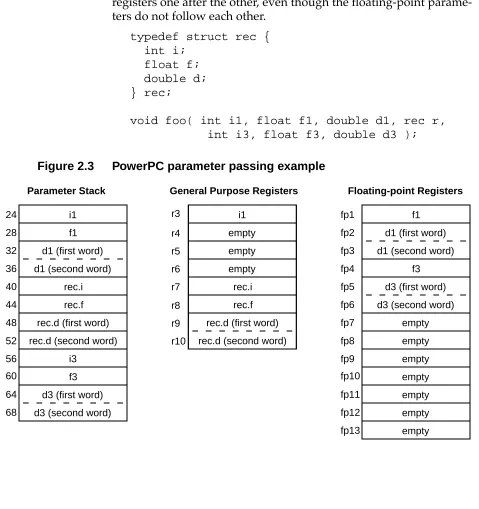
Figure 2.3 shows how the compiler would store the parameters in function foo(), shown below. Note that r4, r5, and r6 are empty and that the floating-point members of the struct are not stored in floating-point registers. Also, the compiler fills up the floating-point registers one after the other, even though the floating-point parame-ters do not follow each other.
typedef struct rec { int i;
float f; double d; } rec;
[image:38.612.390.519.371.620.2]void foo( int i1, float f1, double d1, rec r, int i3, float f3, double d3 );
Figure 2.3 PowerPC parameter passing example
i1
f1
d1 (first word)
d1 (second word)
rec.i
rec.f
rec.d (first word)
rec.d (second word)
i3
f3
d3 (first word)
d3 (second word)
i1 empty empty empty rec.i rec.f
rec.d (first word)
rec.d (second word)
f1
d1 (first word)
d1 (second word)
f3
d3 (first word)
d3 (second word) empty empty empty empty empty empty empty
Parameter Stack General Purpose Registers Floating-point Registers
This list describes where the compiler places a return value:
• It returns integer values in r3.
• It returns float and double floating-point values in fp1. • If it returns a composite type (such as a struct, class, or array),
it allocates area for the return value in a temporary storage area, and returns a pointer to that area as an implicit left-most parameter (that is, in r3).
Magic Cap calling conventions
The Magic Cap compiler uses the same calling conventions as the 68K Macintosh compiler with the MPW C Calling Conventions op-tion on and the d0_pointers pragma on. For more information, see “68K Macintosh calling conventions” on page 35, “Declaring MPW C functions (Macintosh Only)” on page 75, and “d0_pointers (68K Macintosh only)” on page 180.
Win32/x86 calling conventions
The Win32/x86 C/C++ compiler lets you choose how it calls func-tions with these types of declaration: __stdcall and __thiscall.
If you don’t use a declaration specifier, the compiler uses the default calling convention. It pushes all parameters onto the stack in right to left order, so the first parameter in the list is on top of stack when the call is made. It expands each parameter to at least 32 bits on the stack and pads structs to an even number of 32 bit longwords. The caller removes the parameters from the stack. The compiler returns the function’s value in one of these ways:
• It returns integer and pointer values in the EAX register. • It returns floating point values on the floating point processor
stack
If you’re declaring a function for an API, specify the standard call-ing convention with __stdcall. It’s the same as the default calling convention, except that the callee removes parameters from stack.
If you’re declaring a non-static member function, the compiler auto-matically uses the __thiscall calling convention unless you ex-plicitly specify the standard calling convention with __stdcall. The __thiscall calling convention is the same as the standard calling convention, except that it passes the this pointer in the ECX register.
Extensions to C or C++
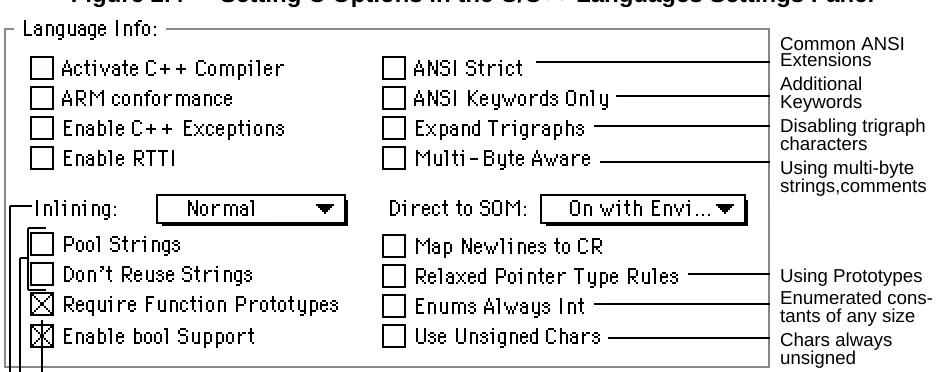
[image:40.612.52.521.401.587.2]This section describes some of Metrowerks C and C++’s extensions to the C and C++ standards. You can disable most of these exten-sions with options in the Language preference panel, as shown in Figure 2.4.
Figure 2.4 Setting C Options in the C/C++ Languages Settings Panel
Using Prototypes Enumerated cons-tants of any size Disabling trigraph characters Common ANSI Extensions Additional Keywords
Chars always unsigned Using multi-byte strings,comments
Storing strings Using prototypes
NOTE: For more information on the options in the upper right corner of the dialog (Activate C++ Compiler, ARM Conformance,
Enable Exception Handling, Don’t Inline, and Enable RTTI), as well as Enable bool support and Direct to SOM see “Overview of C++ Language Notes” on page 85. For more information on en-able bool support, see “Using the bool type” on page 96. For more information on Map Newlines to CR, see “Using MPW C newlines” on page 76.
These are the extensions described in this section:
• “ANSI extensions you can’t disable” on page 42 describes ex-tensions you cannot disable. These exex-tensions are common to many compilers, especially Macintosh compilers.
• “ANSI extensions you disable with ANSI Strict” on page 47 describes extensions you can disable with the ANSI Strict option. These extensions are common to many compilers. • “Disabling trigraph characters” on page 49 describes how to
prevent the compiler from expanding trigraph characters. You can disable this extension with the Expand Trigraphs op-tion.
• “Additional keywords” on page 50 describes three additional words that the compiler recognizes as keywords. You can dis-able this extension with the ANSI Keywords Only option. • “Enumerated constants of any size” on page 51 describes
how Metrowerks C and C++ create enumerated constants of any size. You can disable this extension with the Enums Al-ways Int option.
• “Chars always unsigned” on page 52 describes how Metrow-erks C and C++ lets you treat a char declaration as an
unsignedchar declaration. You can enable this extension with the Use Unsigned Chars option.
• “Inlining functions” on page 52 describes how to choose the way in which Metrowerks C and C++ inline your functions. You choose with the Inlining menu.
Kanji). You can enable this extension with the Multi-Byte Aware option.
• “Using prototypes” on page 54 describes how to control how strictly Metrowerks C and C++ enforce prototypes. There are two options and a pragma that control prototypes: the Re-quire Function Prototypes option, the Relaxed Pointer Type Rules option, and the pragma ignore_oldstyle.
• “Storing strings (Macintosh only)” on page 56 describes how to control how to store strings. There are two options that control strings: Pool Strings and Don’t Reuse Strings.
ANSI extensions you can’t disable
This section describes some extensions to the ANSI C and C++ stan-dards that you cannot disable with any option in the project set-tings. Many compilers, especially Macintosh compilers, support these extensions.
These extensions are as follows:
• “Multibyte characters (Macintosh Only)” on page 43
• “Declaring variables by address (Macintosh Only)” on page 43
• “Opcode inline functions (68K Macintosh Only)” on page 43 • “Specifying the registers for arguments (68K Macintosh
Only)” on page 45
Multibyte characters (Macintosh Only)
(K&R, §A2.5.2) The C and C++ compilers let you use multibyte character constants which contain 2 to 4 characters. Here are some examples:
Table 2.6 Multibyte character constant
Declaring variables by address (Macintosh Only)
(K&R, §A8.7) The C and C++ compilers let you specify the address that a variable refers to. For example, this definition defines MemErr to contain whatever is at the address 0x0220:
short MemErr:0x220;
the variable MemErr contains whatever is at the address 0x220.
TIP: Avoid using this extension to refer to low-memory globals. To ensure that your programs are compatible with future versions of the Mac OS, use the functions defined in the LowMem.h header file.
Opcode inline functions (68K Macintosh Only)
(K&R, §A8.6.3, §A10.1) The 68K C and C++ compilers let you de-clare a function that specifies the opcodes that it contains. When you call an opcode inline function, the compiler replaces the function call with those opcodes. To define an opcode inline function, replace the function body with an equals sign and the opcode. If there’s
Character constant Equivalent hexadecimal
’ABCD' 0x41424344
’ABC' 0x00414243
more than one opcode, enclose them in brackets. Listing 2.6 shows two opcode inline functions.
Listing 2.6 Declaring an opcode inline function
pascal OSErr FSpCatMove(FSSpec *from,FSSpec *to) = { 0x303C,0x000C,0xAA52 };
pascal void LineTo(short h,short v) = 0xA891;
NOTE: Only the 68K Macintosh C and C++ compilers lets you use opcode inline function declarations. However, all the C++ com-pilers let you use C++ inline functions, declared with the inline
keyword.
Inline data (68K Macintosh Only)
The 68K C and C++ compilers let you include simple inline data with the asm declaration. Use this syntax:
asm { constant, constant, . . . } asm ( constant, constant, . . . )
A constant can be a numeric constant or a string literal.
For example, this function:
Listing 2.7 Inline data example
void foo() {
asm { 0x4e714e71,0x4e714e71 }; // four 68K NOP instructions
asm ((char)'C',(char)'o',(short)'de',"Warrior"); }
Produces assembly code that looks like this:
Listing 2.8 Assembly code from inline data
LINK A6, #$0000 NOP
NOP ; First two NOPs NOP
NOP NOP
NOP ; Next four NOPs DC.B "CodeWarrior\0"
UNLK A6 RTS
Specifying the registers for arguments (68K Macintosh Only)
(K&R, §A8.6.3, §A10.1) The 68K C and C++ compilers let you can specify which registers that a function uses for its parameters and the return value. The registers D0-D2, A0-A1, and FP0-FP3 are avail-able.
When you declare the function, specify the registers by using the #pragma parameter statement before the declaration. When you de-fine the function, specify the registers right in the argument list.
This is the syntax for the #pragma parameter:
#pragma parameter return-reg func-name(param-regs)
return value in the register return-reg. Both return-reg and param-regs are optional.
For example, Listing 2.9 shows the declaration and definition of a function, in which a is passed in D0, p is passed in A1, x is passed in FP0 and f is passed on the stack.
Listing 2.9 Using registers with functions
#pragma parameter __D2 function(__D0,__A1,__FP0) short function(long a, Ptr p, long double x, short f);
short function(long a:__D0, Ptr p:__A1,
long double x:__FP0, short f) :__D2 {
// ... }
64-bit integers
The C or C++ compiler lets you define a 64-bit integer with the type specifier long long. This is twice as large as a long int, which is a 32-bit integer. A long long can hold values from
-9,223,372,036,854,775,808 to 9,223,372,036,854,775,807. An unsigned long long can hold values from 0 to
18,446,744,073,709,551,615.
In an enumerated type, you can use an enumerator large enough for a long long. For more information, see “Enumerated types” on page 28. However, long long bitfields are not supported.
You can disable the long long type with the pragma longlong, described at “longlong” on page 198. There is no settings panel op-tion to disable it. If this pragma is off, using long long causes a syntax error. To check whether this option is on, use
ANSI extensions you disable with ANSI Strict
This section describes some optional extensions to the ANSI C and C++ standards that you can enable by turning off the ANSI Strict option in the Language preference panel. Many compilers, includ-ing Metrowerks C and C++, support these extensions.
NOTE: You cannot compile most standard Macintosh applica-tions if the ANSI Strict option is on. In general, use this option only if you have to check whether a program is strictly ANSI-con-ferment.
The optional ANSI extensions are the following. If you turn on the ANSI Strict option, the compiler generates an error if it encounters any of these extensions.
• “C++-style comments” on page 48
• “Unnamed arguments in function definitions” on page 48 • “A # not followed by argument in macro definition” on page
48
• “An identifier after #endif” on page 48
• “Using typecasted pointers as lvalues” on page 49
For more information on how this option affects enumerated types, see “Enumerated types” on page 28.
The ANSI Strict option corresponds to the pragma ANSI_strict, described at “ANSI_strict” on page 173. To check whether this op-tion is on, use __option (ANSI_strict), described at
C++-style comments
(K&R, §A2.2) In the C compiler, you can use C++-style comments. Anything that follows // on a line is considered a comment. For ex-ample:
a = b; // This is a C++-style comment
Unnamed arguments in function definitions
(K&R, §A10.1) The C compiler lets you use an unnamed argument in a function definitions. For example:
void f(int ) {} /* OK, if ANSI Strict is off */ void f(int i) {} /* ALWAYS OK */
A # not followed by argument in macro definition
(K&R, §A12.3) The C and C++ compilers do not generate an error if you use the quote token (#) in a macro definition and a macro argu-ment does not follow it. For example:
#define add1(x) #x #1
// OK, but probably not what you wanted: // add1(abc) creates "abc"#1
#define add2(x) #x "2"
// OK: add2(abc) creates "abc2"
An identifier after #endif
(K&R, §A12.5) The C and C++ compilers let you place an identifier token after #endif and #else. This extension helps you match an #endif statement with its corresponding #if, #ifdef, or #ifndef statement, as shown below:
#ifdef __MWERKS__ # ifndef __cplusplus /*
* . . . */
If you turn on the ANSI Strict option, you can make the identifiers into comments, like this:
#ifdef __MWERKS__ # ifndef __cplusplus /*
* . . . */
# endif /* __cplusplus */ #endif /* __MWERKS__ */
Using typecasted pointers as lvalues
The C and C++ compilers let you use a pointer that you’ve type-casted to another pointer type as an lvalue. For example:
char *cp;
((long *) cp)++; /* OK if ANSI Strict is off. */
Disabling trigraph characters
(K&R, §A12.1) The C and C++ compilers let you ignore trigraph characters. Many common Macintosh character constants look like trigraph sequences, and this extension lets you use them without in-cluding escape characters.
If you’re writing code that must follow the ANSI standard strictly, turn on the Expand Trigraphs option in the Language preference panel. Be careful when you initialize strings or multi-character con-stants that contain question marks. For example:
char c = '????'; // ERROR: Trigraph sequence // expands to '??^ char d = '\?\?\?\?'; // OK
Additional keywords
(K&R, §A2.4) If you’re writing code that must follow the ANSI stan-dard strictly, turn on the ANSI Keywords Only option in the Lan-guage preference panel. The compiler generates an error if it encounters any of the Metrowerks C/C++ additional keywords.
This sections contains the following:
• “Macintosh and Magic Cap keywords” on page 50 • “Win32/x86 keywords” on page 51
The ANSI Keywords Only option corresponds to the pragma only_std_keywords, described at “only_std_keywords” on page 204. To check whether this option is on, use __option
(only_std_keywords), described at “only_std_keywords” on page 233. By default, this option is off.
Macintosh and Magic Cap keywords
The 68K Macintosh, PowerPC Macintosh, and Magic Cap C /C++ compilers recognize three additional reserved keywords.
• asm lets you compile a function’s body with built-in bler. For more information on how to use the built-in assem-bler, consult “Overview of 68K Assembler Notes” on page 115 and “Overview of PowerPC Assembler Notes” on page 125. (K&R, §A10.1)
• far (68K only) lets you declare a variable or a function to use the far mode addressing regardless of how you set the op-tions Far Data, Far Virtual Function Tables, and Far String Constants in the Processor settings. For more information on the far mode, see the CodeWarrior IDE User’s Guide. (K&R, §A8.1)
NOTE: The PowerPC compiler ignores the far qualifier but does not generate an error.
Tool-box Functions (Macintosh Only)” on page 77. (K&R, §A8.6.3, §A10.1)
• inline lets you declare a C function to be inline. It works the same as inline in C++. For more information, see “Inlining functions” on page 52.
Win32/x86 keywords
The Win32/x86 compiler recognizes these keywords:
• __stdcall specifies that this function uses the standard ing convention. For more information, see “Win32/x86 call-ing conventions” on page 39.
• asm specifies that this function is entirely implemented with assembler code and the compiler does not need to produce any prefix or suffix code.
The Win32/x86 compiler ignores the pascal keyword and raises an error for the far keyword.
Enumerated constants of any size
(K&R, §A8.4) When the Enums Always Int option is on, the C or C++ compiler makes an enumerated type the same size as an int. If an enumerated constant is larger than int, the compiler generates an error. When the option is off, the compiler makes an enumerated type the size of any integral type. It chooses the integral type with the size that most closely matches the size of the largest enumerated constant. The type could be as small as a char or as large as a long int.
For example:
enum SmallNumber { One = 1, Two = 2 };
/* If Enums Always Int is off, this type will be the same size as a char.
enum BigNumber
{ ThreeThousandMillion = 3000000000 };
/* If Enuns Always Int is off, this type will be the same size as a long int.
If this option is on, the compiler may generate an error. */
For more information on how enumerated types are implemented, see “Enumerated types” on page 28.
The Enums Always Int option corresponds to the pragma
enumsalwaysint, described at “enumsalwaysints” on page 184. To check whether this option is on, use __option (enumsalway-sint), described at “enumsalwaysint” on page 231. By default, this option is off.
Chars always unsigned
When the Use Unsigned Chars option is on, the C/C++ compiler treats a char declaration as if it were an unsignedchar declara-tion.
NOTE: If you turn this option on, your code may not be compati-ble with libraries that were compiled with this option turned off. In particular, your code may not work with the ANSI libraries included with CodeWarrior.
The Use Unsigned Chars option corresponds to the pragma unsigned_char, described at “unsigned_char” on page 220. To check whether this option is on, use __option(unsigned_char), described at “unsigned_char” on page 235. By default, this option is off.
Inlining functions
makes your programs faster (since the compiler executes the func-tion’s code immediately without a function call), but possibly larger (since the function’s code may be repeated in several different places).
If you turn off the ANSI Keywords Only option, you can declare C functions to be inline, just as you do in C++. And the Inlining menu lets you choose to inline all small functions, only functions declared inline, or no functions, as shown in the table below:
The Don’t Inline option corresponds to the pragma dont_inline, described at “dont_inline” on page 183. To check whether this op-tion is on, use __option (dont_inline), described at
“dont_inline” on page 231. By default, this option is off.
The Auto-Inline option corresponds to the pragma auto_inline, described at “auto_inline” on page 175. To check whether this op-tion is on, use __option (auto_inline), described at
“auto_inline” on page 230. By default, this option is off.
Using multibyte strings and comments
To use multibyte strings or comments (such as Kanji), turn on the Multi-Byte Aware option. If you don’t need multibyte strings or comments, turn this option off, since it slows down the compiler.
This option Does this…
Don’t Inline Inlines no functions, not even C or C++ func-tions declared inline.
Normal Inlines only C and C++ functions declared in-line and member functions defined within a class declaration. Note that Metrowerks may not be able to inline all the functions you declare in-line.
Using prototypes
(K&R, §A8.6.3, §A10.1) The C and C++ compilers let you choose how to enforce function prototypes:
• “Requiring prototypes” on page 54 explains the Require Pro-totypes option which forces you to prototype every function so you can find errors caused by forgotten prototypes.
• “Relaxing pointer checking” on page 56 explains the Relaxed Pointer Type Rules option which treats char*, unsigned char*, and Ptr as the same type.
Requiring prototypes
When the Require Prototypes option is on, the compiler generates an error if you use a function that does not have a prototype. This option helps you prevent errors that happen when you use a func-tion before you define it. If you do not use funcfunc-tion prototypes, your code may not work as you expect even though it compiles without error.
In Listing 2.10, PrintNum() is called with an integer argument but is later defined to take a floating-point argument.
Listing 2.10 Unnoticed type-mismatch
#include <stdio.h>
void main(void) {
PrintNum(1); // NO: PrintNum() tries to } // interpret the integer as a // float. Prints 0.000000. void PrintNum(float x)
{