
22 Ccna Security Quick Reference [ PUNISHER ] pdf
90
0
0
Full text
(2) [2] CCNA Security Quick Reference by Anthony Sequeira. About the Author Anthony Sequeira, CCIE No. 15626, completed the CCIE in Routing and Switching in January 2006. He is currently pursuing the CCIE in Security. For the past 15 years, he has written and lectured to massive audiences about the latest in networking technologies. He is currently a senior technical instructor and certified Cisco Systems instructor for SkillSoft. He lives with his wife and daughter in Florida. When he is not reading about the latest Cisco innovations, he is exploring the Florida skies in a Cessna.. About the Technical Editor Ryan Lindfield is an instructor and network administrator with Boson. He has more than 10 years of network administration experience. He has taught many courses designed for CCNA, CCNP, and CCSP preparation, among others. He has written many practice exams and study guides for various networking technologies. He also works as a consultant, where among his tasks are installing and configuring Cisco routers, switches, VPNs, intrusion detection systems, and firewalls.. © 2008 Cisco Systems Inc. All rights reserved. This publication is protected by copyright. Please see page 88 for more details..
(3) [3] CCNA Security Quick Reference by Anthony Sequeira. CHAPTER 1 Network Security Principles. Network Security Fundamentals This section covers the need for network security and the security objectives found with most organizations. This section also examines the different types of attacks that modern networks can experience.. Why do we need network security? Network threats include internal and external threats. Internal threats are the most serious. These threats often occur because best practices are not followed. For example, blank or default passwords are used, or in-house developers use insecure programming practices. External threats typically rely on technical methods to attack the network. The CCNA in Security focuses on combating these attacks using technical means. Firewalls, routers with access control lists (ACL), intrusion prevention systems (IPS), and other methods are the focus.. Network security objectives Network security should provide the following: n. Data confidentiality. n. Data integrity. n. Data and system availability. Confidentiality ensures that only authorized individuals can view sensitive data. Powerful methods of ensuring confidentiality are encryption and access controls. Integrity ensures that data has not been changed by an unauthorized individual.. © 2008 Cisco Systems Inc. All rights reserved. This publication is protected by copyright. Please see page 88 for more details..
(4) [4] CCNA Security Quick Reference by Anthony Sequeira. CHAPTER 1 Network Security Principles. Availability ensures that access to the data is uninterrupted. Denial-of-service (DoS) attacks attempt to compromise data availability. These attacks typically try to fail a system using an unexpected condition or input, or fail an entire network with a large quantity of information.. Data classification Public-sector classification levels include the following: n. Unclassified. n. Sensitive but unclassified (SBU). n. Confidential. n. Secret. n. Top-secret. Private-sector classification levels include the following: n. Public. n. Sensitive. n. Private. n. Confidential. Classification criteria include the following: n. Value: The most important factor.. n. Age: With time, the sensitivity of data typically decreases.. © 2008 Cisco Systems Inc. All rights reserved. This publication is protected by copyright. Please see page 88 for more details..
(5) [5] CCNA Security Quick Reference by Anthony Sequeira. CHAPTER 1 Network Security Principles n. Useful life: Information can be made obsolete with newer info.. n. Personal association: The data is associated with sensitive issues or individuals.. Classification roles include the following: n. Owner. n. Custodian (responsible for the day-to-day management of the data). n. User. Security controls Administrative controls involve policies and procedures. Technical controls involve electronics, hardware, and software. Physical controls are mostly mechanical. Controls are categorized as preventative, deterrent, or detective.. Responses Investigators must prove motive, opportunity, and means. The system should not be shut down or rebooted before the investigation begins.. © 2008 Cisco Systems Inc. All rights reserved. This publication is protected by copyright. Please see page 88 for more details..
(6) [6] CCNA Security Quick Reference by Anthony Sequeira. CHAPTER 1 Network Security Principles. Laws and ethics Security policy must attempt to follow criminal, civil, and administrative law. Ethics refer to values that are even higher than the law.. Network Attack Methodologies It is very important to understand the command types of attacks that a network can experience. Studying these attacks is the first step in defending against them. Motivations and classes of attack A vulnerability is a weakness in a system that can be exploited by a threat. A risk is the likelihood that a specific attack will exploit a particular vulnerability of a system. An exploit happens when computer code is developed to take advantage of a vulnerability. The main vulnerabilities of systems are categorized as follows: n. Design errors. n. Protocol weaknesses. n. Software vulnerabilities. n. Misconfiguration. © 2008 Cisco Systems Inc. All rights reserved. This publication is protected by copyright. Please see page 88 for more details..
(7) [7] CCNA Security Quick Reference by Anthony Sequeira. CHAPTER 1 Network Security Principles n. Hostile code. n. Human factor. Potential adversaries can include the following: n. Nations or states. n. Terrorists. n. Criminals. n. Hackers. n. Corporate competitors. n. Disgruntled employees. n. Government agencies. Many different classifications are assigned to hackers, including the following: n. Hackers: Individuals who break into computer networks and systems to learn more about them.. n. Crackers (criminal hackers): Hackers with a criminal intent to harm information systems.. n. Phreakers (phone breakers): Individuals who compromise telephone systems.. n. Script kiddies: Individuals with very low skill level. They do not write their own code. Instead, they run scripts written by other, more skilled attackers.. n. Hacktivists: Individuals who have a political agenda in doing their work.. n. Academic hackers: People who enjoy designing software and building programs with a sense for aesthetics and playful cleverness.. © 2008 Cisco Systems Inc. All rights reserved. This publication is protected by copyright. Please see page 88 for more details..
(8) [8] CCNA Security Quick Reference by Anthony Sequeira. CHAPTER 1 Network Security Principles n. Hobby hacker: Focuses mainly on computer and video games, software cracking, and the modification of computer hardware and other electronic devices.. How does a hacker usually think? 1. Perform footprint analysis (reconnaissance). 2. Enumerate applications and operating systems. 3. Manipulate users to gain access. 4. Escalate privileges. 5. Gather additional passwords and secrets. 6. Install back doors. 7. Leverage the compromised system.. Defense in depth The defense-in-depth strategy recommends several principles: n. Defend in multiple places.. n. Defend the enclave boundaries.. n. Defend the computing environment.. n. Build layered defenses.. n. Use robust components.. © 2008 Cisco Systems Inc. All rights reserved. This publication is protected by copyright. Please see page 88 for more details..
(9) [9] CCNA Security Quick Reference by Anthony Sequeira. CHAPTER 1 Network Security Principles n. Use robust key management.. n. Deploy IDS or IPS.. IP spoofing IP spoofing refers to forging the source address information of a packet so that the packet appears to come from some other host in the network. IP spoofing is often the first step in the abuse of a network service, or a DoS type of attack. In IP spoofing, the attacker sends messages to a computer with an IP address that indicates the message is coming from a trusted host. The basis of IP spoofing lies in an inherent security weakness in TCP known as sequence prediction. Hackers can guess or predict the TCP sequence numbers that are used to construct a TCP packet without receiving any responses from the server. Their prediction allows them to spoof a trusted host on a local network. IP spoofing attacks are categorized in one of two ways: n. Nonblind spoofing: The attacker sniffs the sequence and acknowledgment numbers and does not need to “predict” them.. n. Blind spoofing: The attacker sends several packets to the target machine to sample sequence numbers and then predicts them for the attack.. Spoof attacks are often combined with IP source-routing options set in packets. Source routing is the ability of the source to specify within the IP header a full routing path between endpoints. Cisco IOS routers drop all source-routed packets if the no ip source-route global command is configured. Security devices, such as Cisco PIX 500 Series Security Appliances and the Cisco ASA 5500 Series Adaptive Security Appliances, drop such packets by default.. © 2008 Cisco Systems Inc. All rights reserved. This publication is protected by copyright. Please see page 88 for more details..
(10) [ 10 ] CCNA Security Quick Reference by Anthony Sequeira. CHAPTER 1 Network Security Principles. Man-in-the-middle attacks are often the result of TCP/IP spoofing. Figure 1-1 shows a man-in-the-middle attack. An attacker sniffs to identify the client and server IP addresses and relative port numbers. The attacker then modifies his or her packet headers to spoof TCP/IP packets from the client. The attacker waits to receive an ACK packet from the client communicating with the server. The ACK packet contains the sequence number of the next packet that the client is expecting. The attacker replies to the client using a modified packet with the source address of the server and the destination address of the client. This packet results in a reset that disconnects the legitimate client. The attacker takes over communications with the server by spoofing the expected sequence number from the ACK that was previously sent from the legitimate client to the server. FIGURE 1-1 Man-in-the-middle attack. Man-in-theMiddle Host A. Host B. R1. R1. Confidentiality attacks Attackers can use many methods to compromise confidentiality. The following are some of the common methods: n. Packet sniffing: Eavesdropping and logging traffic that passes over a digital network or part of a network.. n. Port scanning: Searching a network host for open ports.. n. Dumpster diving: Searching through company dumpsters, looking for information that can provide a valuable source of information for hackers.. n. Emanations capturing: Capturing electrical transmissions from the equipment of an organization to obtain information about the organization.. n. Wiretapping: Monitoring the telephone or Internet conversations of a third party.. © 2008 Cisco Systems Inc. All rights reserved. This publication is protected by copyright. Please see page 88 for more details..
(11) [ 11 ] CCNA Security Quick Reference by Anthony Sequeira. CHAPTER 1 Network Security Principles n. Social engineering: Using social skills to manipulate people inside the network to provide the information needed to access the network.. n. Overt channels: The ability to hide information within a transmission channel that is based on tunneling one protocol inside another. Steganography is an example of an overt channel: hiding messages in digital pictures and digitized audio.. n. Covert channels: The ability to hide information within a transmission channel that is based on encoding data using another set of events.. n. Phishing, pharming, and identity theft: Phishing is an attempt to criminally acquire sensitive information, such as usernames, passwords, and credit card details, by masquerading as a trustworthy entity. Pharming is an attack aimed at redirecting the traffic of one website to another website.. Integrity attacks Hackers can use many types of attacks to compromise integrity: n. Salami attacks: A series of minor data security attacks that together result in a larger attack.. n. Data diddling: Changing data before or as it is input into a computer.. n. Trust exploits: An individual taking advantage of a trust relationship within a network. Perhaps the trust relationship is between a system in the DMZ and a system in the inside network.. n. Password attacks: Any attack that attempts to identify a user account, password, or both.. n. Session hijacking: The exploitation of a valid computer session to gain unauthorized access to information or services in a computer system.. © 2008 Cisco Systems Inc. All rights reserved. This publication is protected by copyright. Please see page 88 for more details..
(12) [ 12 ] CCNA Security Quick Reference by Anthony Sequeira. CHAPTER 1 Network Security Principles. Availability attacks Hackers can use many types of attacks to compromise availability: n. Botnets: A collection of software robots that run autonomously and automatically.. n. DoS: A denial-of-service attack seeks to make a system or service unavailable after the system is sent large amounts of traffic.. n. DDoS (Distributed DoS): Hackers use a terminal to scan for systems to hack. The hacker then installs zombie software on them.. n. SYN floods: Here the system is sent many different false SYN requests for TCP communication channels. This is a form of DoS.. n. ICMP floods: Here the system is sent many false ICMP packets.. n. Electrical power: Attacks involve power loss, reduction, or spikes.. n. Computer environment: Temperature, airflow, humidity, water, gas.. Best practices for mitigation These include the following: n. Keep patches up-to-date.. n. Shut down unnecessary services and ports.. n. Use strong passwords, and change them often.. n. Control physical access to systems.. n. Avoid unnecessary web page inputs.. © 2008 Cisco Systems Inc. All rights reserved. This publication is protected by copyright. Please see page 88 for more details..
(13) [ 13 ] CCNA Security Quick Reference by Anthony Sequeira. CHAPTER 1 Network Security Principles n. Perform backups and test the backed-up files on a regular basis.. n. Educate employees about the risks of social engineering.. n. Encrypt and password-protect sensitive data.. n. Implement security hardware and software.. n. Develop a written security policy for the company.. Operation Security Secure network life cycle management A general system development life cycle (SDLC) includes five phases: n. Initiation: Consists of a security categorization and a preliminary risk assessment.. n. Acquisition and development: Includes a risk assessment, security functional requirements analysis, security assurance requirements analysis, cost considerations and reporting, security planning, security control development, developmental security test and evaluation, and other planning components.. n. Implementation: Includes inspection and acceptance, system integration, security certification, and security accreditation.. n. Operations and maintenance: Includes configuration management and control, and continuous monitoring.. n. Disposition: Includes information preservation, media sanitization, and hardware and software disposal.. © 2008 Cisco Systems Inc. All rights reserved. This publication is protected by copyright. Please see page 88 for more details..
(14) [ 14 ] CCNA Security Quick Reference by Anthony Sequeira. CHAPTER 1 Network Security Principles. Security testing Many types of testing techniques are available: n. Network scanning. n. Vulnerability scanning. n. Password cracking. n. Log review. n. Integrity checkers. n. Virus detection. n. War dialing. n. War driving (802.11 or wireless LAN testing). n. Penetration testing. The following list is a collection of popular tools: n. Nmap. n. GFI LANguard. n. Tripwire. n. Nessus. n. Metasploit. n. SuperScan by Foundstone, a division of McAfee. © 2008 Cisco Systems Inc. All rights reserved. This publication is protected by copyright. Please see page 88 for more details..
(15) [ 15 ] CCNA Security Quick Reference by Anthony Sequeira. CHAPTER 1 Network Security Principles. Disaster recovery Possible disruptions can be categorized as follows: n. Nondisaster: A situation in which business operations are interrupted for a relatively short period of time.. n. Disasters: Cause interruptions of at least a day.. n. Catastrophe: The facilities are destroyed, and all operations must be moved.. Backups n. Hot site: A completely redundant site, with very similar equipment to the original site. n. Warm site: A facility that has very similar equipment to the original site, but unlikely to have current data because of a lack of frequent replication with the original site. n. Cold site: Does not typically contain redundant computing equipment (for example, servers and routers). Developing a Network Security Policy This section details the creation of a network security policy—a very important document that details the security objectives and procedures for the organization.. © 2008 Cisco Systems Inc. All rights reserved. This publication is protected by copyright. Please see page 88 for more details..
(16) [ 16 ] CCNA Security Quick Reference by Anthony Sequeira. CHAPTER 1 Network Security Principles. Why do you need one? Aside from protecting organization assets, a security policy serves other purposes, such as the following: n. Making employees aware of their security-practice obligations. n. Identifying specific security solutions required to meet the goals of the security policy. n. Acting as a baseline for ongoing security monitoring. Components of the security policy What are the exact components found in the network security policy? This section covers those details.. Governing policy At a very high level, a governing policy addresses security concepts deemed important to an organization. Here are typical elements of this section: n. Identification of the issue addressed by the policy. n. Discussion of the organization’s view of the issue. n. Examination of the relevance of the policy to the work environment. n. Explanation of how employees are to comply with the policy. n. Enumeration of appropriate activities, actions, and processes. n. Explanation of the consequences of noncompliance. © 2008 Cisco Systems Inc. All rights reserved. This publication is protected by copyright. Please see page 88 for more details..
(17) [ 17 ] CCNA Security Quick Reference by Anthony Sequeira. CHAPTER 1 Network Security Principles. Technical policies Technical policies provide a more detailed treatment of an organization’s security policy, as opposed to the governing policy. Elements of this section include the following: n. E-mail. n. Wireless networks. n. Remote access. End-user policies End-user policies address security issues and procedures relevant to end users.. More detailed documents More detailed documents are often contained in a security policy: n. Standards: Support consistency within a network.. n. Guidelines: Tend to be suggestions.. n. Procedures: Detailed documents providing step-by-step instructions for completing specific tasks.. Roles and responsibilities The ultimate responsibility for an organization’s security policy rests on the shoulders of senior management. Senior management typically oversees the development of a security policy. Senior security or IT personnel are. © 2008 Cisco Systems Inc. All rights reserved. This publication is protected by copyright. Please see page 88 for more details..
(18) [ 18 ] CCNA Security Quick Reference by Anthony Sequeira. CHAPTER 1 Network Security Principles. usually directly involved with the creation of the security policy. Examples of senior security or IT personnel include the following: n. Chief security officer (CSO). n. Chief information officer (CIO). n. Chief information security officer (CISO). Risk analysis, management, and avoidance Network designers identify threats to the network using threat identification practices. Also, analysis must be performed of the probability that a threat will occur and the severity of that threat. This is risk analysis. When performing risk analysis, one of two approaches can be used: n. Quantitative analysis: Mathematically models the probability and severity of a risk. A sample quantitative analysis formula is ALE = AV * EF * ARO; this formula calculates the annualized loss expectancy (ALE). The ALE produces a monetary value that can be used to help justify the expense of security solutions. AV is asset value, EF is the exposure factor, and ARO is the annualized rate of occurrence.. n. Qualitative analysis: Uses a scenario model, where scenarios of risk occurrence are identified.. Creating the Cisco Self-Defending Network This type of network is built in three phases: n. Integrated: Every element is a point of defense.. n. Collaborative: Collaboration among the service and devices throughout the network.. n. Adaptive: The network can intelligently evolve and adapt the threats.. © 2008 Cisco Systems Inc. All rights reserved. This publication is protected by copyright. Please see page 88 for more details..
(19) [ 19 ] CCNA Security Quick Reference by Anthony Sequeira. CHAPTER 1 Network Security Principles. Benefits n. Reduced integration costs. n. Proactive, planned upgrades. n. Improves efficiency of security management. Key tools n. Cisco Security Manager: Powerful but easy-to-use solution that enables you to centrally provision all aspects of device configurations and security policies for the Cisco family of security products.. n. MARS (Cisco Security Monitoring, Analysis, and Response System): Provides security monitoring for network security devices and host applications made by Cisco and other providers.. © 2008 Cisco Systems Inc. All rights reserved. This publication is protected by copyright. Please see page 88 for more details..
(20) [ 20 ] CCNA Security Quick Reference by Anthony Sequeira. CHAPTER 2 Perimeter Security. Securing Administrative Access to Routers It is critical to secure administrative access to the routers that help power your network infrastructure. This section details exactly how this should be carried out.. Router security principles There are three areas of router security: n. Physical security. n. Operating system. n. Router hardening. Cisco Integrated Services Router family Cisco Integrated Services Routers feature comprehensive security services, embedding data, security, voice, and wireless in the platform portfolio for fast, scalable delivery of mission-critical business applications. Models include the 800 Series, 1800 Series, 2800 Series, and 3800 Series.. Configuring secure administrative access You need to secure administrative access for local access (console port) and remote access such as HTTP or Telnet/SSH.. © 2008 Cisco Systems Inc. All rights reserved. This publication is protected by copyright. Please see page 88 for more details..
(21) [ 21 ] CCNA Security Quick Reference by Anthony Sequeira. CHAPTER 2 Perimeter Security. Be sure to password-protect your router. These commands can be used: n. Console password line console 0 login password cisco. n. Virtual terminal password line vty 0 4 login password cisco. n. Enable password enable password cisco. n. Secret password enable secret cisco. All these passwords are in clear text in the configuration files with the exception of the enable secret command. To encrypt the passwords that are clear text, use the command service password-encryption. To configure idle timeouts for router lines, use the command exec-timeout minutes [seconds]. You can also configure minimum password lengths with the security passwords min-length length command. To create username and password entries in the local accounts database, use the syntax username name secret {[0] password | 5 encrypted-secret}.. © 2008 Cisco Systems Inc. All rights reserved. This publication is protected by copyright. Please see page 88 for more details..
(22) [ 22 ] CCNA Security Quick Reference by Anthony Sequeira. CHAPTER 2 Perimeter Security. To disable the ability to access ROMMON to disable password recovery on your router, use no service passwordrecovery.. Setting multiple privilege levels You can configure multiple privilege levels on the router for different levels of your administrators. There are 16 privilege levels, 0 to 15. Level 0 is reserved for user-level access privileges, levels 1 to 14 are levels you can customize, and level 15 is reserved for privileged mode commands. To assign privileges to levels 2 to 14, use the privilege command from global configuration mode. The syntax for this command is privilege mode {level level command | reset command}. Remember that privilege levels are “cascading.” If a user has level 13 access, that user also gains access to the commands in levels 1 through 12.. Role-based CLI access A new approach to having various levels of access for different administrators is called role-based CLI access. Using this approach, different administrators have different “views” of the CLI. These views contain the specific commands that are available for different administrators. To configure role-based CLI, complete the following steps: Step 1.. Enable AAA.. Step 2.. Use the enable view command to enable the feature.. Step 3.. Use the configure terminal command to enter global configuration mode.. Step 4.. Use the parser view view-name command to create a new view.. Step 5.. Use the secret command to assign a password to the view.. © 2008 Cisco Systems Inc. All rights reserved. This publication is protected by copyright. Please see page 88 for more details..
(23) [ 23 ] CCNA Security Quick Reference by Anthony Sequeira. CHAPTER 2 Perimeter Security Step 6.. Use the command commands parser-mode {include | include-exclusive | exclude} [all] [interface interface-name | command] to assign commands to the selected view.. Step 7.. Verify using the enable view command.. Securing the Cisco IOS image and configuration files You can now secure copies of the IOS and your configuration file in memory so that they cannot be maliciously or accidentally erased. The secure boot-image command protects the IOS image, and the command secure boot-config protects the running configuration. These protected files will not even appear in a dir listing of flash. To see these protected files, use the show secure bootset command.. Enhanced security for virtual logins The following commands have been added to enhance security for virtual logins: n. login block-for seconds attempts tries within seconds This command configures your Cisco IOS device for login parameters that help provide denial-of-service (DoS) detection. This command is mandatory; all other commands here are optional.. n. login quiet-mode access-class {acl-name | acl-number} This command specifies an ACL that is to be applied to the router when it switches to quiet mode. The devices that match a permit statement in the ACL are exempt from the quiet period.. n. login delay seconds Configures a delay between successive login attempts.. n. login on-failure log [every login] Generates logging messages for failed login attempts.. © 2008 Cisco Systems Inc. All rights reserved. This publication is protected by copyright. Please see page 88 for more details..
(24) [ 24 ] CCNA Security Quick Reference by Anthony Sequeira. CHAPTER 2 Perimeter Security n. login on-success log [every login] Generates logging messages for successful login attempts.. n. show login Verifies that the login block-for command is issued.. Banner messages Banner messages are important. With these messages, you can ensure that unauthorized personnel are informed that they will be prosecuted for illegal access. The syntax for this command is banner {exec | incoming | login | motd | slip-ppp} d message d.. Cisco Security Device Manager (SDM) SDM is a powerful graphical user interface you can use to configure and monitor your Cisco router.. Supporting SDM Cisco SDM is factory-installed on some router models. It is also available on a CD-ROM that is included with new routers, and it can be downloaded from Cisco.com. In addition to the full SDM, an SDM Express version is available. If the router is an existing router and is not configured with the Cisco SDM default configuration, configure the following services for Cisco SDM to access the router properly: n. Set up a username and password that has privilege level 15: username name privilege 15 secret password. © 2008 Cisco Systems Inc. All rights reserved. This publication is protected by copyright. Please see page 88 for more details..
(25) [ 25 ] CCNA Security Quick Reference by Anthony Sequeira. CHAPTER 2 Perimeter Security n. Enable the HTTP server: ip http server ip http authentication local ip http secure-server. (for enabling HTTPS access to Cisco SDM). ip http timeout-policy idle 600 life 86400 request 1000. n. Define the protocol to use to connect to the Telnet and Secure Shell (SSH) vty lines: line con 0 login local line vty 0 4 privilege level 15 login local transport input telnet ssh line vty 5 15 privilege level 15 login local transport input telnet ssh. On a new router, you can access Cisco SDM Express from your PC web browser by going to http://10.10.10.1.. Running SDM To launch Cisco SDM from a PC, choose Start > Programs (All Programs) > Cisco Systems > Cisco SDM > Cisco SDM. To launch Cisco SDM from the router flash memory, open an HTTP or HTTPS connection to the IP address of the Ethernet interface on the router.. © 2008 Cisco Systems Inc. All rights reserved. This publication is protected by copyright. Please see page 88 for more details..
(26) [ 26 ] CCNA Security Quick Reference by Anthony Sequeira. CHAPTER 2 Perimeter Security. Navigating in SDM Home, Configure, and Monitor are the main buttons you will use. These appear on the top button bar. When you click either Configure or Monitor, many options appear down the button bar on the left side of the screen. Many of these options lead to a wizard that aids in the configuration.. Using AAA with the Local Database AAA (Authentication, Authorization, and Accounting) services are a powerful security addition to any organization. This section details the use of these services in conjunction with a local database on the router or switch.. Authentication, authorization, and accounting Authentication requires users and administrators to prove that they really are who they say they are. Authorization dictates what these users can do after they are authenticated. Accounting tracks what users do. AAA can be used to control administrative access to the device and access to the network beyond through the device. Cisco provides four methods for implementing AAA: n. Self-contained AAA using the local database. n. Cisco Secure Access Control Server (ACS) for Microsoft Windows Server. n. Cisco Secure ACS Express (entry-level version appropriate for 350 users). n. Cisco Secure ACS Solution Engine (rack-mountable hardware version). © 2008 Cisco Systems Inc. All rights reserved. This publication is protected by copyright. Please see page 88 for more details..
(27) [ 27 ] CCNA Security Quick Reference by Anthony Sequeira. CHAPTER 2 Perimeter Security. Local authentication Using this method, the user connects to the router, the router prompts for a username and password, and then the router authenticates using the local database. There are two modes: character mode (when the user is trying to connect to the router for admin), and packet mode 0 (when the user is trying to connect through the router for access to the network beyond). To configure in SDM, choose Configure > Additional Tasks > Router Access > User Accounts/View to add user accounts. Then choose Configure > Additional Tasks > AAA to ensure that AAA is enabled. Then choose Configure > Additional Tasks > AAA > Authentication Policies > Login to configure the local setting. Additional settings can be made at the command line. For example, to specify the maximum number of unsuccessful authentication attempts before a user is locked out, use the aaa local authentication attempts max-fail command in global configuration mode. To display a list of all locked-out users, use the show aaa local user lockout command in privileged EXEC mode. Use the clear aaa local user lockout command in privileged EXEC mode to unlock a locked-out user. To display the attributes that are collected for a AAA session, use the show aaa user {all | unique id} command in privileged EXEC mode. You can use the show aaa sessions command to show the unique ID of a session. To display information about AAA authentication, use the debug aaa authentication command in privileged EXEC command mode. SDM creates the necessary commands at the CLI from the GUI. SDM uses the following commands on the router: n. The aaa new-model command enables AAA.. n. The aaa authentication login default local command defines the default method list for login authentication using the local database.. n. The username command adds a username and password to the local security database.. © 2008 Cisco Systems Inc. All rights reserved. This publication is protected by copyright. Please see page 88 for more details..
(28) [ 28 ] CCNA Security Quick Reference by Anthony Sequeira. CHAPTER 2 Perimeter Security. Using AAA with Cisco Secure ACS ACS is a more scalable solution than trying to create and maintain user accounts on separate Cisco devices. To communicate with the external Cisco Secure ACS, the Cisco device uses TACACS+ or RADIUS. Of the two, TACACS+ is more secure, but RADIUS is an open standard. Also, many of the most modern security features require the use of the open-standard RADIUS protocol. TACACS+ offers the following features: n. Separates authentication and authorization. n. Supports a large number of features. n. Encrypts all communications. n. Uses TCP port 49. RADIUS offers the following features: n. Scales well. n. Uses UDP ports 1645 or 1812 for authentication and UDP ports 1646 or 1813 for accounting. To configure the router for AAA with ACS, use SDM and choose Configure > Additional Tasks > AAA > AAA Servers and Groups > AAA Servers and add the servers. Then choose Configure > Additional Tasks > AAA > Authentication Policies > Login to create a policy. You can apply a policy that you create using Configure > Additional Tasks > Router Access > VTY.. © 2008 Cisco Systems Inc. All rights reserved. This publication is protected by copyright. Please see page 88 for more details..
(29) [ 29 ] CCNA Security Quick Reference by Anthony Sequeira. CHAPTER 2 Perimeter Security. Implementing Secure Management and Reporting Management traffic is often a necessity in the network infrastructure. This section details how to ensure that this traffic does not represent a security breach.. The architecture for secure management and reporting The information flow between management hosts and the managed devices can take two paths: n. Out-of-band (OOB): Information flows within a network on which no production traffic resides.. n. In-band: Information flows across the enterprise production network.. Overall guidelines for secure management and reporting include the following: n. Keep clocks on hosts and network devices synchronized.. n. Record changes and archive configurations.. OOB management guidelines n. Help ensure that management traffic is not intercepted on the production network.. In-band management guidelines n. Apply only to those devices that truly need to be managed in this manner.. n. Use IPsec, SSH, or SSL.. n. Decide whether monitoring needs to be constant or periodic.. © 2008 Cisco Systems Inc. All rights reserved. This publication is protected by copyright. Please see page 88 for more details..
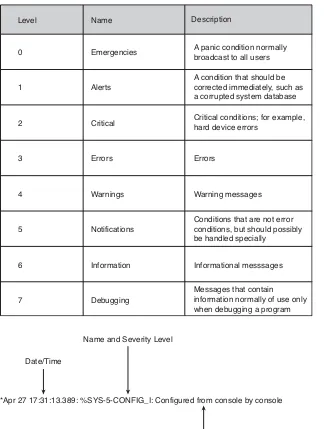
(30) [ 30 ] CCNA Security Quick Reference by Anthony Sequeira. CHAPTER 2 Perimeter Security. Syslog Syslog is the current standard for logging system events in a Cisco infrastructure. It is the most popular option for storing Cisco router log messages. The Cisco Security Monitoring, Analysis, and Response System (MARS) is a Cisco security appliance that can receive and analyze syslog messages from various networking devices and hosts. Remember that router log messages can also be sent to n. The console. n. Terminal lines. n. An internal buffer. n. SNMP traps. Figure 2-1 shows the various Cisco log severity levels. Cisco router log messages contain three main parts: n. Time stamp. n. Log message name and severity level. n. Message text. Figure 2-2 shows this message format.. © 2008 Cisco Systems Inc. All rights reserved. This publication is protected by copyright. Please see page 88 for more details..
(31) [ 31 ] CCNA Security Quick Reference by Anthony Sequeira. CHAPTER 2 Perimeter Security FIGURE 2-1 Cisco log severity levels. Level. Name. Description. 0. Emergencies. A panic condition normally broadcast to all users. 1. Alerts. A condition that should be corrected immediately, such as a corrupted system database. 2. Critical. Critical conditions; for example, hard device errors. 3. Errors. Errors. 4. Warnings. Warning messages. 5. Notifications. Conditions that are not error conditions, but should possibly be handled specially. 6. Information. Informational messsages. 7. Debugging. Messages that contain information normally of use only when debugging a program. FIGURE 2-2 Cisco log message format. Name and Severity Level Date/Time. *Apr 27 17:31:13.389: %SYS-5-CONFIG_I: Configured from console by console. The Message Text © 2008 Cisco Systems Inc. All rights reserved. This publication is protected by copyright. Please see page 88 for more details..
(32) [ 32 ] CCNA Security Quick Reference by Anthony Sequeira. CHAPTER 2 Perimeter Security. To enable syslog logging on your router using SDM, choose Configure > Additional Tasks > Router Properties > Logging. To view the syslog information, choose Monitor > Logging.. Simple Network Management Protocol (SNMP) Versions 1 and 2c of SNMP use clear-text passwords called community strings. This offers little to no security. SNMP 3 uses a combination of authenticating and encrypting packets over the network to provide secure access to devices. SNMP 3 provides message integrity, authentication, and encryption. SNMP 3 supports all three of the following security levels: n. noAuth: Community string. n. auth: HMAC or MD5 (hashing for integrity). n. Priv: DES, 3DES, or AES (encryption for confidentiality). When actually implemented on a router, these levels can be combined. For example, authPriv allows the use of authentication and encryption. To use the SDM to configure SNMP, choose Configure > Additional Tasks > Router Properties > SNMP.. SSH The SSH daemon is a feature that enables an SSH client to make a secure, encrypted connection to a Cisco router. Use SSH rather than Telnet to manage Cisco devices. Cisco IOS Release 12.1(1)T and later support SSH Version 1 (SSHv1), and Cisco IOS Release 12.3(4)T and later support both SSHv1 and SSH Version 2 (SSHv2). The Cisco router acts as the SSH server, and the client must be acquired to connect to the server. A sample client is PuTTY.. © 2008 Cisco Systems Inc. All rights reserved. This publication is protected by copyright. Please see page 88 for more details..
(33) [ 33 ] CCNA Security Quick Reference by Anthony Sequeira. CHAPTER 2 Perimeter Security. To use SDM to configure SSH, choose Configure > Additional Tasks > Router Access > SSH. After enabling SSH on the router, configure the vty lines to support SSH. To use Cisco SDM to configure SSH on the vty lines, choose Configure > Additional Tasks > Router Access > VTY. To use the command line for the configuration, follow these steps: Step 1.. Configure the IP domain name of your network using the ip domain-name domain-name command in global configuration mode.. Step 2.. If there are any existing key pairs, it is recommended that you overwrite them using the command crypto key zeroize rsa.. Step 3.. Generate keys to be used with SSH by generating RSA keys using the crypto key generate rsa generalkeys modulus modulus-size command in global configuration mode.. Step 4.. Configure how long the router waits for the SSH client to respond using the ip ssh timeout seconds command in global configuration mode; this step is optional.. Step 5.. Configure the number of SSH retries using the ip ssh authentication-retries integer command in global configuration mode; this step is optional.. Step 6.. Enable vty inbound SSH sessions; use the transport input ssh command.. Time features You can use Cisco SDM to configure the date and time settings of the router in three ways: n. Synchronize with the local PC clock. n. Manually edit the date and time. n. Configure NTP (Network Time Protocol). © 2008 Cisco Systems Inc. All rights reserved. This publication is protected by copyright. Please see page 88 for more details..
(34) [ 34 ] CCNA Security Quick Reference by Anthony Sequeira. CHAPTER 2 Perimeter Security. To do this in SDM, choose Configure > Additional Tasks > Router Properties > Date/Time. For an NTP configuration, choose Configure > Additional Tasks > Router Properties > NTP/SNTP.. Locking Down the Router Cisco provides two powerful methods for locking down the router. This means disabling or protecting unused services, and making other configuration changes that are necessary for a secure network infrastructure.. AutoSecure The AutoSecure IOS feature is invoked by issuing the auto secure command from the CLI.. Cisco SDM One-Step Lockdown The Cisco SDM One-Step Lockdown method for securing a router uses a wizard in the Cisco SDM graphical interface. To access this feature, choose Configure > Security Audit. Note that there is also a very informative Security Audit feature you can use before performing the One-Step Lockdown. You should keep in mind some distinctions between the two approaches: n. One-Step Lockdown does not support the disabling of NTP.. n. One-Step Lockdown does not support the configuration of AAA.. n. One-Step Lockdown does not support the setting of Selective Packet Discard (SPD) values.. n. One-Step Lockdown does not support the enabling of TCP intercepts.. n. One-Step Lockdown does not configure antispoofing access control lists.. © 2008 Cisco Systems Inc. All rights reserved. This publication is protected by copyright. Please see page 88 for more details..
(35) [ 35 ] CCNA Security Quick Reference by Anthony Sequeira. CHAPTER 2 Perimeter Security n. Although One-Step Lockdown does support the disabling of SNMP, it does not support the configuration of SNMP 3.. n. Although One-Step Lockdown does support the configuration of SSH access, it does not support the enabling of Service Control Point or the disabling of other access services and file transfer services.. © 2008 Cisco Systems Inc. All rights reserved. This publication is protected by copyright. Please see page 88 for more details..
(36) [ 36 ] CCNA Security Quick Reference by Anthony Sequeira. CHAPTER 3 Cisco IOS Firewalls. Firewall Technologies Firewalls are a key security technology in the modern network infrastructure. This section details their evolution and the technologies that have resulted.. Firewall fundamentals The firewall should n. Be resistant to attacks. n. Be the only transit point. n. Enforce the access control policy of the organization. Static packet-filtering firewalls These work at Layer 3 and 4, examining packets one at a time. They are implemented on a Cisco router using access control lists (ACL). Advantages of these firewalls include the following: n. Are based on simple permit and deny sets. n. Low impact on network performance. n. Easy to implement. n. Supported on most routers. n. Initial security at a low network layer. n. Perform most of what higher-end firewalls do at a lower cost. © 2008 Cisco Systems Inc. All rights reserved. This publication is protected by copyright. Please see page 88 for more details..
(37) [ 37 ] CCNA Security Quick Reference by Anthony Sequeira. CHAPTER 3 Cisco IOS Firewalls Disadvantages of these firewalls include the following: n. Susceptible to IP spoofing.. n. Packet filters do not filter fragmented packets well.. n. Complex ACLs are difficult to implement and maintain correctly.. n. Packet filters cannot dynamically filter certain services.. n. Packet filters are stateless; they do not maintain any state information for added protection.. Application layer gateways Application layer firewalls (also called proxy firewalls or application gateways) operate at Layers 3, 4, 5, and 7 of the OSI model. Proxy services are specific to the protocol that they are designed to forward, and they can provide increased access control, provide careful detailed checks for valid data, and generate audit records about the traffic they transfer. Sometimes, application layer firewalls support only a limited number of applications. Application layer firewalls offer advantages: n. Authenticate individuals, not devices. n. Make it harder for hackers to spoof and implement denial-of-service (DoS) attacks. n. Can monitor and filter application data. n. Can provide detailed logging. The disadvantages are as follows: n. Process packets in software. n. Support a small number of applications. © 2008 Cisco Systems Inc. All rights reserved. This publication is protected by copyright. Please see page 88 for more details..
(38) [ 38 ] CCNA Security Quick Reference by Anthony Sequeira. CHAPTER 3 Cisco IOS Firewalls n. Sometimes require special client software. n. Are memory- and disk-intensive. Dynamic or stateful packet-filtering firewalls Stateful inspection is a firewall architecture that is classified at the network layer, although for some applications it can analyze traffic at Layers 4 and 5, too. Unlike static packet filtering, stateful inspection tracks each connection traversing all interfaces of the firewall and confirms that they are valid. Stateful packet filtering maintains a state table and allows modification to the security rules dynamically. The state table is part of the internal structure of the firewall. It tracks all sessions and inspects all packets passing through the firewall. Although this is the primary Cisco firewall technology, it has some limitations: n. Cannot prevent application layer attacks.. n. Not all protocols are stateful.. n. Some applications open multiple connections.. n. Does not support user authentication.. Other types Application inspection firewalls ensure the security of applications and services. Advantages include the following: n. Are aware of the state of Layer 4 and Layer 5 connections. n. Check the conformity of application commands at Layer 5. © 2008 Cisco Systems Inc. All rights reserved. This publication is protected by copyright. Please see page 88 for more details..
(39) [ 39 ] CCNA Security Quick Reference by Anthony Sequeira. CHAPTER 3 Cisco IOS Firewalls n. Can and affect Layer 7. n. Can prevent more kinds of attacks than stateful firewalls can. Transparent firewalls (Cisco PIX and Cisco Adaptive Security Appliance Software Version 7.0) can deploy a security appliance in a secure bridging mode as a Layer 2 device to provide security services at Layer 2 to Layer 7.. Cisco Firewall family Cisco IOS Firewall features n. Zone-based policy framework for intuitive policy management. n. Application firewalling for web, e-mail, and other traffic. n. Instant messenger and peer-to-peer application filtering. n. VoIP protocol firewalling. n. Virtual routing and forwarding (VRF) firewalling. n. Wireless integration. n. Stateful failover. n. Local URL whitelist and blacklist support; remote server support too, through Websense or SmartFilter. Cisco PIX 500 Series Security Appliance features n. Advanced application-aware firewall services. n. Market-leading VoIP and multimedia security. n. Robust site-to-site and remote-access IP security (IPsec) VPN connectivity. © 2008 Cisco Systems Inc. All rights reserved. This publication is protected by copyright. Please see page 88 for more details..
(40) [ 40 ] CCNA Security Quick Reference by Anthony Sequeira. CHAPTER 3 Cisco IOS Firewalls n. Award-winning resiliency. n. Intelligent networking services. n. Flexible management solutions. Cisco ASA 5500 Series Adaptive Security Appliance features n. World-class firewall. n. Voice and video security. n. SSL and IPsec VPN. n. IPS. n. Content security. n. Modular devices. n. High scalability. Best practices Firewall best practices include the following: n. Position firewalls at key security boundaries.. n. Firewalls are the primary security device, but it is unwise to rely exclusively on a firewall for security.. n. Deny all traffic by default and permit only services that are needed.. n. Ensure that physical access to the firewall is controlled.. © 2008 Cisco Systems Inc. All rights reserved. This publication is protected by copyright. Please see page 88 for more details..
(41) [ 41 ] CCNA Security Quick Reference by Anthony Sequeira. CHAPTER 3 Cisco IOS Firewalls n. Regularly monitor firewall logs. Cisco Security Monitoring, Analysis, and Response System (MARS) is especially useful in monitoring firewall logs.. n. Practice change management.. n. Remember that firewalls primarily protect from technical attacks originating from the outside.. Static Packet Filters Using ACLs Fundamentals of ACLs ACLs operate in two ways: n. Inbound ACLs: Incoming packets are processed before they are routed to an outbound interface.. n. Outbound ACLs: Incoming packets are routed to the outbound interface, and then they are processed through the outbound ACL.. If there is no matching permit or deny statement and the entire access list has been processed, the packet is denied by an implicit deny all at the end of the access list. Cisco routers support two types of IP ACLs: n. Standard ACLs: Check the source addresses of packets that can be routed.. n. Extended ACLs: Check both the source and destination packet addresses. They can also check for specific protocols, port numbers, and other parameters.. © 2008 Cisco Systems Inc. All rights reserved. This publication is protected by copyright. Please see page 88 for more details..
(42) [ 42 ] CCNA Security Quick Reference by Anthony Sequeira. CHAPTER 3 Cisco IOS Firewalls You can use two general methods to create ACLs: n. Numbered ACLs: Use a number for identification.. n. Named ACLs: Use an alphanumeric string for identification.. Cisco IOS Release 12.3 or later features IP access list entry sequence numbering to assist in the management of ACLs. Follow these guidelines with ACLs: n. Based on the test conditions, choose a standard or extended, numbered or named ACL.. n. Only one ACL per protocol, per direction, and per interface is allowed.. n. Your ACL should be organized to allow processing from the top down. Organize your ACL so that the more specific references to a network or subnet appear before ones that are more general.. n. Unless you end your ACL with an explicit permit any statement, by default the ACL denies all traffic that fails to match any of the ACL lines.. n. Every ACL should have at least one permit statement.. n. You should create the ACL before applying it to an interface.. n. If you apply an ACL to an interface, the ACL filters traffic going through the router but does not filter traffic that the router generates.. n. You should typically place extended ACLs as close as possible to the source of the traffic that you want to deny. You must put the standard ACL as close as possible to the destination of the traffic you want to deny.. © 2008 Cisco Systems Inc. All rights reserved. This publication is protected by copyright. Please see page 88 for more details..
(43) [ 43 ] CCNA Security Quick Reference by Anthony Sequeira. CHAPTER 3 Cisco IOS Firewalls. ACL wildcard masking Wildcard masking for IP address bits uses the numerals 1 and 0 to specify how to treat the corresponding IP address bits: n. Wildcard mask bit 0: Match the corresponding bit value in the address. n. Wildcard mask bit 1: Ignore the corresponding bit value in the address. Figure 3-1 shows an example of wildcard masking. FIGURE 3-1 Wildcard masking. An administrator wants to match the subnets 172.40.16.0/24 to 172.40.31.0/24. The first two octets of the wildcard mask will be 0.0 since 172.40 must be matched exactly. For the third octet, the administrator first converts the starting range number to binary: 16 = 0 0 0 1 0 0 0 0 Notice the administrator does not care about the binary values in the last four bit positions; therefore, the wildcard mask is: 0 0 0 0 1 1 1 1 = 15 Also, the administrator does not care at all about any bit in the last octet, so this octet is all 1 values: 1 1 1 1 1 1 1 1 = 255 The resulting address and wildcard mask used in the ACL are: 172.40.16.0 0.0.15.255. You can use abbreviations in your wildcard masks. For example, instead of 0.0.0.0, you can use the keyword host. Instead of 255.255.255.255, you can use the keyword any.. © 2008 Cisco Systems Inc. All rights reserved. This publication is protected by copyright. Please see page 88 for more details..
(44) [ 44 ] CCNA Security Quick Reference by Anthony Sequeira. CHAPTER 3 Cisco IOS Firewalls. ACL creation To create the standard ACL, use access-list access-list-number {deny | permit} source [source-wildcard]. To assign the standard ACL to an interface, use ip access-group {access-list-number | access-list-name}{in | out}. To assign an ACL to a vty line, use access-class access-list-number {in [vrf-also] | out}. To create an extended ACL, use access-list access-list-number [dynamic dynamic-name [timeout minutes]] {deny | permit} protocol source source-wildcard destination destination-wildcard [precedence precedence] [tos tos] [log | log-input] [time-range time-range-name] [fragments] [established]. Use the show access-list command to verify the ACL, and use show ip interface to check for assignment. The Security Device Manager (SDM) offers an excellent GUI for ACL creation. Choose Configure > Additional Tasks > ACL Editor > Access Rules.. Cisco IOS Zone-Based Policy Firewall One of the most exciting developments for Cisco in the area of IOS firewalls has been the new zone-based firewall. This section details this new technology.. © 2008 Cisco Systems Inc. All rights reserved. This publication is protected by copyright. Please see page 88 for more details..
(45) [ 45 ] CCNA Security Quick Reference by Anthony Sequeira. CHAPTER 3 Cisco IOS Firewalls. Overview With Cisco IOS Release 12.4(6)T, a new configuration model for the Cisco IOS Firewall feature set was introduced. This new model presented the Cisco IOS zone-based policy, which provides the following: n. Intuitive policies for multiple interface routers. n. A greater level of granularity for firewall policy application. n. The ability to prohibit traffic between firewall zones until an explicit policy is applied to allow desirable traffic via a default deny-all policy. The new zone-based policy inspection interface supports almost all the firewall features implemented in earlier releases and much more, including the following: n. Stateful packet inspection.. n. Application inspection.. n. Virtual private network (VPN) VRF-aware Cisco IOS Firewall.. n. URL filtering.. n. DoS mitigation.. n. Policies are applied between zones.. n. Default deny-all policy.. n. Subnet- and host-specific policies.. n. Combining service lists with network and host address lists is allowed.. n. Clearer statement of firewall policies.. n. Unidirectional policy between zones.. © 2008 Cisco Systems Inc. All rights reserved. This publication is protected by copyright. Please see page 88 for more details..
(46) [ 46 ] CCNA Security Quick Reference by Anthony Sequeira. CHAPTER 3 Cisco IOS Firewalls Policies may be made up of combinations of the following: n. IP addresses or subnets using ACLs. n. Protocols. n. Application services. n. Application-specific policies. The zone-based firewall approach takes three possible actions: n. Inspect: Causes Cisco IOS stateful packet inspection. n. Drop: Analogous to a deny statement in an ACL. n. Pass: Analogous to a permit statement in an ACL. Configuring the zone-based firewall To configure a zone-based firewall using the Basic Firewall wizard, choose Configuration > Firewall and ACL. From the Create Firewall tab, click Basic Firewall. To manually configure a zone-based firewall using the SDM, follow these steps: Step 1.. Define the zones; choose Configure > Additional Tasks > Zones.. Step 2.. Define class maps; choose Configure > Additional Tasks > C3PL > Class Map > Inspection.. Step 3.. Define policy maps; choose Configure > Additional Tasks > C3PL > Policy Map > Protocol Inspection.. Step 4.. Define zone pairs and assign policy maps to them; choose Configure > Additional Tasks > Zone Pairs.. © 2008 Cisco Systems Inc. All rights reserved. This publication is protected by copyright. Please see page 88 for more details..
(47) [ 47 ] CCNA Security Quick Reference by Anthony Sequeira. CHAPTER 3 Cisco IOS Firewalls. To monitor the firewall in SDM, choose Monitor > Firewall Status. To monitor from the command line, use the show policy-map type inspect zone-pair session command.. © 2008 Cisco Systems Inc. All rights reserved. This publication is protected by copyright. Please see page 88 for more details..
(48) [ 48 ] CCNA Security Quick Reference by Anthony Sequeira. CHAPTER 4 Site-to-Site VPNs. Cryptographic Services This section covers the key topics of cryptography. You should understand these principles before studying VPN technologies.. Overview Cryptology is the science of making and breaking secret codes. A cipher is an algorithm for performing encryption and decryption. The Vigenère cipher is a polyalphabetic cipher that encrypts text by using a series of different Caesar ciphers based on the letters of a keyword. Cryptanalysis is the practice of breaking codes to obtain the meaning of encrypted data. Here are examples of attacks: n. Brute-force attack: The attacker tries every possible key with the decryption algorithm.. n. A cipher-text-only attack: The attacker has the cipher text of several messages but no knowledge of the underlying plain text. The attacker must deduce the key or keys used to encrypt the messages to decrypt other messages encrypted with the same keys.. n. A known-plain-text (the usual brute-force) attack: The attacker has access to the cipher text of several messages but also knows something about the plain text underlying that cipher text. The attacker uses a brute-force attack to try keys until decryption with the correct key produces a meaningful result.. n. A chosen-plain-text attack: The attacker chooses what data the encryption device encrypts and observes the ciphertext output.. n. A chosen-cipher-text attack: The attacker can choose different cipher texts to be decrypted and has access to the decrypted plain text.. n. Birthday attack: A form of brute-force attack against hash functions.. n. Meet-in-the-middle attack: The attacker knows a portion of the plain text and the corresponding cipher text.. © 2008 Cisco Systems Inc. All rights reserved. This publication is protected by copyright. Please see page 88 for more details..
(49) [ 49 ] CCNA Security Quick Reference by Anthony Sequeira. CHAPTER 4 Site-to-Site VPNs. The following are features that good encryption algorithms provide: n. Resist cryptographic attacks. n. Support variable and long key lengths and scalability. n. Create an avalanche effect. n. Do not have export or import restrictions. Symmetric and asymmetric encryption algorithms There are two classes of encryption algorithms, which differ in their use of keys: n. Symmetric encryption algorithms: Same key to encrypt and decrypt data. n. Asymmetric encryption algorithms: Different keys to encrypt and decrypt data. The following are well-known encryption algorithms that use symmetric keys: n. DES: 56-bit keys. n. Triple Data Encryption Standard (3DES): 112- and 168-bit keys. n. AES: 128-, 192-, and 256-bit keys. n. International Data Encryption Algorithm (IDEA): 128-bit keys. n. The RC series: RC2, RC4, RC5, and RC6. n. RC2: 40- and 64-bit keys. n. RC4: 1- to 256-bit keys. n. RC5: 0- to 2040-bit keys. © 2008 Cisco Systems Inc. All rights reserved. This publication is protected by copyright. Please see page 88 for more details..
(50) [ 50 ] CCNA Security Quick Reference by Anthony Sequeira. CHAPTER 4 Site-to-Site VPNs n. RC6: 128-, 192-, and 256-bit keys. n. Blowfish: 32- to 448-bit keys. Because of their fast speed, symmetric algorithms are frequently used for encryption services, with additional key management algorithms providing secure key exchange. The best-known asymmetric cryptographic algorithms are n. RSA. n. ElGamal. n. Elliptic curve algorithms. Block ciphers transform a fixed-length block of plain text into a block of cipher text of the same length. Applying the reverse transformation to the cipher-text block, using the same secret key, results in decryption. Currently, the fixed length, also known as the block size, for many block ciphers is typically 128 bits. DES has a block size of 64 bits. Unlike block ciphers, stream ciphers operate on smaller units of plain text, typically bits. With a stream cipher, the transformation of these smaller plain-text units varies, depending on when they are encountered during the encryption process. RC4 is a common stream cipher.. Cryptographic hashes Hashing is a mechanism that is used for data integrity. Data of arbitrary length is input into the hash function, and the result of the hash function is the fixed-length hash.. © 2008 Cisco Systems Inc. All rights reserved. This publication is protected by copyright. Please see page 88 for more details..
(51) [ 51 ] CCNA Security Quick Reference by Anthony Sequeira. CHAPTER 4 Site-to-Site VPNs. Key management Key management consists of the following components: n. Key generation. n. Key verification. n. Key storage. n. Key exchange. n. Key revocation and destruction. SSL VPNs SSL-based VPNs provide remote-access connectivity from almost any Internet-enabled location using a standard web browser and its native SSL encryption. The steps of SSL VPN establishment are as follows: Step 1.. The user makes an outbound connection to TCP port 443, typically using a web browser.. Step 2.. The router responds with a digital certificate, which contains a public key that is digitally signed by a trusted certificate authority (CA).. Step 3.. The user computer generates a shared-secret symmetric key that both parties will use.. Step 4.. The shared secret is encrypted with the public key of the router and transmitted to the router. The router software can easily decrypt the packet using its private key. Now both participants in the session know the shared secret key.. Step 5.. The key is used to encrypt the SSL session.. © 2008 Cisco Systems Inc. All rights reserved. This publication is protected by copyright. Please see page 88 for more details..
(52) [ 52 ] CCNA Security Quick Reference by Anthony Sequeira. CHAPTER 4 Site-to-Site VPNs. Symmetric Encryption Symmetric encryption is a common approach to encryption used with VPNs. This section describes this important technology.. Key lengths Symmetric encryption algorithms typically use keys of length 40 to 256 bits. Lengths of 80 bits or longer are considered trusted.. DES This encryption algorithm typically operates in block mode, where it encrypts data in 64-bit blocks. DES uses two standardized block cipher modes: n. Electronic Code Book (ECB): Serially encrypts each 64-bit plain-text block using the same 56-bit key.. n. Cipher Block Chaining (CBC): Each 64-bit plain-text block is exclusive ORed (XORed) bitwise with the previous cipher-text block and then is encrypted using the DES key.. Guidelines for DES usage include the following: n. Change keys frequently to help prevent brute-force attacks.. n. Use a secure channel to communicate the DES key from the sender to the receiver.. n. Use DES in CBC mode.. n. Test a key to see whether it is weak before using it.. n. Use 3DES rather than DES.. © 2008 Cisco Systems Inc. All rights reserved. This publication is protected by copyright. Please see page 88 for more details..
(53) [ 53 ] CCNA Security Quick Reference by Anthony Sequeira. CHAPTER 4 Site-to-Site VPNs. 3DES The technique of applying DES three times in a row to a plain-text block is called 3DES.. AES The AES algorithm currently specifies how to use keys with a length of 128, 192, or 256 bits to encrypt blocks with a length of 128, 192, or 256 bits. This provides nine different combinations of key length and block length. Both block length and key length can be extended easily in multiples of 32 bits. AES was chosen to replace DES and 3DES because the key length of AES is much stronger than DES and AES runs faster than 3DES on comparable hardware. AES is more suitable for high-throughput, low-latency environments, especially if pure software encryption is used.. Software-Optimized Encryption Algorithm (SEAL) SEAL is an alternative algorithm to software-based DES, 3DES, and AES. SEAL encryption uses a 160-bit encryption key and has less impact on the CPU compared to other software-based algorithms. Restrictions for SEAL include the following: n. The Cisco router and the other peer must support IPsec, and it cannot be hardware-based encryption.. n. The Cisco router and the other peer must support the k9 subsystem.. This feature is available only on Cisco equipment.. © 2008 Cisco Systems Inc. All rights reserved. This publication is protected by copyright. Please see page 88 for more details..
(54) [ 54 ] CCNA Security Quick Reference by Anthony Sequeira. CHAPTER 4 Site-to-Site VPNs. Rivest ciphers Widely used RC algorithms include the following: n. RC2: A variable key-size block cipher that was designed as a replacement for DES. n. RC4: A variable key-size Vernam stream cipher that is often used in file-encryption products and for secure communications. n. RC5: A fast block cipher that has variable block size and variable key size. n. RC6: A block cipher that was designed by Rivest, Sidney, and that Yin and is based on RC5 (meant to meet the design requirements of AES). Cryptographic Hashes This section details the most common cryptographic hashes in use today.. Hash Message Authentication Codes (HMAC) Hashing is typically used for the following: n. To provide proof of the integrity of data, such as that provided with file integrity checkers, digitally signed contracts, and Public Key Infrastructure (PKI) certificates. n. To provide proof of authenticity when it is used with a symmetric secret authentication key, such as IPsec or routing protocol authentication. © 2008 Cisco Systems Inc. All rights reserved. This publication is protected by copyright. Please see page 88 for more details..
(55) [ 55 ] CCNA Security Quick Reference by Anthony Sequeira. CHAPTER 4 Site-to-Site VPNs Cisco technologies use two HMAC functions: n. Keyed MD5, based on the MD5 hashing algorithm. n. Keyed SHA-1, based on the SHA-1 hashing algorithm. Cisco products use hashing for entity-authentication, data-integrity, and data-authenticity purposes: n. IPsec gateways and clients use hashing algorithms to provide packet integrity and authenticity.. n. Cisco IOS routers use hashing with secret keys to add authentication information to routing protocol updates.. n. Cisco software images have an MD5-based checksum available so that customers can check the integrity of downloaded images.. n. Hashing can also be used in a feedback-like mode to encrypt data; TACACS+ uses MD5 to encrypt its session.. MD5 MD5 is a one-way function that makes it easy to compute a hash from the given input data but makes it unfeasible to compute input data given only a hash. The input is a data block plus a feedback of previous blocks. The 512-bit blocks are divided into 16 32-bit subblocks. These blocks are then rearranged with simple operations in a main loop, which consists of four rounds. The output of the algorithm is a set of four 32-bit blocks, which concatenate to form a single 128-bit hash value. The message length is also encoded into the digest.. SHA-1 The SHA-1 algorithm takes a message of no less than 264 bits in length and produces a 160-bit message digest. The algorithm is slightly slower than MD5, but the larger message digest makes it more secure against brute-force collision and inversion attacks. There are also 224-, 256-, 384-, and 512-bit versions of SHA.. © 2008 Cisco Systems Inc. All rights reserved. This publication is protected by copyright. Please see page 88 for more details..
(56) [ 56 ] CCNA Security Quick Reference by Anthony Sequeira. CHAPTER 4 Site-to-Site VPNs Best practices include the following: n. Avoid MD5 if possible.. n. Consider using MD5 only if speed is an issue.. n. Protect HMAC secret keys.. Digital Signatures Digital signatures are often used in the following situations: n. To provide a unique proof of data source. n. To authenticate a user by using that person’s private key, and the signature it generates. n. To prove the authenticity and integrity of PKI certificates. n. To provide a secure time stamp. The following steps indicate how digital signatures function: Step 1.. A user wants to sign some data. The user uses a signature algorithm with a personal signature key; only the signer knows this signature key.. Step 2.. Based on the input data and a signature key, the signature algorithm generates its output, called a digital signature.. Step 3.. The sending device attaches the digital signature to the message and sends the message to the receiver.. Step 4.. The receiving device verifies the signature with the verification key, which is usually public.. © 2008 Cisco Systems Inc. All rights reserved. This publication is protected by copyright. Please see page 88 for more details..
(57) [ 57 ] CCNA Security Quick Reference by Anthony Sequeira. CHAPTER 4 Site-to-Site VPNs Step 5.. The receiving device inputs the message, the digital signature, and the verification key into the verification algorithm, which checks the validity of the digital signature.. Step 6.. If the check is successful, the document was not changed after signing, and the document was originated by the signer of the document.. Cisco products use digital signatures for entity-authentication, data-integrity, and data-authenticity purposes: n. IPsec gateways and clients use digital signatures to authenticate their Internet Key Exchange (IKE) sessions.. n. Cisco SSL endpoints and the Cisco Adaptive Security Device Manager (ASDM) use digital signatures to prove the identity of the SSL server.. n. Some of the service-provider-oriented voice management protocols use digital signatures to authenticate the involved parties.. Asymmetric Encryption Here are the steps used in asymmetric encryption: Step 1.. User A acquires User B’s public key.. Step 2.. User A uses User B’s public key to encrypt a message, which is often a symmetric key, using an agreed-upon algorithm.. Step 3.. User A transmits the encrypted message.. Step 4.. User B uses his private key to decrypt, and reveal, the message.. © 2008 Cisco Systems Inc. All rights reserved. This publication is protected by copyright. Please see page 88 for more details..
(58) [ 58 ] CCNA Security Quick Reference by Anthony Sequeira. CHAPTER 4 Site-to-Site VPNs. RSA The RSA keys are usually 512 to 2048 bits long. The RSA algorithm is based on the fact that each entity has two keys, a public key and a private key. The public key can be published, but the private key must be kept secret. RSA is mainly used for two services: n. To ensure confidentiality of data by performing encryption. n. To perform authentication of data, nonrepudiation of data, or both by generating digital signatures. Diffie-Hellman (DH) The DH algorithm is the basis of most modern automatic key exchange methods. The IKE protocol in IPsec VPNs uses DH algorithms extensively.. PKI Overview A PKI provides a framework upon which you can base security services, such as encryption, authentication, and nonrepudiation. A PKI allows for very scalable solutions and is becoming an extremely important authentication solution for VPNs. Two important PKI terms n. Certificate authority (CA): The trusted third party that signs the public keys of entities in a PKI-based system.. n. Certificate: A document that has been signed by the CA. This binds the name of the security entity with its public key.. © 2008 Cisco Systems Inc. All rights reserved. This publication is protected by copyright. Please see page 88 for more details..
(59) [ 59 ] CCNA Security Quick Reference by Anthony Sequeira. CHAPTER 4 Site-to-Site VPNs. The CA may be a single entity, or there may be a complex hierarchy of CAs. X.509 is a well-known standard that defines basic PKI formats. The standard has been widely used with many Internet applications, such as SSL and IPsec. Simple Certificate Enrollment Protocol (SCEP) is a PKI communication protocol used for automated VPN PKI enrollment.. IPsec VPN Fundamentals This section ensures that you understand the fundamentals of the modern IPSec VPN. Coverage includes critical topics such as the function of IPSec and IKE.. VPN overview IPsec is the primary technology used in VPNs. It provides the following in the network: n. Cost savings. n. Security. n. Scalability. n. Compatibility with broadband. There are two types: n. Site-to-site. n. Remote-access. Many Cisco devices can work together to form the VPN, including routers, firewalls, and Adaptive Security Appliances.. © 2008 Cisco Systems Inc. All rights reserved. This publication is protected by copyright. Please see page 88 for more details..
(60) [ 60 ] CCNA Security Quick Reference by Anthony Sequeira. CHAPTER 4 Site-to-Site VPNs. IPsec overview IPsec has many advantages, including the following: n. Offers protection for any number of applications, running over any number of networks, using any number of media.. n. Security is provided at the network layer; upper layers are unaffected.. n. IPsec is extremely scalable.. IPsec features two main framework protocols, as shown in Figure 4-1:. FIGURE 4-1. n. AH: Authentication Header is used only when confidentiality is not required; it provides authentication of the IPsec traffic only.. n. ESP: Encapsulating Security Payload provides confidentiality and authentication. Authentication Header (AH). IPsec security protocols. Data in plaintext R1. Provides: • Authentication • Integrity. R2. Encapsulating Security Payload (ESP) Data encrypted R1. Provides: • Encryption • Authentication • Integrity. R2. © 2008 Cisco Systems Inc. All rights reserved. This publication is protected by copyright. Please see page 88 for more details..
Figure
Related documents
Security Cisco Adaptive Security Appliance (ASA) Cisco Network Appliance Control (NAC) Cisco CS MARS. Cisco Intrusion detection / protection Netscreen /
Cisco award-winning security products and consulting services provide the building blocks for the network security solution that your business needs.. Cisco Secure
The curricula emphasize the real-world best practices of network security using the features of Cisco IOS® Software security, Cisco ASA adaptive security appliance secure
We have audited the consolidated financial statements and the parent financial statements of GASA GROUP Holding A/S for the financial year 01.01.2019 - 31.12.2019, which comprise
2.3 The genetics of smoking behavior and nicotine dependence Although environmental factors, such as the influence of peers and family members, as well as national culture
In this procedure, you configure a Network Address Translation (NAT) rule that associates IP addresses from this pool with the inside clients so they can communicate securely with
The Cisco Email Security portfolio - including the Cisco Email Security Appliance (ESA), Cisco Virtual Email Security Appliance (ESAV), and Cisco Cloud Email Security (CES)
The Cisco Email Security portfolio―including the Cisco Email Security Appliance (ESA; see Figure 1), Cisco Email Security Virtual Appliance (ESAV), and Cisco Cloud Email Security
