Web-based Annotation Tool for Inflectional Language Resources
Abdulrahman Alosaimy, Eric Atwell
School of Computing, University of LeedsLeeds LS2 9JT, UK {scama, e.s.atwell}@leeds.ac.uk
Abstract
We present Wasim, a web-based tool for semi-automatic morphosyntactic annotation of inflectional languages resources. The tool features high flexibility in segmenting tokens, editing, diacritizing, and labelling tokens and segments. Text annotation of highly inflectional languages (including Arabic) requires key functionality which we could not see in a survey of existing tools. Wasim integrates with morphological analysers to speed up the annotation process by selecting one from their proposed analyses. It integrates as well with external POS taggers for kick-start annotation and adaptive predicting based on annotations made so far. It aims to speed up the annotation by completely relying on a keyboard interface, with no mouse interaction required. Wasim has been tested on four case studies and these features proved to be useful. The source-code is released under the MIT license.
Keywords: annotation, inflectional language, morphosyntactic, Arabic
1.
Introduction
POS tagging text in inflectional languages is usually hard. A typical problem is substantial lexical data sparseness due to the high number of possible inflexions of a single word. To reduce sparseness and number of Out-of-Vocabulary (OOV) words, inflected words are often segmented prior to or in parallel with POS tagging. However, the segmentation process is prone to errors. Inflection boundaries are often not marked which increases the number of homographs (two or more words spelt in the same form but with different POS tag or pronunciation (e.g. due to differences in diacritization). Some orthographical changes are caused by inflexions, making it hard to recover the original word form. As a result, a segmentation process sometimes fails to detect morphemes.
Wasim is a web-based tool for semi-automatic annotation of text for the purpose of gold standard corpus production1. It was developed for the annotation of our
Sunnah Arabic Corpus (SAC) (Alosaimy & Atwell, 2017), a collection of classical Arabic sayings ascribed to the prophet Mohammad. It has also been tested in four case studies.
For the project, we investigated the required set of features needed for annotating SAC and used these as criteria in a survey of existing tools. In our search for currently available tools, we limited our survey to tools that 1. are web-based: to integrate it with other systems, and to allow easier access through browsers. 2. Annotate text tokens with morpho-syntactic tags in CoNLL-U v.2 format (Nivre & Agic, 2017)2. 3. Support right-to-left
languages. 4. are available to download for research purposes.
Morphosyntactic annotation of SAC (and other highly inflectional language corpora) requires additional specialized functionality:
1 Source code and demo is available at:
http://wasim.al-osaimy.com
2 CoNLL-U format has been used in Universal
Dependencies project and well described in
http://universaldependencies.org/
1. Segmentation of one word into a set of segments 2. Addition of orthographical accents or diacritics 3. Listing a set of solutions from a lexicon
dictionary (internally or externally using a morphological analyser)
4. Consistency validation and integrating annotation guidelines (e.g. homographs).
5. Adaptive prediction based on historical tagging 6. Efficient keyboard-based navigation and
labelling
In the next section, we provide an overview of major related tools for annotating corpora, with a tabular comparison of support for these features with Wasim.
2.
Related Work
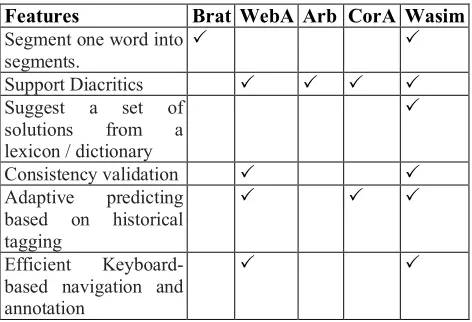
We limit our literature review to tools that meet our four conditions, which results in five tools. Brat (Stenetorp et al., 2012) is a widely-used visualization and annotation tool that is mainly for syntactic annotation in addition to morpho-syntactic annotation. WebAnno (Yimam, Gurevych, de Castilho, & Biemann, 2013) is a Java-based set of well-documented tools for multiple annotation tasks. Arborator (Gerdes, 2013) is a dependency annotation tool, that supports RTL languages natively. Sequence Annotation Web Tool (Samih, Maier, & Kallmeyer, 2016) is a basic web-based tool for the annotation of token sequences with an arbitrary set of labels (e.g. POS tags). The authors claimed to publish the code on GitHub, but we could not find a link to it, so we exclude it from the table comparison. CorA (Marcel Bollmann, Florian Petran, Stefanie Dipper, 2014) is a web-based tool for morpho-syntactic annotation of non-standard texts.
Features Brat WebA Arb CorA Wasim
Segment one word into
segments. P P
Support Diacritics P P P P
Suggest a set of
solutions from a
lexicon / dictionary
P
Consistency validation P P
Adaptive predicting based on historical tagging
P P P
Efficient Keyboard-based navigation and annotation
[image:2.595.54.290.69.230.2]P P
Table 1: Tools and their support for a range of features.
3.
Major features
The annotation of text in a highly inflectional language is usually harder because:
1. Words are highly ambiguous, which results in many homographs (i.e. more need of a lexicon), 2. Words need to be segmented into a set of
morphemes, and
3. As a result, tagger performance is usually poorer and relies on a lexicon or a morphological analyser to improve the accuracy.
Semi-automatic annotation should help to remove the ambiguity of words as it should be able to correct tagger errors. Often, these errors are in the ranking of the solution set provided by the morphological analyser. Therefore, the most essential feature is the integration of a morphological analyser, which allows the annotator to re-select the proper analysis in case of incorrect automatic tagging.
In addition, an efficient way to segment words into a set of morphemes is a necessity. For example in Arabic, many words are inflected and an inflected word (multi-word token) consists on average of 2.06 syntactic (multi-words (or morphemes)3.
3.1 Morphological Analyser Integration
Wasim integrates with morphological analysers to speed up the process of annotation. Morphological analysers take a word as input and produce a list of possible analyses (which include word’s segmentation and lemma and segment’s POS tag and features). By providing a set of possible analyses, Wasim allows annotators to select one analysis. Once a solution is chosen, all its values of POS tag, lemma, segmentation, and morphological features will be reflected in the word analysis. The chosen solution can be edited though.
In our SAC project, a word may be tagged with up to ten features, in addition to segmenting the word into a set of morphemes and marking its POS tag. We hypothesise that it will more efficient to select a solution instead of doing them all from scratch. However, this hypothesis depends on the quality of the morphological analyser. Annotators have to mark all features if the analyser returns no results.
3
http://universaldependencies.org/treebanks/ar-comparison.html
Once a newly-created analysis is detected, it will be saved in the server for possible later re-use.
Wasim provides two ways of morphological analyser integration. First, using an embedded supplementary tool that acts as a simple lexicon memory: It reads the annotated part of the corpus and index words with their annotations. Then, it allows HTTP requests to be made from Wasim, and it will return all possible solutions of the token in hand.
Second is using an external morphological analyser (MA). MA outputs must be in CoNLL-U format with word id in the MISC column that maps to the original word index of the submitted sentence (e.g. WID=2). The reason is to allow Wasim to group MA’s analyses of one word together.
A mapping between MA’s tagset and the project tagset may be required, and this can be defined in the configuration. If the mapping results in an ambiguous tag in the project’s tagset, Wasim will duplicate the analysis for each possible tag. For example, if NOUN is mapped to PN and N, two analyses will be presented to the annotator.
3.2 Consistency Reinforcement
Consistency (a.k.a. “stability” when measuring the consistency of one annotator alone over time) of the corpus annotation process is important to ensure that all annotators in all texts follow the same procedure of annotation over time. High consistency means little disagreement in the annotation, and this helps training machine learning algorithms successfully.
[image:2.595.308.541.184.372.2]To increase the consistency of the segmentation and tagging of a corpus, Wasim followed three approaches. First, it allows the use of an automatic POS tagger. Second, it integrates with morphological analysers. Third, it generates periodically a list of common homographs. Homographs are associated with their possible POS tags and segmentation. Possible segmentations are only shown when the token in hand is a homograph.
Fig 1 The list of possible solutions from a morphological analyser. A solution is usually a bundle of POS tag,
segmentation, lemma and morphological features. Selecting one solution will replace all its content to each
Usually, in annotation guidelines, there is some guidance for specific words, usually homographs. However, in highly inflectional languages, those homographs are overwhelming, and such offline guidelines may miss some homographs, and/or the guideline document may be lengthy. This feature serves as an online guideline for annotators, which is automatically built up.
In the segmentation layer, Wasim warns the annotator when a segmentation of a word differs from previous segmentation of the same word. If the annotator insists, the new segmentation will be added. A similar process is applied for morphological tagging.
The list is regenerated periodically from the annotated part of the corpus, and the possible segmentations/POS tags of homographs are kept. Each homograph will have a set of examples in context for each sense. Moderators can edit the list, and/or add guideline notes for tagging of special cases. The list will appear in Wasim with relevant notes when selecting a word in the list.
3.3 POS tagging Integration
Instead of starting the annotation process of a corpus from scratch, Wasim integrates with UDPipe (Straka & Straková, 2017) to kick start the annotation process. UDPipe provides trained models for more than 60 languages that tokenize, tag, lemmatize and dependency parse raw text and save results in CoNLL-U formatted files. Wasim uses UDPipe as well to improve its prediction model by periodically adding instances of the corpus that has been annotated so far.
Other tools can be used as long as they generate CoNLL-U formatted files. For example, SAWAREF toolkit can be used for Arabic and the translation from popular POS tagger into CoNLL-U format can be done using one of its tools.
4.
Data Representation
Wasim follows the Universal Dependencies v 2.0 (UD) (Nivre & Agic, 2017) in the way it represents sentence segmentation, POS tagging, morphological features, segmentation, and lemmatization. All annotation is stored as CoNLL-U files, which can be downloaded anytime.
Since Wasim does not annotate syntactic relationships, related columns are marked as missing.
Unlike some other representations, CoNLL-U is morpheme-based tagging with the ability to recover the original word form prior to segmentation. In addition, each morpheme has two POS tags; one from coarse universal tagset (UPOS) and one from the author’s defined fine-grained tagset (XPOS). This enables sharing and comparing of cross-linguistically consistent grammatical annotation of more than 100 treebanks available in UD project. CoNLL-U format serves two purposes: a well-formed structure for saving annotations (like XML) and as a high-level guideline for morphological tagging. Annotators are encouraged to use UPOS tags, and a simple mapping from XPOS to UPOS can be provided in the configuration.
The UD project does not have a standard format for diacritization as it is language-specific. We followed our project’s representation of diacritization of Arabic4.
Wasim allows users to enforce such representation by performing a series of transformations using “regex” expressions. Moderators can enforce a similar approach for other languages. Diacritization changes a word from its original form; Wasim, however, keeps the original sentence form before diacritization in the comments part of the sentence.
5.
Tool Description
The Wasem tool has two main components: a front-end
interface which allows interaction with annotator and provides warnings and feedbacks, and a back-end server that manages sessions and storage of CoNLL-U files. The front-end web-based tool is built using Ionic framework using Typescript/Javascript programming language. The main screen contains four sections: a toolbar at the top is used for warnings, helpful shortcuts, and for a glance of shortcuts. The rest is separated into three columns. The middle column shows the words in small boxes (each with its XPOS tag beneath it) with the current word in process highlighted in a different colour. Multi-word tokens show morphemes linked by a “+”
[image:3.595.64.557.81.223.2]4 http://sac.al-osaimy.com/guidelines
Figure 2: A screenshot that shows Wasim in a browser. The middle part represents one sentence where each box is a token (with its XPOS tag). Tokens of inflected word are linked by + symbol. The left side shows feature annotation. The top bar represents actions such “save file” and “undo last action”. On the right side, CoNLL-U synchronized
symbol. Instead of displaying words in a tabular format (like in CorA, SAWT), we display words in natural paragraph flow; allowing annotator to easily examine a word’s context. The left column shows key-value pairs of the lemma and morphological features, and the right column shows the synchronized CoNLL-U format of the current document. Closed features are a dropdown list with an auto-complete feature. Figure 2 shows a screenshot that shows the main components of Wasim.
CoNLL-U representation on the right side is editable at any time, as Wasim synchronizes changes. Changes will be validated and errors are reported in an error log box below it. In case of valid changes, such changes are reflected on the Wasim widgets. This should give an option to the annotator to make changes in bulk like copying previous annotations, though this should be used carefully in Gold Standard manual annotation.
In addition, three useful subviews are displayed on demand: A. a list of other alternative solutions retrieved from a morphological analyser. B. a tabular format of morphological features and possible values. C. a segmentation view that allows segmenting words easily. The front-end of Wasim can be seen as a CoNLL-U file editor: it parses the file, validates the syntax and visualizes the sentences with a synchronized side-by-side view of the CoNLL-U file.
The back-end is a server operated using Node.js Express server, and is responsible for authentication and management of annotated and raw files. A connection with the server using WebSocket is established for several reasons: such as morphological analyser requests, logging sessions, diacritization requests, and temporary session backup.
Each project is a folder in the system that contains document files, configuration files, a database of homographs and a file of the corpus lexicon. It manages the versioning of files using the standard Git version control system. The Git system tracks all the changes that are made to files, and allows multiple operations, e.g. diff
to show changes to a file in the colour-coded interface. Annotated documents are moved to a subfolder.
All annotations are stored in CoNLL-U format as plain text files. Accessing one file from an annotator will grab a copy of that file; however, this might allow other annotators to work on the same file. To prevent that, Wasim implements a simple lock system where a file is locked while a connection is maintained with the server (using WebSocket). We only release the lock if the annotator accesses another file or the connection is closed.
Wasim is designed to be configurable to support preferences and project related setup. Project setup includes its name, language, remote Git repository, UDPipe model, morphological analyser path and several other preferences. Projects must define their own fine-grained tagset (unless UD tagset is used), with their morphological features. Wasim allows custom key-binding for actions. The configuration files are saved in the project level as JSON files.
The annotation process can be fully manual or semi-manual. In case of semi-manual, the corpus is first tagged
using UDPipe models. Automatically generated tags can then be checked and manually edited using Wasim. In the next section, we will describe the supported morphosyntactic layer in more detail.
6.
Morphosyntactic tasks
Wasim provides an easy interface for the annotation of up to six tasks. While these tasks can be processed sequentially, we allow annotators to work on any of the tasks at the same time. Tasks sometimes are interrelated, e.g. if the automatic tagger produced the wrong POS tag, it might as well have produced the wrong morphological segmentation/lemma ..etc. Since Wasim uses morphological analysers, if the annotator chose one solution, it will affect multiple tasks at the same time. Therefore, we allow the annotator to edit previous tasks without leaving the screen. However, we expect the annotator to use the morphological analyser (MA) feature at the beginning of a word’s segmentation, diacritize then segment the word, mark POS tag, and finally mark morphological features.
Since Wasim allows the user to annotate text on many levels at the same time, an annotator might skip a task accidentally. Wasim provides a guide to go through tasks in keyboard mode. It highlights tasks sequentially to keep the annotator’s focus on the current task.
However, depending on the corpus annotation goals and preferences, an annotator can customize the view; e.g. deactivate one/multiple tasks, or disable CoNLL-U view. The annotator can write post-process rules to check the validity and consistency of different tasks as well as constraints on different tasks.
Wasim is designed to increase productivity for these particular annotation tasks while sacrificing some degree of simplicity, eg there are many shortcuts/buttons on the screen. While the learning curve (the rate of a person's progress in gaining experience) is steep, we hypothesized that once the annotator is trained, Wasim features will reduce the time required for annotating each word.
6.1 Morphological segmentation
Inflectional languages tend to inflect morphemes to express different grammatical features. Unlike many other annotation tools, we do not assume the text to be tokenized/segmented. Annotators can easily tokenize words by editing their forms. Word can be segmented as well by placing a pointer in the proper position and inserting a special character (“+” sign by default). The two generated morphemes will clone the data from the original word except for its form which will be divided. The multi-token form will remain the same though. The original word in the main screen will be replaced by two morphemes linked by “+” symbol. The annotator can remove segmentation by simply hitting the “backspace” button in one morpheme, and it will merge to the previous morpheme.
Since we follow CoNLL-U representation, UD representation keeps the form of both the word and the token in its two-level indexing scheme. The form of one token can be rewritten as if it was not inflected. Free morpheme form can be altered because of the inflexion, and an annotator can recover its original form, e.g. “John’s” can be recovered to either “john+has” or “john+is”. The original form (John+’s) will be written in the MISC (last) column. The result CoNLL-U will be like the following:
1-2 John’s _ _ _ _ _ _ _ _
1 John _ NOUN N _ 0 _ _ _
2 has has AUX BE _ 0 _ _ ORG=’s
6.2 Diacritization
A diacritic (sometimes called accent or short vowel) is an optional small glyph added to letters to change the sound of the letter. Diacritization is the process of adding those glyphs. In our Sunnah project, we asked for this addition as diacritics reduce the ambiguity of words.
This process is tedious as it requires the annotator to move the cursor letter by letter to add diacritics. Since the number of the possible diacritization patterns is low, we enable the use of morphological analysers to generate the possible diacritization of a word. The annotation process is then eased by only selecting the correctly-diacritized word. The annotator has the ability, though, to edit the form if no appropriate solution is provided.
Additionally, Wasim uses a diacritization tool (Abdulrahman Alosaimy & Atwell, 2018) that borrows more thorough diacritization forms in similar contexts. This method is different from most other diacritizer as it does not “compute” diacritization, but rather “borrows” it if the word is found in a similar context. Context can be defined in different ways: e.g. n-word-gram.
Wasim allows moderators to enforce standards on the diacritization. For example, in Arabic, it can be configured to ignore diacritization of letters preceeded by a long vowel. These transformation rules can be enforced using a set of regular expressions (regex)5. These rules
will only be applied to a subset of morpheme/words that conform to certain conditions. For example, in the guidelines of SAC, we require no diacritization on the Lam letter of the definite article "Al-". We had a rule that removes such diacritization of the subset morphemes that has a POS tag: DET.
6.3 POS tagging
POS tagging in Wasim is morpheme-based. We assume that the tag set is assignable to any morpheme regardless of its location (e.g. prefix or base). Tags can be easily chosen from a list of POS tags ordered by their frequency or alphabetically. The most common POS tags are shown at the top, and pressing its associated number will assign it to the current in hand morpheme.
5 A regular expression, or regex is famous way to define a
search and replace pattern.
6.4 Morphological features
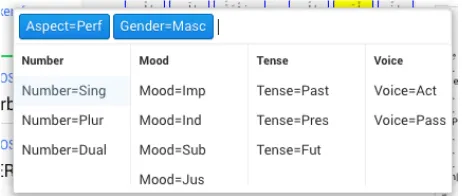
Morphological features can be easily marked through a popup that offers a single input line for all morphological features together. This popup, shown in Figure 3, offers keyboard navigation to select the features. It also acts as a search input, so that only features that match the input text are visible.
Only the subset of morphological features that is compatible with segment’s POS tag is shown. For example, “Mood” is only shown with VERBs. The compatibility table is configurable, but by default, we used the computability of UPOS tag and UD morphological features.
Once the input gets the focus of the user, it shows a drop-down list of all possible values. Once a value is selected (e.g. “MASC” for gender), other incompatible values hide accordingly. The goal is to speed up the annotation by selecting values in one place and asking for relevant morphological features only.
6.5 Lemmatization
Wasim offers a simple interface for lemmatization. If it is integrated with a morphological analyser, the lemma of the chosen solution will be assigned. The lemma, however, can be edited manually.
6.6 Sentence Segmentation layer
Wasim provides the ability to alter the text and separate one sentence into two. By convention, ConLL-U format leaves an empty line as an indicator of sentence start/end.
7.
Case Studies
We provide four case studies to show the use of four languages. In each case, we evaluate one major feature and the effect of that feature on the speed and accuracy. In each case, we annotate a paragraph (an average of 70 words) depending on the target language of the case. While the text size is small and might not clearly show the improvement, these experiments are for illustration purposes rather than to actually measure the difference. In addition, the annotator who has done these four experiments is the author of the tool, therefore, most of the effect of the learning curve is excluded.
[image:5.595.311.542.74.172.2]For each case, the text is divided into two halves, H1 and H2, and both halves are tagged twice (two rounds). In all cases and for both rounds, the annotator is the same person. Both halves are tagged with the feature enabled (F=True) and then disabled (F=False) but in a different order for each half. The steps are {H1F=True,H2 F=False,H1
F=False,H2 F=True }, and first two steps are first round. In the
last two steps, the annotator already knows the texts and should annotate it faster. However, results between step 3 and 4 are comparable as the word counts are similar. In Arabic cases, we used Quranic Arabic Corpus and asked the annotation to follow its annotation guidelines, and the annotator understands well its tagset. UDPipe is trained as well on Quranic Arabic Corpus (Dukes & Habash, 2010) (converted to CoNLL-U by the author and available on Github6). The morphological analyser used
here is MADAMIRA and its results are parsed and converted to CoNLL-U format using Sawaref toolkit. A manual mapping from MADAMIRA tagset to QAC is defined and used.
Time is used as a metric for efficiency. The Intra-rater reliability is high in all cases which shows that using features does not affect the accuracy. Mismatches between the two rounds are reviewed and corrected in a third round. The accuracy in terms of the fraction of correctly annotated words is then evaluated for the two rounds compared with the gold standard (third round). More metrics are reported per case requirement. In all cases, we only evaluate the accuracy of segmentation and POS tagging, although all tasks are done. Diacritization, lemmatization, and other features accuracy are not included. At the end, we show summary statistics on our Sunnah Arabic Corpus Annotation.
7.1 Modern Standard Arabic and
Morphological Analyser
In this case, the annotator used the morphological analyser to select one candidate analysis from a list of proposed analyses. “Using MA” reports the case of annotators selecting an analysis even though such analysis was corrected later. We report the number of times the annotator used MA and the number he edited the proposed analysis. Clearly, the results show that using MA is helpful in speed and accuracy, but in most cases, it is prone to errors. Using MA improved the annotation accuracy and speed significantly.
Using MA Without round 1 round 2 round 1 round 2
Word count 50 51 51 50
Morphs count 72 70 70 72 Accuracy 96% 100% 84% 84% Time (secs) 1358 635 1819 1729 Time (s/m) 18.86 9.07 25.99 24.01
Uses of MA 39 43 - -
Number of
[image:6.595.303.538.119.244.2]edits 30 31 - -
Table 2: Using MA feature comparison.
7.2 Quranic Arabic and Consistency
Reinforcement (CR)
In this case, we show how the warning and helper guidelines help to improve the accuracy. Consistency Reinforcement feature used the whole QAC corpus to build the list of homographs and their segmentation and tagging. We report the number of homographs that were displayed on the screen. 5-8 out of 25-24 morphemes
6https://github.com/aosaimy/qac.conllu
shows the high number of homographs in the Quranic Arabic Corpus (a case of highly inflectional language).
Using Consistency
Helper Without Step 1 Step 4 Step 2 Step 3
Word count 15 16 16 15
Morphs
count 25 24 24 25
Accuracy 100% 100% 100% 93% Time (secs) 269 278 331 284 Time (s/m) 10.76 11.58 13.79 11.36
[image:6.595.301.538.320.436.2]homographs 5 8 - -
Table 3: The accuracy and speed when using CR feature.
7.3 Sunnah Arabic and Keyboard Navigation
In this case, we ask the annotator not to use the keyboard for navigation except for typing the correct form or diacritization. We also report the number of mouse clicks vs. the number of uses of keyboard key presses.
Using Keyboard Using Mouse Step 1 Step 4 Step 2 Step 3 Word count 31 30 30 31 Morphs
count 38 37 37 38
[image:6.595.49.285.533.669.2]Accuracy 100% 100% 100% 100% Time (secs) 355 307 677 262 Time (s/m) 9.34 8.3 18.3 6.89 Presses/clicks 131 166 147 87
Table 4: The accuracy, speed, keyboard presses and mouse clicks comparison with two modes.
7.4 English and UDPipe
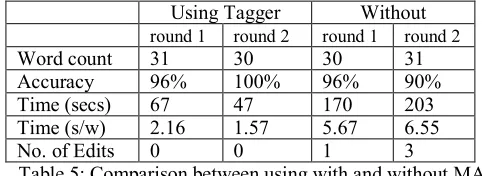
In this case, we show that Wasim is language agnostic and can work for non-highly inflectional and/or left-to-right languages as well. We used a trained model of English Treebank (provided by UD project) to kick start the annotation process of assigning universal POS tags. We do not show the effect of adaptive training UDPipe model since the text excerpt is too small. Obviously, tagging English text is more efficient since it is not an inflectional language, and is not morphologically rich compared to Arabic.
Using Tagger Without round 1 round 2 round 1 round 2 Word count 31 30 30 31 Accuracy 96% 100% 96% 90% Time (secs) 67 47 170 203 Time (s/w) 2.16 1.57 5.67 6.55
No. of Edits 0 0 1 3
Table 5: Comparison between using with and without MA
7.5 General Case: Sunnah Arabic Corpus
[image:6.595.298.539.586.674.2]In the SAC, the speed of the annotation is rising over time due to two reasons: the automatic tagger becomes more accurate over time, the annotators are gaining experience. Obviously, the speed of annotation depends on several factors like text, language, course vs fine-grained tagging, and annotator experience. Therefore, reported speed measures should be viewed with caution.
8.
Conclusion
We presented Wasim, an open-source web-based tool efficiency-oriented for semi-automatic annotation of inflectional languages resources. Wasim supports multiple tasks including segmenting tokens, diacritizing and labelling tokens and segments. It integrates the UDPipe toolkit to kick-start the annotation process and can be integrated with a morphological analyser to speed up the annotation process. We illustrated the improvement in accuracy and time in four cases with different genres and languages.
For future work, we plan to add support for additional layers for syntax, co-referencing, and named entities.
9.
Bibliographical References
Alosaimy, A., & Atwell, E. (2017, December). Sunnah Arabic Corpus: Design and Methodology.
Proceedings of the 5th International Conference on Islamic Applications in Computer Science and Technologies (IMAN 2017).
Alosaimy, A., & Atwell, E. (2018). Diacritization of a Highly Cited Text: A Classical Arabic Book as a Case. In 2nd IEEE International Workshop on Arabic and derived Script Analysis and Recognition (ASAR 2018). London, UK.
Dukes, K., & Habash, N. (2010). Morphological Annotation of Quranic Arabic. LREC.
Gerdes, K. (2013). Collaborative Dependency Annotation. In DepLing (pp. 88–97).
Marcel Bollmann, Florian Petran, Stefanie Dipper, J. K. (2014). CorA: A web-based annotation tool for historical and other non-standard language data.
Proceedings of the 8th Workshop on Language Technology for Cultural Heritage , Social Sciences , and Humanities ( LaTeCH ), 86–90.
Nivre, J., & Agic, L. ˇZeljko. (2017). Universal dependencies 2.0 CoNLL 2017 shared task development and test data. LINDAT/CLARIN digital library at the Institute of Formal and Applied Linguistics, Charles University.
Samih, Y., Maier, W., & Kallmeyer, L. (2016). SAWT: Sequence Annotation Web Tool. EMNLP 2016, 65. Stenetorp, P., Pyysalo, S., Topić, G., Ohta, T., Ananiadou,
S., & Tsujii, J. (2012). BRAT: a web-based tool for NLP-assisted text annotation. In Proceedings of the Demonstrations at the 13th Conference of the European Chapter of the Association for Computational Linguistics (pp. 102–107).
Straka, M., & Straková, J. (2017). Tokenizing, POS Tagging, Lemmatizing and Parsing UD 2.0 with UDPipe. In Proceedings of the CoNLL 2017 Shared Task: Multilingual Parsing from Raw Text to
Universal Dependencies (pp. 88–99). Vancouver, Canada: Association for Computational Linguistics. Yimam, S. M., Gurevych, I., de Castilho, R. E., &