.NET Framework Solutions—In Search of the
Lost Win32 API
John Paul Mueller
Associate Publisher
Joel Fuggazzotto
Acquisitions and Developmental Editor
Denise Santoro Lincoln
Editors
Judy Flynn
William Rodarmor
Production Editor
Kylie Johnston
Technical Editor
Ross Russell Mullen
Graphic Illustrator
Jeff Wilson
Happenstance Type-O-Rama
Electronic Publishing Specialists
Jill Niles
Judy Fung
Scott Benoit
Proofreaders
Laurie O’Connell
Dave Nash
Nancy Riddiough
Monique van den Berg
Indexer
Lynnzee Elze
CD Coordinator
Dan Mummert
CD Technician
Kevin Ly
Cover Designer
Caryl Gorska/Gorska Design
Tony Stone
Copyright © 2002 SYBEX Inc., 1151 Marina Village Parkway, Alameda, CA 94501. World rights
reserved. The author(s) created reusable code in this publication expressly for reuse by readers.
Sybex grants readers limited permission to reuse the code found in this publication or its
accompanying CD-ROM so long as (author(s)) are attributed in any application containing the
reusable code and the code itself is never distributed, posted online by electronic transmission, sold,
or commercially exploited as a stand-alone product. Aside from this specific exception concerning
reusable code, no part of this publication may be stored in a retrieval system, transmitted, or
reproduced in any way, including but not limited to photocopy, photograph, magnetic, or other
record, without the prior agreement and written permission of the publisher.
Library of Congress Card Number: 2002108076
ISBN: 0-7821-4134-X
SYBEX and the SYBEX logo are either registered trademarks or trademarks of SYBEX Inc. in the
United States and/or other countries.
Screen reproductions produced with FullShot 99. FullShot 99 © 1991-1999 Inbit Incorporated. All
rights reserved. FullShot is a trademark of Inbit Incorporated.
The CD interface was created using Macromedia Director, COPYRIGHT 1994, 1997-1999
Macromedia Inc. For more information on Macromedia and Macromedia Director, visit
http://www.macromedia.com/ .
TRADEMARKS: SYBEX has attempted throughout this book to distinguish proprietary trademarks
from descriptive terms by following the capitalization style used by the manufacturer.
The author and publisher have made their best efforts to prepare this book, and the content is based
upon final release software whenever possible. Portions of the manuscript may be based upon
pre-release versions supplied by software manufacturer(s). The author and the publisher make no
representation or warranties of any kind with regard to the completeness or accuracy of the contents
herein and accept no liability of any kind including but not limited to performance, merchantability,
fitness for any particular purpose, or any losses or damages of any kind caused or alleged to be
caused directly or indirectly from this book.
Manufactured in the United States of America
10 9 8 7 6 5 4 3 2 1
Software License Agreement: Terms and Conditions
The media and/or any online materials accompanying this book that are available now or in the
future contain programs and/or text files (the “Software”) to be used in connection with the book.
SYBEX hereby grants to you a license to use the Software, subject to the terms that follow. Your
purchase, acceptance, or use of the Software will constitute your acceptance of such terms.
In the event that the Software or components include specific license requirements or end-user
agreements, statements of condition, disclaimers, limitations or warranties (“End-User License”),
those End-User Licenses supersede the terms and conditions herein as to that particular Software
component. Your purchase, acceptance, or use of the Software will constitute your acceptance of
such End-User Licenses.
By purchase, use or acceptance of the Software you further agree to comply with all export laws and
regulations of the United States as such laws and regulations may exist from time to time.
Reusable Code in This Book
The authors created reusable code in this publication expressly for reuse for readers. Sybex grants
readers permission to reuse for any purpose the code found in this publication or its accompanying
CD-ROM so long as all of the authors are attributed in any application containing the reusable code,
and the code itself is never sold or commercially exploited as a stand-alone product.
Notice
The Graphic Workshop and GIF Construction Set software included with this publication is provided
as shareware for your evaluation. If you try this software and find it useful, you are requested to
register it as discussed in its documentation and in the applications’ “About” screen. SYBEX has not
paid the registration fee for this shareware.
Software Support
Components of the supplemental Software and any offers associated with them may be supported by
the specific Owner(s) of that material, but they are not supported by SYBEX. Information regarding
any available support may be obtained from the Owner(s) using the information provided in the
appropriate read.me files or listed elsewhere on the media.
Should the manufacturer(s) or other Owner(s) cease to offer support or decline to honor any offer,
SYBEX bears no responsibility. This notice concerning support for the Software is provided for your
information only. SYBEX is not the agent or principal of the Owner(s), and SYBEX is in no way
responsible for providing any support for the Software, nor is it liable or responsible for any support
provided, or not provided, by the Owner(s).
Warranty
SYBEX warrants the enclosed media to be free of physical defects for a period of ninety (90) days
after purchase. The Software is not available from SYBEX in any other form or media than that
enclosed herein or posted to http://www.sybex.com/. If you discover a defect in the media during this
warranty period, you may obtain a replacement of identical format at no charge by sending the
defective media, postage prepaid, with proof of purchase to:
SYBEX Inc.
Product Support Department
1151 Marina Village Parkway
Alameda, CA 94501
Web: http://www.sybex.com/
After the 90-day period, you can obtain replacement media of identical format by sending us the
defective disk, proof of purchase, and a check or money order for $10, payable to SYBEX.
SYBEX makes no warranty or representation, either expressed or implied, with respect to the
Software or its contents, quality, performance, merchantability, or fitness for a particular purpose. In
no event will SYBEX, its distributors, or dealers be liable to you or any other party for direct,
indirect, special, incidental, consequential, or other damages arising out of the use of or inability to
use the Software or its contents even if advised of the possibility of such damage. In the event that
the Software includes an online update feature, SYBEX further disclaims any obligation to provide
this feature for any specific duration other than the initial posting.
The exclusion of implied warranties is not permitted by some states. Therefore, the above exclusion
may not apply to you. This warranty provides you with specific legal rights; there may be other
rights that you may have that vary from state to state. The pricing of the book with the Software by
SYBEX reflects the allocation of risk and limitations on liability contained in this agreement of
Terms and Conditions.
Shareware Distribution
This Software may contain various programs that are distributed as shareware. Copyright laws apply
to both shareware and ordinary commercial software, and the copyright Owner(s) retains all rights. If
you try a shareware program and continue using it, you are expected to register it. Individual
programs differ on details of trial periods, registration, and payment. Please observe the requirements
stated in appropriate files.
Copy Protection
The Software in whole or in part may or may not be copy-protected or encrypted. However, in all
cases, reselling or redistributing these files without authorization is expressly forbidden except as
specifically provided for by the Owner(s) therein.
This book is dedicated to my loving wife—
she is my first, best friend.
Acknowledgments
Thanks to my wife, Rebecca, for working with me to get this book completed during an
exceptionally difficult time. I really don’t know what I would have done without her help in
researching and compiling some of the information that appears in this book (especially the
glossary). She also did a fine job of proofreading my rough draft and page-proofing the final result.
Russ Mullen deserves thanks for his technical edit of this book. He greatly added to the accuracy and
depth of the material you see here. I really appreciated the time he devoted to checking my code for
accuracy—especially the last minute checks of test utilities. Russ also supplied some of the URLs
you see in the book and other helpful tips and hints.
Matt Wagner, my agent, deserves credit for helping me get the contract in the first place and taking
care of all the details that most authors don’t really consider. I always appreciate his help. It’s good
to know that someone wants to help.
professionals.
About the Author
John Mueller is a freelance author and technical editor. He has writing in his blood, having produced
55 books and over 200 articles to date. The topics range from networking to artificial intelligence
and from database management to heads-down programming. Some of his current books include a
C# developer guide, a small business and home office networking guide, and several Windows XP
user guides. His technical editing skills have helped over 29 authors refine the content of their
manuscripts. John has provided technical editing services to both
Data Based Advisor
and
Coast
Compute
magazines. He’s also contributed articles to magazines like
SQL Server Professional
,
Visual C++ Developer
, and
Visual Basic Developer
. He’s currently the editor of the .NET electronic
newsletter for Pinnacle Publishing.
Table of Contents
Introduction...1
Overview...1
Hunting for Treasure...1
Hidden Nuggets...1
Who Should Read This Book?...2
Tools Required...2
Conventions Used in This Book...2
Icons...3
Part I: An Overview of the Win32 API...5
Chapter 1: Overcoming Holes in the .NET Framework...6
Overview...6
Why Access the Win32 API?...6
A Case of Missing Functionality...7
Win32 Function Types...8
Win32 Access Requirements...11
Win32 Access for C# Developers...14
Understanding the Effects of Unsafe Code...14
Understanding the Effects of Pointers...15
Advantages for the C# Developer...16
Win32 Access for Visual Basic Developers...16
Understanding Visual Basic Limitations...17
Advantages for the Visual Basic Developer...18
Where Do You Go from Here?...18
Chapter 2: Working with Win32 API Data...19
Overview...19
A Short View of Data...19
Working with Variables...24
Converting Variables to C# Types...25
Converting Variables to Visual Basic Types...25
Special Rules for COM...26
Working with Data Structures...28
Working with Pointers...32
Working with Enumerations...32
Importing Resources...33
Understanding .NET Framework Functionality...33
Using the IDE Features...34
Working with the Win32 API...35
Where Do You Go from Here?...36
Chapter 3: Accessing the Win32 API...37
Overview...37
An Overview of the DLLs...37
Types of Win32 Access...38
Direct DLL Access...39
C LIB Access...40
A Direct DLL Access Example...42
Table of Contents
Chapter 3: Accessing the Win32 API
A C LIB Substitute Functions Example...49
Interpreting Error and Result Values...51
Helpful Win32 Programming Tools...52
Dependency Walker...53
Error Lookup...59
Spy++...60
Where Do You Go from Here?...64
Chapter 4: Processing Windows Messages...65
Overview...65
Understanding the Windows Message Types...65
Windows Message Handlers Found in the .NET Framework...68
An Overview of Windows Message Functions...70
SendMessage()...70
PostMessage(), PostThreadMessage, and PostQuitMessage()...72
SendNotifyMessage()...77
SendMessageCallback()...78
GetMessage() and PeekMessage()...78
RegisterWindowMessage()...79
Creating a Windows Message Handler Example...79
Creating the Event...79
Creating the Windows Message Loop Override...80
Creating the Event Handler...81
Demonstrating the Windows Message Handler...82
Developing for Thread Safety...83
Where Do You Go from Here?...84
Chapter 5: Using Callback Functions...85
Overview...85
What Is a Callback Function?...85
Using Callback Functions...86
An Overview of Callback Function Prototypes...86
Implementing a Callback from the Managed Environment...87
Implementing a Callback from a Wrapper DLL...91
Enumerating Calendar Information Example...95
Creating the Macro Wrapper DLL...96
Creating the EnumCalendarInfoEx() Function Code...98
Demonstrating the Calendar Enumeration...99
Where Do You Go from Here?...101
Part II: Fixing Holes in Standard Applications...102
Chapter 6: Gaining Support for the Console Application...103
Overview...103
What Does the .NET Framework Provide?...103
Clearing the Screen Example...104
Getting Console Information Examples...107
Working with Code Pages...107
Table of Contents
Chapter 6: Gaining Support for the Console Application
Working with Processes...113
Changing the Environment Examples...114
Accessing the Environmental Strings...115
Using Cursors and Fonts...118
Determining the Console Window Title...122
Manipulating the Console Screen Buffer...123
Where Do You Go from Here?...126
Chapter 7: Accessing the Hardware Directly...128
Overview...128
When is Direct Access Required?...128
Serial Port Access Examples...130
Creating a Serial Stream...130
Determining the Port Status...136
Parallel Port Access Examples...143
Creating the Wrapper DLL...144
Viewing the First Level of Printer Information...146
Viewing the Second Level of Printer Information...148
Where Do You Go from Here?...152
Chapter 8: Overcoming Security Issues...154
Overview...154
An Overview of Windows Security...154
A Detailed View of the Windows Security API...155
An Overview of the Functions...161
Using the Access Control Editor...165
Using the Security Configuration Editor...167
Understanding How .NET Role−Based Security Differs...169
Looking Up an Account SID Example...172
Using the GetFileSecurity() Function Example...175
Working with ACEs Example...178
Where Do You Go from Here?...183
Part III: Fixing Advanced Win32 API Problems...185
Chapter 9: Accessing Windows XP Special Features...186
Overview...186
What’s New in Windows XP?...186
Common Features...187
Professional Edition Exclusive Features...188
Determining the Operating System Version Example...189
Working with Theme Support Example...195
Balloon Help Example...202
Using NUnit for Automated Testing...207
Where Do You Go from Here?...210
Chapter 10: Using Operating System Special Functions...211
Overview...211
Table of Contents
Chapter 10: Using Operating System Special Functions
Learning How to Avoid Version Compatibility Problems...213
Determining System Power Status Example...215
Creating an Application Shortcut Example...219
Shutting the System Down Remotely Example...222
Obtaining Device Capabilities Example...225
File Compression...227
Using PC−Lint for C++ Development...228
Where Do You Go from Here?...230
Chapter 11: Accessing the Media Player...232
Overview...232
A Quick Overview of the Media Player...232
Windows Media Player General Operation...233
Internet Content...234
Using the Media Library...235
Displaying a Configuration Dialog Example...236
Playing Sound Files Example...240
Determining Device Capabilities...241
Opening a File...244
Playing a File...251
Pausing and Stopping a File...253
Required Application Cleanup...254
Using IconForge...254
Where Do You Go from Here?...257
Chapter 12: Working with Microsoft Management Console...258
Overview...258
Using GUIDGen...258
The Case for an MMC Snap−In...260
Creating a Wrapper DLL...262
Creating an Interface...263
Writing the MMC Wrapper DLL...266
Developing the MMC Snap−In Example...277
Developing an About Dialog...277
Working with IDataObject...279
Creating IComponent and IComponentData...282
Testing the Snap−In within MMC...284
Where Do You Go from Here?...286
Part IV: Working with DirectX...288
Chapter 13: Creating DirectX Structures and Data Elements...289
Overview...289
Using the DXDIAG Utility...289
Learning about DirectX Compatibility...290
Viewing the Drivers...292
Working with the DirectX Structures...294
An Overview of the Data Structures...294
Table of Contents
Chapter 13: Creating DirectX Structures and Data Elements
Understanding DirectX Data Pitfalls in the Managed Environment...303
Where Do You Go from Here?...305
Chapter 14: Developing DirectX Access Routines...307
Overview...307
Working with DirectX Functions...307
DirectDrawCreate() and DirectDrawCreateEx()...308
DirectDrawCreateClipper()...309
DirectDrawEnumerate() and DirectDrawEnumerateEx()...310
Function Declarations...310
Function Return Values...312
Creating DirectX Callback Function Prototypes...315
DDEnumCallback() and DDEnumCallbackEx()...315
EnumModesCallback() and EnumModesCallback2()...315
EnumSurfacesCallback(), EnumSurfacesCallback2(), and EnumSurfacesCallback7()...316
EnumVideoCallback()...316
Delegate Declarations...316
Working with the DirectX Interfaces and Classes...317
Learning the DirectX Capabilities of the Host Machine Example...318
Using the DirectDrawEnumerateEx() Function...318
Using the DirectX Caps Viewer Tool...320
A Simple 2D DirectDraw Example...324
Importing the DirectX COM Library...324
Writing the Code...325
Using the GIF Construction Set...329
Using the GIF Construction Set...333
Where Do You Go from Here?...336
Chapter 15: Creating Applications with DirectX 8.1...337
Overview...337
An Overview of DirectX 7 and DirectX 8.1 Differences...337
Consolidated Objects...337
Updated Objects and Features...338
An Overview of the Tools...340
Using the DirectX Control Panel Application...340
Using the DMO Test Utility...344
Creating a Test File Using GraphEdit...344
Testing the WavesReverb DMO...346
A Simple DirectSound Example...348
Using the Force Feedback Editor...350
A Simple DirectInput Example...354
Using the DirectX Texture Tool...357
Where Do You Go from Here?...359
Chapter 16: Extended DirectX Programming Examples...360
Overview...360
Using the GraphEdit Utility...360
Creating a Connection...360
Table of Contents
Chapter 16: Extended DirectX Programming Examples
Working with Filters...363
Performance Tuning...365
Saving the Result...366
Using the DirectPlay Network Simulator...367
Using the MeshView Tool...369
Creating a Mesh...369
Adding Color...370
Making Other Changes...373
Using a Mesh Example...376
Initializing the Application...376
Loading a Mesh File...377
Displaying the Image On Screen...380
A Few Words about Output...383
Where Do You Go from Here?...385
Part V: Appendices...387
Appendix A: Fifty−Two Tips for Error−Free Win32 API Access...388
Appendix B: Fixes for Common API Access Errors...393
Resolving Data Corruption in Data Structures...393
The [DllImport] Attribute Works Improperly...394
Data Transfer Problems...394
.NET Implementation of COM Interface Doesn’t Work...396
Handling Memory Leaks and Other Resource Problems...396
Windows Doesn’t Appear to Handle Messages Correctly...397 Glossary....399
B...399
C...400
D...401
E...402
F...403
G...404
H...404
I...405
L...405
M...406
N...407
P...408
R...409
S...409
T...410
U...411
V...412
Table of Contents
List of Figures...415
Chapter 1: Overcoming Holes in the .NET Framework...415
Chapter 2: Working with Win32 API Data...415
Chapter 3: Accessing the Win32 API...415
Chapter 4: Processing Windows Messages...415
Chapter 5: Using Callback Functions...416
Chapter 6: Gaining Support for the Console Application...416
Chapter 7: Accessing the Hardware Directly...416
Chapter 8: Overcoming Security Issues...416
Chapter 9: Accessing Windows XP Special Features...417
Chapter 10: Using Operating System Special Functions...417
Chapter 11: Accessing the Media Player...417
Chapter 12: Working with Microsoft Management Console...418
Chapter 13: Creating DirectX Structures and Data Elements...418
Chapter 14: Developing DirectX Access Routines...418
Chapter 15: Creating Applications with DirectX 8.1...418
Chapter 16: Extended DirectX Programming Examples...419
List of Sidebars...420
Chapter 2: Working with Win32 API Data...420
Chapter 3: Accessing the Win32 API...420
Chapter 8: Overcoming Security Issues...420
Chapter 10: Using Operating System Special Functions...420
Chapter 13: Creating DirectX Structures and Data Elements...420
Chapter 15: Creating Applications with DirectX 8.1...420
List of Tables...421
Chapter 4: Processing Windows Messages...421
Chapter 8: Overcoming Security Issues...421
List of Listings...422
Chapter 1: Overcoming Holes in the .NET Framework...422
Chapter 2: Working with Win32 API Data...422
Chapter 3: Accessing the Win32 API...422
Chapter 4: Processing Windows Messages...422
Chapter 5: Using Callback Functions...422
Chapter 6: Gaining Support for the Console Application...422
Chapter 7: Accessing the Hardware Directly...423
Chapter 8: Overcoming Security Issues...423
Chapter 9: Accessing Windows XP Special Features...423
Chapter 10: Using Operating System Special Functions...423
Chapter 11: Accessing the Media Player...423
Chapter 12: Working with Microsoft Management Console...424
Chapter 13: Creating DirectX Structures and Data Elements...424
Chapter 14: Developing DirectX Access Routines...424
Chapter 15: Creating Applications with DirectX 8.1...424
Introduction
Overview
Hey! I needed that!
You might be tempted to yell something like this when you discover that Microsoft has implemented some, but not all, of the Win32 API in the .NET Framework. In some cases, you might find that Microsoft mislaid the feature in an out−of−the−way spot, but more often than not, the feature is simply missing. It’s not
documented anywhere and Microsoft doesn’t give you even one clue as to where the feature might have gone. A visit to the newsgroups will often yield a pathetic claim that the missing feature will appear in the next version of the .NET Framework—so much for developing your application today.
The good news is that there are ways around your problem. In fact, sometimes the method for overcoming the loss of a feature is so simple you have to wonder why Microsoft didn’t implement it (or at least document it). In other situations, the road to your missing Win32 function lies along a twisted path strewn with the boulders of incompatibility. This book helps you in both cases. We explore both the easy and the hard fixes. In fact, by the time you complete this book, you’ll have discovered that the .NET Framework simply hides much of the functionality that you thought it offered as an open feature.
Hunting for Treasure
In some respects, this book is about the adventure of programming in the .NET Framework. Like any
adventure, you need a map to find the treasure at the end, and this book is your map. You’ll discover all of the functionality that other developers only dream about listed right in this map, and not only that, the road is marked for easy recovery. I’ll also show you all of the hidden traps and how to avoid them. We’ll discuss the problems of implementing an application solution that relies on the Win32 API and how you can easily achieve success.
We’ll begin simply by looking at the tools you need to go on your adventure. You’ll learn about messaging and using callback functions. Together we’ll explore the depths of the data structure. In many places, you’ll learn about the secret code words required to open the doors of files filled with treasure. For many of you, the path will begin to look familiar. But watch out! Working with the Win32 API from .NET is nothing like working with it from the languages of days gone by.
Once you’re an accomplished adventurer, we’ll begin delving into the new features found in Windows XP. You’ll begin to understand that you don’t have to implement security Microsoft’s way and that the hardware really hasn’t disappeared after all. Adventurers with a thirst for the most exotic treasures will discover the media player, MMC snap−ins, and even DirectX. By the time the journey ends, you’ll find that every dream of Windows functionality treasure you might have wanted is answered. In sum, this is the one true map for all .NET developers who need the Win32 API in all of its forms.
Hidden Nuggets
Who Should Read This Book?
I’ve designed this book for Visual Basic .NET and Visual C# .NET developers who need access to the Win32 API. Given the current state of the .NET Framework, I’m betting that most .NET developers will need some type of access to the Win32 API, and this book explores the issue at all levels. All of the examples contain full explanations, and for each, you’ll find both the source and the compiled example on the CD that accompanies this book.
You won’t find any information on using the language of your choice in this book—I concentrate on the Win32 API and what you need to work with it. Consequently, you won’t want to look at this book until you’ve already learned to use either Visual Basic or Visual C#. We’ll begin working with the Win32 API in the examples that appear in the first chapter and you won’t stop until you reach the end of the book. Every chapter has at least one detailed example, and most contain several. You’ll also find supplementary examples in the \Extras folder of the CD.
Tools Required
There are some assumptions that I’ve made while writing the application programming examples in this book. While writing this book, I used a Windows 2000 and Windows XP workstation. There’s no guarantee that any of the code in the book will work with Windows 9x, although most of it will. You must install the latest service packs for all products before the examples will work properly. Microsoft’s .NET product line is new technology and relies on the latest versions of many DLLs and the .NET Framework. In some cases, I’ll list other special requirements that you must observe before the example application will run.
Note Most of the concepts you’ll learn in this book won’t appear in your online documentation. Some of it’s so new that it only appears on selected Web sites. Throughout the book you’ll find tips and notes alerting you to the location of such information. In addition, Microsoft made some material available only through selected channels like an MSDN subscription. Other pieces of information are simply undocumented, and you won’t find them anywhere except within a newsgroup when someone finds the feature accidentally. In a few cases, I’ll tell you outright that I learned about the feature through trial and error—the type of research you won’t have to perform when using this book.
I tested all of the examples in this book with Visual Studio .NET Enterprise Architect Edition. None of these examples are guaranteed to work with any other programming language products and none of them will work with the educational versions of Visual Studio.
Conventions Used in This Book
It always helps to know what the special text means in a book. In this section we’ll cover usage conventions. This book uses the following conventions:
Convention Explanation
Inline Code Some code will appear in the text of the book to help explain application functionality. The code appears in a special font that makes it easy to see it. This monospaced font also makes the code easier to read.
Inline Variable
As with source code, variables that appear inline will also appear in a special font that makes them stand out from the rest of the text. When you see monospaced text in an italic typeface, you can be sure it’s a variable of some type.
User Input Sometimes I’ll ask you to type something. For example, you might need to type a particular value into the field of a dialog box. This special font helps you see what you need to type.
[Filename] When you see square brackets around a value, switch, or command, it means that this is an optional component. You don’t have to include it as part of the command line or dialog field unless you want the additional functionality that the value, switch, or command provides.
Filename A variable name is a value that you need to replace with something else. For example, you might need to provide the name of your server as part of a command−line argument. Because I don’t know the name of your server, I’ll provide a variable name instead. The variable name you’ll see usually provides a clue as to what kind of
information you need to supply. In this case, you’ll need to provide a filename.
File Ø Open Menus and the selections on them appear with a special menu arrow symbol. “File Ø Open” means “Access the File menu and choose Open.”
italic You’ll normally see words in italic if they have special meaning or if
this is the first use of the term and it is accompanied by a definition. Always pay special attention to words in italic because they’re unique in some way.
monospace Some words appear in a monospace font because they’re easier to see or require emphasis of some type. For example, all filenames in the book appear in a monospace font to make them easier to read. URLs URLs will normally appear in a monospace font so that you can see
them with greater ease. The URLs in this book provide sources of additional information designed to make your development experience better. URLs often provide sources of interesting information as well.
Icons
This book contains many icons that help you identify certain types of information. The following paragraphs describe the purpose of each icon.
Note Notes tell you about interesting facts that don’t necessarily affect your ability to use the other
information in the book. I use note boxes to give you bits of information that I’ve picked up while using C#, Windows 9x, Windows 2000, or Windows XP.
Tip Everyone likes tips because they tell you ways of doing things that you might not have thought about before. Tip boxes might also provide an alternative way of doing something; often you might like the alternative better than the first approach I provided.
You’ll also find that I use notes and tips to hold amplifying information. For example, many of the URLs in this book appear as part of a note or a tip. The Internet contains a wealth of information, but finding it can be difficult, to say the least. URLs within notes and tips help you find new sources of information on the Internet,
information that you can use to improve your programming or learn new techniques. You’ll also find
newsgroup URLs that tell where you can find other people to talk with about C#. Finally, URLs will help you find utility programs that’ll make programming faster and easier than before.
Warning The warning icon means “Watch out!” Warnings almost always tell you about some kind of system or data damage that’ll occur if you perform a certain action (or fail to perform others). Make sure you understand a warning thoroughly before you follow any instructions that come after it.
Part I: An Overview of the Win32 API
Chapter 1: Overcoming Holes in the .NET Framework Chapter 2: Working with Win32 API Data
Chapter 1: Overcoming Holes in the .NET Framework
Overview
There are few, if any, perfect programming platforms in the world and .NET is no exception. Developers who spend any time working in the unmanaged environment before they begin working with .NET will notice some distinct problems with functionality in the .NET environment. Some of these holes (such as those in the security area) are apparent and require an immediate fix; others (such as the lack of support for a Beep() function) are subtle and you might never notice them. The point is that the.NET Framework is new
technology and there are bound to be some holes in coverage, and you’ll notice them with regular frequency.
This chapter provides a quick overview of some major areas of omission in the .NET Framework. I want to say at the outset that I feel the .NET Framework is a big improvement over using unmanaged code, but it’s new and lacks some features that most developers will need. Consequently, you’ll find that this book discusses “holes” in coverage or augmentation of features. I’m not here to tell you that the .NET Framework is technically flawed. The goal of this chapter is to help you plan your development efforts to make the best use of existing .NET Framework functionality and to access the Win32 API when the .NET Framework proves less than perfect.
Note Visual C++ represents a unique language in .NET because it provides both managed and unmanaged coding environments. Consequently, you can access the Win32 API in its entirety from Visual C++ using the same unmanaged techniques you used before .NET appeared on the horizon. This unique functionality means that Visual C++ developers won’t need the special techniques found in this book. It also means that you can use Visual C++ as a language bridge between managed and unmanaged
environments.
Why Access the Win32 API?
Many of you have a lot of experience working with the Win32 API are already familiar with the programming requirements for unmanaged code. The idea of working with unmanaged code presents few problems for the seasoned developer. However, the .NET Framework that Microsoft has advertised is supposed to obviate the need to work with unmanaged code, so the first question on most developer’s minds is: why they would even need to access the Win32 API? The short answer is that you’ll find a lack of functionality in some areas such as DirectX, the Microsoft Management Console (MMC), and direct hardware access when working with the .NET Framework. You can only gain access to this functionality through the Win32 API.
The long answer requires a little more explanation. For example, not all .NET languages have an equal measure of missing functionality. The .NET Framework doesn’t include a Beep() function, so you’ll find this feature missing in C# as well. However, because Visual Basic includes a Beep() function as part of the language, it doesn’t require any special programming to access this Win32 API feature. In sum, the question of missing functionality is a matter of determining if the language you’re using provides the feature and then determining the best method to access the feature if it is missing.
language provides support for the required feature. It might not, which means you’ll need to create wrappers for the missing functionality.
Now that you have a basic overview of the question of why you’d want to access the Win32 API, let’s discuss the issues in more detail. The following sections describe needs and requirements for Win32 API access in a generic manner. You can apply this material equally to any language you might want to use with .NET.
A Case of Missing Functionality
As previously mentioned, the .NET Framework lacks functionality for some basic calls such as Beep(). This means that a C# developer who needs to create a sound within an application has to find some other means to do it. There’s no doubt that the functionality is missing, but the technique used to create the desired
functionality varies by language capability, environment, and flexibility. For example, when working with Visual Basic, you already have access to a basic Beep() function, so no additional coding is required if you require a simple beep. However, as shown in Listing 1.1, there are actually four ways to create a beep in C# and not all of them provide the same features. (You’ll find the source code for this example in the \Chapter 01\C#\MakeSound folder of the CD; a Visual Basic version appears in the \Chapter 01\VB\MakeSound folder.)
Listing 1.1: Creating a Beep in C#
// Import the Windows Beep() API function. [DllImport("kernel32.dll")]
private static extern bool Beep(int freq, int dur);
// Define some constants for using the PlaySound() function. public const int SND_FILENAME = 0x00020000;
public const int SND_ASYNC = 0x0001;
// Import the Windows PlaySound() function. [DllImport("winmm.dll")]
public static extern bool PlaySound(string pszSound, int hmod, int fdwSound);
[STAThread]
static void Main(string[] args) {
// Create a sound using an escape character. Console.Write("\a");
Console.WriteLine("Press Any Key When Ready..."); Console.ReadLine();
// Create a sound using a Windows API call. Beep(800, 200);
Console.WriteLine("Press Any Key When Ready..."); Console.ReadLine();
// Create a sound using a Visual Basic call. Microsoft.VisualBasic.Interaction.Beep();
Console.WriteLine("Press Any Key When Ready..."); Console.ReadLine();
// Create a sound using a WAV file. PlaySound("BELLS.WAV",
0,
SND_FILENAME | SND_ASYNC);
Console.WriteLine("Press Any Key When Ready..."); Console.ReadLine();
}
It’s important to note that using an escape character to produce a sound only works for a console
application—you can’t use this technique in a GUI application. However, this technique does enable you to circumvent the requirement to access the Win32 API just to create a beep. The technique is important because it provides you with another choice; one that doesn’t rely on unmanaged code.
The Win32 API Beep() function has the advantage of providing the greatest flexibility for the smallest cost in resources. To use this technique, you must declare the Win32 API Beep() function as a DLL import using the [DllImport] attribute. In this case, you must use unmanaged code to achieve your objective, but you don’t need a wrapper DLL—C# and Visual Basic both provide all the support required. Notice that the Win32 API Beep() function enables you to choose both the tone (frequency) and duration of the beep, which is something you won’t get using an escape character or Visual Basic’s built−in function.
Some developers might not realize that they are able to access other language features from within the current language by relying on a .NET Framework feature called Interaction. The third method, shown in Listing 1.1, simply calls the Visual Basic Beep() function. You need to include a reference to the
Microsoft.VisualBasic.DLL to make this portion of the example work. This technique requires a little more effort than making a direct Win32 API call, but it has the advantage of using pure managed code within the C# application.
Sometimes you don’t want to use a plain beep within an application, so it’s helpful to know how to access WAV files. The fourth technique, shown in Listing 1.1, has the advantage of complete sound source
flexibility. However, this technique also has the dubious honor of being the most complicated way to produce a sound. The function call to PlaySound() is more complicated than the Beep() Win32 API call. You also need to define constants to use it.
The point of this section is that you’ll find missing functionality within the .NET Framework, but you don’t always have to rely on Win32 API calls to fill the gap. In many situations, you can rely on language
interoperability or built−in operating system functionality. When you do need to rely on the Win32 API, you’ll find that some functions are easier to use than others. It isn’t always necessary to use the most complex method when a simple one will work. In fact, in some cases, you’ll find that you can’t use the full−featured function because the target language won’t support it.
Win32 Function Types
One of the problems in determining if a piece of functionality is missing from the .NET Framework is that the framework is relatively large—not as large as the Win32 API, but large nonetheless. (At the time of this writing, the download size for the .NET Framework was 21 MB.) So it pays to know where you’ll find holes in the .NET Framework most often. The following sections discuss the various places where other developers have found holes in the .NET Framework coverage of the Win32 API. You might find other areas when working with special Win32 API features, but these sections provide you with a fairly complete overview.
Hardware
Every time Microsoft releases a new technology, they find a way to add yet more layers of code between the developer and the hardware, and .NET is no exception. Any hope you entertained of direct hardware access will quickly fade as you make your way through a few programming tasks. You’ll even find it difficult to
access Windows driver and low−level DLL functionality—the access just isn’t there. Generally, you’ll find that the .NET Framework provides you with objects that indirectly relate to some type of hardware
functionality, such as the use of streams for hard drive and printer access.
The lack of direct hardware access isn’t always a negative, however. Once you get used to using the .NET Framework objects, you might find that direct hardware access is unnecessary or, at least, a rare event. Common hardware types, such as printers and hard drives, won’t present a problem in most cases. Some developers have complained about the level of support provided for common low−level devices like the serial ports.
You’ll also run into problems when working with hardware that Microsoft didn’t anticipate. For example, accessing many USB devices is a frustrating experience when working with .NET. In most cases, you’ll need to use unmanaged code and a third−party library to access new devices. We’ll talk more about direct hardware access in Chapter 7.
Security
Microsoft’s latest security craze is role−based security. It’s true that role−based security is extremely easy to use and requires less effort on the part of the developer. In many cases, role−based security is also more flexible than the security that Microsoft provided in the past. However, role−based security is also less than appropriate if you need low−level control over the security features of your application.
There’s a place for tokens, access control lists, and all of the other paraphernalia of Win32 API security in many applications, but you can’t gain access to these features within the .NET Framework. To gain access to the low−level details of security within Windows, you still need to use the security calls provided by the Win32 API. We’ll discuss security access within Chapter 8.
Operating System
It would seem that the operating system is the first thing you’d need to support as part of development
platform, but this isn’t necessarily true. Consider two existing types of application that don’t rely very heavily on the operating system: browser−based applications and Java applications. Yes, both technologies require basic access to the operating system, but you’ll find that for the most part you can’t access the operating system as an entity. These development platforms rely on runtime engines that interact with the operating system in a predefined manner.
The .NET Framework is a modern development platform that will hopefully see implementation on other platforms. Consequently, you won’t see any operating system support in the core namespaces, but will see some support in the Microsoft−specific namespaces. The separation of .NET functionality from operating system functionality is understandable, given Microsoft’s stated goal of platform independence. However, unlike other platforms, the .NET Framework does provide limited operating system interfaces. In fact, there are three levels of operating system support that you need to consider when working with the .NET
Framework—and .NET only supports one of them.
Upper−Level Interface This is the level of operating support that the .NET Framework does support. The
support appears in several areas, but the two main namespaces are System.Windows.Forms and
Microsoft.Win32. As the names imply, the first namespace helps you gain access to the GUI features that Windows provides, while the second namespace provides access to features like the registry. The level of support in both areas is extensive, but limited to features that Microsoft felt a developer would need to create business applications.
Low−Level Services There are a lot of low−level services that the .NET Framework doesn’t even touch. For
example, if you want to learn about the capabilities of the display, you’ll need to use a Win32 API call to do it. Likewise, if you want to learn the status of the services on a remote machine, you’ll have to resort to the Win32 API. We’ll discuss low−level service access in greater detail in Chapter 10.
Version−Specific Features Generally, you’ll find that any operating system features that the .NET
Framework does support are also found in all versions of Windows since Windows NT. In some cases, you’ll also find the new features originally found in the Windows 9x operating system interface. However, if you want to use the new graphical features found in Windows XP, you’ll have to rely on the Win32 API. We’ll discuss some of these special features and how to access them in Chapter 9.
Multimedia
Microsoft engineered the .NET Framework for business users. You won’t find support for any sound capability and barely any functions for graphics. There isn’t any support for devices such as joysticks. In short, if you want to work with multimedia, your only choices are using the Win32 API calls or employing DirectX. Both of these solutions currently require the use of unmanaged code. Microsoft has said they plan to create a managed version of DirectX, but it’s not a high priority. We’ll discuss multimedia issues in greater detail in Chapter 11. A joystick example appears in Chapter 7 as part of direct hardware access.
Utility
There are a number of utility applications within Windows that require special interfaces. The most prominent of these utility applications is the Microsoft Management Console (MMC), which acts as a container for special components called snap−ins. The MMC is a vital tool for network administrators (and even for the common user) because it enables you to perform tasks such as monitor computer performance and manage user security. Unfortunately, the .NET Framework doesn’t include support for this necessary utility, despite constant requests from developers during the beta process. You’ll find a comprehensive MMC example in Chapter 12, along with tips for working with other utility application types.
DirectX
It wasn’t long ago that game developers fought with Microsoft over the need to access hardware directly in a way that would keep Windows in the loop without the performance−robbing penalty of actually using Windows. The result of this conflict is DirectX—an advanced programming technology for working with a wide range of multimedia hardware. Given Microsoft’s goal of making the .NET Framework business friendly, it’s not too surprising they failed to include any DirectX support.
Unfortunately, some business application developers rely on DirectX to produce complex reports and perform other business−related multimedia tasks. Part of the problem may be that Microsoft viewed the behemoth that is DirectX and decided they needed to implement it at a later date to get the .NET Framework out in a timely manner. Rumors abound that Microsoft plans to release a .NET Framework friendly version of DirectX sometime in the future, but for now, you need to rely on unmanaged programming techniques to work with DirectX.
DirectX is a complex topic—one that many books can’t cover in detail. Consequently, we’ll discuss DirectX in the chapters found in Part IV of the book. We won’t discuss DirectX itself. I’m assuming you already know how to use DirectX (or will find another book to guide you). These chapters show how to make DirectX work with managed applications—no small undertaking, but definitely doable.
Win32 Access Requirements
It’s important to know what you need to do in order to access the Win32 API once you decide that the .NET Framework doesn’t provide a required level of support. Generally speaking, Win32 API access isn’t difficult for general functions. If you look again at the Beep() example in Listing 1.1, you’ll notice that gaining access to the required functions doesn’t require a lot of code. However, you do need to know something about the function you want to access, including the fact that it exists. The following list details some of the information you need (we’ll discuss this information in detail in Chapter 2).
A knowledge of the function and its purpose
•
A complete list of all function arguments and return values
•
A description of any constants used with the function
•
Complete details about any structures the function requires for data transfer
•
The values and order of any enumeration used with the function
•
Not every function requires all of this information, but you need to at least verify what information the function does require. A simple function may require nothing more than a [DLLImport] entry and a call within your code. Complex functions might require structures, which means converting the data within the structure to match the language you’re using within .NET. The most complex functions may have data structure elements such as unions that are impossible to replicate properly within a managed environment, which means creating a wrapper function in an unmanaged language such as Visual C++ (the language we’ll use for this purpose throughout the book).
Sometimes what appears to be a single function call actually requires multiple functions. For example, the .NET Framework doesn’t offer any way to clear the console screen, so you need to perform this task using a Win32 API call. Unfortunately, clearing the screen means moving the cursor and performing other low−level tasks—a single call won’t do. Listing 1.2 shows a typical example of a single task that required multiple function calls. (The source code for this example appears in the \Chapter 01\C#\ClearScreen and the \Chapter 01\VB\ClearScreen folders of the CD.)
Note Don’t worry if this listing appears a bit on the complex side—you’ll learn about all of the features in this example as you progress through the book. In fact, this example is just a good beginning point for the complex code that we’ll discuss later.
Listing 1.2: Clearing the Screen Requires Multiple Function Calls
// This special class contains an enumeration of // standard handles.
class StdHandleEnum {
public const int STD_INPUT_HANDLE = −10; public const int STD_OUTPUT_HANDLE = −11; public const int STD_ERROR_HANDLE = −12; };
// This sructure contains a screen coordinate. [StructLayout(LayoutKind.Sequential, Pack=1)] internal struct COORD
{
public short X; public short Y; }
// This stucture contains information about the
// console screen buffer.
[StructLayout(LayoutKind.Sequential, Pack=1)] internal struct CONSOLE_SCREEN_BUFFER_INFO {
public COORD Size; public COORD p1; public short a1; public short w1; public short w2; public short w3; public short w4; public COORD m1; }
// We need these four functions from kernel32.dll. // The GetStdHandle() function returns a handle to any // standard input or output.
[DllImport("kernel32.dll", SetLastError=true)]
public static extern IntPtr GetStdHandle(int nStdHandle);
// The GetConsoleScreenBufferInfo() returns information // about the console screen buffer so we know how much to // clear.
[DllImport("kernel32.dll", SetLastError=true)]
public static extern bool GetConsoleScreenBufferInfo( IntPtr hConsoleOutput,
out CONSOLE_SCREEN_BUFFER_INFO lpConsoleScreenBufferInfo);
// The SetConsoleCursorPosition() places the cursor on the // console screen.
[DllImport("kernel32.dll", SetLastError=true)] public static extern bool SetConsoleCursorPosition( IntPtr hConsoleOutput,
COORD dwCursorPosition);
// The FillConsoleOutputCharacter() allows us to place any character // on the console screen. Using a space clears the display area. [DllImport("kernel32.dll", SetLastError=true, CharSet=CharSet.Auto)] public static extern bool FillConsoleOutputCharacter(
IntPtr hConsoleOutput, short cCharacter, int nLength, COORD WriteCoord,
out int lpNumberOfCharsWritten);
[STAThread]
static void Main(string[] args) {
// Needed ask Windows about the console screen // buffer settings.
CONSOLE_SCREEN_BUFFER_INFO CSBI; // Handle to the otuput device. IntPtr hOut;
// Number of characters written to the screen. int CharOut;
// Home cursor position.
COORD Home;
// Write some data to the screen. Console.Write("Some Text to Erase!" + "\r\nPress any key...");
Console.ReadLine();
// Clear the screen.
// Begin by getting a handle to the console screen. hOut = GetStdHandle(StdHandleEnum.STD_OUTPUT_HANDLE); // Get the required console screen buffer information. GetConsoleScreenBufferInfo(hOut, out CSBI );
// Set the home position for the cursor (upper left corner). Home.X = 0;
Home.Y = 0;
// Fill the console with spaces. FillConsoleOutputCharacter(hOut, (short) ‘ ‘,
CSBI.Size.X * CSBI.Size.Y, Home,
out CharOut);
// Place the cursor in the upper left corner. SetConsoleCursorPosition(hOut, Home);
// Show the screen is clear. Console.ReadLine();
}
Notice that this example uses more of the elements typical of a Win32 API call, including an enumeration and two structures. The code requires an enumeration for standard output handles. An output handle is simply a pointer to a device such as the screen. The three standard devices are input, output, and error. We also need two structures to fulfill the needs of the Windows API calls used in the example. The code listing describes each structure’s task.
The example code relies on four Windows API functions, all of which appear in the KERNEL32.DLL. All four perform some type of console screen manipulation. The code listing describes each function’s task.
The short part of the code is actually demonstrating the console screen clearing process. Main() creates some output on screen. The ReadLine() call merely ensures the code will wait until you see the text. Press Enter and the clearing process begins.
The first thing we need is a handle to the console output. The handle tells Windows what device we want to work with. Once we have a handle to the output device, we need to ask Windows about its dimensions. The dimensions are important because you want to ensure the console screen erases completely. The
FillConsoleOutputCharacter() function call fills the screen with spaces—the equivalent of erasing its content. Finally, we place the cursor in the upper left corner—the same place the CLS command would.
Of course, working with Windows means more than just making simple function calls; sometimes you need to work with COM as well. Once you get past simple functions and into the COM environment, development quickly gains a level or two of complexity. For example, if you want to create a COM equivalent component, you’ll also need to discover and implement the interfaces supported by the unmanaged component.
Sometimes the interfaces can become complex and difficult to re−create, as we’ll see in the MMC example in Chapter 12.
Win32 Access for C# Developers
C# developers have a number of advantages over other .NET languages when it comes to Win32 access. The most important is the ability to use unsafe code and pointers. Many developers find that C# is an outstanding choice for the low−level programming tasks required for Win32 access. Of course, there’s no free lunch—you pay a price whenever you gain some level of flexibility in the development environment. The following sections provide you with an overview of the pros and cons of using C# as your development language. We’ll discuss these issues in greater detail as the book progresses.
Understanding the Effects of Unsafe Code
The term “unsafe code” is somewhat ambiguous because it doesn’t really tell you anything about the code. A better way to view unsafe code is unmanaged code that appears within a managed environment. Any code that relies on the use of manual pointers (* symbol) or addresses (& symbol) is unsafe code. Whenever you write code that uses these symbols, you also need to use the unsafe keyword in the method declaration as shown below. (This example appears in the \Chapter 01\C#\Unsafe folder of the CD.)
unsafe private void btnTest_Click(object sender, System.EventArgs e) {
int Input = Int32.Parse(txtInput.Text); // Input string.
// Convert the input value. DoTimeIt(&Input);
// Display the result
txtOutput.Text = Input.ToString(); }
unsafe private void DoTimeIt(int* Input) {
int Output; // Output to the caller.
// Display the current minute.
txtMinute.Text = System.DateTime.Now.Minute.ToString();
// Create the output value. Output = *Input;
Output = Output * System.DateTime.Now.Minute;
// Output the result. *Input = Output; }
This is a simple example that we could have created using other methods, but it demonstrates a principle you’ll need to create applications that rely on the Win32 API later. The btnTest_Click() accesses the input value, converts it to an int, and supplies the address of the int to the DoTimeIt() method. Because we’ve supplied an address, rather than the value, any change in the supplied value by DoTimeIt() will remain when the call returns.
The DoTimeIt() method accesses the current time, multiplies it by the value of the input string, and then outputs the value. Notice the use of pointers in this method to access the values contained in the Input and Output variables. The reason this code is unsafe is that the compiler can’t check it for errors. For example, you could replace the last line with Input = &Output; and the compiler would never complain, but you also
wouldn’t see the results of the multiplication.
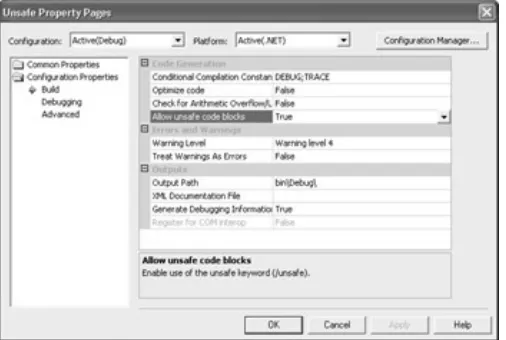
Besides using the unsafe keyword, you also need to set your application to use unsafe code. Right−click the project name in Solution Explorer and choose Properties from the context menu. Select the Configuration Properties\Build folder and you’ll see the Allow unsafe code blocks option shown in Figure 1.1. Set this option to True to enable use of unsafe code in your application.
Figure 1.1: Using the Allow unsafe code blocks option to enable use of unsafe code in your application.
Note You can’t use pointers on managed types, but you can use them on values. For example, you can’t obtain the address of a string because a string is a managed type. The reason this example works in C# is that int is a value type. If you need to pass a string, then it’s important to know other ways to mimic pointers. For example, you can pass a string using the ref or out keywords, or you can marshal it using various techniques.
Generally, you should avoid using unsafe code whenever possible, if only to get as much help as possible from the compiler. The “Understanding the Effects of Pointers” section tells you about managed alternatives that mimic pointers. In short, while unsafe code is a necessity when working with the Win32 API, you should avoid it whenever possible.
Understanding the Effects of Pointers
One of the first issues that you’ll face when working with the Win32 API is the use of pointers—the Win32 API uses them by the gross. You’ll find pointers as function arguments, within structures, and even nested within each other. The problem with pointers is that they aren’t objects; they really aren’t anything. A pointer is an abstraction, an address for something real. The pointer to your house is the street address found on letters and packages. The .NET Framework refrains from relying on pointers (from a developer’s perspective) and uses the actual object whenever possible. The pointers are still there; CLR simply manages them for you.
As mentioned in the previous section, you can use actual pointers in C# if you’re also willing to deal with the problems of unsafe code. Unlike other .NET languages, C# embraces C++ type pointers, which makes it ideal for creating low−level routines and even wrapper DLLs in many situations. However, there are many ways to mimic pointers so that you can gain the benefits of the Win32 API without losing the benefits of the managed environment.
The first thing to consider is that pointers aren’t always necessary. For example, the code in Listing 1.1 works fine without pointers because we’re passing values to the Win32 API and not expecting anything in return. Avoid pointers whenever possible by verifying the need for them first. In many situations, you can simply pass a value to the Win32 API when a return value isn’t needed by your application.
Another issue to consider is the use of pointer substitutes. Look at the FillConsoleOutput−Character() method declaration in Listing 1.2 and you’ll notice that it relies on the out keyword to return the number of characters written to the screen. An IntPtr easily handles the console output handle (essentially a pointer to a pointer). In fact, you can place this use of an IntPtr in your rules of thumb book. Generally, you can replace a handle with an IntPtr for all Win32 API calls.
Sometimes you must use a pointer—there simply isn’t any way around the issue. For example, you’ll often find that COM calls require pointers to pointers, such as when you want to work with an interface. In this situation, you might find it impossible to develop a substitute for pointers. When this problem occurs, try to localize the pointer code to a special function, even if it might not make sense to create a separate function from a program flow perspective. Placing the pointer in its own function makes it simpler to work with the pointer, reduces the probability of missed pointer errors, and makes it easier to debug the application later.
Advantages for the C# Developer
C# developers have certain advantages when using the Win32 API. We’ve already discussed some of these advantages, but the most important is support for pointers and unsafe code. However, C# has some other advantages and I’d be remiss not to mention them.
C−like Language Structures Most of the information you’ll need to access Win32 API is found in the C
header files that come with Visual Studio. In fact, when you research a function in the Visual Studio help files, the information is often presented using C header file entries. While C# isn’t C, it does have many of the same features, making conversion a lot easier than other languages.
Direct Language Conversion It’s possible to recreate most C structures using C# without much effort. In
fact, several of the examples in the book use the content from the C header files with small changes to account for language differences between C and C#. Because you don’t have to interpret the structures, you’ll find that writing the code to access the Win32 API from C# is relatively easy. The only time you’ll run into problems is when you need to write code for complex COM interfaces and methods.
Less Language Baggage Generally, you’ll find that if the .NET Framework doesn’t support a Win32 API
feature, then C# doesn’t support it either. Knowing this fact saves time because you don’t have to research the language to discover if it provides the required support. Of course, this could also be viewed as a negative because C# will require Win32 API function calls more often than languages that do provide robust language support for Windows features.
Better Microsoft Support It may be a quirk, but every time someone from Microsoft demonstrates a
low−level language example for .NET, it appears in C# before it appears in any other language. C# is also the language of choice on newsgroups and on Web sites in many cases. Visual Basic is next on the list.
Interestingly enough, the language most capable of handling Win32 API calls is the one that is seldom used—Visual C++.
Win32 Access for Visual Basic Developers
In the past, Advanced Visual Basic developers were used to accessing Win32 API functions because Visual Basic has always had certain holes in its coverage of Windows features. From this perspective, nothing has changed for Visual Basic .NET developers. What has changed is that you now have the additional hurdle of working with managed code when accessing the Win32 API, and this can make a significant difference.
Warning Don’t get the idea that you can use your old Visual Basic code directly in Visual Basic .NET. Some developers have stated that Microsoft created an entirely new language when they developed Visual Basic .NET. While this view might not be strictly true, it’s true that your old code won’t run as is—even the Win32 API access code. Your old code does provide a starting point, however, so make sure you use it as a reference as you develop your new Visual Basic .NET code.
Visual Basic still offers ease of use features that C# doesn’t have. You can still prototype applications quickly using very little code. Unfortunately, the addition of managed code has put Visual Basic developers at a decided disadvantage in the Win32 API access arena. There are certain types of Win32 API access that you simply can’t create using Visual Basic because it lacks support for unsafe code and pointers.
The following sections detail the advantages and disadvantages of using Visual Basic to access the Win32 API. At times you’ll consider the disadvantages more important and may even decide to implement the Win32 API access using a wrapper DLL. However, Visual Basic does have features that make it the best language choice, in some cases, and we’ll discuss them as well.
Note Throughout the book, you’ll see examples in both Visual Basic and C#. If it’s possible to perform an access task in both languages, you’ll find the example in both languages on the CD, even if the Visual Basic source code doesn’t appear in the text. You can create every example in the book using C#, but some examples are beyond the capabilities of Visual Basic .NET. Whenever an example fails in Visual Basic, the book will include an explanation of the problem and provide you with some alternatives whenever possible. There are some examples where you’ll have to rely on C# or Visual C++ to perform the task.
Understanding Visual Basic Limitations
The biggest limitations for Visual Basic .NET developers are lack of unsafe code and lack of pointer support. You can get around some of these limitations using the techniques in the “Understanding the Effects of Pointers” section of the chapter. Essentially, you need to be able to provide the input to the Win32 API call using something other than a pointer, which often means a either compromise or not using the call at all.
Visual Basic developers also have language problems to overcome. If you want to use the Win32 API, you also need to know how the C header files work, which means having some knowledge of the C language. Many Visual Basic developers lack this knowledge, making it difficult to create a Visual Basic version of a structure, function call, or other construct originally written in C.
In most cases, Visual Basic developers will find it difficult to re−create complex COM interfaces. For example, the MMC example defies implementation in Visual Basic because it relies heavily on COM interface simulation. In fact, this particular task is barely doable in C# and you still need to create a Visual C++ wrapper for certain MMC function calls. In short, some tasks will defy every effort to complete in Visual Basic because there’s no conduit for communication with the Win32 API.
Another problem with Visual Basic is that you can’t re−create some of the stranger Win32 API structures. For example, some structures include unions, which is a feature that Visual Basic doesn’t support. Unfortunately, there isn’t any workaround for this problem other than to emulate the union in some other manner. In many cases, there isn’t any way to emulate the union, making it impossible to call the Win32 API function that relies on the structure in question.
One of the advantages of Visual Basic is also a disadvantage. Developers gain a significant development speed boost by using Visual Basic. It enables a developer to prototype applications quickly. Coding and