Rochester Institute of Technology
RIT Scholar Works
Theses Thesis/Dissertation Collections
5-2014
Performance Analysis of Tracking on Mobile
Devices using Local Binary Descriptors
Mohammad Faiz Quraishi
Follow this and additional works at:http://scholarworks.rit.edu/theses
This Thesis is brought to you for free and open access by the Thesis/Dissertation Collections at RIT Scholar Works. It has been accepted for inclusion in Theses by an authorized administrator of RIT Scholar Works. For more information, please [email protected].
Recommended Citation
Performance Analysis of Tracking on Mobile Devices
using Local Binary Descriptors
by
Mohammad Faiz Quraishi
A Thesis Submitted in Partial Fulfillment of the Requirements for the Degree of Master of Science in Computer Engineering
Supervised by
Dr. Andreas Savakis
Department of Computer Engineering Kate Gleason College of Engineering
Rochester Institute of Technology Rochester, NY
May 2014
Approved By:
_____________________________________________ ___________ ___
Dr. Andreas Savakis
Primary Advisor – R.I.T. Dept. of Computer Engineering
_ __ ___________________________________ _________ _____
Dr. Andrés Kwasinski
Secondary Advisor – R.I.T. Dept. of Computer Engineering
_____________________________________________ ______________
Dr. Roy Melton
Dedication
I would like to dedicate this thesis to my parents, Dr. Abdul Rashid Quraishi and Wasima
Acknowledgements
I would like to express my thanks and appreciation to my advisor, Dr. Andreas Savakis
for all his assistance and support in my research. I would also like to thank Dr. Andrés
Kwasinski and Dr. Roy Melton for serving on my committee. I would also like to express
my gratitude to all the staff of the Kate Gleason College of Engineering Computer
Engineering Department for all assistance and work during my studies. Lastly, I would
like to thank all my lab colleagues who have helped not only in collaboration but also in
Abstract
With the growing ubiquity of mobile devices, users are turning to their
smartphones and tablets to perform more complex tasks than ever before. Performing
computer vision tasks on mobile devices must be done despite the constraints on CPU
performance, memory, and power consumption. One such task for mobile devices
involves object tracking, an important area of computer vision. The computational
complexity of tracking algorithms makes them ideal candidates for optimization on
mobile platforms.
This thesis presents a mobile implementation for real time object tracking.
Currently few tracking approaches take into consideration the resource constraints on
mobile devices. Optimizing performance for mobile devices can result in better and more
efficient tracking approaches for mobile applications such as augmented reality. These
performance benefits aim to increase the frame rate at which an object is tracked and
reduce power consumption during tracking.
For this thesis, we utilize binary descriptors, such as Binary Robust Independent
Elementary Features (BRIEF), Oriented FAST and Rotated BRIEF (ORB), Binary
Robust Invariant Scalable Keypoints (BRISK), and Fast Retina Keypoint (FREAK). The
tracking performance of these descriptors is benchmarked on mobile devices. We
consider an object tracking approach based on a dictionary of templates that involves
generating keypoints of a detected object and candidate regions in subsequent frames.
Descriptor matching, between candidate regions in a new frame and a dictionary of
templates, identifies the location of the tracked object. These comparisons are often
Google’s Android operating system is used to implement the tracking application
on a Samsung Galaxy series phone and tablet. Control of the Android camera is largely
done through OpenCV’s Android SDK. Power consumption is measured using the
PowerTutor Android application. Other performance characteristics, such as processing
time, are gathered using the Dalvik Debug Monitor Server (DDMS) tool included in the
Android SDK. These metrics are used to evaluate the tracker’s performance on mobile
Table of Contents
Dedication ... ii
Acknowledgements ... i
Abstract ... i
Table of Contents ... iii
List of Figures ... vii
List of Tables ... xi
Glossary ... xiv
Chapter 1 Introduction ... 1
Chapter 2 Background ... 4
2.1. Binary Descriptors ... 4
2.1.1 BRIEF... 4
2.1.2 ORB ... 6
2.1.3 BRISK ... 8
2.1.4 FREAK ... 9
2.2. Other Description Methods ... 11
2.2.1 Continuous Adaptive Mean Shift (CAMSHIFT) ... 12
2.2.2 Multiple Instance Learning (MIL) ... 14
2.2.3 Track-Learn-Detect (TLD) ... 15
2.2.4 Template Based Tracking... 17
Chapter 3 Development Tools... 20
3.1. Android ... 20
3.1.1 Android Native Development Kit ... 22
3.1.2 ARM NEON Instructions ... 23
3.1.3 Dalvik Debug Monitor Server ... 26
3.2. Power ... 26
Chapter 4 Tracking Solution ... 33
4.1. Tracking Methodology ... 33
4.1.1 SBRIEF ... 36
4.2. Mobile Implementation ... 37
4.2.1 Program Structure ... 37
Chapter 5 Results and Analysis ... 41
5.1. Experimental Setup... 41
5.1.1 Frame Rate and Power Consumption Measures ... 42
5.1.2 Accuracy and Invariance Measures ... 44
5.2. Bottlenecks ... 45
5.2.1 SBRIEF vs. BRIEF ... 46
5.3. Factors Affecting Frame Rate ... 47
5.3.1 Threading and Radii ... 47
5.4. Factors Affecting Power ... 50
5.4.1 Threading and Radii ... 50
5.4.2 Descriptor Choice ... 52
5.5. Effect of Using NEON Coprocessor ... 52
5.6. Frame Rate ... 54
5.7. Power Consumption ... 55
5.8. Accuracy ... 56
5.8.1 Cliffbar Accuracy ... 56
5.8.2 Twinings Accuracy ... 61
5.8.3 David Accuracy ... 66
5.8.4 Dollar Accuracy ... 71
5.8.5 Coke Accuracy ... 76
5.8.6 Sylvester Accuracy ... 81
5.8.7 Surfer Accuracy... 85
5.8.8 Motinas Toni Accuracy ... 89
5.8.9 Dudek Accuracy ... 95
5.9. Parameter Optimization ... 101
5.10. Scale Invariance ... 104
5.11. Rotation Invariance ... 110
5.13. Discussion ... 116
5.13.1 Threading, Frame Rate and Power ... 116
5.13.2 Scalable Coarse-to-Fine Search Region ... 118
5.13.3 Accuracy and Invariance ... 119
5.13.4 Object Tracking on Android Devices... 120
Chapter 6 Conclusions and Future Work ... 122
6.1. Contributions ... 123
6.2. Future Work ... 124
List of Figures
Figure 1 BRIEF sampling patterns a-e... 6
Figure 2 BRISK sampling pattern... 9
Figure 3 FREAK sampling pattern ... 11
Figure 4 CAMSHIFT Flow Chart ... 13
Figure 5 TLD block Diagram ... 16
Figure 6 Android Operating System Architecture ... 21
Figure 7 Program Flow Chart ... 33
Figure 8 Search Pattern r=8, s=1 ... 34
Figure 9 Search Pattern r=8, s=2 ... 35
Figure 10 Software Block Diagram ... 38
Figure 11 Tracker Block Diagram ... 39
Figure 12 Options file syntax ... 42
Figure 13 Frame Rate by Search Radius Single Threaded ... 48
Figure 14 Frame Rate by Search Radius Multithreaded ... 48
Figure 15 Single Threaded Power Consumption based on candidates ... 50
Figure 16 Multithreaded Power Consumption based on Candidate Radius ... 51
Figure 17 Comparison of NEON Scoring ... 53
Figure 18 Comparison of Power Consumption ... 53
Figure 19 Frame Rates based on processing time per frame ... 55
Figure 20 Cliffbar Error with 441 Candidates ... 57
Figure 21 Average Tracking Error: Cliffbar Error with 289 Candidates ... 58
Figure 23 Average Tracking Error: Cliffbar Error with 81 Candidates ... 60
Figure 24 Cliffbar Frames 9, 30, 88, 157 ... 60
Figure 25 Average Tracking Error: Twinings 441 Candidates ... 62
Figure 26 Average Tracking Error: Twinings 289 Candidates ... 63
Figure 27 Average Tracking Error: Twinings 169 Candidates ... 64
Figure 28 Average Tracking Error: Twininigs 81 Candidates ... 65
Figure 29 Average Tracking Error: Twinings Frames 7, 111, 197 ... 65
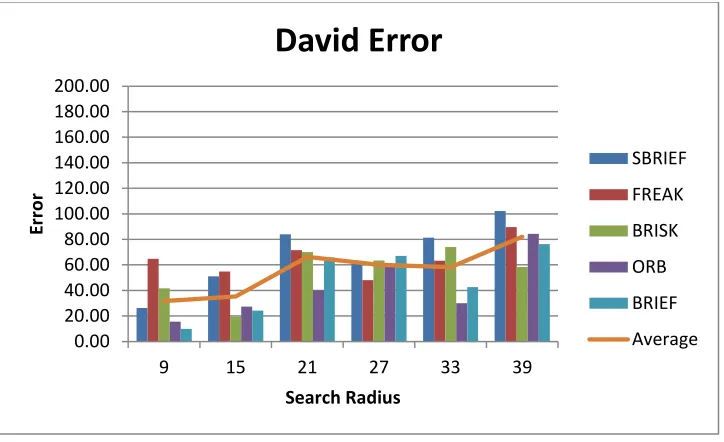
Figure 30 Average Tracking Error: David Error with 441 Candidates ... 67
Figure 31 Average Tracking Error: David Error with 289 Candidates ... 68
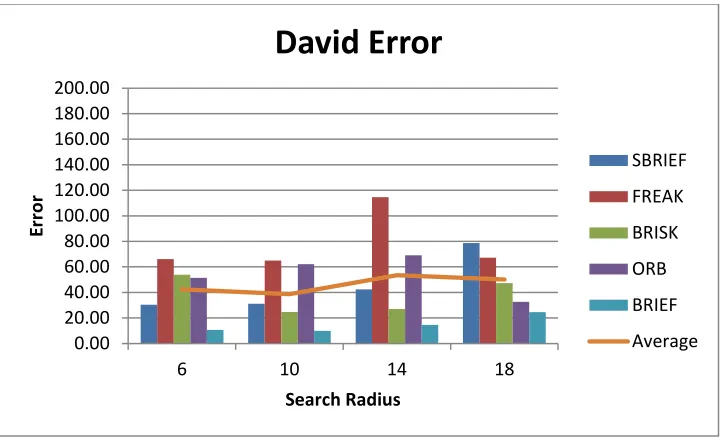
Figure 32 Average Tracking Error: David Error with 169 Candidates ... 69
Figure 33 Average Tracking Error: David 81 Candidates ... 70
Figure 34 David Frames 1, 11, 31... 70
Figure 35 David Frames 241, 323, 370, 396 409... 71
Figure 36 Average Tracking Error: Dollar 441 Candidates ... 72
Figure 37 Average Tracking Error: Dollar 289 Candidates ... 73
Figure 38 Average Tracking Error: Dollar 169 Candidates ... 74
Figure 39 Average Tracking Error: Dollar 81 Candidates ... 75
Figure 40 Dollar Frame 58, 137, 203, 253 ... 75
Figure 41 Average Tracking Error: Coke 41 Candidates ... 77
Figure 42 Average Tracking Error: Coke 289 Candidates ... 78
Figure 43 Average Tracking Error: Coke 169 candidates ... 79
Figure 44 Average Tracking Error: Coke 81 Candidates ... 80
Figure 46 Average Tracking Error: Sylvester 441 Candidates ... 81
Figure 47 Average Tracking Error: Sylvester 289 Candidates ... 82
Figure 48 Average Tracking Error: Sylvester 169 Candidates ... 83
Figure 49 Average Tracking Error: Syslvester 81 Candidates ... 84
Figure 50 Sylvester Frames 18, 162, 369 ... 84
Figure 51 Average Tracking Error: Surfer 441 Candidates ... 85
Figure 52 Average Tracking Error: Surfer 289 Candidates ... 86
Figure 53 Average Tracking Error: Surfer 169 Candidates ... 87
Figure 54 Average Tracking Error: Surfer 81 Candidates ... 88
Figure 55 Surfer Frames 401, 450, 552, 580, 718 ... 88
Figure 56 Average Tracking Error: Toni Candidates ... 90
Figure 57 Average Tracking Error: Toni 289 Candidates ... 91
Figure 58 Average Tracking Error: Toni 169 Candidates ... 92
Figure 59 Average Tracking Error: Toni 81 Candidates ... 93
Figure 60 Toni Frames 7, 21, 85, 120, 131, 241, 288 ... 94
Figure 61 Average Tracking Error: Dudek Error with 441 Candidates ... 96
Figure 62 Average Tracking Error: Dudek Error with 289 Candidates ... 97
Figure 63 Average Tracking Error: Dudek Error with 169 Candidates ... 98
Figure 64 Average Tracking Error: Dudek Error with 81 Candidates ... 99
Figure 65 Dudek Frames 16, 98, 206, 221, 375, 977 ... 99
Figure 66 Dudek Error with a radius of 44 ... 100
Figure 67 Dudek Error with a radius of 36 ... 101
Figure 69 Effect of varying sigma in Cliffbar Error ... 103
Figure 70 Effect of varying sigma in Coke Error ... 103
Figure 71 Cliffbar Scale Invariance ... 105
Figure 72 Twinings Scale Invariance ... 105
Figure 73 David Scale Invariance ... 106
Figure 74 Dollar Scale Invariance ... 106
Figure 75 Coke Scale Invariance ... 107
Figure 76 Sylvester Scale Invariance ... 107
Figure 77 Surfer Scale Invariance... 108
Figure 78 Toni Scale Invariance ... 108
Figure 79 Dudek Scale Invariance ... 109
Figure 80 Cliffbar Rotation Invaraiance ... 110
Figure 81 Twininigs Rotation Invariance ... 110
Figure 82 David Rotation Invariaince... 111
Figure 83 Dollar Rotation Invariaince ... 111
Figure 84 Coke Rotation Invariance ... 112
Figure 85 Sylvester Rotation Invariance... 112
Figure 86 Surfer Rotation Invariance ... 113
Figure 87 Toni Rotation Invariance ... 113
Figure 88 Dudek Rotation Invariance ... 114
Figure 89 Binary Descriptor comparison to CAMSHIFT ... 115
List of Tables
Table 1 Device Specifications ... 41
Table 2 Videos used for testing ... 41
Table 3 Percent of Time Per Frame used for Description ... 45
Table 4 CPU Percent of Time Per Frame used for Scoring ... 46
Table 5 Percent Difference from Mean among OpenCV Descriptors ... 49
Table 6 Percent Difference from the Mean frame rate ... 49
Table 7 Average Power Consumption by Candidate Radius ... 51
Table 8 Average Tracking Error: Cliffbar with 441 candidates ... 56
Table 9 Average Tracking Error: Cliffbar with 289 candidates ... 57
Table 10 Average Tracking Error: Cliffbar with 169 candidates ... 58
Table 11 Average Tracking Error: Cliffbar with 81 candidates ... 59
Table 12 Average Tracking Error: Twinings 441 Candidates ... 62
Table 13 Average Tracking Error: Twinings 289 Candidates ... 62
Table 14 Average Tracking Error: Twinings 169 Candidates ... 63
Table 15 Average Tracking Error: Twinings 81 Candidates ... 64
Table 16 Average Tracking Error: David 441 Candidate Points ... 66
Table 17 Average Tracking Error: David Error with 289 Candidates ... 67
Table 18 Average Tracking Error: David Error with 169 Candidates ... 68
Table 19 Average Tracking Error: David Error with 81 Candidates ... 69
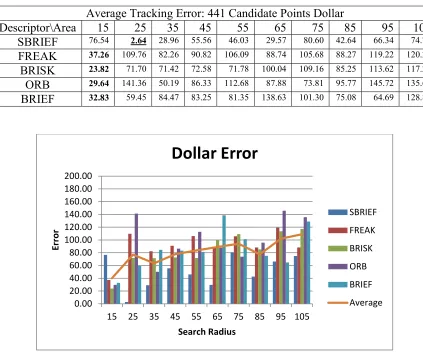
Table 20 Average Tracking Error: Dollar 441 Candidates ... 72
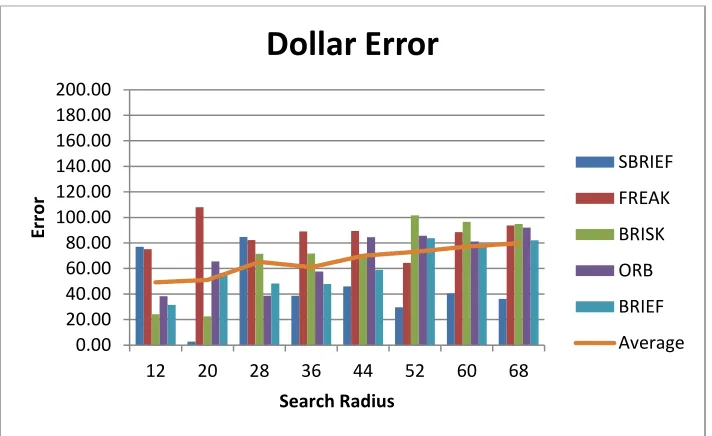
Table 21 Average Tracking Error: Dollar 289 Candidates ... 72
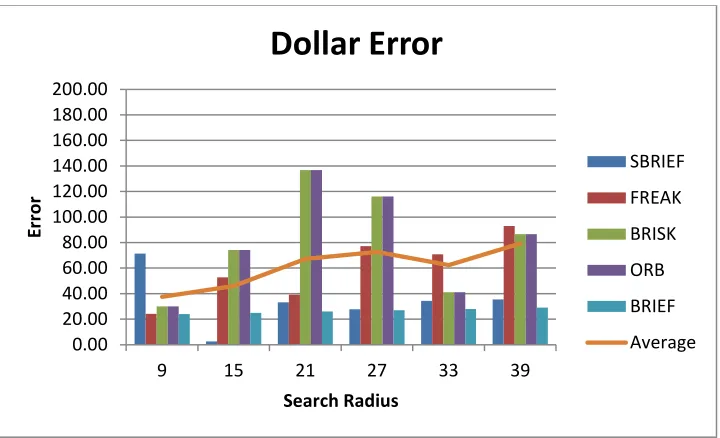
Table 23 Average Tracking Error: Dollar 81 Candidates ... 74
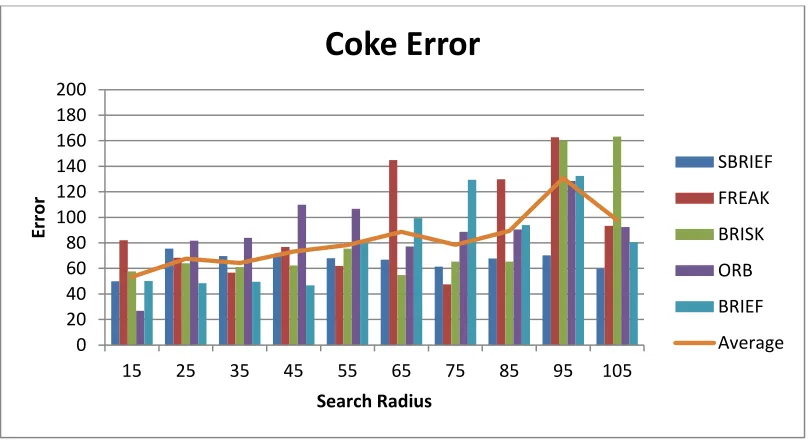
Table 24 Average Tracking Error: Coke 441 Candidates ... 76
Table 25 Average Tracking Error: Coke 289 Candidates ... 77
Table 26 Average Tracking Error: Coke 169 Candidates ... 78
Table 27 Average Tracking Error: Coke 81 Candidates ... 79
Table 28 Average Tracking Error: Sylvester 441 Candidates ... 81
Table 29 Average Tracking Error: Sylvester 289 Candidates ... 82
Table 30 Average Tracking Error: Sylvester 169 Candidates ... 82
Table 31 Average Tracking Error: Sylvester 81 Candidates ... 83
Table 32 Average Tracking Error: Surfer 441 Candidates ... 85
Table 33 Average Tracking Error: Surfer 289 Candidates ... 86
Table 34 Average Tracking Error: Surfer 169 Candidates ... 87
Table 35 Average Tracking Error: Surfer 81 Candidates ... 87
Table 36 Average Tracking Error: Toni 441 Candidates ... 89
Table 37 Average Tracking Error: Toni 289 Candidates ... 90
Table 38 Average Tracking Error: Toni 169 Candidates ... 91
Table 39 Average Tracking Error: Toni 81 Candidates ... 92
Table 40 Average Tracking Error: Dudek Error with 441 Candidates ... 95
Table 41 Average Tracking Error: Dudek Error with 289 Candidates ... 96
Table 42 Average Tracking Error: Dudek Error with 169 Candidates ... 97
Table 43 Average Tracking Error: Dudek Error with 81 Candidates ... 98
Table 44 Change in Power and FPS for 1681 Points ... 116
Table 46 Change in Power and FPS for 441 Points ... 116
Table 47 Change in Power and FPS for 289 Points ... 117
Table 48 Change in Power and FPS for 81 Points ... 117
Glossary
BRIEF Binary Robust Independent Elementary Features descriptor
BRISK Binary Robust Independent Scalable Keypoint descriptor
CAMSHIFT Continuous Adaptive Meanshift
Candidate radius The number of candidate points that make up the radius for the search
region
FREAK Fast Retina KeyPoint descriptor.
ORB Oriented FAST and Rotated BRIEF descriptor.
Sample radius The radius for the entire span of all candidate points.
SBRIEF Simple BRIEF
Chapter 1
Introduction
As mobile devices increase in ubiquity, so has the demand that they perform more
complex tasks. Whereas phones and tablets initially were used for calls and web surfing,
focus has now shifted to using these devices for applications such as video conferencing
and 3D gaming. Computer Vision presents another interesting opportunity for mobile
devices, as their form factor and popularity presents many interesting and novel
applications.
One of the most popular uses for mobile object tracking is augmented reality.
Mobile apps such as LayAR annotate frames from a mobile camera by tracking either a
marker or natural feature. Usually these applications are used for commercial purposes
that present content to supplement products or advertisements. In addition, mobile object
tracking can be used to assist those with low vision, as seen in [1]. Here a mobile
Android device superimposed faces found in a scene in areas where individuals affected
with blind spots or tunnel vision could see them. Billinghurst et al. all further show the
application of augmented reality in the classroom via mobile devices [2]. Both these
examples rely on efficient, accurate, and fast methods of tracking on mobile devices. Yet
another example for the importance of this work can be found in the work of Navab et al.,
who uses augmented reality to assist surgeons [3]. Although the system described by
Navab et al. does not use a mobile platform, advances in mobile tracking, could greatly
improve the usability and reduce the cost of computer vision in medicine.
In addition to good tracking performance, tracking on mobile devices must be
power conscious. Any application that significantly reduces the battery life of a mobile
Saipullah et al. note that even simple image processing tasks on mobile devices show
significant power consumption [4]. For this reason, any proposed mobile tracking
application must also use power consumption as a metric.
Previously, Wagner et al. presented a SIFT-based tracking model for mobile
phones in [5]. SIFT, or Scale Invariant Feature Transform, is a popular and robust
descriptor for image description, but is also very complex. In this work, we benchmark
binary descriptors that require only comparisons between pairs of pixels to describe a
keypoint. These descriptors are becoming increasingly popular, because they are not
patent protected like SIFT and are simpler to implement. Further, we use these
descriptors in our template based tracker to benchmark performance on mobile devices.
To our knowledge this is the first comprehensive implementation of object
tracking on a mobile device using binary descriptors. Our tracker has the ability to use
five commonly known binary descriptors and a custom light weight implementation of
BRIEF described in Section 4.1.1. Whereas some tracking work describes frame rate by
the observed processing time, our work contributes benchmarking data for these
descriptors in terms of their real world frame rate as measured on an Android
smartphone. In addition to this we also present benchmarking data on power consumption
for the description methods used in our tracker. Further, we show the effectiveness of our
tracking methodology to generate accurate results based on testing of standard videos.
This remainder of this work is organized as follows. Chapter 2 presents
background on well-known binary descriptors and other object tracking
methodologies. Chapter 3 describes the background of the Android technologies that are
measurements. Chapter 4 details our tracking algorithm and the software implementation
for the Android OS. In Chapter 5 we present our tracker’s performance results based on
frame rate, power consumption, accuracy and invariance to scale and rotation as well as a
comparison to other trackers. In Chapter 6 we conclude this thesis, summarize our
Chapter 2
Background
2.1. Binary Descriptors
In this chapter we describe the various binary descriptors to be benchmarked on
our mobile tracking system.
2.1.1 BRIEF
Binary Robust Independent Elementary Features, or BRIEF, was proposed by
Calonder et al. in 2010. BRIEF is an early binary descriptor that attempts to reduce the
complexity of histogram descriptors such as SIFT and SURF. Being a binary descriptor,
BRIEF represents a keypoint as a bit string generated from intensity comparisons from a
sampling pattern.
{ (1)
Given a pair of pixels from the sampling pattern, if a pixel is greater than a pixel
the corresponding bit, , is represented as a 1, or 0 otherwise. These comparisons are
performed for the number of times needed to fill the length of the descriptor. For
example, if we are using a 32 byte BRIEF descriptor, we need 512 sample points for 256
comparisons to comprise the 32 bytes. After this procedure, two descriptors can be
compared via calculating the Hamming distance between the bit strings.
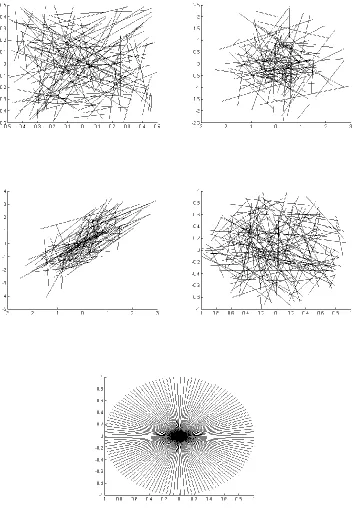
When generating the bit strings for the BRIEF descriptor we must have two
vectors of points for comparison. The BRIEF descriptor does not specify a sampling
pattern for the points in these vectors, and . Instead, Calonder et al. present five
Gaussian random samples, (c) Gaussian samples where points in are sampled with a
standard deviation of , where is the sample standard deviation, and points in are sampled with a standard deviation of , (d) random samples along a polar grid, and (e) sampling where takes on all values in a polar grid and all are . Using these patterns Calonder et al. show nearly similar recognition rate for all sampling
patterns, except with the final pattern which gives lower performance in all cases. The
quick comparisons and good recognition make BRIEF an interesting candidate for
benchmarking on a mobile device. The size of BRIEF can vary depending of
performance needs further making the descriptor more suitable for real time applications
Figure 1 BRIEF sampling patterns a-e
2.1.2 ORB
The Oriented FAST and Rotated BRIEF, or ORB, descriptor was proposed by
alternative to SIFT, intending to allow better performance in real time applications. The
ORB descriptor builds upon the FAST keypoint detector and the BRIEF descriptor [6].
The first step in the creation of ORB is adding an orientation component to the
FAST feature detector. FAST is a detector used for corners around the radius of a certain
keypoint [6]. Once this is completed the keypoints are threshold by a Harris measure to
produce corners. These corners are further used in a pyramid to create multi-scale
features.
Rublee et al. use an intensity centroid which assumes that a corner’s intensity is
offset from its center. In order to find the centroid, the moment of the patch is first
defined by Equation (2).
∑
(2)
Using Equation (2) the centroid can be found using Equation (3).
(
)
(3)
Using a vector from the corner to the center an orientation can be defined using the
quadrant aware version of arctangent, arctan2 [6]. This is shown in Equation (4).
(4)
This is the means by which the BRIEF descriptor is oriented for construction of the ORB
descriptor.
However, rather than using the same BRIEF descriptor described in [7], Rublee et
al. modified the sample points so that they have a high variance and are uncorrelated. In
five proposed distributions. However, these points may not have high variance and may
be correlated. The higher the variance between the sample points, the more descriptive
individual descriptors become [6]. Using a training set of images Rublee et al. were able
to determine a high variance pattern for the BRIEF component of the ORB descriptor.
The oriented FAST keypoint feature and the high variance BRIEF are combined to create
ORB.
Rublee at al. tested the ORB descriptor against SIFT and SURF for performance.
They show that computing ORB takes significantly less time than SIFT or SURF [6].
Because of its inexpensive computation in relation to SIFT and SURF, ORB is more
suitable for a mobile platform. Further, the authors of ORB implemented a real time
tracker on a mobile phone to test its ability to performance. Rublee at al. were able to
track at around 7 frames per second on a 640 by 480 pixel image.
2.1.3 BRISK
Binary Robust Invariant Scalable Keypoints or BRISK was proposed by
Leutenegger et al. in 2011 [8]. Unlike BRIEF, BRISK has a predefined sampling pattern
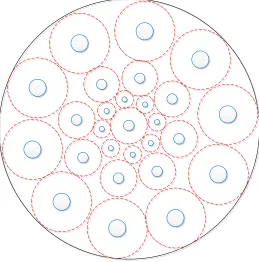
for generating the bits in the descriptor. These comparisons can be seen in Figure 2, as
short pairs forming a circular pattern. Short pairs of points are those with a distance
below a defined threshold; these are used for the description while longer pairs, those
with greater distance, are used for orientation information.
Unlike BRIEF, BRISK is designed to be rotation invariant. Rotation invariance
adds complexity to the description process, but allows better tracking of moving objects.
Orientation is first calculated using the gradient for a sample patch. Once this is done, the
that when an object is rotated, it should produce the same gradient as the original. Since
sampling is performed along the gradient, the bit string of the original and rotated
[image:27.612.176.435.157.419.2]keypoint should be the same making BRISK invariant to rotation.
Figure 2 BRISK sampling pattern
2.1.4 FREAK
The Fast Retina Keypoint, or FREAK, descriptor was proposed by Alahi et al. in
2012 [9]. The FREAK descriptor is 64 bytes long and has the option of rotation and or
scale invariance. The motivation for FREAK was to create a sampling pattern that
emphasized robust performance. As seen in the previous sections, there are many ways to
choose the sampling pattern for a binary descriptor. Rather than turning to random
sampling as in the case of BRIEF, or concentric circles as in the case of BRISK, the
The FREAK descriptor’s most unique feature is that its sampling pattern attempts
to mimic the human retina. In the human eye, photoreceptors influence ganglion cells that
ultimately create the receptive field [9]. Alahi et al. note that the distribution of ganglion
cells decreases exponentially with their distance away from the fovea, while the size and
dendritic field increases with distance from the fovea. Using this as inspiration, the
FREAK descriptor uses a circular sample grid around a keypoint, with decreasing density
proportional to the distance from the keypoint. As in BRISK, different kernel sizes are
used for every sample point. However, in order to follow the retinal model, the standard
deviation of the Gaussian kernel is based on the four regions of the eye: foveola, fovea,
parafoveal, and perifoveal. As the sample points grow further away in distance from the
center, so does the standard deviation of the Gaussian kernel. In addition to this, FREAK
uses overlapping receptive fields when sampling, whereas BRISK’s sample points do not
overlap. Alahi et al. note that using overlapping fields increases accuracy, possibly
because more information is captured. This adds redundancy and discriminative power
[9]. The final descriptor is calculated with comparisons over pairs of receptive fields
defined by Equation (5) and Equation (6).
∑
(5)
{ ( ) ( )
(6)
In Equation (6) is a pair of receptive fields, is the desired length of the descriptor,
and ( ) is the intensity of the first field of the pair, [9]. After generation, the FREAK descriptors can be compared using the Hamming distance, as with any other
Alahi et al. note that humans do not look at a scene steadily. Rather the human
eye performs a saccadic search that moves from lower detail of the perifoveal area to the
most detailed region, the foveola. Using this formula the eye can make easy estimates of
the locations for objects before using more detailed information. The FREAK descriptor
is designed to work the same way cascading information in a coarse to fine pattern. This
means that coarse comparisons are stored at the beginning of the bit string, while finer
ones at the end. In practice Alahi et al. state that more than 90% of potential candidate
points can be discarded by comparing just the first 16 bytes of the 64-byte FREAK
descriptor. This feature makes the descriptor attractive on a mobile platform, as it can
greatly reduce the amount of comparisons needed to be performed in real time.
Peri
Para
Fovea
Figure 3 FREAK sampling pattern
2.2. Other Description Methods
Here we describe image description and tracking using methods other than binary
2.2.1 Continuous Adaptive Mean Shift (CAMSHIFT)
Another popular tracking method is Continuous Adaptive Mean Shift or
CAMSHIFT and is described in [10] by Bradski. CAMSHIFT uses a histogram of
hue-saturation-value (HSV) values to describe a patch.
An initial region is selected that represents the object to be tracked. From this
patch, a color histogram is created from the hue values. This histogram is then used to
create a probability distribution for the different hue values for the region that is tracked.
For each subsequent frame, the probability distribution is used to find the center of mass
within the search window. After finding the center of mass, the search window is
centered at that point and the mass under it is updated. After this, convergence is tested.
If the distributions converge, the location of the search window is reported as the new
location for the object. The search window is then updated and set it as the starting
calculation for the subsequent frames. If convergence fails, CAMSHIFT continues
searching until we find a convergent region set by a threshold. A flow chart of the
CAMSHIFT algorithm can be found in Figure 4.
Although CAMSHIFT is a simple and effective algorithm, it is not very robust
since it depends on the hue of the object being tracked. This means that objects with
similar hue may be learned as tracking continues. In addition to this, since CAMSHIFT
Choose initial search window
Set Calculation
region
Use (X,Y) to set search
window center
Color histogram look-up in calculation
region
Color probability distribution
Find Center of mass in search window
Center search window at center
of mass
Converged?
No
Report X, Y,
Z, and Roll Yes
HSV Image
Figure 4 CAMSHIFT Flow Chart
In previous work, CAMSHIFT was used to extend the work in [1]. The
CAMSHIFT algorithm was chosen as a fast method to track human flesh tones for low
but was highly susceptible to drift because of CAMSHIFT’s color dependence. A
comparison to this method can be seen in Section 5.12.
2.2.2 Multiple Instance Learning (MIL)
The MIL or Multiple Instance Learning tracker was first proposed by Babenko et
al. in [11]. The MIL tracker is designed to track an object by learning from multiple
positive and negative examples. This is done by a boost algorithm called
Online-MILBoost which uses many weak classifiers to generate one strong classifier as seen
Equation (7).
∑
(7)
The MIL algorithm works by bagging positive and negative examples into several bags.
A bag is deemed to be a positive bag if it contains at least one positive example, whereas
all other bags that do not contains one positive example are labeled negative. However,
the images within each bag are not labeled.
At the beginning, a set of image patches are cropped out from the previously
known location within some search radius. The cropped images can be defined using the
following equation.
‖ ‖ (8)
In Equation (8) where is the location of a patch , and is the object location at time . The MIL classifier is then used on these patches to find the patch with the highest
probability of being the object and that is decided as the next location. After this is done,
newly determined location within some radius. These patches are defined using Equation
(9).
‖ ‖ (9)
These patches are placed into the positively labeled bag. Negative samples are placed into
bags as well by cropping out patches defined as by Equation (10).
‖ ‖ (10)
A random subset of these negative patches is taken if the set is too large and placed into
its own negative bag. Once these bags are produced they are used to retrain the MILBoost
algorithm, for which details are described in [11].
Babenko et al. test the MIL tracker on several standard videos and present their
results for the online boosting method. The MIL tracker was shown to have either the
lowest or second lowest error from ground truth in all videos tested [11].
2.2.3 Track-Learn-Detect (TLD)
The TLD or Tracking-Learning-Detection tracking is another approach to
tracking that does not use binary descriptors. TLD was proposed by Kalal et al. in [12], as
a means to combine the strengths and weakness of detection and tracking into a long term
tacking approach. Detectors are designed to run every frame and do not drift as a trackers
do. Furthermore a detector not only can give the position of an object, but also can be
used to determine if an object is no longer in a frame or occluded. However, a detector
requires training beforehand to operate and often does not perform as fast as a tracker.
Although a tracker is faster, it can drift due to accumulation of error and will fail if the
TLD aims to use the different strengths of the tracking and detection approach
together. In this framework the tracker is used to track an object through a video. At the
same time a detector is used on frames to detect the object. The learning stage combines
the outputs from the tracker and detector to generate new training data. The goal of these
new training data is to train the detector as to minimize false positives and false negatives
as the video stream is processed [12]. As the detector is retrained it can be used to
reinitialize the tracker with a more current model of the object. The block diagram for the
TLD tracker can be seen in Figure 5 below.
Learning
Detection Tracking
detections
re-initialization fragments of trajectory
training data
Figure 5 TLD block Diagram
Kalal et al. further describe their detector as using three cascading stages to
improve performance: patch variance, ensemble classifier, and nearest neighbor
classifier. The first stage is the patch variances filter which is able to reject more than
50% of non-object patches based on variance comparisons [12]. After this stage the
ensemble classifier is given a patch that was not rejected by the patch variance filter. This
stage of the classifier classifies a patch as the object if the posterior is larger than 50%,
which is calculated from a number of pixel comparisons [12]. After these stages, a
The tracker used in the TLD tracker is a median-flow tracker with added failure
detection [12]. This tracker represents an object by a bounding box and then estimates its
motion between subsequent frames. This is done by estimating the displacement of a
number of points within the bounding box, then estimating their reliability [12]. The
tracker then votes with 50 percent of the most reliable displacements using the median
[12]. After an output from both the detector and tracker are produced, an integrator step
combines the two bounding boxes for the object location of the entire TLD algorithm
[12]. As the tracker and detector modules of the TLD tracker output bounding boxes,
these are used by the learning component to generate better classification data for the
detector. The learning is done using p-experts which are designed to increase the
generalization of the detector and n-experts which are designed to increase the
discrimination of the detector. The exact learning method is described in more detail in
[12].
Kalal et al. show that their tracking method is able to outperform many other
tracking methods including MIL. The average error reported by the TLD tracker of the
videos tested was only 10.9 as compared to 46.1 by MIL for the same videos [12].
Though the TLD method is novel and shown to be superior to many of its counterparts, it
is not designed to take into account processing constraints of mobile devices. It does
however provide us a benchmark for our accuracy measures in the proposed tracker for
this work.
2.2.4 Template Based Tracking
Template based tracking is a popular tracking approach that we use in the
described in Section 4.1. The principle behind template based tracking is as follows:
extract a template in the first frame of a video sequence and then find the closest possible
match to this template in the subsequent frames [13], [14]. The assumption behind the
single template tracking approach is that the object being tracked remains the same
throughout the video sequence. If this is true then tracking using templates would be a
simple and effective solution. However, this is rarely the case as the object often goes
through many transformations in a video sequence ranging from changes in size, rotation,
or occlusion.
Since an object rarely stays static through a video sequence much work has been
done on how to handle changes in the template during tracking. This is known as the
template update problem [14]. One naïve approach described by Schreiber and Matthews
et al. is to update the template every frames from the currently estimated position [13]
[14]. This approach, however, can introduce more error into the template, since there is
no guarantee that the currently estimated position has correctly identified the object. In
[14], Matthews et al. describe a third strategy by using more than one template. In this
approach, the first template is used to correct the drift in subsequent template updates.
This is a similar approach taken by Schreiber in [13], but with a different means of drift
correction.
Another use of template tracking has been shown by Tsagkatakis and Savakis in
[15] using distance metric learning, or DML, and a dictionary of templates. Just as in
other template based methods [15] uses templates to find the current position of a tracked
object. In order to determine the similarity between the template and the estimated
to learn a new distance metric that will satisfy the pairwise constraints imposed by class
label information. The learned distance can be a Mahalanobis-like distance of a linear
transformation of the input data [15]. The approach of [15] is to use an online DML for
object tracking. Using this learned distance Tsagkatakis and Savakis are able to decide
how to update their template dictionary.
2.2.5 SIFT
Wagner et al. describe in [5] a SIFT (Scale Invariant Feature Transform) based
approach to tracking on mobile phones. Wagner et al. call this modified SIFT algorithm,
PhonySIFT. Rather than using DoGs (Difference of Gaussians) for feature detection, as
the original SIFT, PhonySIFT uses the faster FAST corner detector to detect features [5].
Since FAST does not provide the same scale information as DoGs, PhonySIFT stores
features at different scales to avoid CPU-intensive scale space search [5]. In addition,
PhonySIFT uses subregions with four bins for a total of 36 elements as opposed to the standard subregions and 128 elements of other SIFT implementations. Using a system called PatchTracker Wagner et al. were able to demonstrate tracking at about 38.3
ms per frame and 8.3 ms per frame with the tracker at a resolution of 320 by 240 [5].
Wagner et al.’s work gives us a trajectory by which we can modify descriptors for our
mobile implementation. However, this work did not take into consideration power
consumption and performance on standard videos that more accurately represent real
Chapter 3
Development Tools
3.1. Android
Our proposed solution uses Google’s Android mobile operating system. This
operating system was chosen not only for its popularity among other mobile platforms
but also for its ease of development. Since Android development relies on open source
tools there are a plethora of libraries and projects available online for Android developers
to use. In addition to this Android is able to run native C/C++ code through the Java
Native Interface (JNI), which not only adds performance benefits but also makes legacy
and native libraries available to the Android platform.
In the decades past, there have been many environments for embedded
development. Typically these development environments relied heavily on proprietary
technology [16]. As the popularity of smartphones rose, many saw the need to create an
open development environment for mobile devices. In order to provide this solution, the
Open Handset Alliance (OHA), a consortium of telecom, hardware, and software
companies, developed and released the Android OS as its first product in 2008 [16] [17].
Android Inc. was originally founded in 2003, but was later acquired by Google in 2005
and was the first product released by the OHA [16]. The Android SDK allows developers
to develop in Java-like managed code and use Google developed Java libraries [17].
Initially Android did not include native support; however, in 2009 Google released the
Android Native Development Kit (NDK) [18]. The NDK development tools now allow
both the managed and native features of the Android architecture to achieve real time
performance.
Applications
Home Contacts Phone Browser ...
Application Framework Activity Manager Window Manager Content
Providers View System
Package Manager Telephony Manager Resource Manager Location Manager Notification Manager Libraries Surface Manager
OpenGL | ES
SGL Media Framework FreeType SSL SQLite WebKit libc Android Runtime Core Libraries Dalvik Virtual Machine Linux Kernel Display Driver Camera Driver Flash Memory Driver Binder (IPC) Driver Keypad
Driver WiFi Driver
Audio Drivers
Power Management
Figure 6 Android Operating System Architecture
The Android OS architecture includes five layers based on a Linux kernel. These
layers, from highest to lowest level, are the application, application framework, library
and Android runtime, and Linux layers [16] [17] [19]. The application layer contains
preinstalled and third party applications. Below this layer, the application framework
contains managers, such as window, location, and notification managers that can be used
by applications. The library and Android Runtime sit together below the application
framework. The library layer includes libraries written in C/C++ such as SGL and SQLite
applications. Below this is the Linux kernel which provides a layer between the hardware
and the stack as well as device drivers, such as the Wi-Fi and GPS drivers. Since the
Android OS is designed to run on multiple types or hardware, such as phones and tablets,
and from multiple vendors, the use of a virtual machine gives Android code the ability to
be written for all platforms.
The Dalvik Virtual Machine is the most important layer for developing the
majority of Android applications. For most applications this is the only layer with which
developers interact. The Dalvik Virtual Machine (DVM), like the Java Virtual Machine
(JVM) is process virtual machine also called an Application Virtual Machine. This means
that it is designed to execute applications and provide a platform independent
programming environment [16]. Just as Java applications are compiled into Java byte
code, called .class files, to be executed by the JVM, Android applications are compiled
into Dalvik byte code, called .dex, to be executed by the DVM. During compilation,
Android code, like Java code, is compiled into .class files. For standard Java these .class
files can be run by the JVM. For Android the code must be further transformed into
DVM byte code, via the dx tool. The dx tool transforms .class files into .dex files, or
Dalvik executables. Finally these .dex files are packed into an Application Package File
(APK) which can be installed on the Android device and run. Although most
development may only require use of the core DVM libraries, in the case of our tracker it
is also necessary to connect to native libraries for real-time performance.
3.1.1 Android Native Development Kit
In addition to running on the DVM, our tracker must also utilize the JNI to
execute native C/C++ libraries. In regards to coding, executing native code from the
DVM is the same as executing it from the JVM. In order to use native code with the
DVM, the C/C++ code must be compiled for the Android platform. This is done with the
Android NDK, which compiles C/C++ code into libraries for the Linux layer of the
Android OS [18]. Method signatures in the standard Android application, written in Java,
are marked native to signal that their implementation exists outside of the DVM byte
code [20]. The Android application is then told where to find these native libraries to
execute these methods. For our tracker, all calculations are done natively and make use of
classes in the OpenCV library. This allows us to utilize the performance gain of
executing native code rather than code running on the DVM. However, code written in
Java is still needed to control the user interface and manage input and output parameters.
Together, the Android UI and our tracking approach, implemented in native code,
provide a real time object tracking application for the Android OS.
3.1.2 ARM NEON Instructions
In addition to using native C/C++ code, the Android NDK also allows for the use
of ARM NEON instructions. The NEON instruction set is the general purpose Single
Instruction Multiple Data (SIMD) engine designed by ARM for their ARMv7 and greater
architectures [21], [22]. The NEON instruction set is specifically designed to enhance the
performance of multimedia and signal processing algorithms that contain a great amount
of data level parallelism [21], [22]. NEON contains 32 registers, each 64 bits wide, that
can also be used as 16 registers that are 128 bits wide [21], [22]. Once data are loaded
into these registers, operations can be done in parallel on the vectors. Two registers, for
another sequentially, all integers from one register can be subtracted from another in one
instruction. Such operations can greatly increase the performance of multimedia
algorithms. When calculating the Hamming distance for example, the exclusive-or
operation must be performed along every byte of a descriptor, as the number of set bits is
accumulated. This is an area where we can take advantage of SIMD instructions as noted
in [7], since NEON contains instructions to perform exclusive-or and count the number of
set bit for many bytes in one instruction.
When using NEON instructions, there are several ways to take advantage of the
NEON registers. The highest development level involves using libraries optimized for
NEON. Below this level one can use C/C++ compilers that support vectorization. Below
the compiler level there exists the ability to use NEON intrinsic functions that are
extended from the standard C library, and lastly one can write pure NEON assembly code
[22]. In [22] these four implementations were compared for performance when
performing Householder Singular Value Decomposition. The CLAPACK library was
compared to plain C code, NEON intrinsic functions and inline assembly. Yang et al.
found that the inline assembly had the greatest scalability, outperforming all other
implementations for near all matrix sizes. After the pure assembly, intrinsic functions
were the next best performer; however, for small matrix dimensions plain C was better.
The worst performer was the CLAPACK library which outperformed plain C when the
matrix dimensions exceeded 32. At the highest dimension tested, the assembly
implementation performed at more than 350 Mflops, the instrinsics performed at near 300
Mflops, CLAPACK performed at greater than 150 Mflops, while plain C was slightly
al. and claimed by ARM, the NEON instructions are worth benchmarking in our tracker
implementation. As stated by [7], the Hamming distance calculation is a known area
where SIMD, such as NEON or Intel’s SSE can benefit.
ARM claims that using NEON instructions can improve performance
dramatically by as much as 60% to 150% on complex video codecs, and 4 to 8 times on
DSP algorithms [21]. These performance gains however need to be examined by the
power consumption used by the NEON architecture. For their experiments, [23] prepared
an open source LAME mp3 encoder, gocr, raw2gif, huffcode, unzip, and tar algorithm
with vectorization to compare performance against a standard implementation. Using
these algorithms, Jang et al., showed that the binary sizes of the six algorithms differed
substantially when compiled with and without NEON. The greatest change was shown
with the tar program which had a binary of 1224 KB without using NEON, and only a
size of only 482 KB with NEON [22]. Not all algorithms however, decreased in size. For
the smaller huffcode process, using NEON increased the size of the binary from 15 to 16
KB [22], and this was the only case of increase among the six algorithms. Due to the
drastic binary size differences, Yang et al. used these data to expected significant
performance differences of the NEON versions of the algorithms. Ultimately Yang et al.
found little correlation between speedup and increased power consumption. In some
cases of speedup more power was used while in others there was no significant change.
In our work, we investigate the feasibility of using NEON instructions to increase
3.1.3 Dalvik Debug Monitor Server
In addition to the Android SDK, NDK, and JNI, the Android Dalvik Debug
Monitor Server (DDMS) tool is required to measure the performance of our solution.
Android DDMS is a tool included in the Android SDK for application debugging. Given
a start and stop point, the tool is able to trace all methods executing on an Android device
and record them into a trace file [24]. Using the trace file produced by DDMS we are able
to see the inclusive and exclusive percent as well as the amount of time a method spends
on the CPU and the total number of calls made during the trace. The inclusive measure
represents the time spent in a method including its submethods, while exclusive measures
reflect the operations in that method without subcalls [24]. In addition to this, the tool
also reports these measures according to CPU time and real time, where CPU time is the
amount of time spent on the CPU and real time includes any time waiting for resources to
become available [24]. Using this, we were able to see the best operations to optimize for
better real time performance in our object tracker.
3.2. Power
As their name suggests, the key advantage to mobile devices over traditional
desktops and notebooks is their ability to operate in any environment a user desires.
Mobile devices are frequently marketed as allowing access to the Internet, media, games
“on the go” in contrast to being chained to wired connections required for workstations
and even some notebooks. Advancements in wireless technology, ranging from faster
Wi-Fi and mobile networks, ubiquitous wireless protocols such as Bluetooth and touch
screens which remove the need for keyboards or mice, aid in the perception that mobile
remains: the power cord. Mobile devices today are only as mobile as their batteries allow
them to be. This problem has given consumers yet another criterion for their mobile
purchases: battery life. Manufactures such as Samsung and Apple now entice consumers
with battery lives long enough for them to forget the power cord. However, as users have
come to expect more computing power from their devices with every new generation, the
capacities of lithium-ion batteries powering most all mobile devices are not keeping pace.
While Moore’s law offers doubled computing power every two years, lithium-ion
capacity has not even doubled in the last decade [25]. As more processing power is
packed onto mobile devices, and users start to become more reliant on mobile platforms
than desktops or notebooks, users can expect the need for more frequent charging.
Despite the fact lithium-ion batteries have a high energy-to-weight ratio [26], simply
increasing the battery capacity will increase the weight and size of a mobile device,
which is undesirable for mobility. Instead, a more sophisticated approach must take into
account management of the various devices and operations on a mobile device that
consume the most power.
Today’s mobile devices often contain modules not found in conventional desktops
or laptops, such as GPS or 4G modules. Such devices change the power consumption of
mobile devices when compared to notebooks or desktops. For example, [25] shows that
although the primary power concern for laptops is CPU and display usage, there are other
components on mobile devices that are of concern. The work in [25] surveys the different
components of a typical mobile device to determine its power uses for various tasks. For
example, while Bluetooth interfaces are mostly idle and waiting to connect, [25] also
Bluetooth interface. The same types of tests were conducted for other technologies such
as Wi-Fi and mobile data as well as use of different combinations of devices such as
using Bluetooth, mobile data, or a voice call at the same time. Results presented by [25]
show that in contrast to workstations, the highest energy consuming parts of mobile
devices are the wireless technologies and not the CPU. In regard to our proposed object
tracking application, such results are helpful, as wireless communication is not used. This
means simple analysis of the CPU usage can help create a power efficient tracking
application provided the energy model is accurate.
There are two popular methodologies for power usage modeling on mobile
phones, utilization-based methods and system call based methods. Utilization based
methods assume that the energy consumed by any component is linearly related to its
utilization [27]. This is in contrast to a system call based approach that relates power
consumption to the types of calls made to a device. Each of these approaches has
different benefits in power estimation.
The system call approach aims to correct the fundamental assumption of
utilization-based methods. This is motivated by three main observations described by
[28]. The first observation is that not all utilization of a particular device results in the
same power consumption [28]. This can be illustrated by the fact that a file open or file
close operation may consume different amounts of power depending on the hardware
[27], [28]. Secondly, some components use power long after utilization. This is shown by
[28], where changing the state of the GPS consumes power long after the use of a
devices’ service, and this is called a tail power state. Lastly, the third problem area for a
devices that do not have quantitative utilization. Such components include the camera
and GPS devices that are simply turned on or off once. A utilization-based approach must
sample periodically and may delay in reading the change of power state of these devices
[28]. In addition to these observations, [27] further shows that not all devices may operate
linearly. For example, the power consumed by a phone’s or tablet’s backlight may not be
linearly related to the brightness level. In fact, [27] describes the power consumption of
an LCD for which there are four linear power regions depending on the backlight setting.
Data transmission is another case in which linear assumptions may be problematic. When
communicating with a cellular network for example, a phone may be requested to send a
stronger signal if it is further away from a cell tower [27]. This means that a call of the
same duration and quality may consume more energy depending on the user’s location.
Factoring in these characteristics of mobile devices, using a system call based approach
allows for more fine-grained measurements of power usage on a mobile device.
The system call approach relies on the observation that it is only through system
calls that an application can gain access to any hardware [28]. This means that system
calls are used as triggers for power state transitions. Even calls that do not imply
utilization can be logged and incorporated into the training phase of a power model.
Periodic sampling is eliminated for devices such as camera and GPS as system calls that
initialize them immediately trigger power state changes [28]. These observations lead
[28] to develop a Finite State Machine (FSM) power model for mobile devices. As calls
are made during application execution, the FSM logs power usage transitions to different
power states. The FSM is constructed by measuring the power consumption of different
FSM models for each component. As the program runs, the state transitions log power
usage assigned to a particular state for each device. These FSM models can allow for
more grained estimates than the utilization-based approach [28]. Despite the
fine-grained control available with this approach, it can be cumbersome to train different
devices and does not necessarily enhance understanding power characteristics of an
algorithm.
Although a utilization based approach may not be able to give the fine-grained
estimation as [28], it is still useful for many components of interest in object tracking. A
utilization-based approach is proposed by [26] and was developed using two Android
development phones. Different components of the phone (e.g. CPU, Wi-Fi, LCD, etc),
were utilized from 0 to 100 percent using training programs [26]. These programs were
then used to derive models for power consumption based on utilization. For instance the
CPU’s power usage was measured by loading the component from 0 to 100 percent
utilization, while the Wi-Fi model was conducted by varying the data rate [26]. After
collecting these data, a regression based approach was used to generate equations
modeling the power characteristics of each device. Using the two phone models, [26]
showed, expectedly, that there is little power variation between instances of the same
phone, but two different phones can have significantly different power models. In order
to solve this problem, [26] derives a model based on the state-of-discharge or SOD of a
battery. The SOD is the percent of the rated battery energy that has been discharged. This
curve can be found through software training processes that discharge the battery from
full to drained and collect data from the voltage terminals of the phone. Once this curve is
[26]. This is the approach used by the PowerTutor app released by [26]. The app is tested
to be accurate within 0.8% on average, with a maximum error of 2.5% for ten-second
intervals [26]. Similarly to [26], the approach of [27] uses a utilization model for
measuring power consumption; however [27] adds different models for different cores on
a device and uses a non-linear model for the LCD. Although these models have less
fine-grained tuning, they are easy to use and sufficient for the purpose of determining the
power consumption of the object tracking algorithm.
The PowerTutor app was chosen as the measurement methodology for this work.
Although [28] and [27] demonstrated the limitations of [26]’s methodology, PowerTutor
provides relevant power estimation for the purposes of this work. Many of the
shortcomings of the PowerTutor app involve device uses in wireless communication, of
which object tracking requires none. As the interest of this work is to assess the object
tracking algorithm’s efficiency, CPU power consumption is of primary importance which
both [26] and [27] found to be generally linear to utilization. Further supporting this
decision are the findings of [4] when testing PowerTutor with image processing
algorithms. The work in [4] performed image processing methods from the OpenCV
library such as description, YUV to RGB conversion, and Gaussian and Laplacian
convolution. While performing these tasks, a custom wattmeter was used to measure
power consumption in addition to the PowerTutor app. The work in [4] found no
significant differences between the measurements given by the custom wattmeter or
PowerTutor over many trials. In addition, the PowerTutor app is freely available from the
PowerTutor is the primary means of measuring the tracking algorithm’s CPU power
Chapter 4
Tracking Solution
4.1. Tracking Methodology
Our tracking methodology is a template-based approach that uses static and
dynamic dictionaries, as was done in [29] and based on initial work by [15]. A flow chart
of the tracking operations can be seen in Figure 7. When tracking is initialized, the
coordinates and region of an object are passed to the tracker. This step can be done via a
detector, user selection, or ground truth data. The tracker needs a rectangle around the
region to be defined in the image passed to it.
Wait for Frame
Convert to Gray
Object Selected? Tracking Path Get Search Region Describe Score Get Winner Yes Update Dictionaries Output Coordinates Detect Are Coordinates Valid? Description Path Describe Yes Update Dictionaries Wait for User Selection No Region Selected? Yes No First Detection? No No Yes Draw Start
Upon receiving the region of the object in the frame, the tracker goes through its
description path. Here the object’s center point is described via a binary descriptor of
choice. This description serves as the static template for matching of candidate regions in
subsequent frames. The location of the object is stored as the last known location of the
object for use in searching the subsequent frames. Upon receiving a subsequent frame,
the tracker describes a patch centered at the last known location and spanning the search
region. The search region is defined as points defined by Equation (11).
(11)
{
(12)
Equation (12) defines where is the candidate radius, and both and range
from to .
Figure 9 Search Pattern r=8, s=2
Figure 8 and Figure 9 show our coarse-to-fine search pattern. In both cases the number of
candidate points is the same ( ) , when . However, the search area is different depending on the skip width, . In Figure 8, the search area is a region with
radius of 12, and in Figure 9 our search radius is 20. This scheme allows the description
to be of a larger area with the same number of points. As the skip width increases the
distribution of points becomes less dense. We use this approach to work around the
computational limits of the mobile phone and describe a larger region with the same
number of points, as speed is most tied to the number of candidate points.
In general, the number of candidate points can be given Equation (13).
(13)
For every one of these candidate points a descriptor is generated and scored against the
determined to be the new object location. It then serves as an additional dynamic
dictionary which consists of a queue of eight templates.
(14)
When scoring the candidates against the dictionary entries, a Gaussian weighting
function, the variance shown in Equation (14) is used to bias the score toward the center
of the search region. The variance is derived from the width of the video frames, which is
320 by 240 in the standard testing videos.
4.1.1 SBRIEF
In addition to the tracking methodology described above, we developed a custom
descriptor for performance analysis, Simple-BRIEF, or SBRIEF. Simple BRIEF is based
on the descriptor described in [30], but does not use any Gaussian blurring of the image.
Though this may reduce the robustness of the descriptor, it greatly simplifies it for fast
computation and processing for our mobile platforms. SBRIEF can be calculated simply
by performing the number of comparisons needed for the descriptor length. In our
implementation we use a 32-byte SBRIEF descriptor, which performs 256 comparisons
from 512 sample points. Since the locations of the sample points relative to the keypoint
are known at compile time, the computation of SBRIEF can be viewed as 256
comparison operations. The observed performance gain of SBRIEF over BRIEF and the
4.2. Mobile Implementation
Our aim for this work is to implement the previously described tracking algorithm
effectively on a mobile device. We consider acceptable performance tracking at least 15
frames per second, at a resolution of 640 by 480 pixels on the mobile phone or tablet.
4.2.1 Program Structure
In order to achieve our performance goals we take advantage of the Java Native
Interface (JNI) from the Dalvik Virtual Machine. The program structure can be seen in
Figure 10 with a detailed view of the tracker in Figure 11.
The Android Java code is used primarily to handle user interactions and interacts
with Android libraries. The tracker has the ability to take options