ASP.NET
2.0
DEMYSTIFIED
JIM KEOGH
McGraw-HiIYOsborne 2100 Powell Street, 10th Floor Emeryville, California 94608 U.S.A.
To arrange bulk purchase discounts for sales promotions, premiums, or fund-raisers, please contact McGraw-HiWOsborne at the above address.
ASP.NET 2.0 Demystified
Copyright O 2005 by The McGraw-Hill Companies. All rights reserved. Printed in the United States of America. Except as permitted under the Copyright Act of 1976, no part of this publication may be reproduced or distributed in any form or by any means, or stored in a database or retrieval system, without the prior written permission of publisher, with the exception that the program listings may be entered, stored, and executed in a computer system, but they may not be reproduced for publication.
1234567890 FGR FGR 0198765
ISBN 0-07-22614 1-2
Acquisitions Editor Wendy Rinaldi
Project Editor Carolyn Welch
Acquisitions Coordinator Alexander McDonald
Technical Editor Ron Petrusha
Copy Editor Bob Campbell
Proofreader Susie Elkind
This book was composed with Adobe InDesign.
Indexer Claire Splan
Composition ITC
Illustration ITC
Cover Series Design Margaret Webster-Shapiro
Cover Illustration Lance Lekander
CHAPTER
1CHAPTER
3CHAPTER
8CHAPTER
11APPENDIX B
An Inside Look a t ASPoNET
The ASPoNET Web Page
Building an ASPoNET Web Page Application
Variables and Expressions i n ASPONET
Conditional Statements
Arrays
Subroutines and Functions
Drop-Down Lists, Radio Buttons, Check Boxes
Data bases
Interacting with Databases
SQL
Binding Data t o Controls
Final Exam
Answers t o Final Exam
Introduction
CHAPTER
1An Inside Look
a tASP.NET
The Static over Static Web PagesServing Up Static Web Pages: Are You Being Served?
The Pros and Cons o f Static Pages Dynamic Web Pages: Viagra for Web Sites
Parles-tu Visual Basic .NET?
The Pros and Cons o f Dynamic Pages Are You Ready for Some ASP.NET?
Building an ASP.NET Web Page Publishing Your ASP.NET Web Page Looking Ahead
Quiz Answers
CHAPTER
2The ASP.NET Web Page
HTML and XHTML: A Short Review Kick-starting Visual Web Developer
ASPONET 2.0 Demystified
The Moment of Truth: Creating Your First ASP.NET Web Page
Testing Your ASP.NET Web Page
Writing HTML Code Yourself: Watch Out! Digging into the Source Code
Object-Oriented Programming: A Class Act Events:
I'll
Wait for Your CallDefining the Source Code Portion HTML Server Controls
Web Controls
HTML Server Controls vs. Web Controls Looking Ahead
Quiz Answers
Building an ASP.NET
Web Page Application
Designing an ASP.NET Web Page ApplicationDesign Phase Development Phase Testing
Implementation Maintenance
Designing Your First ASP.NET Web Application Client Side
Server Side
Developing Your First ASP.NET Web Application Server-Side Development
Running an ASP.NET Web Page Application Implementing an ASP.N ET Web Page Application Looking Ahead
CONTENTS
CHAPTER
4Variables and Expressions i n ASP.NET
Values and VariablesValues Variables
Declaring a Variable Initializing a Variable Scope
Assigning a Value t o a Variable Operators and Expressions
Parts o f an Expression Multiple Operations Types o f Operators Order o f Operations Concatenation Constants
Casting: Converting Data Types Looking Ahead
Quiz Answers
CHAPTER
5Conditional Statements
Conditional Statements TheI f
...
Then StatementThe
I f
...
Then Statement i n Action TheI f
...
Then...
Else Statement TheI f
...
Then...
Elseif StatementIf..
.Then...
Elseif...
Else Statement The NestedI f
...
Then StatementThe Case Statement
A Variation o f t h e Case Statement Loops
The For Loop
ASP.NET 2.0
Demystified
The Do While Loop
The Do Loop While Loop The Do Until Loop The Do Loop Until Loop Looking Ahead
Quiz Answers
CHAPTER
6Arrays
What Is an Array? Declaring an Array
Initializing an Array Array Elements
Looping the Array
Adding an Array Element Multidimensional Arrays
Declaring a Multidimensional Array Referencing a Multidimensional Array Arrays and the Array Class
How Many Elements Are There i n the Array?
There Are Methods t o Our Madness Array Using Different Data Types
Looking Ahead Quiz
Answers
CHAPTER 7
Subroutines and Functions
Dividing Your Application intoSubroutines and Functions Subroutine Versus Function Creating a Subroutine
Calling a Subroutine
CONTENTS
Passing Parameters Multiple Parameters
Passing Multiple Arguments Functions
Return Value Calling a Function Passing an Array
Returning an Array from a Function Looking Ahead
Quiz Answers
Drop-Down Lists, Radio Buttons, Check Boxes
Drop-Down ListsCreating a Drop-Down List Box Accessing the Selected Item from
a Drop-Down List Box Radio Buttons
Creating a Radio Button
Accessing the Selected Radio Button Check Boxes
Creating a Check Box Accessing a Check Box Selecting Check Boxes from
Within Your Application Looking Ahead
Quiz Answers
CHAPTER 9
Databases
An Overview
Data, Database, and Tables Relating Tables
ASP.NET 2.0 Demystified
The Process
Identifying Information Change Information i n t o Data Define Data
Organize Data i n t o Groups
Identify Columns Used t o Identify a Row o f Data
Indexes Looking Ahead Quiz
Answers
Interacting with Databases
The ADO.NET Connection Namespaces and Classes Opening a Connection t o a DBMS Creating a Database and Tables Sending a Query t o the DBMS
Were Any Rows Returned? Retrieving a Specific Row Query Parameters
Inserting a Row Updating a Row Deleting a Row Stored Procedures
Creating a Stored Procedure Calling a Stored Procedure
Passing Parameters t o a Stored Procedure Looking Ahead
CONTENTS
CHAPTER
11
SQL
Tables Indexing
Inserting a Row
Selecting Data from a Table Relational Operators Updating Tables
Deleting Data from a Table Joining Tables
Calculating Columns
Grouping and Ordering Data Looking Ahead
Quiz Answers
APTER 12 Binding Data to Controls
Data Binding Basics The Repeater Control A Closer Look a t Templates
Drop-Down List Radio Button Check Box List Box Hyperlin
ks
Quiz Answers
DIX A Final Exam
APPENDIX B Answers to Final Exam
Most of us have gone online to check our bank account, pay bills, or place an order from an e-commerce web site, and we were probably amazed at how these companies were able to display our personal information on their web pages.
Within seconds of entering our user ID and password we can view our records on the screen. This seems like a miracle considering the amount of time you spend creating your web page. At first you might think they have an army of web builders quickly looking up your information in their databases and then creating a customized web page for you. That's not practical, so there might be a secret method they use-and there is.
The secret is ASP.NET.
Web developers us ASPNET to perform tasks normally performed by employees to serve the needs of their customers, such as:
Verifying that the person is a customer
Understanding the needs of the customer
Retrieving the customer's information from the company's database
Building a web page
Transmitting the customized web page containing customer information to the customer
ASPNET is server-side software used to create interactive, dynamic web sites that can interface with databases that are also used by other corporate systems such as accounting, order entry, and shipping systems.
ASP.NET 2.0
Demystified
The Home Shopping Network uses ASP.NET to process orders from thousands of customers every day. Microsoft uses ASP.NET for their web site to meet the needs of their customers 24 hours a day, seven days a week.
You might be a little apprehensive learning ASP.NET, especially if you are a web developer and not a computer programmer. ASP.NET can be mystifying; however, it becomes demystified as you read ASPNET 2.0 Demystijied because your knowledge of HTML is used as the foundation for learning to write ASP.NET dynamic web pages.
As you'll see when you write your first ASP.NET application, each element of ASP.NET is introduced by combining a working web page with just the ASP.NET element you need. You already know 90 percent of the code that creates the web page because it is HTML. The remaining 10 percent of the code is ASP.NET, which is clearly explained in every chapter.
Like many developers, you probably learn by doing. You'll like reading ASRNET 2.0 Demyst@ed because it uses a hands-on approach to teaching ASP.NET. You can copy examples illustrated in this book from our web site and experiment with each ASPNET concept presented in this book. Load the web page and see the effect of ASP.NET. Copy the ASP-NET and reload the web page and see how the web page reacts without the ASP.NET. You can then incorporate the ASP.NET into your own web page and move on to the next topic.
By the end of this book you'll be able to make your own classy web site that will leave even the sophisticated web surfer in awe and web developers scratching their heads, asking, "How did he do that?"
A
Look
Inside
ASP.NET can be challenging to learn unless you follow the step-by-step approach that is used in this book. Topics are presented in the order in which many developers like to learn them, starting with basic components and then gradually moving on to those features found on classy web sites.
INTRODUCTION
Chapter
1:
An Inside Look at ASPONET
Ever wondered how high traffic web sites work? Scratch the surface and you'll be surprised what you won't find-web pages. Few static web pages are stored on these web sites because nearly all their web pages are generated by a program tailored to meet the needs of each visitor to the web site. You can make your web site come alive with a professional flare by using ASP.NET. In Chapter 1, you'll learn everything you need to get started to put ASP.NET to work for you on your web site.
Chapter 2: The ASPONET Web Page
The content of a dynamic web page is a blend of HTML markup code and source code, and can include data retrieved from a database or from a nonweb-based application, depending on the nature of your application.
In this chapter, you'll learn how to build an ASPNET web page using the Visual Web Developer. The Visual Web Developer is an all-in-one editor and development environment where you build ASP.NET applications by dragging and dropping elements and source code from a toolbox onto your ASP.NET page. Best of all, the Visual Web Developer writes the code for you.
Chapter 3: Building an ASPoNET Web Page Application
Building web pages dynamically is more involved than creating static web pages because you must design, develop, and test the client-side and server-side of the application. The client-side is what the visitor sees. The server-side is the ASP.NET program that interacts with a database and generates the web page.
In this chapter, you'll learn techniques developers use to create the server-side program that generates an ASP.NET web page. You'll find this more challenging than building static web pages, but the step-by-step instructions presented in the chapter get you up and running in no time.
Chapter 4: Variables and Expressions i n ASPONET
ASP.NET 2.0
Demystified
You'll write these instructions using Visual Basic .NET. In this chapter, we'll explore the foundation of nearly every instruction that you'll write. These are values, variables, and expressions. If you know how to add 1
+
1, then you will breeze through this chapter.Chapter 5: Conditional Statements
Commercial web sites powered by ASP.NET make intelligent decisions on the fly while processing a visitor's request, such as validating his or her login and knowing what personal information should be displayed on the web page.
You can write instructions telling ASP.NET how to make decisions by using conditional statements. You'll learn how to write conditional statements in this chapter that tell ASP.NET when to make a decision, how to make a decision, and what to do after a decision is made.
Chapter 6: Arrays
Visitors to your web site want information and they want it fast. Developers meet this demand by placing large amounts of information in memory in an array so the information can be retrieved at nearly the speed of light.
In this chapter, you'll learn about arrays and how to use them in your ASP.NET application to store and manipulate large amounts of information.
Chapter 7: Subroutines and Functions
An ASP.NET application is inherently complex because it requires a lot of instruc- tions. This makes an ASP.NET application difficult to write, difficult to read, and difficult to change. Developers reduce the complexity of an ASPNET application by grouping the application into logical pieces that are later assembled into the complete application.
Groups are called a subroutine and function and in this chapter you'll learn how to use subroutines and functions to simplify the complexity of your ASP.NET application.
Chapter
8:
Drop-Down Lists, Radio Buttons,
Check Boxes
on commercial web sites. These controls enable visitors to pick and choose selec- tions using a mouse, and minimize the amount of information they need to enter from the keyboard.
You're already familiar with these GUI controls since they are widely used on e-commerce web sites. In this chapter, you'll learn how to create these GUI controls on your ASP web page. You'll also learn how to retrieve values selected by visitors to your web site.
Chapter
9:
Databases
Many commercial web sites are data driven and use the web to enable customers to complete transactions online. The heart of a data-driven web site is the data- base that contains account information, product information, and other data that is necessary for a transaction.
This is the first of four chapters that teach you how to create a data-driven web site. In this chapter, you'll learn database concepts and how to design a database for your application.
Chapter
10:
Interacting with Databases
Your ASP.NET application must use a series of routines behind the scenes that, among other things, links your web site to a database. This connection enables you to store information in the database and retrieve information from the database, which can be incorporated directly into your web page.
In this chapter, you'll learn how to create an ADO.NET connection that becomes your pipeline into popular commercial database management software (DBMS), such as Microsoft SQL Server, Oracle database server, and Microsoft Access. You'll also learn how to write simple SQL statements in a query that direct the DBMS to perform tasks that are commonly used in many commercial web sites.
Chapter
11:
SQL
Real world ASP.NET web applications require sophisticated queries to retrieve information from multiple tables, perform complex calculations, and efficiently organize information so it can be displayed on a web page.
ASP.NET 2.0
Demystified
Chapter
12:
Binding Data to Controls
An efficient way to streamline your data-driven ASPNET application is to link data directly to web controls so data automatically appears every time a web page is displayed. For many applications, the data is information stored in a database. In this chapter, you'll learn how to bind data contained in a database to a web control and then use that data and web control in your application.
Appendixes
CHAPTER
An
Inside
Look
a t
AS
P.
N ET
Scratch the surface of an e-commerce web site and you’ll be surprised at what you won’t find-web pages. Few web pages are stored in files on an e-commerce web server, because a program generates nearly all web pages that visitors see. Pro- grams also respond to requests visitors make, such as to display their account status and to process an order. And programs are used to personalize web pages.
Web pages you build are static web pages, since their content stays the same once you save the pages to your web server. Web pages generated by a program are dynamic web pages because the program can tailor the content of the web pages to meet the needs of each visitor to the web site.
You can make your web site come alive with a professional flare by using ASP
.NET to create dynamic web pages that individually respond to each request made
by visitors to your site. You’ll learn everything you need to know to put ASP.NET
ASPONET 2.0
Demystified
The Static over Static Web Pages
Before embarking on a journey into the world of ASP.NET, let's quickly review how static web pages are used on a web site so that you can later appreciate the power of dynamic web pages. A static web page is a web page whose content doesn't change after the developer saves the web page to the web server. The web page simply remains the same until the developer replaces it with an updated static web page (Figure 1 - 1).
With one exception, static web pages are not tailored to each visitor, since every visitor to the web site sees exactly the same web page. In order to personalize the content of the web page, the developer must know something about the visitor and then update and replace the existing web page on the web server. Obviously, this is impossible to do for every visitor.
The exception is to personalize a web page by using a client-side script such as JavaScript that is incorporated into the web page. JavaScript is a limited object- oriented programming language that developers use to enhance the capabilities of HTML.
A developer uses JavaScript to create portions of the web page dynamically after the browser loads the web page. For example, the visitor's name might have been saved to a cookie during a previous visit to the web site. On the next visit, the JavaScript reads the cookie and then uses the visitor's name to write a personal greeting on the web page.
Developers also use JavaScript to dynamically modify an HTML form while the visitor is interacting with the form. For example, the visitor might be prompted to enter a telephone number onto the form. The JavaScript then properly formats the telephone number.
It is important to remember that scripts written in JavaScript or a similar script- ing language run on the visitor's computer. ASP.NET runs on the web server, which gives developers far-reaching capabilities to tie together corporate databases and
CHAPTER
l
An Inside
Look
a t ASP.NET
non-web applications into a web page. Pick up a copy of my JavaScript Demystified (McGraw-Hill/Osbome, 2005) if you want to learn more about how to enhance your web page with JavaScript.
Serving Up Static Web Pages: Are You Being Served?
A web server is like a sales clerk who stands behind the counter waiting to respond
to customers' requests.
The customer in this case is called a client, which is typically the browser used by the visitor to retrieve the web page. However, a client can be any program that accesses the Intemet, such as Microsoft Office products and customized programs that you might write yourself using Visual Basic, C++, or other popular program- ming languages.
The client requests either to receive a file or to run a program. The file is usually a web page, but it could be a file containing a graphic image, a Flash movie, an audio file, or a Java applet used by a browser plug-in.
The program on the server side can perform any number of operations, which may include processing information supplied by the visitor and generating dynamic web pages. You'll learn more about this throughout this chapter.
The client's request takes the form of a URL such as www.mywebsite.com/ FileName and is followed by a series of strange-looking characters. The first part of the request (www.mywebsite.com) identifies the domain on the web server. The second part is the name of the file located within the domain. The strange-looking characters forrn the query string, which is information that the server-side program needs to process the client's request.
When a request is received, the web server locates the file and sends the file to the client; then it waits to receive another request from any client. The client then processes the file; if the file is a web page, the browser displays its content on the screen (Figure 1-2).
ASP.NET 2.0
Demystified
CGI stands for common gateway inte6ace, and it refers to software running on the server that is called when a client submits a form. The CGI program uses infor- mation contained in the form to process the client's request.
The Pros and Cons of Static Pages
Static web pages have been the mainstay of web sites for decades because they are relatively simple to build and easy to host, and because for many web sites they effectively present information to visitors.
Static web pages are simple to build because they can be created by dragging and dropping HTML elements using a web development tool such as Dreamweaver or Frontpage.
Static web pages are easy to host because you don't require additional software on the web server such as the ASP.NET engine, which you'll learn about later in this chapter. All you require is a web server to host a static web page.
Static web pages effectively present information to visitors to a web site because many web sites display information that doesn't change frequently and doesn't require the personalization and interactions found on e-commerce web sites.
However, static web pages do have drawbacks, one of which is the lack of a capa- bility to personally communicate with visitors-a requirement of many enterprises. Businesses that use the web as a source of revenue or to improve customer support require web pages to give visitors a warm, cozy, personalized experience that can only be achieved by dynamically generating web pages.
For example, static web pages are incapable of displaying customer account infor- mation because account information could change frequently during the day, requiring the developer to manually update the page, and there would simply be too many static web pages+ne per account. Also, static web pages are incapable of enacting e-commerce business strategies such as dynamic pricing, where a business adjusts the selling price of an item according to the customer's profile stored in a database.
Businesses turn to dynamic web pages to provide customers with the up close and personal relationship expected when doing business online.
Dynamic Web Pages: Viagra for Web Sites
C
l
An Inside
Look
a t ASP.NET
Here's the trick: A dynamic web page contains the same HTML markup code as a static web page, except the code is written by a program at the time that the web server receives the client's request. The HTML markup code isn't written to a file. Instead, it is sent directly to the client.
Here's how this works. Typically, index.htm1 is the first web page a client re- quests from a web site. This is a static web page in many cases, because the client's request usually doesn't identify the visitor. You've seen this happen whenever you go online to view your benefit statement. The first web page that appears prompts you to log in.
The second request usually contains information that identifies the visitor, such as an employee ID and password, and asks the web server to run a program rather than return a web page. You might be wondering how the client knows what pro- gram to run. The URL for the program is contained in a hyperlink on the first web page requested by the client.
When this URL is requested, the web server passes the request to software that is specifically designed to run the program, which is commonly called an engine. For example, if the URL is for a myprogram.aspx, the web server passes the request to the ASP.NET engine to run this program.
The information provided by the client is used by the program to customize the next web page that is sent to the client. How the program customizes the web page depends on the nature of the application.
For example, a program that validates your login executes when you submit your employee ID and password to gain access to the benefits web site. If your login information is invalid, the program generates a dynamic web page prompting you to re-enter it. If it is valid, then the program retrieves your benefits information from the company's database and generates a dynamic web page that blends your benefit information with general information that explains the status of your ac- count (Figure 1-3).
A dynamic web page looks the same as a static web page to a client. In fact, you couldn't tell the difference if you viewed the source code of both of them. Another way of looking at this is that you already know how to write most of the program that generates a dynamic web page, since you know how to write a web page using HTML.
Parles-tu Visual Basic .NET?
ASP.NET 2.0
Demystified
Figure 1-3 Dynamic web pages usually blend general information with personalized
information obtained from a database.
The Pros and Cons of Dynamic Pages
The capability to create web pages dynamically opens new horizons for developers, for now they can create web-based applications that can tap into corporate data- bases and that can interact with existing non-web-based applications.
You've probably experienced such interactions when making an online purchase, but you may not have realized what was happening behind the scenes. You entered your credit card information into a web page and clicked the Submit button, which kicked off a program on the web server that probably passed along your credit card information to a non-web-based application for validation. This application deter- mines if your credit card is valid by comparing your information with information stored in a database. Once your card is validated, a web page confirming your pur- chase is dynamically created and sent to your browser.
You simply can't do this with a static web page.
Here are some other benefits of using dynamic web pages:
An Inside Look a t ASP.NET
They give you access from any place with an Internet connection A web- based application is never out of reach from anyone who is authorized to access it.
They increase customer satisfaction Customers go online rather than wait in line registering for class, placing an order, paying a bill, or checking their account status.
You can't do this with a static web page.
And there are drawbacks to using dynamic web pages, too:
Security A web-based application that generates dynamic web pages might expose corporate applications and databases to hackers.
Decreased customer satisfaction There is a tendency to keep customers at arm's length and force the customer to do business with the firm online, while concealing ways in whch a customer can talk to a company representative.
Complex programming Creating dynamic web pages and linking them to corporate databases and non-web-based applications requires programming, something that isn't necessary when using static web pages.
Additional software An engine-not a web server-executes programs. Therefore, the engine must be installed and maintained. The web server processes static web pages without requiring help from an engine.
Are You
Ready for Some ASP.NET?
ASP.NET is the latest incarnation of Microsoft's Active Server Pages and is the engine that executes ASP.NET web pages. An ASP.NET web page is the program that you create to generate a dynamic web page, which you'll learn how to do in the next chapter. For now we'll take a few moments to introduce the concept of an ASP.NET web page.
Two sets of instructions must be executed in order for a visitor to view a dy- namic web page. The first set is executed on the web server. Developers call this the server side. The second set is executed on the visitor's computer. Developers call this the client side. Both sets of instructions are written in an ASPNET web page.
ASP.NET
2.0
Demystified
The HTML markup code section contains HTML markup code that forms the
dynamic web page sent to the visitor's computer by the ASP.NET engine. These instructions are executed on the client side by the browser.
The controls section contains instructions that tell the ASP.NET engine how to generate the dynamic web page. These instructions are executed on the server side by the ASPNET engine. The controls section is divided into two subsections called HTML controls and web controls. You'll learn the difference between these two subsections in the next chapter.
The ASP.NET engine that executes the ASPNET web page needs to run within the .NET Framework. This simply means that the ASPNET engine needs help from a group of programs and related files that are collectively called the .NET Frame- work. There are two key elements of the .NET Framework: .NET programming languages and Framework classes.
A .NET programming language is a language developers use to write instructions telling the ASP.NET engine what to do. VB.NET and C# are each a .NET prograrn- ming language. Framework classes are like building blocks used to write ASPNET web pages. You'll learn more about Framework classes in the next chapter.
Building an ASP.NET Web Page
An ASPNET web page can be built using an editor such as Microsoft's Notepad that comes with Windows. All that's needed is for you to write the HTML markup code section and the control sections using VB.NET or C#, and then save the page to a file that has the .aspx file extension. You'll learn how to do this in the next chapter.
The next step is to execute your ASPNET web page. This is the tricky part be- cause to do this, you need a web server that has access to the ASP.NET engine, and chances are you don't have these on your computer. Don't be too concerned, because you have three options available, depending on which operating system you have running on your computer.
ASP.NET
Web
Matrix
Web
Sewer
ASP.NET Web Matrix is your best option if you are running Windows NT, Win- dows XP Professional, Windows XP Home, or Windows Server 2003 (unlikely unless your computer is also running a web server) on your computer because it is a free, all-in-one development tool and web server.
An
Inside
Look
a t ASP.NET
you don't already have it installed on your computer. (.NET Framework is already installed if you are running Microsoft Windows Server 2003, Windows 2000, or Windows XP.) The .NET Framework is also free. You can download it from www .asp.net or http://msdn.microsoft.com/net.
The greatest benefit of using the ASP.NET Web Matrix is that you can build your ASP.NET web page using WYSIWYG (what you see is what you get) by dragging and dropping components from a toolbox onto the page. And you can test your ASP.NET web page with a click of a button, since the ASP.NET Web Matrix has the Web Matrix Web Server built in.
ASP.NET Web Matrix has its drawbacks. First, it doesn't run on Windows 98 or Windows ME, and besides, the ASP.NET Web Matrix Web Server is limited to re- quests coming from the computer running it. This means that you cannot access the ASP.NET Web Matrix Web Server from outside your computer even if your com- puter is connected to the Internet, because the ASP.NET Web Matrix web server is not designed as a product web server.
Web Hosting
If you're running Windows 98 or Windows ME or simply don't want to download the ASPNET Web Matrix to your computer, then you'll need to make arrangements with a web hosting company to run your ASP.NET web page.
A web hosting company provides space on its web server for your web site, usu- ally for a nominal monthly charge. The company will also help you register your own domain name (e.g., www.mydomain.com) and link your domain to your web site.
TIP:
GO to www.net~ol.~om t o j n d out what domains are still available.There are thousands of web hosting companies. Visit www.hostindex.com or www.tophosts.com for a listing of web hosting companies and their offerings. When selecting a web hosting company, make sure that the company supports ASP.NET. If it doesn't, then their web servers cannot handle your ASP.NET web pages.
ASP.NET 2.0 Demystified
Internet Information Sewer (11s)
You can install Microsoft's Internet Information Server (11s) if you are running a Windows 2000, Windows XP Professional, or Windows 2003 web server. However, Internet Information Server is a bit of overkill, since it is the web server used by many web-hosting companies.
Developers rarely run such a powerful web server on their desktop, since they can use the ASP.NET Web Matrix web server to test and debug their ASP.NET web pages.
Publishing Your ASPoNET
Web
Page
The last step in creating an ASP.NET web page is to publish it on your web site. The process of publishing your ASP.NET web page is basically the same process used to publish a static web page: you copy the ASP.NET web page file to the proper location on the web server using the File Transfer Protocol utility that is built into most browsers.
The exact location to place your ASP.NET web page file is up to you. Many developers store all their ASP.NET web pages in the same subdirectory on the web server to keep their web site files organized.
You won't be able to FTP your files if you are using the www.brinkster.com edu- cational package, since FTP is provided only to paid accounts. Instead, you'll need to copy and paste your ASP.NET Web Page into their web page.
Here are a few things to review before publishing your ASP.NET Web Pages:
Make sure your web hosting company supports ASP.NET. Some support ASP, but not ASP.NET.
Make sure that the hyperlink that references your ASPNET web page has the path to the subdirectory that contains the ASP.NET web page file and includes the filename; otherwise, an error is displayed by the browser.
Make sure you thoroughly test your ASP.NET web page and stamp out all bugs.
Make sure that resources used by your ASPNET web page such as databases and non-web-based applications, if any, are available to your ASP.NET web page.
CHAPTER 1 An Inside Look a t ASP.NET
Looking
Ahead
ASP.NET is used to generate dynamic web pages in response to requests made by visitors to your web site. Dynamic web pages are web pages that don't exist on a web server. Instead, a program generates them.
The content of a dynamic web page can be tailored for each visitor according to information provided by the visitor. For example, it could contain the visitor's ac- count status or order information that is retrieved from databases and non-web-based applications.
The program that generates the dynamic web page is called an ASPNET web page. An ASP.NET web page contains two sets of instructions. These are HTML markup code and controls. The HTML markup code forms the dynamic web page that is sent to the client. Controls are instructions that tell the ASPNET engine how to generate the dynamic web page. The ASP.NET engine is the application on the server side that executes the ASP.NET web page.
In the next chapter, you'll learn how to create ASP.NET web pages using the ASPNET Web Matrix.
Quiz
1. ASP.NET web pages are written usinga. VB.NET
b. C#
c. C++
d. VBScript
2. The ASP.NET engine requires a. .NET OS
b. .NET Framework
c. .NET Source Code
d. None of the above
3. ASP.NET can be used to create
a. E-commerce web sites
b. Intranet web sites
c. Corporate web sites
ASP.NET 2.0
Demystified
4. ASP.NET web pages run on a. The server side
b. The client side
c. Both the server side and the client side
d. None of the above
5. The ASl'.NET engine runs on a. The server side
b. The client side
c. Both the server side and the client side
d. None of the above
6. The .NET Framework contains a. Customer information
b. Classes
c. Account information
d. All of the above
7. You can write an ASP.NET web page using any editor.
a. True
b. False
8. All dynamic web pages must be generated by ASPNET web pages. a. True
b. False
9. There is a visible difference between HTML markup code in a static web page and a dynamic one.
a. True
b. False
10. A dynamic web page cannot contain images or audio.
a. True
CHAPTER 1 An
Inside
Look
a t
ASP.NET
Answers
1. a. VB.NET and b. C#
2. b. .NETFramework
3. d. All of the above
4. a. The server side 5. a. The server side 6. b. Classes 7. a. True
8. b. False
CHAPTER
The ASP.NET
Web
Page
An ASP.NET web page is an extension of HTML markup code that includes instructions called source code that tell the ASP.NET engine how to generate a dynamic web page. The content of a dynamic web page is a blend of HTML markup code and source code; it can include data retrieved from a database or from a non-web-based application, depending on the nature of your application.
In this chapter you’ll learn how to build an ASP.NET web page using the ASPNET Web Matrix Project, which is an all-in-one editor and development environment that enables you to drag and drop HTML elements and source code from a Toolbox onto your ASP.NET web page. Best of all, the Visual Web Developer writes the code for you.
HTML and XHTML: A Short
Review
Before plowing ahead learning how to create an ASPNET2.0
Demystified
web page, let's take a very brief side trip to review HTML and XHTML. Skip this section if you already know how to build static web pages using HTML and XHTML; otherwise, refresh your memory by reading the rest of this section.
HTML markup code consists of tags that tell the client, which is usually the browser, how to display information contained in the web page and instruct it on how to link to other pages and files.
An HTML tag has a start tag (<TagName>) and an end tag (</TagName>). Infor- mation that is affected by the tag is placed between these tags. For example, suppose you want text to appear in italics. Here's what you write. The <i> is the start tag and the d i > is the end tag. The text "Some text" is the text that the browser displays in italics.
There are many tags that can be used to describe how information contained in a web page should be displayed on the screen.
TIP:
Some HTML tags have only a start tag and not an end tag, such as <br>, which signifies a new line and the <hr> tag that tells the browser to draw a horizontal line.HTML tags are typically grouped together so that multiple tags can apply to the same information. This is referred to as nesting the HTML tags. Let's say that you want the previous example to display in bold italics. Here are the HTML tags that you need to write: The italics tag (<i>) is nested within the bold (<b>) tag. This tells the browser to display the text "Some text" in bold italic.
You can change the order of nested tags as long as the tags are properly nested. Properly nested HTML tags require that each end tag appear in the reverse sequence from the start tags. The preceding example is properly nested; however, the next example is improperly nested because the bold end tag
(a>)
comes before the italic end tag (di>).HAPTER 2
The ASP.NET Web Page
XHTML is a variation of HTML that is used to create the HTML markup portion of an ASP.NET web page and requires stricter formatting than that found in HTML. XHTML is a blend of HTML and Extensible Markup Language (XML), which among other things has strict tag formatting.
XHTML is case sensitive and requires all tags to be in lowercase. Furthermore, all XHTML tags must have an end tag, including HTML tags such as <br> and <hr> that don't require an end tag in HTML.
TIP:
Combine the start and end tags into one tag by using the form <TagName/>,
such as <hr/>.
Kick-starting Visual
Web
Developer
You can create an ASP.NET web page by using a simple text editor such as Notepad that comes with Windows. However, you'll find yourself having to write each line of HTML markup code and source, which is time-consuming and tedious.
Many professional developers choose to use a development environment that includes a WYSIWYG editor that you can use to drag and drop elements onto the ASPNET web page. You don't have to write all the code, because the WYSIWYG editor writes some of it for you.
The Visual Web Developer is a commonly used WYSIWYG editor for building ASP.Net web pages. The Visual Web Developer is a component of Microsoft Visual Studio 2005, which is available at www.microsoft.com.
Once Microsoft Visual Studio 2005 is installed, start by following these steps:
1. Click the Windows's Start button.
2. Select Programs.
3. Select the Microsoft Visual Studio 2005 folder.
4. Select the Microsoft Visual Studio 2005 application.
After Visual Studio 2005 is displayed, select File
I
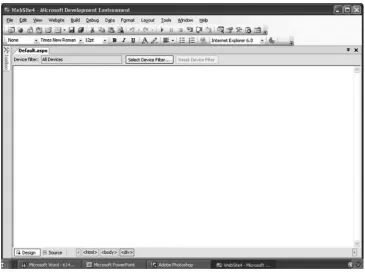
New Web Site and then select the ASP.NET Web Site icon to create a new ASP.NET web page. A screen opens displaying two tabs along the bottom-left corner: Design and Source.ASP.NET 2.0
Demystified
Figure 2-1 The Design tab is where you design content for your ASP.NET web page.
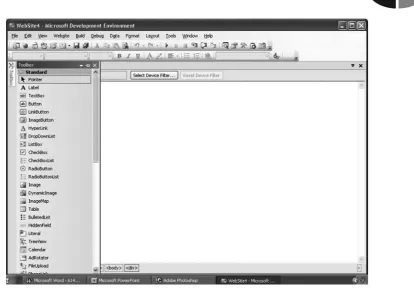
You display the Toolbox by selecting the Toolbox tab located in the upper-left side of the window (Figure 2-2). Place the mouse cursor on the Toolbox tab and wait a second for the Toolbox to open.
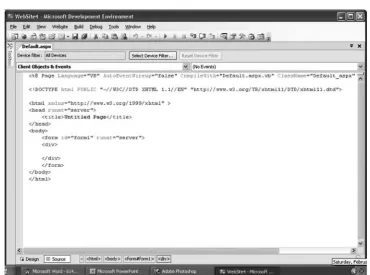
The Source tab displays the HTML markup code for the ASP.NET web page. The Visual Web Developer generates this code for you, although you can enter HTML markup code there too.
Notice that the Design tab is empty. This is because you haven't designed your ASP.NET web page yet. However, the Source tab contains HTML markup code. At first this may seems unusual, but it isn't, because the Visual Web Developer auto- matically creates the basic HTML server control that is required for all ASP.NET web pages.
The ASP.NET
Web
Page
Figure 2-2 The Toolbox contains controls that you drag and drop into your web page.
side rather than on the client side (see Chapter l). You'll learn how the HTML control is run on the server side in the section "HTML Server Controls" later in this chapter.
For now it is important to understand that in the absence of the runat="server" attribute, the ASP.NET engine treats the HTML markup as an HTML control, but not an HTML server control. This means that the HTML markup code is sent directly to the client (i.e., browser) by the ASP.NET engine if you leave out the runat="server" attribute.
Tools
of
the Trade
ASP.NET 2.0
Demystified
Figure 2-3 The Code tab displays an HTML control that is generated for you.
The Moment of Truth: Creating
Your First ASP.NET
Web
Page
Let's create the traditional first ASP.NET web page-Hello world! Here's what you need to do:
Select the Design tab.
Select the Toolbox panel.
The ASP.NET Web Page
4. Release the mouse button and you'll notice that the Toolbox automatically closes.
5. Point to the label on the Design tab. Select the right mouse button to display a pop-up menu and then select the Property option to display the Property panel.
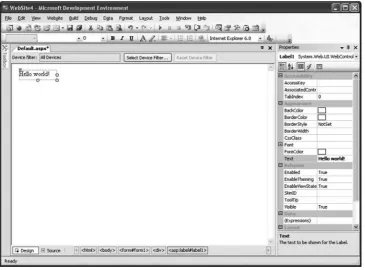
6. Select the label on the Design tab and then locate the Text property in the Appearance section of the Property panel. Enter Hello world!
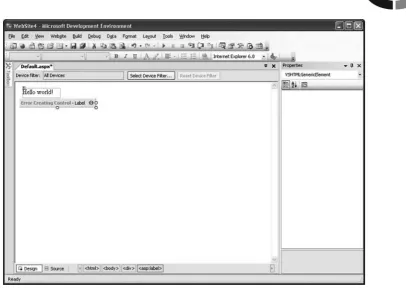
[image:44.513.49.415.316.586.2]7. Move the mouse cursor to anywhere on the Design tab and then click the left mouse button. "Hello world!" appears on the ASP.NET web page (Figure 2-4). You may have to drag the sizing box that appears around the label to resize the label so that the text appears on one line.
That's all you need to do.
Select the Code tab and you'll see code that Visual Web Developer wrote for you. You must admit that dragging and dropping is more convenient that writing the code yourself.
ASPONET 2.0
Demystified
Testing Your ASP.NET Web Page
You can test your ASP.NET web page by pressing CTRL-FS. Visual Web Developer
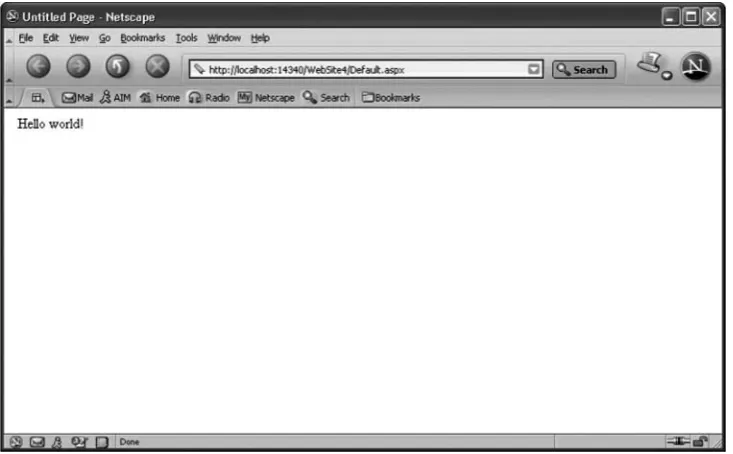
cranks away and opens the web page in your browser (Figure 2-5).
Very little can go wrong with the Hello world! web page. However, a real-world ASP.NET application is more complex than the Hello world! web page and must be thoroughly tested before you release it on your web site.
In order to thoroughly test your ASP.NET application, you'll need to run it using the debugger that comes with Visual Web Developer. The debugger is a tool that is used to execute your web page so that you can see what happens when each instruc- tion executes.
You'll find the debugger by selecting the Debug menu option. Don't do this now, because we'll show you how to use the debugger later in this book.
Writing HTML Code Yourself: Watch Out!
[image:45.513.104.471.378.605.2]There are still some diehards among us who like to get their hands dirty and write HTML markup code themselves. Dragging and dropping is simple for lazy devel- opers. If you're one of those hands-on developers, though, then there are a few facts you need to know before you starting writing HTML markup code using Visual Web Developer.
APTER
2
The ASP.NET Web
Page
Figure 2-6 An error is displayed if you write buggy code.
The Source tab of the Visual Web Developer is the place to insert your own HTML markup code into the ASP.NET web page. Code that you enter here is prop- erly displayed when you switch to the Design tab. However, you must make sure that you properly write your code; otherwise, you'll see an error displayed in the Design tab (Figure 2-6).
Digging into the Source Code
ASP.NET
2.0 Demystified
You'll learn how to write source code in the remaining chapters; for now, how- ever, it is important that you take a closer look at what source code is and how the ASP.NET engine calls it.
Object-Oriented Programming:
A
Class Act
Source code is written using object-oriented programming. Object-oriented pro- gramming is a style of programming that resembles the way we naturally look at things. We see the world as objects such as a computer keyboard. We don't see the world as a group of parts such as keys, springs, diodes, and other components of the keyboard.
An object is defined as having data and actions. For example, a keyboard has a specific length and width. These are two of many data that defines the keyboard. Also, a key on the keyboard can be pressed and released. These are two actions that also define the keyboard.
In object-oriented programming, a class defines an object. Data that is associated with the object is called a property, and actions are called methods. It is important to keep in mind that a class is a definition and not a real object. Some developers who are new to object-oriented programming find this a difficult concept to grasp.
Think of a class as a stencil of the letter W The stencil isn't the letter W. Instead it defines what the letter W looks like. A real W is created when you place the sten- cil on a piece of paper and trace the stencil. The real W is seen once you remove the stencil from the paper. You can use the stencil over and over again to create many copies of the letter
K
and all those copies are identical because they come from the same definition.In object-oriented programming, copies of a class are called instances, or simply objects. Each instance is identical to other instances of the same class. That is, each instance has properties and methods that are defined in the class. For example, when we create an instance of the keyboard, the instance will have a width and length and keys that can be pressed and released.
Visual Basic .NET (and C#) use the .NET Framework library of classes that you'll be using to build the source code for your ASP.NET web page.
Classes will have properties whose values you can modify and other properties that cannot be modified. For example, you can't change the width and length of a keyboard, but you might be able to select the color of the keyboard.
CHAPTER 2 The ASP.NET Web Page
Let's take a look at a method that you'll use when writing source code for your ASPNET web page. This is the Response.Write() method, which is used to send a response to the client who initiated the request.
Response is the object, and Write() is the built-in method. Notice that a dot is used to link them together. In a sense this is saying to the ASPNET engine, use the Write() method that is defined in the Response object. Developers refer to this as calling the method. You'll learn a lot more about calling methods throughout this book.
The Write() method sends a series of characters from the ASP.NET engine to the client, which is usually a browser. These characters are typically HTML markup code that creates the dynamic web page. Characters are placed within quotations between the parentheses as shown in the following example, which causes "Hello world." to be displayed in bold on the client's computer.
Events:
I'll
Wait for Your Call
The source code portion of an ASP.NET web page is subdivided into one or more groups, each of which is associated with an event. An event is an action such as your pressing ENTER on the keyboard. The source code that is associated with the
event is called an event handlez
When an event occurs, the ASPNET engine executes any source code in the event handler that is associated with the event. Developers say that an event has fired when an event occurs, causing its event handler to execute.
For example, a 911 operator might receive a call for an ambulance. This is an event. The 911 operator follows a specific set of instructions when a call for an ambulance is received. These instructions (source code) are the event handler that dispatches an ambulance.
TIP:
Programming languages that execute source code in response to an event are called event-driven programming languages. Programming languages that execute source code in sequence are called procedural programming languages.ASP.NET 2.0
Demystified
You'll need to define the Page-Load event handler. Here's how this is done:
1. Select the Source tab.
2. Change AutoEventWireup to True.
3. Click the right mouse button.
4. Select View Code from the pop-up menu.
5. Enter the following source code:
Sub Page-Load(sender as Object, e as EventArgs)
Response.Write (I1<b>Hello world.</b>I1)
End Sub
That's all you need to do!
Let's walk through this example. First of all remember that we're using Visual Basic .NET as the programming language for the source code, so your source code will look different if you decide to use C# to write it.
Sub and End Sub define the sequence of source code instructions that forms the event handler. Sub is short for subroutine. Each event handler must have a unique name. Page-Load is the name of this event handler.
ASP.NET passes the event handler two pieces of information in order for it to process the event. First, the event handler needs to know who made the request, and then it needs to know any additional data about the event.
These are given to the event handler by the ASP.NET engine and are stored in arguments that are identified within the parentheses of the event handler. You don't need to know about arguments right now, because you'll learn about them later in this book. However, if you can't wait, then read the next section, "Arguments: A Preview"; otherwise, skip that section.
Between the Sub and End Sub lines is where you place the source code that you want the ASP.NET engine to execute whenever the Page-Load event occurs. Source code is executed sequentially. You'll learn how to write source code through- out this book.
Our example has one line of source code that sends <b>Hello world.&> to the client when the client loads the ASP.NET web page. You probably recognize this as HTML markup code.
Arguments: A Preview
2
The ASP.NET Web Page
The developer needs a way to identify arguments (information) so that it can be referenced in the event handler. This is done by assigning a name to the argument and by identifying the kind of augment within the parentheses of the event handler.
Think of this as the form that the 91 1 operator fills in when an emergency call is received. The form has Caller, Address, and Nature of Emergency as labels. The 91 1 operator writes down the name of the caller, the address of the emergency, and the nature of the emergency alongside the corresponding label.
While the emergency call is being processed, the 91 1 operator and other emer- gency personnel refer to the labels (Caller, Address, Nature of Emergency) whenever this specific information is required. For example, the paramedic might radio the 911 operator, "We're at the address speaking to the caller." The 911 operator and the paramedics refer to the form for the specific address and the caller's name.
The argument name is like the label on the form. The ASP.NET engine "writes" the specific information to each label. Developers call this assigning a value to the argument. You'll learn more about this in the next chapter.
The Page-Load event handler has two arguments. The first argument is called sender and is a kind of Object. You'll recall that an Object is an instance of a class. This identifies the source of the event. The second argument is called e and is a kind of EventArgs, which is information about the event. You'll learn more about this later in the book.
Defining the Source Code Portion
Before event handlers can respond to an event, you need to define the source code portion of your ASPNET web page. You do this by defining a Page directive and a script. A directive tells the ASP.NET engine how to execute the source code. You'll learn about directives later in this book. For now it is important for you to under- stand the Page directive in order to test the source code.
A directive begins with <% @ and ends with %>. Between these are the directive name and any directive attributes. A Page directive tells the ASP.NET engine how to execute the source code portion of the ASP.NET web page. It uses the Language attribute to tell the ASP.NET engine which programming language is used to write the source code. Here's the Page directive that is written for you by Visual Web Developer. The AutoEventWireup attribute is set to True, but you'll need to set this to False.
<%@ Page Lang~age=IlVB~~ AutoE~entWireup=~~False~~
ASPONET 2.0 Demystified
Beneath the Page directive is a script. A script consists of one or more lines of code that can be executed at the server or at the client. For example, any code written in JavaScript is a script that is executed by the client. Event handlers are part of a script that is executed by the server.
You define a script by using the <script>
..
.
dscript> HTML markup code. The <script> start tag must include the runat="server" attribute, which tells the ASP.NET engine that the script is to be executed by the server.Here's the complete source code portion of our example. Make sure that the Source tab contains this source code and then test it (see the section "Testing Your ASPNET Web Page" earlier in the chapter).
<script runat="serverM>
Sub Page-Load(sender as Object, e as EventArgs) Response. Write (I1<b>Hello world. </b>I1)
End Sub </script>
HTM
L Server Controls
As you learned in Chapter 1, you can drag and drop elements from the Toolbox onto the Design tab and the Visual Web Developer automatically writes the correspond- ing HTML markup code for you and displays it in the HTML tab. Every time the ASP.NET engine encounters HTML markup code on your ASP.NET web page, the ASP.NET engine passes it along to the client without modifying the code.
HTML server controls take the form of HTML markup code but contain the runat="server" attribute, which tells the ASPNET engine that this is an instruction for the ASP.NET engine and not HTML markup code that is passed along to the client. You insert HTML controls on your ASP.NET web page by hand.
Earlier in this chapter you learned about classes, methods, and properties. The .NET Framework that you installed to run the Visual Web Developer contains a library of classes that are used to create source code for an ASP.NET web page. Think of this as a library of source code that other programmers wrote and you can use in your ASP.NET web page.
CHAPTER 2 The ASP.NET
Web
Page
Web
Controls
Web controls are similar in concept to HTML controls in that they are instructions to the ASPNET engine to use the corresponding class in the .NET Framework to generate HTML markup code. HTML server controls are closely tied to the output HTML control; ASP.NET server controls are not.
Web controls are declared using the following format:
The declaration begins with <asp: followed by the name of the web control. Next is the runat="server" property, which tells the ASP.NET engine to run the code. Depending on the nature of the web control, there may be other properties. If so, then they are also listed along with their values. The name of the property and its value are dependent on the web control. The web control ends with the end tag.
You insert web controls on your ASP.NET web page by dragging and dropping them from the Web Controls portion of the Toolbar onto the Design tab. When the ASP.NET engine encounters a web control, it uses the corresponding .NET Frame- work class to generate HTML markup code that is sent to the client.
HTML
Sewer Controls vs.
Web
Controls
HTML server controls seem to do the same thing as web controls. Why both? HTML controls are used to make it easy to import and export dynamic web pages between ASPNET and ASP, since no changes are necessary. On the other hand, changes must be made when web controls are used, since they are not compatible with ASP.
Besides the compatibility issue, web controls have more properties than HTML controls, giving you greater control than with the comparable HTML control. Web controls can be dragged and dropped from the Toolbox, whereas HTML controls must be entered by hand.
Looking Ahead
ASPONET
2.0
Demystified
The Toolbox contains all the elements that you need to build an ASPNET web page. You insert them into the Design tab by dragging and dropping them from the Toolbox.
Once you've built your ASP.NET web page, you must test it by pressing CTRL-FS
to pop up the web page in the browser.
Now that you have a good understanding of how to create an ASP.NET web page using the Visual Web Developer, it is time to create a more robust ASP.NET web page than Hello world!-which you'll do in the next chapter.
Quiz
1. An HTML server control is
a. Another term for HTML markup code
b. Instructions for the ASP.NET engine to use an HTML class in .NET Framework
c. Instructions for the ASP.NET engine to use a web control class in .NET Framework
d. Another term for web control
2. A class is an instance of an object.
a. True
b. False
3. The Response. Write() method
a. Sends HTML controls to the client
b. Sends web controls to the client
c. Sends characters to the client
d. None of the above
4. An event handler is
a. Something that occurs while the ASPNET executes
b. A block of code that executes in reaction to a specified event
c. Another term for an event
The ASP.NET Web Page
5. Page-Load
a. Is the way a client requests a page from the web server
b. Starts the web server
c. Starts the ASP.NET engine
d. Is the name of the event handler for the Page-Load event
6. An ASPNET web page is divided into an HTML portion and a source code portion.
a. True
b. False
7. Event handlers must be defined within the script tag. a. True
b. False
8. A method is
a. An action associated with a class
b. Data associated with a class
c. An instance of a class
d. None of the above
9. The runat="server" attribute means
a. Start the web server
b. Start the ASP.NET engine
c. Execute the code on the server side
d. None of the above
10. The sequence c%@ Page Language="VB7' %> is a directive. a. True
b. False
Answers
1. b. Instructions for the ASP.NET engine to use an HTML class in .NET Framework
ASP.NET
2.0
Demystified
3. c. Sends characters to the client
4. b. A block of code that executes in reaction to a specified event
5.
d. Is the name of the event handler for the Page-Load event6. a. True
7. a. True
8. a. An action associated with a class
9. c. Execute the code on the server side
CHAPTER
Building an
ASP.NET
Web
Page Application
Developing an ASP.NET web page application is more involved than creating a web site using static web pages because you must design, develop, and test both the client side and the server side. The client side is what the visitor sees. The server side is how the ASP.NET web page generates what the visitor sees.
As you learned in previous chapters, an ASP.NET web page application can link together web pages with databases and non-web-based application, which is some- thing that cannot be done using static web pages. It is for this reason that an ASP.NET web page application can be more challenging to build than a web site that has only static web pages.
ASP.NET 2.0
Demystified
Designing an ASP.NET Web Page Application
All applications, including an ASP.Net web page application, are developed using the same general road map, called the application life cycle. The application life cycle divides the development process of an application into phases, each of which
must be completed before the next phase can begin. A phase specifies things that must be done in order to create the application successfully.
The life cycle that we'll use have five phases: design, development, testing, im- plementation, and maintenance. You might come across other versions of the life cycle that have different phases, but they generally all help you accomplish the same objective: to create an application.
You might be wondering why they call this a life cycle. The reason is that the road map to creating an application is similar to the development of living things. Think about plants. A new plant develops from a seed, matures, and dies. During this cycle it gives off other seeds that begin the life cycle again.
An application also dies when it outlives its usefulness. Usually by this time, the application has been modified many, many times in order to conform to changing business requirements. At some point, developers decide it is more economical to build a replacement application than to simply continue to modify the existing application. When this happens, the existing application dies. The developers start at the beginning of the life cycle to create the replacement application.
Design Phase
The first phase of the life cycle is the design phase. This is where you determine the
objective of the application. That is, what is the application going to do? You then define all the features that will be necessary to reach the objective.
Let's say that you're a building a house. In the design phase, you determine your housing needs and relay this to the architect. The architect draws up a detail plan for the house based on your needs.
Your goal for the design phase is to develop a detail plan for building your application. This plan must describe how both the user side and the server side look and work.