City, University of London Institutional Repository
Citation
:
Makri, S., Blandford, A. and Cox, A. L. (2008). Using information behaviors to
evaluate the functionality and usability of electronic resources: From Ellis's model to
evaluation. Journal of the American Society for Information Science and Technology, 59(14),
pp. 2244-2267. doi: 10.1002/asi.20927
This is the accepted version of the paper.
This version of the publication may differ from the final published
version.
Permanent repository link:
http://openaccess.city.ac.uk/3913/
Link to published version
:
http://dx.doi.org/10.1002/asi.20927
Copyright and reuse:
City Research Online aims to make research
outputs of City, University of London available to a wider audience.
Copyright and Moral Rights remain with the author(s) and/or copyright
holders. URLs from City Research Online may be freely distributed and
linked to.
1 Page numbers differ from published version
Using Information Behaviors to Evaluate the
Functionality and Usability of Electronic Resources:
From Ellis’s Model to Evaluation
Stephann Makri, Ann Blandford, and Anna L. Cox
UCL Interaction Centre, University College London, 8th Floor, Malet Place Engineering
Building, Gower Street, London WC1E 6BT, United Kingdom. E-mail: {s.makri, a.blandford,
anna.cox}@ucl.ac.uk
Information behavior (IB) research involves examining how people look for and use information, often with the sole purpose of gaining insights into the behavior displayed. However, it is also possible to examine IB with the purpose of using the insights gained to design new tools or improve the design of existing tools to support information seeking and use. This approach is advocated by David Ellis who, over two decades ago, presented a model of information seeking behaviors and made suggestions for how electronic tools might be designed to support these behaviors. Ellis also recognized that IBs might be used as the basis for evaluating as well as designing electronic resources. In this article, we present the IB evaluation methods. These two novel methods, based on an extension of Ellis’s model, use the empirically observed IBs of lawyers as a framework for structuring user-centered evaluations of the functionality and usability of electronic resources. In this article, we present the IB methods and illustrate their use through the discussion of two examples. We also discuss benefits and limitations, grounded in specific features of the methods.
Introduction
In this article, we present the information behavior (IB) methods—two novel, specialized methods for evaluating electronic resources ranging from Internet search engines to digital libraries and indexes/citators. The IB methods are novel as they are based on the observed IB of lawyers and are theoretically underpinned by an extension of Ellis’s behavioral model of information seeking. The methods are specialized in the sense that they are intended to be used to evaluate electronic resources as opposed to other types of interactive system. The IB methods were developed based on the premise that observed IB can provide a useful structure for evaluating electronic resources by using the observed behaviors as theoretical “lenses” to evaluate the functionality of electronic resources (i.e., the features provided by the resource aimed at supporting users) and the usability of these resources (i.e., how easy to use the resource is).
Although both the IB functionality and usability methods are underpinned by the same IB theory, they can be regarded as two separate evaluation methods in their own right. An IB functionality evaluation aims to provide data on the range of functionality supported by a particular electronic resource (and provides the basis for discussing whether this range is appropriate). An IB usability evaluation aims to provide data relating to the difficulties that users face when using a particular resource and how severe and easy to address the evaluator considers these issues to be.
2 Page numbers differ from published version
Background: The Rationale Behind the IB Methods
IB research has led to the development of several models that describe aspects of IB. These have ranged from models that view information seeking as a series of stages, such as Marchionini’s (1995) model, to those that view it as a cognitive or affective process (e.g., Sutcliffe & Ennis, 1998; Kuhlthau, 1988) to those that regard information seeking as a set of interrelated behaviors (e.g., Ellis, 1989; Ellis, Cox, & Hall, 1993; Ellis & Haugan, 1997). Other models and approaches have been devised that allow us to conceptualize information seeking in more ways still, such as a problem-solving activity (Wilson, 1999), an evolutionary process (Bates, 1989), a “foraging” activity (Pirolli & Card, 1995), a gap in knowledge to be filled (Belkin, 1980), and a sense-making activity (Dervin, 1983). Each of these models and approaches provide a different insight into IB. However, most of these models and approaches provide scope only for gaining insights into people’s behavior and do not provide support for examining IB with the purpose of using the insights gained to design new tools or improve the design of existing tools to support information seeking and use. Indeed, as highlighted by Colbert, Peltason, Fricke, R., and Sanderson (1997), “their fitness for purpose for design has rarely been assessed” (p. 73). One exception is the work of David Ellis who, over two decades ago, presented a model of information seeking behaviors and made suggestions for how electronic tools might be designed to support these behaviors. He suggests that “the general principle of using the behavioral aspects of users’ information seeking activities to inform the design of electronic resources . . . could play a more prominent role in the design of computer based information retrieval systems than, at present, it does” (Ellis 1989, p. 202). Ellis also recognized that his behavioral model might be used as the basis for evaluating electronic resources, “as an evaluatory tool to identify the existence and ease of implementation of features of the model in existing systems” (Ellis, 1987, p. 242).
Our IB method, based on an extension of Ellis’s model, uses the empirically observed IBs of lawyers as a framework for structuring user-centred evaluations of the functionality and usability of electronic resources. Part of the empirical work that forms the basis of the methods has been published in Makri et al. (2008) and concerns the IB displayed by academic lawyers (i.e., law students and
academic/research staff). The remainder of the empirical work that forms the basis of the methods concerns the behavior displayed by practicing lawyers working for the London branch of a
multinational law firm. Both academic and practicing lawyers performed similar IBs and we refer to both sets of findings in this article.
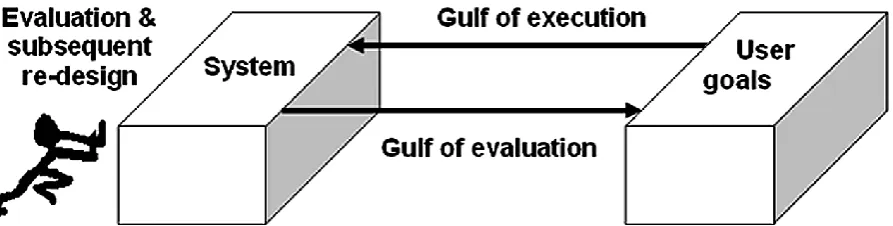
The rationale behind the IB methods is closely related to Norman’s (1986) notion of “bridging the gulf” between user and system (see Figure 1). The IB functionality method aims to support people with a stake in a resource to “push” the resource closer to its users by supporting them in examining whether the resource supports an appropriate range of user behavior. The IB usability method aims to push electronic resources closer to users by supporting stakeholders to identify usability issues that, if addressed properly, should lead to improved support for user behavior.
This is with the broad aim of improving the design of interactive systems so that they “speak the user’s language” as opposed to forcing users to learn the system’s language. Through the IB evaluation methods and the resultant functionality and usability insights that they provide, we seek to help bridge the gulfs between a system and its users by making the system more closely match user goals and therefore become more user-centred.
Background: The Theoretical Basis of the IB Methods
3 Page numbers differ from published version
FIG. 1. How evaluation and subsequent re-design can bridge the gulfs between system and users by ‘pushing’ systems closer to users and their goals. Diagram adapted from Norman (1986).
The observations led to the identification of a number of IBs displayed by the lawyers, many of which were similar to those identified by Ellis and his colleagues (see Ellis, 1989; Ellis et al., 1993; Ellis & Haugan, 1997). These observations served to validate Ellis’s model in the new domain of law and also served to extend Ellis’s model to include additional behaviors pertinent to legal information seeking (updating and history tracking behaviors, which are discussed later), broaden the scope of the model through the identification of information use as well as information seeking behaviors, and enhance the potential analytical detail of the model through the identification of several levels at which many of the behaviors were found to operate. The model of IBs resulting from these observations, which incorporates the theoretical enhancements described above, forms the theoretical basis of the IB methods. The IBs at the heart of the model are presented, along with definitions, in Appendix A. We also discuss these behaviors, in the context of previous related work, below. This not only includes work by Ellis and his colleagues, but also by Meho and Tibbo (2003), who revisited Ellis’s findings to see whether they were still applicable now that electronic information seeking has become more widespread. This is followed by a discussion of the concept of levels at which these behaviors can operate.
The Information Behaviors that form the Basis of the IB Methods Discussed in Relation to Previous Work
Ellis’s (1989) model is based on interviews with academics and commercial researchers from a number of scientific disciplines: the social sciences (Ellis, 1989), physical sciences (Cox, 1991; Hall, 1991—both reported in Ellis et al., 1993) and engineers and research scientists (Ellis&Haugan, 1997). The latter study served to validate the model outside an academic domain, while interview data by Smith (1988) was analysed by David Ellis to validate the model in the non-scientific discipline of English literature. All of these studies identified similar behavioral characteristics (although reports of the studies of physicists and English literature students in particular used different terminology to describe what Ellis et al. (1993) consider to be similar behaviors). Ellis (1993) attributes this difference in terminology to the fact that “the later studies were not simple verification studies as, in each case, the models were developed from the data and then compared to the original model” (p. 483). Ellis also notes that the models in each of the studies differed in detail somewhat, partly due to minor differences in focus between studies and partly from subject differences between groups. Overall, Ellis and Haugan (1997) deem the model to be “quite robust in relation to the information seeking patterns of scientists, engineers and social scientists in both an academic and an industrial research environment and over a period of time which has seen accelerating changes in the information
environment itself” (p. 402).
Ellis’s model comprises a number of broad information seeking behaviors identified from the interviews that, according to Ellis (1989), are non-sequential. It is also possible to display more than one characteristic at any given time. A number of these behaviors were also identified in our empirical observations of lawyers (see Makri, Blandford, & Cox, 2008). The behaviors identified by both Ellis and ourselves are as follows:
4 Page numbers differ from published version
electronic resources by helping users to identify review-type or heavily-cited materials and by providing an indication of the sources that publish material in the required area. These design recommendations are sometimes, but not often, supported in current electronic resources.
Chaining. “Following chains of citations or other forms of referential connections between material” (Ellis, 1989, p. 179).
Ellis (1989) highlights that there are two types of chaining: forwards chaining (which involves identifying and accessing documents that have subsequently cited the current document) and backwards chaining (which involves following references to documents that have been cited in the current document). Ellis suggests that electronic resources should support both types of chaining, and they can provide enhanced chaining support by indicating material in the database by a particular author, by providing a facility for identifying all types of (forward and backwards) referential connections to and from the material of interest, and by supporting more advanced forms of citation chaining (such as bibliographic coupling—identifying common works that particular documents cite— and cocitation searching—identifying pairs of highly cited papers). Basic support for forwards and backwards chaining is commonly supported by current electronic resources, however the type of advanced chaining support described by Ellis is less commonly supported.
Browsing. “Semi-directed searching in an area of potential interest” (Ellis, 1989, p. 179). Ellis suggests that support for browsing all types of information held on an electronic resource should be provided by infrared radiation (IR) systems. Support for browsing material in electronic resources is increasing, although we are yet to see many electronic resources that allow all of their content to be browsed.
Differentiating. “An activity which uses differences between sources as a filter on the nature and quality of the material examined” (Ellis et al., 1993, p. 179). Ellis (1989) explains that “differentiating is effected by the researcher identifying different sets of sources in terms of the differing probability of their containing useful material” (p. 190). Ellis suggests that electronic resources can support differentiating by allowing users to specify preferences for sources that they think are most likely to contain material of interest and then using these preferences to restrict the search, to exclude certain sources or types of source from the search, or to display material in order of source or source type. This, Ellis (1989) asserts, “is far easier than attempting to deal with differences of approach and level of treatment directly” (p. 193).
Filtering. The “use of certain criteria or mechanisms when searching for information to make the information as relevant and as precise as possible” (p. 399). Current electronic resources support filtering in a number of ways, all allowing users to refine or reformulate their searches and some allowing users to search within the current search results, perform field-restricted searches (including date restriction).
Monitoring. “Maintaining awareness of developments and technologies in a field through regularly following particular sources” (Ellis & Haugan, 1997, p. 396). Ellis (1989) suggests that “monitoring” can be supported by allowing users to specify sources to monitor and automatically searching these sources when the user next logs in to the system or when the sources are next updated. Ellis also suggests that monitoring may be enhanced through the provision of an “alerting” function, where sources of interest are brought to the attention of the user. E-mail alerts are becoming increasingly common in current day electronic resources, with the systems providing the facility for users to save searches and have them automatically and periodically run by the system on their behalf (and any new results sent to them in an e-mail). Only a limited amount of monitoring behavior was displayed by the lawyers in our study, most likely due to the fact thatthe broad task they were set involved them finding or stepping through how they went about finding information as opposed to maintaining awareness of developments.
5 Page numbers differ from published version
the papers from a particular conference proceedings or journal issue are stored together to facilitate browsing as well as searching).
A couple of behaviors were identified by Ellis and his colleagues in other disciplines but were not found among our lawyers. These behaviors, which do not feature by default in the enhanced behavioral model that forms the basis of the IB methods, are verifying and ending. Verifying involves “checking the information and sources found for accuracy and errors” (Ellis et al., 1993, p. 364). Verifying was identified in Ellis et al.’s study of physical scientists, in Ellis and Haugan’s (1997) study of engineers and research scientists, and Meho and Tibbo’s (2003) study of social scientists. As the legal documents that lawyers found were considered to be accurate and free of errors simply because they had become law, this behavior was not identified among lawyers in our observations. Ending involves “the assembly and dissemination of information or the drawing together of material for publication” (Ellis et al, 1993, p. 365) and was also identified in the studies by Ellis et al., 1993 and Ellis and Haugan, 1997. similar behavior, assembly and dissemination, was also identified in the study of English literature researchers by Smith (1988), reported in Ellis et al. (1993). These studies give examples of ending behavior that involve finding information as part of the process of assembly and dissemination, which suggests that the scope of this behavior as defined by Ellis is limited to activities associated with finding information towards the end of the writing process. The behavioural model that forms the basis of the IB methods does not include ending behavior as we do not distinguish between the activities involved in finding information at different stages of the information seeking process.
When revisiting Ellis’s findings among social scientists Meho and Tibbo (2003) identified three new behaviors: accessing, information managing, and networking. Although we did not observe much networking among academic and practicing lawyers (practicing lawyers tended to use internal knowledge management sources to obtain information published by their colleagues, possibly due to the large size of the law firm), accessing was found to be an important IB. Although Meho and Tibbo discussed accessing solely related to physical problems accessing paper-based information, such as long travel distances and difficulty getting hold of published materials within certain countries, accessing behavior as identified in our empirical study of lawyers’ IB (see Makri et al., 2008) involved
electronic as opposed to physical access to resources. Current day electronic resources support accessing through two main methods; some offer automatic (and invisible) Internet protocol (IP) recognition to recognize the company or institution from which the user is accessing the system and grant them access to the system or materials within the system. Others rely on users logging in with a username and password. Others still rely on a mixture of the two, mainly in order to provide personalisation services to users.
Meho and Tibbo (2003) found that many social scientists spoke about “filing, archiving, and organizing information collected or used in facilitating their research” (p. 582) and presented a behavior that they called information managing. This is an example of an information use as opposed to information seeking behavior. In our study of lawyers’ IB, we identified several information use behaviors. The first of these behaviors (and the most similar to Meho and Tibbo’s information managing behavior) is recording, which can also involve filing, archiving, and organizing information. However, although information managing is a rather broad term that can subsume several types of lower-level behavior, we believe recording is a more precise description of the behavior we observed. Recording involves making a record of information.
This information might be resources or sources used, documents or content found, or the query terms used or results returned in a search. Current electronic resources usually support users in recording documents but rarely support keeping a record of sources used. Many electronic legal resources also keep an automatic record of users’ searches. Other information use behaviors identified by Makri et al. (2008) that form the basis of the IB methods are as follows:
6 Page numbers differ from published version
Collating and Editing. Collating involves drawing together documents and/or content for later use. Editing involves preparing and arranging documents or content for later use by making revisions or adaptations. Some electronic legal resources support the downloading, printing or e-mailing of batches of documents (thereby collating them). However, electronic resources rarely support editing behavior (although some resources allow documents to be downloaded into an editable Word processing format).
Another information use behavior, distributing, was identified only among practicing lawyers. Distributing involves handing or sharing out documents, contents of documents or search queries/results to others. Some electronic legal resources provide the facility to e-mail documents to colleagues. However, in general, support for distributing behavior is rare.
A number of additional behaviors were also identified by Makri et al. (2008):
Searching involves formulating a query in order to locate information. Searching behavior is not discussed at all by Ellis and his colleagues, perhaps due to the paper-based nature of information seeking in these studies. This behavior was, however, discussed briefly by Meho and Tibbo (2003). Searching is supported by electronic resources in a number of ways. One such way is through the provision of segmented search fields that restrict the search to particular parts of documents or document meta-data.
Selecting involves carefully choosing resources, sources, or documents as being potentially useful for the information task at hand (definition adapted from Oxford English Dictionary). Selecting shares conceptual similarity to distinguishing, filtering, and extracting behaviors but it subtly different to these behaviors. It is different to distinguishing because it does not involve ranking resources based on perceived importance. It is also different to filtering because although various criteria are used when selecting which resource to use, these criteria are not used as precise, explicit filters to help decide between which document or source to select. Selecting is supported by electronic resources through the provision of document metadata (such as the title or year of publication of a document) in search result or browsable lists.
Updating behavior, which we believe is particularly pertinent to information seeking in the legal domain, involves ensuring a current understanding of amendments or changes to a particular legal document. Updating with regard to a particular legal case or piece of legislation, for example, involves finding out whether the case or legislation is currently good law. Electronic legal resources support updating and history tracking by providing dedicated case and legislation citators which allow users to view the history of a case or piece of legislation.
The final IB that forms the basis of the IB methods is history tracking, which is similar to updating behavior but involves ensuring an historical as opposed to a current understanding of amendments or changes to a particular document (i.e., an understanding of the treatment a particular case or piece of legislation has received over time). Refer to Appendix A for a summary list of the behaviors that form the basis of the IB methods. In general, users’ IB has been found to be similar across domains (see Ellis, 1989; Ellis, 1993; Ellis et al., 1993;
Ellis & Haugan, 1997) and has not been found to have changed substantially since Ellis’s studies in the 1980’s and 1990’s even though electronic information seeking is now far more common (see Meho & Tibbo, 2003). Discrepancies between sets of findings are minor and have often been due to differences in terminology (as highlighted by Ellis et al., 1993) or differences in the scope of the research carried out (e.g., Meho and Tibbo, 2003 identified information managing behavior and Makri et al., 2008 identified additional information use behaviors in addition to a number of information seeking behaviors). Some discrepancies have, however, been due to differences in behaviors across domains. For example, verifying behavior was found among some disciplines but not others. This suggests that IBs in a new domain are likely to be similar but not necessarily identical to those identified among the lawyers in our study.
7 Page numbers differ from published version
Indeed, the IB methods are extensible and customisable and can therefore be tailored to include any additional or alternative behaviors relevant to a new, non-legal, domain. For example, currently the behaviors used as the basis of the IB evaluation methods do not include behaviors identified in other empirical studies but not in our own (such as verifying and networking). However, it is possible to incorporate additional relevant behaviors into both an IB functionality and IB usability evaluation. For example, when evaluating the functionality of electronic resources designed to support physical scientists’ information work, evaluators might wish to assess functionality support for verifying behavior, i.e., support for “checking the information and sources found for accuracy and errors” (Ellis et al., 1993, p. 364). Similarly, when conducting an IB usability evaluation of an electronic resource designed for physical scientists, it is possible to set one or more tasks focused on verifying behavior (e.g., check one of the documents you have found for accuracy and errors). It is therefore possible to customize the IB methods to new domains by including or excluding certain behaviors. In effect, this means that when applying the IB methods to a new domain, it is only necessary to change the theory base of the methods (i.e., the IBs to be used to frame the evaluation). It is not necessary to change the methods themselves. Indeed, we hypothesize that the IB methods can be applied to a wide range of domains with only slight modification to the theory base. As some identified IBs share conceptual similarities (e.g., selecting and distinguishing), care must be taken when customising the methods to ensure that all behaviors used as part of the theory base are clearly and precisely defined.
This should help minimize the chance of users of the methods misunderstanding what the behaviors entail (and therefore making functionality suggestions or defining usability tasks related to an incorrect understanding of a particular behavior).
The Behavioral ‘Levels’ that Form the Basis of the IB Methods
The IB methods are strongly underpinned by the IBs discussed above. They are also underpinned by the concept of levels at which these IBs can operate. Makri et al. (2008) identified five levels at which IBs can operate. These include the resource level (i.e., the level of the electronic resource itself), the
source level (i.e., the level of an information source or sources within a particular electronic resource), the document level (i.e., the level of a document or documents within a particular information source), the content level (i.e., the level of content within a particular document), and the search query/result
level. Four of these levels are illustrated in Figure 2, which highlights that an electronic resource can contain several sources that, in turn, can contain several documents, each with content within them. For example, LNB, a widely used electronic legal resource, contains many sources ranging from different series of legal case reports and legal journal articles to collections of different types of legislation such as Acts of Parliament and Statutory Instruments. Within each source are a number of documents (individual case reports, articles, pieces of legislation etc.), each with their own content. We do not illustrate the fifth level (the search query/result level) in Figure 2, but it can be regarded as the means of bridging each of the other levels (i.e., searching for content that is held in a particular electronic resource). Note that, particularly in the digital library community, the word resource is often used to describe both digital libraries themselves and electronic sources within a library (e.g., a particular journal series available within). In this article, we refer to resources and sources as separate and distinct entities.
8 Page numbers differ from published version
The empirical findings presented in Makri et al. (2008) demonstrate that many of the behaviors identified by Ellis and his colleagues can be performed at multiple levels. For example, consider recording behavior (which involves making a record of information). Recording might be performed at the resource level by bookmarking or otherwise saving details of electronic resources. Recording might be performed at the source level by saving a list of favorite or frequently used sources within a particular resource. At the document level, recording might be performed by downloading, printing, or saving a particular document (or even e-mailing it to one’s self). At the content level, parts or sections of documents can also be downloaded, printed, saved, or e-mailed. Finally, at the search query/result level, a manual or automatic record can be made of the search queries entered during a particular information seeking episode and possibly the results returned from those queries.
Some behaviors, such as surveying and monitoring, operate at a combined document and content level. This level is used when it is difficult, impossible, or undesirable to separate whether a particular behavior is performed on the document, or the content within it. For example, surveying and monitoring involve gaining an overview of and maintaining awareness of developments in a particular research area. This involves looking at both documents and the content of those documents. However, the resulting observable behavior at the document level is likely to be the same as the observable behavior at the content level and therefore only one combined level is used to describe this behavior. Although these levels may be applicable to paper-based information seeking (for example, it is possible to regard a paper volume of journal titles as a resource, an individual issue as a source, an article within an issue as a document, and the textual content of the article as content), this has not been empirically tested as the focus of Makri et al.’s study was on electronic not paper-based IB.
The concept of levels is important for structuring both IB functionality and usability evaluations. An IB functionality evaluation involves using the IBs discussed in this section to frame a functionality evaluation of an electronic resource by examining whether and in which ways each behavior is supported by the resource at each applicable level. Applicable levels are those at which the behavior was found to operate by Makri et al. (2008) and by subsequent research. An IB usability evaluation involves setting behavior-focused tasks to intended or actual users of an electronic resource, asking them to think aloud while performing the tasks (i.e., to verbalise their thoughts, actions and feelings), and analysing the resultant think-aloud data. Depending on the focus of the usability evaluation, these tasks may be aimed at performing a particular behavior at a certain level. For example, one of the possible tasks that can be set as part of a custom IB usability evaluation is to browse to see whether a particular source is available in the electronic resource (for example, by browsing through a list of sources that the resource contains). This task aims to encourage users to perform browsing at the source level as opposed to the more common document level (where the user browses to locate particular documents, not sources).
The IB Methods
We now present the IB methods. We begin with an introduction to usability and functionality evaluation in general and highlight the niche in the evaluation methods market that the IB methods address. We then briefly discuss the development and evaluation of the methods, followed by an overview of both the functionality and usability methods.
Introduction to Functionality and Usability Evaluation
Functionality and usability are two aspects of an interactivesystem that can be evaluated with the aim of suggesting design improvements. Evaluating the functionality of a resource involves in some way examining the features provided by the resource aimed at supporting users. Evaluating the usability of a resource essentially involves examining how easy it is to use it (the International Organization for Standardization defines it as the effectiveness, efficiency, and satisfaction with which specified users achieve specified goals in particular environments [ISO# 9241, www.iso.org]).
9 Page numbers differ from published version
However, there is almost no literature detailing existing feature inspection methods. This is with the exception of work by Bell (1992), who details a method for designing programming languages that are easy to write that is aimed at evaluating both the facility provided by a programming environment (which Bell describes as “the ability to solve problems easily” [p. 7]) and the expressiveness of the environment (which he describes as “the ability to state solutions to hard problems simply” [p. 7]).
The IB Methods’ Place Alongside Other Evaluation Methods
Existing methods in the human–computer interaction (HCI) domain provide different ways to examine the usability of interactive systems and many of these methods have a specific focus which helps to make them useful in a specific way. For example, cognitive walkthrough (Polson, Lewis, Rieman, &Wharton, 1992; Wharton, Reiman, Lewis, & Polson, 1994) allows those using the method to assess the learnability of an interface, with a focus on the user’s cognitive processes and perception. Similarly concept-based analysis of surface and structural misfits (CASSM; see Blandford, Green, Furniss, & Makri, 2008) is a method that can be used to highlight mismatches between how users conceptualize aspects of an interactive system and how the system supports user concepts. Some of these user evaluation methods have been applied to a digital library and electronic resource context. For example, Blandford, Keith, Connell, and Edwards (2004) used a range of evaluation methods (heuristic evaluation, cognitive walkthrough, claims analysis, and CASSM) to evaluate various digital libraries. Similarly, Blandford et al. (2008) present a worked example of how CASSM can be applied to think-aloud data of postgraduate HCI and library and information studies students using a range of electronic resources. Blandford and her colleagues have also tailored claims analysis to a digital libraries context (see Blandford, Keith, & Fields, 2006; Blandford, Keith, Fields, & Furniss, 2007). As highlighted by Blandford and Green (2008), evaluation methods can be broadly classed along three dimensions:
whether they are carried out with the active involvement of users (those that involve users are known as empirical methods and those that do not as analytical methods)
whether they are carried out with a running system
whether they are carried out in a realistic context of use
According to Nielsen (1993), usability evaluation with real users “is the most fundamental usability method and is in some sense irreplaceable, since it provides direct information about how people use computers and what their exact problems are with the concrete interface being tested” (p. 165). Similarly Landauer (1995) has described user testing as the gold standard for evaluation. However, user testing can be resource intensive and this has resulted in the use of evaluation methods that do not require user involvement (such as those described in the previous paragraph).The IB functionality method is not carried out with active end-user involvement per se; however, evaluators may seek to use the method armed with usage data of their resources in order to help them reason about increasing or even reducing functionality (both are discussed in detail later in this article). Therefore, this method can be classed as an analytical method. The IB usability method, on the other hand, is primarily an empirical method as it involves analysing think-aloud data of users performing certain IB-focused tasks. The IB usability method is also partly analytical, as it involves evaluators identifying usability issues from the think-aloud data and deciding on how severe and easy to address they are. The mixed nature of the IB usability method allows it to benefit from the use of rich user data (where it would otherwise be difficult for evaluators to predict how users are likely to behave with an electronic resource) and from a theoretical underpinning to drive task setting and analysis (where it would otherwise be difficult to analyse this rich data in a structured way). As the IB usability method involves observing real users performing behavior-focused tasks, it requires the use of a running system. An IB functionality evaluation can be supported by (but does not require) a running system, particularly as evaluators may be familiar with most of the functionality provided by the resource under evaluation. Although based on empirically observed behavior, an IB functionality evaluation does not involve a realistic context of use (as it does not actively involve users). On the other hand, although the think-aloud tasks that are part of an IB usability evaluation might be performed in an artificial setting, the tasks themselves (also based on empirically observed behavior) do aim to ensure a realistic context of use.
10 Page numbers differ from published version
evaluate the functionality and usability of electronic resources and not interactive systems in general. Although Blandford and her colleagues have applied and tailored various evaluation methods to an electronic resource context, we are unaware of any other evaluation methods developed especially to evaluate electronic resources (see Blandford, Keith, & Fields, 2006; Blandford, Green, Furniss, & Makri, 2008).We also believe that the IB methods are novel because they are empirically grounded (i.e., they are based on the electronic IB displayed by the academic and practicing lawyers in our study). The IB methods aim to provide a bridge between the domains of information science and HCI, by providing users with the opportunity to conduct functionality and usability evaluations that are highly structured but are also flexible in the sense that they can be tailored to particular domains or foci. Part of this structure is provided by the theoretical underpinning of the IBs and levels that provide a framework for assessing electronic resource functionality (as part of an IB functionality evaluation) and for setting behavior-focused tasks (as part of an IB usability evaluation). Part of the structure is also provided by supporting forms, which can be used to record the output of the evaluations (see Appendices 1 and 2 for examples of these forms). Flexibility is provided by the extensibility and customisability of the methods, which can be tailored to facilitate the evaluation of particular IBs or levels of interest.
Introduction to the IB methods
The IBs that underpin the IB methods feed in to the functionality and usability evaluations in different ways. They are used in an IB functionality evaluation as a framework for assessing the functionality provided by electronic resources. An IB functionality evaluation involves users of the method (i.e., evaluators) discussing whether and in what ways an electronic resource currently supports the IBs at the five levels described earlier. Where the resource under evaluation is being evaluated by people with a stake in it, an IB functionality evaluation also involves evaluators discussing whether it might be possible to support user behaviors/levels in additional ways and considering the arguments for and against supporting particular behaviors/levels.
The IBs are used in the IB usability method as the foundation of think-aloud tasks that are set to intended or actual users of the electronic resource (see Table 3 for a list of behavior-focused tasks derived from our empirical data).
In the usability component of the method, evaluators set a number of behavior-focused tasks to users who are asked to perform the tasks while thinking aloud. This involves the users verbalizing their thoughts, actions, and feelings while performing the tasks using the specified electronic resource (just as in a conventional think-aloud session). The evaluators then identify usability issues from the resultant think-aloud data and make summary judgements on how severe they consider the issues to be (i.e., whether they need immediate attention) and the amount of effort they consider to be required to address the issues. The process of identifying and making summary judgements on usability issues that are identified from think-aloud data is not unique to the IB usability method. Indeed, this is often a standard part of user testing. It is the theory-based, task-setting element that makes the IB usability method unique as the behavior-focused tasks are used to frame the think-aloud session – providing a structure to the tasks that aims to encourage the display of a broad range of IBs (or particular behaviors/levels of interest). The IB methods can be used by anyone with an interest or stake in an electronic resource. However, we recommend the methods are used by people with a basic grounding in usability evaluation and without a strong bias towards the existing design of the electronic resource under evaluation. This means that while the methods can, in theory, be used by the developers of a particular resource themselves, this is not advisable as it is likely to be difficult to avoid attachment to particular system functionality or other related issues (such as power relationships within the firm or the evaluation team itself). This is the case with many HCI evaluation methods. The process of planning and conducting an IB evaluation is framed by Blandford et al.’s (2008) PRET A Rapporter Framework (PRETAR)—a framework for structuring user centred evaluation studies, including evaluation studies of information retrieval systems. The broad process of conducting a functionality or usability IB evaluation are described below:
11 Page numbers differ from published version
information-use behaviors, such as analysing, synthesising, recording, collating, editing, and distributing information. Therefore, in such cases, certain behaviors may be excluded from the evaluation.
2. Deciding on the practicalities of the evaluation involves considering issues such as when in the design and evaluation cycle the resource should be evaluated, who should participate in the evaluation, how much time should be devoted to the evaluation, and how the evaluation should be recorded.
3. Considering the ethical issues surrounding the evaluation involves considering issues surrounding keeping participant data as anonymous as possible and respecting participants’ confidentiality and privacy. It may also involve considering how participant data will be used and, if applicable, disseminated.
4. Conducting the evaluation itself and recording the output is discussed in detail below for both the functionality and the usability methods.
5. Communicating the findings from the evaluation. There are many varied ways of communicating the findings of an IB evaluation, ranging from using them as the basis of formal reports to using them as a basis of informal presentations or discussions.
The IB Functionality Method
An IB functionality evaluation involves deciding whether the IBs, at each applicable level, are currently supported by the electronic resource and then:
For levels of a behavior that the resource currently supports, determining in which way(s) the resource currently supports and in which additional ways it might support the behavior at this level.
For levels of a behavior that the resource does not currently support, determining in which way(s) the resource might support the behavior at this level.
An IB functionality evaluation also involves asking the following general questions:
Are there any behaviors/levels that it may no longer be necessary to support? For any behaviors/levels that you are considering ceasing support, what are the potential arguments for and against support?
Are there any ways that you currently support any of the behaviors/levels that may no longer be necessary? Forways of supporting a particular behavior/level that you are considering ceasing support, what are the potential arguments for and against support?
The functionality evaluation can be supported by reference to or exploration of a running version of the resource under evaluation (whether this be a full running version or a limited functionality prototype). Table 1 lists the behaviors and each applicable level at which resource functionality should be assessed.
12 Page numbers differ from published version The IB usability method.
An IB usability evaluation involves asking intended or actual users of an electronic resource to think aloud while using the resource to perform a number of tasks and analysing the resultant think-aloud data. This essentially involves conducting a conventional think-aloud session where users are asked to verbalize their thoughts, actions, and feelings and their verbal protocols are recorded (with minimal researcher intervention). The general think-aloud process is documented in both HCI textbooks (such as Dumas & Redish, 1999) and in articles (such as Boren & Ramey, 2000). Both present guidelines for conducting aloud sessions. An IB usability evaluation differs from a conventional HCI think-aloud study in that it is solely based on the behavior-focused tasks that users are asked to perform. There are three sets of tasks—core, recommended, and custom—, and it is possible to ask users to perform them all in an IB usability evaluation. In a core IB usability evaluation, participants are asked to perform two tasks related to accessing the electronic resource under evaluation and then the broad (and only somewhat behavior-focused) task of finding information currently or recently needed for their work. This task is the same as the one set to participants in our empirical study of lawyers’ IB (see Makri et al, 2008). The broad nature of this task encourages (but does not guarantee) the display of a wide range of IBs. Although a core IB usability evaluation is highly naturalistic, it does not, however, encourage the display of particular behaviors.We recommend a core IB usability evaluation as a “quick and dirty”way of acquiring user think-aloud data that highlights usability issues. The tasks set as part of a recommended evaluation are more behavior-focused than the core tasks but not as naturalistic.
13 Page numbers differ from published version
behaviors/levels at which the behaviors can operate. It is therefore possible to mix and match custom tasks that aim to encourage demonstration of particular behaviors/levels of interest.
In a core IB usability evaluation, participants are asked to perform the three information seeking tasks in Table 2:
In a recommended evaluation, participants are asked to perform the three core tasks listed above,
14 Page numbers differ from published version
In a custom IB usability evaluation, the choice of tasks that users are asked to perform will vary depending on the focus of the evaluation. These tasks are designed to encourage the demonstration of specific, individual IBs. Table 4 lists possible custom tasks relating to chaining behavior (i.e., “following chains of citations or other forms of referential connections between material” Ellis, 1989, p. 179). In a custom evaluation, tasks can also be set to encourage behaviors at a particular level. For example, three tasks relating to surveying at the document level are presented as part of the set of recommended tasks in Table 3 (listed under the “get an overview of an area by” heading). However, it is possible to an additional (or alternative) task related to surveying sources, such as “try to found out which sources contain information about a particular legal area.”
In an IB usability evaluation, users are audio and screen recorded as they think-aloud while performing the information tasks and the resultant think-aloud data is reviewed in order to identify usability issues. Although reviewing the think-aloud data, the evaluator(s) keep a record of any user actions, user comments, or personal observations that might suggest a usability issue and makes a note of what they believe to be the underlying usability issues identified from the actions/ comments/ observations. The evaluator(s) also record details of the screen(s)/page(s)/part(s) of the resource that the actions, comments, or observations relate to and makes judgements on the severity and amount of effort required to address the usability issue. The form for recording the detailed output of an IB usability evaluation is presented in Appendix B. Electronic versions of these forms, along with other support material for conducting functionality and usability IB evaluations, are available from our Web site, www.uclic.ucl.ac.uk/people/s.makri/IBMethods.html. This includes a comprehensive tutorial, detailed examples of how a range of electronic legal resources currently support each IB at the applicable levels, and a full list of custom tasks related to a range of behaviors/levels (not just chaining tasks as presented in Table 4).
Development and Evaluation of the Methods
The IB methods were developed and tested iteratively over a period of several months. This process included a set of user pilots aimed at determining the tasks and procedural details to be used during an IB usability evaluation and a pilot think-aloud data analysis session with an electronic resource developer. The process also included an informal pilot of the functionality method and semi-structured interviews with a digital library developer aimed at finding out how usable and useful he deemed aspects of the method to be, how likely he was to use the method in future, and what improvements he would suggest for the method. Also, although not the focus of this article, we have also recently conducted a formative evaluation of both methods with a group of electronic legal resource stakeholders working for LNB in the UK. In general, the stakeholders found both methods to be useful, usable, and easy to learn. Feedback was also generally positive regarding whether they might use the methods in future. The evaluation session also suggested useful ways that the methods might be improved. Most of these suggestions have been incorporated into our discussion of the methods in this article (such as the need to consider functionality reduction at a summary level as opposed to for every applicable behavior/level). We aim to examine the feasibility of the remaining suggestions (such as creating electronic versions of the forms used) in the near future.
Worked Examples of Carrying Out a Functionality and Usability IB Evaluation
15 Page numbers differ from published version
boundary that we set was to evaluate only those parts of the system available as default in the publicly available, uncustomized, and academic version of the resource, which we accessed in late 2007. As we did not have a direct stake in LNB, there was no need to consider practicalities such as the amount of time to devote to the evaluations or the place of the evaluations in the product’s development cycle (we only had access to the publicly available version of the resource). We also had access to a single evaluator, the lead author, and to several audio and screen recordings of lawyers using LNB to perform a range of the tasks that feature in an IB usability evaluation.We chose to use a small clip of a trainee solicitor performing updating behavior as this clip illustrated a number of potential usability issues. The ethical issues surrounding the evaluation mainly involved gaining permission from LNB to evaluate their resource and to report the evaluation, complete with screenshots, in this article. It was also important to obtain permission from the trainee solicitor to publish the data arising from his think-aloud session. This data is presented in Appendix C. We communicate the findings from the functionality and usability IB evaluations below.
Example IB Functionality Evaluation of an Electronic Legal Resource
To illustrate part of an IB functionality evaluation, we evaluate LNB in relation to browsing and extracting behaviors. Browsing involves ‘semi-directed searching for sources, documents or content.’ Extracting can often work hand-in hand with browsing and involves ‘systematically working through a particular resource to identify sources of interest, a particular source to identify documents of interest and/or a particular document to identify content of interest.’ As well as from the definitions, it can be noted in Table 1 that browsing and extracting can operate at three levels: source, document, and content. As a reminder, browsing and extracting behaviors are presented together in Table 1 because they are intended to be analysed together. We now evaluate LNB in relation to browsing and extracting behaviors for each of these three levels. An IB functionality evaluation usually involves asking ourselves in which ways an electronic resource supports a certain behavior or behaviors at a particular level and in which additional ways might it support them. It also usually involves considering whether there are any behaviors, levels, or ways of supporting them that may no longer be necessary.
We do not discuss potential functionality reduction and arguments for and against support in this example, as we feel we would only be able to do so if we had a direct stake in the resource (and were armed with knowledge about the use of the various parts of the resource’s functionality). We do, however, discuss additional ways in which the resource might support each behavior/level (even though this is not normally necessary if the evaluator does not have a direct stake in the resource under evaluation). However, we do so purely to illustrate how the IB functionality method can lead to suggestions for additional functionality support. See Appendix A for a form that outlines the questions to be considered in different circumstances as part of an IB functionality evaluation. This form can also be used to help record the output of the evaluation. We now turn to ask in which ways the resource currently supports and in which additional ways it might support browsing and extracting behaviors at each of the source, document and content levels.
In which way(s) does the resource currently support browsing and extracting at the source level? It is possible to browse to locate (and extract) sources in LNB by using the dedicated browse functionality provided by the resource.
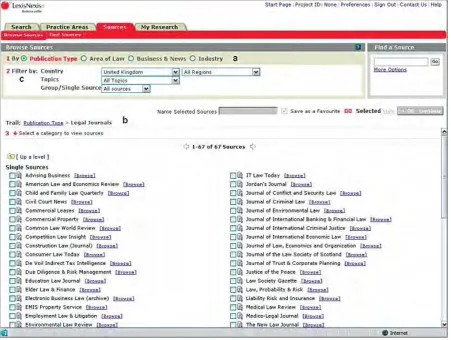
16 Page numbers differ from published version FIG. 3. Browsable list of sources in LexisNexis Butterworths, listed by ‘publication type.’
In which additional ways might the resource support browsing and extracting at the source level?
Although LNB provides comprehensive support for browsing and extracting at the source level, the resource might support this behavior/ level further by allowing legal professionals to browse by other aspects of source meta-data that they deem to be important. For example, by when the first or most recent document in the source was published (i.e., browsing by source coverage dates).
In which way(s) does the resource currently support browsing and extracting at the document level?
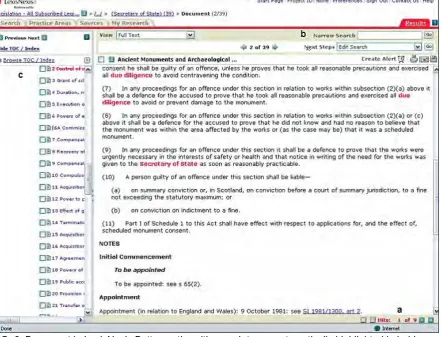
As well assupporting browsing and extracting at the source level, LNBalso provides comprehensive support for browsing sources inorder to extract documents. Clicking on the “browse” hyperlinknext to any of the listed sources in Figure 3 allows users to view documents contained within the source (albeit after drilling down several more levels). Another way that LNB supports browsing and extracting at the document level is illustrated by the “browse TOC/index” sidebar in Figure 4(labelled
17 Page numbers differ from published version
FIG. 4. Table of Contents/Index sidebar in LexisNexis Butterworths, which allows users to browse documents from the current source.
[image:18.595.74.522.71.412.2]In which additional ways might the resource support browsing and extracting at the document level? Despite strong coverage for browsing and extracting at the document level, there are additional ways that these behaviors might be supported at this level. Figure 5 illustrates the keywords listed at the top of a legal case in LNB. The resource currently facilitates browsing to other documents listed as part of the keywords (in the case of Figure 5, the Employment Rights Act 1996). However, there is also scope to allow browsing and extracting by keyword and other items of document metadata.
[image:18.595.71.527.558.672.2]18 Page numbers differ from published version
FIG. 6. Document in LexisNexis Butterworths with search terms automatically highlighted in bold.
For example, it may be possible to allow users to click on a keyword and be presented with other documents that are related to the keyword (whether those documents be cases, or other types of document such as legislation or journal articles). There may also be scope to provide, for legal case reports, the facility to browse to all other cases involving a particular party in the currently displayed case (for example, Secretary of State for Trade and Industry in Figure 5), all other cases with the same judge presiding or all other cases with the same counsel. Similarly, for legal journal articles, there may be scope to find all other articles written by the same author as the currently displayed article. In which way(s) does the resource currently support browsing and extracting at the content
level? As with the other levels, LNB also provides a considerable amount of support for browsing and extracting at the content level. As illustrated in Figure 6, users’ search terms are automatically highlighted in bold in the full-text of a document, and it is possible to cycle through each occurrence of the search terms by clicking on the small arrows in the bottom-right-hand-corner of the screen (labelled a).
19 Page numbers differ from published version
necessarily lead to a holistically more usable resource, and care must be taken to ensure that a balance is struck between the functionality supported by the resource (and the resultant complexity arising from this support) and the overall usability of the resource. This provides a case for conducting both functionality and usability evaluations of resources. In the next section, we shift our focus from functionality to usability and present an example of an IB usability evaluation of LNB.
Example IB Usability Evaluation of an Electronic Legal Resource
We now present another example, this time of analysing think-aloud data as part of an IB usability
evaluation. Note that although the process of conducting an IB usability evaluation also involves setting tasks to users and collecting the data, we discuss only the data analysis process in this example. The think-aloud data is based on a trainee solicitor who worked for a small London law firm, using the same electronic resource as in the previous example (LNB). The trainee was asked to use the resource to perform one of the tasks that is set as part of a recommended IB usability evaluation related to updating behavior. This task was to try and find out if a particular case is still good law. In order to complete the updating task, the trainee chose to examine a case called White vs. White. The trainee had used LNB only a few times before as part of a legal practice course. The trainee’s novice status proved useful in yielding usability data that we hypothesize might not have been obtained from a more experienced user.
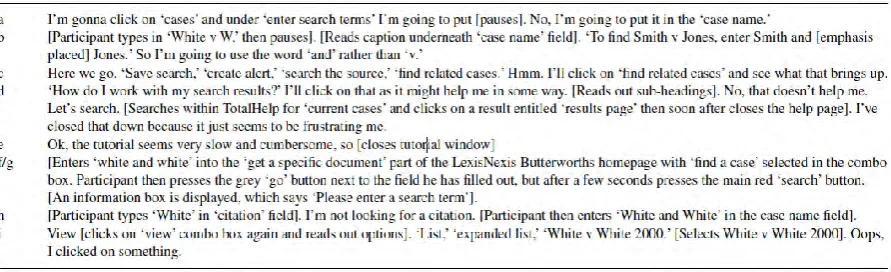
In this example, we provide a description of how the trainee solicitor went about the updating task. This serves as a summary of the written transcript of the trainee performing the task, presented in Appendix C. Throughout our description, we also discuss the usability issues arising from the actions and comments made by the trainee while performing the task. The usability data is summarized on the IB usability form presented in Appendix B. The usability data on the form can be cross-referenced to highlighted sections of the transcript. Each highlighted section of the transcript in Appendix C is marked with a letter, which corresponds to a row (i.e., a usability issue) on the usability form in Appendix B.
It is important to note that there is an element of subjectivity involved in identifying usability issues related to complex electronic resources such as LNB. Therefore, different evaluators are likely to identify different usability issues (and potentially differ on their subjective ratings of the severity and ease of addressing each issue). This “evaluator effect” is evidenced by Hertzum and Jacobsen (2001), who asked four evaluators to select the ten most severe from those they had identified but found that none of the severe issues appeared on all four evaluators’ list of top-ten issues. It therefore follows that this example evaluation should not be regarded as the sole or most authoritative interpretation of the trainee solicitor’s think-aloud data but as one possible interpretation of the data.
Description of How the Trainee Solicitor Went About Performing the Updating Task and Discussion of the Resultant Usability Data
The trainee solicitor began by stating that he wanted to find out whether an ancillary relief case, fought by the parties White and White, was still good law. He clicked on the “cases” tab and mentioned that he was about to type the party names in the “enter search terms” field, as opposed to the “case name” field (which he soon realized would have been a more appropriate choice). This suggests a potential usability issue as the case search page did not make it immediately clear to the user in which segmented field to enter their search query. The trainee’s comments and actions related to this issue are marked with the letter a in the full transcript of the think-aloud session in Appendix C and in Table 5 (which presents only the comments and actions that suggest a usability issue, not the full transcript). Each usability issue is also summarized in a row on the usability form in Appendix B. As the trainee noticed the correct field within a couple of seconds, this issue is not deemed to be severe. Also, as the trainee quickly noticed the error, this does not suggest that the segmented fields are poorly labelled. As it is not immediately clear what caused the trainee difficulties, this issue would likely take a large amount of effort to address.
The trainee continued by typing “White vW” in the “case name” segmented field, then read a caption underneath the field that instructs users on the correct syntax to use when searching for cases (i.e.,
20 Page numbers differ from published version
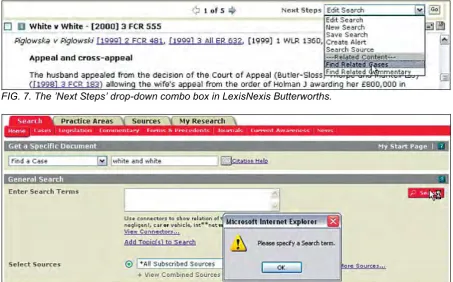
White vs. White case, and the trainee began by reading part of the case aloud. The trainee then wondered how [he could] check to see if the case has been updated or not and clicked first on the “view” drop-down combo box, reading the options aloud, and then on the “next steps” combo box (pictured in Figure 7). Again, he chose to read the options aloud and selected the “find related cases” option to see what that brings up. This suggests the actions facilitated by the “next steps” combo may not be as transparent as they could be, an issue that we deem to be quite severe and moderately difficult to address. This relates to letter c in Appendix B and Table 5.
The trainee was then presented with a list of “related cases,” which he scrolled through. He then selected one of the cases in the list, “Wood vs. Rost,” and noticed a reference and hyperlink to the “White vs. White” case, which he selected. Feeling, as he put it, “a bit stuck,” he clicked on “help” but did not find anything that would assist him to perform the task at hand. After a few minutes, he closed the help page as it “[seemed] to be frustrating” him. He then tried viewing a tutorial, but after a few minutes closed the tutorial too, commenting that it “seems very slow and cumbersome.” These are both usability issues that we deem to be quite severe if only because they caused the trainee frustration. We deem them to be moderately difficult to address as although updating tasks are important for lawyers, it is a considerable challenge for help systems to provide the required assistance in a useful format without patronising or frustrating users. These issues relate to letters d
and e in Appendix B and Table 5.
[image:21.595.75.521.184.320.2]After closing the tutorial screen, the trainee decided to try searching again and selected “find a case” from the “get a specific document” combo box (see Figure 8). However, the trainee did not notice the “go” submit button turn grey after he submitted the search and, possibly assuming he had clicked on the wrong submit button, clicked on a “search” button that was not related to the current search field. Figure 8 illustrates the trainee clicking on the unrelated “search” button and receiving a popup error message. This suggests that the relationship between search fields and their associated search buttons may not be as clear as it could be. This usability issue (letter f ) is, in our opinion, very severe and would require moderate effort to address (perhaps by hiding or greying-out submit buttons that are not relevant to the search fields currently in use). The trainee not noticing the “go” button turning grey can be regarded as a separate usability issue (letter g), associated with the resource providing potentially unclear feedback. We deem this issue to be quite severe and suggest it would require moderate effort to address. The trainee then dismissed the popup box, returned to the “case search” page, and briefly entered a party name in the “citation” field before correcting the error (which was identical to an error made towards the beginning of the task—letter h). Like related usability issue a, we deem this issue to be non-severe but difficult to address. Next, the trainee ticked “House of Lords” in the “court” selection box, and after conducting the search, filtered the results in the same way as earlier in the task, briefly pausing to tick the tick-box beside the “White vs. White” case and press “view tagged’ to check his hypothesis that it would “be the same as if [he] just clicked on it.” The trainee’s hypothesis was confirmed when the full-text of the White vs. White case was displayed. The trainee then read the “next steps” combo box options aloud for the second time and then selected “White v. White 2000” from the “view” combo, which re-loaded the full-text of the case. This seemed to confuse the trainee, who stated “oops, I clicked on something.” This suggests that the effect of selecting the current document from the “view” combo may be unclear. This is a usability issue (letter
21 Page numbers differ from published version FIG. 7. The ’Next Steps’ drop-down combo box in LexisNexis Butterworths.
FIG. 8. Popup error message displayed by LexisNexis Butterworths when a search is submitted without anything in the ‘enter search terms’ field.
Benefits of Using the IB Functionality and Usability Methods
We believe the key benefits of using the IB functionality and usability methods are related to those aspects of the methods that make them novel. For example, because the methods are based on
empirically observed IBs, they allow evaluators to take a truly user-centred as opposed to system-centred focus on improving usability and providing an appropriate range of functionality. Similarly, because the methods specialize in facilitating the evaluation of electronic resources and not other types of interactive system, they allow evaluators to focus on functionality and usability-related issues that are specific to or particularly problematic with these types of systems. For example, issues to do with “accessing” behavior are particularly important for developers of electronic resources to consider as these resources are not always accessed in a straightforward manner like an e-commerce or other Web site might be. Similarly, there are few other types of interactive systems where it might be important to consider providing the functionality to restrict access at a variety of levels (e.g., access to the resource itself, access to particular sources within the resource, access to particular documents). One should note, however, that addressing access issues may be not necessarily be within developers’ control (see Bates, 2002; Blandford, Gow, Buchanan, Rimmer, &Warwick, 2007).
Other benefits, which we have already discussed, include the extensibility and flexibility of the methods. To recap, the IB methods can be tailored in two main ways. First, particular behaviors/levels can be included or excluded from both functionality and usability evaluations depending on the current domain or focus. Second, evaluations can be conducted on entire resources or particular parts of a resource. Modularity, scalability, flexibility, and customizability are all highlighted as important features of methods by Garzotto and Perrone (2007). We have also previously discussed the highly structured