i
INTERACTIVE OBJECTS FOR VIRTUAL REALITY (VR) USING OCULUS RIFT AND MOTION SENSOR
LOO KUN KHENG
This Report Is Submitted In Partial Fulfilment of Requirements For The Bachelor Degree in Electronic Engineering (Computer Engineering)
Fakulti Kejuruteraan Elektronik dan Kejuruteraan Komputer Universiti Teknikal Malaysia Melaka
v
ACKNOWLEDGEMENT
vi
ABSTRACT
vii
ABSTRAK
Realiti Virtual adalah merupakan pola terkini di mana semua orang mengejar teknologi tinggi untuk paparan yang unggul dan interaktif. Kewujudan Pokemon Go dan Oculus Rift terbukti bahawa dunia boleh menerima Realiti Virtual dan Realiti Tambahan. Idea
ini adalah untuk mewujudkan objek interaktif untuk Realiti Virtual menggunakan
Oculus Rift dan sensor gerakan. Oleh itu, tujuan projek ini adalah untuk memberi
tumpuan kepada objek interaktif untuk pembelajaran interaktif. Pada masa kini, pembanguan Realiti Virtual dengan pengesanan isyarat tangan adalah tidak tepat. Oleh itu, saiz dan kedudukan model tangan virtual hendaklah padan dengan tangan pengguna untuk meningkatkan ketepatan isyarat tangan. Reka cipta dunia Realiti Virtual berdasarkan pembelajaran direka dengan menggunakan Unity 5. Objek interaktif adalah direka dengan ciri-ciri dalam Unity 5 components. 3D paksi adalah
komponen utama dalam penentukuran Leap Motion. Unity 5 dan C # pengaturcaraan
adalah digunakan untuk menentukur Leap Motion. Projek ini menghasilkan keputusan
viii
TABLE OF CONTENT
CHAPTER CONTENT PAGE
PROJECT TITLE i
REPORT STATUS APPROVAL FORM ii
DECLARATION iii
ACKNOWLEDGEMENT v
ABSTRACT vi
ABSTRAK vii
TABLE OF CONTENT viii
LIST OF TABLES xi
LIST OF FIGURES xii
LIST OF ABBREVIATIONS xv
LIST OF APPENDIX xvi
I INTRODUCTION
1.1 Project Background 1
1.2 Problem Statement 2
1.3 Objectives 3
1.4 Scope 4
ix
II LITERATURE REVIEW
2.1 Virtual Reality (VR) 5
2.2 VR Evolution 6
2.2.1 Panoramic paintings and stereoscopic 6 3D display
2.2.2 The VR HMD for Vision, Audio and Tactile 6
2.2.3 Augmented Reality (AR) 7
2.3 Oculus Rift 8
2.4 Types of Oculus Rift 12
2.5 Leap Motion Controller 14
2.6 Types of Motion Sensor 16
2.7 Vuforia 17
2.8 Summary 18
III METHODOLOGY
3.1 System Overview 19
3.2 Block diagram of Project 21
3.3 Setup and flow chart of the project implementation 21
3.4 VR environment Design 26
3.4.1 The steps of Creating VR environment 32 3.5 Integration Between Oculus Rift DK2 39
and Leap Motion
3.6 The accuracy of hand tracking 44
3.7 Compile, build and run 36
3.8 Summary 45
IV RESULT
4.1 The accuracy of the hand tracking 46 4.2 Virtual Reality Environment and the Interaction 47
4.2.1 Opening of Newton scene 48
4.2.2 Newton World scene 49
4.2.3 Ending scene 54
4.3 Interaction between user with the interactive object 55
x
V CONCLUSION
5.1 Conclusion 60
5.2 Future development 61
xi
LIST OF TABLES
NO TITLE PAGE
xii
LIST OF FIGURES
NO TITLE PAGE
1.1 Project Flow 2
1.2 Evolution of Computer 2
1.3 Evolution of Camera 2
1.4 Evolution of Learning Process (no change) 3
2.1 AR application 7
2.2 Body of Oculus Rift 8
2.3 The inner component of the Oculus Rift DK2 9
2.4 The View 10
2.5 The interpapillary distance of the HMD 10
2.6 The FOV of Oculus Rift 11
2.7 The Leap Motion Controller 14
2.8 The infra-red camera of the Leap Motion Controller 15
2.9 Component of Leap Motion Controller 15
3.1 Overview of the System 19
3.2 Front view of Oculus Rift DK2 20
3.3 Top view of Oculus Rift DK2 20
3.4 Block diagram of the project 21
3.5 The connection of the ports in CPU 22
3.6 Result of wrong connection 23
3.7 The overall flow chart of the project 24
3.8 Calibration of the leap motion 25
3.9 The workspace of VR 26
3.10 The flow chart of scene 1 27
xiii
3.13 The flow chart of the interactive object in scene 2 29 3.14 The flow chart of second interactive object in scene 2 30 3.15 The flow chart of the restart button in scene 2 31
3.16 The flow chart of scene 3 32
3.17 Unity 5 interface 33
3.18 The 3D objects component 34
3.19 The light component 35
3.20 The text component 35
3.21 Transform component of GameObject 36
3.22 The Main Camera Component 37
3.23 Adding new component 37
3.24 Oculus Rift DK2 with attached Leap Motion 39
3.25 Option of allow unknow source 39
3.26 Leap Motion Asset Control Panel 40
3.27 Hand modelling of leap motion work perfectly in VR 40 3.28 The detection of hand in leap motion controller 41
3.29 Leap motion core assets 42
3.30 Calibration Verification 42
3.31 Triggering with poor accuracy 43
3.32 Triggering with high accuracy 43
3.33 The adjusting of position and size 44
3.34 Build settings window 44
3.35 The game view of Unity and Oculus Rift 45
4.1 The not accurate hand tracking 46
4.2 The poor sizing of hand model 47
4.3 High accuracy hand model (after calibration) 39
4.4 Opening Scene 48
4.5 Newton world scene 49
4.6 First interactive object of the scene 50 4.7 Second interactive object of the scene 51
4.8 Before touch 52
4.9 After touch 52
xiv
4.11 Restart Cube 54
4.12 Ending scene 54
4.13 First tracking object 55
4.14 First pop out 55
4.15 Second tracking object 56
4.16 Second pop out 56
4.17 Third tracking object 57
4.18 Third pop out 57
xv
LIST OF ABBREVIATIONS
VR Virtual Reality
AR Augmented Reality
HMD Head Mounted Device
USB Universal Serial Bus
VGA Video Graphics Array
DVI Digital Visual Interface
HDMI High Definition Multimedia Interface
DK2 Developer Kits
VPL Visual Programming Lab
FOV Field of View
GUI Graphical User Interface
PCB Printed Circuit Board
RF Radio Frequency
LED Light-emitting diode
OLED Organic light-emitting diode
RAM Random access memory
xvi
LIST OF APPENDIX
Newton world Coding 58
1
CHAPTER 1
INTRODUCTION
1.1 Project Background
Virtual Reality (VR) is an artificial environment that is created with software and presented to the user in such a way that the user suspends belief and accepts it as a real environment. Basically, VR will give user a virtual world that acts as the second world which giving a great visual experience. Inside the VR world, there is a lot of interactive object. The objects can take actions when the user input commands to it. For example, touching or grabbing it.
2
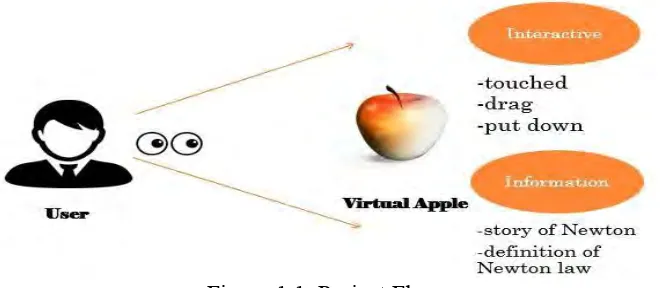
Figure 1.1: Project Flow
Figure 1.1 is the project flow of this project. User wears a head mounted device (HMD) for the display of virtual environment. The immersive interactive object will be pop out in the view of user. For example, user can interact with the virtual apple in their view by using hand movement in front of motion sensor. Command is given to the virtual apple by touching it, dragging it or grabbing it. This result the feedback of the virtual apple like displaying the story of Newton and definition of Newton law.
[image:18.595.207.432.564.659.2]1.2 Problem Statement
Figure 1.2: Evolution of Computer
3
Figure 1.4: Evolution of Learning Process (no change)
From past till now, the things are keep on changing to have a better experience. A personal computer with varies features from a personal computer with limited feature as shown in Figure 1.2. A portable and small size camera is transformed from a huge size of camera as shown in Figure 1.3. But, the way of study environment is the same no matter old time or recent time as shown in Figure 1.4. This shown that there is no obvious transformation of study environment. Therefore, the problem is the education learning process today is lack of evolution. Students will feel boring and lack of attention when they study like a robot every day. The next problem is the accuracy of the hand gesture detection. The triggering accuracy is not stable.
1.3 Objectives
The aim of this project is to create interactive objects for Virtual Reality that focus in education learning. In order to achieve this, there are three objectives as stated below.
i. To design and develop the interactive objects by using Oculus Rift and motion sensor.
ii. To implement adaptive 3D objects in Virtual Reality for interactive learning
4
1.4 Scope of Project
This project included two parts which are virtual reality design and calibration of hand gesture sensor. For virtual reality, Oculus Rift DK2 is used as the headset hardware to display the VR. Unity 5 and Microsoft Visual Studio act as software tool in coding writing and execution. For calibration of hand gesture sensor, Leap motion is the hardware to sensor the hand movement. The C# and Unity 5 are used to coordinate the hand modelling position.
The limitation of this project is the version of the Unity 5 and Leap Motion. In order to use the latest asset from the asset library, the version of the Unity 5 and Leap Motion needed to be updated to latest version. Unfortunately, the work station is not meet the requirement of the latest version of leap motion due to the installation of the old version of Leap Motion. Therefore, limited assets can be imported into Unity 5 for VR design. Besides, the functionality of the Leap Motion is not perfect. This is because the Leap Motion cannot be detected if the Leap Motion is overheated. Therefore, the Leap Motion needed to be cooled down for few minutes after doing several experiments.
1.5 Report structure
This report separated into five chapters as stated. Chapter 1 is the Introduction of the project. This chapter covers the overview of the project such as project background, problem statement, objective and scope. Chapter 2 is the Literature Review. This chapter will discuss the past studies related to the project. Background theory will be included in this chapter. Chapter 3 is the Methodology. All relevant experiments and techniques used in the project will be discussed in Chapter 3. The details of the flowchart of the system design will be explained in this chapter. Chapter 4 is the Results and Discussion. The result of the project from experiments will be recorded and interpreted in Chapter 4. This chapter also will analyze and discuss the data which get through the experiment. Chapter 5 is the Conclusion and Recommendation. This chapter will make a conclusion from the project and recommendation for the future plan which related to the project.
5
CHAPTER 2
LITERATURE REVIEW
2.1 Virtual Reality (VR)
6
remember new knowledge for all those who prefer a visual, auditory or kinaesthetic learning style [5]. Learning in an environment that providing a good visual, audio and kinaesthetic is much more intractable. This can give the user a clear vision of the concept of educational material rather than imagine it. Therefore, the brain cell of body will receive and store the information more easily and efficiently.
2.2 VR Evolution
Virtual reality has beginnings that preceded the time that the concept was coined and formalized. In this detailed history of virtual reality of how technology has evolved and how key pioneers have paved the path for virtual reality today.
2.2.1 Panoramic paintings and stereoscopic 3D display
Virtual reality as a means of creating the illusion for the user. The earlier attempt at virtual reality is the 360-degree murals (or panoramic paintings) from the nineteenth century. These paintings were intended to fill the viewer’s entire field of vision, making the user feel present at some historical event or scene. After that Charles Wheatstone [6] demonstrated brain can process the different two-dimensional images from each eye into a single object of three dimensions. Viewing two side by side stereoscopic images or photos through a stereoscope gave the user a sense of depth and immersion.
2.2.2 The VR HMD for Vision, Audio and Tactile
7
Feedback [8]. All these 3 elements are providing an interactive virtual world for the ability of the users to interact with objects in the virtual world in realistic way.
[image:23.595.127.506.183.437.2]2.2.3 Augmented Reality (AR)
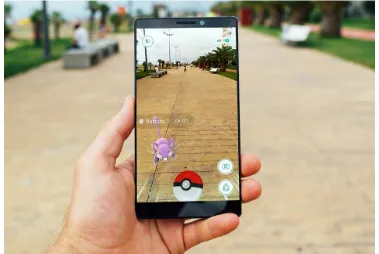
Figure 2.1 AR application
8
[image:24.595.159.475.97.275.2]2.3 Oculus Rift
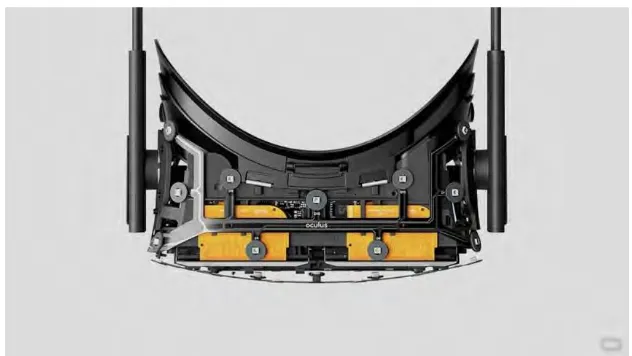
Figure 2.2 Body of Oculus Rift