RIT Scholar Works
Theses
Thesis/Dissertation Collections
6-2016
Android Malware Detection Using Category-Based
Machine Learning Classifiers
Huda Ali Alatwi
Follow this and additional works at:
http://scholarworks.rit.edu/theses
This Thesis is brought to you for free and open access by the Thesis/Dissertation Collections at RIT Scholar Works. It has been accepted for inclusion in Theses by an authorized administrator of RIT Scholar Works. For more information, please [email protected].
Recommended Citation
Rochester Institute of Technology
Masters Thesis
Android Malware Detection
Using Category-Based
Machine Learning Classifiers
A thesis submitted in fulfilment of the requirements
for the degree of Master of Science in Computing Security
Supervised by
Tae Oh, Bill Stackpole, and Chaim Sanders
Department of Computing Security
B. Thomas Golisano College of Computing and Information Sciences
Android Malware Detection
Using Category-Based Machine Learning Classifiers
by Huda Ali Alatwi
Android malware growth has been increasing dramatically along with increasing the
diversity and complicity of their developing techniques. Machine learning techniques
are the current methods to model patterns of static features and dynamic behaviors
of Android malware. Whereas the accuracy rates of the machine learning classifiers
increase with increasing the quality of the features, we relate between the apps’ features
and the features that are needed to deliver its category’s functionality. Differently, our
classification approach defines legitimate static features for benign apps under a specific
category as opposite to identifying malicious patterns. We utilize the features of the
top rated apps in a specific category to train a malware detection classifier for that
given category. Android apps stores organize apps into different categories, for instance,
26 categories on Google Play Store. Each category has its distinct functionalities which
means the apps under a specific category are similar in their static and dynamic features.
In general, benign apps under a certain category tend to share a common set of features.
On the contrary, malicious apps tend to request abnormal features, less or more than
what is common for the category that they belong to. This study proposes
category-based machine learning classifiers to enhance the performance of classification models
at detecting malicious apps under a certain category. The intensive machine learning
experiments proved that category-based classifiers report a remarkable higher average
Contents
Contents ii
List of Figures iv
List of Tables vi
1 Preface 1
1.1 Introduction . . . 1
1.2 Motivations . . . 2
1.3 Scope . . . 3
1.4 Contribution . . . 3
1.5 Thesis Structure . . . 4
2 Background 5 2.1 Android Architecture . . . 6
2.2 Android Application Components . . . 8
2.3 Android Security Features . . . 8
2.4 Android Permission Model . . . 9
2.5 Android Permission Protection Level . . . 10
2.6 Android Malware . . . 11
3 Related Work 12 3.1 Static Analysis . . . 12
3.2 Dynamic Analysis . . . 15
4 Design & Methodology 17 4.1 Data Collection . . . 18
4.2 Reverse Engineering . . . 19
4.3 Features Parsing . . . 20
4.3.1 Permissions . . . 20
4.3.2 Broadcast Receivers . . . 22
4.3.3 APIs Classes . . . 23
4.4 Binary Vector Generation . . . 24
4.5 Features Selection . . . 25
4.6 Classification Models . . . 28
4.6.1 AdaBoost . . . 28
4.6.2 Support Vector Machines . . . 29
4.6.3 Random Forest . . . 30
5 Experiments & Analysis Results 31
5.1 Experiments’ Environment . . . 32
5.2 Experiments’ Settings . . . 32
5.3 Evaluation Measurements . . . 32
5.4 Testing Apps from all categories with allCateg Classifiers . . . 34
5.5 Testing Music Apps with musicCateg & allCateg Classifiers . . . 36
5.5.1 Support Vectors Machine . . . 36
5.5.2 RandomForest . . . 36
5.5.3 AdaBoost . . . 36
5.6 Evaluating Performance of musicCateg & allCateg Classifiers . . . 37
5.6.1 Proving Outperformance of Category-based Classifier ”musicCateg” . . . 40
5.7 Testing Personalization Apps with personaCateg & allCateg Classifiers . . 41
5.7.1 Support Vector Machines . . . 41
5.7.2 RandomForest . . . 41
5.7.3 AdaBoost . . . 41
5.8 Evaluating Performance of personaCateg & allCateg Classifiers . . . 42
5.8.1 Proving Outperformance of Category-based Classifier ”personaCateg” . . . 45
6 Conclusion 46
A Building Classification Models in -R- 48
List of Figures
2.1 Android’s Stack Structure . . . 7
2.2 AndroidManifest.xml file . . . 10
4.1 The framwork of the study . . . 18
4.2 Permissions Requested by Malware . . . 20
4.3 Top 10 Requested Permissions in ”allCateg” Dataset . . . 21
4.4 Top 10 Requested Permissions in ”msicCateg” Dataset . . . 21
4.5 Top 10 Requested Permissions in ”personaCateg” Dataset . . . 22
4.6 Broadcasts Mechanism in Android . . . 22
4.7 Broadcasts Receivers requested by malicious apps . . . 23
4.8 Top 10 Broadcast Receivers in ”allCateg” Dataset . . . 23
4.9 Top 10 Broadcast Receivers in ”musicCateg” Dataset . . . 24
4.10 APIs requested by malicious apps . . . 24
4.11 Top 10 Requested APIs in ”allCateg” Dataset . . . 25
4.12 Top 10 Requested APIs in ”musicCateg” Dataset . . . 25
4.13 Top 10 Requested APIs in ”personaCateg” Dataset . . . 26
4.14 Apps’ Binary Vectors . . . 27
4.15 Features Selection Approaches . . . 27
4.16 AdaBoost . . . 28
4.17 Support Vector Machines . . . 29
4.18 Random Forests . . . 30
5.1 Accuracy of allCateg Classifiers . . . 34
5.2 Fmeasure allCateg Classifiers . . . 35
5.3 ROC curve for Testing all categories apps with allCateg-SVM classifier . . 35
5.4 Accuracy of ”musicCateg” &”allCateg” Classifiers . . . 37
5.5 Fmeasure of musicCateg & allCateg Classifiers . . . 37
5.6 ROC curve for Testing music apps with allCateg-SVM classifier . . . 38
5.7 ROC curve for Testing music apps with allCateg-SVM classifier . . . 38
5.8 t.test of F-measure of musicCateg-SVM & allCateg-SVM classifiers . . . . 39
5.9 t.test of F-measure of musicCateg-RF & allCateg-RF classifiers . . . 39
5.10 t.test of F-measure of musicCateg-Ada & allCateg-Ada classifiers . . . 39
5.11 Accuracy of ”personaCateg” &”allCateg” Classifiers . . . 42
5.12 Fmeasure of ”personaCateg” &”allCateg” Classifiers . . . 42
5.13 ROC curve for Testing personalization apps with allCateg-SVM classifier 43 5.14 ROC curve for Testing personalization apps with personaCateg-SVM clas-sifier . . . 43
5.15 t.test of F-measure of personaCateg-SVM & allCateg-SVM classifiers . . . 44
List of Tables
2.1 Android Malware Families . . . 11
4.1 Datasets allCateg, musicCateg, personaCateg . . . 19
4.2 Categories’ Descriptions . . . 19
4.3 Reverse Engineering Tools . . . 19
4.4 Numbers of Selected Features . . . 26
5.1 Experiments’ Environment . . . 32
5.2 Confusion Matrix . . . 33
5.3 Testing all categories app with allCateg classifiers . . . 34
5.4 Testing music apps with musicCateg & allCateg SVM classifers . . . 36
5.5 Testing music apps with musicCateg & allCateg RF classifiers . . . 36
5.6 Testing music apps with musicCateg & allCateg adaBoost classifiers . . . 36 5.7 Testing personalization apps with personaCateg & allCateg SVM classifiers 41 5.8 Testing personalization apps with personaCateg & allCateg RF classifiers 41 5.9 Testing personalization apps with personaCateg & allCateg Ada classifiers 41
Preface
1.1
Introduction
According to International Data Corporation (IDC), Android OS is the most popular
smartphone platform with 82.2% of the market share of smartphones, while 13.9% for
iOS apple in the second quarter of 2015 [3]. Statistically speaking, it is also the first
targeted platform by malware authors seeking to take the control over millions of Android
smartphones over the world. Due to the popularity of Android’s smartphones, its apps’
security is a serious issue concerning 80% of smartphones users.
Android is an open source development environment that offers a rich SDK that
enables developers to deploy their own apps and distribute them through Android apps
centers. Android’s popularity is a result of being an open source, third-party distribution
centers, a rich SDK, and the popularity of Java as a programing language. Importantly,
due to this open environment, malaware authors can develop malicious apps that abuse
the features that the platform offers or pack a legitimate app with a piece of malicious
code; besides, exploiting vulnerabilities in the platform, hardware, or other installed
apps to lunch malicious behaviors. Mainly, malware authors seek access confidential
data of a device’s user, monetary benefits via premium SMS, or joining the device to a
botnet. Even legitimate apps introduce the risk of privacy-invading; Mcafee reported in
Q1 2014 that 82% of Android apps track user’s and 80% gather location data.
Research studies in the Android malware detection field work in three approaches
static, dynamic or hybrid. In static analysis, malware is disassembled into a source code
from where specific features are extracted. In dynamic analysis, malware is monitored
at run-time in a virtual environment. In the both approaches, machine learning
algo-rithms have been used to build classification models by training classifiers with datasets
Chapter 1. Preface 2
of mlaware features that collected from static or dynamic analysis. The learned
clas-sification models are then used to detect malicious apps and classify them into their
families.
In this study, we approach the problem differently by utilizing the features of
be-nign apps for malware detection. We relate between the features that the app requests
and the common features for its category. Android apps stores organize apps into
dif-ferent categories; for example, Google play store organizes apps in 26 categories such
as: ”Health & Fitness”, ”News & Magazine”, ”Books & References”, ”Music & Audio”,
etc. Each category has its distinct functionalities which means the apps under a certain
category share similar features. One group of these features are the permissions;
per-missions are the privileges that enable apps to access the system’s resources to perform
their functions. Each built-in permission is responsible for providing the capabilities to
execute a particular process. Apps belong to a specific category deliver the same
func-tionality as a result they require a common combination of permissions. For instance,
apps under ”Communication” category commonly request READ CONTACTS but it is
un-common if it is requested by apps under ”News & Magazines”. In general, benign apps
under a certain category tend to have a common set of features: permissions, intents
filters, hardware components, broadcast receivers, APIs, etc. On the contrary,
mali-cious apps tend to request abnormal features, less or more than what is common for the
category that they belong to. Repeatedly from that point of view, this study proposes
category-based machine learning classifiers to enhance the performance of classification
models at detecting malicious apps under a certain category. .
1.2
Motivations
Android malware growth has been increasing dramatically along with increasing of the
diversity and complicity of their developing techniques. According to F-Secure, a
com-puter security company, Android had the biggest share of smartphone malware by 97%
in 2014 [9]. Android global market share of smartphone industry is 78% which
rep-resents the biggest share among other smartphone platforms [3]. Statically speaking,
Android apps’ security concerns one billion of active users over the world [8]. Due to
the openness of Android environment, there is a remarkable increase in the number of
published Android apps. According to the statistics (staista), the number of available
apps to download in Google play stores was around 1,500,000 in 2014 [2].
Static analysis can report a high accuracy rate in detection malware; and it is
rel-atively cheap compared to dynamic analysis in terms of effort, time, and computational
on Android. In the both approaches, static and dynamic, they are used to model
pat-terns of static features and dynamic behaviors of malware. Mostly, the researches focus
on training supervised machine learning classifiers to detect, classify the malware to a
known malware family, or using semi-supervised learning to discover a new one. In fact,
machine learning techniques can report remarkable accuracy rates at detecting malicious
apps depending on the quality of the features that used for training the classifiers e.g how
specific they are. Whereas the accuracy rates of the classifiers increase with increasing
the quality of the features, we relate between the apps’ features and the features that
are needed to deliver its category’s functionality to detect malicious patterns. In other
words, we train a malware detection classifier for each category, separately.
1.3
Scope
This study is a static analysis that uses the features that can be extracted from the
source codes of the apps’ .apk files. We parsed three group of features from each
apps in our datasets: permissions, broadcast receivers, and APIs. Whereas we
pro-pose category-based classifiers to improve the performance of the classification models
at detecting malicious apps under a certain category, we worked on two categories on
the Google Play Store ”Music & Audio” and ”Personalization”. We built three datasets
of apps features: apps from all categories (allCateg), apps from ”Music & Audio” category (musicCateg), and apps from ”Personalization” category(personaCateg); in each dataset the benign apps were downloaded from the top rated apps on the Google
Play Store while malicious apps from virushare. For each dataset, we trained three
ma-chine learning classifiers: Support Vector Mama-chines, RandomForest, and AdaBootsM.
We tested the classifiers with two datasets of apps from ”Music & Audio” and
”Personal-ization” categories. By evaluating the performance of the classifiers, the category-based
classifiers reported a higher performance by 3.5-4.5% compared to non-category based.
1.4
Contribution
Mostly, research studies in Android malware detection focus on identifying the features
of malicious apps by using machine learning techniques to recognize and model the
malicious patterns of static features and dynamic behaviors of malware. Up to our
knowledge, no researches have worked on relating between the apps’ features and the
features of benign to distinguish benign form malicious ones in the same category.
Dif-ferently, our classification approach defines legitimate static features for benign apps
Chapter 1. Preface 4
features of the top rated apps in a specific category to define a profile of the common sets
of features for that category. In other words, to detect whether or not the app posses the
characteristics of benign, we relate between the app’s features and the features that are
needed to deliver its category’s functionalities. Android stores organize apps into
differ-ent categories; 26 categories on the Google Play Store, for example. In each category, the
apps deliver a similar functionality as a result the they tend to request a common set of
features like same permissions, APIs, hardware components, broadcast receivers, intents
filters,..etc. On the contrary, malicious apps tend to have abnormal features, less or
more than what is common for the category that they belong to. Whereas the accuracy
rates of the classifiers increase with increasing the quality of the features, we propose
category-based classifiers to enhance the performance of machine learning algorithms at
detecting malicious apps under a given category.
1.5
Thesis Structure
The structure of this thesis is organized in six chapters. Chapter 2 shows a brief
back-ground about Android OS which includes architecture, security features, application
components, permissions model, and permissions protection levels. Chapter 3 presents
related work has been done in static and dynamic malware detection in Android
environ-ment. Chapter 4 shows the implementation of this study which covers the framework,
used tools, datasets, extracting features, selecting features using features selection
algo-rithms, and training machine learning classifiers. Chapter 5 demonstrates the results,
the significant findings, and performance evaluation of the classifiers. Chapter 6
con-cludes the study work, emphasizes our findings, and suggests further potentials for future
Background
Android is an open-source operating system for mobile phones, tablets, TVs, cars,
em-bedded and wearable devices. It was built based on Linux kernel, developed by Google
and released on September 23, 2008 . As a result of the open environment of Android,
many companies and manufacturers uses it as a platform for their products. Besides,
this environment allows companies to customize the Android system to fit with their
devices needs. Android offers a friendly development environment through a variety
of tools: Android SDK, Android NDK, Android Debug Bridge (ADB), and Android
Developer Tools (Eclipse). Android Software Development Kit (SDK) is updated with
every release of a new version of Android; it provides comprehensive packages of Java
framework classes, libraries, and debuggers for programmers. Also, the SDK offers
An-droid Emulator which enables developers to run and test their apps on different virtual
devices that run different versions of Android OS. Secondly, Android Native
Develop-ment Kit (NDK) is a set of libraries written in C, C++, and other languages can be
loaded into Java code through System.loadLibrary call. Android Debug Bridge (ADB)
is a command line tool in a client-server form that consists of three components: client,
server, and daemon. The client runs on the development machine where the daemon
runs in the background on each emulator or device instance and the server manages
communication between the client and the daemon. ADB enables developers to test
their apps for bugs by connecting the device running the software to a PC and using
terminal commands. Finally, Eclipse is the official Integrated Development Environment
(IDE) to develop Android apps. It provides many features through GUI or command
lines; it allows programmers to develop their apps with different programming languages:
JAVA is widely used for Android apps, C, C++. Google Play Store is the official
dis-tribution center for Android Apps which are developed by Google or third-parties. It
allows Android users to browse, install, and update the apps. Over 50 billion apps
were downloaded by Android users from Google Play Store in 2013 . Unsurprisingly,
Chapter 2. Background 6
the open development environment of Android encourages the developers and even the
attackers to deploy their own applications. Android markets follow specific procedures
that aim to detect and remove malicious apps. For instance, Google Play Store uses
a tool called Bouncer that scans the uploaded apps and applies security measurements
before publishing. The Google Bouncer is a dynamic analysis technique that tests apps
by running them in virtual environments to monitor automatically the app’s behavior.
Even with the security measurements that Google takes, the attackers find their ways
to pass their malicious apps through the scanning system by using hiding techniques
such as encryption and heuristic evasion. Security researchers from Columbia
Univer-sity have exploited vulnerabilities in Google’s Bouncer system. The vulnerabilities allow
the attackers to pass the malware apps to the Android market [6]. The team found
that the examined dynamic and static analysis tools were vulnerable to repackaged and
heuristic evasion based malware. Indeed, Android malware detection is a significant
issue for security researchers; also, it is a serious challenge for Android users’ privacy.
The following sections briefly cover basics of Android OS which include its architecture,
security features, apps components, permissions model and permission protection levels.
2.1
Android Architecture
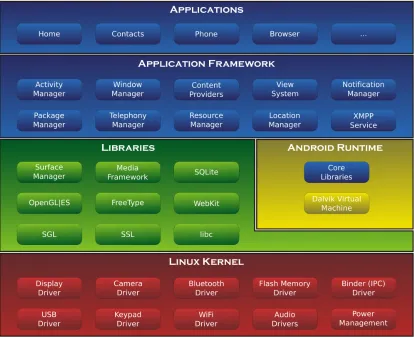
As can be seen in the Figure 2.1, the Android stack consists of four layers that manage
the whole system starting from hardware sensors to the user’s high-level apps. Each
layer provides specific services and groups of programs that run similar functions. The
first layer, the Linux Kernel layer is the most important layer and located at the
bot-tom; it represents the heart of Android system. It provides the OS services and manages
the hardware’s functions such as memory, power, drivers, network stack, security
set-tings, shared libraries and hardware abstraction. The second layer, the native library
layer, provides native libraries which are a set of instructions that manage data
pro-cessing. The native layer provides the open source libraries, such as surface manager,
media framework, SQLite, Webkit, OpenGL—ES, FreeType, and SSL. In short, those
libraries do the following jobs: Surface manager library is for composing windows on the
screen; media framework library is for processing input and output of video and audio
data; SQLite library is for database operations; Webkit is for supporting web browsers;
OpenGL—ES is for supporting high performance 2D and 3D graphics; FreeType is for
fonts support; SSL library is for providing services of SSL and TLS protocols. This
layer also provides the Android runtime libraries which include the core libraries and
the Dalvik VM. The Core libraries are a group of Java core libraries for developing
An-droid apps. The Dalvik VM is the virtual environment for sandboxing the apps where
uses. The third layer, the Application Framework Layer, includes the Android APIs.
The APIs are classes and interfaces for Android apps’ development. This layer interacts
with the running apps and manages the basic functions on the device. The most
impor-tant programs in this layer are activity manager, content provider, telephony manager,
location manager, and resources manager. Each manager is responsible for managing a
specific function. For example, the the activity manager controls life cycle of the apps.
The content provider manages sharing data between the apps. The telephony manager
provides sevices regarding voice calls. The resources manager regulates resources that
are needed for running the apps. Finally, the Application Layer which is the topmost
layer where the phone’s functions are provided to the end-user. The application layer
provide functionalities that include making calls, managing contacts, sending messages,
and browsing web. In this layer, Android provides a set of core applications, such as
[image:15.596.110.524.318.656.2]email client, calendar, browser, maps, contacts, SMS program, gallery, and etc.
Chapter 2. Background 8
2.2
Android Application Components
In the development phase, an Android application consists of two folders and one file:
Class, Resources and AndroidManifest.xml, respectively. The Class folder contains the
apps’ source codes; the Resources folder contains the app’s multimedia;
AndroidMani-fest.xml is the app’s configuration file that lists essential information about the app for
the Android system. The information that is listed in the AndroidManifest.xml file is
as follows: Java package name, the app’s components, hosted processes, permissions,
instrumentation classes, and other libraries. During the compiling phase, tboth folders
and the AndroidManifest.xml file are bundled together to generate the executable file
of the application in .apk format. The structure of Android application consists of four
components: Activity, Service, BroadCastReceiver, and ContentProvider [4]. All those
components are defined by the app’s developer in the AndroidManifest.xml file.
• Activity: defines the user interface is triggered by the user when he interacts with
app’s interface components such as: buttons, menus, icons, checkboxes, etc.
• Service: defines the background processes such as downloading a file or playing
music after closing the app UI. Any component can start a service by calling one
of the two methods:
– StartService(): The service continues running till explicitly stopped.
– BinService(): The service is bound to the component. It continues running as long as the component is running and stops when the component stops.
• BroadCastReceiver: used by the app as a mailbox to receive and respond to the
broadcast messages (intent) of other apps or the system, such as the message is
sent by the system when the battery reaches a low limit.
• ContentProvider: used to store the app’s data and to share it with other apps; it
provides database functions of inserting, deleting, and querying.
2.3
Android Security Features
Android security aims to protect user’s data and phones’ hardware. system, and
soft-ware. The main foundations of the Android’s security are the following: relying on
Linux kernel, applications sandboxing, applications signing, and application-defined and
user-granted permissions. The Linux kernel is commonly trusted to be used in highly
sensitive-security environments. Due to its open environment, Linux security is
and attackers who find vulnerabilities to be exploited. It also offers the ability to
re-move the unnecessary and insecure parts from the kernel. The apps sandboxing feature
isolates the apps’ processes and data from others under a unique UID. In the kernel,
Android gives each app a distinct Linux user ID at installation time. In other words,
each app has a constant unique UID for whole the duration of its life. The same app may
have a different UID on other devices what matters is that two different apps cannot be
assigned with one UID. Because each app has its own UID, they cannot run in the same
process instead they need to run separately under its UID. That isolates the running
process to secure apps from each other. Also, the data of any app is stored under its
UID and is inaccessible by the other apps. The application signing feature, requires that
any apps’ .apk file must be signed by the developer’s certificate to identify the app’s
au-thor. This feature enables the apps to share one UID if they were signed by the same
certificate. It also allows the system to grant or deny the signature-level permissions;
the system grants the signature-level permissions to the requested app, if it is signed
with the same certificate of other apps that declared the permissions. Finally, the
per-mission model that is adopted by Android protects the phone’s resources and functions
be making them accessible only to the apps that are granted with the appropriate
priv-ileges. By default, no apps have permissions to handle the phone’s hardware, software,
functions and data. The apps’ developers need to declare required permissions for the
app’s functionality. At installation time, the users need to grant requested permissions
otherwise the installation is terminated by the system. The next section illustrates the
Android permission model in more detail.
2.4
Android Permission Model
The permissions model is the main security concept that Android security relies on.
Android runs applications separately in sandboxes. Each app is run in an isolated
en-vironment where it has no access to the system’s resources. The permissions must be
given to the app to be able to access and use system resources that are required for its
functionality. All the permissions that must be declared in the AndroidManifest.xml
file by the developer in the development phase. These permissions also must be granted
by the system or the user at the installation time; once they are granted they could
not be changed unless the application is uninstalled by the user. The permissions can
be declared in one or more <permission>tags in the AndroidManifest.xml file; they also must be defined with required and optional attributes. The<label>and < descrip-tion>attributes are the strings that are displayed to the user at installation time. These attributes must be clearly defined to help the user in understanding the privileges that
Chapter 2. Background 10
the system to display the category of the permission to the user. The < protection-Level>attribute is required to identify the security level of the permission; it defines the criticality of the app privileges. The figure below shows the DEADLY ACTIVITY
permission along with its attributes.
Figure 2.2: AndroidManifest.xml file
The permissions model uses the two <uses-permission>and <permission>tags to govern apps’ access to the system resources and other app’s data, respectively. The
<uses-permission>tag defines the permissions that the app needs to access specific data, hardware, software and other system resources. On the other hand, the < per-mission>tag defines the permissions that other apps need to have access to the app’s data and components. In other words, it defines how the app’s components can be
accessible by the other apps.
2.5
Android Permission Protection Level
Android has more than 130 built-in permissions; it also allows developers to declare
new permissions for their apps called dynamic permissions. The built-in permissions
are classified into four security levels: normal, dangerous, signature, and signature or
system.
• “normal”: a low risk permission that enables the app to access to the least critical
system resources; it is automatically granted by the system without notifying the
user.
• “dangerous”: a high risk permission that enables the app to access the user’s
private data and the phone’s hardware, system and software. The dangerous
for granting this kind of permission. The user has to grant the requested
permis-sions under his understanding and acceptance of the consequences, otherwise the
installation process is terminated by the system.
• “signature”: a permission granted by the system only if the app requests a
per-mission that is declared by another app and both apps are signed with the same
certificate. This permission is granted automatically by the system without
noti-fying the user if tboth apps have the same certificate.
• “signtureorsystem”: a permission granted by the system only if the apps are in the
Android system image or signed with the same certificate of the app that declared
the permission. This permission is granted automatically by the system without
notifying the user.
2.6
Android Malware
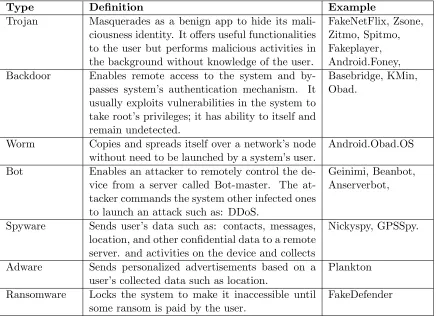
The table below briefly lists most common Android malware types and its characteristics
Type Definition Example
Trojan Masquerades as a benign app to hide its
mali-ciousness identity. It offers useful functionalities to the user but performs malicious activities in the background without knowledge of the user.
FakeNetFlix, Zsone, Zitmo, Spitmo, Fakeplayer, Android.Foney,
Backdoor Enables remote access to the system and
by-passes system’s authentication mechanism. It usually exploits vulnerabilities in the system to take root’s privileges; it has ability to itself and remain undetected.
Basebridge, KMin, Obad.
Worm Copies and spreads itself over a network’s node
without need to be launched by a system’s user.
Android.Obad.OS
Bot Enables an attacker to remotely control the
de-vice from a server called Bot-master. The at-tacker commands the system other infected ones to launch an attack such as: DDoS.
Geinimi, Beanbot, Anserverbot,
Spyware Sends user’s data such as: contacts, messages,
location, and other confidential data to a remote server. and activities on the device and collects
Nickyspy, GPSSpy.
Adware Sends personalized advertisements based on a
user’s collected data such as location.
Plankton
Ransomware Locks the system to make it inaccessible until
some ransom is paid by the user.
[image:19.596.109.545.387.704.2]FakeDefender
Chapter 3
Related Work
In this chapter, we survey some research studies in detection malware in Android
envi-ronment. There are mainly two approaches are used to detect malware: static analysis
and dynamic analysis. Static analysis technique examines the app’s source code
with-out executing it to detect malicious patterns; the executable app is disassembled to the
source code files from where many features are extracted such as: permissions, hardware
components, broadcast receivers, APIs, intents, data flow, control flow, etc. On the other
hand, dynamic analysis examines the app in a run time environment and monitors the
app’s dynamic behavior and the system’s responses; dynamic features are monitored like
network connections, system calls, resources’ usage, etc. Commonly, in both approaches,
the data is collected to train machine learning classifiers to build a separation modeling
between benign and malicious characteristics of the apps. The following sections show
in details some research studies have been conducted in the both approaches.
3.1
Static Analysis
(Seo, Gupta, Sallam, Bertino, & Yim, 2014) proposed (DroidAnalyzer) that uses
per-missions, dangerous APIs and keywords associated with malicious behaviors to detect
potential malicious scripts in Android apps [26]. Lists of common malicious APIs and
keywords were collected by static analysis from a large dataset of Android malware.
These lists are used in the algorithm of DroidAnalyzer which depends on keywords
searching technique. The lists define suspicious keywords are used in malicious actions
such as root exploiting, leakage user private data, cost money through sending SMS or
calling premium numbers. Malware from different families were analyzed to build up
those lists of malicious and suspicious keywords, API, and commands. For instance,
the monetization malware usually contain sendsms() and ocalContentResolver2.delete()
APIs. In case of spyware, that gather user’s SMS, they contain APIs such as
getMes-sageBody(), getOriginatingAddress(), getDateTimeinstance(). The tool mainly takes
the app’s disassembled code as an input and infers the risky APIs and their suspicion
level as an output. The tool scans the apps’ code for matches with the lists; then, it
reports 4 suspicion levels: R, RS, S and C. The level R indicates surely rooting or root
exploit app. The level RS indicates a suspicious as rooting app or for rooted phones.
The level S indicates a suspicious malware without rooting exploit. The level C indicates
a safe app without suspicious APIs nor keywords.
(Arp, Spreitzenbarth, Hubner, Gascon, & Rieck, 2014) proposed (DERBIN) a
lightweight static analysis framework that extracts a set of features from the app’s
An-droidManifest.xml (hardware components, requested permissions, App components, and
filtered intents) and disassembled code (restricted API calls, used permissions, restricted
API calls, network addresses) to generate a joint vector space [11]. Support Vector
Ma-chines (SVM) was applied on the dataset to learn a separation between the two-classes
of apps (benign and malicious). The system was tested with 123,453 benign and 5,560
malware; it reported successfully 94% of the malware with a false positive rate of 1%.
The system also gives explanations to the user with identifying the suspicious properties
and the malicious patterns of the detected malware in meaningful descriptions.
(Wu, Mao, Wei, Lee, & Wu, 2012) proposed (Droidmat) that detects malware
through analyzing AndroidManifest.xml and tracing systems calls [29]. Droidmat
de-pends on static analysis of the apps’ permissions, components, intent messages, and
API calls. In the first, Droidmat extracts different features from the apps’
Android-Manifest.xml such as: permissions and intention messages. Then, it marks the app’s
components: activity, service, and receiver as initial points to trace the API calls that
are related to the permissions. The features were collected are: permissions, components
(activity, receiver, and service), intents, and usage of the API calls with what kind of
components. Next, it applies K-means algorithm to model malware while the number
of clusters are determined by singular value decomposition (SVD).
(Sanz, Santos, Laorden, Ugarte-Pedrero, & Bringas, 2012) proposed a machine
learning method for automatic Android apps categorization and malware detection [25].
The method analyzes different sets of the apps’ features are extracted from the
An-droidManifest.xml file, the source code files (the frequency of occurrence of the printable
strings), and Android market (permissions, rating, and number of ratings).The machine
learning algorithms were applied: Decision Trees (DT), K-Nearest Neighbour (KNN),
Bayesian Networks (BN), Random Forest (RF) and Support Vector Machines (SVM).
For the results, BN was reported as the best classifier while RF as the second, and DT
Chapter 3. Related Work 14
(Sahs, & Khan, 2012) built up a system uses the extracted permissions and the
control flow graphs from benign apps to train one-class Support Vector Machines (SVM)
classifier [22]. The classifier was trained to give always positive for the trained data and a
negative for the tested data that is adequately different from the trained ones. The team
used kernels over binary vectors, strings, sets of features, non-standard permissions, and
apps. The Bit-vector classifies apps based on the requested permissions; it was able
to report all the malware but also reported falsely half of benginin as malicious. The
string kernel reported mostly all the sample as malware. On the other hand, the graph
kernel had a higher false positive rate (benign classified as malware) than true negative
(malware classified as benign) rate.
(Vidas, Christin, & Cranor, 2011) proposed Permission Check Tool to assist
An-droid developers in declaring the least privilege permissions that are required for the
app’s functionality [28] . The tool automatically analyzes the app’s code and derives the
minimum set of permissions that are needed to be run.
(Fuchs, Chaudhuri, & Foster, 2009) proposed (SCandroid) that analyzes data flow
in Java codes of Android apps by using a modular that traces data movement across
the app’s components [18]. The idea of SCandroid is based on the common structure of
basic components that the apps follow and intercommunication between them.
(Enck, Ongtang, & McDaniel, 2009) proposed (Kirin) that applies a set of
pre-defined security rules at installation time to detect any match between the app and
templates of malicious patterns [15]. Kirin declares a specific combination of
permis-sions could be dangerous and used to launch malicious actions. The system consists
of three components: installer, security service, and database of security rules. The
installer extracts the security configuration from the app’s AndroidManifest.xml file.
Next, the security service applies the security rules against the extracted configuration;
if there is a match then the app fails in passing validation process; in this case, the
sys-tem provides two choices either terminating the installation or providing the results of
analyzing the risk of granting the required permissions to the user to make his decision.
On the drawbacks side, Kirin functions only at installation time and doesn’t provide
any support at runtime. Also, it is limited to the available information in the package’s
3.2
Dynamic Analysis
(Shabtai, Kanonov, Elovici, Glezer, & Weiss, 2012) proposed Artificial Neural Networks
(ANNs)-based system to detect unknown Android malware through analyzing the apps’
permissions and system calls [27]. Two types of ANN were used: Feedforward Neural
Networks (FNN) and Recurrent Neural Networks (RNNs). The Feedforward Neural
Networks were used for training the model with the requested permissions to build
dis-tinguishable patterns between goodware and malware. The Recurrent Neural Networks
(RNNs) were used for training the model with the system calls of the benign apps’
execution behaviors.
(Zhou, Wang, Zhou, & Jiang, 2011) proposed (DroidRanger) to detect known and
unknown malware using two approaches: permission-based and heuristics-based [31].
DroidRanger basically consists of two engines: footprint-based and heuristic-based. The
footprint-based detection engine uses permission-based filtering and behavioral footprint
matching to detect known malware. While, the heuristic-based engine is used to detect
zero-day malware. The permission-based filtering filters out the apps that do not request
malicious permissions that are essential for malware’s functionality. After that, the
behavioral footprint matching tries to matches between the app and other malware’s
behaviors could be found in the AndroidManifest.xml, byte code, APIs, and structural
layout of the application. On the other hand, the heuristics-based filtering monitors
automatically specific malicious actions such as: dynamic loading for a new code or
native Linux system calls; it also analyzes the logged system calls to detect malicious
behaviors.
(Ongtang, McLaughlin, Enck, & McDaniel, 2009) proposed Secure Application
In-teraction (SAINT), an infrastructure to control granting the permissions to the app at
the install-time [15]. Also, SAINT controls how the app uses the permissions at
run-time for interaction with other interfaces of other apps, PKI, and the Android system.
The SAINT was proposed as an extended policy infrastructure for the Android’s
poli-cies. SAINT works by applying three groups of policies: install-time policy, run-time
policy, and administrative policy. At installation time, SAINT’s installer extracts the
requested permissions from the app’s AndroidManifest.xml; then, it inquiries the
App-Policy provider for each permission to match it with a set of predefined rules. Then,
the AppPolicy returns the decision of proceeding the installation or terminating it. The
SAINT’s install-time policy consists of three components: label, owner, and conditions;
the label declares the permission to be granted; the owner declares the app that requests
the permission; the conditions are a set of checks are applied on the app’s attributes.
At run-time, SAINT allows IPCs between the apps when both the caller and the callee
Chapter 3. Related Work 16
not satisfied, it is blocked otherwise the IPC is directed to the Android permission
checks which allows IPC to continue based on the Android’s policy. SAINT applies
two types of policies at run-time: access policy and expose policy. The access policy
governs applying the security measurements on the caller that initiates the IPC and
the IPC. While, the expose policy governs applying the security measurements on the
callee which receives the IPC. SAINT’s architecture consists of three components:
in-staller, mediator, and AppPolicy Provider. The SAINT’s installer is a modified version
of the Android’s installer that parses the package to extract its configurations to be
examined by the run-time policy. The SAINT’s policy is implemented in xml format
to match with the app’s AndroidManifest.xml: the installer matches between the app’
configurations and its corresponding permission-granting policy that are retrieved from
the AppPolicy provider: if there is no conflict the app’s installation is processed,
other-wise it is terminated. The SAINT’s mediator enforces the runtime policy and governs
interaction between the components such as: starting a new activity, accessing content
providers, binding components to services and receiving broadcast intents. The
App-Policy Provider is a SQLite database where the install-time and run-time policies are
stored; the AppPolicy Provider’s datbase is stored in the system directory/data/system.
Many tools of dynamic detection use various techniques and features to detect
ma-licious apps; Virusmeter measures high power consumption [21], pB-MDS uses a user’s
inputs and system calls [30], Crowdroid applies k-means on vectors of the system’s calls
[13], AntiMalDroid applies SVM algorithm on vectors of logged behavior sequences [31].
AppInspector and TaintDroid track the flow of sensitive data between third-party apps
[14]. A host-based malware system monitors: CPU consumption, number of sent packets
through the Wi-Fi, number of running processes, Keyboard/Touch-screen pressing and
Design & Methodology
In this chapter, we discuss the methodology of this study which covers the framework,
the apps sample, reverse engineering the apps, extracting and preprocessing features,
selecting the best subset of features using features selection algorithms, and building the
classification models.
This study lays out detection Android malware as a machine learning problem. As
a result, the work flow of this study can be basically divided into two distinct phases:
training phase and classification phase. In the training phase, a set of features (Per-missions, Broadcast Receivers, API Classes) are parsed from the source codes of a large
sample of malware and benign apps; the extracted features are represented in a binary
vector format; the features then are filtered with using attribute selection algorithms
to end up with the best subset of the most significant and relevant features that define
the characteristics of goodness or maliciousness of the apps; three machine learning
al-gorithms (Support Vector Machines, Random Forests, and Adaboost) are trained with
the datasets to build classification models. In theclassification phase, the same set of features are extracted from a sample of benign and malware to be tested and classified
by the learned models from the training phase.
This study as mentioned before aims to enhance the performance of machine
learn-ing classifiers by relatlearn-ing between apps’ features and the category that they belong to.
Good applications under a specific category tend to have a common set of features while
the malicious apps tend to have abnormal, less, or more features compared to the good
apps in the same category. To achieve the goal of this study, we use machine
learn-ing algorithms to train and build three groups of classification models: (allCateg),
(musicCateg), and (personaCateg). The (allCateg) classifiers are trained with the features of the top rated apps on Google Play Store and malware from all categories.
Chapter 4. Design & Methodology 18
Google Play Store and malware from ”Music & Audio” category. The (personaCateg)
classifiers are trained with the features of the top rated apps on Google Play Store and
[image:26.596.112.520.143.321.2]malware from ”Personalization” category.
Figure 4.1: The framwork of the study
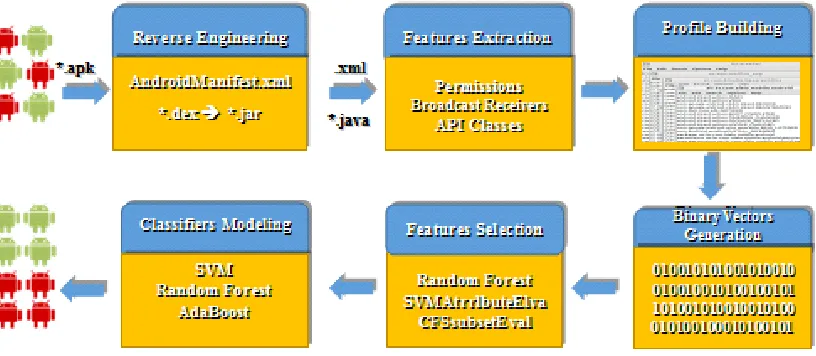
The framework of this study, as shown in the above figure, consists of six
compo-nents. The first component is a module to reverse engineer the apk files into source code
in forms of AndroidManiFest.xml and java classes. The second component is a module
to parse three group of features: permissions, broadcast receivers, and APIs. The third
module is to transform the extracted features from each app into a binary vector that
can be applicable for machine learning algorithms; each app is represented as a single
instance with binary vector of features and a class label indicates whether the app is
benign or malicious. The last component is modeling the classifiers by training three
machine learning algorithms: Support Vector machines, Random Forests and Adaboost
with the binary vectors of the apps in our sample. The learned models are used to detect
whether a given app is malicious or benign. The next follow sections explain in details
the implementation of this study which cover the datasets, the used tools, the features
of our main interest, and the machine learning algorithms.
4.1
Data Collection
For the first part of the study which is building classification models for apps from all
categories, we train the models with features of 4063 malicious apps and the top 1000
rated apps from all the 26 categories on Google Play Store.
The second part of our study mainly focuses on relating between the app’s features
and a common set of features for the category that belongs to. In this study, we chose
All Categories Music & Audio Personalization
Benign 1000 854 732
Malware 4063 1336 942
[image:27.596.147.485.79.138.2]Total 5063 1990 1674
Table 4.1: Datasets allCateg, musicCateg, personaCateg
data is collected from each dataset, separately to train two groups of malware
detec-tion classifiers one for music apps and the another one for personalizadetec-tion apps. The
(musicCateg)dataset contains 855 apps from the top rated apps from “Music & Audio” category on the Google Play store and 1136 malicious apps from the same category. The
(personaCateg) dataset contains 732 apps from the top rated apps from “Personaliza-tion” category on the Google Play store and 942 malicious apps from the same category,
as well.
Category Description Sub-Categories
Music & Audio Apps enable the user to play audio files, mu-sical instruments, or listen to radio
Radio, Tuners, chords & scores, Live music & event tickets, Karaoke, singing & lyrics, Gui-tar, Audio & podcasts.
Personalization Apps enable the user to customize the device or enjoy some of its features.
Home screen customization, Emojis, themes, smileys, Live wallpapers, Ringtone makers, Weather widgets.
Table 4.2: Categories’ Descriptions
4.2
Reverse Engineering
The apps’ ”apk” files were decompiled into their source codes from where specific group
of features were parsed into a corresponding profile for each app. This process was
automated by scripting and integrating multiple reverse engineering tools in Santoku, a customized Linux system for mobile security, to transform the .apk files into source
codes in formats of AndroidMainfest.xmland.javafiles. The table below shows the tools were used in the Reverse Engineering phase.
Tool Use
APKTool Decodes .apk files into nearly the original forms (.xml, .png, .dex). dex2jar Converts .dex files into .jar files.
jd Converts .jar files into .java files.
Chapter 4. Design & Methodology 20
4.3
Features Parsing
Malware detection using data mining techniques require feeding machine learning
algo-rithms with a dataset of instances and variables to learn patterns and build classification
models. The features (Permissions, Broadcast Receivers, APIs) are parsed from
the source codes by a python module; the extracted features are used to construct a
binary vector for each app in our sample. If a specific feature, like READ PHONE STATE
permission, is requested by the app, it represented by 1 in its binary vector while it
is represented by 0 if it is not requested. The next sections explain the investigated
features.
4.3.1 Permissions
Figure 4.2: Permissions Requested by Malware
The Android system runs apps in sandboxes on the virtual environment(Davik
VM) where apps are isolated from direct interfering with the system’s resources and
other apps’. Android regulates apps access to the resources of hardware, OS, and other
installed apps through the Permissions model; the apps need to be granted with the
appropriate permissions to perform any kind of privileged processes on the system. The
app’s developer needs to declare the required permissions for the app in the
AndroidMan-ifest.xml file; and the user needs at installation time to grant the requested permissions
to proceed installation or otherwise the installation process is terminated.
The permissions are the most important and common features that have been used
in detecting malware in the Android environment. We here also considered them as long
models of permissions that are requested by malicious apps to define sets of permissions
that if they are granted that enable apps to launch malicious activities. In our study,
we relate between the permissions that are requested by an app and a common set of
permissions for the category that the app belongs to by training classification models
with the permissions of the top rated apps in the same category. Undoubtedly, that
the functionalities of a specific category require a set of permissions while if the app
requests uncommon or overprivileged permissions compared to the benign apps in the
[image:29.596.135.498.229.445.2]same category that can indicate a malicious intention.
Figure 4.3: Top 10 Requested Permissions in ”allCateg” Dataset
[image:29.596.136.497.481.698.2]Chapter 4. Design & Methodology 22
Figure 4.5: Top 10 Requested Permissions in ”personaCateg” Dataset
Figure 4.6: Broadcasts Mechanism in Android
4.3.2 Broadcast Receivers
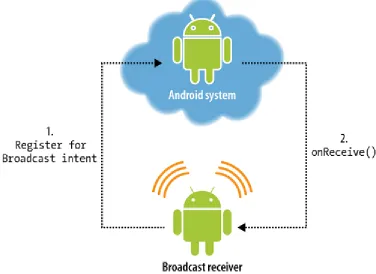
Android allows apps to interact with the system and other apps by sending and
lis-tening to broadcasts that are sent across the system and the installed apps.
An-droid announces systems events in broadcast messages that can be received by other
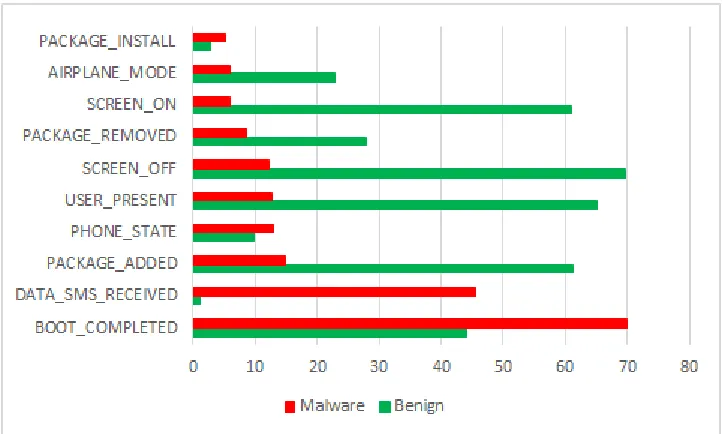
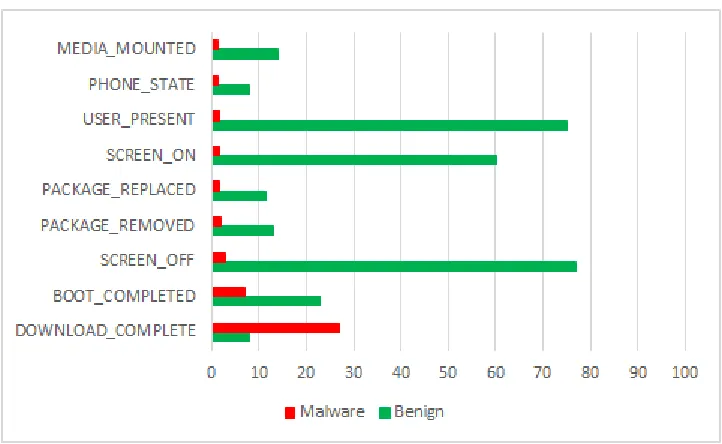
[image:30.596.127.503.336.610.2]CONNECTIVITY CHANGE, etc...). Apps also can send broadcasts to other apps to trigger some actions such as an app needs to open a web page so any installed web browser can
response. Broadcast receivers can be registered statically in the AndroidManifest.xml
file or dynamically in the code. In our study, we mainly focus on the broadcast receivers
that listen to the Android system events. We relate between the app’s broadcast
re-ceivers and the Android broadcast events that the top rated apps in the same category
[image:31.596.136.497.360.577.2]they listen to.
Figure 4.7: Broadcasts Receivers requested by malicious apps
Figure 4.8: Top 10 Broadcast Receivers in ”allCateg” Dataset
4.3.3 APIs Classes
APIs are classes and interferes that enable apps to interact and lunch functionalities of
the underlying Android system. Android platform provides a hierarchical structure of
classes based on the targeted version of the Android system which specified by the API
level. The framework API level 23 provides a core set of 232 packages and hundreds of
classes and interfaces. We use the APIs as features to identify the processes that the
Chapter 4. Design & Methodology 24
Figure 4.9: Top 10 Broadcast Receivers in ”musicCateg” Dataset
activities such as loading external jar files by callingloadClass()or collecting device’s info by calling getDeviceId(). Apps are under a certain category call a certain set of APIs that are needed for providing the category’s functionalities. We relate between the
APIs requested by the app’s and the common set of APIs that requested by the benign
apps in the same category.
Figure 4.10: APIs requested by malicious apps
4.4
Binary Vector Generation
Each app in the sample was represented as a single instance with binary vector of features
and a class label indicates whether the app is benign or malicious. The figure 4.14 shows
the instances of the dataset; if the feature is present in the app it is represented by 1, if
Figure 4.11: Top 10 Requested APIs in ”allCateg” Dataset
Figure 4.12: Top 10 Requested APIs in ”musicCateg” Dataset
4.5
Features Selection
This step aims to reduce the high-dimensional of the variables space in the datasets by
identifying subsets of features that are the best predictors for the class labels. Generally,
features selection enhances the generalization of the learned models by reducing
over-fitting, increases the classification accuracy, and reduces the training and classification
times, produces simplified interpreted models. Typically, features selection techniques
are divided into three main approaches: filters, wrappers, and embedded. Wrappers
firstly search the variables space for subsets of features and then they evaluate the
Chapter 4. Design & Methodology 26
Figure 4.13: Top 10 Requested APIs in ”personaCateg” Dataset
analysis to rank each feature based on the statistical properties of the dataset; the
features then kept or filtered out based on their score; the drawback of this technique
that features are selected without involving the machine learning algorithm in the process
of selecting the features. Embedded techniques selects and builds learned models at the
same time, one example of this technique is Random Forests algorithm.
Before applying features selection algorithms, we cleaned the datasets; the features
are provided by theAndroid platform were the most important for our consideration in filtering out or keeping a certain set of features for applying the features selection
algorithms. For each machine learning algorithm, we used different features selection
algorithm.
Groups of Features All Categories Music & Audio Personalization
Permissions 142 57 56
Broadcast Receivers 136 84 92
APIs Classes 2497 2284 1767
Figure 4.14: Apps’ Binary Vectors
[image:35.596.114.526.494.734.2]Chapter 4. Design & Methodology 28
4.6
Classification Models
4.6.1 AdaBoost
Adaboost, short for ”adaptive Boosting”, is an ensemble technique and a metaheuristic
machine learning algorithm. It is used conjointly with other machine learning algorithms
to boost their performance. The algorithm sequentially builds a model based on the
errors of previous models by learning a simple classifier and focusing on getting the
misclassified data points to be classified correctly in the next round. Weak classifiers
like decision trees are used to explore the data points and train a model for the easy
to be predicted points, Adaboost then works to get the misclassified data points to
be classified correctly by giving them higher weights. The errors of the early experts
indicate the hard to be predicated data points. Adaboost improves weak learners and
converts them from simple into complex classifiers. Adaboost is prone to overfitting
because of its sensitivity to noisy data, but in some problems it can be less susceptible
to overfitting compared to other classifiers. It is an efficient classifier for very high
dimensional variables space problems; it selects the predictors features and discards the
[image:36.596.163.471.412.638.2]irreverent ones which increases the accuracy of the learned model.
4.6.2 Support Vector Machines
Support Vector Machines (SVM) and also called Support Vector Networks (SVN) are
supervised machine learning methods to analyze, detect and match patterns of data for
classification and regression purposes. SVM is a non-probabilistic binary linear classifier
that assigns training data into one category or more. It also can be used efficiently for
nonlinear classification problems using Kernel Trick. Kernel Trick is a class of SVM
algorithms that maps the input features into a very high dimensional output space in
a simple and cheaper computational way. SVM is a representation of training data as
points in the space that conglomerate based on their category in form of groups that are
separated by a clear distinct gap called a hyperplane. In the training phase, SVM builds
up a model of patterns from the training data which is used as a space for classification
phase. In the classification phase, the new input points are mapped into the trained
space and categorized based on which side of the gap they fall on. In the figure below a
straight line separates between two classes, the new data are mapped into the space if
they up the line will be categorized into otherwise into. Hyperplane is a subspace less by
one dimension than its ambient space; it is 2-dimensions in 3D space, and a 1-dimension
in 2D space. SVM forms a hyperplane or set of hyperplanes for data classification and
regression. For more confidence and less generalization error, the hyperplane must be
selected by functional margin that makes the distance between the nearest training data
points in any class as much larger as possible. We selected SVM because its resistance
to over-fitting even in the very high dimensional variables space like our datasets. SVM
[image:37.596.177.456.496.716.2]is the best choice for binary classification problems like ours.
Chapter 4. Design & Methodology 30
4.6.3 Random Forest
Random forest is an ensemble algorithm that constructs a collection of decorrelated
decision trees. The algorithm uses bagging technique to sample the randomly the
in-stances and features, and then learns a decision tree classifier for each subset of the
data. The algorithm grows number of classification trees, for a new input vector to be
classified the algorithm puts the input vector down in each classification tree. Each tree
gives a prediction class for the input vector, the algorithm decides the class label based
on the majority of the votes from all the decisions trees. Random Forests by selecting
repeatedly a random subset of features and data, they increase the generalization of the
classification models and decrease over-fitting. So, compared to other algorithms, they
build high accurate, robust and reliable classification models. They also work efficiently
with very large instances and high dimensional features spaces. They learn models and
select the best features at the same time; they estimate the importance of the features
at training time, in each round the algorithm dominates the most important features
that can split the data points into classes to be the root and in the highest levels of the
[image:38.596.107.524.382.660.2]tree while the least important become the leaves of the tree.
Experiments & Analysis Results
In this chapter, we discuss the results of the experiments, evaluate the performance of
the classification models, and demonstrate our findings. The first section explains the
terminology of the metrics that we used in measuring the performance of the classifiers.
The second section shows the results of testing three datasets: apps from all
cate-gories with allCateg classifiers, apps from ”Music & Audio” category with allCateg
and musicCateg classifers, respectively and apps from ”Personalization” category with
allCategandpersonaCategclassifiers, as well. In the last section, we compare the per-formance of the non-category and the category-based classifiers at detecting malicious
and benign apps from the two categories: ”Music & Audio” and ”Personalization”.
This study aims to improve the performance of the classification models by
enhanc-ing the quality of the selected features for trainenhanc-ing the classifiers. Each category has
a distinct functionality from another one; benign apps under a certain category have
a common set of features; in contrast, malicious apps tend to request abnormal, less,
or more features compared to benign apps in the same category. To detect malicious
apps, we relate between the apps’ features and the features that are needed to deliver
the category’s functionality that the app belongs to. To achieve this goal, we prepared
three datasets that contain binary vectors of benign and malicious features of: apps
from all categories (allCateg), apps from ”Music & Audio” category (musicCateg), and apps from ”Personalization” category (personaCateg). In the training phase, for each dataset, we built three classification models using: Support Vector Machines,
Ran-dom Forests, and adaBoost. The classifiers were trained with three groups of features:
permissions, broadcast receivers, and APIs. In the testing phase, to validate our
ap-proach, music apps were tested with allCateg and musicCateg classifers, respectively and personalization apps were tested with allCateg and personaCateg classifiers, as well. The experiments were repeated 50 times and in each round all the three datasets
Chapter 5. Experiments & Analysis Results 32
were shuffled randomly where 70% of the dataset was used for training and 30% for
testing.
5.1
Experiments’ Environment
Due to the large number of the datasets’ instances and its high-dimensional features
space that require powerful computational resources for applying variety of machine
learning algorithms, we did carry out our experiments on a virtual machine on AWS
with the characteristics that are shown in the table below.
vCPUs 2 vCPUs, 2.5 GHz, Intel Xeon Family
Memory 16 GiB
OS Ubuntu
Data Mining Tool Rstudio
Table 5.1: Experiments’ Environment
5.2
Experiments’ Settings
For the three datasets: allCateg, musicCateg and personaCateg, 70% of the dataset was used for training the classifier, and 30% used was for testing. The datasets were
randomly shuffled in each round of the 50 iterations that we used to average the
perfor-mance of the classifiers. The R code of implementing the experiments is shown in the
Appendix A.
5.3
Evaluation Measurements
In order to evaluate the performance of the classification models, we used the metrics
as the following:
• Accuracy: The proportion of the total number of the apps that are correctly classified whether as benign or malicious.
Accuracy = tp+tn
tp+tn+f p+f n
• Precision: The proportion of the actual malicious apps are correctly classified to the total of all apps that are classified as malicious.
Precision = tp
• Recall: The proportion of the malicious apps that are classified correctly to the total number of the malicious that are classified correctly as malicious or incorrectly
as benign.
Recall = tp
tp+f n
• F-Measure: The harmonic mean of precision and recall. This value tells how much the model is discriminative.
F-Measure = 2· precision·recall precision + recall
• ROC Area: The probability that a given malicious app will be correctly classi-fied as malicious is higher than classiclassi-fied as benign. This metric is calculated by
combining FPR and TPR. Generally, the higher the ROC value is, the higher
accurate predictions that the classification model gives.
• Confusion Matrix: shows the number of the apps that are classified correctly (the prediction class value matches the actual class value) or incorrectly (the
pre-diction class value doesn’t match the actual class value). In our experiment, the
malicious apps are labeled as positive while the benign apps as negative. The
matrix confusion shows the detection results in 4 terms:
– True Positive (TP): The number of the malicious apps that are correctly classified as malicious.
– False Negative (FN):The number of the malicious apps that are incorrectly classified as not malicious (benign)
– True Negative (TN): The number of the benign apps that are correctly classified as not malicious (benign).
– False Positive (FP): The number of the benign apps that are incorrectly classified as malicious.
Predicated as (Malicuios) Predicated as (Benign)
Actual (Malicious) True Positive False Negative
Actual (Benign) False Positive True Negative
Table 5.2: Confusion Matrix
The next sections show the average performance of 50 iterations of testing the
learned classifiers. In each round, the datasets were randomly shuffled: 70% for training
Chapter 5. Experiments & Analysis Results 34
5.4
Testing Apps from all categories with allCateg
Classi-fiers
Metric allCateg-SVM allCateg-RF allCateg-AdaBoost
Accuracy 0.9903 0.9881 0.9743
Precision 0.9799 0.9967 0.9762
F-Measure 0.9707 0.9631 0.9179
Recall 0.9671 0.9318 0.8674
FPR 0.0039 0.0005 0.0043
TPR 0.9671 0.9318 0.8674
FNR 0.0382 0.0681 0.1325
TNR 0.9960 0.9994 0.9956
Specificity 0.9960 0.9994 0.9956
Sensitivity 0.9617 0.9318 0.8674
Table 5.3: Testing all categories app with allCateg classifiers
Table 5.3 shows the average performance of testing a random dataset of apps from
all categories over 50 iterations with three classifiers: Support Vector Machines, Random
Forests, and Adaboost.
Figure 5.1: Accuracy of allCateg Classifiers
Figure 5.1 shows the variation of the classifiers’ accuracy over 50 iterations of
shuf-fling the dat