Rochester Institute of Technology
RIT Scholar Works
Theses
Thesis/Dissertation Collections
11-15-2006
Robot Rescue
Hui Yu Ruan
Follow this and additional works at:
http://scholarworks.rit.edu/theses
This Thesis is brought to you for free and open access by the Thesis/Dissertation Collections at RIT Scholar Works. It has been accepted for inclusion in Theses by an authorized administrator of RIT Scholar Works. For more information, please [email protected].
Recommended Citation
Rochester Institute of Technology
A Thesis submitted to the Faculty of the
College of Imaging Arts and Sciences
in candidacy for the degree of
Master of Fine Arts
Robot Rescue
An Interactive game
by Hui Yu Ruan
Approvals
Chief Advisor: Chris Jackson, Associate Professor, Computer Graphics Design
Signature of Chief Advisor Date
Associate Advisor: Marla Schweppe, Professor, Computer Graphics Design
Signature of Associate Advisor Date
Associate Advisor: Dan DeLuna, Assistant Professor, Computer Graphics Design
Signature of Associate Advisor Date
School of Design Chairperson:
Patti Lachance, Associate Professor, School of Design
Signature of Administrative Chairperson Date
Reproduction Granted:
I, __________________________________________, hereby grant permission to Rochester Institute of Technology to reproduce my thesis documentation in whole or part. Any reproduction will not be for commercial use or prof
i
t.
Signature of Author Date
Inclusion in the RIT Digital Media Library Electronic Thesis and Dissertation (ETD) Archive:
I, __________________________________________, additionally grant to Rochester Institute of Technology Digital Media Library the non-exclusive license to archive and provide electronic access to my thesis in whole or in part in all forms of media in
perpetuity. I understand that my work, in addition to its bibliographic record and abstract, will be available to the worldwide community of scholars and researchers through the RIT DML. I retain all other ownership rights to the copyright of the thesis. I also retain the right to use in future works (such as articles and books) all or part of this thesis. I am aware that Rochester Institute of Technology does not require registration of copyright for ETDs. I hereby certify that, if appropriate, I have obtained and attached written permission statements from owners of each third party copyrighted matter to be
Abstract
Recently, it is very common in Asia that people put little toys on their office
desks. It doesn’t mean they sometimes have their kids visiting them nor they
are not grown up yet. These are toys, which can soothe their stress from work. I
am always attracted by toys and also animations designed or directed by many
artists and designers. In this fantasy world of toys, there may not be only human
beings. As in Hayao Miyazaki’s animation “Spirited Away,” where there was a
magic world ruled by a witch; and there was also an old spider man, a frog
manager and even coals that were animated into cute little creatures.
Imagination is unlimited; we can even fly or speak animal language in this world.
In this fantasy world, figures and stories are not only just imaginations, but
sometimes they become ideas for new technology. I believe imagination
provides diversity and introduces more surprise and joys in our lives.
With this magic of our minds, I intended to create a fantastic environment. At
first I had created a planet and also some creatures. While I was creating these
characters, there was a story coming up as if I was reading a storybook. The
characters had their personalities and different missions to achieve. These
became the opening animations of this project and then came the game. I was
hoping users would feel more familiar to this environment in the game and closer
to the creatures and the space I had created.
Table of Contents
1. Introduction
1.1 Content
1.2
Keywords
1.3 Art style
1.4 Flowchart
2. Process
2.1 Character setting
2.2 Game play
2.3 Demonstration
2.4 Programming
3. Usability
4. Conclusion
5. Appendix
5.1 Sketches
5.2 Programming
1. Introduction
This is a flash based game combined with animated characters and an illustrated story.
With a hand drawn illustration style in the game, I tried to present a playful and joyous
feeling.
1.1 Keywords
Animation
Fantasy
Flash Game
Illustration
Interactive
1.2
Content
My main idea is to create a world from my imagination.
At the very beginning, there were floating seeds in space and a deserted planet; and it
looked like they had no connections to each other until one day an accident happened.
Robot and his spaceship crashed on this empty planet on his way home. There was
nothing on it and his spaceship had lost several propellers. These propellers were
scattered in the space; Robot needed to gather the propellers to fix his spaceship.
Without the spaceship, he was trapped; the only way to reach the propellers was to
move the planet. Therefore, he found out that by planting the seeds on the planet
would disrupt the balance of the planet, and then he would have the chance to reach
the propellers that he had lost.
In order to complete this mission, users have to help the Robot catch the seeds in
space, plant them in the crater, and put the propellers back in the right place.
1.3 Art style
The game is engaged with lots of movements: the seeds are constantly moving, and the
planet is rotating. Lots of stuff will be moving around at the same time. File size will be
an important task I need to manage for this web output flash game. After some
considerations, using vector-based graphics is the best way to present this game. File
size can be condensed and the movements in the game would be smoother; and at the
2. Process
2.1 Character setting
I mainly used Adobe Illustrator to design the characters in this project. All the
[image:9.612.116.502.267.341.2]characters were modified a few times before they became what they are now.
Figure 01. The process of setting up the “Robot”
I hope that the Robot can bring very peaceful feelings to us, so he shouldn’t hold any
weapons. He is just like a gardener alien, so he has a little sprinkler system hidden on
his left side. With a little propeller on his head, he can travel within short distances; and
also he can move around with wheels very well. The Robot was first designed as a
round shape, but I felt he was not special enough. With some modifications, he looked
more like a pentagon shape with a round head; (See Figure 01) and then I had made its
edges smoother as the final setting. After the Robot was designed, it was easy to
create the mother character. In my opinion, typical mothers usually have curly hair and
they prepare our meals; therefore, if the mommy Robot has a spatula in hand that
Figure 02. The process of setting up the “Robot’s Mommy”
It would be too boring if the spaceship looked just like an ordinary spaceship, so I made
mine with a whale appearance. (See Figure 03) With the propellers, this spaceship can
travel both in space and deep under the ocean.
Figure 03. The process of setting up the “Whale Spaceship”
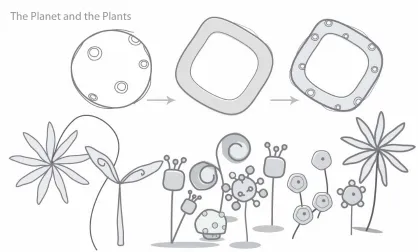
Since the game takes place in a fantasy world the planet should be a little peculiar: it is
a round cornered cube with many craters.
The seeds would grow into different plants: some of them appear like mushrooms,
[image:10.612.98.520.350.452.2]2.2 Game play
Robot
Lead character of the game.
Users will help Robot to catch the seeds and fix the spaceship.
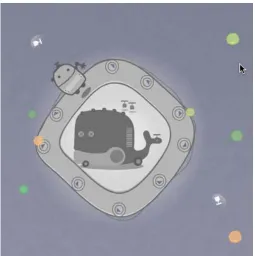
When users plant a seed into a crater the Robot will go and take good care of it.
Planet
Where the spaceship crashed and where the Robot was trapped. There was nothing on
the planet.
Seeds
Floating and moving in space, users can drag these seeds into the craters on the planet
and there will be some mysterious plants growing up. The seeds will float around faster
when the time is counting down, and it will be more difficult to win the game. And if
users choose different levels, the number of seeds will be different. In easy mode the
game will start at 15 seeds; as in the advanced mode, users will have only 9 seeds at
the beginning.
Spaceship
The spaceship was out of control and crashed on the planet. Users need to drag the
seeds to the crater in order to break the balance of the planet, which cause it to move
Propellers
Robot lost five propellers from his spaceship; there was no way to fly again without
these propellers. Users have to collect them all and put them into the right place on the
spaceship in order to make the spaceship work again.
[image:13.612.181.436.200.456.2]Figure 05. Two different conditions with propeller
Propellers are in two different conditions. (See Figure 05)
A. Because of the crash, the propellers are scattered in different places in space. Users
have to collect them by moving the planet. When a user collects one propeller, five
seconds are added and three new seeds appear as a reward.
B. When users make the planet move and catch one propeller, the original white
propeller turns gray and appears on the planet. At this time, users can easily drag and
Thunder ball
The powerful thunder ball can create thunderstorms and kill any plant. This is another
way to make the planet move.
Timer
The game has a time limitation: in the easy mode there are 95 seconds to complete the
mission; and in the advanced mode there are 60 seconds. The game is over when the
time runs out.
Robot Mommy
Beside the timer, Robot's mother is waiting for him. As time passes, mom loses her
patience and waves her spatula and becomes really angry.
2.3 Demonstration
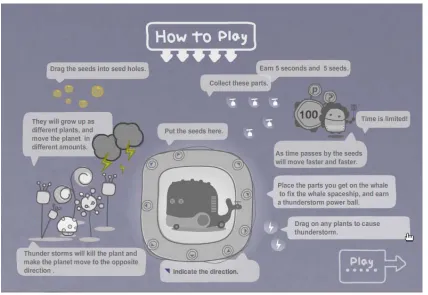
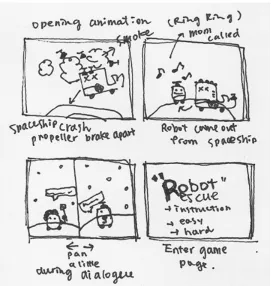
There are two different ways to demonstrate game play. The first one uses animation
to introduce how to play the game. (See Figure 06.1) Some description shows up to
explain how the game works. I hope by running through the demonstration, users will
understand the game faster.
During the game, if users have any questions, they can always click on the question
mark and the game will pause. An instruction page will show up with full explanations
2.4 Programming
There are many steps to accomplish this project, and I planned my coding task as
following:
Setting environment
1. Make the planet spin around constantly.
2. Let the propeller show up at different locations every time.
3. Create borders to keep the planet on the stage.
4. Set timer and angry mommy animation
5. Have different level with the game.
Connect the game with the seeds
1. Create seeds and let these seeds move in the space.
2. Make the seeds and the thunder ball draggable.
3. Have different speed of seeds.
4. Have the random plants grow up while user puts the seed in the crater.
5. Add five seconds and 3 more seeds while user puts the propeller on the
spaceship.
6. Make the planet move toward a direction when user puts the seed in the crater.
Other effects
1. The thunderstorm killed the plants occasionally.
3. Make the thunderstorm occur while user puts the thunder ball on the
chosen plant.
4. Activate the spaceship while the user finishes putting all propellers back
on the ship.
There are many tasks during game creation. Imagination is very important for story and
artwork, but when it comes to programming, logic is the key to making the game work.
I have faced some difficulties while coding the game, and when I finally solved them, it
became a very valuable experience for me.
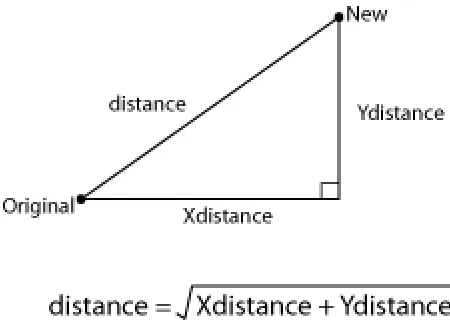
The first difficulty is how to make the planet move smoothly toward the right direction.
By setting the position after the user puts the seed in the crater, it creates a distance
between the original position and the new position. After research, I found out that by
knowing the X distance and Y distance I can use trigonometric function to calculate how
[image:17.612.192.417.493.653.2]Second, functions about craters are complicated. While the user puts the seed into the
crater, I need to make a plant grows up from there and move the planet toward the new
location while disabling the crater so the user cannot plant another one. At the same
time, I need to randomly call the thunderstorm function to make the thunderstorm
happen. There are more than four different functions happening at the same time, and I
was coding poorly with the order, so even though there is no error with the function itself,
the game still could not work properly. After spending time cleaning up nasty code, the
game runs much better than before.
Last but not least, because I am using “as” files to control different elements of the game,
such as controlling seeds with one “as” file and propellers as another, having too many
different files in hand sometimes caused them to miss communicate, so I had to check
all the relate file again to find out where the problems are. After this project, I learned
that it is better to have a memo to record functions I need to use in different files and
name the functions and files properly.
3. Usability
When the project was nearly completed, my committee and friends tested it. Most of
them liked the characters and were also quick to understand what was going on with
the story. I gathered feedback from them: as the time was passing by, the speed the
seeds were moving was too fast and it made them too difficult to catch; and some
people said they were just waiting to lose the game. For some of the users the seeds
were too little for them to catch. In the first version of the game, when users put the
seeds in the craters, it was very difficult to know or predict the direction the planet would
move. Overall, most of the people liked the characters and the moving sound effect;
also they thought the instruction page helped a lot.
With all this feedback in mind, I had modified the project. If the seeds were too hard to
catch, then it would be no fun to play. After a few more tries, many people were really
frustrated with the seeds. So I had made it more reasonable by slowing down the
seeds’ moving speed when the time was running out, and also the hot spot for catching
4. Conclusion
Before the project, I had no idea that making a game would require this much energy.
There were so many different things I had to take care of: from creating, planning and
achieving, and fixing thousands of little bugs that showed up every time I tested it.
Actually I am not a very careful person. I easily forget some of the little things that are
behind me. So dealing with all the problems really challenged me a lot. It was not only
finishing a project, I also improved myself as a person who can take care of details.
From coming up with ideas, sketching, planning, processing and trouble -shooting, I had
gone through it step by step. However, standing back and looking at my project, I feel I
can still make a lot of improvements. It is a project that can be done more: with more
characters or different ways to play with, or even expand the space. A lot more places
5. Appendix
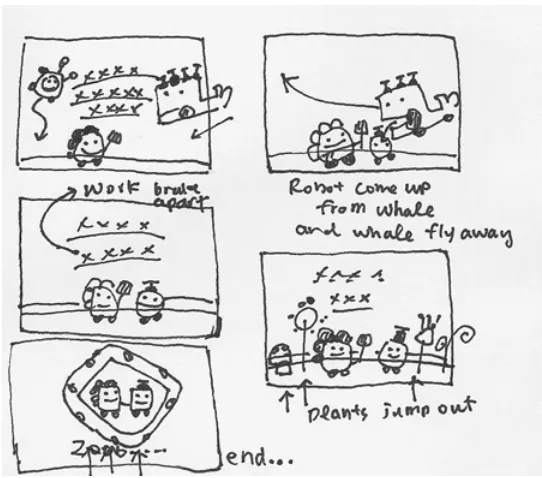
[image:21.612.95.517.130.372.2]5.1 Sketches
[image:21.612.173.444.408.694.2]Figure 08.3 Storyboard for ending animation
5.2 Programming
These are functions that would make the thunderstorms to blow occasionally. “come”
makes a random number that calls the function to start the storm.
function Weather()
{
j=random(6)+1
come = 17000+(random(10)*1000)
_global['setTimeout'](gogo, come);
_global['setTimeout'](clean,come+2000);
function gogo(){
_root.planet.sh01.p01.play();
trace("thunderStrom")
}
function clean(){
doMove("_root.w", _root.w._x+(j*15), _root.w._y+(j*10),luckN);
doMove("_root.planet", _root.planet._x+(j*15), _root.planet._y+(j*10),luckN);
_root.planet.sh01.p01.removeMovieClip();
_root.seed01 = 0
_root.planet.a1._visible = true ;
} }
}
This function controls every seed that is floating in the sky. With dragging and dropping,
the code will detect if the seed was dropped at any crater. And then it will randomly
attach a new movieclip and make a new plant grow if there is no other plant on it.
function Movearound(){
this.onPress = function(){
startDrag(this);
this.xSpeed =0
PressM = true
}
this.onRelease =this.onReleaseOutside = function(){
_root.w.hint.n12.gotoAndStop(1);
PressM = false
stopDrag();
this.xSpeed =( Math.random() *6) ;
this.ySpeed =1;
this._x += this.xSpeed ;
this._y += this.ySpeed ;
allplant = ["01","02","03","04","05"]
i = allplant.length;
k =Math.floor(Math.random()*i)+1;
g = (k/2)+3
if ((this.hitTest(_root.planet.sh01)) && _root.seed01 == 0){
_root.seed01 =1
_root.planet.a1._visible = false ;
_root.popN-=1
_root.planet.gotoAndPlay(2);
_root.mc.attachMovie("alien02", "a02",_root.mc.getDepth())
_root.planet.sh01.attachMovie("plant0"+[k], "p01",_root.getNextHighestDepth())
doMove("_root.w", _root.w._x-(g*10), _root.w._y-(g*25),luckN);
Weather();
this.removeMovieClip();
……
…….
6. Bibliography
Books
Derek Franklin, & Jobe Makar. (2003). Macromedia Flash MX 2004 ActionScript:
Training from the Source. Macromedia Press.
Gary Rosenzweig. (2002). Macromedia Flash MX ActionScript for Fun and Games. Que.
Glen Rhodes, Justin Everett-Church, David Doull, Igor Choromanski, Kevin Sutherland,
& Thomas Poeser. Flash Games Studio. Friends of ED.
Jobe Makar. (2002). Macromedia Flash MX Game Design Demystified. Macromedia
Press.
惶聘聘!)3115*/!韧 怜眇!Gmbti!NY!3115!BdujpoTdsjqu/!┒将 洳偎轧╈篾 !
Websites
Actionscript.org http://actionscript.org/
Adobe - Flash Support Forums
http://www.adobe.com/cfusion/webforums/forum/index.cfm?forumid=15
Flash Kit http://www.flashkit.com/index.shtml
FlashGuru Consulting http://www.flashguru.co.uk/
Kirupa.com http://www.kirupa.com/developer/actionscript/hittest.htm
Kurt Nitro