Introduction
Around the Millennium, I published my book, E-Moderating [1]. Soon after, with a colleague, David Shepherd, we started to offer online courses for any teacher, tu-tor, facilitator or group leader who wis-hed to experience and explore the skills needed in the virtual environment for him or herself (see www.atimod.com). Then I wrote about designing for online groupwork [2], aimed at a similar audi-ence, and we began a short online ‘E-tivi-ties course’. The 2ndedition of E-Moder-ating [1] was then updated, as e-modera-tors everywhere tried out the ideas and let me know how it was going.
To my astonishment, by 2006 more than one thousand people had taken part in online e-moderating courses and more than 20,000 have bought and ap-parently read and used the books. Many people used the medium itself to give feedback and comments to David and me on how they’ve adapted and applied the ideas on designing for participation and intervening for learning in low cost, online and asynchronous group environ-ment and their special contexts. At every e-learning conference, I found commen-tary and exploration reported.
On review and reflection from all the feedback, I realised that the 80:20 rule applies to e-moderating. The 80:20 prciple suggests that there may be an in-herent imbalance between cause and ef-fect, effort and reward, inputs and out-puts and that imbalance tends to the ra-tio of 80:20. The 80:20 principle is a very simple approximation of the value of work, but it seems to hold true pretty of-ten for us. So, I began to ask my
corre-spondents and visitors: “do you know which 20% of our e-moderating work produces 80% of the results?” What fol-lows is a summary of many ideas based on those years of feedback.
About Theory to Practice in
E-Moderating
We try and place our work in theoretical approaches and produce conceptual models for testing and sharing. However, although high flying theories of learning or knowledge help us to understand what happens in our e-learning processes, they are not much direct help in saving our time and promoting motivation and achievement in our learners. Instead, we need to be able to interpret and apply them through simple and effective on-line tasks.
Take the debate about constructivism for example. Our practice falls within the constructivist approaches to knowledge and learning. The ideas around construc-tivism in teaching have arisen in the 21st Century, partly in response to the potential for more active, student-led learning in online environments and away from passive teacher-led instruc-tion. Constructivism explains knowledge as created by individuals through their own experiences and with the support of their cognitive framework. It sees learn-ing is an active process in which learners engage with and build new ideas or con-cepts based upon their current or past knowledge. Such knowledge may include past experience, formal teaching, read-ing, sharing with peers and their own creative endeavours. The learner selects Gilly Salmon is a Professor of e-learning
and Learning Technologies at the University of Leicester/UK. She researches about e-lear-ning scenarios for the future. She is known for her book ‘E-Moderating. The key to tea-ching and learning online’, where she explo-res a five stage model to prepare teachers for online moderation and work: 1. Access and motivation, 2. Online socialization, 3. Infor-mation exchange, 4. Knowledge constructi-on, 5. Development. Based on this research she is developing a practical and inspiring guide for online teachers.
This article appears by courtesy of Gilly Salmon and is taken from: Mac Labrahinn, I.; McDonald Legg, C.; Schneckenberg, D.; Wild, J.: The challenge of eCompetence in Academic Staff Development. Galway: CELT, 2006. www.ecompetence.info
80:20 for E-Moderators
transforms, integrates and makes choic-es informed by their own mental models in developing their understandings.
There are various versions of these the-oretical underpinnings. One is an intro-spective view of knowledge as personally constructed and built on an individual’s earlier internal mental models in the light of his or her new experiences [3]. Another view is of knowledge as rather more external and the group learning and teaching experience helps the stu-dents to internalise it. Taking part in a group of learners with sympathetic and supportive facilitation, e-moderation is critically important to the construction of the knowledge. In practical terms,
con-structivism implies the need to promote discovery, dialogue, interaction, contextu-alisation and reflection, rather than deliv-ery of content and information [4].
As e-moderators we approve of the ide-as, of course! For example, such an ap-proach should enable individuals to “go beyond the information given” and work with others. So, what do we do to make this virtually real?
The task of the e-moderator here is to: • gauge the students’ readiness to learn
(get them posting messages in re-sponse to a stimulus);
• ask the students to explore their own way forward and get them engaged with
each other (through simple e-tivities that depend on collaboration);
• fill in any gaps (weave and comment on their postings);
• help to organise the knowledge so that it can be readily grasped by simplifying, generating new propositions and in-creasing the manipulation of informa-tion (summarise and structure).
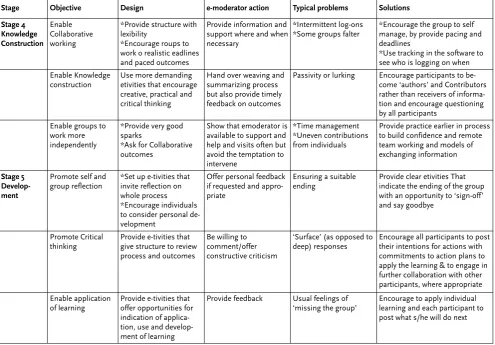
An E-Moderating 80:20 Plan
Here is the ‘state of the art’ for the ab-solute essentials for successful e-moder-ating, based on the minimum interven-tion.
Stage Objective Design e-moderator action Typical problems Solutions
Stage 1: Access and Motivation
Access to the system for all participants within a short period of time
*Simple log on *Clear intuitive navi-gation
*Clear instructions for help in case of difficulty
*Welcome, *Congratulate, *Encourage, *Reassure, *Direct to online or telephone help
*Participants’ inability to diagnose source of access problems *Emotional responses to IT failures
*Provide human support *Acknowledge feelings Provide really good joining instructions *System thoroughly checked and independently tested before going live – ‘right the first time!’
Motivate each participant to contribute (post a message rather than just read)
*Provide an easy e-tivity to ensure an early posting
*Avoid requesting lots of personal information & photos
*Acknowledge all successes
*Encourage participants to respond to each other
*Worries about security, *Reluctance to contribute to strangers
*Reassure
*Scaffold all contributions so trust builds gradually and effectively
Motivate to visit and contribute frequently
*Make benefits of each task 100% clear *Keep tasks simple and achievable at one log in *Keep to only 2 or 3 tasks
*Ensure all participants have posted in first few days and each has had responses to their contributions *Follow up ‘no shows’
Participants believe taking part is too time consuming
*Avoid lots of reading in first couple of weeks
*Insert tips on how to manage time and use the software effectively
*Chase noncontributors through e mail or telephone
Stage 2 Socialisation
Build effective groups
Set up e-tivities that demonstrate the value of working together
*Weave *Summarise *Feedback
*Admire, but not too often
*Avoid overwhelming by constant interventions
Domination of the con-ference by one or two individuals
Encourage all participants to post and respond to others
Set the stage for the learning
Ensure each etivity has a clear purpose and one straightforward task
Model supportive group processes
Lurking due to feelings of having less to contribute than others
Encourage each person to write from his or her own experience
Stage 3 Information exchange
Set up practice in online cooperation
Provide e-tivities that need small groups of around 6 persons to complete
*Encourage participants to do their own weaving & summarising but be alert & willing to ‘teach’ and comment where appropriate
*Monitor group activity
*Difficulties in organis-ing teams and workorganis-ing together such as unequal group size or late starts
*Provide models of structured ways of working together *Pay attention to the group formation stage
*Allow plenty of time but provide deadlines for paced completion of activities
Set up use of Infor-mation for learning
Use small ‘sparks’ of Interesting content that promote dialogue between the group
Provide direction through the material if asked but avoid constant interventions
Participants become overwhelmed by the de-livery of ‘content’ and/or constant emoderator in-terventions and requests
Figure 1: e-moderating essentials.
And another thing (or two) …
Keeping the pace.
Experienced e-moderators know that there is no simple cause-effect result in leading online groups. There are, howev-er, some patterns of typical behaviours of online participants that can be managed better.
In asynchronous group e-learning, participants will log online at times to suit them, often fitting in their online time around other events taking place in their lives. Some typical patterns are: • Weekend only
• Weekdays only • Only on certain days
• Some will miss logging for a whole week.
• Some log in three times a day. • No discernable pattern.
Some participants will be quick at getting involved and postings, others slower, of-ten reading before contributing.
Whatever pattern of logging in is ex-hibited, this can be disrupted by holi-days, national holidays and local festivals and personal ‘events’ in their lives, which take them away from their normal activi-ties. One woman gave birth and carried on the next day. Another person’s car broke down and it impacted her life so much that she failed to log on.
As an e-moderator, even if you make every effort to start and finish cohorts on the same day, and move them on togeth-er as a group, you can expect the spread of work by participants to be over a num-ber of e-tivities. This results in your hav-ing to scan several online activities to en-sure that you are keeping pace with each participant and with the group dynamics.
Techniques for supporting all partici-pants are:
1. Summarising more frequently, en-abling faster catch up by participants whenever they log on.
2. Encouraging slower and faster partici-pants, by private email, to reflect on the consequences for them of being a faster or slower participant.
3. Encourage faster participants to look back on threads they have completed and provide responses for the slower participants.
4. Encourage revisiting e-tivities after several days for further reflection.
Avoiding E-Moderating barriers
Sometimes what we do gets in the way of responding appropriately to participants’ needs. Here are some examples of e-moderating behaviours reported that ‘gets in the way’.
1. Gushing praise with little content. Stage Objective Design e-moderator action Typical problems Solutions
Stage 4 Knowledge Construction
Enable Collaborative working
*Provide structure with lexibility
*Encourage roups to work o realistic eadlines and paced outcomes
Provide information and support where and when necessary
*Intermittent log-ons *Some groups falter
*Encourage the group to self manage, by provide pacing and deadlines
*Use tracking in the software to see who is logging on when
Enable Knowledge construction
Use more demanding etivities that encourage creative, practical and critical thinking
Hand over weaving and summarizing process but also provide timely feedback on outcomes
Passivity or lurking Encourage participants to be-come ‘authors’ and Contributors rather than receivers of informa-tion and encourage quesinforma-tioning by all participants
Enable groups to work more independently
*Provide very good sparks
*Ask for Collaborative outcomes
Show that emoderator is available to support and help and visits often but avoid the temptation to intervene
*Time management *Uneven contributions from individuals
Provide practice earlier in process to build confidence and remote team working and models of exchanging information
Stage 5 Develop-ment
Promote self and group reflection
*Set up e-tivities that invite reflection on whole process *Encourage individuals to consider personal de-velopment
Offer personal feedback if requested and appro-priate
Ensuring a suitable ending
Provide clear etivities That indicate the ending of the group with an opportunity to ‘sign-off’ and say goodbye
Promote Critical thinking
Provide e-tivities that give structure to review process and outcomes
Be willing to comment/offer constructive criticism
‘Surface’ (as opposed to deep) responses
Encourage all participants to post their intentions for actions with commitments to action plans to apply the learning & to engage in further collaboration with other participants, where appropriate
Enable application of learning
Provide e-tivities that offer opportunities for indication of applica-tion, use and develop-ment of learning
Provide feedback Usual feelings of ‘missing the group’
2. Not posting any messages for 3 days without informing anyone or arrang-ing for a stand-in.
3. Responding to every message. 4. Responding with no learning points
over a period.
5. Ignoring some participants. 6. Only responding at a surface level. 7. Only responding at a deep level. 8. Being manipulative.
An online message that is cold, far too long, closes off discussion, excludes or demotes participants or ideas, or that ig-nores significant parts of the messages of others communicates more than just the words on the screen. An e-moderator who constantly says “yes well done” (per-haps through lack of time or options) is soon spotted. Similarly, online, an e-moderator who lurks but does not com-ment can be viewed with suspicion.
Instead it’s best to focus on weaving and summarising.
Weaving and summarising: the absolute
key e-moderating job
With well designed e-tivities, the e-mod-erator has a rich source of participants’ responses with which to work. This means that weaving, archiving and sum-marising are key tasks for e-moderators and add much value. (A great deal more than ringing your hands about non-par-ticipation.)
The purpose of Summarisingis: • To acknowledge the variety of ideas and
contributions.
• To refocus discussion and activity when postings are too numerous. Summarise after each 20 messages, at a pre-agreed time or at regular intervals, e.g. every 3 days. In a large or busy etivity, this can be done daily.
• To refocus discussion and activity when postings have strayed from the topic. • To refocus discussion and promote
ac-tivity when e-tivities are going well. • To refocus discussion and revive activity
when postings are flagging. • To signal closure of the e-tivity.
• To take the outcomes of an e-tivity to present or work offline.
• To provide fresh starting points for broadening and deepening discussion. • To remind students of the journey they
have travelled.
• To reinforce and ‘imprint’ new informa-tion and knowledge.
• To provide a ‘spark’ for a new e-tivity. • To provide a ‘footprint’ as a spark for a
new group.
How to summarise:
1. Collect all the relevant messages into one document.
2. Thank and praise the participants who contributed.
3. Look for 3-4 key themes from the con-tributions and precis them in a sen-tence or three (maximum).
4. If you wish, highlight individual par-ticipant’s contributions that add fresh ideas or look at the topic in an interest-ing way.
5. Add your teaching comments or cri-tique, point out omissions, other
spectives or applications, and make reference to further literature or ideas. 6. Add a short, further example of your
own if necessary.
7. Shorten the sentences, delete all un-necessary material.
8. End with congratulations, praise or a positive note of some kind.
9. Add a question or reflection for fur-ther consideration, if appropriate. 10. Add further reading or follow up if
appropriate (preferably electronically sourced).
11. Post message on the message forum with a really good, short title, on the day you said you would.
The Purpose of Weavingis to:
• Emphasise and extend a point from a participant’s message - to show wider or more generic application.
• Collect 3 or 4 snippets from different messages together and represent in a new light.
• Highlight an issue or topic from one discussion that links with others. • Agree or disagree with reasons to
refo-cus the disrefo-cussion.
• Highlight key issues to encourage two or three final contributions before sum-marising. [5]
Shifting the work
E-Moderating large groups can be time consuming and participants benefit from becoming selfmanaging (Salmon and Lawless, 2005). The more effort you can put into designing your e-tivities and the better structured the interaction between participants is, the more time you will have for giving feedback and offering weaving and summaries. Make time and create independent learners by sitting on your hands, if necessary, and not re-sponding to every message yourself. In-stead, let the participants know when you will read their messages and give feed-back, meanwhile encouraging them all to selfmanage.
A basic framework to assist with self management is:
• Invite larger groups into smaller stu-dent teams. Give them adequate time to complete an etivity and then report back to the larger group. They may
need some e-faciliating skills within their number.
• Offer clarification about the task, the timescale and the form of presentation, if necessary.
• Leave them to get on with the task, only intervening if they fail to post their con-tribution to the plenary on time. • Start a discussion on the results of the
plenary contributions, but do not domi-nate it. Summarise the discussion or ask an experienced participant to do this.
There are some special characteristics that will help groups to self-manage on-line:
1. Ask individuals to confirm when they have joined in. A simple joining activi-ty in the thread will leave a trace to in-dicate that participants arrived. A cross check against a list of participants will reveal who is late. Designate a partici-pant from each work team to follow up less visible contributors.
2. State the purpose of the task. The task will motivate the participants. Offer clarification, if necessary, but allow op-portunities for flexible interpretations. 3. Describe how groups will be formed.
An element of self selection helps to maintain interest, but ensure that the method is simply described and inca-pable of being misunderstood. 4. Set up a thread for each group and let
the group know where to locate the thread.
5. Encourage them to post in the right places and keep focused.
6. Describe the form and type of content that the group should produce and where and when they should post it. Aim to be prescriptive without being too restrictive. Indicate the main is-sues that must be addressed. 7. Set out the plenary process in the
ple-nary thread. This can be part of your welcoming message.
8. Ask the participants to review both content (their main focus) and the process. Include setting up the group, the degree to which they found the task motivating, how they collaborat-ed, their approach to feeding back as part of the learning points – so it be-comes ‘natural and normal’ to reflect
not just their outputs but how they worked together.
The 80: 20 E-Moderator
So I hope you will try out these guide-lines and achieve more with less in your e-moderating practice. They are the be-ginning, not the end of the story, so please share your discoveries of more ideas and good luck! Online can yet be a most happy and productive place for learning and teaching.
References
[1] Salmon, G.: E-Moderating: The Key to
Teaching and Learning Online. Lon-don, Taylor & Francis , 2000 & 2004 [2] Salmon, G.: E-tivities: the Key to
Ac-tive online Learning.London, Taylor & Francis , 2002.
[3] Stahl, G.: Group Cognition:
Com-puter Support for Collaborative Knowledge Building. Cambridge, MA, MIT Press, 2005.
[4] Cooner, T. S.: Dialectical
Construc-tivism: Reflections on Creating a Web-mediated Enquirybased Learn-ing Environment.Social Work Educa-tion.2005, Vol 24 No. 4, S. 375-390. [5] Jacques, D.and Salmon, G.:
Learn-ing in Groups.London, Taylor & Fran-cis, in press
[6] Lawless, N.and Salmon, G.:
Management Education for the 21st Century. Hrsg.: Bonk, C. and Gra-ham, C. (eds): The Handbook of Blend-ed Learning: Global perspectives, local designs.San Francisco, Pfeiffer, 2005
This publication is taken from: