Education Researchers’ Report
Interaction of IT Systems & Repositories Project
2003
Murdoch University
Use and Useability of Learning Objects within the COLIS
Demonstrator Framework
Contents
Contents... 2
1 Executive Summary... 3
2 Project Team... 5
3 Introduction ... 6
3.1 Context... 6
3.2 Aims/objectives/outcomes... 6
3.3 Relationship to the COLIS ‘Global Use Case’ ... 7
4 Literature Review... 8
5 Methodology... 10
6 Results... 11
6.1 Research/learning on metadata... 11
6.2 Interface issues ... 12
6.3 Cataloguing learning objects ... 12
6.4 Discovering learning objects and creating lessons ... 14
7 Discussion ... 18
7.1 Quality of metadata ... 18
7.2 Cataloguing learning objects ... 18
7.3 Wider use of learning objects ... 19
8 Conclusion ... 21
9 References ... 22
10 Acknowledgements ... 25
11 Appendices ... 26
11.1 Appendix A ... 26
1 Executive Summary
Murdoch University was one of several institutions and consortia funded to
investigate the educational use of the Collaborative Online Learning and Information Services (COLIS) system developed in 2002 by a consortium based at Macquarie University. This project set out to investigate the use and useability of learning objects across three aspects of the COLIS system. Existing, single file learning objects were to be inserted into the IPR Systems Learning Object Exchange (LOX),
transferred into the Learning Object Management System (LOMS), and made available through the WebCT Learning Management System. With the forced substitution of the Intralibrary Learning Object Repository for the IPR Systems exchange, the use of LOMS became superfluous. Similarly, the Federated search gateway did not function with the Intralibrary Learning Object Repository. Instead, Intralibrary’s own search function was used.
The major focus of this research was on the experience of the teacher in using learning objects within the COLIS framework. There are two aspects to this:
1 The issues involved in specifying metadata for each learning object.
2 The effectiveness of the process of discovery of the learning objects and their insertion into WebCT
In working towards these objectives, several activities took place. Librarians catalogued learning objects into Intralibrary. Academic teaching staff searched for learning objects in Intralibrary and inserted them into WebCT. We investigated how easy it was for these stakeholders to use the suite of systems and identified ways in which they might be improved. Results are summarised below.
Interface issues
Library staff familiarised themselves with the Intralibrary interface, finding it easy to use for data entry and basic retrieval. However, ongoing access problems were experienced during September and Intralibrary only worked with Internet Explorer at Murdoch University. Some time later, Mozilla 1.4 could also be used. The COLIS walkthrough document served as a useful introduction to the interface.
Entering learning objects and metadata into the LOX
Learning objects, of various formats and file types (PDF, HTML GIF and other graphics formats, Word, Excel, PowerPoint, and their OpenOffice equivalents), and their associated metadata were entered into Intrallect’s Intralibrary software. 66 learning objects were catalogued.
Discovering learning objects and creating lessons
Library cataloguing staff found it difficult to catalogue learning objects without an agreed ‘vocabulary’. A further problem was lack of contextual information about learning objects that were to be catalogued. The academic staff had this information, but did not know what information to give the librarians. A two-stage cataloguing process is suggested, and a national thesaurus of terms is necessary for librarians to be able to effectively catalogue learning objects.
A range of interface and functionality problems with using the Intralibrary system within the COLIS framework were identified and passed back to the COLIS team. A particular issue was that the Intralibrary system would not permit searching on terms with three or fewer letters.
The major recommendation arising from this research is that the learning object cataloguing process should be split into two parts, with academics inserting a small amount of contextual information as a first step, and a librarian completing the full metadata creation process.
Cataloguing learning objects was quite time-consuming. Initial estimates, based on cataloguing print records, was that it would take approximately 10 minutes to catalogue each learning object, whereas actual times were up to 15-20 minutes.
2 Project Team
Person Contact Role, background
Dr Rob Phillips
Educational Designer
Teaching and Learning Centre, Murdoch University
[email protected] Phone: 08 9360 6054
Project leader.
Expertise in educational technology, learning management systems, educational research. Dr Raj Gururajan Senior Lecturer,
School of Information Technology Murdoch University
[email protected] 08 9360 7299
Deputy Project Leader. Director, Centre for Enterprise Collaboration in Innovative Systems (CECIS).
Research interests in e-Commerce and e-Learning Mr Shri Rai Lecturer,
School of Information Technology Murdoch University
[email protected] 08 9360 6090
Research and teaching interests in e-Learning, LMS development, data objects, information objects and learning objects
Ms Fay Sudweeks
Senior Lecturer,
School of Information Technology Murdoch University
[email protected] 08 9360 2364
Research and teaching interests in e-Learning
Margaret Jones
Director, Library Services Library
Murdoch University
[email protected] 08 9360 2160
Oversight of all areas of library work.
Del Shiers Manager, Collection Services
Library
Murdoch University [email protected]
Expertise in cataloguing educational resources, access to Library information resources Ross O’Neil Collection Services Library Murdoch University
3 Introduction
3.1 Context
Murdoch University was one of several institutions and consortia funded to
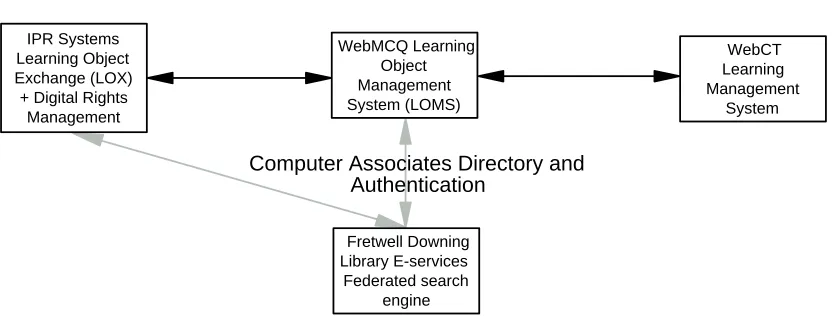
investigate the educational use of the Collaborative Online Learning and Information Services (COLIS) system developed in 2002 by a consortium based at Macquarie University. The COLIS project investigated whether the IMS1 specifications for interoperability of learning systems could be applied in a practical context. The COLIS project team was able to implement a demonstrator project (Dalziel, 2002), providing interoperability between the IPR Systems2 Learning Object Exchange (which also provides digital rights management), the WebMCQ3 Learning Object Management System (LOMS) and the WebCT Learning Management System. Single sign-on functionality was initially provided to all systems through the Computer Associates Directory and Authentication service, and search functionality was
provided by the Fretwell Downing federated search engine. The inter-relationships of the various systems are illustrated in Fig. 1.
3.2 Aims/objectives/outcomes
WebCT Learning Management
System IPR Systems
Learning Object Exchange (LOX) + Digital Rights Management
WebMCQ Learning Object Management System (LOMS)
Fretwell Downing Library E-services
Federated search engine
[image:6.595.89.506.341.499.2]Computer Associates Directory and Authentication
Figure 1. Inter-relations of the various systems in the original COLIS Demonstrator.
The intention of the research was to obtain information about the usefulness of learning objects for academic teaching staff, and obtain information about human and technical issues surrounding the use of learning objects. The research was also meant to provide evidence about the useability of the interfaces used in the COLIS
framework, and suggest improvements to these interfaces.
The major focus of this research was on the experience of librarians and teachers in using learning objects within the COLIS framework. There were two aspects to this:
• The issues involved in specifying metadata and digital rights for each learning object.
• The effectiveness of the process of discovery and inclusion of the learning objects into LOMS and WebCT
1
http://www.imsproject.org 2
http://www.iprsystems.com/ 3
Initially, the project intended to investigate the use and useability of learning objects across three aspects of the COLIS system. Existing learning objects were to be inserted into the IPR Systems Learning Object Exchange (LOX), transferred into the Learning Object Management System (LOMS), and made available through the WebCT Learning Management System.
Unfortunately, commercial pressures resulted in the replacement of two parts of the COLIS framework in 2003. Access management was provided by LibProxy, but this had essentially the same functionality as the previous access management product. However, the withdrawal of the IPR Systems LOX, to be replaced with the
Intralibrary Learning Object Repository, had several ramifications on the conduct of the research:
• The start of work was delayed as the new system was substituted into the COLIS framework and technical issues were resolved.
• Intralibrary had limited digital rights functionality, which was an important part of our original research objectives. While the ability to define digital rights at the time of creation was built into LOMS during the project, this functionality was not directly relevant to our original research design, and was not available in time to amend that research design.
• While the IPR Systems LOX and the LOMS had logically distinct functionality, the Intralibrary functionality overlapped that of both the LOMS and the LOX. There was, therefore, no need to use the LOMS system.
• Neither the LOX nor the Intralibrary systems had the functionality to allow the Federated search gateway to search its repository. Instead, the
Intralibrary system’s own internal search facility was used.
Accordingly, only two of the five systems of the original COLIS demonstrator were relevant to our research, as shown in Fig. 2.
The initial objectives of the research were modified to investigate:
1. The issues involved in specifying metadata for each learning object.
2. The effectiveness of the process of discovery of the learning objects and their inclusion into WebCT
3.3 Relationship to the COLIS ‘Global Use Case’
The ‘learning objects’ used in this research were not particularly sophisticated. They were simply documents which were used as resources in two units in the School of
WebCT Learning Management
System Intralibrary
Learning Object Repository
LibProxy Directory and Authentication
Information Technology: Introduction to Multimedia and the Internet and Organisational Informatics.
Documents of various formats and file types (PDF, HTML GIF and other graphics formats, Word, Excel, PowerPoint, and their Open Office equivalents) were provided by the academics to library staff. Librarians catalogued learning objects into
Intralibrary, together with their associated metadata.
Subsequently, academic teaching staff and research students searched for learning objects in Intralibrary and inserted them into WebCT.
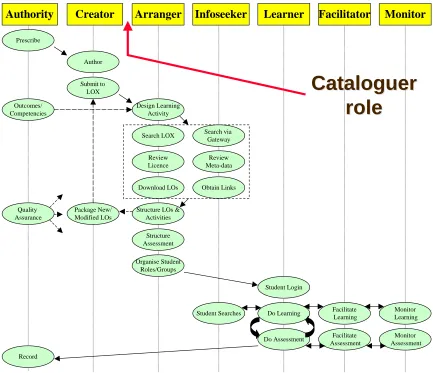
The initial COLIS project (Dalziel, 2002) defined a ‘Global Use Case’, which attempted to formalise the roles carried out in the learning object lifecycle, from creation to use. Five roles were initially defined (Dalziel, 2002): Authority, Creator, Arranger, Infoseeker and Learner. Two further roles were added late in 2002 4: Facilitator and Moderator.
In this context, the academics and librarians were to jointly play the role of the Creator, and the academics and research students were to play the roles of the
Arranger and Info seeker. Subsequent results indicated that the Creator role should be supplemented by a Cataloguer role (see §7.2).
4 Literature Review
Perhaps the earliest reference to what may be considered as the concept of learning objects was in the Theseus model developed by Stringer (Stringer, 1992a, 1992b) in the early 1990’s. The Theseus model used the notion of nodes (single screens) of information which could be linked together into paths. Each path passing through a node was recorded on that node, so that other visitors to the node could choose to follow a path taken by another. Stringer’s work was too ambitious for the technology of the day, and was not widely adopted.
A 1999 report for the Australian Department of Education, Training and Youth Affairs (McNaught, Phillips, Rossiter, & Winn, 2000) investigated factors affecting the widespread adoption of educational technology in Australian universities, and identified digital repositories as an important factor. The report analysed issues surrounding the development of a learning object economy5, although before the term learning object was widely-used, as well as theoretically discussing background issues which underpinned the development of current interoperability specifications and the COLIS project.
It appears that the term “learning object” may have been “first popularised in 1994 by Wayne Hodgins” when he used the term in the name of a working group. (cited in N. Friesen (2003): Polsani (2003)). As Friesen (2003) points out, there is confusion about what the term means. The word “object” is a technical term used in Computer Science. It has a very precise meaning and well understood. On the other hand, the word “learning” is non-technical and imprecise and as Friesen puts it “extreme in its vagueness”, so much so that even educational experts cannot agree on its meaning.
4
Sourced from Powerpoint slides used at the 2003 COLIS Roadshows. 5
Putting the two words together is bound to cause confusion and has led to a plethora of definitions of “learning objects” (see, for example, Appendix A).
The loose definition we will use in this report is:
A learning object is a collection of digital assets organised in such a way that they can be used for an educational purpose, and which is described by metadata. Learning objects may be embedded in other learning objects, and learning objects may be organised into learning activities.
A number of web sites provide useful background about learning objects, for example:
• The Queensland TAFE Reusable Learning Objects Page. www.tnqit.tafe.net/RLO/index.htm
• An online book “The Instructional Use of Learning Objects” – online version by David Wiley (Wiley, 2000). www.reusability.org/read/ • The Wisc On-line Resource Centre
www.wisconline.org/about/woinfo/woinfo.html • Janison Toolbox
www.janison.com.au/janison/products/toolbox_navigation.asp
Learning objects have an attraction that is difficult to ignore. For example, a Learning Objects symposium (Duval, Hodgins, Rehak, & Robson, 2003) held on 24 June 2003 in Honolulu concluded: “The promise and purpose of learning objects is to increase the effectiveness of learning as much or more so than their ‘efficiency’ in terms of cost, speed, etc. The learning object model does so by addressing the need for significantly greater adaptability of learning content to fit the unique needs of individuals or groups, and by enabling greater flexibility for mass customisation and ultimately learning”.
“What makes objects discoverable, accessible or searchable is the metadata used to describe and categorise them.” (Friesen, 2001). Metadata is data about data, an abstract description of data. A common example is a library catalogue. In the case of learning objects, metadata provide a concise description of the objects. This could include the name of the creator of the object, purpose of the object, file format of the object, … etc. It is generally agreed that learning objects need metadata and our definition of learning objects reflects this. Friesen (2001), however, indicates that there is some disagreement about whether metadata should be an integral part of the learning object or whether it should be external. In one view, “the integration of metadata with the learning object is intrinsic to object-orientation itself” (Dovey, (1999), cited in Friesen (2001)). The alternative view is that metadata may be associated with content but need not necessarily form part of the learning object.
We also do not agree with the view that metadata and its associated content should be bound in one object just because in the object-oriented paradigm, code and data are bound together. There is no parallel between metadata/content and code/data. In fact, both metadata and content are data in a computing science sense.
Although close binding of metadata in an object reduces the reuse of the object, such a binding increases interoperability when commonly-agreed metadata schemas (e.g. IMS) are used. This is because an object will have only one set of values for the metadata fields. If the metadata were separate from the object, as in the opposing view, different people can give different values for the metadata. In fact, it is possible for different metadata repositories linking to a single learning object to each have the same metadata fields, but with different values for the fields, or even different
metadata fields for the same object. In this scenario, reuse is potentially high, as anyone can customise the metadata for their own context, but interoperability would be low. For example, one metadata scheme may have a field called “cost”, while another scheme may have a field called “price” to mean exactly the same thing. The objects cannot easily interact with each other in some predefined way because the objects appear to be unrelated in a given context.
Even if objects have a commonly-agreed to metadata schema, there is no guarantee that values entered for the metadata fields by different cataloguers or annotators would be the same (Kabel, Hoog, & Wielinga, 2003). As will be described later, our findings show this to be the case. Kabel et al. indicate that different people give consistent values to metadata fields (consistent tagging) if these fields are “tangible". Tagging of “abstract" data fields is not consistent. They also report that structured metadata lists get tagged more consistently compared to flat metadata lists. Another interesting finding by Kabel et al. is that text is tagged more consistently compared to images. The explanation given is that wherever there is scope for interpretation, as in abstract metadata fields or in images, tagging by different people is not consistent.
5 Methodology
The research methodology was derived from the Learning-Centred Evaluation framework used in the ASCILITE CUTSD evaluation project (Phillips, 2002a, 2002b). This approach, originating in earlier work by Alexander & Hedberg (1994) and Bain (1999) distinguishes between formative and summative evaluation. This research was essentially formative (Flagg, 1990; Kennedy, 1999), seeking to identify ways to improve the useability of the components of COLIS, and their integration.
Data collection was primarily qualitative, seeking evidence about the use and useability of the COLIS system in our context through journals, observations and interviews (Harvey, 1998). Both the two librarians, who catalogued learning objects, and the two academics and two research students, who discovered learning objects, used journaling techniques to record their use of the system. While the librarians took notes about their work and wrote a procedures manual, the academics and research students kept a journal of their experiences with using the system, noting:
• ease of use, interface, searchability • other issues identified
• suggestions for improvement
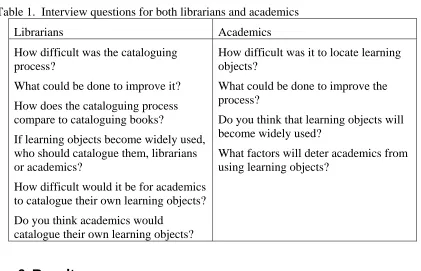
Both librarians and academics were interviewed by one of the project leaders, after the event, about their experiences. The interview questions are listed in Table 1, and interviews were tape recorded and transcribed for later analysis.
[image:11.595.94.515.244.515.2]Both journals and interview transcripts were analysed and emergent themes were identified. The themes were refined to form the body of section 6 of this report, and reviewed by stakeholders as part of the report-writing process6.
Table 1. Interview questions for both librarians and academics
Librarians Academics
How difficult was the cataloguing process?
What could be done to improve it?
How does the cataloguing process compare to cataloguing books?
If learning objects become widely used, who should catalogue them, librarians or academics?
How difficult would it be for academics to catalogue their own learning objects?
Do you think academics would catalogue their own learning objects?
How difficult was it to locate learning objects?
What could be done to improve the process?
Do you think that learning objects will become widely used?
What factors will deter academics from using learning objects?
6 Results
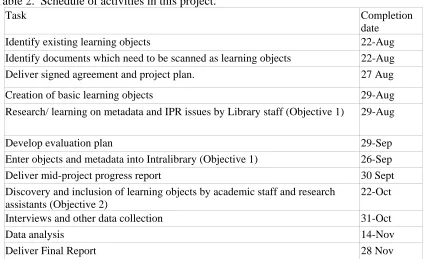
The activities carried out in the project and their associated schedule are summarised in Table 2. Project activities proceeded largely according to plan, except that the withdrawal of the IPR Systems Learning Object Exchange restricted the scope of the investigation. Major activities are summarised in subsequent subsections.
6.1 Research/learning on metadata
Several metadata schema were examined by Library staff, to familiarise themselves with concepts and terminology. These included Dublin Core (http://dublincore.org/), IMS (http://www.imsglobal.org/specifications.cfm) and the IEEE Standard for Learning Object Metadata (http://ltsc.ieee.org/wg12/). The EdNA site
(http://www.edna.edu.au/metadata) was noted as suitable for future Library staff training.
6
6.2 Interface issues
Table 2. Schedule of activities in this project.
Task Completion date
Identify existing learning objects 22-Aug
Identify documents which need to be scanned as learning objects 22-Aug
Deliver signed agreement and project plan. 27 Aug
Creation of basic learning objects 29-Aug
Research/ learning on metadata and IPR issues by Library staff (Objective 1) 29-Aug
Develop evaluation plan 29-Sep
Enter objects and metadata into Intralibrary (Objective 1) 26-Sep
Deliver mid-project progress report 30 Sept
Discovery and inclusion of learning objects by academic staff and research assistants (Objective 2)
22-Oct
Interviews and other data collection 31-Oct
Data analysis 14-Nov
Deliver Final Report 28 Nov
Library staff familiarised themselves with the Intralibrary interface, finding it easy to use for data entry and basic retrieval. However, ongoing access problems were experienced during September and Intralibrary only worked with Internet Explorer at Murdoch University. Some time later, Mozilla 1.4 could also be used. The COLIS walkthrough document served as a useful introduction to the interface.
The Intralibrary product was not fully-functional for a period, but this was mainly resolved. A range of interface and functionality problems with using the Intralibrary system within the COLIS framework were identified and passed back to the COLIS team, to be subsequently forwarded to Intralibary’s developers. For example, Windows users were able to access the system with most browsers, but Macintosh users continued to have problems. This was contrary to the interoperability goals of COLIS.
A particular issue was that the Intralibrary system would not permit searching on terms with three or fewer letters, with the result that common acronyms, such as IMS and PDF, could not be searched for.
The display of search results was also lacking in functionality. The ordering of the display of search results was unclear. There should be a range of display options, including a sorting by the title of the learning objects, and this should include the ‘skip filing codes’, so that preceding articles on titles are ignored in the sort order.
The librarians refined their journal into a set of instructions about the processes involved in cataloguing learning objects. This is included in Appendix B.
6.3 Cataloguing learning objects
their associated metadata were entered into Intralibrary. Initially it was planned to catalogue 200 learning objects, but delays and technical problems resulted in 66 learning objects being catalogued. However, this was a sufficient number to carry out the planned research.
A further factor was that the cataloguing process was more time-consuming than first thought. Initial estimates, based on cataloguing print records, was that it would take approximately 10 minutes to catalogue each learning object, whereas actual times, once the process had been learned, averaged between 15 and 20 minutes. However, the estimate of 10 minutes for a print record presupposed cataloguing an item which had already been catalogued by other libraries (e.g. a book). Cataloguing unique non-digital information objects is more time-consuming.
Library cataloguing staff initially found it difficult to catalogue learning objects. Once they had learnt the metadata standard, they needed to decide which values to enter for each of the metadata terms. While some of these were pre-determined by the Intralibrary menu structure, others were not. The librarians made Murdoch-specific choices about the vocabulary for the metadata terms to be entered. This concerned the librarians, because, while the Murdoch entries might be consistent, other members of the larger research project would use different vocabularies. The lack of
consistency of metadata highlighted concerns about the maintainability of the
metadata. There was a strong concern that effort put into cataloguing learning objects may be wasted as standards evolved and terms used in metadata become obsolete. Ongoing quality control was also an issue.
A useful example of the need for consistency from record to record is the method used for entering author details. If some authors are entered as first name, second name and others as second name, initial, then searches on authors’ names may yield varying results. An agreed standard needs to be developed so that cataloguing details can be entered consistently.
While acknowledging that the COLIS system was a pilot project, the librarians felt that national standards needed to be agreed on: “If it is going to be a National Database then we really need to address these sorts of issues very much upfront and “somebody” needs to control them on an ongoing basis”.
The librarians acknowledged the similarities between cataloguing books and learning objects: “I mean the essence of analysing intellectual content is the same”. In
cataloguing a book, there are well-established standards for descriptive data, classification data, subject headings, name authorities, international standards, national standards and, in some cases, local variations on the standards. While the framework for cataloguing information resources in various formats is well established, the learning object cataloguing framework is still being explored.
An important issue in developing a national approach is agreement about what Thesaurus or range of Thesauri should be used, or, alternatively, whether it is preferable to use keywords.
A further problem experienced by the librarians in cataloguing learning objects was the lack of contextual information available to librarians at the time of cataloguing. Initially, the librarians were simply given access to the electronic documents and left to make their own decisions about the contextual metadata, such as the title,
sometimes made inappropriate choices. The librarians’ choices of descriptions were complicated by the fact that many of the learning objects had similar names: “for a particular topic within a course, there might be several objects which have very much the same title, they might be to do with a particular topic but one might be the lecture in a particular file format and the other might be a different file format for the outline … or it may be notes by the author to help create these things and if you give them exactly the same title or the same description it is not going to be apparent that they are actually different things, but if you want to make them look different you need to have a standard way in the title or somewhere where you make apparent that this is that type of an Object as opposed to the outline as opposed to the lecture”.
As the project proceeded, academics provided more contextual information to the librarians, and this simplified the cataloguing process. However, initially, the academic staff did not know what information was needed by the librarians.
Version control was another issue which vexed the librarians. In a library
environment, published works are usually much more controlled. While there may be multiple copies of a work, each copy is identical and the titles are always the same. The standards for bibliographic description are based on that similarity whereas, in a learning object environment “an author can dash off a version of a file and then modify it the next day and send that for cataloguing as another object, perhaps even not realising that the previous one has been sent in a previous email, or in a different file format, but intending it to be the same object, slightly edited with a different title”.
As one example, some of the learning objects were sourced from thirteen lectures, with files in PDF format, “and each of them was obviously the presentation for a lecture, but the footers on the pages of some of them were giving semester one 2001, semester one 2002 and some were different course codes (B230), when they were supposed all to be the lectures for the current 2003 semester course B239”.
The advent of a learning object economy will require increased discipline by the document creator in imposing version control on learning objects. The cataloguer cannot be responsible for this. The analogous situation with books is that the publisher takes care of version control. However, systems need to be developed whereby academics can control the versions of their learning objects. Learning Content Management Systems, such as Harvest Road’s7 HIVE have embedded version control functionality, and this may reduce the possibility of confusion.
6.4 Discovering learning objects and creating lessons
In order to investigate the discovery of learning objects in the COLIS framework, two academics and two postgraduate students, acting as academics, simulated the process of creating a lesson on an Information Technology topic using learning objects stored in Intralibrary. This simulation was structured so that each academic attempted to create lessons from the other academic’s learning objects. The lessons consisted of web pages supporting four lectures on relevant topics.
One academic, Fay, was currently teaching B329, Organisational Informatics, but had previously taught B108, Introduction to Multimedia and the Internet. The other academic, Shri, had never taught B329. Of the two research students, Khushroo had
7
been a tutor in B108, and therefore was familiar with the content, but Pilun was unfamiliar with the content of B329.
While Fay and Shri had some knowledge of the COLIS system, both Khushroo and Pilun were completely new to it. Both students were competent web users, and Khushroo was aware of knowledge objects, the IMS specifications and metadata.
The simulation could, therefore, be structured across two dimensions, so that one person either had knowledge or no knowledge, of the COLIS system and the content of the lesson, as shown in Table 3.
Table 3. Structure of the discovery experiment Knowledge of content (B108)
No knowledge of content (B329)
Knowledge of system Fay Shri No knowledge of system Khushroo Pilun
The tasks to be undertaken were:
For B108: Create a multimedia module of four lectures incorporating topics on graphics, text, audio, video/animation.
For B329: Create an organisational informatics module of four lectures incorporating topics on computer-mediated communication, group processes, computer-mediated collaborative work and virtual organisations.
The results of the simulation for each of the four participants are described in the following sections.
Pilun
Pilun, the user with knowledge of neither the content nor the system, had no difficulty in learning to use Intralibrary. He was able to complete his task in 38 minutes. He found the interface simple and easy to understand, with appropriate colours and layout. He felt that most users could use Intralibrary for searching without a manual. He also found that the tree structure was somewhat confusing, especially when many branches were expanded, favouring a Windows Explorer-like folder structure.
While searching for lesson content, he found specific lesson topics relatively easily by browsing and built a web page from these. However, with a more-populated
repository, browsing is not a sustainable discovery strategy. Pilun then tried searching, and located the same learning objects relatively-easily.
Khushroo
Khushroo, the user with knowledge of the content but not of the system, similarly had little difficulty in building a lesson by browsing. Browsing may be an appropriate strategy for users new to a system, but would not be effective on a real learning object repository, because of the volume of records. He then used both the ‘search’ and ‘advanced search’ options, and located the same learning objects. However, while searching for learning objects relevant to the topic ‘text’ in the lesson task, he did not locate relevant learning objects.
Shri
Shri, an academic who was familiar with COLIS, but not with the content, took a very systematic approach to his task. He identified a set of key phrases (organisational informatics, computer-mediated communication, group processes, computer-mediated collaborative work and virtual organizations), and surmised that keywords would be words in these phrases. His search procedure was to first search on the whole phrases, then on words in phrases.
Shri searched on ‘organisational informatics’, which resulted in 16 matches including duplicates. Since some of these were labelled lectures and the task was to create 4 lectures, he searched on organisational informatics lecture. This resulted in 24 hits including relevant results. He also performed several advanced searches on the metadata with ‘organisational informatics lecture’. Searches on all fields returned 24 hits; searches on the title metadata yielded 22 hits, and searches on the keywords metadata returned 14 hits. This was the smallest number of hits which included relevant items, and Shri used this to generate his lesson.
However, a metadata search of ‘organisational informatics lecture’ in the description
metadata yielded only 5 hits, none of which were relevant, indicating a meta-tagging problem.
From an interface point of view, Shri found Intralibrary easy to use, but suggested that the icons were not intuitive, needing title attributes. HTML ALT tags were not
sufficient as they do not show up in Mozilla if images are visible. Shri reported spending under one hour on the task, but felt that he could have completed it in 15 minutes, “if I hadn’t been playing”.
Fay
Fay, an academic who was familiar with both COLIS and the content of the task, started immediately with the Search function. A search on ‘graphics’ returned six objects, but of these six, four could not be viewed in Intralibrary. One PowerPoint object displayed the default image for a graphic, while the other 3 objects which could not be viewed displayed an error message: “Sorry you have been logged out”, even though Fay was still logged in.
Searches on ‘audio’, ‘video’ and ‘animation’ proceeded successfully. However, as Khushroo found, searches for ‘text’ were unsuccessful. As Fay’s journal reports:
“The first search for “text” resulted in 50 objects, which were irrelevant, in e-reserve8, or could not be viewed. As I am familiar with the content of the unit, I then searched for ‘HTML’, which is what this particular topic is about. This search resulted in 12 objects including readings in e-reserve and the same objects resulting from the “graphics” [search]. I then tried ‘Introduction to HTML’ which resulted in a list of 20 objects. Most of the objects were irrelevant. There was only one relevant object which was a reading on HTML, CSS and XML in e-reserve.
“I tried the Advanced Search. Using the Metadata option and the keyword ‘text’ resulted in the same results as for the basic search. Using the Vocabulary option resulted in no results.”
8
Like Khushroo, Fay had difficulty searching for learning objects relevant to the topic ‘text’ in the lesson task, because they had not been catalogued appropriately.
However, it is unusual to need to search for text documents which are designed to support a ‘text’ topic.
Fay reported that the time taken for this task, including the HTML page and this document, was approximately 1 hour. She found the Intralibrary interface easy to navigate, intuitive and pleasant to work with.
Fay was surprised that other objects in file formats such as JPG, GIF, AVI and WAV were not found with her searches. She surmises that the metadata information needs some refinement (with more assistance from the contributors/authors).
7 Discussion
7.1 Quality of metadata
The quality of the metadata entered by the librarians became an issue when the discovery process was simulated. Three of the four participants reported inconsistent search results when using the metadata fields. Kabel et al. (2003) report that they experienced similar problems whenever some interpretation was needed during cataloguing. This experience brought home to the academics the importance of correctly specifying the metadata, and they acknowledged that the inconsistency of the metadata was due to the lack of contextual information provided to librarians. This, together with the concerns of librarians about their inability to accurately catalogue learning objects, led us to consider a two-stage cataloguing process.
7.2 Cataloguing learning objects
A major recommendation arising from this research is to suggest an extension to the COLIS Global Use Case. The Creator category was found to be problematic in practice. Both librarians and academics agreed that “if it is going to take an academic half an hour, or even quarter of an hour, to input these things [metadata], they are not going to want to do it.” Koppi and Lavitt (2003) report similar time problem in their study. The learning object cataloguing process, therefore, has to be as simple as possible, but also accurate and consistent. There is clearly a role for librarians in creating metadata for learning objects, because:
1 Academics have neither the time nor interest to do this
2 Academics do not have the requisite skills in cataloguing, but librarians do
3 Librarians are aware of the vocabularies, thesauri and standards needed to consistently catalogue
4 Learning object metadata is likely to be more consistent if created by librarians
However, librarians should not be expected to input the complete set of metadata, because academics need to provide contextual information about the learning object, since they are in the best position to know that.
with the addition of the Cataloguer role. This approach has been taken by the Learning Federation in their work creating learning objects for the schools sector (The Learning Federation, 2002), where some mandatory metadata is automatically created; content developers create an initial small set of metadata; and quality assurance personnel subsequently create and maintain metadata. A proposed set of metadata to be provided by Creators is shown in Table 4.
Authority Creator Arranger Learner
Prescribe Author Submit to LOX Design Learning Activity Search LOX Download LOs Structure LOs &
[image:19.595.78.511.79.452.2]Activities Structure Assessment Organise Student Roles/Groups Student Login Do Learning Do Assessment Record Infoseeker Search via Gateway Obtain Links Student Searches Review Licence Review Meta-data
Cataloguer
Cataloguer
role
role
Facilitator Facilitate Learning Facilitate Assessment Package New/ Modified LOs Quality Assurance Outcomes/ Competencies Monitor Monitor Learning Monitor AssessmentFigure 3. Extension of the COLIS Global Use Case
The ALCTS Metadata Enrichment Task Force (Bates, 2003) (cited in Ahronheim, 2003) recently explored ways to enrich metadata records by focusing on providing additional subject access mechanisms (e.g., front-end user thesauri) and increasing granularity of access and display (e.g., by enabling progression through hierarchy and versions and by additional descriptive information including summaries. Its
recommendations may provide a mechanism through which accurate learning object metadata might be efficiently generated.
7.3 Wider use of learning objects
efficient. As Fay reported: “I spend about half a day before each lecture looking on Google, so being able to have something that might find something more specific [would be good]”. If a new course needed to be developed, one of the first activities undertaken would be to search learning object repositories for appropriate resources. Table 4. Proposed set of metadata to be provided by Creators.
Metadata field Information to be entered
Title Provide title if this is not the same as found on the file's opening display screen, or if it is not displayed and is part of a series, such as: lecture series. If so, give details, e.g. course and lecturer/topic number
Example: Markup languages; societal issues (B108 lecture 9) Description Provide a brief description on the subject material covered
by the file if it is not readily available from the opening screen display (especially if not textual material, e.g. gifs, mpegs, etc.)
Example: Covers the nature of markup languages with particular reference to those based on XML lifecycle Version The Cataloguer cannot be responsible for the version.
Creators need to decide if a version of their documents needs to be recorded, perhaps as part of an institution-wide system. Role of contributor Provide contributors’ names and roles if appropriate.
Otherwise, it is assumed that the provider of the file is the 'author' or 'content provider'.
Special requirements for use
Provide if not commonly available to basic PC users Example: Requires OpenOffice reader
Type of resource Provide. If the resource is textual material, 'narrative text' is assumed
Intended for use by Provide. e.g. Learner, Author, Teacher. Intended for use in Select from menu
Educational Language of target user
Provide if not for English speaking users
Charge to use this resource
Indicate 'Yes', otherwise 'No' is assumed
Subject to copyright Indicate 'No', otherwise 'Yes' is assumed
Keywords Provide a keyword string if details from the description need elaboration.
Example: SGML, DTD, XML, PCDATA, CSS, XHTML, MathML, SVG, RELAX NG
However, when questioned about whether other academics would embrace a learning object economy, both librarians and academics expressed doubt that all would take part. The librarians felt that academics would need evidence of the sustainability of such a model, and would need to be convinced that there were benefits to themselves, such as saving time.
The academics felt that some of their colleagues were “very touchy” about sharing resources, and wanted to protect their intellectual property. There were significant numbers of academics who would only share their learning resources if their intellectual property rights were protected. A complex range of issues surrounding management of digital rights needs to be investigated, but this was not possible in this research.
Koppi and Lavitt (2003) allude to the lack of reward system (similar to that in publishing research) for academics not wanting to spend too much time on
cataloguing their learning materials or sharing it with others. They conclude “It is ironic how the issue of Intellectual Property (IP) is often used as a reason for not making teaching materials public when the same academics can’t give their IP away fast enough when it comes to publicising their research by way of publications and conferences”.
Further factors impeding the broader adoption of learning object exchanges identified by participants in this research were the ICT skills of academics and their willingness to adopt new teaching approaches.
8 Conclusion
As part of this project, 66 learning objects were catalogued and inserted into the Intralibrary learning object repository. Several technical difficulties were encountered and bugs identified and reported, but, overall, Intralibrary was relatively easy to use.
In our opinion, the range of technologies in the COLIS demonstrator, and the built-in interoperability, are not yet of industrial strength, but are approaching this.
The IEEE LOM metadata standard seems to be an appropriate mechanism to use for standardising metadata. However, even with this standard, and with maturing technology, a range of technical and procedural issues need to be resolved before learning objects can be effectively used on a wide scale.
One issue is the need for an agreed vocabulary and mechanisms for consistently creating metadata on a national or international scale.
A second issue is the development of a new role of Cataloguer, which complements the Creator role in the COLIS Global Use Case. By simplifying the metadata creation process for academics, and enabling the technical metadata elements to be input by information professionals, it is likely that more accurate and consistent descriptions of learning objects can be created.
However, even with agreed mechanisms for creating searchable learning objects and interoperable repositories, digital rights management becomes an issue. There are broadly two opinions held by academics about intellectual property in general, and digital rights, in particular. Many academics are willing to freely share their
teaching materials, and fear that it will be ‘stolen’, and that their value to their
institution will be diminished if other people have access to their intellectual property.
While many academics sharing learning objects would like to be acknowledged, and perhaps recompensed, for their efforts, they are not comfortable with other people modifying their learning resources. It is ironic, however, that many of the same academics cite as reasons for not adopting learning objects created by others the cost, and the inability to modify them to an individual context.
Much work needs to be done before a viable learning object economy can be developed, and the human issues may well be the most crucial
9 References
Ahronheim, J. (2003, 9 Oct). ALCTS Metadata Enrichment Task Force. Library of Congress Cataloging newsline, 11.
Alexander, S., & Hedberg, J. G. (1994). Evaluating technology-based learning: which model? In K. Beattie & C. McNaught & S. Wills (Eds.), Multimedia in Higher Education: Designing for Change in Teaching and Learning. Amsterdam: Elsevier.
Bain, J. (1999). Introduction to special issue on learning centered evaluation of
innovation in higher education. Higher Education Research and Development, 18(2), 165-172.
Bates, M. J. (2003). Improving User Access to Library Catalog and Portal Information (Final Report Version 3): ALCTS. [Online] Available at http://www.loc.gov/catdir/bibcontrol/2.3BatesReport6-03.doc.pdf.
Boyle, T. (2003). Design principles for authoring dynamic reusable learning objects.
Australian Journal of Educational Technology, 19(1), 46-58.
Boyle, T., & Cook, J. (2002). Towards a Pedagogically Sound Basis For Learning Object Portability and Re-use. Paper presented at the Meeting at the
Crossroads, Proceedings of the 18th Annual Conference of the Australian Society for Computers in Learning in Tertiary Education, Melbourne: Biomedical Multimedia Unit, The University of Melbourne. [Online] Available at boylet.pdf.
Dalziel, J. (2002). Reflections on the COLIS (Collaborative Online Learning and Information Systems) Demonstrator Project and the "Learning Object
Lifecycle". In A. Williamson & C. Gunn & A. Young & T. Clear (Eds.), 19th Annual Conference of the Australasian Society for Computers in Learning in Tertiary Education (pp. 159-166). Auckland, New Zealand. [Online]
Available at
http://www.ascilite.org.au/conferences/auckland02/proceedings/papers/207.pd f.
Dovey, M. (1999). Meta-Objects - An Object Oriented approach to metadata. Retrieved 9 December, 2003, from the World Wide Web:
http://www.ariadne.ac.uk/issue19/meta-objects
Duval, E., Hodgins, W., Rehak, D., & Robson, R. (2003). Learning Objects 2003 Symposium: Lessons Learned, Questions Asked. Honolulu, Hawaii. [Online] Available at
http://www.cs.kuleuven.ac.be/~erikd/PRES/2003/LO2003/index.html. El Saddik, A., Fischer, S., Ipsi, G., & Steinmetz, R. (2001). Reusability and
Adaptability of Interactive Resources In Web-Based Education Systems. ACM Journal of Educational Resources in Computing, 1(1).
Flagg, B. N. (1990). Formative Evaluation of Educational Technologies. Hillsdale, NJ: Lawrence Erlbaum.
Friesen, N. (2001). What are Educational Objects. Interactive Learning Environments, 9(3). [Online] Available at
http://www.careo.org/documents/objects.html.
Friesen, N. (Ed.). (2003). Three objections to Learning Objects. London: Taylor and Francis Books Ltd. [Online] Available at
http://phenom.educ.ualberta.ca/~nfriesen/.
Fripp, C., & Macnamara. (2003, 6-9 May). Copyright Management in The World of Learning Objects. Paper presented at the Educause Australia, Adelaide, Australia.
Geissinger, H. (2001). Re-use of current teaching resources at a dual-mode university.
Campus - Wide Information Systems; Bradford, 18(3), 120-124. Harvey, J. (1998). Evaluation Cookbook. Learning Technology Dissemination
Initiative. Retrieved April 28, 2003, from the World Wide Web: http://www.icbl.hw.ac.uk/ltdi/ltdi-pub.htm
Hawryszkiewycz, I. T. (2002, 8-11 December). Designing Learning Activities From Learning Objects. Paper presented at the ASCILITE 2002, Unitec, Auckland, New Zealand.
Hiddink, G. (2001a). ADILE: Architecture of a Database-Supported Learning Environment. Journal of Interactive Learning Research, 12(2/3), 297-315. Hiddink, G. (2001b). Solving reusability problems of online learning materials.
Campus - Wide Information Systems, Bradford, 18(4), 146-152.
IEEE. (2002, 12 June). Draft Standard for Learning Object Metadata [pdf document]. Retrieved 23 March, 2003, from the World Wide Web:
http://ltsc.ieee.org/doc/wg12/LOM_1484_12_1_v1_Final_Draft.pdf
Ip, A., & Morrison, I. (2001). Learning Objects in Different Pedagogical Paradigms.
Paper presented at the Meeting at the Crossroads, Proceedings of the 18th Annual Conference of the Australian Society for Computers in Learning in Tertiary Education, Melbourne: Biomedical Multimedia Unit, The University of Melbourne.
Kabel, S., Hoog, R., & Wielinga, B. (2003). Consistency in Indexing Learning Objects: an Empirical Investigation. Paper presented at the Learning Objects 2003 Symposium: Lessons Learned, Questions Asked, Honolulu, Hawaii. [Online] Available at
http://www.cs.kuleuven.ac.be/~erikd/PRES/2003/LO2003/Kabel.pdf.
Kennedy, G. E. (1999). Defining the dimensions of a formative evaluation program: A multi-method, multi-perspective approach to the evaluation of multimedia.
Paper presented at the Ed-Media 99 Conference, Seattle, Washington.
Questions Asked. Honolulu, Hawaii. [Online] Available at
http://www.cs.kuleuven.ac.be/~erikd/PRES/2003/LO2003/Koppi.pdf. McKnight, S., & Livingston, H. (2003, 6-9 May). Reuse of Learning Objects? Why,
How and When? Paper presented at the Educause Australia, Adelaide, Australia.
McNaught, C., Phillips, R., Rossiter, D., & Winn, J. (2000). Developing a Framework for a Useable and Useful Inventory of Computer-facilitated Learning and Support Materials in Australian Universities (Evaluations and Investigations Programme). Canberra: DETYA. [Online] Available at
http://www.dest.gov.au/highered/eippubs1999.htm. Merrill, M. D. (1998). Knowledge Objects. CBT Solutions, 1-11.
Mortimer, L. (2002). (Learning) Objects of Desire: Promise and Practicality. Learning Circuits, ASTD's Online Magazine All About E-Learning. [Online] Available at www.learningcircuits.org.
Oliver, R. (2001). Learning Objects: Supporting Flexible Deliver of Online Learning.
Paper presented at the 18th Annual Conference of the Australian Society for Computers in Learning in Tertiary Education, Melbourne: Biomedical Multimedia Unit, The University of Melbourne.
Phillips, R. A. (2002a, 8 April, 2002). Learning-centred Evaluation of Computer-facilitated Learning Projects in Higher Education: Outcomes of a CUTSD Staff Development Grant "Staff Development in Evaluation of Technology-based Teaching Development Projects: An Action Inquiry Approach". Committee for University Teaching and Staff Development, Commonwealth of Australia. Retrieved 24 April, 2002, from the World Wide Web:
http://cleo.murdoch.edu.au/projects/cutsd99
Phillips, R. A. (2002b). Staff Development in Learning-centred Evaluation of Computer-facilitated Learning Projects. In A. Goody & D. Ingram (Eds.),
Spheres of Influence: Ventures and Visions in Educational Development. Crawley, W.A.: Organisational and Staff Development Services, The University of Western Australia. [Online] Available at
http://www.csd.uwa.edu.au/ICED2002/publication/Rob_Phillips.pdf. Polsani, P. R. (2003). Use and Abuse of Reusable Learning Objects. Journal of
Digital information, 3(4). [Online] Available at http://jodi.ecs.soton.ac.uk/Articles/v03/i04/Polsani/.
Reid, I. (2003, 6-9 May). Embedding education design in learning objects. Paper presented at the Educause Australia, Adelaide, Australia.
Sampson, D., Karagiannidis, C., & Cardinali, F. (2002). An Architecture for Web-based e-Learning Promoting Re-usable Adaptive Educational e-Content.
Educational Technology & Society, 5(4). [Online] Available at http://ifets.ieee.org/periodical/vol_4_2002/sampson.html.
Santacruz-Valencia, L. P., Aedo, I., Breuer, P. T., & Kloos, C. D. (2003). A
Framework for Creation, Integration and Reuse of Learning Objects. Learning Technology Task Force (LTTF), IEEE Computer Society, 5(1). [Online] Available at http://lttf.ieee.org/learn_tech/issues/january2003/index.html. Smart, L., Fennessy, B., & Mason, D. (2003, 6-9 May). Digital storage and retrieval -
An action research approach. Paper presented at the Educause Australia, Adelaide, Australia.
Instructional Use of Learning Objects: Online Version. [Online] Available at http://reusability.org/read/chapters.
Stringer, R. (1992a). Theseus. Paper presented at the Pacific University Consortium Conference, Kyoto, Japan.
Stringer, R. (1992b). Theseus. International Federation of Library Associations, 18(3).
The Learning Federation. (2002). Metadata Application Profile: Mandatory Elements. Melbourne: Curriculum Corporation and education.au. [Online] Available at http://www.thelearningfederation.edu.au/repo/cms2/tlf/published/8519/docs/M etadata_Mandatory_Elements_1_1.pdf.
Ward, N. (2003, 6-9 May). Creating a Metadata Application Profile: A Case Study of The Learning Federation experience. Paper presented at the Educause in Australia, Adelaide, Australia.
Wiley, D. A. (2000). Connecting learning objects to instructional design theory: A definition, a metaphor, and a taxonomy. In D. A. Wiley (Ed.), The
Instructional Use of Learning Objects: Online Version. [Online] Available at http://reusability.org/read/chapters/wiley.doc.
Zhang, J., Gruenwald, L., Candler, C., McNutt, G., & Chung, W. S. (2002, Accessed 23 March 2003). Database and Metadata Support of a Web-based Multimedia Digital Library for Medical Education. Paper presented at the ICWL, Hong Kong, China. [Online] Available at
www.cs.ou.edu/~database/documents/zgcmc02.pdf.
10 Acknowledgements
11 Appendices
11.1 Appendix A
The following table, derived from honours work (E-Learning: Developing A
Framework For Interoperable Learning Objects) in progress by Dianne Edwards lists various definitions of learning objects.
Author Object Name and definition (Boyle, 2003) Learning Objects:
Each learning object should:
Be based on one learning objective or clear learning goal. Not share unnecessary dependencies with other objects. Be pedagogically rich.
Compound objects are pedagogically richer and useful for repurposing. (Boyle & Cook,
2002)
Learning Entities.
(Dalziel, 2002) Learning Object:
A Learning Object is an aggregation of one or more digital assets, incorporating meta-data, which represent an educationally meaningful stand-alone unit.
(Downes, 2001) Learning Objects. (El Saddik, Fischer,
Ipsi, & Steinmetz, 2001)
Learning Object:
(IEEE, 2002) “A learning object is defined as any entity, digital or non digital, which can be used, re-used or referenced during technology supported learning.”
Focus is on digital learning objects.
Define Smart learning objects which are multimedia objects that include dynamic metadata.
(Fripp &
Macnamara, 2003)
Learning objects:
(Geissinger, 2001) (IEEE, 2002)“a learning object is defined as any entity, digital or non digital, which can be used, for learning, education or training.” (Hawryszkiewycz,
2002)
Learning objects combine to create Learning activities which are composed of three object classes:
Subject metadata Learning method Environment (Hiddink, 2001b) Learning Objects
(Hiddink, 2001a) Learning Object defined as a digital multimedia object plus metadata. (IEEE, 2002) Learning object defined as
“any entity, digital or non digital, which can be used, for learning, education or training.”
(Ip & Morrison, 2001)
Definition of learning object is very broad in this paper, it is only limited to those used directly by the learner.
Differentiates between learning resources and learning object. A learning object should support interactivity and manage access. (McKnight &
Livingston, 2003)
(Merrill, 1998) Knowledge Object with five major components.
The entity, some device, person, creature, place, symbol, object, thing; Parts of the entity;
Properties of the entity (properties are qualities or quantities associated with the entity);
Activities associated with the entity (activities are actions that can be performed by the learner on, with, to, the entity);
Processes associated with the entity (processes are events triggered by an activity or another process that change the value of properties of the entity).
(Mortimer, 2002) Learning Objects: A piece of content smaller than course or lesson. Part of three interdependent components,
The learning object itself.
Meta-tagging to describe content and Learning Content Management System.
Lists different types of Learning Object definitions Content – learning objective
Size or seat time – ie chunk of learning that takes no longer than 15 minutes
Context and capabilities: standalone, deliverable anywhere, anytime. Tagging and storage – metadata
(Oliver, 2001) Learning object defined as any entity digital or non-digital that may be used for education and training. (IEEE, 2002) For online learning this includes web pages, pdf documents, database applications, animations, Java applets, PowerPoint presentations and QuickTime movies.
Flexible Toolboxes - definition of Learning Object broader, in terms of educational properties, eg learning elements, modules and assessment items.
(Polsani, 2003) Learning Object defined as “an independent and self-standing unit of learning content that is predisposed to reuse in multiple instructional contexts.”
(Reid, 2003) Learning Objects – custom form to suit own Learning Management System.
(Sampson, Karagiannidis, & Cardinali, 2002)
Defines custom packaging extension of IMS, does not define Learning Objects.
(Santacruz-Valencia, Aedo, Breuer, & Kloos, 2003)
Electronic Learning Object
An ELO has attributes, behaviours and interfaces which define interactions with other objects, internal and public actions. (Smart, Fennessy, &
Mason, 2003)
Dynamic Learning Element
Any resource that can be discovered on the Internet, and can be sourced, accessed (either online or not, depending on the format) and used, by a learner, either spontaneously or within a planned process, to help achieve an accredited learning outcome, within either a learner centric framework or a teacher driven process.
(South & Monson, 2000)
(Ward, 2003) Learning object defined as "a digital resource facilitating learning experiences related to a particular educational purpose".
TLF Learning Objects designed to possess educational value independent of any one application or context.
(Wiley, 2000) Learning Objects is defined as “any digital resource that can be reused to support learning,”
(Zhang, Gruenwald, Candler, McNutt, & Chung, 2002)
11.2 Appendix B
COLIS PROCEDURES Ross O’Neil,
14/10/2003
Following only a brief survey of Metadata standards limited by project time constraints, these procedures have developed over September-October 2003 as various objects were uploaded to the COLIS IntraLibrary. Decisions on metadata content followed
discussions among Murdoch project participants but are open to further discussion and modification.
Examples appended below for metadata of typical objects.
Note: IE browser was necessary on library’s Windows XP PC workstations
COLIS Demonstrator home page:
http://1443.libproxy.ics.mq.edu.au/colis/webmcq_colis_list.htm
Click: Start here >> brings up a login screen
Username: Murdoch ; Password: hocdrum
Nominate a session length, default 30 minutes, and click LOGIN
Click:
Intrallect - Intralibrary
Entry screen displays login name as: Ross O'Neil
This entry screen is a ‘browse library’ screen divided in 2 halves with browsing tips (see also the help screens by clicking ”?” icon)
Other options are given across the top: Search (text box)
Advanced search Upload area Profile Logout
UPLOADING AND METADATA PROCEDURES
To load objects and create metadata use the ‘upload area’.
Existing objects can have metadata updated by finding them (search or browse) and ‘un-publishing’ them to place them back in the ‘upload area’ for editing.
UPLOAD AN OBJECT
Click ‘upload area’
In ‘select file’‘browse’ to find file (files or loading were saved on a personal network folder), click OK
File name is entered in ‘enter title’ – leave for later, or edit to object’s title.
‘object type’ is ‘file’ by default (‘package’ and ‘virtual’ were not used)
completed in order, before the object can appear in the IntraLibrary for use by others.
(also note icons ‘view object’ and ‘delete object’)
Several objects can be loaded to the ‘upload area’ and worked on later… the objects are listed in order of latest uploaded. When worked on they are resorted. Sort order a bit hard to follow so if there are many it may be difficult to locate a particular title.
EDIT METADATA
Click the ‘edit metadata’ icon
A “basic metadata screen” permits editing of most important fields. Only Title and Description need mandatory updates (other fields added by default)
After completing Title and Description, click ‘save’ button, then
‘Advanced editor’ to scroll through the complete range of fields. Optionally, metadata from a recently published object can be used to populate fields by using the ‘copy’ button (care needed as author and other imformation from the previous object must be updated)
Murdoch has made decisions about use of fields, as outlined below
general:
Title: Title field is mandatory. (The distinctive title from the object was used or created based on the file name. Course codes and titles of series, eg, lecture or topic series, were added in brackets)
Language…: Default en (English) plus drop-down list options (DDL in details below)
Description: A brief description is mandatory (These were pasted from the introduction of the object where available. For ECMS search objects a standard phrase precedes the source of the ECMS article/chapter, etc, eg: Murdoch University Library search result for a scanned article available via ECMS. Source:)
Catalogue Entry: ('Catalog' and 'Catalog reference' left blank) When or where it is used: (left blank)
Aggregation level: Default from file type (retained) Identifier: (left blank)
lifecycle:
Version or state: (left blank)
Contribute: Defaults to login name (edit one, add more if applicable. Usually the role ‘contributor’ was used, or ‘author’ if responsibility for the object was clear)
Role of contributor: List with ‘author’ default or options: Undefined
Content provider
Editor
Educational Validator
Initiator
Instructional Designer
Publisher
Script Writer
Technical Implementer
Technical Validator
Terminator Unknown Validator
Date of creation: Default date (retained)
metametadata:
Catalog and entry for the metadata: 2 subfields (both left blank):
Catalogue for the metadata:
Catalogue reference of the metadata:
Role in contributing the metadata: (This field not indexed) Role of contributor: List as above (Creator used) Contributor: Defaults to login name (Ross O’Neil)
Date of creation: Default date
Identifier for the metadata: (left blank)
technical:
Technical format: application/file type options set by default: application/…
audio/… image/… message/… text/… video/… x-world/…
Size of object: default (retained) Location: (left blank)
Duration of media resource (hh:mm:ss): (time entered for some kinds of files, eg, avi)
Special requirements for use: (included where special software, eg, OpenOffice or access requirements required, eg, Murdoch
University staff and students only for ECMS access)
educational:
Type of resource: Options as follows (mostly ‘Narrative text was chosen, one was a table, sometimes ‘undefined’):
Undefined Diagram Exam
Exercise
Narrative text Problem statement Questionnaire
Self Assessment
Simulation Slide
Table
Intended for use by: Options as follows (mostly ‘Learner’, sometimes ‘Teacher’ chosen based on cataloguer’s subjective judgment):
Undefined Author Learner Manager Teacher
Intended for use in: Options as follows (where for Murdoch Part 1 course, ‘University 1st cycle chosen, where for Part 2, …2nd cycle, otherwise subjective judgment made by cataloguer, or left ‘undefined’
:
Continuous formation
Higher Education
Primary Education
Professional formation
Secondary Education
Technical School 1st cycle
Technical School 2nd cycle
University 1st cycle
University Post-graduate
University 2nd cycle Vocational Training
Age or experience of target user: (left blank)
Typical time required to complete (hh:mm:ss): (left blank) Educational language of target user: Default: English
(retained)
rights:
Charge to use this resource: Default No (retained) Subject to copyright: Default Yes (retained)
Copyright statement: (left blank, except for ECMS, where MU Library disclaimer pasted in field – see example 1 below)
Classification:
Classified by: Default ‘Discipline’ (retained) or options: Undefined
Accessibility restrictions
Discipline
Educational level
Educational objective
Idea
Prerequisite
Security level