Web portal classroom is a system which enable the student to update their information and the activities that running in the classroom. The system is divided into three parts which are admin, student class monitor and student. For admin, they can add new student which they provide email address and a default password based on the student themselves, this can limit the student on entering the system. Admin also can view how many students available in the system and how many activities in the system based on the update by the class monitor. Extra, admin can view each details of the student’s profile. Next, student class monitor has a special permission because they also can view each of the student’s profile plus they can add a new activity on that class, they also can add cover photo, images of the activities and document such as pdf file. The document can be deleted by the class monitor. The update activities may appear on the announcement in student’s home. For student’s part they can view other members in the same classroom, view some upcoming activities, view image and download the document that provided by the class monitor. Student and class monitor can update their profile and the image of their choices.
Keywords:web portal, classroom, activity, system
I. INTRODUCTION
I
n today's globalization era, many people entering this university have different backgrounds that differ from each other in their presence to the same university and may be in the same class. We have a lot of social media application such as Whatsapp, Instagram, Wechat and a lot more, we can connect with each other among our friends [1-4]. The rise of specific apps for social media engagement also quite large such as LinKedIn and few others have motivated others to develop very specific social media platform [5-12]. Thus, in this project we have developed a portal for student to engage in active or passive discussion among them that act just like other social media with multiple functions. Therefore, web portal classroom enable student to bridging relationships with one another. Web Portal Classroom (Weclass) is focus on the student and the activities in the classroom. It can dress out the total of students that get in the system. Admin can add a new student who want to enter this website. This system performs a systematic way for the studentRevised Manuscript Received on October 05, 2019. * Correspondence Author
Hamzah Asyrani Bin Sulaiman*, Department of Interactive Media, Universiti Teknikal Malaysia Melaka, Durian Tunggal, Melaka. Email: [email protected]
Muhamad Aizad Shahriel Bin Mohd Ridzuan, Universiti Teknikal Malaysia Melaka, Durian Tunggal, Melaka.
II. DATA FLOW DIAGRAM
A. Context Diagram
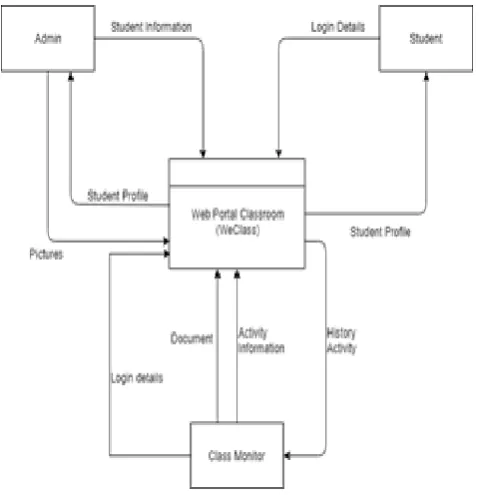
[image:1.595.309.549.340.588.2]This context diagram explains about how the current system works. First, student should login to their account. Student will update their profile by editing into each information. Class monitor also can update their profile plus can add activity and insert images then retrieve history of activity. Admin has the permission to add new student account, view student profile and view images uploaded by class monitor. Figure 1 and 2 shows Context Diagram and Level 1 of Web Portal Classroom design.
Figure 1 Context Diagram
B. Level 1
In Level 1 shows the process of Web Portal Classroom (Weclass). Student can login to the system and view the profile of each students in the same classroom. Student may update their own profile. Class monitor can add upcoming activities to their class. While admin can add a new student.
Web Class Portal System for Student
Information Database
Figure 2: Level 1 of Web Portal Classroom
C. Entity Relationship Diagram (ERD)
In this Entity Relationship Diagram, each customer that has registered as member will be given a unique user id by the system automatically. Customer can place their order on this system, and each check out will be group by one unique order id. Then, the system will display an order summary to customer which selected from table orders and products and group by order id and products id. Admin can add products to the system by providing the details of the product and each product will be given a unique id which is product id. After place the order, customer is required to make the transaction and fill in a payment notice form and each data will be stored in payment table according to the payment id. Admin will update the shipping status and provide tracking number to customer after admin has confirmed the payment.
III. IMPLEMENTATION
We have implemented the following modules in our weclass portal. Figures below shows all the details.
Module 1 Module name: Add new student
Purpose:
To allow user to become a member of Web Portal Classroom (Weclass). This step is run by admin.
Input / Output:
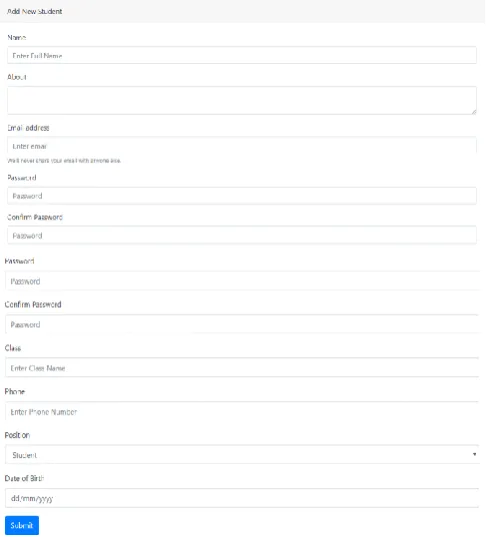
Input: Name (name), About (about), Email address (email), Password (password), Confirm Password (confirm password), Class (class), Phone (phone number), Position (position), Date of Birth (birth date)
Output: Student has already been registered
Figure 3: Entity Relationship Diagram for Classroom Portal
[image:2.595.58.321.51.310.2]Input Screen:
Figure 4: Input screen of add new student
Logic:
1. When Submit button is pressed then
a) Empty input is validated. Error message will show on the screen
[image:2.595.317.561.398.667.2]Module 2 Module name: Login
Purpose:
To allow student login into web portal classroom (Weclass)
Input/Output:
[image:3.595.62.556.43.685.2]Input: Email (email), Password (password). Output: Enter the page or data error message Input Screen:
Figure 5: Input screen of login
Figure 6: Home Page
Logic:
1. When submit button pressed then
a) If data validation error, error message will popup b) If data validation is correct, user will enter the home page
Module 3 Module name: Student Profile
Purpose:
To allow student to edit their profile
Input / Output
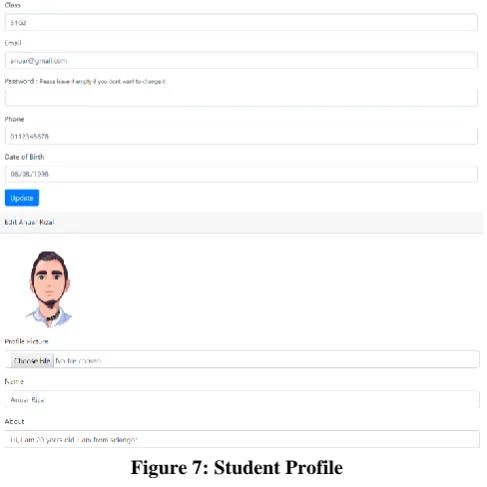
Input: Input: Profile picture (picture), Name (name), About (about), Class (class), Email address (email), Password (password), Phone (phone number), Date of Birth (birth date)
Output: Success message pop-up
[image:3.595.318.562.52.296.2]Input Screen:
Figure 7: Student Profile
Figure 4.5 Success message popup
Figure 8: Success profile display
Logic:
1. When Edit button pressed then the student will redirect to Edit Profile
2. When update button is pressed then
a) Non-email input is validated, error message will be display.
b) If data validation complete, process will finish update.
Module 4 Module name: Add new activity
Purpose:
To allow class monitor to add new activity
Input / Output
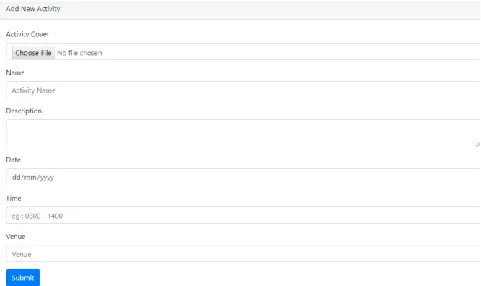
Input: Activity cover (picture), Name (name), Description (description), Date (date), Time (time), Venue (venue)
Output: Success, activity page
Figure 9: Input screen of add new activity
Logic:
1. When submit button is pressed
a) Empty input is validated; error message will display. b) If data validation is correct, success message will be display.
c) Data will store in table activities
Module 5 Module name: Edit Activity
Purpose:
To allow class monitor edit activity information
Input / Output
Input: Activity cover (picture), Name (name), Description (description), Date (date), Time (time), Venue (venue)
Output:
Input Screen:
Figure 10: Input screen of edit activity
Logic:
1. When update button is pressed
a) Update information will be store in activities table
Module 6 Module name: Add images
Purpose:
To allow class monitor add images in the activities
Input / Output Input: Output:
[image:4.595.57.298.50.193.2]Input Screen:
Figure 11: Input screen of add images
Logic:
1. When Add image button is pressed
a) The images will appear in the activity page
Module 7 Module name: Add new document
Purpose:
To allow class monitor to add document such as pdf file
Input / Output
Input: Document (document), Description (description), Date (date)
Output: success message pop-up
[image:4.595.319.560.432.536.2]Input Screen:
[image:4.595.57.299.454.632.2]Figure 4.10 Input screen of add new document
Figure 12: Input screen of success message
Logic:
1. When Add file button is pressed
a) The document is already been store in table document
b) Document will appear in the activities page
Purpose:
To allow class monitor to delete document
Input / Output Input: Click the file
Output: The document already been deleted
Input Screen:
Figure 13: Input screen of delete document
Logic:
1. When click delete button icon a) The file already been delete
Interface Design
A. Input Design 1. Login
Figure 14: Log in form
2. Add new student
Figure 15: Add new student form
[image:5.595.55.550.50.816.2]3. Student Profile
Figure 16: Student profile form
[image:5.595.316.561.79.313.2]4. Add new activity
Figure 17: Add new activity form
5. Edit activity
Figure 18: Edit activity form
6. Add image
Figure 19: Add image interface
7. Add new document
Figure 20: Add new document form
8. Delete document
B. Output Design
1. Login
Figure 22: Student enter weclass homepage
2. Add new student
Figure 23: Admin add student success
3. Student profile
Figure 24: Student profile finish update
4. Add new activity
Figure 25: Activity already been created
5. Edit activity
Figure 26: Activity already been update
[image:6.595.59.550.40.806.2]6. Add image
Figure 27: Images appear in album
7. Add new document
Figure 28: Document file inside the activity page
8. Delete document
IV. DISCUSSION
A. Summary
At the end of the project, web portal classroom (weclass) has been successfully built in approximately two months. The main purpose of this system is to help students get to know each of their classmates and create a sweet memory on addition of the activities. This system also helps class monitor be responsible on the task that been given to him to create a new activities event. Besides, this system also helps the students understand the valuable of friendship. Other than that, all the problems are solved during the implementing of the system although some of the stage may take a longer time because lack of knowledge about websites system.
B. Strength and Weakness
Strength of Web Portal Classroom (Weclass)
1. To help class monitor manage the activities in the classroom.
2. To enable the admin to add new student for security reason.
3. To enable student to update their profile. 4. To help student retrieve document file.
Weakness of Web Portal Classroom (Weclass)
1. No link for student and class monitor who had forgotten login details
2. No page for admin to update or edit design.
3. Delete function not available on student and class monitor.
4. Admin cannot verify activities that added by class monitor.
5. Image in the activities cannot be download but can only view.
C. Suggestion and Improvement
This system needs to improve the functionality of Log in page for student who had forgotten their registration email and password. Next, improvement of this system should focus on the modification of class monitor and student view. Delete function should be added in the class monitor and student view for more systematic functionality.
ACKNOWLEDGMENT
We would like to thank to Universiti Teknikal Malaysia Melaka for facility and environment support for this project.
REFERENCES
1. Ateeq, A.A. and K. Alkadi. Assessing the quality of online health information portals (languages other than Arabic or english) in asian countries in meeting health on the net (hon) standards. in 2017 International Conference on Informatics, Health and Technology, ICIHT 2017. 2017.
2. Kumar, H.R. and M.R.V. Parthipan, Smart portal application a
complete app for student and staff management. International Journal of Pharmacy and Technology, 2016. 8(4): p. 21212-21217.
3. Krynski, L., G. Goldfarb, and I. Maglio, Technology-mediated
communication with patients: WhatsApp Messenger, e-mail, patient portals. A challenge for pediatricians in the digital era. Archivos Argentinos de Pediatria, 2018. 116(4): p. e554-e559.
4. Tiung, L.K., et al., Uses and gratifications of news portal among Malaysian youths. Jurnal Komunikasi: Malaysian Journal of Communication, 2016. 32(2): p. 790-816.
5. Raiman, L., R. Antbring, and A. Mahmood, WhatsApp messenger as a
tool to supplement medical education for medical students on clinical attachment. BMC Medical Education, 2017. 17(1).
6. Fernández Robin, C., S. McCoy, and D. Yáñez, Whatsapp, in Lecture Notes in Computer Science (including subseries Lecture Notes in Artificial Intelligence and Lecture Notes in Bioinformatics). 2017. p. 82-90.
7. Afful, B. and R. Akrong, WhatsApp and academic performance among
undergraduate students in Ghana: Evidence from the University of Cape Coast. Journal of Education for Business, 2019.
8. Aktaş, B.Ç. and Y. Can, The effect of "Whatsapp" usage on the attitudes of students toward english self-efficacy and english courses in foreign language education outside the school. International Electronic Journal of Elementary Education, 2019. 11(3): p. 247-256.
9. Melo, P., et al. WhatsApp monitor: A fact-checking system for
WhatsApp. in Proceedings of the 13th International Conference on Web and Social Media, ICWSM 2019. 2019.
10. Zotti, F., et al., Implementing post-orthodontic compliance among
adolescents wearing removable retainers through whatsapp: A pilot study. Patient Preference and Adherence, 2019. 13: p. 609-615.
11. Nguyen, B. and B.K.P. Woo, Sharing is Caring: WhatsApp as a method
of disseminating dementia knowledge to elderly Chinese Americans. International Psychogeriatrics, 2019.
12. Lo Bue, E., et al., Other Apps Beyond WhatsApp. World Neurosurgery,
2019.
AUTHORSPROFILE
Hamzah Asyrani Sulaiman His research expertise currently on computer graphics and visualization where it covers collision detection system, subdivision technique, parallel programming using GPU acceleration and physic and particle system in virtual environment world research area. He had Phd in Mathematics with Computer Graphics in 2015.