The Basics of Web Hacking
Tools and Techniques to Attack the Web
Josh Pauli
Table of Contents
Cover image
Title page
Copyright
Dedication
Acknowledgments
Honey Bear
Lizard
Baby Bird
Family And Friends
Security Community
Scott White—Technical Reviewer
Syngress Team
My Vices
Biography
Foreword
Introduction
About This Book
A Hands-On Approach
A Quick Disclaimer
Chapter 1. The Basics of Web Hacking
Chapter Rundown:
Introduction
What Is A Web Application?
What You Need To Know About Web Servers
What You Need To Know About HTTP
The Basics Of Web Hacking: Our Approach
Web Apps Touch Every Part Of IT
Existing Methodologies
Most Common Web Vulnerabilities
Setting Up A Test Environment
Chapter 2. Web Server Hacking
Chapter Rundown:
Introduction
Reconnaissance
Port Scanning
Vulnerability Scanning
Exploitation
Maintaining Access
Chapter 3. Web Application Recon and Scanning
Chapter Rundown:
Introduction
Web Application Recon
Web Application Scanning
Chapter 4. Web Application Exploitation with Injection
Chapter Rundown:
SQL Injection Vulnerabilities
SQL Injection Attacks
Sqlmap
Operating System Command Injection Vulnerabilities
Operating System Command Injection Attacks
Web Shells
Chapter 5. Web Application Exploitation with Broken Authentication and Path Traversal
Chapter Rundown:
Introduction
Authentication And Session Vulnerabilities
Path Traversal Vulnerabilities
Brute Force Authentication Attacks
Session Attacks
Path Traversal Attacks
Chapter 6. Web User Hacking
Chapter Rundown:
Introduction
Cross-Site Scripting (XSS) Vulnerabilities
Cross-Site Request Forgery (CSRF) Vulnerabilities
Technical Social Engineering Vulnerabilities
Web User Recon
Web User Scanning
Web User Exploitation
Cross-Site Scripting (XSS) Attacks
Reflected XSS Attacks
Stored XSS Attacks
Cross-Site Request Forgery (CSRF) Attacks
User Attack Frameworks
Chapter Rundown:
Introduction
Web Server Fixes
Web Application Fixes
Web User Fixes
Chapter 8. Next Steps
Chapter Rundown:
Introduction
Security Community Groups And Events
Formal Education
Certifications
Additional Books
Copyright
Acquiring Editor:Chris Katsaropoulos
Editorial Project Manager:Benjamin Rearick Project Manager:Priya Kumaraguruparan Designer:Mark Rogers
Syngress is an imprint of Elsevier
225 Wyman Street, Waltham, MA 02451, USA
Copyright © 2013 Elsevier, Inc. All rights reserved.
No part of this publication may be reproduced or transmitted in any form or by any means, electronic or mechanical, including photocopying, recording, or any information storage and retrieval system, without permission in writing from the publisher. Details on how to seek permission, further information about the Publisher’s permissions policies and our arrangements with organizations such as the Copyright Clearance Center and the Copyright Licensing Agency, can be found at our website:
www.elsevier.com/permissions.
This book and the individual contributions contained in it are protected under copyright by the Publisher (other than as may be noted herein).
Notices
Knowledge and best practice in this field are constantly changing. As new research and experience broaden our understanding, changes in research methods or professional practices, may become necessary. Practitioners and researchers must always rely on their own experience and knowledge in evaluating and using any information or methods described herein. In using such information or methods they should be mindful of their own safety and the safety of others, including parties for whom they have a professional responsibility.
To the fullest extent of the law, neither the Publisher nor the authors,
persons or property as a matter of products liability, negligence or otherwise, or from any use or operation of any methods, products, instructions, or ideas contained in the material herein.
Library of Congress Cataloging-in-Publication Data
Pauli, Joshua J.
The basics of web hacking : tools and techniques to attack the Web / Josh Pauli. pages cm
Includes bibliographical references and index. ISBN 978-0-12-416600-4
1. Web sites–Security measures. 2. Web applications–Security measures. 3. Computer networks–Security measures. 4. Penetration testing (Computer security) 5. Computer hackers. 6. Computer crimes–Prevention. I. Title.
TK5105.59.P385 2013 005.8–dc23
2013017240
British Library Cataloguing-in-Publication Data
A catalogue record for this book is available from the British Library.
ISBN: 978-0-12-416600-4
Printed in the United States of America 13 14 15 10 9 8 7 6 5 4 3 2 1
Dedication
Acknowledgments
Honey Bear
To my wife, S amantha: We’ve come a long way since being scared teenagers expecting a baby! Your support no ma er the projects I take on, your understanding no ma er how much I complain, and your composure no ma er what comes at our family are legendary and have kept our family chugging along.
Lizard
To my oldest daughter, Liz: Your work ethic, a ention to detail, and drive to succeed are an inspiration to me. I ’m looking forward to the coming years as you take on your next challenges, as I have no doubt you will succeed with flying colors!
Baby Bird
To my youngest daughter, Maddie: Your smile and playful nature always pick me up and make me realize how good we have it. I f four open-heart surgeries won’t slow you down, what excuse does anybody else have? Keep smiling, playing, and being yourself—we’re all better off that way!
Family and Friends
Huge thanks to Merm, Tara, Halverto, S tacy & S teph, Luke & Tracy, D avid, D r. B, Crony, my D S U students, and everybody else that I ’ve surely forgo en that have provided friendship and support. Salute!
A nd a special note to D r. Patrick Engebretson, a great friend and colleague, that I ’ve shared many beers, fried goodies, stories, car rides, and office visits with. Your assistance through this publishing process has been a tremendous help. Do work, big boy!
Last, to my parents, D r. Wayne and D r. Crystal Pauli: I t appears that those years of twisting my ear, filling my mouth full of soap, and breaking wooden spoons on my bu have finally paid off! (That stuff was allowed in the 1980s and it’s obvious now that I wasn’t the easiest child to raise.) Your love and support have never wavered and I couldn’t ask for better parents.
Man, what a group. I t doesn’t ma er if you’re a complete beginner, a super l33t hacker, or anywhere in between, you’re always welcome if you’re willing to learn and explore. A s a S outh D akota guy, I have my own personal “Mount Rushmore of S ecurity”: a group that not only is highly skilled in security but also has provided me with a ton support.
■ To Dr. Jared DeMott: You’re one of the finest bug hunters/exploitation gurus in the world, but an even better family man and friend. With all your success it would be easy to forget about us “little people” at Dakota State University, but instead you’ve never been a bigger supporter of our mission and goals.
■ To Dave Kennedy: HUGS! You’re one of the most encouraging security people that I’ve ever come across. The amount of fun you have working, training, speaking, and just hanging out with the security community is what this is all about. I’m glad our paths crossed and I look forward to many more years of watching you continue to flourish. MORE HUGS!
■ To Eric Smith: I will never forget watching in awe as you dominated as a one-man red team for our security competition at DSU. Your personal story of hard work,
dedication, and hours spent perfecting your craft is one that I’ve relayed to my
students hundreds of times. Thanks for always making time to come back to Madison, SD, and furthering your demigod status with our students!
■ To Dafydd Stuttard: I blame you for all of this! The Web Application Hacker’s Handbook
(WAHH) that you authored with Marcus Pinto was one of the first premiere security books that I really dug into. After attending your classes, being the technical reviewer on the 2nd edition of WAHH, using your Burp Suite web application hacking tool extensively, and exchanging countless e-mails with you, it’s crystal clear that you’re the Godfather of web application security. I’ve educated over 400 students with
WAHH and Burp Suite and hope my book can serve as an on-ramp to your super highway.
Scott White—Technical Reviewer
A special thanks to S co White for doing a tremendous job reviewing and cleaning up my work. With all the different directions you get pulled and requests for your time, I truly appreciate your expertise, timeliness, and honest feedback. This book is much stronger because of your work!
Syngress Team
To all the fine folks at S yngress that took a chance on me and provided nothing but the best in service, feedback, and critiques in an uber-timely manner. Especially, Chris Katsaropoulos and Ben Rearick—your professionalism and tact are greatly appreciated and are the way an organization should operate.
Biography
Foreword
The World Wide Web is a huge and expanding mass of application code. The majority of businesses, governments, and other organizations are now on the web, exposing their systems and data to the world via custom application functionality. With today’s development frameworks, it is easier than ever to create a functional web application without knowing or doing anything about security. With today’s technologies, that application is likely to be far more complex than those that have come before. Evolving technologies bring with them more a ack surface and new types of a ack. Meanwhile, old vulnerabilities live on and are reintroduced into new applications by each generation of coders.
I n the recent past, numerous high-profile organizations have been compromised via their web applications. Though their PR departments may claim they were victims of highly sophisticated hackers, in reality the majority of these a acks have exploited simple vulnerabilities that have been well understood for years. S maller companies that don’t feel under the spotlight may actually be even more exposed. A nd many who are compromised never know about it.
Clearly, the subject of web application security is more critical today than ever before. There is a significant need for more people to understand web application a acks, both on the offensive side (to test existing applications for flaws) and on the defensive side (to develop more robust code in the first place). I f you’re completely new to web hacking, this book will get you started. A ssuming no existing knowledge, it will teach you the basic tools and techniques you need to find and exploit numerous vulnerabilities in today’s applications. I f your job is to build or defend web applications, it will open your eyes to the a acks that your own applications are probably still vulnerable to and teach you how to prevent them from happening.
Dafydd Stuttard
Creator of Burp Suite
Introduction
Many of us rely on web applications for so many of our daily tasks, whether at work, at home, or at play, and we access them several times a day from our laptops, tablets, phones, and other devices. We use these web applications to shop, bank, pay bills, a end online meetings, social network with friends and family, and countless other tasks. The problem is that web applications aren’t as secure as we’d like to think, and most of the time the a acks used to gain access to a web application are relatively straightforward and simple. I n fact, anyone can use widely available hacking tools to perform these devastating web attacks.
This book will teach you how to hack web applications and what you can do to prevent these a acks. I t will walk you through the theory, tools, and techniques used to identify and exploit the most damaging web vulnerabilities present in current web applications. This means you will be able to make a web application perform actions it was never intended to perform, such as retrieve sensitive information from a database, bypass the login page, and assume the identity of other users. You’ll learn how to select a target, how to perform an a ack, what tools are needed and how to use them, and how to protect against these attacks.
About This Book
This book is designed to teach you the fundamentals of web hacking from the ground up. I t’s for those of you interested in ge ing started with web hacking but haven’t found a good resource. Basically, if you’re a web hacking newbie, this is the book for you! This book assumes you have no previous knowledge related to web hacking. Perhaps you have tinkered around with some of the tools, but you don’t fully understand how or where they fit into the larger picture of web hacking.
Top web hacking experts have a firm grasp on programming, cryptography, bug hunting, exploitation development, database layout, data extraction, how network traffic works, and much more. I f you don’t have these skills, don’t be discouraged! These knowledge and skills are accumulated over the course of a career, and if you’re just ge ing started with web hacking, you probably won’t have all of these skills. This book will teach you the theory, tools, and techniques behind some of the most damaging web a acks present in modern web applications. You will gain not only knowledge and skill but also confidence to transition to even more complex web hacking in the future.
This book follows a very hands-on approach to introduce and demonstrate the content. Every chapter will have foundational knowledge so that you know the why of the a ack and detailed step-by-step directions so that you know the how of the attack.
O ur approach to web hacking has three specific targets: the web server, the web application, and the web user. These targets all present different vulnerabilities, so we need to use different tools and techniques to exploit each of them. That’s exactly what this book will do; each chapter will introduce different a acks that exploit these targets’ vulnerabilities.
What's in This Book?
Each chapter covers the following material:
Chapter 1: The Basics of Web Hacking provides an overview of current web vulnerabilities and how our hands-on approach takes aim at them.
Chapter 2: Web S erver Hacking takes traditional network hacking methodologies and applies them directly to the web server to not only compromise those machines but also to provide a base of knowledge to use in a acks against the web application and web user. Tools include Nmap, Nessus, Nikto, and Metasploit.
Chapter 3: Web A pplication Recon and S canning introduces tools, such as web proxies and scanning tools, which set the stage for you to exploit the targeted web application by finding existing vulnerabilities. Tools include Burp S uite (S pider and I ntercept) and Zed Attack Proxy (ZAP).
Chapter 4: Web A pplication Exploitation with I njection covers the theory, tools, and techniques used to exploit web applications with S Q L injection, operating system command injection, and web shells. Tools include Burp S uite (specifically the functions and features of the Proxy I ntercept and Repeater tools), sqlmap, J ohn the Ripper (J tR), custom web shell files, and netcat.
Chapter 5: Web A pplication Exploitation with Broken Authentication and Path Traversal covers the theory, tools, and techniques used to exploit web applications with brute forcing logins, sessions a acks, and forceful browsing. Tools include Burp S uite (I ntruder and S equencer) and various operating system commands for nefarious purposes.
Chapter 6: Web User Hacking covers the theory, tools, and techniques used to exploit other web users by exploiting web application cross-site scripting (XS S ) and cross-site request forgery (CS RF) vulnerabilities as well as a acks that require no existing web server or web application vulnerabilities, but instead prey directly on the user’s willingness to complete dangerous actions. The main tool of choice will be S ocial-Engineer Toolkit (SET).
Chapter 7: Fixes covers the best practices available today to prevent all the a acks introduced in the book. Like most things security-related, the hard part is not identifying these mitigation strategies, but instead on how to best implement and test that they are doing what they are intended to do.
continue on your hacking journey. There are tons of great information security groups and events to take part in. S ome of you may want formal education, while others may want to know what certifications are especially applicable to this type of security work. A quick list of good books to consider is also provided.
A Quick Disclaimer
The goal of this book is to teach you how to penetrate web servers, web applications, and web users; protect against common a acks; and generally improve your understanding of what web application security is. I n a perfect world, no one would use the tools and techniques discussed in this book in an unethical manner. But since that’s not the case, keep the following in mind as you read along:
Think before you hack. Don’t do malicious things.
Don’t attack a target unless you have written permission.
C H A P T E R 1
Chapter Rundown:
■ What you need to know about web servers and the HTTP protocol
■ The Basics of Web Hacking: our approach
■ Common web vulnerabilities: they are still owning us
■ Setting up a safe test environment so you don’t go to jail
Introduction
There is a lot of ground to cover before you start to look at specific tools and how to configure and execute them to best suit your desires to exploit web applications. This chapter covers all the areas you need to be comfortable with before we get into these tools and techniques of web hacking. I n order to have the strong foundation you will need for many years of happy hacking, these are core fundamentals you need to fully understand and comprehend. These fundamentals include material related to the most common vulnerabilities that continue to plague the web even though some of them have been around for what seems like forever. S ome of the most damaging web application vulnerabilities “in the wild” are still as widespread and just as damaging over 10 years after being discovered.
I t’s also important to understand the time and place for appropriate and ethnical use of the tools and techniques you will learn in the chapters that follow. A s one of my friends and colleagues likes to say about using hacking tools, “it’s all fun and games until the FBI shows up!” This chapter includes step-by-step guidance on preparing a sandbox (isolated environment) all of your own to provide a safe haven for your web hacking experiments.
A s security moved more to the forefront of technology management, the overall security of our servers, networks, and services has greatly improved. This is in large part because of improved products such as firewalls and intrusion detection systems that secure the network layer. However, these devices do li le to protect the web application and the data that are used by the web application. A s a result, hackers shifted to a acking the web applications that directly interacted with all the internal systems, such as database servers, that were now being protected by firewalls and other network devices.
Therefore, because the security of the web application has also improved just like the network, the attack surface has again shifted; this time toward attacking web users. There is very li le that network administrators and web programmers can do to protect web users against these user-on-user a acks that are now so prevalent. I magine a hacker’s joy when he can now take aim on an unsuspecting technology-challenged user without having to worry about intrusion detection systems or web application logging and web application firewalls. A ackers are now focusing directly on the web users and effectively bypassing any and all safeguards developed in the last 10 + years for networks and web applications.
However, there are still plenty of existing viable a acks directed at web servers and web applications in addition to the a acks targeting web users. This book will cover how all of these a acks exploit the targeted web server, web application, and web user. You will fully understand how these a acks are conducted and what tools are needed to get the job done. Let’s do this!
What Is a Web Application?
The term “web application” has different meanings to different people. D epending on whom you talk to and the context, different people will throw around terms like web application, web site, web-based system, web-based software or simply Web and all may have the same meaning. The widespread adoption of web applications actually makes it hard to clearly differentiate them from previous generation web sites that did nothing but serve up static, noninteractive HTML pages. The term web application will be used throughout the book for any web-based software that performs actions (functionality) based on user input and usually interacts with backend systems. When a user interacts with a web site to perform some action, such as logging in or shopping or banking, it’s a web application.
Relying on web applications for virtually everything we do creates a huge a ack surface (potential entry points) for web hackers. Throw in the fact that web applications are custom coded by a human programmer, thus increasing the likelihood of errors because despite the best of intentions. Humans get bored, hungry, tired, hung-over, or otherwise distracted and that can introduce bugs into the web application being developed. This is a perfect storm for hackers to exploit these web applications that we rely on so heavily.
But alas, security is often treated as an afterthought too much of the time; this type of development leaves the freshly created web applications ripe with vulnerabilities that can be identified and exploited for a hacker’s own nefarious reasons.
What You Need to Know About Web Servers
A web server is just a piece of software running on the operating system of a server that allows connections to access a web application. The most common web servers are I nternet I nformation S ervices (I I S ) on a Windows server and A pache Hypertext Transfer Protocol (HTTP) S erver on a Linux server. These servers have normal directory structures like any other computer, and it’s these directories that house the web application.
I f you follow the Windows next, next, next, finish approach to installing an I I S web server, you will end up with the default C:\Inetpub\wwwroot directory structure where each application will have its own directories within wwwroot and all vital web application resources are contained within it.
Linux is more varied in the file structure, but most web applications are housed in the
/var/www/ directory. There are several other directories on a Linux web server that are especially relevant to web hacking:
■/etc/shadow: This is where the password hashes for all users of the system reside. This is the “keys to the kingdom”!
■/usr/lib: This directory includes object files and internal binaries that are not intended to be executed by users or shell scripts. All dependency data used by the application will also reside in this directory. Although there is nothing executable here, you can really ruin somebody’s day by deleting all of the dependency files for an application.
■/var/*: This directory includes the files for databases, system logs, and the source code for web application itself!
■/bin: This directory contains programs that the system needs to operate, such as the shells, ls, grep, and other essential and important binaries. bin is short for binary. Most standard operating system commands are located here as separate executable binary files.
The web server is a target for a acks itself because it offers open ports and access to potentially vulnerable versions of web server software installed, vulnerable versions of other software installed, and misconfigurations of the operating system that it’s running on.
What You Need to Know About HTTP
add items to your shopping cart, select a shipping method, and enter payment information.
HTTP without the use of cookies would require you to relogin during each of those steps. That is just not realistic, so the concept of a session was created where the application keeps track of your requests after you login. A lthough sessions are a great way to increase the user-friendliness of a web application, they also provide another a ack vector for web applications. HTTP was not originally created to handle the type of web transactions that requires a high degree of security and privacy. You can inspect all the gory details of how HTTP operates with tools such as Wireshark or any local HTTP proxy.
The usage of secure HTTP (HTTPS ) does li le to stop the types of a acks that will be covered in this book. HTTPS is achieved when HTTP is layered on top of the S ecure S ocket Layer/Transport Layer S ecurity (S S L/TLS ) protocol, which adds the TLS of S S L/TLS to normal HTTP request and responses. I t is best suited for ensuring man-in-the-middle and other eavesdropping a acks are not successful; it ensures a “private call” between your browser and the web application as opposed to having a conversation in a crowded room where anybody can hear your secrets. However, in our usage, HTTPS just means we are going to be communicating with the web application over an encrypted communication channel to make it a private conversation. The bidirectional encryption of HTTPS will not stop our attacks from being processed by the waiting web application.
HTTP Cycles
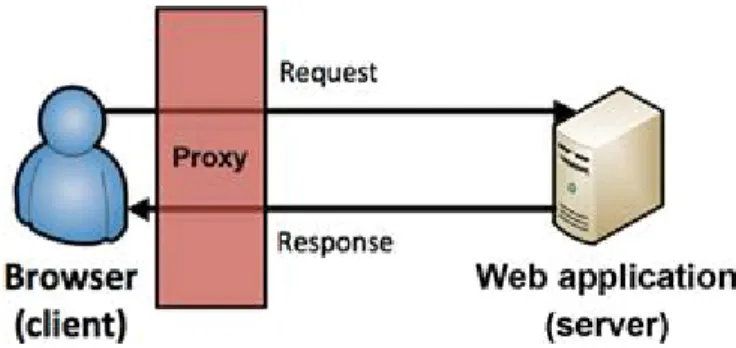
O ne of the most important fundamental operations of every web application is the cycle of requests made by clients’ browsers and the responses returned by the web server. I t’s a very simple premise that happens many of times every day. A browser sends a request filled with parameters (variables) holding user input and the web server sends a response that is dictated by the submitted request. The web application may act based on the values of the parameters, so they are prime targets for hackers to a ack with malicious parameter values to exploit the web application and web server.
Noteworthy HTTP Headers
Each HTTP cycle also includes headers in both the client request and the server response that transmit details about the request or response. There are several of these headers, but we are only concerned with a few that are most applicable to our approach covered in this book.
The headers that we are concerned about that are set by the web server and sent to the client’s browser as part of the response cycle are:
■Content-Length: This header’s value is the length of the response body in bytes. This header is helpful to hackers because you can look for variation in the number of bytes of the response to help decipher the application’s response to input. This is especially applicable when conducting brute force (repetitive guessing) attacks.
■Location: This header is used when an application redirects a user to a new page. This is helpful to a hacker because it can be used to help identify pages that are only allowed after successfully authenticating to the application, for example.
The headers that you should know more about that are sent by the client’s browser as part of the web request are:
■Cookie: This header sends the cookie (or several cookies) back to the server to maintain the user’s session. This cookie header value should always match the value of the set-cookie header that was issued by the server. This header is helpful to hackers because it may provide a valid session with the application that can be used in attacks against other application users. Other cookies are not as juicy, such as a cookie that sets your desired language as English.
■Referrer: This header lists the webpage that the user was previously on when the next web request was made. Think of this header as storing the “the last page visited.” This is helpful to hackers because this value can be easily changed. Thus, if the application is relying on this header for any sense of security, it can easily be bypassed with a forged value.
Noteworthy HTTP Status Codes
A s web server responses are received by your browser, they will include a status code to signal what type of response it is. There are over 50 numerical HTTP response codes grouped into five families that provide similar type of status codes. Knowing what each type of response family represents allows you to gain an understanding of how your input was processed by the application.
■100s: These responses are purely informational from the web server and usually mean that additional responses from the web server are forthcoming. These are rarely seen in modern web server responses and are usually followed close after with another type of response introduced below.
■200s: These responses signal the client’s request was successfully accepted and processed by the web server and the response has been sent back to your browser. The most common HTTP status code is 200 OK.
■300s: These responses are used to signal redirection where additional responses will be sent to the client. The most common implementation of this is to redirect a user’s browser to a secure homepage after successfully authenticating to the web
application. This would actually be a 302 Redirect to send another response that would be delivered with a 200 OK.
and 404 Not Found.
■500s: These responses are used to signal an error on the server side. The most common status codes used in this family are the 500 Internal Server Error and 503 Service Unavailable.
Full details on all of the HTTP status codes can be reviewed in greater detail at http://www.w3.org/Protocols/rfc2616/rfc2616-sec10.html.
The Basics of Web Hacking: Our Approach
O ur approach is made up of four phases that cover all the necessary tasks during an attack.
1. Reconnaissance 2. Scanning
3. Exploitation 4. Fix
I t’s appropriate to introduce and discuss how these vulnerabilities and a acks can be mitigated, thus there is a fix phase to our approach. A s a penetration tester or ethical hacker, you will get several questions after the fact related to how the discovered vulnerabilities can be fixed. Consider the inclusion of the fix phase to be a resource to help answer those questions.
Our Targets
O ur approach targets three separate, yet related a ack vectors: the web server, the web application, and the web user. For the purpose of this book, we will define each of these attack vectors as follows:
1. Web server: the application running on an operating system that is hosting the web application. We are NOT talking about traditional computer hardware here, but rather the services running on open ports that allow a web application to be
reached by users’ internet browsers. The web server may be vulnerable to network hacking attempts targeting these services in order to gain unauthorized access to the web server’s file structure and system files.
2. Web application: the actual source code running on the web server that provides the functionality that web users interact with is the most popular target for web
hackers. The web application may be susceptible to a vast collection of attacks that attempt to perform unauthorized actions within the web application.
3. Web user: the internal users that manage the web application (administrators and programmers) and the external users (human clients or customers) of the web applications are worthy targets of attacks. This is where a cross-site scripting (XSS) or cross-site request forgery (CSRF) vulnerabilities in the web application rear their ugly heads. Technical social engineering attacks that target web users and rely on no existing web application vulnerabilities are also applicable here.
unique tools and techniques are needed to efficiently attack each of them.
Our Tools
For every tool used in this book, there are probably five other tools that can do the same job. (The same goes for methods, too.) We’ll emphasize the tools that are the most applicable to beginner web hackers. We recommend these tools not because they’re easy for beginners to use, but because they’re fundamental tools that virtually every professional penetration tester uses on a regular basis. I t’s paramount that you learn to use them from the very first day. Some of the tools that we’ll be using include:
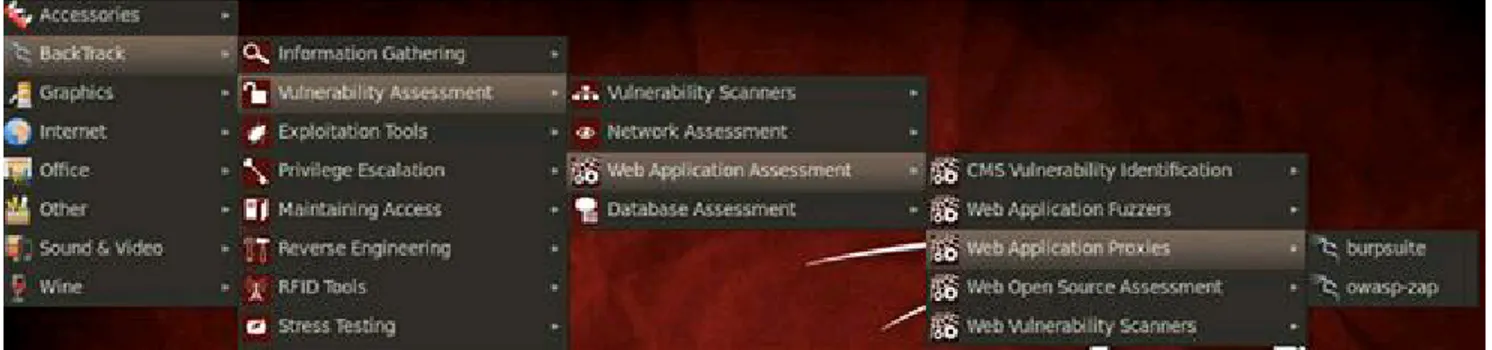
■Burp Suite, which includes a host of top-notch web hacking tools, is a must-have for any web hacker and it’s widely accepted as the #1 web hacking tool collection.
■Zed Attack Proxy (ZAP) is similar to Burp Suite, but also includes a free vulnerability scanner that’s applicable to web applications.
■ Network hacking tools such as Nmap for port scanning, Nessus and Nikto for vulnerability scanning, and Metasploit for exploitation of the web server.
■ And other tools that fill a specific role such as sqlmap for SQL injection, John the Ripper
Web Apps Touch Every Part of IT
A nother exciting tidbit for web hackers is the fact that web applications interact with virtually every core system in a company’s infrastructure. I t’s commonplace to think that the web application is just some code running on a web server safely tucked away in an external D MZ incapable of doing serious internal damage to a company. There are several additional areas of a traditional I T infrastructure that need to be considered in order to fully target a system for a ack, because a web application’s reach is much wider than the code wri en by a programmer. The following components also need to be considered as possible attack vectors:
■ Database server and database: the system that is hosting the database that the web application uses may be vulnerable to attacks that allow sensitive data to be created, read, updated, or deleted (CRUD).
■ File server: the system, often times a mapped drive on a web server, that allows file upload and/or download functionality may be vulnerable to attacks that allow server resources to be accessed from an unauthorized attacker.
■ Third-party, off-the-shelf components: modules of code, such as content management systems (CMSs), are a definitely a target because of the widespread adoption and available documentation of these systems.
Existing Methodologies
S everal a ack methodologies provide the processes, steps, tools, and techniques that are deemed to be best practices. I f you’re a white hat hacker, such activities are called penetration testing (pen test for short or PT for even shorter), but we all realize they are the same activities as black hat hacking. The two most widely accepted pen test methodologies today are the O pen-Source Security Testing M ethodology M anual (OSSTM) and the Penetration Testing Execution Standard (PTES).
The Open-Source Security Testing Methodology
Manual (OSSTM)
The OSSTM was created in a peer review process that created cases that test five sections: 1. Information and data controls
2. Personnel security awareness levels 3. Fraud and social engineering levels
4. Computer and telecommunications networks, wireless devices, and mobile devices 5. Physical security access controls, security process, and physical locations
Penetration Testing Execution Standard (PTES)
The new kid on the block is definitely the PTES , which is a new standard aimed at providing common language for all penetration testers and security assessment professionals to follow. PTES provides a client with a baseline of their own security posture, so they are in a be er position to make sense of penetration testing findings. PTES is designed as a minimum that needs to be completed as part of a comprehensive penetration test. The standard contains many different levels of services that should be part of advanced penetration tests. More information can be found on the PTES homepage at http://www.pentest-standard.org/.
Making Sense Of Existing Methodologies
Because of the detailed processes, those standards are quite daunting to digest as a beginning hacker. Both of those standards basically cover every possible aspect of security testing, and they do a great job. Tons of very smart and talented people have dedicated countless hours to create standards for penetration testers and hackers to follow. Their efforts are certainly commendable, but for beginning hackers it’s sensory overload. How are you going to consider hacking a wireless network when you may not even understand basic network hacking to begin with? How are you going to hack a mobile device that accesses a mobile version of a web application when you may not be comfortable with how dynamic web applications extract and use data from a database?
What is needed is to boil down all the great information in standards such as the O S S TM and PTES into a more manageable methodology so that beginning hackers aren’t overwhelmed. That’s the exact goal of this book. To give you the necessary guidance to get you started with the theory, tools, and techniques of web hacking!
Most Common Web Vulnerabilities
O ur targets will all be exploited by a acking well-understood vulnerabilities. A lthough there are several other web-related vulnerabilities, these are the ones we are going to concentrate on as we work through the chapters.
Injection
I njection flaws occur when untrusted user data are sent to the web application as part of a command or query. The a acker’s hostile data can trick the web application into executing unintended commands or accessing unauthorized data. I njection occurs when a hacker feeds malicious, input into the web application that is then acted on (processed) in an unsafe manner. This is one of the oldest a acks against web applications, but it’s still the king of the vulnerabilities because it is still widespread and very damaging.
■ Structured query language (SQL) queries
■ Lightweight directory access protocol (LDAP) queries
■ XML path language (XPATH) queries
■ Operating system (OS) commands
A nytime that the user’s input is accepted by the web application and processed without the appropriate sanitization, injection may occur. This means that the hacker can influence how the web application’s queries and commands are constructed and what data should be included in the results. This is a very powerful exploit!
Cross-Site Scripting (XSS)
Cross-S ite S cripting (XS S ) occurs when user input is accepted by the application as part of a request and then is used in the output of the response without proper output encoding in place for validation and sanitization. XS S allows a ackers to execute scripts in the victim’s browser, which can hijack user sessions, act as a key logger, redirect the user to malicious sites, or anything else a hacker can dream up! A hacker can inject malicious script (often times J avaS cript, but it also could be VBS cript) that is then rendered in the browser of the victim. Because this script is part of the response from the application, the victim’s browser trusts it and allows the script to run.
XS S comes in two primary “flavors”: reflected and stored. Reflected XS S is much more widespread in web applications and is considered to be less harmful. The reason that reflected XS S is considered less harmful isn’t because of what it can do, but because it’s a one-time a ack where the payload sent in a reflected XS S a ack is only valid on that one request. Think of reflected XS S as “whoever clicks it, gets it.” Whatever user clicks the link that contains the malicious script will be the only person directly affected by this a ack. I t is generally a 1:1 hacker to victim ratio. The hacker may send out the same malicious URL to millions of potential victims, but only the ones that click his link are going to be affected and there’s no connection between compromised users.
Stored XSS is harder to find in web applications, but it’s much more damaging because it persists across multiple requests and can exploit numerous users with one a ack. This occurs when a hacker is able to inject the malicious script into the application and have it be available to all visiting users. I t may be placed in a database that is used to populate a webpage or in a user forum that displays messages or any other mechanism that stores input. A s legitimate users request the page, the XS S exploit will run in each of their browsers. This is a 1:many hacker to victim ratio.
Both flavors of XSS have the same payloads; they are just delivered in different ways.
Broken Authentication And Session Management
S essions are the unique identifiers that are assigned to users after authenticating and have many vulnerabilities or attacks associated with how these identifiers are used by the web application. Sessions are also a key component of hacking the web user.
implemented correctly, allowing a ackers to compromise passwords, keys, session tokens, or exploit other implementation flaws to assume other users’ identities. Functionality of the web application that is under the authentication umbrella also includes password reset, password change, and account recovery to name a few.
A web application uses session management to keep track of each user’s requests. Without session management, you would have to log-in after every request you make. I magine logging in after you search for a product, then again when you want to add it to your shopping cart, then again when you want to check out, and then yet again when you want to supply your payment information. S o session management was created so users would only have to login once per visit and the web application would remember what user has added what products to the shopping cart. The bad news is that authentication and session management are afterthoughts compared to the original I nternet. There was no need for authentication and session management when there was no shopping or bill paying. S o the I nternet as we currently know it has been twisted and contorted to make use of authentication and session management.
Cross-Site Request Forgery
CS RF occurs when a hacker is able to send a well-crafted, yet malicious, request to an authenticated user that includes the necessary parameters (variables) to complete a valid application request without the victim (user) ever realizing it.
This is similar to reflected XS S in that the hacker must coerce the victim to perform some action on the web application. Malicious script may still run in the victim’s browser, but CS RF may also perform a valid request made to the web application. S ome results of CS RF are changing a password, creating a new user, or creating web application content via a CMS . A s long as the hacker knows exactly what parameters are necessary to complete the request and the victim is authenticated to the application, the request will execute as if the user made it knowingly.
Security Misconfiguration
This vulnerability category specifically deals with the security (or lack thereof) of the entire application stack. For those not familiar with the term “application stack,” it refers to operating system, web server, and database management systems that run and are accessed by the actual web application code. The risk becomes even more problematic when security hardening practices aren’t followed to best protect the web server from unauthorized access. Examples of vulnerabilities that can plague the web server include:
■ Out-of-date or unnecessary software
■ Unnecessary services enabled
■ Insecure account policies
■ Verbose error messages
system. A ll these se ings should be defined, implemented, and maintained, as many are not shipped with secure defaults. This includes keeping all software up to date, including all code libraries used by the application.
Setting Up a Test Environment
Before you dig into the tools and techniques covered in the book, it’s important that you set up a safe environment to use. Because this is an introductory hands-on book, we’ll practice all the techniques we cover on a vulnerable web application. There are three main requirements you need to consider when se ing up a testing environment as you work through the book.
1. Because you will be hosting this vulnerable web application on your own computer, it’s critical that we configure it in a way that does not open your computer up for attack.
2. You will be using hacking tools that are not authorized outside of your personal use, so it’s just as critical to have an environment that does not allow these tools to inadvertently escape.
3. You will surely “break” the web application or web server as you work your way through the book, so it’s critical that you have an environment that you can easily set up initially as well as “push the reset button” to get back to a state where you know everything is set up correctly.
There are countless ways that you could set up and configure such an environment, but for the duration of this book, virtual machines will be used. A virtual machine (VM), when configured correctly, meets all three of our testing environment requirements. A VM is simply a software implementation of a computing environment running on another computer (host). The VM makes requests for resources, such as processing cycles and RA M memory usage, to the host computer that allows the VM to behave in the same manner as traditionally installed operating systems. However, a VM can be turned off, moved, restored, rolled back, and deleted very easily in a ma er of just a few keystrokes or mouse clicks. You can also run several different VMs at the same time, which allows you to create a virtualized network of VMs all running on your one host computer. These factors make a virtualized testing environment the clear choice for us.
A lthough you have plenty of options when it comes to virtualization software, in this book we’ll use the popular VMWare Player, available for free at http://www.vmware.com. O wing to its popularity, there are many preconfigured virtual machines that we can use. Having systems already in place saves time during setup and allows you to get into the actual web hacking material sooner and with less hassle.
I f VMWare Player is not your preferred solution, feel free to use any virtualization product that you are comfortable with. The exact vendor and product isn’t as important as the ability to set up, configure, and run the necessary virtualized systems.
BackTrack Linux homepage, located at http://www.backtrack-linux.org/downloads/.
Today, BackTrack is widely accepted as the premiere security-oriented operating system. There are always efforts to update and improve the hacker’s testing environment and the recent release of Kali Linux is sure to gain widespread popularity. However, we will be sticking to BackTrack throughout the book. BackTrack includes hundreds of professional-grade tools for hacking, doing reconnaissance, digital forensics, fuzzing, bug hunting, exploitation, and many other hacking techniques. The necessary tools and commands in BackTrack applicable to our approach will be covered in great detail as they are introduced.
Target Web Application
D amn Vulnerable Web A pplication (D VWA) will be used for the target web application and can be researched further at its homepage at http://www.dvwa.co.uk/. D VWA is a PHP/MyS Q L web application that is vulnerable by design to aid security professionals as they test their skills and tools in a safe and legal environment. I t’s also used to help web developers better understand the processes of securing web applications.
However, D VWA is not natively available as a VM, so you would have to create your own VM and then set up and configure D VWA to run inside this new VM. I f that interests you, installation instructions and the files necessary to download are available on the DVWA web site.
For our purposes, we will be accessing D VWA by having it run locally in the BackTrack VM via http://localhost or the 127.0.0.1 I P address. We will be hosting both our target application (D VWA) and the hacking tools in our BackTrack VM. This means you will have everything you need in one VM and will use less system resources.
Installing The Target Web Application
I n order to set up our safe hacking environment, we first need to download a BackTrack VM and configure it to host the D VWA target web application. The following steps ready the BackTrack VM for installation of the DVWA.
1. Download a BackTrack virtual machine from http://www.backtrack-linux.org/downloads/.
2. Extract the. 7z file of the BackTrack virtual machine.
3. Launch the BackTrack VM by double-clicking the .vmx file in the BackTrack folder. If prompted, select I copied it and select OK.
4. Login to BackTrack with the root user and toor password.
5. Use the startx command to start the graphical user interface (GUI) of BackTrack. 6. Open a terminal by clicking on the Terminal icon in the upper left-hand corner of
FIGURE 1.1 Opening a terminal in BackTrack.
O nce you have successfully logged into BackTrack, complete the following steps to install D VWA as the target application. This will require a live I nternet connection, so ensure that your host machine can browse the I nternet by opening a Firefox browser to test connectivity.
A le rt
For trouble-shooting your VM’s ability to make use of the host machine’s I nternet connection, check the network adapter se ings for your VM in VM Player if necessary. We are using the NAT network setting.
1. Browse to http://theunl33t.blogspot.com/2011/08/script-to-download-configure-and-launch.html in Firefox (by clicking on Applications and then Internet) in your
BackTrack VM to view the DVWA installation script created by the team at The Unl33t. A link to this script is also included later in the chapter for your reference. 2. Select and copy the entire script starting with #/bin/bash and ending with last line
that ends with DVWA Install Finished!\n.
3. Open gedit Text Editor in BackTrack by clicking on Applications and then
Accessories.
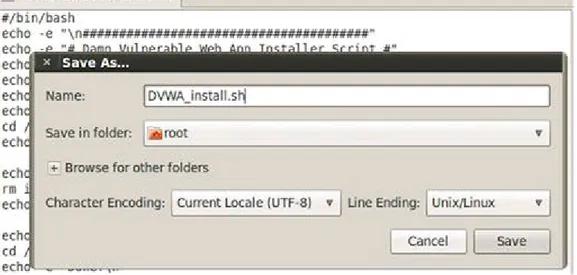
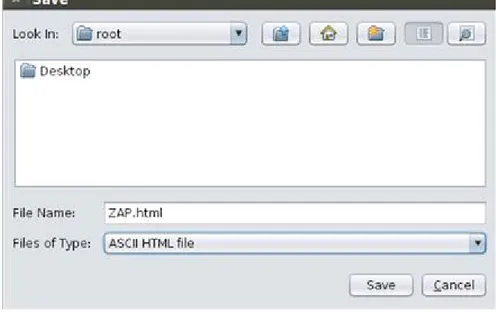
FIGURE 1.2 Saving the DVWA install script in the root directory.
5. Close gedit and Firefox.
6. Open a terminal and run the ls command to verify the script is in the root directory. 7. Execute the install script by running the sh DVWA_install.sh command in a
terminal. The progress of the installation will be shown in the terminal and a browser window to the DVWA login page will launch when successfully completed.
Configuring The Target Web Application
O nce D VWA is successfully installed, complete the following steps to login and customize the web application:
FIGURE 1.3 Logging into DVWA as an application administrator.
A le rt
The URL is 127.0.0.1 (this is localhost; the web server running directly in BackTrack).
2. Click the options button in the lower right of Firefox if you are prompted about a potentially malicious script. Remember DVWA is purposely vulnerable, so we need to allow scripts to run.
3. Click Allow 127.0.0.1 so scripts are allowed to run on our local web server. 4. Click the Setup link in DVWA.
5. Click the Create / Setup Database button to create the initial database to be used for our exercises as shown in Figure 1.4.
FIGURE 1.4 Confirmation that the initial database setup completed successfully.
FIGURE 1.5 Confirmation that the initial difficulty setup completed successfully.
7. Click the submit button to create these initial difficulty settings to be used for our exercises. If the exercises are too easy for you, feel free to select a more advanced difficulty level!
You are now ready to use hacking tools in BackTrack to a ack the D VWA web application. You can revisit any of these steps to confirm that your environment is set up correctly. I t is not necessary to shut down the VM every time you want to take a break. I nstead, you can suspend the VM, so the state of your work stays intact. I f you choose to shut down the VM to conserve system resources (or for any other reason), you can easily follow the steps above to prepare your VM. I t’s probably worth noting that you are now running an intentionally vulnerable and exploitable web application on your BackTrack machine. S o it’s probably not a good idea to use this machine while connected to the Internet where others could attack you!
DVWA Install Script
#/bin/bash
echo -e "\n#######################################" echo -e "# Damn Vulnerable Web App Installer Script #" echo -e "#######################################"
echo " Coded By: Travis Phillips"
echo " Website: http://theunl33t.blogspot.com"
echo -e -n "\n[*] Changing directory to /var/www..." cd /var/www > /dev/null
echo -e "Done!\n"
echo -n "[*] Removing default index.html..." rm index.html > /dev/null
echo -e "Done!\n"
echo -n "[*] Changing to Temp Directory..." cd /tmp
echo -e "Done!\n"
echo "[*] Downloading DVWA..."
wget http://dvwa.googlecode.com/files/DVWA-1.0.7.zip echo -e "Done!\n"
echo -n "[*] Unzipping DVWA..." unzip DVWA-1.0.7.zip > /dev/null echo -e "Done!\n"
echo -e "Done!\n"
echo -n "[*] Copying dvwa to root of Web Directory..." cp -R dvwa/* /var/www > /dev/null
echo -e "Done!\n"
echo -n "[*] Clearing Temp Directory..." rm -R dvwa > /dev/null
echo -e "Done!\n"
echo -n "[*] Enabling Remote include in php.ini..." cp /etc/php5/apache2/php.ini /etc/php5/apache2/php.ini1
sed -e 's/allow_url_include = Off/allow_url_include = On/' /etc/php5/apache2/php.ini1 > /etc/php5/apache2/php.ini
rm /etc/php5/apache2/php.ini1 echo -e "Done!\n"
echo -n "[*] Enabling write permissions to /var/www/hackable/upload..." chmod 777 /var/www/hackable/uploads/
echo -e "Done!\n"
echo -n "[*] Starting Web Service..." service apache2 start &> /dev/null echo -e "Done!\n"
echo -n "[*] Starting MySQL..." service mysql start &> /dev/null echo -e "Done!\n"
echo -n "[*] Updating Config File..."
cp /var/www/config/config.inc.php /var/www/config/config.inc.php1
sed -e 's/'\'\''/'\''toor'\''/' /var/www/config/config.inc.php1 > /var/www/config/config.inc.php
rm /var/www/config/config.inc.php1 echo -e "Done!\n"
echo -n "[*] Updating Database..."
wget --post-data "create_db=Create / Reset Database" http://127.0.0.1/setup.php&> /dev/null
mysql -u root --password='toor' -e 'update dvwa.users set avatar = "/hackable/users/gordonb.jpg" where user = "gordonb";'
mysql -u root --password='toor' -e 'update dvwa.users set avatar = "/hackable/users/smithy.jpg" where user = "smithy";'
mysql -u root --password='toor' -e 'update dvwa.users set avatar = "/hackable/users/admin.jpg" where user = "admin";'
mysql -u root --password='toor' -e 'update dvwa.users set avatar = "/hackable/users/pablo.jpg" where user = "pablo";'
mysql -u root --password='toor' -e 'update dvwa.users set avatar = "/hackable/users/1337.jpg" where user = "1337";'
echo -e "Done!\n"
echo -e -n "[*] Starting Firefox to DVWA\nUserName: admin\nPassword: password" firefox http://127.0.0.1/login.php &> /dev/null &
echo -e "\nDone!\n"
C H A P T E R 2
Chapter Rundown:
■ Recon made easy with host and robots.txt
■ Port scanning with Nmap: getting to know the world’s #1 port scanner
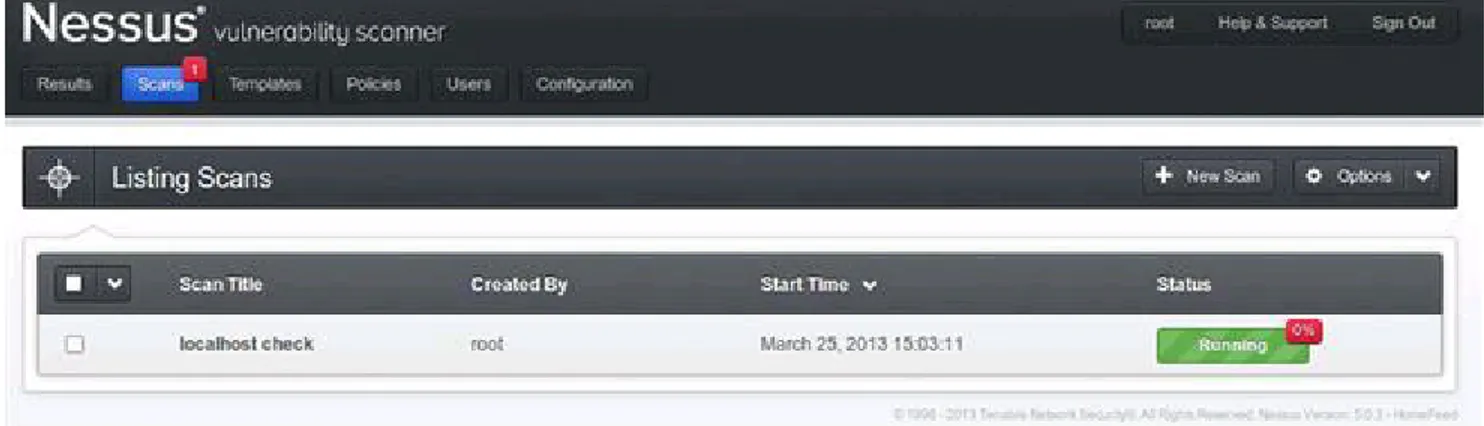
■ Vulnerability scanning with Nessus and Nikto: finding missing patches and more
■ Exploitation with Metasploit: a step-by-step guide to poppin’ boxes
Introduction
Web server hacking is a part of the larger universe known casually as “network hacking.” For most people, this is the first area of hacking that they dig into as it includes the most well-known tools and has been widely publicized in the media. J ust check out the movies that make use of some of the tools in this chapter!
O bviously, network hacking isn’t the emphasis of this book, but there are certain tools and techniques that every security person should know about. These are introduced in this chapter as we target the web server that is hosting the web application. N etwork hacking makes use of some of the most popular hacking tools in the world today: beauties such as N map, N esses, and Metasploit are tools in virtually every security toolbox. I n order to position yourself to take on more advanced hacking techniques, you must first master the usage of these seminal tools. This is the classic “walk before you run” scenario!
There are several tremendous books and resources dedicated to these tools, but things take on a slightly different format when we are specifically targeting the web server. Traditional network hacking follows a very systematic methodology that this book is based on. We will perform reconnaissance, port scanning, vulnerability scanning, and exploitation while targeting the web server as the network service under attack.
We will perform some manual inspection of the robots.txt file on the web server to be er understand what directories the owner does not want to be included in search engine results. This is a potential roadmap to follow to sensitive information within the web server—and we can do so from the comfort of our own web browser! We will also use some specific tools dedicated to web server hacking such as N ikto for web server vulnerability scanning. Couple all of this with the mature tools and techniques of traditional network hacking, and we have a great approach for hacking the web server. Let’s dig in!
Reconnaissance
D uring the Reconnaissance stage (also known as recon or information gathering), you gather as much information about the target as possible such as its I P address; the network topology; devices on the network; technologies in use; package versions; and more. While many tools may be involved in recon, we’ll focus first on using host and
Netcraft to retrieve the server’s I P address (unique numeric address) and to inspect its
robots.txt file for additional information about the target environment.
A lthough recon can be very time-consuming, it forms the basis of almost every successful network a ack, so take your time. Be sure when gathering information that you record everything. A s you run your tools, save the raw output and you’ll end up with an impressive collection of URLs, I P addresses, email addresses, and other noteworthy tidbits. I f you’re conducting a professional penetration test, it’s always a good idea to save this raw output as often times you will need to include it in the final report to your client.
Learning About The Web Server
We are targeting the web server because it is designed to be reachable from outside the network. I ts main purpose is to host web applications that can be accessed by users beyond the internal network. A s such, it becomes our window into the network. First, we need to find the web server’s external I P address so that we can probe it. We’ll generally start with the URL of the target web application, such as http://syngress.com, which we’ll then convert to an I P address. A URL is usually in text format that is easily remembered by a user, while an I P address is a unique numeric address of the web server. N etwork hacking tools generally use the I P address of the web server, although you can also use the host name and your computer will perform the lookup automatically in the background. To convert the URL to an I P address, use the host command in a BackTrack terminal.
host syngress.com
This command returns the following results, which includes the external I P address of the D akota S tate University (dsu.edu) domain as the first entry. The other entry relates to email services and should be archived for potential use later on.
dsu.edu has address 138.247.64.140
dsu.edu mail is handled by 10 dsu-mm01.dsu.edu.
You can also retrieve the I P address by searching by URL at http://news.netcraft.com/. A web browser is capable of processing both I P addresses and URLs to retrieve the home page of a web application hosted on a web server. S o to make sure that you have found the correct I P address of the web server, enter the I P address directly into a browser to see if you reach the target as shown in Figure 2.1.
A le rt
conducted against the environment.
FIGURE 2.1 Using an IP address to reach the target.
The Robots.Txt File
O ne way to begin understanding what’s running on a web server is to view the server’s
robots.txt file. The robots.txt file is a listing of the directories and files on a web server that the owner wants web crawlers to omit from the indexing process. A web crawler is a piece of software that is used to catalog web information to be used in search engines and archives that are mostly commonly deployed by search engines such as Google and Yahoo. These web crawlers scour the I nternet and index (archive) all possible findings to improve the accuracy and speed of their Internet search functionality.
To a hacker, the robots.txt file is a road map to identify sensitive information because any web server’s robots.txt file can be retrieved in a browser by simply requesting it in the URL. Here is an example robots.txt file that you can easily retrieve directly in your browser by simply requesting /robots.txt after a host URL.
User-agent: * # Directories
Disallow: /modules/ Disallow: /profiles/ Disallow: /scripts/ Disallow: /themes/ # Files
Disallow: /CHANGELOG.txt Disallow: /cron.php
Disallow: /INSTALL.mysql.txt Disallow: /INSTALL.pgsql.txt Disallow: /install.php
Disallow: /INSTALL.txt Disallow: /LICENSE.txt Disallow: /MAINTAINERS.txt Disallow: /update.php
Disallow: /logout/ Disallow: /node/add/ Disallow: /search/ Disallow: /user/register/ Disallow: /user/password/ Disallow: /user/login/ # Paths (no clean URLs) Disallow: /?q=admin/ Disallow: /?q=logout/ Disallow: /?q=node/add/ Disallow: /?q=search/ Disallow: /?q=user/password/ Disallow: /?q=user/register/ Disallow: /?q=user/login/
This robots.txt file is broken out into four different sections: 1. Directories
2. Files
3. Paths (clean URLs) 4. Paths (no clean URLs)
Clean URLs are absolute URL paths that you could copy and paste into your browser. Paths with no clean URLs are using a parameter, q in this example, to drive the functionality of the page. You may have heard this referred to as a builder page, where one page is used to retrieve data based solely on the URL parameter(s) that were passed in. Directories and files are straightforward and self-explanatory.
Every web server must have a robots.txt file in its root directory otherwise web crawlers may actually index the entire site, including databases, files, and all! Those are items no web server administrator wants as part of your next Google search. The root directory of a web server is the actual physical directory on the host computer where the web server software is installed. In Windows, the root directory is usually C:/inetpub/wwwroot/, and in Linux it’s usually a close variant of /var/www/.
There is nothing stopping you from creating a web crawler of your own that provides the complete opposite functionality. S uch a tool would, if you so desired, only request and retrieve items that appear in the robots.txt and would save you substantial time if you are performing recon on multiple web servers. O therwise, you can manually request and review each robots.txt file in the browser. The robots.txt file is complete roadblock for automated web crawlers, but not even a speed bump for human hackers who want to review this sensitive information.
Port Scanning
side door. J ust as we expect salesmen to use the front door, we also expect certain services to use certain ports on a computer. I t’s pre y standard for HTTP traffic to use port 80 and HTTPS traffic to use port 443. S o, if we find ports 80 and 443 open, we can be somewhat sure that HTTP and HTTPS are running and the machine is probably a web server. O ur goal when port scanning is to answer three questions regarding the web server:
1. What ports are open?
2. What services are running on these ports? 3. What versions of those services are running?
I f we can get accurate answers to these questions, we will have strengthened our foundation for attack.
Nmap
The most widely used port scanner is Nmap, which is available in BackTrack and has substantial documentation at http://nmap.org. First released by Gordon “Fyodor” Lyon in 1997, Nmap continues to gain momentum as the world’s best port scanner with added functionality in vulnerability scanning and exploitation. The most recent major release of
Nmap at the time of this writing is version 6, and it includes a ton of functionality dedicated to scanning web servers.
Updating Nmap
Before you start using with Nmap, be sure that you’re running the most recent version by running the nmap -V command in a terminal. I f you are not running version 6 or higher, you need to update Nmap. To perform the updating process, open a terminal in BackTrack and run the apt-get upgrade nmap command. To make sure you are running version 6 or higher, you can again use the nmap -V command after installation is complete.
Running Nmap
There are several scan types in Nmap and switches that add even more functionality. We already know the IP address of our web server so many of the scans in Nmap dedicated to host discovery (finding an I P address of a server) can be omi ed as we are more interested in harvesting usable information about the ports, services, and versions running on the web server. We can run Nmap on our D VWA web server when it’s running on the localhost (127.0.0.1). From a terminal, run the following Nmap command.
nmap -sV -O -p- 127.0.0.1
Let’s inspect each of the parts of the command you just ran, so we all understand what the scan is trying to accomplish.
■ The –sV designates this scan as a versioning scan that will retrieve specific versions of the discovered running services.