Cisco Press
800 East 96th Street, 3rd Floor Indianapolis, IN 46240 USA
Cisco Press
CCNP Self-Study
CCNP BCMSN Exam
Certification Guide
ii
CCNP BCMSN Exam Certification Guide
David HucabyCopyright © 2004 Cisco Systems, Inc. Published by:
Cisco Press
800 East 96th Street, 3rd Floor Indianapolis, IN 46240 USA
All rights reserved. No part of this book may be reproduced or transmitted in any form or by any means, electronic or mechanical, including photocopying, recording, or by any information storage and retrieval system, without written permission from the publisher, except for the inclusion of brief quotations in a review.
Printed in the United States of America 1 2 3 4 5 6 7 8 9 0 First Printing September 2003
Library of Congress Cataloging-in-Publication Number: 2002115604 ISBN: 1-58720-077-5
Warning and Disclaimer
This book is designed to provide information about selected topics for the Building Cisco Multilayer Switched Networks (BCMSN) exam for the CCNP certification. Every effort has been made to make this book as complete and as accurate as possible, but no warranty or fitness is implied.
The information is provided on an “as is” basis. The authors, Cisco Press, and Cisco Systems, Inc., shall have neither liability nor responsibility to any person or entity with respect to any loss or damages arising from the information contained in this book or from the use of the discs or programs that may accompany it.
The opinions expressed in this book belong to the author and are not necessarily those of Cisco Systems, Inc.
Feedback Information
At Cisco Press, our goal is to create in-depth technical books of the highest quality and value. Each book is crafted with care and preci-sion, undergoing rigorous development that involves the unique expertise of members from the professional technical community. Readers’ feedback is a natural continuation of this process. If you have any comments regarding how we could improve the quality of this book or otherwise alter it to better suit your needs, you can contact us through e-mail at [email protected]. Please make sure to include the book title and ISBN in your message.
We greatly appreciate your assistance.
Trademark Acknowledgments
iii
Publisher: John Wait
Editor-In-Chief: John Kane
Executive Editor: Brett Bartow
Cisco Representative: Anthony Wolfenden
Cisco Press Program Manager: Sonia Torres Chavez
Manager, Marketing Communications, Cisco Systems: Scott Miller
Cisco Marketing Program Manager: Edie Quiroz
Production Manager: Patrick Kanouse
Development Editor: Christopher Cleveland
Project Editor: San Dee Phillips
Copy Editor: Marcia Ellett
Technical Editors: Stephen Daleo, Steve McQuerry, Geoff Tagg
Team Coordinator: Tammi Ross
Book Designer: Gina Rexrode
Cover Designer: Louisa Adair
Indexer: Tim Wright
iv
About the Author
v
About the Technical Reviewers
Stephen Daleo, president of Golden Networking Consultants, Inc. is a network consultant whose clients include the University of South Florida – St. Petersburg, FL and North Broward Hospital District (Fort Lauderdale, FL). Steve was one of the course developers for Cisco Internet Learning Solutions Group – BCMSN 2.0 class. Steve is a frequent contributor to the technical content of Cisco Press books and is an active certified Cisco Systems instructor (97025) teaching the BCMSN, BCRAN, CIPT, CIT, BSCI, and ICND Cisco courses.
Steve McQuerry, CCIE No. 6108, is an instructor, technical writer, and internetworking consultant with over 10 years of networking industry experience. He is a certified Cisco Systems instructor teaching routing and switching concepts to internetworking professionals throughout the world. Steve is also a founding partner in Intrellix, an internetworking consulting company specializing in post-sales consulting services.
Geoff Tagg runs a networking consultancy in the UK, where he has over 20 years experience in working with companies ranging from small local businesses to large multinationals. Prior to that, he was a systems programmer for a number of years. Geoff’s main specialty is IP network design and implementation. Geoff lives in Oxford, England with his wife, Christine, and family, and is a visiting professor at nearby Oxford Brookes University.
vi
Dedications
As always, this book is dedicated to the most important people in my life—my wife, Marci, and my two little daughters, Lauren and Kara. Their love, encouragement, and support carry me along. I’m so grateful to God, who gives endurance and encouragement (Romans 15:5) and has allowed me to work on projects like this.
I would also like to dedicate this book to the memory of two teachers who have made an impact on me:
Mabel “Stoney” Stonecipher, my college technical writing teacher and family friend, who made writing about technical things fun and educational.
vii
Acknowledgments
It has been my great pleasure to work on another Cisco Press project. I enjoy the networking field very much, and technical writing even more. And more than that, I’m thankful for the joy and inner peace that Jesus Christ gives, making everything more abundant.
Technical writing may be hard work, but I’m finding that it’s also quite fun because I’m working with very good friends. I can’t say enough good things about Chris Cleveland. Somehow, Chris is able to handle many book projects all at once, while giving each one an incredible amount of attention and improvement. Brett Bartow is a constant source of organization, project management, and encouragement. I’m glad he agreed to have me back for another project!
Now a few words about another group of good friends—the technical reviewers that made this a much, much better book. I am very grateful for the insight, suggestions, and helpful comments that Steve Daleo, Steve McQuerry, and Geoff Tagg contributed. Each one offered a different perspective, which helped make this a more well-rounded book and me a more educated author. Christopher Paggen also provided some early help with new Catalyst features and development.
Lastly, for the very first time, I am able to announce that no laptop computers were harmed in the writing of this book.
viii
Contents at a Glance
Foreword xxiiiIntroduction: Overview of Certification and How to Succeed xxiv
PART I Overview and Design of a Campus Network 2 Chapter 1 Campus Network Overview 5
Chapter 2 Modular Network Design 33
PART II Building a Campus Network 54 Chapter 3 Switch Operation 57
Chapter 4 Switch Configuration 83 Chapter 5 Switch Port Configuration 107 Chapter 6 VLANs and Trunks 137
Chapter 7 VLAN Trunking Protocol (VTP) 167 Chapter 8 Aggregating Switch Links 189
Chapter 9 Traditional Spanning Tree Protocol 209 Chapter 10 Spannning Tree Configuration 239
Chapter 11 Protecting the Spanning Tree Protocol Topology 263 Chapter 12 Advanced Spanning Tree Protocol 279
PART III Layer 3 Switching 302 Chapter 13 Multilayer Switching 305
Chapter 14 Router Redundancy and Load Balancing 327 Chapter 15 Multicast 353
ix
Chapter 19 Securing Switch Access 451 Chapter 20 Securing with VLANs 469
PART V Scenarios for Final Preparation 494 Chapter 21 Scenarios for Final Preparation 497
PART VI Appendix 514
Appendix A Answers to Chapter “Do I Know This Already?” Quizzes and Q&A Sections 517
Index 582
x
Contents
Foreword xxiii
Introduction: Overview of Certification and How to Succeed xxiv
Part I Overview and Design of a Campus Network 2
Chapter 1 Campus Network Overview 5
“Do I Know This Already?” Quiz 5 Foundation Topics 9
Switching Functionality 9 Layer 2 Switching 10 Layer 3 Routing 10 Layer 3 Switching 11 Layer 4 Switching 12
Multilayer Switching (MLS) 12 Campus Network Models 12
Shared Network Model 13 LAN Segmentation Model 14 Network Traffic Models 17 Predictable Network Model 19 Hierarchical Network Design 19
Access Layer 20 Distribution Layer 21 Core Layer 21
Cisco Products in the Hierarchical Design 21 Access Layer Switches 22
Distribution Layer Switches 23 Core Layer Switches 24 Product Summary 25 Foundation Summary 27 Q&A 30
Chapter 2 Modular Network Design 33
“Do I Know This Already?” Quiz 33 Foundation Topics 37
Modular Network Design 37 The Switch Block 38
Sizing a Switch Block 39 The Core Block 41
Collapsed Core 42 Dual Core 43
xi
Other Building Blocks 45 Server Farm Block 46
Network Management Block 46 Enterprise Edge Block 47 Service Provider Edge Block 47 Can I Use Layer 2 Distribution Switches? 48 Foundation Summary 50
Q&A 52
Part II Building a Campus Network 54
Chapter 3 Switch Operation 57
“Do I Know This Already?” Quiz 57 Foundation Topics 61
Layer 2 Switch Operation 61 Transparent Bridging 61 Follow That Frame! 63 Multilayer Switch Operation 66
Types of Multilayer Switching 66 Follow That Packet! 67
Multilayer Switching Exceptions 69 Tables Used in Switching 69
Content Addressable Memory (CAM) 70
Ternary Content Addressable Memory (TCAM) 71 TCAM Structure 71
TCAM Example 72
Port Operations in TCAM 74 Troubleshooting Switching Tables 75
CAM Table Operation 75 TCAM Operation 76 Foundation Summary 77 Q&A 79
Chapter 4 Switch Configuration 83
”Do I Know This Already?” Quiz 83 Foundation Topics 87
Switch Management 87 Operating Systems 87 Identifying the Switch 88 Passwords and User Access 89
Password Recovery 90 Remote Access 90
xii
Switch File Management 91 OS Image Files 92
Filename Conventions 93 Configuration Files 93 Other Catalyst Switch Files 94
Moving Catalyst Switch Files Around 94 Troubleshooting from the Operating System 96
Show Configuration and File Contents 96 Debugging Output 97
View CDP Information 98 Foundation Summary 100 Q&A 103
Chapter 5 Switch Port Configuration 107
”Do I Know This Already?” Quiz 107 Foundation Topics 112
Ethernet Concepts 112 Ethernet (10 Mbps) 112 Long Reach Ethernet (LRE) 113 Fast Ethernet 114
Full-Duplex Fast Ethernet 115 Gigabit Ethernet 117
10Gigabit Ethernet 118 Metro Ethernet 119
Connecting Switch Block Devices 120 Console Port Cables/Connectors 120 Ethernet Port Cables and Connectors 121 Gigabit Ethernet Port Cables and Connectors 121 Switch Port Configuration 123
Selecting Ports to Configure 123 Identifying Ports 124
Port Speed 124 Port Mode 125
Managing Error Conditions on a Switch Port 125 Detecting Error Conditions 125
Automatically Recover from Error Conditions 126 Enable and Use the Switch Port 126
Troubleshooting Port Connectivity 126 Looking for the Port State 127
Looking for Speed and/or Duplex Mismatches 127 Foundation Summary 129
xiii
Chapter 6 VLANs and Trunks 137
”Do I Know This Already?” Quiz 137 Foundation Topics 141
Virtual LANs 141
VLAN Membership 142 Static VLANs 142
Configuring Static VLANs 143 Dynamic VLANs 144 Deploying VLANs 144
End-to-End VLANs 145 Local VLANs 145 VLAN Trunks 146
VLAN Frame Identification 146 Inter-Switch Link Protocol 148 IEEE 802.1Q Protocol 148 Dynamic Trunking Protocol 150 VLAN Trunk Configuration 150
VLAN Trunk Configuration 150 Service Provider Tunneling 153
IEEE 802.1Q Tunnels 153 Configuring a 802.1Q Tunnel 155 Layer 2 Protocol Tunnels 155
Configuring Layer 2 Protocol Tunneling 156 Ethernet over MPLS Tunneling 157 Troubleshooting VLANs and Trunks 159 Foundation Summary 162
Q&A 164
Chapter 7 VLAN Trunking Protocol (VTP) 167
“Do I Know This Already?” Quiz 167 Foundation Topics 171
VLAN Trunking Protocol 171 VTP Domains 171 VTP Modes 171 VTP Advertisements 172 VTP Configuration 175
Configuring a VTP Management Domain 175 Configuring the VTP Mode 176
Configuring the VTP Version 177 VTP Status 178
VTP Pruning 179
Enabling VTP Pruning 181 Troubleshooting VTP 182 Foundation Summary 184 Q&A 186
xiv
Chapter 8 Aggregating Switch Links 189
“Do I Know This Already?” Quiz 189 Foundation Topics 193
Switch Port Aggregation with EtherChannel 193 Bundling Ports with EtherChannel 194 Distributing Traffic in EtherChannel 194 Configuring EtherChannel Load Balancing 195 EtherChannel Negotiation Protocols 197
Port Aggregation Protocol (PAgP) 197 Link Aggregation Control Protocol (LACP) 198 EtherChannel Configuration 198
Configuring a PAgP EtherChannel 199 Configuring a LACP EtherChannel 199 Troubleshooting an EtherChannel 200 Foundation Summary 204
Q&A 206
Chapter 9 Traditional Spanning Tree Protocol 209
“Do I Know This Already?” Quiz 209 Foundation Topics 213
IEEE 802.1D Overview 213 Bridging Loops 213
Preventing Loops with Spanning Tree Protocol 217
Spanning Tree Communication: Bridge Protocol Data Units 217 Electing a Root Bridge 218
Electing Root Ports 220 Electing Designated Ports 223 STP States 225
STP Timers 227 Topology Changes 228 Types of STP 229
Common Spanning Tree (CST) 229 Per-VLAN Spanning Tree (PVST) 229 Per-VLAN Spanning Tree Plus (PVST+) 230 Foundation Summary 231
Q&A 234
Chapter 10 Spannning Tree Configuration 239
“Do I Know This Already?” Quiz 239 Foundation Topics 243
STP Root Bridge 243
xv
Spanning Tree Customization 248 Tuning the Root Path Cost 248 Tuning the Port ID 249
Tuning Spanning Tree Convergence 250 Modifying STP Timers 250
Redundant Link Convergence 252 PortFast: Access Layer Nodes 252 UplinkFast: Access Layer Uplinks 253 BackboneFast: Redundant Backbone Paths 254 Troubleshooting STP 255
Foundation Summary 257 Q&A 258
Chapter 11 Protecting the Spanning Tree Protocol Topology 263
“Do I Know This Already?” Quiz 263 Foundation Topics 267
Protecting Against Unexpected BPDUs 267 Root Guard 267
BPDU Guard 268
Protecting Against Sudden Loss of BPDUs 269 BPDU Skew Detection 270
Loop Guard 270 UDLD 271
Troubleshooting STP Protection 273 Foundation Summary 274
Q&A 276
Chapter 12 Advanced Spanning Tree Protocol 279
“Do I Know This Already?” Quiz 279 Foundation Topics 283
Rapid Spanning Tree Protocol (RSTP) 283 RSTP Port Behavior 283
BPDUs in RSTP 284 RSTP Convergence 285
Port Types 286 Synchronization 287 Topology Changes and RSTP 288 RSTP Configuration 290
Multiple Spanning Tree (MST) Protocol 290 MST Overview 292
xvi
Spanning Tree Instances Within MST 293 IST Instances 293
MST Instances 294 MST Configuration 295 Foundation Summary 298 Q&A 300
Part III Layer 3 Switching 302
Chapter 13 Multilayer Switching 305
“Do I Know This Already?” Quiz 305 Foundation Topics 309
InterVLAN Routing 309 Types of Interfaces 310
Configuring InterVLAN Routing 310 Layer 2 Port Configuration 310 Layer 3 Port Configuration 311 SVI Port Configuration 312 Multilayer Switching with CEF 312 Traditional MLS Overview 312 CEF Overview 313
Forwarding Information Base (FIB) 314 Adjacency Table 315
Packet Rewrite 316 Configuring CEF 316 Fallback Bridging 317 Verifying Multilayer Switching 318
InterVLAN Routing 318 CEF 319
Fallback Bridging 321 Foundation Summary 322 Q&A 324
Chapter 14 Router Redundancy and Load Balancing 327
“Do I Know This Already?” Quiz 327 Foundation Topics 331
Router Redundancy in Multilayer Switching 331 Packet Forwarding Review 331
Hot Standby Router Protocol (HSRP) 332 HSRP Router Election 332
Conceding the Election 333 HSRP Gateway Addressing 334 Load Balancing with HSRP 335
xvii
Gateway Load Balancing Protocol (GLBP) 337 Active Virtual Gateway 338
Active Virtual Forwarder 339 GLBP Load Balancing 340 Enabling GLBP 340 Server Load Balancing (SLB) 343
SLB Configuration 344 Server Farms 344 Virtual Servers 345
Verifying Redundancy and Load Balancing 346 Foundation Summary 347
Q&A 350
Chapter 15 Multicast 353
“Do I Know This Already?” Quiz 353 Foundation Topics 357
Multicast Overview 357 Multicast Addressing 358 Routing Multicast Traffic 359
Multicast Trees 359
Reverse Path Forwarding 360 IGMP 360
IGMPv1 360 IGMPv2 361 PIM 361
PIM Dense Mode 362 PIM Sparse Mode 363 PIM Sparse-Dense Mode 365 PIM Version 1 365
PIM Version 2 366 Switching Multicast Traffic 367
IGMP Snooping 367 CGMP 368
Verifying Multicast Routing and Switching 369 Multicast Routing with PIM 369
Multicast Switching 369
What Would Happen Without a Multicast Router? 370 Foundation Summary 371
Q&A 373
Part IV Campus Network Services 374
Chapter 16 Quality of Service Overview 377
“Do I Know This Already?” Quiz 377 Foundation Topics 381
The Need for Quality of Service 381 Types of QoS 382
Best Effort Delivery 382 Integrated Services Model 382 Differentiated Services Model 383 DiffServ QoS 383
Layer 2 QoS Classification 384
Layer 3 QoS Classification with DSCP 384 Class Selector 386
Drop Precedence 386 QoS Building Blocks 387
Ingress Queueing 388
Classification, Trust, and Marking 388 Policers 389
Scheduling 390
Congestion Avoidance 391 Tail Drop 391
Weighted Random Early Detection 392 Switch Port Queues 393
Foundation Summary 396 Q&A 398
Chapter 17 DiffServ QoS Configuration 401
“Do I Know This Already?” Quiz 401 Foundation Topics 405
Applying QoS Trust 406
Trust QoS on an Interface 406 Do Not Trust any QoS Information 407 Mapping Inbound QoS Information 407 Defining a QoS Policy 409
Defining a QoS Class to Classify Traffic 409 Classifying Traffic with an Access List 410 Classifying Traffic with NBAR 410
What Happens When NBAR Is Enabled? 411 Defining a QoS Policy 411
Identifying the QoS Class Maps 411 Marking QoS Information 412 Trusting QoS Information 412 Policing Classified Traffic 412 Apply a QoS Policy to an Interface 413 Tuning Egress Scheduling 414
Using Congestion Avoidance 414
xix
Avoiding Congestion by Using Tail Drop 416 Avoiding Congestion by Using WRED 416 Setting WRED Thresholds 416
A QoS Configuration Example 417 Configuring QoS Trust 418
Configuring a QoS Class to Classify Traffic 419
Configuring a QoS Policy to Act on Classified Traffic 420 Egress Queue Tuning 421
Verifying and Troubleshooting QoS 422 Foundation Summary 425
Q&A 428
Chapter 18 IP Telephony 431
“Do I Know This Already?” Quiz 431 Foundation Topics 435
IP Telephony Overview 435 Inline Power 435
How Inline Power Works 436 Configuring Inline Power 437 Voice VLANs 437
Voice VLAN Configuration 438 Voice QoS 440
QoS Trust 440
Voice Packet Classification 441 Queuing for Voice Traffic 442
Verifying Inline Power, Voice VLANs, and Voice QoS 442 Verifying Inline Power 443
Verifying Voice VLANs 443 Verifying Voice QoS 444 Foundation Summary 448 Q&A 449
Chapter 19 Securing Switch Access 451
“Do I Know This Already?” Quiz 451 Foundation Topics 455
Switch AAA 455 Authentication 455 Authorization 457 Accounting 459 Port Security 460
Chapter 20 Securing with VLANs 469
“Do I Know This Already?” Quiz 469 Foundation Topics 473
VLAN Access Lists 473 VACL Configuration 473 Private VLANs 474
Private VLAN Configuration 477 Configure the Private VLANs 477 Associate Ports with Private VLANs 477
Associate Secondary VLANs to a Primary VLAN SVI 479 Switch Port Monitoring 480
Local SPAN and VSPAN 481
Local SPAN and VSPAN Configuration 482 Remote SPAN 484
Remote SPAN Configuration 485 Foundation Summary 488
Q&A 491
Part V Scenarios for Final Preparation 494
Chapter 21 Scenarios for Final Preparation 497
Scenario 1: Trunking and DTP 497
Scenario 2: VLANs, Trunking, and VTP 499 Scenario 3: Traditional STP 500
Scenario 4: Advanced STP 500
Scenario 5: Router Redundancy with HSRP and GLBP 501 Scenario 6: Multicast 503
Scenario 7: QoS in a Switched Network 504
Scenario 8: Securing Access and Managing Traffic in a Switched Network 505 Scenario Answers 506
Scenario 1 Answers 506 Scenario 2 Answers 506 Scenario 3 Answers 507 Scenario 4 Answers 508 Scenario 5 Answers 509 Scenario 6 Answers 510 Scenario 7 Answers 510 Scenario 8 Answers 512
Part VI Appendix 514
Appendix A Answers to Chapter “Do I Know This Already?” Quizzes and Q&A Sections 517
xxi
Icons Used in This Book
Router Bridge Hub
DSU/CSU DSU/CSU
Catalyst Switch
Multilayer Switch
PC with Software
PC Sun
Workstation
Macintosh Terminal Cisco Works Workstation
File Server Web
Server
Printer Laptop
IBM Mainframe
Front End Processor
Cluster Controller ATM
Switch
ISDN/Frame Relay Switch
Communication Server
Gateway Access
Server Modem
Network Cloud Token
Ring
Token Ring
FDDI
FDDI
Command Syntax Conventions
The conventions used to present command syntax in this book are the same conventions used in the Cisco IOS Command Reference. The Command Reference describes these conventions as follows:
■ Vertical bars (|) separate alternative, mutually exclusive elements.
■ Square brackets [ ] indicate optional elements.
■ Braces { } indicate a required choice.
■ Braces within brackets [{ }] indicate a required choice within an optional element.
■ Boldface indicates commands and keywords that are entered literally as shown. In actual configuration examples and output (not general command syntax), boldface indicates commands that are manually input by the user (such as a show command).
xxiii
Foreword
CCNP BCMSN Exam Certification Guide is a complete study tool for the CCNP BCMSN exam, allowing you to assess your knowledge, identify areas in which to concentrate your study, and master key concepts to help you succeed on the exams and in your daily job. The book is filled with features that help you master the skills to implement appropriate technologies to build scalable, multilayer switched networks. This book was developed in cooperation with the Cisco Internet Learning Solutions Group. Cisco Press books are the only self-study books authorized by Cisco for CCNP exam preparation.
Cisco and Cisco Press present this material in text-based format to provide another learning vehicle for our customers and the broader user community in general. Although a publication does not duplicate the instructor-led or e-learning environment, we acknowledge that not everyone responds in the same way to the same delivery mechanism. It is our intent that presenting this material via a Cisco Press publication will enhance the transfer of knowledge to a broad audience of networking professionals.
Cisco Press will present study guides on existing and future exams through these Exam Certification Guides to help achieve Cisco Internet Learning Solutions Group’s principal objectives: to educate the Cisco community of networking professionals and to enable that community to build and maintain reliable, scalable networks. The Cisco Career Certifications and classes that support these certifications are directed at meeting these objectives through a disciplined approach to progressive learning. To succeed on the Cisco Career Certifications exams, as well as in your daily job as a Cisco certified professional, we recommend a blended learning solution that combines instructor-led, e-learning, and self-study training with hands-on experience. Cisco Systems has created an authorized Cisco Learning Partner program to provide you with the most highly qualified instruction and invaluable hands-on experience in lab and simulation environments. To learn more about Cisco Learning Partner programs available in your area, please go to www.cisco.com/go/authorizedtraining.
The books Cisco Press creates in partnership with Cisco Systems will meet the same standards for content quality demanded of our courses and certifications. It is our intent that you will find this and subsequent Cisco Press certification and training publications of value as you build your networking knowledge base.
Thomas M. Kelly
Vice-President, Internet Learning Solutions Group Cisco Systems, Inc.
Introduction: Overview of Certification and How to Succeed
Professional certifications have been an important part of the computing industry for many years and will continue to become more important. Many reasons exist for these certifications, but the most popularly cited reason is that of credibility. All other considerations held equal, the certified employee/consultant/job candidate is considered more valuable than one who is not.Objectives and Methods
The most important and somewhat obvious objective of this book is to help you pass the Cisco BCMSN exam (642-811) In fact, if the primary objective of this book were different, the book’s title would be misleading; however, the methods used in this book to help you pass the BCMSN exam are designed to also make you much more knowledgeable about how to do your job. While this book and the accompanying CD-ROM have many example test questions, the method in which they are used is not to simply make you memorize as many questions and answers as you possibly can.
One key methodology used in this book helps you discover the exam topics about which you need more review, to help you fully understand and remember those details, and to help you prove to yourself that you have retained your knowledge of those topics. So, this book does not try to help you pass by memorization, but by helping you truly learn and understand the topics. The BCMSN exam is just one of the foundation topics in the CCNP and CCDP certifications, and the knowledge contained within is vitally important to consider yourself a truly skilled routing and switching engineer or specialist. This book would do you a disservice if it did not attempt to help you learn the material. To that end, the book can help you pass the BCMSN exam by using the following methods:
■ Helping you discover which test topics you have not mastered
■ Providing explanations and information to fill in your knowledge gaps
■ Supplying exercises and scenarios that enhance your ability to recall and deduce the answers to test questions
■ Providing practice exercises on the topics and the testing process through test questions on the CD-ROM
Who Should Read This Book?
This book is not designed to be a general networking topics book; although, it can be used for that purpose. This book is intended to tremendously increase your chances of passing the Cisco BCMSN exam. Although other objectives can be achieved from using this book, the book is written with one goal in mind: to help you pass the exam.
xxv
Exam Overview
Cisco offers three levels of certification, each with an increasing level of proficiency: Associate, Professional, and Expert. These are commonly known by their acronyms CCNA/CCDA (Cisco Certified Network/Design Associate), CCNP/CCDP (Cisco Certified Network/Design Professional), and CCIE (Cisco Certified Internetworking Expert). There are others as well, but this book focuses on the certifications for enterprise networks.
For the CCNP certification, you must pass a series of four core exams or pass a longer foundations exam plus one support exam. The BCMSN exam or its content is included and required for either path. For most exams, Cisco does not publish the scores needed for passing. You need to take the exam to find that out for yourself.
To see the most current requirements for the CCNP or CCDP certifications, go to www.cisco.com; then, click Learning and Events, followed by Career Certifications and Paths.
The BCMSN exam itself is composed of 60 to 70 questions, presented in a variety of formats. You can expect to find multiple-choice single answer, multiple-choice multiple answer, drag-and-drop, fill-in-the-blank, and simulations. To find more specific information about the topics that can be covered on the BCMSN exam, go to www.cisco.com; then, click Learning and Events, followed by Exam Information and then Certification Exams. The exam lasts 90 minutes and is offered through either Pearson VUE or Prometric testing centers only. See www.cisco.com/en/US/learning/le3/le11/ learning_about_registering_for_exams.html for the most current information about registering for the exam.
Strategies for Exam Preparation
The strategy you use to prepare for the BCMSN exam might be slightly different than strategies used by other readers, mainly based on the skills, knowledge, and experience you already have obtained. For instance, if you have attended the BCMSN course, you might take a different approach than someone who learned switching through on-the-job training.
Regardless of the strategy you use or the background you have, this book is designed to help you get to the point where you can pass the exam with the least amount of time required. For instance, there is no need for you to practice or read about IP addressing and subnetting if you fully under-stand it already. However, many people like to make sure that they truly know a topic and read over material that they already know. Several book features help you gain the confidence that you know some material already and also help you know what topics you need to study more.
How This Book Is Organized
with. Chapters 1 through 20 are the core chapters and can be covered in any order, though some chapters are related and build upon each other. If you do intend to read them all, the order in the book is an excellent sequence to use.
When you finish with the core chapters, you have several options on how to finish your exam preparation. Chapter 21, “Scenarios for Final Preparation,” provides many scenarios to help you review and refine your knowledge, without giving you a false sense of preparedness that you would get with simply reviewing a set of multiple-choice questions. You can review the questions at the end of each chapter, and you can use the CD-ROM testing software to practice the exam.
Each core chapter covers a subset of the topics on the BCMSN exam. The core chapters are organized into parts. The core chapters cover the following topics:
PART I: Overview and Design of a Campus Network
■ Chapter 1, “Campus Network Overview”—This chapter covers the use of switches in the OSI model’s various layers, the different campus network models, hierarchical network design, and how Cisco’s switching products fit into a hierarchical network design.
■ Chapter 2 “Modular Network Design”—This chapter covers how to design, size, and scale a campus network using a modular approach
PART II: Building a Campus Network
■ Chapter 3, “Switch Operation”—This chapter covers Layer 2 and multilayer switch operation, how various CAM and TCAM tables are used to make switching decisions, and how to monitor these tables to aid in troubleshooting.
■ Chapter 4, “Switch Configuration”—This chapter covers the operating system software avail-able on Cisco Catalyst switches, basic switch configuration and administration, switch file management, and how to verify that a switch is functioning properly to aid in troubleshooting.
■ Chapter 5, “Switch Port Configuration”—This chapter covers basic Ethernet concepts, using scalable Ethernet, connecting switch block devices, and verifying switch port operation to aid in troubleshooting.
■ Chapter 6, “VLANs and Trunks”—This chapter covers basic VLAN concepts, transporting multiple VLANs over single links, configuring VLAN trunks, Layer 2 and Ethernet over MPLS tunnels, and verifying VLAN and trunk operation.
■ Chapter 7, “VLAN Trunking Protocol (VTP)”—This chapter covers VLAN management using VTP, configuring VTP, managing traffic through VTP pruning, and verifying VTP operation.
xxvii
■ Chapter 9, “Traditional Spanning Tree Protocol”—This chapter covers IEEE 802.1D Spanning Tree Protocol (STP), as well as an overview of the other STP types that might be running on a switch.
■ Chapter 10, “Spanning Tree Configuration”—This chapter covers the STP Root Bridge, customizing the STP topology, tuning STP convergence, redundant link convergence, and verifying STP operation.
■ Chapter 11, “Protecting the Spanning Tree Protocol Topology”—This chapter covers protecting the STP topology using Root Guard, BPDU Guard, and Loop Guard, as well as how to detect delayed BPDU reception using BPDU Skew Detection, and verifying that these STP protection mechanisms are functioning properly.
■ Chapter 12, “Advanced Spanning Tree Protocol”—This chapter covers Rapid Spanning Tree Protocol (RSTP) and Multiple Spanning Tree (MST) Protocol.
PART III: Layer 3 Switching
■ Chapter 13, “Multilayer Switching”—This chapter covers interVLAN routing, multilayer switching with CEF, and verifying that multilayer switching is functioning properly.
■ Chapter 14, “Router Redundancy and Load Balancing”—This chapter covers providing redundant router or gateway addresses on Catalyst switches, server load balancing, and verifying that redundancy and load balancing are functioning properly.
■ Chapter 15, “Multicast”—This chapter covers general multicast concepts, routing and switch-ing multicast traffic, and verifyswitch-ing that multicast routswitch-ing and switchswitch-ing are functionswitch-ing properly.
PART IV: Campus Network Services
■ Chapter 16, “Quality of Service Overview”—This chapter covers the Differentiated Services QoS model, the building blocks of the DiffServ QoS model, and switch port queues.
■ Chapter 17, “Diffserv QoS Configuration”—This chapter covers applying QoS trust, defining a DiffServ QoS policy, tuning egress scheduling, configuring congestion avoidance, and verifying that QoS operation is functioning properly.
■ Chapter 18, “IP Telephony”—This chapter covers how a Catalyst switch can provide power to operate a Cisco IP Phone, how voice traffic can be carried over the links between an IP Phone and a Catalyst switch, QoS for voice traffic, and verifying that IP Telephony features are functioning properly.
■ Chapter 20, “Securing with VLANs”—This chapter covers how to control traffic within a VLAN using access lists, implementing private VLANs, and monitoring traffic on switch ports for security reasons.
Each chapter in the book uses several features to help you make the best use of your time in that chapter. The features are as follows:
■ Assessment—Each chapter begins with a “Do I Know This Already?” quiz that helps you determine the amount of time you need to spend studying that chapter. If you intend to read the entire chapter, you can save the quiz for later use. Questions are all multiple-choice, single-answer, to give a quick assessment of your knowledge.
■ Foundation Topics—This is the core section of each chapter that explains the protocols, concepts, and configuration for the topics in the chapter.
■ Foundation Summary—At the end of each chapter, a Foundation Summary collects key con-cepts, facts, and commands into an easy-to-review format. A more lengthy “Q&A” section follows, where many review questions are presented. Questions are mainly open-ended, rather than multiple choice, as found on the exams. This is done to focus more on understanding the subject matter than on memorizing details.
■ Scenarios—Scenarios are collected in the final chapter to allow a much more in-depth exami-nation of a network implementation. Rather than posing a simple question asking for a single fact, the scenarios let you design, configure, and troubleshoot networks (at least on paper) with-out the clues inherent in a multiple-choice quiz format.
■ CD-based practice exam—The companion CD-ROM contains two separate test banks—one composed of the questions from the book and an entirely new test bank of questions to reinforce your understanding of the book’s concepts. In addition to the multiple choice questions, you also encounter some configuration simulation questions where you actually perform configura-tions. This is the best tool for helping you prepare for the actual test-taking process.
How to Use This Book for Study
Retention and recall are the two features of human memory most closely related to performance on tests. This exam preparation guide focuses on increasing both retention and recall of the topics on the exam. The other human characteristic involved in successfully passing the exam is intelligence; this book does not address that issue!
xxix
Memory recall is based on connectors to the information that needs to be recalled—the greater the number of connectors to a piece of information, the better chance and better speed of recall. For example, if the exam asks what VTP stands for, you automatically add information to the question. You know the topic is switching because of the nature of the test. You might recall the term “VTP domain,” which implies that this is a type of switch domain. You might also remember that it is talking about VLANs. Having read one of the multiple-choice answers “VLAN Trunk Protocol,” you might even have the infamous “aha” experience, in which you are then sure that your answer is correct—and possibly a brightly lit bulb is hovering over your head. All these added facts and assumptions are the connectors that eventually lead your brain to the fact that needs to be recalled. Of course, recall and retention work together. If you do not retain the knowledge, recalling it will be difficult.
This book is designed with features to help you increase retention and recall. It does this in the following ways:
■ By providing succinct and complete methods of helping you decide what you recall easily and what you do not recall at all.
■ By giving references to the exact passages in the book that review those concepts you did not recall, so you can quickly be reminded about a fact or concept. Repeating information that connects to another concept helps retention, and describing the same concept in several ways throughout a chapter increases the number of connectors to the same pieces of information.
■ By including exercise questions that supply fewer connectors than multiple-choice questions. This helps you exercise recall and avoids giving you a false sense of confidence, as an exercise with only multiple-choice questions might do. For example, fill-in-the-blank questions require you to have better and more complete recall than multiple-choice questions.
■ By pulling the entire breadth of subject matter together. A separate chapter (Chapter 21) contains scenarios and several related questions that cover every topic on the exam and gives you the chance to prove that you have gained mastery over the subject matter. This reduces the connectors implied by questions residing in a particular chapter and requires you to exercise other connectors to remember the details.
■ Finally, accompanying this book is a CD-ROM that has exam-like questions in a variety of formats. These are useful for you to practice taking the exam and to get accustomed to the time restrictions imposed during the exam.
If you find that you do well on the assessment quizzes, it still might be wise to quickly skim through each chapter to find sections or topics that do not readily come to mind. Sometimes, even reading through the detailed table of contents will reveal topics that are unfamiliar or unclear. If that happens to you, mark those chapters or topics and spend time working through those parts of the book.
Strategies for the Exam
Try to schedule the exam far enough in advance so that you have ample time for study. Consider the time of day and even the day of the week so that you choose a timeframe that suits your daily routine. Because the exam lasts 90 minutes, you should make sure the exam time does not coincide with your regular lunchtime or some other part of the day when you are usually tired or trying to wake up. As for the day of the week, your work schedule might prevent you from studying a few days before the exam.
Hopefully, you can find a testing center located nearby. In any event, be sure to familiarize yourself with the driving and parking directions well ahead of time. You do not want to be frantically searching for streets or buildings a few minutes before the exam is scheduled to start. You will need at least one form of picture ID to present at the testing center.
Think about common-sense things, such as eating a nutritious meal before you leave for the exam. You need to be as comfortable as possible for the entire 90-minute exam, so it pays not to be hungry. Limiting the amount of liquids you consume right before test time might also be wise. After the exam begins, the clock does not stop for a restroom break. Also, think about taking a lightweight jacket along, in case the exam room feels cold.
During the exam, try to pace yourself by knowing that there are at most 70 questions in a 90-minute period. That does not mean that every question should be answered in a little over a minute; it means only that you should try to move along at a regular pace. Be aware that if you are unsure about an answer, you are not allowed to mark the question and return to it later. That was allowed in exams of years past, not anymore. This might force you into a guessing position on a question, just so you can move along to the others before the time runs out.
At the end of the exam, you receive your final score and news of your passing or failing. If you pass, congratulate yourself and breathe a sigh of relief at not having to study more!
xxxi
CCNP Exam Topics
Carefully consider the exam topics Cisco has posted on its website as you study, particularly for clues as to how deeply you should know each topic. Beyond that, you cannot go wrong by develop-ing a broader knowledge of the subject matter. You can do that by readdevelop-ing and studydevelop-ing the topics presented in this book. Remember that it is in your best interest to become proficient in each of the CCNP subjects. When it is time to use what you have learned, being well-rounded counts more than being well-tested.
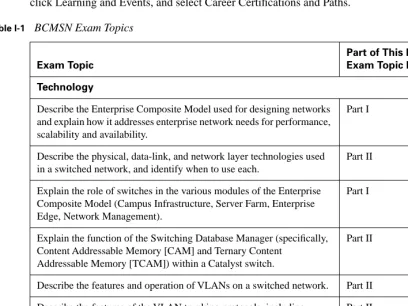
[image:32.612.94.502.249.555.2]Table I-1 shows the official exam topics for the BCMSN exam, as posted on Cisco.com. Note that Cisco has historically changed exam topics without changing the exam number, so do not be alarmed if small changes in the exam topics occur over time. When in doubt, go to www.cisco.com, click Learning and Events, and select Career Certifications and Paths.
Table I-1 BCMSN Exam Topics
Exam Topic
Part of This Book Where Exam Topic Is Covered
Technology
Describe the Enterprise Composite Model used for designing networks and explain how it addresses enterprise network needs for performance, scalability and availability.
Part I
Describe the physical, data-link, and network layer technologies used in a switched network, and identify when to use each.
Part II
Explain the role of switches in the various modules of the Enterprise Composite Model (Campus Infrastructure, Server Farm, Enterprise Edge, Network Management).
Part I
Explain the function of the Switching Database Manager (specifically, Content Addressable Memory [CAM] and Ternary Content
Addressable Memory [TCAM]) within a Catalyst switch.
Part II
Describe the features and operation of VLANs on a switched network. Part II Describe the features of the VLAN trunking protocols, including
802.1Q, ISL (emphasis on 802.1Q), and dynamic trunking protocol.
Part II
Describe the features and operation of 802.1Q Tunneling (802.1QinQ) within a service provider network.
Part II
Describe the operation and purpose of managed VLAN services. Part II
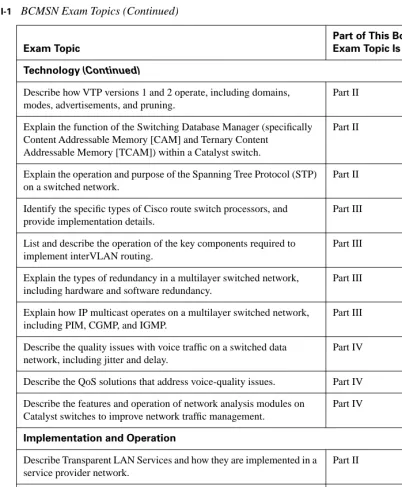
Technology (Continued)
Describe how VTP versions 1 and 2 operate, including domains, modes, advertisements, and pruning.
Part II
Explain the function of the Switching Database Manager (specifically Content Addressable Memory [CAM] and Ternary Content
Addressable Memory [TCAM]) within a Catalyst switch.
Part II
Explain the operation and purpose of the Spanning Tree Protocol (STP) on a switched network.
Part II
Identify the specific types of Cisco route switch processors, and provide implementation details.
Part III
List and describe the operation of the key components required to implement interVLAN routing.
Part III
Explain the types of redundancy in a multilayer switched network, including hardware and software redundancy.
Part III
Explain how IP multicast operates on a multilayer switched network, including PIM, CGMP, and IGMP.
Part III
Describe the quality issues with voice traffic on a switched data network, including jitter and delay.
Part IV
Describe the QoS solutions that address voice-quality issues. Part IV Describe the features and operation of network analysis modules on
Catalyst switches to improve network traffic management.
Part IV
Implementation and Operation
Describe Transparent LAN Services and how they are implemented in a service provider network.
Part II
Configure access ports for static and multi-VLAN membership. Part II
Configure and verify 802.1Q trunks. Part II
Configure and verify ISL trunks. Part II
[image:33.612.58.460.76.563.2]Configure VTP domains in server, client, and transparent modes. Part II
Table I-1 BCMSN Exam Topics (Continued)
Exam Topic
xxxiii
Implementation and Operation (Continued)
Enable Spanning Tree on ports and VLANs. Part II
Configure Spanning Tree parameters including: port priority, VLAN priority, Root Bridge, BPDU guard, PortFast, and UplinkFast.
Part II
Implement IP technology on a switched network with auxiliary VLANs.
Part IV
Configure and verify router redundancy using HSRP, VRRP, GLBP, SRM, and SLB.
Part III
Configure QoS features on multilayer switched networks to provide optimal quality and bandwidth utilization for applications and data.
Part IV
Configure Fast EtherChannel and Gigabit EtherChannel to increase bandwidth for interswitch connections.
Part II
Planning and Design
Compare end-to-end and local VLANs, and determine when to use each.
Part I
Design a VLAN configuration with VTP to work for a given specific scenario.
Part II
Select multilayer switching architectures, given specific multilayer switching needs.
Part II
Describe the general design models when implementing IP telephony in a switched network environment.
Part IV
[image:34.612.103.503.76.461.2]Plan QoS implementation within a multilayer switched network. Part IV
Table I-1 BCMSN Exam Topics (Continued)
Exam Topic
For More Information
If you have any comments about the book, you can submit those via the www.ciscopress.com web site. Just go to the web site, select Contact Us, and type in your message.
PART I: Overview and Design of
a Campus Network
Chapter 1 Campus Network Overview
This part of the book covers the following BCMSN exam topics:
■ Describe the Enterprise Composite Model used for designing networks and explain how it addresses enterprise network needs for performance, scalability, and availability.
■ Explain the role of switches in the various modules of the Enterprise Composite Model (Campus Infrastructure, Server Farm, Enterprise Edge, Network Management).
This chapter covers the
following topics that you
need to master for the CCNP
BCMSN exam:
■ Switching Functionality—This section
covers the use of switches in the OSI model layers. You learn about the functions and application of routing and switching in Layers 2, 3, and 4, along with the concept of multilayer switching.
■ Campus Network Models—This section
presents the concept of a campus network, and describes the traditional campus model and models based on traffic patterns. This section also describes the factors that affect a campus network’s design.
■ Hierarchical Network Design—This
section details a three-layer, hierarchical structure of campus network designs.
■ Cisco Products in the Hierarchical
C
H
A
P
T
E
R
1
Campus Network Overview
As campus networks have grown and technologies have matured, network engineers and architects have many more options to consider than the hubs, Ethernet switches, and routers traditionally put in place. You can use switches to improve network performance in many ways. However, simply replacing existing shared networks with switched networks is not enough. The switching function alone alleviates congestion and increases bandwidth (in addition to more complex capabilities) if properly placed and designed. Switches themselves have also improved over time. The type of switch, its capabilities, and its location within a network can greatly enhance network performance.
This chapter presents a logical design process that you can use to build a new campus network or to modify and improve an existing network.
“Do I Know This Already?” Quiz
The purpose of the “Do I Know This Already?” quiz is to help you decide if you need to read the entire chapter. If you already intend to read the entire chapter, you do not necessarily need to answer these questions now.
The 12-question quiz, derived from the major sections in the “Foundation Topics” portion of the chapter, helps you determine how to spend your limited study time.
Table 1-1 outlines the major topics discussed in this chapter and the “Do I Know This Already?” quiz questions that correspond to those topics.
Table 1-1 “Do I Know This Already?” Foundation Topics Section-to-Question Mapping
Foundation Topics Section Questions Covered in This Section
Switching Functionality 1-3
Campus Networks, Traffic Pattern Models 4-7
Hierarchical Design Model 8-10
1. Layer 2 switching uses which of the following values to forward data?
a. IP address
b. IPX address
c. MAC address
d. RIP address
e. UDP port
2. Multilayer switching (MLS) forwards packets based on what OSI layers:
a. Layer 1
b. Layer 2
c. Layer 3
d. Layer 4
e. b, c, d
f. a, b, c, d
3. Which of the following does a multilayer switch perform?
a. Forwarding according to MAC address
b. Forwarding according to IP address
c. Forwarding according to UDP/TCP port numbers
d. All of the above
4. What does the 20/80 rule of networking state? (Pick one.)
a. Only 20 out of 80 packets arrive at the destination.
b. Twenty percent of the network is used 80 percent of the time.
c. Twenty percent of the traffic on a network segment travels across the network, while 80 percent of it stays local.
d. Twenty percent of the traffic on a network segment stays local, while 80 percent of it travels across the network.
“Do I Know This Already?” Quiz 7
5. Where does a collision domain exist in a switched network?
a. On a single switch port
b. Across all switch ports
c. On a single VLAN
d. Across all VLANs
6. Where does a broadcast domain exist in a switched network?
a. On a single switch port
b. Across all switch ports
c. On a single VLAN
d. Across all VLANs
7. What is a VLAN primarily used for?
a. To segment a collision domain
b. To segment a broadcast domain
c. To segment an autonomous system
d. To segment a spanning-tree domain
8. In which OSI layer should devices in the distribution layer typically operate?
a. Layer 1
b. Layer 2
c. Layer 3
d. Layer 4
9. How many layers are recommended in the hierarchical campus network design model?
a. 1
b. 2
c. 3
d. 4
10. A hierarchical network’s distribution layer aggregates which of the following?
a. Core switches
b. Broadcast domains
c. Routing updates
d. Access layer switches
11. Which Cisco switch products should not be used in a campus network distribution layer?
a. Catalyst 2950
b. Catalyst 3550
c. Catalyst 4000/4500
d. Catalyst 6500
12. Which of these attributes might make a Catalyst 2950 a good choice for use in a wiring closet?
a. High density of low cost 10/100 ports
b. Advanced quality of service features
c. High density of 1000BASE-X ports
d. Large modular chassis
You can find the answers to the quiz in Appendix A, “Answers to Chapter ‘Do I Know This Already?’ Quizzes and Q&A Sections.” The suggested choices for your next step are as follows:
■ 6 or less overall score—Read the entire chapter. This includes the “Foundation Topics,” “Foundation Summary,” and “Q&A” sections.
■ 7–9 overall score—Begin with the “Foundation Summary” section and then follow up with the “Q&A” section at the end of the chapter.
Switching Functionality 9
Foundation Topics
Switching Functionality
To understand how switches and routers should be chosen and placed in a network design, you should first understand how to take advantage of data communication at different layers.
The OSI reference model separates data communication into seven layers, as shown in Table 1-2. Each layer has a specific function and a specific protocol so that two devices can exchange data on the same layer. A protocol data unit (PDU) is the generic name for a block of data that a layer on one device exchanges with the same layer on a peer device. A PDU is encapsulated in a layer’s protocol before it is made available to a lower-level layer, or unencapsulated before being handed to a higher-level layer.
In Table 1-2, Layers 2, 3, and 4 are represented by the data link, network, and transport layers, respectively, with PDUs’ frame, packet, and TCP segment. When a TCP segment (Layer 4) needs to be transmitted to another station, the TCP segment is encapsulated as a packet (Layer 3), and further encapsulated as a frame (Layer 2). The receiving station unencapsulates Layers 2 and 3 before processing the original TCP segment.
[image:44.612.94.503.299.453.2]The layered protocols also apply to networking devices. For example, a Layer 2 device transfers data by looking at Layer 2’s PDU header information. Upper-layer protocols are not looked at or even understood. Layer-specific devices are discussed in detail in the sections that follow.
Table 1-2 Layers of Data Communications
OSI Layer Protocol Data Unit Mechanism to Process PDU
7 (application) 6 (presentation) 5 (session)
4 (transport) TCP segment TCP port
3 (network) Packet Router
2 (data link) Frame Switch/bridge
Layer 2 Switching
Devices that forward frames at Layer 2 involve the following functions:
■ MAC addresses are learned from the incoming frames’ source addresses.
■ A table of MAC addresses and their associated bridge and switch ports is built and maintained.
■ Broadcast and multicast frames are flooded out to all ports (except the one that received the frame).
■ Frames destined to unknown locations are flooded out to all ports (except the one that received the frame).
■ Bridges and switches communicate with each other using the Spanning Tree Protocol to eliminate bridging loops.
A Layer 2 switch performs essentially the same function as a transparent bridge. However, a switch can have many ports and can perform hardware-based bridging. Frames are forwarded using special-ized hardware, called application-specific integrated circuits (ASICs). This hardware gives switching great scalability, with wire-speed performance, low latency, low cost, and high-port density.
As long as Layer 2 frames are being switched between two Layer 1 interfaces of the same media type, such as two Ethernet connections or an Ethernet connection and a Fast Ethernet connection, the frames do not have to be modified. However, if the two interfaces are different media, such as Ethernet and Token Ring or Ethernet and Fiber Distributed Data Interface (FDDI), the Layer 2 switch must translate the frame contents before sending out the Layer 1 interface.
Layer 2 switching is used primarily for workgroup connectivity and network segmentation. You can contain traffic between users and servers in a workgroup within the switch. In addition, the number of stations on a network segment can be reduced with a switch, minimizing the collision domain size.
One drawback to Layer 2 switching is that it cannot be scaled effectively. Switches must forward broadcast frames to all ports, causing large switched networks to become large broadcast domains. In addition, Spanning Tree Protocol (STP) can have a slow convergence time when the switch topology changes. STP can also block certain switch ports, preventing data transfer. (Chapters 9 through 12 discuss STP and its variations in further detail.) Layer 2 switching alone cannot provide an effective, scalable network design.
Layer 3 Routing
Devices involved in Layer 3 routing perform the following functions:
■ Packets are forwarded between networks based on Layer 3 addresses.
Switching Functionality 11
■ Packet forwarding involves a table lookup of the destination network, next-hop router address, and the router’s own outbound interface.
■ An optimal path can be chosen from among many possibilities.
■ Routers communicate with each other using routing protocols.
By nature, routers do not forward broadcast packets and only forward multicast packets to segments with multicast clients. This action provides control over broadcast propagation and offers network segmentation into areas of common Layer 3 addressing.
Logical addressing is possible on a network with routers because the Layer 3 (network layer) address uniquely identifies a device only at the network layer of the OSI reference model. Actual frame forwarding occurs using the Layer 2, or data link, address of devices. Therefore, some method must exist to associate a device’s data link layer (MAC) address with its network layer (IP) address. A router must also have addresses from both layers assigned to each of its interfaces connected to a network. This assignment gives the router the functionality to support the logical network layer addresses assigned to the physical networks.
In addition, a router must examine each packet’s Layer 3 header before making a routing decision. Layer 3 security and control can be implemented on any router interface using the source and destination addresses, protocol, or other Layer 3 attribute to make decisions on whether to limit or forward the packets.
Layer 3 routing is generally performed by microprocessor-based engines, which require CPU cycles to examine each packet’s network layer header. The routing table of optimal paths to Layer 3 networks can also be a large table of dynamic values, requiring a finite lookup delay. Although you can place a router anywhere in a network, the router can become a bottleneck due to a latency of packet examination and processing.
Layer 3 Switching
Devices involved in Layer 3 switching perform the following functions:
■ Packets are forwarded at Layer 3, just as a router would do.
■ Packets are switched using specialized hardware, application-specific integrated circuits (ASICs) for high-speed and low latency.
■ Packets can be forwarded with security control and quality of service (QoS) using Layer 3 address information.
Layer 4 Switching
Devices involved in Layer 4 switching perform the following functions:
■ Packets are forwarded using hardware switching, based on both Layer 3 addressing and Layer 4 application information. (Layer 2 addressing is also inherently used.)
■ Layer 4 protocol types (UDP or TCP, for example) in packet headers are examined.
■ Layer 4 segment headers are examined to determine application port numbers.
Switching at Layer 4 allows finer control over the movement of information. For example, traffic can be prioritized according to the source and destination port numbers, and QoS can be defined for end users. Therefore, video or voice data can be switched at a higher level of service with more bandwidth availability than file transfer or HTTP traffic. Layer 4 port numbers for source and destination can also perform traffic accounting.
A Layer 4 switch must also allocate a large amount of memory to its forwarding tables. Layer 2 and Layer 3 devices have forwarding tables based on MAC and network addresses, making those tables only as large as the number of network devices. Layer 4 devices, however, must keep track of application protocols and conversations occurring in the network. Their forwarding tables become proportional to the number of network devices multiplied by the number of applications.
Multilayer Switching (MLS)
Devices involved in MLS perform the following functions:
■ Packets are forwarded in hardware that combines Layer 2, Layer 3, and Layer 4 switching.
■ Packets are forwarded at wire speed.
■ The traditional Layer 3 routing function is provided using Cisco Express Forwarding (CEF), where a database of routes to every destination network is maintained and distributed to switching ASICs for very high forwarding performance.
Cisco switches perform multilayer switching at Layer 3 and Layer 4. At Layer 3, the Catalyst family of switches caches traffic flows based on IP addresses. At Layer 4, traffic flows are cached based on source and destination addresses, in addition to source and destination ports. All switching is performed in hardware, providing equal performance at both Layer 3 and Layer 4 switching.
Campus Network Models
Campus Network Models 13
wireless LANs, higher-speed Fast Ethernet, Fast EtherChannel, and Gigabit Ethernet LANs. Some campus networks also consist of legacy Token Ring and FDDI.
An understanding of traffic flow is a vital part of the campus network design. While you can leverage high-speed LAN technologies to improve any traffic movement, the emphasis should be on provid-ing an overall design tuned to known, studied, or predicted traffic flows. The network traffic can then be effectively moved and managed, and you can scale the campus network to support future needs.
The next sections present various network models that you can use to classify and to design campus networks. Beginning with traditional shared networks, the models build on each other to leverage traffic movement and provide predictable behavior.
Shared Network Model
In the early 1990s, campus networks were traditionally constructed of a single LAN for all users to connect to and use. All devices on the LAN were forced to share the available bandwidth. LAN media such as Ethernet and Token Ring both had distance limitations, as well as limitations on the number of devices that could be connected to a single LAN.
Network availability and performance declined as the number of connected devices increased. For example, an Ethernet LAN required all devices to share the available 10-Mbps half-duplex band-width. Ethernet also used the carrier sense multiple access collision detect (CSMA/CD) scheme to determine when a device could transmit data on the shared LAN. If two or more devices tried to transmit at the same time, network collisions occurred, and all devices had to become silent and wait to retransmit their data. This type of LAN is a collision domain because all devices are susceptible to collisions. Token Ring LANs are not susceptible to collisions because they are deterministic and allow stations to transmit only when they receive a “token” that passes around the ring.
One solution used to relieve network congestion was to segment, or divide, a LAN into discrete collision domains. This solution used transparent bridges, which only forwarded Layer 2 data frames to the network segment where the destination address was located. Bridges enabled the number of devices on a segment to be reduced, lessened the probability of collisions on segments, and increased the physical distance limitations by acting as a repeater.