Theses Thesis/Dissertation Collections
2003
Web-based distributed EJB BugsTracker: an
integration of struts framework at web server, EJBs
at application server, and a relational database
San Htun Aung
Follow this and additional works at:http://scholarworks.rit.edu/theses
This Master's Project is brought to you for free and open access by the Thesis/Dissertation Collections at RIT Scholar Works. It has been accepted for inclusion in Theses by an authorized administrator of RIT Scholar Works. For more information, please [email protected].
Recommended Citation
ROCHESTER INSTITUTE OF TECHNOLOGY
Department of Computer Science
Master of Science Project Report
Web-based Distributed EJB BugsTracker
An integration of Struts Framework at Web Server, EJBs at Application Server, and a Relational Database
San Htun Aung
September 26, 2003
Committee Members
TABLE OF CONTENTS:
FIGURES:··· 4
TABLES:··· 4
ABSTRACT: ··· 5
PROJECT BACKGROUND:··· 6
OVERVIEW OF THE EJB ARCHITECTURE:··· 7
AN INTRODUCTION···7
DESCRIPTION OF J2EE/EJB ARCHITECTURE···7
TYPE OF EJBBEANS···7
Entity Beans ··· 7
Session Beans··· 8
IMPLEMENTATION OF EJBS···8
Home interface··· 8
Remote interface ··· 8
EJB bean class ··· 8
OVERVIEW OF STRUTS FRAMEWORK:··· 9
AN INTRODUCTION···9
The Controller··· 9
Business Logic Layer ··· 9
The Model ··· 10
The View ··· 10
Struts Before and After··· 10
FUNCTIONAL SPECIFICATION:··· 11
1.GENERAL DESCRIPTION···11
1.1 Overview ··· 11
1.2 Scope of the project··· 11
1.3 Operating environments··· 11
1.4 User personas and characteristics··· 11
1.5 Definitions of acronyms, and abbreviations ··· 11
2.SPECIFIC FUNCTIONAL DESCRIPTION···12
2.1 Audit trail for the defects ··· 12
2.2 Defect Accountability··· 12
2.3 User Permissions (restricting operation on projects and defects)··· 12
2.4 User friendly interface -- GUI separated from Business Logic or Components ··· 12
2.5 Secure login ··· 12
APPLICATION DESIGN AND IMPLEMENTATION:··· 13
1.INTRODUCTION···13
2.SYSTEM ARCHITECTURE···13
2.1 Overall architecture of this project··· 13
2.2 Basic interaction between Web Container and EJBs Container··· 14
2.3 Deliverable java packages and components of this project ··· 14
3.IMPLEMENTATION OF WEB COMPONENTS···15
3.1 Definition of each JSP screen requirements ··· 15
3.2 All Access Paths for Each JSP Screen ··· 17
Overall Site Map··· 17
3.3 Struts ActionForms classes ··· 18
3.4 Struts Action classes ··· 19
4.1 Entity Bean package ··· 21
4.2 Session Bean package ··· 22
5.IMPLEMENTATION OF VALUE OBJECTS···23
5.1 ValueObjects implementations··· 24
5.2 GeneralSeralizableObject implementation ··· 25
5.3 UserUtilities implementation ··· 26
6.DETAIL DESCRIPTION OF EJB’S RELATINOSHIP···27
6.1 Overall of the entities relationship diagram ··· 27
6.2 Entity relationship diagram between User and Bug ··· 28
6.3 Entity relationship diagram between Bug, Project and HistoryBugs ··· 29
PRODUCT CONCLUSION:··· 31
1.COMMERCIAL PRODUCTS REFERENCES···31
2.REVIEW CRITERIA···31
SYSTEM TESTING:··· 34
APPENDICES:··· 38
LOGIN SEQUENCE DIAGRAM···38
DATABASE TABLES···39
FIGURES:
Figure 1: Whole picture of Commercial Containers for J2EE/EJB Architecture ··· 7
Figure 2: Struts framework components ··· 9
Figure 3: Struts Framework "Before" and "After" ··· 10
Figure 4 : Project Architecture ··· 13
Figure 5: Communication between the Web container and the EJB container/server··· 14
Figure 6: Deliverable Java packages and components for this application ··· 15
Figure 7: Overall site map that express all access paths of each JSP pages ··· 17
Figure 8: UML diagram for package name: rit_cs_edu.web.forms··· 18
Figure 9: UML diagram for package name: rit_cs_edu.web.action··· 19
Figure 10: UML diagram for package name: rit_cs_edu.jboss.ejb.entity··· 21
Figure 11: UML diagram for package name: rit_cs_edu.jboss.ejb.session··· 22
Figure 12: JVOs are being used for passing data to/from the EJB and Web Containers ··· 23
Figure 13: UML diagram for package name: rit_cs_edu.ValueObjects··· 24
Figure 14: UML diagram for class name: GeneralSeralizableObject.java··· 25
Figure 15: UML diagram for class name: UserUtilities.java··· 26
Figure 16: Overall CMP relationships at an EJB designer tool from JBuilder 8 ··· 27
Figure 17: Entity relationship diagram between User and Bug··· 28
Figure 18: Definition of CMP relationship from ejb-jar.xml··· 28
Figure 19: Cascade deletes between Project, Bug, and HistoryBugs entity beans ··· 29
Figure 20: Definition of EJB's finder method at ejb-jar.xml··· 30
Figure 21: Login sequence diagram··· 38
Figure 22: Entity relationship diagram for EJB BugsTracker··· 39
TABLES:
Table 1: Data fields required for each screen of the JPS pages··· 16Table 2: Integrated deployment test cases··· 34
Table 3: User administration test cases ··· 35
Table 4: Project administration test cases ··· 36
Table 5: Project List test cases··· 37
Table 6: Home Page test cases··· 37
ABSTRACT:
This “Web-based Distributed EJB BugsTracker” is an integration effort of the 4-tier Enterprise Java Bean -- EJB component architecture where it uses a web browser, a web server, an application sever, and a relational database server.
The application is designed and built for software managers, engineers and quality assurance staffs that keep track of the software defects which are produced during the software development life cycle. It allows independent user login in multi-project environments.
Working from the web browser, the administrator not only has the permission to create, edit and delete the user profiles but also has the facilities to restrict the user’s (the software managers, engineers, and quality assurance staffs) actions on a specific project and its related defects management process such as: reporting of new defects, editing and closing of existing defects on a permitted project. In addition, any changes in the defect’s ownership, status, and severity are automatically recorded into the audit trail with the detail time stamp for future reference.
The Web Server layer of this project is implemented in “Jakarta Struts Framework,” a Model-View-Controller (MVC), which is a new implementation approach in organizing modular applications that cleanly separate business logic, style, and data.
The Application’s Server layer of this project uses a new Container-Managed Persistence model (CMP 2.0) that uses a persistent layer of entity beans and the business logic layer of stateless session beans which results in a high degree of portability across any application and database server: whether it is an object or a relational database. The Value Object pattern of J2EE is being used to allow information to be passed between the web and the application server.
PROJECT BACKGROUND:
The spirit that motivated me initiating this integration project – Web-based Distributed EJB BugsTracker -- is making use of J2EE/EJB component technologies and gaining hands-on experience in building and integrating a web-based distributed business application that claim for reliability, portability, and scalability.
To gain an in-depth understanding of building distributed business components, one should revisit the goal of distributed systems: that is to manage the complexity and provide highly available, scalable and maintainable systems. A distributed system can achieve these objectives by utilizing many simple and self-contained systems that work together to perform the distributed function as a single system.
Many of the advantages of distributed systems come from the standardization of the hardware and software components that they are built on. The underlying complexity may not go away, but by having standards in different areas many different problems can be handled separately. For example, network standards have made communication between machines in a distributed system much easier, not because networking has gotten any easier but because developers no longer have to deal with all the complexity. [7]
Software standards and specifications that deal with the complexities of the business application development are also very important because they can provide developers with the same benefits at a higher level. They make it possible to focus on the business specific application components by removing many of the complexities associated with the underlying application’s infrastructure. [7]
To solve most of the distributed business applications problems, Sun Microsystems developed the Java 2 Platform Enterprise Edition -- J2EE -- a robust suite of middleware services standard. J2EE is a specification, not a product; in fact, it specifies the rules of engagement that J2EE/EJB vendors must agree on when writing their J2EE-compliant products.
OVERVIEW OF THE EJB ARCHITECTURE:
A
N INTRODUCTIONEJB component technology is a subset of J2EE technology and is defined by the J2EE specification that defines the requirements for EJB containers which provide the system services and API support that are required to run EJBs. That is, EJBs without an EJB container is like an engine without a car to put it in — it’s not going anywhere. Typical standard J2EE application server and its services are depicted in Figure 1. Among the APIs that application server must be supported are JNDI, Java Mail, JDBC, and other enterprise services. An EJB developed for one container should be easy to move to another container.
[image:8.612.90.439.230.449.2]D
ESCRIPTION OFJ2EE/EJB
ARCHITECTUREFigure 1: Whole picture of Commercial Containers for J2EE/EJB Architecture
T
YPE OFEJB
B
EANSAccording to EJB 2.0 specification, there are four main types of EJBs; however, this project uses two major types of distributed EJB components which are entity beans and session beans.
Entity Beans
Session Beans
In contrast to entity bean, session beans are primarily used to encapsulate business logic, carry out tasks on behalf of a client, and act as a controllers or managers for other beans. They have the advantage of being relatively lightweight objects in EJB container and are being used when multiple entity beans or other database accesses can be hidden behind the facade of a single session bean.
I
MPLEMENTATION OFEJB
SCreating and using an EJB requires coding a number of classes as well as making a few important deployment decisions. The required classes are:
Home interface
This interface defines the methods in the EJB bean class that are used to find, create, and delete EJB instances. All EJB access done in Struts is initiated by first acquiring the home interface for the EJB it needs. This is done via a JNDI lookup depicted in
Figure 5. An EJB home interface must extend javax.ejb.EJBHome.
Remote interface
Any business logic methods implemented in the EJB bean class must be defined in the remote interface for the container to allow access to them. Examples of methods
defined in the remote interface might be createUser(), updateUser(),
getUser() and getAllUser(). These are the methods web container invokes on the EJBs after it locates or creates them using the home interface. A remote interface
must extend javax.ejb.EJBObject.
EJB bean class
The EJB bean class is the actual class that implements all the methods defined in both the home interface and the remote interface. After the Struts code locates or creates an EJB instance using the EJBs home interface, it invokes the methods exposed by the remote interface. Those methods are actually implemented in the
EJB bean class. The bean class must extend javax.ejb.SessionBean,
javax.ejb.EntityBean.
OVERVIEW OF STRUTS FRAMEWORK:
A
N INTRODUCTIONStruts is an open source framework known as the Model 2, or Model-View Controller (MVC), approach to software design. This framework evolved from the Model 1 design -- JavaServer Page technology. Struts technology offers great advances from pure Java Servlets
and JSP. The presentation of the Java Servlet is coded with lengthy out.println
statements in doGet() and doPut() methods; whereas, JSPs offers a way to include
HTML in Java code. As a result the Java Servlets and JSPs are hard to read and hard to maintain.
The Struts framework, first developed in 2001, combines the best of Java Servlets and JSPs. The framework consists of a 3-tiered design paradigm: the Controller, the Model, and the View. Struts framework provides its own Controller component and integrates with other technologies to provide the Model and the View.
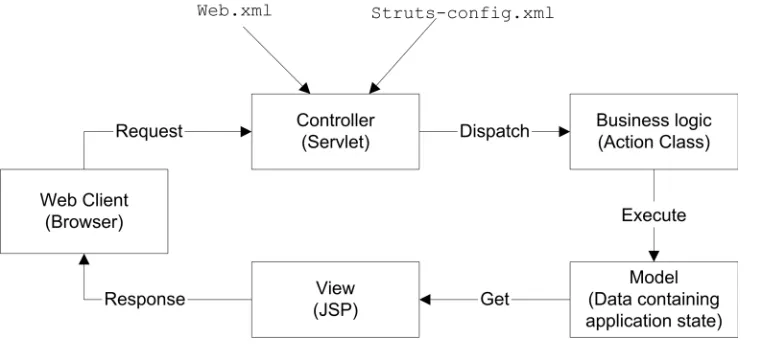
[image:10.612.90.469.340.512.2]Before looking at each component in detail, it is good idea to tie all the pieces together by looking at the Figure 2.
Figure 2: Struts framework components
The Controller
The controller layer controls the application flow. It receives requests from a browser and determines how to process those requests. With Struts, the controller is implemented as a Servlet of the class org.apache.struts.action.ActionServlet.
The struts-config.xml file configures the Controller via <action-mapping> elements.
Business Logic Layer
stored. The Action separates the business logic from the presentation and decides who is next in line for display.
The Model
The Model represents the state of the application. The business objects such as EJBs and JavaBeans update the application state. An ActionForm bean depicted in
Figure 8 represents the model state at a session-request level. The ActionForm class contains getter and setters for properties and a validation method. The JSP file (or the view) reads information from the ActionForm using JSP tags. An ActionForm must exist for each input form.
The View
The View consists of JSPs and a set of JSP custom tags that work in concert with the controller Servlet. There is no flow logic, business logic or Model information in the JSP; it is simply presentation.
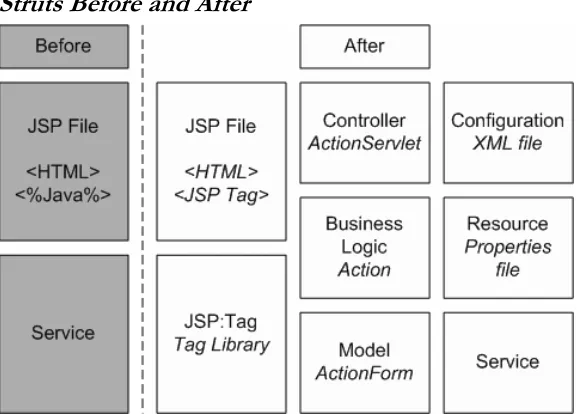
Overall, using the Struts framework significantly impacts the design of a web application. The diagram depicted in Figure 3 shows the composition of a web application before using Struts and after.
[image:11.612.91.381.351.558.2]Struts Before and After
FUNCTIONAL SPECIFICATION:
1.
G
ENERAL DESCRIPTION1.1 Overview
The application is designed and built for software managers, engineers and quality assurance staffs that keep track of the software defects which are produced during the software development life cycle. It allows independent user login in multi project environments.
Working from the web browser, the administrator not only has the permission to create, edit and delete the user profiles but also has the facilities to restrict the user’s (the software managers, engineers, and quality assurance people) actions on a specific project and its related defects management process such as: reporting of new defects, editing and closing of existing defects on a permitted project. In addition, any changes in the defect’s ownership, status, and severity are automatically recorded into the audit trail with the detail time stamp for future reference.
1.2 Scope of the project
This is an integration effort of the 4-tier EJB component architecture where it uses a web browser, a web server, an application sever, and a relational database server. The end result of this project is to develop a fully functional defect-tracker that keeps track of software defects for multi-project environments with independent user login.
1.3 Operating environments
Since this project is using Java’s component technology, it can be run on any operating system with any type of relational database as a storage server. However, this development has been tested on both Sun Solaris and Windows 2000.
1.4 User personas and characteristics
This project is intended to accommodate the following five categories of roles for users: 1. A system administrator or a super user with unrestricted permission.
2. The manager that manages and defines the projects’ versions and its
sub-components.
3. The developer that verifies and fixes the defects. 4. The tester that reports, verifies, and closes the defects.
5. The client – not being part of the development team – will be able to report the new defects from his or her remote locations and offices.
1.5 Definitions of acronyms, and abbreviations
Defects – Defects are detected by a failure of a software system and can be traced back to the fault in the code. “Defect” and “bug” are used interchangeably in this project
Defect’s ownership -- Defect being assigned to an individual username GUI – Graphical User Interface
Severity – Used to rate degree of importance of the defects CMP – Container Management Persistence
2.
S
PECIFIC FUNCTIONAL DESCRIPTION2.1 Audit trail for the defects
Purpose There must be an audit trail of changes in the defect’s status, severity, and the ownership being assigned with the precise time stamp.
Inputs The inputs are for the users who edit and modify the individual defect. The
old and the new values are recorded at the audit trial. Processing Changes are appended to the HistoryBugs entity bean. Outputs An audit trail is generated with an accurate time stamp.
2.2 Defect Accountability
Purpose Introduces a state that the defect must be in between the OPEN and the
CLOSE states. This state will create accountability and ensure that fixes are reviewed before being closed.
Inputs A defect that just has been opened.
Processing An intermediate state that will allow the code changes to be verified before being closed.
Outputs The new defect state is called VERIFY.
2.3 User Permissions (restricting operation on projects and defects)
Purpose Introduces the permissions facilities so that the administrator can restrict the right of the user operating on a specific project and its related defects.
Inputs Only the administrator is allowed to set the following six permissions.
Processing Business logics are implemented at both the Struts Action and Session Bean.
Outputs Authorized JSP view is constructed accordingly to the permissions table.
When any one of the six permissions is granted, that user will automatically become the group member of that project. Any user not being part of the project member will not be able to access, view, and operate on that project.
2.4 User friendly interface -- GUI separated from Business Logic or Components
Purpose User friendly interface that separates the Views (GUI) from the business
logic. This will allow the views to be modified without any change to the business logic code.
Inputs The JSP forms and the views.
Processing The Struts ActionForm and its Action classes.
2.5 Secure login
Purpose Authorization is required to access all level of the JSP pages.
Inputs Required valid usernames and passwords.
Processing Right after successfully login, the valid user session bean is created and the validation is being done against that user session bean.
Outputs Forward to the appropriate JSP view.
4. Edit Project 5. Delete Project 6. Report new defects
1. Edit defects
APPLICATION DESIGN AND IMPLEMENTATION:
1.
I
NTRODUCTIONAfter reading this section, one should have a good understanding of how this product is designed and implemented in both high and low level design view of the project.
2.
S
YSTEM ARCHITECTURE2.1 Overall architecture of this project
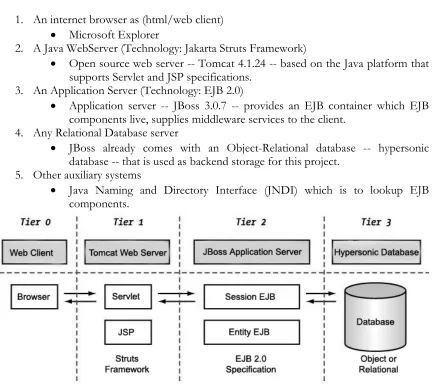
This project is implemented according to the following EJB Architecture.
1. An internet browser as (html/web client)
• Microsoft Explorer
2. A Java WebServer (Technology: Jakarta Struts Framework)
• Open source web server -- Tomcat 4.1.24 -- based on the Java platform that supports Servlet and JSP specifications.
3. An Application Server (Technology: EJB 2.0)
• Application server -- JBoss 3.0.7 -- provides an EJB container which EJB components live, supplies middleware services to the client.
4. Any Relational Database server
• JBoss already comes with an Object-Relational database -- hypersonic
database -- that is used as backend storage for this project. 5. Other auxiliary systems
• Java Naming and Directory Interface (JNDI) which is to lookup EJB
[image:14.612.93.529.222.610.2]components.
Figure 4 : Project Architecture
Depicted in Figure 4, the project architecture includes a Web server, an Application Server, and a data source. Technologies used are displayed below the dashed line; normal application designations are displayed above it. It is clear that two major new component technologies are being used in this project.
1. Jakarta Struts Framework as a front end web component technology.
2.2 Basic interaction between Web Container and EJBs Container
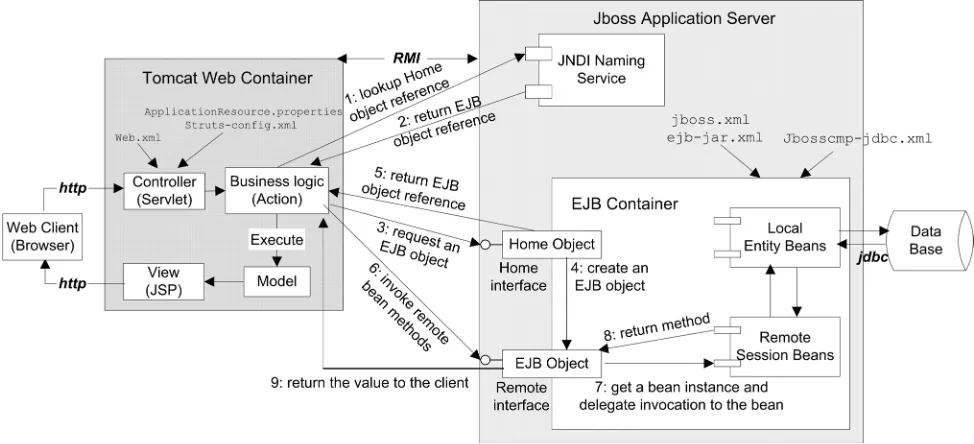
Figure 5 shows the basic interaction between web container (as client) and EJB container (as server.) In depth study of Web and EJB container relationship are not parts of this project; however, understanding the basic interaction of the containers helps us realize that EJB container plays a very critical role in enterprise application servers.
Figure 5: Communication between the Web container and the EJB container/server
1. At the application deployment time, the Home Object is bound to the JNDI tree of JBoss naming service given a JNDI name.
2. The web container of the Action class implements majority of the business logics -- first interact with the JNDI naming service to get the EJB home object reference. 3. Using that EJB home object reference, the Action class from web container requests
an EJB object.
4. EJB Home Object creates (or finds) an EJB object and 5. Return the reference to the web container’s Action class.
6. The web container gets the EJBObject reference and invokes method in the remote interface.
7. The JBoss-container intercepts the method invocation and delegates it to the bean instance.
8. Remote session bean finally returns the value to client (web container) by remote interface.
9. The container invoked returns the result to the web container.
2.3 Deliverable java packages and components of this project
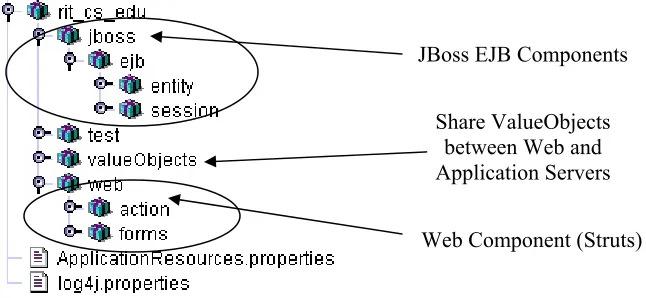
For this project, all common java packages namespace start with “rit_cs_edu.” For the web component, they are separated into three different directories:
1. JSP pages
2. Actions
Actions related classes are named after rit_cs_edu.web.action package. ActionForms related classes are named after rit_cs_edu.web.forms package.
JBoss application server component has two types of EJB Beans – Entity and Session Beans.
All Entity Beans are defined in rit_cs_edu.jboss.ejb.entity.* packag whereas all
[image:16.612.96.419.153.302.2]Session Beans are defined in rit_cs_edu.jboss.ejb.session.*.
Figure 6: Deliverable Java packages and components for this application
3.
I
MPLEMENTATION OFW
EBC
OMPONENTSDetailed description of web components can be divided into three categories 1. JSP pages (Section 3.1 and 3.2)
2. Implementation of Struts ActionForms (Section 3.3) 3. Implementation of Struts Actions (Section 3.4)
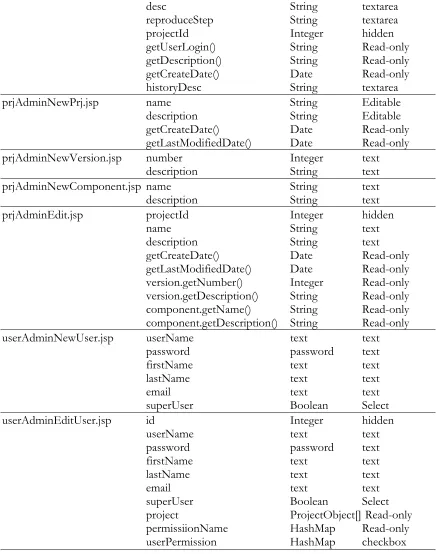
3.1 Definition of each JSP screen requirements
Screen Date fields Java Type Input Type
Logon.jsp userName String text
password String text
bugTrackNewBug.jsp summary String text
statusId Integer Select
severity String Select
ownerId Integer Select
creatorUserId Integer hidden
componentId Integer Select
versionId Integer Select
desc String textarea
reproduceStep String textarea
projectId Integer hidden
bugTrackEditBug.jsp Id Integer hidden
summary String text
statusId Integer Select
severity String Select
ownerId Integer Select
creatorUserId Integer hidden
componentId Integer Select
JBoss EJB Components
Web Component (Struts) Share ValueObjects
versionId Integer Select
desc String textarea
reproduceStep String textarea
projectId Integer hidden
getUserLogin() String Read-only
getDescription() String Read-only
getCreateDate() Date Read-only
historyDesc String textarea
prjAdminNewPrj.jsp name String Editable
description String Editable
getCreateDate() Date Read-only
getLastModifiedDate() Date Read-only
prjAdminNewVersion.jsp number Integer text
description String text
prjAdminNewComponent.jsp name String text
description String text
prjAdminEdit.jsp projectId Integer hidden
name String text
description String text
getCreateDate() Date Read-only
getLastModifiedDate() Date Read-only
version.getNumber() Integer Read-only
version.getDescription() String Read-only
component.getName() String Read-only
component.getDescription() String Read-only
userAdminNewUser.jsp userName text text
password password text
firstName text text
lastName text text
email text text
superUser Boolean Select
userAdminEditUser.jsp id Integer hidden
userName text text
password password text
firstName text text
lastName text text
email text text
superUser Boolean Select
project ProjectObject[] Read-only
permissiionName HashMap Read-only
[image:17.612.88.527.86.640.2]userPermission HashMap checkbox
3.2 All Access Paths for Each JSP Screen
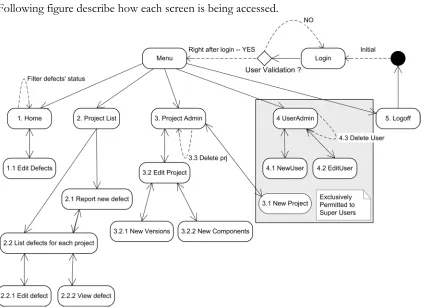
[image:18.612.93.515.93.401.2]Following figure describe how each screen is being accessed.
Figure 7: Overall site map that express all access paths of each JSP pages
Overall Site Map
Right after login, a user has five categories of JSP pages to select from the top menu bar. 1. Home Page (Filtering user’s relevant defects according to it’s status)
1.1. Editing or viewing defects with audit trail. 2. Project List
2.1. Reporting new defects for a specific project. 2.2. Listing defects individually by project.
2.2.1. Editing existing defects with its audit trail. 2.2.2. Viewing existing defects with its audit trail. 3. Project Administration
3.1. Creating new projects. 3.2. Editing existing projects.
3.2.1. Creating new version for a specific project. 3.2.2. Creating new component for a specific project. 3.3. Deleting existing project -- Cascade Deletion. 4. User administration
4.1. Creating new users.
4.2. Editing existing users’ info.
4.3. Deleting existing users – does not delete/effect previously recorded projects and defects.
3.3 Struts ActionForms classes
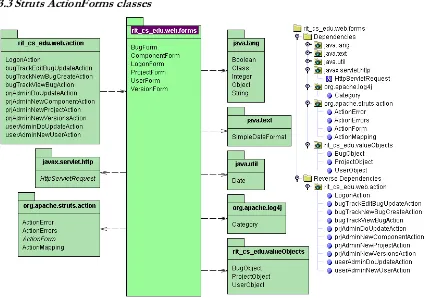
Figure 8: UML diagram for package name: rit_cs_edu.web.forms
Identification <<rit_cs_edu.web.forms.*>> Implementation of Struts Action Forms.
Type This package is a collection of six classes that includes: BugForm.java,
ComponentForm.java, LogonForm.java, ProjectForm.java, UserForm.java and VersionForm.java
Function ActionForm Beans are considered part of the view in the MVC model. The
ActionForm are used by the JSP pages to transfer the state between the views and the model components. This transfer of information is accomplished by the ActionServlet of the Strusts Framework.
Implementation According to Struts Framework, all classes extend
org.apache.struts.action.ActionForm XML
Definition
ActionForm bean are defined in struts-config.xml file as follow. <form-beans>
<form-bean name="UserForm"
type="rit_cs_edu.web.forms.UserForm"/> <form-bean name="ProjectForm"
type="rit_cs_edu.web.forms.ProjectForm" /> <form-bean name="BugForm"
type="rit_cs_edu.web.forms.BugForm" /> <form-bean name="LogonForm"
type="rit_cs_edu.web.forms.LogonForm" /> …
</form-beans>
3.4 Struts Action classes
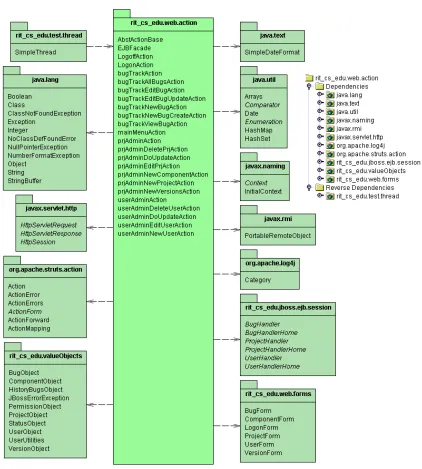
Figure 9: UML diagram for package name: rit_cs_edu.web.action
Identification <<rit_cs_edu.web.action.*>> Implementation of Struts Actions.
Type This package is a collection of twenty-two following classes:
AbstActionBase.java, EJBFacade.java, LogoffAction.java, LogonAction.java, bugTrackAction.java,
bugTrackAllBugsAction.java, prjAdminEditPrjAction.java, bugTrackEditBugUpdateAction.java, bugTrackNewBugAction.java, bugTrackNewBugCreateAction.java, bugTrackViewBugAction.java, mainMenuAction.java, prjAdminAction.java,
userAdminDoUpdateAction.java, userAdminEditUserAction.java, userAdminNewUserAction.jav, prjAdminNewVersionsAction.java, prjAdminNewComponentAction.java
Function An Action is defined as a logical request that takes place in the web
application. Action examples named after LogonAction and LogoffAction are part of the package that performed logon and logoff actions. In this project, Action classes are working in conjunction with EJB Session Beans. Remote EJB Session Beans that contain business logic of the application so that the project maintains a clean separation of tiers.
Not being part of the Action framework, EJBFacade.java is specially implemented in order to help all Action classes getting the instances of Java Naming and Directory Interface (JNID) context and retrieving the Home Interface of the EJB beans.
Implementation In Struts Framework, for each logical request there is an Action class. This start by extending org.apache.struts.Action class. AbstActionBase.java is defined as a parent class for all of the action classes. To enforce the contract between the base class and the subclasses, the parent class -- AbstActionBase.java -- has declared as abstract. Each of the sub-action classes that extends the base class will need to implement its own version of the execute() method. The execute() method is called by the controller Servlet when the Action is to be executed.
Typical execute() method signature is:
public ActionForward execute(ActionMapping mapping, ActionForm form, HttpServletRequest request, HttpServletResponse response) throws Exception;
The return type of the ActionForward object tells the controller where it should be forwarded. Usually, this will be another JSP. The first parameter --ActionMapping -- is an object representation of what is defined for the action in the struts-config.xml file. Second parameter object -- ActionForm -- contains the declaration of the fields of a JSP form. The last two parameters -- HttpServletRequest and HttpServletResponse -- are needed for saving and retrieving the Session Bean’s content moving from one view to the other. XML
Definition struts-config.xml
The definition of LogonActon.java being mapped at struts-config.xml <action-mappings> <action name="LogonForm" type="rit_cs_edu.web.action.LogonAction" validate="true" input="/logon.jsp" scope="request" path="/logon">
<forward name="success" path="/welcome.jsp" /> </action>
</action-mappings>
4.
I
MPLEMENTATION OFEJB
C
OMPONENTSEJB Components for this project are divided into Entity and Session Beans packages: 1. Implementation of Entity Bean Package (Section 4.1)
2. Implementation of Session Bean Package (Section 4.2)
[image:22.612.94.490.144.438.2]4.1 Entity Bean package
Figure 10: UML diagram for package name: rit_cs_edu.jboss.ejb.entity
Identification <<rit_cs_edu.jboss.ejb.entity.*>> Implementation of Entity Beans.
Type This package is a collection of *nine* Local Entity Beans classes:
1. Version.java, VersionBean.java, VersionHome.java
2. HistoryBugs.java,HistoryBugsBean.java, HistoryBugsHome.java 3. IDs.java, IDsBean.java, IDsHome.java
4. Permission.java, PermissionBean.java, PermissionHome.java 5. ComponentHome.java, ComponentBean.java, Component.java 6. User.java, UserBean.java,UserHome.java
7. BugBean.java, Bug.java, BugHome.java
8. StatusHome.java, Status.java, StatusBean.java 9. ProjectBean.java, Project.java, ProjectHome.java
Function Entity beans represent business object in a persistent storage mechanism. In the J2EE SDK, the persistent storage mechanism is a relational database. Typically, each entity bean has an underlying table in a relational database, and each instance of the bean corresponds to a row in that table. Entity’s bean state is automatically managed by a persistence service; the container is responsible for synchronizing the entity bean’s instance fields with the data in the database. This automatic persistence is called container-managed persistence.
Implementation Depicted in Figure 10 and Appendix. Can also be found in EJB 2.0
4.2 Session Bean package
Identification <<rit_cs_edu.jboss.ejb.session.*>> Implementation of Session Beans.
Type This package is a collection of *four* Remote Session Beans classes:
1. BugHandlerBean.java, BugHandler.java, BugHandlerHome.java
2. ProjectHandlerBean.java, ProjectHandlerHome.java, ProjectHandler.java
3. IDsHandlerBean.java, IDsHandlerLocal.java, IDsHandlerLocalHome.java
4. UserHandler.java, UserHandlerBean.java, UserHandlerHome.java
Function Session beans represent a single client inside the JBoss Application Server. To access an application that is deployed on the server, the client invokes the session bean's remote methods. The session bean performs work for its client, shielding the client from complexity by executing business tasks inside the server.
As its name suggests, a session bean is similar to an interactive session. A session bean is not shared--it may have just one client, in the same way that an interactive session may have just one user. Like an interactive session, a session bean is not persistent. (That is, its data is not saved to a database.) When the client terminates, its session bean appears to terminate and is no longer associated with the client.
Implementation Depicted in Figure 11 and Appendix. Can also be found in EJB 2.0
Specification.
Definition Can be found in EJB 2.0 Sepcification.
Dependencies Depicted in Figure 11.
5.
I
MPLEMENTATION OFV
ALUEO
BJECTS [image:24.612.89.481.565.669.2]The Value Object pattern -- a useful pattern in J2EE for critical operation of RMI-based component model such as EJB -- is a serializable representation of a set of data suitable for passing between applications tiers via RMI depicted in Figure 12. Value objects similar to structs in C programming language could be viewed as utility classes. BugObject java class is one of the many ValueObjects patterns from rit_cs_edu.ValueObjects package that contains all the data members of a defect. This BugObject and many other value objects are serialized across the distributed network and used by the remote client. The UML diagram for the common value objects package is depicted in Figure 13.
5.1 ValueObjects implementations
5.2 GeneralSeralizableObject implementation
Figure 14: UML diagram for class name: GeneralSeralizableObject.java
Identification <<rit_cs_edu.ValueObjects.*>>
Type This is a collection of *nine* value objects package (from 1-9) all extending
its parent classes – GeneralSeralizableObject.java. 1. BugObject.java, 2. ComponentObject.java 3. ProjectObject.java, 4. StatusObject.java, 5. UserObject.java, 6. VersionObject.java,
7. HistoryBugsObject.java, 8. PermissionObject.java, 9. StatusObject.java, 10. GeneralSeralizableObject.java
Function Java Value Objects – JVO or Serialized Value Object Beans -- are being used
so that it allows information to be passed to and from the EJBs “one bean at a time” instead of “one property at a time.” Passing data to and from the EJB container and Web Container this way changes the performance and characteristics of the software. It replaces a series of individual get or set method calls with one larger call.
Implementation GeneralSeralizableObject.java is an abstract class which extends the
5.3
UserUtilities implementation
Figure 15: UML diagram for class name: UserUtilities.java
Identification <<rit_cs_edu.ValueObjects.UserUtilities.java>>
Type A utility class that manage user’s permissions.
UserUtilities.java
Function UserUtilities class mainly used by following two Action classes and the JSP
pages for authentication.
1. userAdminEditUserAction translate – or decode -- the contents of the Permission Entity Bean into a displaying user permission matrix at the front-end JSP pages. During the process, HashMap of userPermissions and permissionNames are being used.
2. userAdminDoUpdateAction – translates HTTP's requests submitted
by userAdminEditUser.jsp into HashMap so that the contents of the permission entity beans are being updated appropriately by calling at the following business method.
• uhBean.setUserPermissions(userID, HashMap_permissions).
3. The view component of the JSP pages uses this utility class
authenticates the permissions facilities appropriately at the view. Implementation Three “Static” methods are implemented so that it all exposes to the JSP pages
and have JSP view decides which user is allowed to create, edit and delete dynamically.
• HashMap getPermissionNames() {};
• boolean hasPermission(HashMap permissions, int permissionNeeded) {};
6.
D
ETAILD
ESCRIPTION OFEJB’
SR
ELATINOSHIP6.1 Overall of the entities relationship diagram
An EJB designer tool from JBuilder 8 – depicted in Figure 16 – is the best illustration of
[image:28.612.91.516.274.660.2]entity beans relationships with multiplicity. This means that one entity bean can aggregate or contain many other entity beans. From Figure 16, it can been seen that there are nine “Local Entity Beans” in persisting layer: (1) User, (2) HistoryBugs, (3) Bug, (4) Project, (5) Permissions, (6) IDs, (7) Status, (8) Version, and (9) Component. The lower part of the
Figure 16 illustrates three Remote Session Beans: (1) UserHandler, (2) BugHandler, and (3) ProjectHandler with one Local Session Beans – IdsHandler – at far right. All of these EJBs are hosted inside the JBoss’s EJB Container.
Typically, each entity bean has an underlying table in a relational database depicted in Figure 22, and each instance of the bean corresponds to a row in that table.
6.2 Entity relationship diagram between User and Bug
Figure 17: Entity relationship diagram between User and Bug
To illustrate the implementation of one-to-many relationship between two entity beans, we use the “User” and the “Bug” entities. Depicted in Figure 22, BUG table maintains two foreign keys – creator and owner ids -- to the USER table, and one-to-many relationship can be viewed as: one or more records from BUG entry may contain foreign keys to the same USER records. In other words, from the relational database point of view, the BUG record points to the two USER records by having two foreign keys at the BUG table. “Unidirectional” means “User” bean has no way of knowing which beans are referencing the user bean. The only way finding out who created this defect or bug is by making a call from the bug bean as: bugBean.getCreator().getLogin().
6.3 Entity relationship diagram between Bug, Project and HistoryBugs
[image:30.612.94.516.128.421.2]To illustrate the implementation of a cascade delete, we use the PROJECT, BUG and HISTORYBUGS entities relationship. Once a specific PROJECT EJB is being removed, <cascade-delete/> element will also cause the EJB container deleting BUG and HISTORYBUGS references depicted in Figure 19.
6.4 EJB Finders with EJB QL
A new EJB 2.0 introduces the Enterprise JavaBeans Query Language (EJB QL) – a standard query language for declaring the behavior of custom find methods. EJB QL is a declarative query language that is similar to the Structured Query Language (SQL) used in relational databases, but it is tailored to work with the abstract persistence schema of entity beans in EJB 2.0.
Depicted in Figure 20, an EJB’s custom finder method is being implemented at the User entity bean so that any remote session beans can locate that user entity bean by passing the user login as an argument and return the requested user bean reference to that session bean. According to EJB specification, all entity beans must also have a minimum of findByPrimaryKey() method, which takes the primary key of the entity bean as an argument and returns a reference to an entity bean.
[image:31.612.94.524.267.616.2]
PRODUCT CONCLUSION:
1.
C
OMMERCIALP
RODUCTSR
EFERENCESThe following three commercial bug trackers are evaluated in this section.
1. TestTrack Pro - Complete Defect Management at http://www.seapine.com/
2. Perfect Tracker Version 7 download http://avensoft.com/download.html 3. Fast BugTrack http://fastbugtrack.com
2.
R
EVIEWC
RITERIAFollowing are lists of criteria being used to compare the EJB BugsTracker with the rest of the commercial products. The table has been broken up into two sections. The first column is the review criteria and second column is the comments for the criteria.
Criteria Comments Front-end Technology:
Struts Framework uses three-tier design paradigm: the Controller, the Model, and the View.
Every page of Perfect Tracker [2] for the front-end browser is created at run time based on a Simple Server Pages (SSP) file -- a server-side scripting language created by Avensoft to program Perfect Tracker’s web interface and background task scripts. An SSP file is an HTML file with additional SSP scripts embedded in it. These SSP files control the visual appearance and behavior of the product. It is used to dynamically create HTML content.
TestTrack Pro’s and Fast BugTrack’s front-end web pages are generated through standard Common Gateway Interface (CGI); as a result, any changes in user’s views, business logic, and the states between forms are very hard to maintain and modify inside the CGI scripts.
Criteria Comments Audit Trail Support:
There must be an audit trail of changes at the defect’s status, severity, and the user name being assigned using precise time stamp. Having audit trail not only provides insight into the life of the defect but also enforces the accountability that is necessary when members are in different locations.
Depicted in the following figure, audit trail in the TestTrack Pro [1] only keeping track of a total number of five elements:
1. Create by
2. Date of creation.
3. Creation methods
4. Last modified by
5. Date of last modification.
Perfect Tracker [2] and Fast BugTrack [3] do not have the audit trail facilities. After comparing with the above commercial products, this EJB BugsTracker has a unique feature where it not only keeps an audit trail of changes in defect’s status, severity and ownership but also accounts for which user made those specific changes with a precise time stamp.
Criteria Comments Security Consideration
(User Permissions): A tool that ensures that authorized individual is able to manage and submit defects while unauthorized individuals are denied access.
TestTrack Pro [1] and the other two commercial products have quite different concepts of authorization and security features. For example, TestTrack Pro has the flexibility of granting several levels of security access to a group of users. In this project, only the administrator has the privilege of authorizing individuals to operate on a specific project with the following six types of permission attributes.
1. Edit project 2. Delete project 3. Report new defects 4. Edit defects
5. Assign defects 6. Close defects
Criteria Comments Defect Accountability:
The application must enforce accountability for all of the submitted defects. Otherwise, errors may go unfixed.
The defect must not be able to immediately CLOSE from the initial status -- OPEN. The defect should have an intermediary state between OPEN and CLOSE called VERIFY. This will ensure that defects are reviewed before being closed. Having this intermediate step will enforce the accountability of the defect.
Depicted from the figure on the left, TestTrack Pro [1] implements the accountability in terms of “workflow.” To enforce the accountability of the defect, TestTrack Pro automatically gray out VERIFIY FIX and RE-OPEN options.
In BugsTracker, the accountability rules are much simpler. It enforces an intermediary state between OPEN and CLOSE called VERIFY.
Criteria Comments Server Technology:
With maintainability, portability and scalability, server technology should be platform independent.
Supporting a variety of operating systems, TestTrack Pro [1] and Fast BugTrack [3] require a specific binary distribution with different installation procedures for a particular operating system. For Perfect Tracker [2], it can only be run on Windows environments. Greatly independent from the under lying operating platform, EJB BugsTracker is implemented on the EJB architecture and inherits all the benefits of the J2EE technologies: maintainability, portability, and scalability. The system offers extensibility and portability through Container-Managed Persistence -- CMP 2.0 -- that greatly simplifies the connection between the application and the database tiers which result in developing portable applications that are database-independent. The scalability of the J2EE system also adapts to growth as the number of the uses increase.
Criteria Comments
Future enhancement. After comparing with the three commercial products, this EJB BugsTracker is lacking the following features:
1. Customizable Fields at the GUI 2. Email notification
3. File Attachment 4. Metric Reports
SYSTEM TESTING:
For this project, an end-to-end testing originates with a browser and connects to a Web server to access a JSP/Servlet, which interacts with session beans that end up interacting with entity beans that eventually access the database through the EJB persistence container. The beans produce a result that the Struts controller’s servlet passes to a JSP view to produce HTML that can be displayed at the browser. Test cases are grouped according to application’s main menu.
[image:35.612.88.535.280.719.2]TABLE 2: Integrated deployment test cases TABLE 3: User administration test cases TABLE 4: Project administration test cases TABLE 5: Project list test cases
TABLE 6: Home page test cases
Table 2: Integrated deployment test cases
No Test case name Test actions Expected Results
1 Creation of new
database tables due to the successfully deployment of EJB component – bugejb.WAR
1. Before deployment, delete all database tables from database server.
2. Deploy EJB components – bugejb.jar -- to deployment directory:
JBOSS_HOME/server/default/deploy. 3. Make sure new database tables are created
accordingly.
Nine relational database tables are created.
2 Web component
deployment. 1. Deploy web components module – bugweb.WAR -- to deployment directory: JBOSS_HOME/server/default/deploy. 2. Start your Web browser and enter the
URL provided by your system administrator.
3. For example:
http://localhost:8080/bugweb/logon.jsp
Successful reading of logon.jsp page at the web
browser with no error messages at server console.
3 Login with blank
user name and password.
1. Login with blank user name and password. 2. Results in Struts validation error message
as: “user name and password are required.”
Validation only reaches the web server and an error message is
returned correctly by the
ActionForm.
4 Login with
undefined user name and password.
1. Login with undefined user name and/or password.
2. Results in the following validation errors: a. Invalid user name, please try again. b. Invalid password, please try again.
5 Login with valid user name and password.
1. Verify valid user name and password at the backend database table.
2. Login with valid user name and password.
The welcome page will be presented to the user
6 Going over all
JSP pages with null values at the backend
database.
1. Knowing only one valid super username and password.
2. Going over all the valid pages and looking for any null value will result in exception throw by both web and application servers.
[image:36.612.85.534.72.196.2]No exception errors on web and application server consoles.
Table 3: User administration test cases
No Case Name Test actions Expected Results
1 Creating a new
user. 1. From
UserAdmin page category, try
creating new user.
2. Type in all available text boxes and submit the new user profile.
3. Verify for the consistency of the new user’s profile from browser to database.
Data consistency from presentation to database tier has been established.
2 Modifying existing user’s profile.
1. From UserAdmin JSP page, Click at edit user option.
2. Modify with a new set of data in the user profile and submit the changes.
3. Verify the consistency of the modification from browser to database.
Data consistency from presentation to database tier has been established.
3 Permissions tests
which allow specific user to operate on a specific project.
1. If there is no project and no user is created at the current system, at lest one project and one non-super user are needed to be created.
2. Go back to User Admin JSP page, and
edit one of the non-super user’s profiles. 3. Any new permission being setup and
checked for a specific project, it will end up adding a new data entry at the permission tables in the database.
4. Verify the consistency of the permission type for a specific user id and
project id at the permission table.
Data consistency from presentation to database tier has been established.
4 Deleting users. 1. From User Admin JSP page, Click at
delete user option.
2. Verify the intended use has been deleted at the backend of the database.
Table 4: Project administration test cases
No Case Name Test actions Expected Results
1 Creating a new
project 1. From
Project Admin JSP page, try
creating new project.
2. Type in new project name and its description and click the submit button. 3. Verify the consistency of the new project’s
contents from browser to database.
Data consistency from presentation to database tier has been established.
2 Modifying existing project’s profile – (project name and description)
1. From Project Admin JSP page, Click at edit project option.
2. Modify a new set of data in the project contents and submit the changes.
3. Verify the consistency of the modification from browser to database.
Data consistency from presentation to database tier has been established.
3 Define new
version number for a specific project.
1. If no project is created, please create at lest one project.
2. Go back to Project Admin JSP page,
and edit one of the existing projects. 3. Define or create a new version number for
that specific project by clicking at the “Add new version …” option. Adding a new version will end up creating a new entry at the version table.
4. Verify the consistency of the version contents point to a specific project id at the version table.
Data consistency from presentation to database tier has been established.
4 Define new
components for a specific project.
1. Go back to Project Admin JSP page,
and edit one of the existing projects. 2. Define or create a new component name
for that specific project by clicking at the “Add new component …” option. Adding a new component will end up creating a new entry at the component table. 3. Verify the consistency of the component
contents point to a specific project id
in the component table.
Data consistency from presentation to database tiers has been
established.
4 Deleting projects
– cascade deletes
1. From Project Admin JSP page, Click at delete project option.
2. Deleting one project is going to end up deleting all its related contents in the Bug and HistoryBugs table.
3. Verify the intended cascade deleting contents are deleted at the backend of the database.
Table 5: Project List test cases
No Case Name Test actions Expected Results
1 With no defects at
the project, List the project summary
1. Clicking at the Project List results in
listing the project summary.
2. Since there is no defect at the system, all initial values for the project summary pages are either zero or undefined.
All counts are set to zero with last update date unavailable.
2 Reporting a new
defect. 1. Click at the “Report new defect …” at the project list summary page. 2. Enter proper defects contents. 3. Verify the integrity of defects and its
associated audit trail.
4. Defect’s description, status, ownership, severity, resolution note and its audit trail should be created in the database tables.
New content of the defect is created accordingly.
3. Edit an existing defect with its detail audit trail and optional history comments.
1. Click at the “Edit defect” and make appropriate changes.
2. Verifies the integrity of defects and its associated audit trail at the frond-end. 3. Any changes in defect’s status, ownership
being assigned to, severity, and its audit trail should be recorded in the
HistoryBugs table.
Audit trail for the defect’s status, ownership being assigned to, severity, and its audit trail are recorded as expected.
4 Verify number of
defect counts at the project summary page.
1. Click at the Project List results in
listing the project summary.
2. Make predicted changes to the status of the defect and verify the changes on the project summary page.
Changes in defect’s status accurately reflect at the project summary page.
Table 6: Home Page test cases
No Test Case Test actions Expected Results
1 Verify blank
home page. 1. Click at
Home menu results in user’s home
page.
2. If there is no defect related to the user, home page will be displayed as blank.
Display blank pages with no exception being thrown.
2. Verify filters
facilities.
1. Clicking at Home menu, results in user’s
home page where filtering facilities causes user home page to display relevant defects according to the status of the defect. 2. If no defect is being assigned to a currently
logged-in user, there will be no defect listed. 3. As a result, any defects being assigned to
currently logged-in user will be listed on this home page.
Filtering facilities are displaying appropriately.
3. Editing defects
from home page.
Edit defect from home page uses the same action class from Table 5 item no-3.
APPENDICES:
[image:39.612.91.517.110.404.2]L
OGIN SEQUENCE DIAGRAMD
ATABASE TABLESFigure 22: Entity relationship diagram for EJB BugsTracker
NAME RANGE Java type
INTEGER | INT As Java type “java.lang.Integer” | “int”
VARCHAR Integer.MAXVALUE “java.lang.String”
TIMESTAMP As Java type “Java.sql.Timestamp”
BIT As Java Type “java.lang.Boolean”|“Boolean”
Table 7: HSQL DB Data types: The types on the same line are equivalent
[image:40.612.85.527.512.586.2]ANNOTATED REFERENCES:
J2EE/EJB Technologies:
Books:
1. Ed Roman, Scott W. Ambler, Tyler Jewell, Floyd Marinescu, “Mastering Enterprise Java Beans Second Edition”, December 14, 2001.
2. Jim Farley, William Grawford & David Flanagan, “Java Enterprise in a Nutshell, Second Edition”, April 2002.
3. Monson-Haefel, Richard, “Enterprise JavaBeans, 3rd Edition”, September 2001.
4. Power Vision, “Building Data-Centric n-Tier Enterprise Systems,” Technical White
Paper, July 2001.
5. Scott Stark, Marck Fleury, “JBoss Administration and Development,” The JBoss Group, January 2002.
Web Sites:
6. HSQL SQL Syntax: http://jslack.cs.mnsu.edu/home/downloads/hsql/syntax.html
7. J2EE Community: http://www.TheServerSide.com
8. JBoss Application Server: http://www.jboss.org
9. Sun Microsystems, “Enterprise JavaBeans Specification v2.0,” August 2001:
http://java.sun.com/j2ee/
10. The J2ee tutorial: http://java.sun.com/j2ee/tutorial/
Java FrontEnd Technologies:
Books:
11. Cavaness, Chuck “Programming Jakarta Struts”, November 2002.
12. Lennart Jorelid, “J2EE FrontEnd Technologies: A Programmer's Guide to Servlets,
JavaServer Pages, and JavaBeans”, December 15, 2001.
13. Spielman, Sue “The Struts Framework: Practical Guide for Programmers”, October 1, 2002.
14. Turner, James and Bedell, Kevin “Struts Kick Start”, December 9, 2002.
Web Sites: