A quick guide for AQ staff: using the C-CAP
administration dashboard
C-CAP embedding phase
October 2012
Contents
1. Introduction ... 4
1.1 C-CAP and academic quality: background ... 4
1.2 Managing class and course approval in C-CAP ... 5
1.3 Workflow symbols ... 5
2. Class workflow ... 6
2.1 Class workflow status indicators and actions ... 7
2.2 Circumventing the class approval workflow ... 10
3. Course workflow ... 11
3.1 Course workflow status indicators and actions ... 12
3.2 Circumventing the course approval workflow ... 17
4. Using C-CAP at Academic Committee ... 18
4.1 Recommendations ... 18
Prior to Academic Committee ... 18
During Academic Committee ... 19
4.2 Best practice suggestions ... 20
5. Monitoring curriculum approval issues ... 21
5.1 Common approval issues ... 21
5.2 Logging approval issues in C-CAP ... 22
Figures
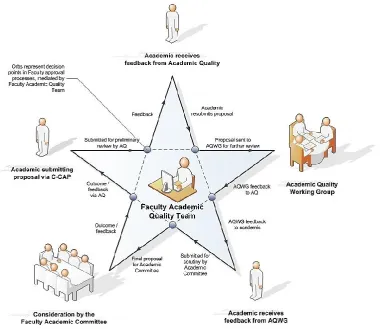
Figure 1: Star-shaped interpretation of typical faculty level approval processes (for course approval), with the Faculty Academic Quality Team at the centre of administering and managing the curriculum
approval process. ... 4
Figure 2: Workflow symbol definitions. ... 5
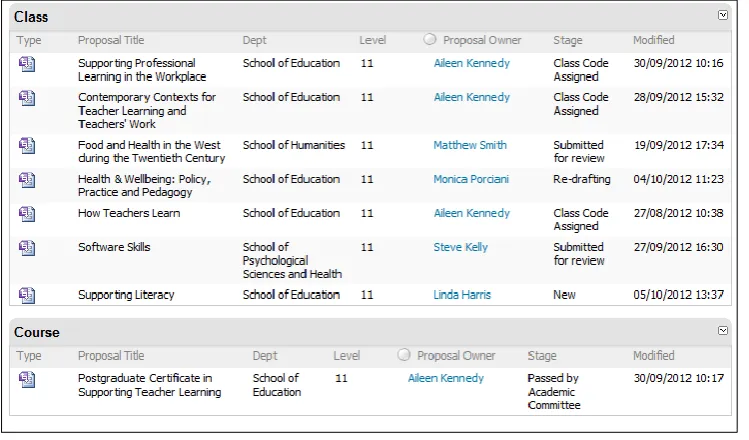
Figure 3: Summary of activity in C-CAP, available from the C-CAP homepage. Includes proposal status indicators which improve process visibility. ... 6
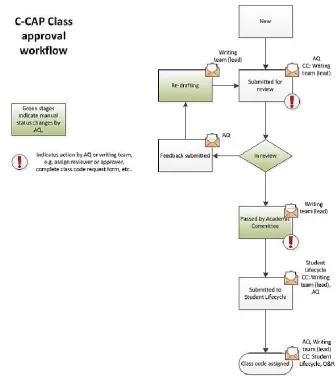
Figure 4: The C-CAP class approval workflow, highlighting status indicators, manual status updates, actions and email notifications. ... 7
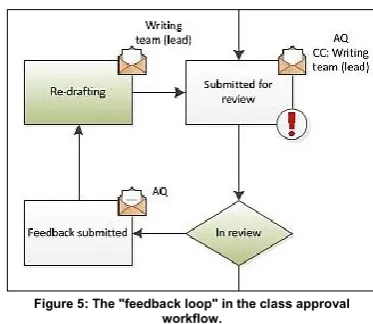
Figure 5: The "feedback loop" in the class approval workflow. ... 8
Figure 6: Course approval workflow in C-CAP. ... 11
Figure 7: Assigning a summary case approver... 12
Figure 8: Feedback loop during the review of summary cases for new courses. ... 13
Figure 9: Monitoring the submission of feedback by proposal reviewers. If submitted, the check box will be ticked. ... 14
Figure 10: Feedback loop during the course review process. Note that the loop can include Academic Committee. ... 15
Figure 11: Feedback loop during O&R scutiny. ... 16
Figure 12: Academic Committee is a significant "off-line" process generating feedback which is delivered via C-CAP. ... 18
Figure 13: Circulating details of proposals for consideration at Academic Committee as active links. 18 Figure 14: Increasing the text size of a proposal via IE browser. ... 19
Figure 15: Logging an approval issue using C-CAP, with links to logging highlighted. ... 22
Figure 16: Logging a class approval issue in C-CAP. ... 22
Tables
Table 1: Common class approval process issues... 211. Introduction
1.1 C-CAP and academic quality: background
The C-CAP system has been designed to improve curriculum design, approval and review within the University of Strathclyde.
Faculty implementations of C-CAP are available at: https://moss.strath.ac.uk/inst/ccapproval/prop/ Whilst academics are at the centre of the curriculum design process, faculty academic quality (AQ) teams are at the centre of - and are critically important to - the approval process. AQ teams are
[image:4.595.110.491.329.658.2]singularly responsible for administrating and managing the curriculum approval process and therefore have responsibility for tracking, providing on-going feedback, controlling the status of proposals, assigning proposals for academic review, etc. Administering this functionality exposes AQ teams to an extra layer of C-CAP functionality. The back-end administration of the curriculum approval process via C-CAP is therefore mediated at a faculty level by AQ staff and is best understood, not through process diagrams, but by a star-shaped interpretation of faculty level approval processes, as illustrated in Figure 1.
Figure 1: Star-shaped interpretation of typical faculty level approval processes (for course approval), with the Faculty Academic Quality Team at the centre of administering and managing the curriculum approval process.
Figure 1 models a typical faculty level approval process for courses. AQ teams govern or mediate key decision points during the approval process. Their centrality to the approval process and their influence
on curriculum design (via academics) is such that they are the stakeholders above all others who interact with C-CAP the most and are the most exposed to its functionality and benefits. AQ teams are therefore at the centre of the star in Figure 1, which is part of the wider process surrounding curriculum design and approval. AQ teams were always central to faculty level approval processes but this centrality was never formalised in the previous state (i.e. before C-CAP) and, as a consequence, the approval process remained mysterious to many stakeholders. The development of C-CAP has changed this by making explicit a curriculum approval process that was hitherto mythic and plagued by tacit practice.
This document provides guidance on using the C-CAP administration dashboard, the underlying approval workflows and also makes recommendations on how best to use C-CAP during the approval process and during Academic Committee. It should also be remembered that C-CAP covers only the curriculum design and approval process; there are a great many “off-line” processes and activities that AQ and faculty officers must undertake to ensure the successful delivery of a new class or course.
1.2 Managing class and course approval in C-CAP
AQ teams have access to significant additional functionality in order to manage faculty-level curriculum approval processes. Faculty AQ teams can:
Assign academic reviewers to class or course proposals Comment on class or course proposals, for AQ purposes Update the status of a class or course proposal
The ability to update the status of proposals is particularly significant and reflects the fact that AQ teams mediate the class and course approval process, as illustrated in Figure 1.
1.3 Workflow symbols
The class and course approval workflows in C-CAP are illustrated in sections 2and 3 respectively. The workflow diagrams map the curriculum approval process within C-CAP and are explained in more detail during the tutorial. It is nevertheless worthwhile defining the symbols used within the workflow diagrams. Only three symbols feature in the workflows presented in this tutorial, but each has a specific meaning and is connected by arrows denoting the direction of flow:
Process
A rectangular symbol is a Process or action step. This is generally the most common symbol in flowcharts and workflow diagrams.Decision
A rhombus symbol is a Decision step in the process requiring a decision or denoting a branch in the process flow. Typically, a Decision symbol occurs when there are two options in how a process should continue, e.g.
yes or no. Within the C-CAP workflow, the decision of Academic Committee will decide whether a course is approved by faculty or must be
redrafted.
Terminator
The oval is a Terminator. A terminators show the end point in a process.2. Class workflow
[image:6.595.113.488.223.443.2]Previous chapters of the Development & Training Gateway summarise the general faculty level steps associated with class approval. However, in order to facilitate class approval a formal workflow is required within C-CAP. The workflow has been designed to communicate the most important approval process milestones (also known as “status indicators”). This helps faculty staff to manage stakeholder work responsibilities and ensures that the approval process is visible to all stakeholders. In particular, the status indicators of all class and course proposals are visible from the C-CAP homepage, as illustrated in Figure 3, thus contributing to improved transparency in University curriculum approval processes. Note that as the list of active classes increases it is desirable to filter this list by status, department or proposal owner by clicking the column heading and selecting a filter to suit your needs.
Figure 3: Summary of activity in C-CAP, available from the C-CAP homepage. Includes proposal status indicators which improve process visibility.
The diagram below (Figure 4) documents the class workflow within C-CAP and highlights the various status indicators that a class proposal lives through during a typical approval. Classes therefore assume a status of “New” as soon as they are created by a Proposal Coordinator and, after being “Submitted for review”, the proposal travels along a workflow towards its final status: “Class code assigned”.
Figure 4: The C-CAP class approval workflow, highlighting status indicators, manual status updates, actions and email notifications.
2.1 Class workflow status indicators and actions
The class workflow status indicators are defined and summarised below, and are based on a typical class approval workflow. Relevant actions for faculty AQ teams are also highlighted. Note that some of the class status indicators are re-used in the course approval workflow and behave in a similar way.
1. New: A newly created class proposal automatically assumes the status of “New”. A proposal maintains this status until the proposal writing team has finished drafting and has submitted their proposal for faculty review (i.e. “Submitted for review”).
2. Submitted for review: The status of a proposal changes from “New” to “Submitted for review” when it has been submitted for faculty review. This change of status triggers email notifications to relevant stakeholders, including faculty AQ who are notified that a new class awaits review.
o AQ action: It is at this “Submitted for review” status that AQ must assign appropriate academic reviewers to scrutinise the proposal (as indicated by the exclamation mark in the diagram). Note that AQ should consider contacting the Proposal Coordinator if reviewers are temporarily unavailable as this will delay the curriculum approval process.
by the green stage). Updating a status can be selected from the administration dashboard (main menu).
o AQ action: Once appropriate academic reviewers have been assigned, manually
update the status to “In review”.
o AQ action: Email the reviewers who have been assigned to review the proposal to notify them that a class is available for review and awaits their comments / feedback. Details of the class title should be included in the email and, if desired, a direct link to the proposal. Faculty AQ teams can monitor which reviewers have provided feedback at any time by visiting the “Assign reviewers” page (see Figure 9 in Section 3). This can be useful if a proposal has been in review for longer than expected. AQ teams may wish to use this functionality as a monitoring tool to pursue reviewers who are “late” delivering their review.
4. Feedback submitted: The status of the proposal will update automatically to “Feedback submitted” once all assigned reviewers have left their review feedback. An email is triggered to notify AQ that the reviews have been completed, at which point AQ staff can visit the proposal to peruse the review feedback and make a decision about what should happen next. In most cases the proposal will move to the next workflow status: “Re-drafting”. AQ can leave additional feedback comments at this stage, if necessary.
5. Re-drafting: Feedback submitted as a result of the review process normally recommends that a number of amendments or additions be made to the proposal. To make the feedback visible to members of the proposal writing team – and to notify the writing team that reviewing has concluded and feedback is available – the status of the proposal must be manually changed to “Re-drafting” (as indicated by green status in the workflow diagram). This status update will notify the Proposal Coordinator via email that this feedback is available and that it should be incorporated into the proposal before it can be approved by faculty.
o AQ action: Manually update the status to “Re-drafting” to make review feedback available to the proposal writing team and to initiate an email to notify the Proposal Coordinator.
o Status note: The status of the proposal will once again revert to “Submitted for review” after the writing team makes the necessary adjustments to the proposal and re-submits for review. AQ will be notified via email, as per the workflow. At this point AQ have a number options:
o AQ option: Assign the proposal for review once again (following the instructions in 2 and 3 above (“Submitted for review” and “In review”). The same reviewers could be assigned or, if necessary, new reviewers assigned.
o AQ option: Scrutinise the changes made to the proposal and consider whether the recommendations from earlier reviewing
has been incorporated. If the writing team have addressed the feedback and recommendations sufficiently, update the status of the proposal to “Passed by Academic Committee”. (See below)
Workflow note: The status indicators of “Submitted for
[image:8.595.340.527.566.728.2]review”, “In review”, “Feedback submitted”, and “Re-drafting” form a feedback loop within the workflow, as highlighted in Figure 5. Depending on the quality of the proposal under review, this feedback loop could theoretically go through numerous cycles until the quality of the proposal is deemed appropriate by AQ and reviewers, at
which point the status would be updated to “Passed by Academic Committee”. During the feedback loop the same steps occur, e.g. assigning reviewers, manual updates to proposal status, etc.
6. Passed by Academic Committee: The status of a proposal changes to “Passed by Academic Committee” when AQ is satisfied that reviewer comments have been satisfactorily addressed and the proposal meets relevant faculty academic standards. “Passed by Academic Committee” is a manual status update to be actioned by faculty AQ staff (as indicated by green status in the workflow diagram). This change in status update notifies (via email) the Proposal Coordinator that the proposal has secured faculty level approval and makes available the class code request form. The Proposal Coordinator is also informed that the class code request form awaits their completion (as indicated by the exclamation mark in the workflow diagram).
AQ action: Manually update the status to “Passed by Academic Committee” to notify the Proposal Coordinator that the class has been approved by faculty and to make available the class code request form.
Proposal Coordinator / AQ action: It is up to the Proposal Coordinator to complete the class code request in order to conclude the approval process. A class cannot be delivered until it has been registered with Student Lifecycle. Failure to submit a class code request may mean the class will be unavailable to students. AQ teams may want to consider monitoring the status of proposals to ensure academic staff complete the class code request. It should also be noted that AQ teams can complete class code requests on behalf of academics. Although this practice is to be discouraged, it may be necessary in exceptional cases to ensure the speedy approval and registration of classes.
Note that the “offline processes” differ slightly across faculties for the ultimate approval of classes. For example, in HaSS the activities of AQ and the HaSS peer review process provides de facto Academic Committee approval, whilst in the Faculty of Science the Academic Committee reserves the right to comment (if it so desires) on the approval of new classes; although in reality it follows a process not dissimilar to HaSS.
If, like the Faculty of Science, Academic Committee wishes to comment on a class that has successfully passed review and AQ scrutiny, it is recommended that the status of the class be set to “In review”. Any feedback that Academic Committee wishes to make can be recorded at the meeting by a member of AQ and entered as additional review feedback. Updating the status to “Re-drafting” will notify the Proposal Coordinator that new feedback comments are available and the proposal once again enters the feedback loop.
7. Submitted to Student Lifecycle: The status indicator “Submitted to Student Lifecycle” is updated automatically when the class code request has been completed and submitted by the Proposal Coordinator. All stakeholders are notified by email. Student Lifecycle (formerly Registry) is notified that a class awaits class code assignation. AQ and the Proposal Coordinator are also notified that the code request has been successfully submitted.
2.2 Circumventing the class approval workflow
In some circumstances it may be necessary for AQ teams to circumvent the approval workflow by enforcing a manual status update. Although such a status update may be inconsistent with the overall approval workflow (as diagrammed in Figure 4), it is possible and in some circumstances it is desirable.
It is difficult to anticipate all the reasons why this might be necessary; but through recent faculty piloting of C-CAP a number of common reasons for workflow circumvention emerged:
In some circumstances AQ may want to leave feedback about a proposal before it goes out to review. This might be because there are glaring errors in the design of a new class that should be resolved prior to review. To make this feedback visible to the writing team and to notify the Proposal Coordinator that the feedback is available, the status would need to be manually updated to “Re-drafting”.
A class proposal with the status indicator “Feedback submitted” may have received exclusively positive feedback from reviewers such that “Re-drafting” is not required as part of the feedback loop (Figure 5). In such circumstances the usual workflow could be circumvented and updated to “Passed by Academic Committee”, thus notifying all stakeholders by email that faculty approval has been secured and a class code request should be completed.
Exceptional examples of workflow circumvention, though less desirable, are nonetheless available: Off-line events may occur which usurp the need for the full approval workflow. For example,
a class requiring last minute approval for, say, the last minute professional accreditation of a course, may have instigated a series of off-line processes or discussions with relevant stakeholders in order to “make it happen” within days. Such rapid curriculum approval is exceptional and is acknowledged to be poor practice; nevertheless, in these exceptional circumstances it is possible to circumvent the class approval workflow in a radical way. A class that has the status “Submitted for review”, for instance, could skip to “Passed by Academic Committee”, if relevant academic quality processes had been observed off-line. It would be expected that evidence of these off-line quality processes be sought and recorded.
3. Course workflow
Previous chapters of the Development & Training Gateway summarise the general faculty level steps associated with course approval. However, in order to facilitate course approval a formal workflow is required within C-CAP. The workflow has been designed to communicate the most important approval process milestones (also known as “status indicators”). This helps faculty staff to manage stakeholder work responsibilities and ensures that the approval process is visible to all stakeholders. In particular, the status indicators of all class and course proposals are visible from the C-CAP homepage, thus contributing to improved transparency in University curriculum approval processes.
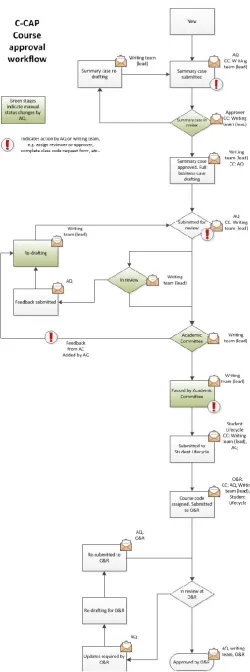
Figure 6 documents the course workflow within C-CAP and highlights the various status indicators that a class proposal lives through during a typical approval. Those familiar with the class approval workflow will notice that the course workflow reuses many of the same status indicators from the class approval workflow; however, the workflow is significantly more complex, reflecting the involved nature of course approval. In particular, the course approval workflow also includes the following activities:
Summary case approval: Before Proposal Coordinators are allowed to begin drafting a complete proposal, they must first seek approval from their HoD, Vice-Dean (Academic) or faculty manager. This involves the submission of a summary case, a brief statement justifying the academic need for the new course, its market, and an overview of its proposed structure and syllabus.
Formal consideration at Academic Committee: Once complete course proposals have been submitted and reviewed internally, it will be considered formally at a faculty Academic Committee. This process is formally modelled in the course workflow. (unlike the class
[image:11.595.265.516.79.753.2]O&R review: Ordinances & Regulations (O&R) must scrutinise the content of new courses, particularly their regulations. A course has not been approved by the University until O&R has given final approval.
Courses assume a status of “New” as soon as they are created by a Proposal Coordinator and, after the proposal has been submitted its status updates to “Summary case submitted”. From this point onwards the proposal travels along a workflow, occasionally entering feedback loops, towards its final status: “Approved by O&R”. As the workflow diagram illustrates, during its journey through the workflow, a change of proposal status may trigger notification emails to relevant stakeholders or additional actions on the part of AQ staff or Proposal Coordinators. Many status indicator changes occur automatically and are initiated by C-CAP; however, there are some instances when AQ must change the status manually. Manual status changes are highlighted (green) in the workflow diagram.
3.1 Course workflow status indicators and actions
The course workflow status indicators are defined and summarised below, and are based on a typical course approval workflow. Relevant actions for faculty AQ teams are also highlighted. Note that some of the class status indicators are re-used in the course approval workflow and behave in a similar way.
1. New: A newly created course proposal automatically assumes the status of “New” and at this stage is merely a summary case justifying the academic need for the new course, its market, etc. Its status remains “New” until the proposal writing team has finished drafting and has submitted their proposal for review (i.e. “Summary case submitted”).
2. Summary case submitted: The status of the proposal changes from “New” to “Summary case submitted” when it has been submitted for review. Summary cases are generally reviewed and approved by a Head of Department, Vice-Dean Academic, or a faculty manager. Their approval paves the way for full drafting of the proposal. Faculty AQ are notified of the submission and must assign an appropriate “Summary case approver”. AQ action: It is at this “Summary case submitted” status that AQ must assign an
appropriate summary case approver to scrutinise the proposal (as indicated by the exclamation mark in the workflow diagram). AQ action: To assign an approver, enter the
proposal main menu and click on the “Assign Summary Case Approver” button (Figure 7). In the resulting screen enter details of the approver
and search. (Note that this screen behaves in the same way as others). Click “Main Menu” to return to the main administration screen.
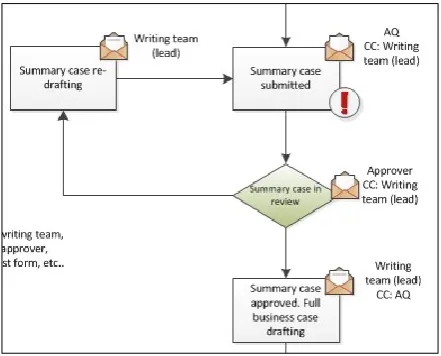
3. Summary case in review: “Summary case in review” indicates that the summary case is being reviewed by the assigned approver. This status change is manual (as indicated by the green stage in the workflow diagram).
AQ action: Once an appropriate approver has been assigned, update the proposal status from “Summary case submitted” to “Summary case in review”. Updating a status
can be selected from the administration dashboard (main menu). Updating the status notifies the approver by email that a summary case awaits their approval. The Proposal Coordinator is also notified that the summary case is now in review.
4. Summary case re-drafting: The “Summary case re-drafting” status update is automatic and is triggered by the approver when they have finished reviewing the summary case. The “Summary case re-drafting” status indicates that the approver has reviewed the summary case and has decided not to approve it in its current form. In most cases this is because further details or changes are required. Feedback from the approver may also be left for the Proposal Coordinator to consider. An email is sent to the Proposal Coordinator
for consideration. Resubmission of the summary case will update the proposal status to “Summary case submitted” once again.
Workflow note: The status indicators of “Summary
case submitted”, “Summary case in review” and “Summary case re-drafting” form a feedback loop within the workflow, as highlighted in Figure 8. Depending on the quality of the summary case under review, this feedback loop could theoretically go through numerous cycles until the quality of the proposal is deemed appropriate by the approver, at which point the status would be updated to “Summary case approved. Full business case drafting”. During the feedback loop the same steps occur, e.g. assigning approvers, manual updates to summary case status, etc.
A number of similar feedback loops occur during the course approval workflow and will be highlighted where appropriate.
5. Summary case approved. Fully business case drafting: The “Summary case approved. Fully business case drafting” status indicates that the Proposal Coordinator has secured approval to engage in the drafting of a full course proposal. The “Summary case approved. Fully business case drafting” status updates automatically when the approver provides his/her statement of support thus approving the course for full drafting. This status update triggers email notifications to the Proposal Coordinator and faculty AQ.
6. Submitted for review: The status of a proposal changes from “Summary case approved. Fully business case drafting” to “Submitted for review” when it has been submitted for faculty review. This automatic change of status triggers email notification to faculty AQ who are notified that a new course awaits review.
AQ action: It is at this “Submitted for review” status that AQ must assign appropriate academic reviewers to scrutinise the proposal (as indicated by the exclamation mark in the diagram). Note that AQ should consider contacting the Proposal Coordinator if reviewers are temporarily unavailable as this will delay the curriculum approval process. 7. In review: The status of the proposal changes to “In review” when AQ has assigned appropriate academic reviewers. This status change, however, is a manual one (as indicated by the green stage). Updating a status can be selected from the administration dashboard (main menu).
AQ action: Once appropriate academic reviewers have been assigned, manually
update the status to “In review”.
AQ action: Email the reviewers who have been assigned to review the proposal to notify them that a course is available for review and awaits their comments / feedback. Details of the course title should be included in the email and, if desired, a direct link to the proposal.
8. Feedback submitted: When feedback has been submitted by all the reviewers, the status of the proposal will update automatically to “Feedback submitted”. An email is triggered to notify AQ that the reviews have been completed, at which point AQ staff can visit the proposal to peruse the review feedback and make a decision about what should happen next. In most cases the proposal will move to the next workflow status: “Re-drafting”. AQ option: Faculty AQ teams can monitor which reviewers have provided feedback at
[image:13.595.308.529.104.282.2]any time by visiting the “Assign reviewers” page, as in Figure 9 below. This can be Figure 8: Feedback loop during the review of summary cases for new
useful if a proposal has been in review for longer than expected. AQ teams may wish to use this functionality as a monitoring tool to pursue reviewers who are “late” delivering their review.
[image:14.595.120.514.66.388.2] AQ option: Faculty AQ may want to consider adding additional review comments at this stage, if required.
Figure 9: Monitoring the submission of feedback by proposal reviewers. If submitted, the check box will be ticked.
9. Re-drafting: Feedback submitted as a result of the review process normally recommends that a number of amendments or additions be made to the proposal. The status update of “Re-drafting” makes this possible. To make the feedback visible to members of the proposal writing team – and to notify the writing team that reviewing has concluded and feedback is available – the status of the proposal must be manually changed to “Re-drafting” (as indicated by green status in the workflow diagram). This status update will notify the Proposal Coordinator via email that this feedback is available and that it should be incorporated into the proposal before it can be approved by faculty.
AQ action: Manually update the status to “Re-drafting” to make review feedback available to the proposal writing team and to initiate an email to notify the Proposal Coordinator.
Status note: The status of the proposal will once again revert to “Submitted for review” after the writing team makes the necessary adjustments to the proposal and re-submits for review. AQ will be notified via email, as per the workflow. At this point AQ have a number options:
AQ option: Assign the proposal for review once again (following the instructions in 6 and 7 above (“Submitted for review” and “In review”). The same reviewers could be assigned or, if necessary, new reviewers assigned.
AQ option: Scrutinise the changes made to the proposal and consider whether the recommendations from earlier reviewing have been incorporated. If the writing team have addressed the feedback and the recommendations sufficiently, update the status of the proposal to “Academic Committee”. (See below)
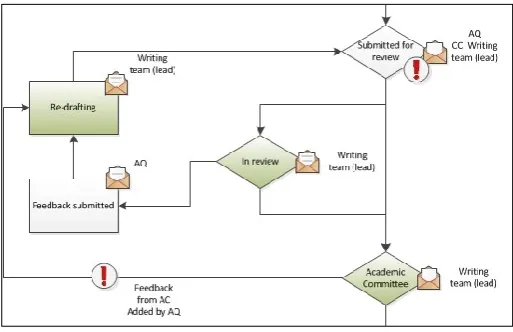
Workflow note: The status indicators of “Submitted for review”, “In review”, “Feedback submitted”, and
on the quality of the proposal under review, this feedback loop could theoretically go through numerous cycles until the quality of the proposal is deemed appropriate by AQ and reviewers, at which point the status
would be updated to “Academic
Committee”. Depending on the outcome of Academic Committee, further feedback may be provided and the status of the proposal changed by AQ to “Re-drafting”; thus the proposal enters the feedback loop once again. During the feedback loop the same steps occur, e.g. assigning reviewers, manual updates to proposal status, etc.
10. Academic Committee: The status “Academic Committee” indicates that the course proposal has passed internal review and AQ scrutiny and is now scheduled for consideration by the faculty Academic Committee. This status must be manually changed
to “Academic Committee” (as indicated by green status in the workflow diagram). This status update notifies the Proposal Coordinator by email that their proposal awaits Academic Committee approval.
AQ action: Manually update the status to “Academic Committee” to indicate that the course proposal has passed the reviewing process and is ready to be considered by Academic Committee.
[image:15.595.269.526.73.239.2] AQ option: Academic Committee may consider the course proposal unsuitable for faculty approval in its current form and may provide detailed feedback for the Proposal Coordinator at the Committee meeting. Such feedback should be recorded by AQ as normal and then added in C-CAP. The status of the proposal should then be updated to “Re-drafting”, thus making the feedback of the Academic Committee visible to the proposal writing team and re-entering the proposal into the feedback loop illustrated in Figure 10.
11. Passed by Academic Committee: The status of a proposal changes to “Passed by Academic Committee” when Academic Committee is satisfied that the proposal aligns with the academic and business strategy of the faculty and demonstrates sufficient academic rigour. “Passed by Academic Committee” is a manual status update to be actioned by faculty AQ staff (as indicated by green status in the workflow diagram). This change in status update notifies (via email) the Proposal Coordinator that the proposal has secured faculty level approval. It also makes available the course code request page to AQ teams (PCAF – Programme Code Request Form). The PCAF requires completion by AQ teams in order to continue the overall curriculum approval process (as indicated by the exclamation mark in the workflow diagram).
AQ action: Manually update the status to “Passed by Academic Committee” to notify the Proposal Coordinator that the class has been approved by faculty and to make available the course code request page (PCAF).
AQ action: It is up to the AQ team to complete and submit the course code request in order to conclude the approval process. A course cannot be delivered until it has been registered with Student Lifecycle.
12. Submitted to Student Lifecycle: The status indicator “Submitted to Student Lifecycle” is updated automatically when the course code request has been completed and submitted by faculty AQ. All stakeholders are notified by email. Student Lifecycle (formerly Registry) Figure 10: Feedback loop during the course review process. Note that the loop
is notified that a course awaits code assignation. Other activities are also undertaken by Student Lifecycle at this point in the workflow.
13. Course code assigned. Submitted to O&R: The “Course code assigned. Submitted to O&R” status update is automatic and occurs when Student Lifecycle has assigned and confirmed the code for the new course. All stakeholders are notified by email as soon as the code is assigned, including Ordinances & Regulations (O&R) who are required to scrutinise the course proposal and its regulations. The notification email will also include details of the newly assigned course code. Proposal Coordinators and AQ teams may wish to make a note of the class code for administrative purposes, e.g. planning, advertising, for inclusion in a course proposal, etc.
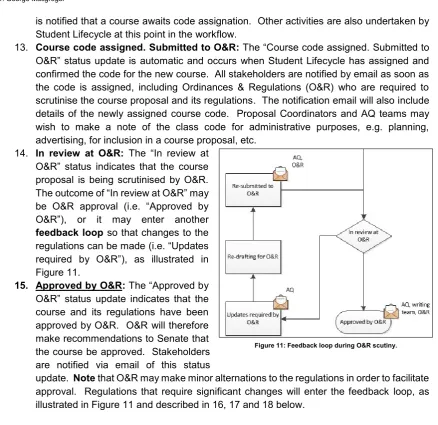
14. In review at O&R: The “In review at O&R” status indicates that the course proposal is being scrutinised by O&R. The outcome of “In review at O&R” may be O&R approval (i.e. “Approved by O&R”), or it may enter another
[image:16.595.93.532.57.482.2]feedback loop so that changes to the regulations can be made (i.e. “Updates required by O&R”), as illustrated in Figure 11.
15. Approved by O&R: The “Approved by O&R” status update indicates that the course and its regulations have been approved by O&R. O&R will therefore make recommendations to Senate that the course be approved. Stakeholders are notified via email of this status
update. Note that O&R may make minor alternations to the regulations in order to facilitate approval. Regulations that require significant changes will enter the feedback loop, as illustrated in Figure 11 and described in 16, 17 and 18 below.
“Approved by O&R” concludes the course approval workflow in C-CAP.
16. Updates required by O&R: “Updates required by O&R” indicates that the regulations require serious revision. Feedback on the nature of the revisions required will be outlined by O&R in the proposal and visible to faculty AQ teams and the Proposal Coordinator; however, only AQ are notified by email of the status change. This is because AQ are often involved the drafting of regulations and may – in the first instance – be best placed to action the feedback.
Action AQ: Update regulations accordingly, upload and re-submit when satisfied with the changes.
17. Re-drafting for O&R: “Re-drafting for O&R” is a transient status and occurs only briefly while AQ are accessing and making changes to the regulations.
18. Re-submitted to O&R: The “Re-submitted to O&R” status is triggered when the necessary revisions to the regulations have been made and they have been submitted to O&R for consideration once again. An email is triggered to O&R notifying them that the revised regulations for the course proposal are now available. Depending on the decision of O&R, the course may re-enter the feedback loop illustrated in Figure 11, or may be “Approved by O&R”, as described in step 16 above, thus concluding the course approval workflow in C-CAP.
3.2 Circumventing the course approval workflow
In some circumstances it may be necessary for AQ teams to circumvent the course approval workflow by enforcing a manual status update. Although such a status update may be inconsistent with the overall approval workflow (as diagrammed in Figure 6), it is possible and in some circumstances it is desirable.
It is difficult to anticipate all the reasons why this might be necessary; but through recent faculty piloting of C-CAP a number of common reasons for workflow circumvention emerged:
In some circumstances the decision to proceed with full drafting of a new course has already been taken outside C-CAP via a variety of off-line processes, e.g. a departmental or faculty meeting, at the instigation of faculty management, etc. In such an instance the requirement to have a summary case approved by the HoD, Vice-Dean Academic or the faculty manager before proceeding with full proposal drafting is unnecessary. It is therefore possible for AQ teams to circumvent these steps in the course approval workflow. Proposal Coordinators would still be expected to complete the summary case as stipulated (this contains important course related information) and submit for review; however, at the status “Summary case submitted” AQ teams can impose a manual status update by toggling the status to “Summary case approved. Full business case drafting”, thus enabling the Proposal Coordinator and writing team to continue with full drafting immediately.
In some instances AQ may want to leave feedback about a proposal before it goes out to review. This might be because there are glaring errors in the design of a new class that should be resolved prior to review. To make this feedback visible to the writing team and to notify the Proposal Coordinator that the feedback is available, the status would need to be manually updated to “Re-drafting”.
A course proposal with the status indicator “Feedback submitted” may have received exclusively positive feedback from reviewers such that “Re-drafting” is not required as part of the feedback loop (Figure 11). In such circumstances the usual workflow could be circumvented and updated to “Academic Committee”, thus notifying all stakeholders by email that the faculty Academic Committee will consider the proposal in due course.
Exceptional examples of workflow circumvention, though less desirable, are nonetheless available: Off-line events may occur which usurp the need for the full approval workflow. For
example, a course requiring last minute approval for, say, the last minute professional accreditation, may have instigated a series of off-line processes or discussions with relevant stakeholders in order to “make it happen” within days. Such rapid curriculum approval is exceptional and is acknowledged to be poor practice; nevertheless, in these exceptional circumstances it is possible to circumvent the class approval workflow in a radical way. A course that has the status “Submitted for review”, for instance, could skip to “Passed by Academic Committee”, if relevant academic quality processes had been observed off-line. It would be expected that evidence of these off-line quality processes be sought and recorded.
4. Using C-CAP at Academic Committee
As noted in Section 1, there are a great many “off-line” processes and activities that AQ and faculty officers must undertake to ensure the
successful delivery of a new class or course; C-CAP only enables the design and approval of curricula.
C-CAP is dependent on some of these off-line activities to facilitate the approval process. A significant off-line activity which impacts upon C-CAP is Academic Committee. Faculty Academic Committees scrutinise course proposals and are responsible for issuing faculty level approval for a new course and, in some faculties, for classes too. Depending on the outcome of Academic Committee, courses (in particular) will be returned to the Proposal Coordinator with additional
feedback comments, as agreed by the Committee. This aspect of the approval process is included in the course workflow, as illustrated in Figure 12.
Piloting of C-CAP indicated that the review of proposals at Academic Committee is an off-line process that C-CAP can support. However, piloting also suggested that there was uncertainty among AQ teams as to how best to use C-CAP at Academic Committee. The practical recommendations listed below should therefore assist AQ teams and faculty officers as they plan for Academic Committee and may enable better management of proposal scrutiny.
4.1 Recommendations
Prior to Academic Committee
Meeting room: Ensure the room booked for the Academic Committee meeting has data projection facilities and access to the Internet.
Laptop: Book a faculty laptop for displaying C-CAP at the meeting.
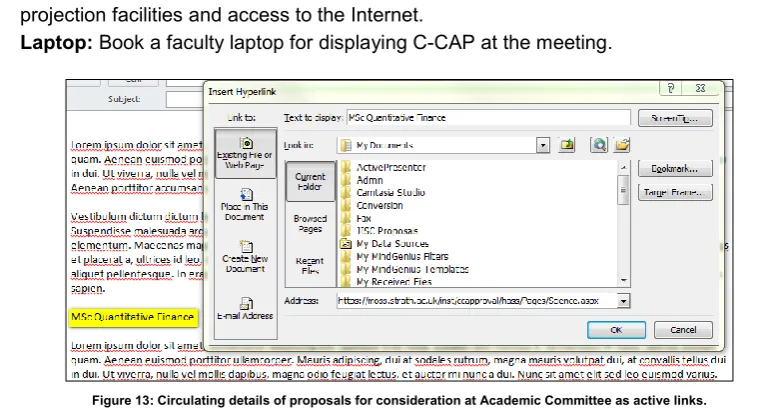
[image:18.595.274.537.113.283.2] Circulation of papers: Notify Academic Committee members that the proposals under consideration at the next meeting are available from C-CAP. Details of the proposals (i.e. title and URL) can be circulated via email with other papers. For example, proposal titles can be Figure 12: Academic Committee is a significant "off-line" process generating
feedback which is delivered via C-CAP.
[image:18.595.98.478.493.698.2]hyperlinked, as in Figure 13, thereby providing recipients with a quick link to the relevant proposal(s).
All academic staff members automatically have access to C-CAP and therefore have an opportunity to peruse proposals electronically prior to the Committee meeting. Since C-CAP use is new to faculties, it might be worth considering the inclusion of additional explanatory notes about C-CAP and why it is being used.
Note that hard copies of proposals can, where necessary, be printed by using the “Print view” facility in C-CAP. Any attachments appended to proposals must be printed separately (e.g. Programme Specification, financial spread sheet, etc.).
During Academic Committee
Prepare C-CAP and data projector: Have the C-CAP home page set immediately prior to the meeting to avoid log-in issues during the Committee meeting. Ensure laptop is projecting correctly.
Text legibility: Depending on the room used, the size of the projection screen, data projector configuration, etc. the size of the text in the proposal may be illegible to members of the Committee when projected. The size of the proposal text can be easily increased by zooming in using the Web browser (i.e. Internet
Explorer). Text size should be increased until all Committee members can read the proposal text without straining.
To increase or decrease the text size,
click on the gear/cog icon in the top right hand corner of the IE browser (Figure 14). Select the “Zoom” option and increase or decrease the size as necessary. The keystroke for increasing text size is Ctrl +.
Minuting the Academic Committee: It is anticipated that Committee members will have made notes on each proposal
(if necessary), prior to the meeting. Committee members can be invited to provide their comments in the usual way; however, it is up to faculties how this feedback should be recorded.
C-CAP piloting suggests there are two approaches. Where one approach is advantageous the other is disadvantageous, and vice versa. In practice, the AQ team member charged with clerking the meeting may need to use both approaches.
Approach #1: The AQ team member clerking the meeting enters Academic Committee feedback into C-CAP while the meeting is underway. This can be done by going through each section of the proposal and seeking comments from the Committee. Comments from the Committee can therefore be agreed for each section of the proposal and entered by the clerk.
[image:19.595.294.523.315.499.2] Advantage: Scrutiny of the proposal is interactive and Committee members can oversee the feedback as it is delivered to the Proposal Coordinator / writing team via C-CAP. Feedback from Academic Committee is also delivered to the Proposal Coordinator as soon as it is entered into C-CAP, thus ensuring the Proposal Coordinator receives the outcome of Academic Committee scrutiny immediately.
Disadvantage: The approach may pose problems for extremely detailed or lengthy feedback. Academic Committee members may be unwilling to wait as such feedback is typed up by the clerk at the meeting.
Approach #2: The AQ team member clerking the meeting minutes the feedback off-line. The clerk can toggle between each section of the proposal and seek comments from the Committee, as in approach #1; however, comments would be recorded and agreed off-line, and would be entered into C-CAP at a later time / date.
Advantage: Proposals stimulating detailed or lengthy comments from the Academic Committee can be noted off-line, thereby avoiding tedium as the clerk types such lengthy comments into C-CAP.
Disadvantage: The scrutiny process is less interactive and Committee members do not see the exact wording of the feedback delivered to the Proposal Coordinator. It also lacks the immediacy of the first approach since feedback may also be delivered to the Proposal Coordinator many days after the Committee has passed judgement on the proposal.
4.2 Best practice suggestions
As C-CAP becomes the de facto tool for administering Academic Committee feedback, suggestions for better incorporating its use may become apparent. Please share your best practice suggestions with other faculty AQ teams, and with the C-CAP team who can then include your suggestions in this document and at the Development & Training Gateway.
5. Monitoring curriculum approval issues
5.1 Common approval issues
[image:21.595.66.528.259.443.2]Improving the efficiency and reliability of the curriculum approval processes at the University of Strathclyde was originally an important aim of the C-CAP system. Evaluation activity undertaken as part of the PiP Project found a series of common approval issues to occur within the previous approval process, which compromised process efficiency and reliability. These issues were found to either delay the approval of curricula or result in its outright rejection. The most common issues were identified within the HaSS Faculty and are summarised in the tables below for both classes and courses; although anecdotal evidence suggests the issues are similar across faculties.
Table 1: Common class approval process issues.
Approval issue Definition
Difficulty identifying internal reviewers Issues surrounding the identification of internal reviewers, e.g. no member of staff available or qualified to review proposal Proposer failed to incorporate feedback Proposer fails to incorporate feedback changes in time for
approval through targeted meeting of Faculty Academic Committee
Reviewer failed to provide feedback Time delay in reviewer providing feedback due to workload constraints.
Proposal insufficiently complete Proposers not fully completing the class proposal proforma with requisite information
Failure to complete class code request Proposers not completing a class code allocation form which can delay class availability, amendments to course regulations, etc Assessment rationale issues Assessment criteria / details flagged up by reviewers as a
potential issue, e.g. assessment strategy problematic, poor mapping to learning objectives, assessment strategy lacks sufficient detail, etc.
Resource planning issues Resources required to deliver the class not taken into account. Duplication with other University business Competition and duplication of classes run elsewhere in the
University not taken into account.
Table 2: Common course approval process issues.
Approval issue Definition
Difficulty identifying internal reviewers Issues surrounding the identification of internal reviewers, e.g. no suitable member of staff available to review proposal.
Volume / size of proposal causing review issues Issues surrounding the volume/size of proposals and the time needed for review, which encroaches on other activity. Fee clarification required Level of course fees set by Course Leader required clarification
by Student Experience & Enhancement Services Directorate (SEES).
Current classes require updating Revisions of class descriptors required to update current teaching practice.
Question mark over total teaching hours Clarity on the total staff teaching hours needed to deliver the course required.
Course proposal and Programme Specification do no
align Information within the Programme Specification must align with the course proposal information. Difficulty obtaining externals Difficulty in obtaining external panel members to attend review
meeting, review proposal documentation, etc.
Risk assessment not investigated by writing team Staffing and associated risk assessment not fully investigated by the Course Leader.
[image:21.595.69.524.473.648.2]5.2 Logging approval issues in C-CAP
C-CAP supports the logging of approval issues and allows Faculty or AQ team members to record issues that may have resulted in the delay or rejection of curriculum proposals. Logging an approval issue is quick and can be initiated from the C-CAP faculty page, as highlighted in Figure 15 below.
[image:22.595.71.525.162.509.2]Note that the highlighted areas of this page are only visible to faculty or AQ staff.
Figure 15: Logging an approval issue using C-CAP, with links to logging highlighted.
Click on the relevant link in the right-hand column of the page (as highlighted in Figure 15) to log a class or approval issue and to generate the interface below, in Figure 16.
Figure 16: Logging a class approval issue in C-CAP.
[image:22.595.110.485.569.729.2] Using the “Approval issue” drop down menu, indicate which of the common approval issues has occurred in the approval of the noted proposal. Please record a new approval issue (in the “New approval issue” box) if none of the “common” issues is relevant.
Click “OK” when satisfied.
As issues are logged in C-CAP they will be added to the “approval metrics” window on the C-CAP page. Issues are grouped according the approval issue, thus enabling staff to quickly survey the most commonly occurring issues. Logging an issue can also be initiated from this window by clicking the “New” menu button.
Up-to-date approval issue lists will be maintained on C-CAP as part of the issue logging process and as new approval issues are recorded they will be added to the drop down menus. A current list of issues and their description can always be found at:
Class: http://goo.gl/JCr6T Course: http://goo.gl/Zj7GW
6. Further support
Development & Training Gateway: The University Development & Training Gateway provides numerous tutorials and videos on the operation of C-CAP, including many faculty AQ activities. Note that a DS username/password is required to access the materials.