CoolBeans: Using Technology to Encourage Real-World
Informal Interaction
Charlotte Dee, Craig McMahon, Leander Hambley, Chris Lord
Department of Electronics and Computer Science University of Southampton
{ced203, cbm103, lh1303, cil103} @ecs.soton.ac.uk
ABSTRACT
Informal interaction is considered an important part of the work ethic and process in business and academia. We found that the new facilities for a computer science department at the University of Southampton were not conducive to this, and designed a technology-based solution to improve social awareness and encourage interaction using a presence-aware application and web interface. Users could use the system to find out who was taking a break and to invite others to do so.
Initial results suggest that the project both encouraged social activity and became a popular fixture in the area on which efforts were focused.
1.
INTRODUCTION
We aim to investigate whether a technological solution can be used to improve informal interaction. Specifically, we want to encourage people to take breaks together in a social space by making it easier to coordinate meetings there and providing some impetus to do so more frequently.
The focus of this study is on the interactions within a new physical space: Building 32, at the University of Southampton. Building 32 is used by computer science staff and researchers, their area split into six sections across two floors, divided by card-access doors. The coffee room, which might serve as the main hub for informal interaction, is less popular than the one in the building formerly used by the department, from which many of the staff and students migrated after it was lost in a fire.
In this new building the inhabitants are thus faced with many layers of separation, geographical, physical and also in terms of their spheres of work and positions within the department. Approaches to the problem of encouraging informal interaction will be outlined in the next section. We expect to employ a technology-based solution; as we will demonstrate later, previous studies have found these to be effective, and as a Computer Science department the staff and researchers are both interested in and inherently capable of using them.
Previous work concentrates on raising social awareness and enlivening social spaces. We wish to combine and expand on these approaches, to create a dynamic display that not only tells you who was there, but who will be there soon and who is there
often. We want users to be able to cooperatively organise their break times, and to be rewarded for doing so.
2.
RELATED WORK
Research shows that informal workplace communications can be crucial to the productivity of a team [7]. In many jobs, the most
frequent workplace activity is informal communication [5,7,8]; spontaneous conversations are often related to physical proximity and tend to take place in high traffic communal places, such as by the coffee machine [6]. Isaacs etal. [5] assert that when groups are co-located, people frequently run into each other and start conversations, but in the segregated space of the new building there is less chance of such encounters happening unless people visit communal areas.
One approach to increasing informal interaction is to move it on to the web. The Forum [6] is a networked virtual world divided into two shared spaces: Forum Contact Space for text based interaction with others and Forum Meeting Space, for meetings with audio-conferencing support. They found that the system encouraged chance encounters when a participant needed to speak to a colleague and was reminded when they saw them in the Contact Space. They found it encouraged interactions which would not otherwise have happened; one user spoke to a person in the Contact Space with whom they would not normally have interacted as they didn’t work near each other.
The authors of the Babble system [4] assert that virtual worlds are frequently incapable of representing the subtle cues that guide “graceful” face-to-face interaction. It enhances the standard chat-room window with a “social proxy” display, showing cues about the status and present activity of other users as coloured dots around a map.
Anderson et al. [2] investigated awareness cues, identifying that when people are working near to each other they are better informed about what their colleagues are doing. They found four cues for social awareness: activity, status, relation and vicinity. Their system iSocialize is PDA-based, and shows the physical proximity of contacts as well as their current activity and mood – another important cue for informal interaction.
Another approach is to improve awareness within physical spaces. Andre et al. [3] identified the key features of the former coffee room at this department that made it work well and suggested ways of recreating the experience with technology. The salient features they identified were:
• Contacts with colleagues
• Could find out who had been there by asking others
• Change of scene from office
• Could meet others on the way to the room
• Chance to meet members of other groups
presence with an RFID1-tagged mug; the display could also be
accessed from users' desktops. The second proposed system was tableTOP, an interactive system for table-tops in a foyer area, allowing people to leave virtual postcards and to play games of chess and Sudoku against other visitors.
3.
METHOD AND DESIGN
Both of the approaches outlined are instructive in improving social awareness, but none seeks to draw many people to a common physical space and connect those already there with those who may join them. Whilst the Babble system [4] presents a unique and practical way to inform users of their colleague’s activities, it also encourages them to interact informally via “chat room”. Essential to the design of our system must be an incentive for users to leave their desks and congregate with others to enable face-to-face informal interaction.
The systems proposed by Andrew et al. could be successful in enlivening social spaces, but their ability to create new informal interaction is limited, because they may only be used to see past
and present visitors to a space, and users cannot coordinate their visits or publicly express their intention to take a break.
To inform a design that will combine and expand upon these approaches, a formative study was carried out to explore the interactions currently taking place within Building 32. We conducted interviews, distributed paper and electronic surveys and carried out observation sessions. Interviewing the entire department would have been extremely time-consuming and difficult to analyse, so questionnaires were designed with discrete responses to show consensus views on important factors.
At the evaluation stage the important question would be: did the system confirm our third hypothesis, that a technology-based solution could remove the barriers to social interaction? In particular, are students and staff encouraged to visit the coffee room more by knowing who they can expect to see when they get there?
3.1
Background
There are three groups working on the levels concerned: IAM, DSSE and LSL. As illustrated in Figure 1, the floors are divided into office sections in the north and south, with a lab for researchers and postgraduates in between.
A “street” connects the north and south ends from the west side, and it is also possible to traverse the length of the building through the middle, provided one has a key card to hand.
There are “breakout spaces” with comfortable seating at both ends of Level 3, designed to provide convenient relaxation and waiting areas.
1 Radio Frequency Identification
Figure 1 Layout of relevant floors
3.2
Hypotheses
Based on findings from previous work and our formative study, we propose the following hypotheses:
1. That the spaces currently provided are not conducive to social interaction;
2. That inhabitants of floors concerned will find the ability to determine who is in a meeting space a useful one; 3. That if these barriers could appear to be removed using
technology, users would be more socially aware of others in the building
3.3
Observations
We wanted to discover whether the spaces concerned were being attended in groups, and whether they served as brief respites from work or as places to socialise. Identifying the predominant usage pattern would inform the design of a social element to the system. We monitored the coffee room and each breakout space for a day, counting the people passing through. We recorded the number of people who stayed to have their coffee with others against those who simply fetched a coffee and left. The coffee room had the most traffic with 130 visits (some were repeat visits). Only 34 of these people stayed to have their coffee with others, with just eleven social interactions taking place. Only four people used the chairs in the south seating area, where two stayed for thirty seconds, one for five minutes and one for six minutes. The first three were waiting for meetings and the latter was reading a book. Three people in total used the north seating area; one person sat on their own and ate their lunch and two people used the area to talk with each other for an hour.
3.4
Interview
We interviewed six people from the building, asking questions about the perceived value of the social spaces and inviting suggestions for how they might be improved. Our interviewees included academic staff, support staff and postgraduates from all groups, on both floors from the north and lab areas. Four were from one group, and we lacked representation from the South side of the building, but we did get feedback from people based there through questionnaires.
“Street” area Kitchenettes
Coffee room
North Offices Breakout area
Three claimed to be regular users of the coffee room, while the others cited its lack of popularity and not knowing who else was there as reasons for not going. All interviewees found that card-locked doors between areas of the building were an annoyance, but none said that it would stop them from going to the coffee room. All felt it would be advantageous to find out who was in the coffee room in advance, and some wanted to be able to notify others as to when they were going for coffee; three said that they would definitely use the coffee room more if they could find out who was there beforehand. One person said the closed door was a barrier, making it impossible to tell “if there’s nobody or everybody” in the coffee room.
Those who were regular users of the coffee room went with others, but identified problems in coordinating this. Some used web-based messaging applications such as Internet Relay Chat. One interviewee said that their head of group wanted his staff to go to coffee together more often and increase awareness of their presence in the building. Another found it difficult to arrange joint visits and thought others didn’t appreciate the benefits of socialising. A non-academic with no previous campus experience found that socialising in the former coffee room had afforded them a valuable insight into academic life.
All interviewees complained about the coffee room environment, citing exposed ducts on the ceiling and little natural light. One interviewee felt that a change of scenery was necessary when having a break and that the coffee room was too similar to the work environment. They commented that in the previous coffee room there was a window with a “horizon view” to rest their eyes on after sitting in front of the computer. Despite a widespread dislike for the décor, one person summed up the general feeling, saying “the people are much more important than the room itself.” This is encouraging – it implies that improving interaction there can be done without drastically improving the environs.
The breakout areas were used to mark work, read, chat and eat, but always privately – not for meetings or social gatherings. Three people expressed concern that when using the breakout areas they may interrupt those who work in surrounding offices.
We put it to our interviewees that a simple solution for alerting them to the presence of their colleagues in social spaces would be to place web cams. One person strongly agreed with the idea and one person was vehemently opposed, but most were pragmatic, unconcerned by the presence of more cameras in what they saw as a surveillance society, but worried that others would not feel the same way. Another idea was to use the RFID-tagged mugs proposed by Andre [3] to detect presence, and this proved more popular. Half would also have been happy to use Bluetooth on their phone but said that it might be an inconvenience to keep turning it on and off when entering and leaving.
When asked what would draw them to the coffee room, suggestions included having a big screen displaying news, a display that enlivened the room and was customisable by visitors (like a digital photo frame), internet access and a whiteboard.
3.5
Questionnaire
There were two types of anonymous questionnaire: paper-based in the coffee room and breakout spaces, and online, advertised by e-mail. The paper-based questionnaires captured the views of those who already used the areas, and the online one was designed for those who did not; people were asked to fill in just one. Thirty people completed the paper questionnaire in the coffee room, four
in the south breakout space and eighteen online. This gave us 52 responses – about 25% of students and staff on both levels. About half of the respondents used the coffee room once a day or more (29% more than once a day, 19% once a day), indicating that a substantial proportion of the 130 visits recorded during the observation process were likely repeat visits. This means that the actual number of individuals is more likely to be around half this figure.
In both questionnaires, we asked participants to rate the coffee room on a Likert scale between one and five on the coffee, socialising, decoration and comfort – factors chosen because they correspond to the features identified by Andre et al. [3] as those most missed in the new facility. Socialising scored lowest with an average of 3.1, confirming the first of our hypotheses. We found that across both questionnaires 42% of people gave it a score of four or five which seemed quite high, but eleven out of eighteen of these responses were from people in the coffee room, ten of whom were with others2. This indicates that those who go alone
do not find the coffee room good for chance encounters – contradicting the assumption that high traffic communal places are the most likely location for informal interactions [6].
We also asked open-ended questions for qualitative feedback. Rated highly among draws to the coffee room were the ability to meet friends, a change of scenery from the desk and a place to get a drink. Respondents had a number of ideas about what would encourage them to use the coffee room more, the most popular being more comfortable seating and seeing others using it. Other suggestions included games and interactive systems, a big screen featuring news items, music, and vending machines.
Although the breakout areas had much more comfortable seats than the coffee room, people did not wish to use these areas more and felt that they should be kept as quiet areas due to the proximity of offices. People commented that they would be encouraged to use the area more "if it didn't bother those within hearing distance" and "if they were not surrounded by academics’ rooms". One said that "it wasn't the smartest idea to put the couches next to office rooms – we can't have decent conversations without bothering staff."
50% of respondents were not interested in finding out who was in the areas in advance, 46% were and 4% said they might be. Among regular users (daily) 45% were interested, but some said they did not need to know as they already arranged who they were going to coffee with by email or IRC. This indicates that in any potential solution, it would be beneficial to include a feature for inviting others to coffee. Among less frequent users more (50%) were interested – this implies that such a system could be beneficial in encouraging more regular visits.
We asked for opinions on potential methods for tracking presence. 45% would be happy to carry an RFID-tagged mug, but among those interested in finding out who was there in advance this figure rose to 74%. 36% of all respondents said they would be happy to use the Bluetooth on their phone to show their presence, this rises to 61% of those who wanted to find out who was there. Only 34% of respondents would not find a webcam intrusive.
2 One of the questions asked in the coffee room-based paper
3.6
Analysis of results
Our study confirmed that the areas provided did not encourage social interactions: the breakout spaces were too close to offices and the enclosed coffee room made it hard to tell if anyone was in there. This gave credence to our second hypothesis; that it would be advantageous to find out who was there ahead of a visit. Other barriers were found to include the atmosphere and decoration of the room, the limited pool of regular users and difficulty in coordinating visits. Reponses gave credence to our final hypothesis – that by removing these barriers we can improve awareness.
It is apparent that the deepest dissatisfaction with any of the social spaces was reserved for the coffee room, and given the comments made about noise in the breakout areas it was decided to leave them be – our system should not threaten the peace of working environments, but encourage the use of an area for socialising away from offices and office-work.
4.
SYSTEM DESIGN
The “CoolBeans” system comprises a presence-based display in the coffee room itself and a networked component to connect to participants via the web, allowing them to find out who is in the coffee room and invite others to join them for breaks there. Some respondents were interested in seeing news and other information on a screen in the coffee room – where currently there are only paintings and limited décor. We designed a dynamic display depicting those in the area along with news feeds they requested via the web. Section 4.3 describes it in more detail.
4.1
The game
A points system is used to drive two strategies for improving interaction. First, we’re aiming to increase overall use of the coffee room – so every user will gain one point when “signing in”. Second, we want to reward users who invite their colleagues for breaks, particularly those who work in different groups or parts of the building, so bonus points are awarded according to these criteria.
The presence-aware component is dependent on a “signing in” procedure. Potential options include Bluetooth and RFID, but the most accessible technology was the iButton3. These are small
buttons containing microchips with a unique ID, attached to plastic fobs. In this system, a computer with iButton readers attached is placed in the room and users connect their buttons with the reader to alert the system to their presence there.
4.2
Web interface
Half of those who do not regularly use the coffee room wanted to be able to find out who was there before going – they can do this via the web interface. We heard that some people who visit the coffee room with others coordinate this using IRC or email – we want to provide a viable alternative that harnesses the other benefits of our system. We developed a server and used PHP, a back-end database and AJAX4 techniques to power the interface.
3http://www.maxim-ic.com/products/ibutton
[image:4.612.324.548.68.224.2]4 Asynchronous Javascript and XML
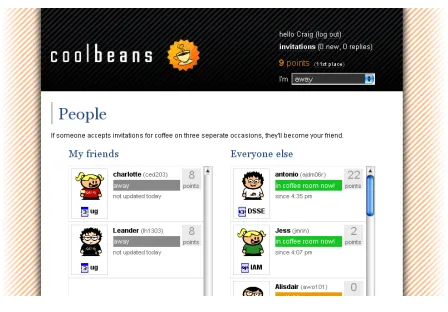
Figure 2 The CoolBeans web interface
To create an account, participants obtain an iButton and enter its ID and other details using the “Create Account” form on the front page. They may choose a graphical avatar that will, as described later, represent them in lists and tables and in the coffee room itself. Immediately they are presented with a list showing everyone else in the system, coloured according to their status, which may be “Away,” “Available”, “Going to coffee room” or “In coffee room now”. These lists show the location of the individual, their “nickname” and points total, and are updated dynamically offering an up-to-the-minute summary of this information.
Anyone may send an invitation to anyone else who is “Available” with an optional personalised message inviting them to go a break. Recipients of invitations can respond with another message to either accept or reject the invitation.
Users may enter the URIs of web feeds to provide the coffee room display with news stories to display relevant to those there. While this was not implemented on the screen for reasons discussed later, there was enthusiasm for the idea and it could be an important part of future work.
4.3
Coffee room display
Figure 3 Coffee room display
The visualisation was designed to be displayed on a large screen and provide useful information to those in the coffee room, without being overly distracting. As a secondary objective, its novelty also provided a draw to the room and acts as a conversation piece to enhance socialisation. The developed architecture was extremely modular, to increase scope for future expansions of the system. Providing the visualisation encouraged users to 'sign in' when visiting the coffee room and it also reinforced the idea of virtual presence.
4.4
A unique solution
The design is concerned with both the physical and digital space. Informed by [3] we encourage awareness of those in physical spaces but extend this by combining it with a personalised web interface to enable users to invite others to socialise with them, and provide an incentive to do so in the style of a game.
The screen in the coffee room provides information relevant to the users currently there. It tells you who was in the room, who is on their way and even who visits most often – or at least is most sociable – via the “top ten” list. The display is a potential talking-point, which we hypothesise will spark new interaction.
5.
IMPLEMENTATION
Java was used for the coffee room display, allowing for cross-platform compatibility and rapid development. Choosing Java also offers the potential for making the visualisation available online to those outside of the coffee room. The 3D engine was programmed using only core Java classes, allowing it to be used online without installation of any third-party libraries. A software 3D engine also broadens the potential user-base of the application, as there is no requirement for hardware acceleration cards or platform-specific functions. The developed engine supports texture-mapped, alpha-blended polygons, allowing a variety of effects to be employed to create enlivened displays. A consideration made when implementing this engine was to allow arbitrary placement of Swing user-interface widgets on top of the visualisation. Due to the flexibility of Swing, this allowed semi-transparent UI widgets to be layered over the main display; a feature that was taken advantage of to display the extra user information. Custom cell-renderers were used with the standard Swing table-view widget to show avatar pictures and information efficiently.
RFID tags or swipe cards would have been the preferred means of interaction with the system to allow a passive (and therefore less intrusive) method of signing in, but costs and implementation time were prohibitive in this study. As described, card readers already control access to the coffee room so using them would have had no interaction cost for the user, but we were unable to gain access to the card system for security reasons. Therefore iButtons provided the most rapid and practical solution for a working prototype.
With this in mind, it was hoped that the iButton readers could be located as close to the doors of the coffee room as possible, to ensure that users would not forget to log in or out of the system. A method of using Gumstix5 was investigated to allow readers to be
freely positioned within the space, but technical problems within the project timeframe prevented this from being taken further. For the prototype system readers were simply connected to the computer running the plasma screen application via its serial ports.
Finally time constraints prevented us from writing classes to extract information from news feeds and display it on the screen, which would require an XML parser. It was hoped that this feature would be completed, so users were still allowed to request feeds via the web interface – this led to some confusion. The users’ views on feeds are discussed in the next section.
All other features of our system design were successfully implemented and tested.
6.
EVALUATION
The system was put in place in the building for ten days. Over this time, 27 volunteers tested the system. Figure 4 shows the distribution of participants by group and level. They are fairly evenly divided between groups, but are mostly based on Level 3 – we noticed that two of our first volunteers from that area were quite close together, and suspect this may have seeded an interest that spread throughout the floor.
11
5 10
1
IAM LSL DSSE other
20 7
Level 3 Level 4
Figure 4 Breakdown of participants
6.1
Post-participation questionnaire
Following a period of use of ten days, the participants in the study were sent a questionnaire. Eleven users had responded by the time this paper was put together. Prior to the study, five of them had used the coffee room more than once a day, five used it once a day and one used it a few times a week. At the end of the study, ten used the coffee room more than once a day and only one still used it just once a day. We asked whether the users had been for coffee with others more often than previously. Six said that they had; this appears to show that social interaction has been encouraged by the system.
5 Gumstix are small-scale computers that can run a limited Linux
[image:5.612.322.519.461.540.2]Prior to the study, none of the participants had chance encounters with others in the coffee room. Nine out of the ten respondents found it useful to be able to find out who was in the coffee room before going, with four of them going to the coffee room specifically because they had seen that there was someone in there they wanted to talk to. One person who hadn’t specifically gone to talk to anyone felt that this was just due to low participation and that if more people had been using the system, there would have been more chance of someone they wanted to talk to using the system. Four users said that they had coffee with people they would not normally have had coffee with before, one person invited a new person specifically to get points and another said that they spoke to some more people outside their own bay. Six people felt they became more aware of others in the building through use of the system. Two users said that they had learnt the names of more people in the building while using the systems. The users were asked what they liked and disliked about the system and how they thought it could be improved. Users liked being able to see who was in the coffee room, as well as having the ability to invite others. One user said the screen “improved the coffee room environment a lot”. This was one of the main complaints about the coffee room that we found from our original interviews and questionnaires and so the system has gone some way to addressing this. Comments on how the system could be improved were to include newsfeeds and improve invitation alerts, for example by email as well as via the web interface. Another point that came up was the distance of the readers from the door. In the future, it may be better to link the card readers that people already need to swipe in with to the system. One person wanted to be able to invite those in the building who had not signed up to the system; this might increase its popularity. The system was overall very popular, with seven out of ten saying they would definitely continue to use the system and the remaining three saying they would maybe continue to use it.
6.2
Log file analysis
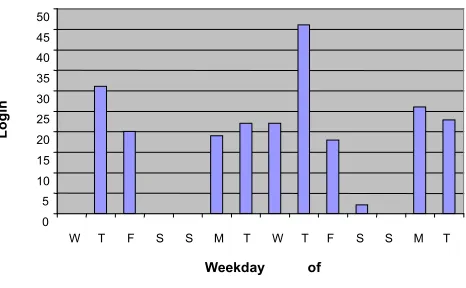
Figure 5 shows the number of users logging into the coffee room each day. It shows steady usage most days, with almost none at weekends and a peek on the second Thursday, possibly due to a departmental lecture. There were 26 users in the system and the average number of logins per day (excluding weekends) was 22.9. More users joined as the study went on, so this figure is an underestimate. The log file shows no evidence of users tiring of the system, though this could have occurred if it had been in place longer. A longer study would also have identified whether the peak on our second Thursday was anomalous or part of a pattern. The log also shows that 93.75% of invitations were between members of the same group and all on the same floor (though not all in the same section).
In the final questionnaires participants claimed to be visiting the room more regularly because of the system, so although the log files showed that most invites were within groups and locations, people may have simply seen people in the coffee room via the web interface and went to meet them.
Only eight people used the invite function on the web, so the system was used more for finding out who was in the coffee room already than for arranging visits. One expressed a desire to have IRC or Jabber interfaces so that a separate web page did not need to be open for invitations.
In total there were 233 occasions when participants signed into the room, advertising their presence to department colleagues.
7.
CONCLUSION
The prototype system ran for over a week with almost thirty volunteers, with the evaluation results being largely positive. Our first hypothesis asserted that the new social spaces are not conducive to the informal interactions that are important in a work environment. We found that the coffee room was lacking in interesting features and cut off from the surrounding area, and that the “breakout spaces” are quiet zones, appreciated as such by many respondents.
Second, the room-monitoring concept (repeatedly and independently proposed) was encouraged and ultimately used extensively by our participants.
We have shown that a technology-based solution can make a social space more dynamic and interesting and when employing presence-aware and networked components can offer a practical way to coordinate informal interaction. The screen display became a popular feature in the coffee room, and the system as a whole made a positive contribution to social activity in the space targeted.
8.
FUTURE WORK
Stakeholders throughout the study were enthusiastic about the planned news-feed display for social spaces. Though it ultimately did not fit into our timescale it should be made a priority for future work. A potential upgrade to the coffee room display should incorporate a space for news feeds to be displayed and linked to the user who requested them, having been entered into the system via the web interface.
[image:6.612.325.558.79.223.2]Feedback also indicated that users did not always find the web page-based interface convenient – being based in a web browser it was difficult to provide it with permanent screen-space and lacked the ability to alert them to invitations when they were engaged in other tasks. Finding out about the activity in the coffee room is not the user’s main task and so should not distract the person from their work. One way to address this would be to use a changing
Figure 5 Login frequency
0 5 10 15 20 25 30 35 40 45 50
W T F S S M T W T F S S M T
Weekday of
study
L
o
g
in
icon, as used by Ackerman and Starr [1] which could change colour each time a person entered the coffee room, or change to a darker shade, the more people were there which would provide the user with some indication at a glance. This could also be used to alert users as to when they had an invitation. An alternative would be to just use an area of 500x70 in the corner of the screen as was done by Zhao and Stasko [9] which was found to be enough to show the users new messages, but not distract from their work.
Awareness of others could be incorporated by allowing users to express their mood, as status, as well as activity and vicinity is an important cue of interruptability [2]. This could be incorporated by allowing users to change the face on their avatars, allowing others to see when they might be in need of a break from their work.
Users commented that the iButton readers were not near enough to the door and that they would like a quicker way of logging in. As they must swipe their ID card to enter the room anyway, this could be linked in to the system. One of the staff at the University is developing techniques for reading ID cards at a distance, and this could prove far more user-friendly and genuinely “presence-activated”, but would have implications for privacy: some might prefer not to have their presence advertised.
9.
ACKNOWLEDGMENTS
We would like to thank mc schraefel for her guidance during the design and implementation phases, and while this paper was being prepared.
Our thanks also to Kirk Martinez and Ian Millardfor helping us to acquire the kit necessary to implement the project.
10.
REFERENCES
[1] Ackerman, M. and Starr, B., (1995) Social Activity Indicators: Interface Components for CSCW Systems. In Proceedings of the
8th annual ACM Symposium on user interface and software
technology pp.159-168, Pittsburgh, USA.
[2] Anderson, B., Jorgensen, M, Kold, U. and Skov, M. (2006) iSocialize: investigating awareness cues for a mobile social awareness application. In Proceedings of the 20th conference fo
the computer-human interaction special interest group (CHISIG) of Australia on Computer-human interaction: design: activities, artefacts and environments, pp.7-14, Sydney, Australia. [3] Andre, P., Chapman, M., Frazer, A., Hargood, C., Hayton, A., Hooper, C., Willingham, G., Martinez, K. and schraefel, m. c. (2006) Rules of Engagement: design attributes for social interactions. In Proceedings of BCS HCI 2006: Engage!, London. [4] Erickson, T., Halverson, C., Kellogg, W., Laff, M. and Wolf, T. (2002) Social translucence: designing social infrastructures that make collective activity visible. In Communications of the ACM, 45(4) pp.40-44.
[5] Isaacs, E., Tang, J and Morris, T., (1996) Piazza. In
Proceedings of the 1996 ACM conference of Computer supported cooperative work pp. 315-324, Boston, USA.
[6] Jeffrey, P. (2000) Forum Contact Space. In Proceedings of CHI 2000, pp.331-332.
[7] Tollmar, K., Sandor, O. and Schomer, A, (1996) Supporting social awareness @ work and experience. In Proceedings of the 1996 ACM conference on Computer supported cooperative work, pp.198-307, Boston, USA.
[8] Whittaker, S., Frolich, D. and Daly-Jones, O. (1994) Informal Workplace Communication. In Proceedings of the SIGCHI conference of Human factors in computing systems: celebrating interdependence, pp. 131-137, Boston, USA.