Theses
7-2019
Accessibility Lab #1: Audio Cues
Jan-Michael Guillermo
Follow this and additional works at:https://scholarworks.rit.edu/theses
This Thesis is brought to you for free and open access by RIT Scholar Works. It has been accepted for inclusion in Theses by an authorized administrator of RIT Scholar Works. For more information, please [email protected].
Recommended Citation
by
Jan-Michael Guillermo
A Thesis Submitted
in
Partial Fulfillment of the
Requirements for the Degree of
Master of Science in Software Engineering
Supervised by
Dr. Daniel Krutz
Department of Software Engineering
B. Thomas Golisano College of Computing and Information Sciences
Rochester Institute of Technology
Rochester, New York
The thesis “Accessibility Lab #1: Audio Cues” by Jan-Michael Guillermo has been
examined and approved by the following Examination Committee:
Dr. Daniel Krutz
Assistant Professor, Department of Software Engineering
Thesis Committee Chair
Dr. Michael Stinson Professor, Department of MSSE
Dr. J. Scott Hawker
Dedication
To my family and friends who have supported me, and my teachers who made learning
Contents
Dedication. . . iii
Abstract . . . vi
1 Introduction. . . 1
2 Related Work . . . 4
2.1 Accessibility Definition . . . 4
2.2 Accessibility in Software . . . 5
2.3 Accessibility in Education . . . 6
3 Accessibility Learning Labs . . . 8
3.1 Objectives . . . 8
3.2 Initial Labs . . . 8
3.3 Lab Components . . . 10
3.4 Steps for Lab Completion . . . 11
4 Lab 1: Hearing . . . 12
4.1 Objective . . . 12
4.2 Pre-Survey . . . 12
4.3 Supplementary Materials . . . 13
4.4 Lab Activity . . . 14
4.4.1 Playthroughs . . . 16
4.4.2 Repair Process . . . 17
4.5 Quiz . . . 20
4.6 Post-Survey . . . 22
5 Evaluation. . . 23
5.1 Research Questions . . . 23
5.2 Experiment Setup . . . 24
5.2.1 Course . . . 24
5.2.2 Groups . . . 24
6 Limitations and Future Work . . . 26
7 Conclusion . . . 27
Abstract
Accessibility Lab #1: Audio Cues
Jan-Michael Guillermo
Supervising Professor: Dr. Daniel Krutz
An increasingly large number of people with disabilities are using software nowadays.
However, much of the software created today is inaccessible to people with disabilities. The
World Wide Web Consortium (W3C) and many other well-known companies have provided
the best practices of creating accessible software. Unfortunately, developers either struggle
to sympathize with accessibility issues, do not know the best practices of accessibility
design, or both. Hence, there is a need to teach developers about accessibility and how to
create accessible software. Unfortunately, accessibility is not widely taught in education.
TheAccessibility Learning Labs(ALL) were created to address the limitation of
read-ily available, high-quality accessibility educational material. The aim of the labs is to help
students understand accessibility issues, increase awareness of the need to create
accessi-ble software, and empathize with proaccessi-blems that people with disabilities go through. This
research focuses on the first accessibility learning lab utilizing audio cues and teaching
Chapter 1
Introduction
As the number of people with disabilities grows larger [34, 35], the need for accessibility in
software has greatly increased, becoming one of the most important factors to be considered
during software development [9]. Accessibilitymeans the ability of everyone regardless of
their condition to have access to something [38]. More specifically, accessibility means
people with disabilities can perceive, understand, and interact with something. Hence, it is
the primary goal of universal design. Universal designis the design and composition of an
environment so that it can be accessed, understood, and used to the greatest extent possible
by all people regardless of their age, size, ability or disability [12]. Universal design aims
to eliminate barriers and improve access for all. Tim Berners-Lee, the director and inventor
of the World Wide Web Consortium (W3C), once stated, “The power of the Web is in its
universality. Access by everyone regardless of disability is an essential aspect.” [4].
To ensure that software is made accessible to everyone, the Americans with Disabilities
Act (ADA) [1] and Section 508 of the Rehabilitation Act [3] were created. Unfortunately,
much of the software created today remains inaccessible to many people with
disabili-ties [29, 21, 22, 19, 8] which cause more problems than solutions in their daily lives. In
2012, National Association of the Deaf (NAD) sued Netflix for their inaccessible
stream-ing video platform [27]. Previously, Netflix delivered captioned DVDs to their Deaf and
Hard of Hearing (DHH) customers until they changed their services to include online video
streaming. However, their online video streaming did not have closed captioning, which
was not accessible to DHH customers. With that accessibility issue, NAD took Netflix
could not apply to website-only businesses. The judge denied the motion and stated that the
ADA also applies to the Internet, then ruled that Netflix has to provide closed captioning
for their customers. This lawsuit shows that providing inaccessible software could have
serious ethical and legal ramifications.
W3C created the Web Content Accessibility Guidelines (WCAG) with the aim of
uni-versal web accessibility [39]. Along with that, many well-known companies such as
Google [18], Apple [11], Adobe [6], IBM [20], Firefox [14], and Microsoft [26] provide
methods in how best to make content more accessible to the general public. Despite the
helpful resources, software developers either struggle to comprehend the accessibility
is-sues, do not know the best practices of accessibility design, or both [24]. Hence, there is a
need to teach current and future software developers about the importance of accessibility
and how to create accessible software. Unfortunately, despite the fact that accessibility is
an essential computing topic, it is generally excluded from education [17, 33, 23].
To educate current and future software developers further about accessibility, a
com-prehensive collection of accessibility laboratory activitiesis necessary to improve the
cur-rent state of computing accessibility education and expand the workforce to create more
chances in developing accessible software. These labs are referred to as the Accessibility
Learning Labs(ALL), a project funded by National Science Foundation (NSF) [15]. The
primary goal of the educational accessibility labs is to increase awareness of the need to
cre-ate accessible software by demonstrating fundamental accessibility concepts and providing
activities to help the students sympathize with the problems that people with disabilities
face everyday. There are five initial “ALL” labs being created. However, this paper will
focus on the first accessibility learning lab.
The first lab will make use of audio cues to teach students about thePerceivable
acces-sibility principle, which we will explore more about later in this paper. Not only that, the
first lab also will teach students about people with hearing impairments. The phrase
”peo-ple with hearing impairments” refers to peo”peo-ple with any degree of hearing loss, from mild
refers to a severe hearing loss, while ”hard of hearing” refers to a hearing loss where there
may be enough remaining hearing for an auditory device such as hearing aids or cochlear
implants to assist with process speech. There is also a matter of self-identification relating
to people with hearing impairments. The ”small d” deaf people typically do not associate
themselves with other members of the deaf community, while the ”big D” Deaf people
typically have a strong deaf identity and identify themselves as culturally deaf. Some deaf
people may favor to identify themselves as hearing or hard of hearing. For that reason, we
will be using the phrase ”people with hearing impairments” for the rest of the paper.
The rest of the paper is organized as follows: Chapter 2 discusses related work that
has motivated this study. Chapter 3 gives an overview of the accessibility learning labs,
and Chapter 4 goes into detail on the first proposed lab. Chapter 5 examines the research
questions our work addresses and discusses how experiments were set up. This work is
Chapter 2
Related Work
This chapter will formally define accessibility and then discuss papers related to
accessi-bility in software and education.
2.1
Accessibility Definition
W3C [39] defines accessibility as the ability to perceive, understand, navigate, and
inter-act with websites, tools, and technologies regardless of disabilities. First, we must best
understand the meaning of disabilities. There are several models of disability that have
been defined in previous years. The two most-often used models are the medical and social
models of disability [36]. The medical model of disability explains that people are disabled
by the impairments they have, while the social model of disability focuses on the idea that
society disables people with disabilities and that everything is designed to meet the needs
of people without disabilities. Developers typically utilize the medical model as it only
focuses on the physical and functional limitations a person may demonstrate and create
software that is accessible to them based on their disability while the social model do not
benefit the developers as it expects people with disabilities to fix it themselves.
Various studies [25, 7] have shown that accessibility tool kits have been used to explore
interaction. An example tool kit is shown below:
• Visual impairments: relates to blindness, visual loss, and color vision deficiency.
• Physical impairments: relates to limited motor skills.
• Communication impairments: relates to the ability to speak, hear, express, or read.
• Socioeconomic impairments: relates to cultural inclusion and economic
considera-tions.
This shows that there are many accessibility factors to consider during software
devel-opment and it can be rough for developers to design software to match everyone’s needs,
but it is not entirely impossible to do so.
2.2
Accessibility in Software
Various validators, such as W3C and AChecker [5], can be used to analyze webpages and
check if they meet the criteria defined in WCAG [39] to ensure that it is accessible for
everyone regardless of disabilities.
Gilbertson et al. [16] conducted an accessibility evaluation on 100 web development
company homepages using the web validators and discovered that 46 of the websites failed
to provide text alternatives for any non-text content, 36 of the websites failed to show
content that can be presented in different ways without losing information or structure, and
71 of the websites failed to make text content readable and understandable.
Calvo et al. [29] conducted a study where seven accessibility experts investigate
mo-bile and desktop websites/applications and create accessibility evaluation reviews using the
criteria from WCAG. Using the information from reviews, the researchers discovered that
a total of 1,214 issues, such as incorrectly hidden information, unused common design
pat-terns, small button/text size, bad color contrast ratio, and many others, were found along
various sport, government, bank, airline, and other websites.
To improve video game accessibility, International Game Developers Association (IGDA)
compiled a list of their top ten accessibility design guidelines [2]. Porter et al. [28]
their play habits, experiences, and accessibility issues, and another consisting of interviews
with individuals from game industries to better understand their accessibility design
pro-cess. First, the researchers analyzed the top ten grossing PC games of 2011 and discovered
that the majority of the games completely met at least four out of ten IGDA’s accessibility
guidelines. The first study showed that many people with motor and cognitive impairments
had accessibility issues with video games regarding the lack of screen reader
accessibil-ity, compatibility with modified assistive controllers, and game speed control. The second
study showed that video game developers have a lack of awareness or education regarding
accessibility and are unable to conceptually grasp the implications of inaccessible video
games.
Giraud et al. [32] conducted a study with six blind participants performing various
tasks (buy a CD, post a message, send a message, and others) on Fnac and Facebook. The
average execution time of tasks on Facebook for sighted users is about 6 seconds, while
blind users took 25 seconds to execute a task. The researchers learned that websites had
in-appropriate content for an easy and fast comprehension and the information exhaustiveness
of webpages. Screen readers would read “handheld recorder (5)” as “handheld recorder
opened bracket 5 closed bracket” instead of “5 handheld recorders”. This mentally
ex-hausted blind users as they needed to do more work to figure out the correct order for the
information.
Those studies have shown that accessibility has become one of the important factors in
software development and there is a need to teach developers more about accessibility and
the ability to make software accessible for everyone.
2.3
Accessibility in Education
Shinohara et al. [23] conducted a survey with 14,176 computing and information science
faculty in the United States and received 1,857 responses. The survey showed that about
175 institutions had at least one instructor teaching accessibility. Most responses agreed
and sub-area specific materials act as key barriers for accessibility education. Most faculty
also expressed that they were open to learning accessibility.
Kawas et al. [30] conducted 18 semi-structured interviews with U.S. computer science
faculty regarding a web-based professional development tool that linked accessibility topics
to CS topics. The tool allowed users to map CS learning objectives to accessibility learning
objectives and in turn, the tool provided relevant materials that taught specific accessibility
topics. The faculty expressed enthusiasm in the tool. Unfortunately, most of the faculty
were restrained by narrow choices due to curricular frameworks, fear of change due to
departmental values, and a lack of time due to busy schedules.
Ludi et al. [31] conducted a study where students took a human-computer interaction
(HCI) course and received a week of lectures about accessibility. The study had two groups
where one had first-hand interaction with someone with a disability and the other did not.
Based on the survey results, the group that interacted with people with disabilities had more
sympathy and accessibility awareness compared to the other group.
Freire et al. [10] proposed an approach for web accessibility education taking
advan-tage of short introductory courses. The researchers conducted an experiment using the
approach with 18 participants. The experiment had the participants use screen readers
ei-ther with blindfolds on or display off, then had them evaluate a small website containing
accessibility issues that was developed by the researchers using WCAG. Testimonials by
students expressed that the experiment helped them understand the difficulties and barriers
faced by blind users.
Studies have shown that accessibility is an essential computing topic that needs to be
widely taught all over the United States. To improve the current state of accessibility
edu-cation, we need to invest more resources in creating accessibility learning materials, having
more accessibility experts teach computing classes, helping future developers understand
Chapter 3
Accessibility Learning Labs
This chapter will discuss accessibility learning labs further by stating their objectives. The
initial labs and their components will be presented. Finally, an explanation of how the
student will walk through each lab activity will be provided.
3.1
Objectives
The goals of the labs are to motivate students to create accessible software and to inform
students how to create accessible software. These labs can be easily integrated into
ex-isting introductory computing courses and will provide instructors with teaching materials
including videos, lecture slides, and activities. Each lab activity will be written entirely
in HTML, CSS, and JavaScript so that it will be able to run on any computer that has a
modern web browser and Internet connectivity.
3.2
Initial Labs
ALL will be comprised of five initial labs:
• Lab 1: Use of Audio Cues [Hearing Impairment]: This lab aims to introduce the
Perceivableaccessibility principle. This principle explains that information and user
interface components must be presentable to users in ways that they can perceive
• Lab 2: Use of Colors [Visual Impairment]: This lab aims to introduce the
Distin-guishable Content accessibility guideline. This guideline explains that the content
must be distinguishable to make it easier for users to see and hear content including
separating foreground from background [39].
• Lab 3: Where to Click? [Visual Impairment]: This lab aims to introduce the
Understandableaccessibility principle. This principle explains that information and
the operation of user interface must be understandable [39] and contains different
guidelines such as that the text content must be readable and understandable, web
pages must be made able to appear and operate in predictable ways, and there should
be input assistance to help users avoid and correct mistakes.
• Lab 4: Autoplay Video [Visual and Hearing Impairment]: This lab aims to
intro-duce theAudio Controlaccessibility guideline. This guideline explains that if there
is any audio on a Web page that plays automatically for more than 3 seconds, there
must exist either a mechanism to pause or stop the audio or a mechanism to control
audio volume independently from the overall system volume level [39].
• Lab 5: Captions [Hearing Impairment]: This lab aims to the introduce the
Time-based Mediaaccessibility guideline. This guideline explains that if non-text content
is time-based media, then text alternatives must provide descriptive identification of
the non-text content [39].
Each lab will address at least one accessibility issue and contain: relevant background
information on the examined accessibility issue, an example activity that contains an
ac-cessibility issue, a process to emulate this acac-cessibility process, details on repairing the
accessibility issue from a technical perspective, and information from actual people about
how this accessibility issue has impacted their life. These labs will be able to cover a
3.3
Lab Components
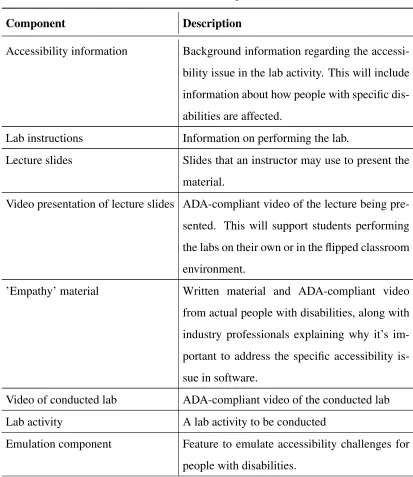
Each lab will contain several components. These components are further described in Table
[image:17.612.102.515.187.664.2]3.1.
Table 3.1: Lab Components
Component Description
Accessibility information Background information regarding the
accessi-bility issue in the lab activity. This will include
information about how people with specific
dis-abilities are affected.
Lab instructions Information on performing the lab.
Lecture slides Slides that an instructor may use to present the
material.
Video presentation of lecture slides ADA-compliant video of the lecture being
pre-sented. This will support students performing
the labs on their own or in the flipped classroom
environment.
’Empathy’ material Written material and ADA-compliant video
from actual people with disabilities, along with
industry professionals explaining why it’s
im-portant to address the specific accessibility
is-sue in software.
Video of conducted lab ADA-compliant video of the conducted lab
Lab activity A lab activity to be conducted
Emulation component Feature to emulate accessibility challenges for
people with disabilities.
Table 3.1 –Continued from previous page
Component Description
Quiz Quiz that will be provided to instructors if
they’d like students to be evaluated at the end
of the activity.
3.4
Steps for Lab Completion
Each lab has three main steps:
1. Discover the accessibility issue: Each lab will address at least one accessibility
issue. Students will use an inaccessible version of the software to directly experience
the effects of inaccessible software on people with disabilities. This demonstration
will help students understand accessibility issues, increase awareness of accessible
software, and empathize with problems that people with disabilities go through.
2. Explain the accessibility issue:Each lab will explain the accessibility issue that was
demonstrated in the activity. The lab will address the accessibility guideline that can
fix the accessibility issue. Best practices of accessibility design and implementation
[18, 11, 6, 20, 14, 26, 39] will be utilized to properly teach students how to properly
design and implement accessible software.
3. Fix the accessibility issue: After experiencing the effects of how people with
dis-abilities use inaccessible software, the lab will walk students through the necessary
steps to fix the accessibility issue by applying the accessibility guideline addressed
in the activity. By doing this, students will understand how accessible software will
Chapter 4
Lab 1: Hearing
This chapter provides the objective and full details of the components of the first
accessi-bility learning lab. Not only that, the surveys, supplementary materials, and lab quiz will
be also briefly explained.
4.1
Objective
The primary goal of the first accessibility learning lab is to teach students the Perceivable
accessibility principle. The Perceivable accessibility principle explains that information
should be presented in multiple forms (visual, auditory, or tactile) without a loss of
infor-mation [39]. In this lab, we will demonstrate that applying this accessibility principle will
enhance the accessibility for Deaf and Hard of Hearing users by presenting audio
informa-tion visually.
4.2
Pre-Survey
The pre-survey’s goal is to assess the initial knowledge students have regarding accessible
software and people with hearing impairments. The questions are listed below. Each
ques-tion can be answered with a linear scale from one to four: ‘one’ ranks strongly disagree,
while ‘four’ ranks strongly agree.
1. How strongly do you agree with the statement: ‘It is difficult to create accessible
2. How strongly do you agree with the statement: ‘I find planning for accessible
soft-ware difficult’?
3. How strongly do you agree with the statement: ‘I frequently think about accessibility
when designing software’?
4. How strongly do you agree with the statement: ‘I look for accessibility features when
I get a new app’?
5. How strongly do you agree with the statement: ‘I consider accessibility as a top
priority when designing software’?
After completing the lab activity, students will be tested again with their new knowledge
in the post-survey using the same questions from the pre-survey.
4.3
Supplementary Materials
The supplementary materials for the first accessibility learning lab consist of lecture slides,
a testimony video, and a case study, which are further shown in Table 4.1. These materials
are to provide students with the information on people with hearing impairment, how
inac-cessible software can impact those people, and how to create acinac-cessible software for DHH
people.
Table 4.1: Supplementary Materials
Material Description
Lecture slides Provide information on hearing impairment and
how to create accessible software.
Testimony video A video from a DHH individual explaining how
their hearing loss has impacted their life and
how inaccessible software has affected them.
Table 4.1 –Continued from previous page
Material Description
Case study A case study explaining the ethical and legal
importance of developing accessible software.
4.4
Lab Activity
To demonstrate the problem to users without hearing impairments, a simple game will be
developed to help hearing users face what DHH users may encounter when using
inacces-sible software. This game, referred to asTreasure Hunter, consists of a hint box and four
[image:21.612.163.457.347.570.2]boxes, shown in Figure 4.1.
Figure 4.1: Concept Design
The objective of the game is to find the box that contains the treasure and get the highest
score. The hint box can be used to get a hint on the location of the treasure with a cost of
a set amount of points. After the player uses the hint box, figure 4.2(a) shows the location
However, the hint box is not always guaranteed to contain a hint inside, shown in Figure
4.2(b). If the player selects a box that contains no treasure, they will have points taken
away from their score. Otherwise, their score will be increased by a number of points, and
the game proceeds to the next round. To inform the user that the hint box contains a hint
inside, an audio cue will play in the beginning of each round with a fifty percent chance of
occurring.
[image:22.612.117.505.230.395.2](a) Available Hint (b) No Hint
Figure 4.2: Results after opening the Hint Box
To avoid the player taking advantage of the hint box without delay, the hint box will
“wait” for a set amount of time before giving out the answer, shown in Figure 4.3. This
feature gives players more incentive to carefully pay attention to the audio cue every round
Figure 4.3: ”Thinking” Hint Box
4.4.1
Playthroughs
To provide a complete learning experience of the lab activity, each student will play a total
of at least three playthroughs:
• First Playthrough: This playthrough will have hearing users play the game with
sound enabled.
• Second Playthrough: After completing the first playthrough, the hearing users will play the game again, but with sound disabled. This is to provide students a
simula-tion of what users with hearing impairments experience every day using inaccessible
software.
• Third Playthrough: After completing the second playthrough, the hearing users
will have an opportunity to repair the lab activity. This is to teach students the proper
approaches to repair inaccessible software that utilizes audio cues as well as to create
accessible software.
This approach is set up that way so that the student should have a lower score in the
not accessible, they will feel helpless and unsure on what to do, reasoning that it is critical
to design accessible software for everyone. Finally, a graph of the scores from all the
playthroughs, shown in Figure 4.4, will be shown at the end of the lab activity to help the
[image:24.612.125.495.183.408.2]student realize the impact of inaccessible software on people with hearing impairment.
Figure 4.4: Results after playing three games
4.4.2
Repair Process
To fix the accessibility issue, a repair editor will be provided in the beginning of the third
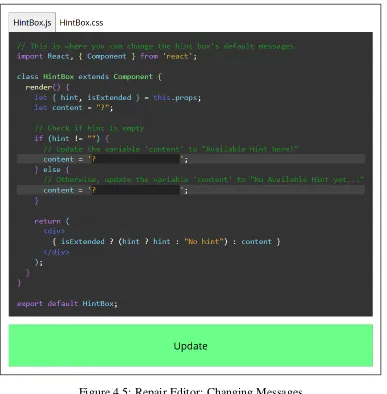
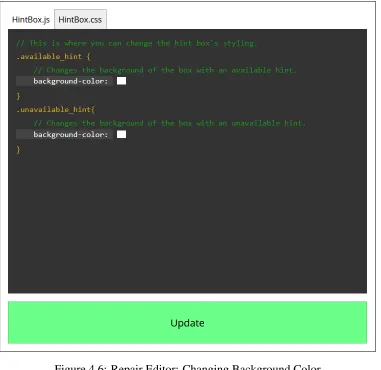
playthrough. The repair editor provides a code simulation and allows the user to tweak the
hint box’s messages and background color to convey key information, as shown in Figures
4.5 and 4.6. The purpose of the repair process is to teach the students how to make software
Figure 4.6: Repair Editor: Changing Background Color
4.4.3
Data
The lab activity will collect all of the players’ data in the various playthroughs, further
explained in Tables 4.2, 4.3, 4.4, and 4.5:
Table 4.2: ’AudioCue Game’ Table
Data Description
GameID A unique identifer for the game LoginID A unique identifer for the player
Score The score the player received in the game
[image:26.612.104.524.585.702.2]Table 4.3: ’AudioCue Round’ Table
Data Description
RoundID A unique identifer for the round GameID A unique identifer for the game
HintUsed A boolean value indicating whether hint has been used or not SoundOption A boolean value indicating whether sound is on or not
Table 4.4: ’AudioCue Choice’ Table
Data Description
ChoiceID A unique identifer for the choice RoundID A unique identifer for the round BoxNumber The box number the player selected
[image:27.612.92.527.397.524.2]Correct A boolean value whether the player is correct or not
Table 4.5: ’AudioCue Repair’ Table
Data Description
RepairID A unique identifer for the repair LoginID A unique identifer for the player
AvailableMessage The message that shows when there is a hint UnavailableMessage The message that shows when there is no hint
AvailableBackgroundColor The background color that is used when there is a hint UnavailableBackgroundColor The background color that is used when there is no hint
Chapters 5 will utilize the ’Score’ data from the ’AudioCue Game’ table, more
ex-plained later on. The remaining data is not used for the evaluation. However, it may serve
helpful information for future purposes.
4.5
Quiz
After performing the lab activity, the students will go through a quiz to test their
accessibility issue regarding audio cues. The quiz questions are listed below along with
answers:
1. What is an audio cue? A playing sound that conveys key information.
2. How many people (aged 18 and over) with hearing loss are there in the United
States? 30-40 million people.
3. What’s a sign of hearing loss? Have trouble hearing over the telephone, think
that others seem to mumble, and need to turn up the TV volume so loud that others
complain.
4. How is hearing loss caused? Noise, age, disease, and heredity.
5. Do users with hearing loss have a disadvantage when they use applications that
utilize audio cues? Yes.
6. How do you make an application that utilizes audio cues more accessible to Deaf
and Hard of Hearing users? Add additional messages and add visual cues.
7. When should accessibility be considered in the development process? From the
beginning.
8. Who is responsible for creating accessible software? Software developers, user
interface designers, and accessibility exeprts on the development team.
9. What does the ’Perceivable’ accessibility principle mean? Information and user
interface components must be presentable to users in ways they can perceive.
10. Which of the item(s) below are accessible to Deaf and Hard of Hearing people?
4.6
Post-Survey
The post-survey contains the same questions as the pre-survey. After going through the
sup-plementary materials and lab activity, this survey will test the students’ newfound
Chapter 5
Evaluation
This chapter will first present the research questions for this study. Then a full explanation
of how the first accessibility learning lab is evaluated will be provided.
5.1
Research Questions
To investigate whether the first accessibility learning lab is effective in improving the
cur-rent state of accessibility in an educational context, we present the following research
ques-tions:
RQ1. How effective is the lab in motivating students to create accessible software?
RQ2. How effective is the lab in educating students to create accessible software?
For RQ1 and RQ2, using the statistical tool R, the answers to the pre-survey and
post-survey questions listed in Chapter 4 by students are compared. The results between
students who learn through existing accessibility activities (Group A) and students
who learn through the lab along with the supplementary materials (Group C) are
compared to determine whether if the proposed lab along with the supplementary
materials are more effective than available provided materials such as through W3C.
RQ3. How effective are the supplementary materials?
To investigate whether including supplementary materials along with the lab activity
learn through the lab without the supplementary materials (Group B) and Group C
are compared.
RQ4. Does the absence of sound impact the user’s response rate?
Using the data collected from the lab activity, we compare the scores from both
the first and second playthroughs, factoring in that the sound is enabled in the first
playthrough, and off in the second.
5.2
Experiment Setup
This section outlines how the first lab is set up in each course.
5.2.1
Course
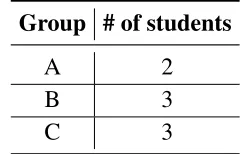
The first accessibility lab got permission to be tested in a single online introductory
com-puting course (N = 8), split into three groups as shown in Table 5.1. More information on
[image:31.612.247.368.451.528.2]each group will be further detailed in the section below.
Table 5.1: Evaluation Groups
Group # of students
A 2
B 3
C 3
The online class uses MyCourses, a tool that allows instructors and students to interact
and with access to course materials online. MyCourses will split the students into three
groups and show material based on the assessment group.
5.2.2
Groups
• Group A: The students will learn the material through existing accessibility activities
such as Firefox [13], W3C [40], and others. These students will be considered our
control group.
• Group B: The students will learn the material through the first accessibility learning
lab. However, the supplementary materials will not be taught to these students. This
is the first study group to determine if the lab approach is effective in teaching
acces-sibility concepts and making students understand the need of accessible software.
• Group C: The students will learn the material through the first accessibility
learn-ing lab, includlearn-ing the supplementary materials. This is the second study group to
determine if the lab approach along with the supplementary materials is effective in
teaching accessibility concepts and making students understand the need of
accessi-ble software.
Each assessment group will have their own specific instructions to complete the lab
Chapter 6
Limitations and Future Work
This chapter identifies factors that limited this study regarding the first accessibility
learn-ing lab, and in turn, a suggestion will be provided for future work to combat each limitation
shown below.
Due to the time constraints, the most notable limitation is that the first accessibility
learning lab was only tested in a single computing course (N = 8). Not only that, the course
that conducted the first lab was online. There is no evidence that the first lab would deliver
the same results both in-person and online courses. The lab was also not successfully
com-pleted in the time for this paper. In the future, the first lab should be tested in more courses
to confirm that the accessibility labs in fact help improve the current state of accessibility
education and increase awareness of the need to create accessible software.
Existing accessibility activities relating to audio cues and people with hearing
impair-ments were to be utilized for Group A (explained in Chapter 5), but they were quite limited,
as either, they do not contain sufficient information or provide enough activities. However,
this is the reason why the accessibility learning labs are proposed to address this problem.
The labs are needed for two reasons: to teach developers how to create accessible software,
and to conduct research on how to best teach developers about accessibility issues.
Another notable limitation is that the testimony video was not able to be created in the
time for the experiment, so the supplementary materials only consisted of lecture slides and
a case study for students to learn the material. However, the video will be created for future
Chapter 7
Conclusion
This paper presents the accessibility learning labs as a solution to the lack of high-quality
accessibility educational materials and discusses the first accessibility learning lab. This
work shows that the first lab teaches students to understand accessibility issues, increase
awareness of the need to create accessible software, and empathize with problems that
people with hearing impairments go through every day. While the experimental results
from a single course during the evaluation of the first lab are not enough to ultimately
conclude the validation of the research questions, this is truly the first step in improving the
current state of accessibility education and teaching current and future software developers
Bibliography
[1] Americans with disabilities act. https://www.dol.gov/general/topic/disability/ada.
[2] Game accessibility top ten. https://igda-gasig.org/about-game-accessibility/game-accessibility-top-ten/.
[3] Section 508 of the rehabilitation act. https://www.fcc.gov/general/section-508-rehabilitation-act.
[4] World wide web consortium launches international program office for web accessi-bility initiative. https://www.w3.org/Press/IPO-announce.
[5] ACHECKER. Web accessibility checker. http://achecker.ca.
[6] ADOBE. Adobe accessibility. https://www.adobe.com/accessibility/.
[7] ALABI, H. I., ANDGOOCH, B. The accessibility toolkit. InProceedings of the 10th SIGPLAN symposium on New ideas, new paradigms, and reflections on programming
and software(Oct 2011), Onward! 2011, pp. 145–148.
[8] ALAHMADI, T., AND DREW, S. Subjective evaluation of website accessibility and usability: A survey for people with sensory disabilities. InProceedings of the 14th
Web for All Conference on The Future of Accessible Work(2017), W4A 2017.
[9] ALLINE M. R. KOBAYASHI, C. C. L., AND TANAKA, E. H. Relationship between accessibility and software evolution. InProceedings of the 10th Brazilian Symposium
on Human Factors in Computing Systems and the 5th Latin(2011), IHC+CLIHC ’11,
pp. 298–302.
[10] ANDRE´ PIMENTA FREIRE, RENATA PONTIN DE MATTOS FORTES, D. M. B. P.,
AND TURINE, M. A. S. Using screen readers to reinforce web accessibility
edu-cation. In Proceedings of the 12th annual SIGCSE conference on Innovation and
[11] APPLE. Apple accessibility. https://www.apple.com/accessibility/.
[12] CENTER FOR EXCELLENCE IN UNIVERSAL DESIGN. What is universal design.
http://universaldesign.ie/What-is-Universal-Design/.
[13] FIREFOX. Accessibility: Ensuring content is usable by and for everyone. https://developer.mozilla.org/en-US/docs/Web/Accessibility.
[14] FIREFOX. Firefox accessibility. https://developer.mozilla.org/en-US/docs/Learn/Accessibility.
[15] FOUNDATION, N. S. Developing experiential laboratories for computing accessibil-ity education. https://www.nsf.gov/awardsearch/showAward?AWD ID=1825023.
[16] GILBERTSON, T. D., AND MACHIN, C. H. C. Guidelines, icons and marketable skills: an accessibility evaluation of 100 web development company homepages. In
Proceedings of the International Cross-Disciplinary Conference on Web Accessibility
(Apr 2012), W4A 2012.
[17] GOLDBERG, L. Teaching accessibility: A call to action from the tech industry, 2015.
[18] GOOGLE. Google accessibility. https://www.google.com/accessibility/.
[19] HANSON, V. L., AND RICHARDS, J. T. Progress on website accessibility? InACM
Transactions on the Web(2013).
[20] IBM. Ibm accessibility. https://www.ibm.com/able/index.html.
[21] JEFFREYP. BIGHAM, I. L.,ANDSAVAGE, S. The effects of ”not knowing what you don’t know” on web accessibility for blind web users. In Proceedings of the 19th
International ACM SIGACCESS Conference on Computers and Accessibility(2017),
ASSETS 2017, pp. 101–109.
[22] JONATHAN LAZAR, J. F., AND ALLEN, A. Determining the impact of computer frustration on the mood of blind users browsing the web. InProceedings of the 8th
international ACM SIGACCESS conference on Computers and accessibility (2006),
ASSETS 2006, pp. 149–156.
[23] KRISTENSHINOHARA, SABAKAWAS, A. J. K.,ANDLADNER, R. E. Who teaches accessibility?: A survey of u.s. computing faculty. InProceedings of the 49th ACM
[24] MICHAEL CRABB, MICHAEL HERON, R. J. M. A. H. R., AND WILSON, A. De-veloping accessible services: Understanding current knowledge and areas for future support. InProceedings of the 2019 CHI Conference on Human Factors in Computing
Systems(May 2019), CHI 2019.
[25] MICHAEL JAMES HERON, PAULINE HELEN BELFORD, H. R., AND CRABB, M. Meeple centred design: A heuristic toolkit for evaluating the accessibility of tabletop games, Jun 2018.
[26] MICROSOFT. Microsoft accessibility. https://www.microsoft.com/en-us/accessibility/.
[27] NATIONAL ASSOCIATION OF THE DEAF. Landmark precedent in nad vs. netflix. https://www.nad.org/2012/06/19/landmark-precedent-in-nad-vs-netflix/.
[28] PORTER, J. R., AND KIENTZ, J. A. An empirical study of issues and barriers to mainstream video game accessibility. InProceedings of the 15th International ACM
SIGACCESS Conference on Computers and Accessibility(Oct 2013), ASSETS 2013.
[29] ROSCIO CALVO, F. S., AND SAVVA, A. Beyond web content accessibility guide-lines: Expert accessibility reviews. In Proceedings of the 7th International Con-ference on Software Development and Technologies for Enhancing Accessibility and
Fighting Info-exclusion(Dec 2016), DSAI 2016, pp. 77–84.
[30] SABAKAWAS, L. V.,ANDKO, A. J. Teaching accessibility: A design exploration of faculty professional development at scale. InProceedings of the 50th ACM Technical
Symposium on Computer Science Education(2019), SIGCSE 2019, pp. 983–989.
[31] STEPHANIE LUDI, MATTHUENERFAUTH, V. H. N. R. P.,ANDGARCIA, P. Teach-ing inclusive thinkTeach-ing to undergraduate students in computTeach-ing programs. In
Proceed-ings of the 49th ACM Technical Symposium on Computer Science Education (Feb
2019), SIGCSE 2018, pp. 717–722.
[32] STEPHANIE´ GIRAUD, TERESA COLOMBI, A. R., AND THEROUANNE´ , P. Acces-sibility of rich internet applications for blind people: a study to identify the main problems and solutions. InProceedings of the 9th ACM SIGCHI Italian Chapter
In-ternational Conference on Computer-Human Interaction: Facing Complexity (Sept
[33] SUZETTE KEITH, G. W., AND PETZ, A. Design for all as focus in european ict teaching and training activities, 2009.
[34] UNITEDSTATES CENSUSBUREAU. Americans with disabilities: 2005.
[35] UNITEDSTATES CENSUSBUREAU. Americans with disabilities: 2010.
[36] UNIVERSITY OF LEICESTER. The social and medical model of disabil-ity. https://www2.le.ac.uk/offices/accessability/staff/accessabilitytutors/information-for-accessability-tutors/the-social-and-medical-model-of-disability.
[37] UNIVERSITY OF WASHINGTON’S DO-IT PROGRAM. How are the terms deaf, deafened, hard of hearing, and hearing impaired typically used?
https://www.washington.edu/doit/how-are-terms-deaf-deafened-hard-hearing-and-hearing-impaired-typically-used.
[38] W3C. Introduction to web accessibility. https://www.w3.org/WAI/fundamentals/accessibility-intro/.
[39] W3C. Web content accessibility guidelines. https://www.w3.org/WAI/standards-guidelines/wcag/.