Ferguson, J.D. and Mohamed, R. and Weir, G.R.S. and Wilson, J. (2002)
Professional Development On-line. In: Proceedings of Computers and
Advanced Technology in Education (CATE 2002). Acta Press.
http://eprints.cdlr.strath.ac.uk/2
714
/
This is an author-produced version of a paper published in
Proceedings of
Computers and Advanced Technology in Education (CATE 2002).
Strathprints is designed to allow users to access the research
output of the University of Strathclyde. Copyright © and Moral
Rights for the papers on this site are retained by the individual
authors and/or other copyright owners. Users may download
and/or print one copy of any article(s) in Strathprints to facilitate
their private study or for non-commercial research. You may not
engage in further distribution of the material or use it for any
profitmaking activities or any commercial gain. You may freely
distribute the url (
http://eprints.cdlr.strath.ac.uk
) of the Strathprints
website.
PROFESSIONAL DEVELOPMENT ON-LINE
{jf, rehman, gw, jnw}@cis.strath.ac.uk
ABSTRACT
Continuing Professional Development (CPD) is making increased use of the Web to develop and support communities of professionals. This paper outlines the factors driving the adoption of CPD and highlights areas where the Web can aid in the development of successful professional communities. Current work to provide on-line support for approximately 500 teachers of computing is then presented, highlighting those aspects of the Web site designed to foster and engage participants in the professional development activity.
KEYWORDS
Continual Professional Development, Community, World Wide Web, On-line support.
1. INTRODUCTION
The use of the Internet and the World Wide Web is growing and the number of applications where it is employed to support, or even to replace, many traditional activities associated with work and recreation continues to expand. New technology means that the nature of the jobs we do has changed, as has the professions in which we work and the skills they require. Life-long learning has never assumed greater importance than it does today, allowing us to remain competent and achieve personal satisfaction and job fulfilment, throughout our careers. From an employer’s viewpoint, lifelong learning contributes to competitive advantage through excellence of employees. At a national level, it allows us to remain competitive in a world participating in free trade and experiencing rapid changes through technology. It is not surprising that many professional communities have turned to the Internet to augment or replace continued professional development support. Traditional approaches to professional development rely on a mixture of activities including conferences, meetings, scholarly reading, newsletters and short courses. However, no matter how excellent any of these activities prove to be, they are of little value if they are not accessible to those who need them most, when they need them. While many
will argue that the Web cannot provide all the things that come with more 'traditional' approaches, Web technology can provide flexible support to professional communities, especially under circumstances where the community members are geographically dispersed and are subject of time constraints.
The use of new technology does not guarantee success in encouraging and supporting CPD. Any successful Web community must be built upon solid foundations. "Web communities need 'social scaffolding' to grow and thrive. Social scaffolding refers to those aspects of a site - roles, rituals, features, events, and leadership - that facilitate community development. Much like a trellis enables a plant to grow, social scaffolding enables members to become progressively more involved in the community" [1]. Simply launching a Web site with a bulletin board and chat facilities does not automatically generate a community [2]. There are numerous examples of quickly launched message boards with many topics but no responses. Creating gathering places alone is not enough - they need to be organised and integrated into the community. The central issues surrounding communities are people issues - Web technology merely acts as a facilitator, providing the tools for helping people come together [3].
This paper outlines the factors driving, as well as those inhibiting, the formation of communities participating in professional development through the use of Internet technology. It then gives some preliminary details of a project currently under development by the authors to deliver continual professional development to a cohort of approximately five hundred teachers of computing and information science in schools throughout Scotland.
2. CONTINUAL PROFESSIONAL
DEVELOPMENT AND THE WEB
Getting individuals to 'buy into' continuing professional development often proves difficult. Many people need to be reminded that they have a career and not just a job [4]. In order to be truly effective, individuals need to take ownership of their approach to personal development and John D. Ferguson, Rehman Mohamed, George Weir and John Wilson
Department of Computer and Information Sciences University of Strathclyde
life long learning. The web can enhance this process by allowing individuals to extend their professional interaction, seeking out and exchanging new ideas and opinions, beyond the boundaries of the organisation in which they work.
Web technology can be used to complement existing forms of learning and development, delivering CPD to a widely diverse and dispersed audience. Individuals may get less benefit from face-to-face conferences as a conference size increases. The Web can mitigate these effects by enabling users to take a more 'personal' approach to professional development, so that individuals can tailor a developmental programme to their own requirements. "Every learner can, at his or her own choice of time and place, access a world of multimedia material... immediately the learner is unlocked from the shackles of fixed and rigid schedules, from physical limitations... and is released into an information world which reacts to his or her own pace of learning" [5]. While the use of Web technology does mean that individuals can work at their own pace, there still needs to be a forum for obtaining feedback on their progress. Further, there are some subjects, requiring more nuance or hands-on involvement, which may prove more difficult to translate to an online environment [6].
Professional development can be substantially enhanced by opportunities to collaborate with others within Web communities [7]. The opportunity to take advantage of the expertise of others can provide community members with important reinforcement and incentive for continuing growth and development, along with enhanced personal status and respect that comes from membership in a learning community with their professional colleagues. The asynchronous nature of much of the communication that takes place online lends itself to CPD and supports synthesis of knowledge [8]. Individuals have 24-hour access to the system and can log on whenever they wish and for however long they wish. Users are able to reflect on issues raised online, and their own ideas and thoughts can germinate through composing replies.
CPD is an ongoing process and as such, the use of Web technology to aid this process is not a one-shot event. Traditionally, individuals within an organisation would take one or two weeks away from their employment to go on a training course. The use of Web technology enables professional development to be a constant continuing process. However, technology is no panacea for professional development. In order to be truly effective, the use of technology must be linked to the objectives and goals of any professional development programme, and must deliver real value to the community.
3. FOSTERING
WEB
COMMUNITIES
The use of the Internet to develop Web communities has meant that localised communities can now have a more
global outlook. "The Net erases boundaries created by time and distance, and makes it dramatically easier for people to maintain connections, deepen relationships, and meet like-minded souls that they would never have met" [9]. In order to be successful and deliver true value to the users, the aims of the community must be clear and the first step to building a loyal community of members is to understand the purpose of the community [1]. Web communities grow and thrive when members are able to fulfil their purpose and accomplish those goals that require other members to participate. The concept of collaborative purpose is one of the Web's premier strengths as a means of building community [10]. There are a number of features that aid the development of an on-line community [9]. These include: -
Backstory: The community's backstory provides a powerful tool in shaping members' expectations about the purpose and personality of the site [1]. The term backstory comes from filmmaking and refers to the part of the movie's story that has happened before the first frame of the film. Backstories introduce the community founders, communicate their motivation, and impact a sense of the community's core values.
Site Map: The site map gives an overall picture of the community space and may include links to each section of the community. The site map should be updated as the site evolves and sections of the community are added.
Feedback: Through implementation and maintenance of feedback loops, communities evolve over time and may react to the requirements of its members. Regular surveys will help gauge the community opinions and re-enforce a sense of shared purpose.
Database: A member database system is crucial for creating and maintaining member profiles that evolve over time. This database can be used to control access to Web pages, mailing lists, chat rooms, conference areas and member profiles. Many communities also allow members to develop their own home pages, thus helping each member develop their sense of belonging to the community [11].
Frequently Asked Questions: These address the needs and questions of newcomers without alienating established members. FAQs serve a key role in breaking down initial barriers for new users and making them feel more at ease with the technology and the community environment itself.
public and private meeting places and it can often prove difficult to identify a single space where the Web community 'lives'. This is a result of the range of tools adopted by members [3]. The most commonly used tools include: - Electronic Mail- The use of e-mail is widespread and as such, it is an extremely powerful communication medium that may be used to hold a community together. E-mail distribution lists may be used for making announcements and for encouraging communication between users. A community newsletter can serve a key role in keeping members up to date with key events or issues that may arise within the community. E-mail can also be used to encourage feedback and suggestion from community members. Poling [12] found that the use of e-mail enhanced the quality of communication within groups and ultimately aided group cohesion: Mailing Lists and Bulletin Boards - Community mailing lists can facilitate conference-style interaction between community members. However mailing lists do not create the same sense of gathering in a location with fellow community members that conference-style interaction can provide [13]: Chat - Real-time chat is a frequently misused community technology [13]. Nothing discourages users more than an empty chat room, or an interactive event that has very little or zero interaction between users. However when utilised correctly, real-time chat can be a very effective communication medium:
4.
AN EXEMPLAR – STORM
The Scottish Teachers Online Resource Modules (STORM) was launched in May 2000 and is the result of a joint venture between the University of Strathclyde and the Scottish Executive Education Department (SEED). STORM is aimed at providing support for teachers of computer courses at Scottish schools (Computing and Information Systems). The University of Strathclyde has developed the content of the site over the period since the launch of STORM and new material is still being added at regular intervals. The Department of Computer Science at the University of Strathclyde has worked closely with the Department of Business and Computer Education, practising teachers and others to develop and support the material on the STORM Web site, [14].
The material was not designed for direct classroom use with students, but rather as a resource that could be used by teachers to aid their professional development. The purpose of the STORM material is to provide teachers with the necessary additional skills and confidence to enhance and enable their role in the classroom. The material on the STORM Web site has been designed to provide support for teachers in three main topic areas, namely databases, computer networking and multimedia, all areas that were recognised as under continual change and posing a challenge to the classroom teacher.
Along with the online course material, STORM provides several tools on the site aimed at engaging debate and
discussion about the subject matter of the material. These tools include chat rooms, bulletin boards, e-mail and search facilities, all provided under the umbrella of the Web/CT framework, [15].
In an attempt to encourage individual teachers to act as moderators and take a leading role in helping to develop the material on the site, the University of Strathclyde offers a Postgraduate Certificate for those who are willing to participate in the development of coursework related to the materials. It was intended that this would create a multiplier effect, with the wider teacher community benefiting as more teachers take up an active role.
While Web/CT provided many of the tools needed to establish the Web site and support interaction, the authors gave careful consideration to those features, outlined in section 3, needed to promote a sense of community, namely:
Backstory: The backstory plays a key role in communicating the purpose and motivation of any community. STORM's introductory page emphasises that the site is aimed at aiding professional development within the teaching community. STORM overcomes the most common initial problems of building Web communities - that of a common goal or purpose by focussing on a collective community-enabled purpose rather than individual goals. The STORM backstory encourages active debate and discussion from members, aimed at providing further benefits to the wider community. The fact that STORM is backed by the Scottish Office adds a sense of legitimacy, making the content of the site directly useful to teachers of computing courses in their everyday work, and should encourage active participation within the community.
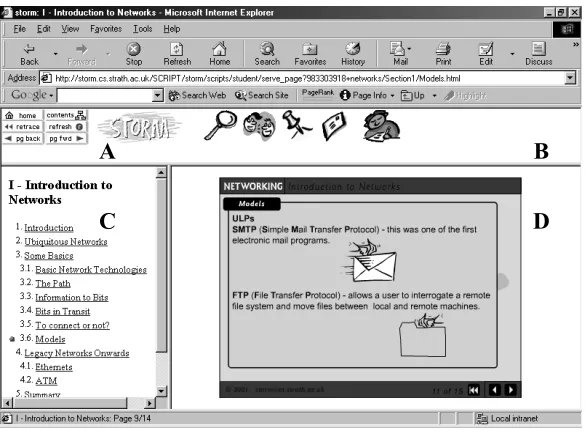
A STORM Navigation - allows users to move between topics, view the list of topics within a particular unit, or return to the STORM course material homepage.
B Toolbar - used to access the search facility, chat
rooms, bulletin board, STORM e-mail or the note-taking tool. Users can access help on these toolbar items via the Tools icon within the STORM course material homepage.
C A listing of the topics covered in a particular
unit.
D The actual course content. The material is
[image:5.595.145.438.103.320.2]presented using Macromedia Flash. Users can navigate through the material using the Flash navigation toolbar, which is located in the bottom right hand corner.
Figure 1: Example of STORM content showing screen layout
Member Database: At the end of 2001, STORM had approximately 500 registered members. For the majority of Web communities, the main stumbling block to building a member database lies in convincing users to register to use a site. STORM has overcome this common problem since only registered users are allowed to access the material on the site. The links to the University of Strathclyde and the SEED have also helped to build up this initial trust within the member base. The member database can be useful when gauging the views of members via e-mail or form-based surveys. Further, as the community evolves, it is envisaged that members will be able to develop their own content through the use of an upload service, allowing members to exchange teaching-related materials within the protected STORM environment.
Frequently Asked Questions: Much of the material that would form part of any general FAQ list for the site is included within the Introduction, Getting Started and
Tools sections of the STORM site. These sections include general information relating to the course content, operation and function of chat rooms, bulletin boards and the internal e-mail system. Within individual subject areas there are FAQ sections specifically relating to the topic content. These areas are designed to hold commonly recurring questions filtered from participants’ interaction with subject related bulletin boards.
STORM Course Content: Currently STORM provides course materials on three topics, namely, databases, networking and multimedia. The content of each topic was designed to provide the equivalent of one day of traditional in-service training through the provision of information content, as well as reinforcement, through engagement in tests and other interactive activities. Subject content is presented using Macromedia Flash allowing the extensive use of animation to help highlight many of the more complex issues found in each topic, Figure (1).
The course material provided by STORM goes beyond that required in everyday use by teachers in the classroom, offering a much needed resource for those teachers wishing gain a deeper understanding of the topics and aid their professional development. The STORM site and the material included within it attempt to meet all of the criteria laid out by Hixson and Tinzmann [4] concerning the usefulness of technology in aiding and enhancing continual professional development, namely:
• Better quality of presentation.
• Opportunities to review information that has
been presented.
• Opportunities to discuss key issues and concepts
with peers and experts via online debates and forums.
C
A B
• Opportunities for coaching and feedback.
• Access to 'expert systems' for support in
decision-making and problem solving.
• Opportunities to make thinking processes more
visible and explicit.
• Provision of rich context environments for
learning via visual media.
Communication Technology: The Web/CT environment on which STORM is mounted provides a wide range of tools to allow participants to interact with each other and with the course tutors. There are a number of chat rooms and bulletin boards, some of which have been designated to individual subject areas and some to general and social interaction. WebCT also supports its own internal e-mail structure, but this was not greatly utilized with members tending to make use of their normal Internet e-mail addresses.
5. CONCLUSION
This paper has examined many of the key issues involved in constructing an online community aimed at delivering continuing professional development. In order for a Web community to be successful, it must be built upon solid foundations; the community members must have a shared purpose and be willing to openly share information. Successful communities tap into a collective community-enabled purpose. They grow and thrive when members are able to fulfil that purpose and accomplish those goals that require other members to participate in the community.
It is vital to give careful consideration to the tools used to develop any Web community. It is not sufficient to merely provide tools for community building; they must match the requirements and needs of community members. The greater the relevance of the tools and the content the more likely they are to be used. While the tools adopted in STORM project give an early indication of some aspects of community development, there still remains much work to be done to encourage and develop interaction with and between participants.
Continuing professional development is an ongoing process and the use of web technology to aid this process is not a one-shot event. Web technology enables professional development to be a constant continuing process. However, Web technology is no panacea for professional development. The use of any technology must be linked to the goals and objectives of any professional development programme, and most importantly, must deliver real value to the community.
REFERENCES
[1] Kim, A. J. (1998), 9 Timeless Principles for Building Community, Web Techniques,
http://www.Webtechniques.com/archives/1998/01/kim/ [2] Mager, D., and Karlenzig, W. (2001), Challenging E-Community Myths, Knowledge Management Review, February, pp74-75.
[3] Cothrel, J. and Williams, R. (1999), Online Communities: Getting the Most out of Online Discussion and Collaboration, Knowledge Management Review, Issue 6, pp20-25.
[4] Arnold, G. and Smith S. (1998), Expert Advice: Lessons Learned from People in the Know, CIO Magazine, November 1,
http://www.cio.com/archive/110198_expert.html
[5] Benjamin, A. (1994), Affordable, Restructured Education: A Solution Through Information Technology, RSA Journal, (May), pp45-49.
[6] Stuart, A. (1999), Continuing Ed, CIO Magazine, September,
http://www.cio.com/archive/Webbusiness/ 090199_virtual.html
[7] Hixson, J. and Tinzmann, M. B. (1990), What Changes are Generating New Needs for Professional Development, North Central Regional Laboratory, Oak Brook,
http://www.ncrel.org/sdrs/areas/rpl_asys/profdev.htm [8] Salmon, G. (2000), E-moderating: The Key to Teaching and Learning Online, Kogan Page, London. [9] Kim, A. J. (2000), Community Building on the Web, Peachpit Press, Berkley.
[10] Real Communities Inc. (2000), Shared Knowledge and a Common Purpose: Using the 12 Principles of Civilization to Build Web Communities, White Paper, August, http://www.realcommunities.com/products/ 12principles.htm
[11] White, N. (2001), Facilitating and Hosting a Virtual
Community, Fullcirc, http://www.fullcirc.com/community/
communityfacilitation.htm
[12] Poling, D. J. (1994), E-mail as an Effective Teaching Supplement, Educational Technology, May 1994.
[13] Steuer, J. (1998), Tilling the Soil: Tools for Building a Web Community, Web Techniques, http://www.Webtechniques.com/archives/1998/01/steuer/ [14] STORM (2001) Scottish Teachers On-line resource Modules, http://storm.cs.strath.ac.uk/