Rochester Institute of Technology
RIT Scholar Works
Theses
Thesis/Dissertation Collections
5-10-1996
Graphical visualization of control system
performance
Jeffrey Marx
Follow this and additional works at:
http://scholarworks.rit.edu/theses
This Thesis is brought to you for free and open access by the Thesis/Dissertation Collections at RIT Scholar Works. It has been accepted for inclusion
in Theses by an authorized administrator of RIT Scholar Works. For more information, please contact
Recommended Citation
Graphical Visualization of Control System
Performance
A Thesis Submitted
in
Partial Fulfillment of the Requirements for
Masters of Science Degree
in ..Mechanical Engineering
at Rochester Institute ofTechnology
on May 10,1996
By
Jeffrey D. Marx
Approvals:
Dr. Charles Haines, Department Head
Dr. Mark H. Kempski, Thesis Advisor
Dr. Kevin Kochersberger, Thesis Committee
I, Jeffrey David Marx, grant permission to the Wallace Memorial Library to
reproduce my thesis in whole or in part. Any reproduction will not be for commercial use
or profit.
1/5"/9e:.
Table
ofContents
Table
ofContents
Abstract
1.
Background
andIntroduction
to
Program
1
.1
Background
1
1
.2Purpose
andOverview
5
1.3
'Visual'Program Introduction
6
2.
Control
System
Analysis
andDesign
2. 1
Tutorial Overview
20
2.2
Open
Loop
Control
21
2.3
Unity
Feedback Proportional
Control
23
2.4
Proportional
Control
withVelocity
Feedback
30
2.5
Proportional-Integral
Control
37
3. M-file Descriptions
3
.1
System Parameter Determination
withM-file Jl
.m47
3.2
System Pole
Plotting
withM-file
J2.m
53
3
.3Graphical User
Interface using M-file J3
.m55
3.4
Bode Amplitude
andPhase Determination
Using
M-files J4.m
&
J5.m
58
3.5
User Pole Selection
withM-file J7.m
61
3.6
Two-Dimensional
System Time Domain Response
withM-file
J8.m
63
3.7
Two-Dimensional
System
Bode Response
withM-files
J9.m
& JlO.m
65
3.8
Two-Dimensional
Response Superposition
withM-file
Jl 3.
m67
3.10
User
Selection
ofGain Values
for Open
Loop
Systems
withM-file Jl 5
75
3.11
System
DC Gain Determination
withM-file
Jl 6m
77
3.12
Root
Locus
Plot Design
Limits
withM-file
Jl 7.m
78
Appendix
A
Derivation
ofSecond
Order Performance
Statistics
Appendix B
Simulink Tutorial
Appendix
C
Theory
Behind Matlab
Step
Algorithm
Appendix
D
M-file
Flowcharts
Appendix
E
M-file Program Codes
Abstract
University
courses oncontrol systemdesign have
traditionally
reliedonthe rootlocus
approach topredicttransient system output.However,
theincreasing
speed ofpersonal computers
has
madeit
practical todesign
control systemsby
simulating
theirtime and
frequency
responses.This
thesis presentsaninteractive Matlab
programfor
control system analysis and
design. The
systemis defined
in
Simulink
with auser-specified gain parameter of variable magnitude.
The
gain parameteris automatically
varied
by
theprogramwithin user-specifiedbounds. Several
surface and performanceplots are produced which
describe
systemtime-domainandfrequency-domain
performance.
The
systemrootlocus is
alsopresentedwith poleloci corresponding
to thegain valuesunderscrutiny.
The
locus
ata specific gain value canbe
selectedfor
determination
of systemperformanceusing
standard assessmentparameters.This
programcan
be
appliedin both
an educationalsetting
and as adesign
toolfor practicing
Chapter
1
Background
&
1.1
Background
Scientific
visualizationis
the
process ofmaking
complex states ofbehaviorcomprehensible
to the
human
eye.It
has
evolvedfrom
being
an academic conceptin
the
early 1960's
to
become
a standard part ofengineering
today.
In
its
early
stages, the
expense of computergraphicsequipment
limited
its
useprimarily
to
large
industries
whocould afford
to
invest in
the
equipment.However,
asthe
cost of computerhardware
has
decreased,
andthe
sophistication of visualization softwarehas
increased,
it has become
more cost effective
for
abroader
range of users.Human
perceptionis
naturally
gearedtowards the three
dimensions
of physicalspace,
and caneasily
adaptto
afourth dimension
such as color variation.By
taking
advantage ofthenatural capabilities ofthe
human
eye,
complex resultsfrom
scientificanalysis can
be
communicated efficiently.In addition,
withthe
use ofhighspeedcomputers,
it is
possibleto
display
the
variationofbehavior
overtime
in
animatedsequences which are not captured well
in
print.Animation
can alsobe
usedto
interactively
explorethe
nature of a resultfield
by
changing
the
observers view orzooming
in
on a particular area ofinterest.
Many
engineering
design
and analysis applications share common components ofmodeling,
analysis,
andvisualizationof results.The
figure below illustrates
this
process.By
creating
a computer model ofthe
product or processbeing
designed,
it is
possibleto
simultaneously
design,
test,
andmodify
objectsby
computer simulation.This
currenttrend
towardsanintegrated
design,
analysis,
and visualization environmenthas
the
following
advantages:Decreased Physical Testing.
Testing
by
computer simulationinstead
ofactualprototype
testing
can resultin
a substantial cost savings.In addition,
it
allows an engineerto
observe phenomena which mightbe dangerous
orimpossible
to
reproduce physically.Integration
of
Design
andAnalysis. The better
one can visualize analysisresults,
the
easierit is
to
correctflaws
shownby
the
analysis.Design Optimization.
By
visualizing
analysis results of a model over a range ofparametric
variations,
optimal valuesfor
the
parameters canbe
moreeasily
determined.
Overall,
visualizationtechniques
have become
part of alarger,
evolutionary
trend
in
the
engineering design
field.
Here,
the
computing
environment promotes aninteractive
processwhichencourages
the
exploration ofdesign
alternatives.The
goal ofthis thesis
is
to
develop
a computer visualizationtool
for
designing
control systems.
However,
this
is
notthe
first
time
this
has been
attempted.Stephen
Boyd
atStanford
University
developed
the
Interactive Control Design Module
(ICDM)
(Boyd,
1993).
His
programshares some ofthe
samefeatures
andideas
that
are presentin
the
programdeveloped for
this
thesis.For
example, the
mainfunction
ofboth
programsis
the
interactive design
ofcontinuous-timesingle-input single-outputlinear
time
invariant
control systems.
Where
it is
assumedthat the
userhas been
exposedto the
concepts ofinterface
which makesthem
easy
to
learn
and use.Also,
they
both
rununderothersoftware packages.
Boyd's
runs underXmath
and mineunderMatlab. Both
also use amultiple window
design
where each ofthe
windows performs a particular set offunctions.
There
arehowever
severalfeatures
whichICDM
has
which are not availablein
my
program.
For
instance,
ICDM
offers multiple controllertypes
and synthesismethods,
where as
my
programonly
offerstwo
(3-D
andRoot Locus).
The
controllers andsynthesis methods offered
by
ICDM
are:1)
PID
2)
Linear
Quadratic Gaussian
(LQG)
3)
Minimum
Entropy
Controller
(LEQG) 4)
Root Locus.
The
rootlocus
controllersynthesis window
features
the
separation,
by
color,
of plant and controller poles and zeros.It
also allowsthe
userto
graphically
add ordelete
controller poles and zeros.Another
feature
ofICDM
is
the
ability
to
study
the
robustness of a controllerto
variationsin
the
plant.
Thus
enabling
the
userto
comparethe
effect onthe
systems performanceto the
nominal system.
ICDM
alsohas
an on-linehelp
systembuilt into it.
Thus,
giving
the
usera convenient
way
to
find
answersto
specific questions.There
arealso severalfeatures
that
are presentin my
programwhichare notavailable
in
ICDM. The
first is
the
ability
to
create non-standard control systemconfigurations.
My
program canlink
withany
control systemthat
is
createdin Simulink
(Matlab's
graphicalblock diagram builder).
However,
ICDM
is limited
to
a standardsimple
feedback
control configuration.Another
advantagemy
program offersis
the
ability
to
create3-D
surface plots ofthe systems response over a user-input variable gainrange.
This
variable gainblock
canbe
placed at anarbitrary
location
withinthe
controllocus
plotbased
onthe
userinput
constraintsfor
the
settling
time
andpercentovershoot.
Another
convenientfeature
ofmy
programis it
will computethe
performancestatistics of
the
systemsoutput,
both
analytically
and numerically.Both ICDM
andmy
programare effectivetools
for
control systemdesign,
but
1.2
Purpose
andOverview
The
scopeofthis thesis
is
to
develop
aflexible
andeasy
to
use program withinMatlab
thatcanbe
usedto
visualize and analyzearbitrary
dynamic
systems enteredin
block
diagram
form in Simulink (see
Appendix 'B'). In
particular,
it
wasdesired
to
3-dimensionally
visualizehow
the time-domain
andfrequency-domain
response of anarbitrary
system changeddue
to
a variable gainblock
placed somewhere withinthe
block
diagram.
It
was alsodesired
that these
3
-dimensionalvisualizationsbe linked
together
with
the traditional
rootlocus
approach ofanalyzing
control systems.This
programcould
then
be
usedas aneducationalaidfor
systemdynamics
and control systemscourses.
The
programthatwasdeveloped,
named'Visual',
was successfulin
meeting
andgoing beyond
the
above objectives.It
canbe
usedas an effectivetool
for both
analysisand
design
of control systems.An
educationalbenefit
ofthe
programis it
allowsthe
userto
quickly
flip
back
andforth between
the
rootlocus
plot andthe
3-dimensional
responsevisualizations.
By flipping
back
andforth,
students andpracticing
engineers,
candevelop
a
better
understanding
ofhow
gainparametervariations affectthe
rootlocus
and systemresponse.
Another
educationalbenefit is
that the colorful,
3
-dimensionalresponsevisualizationsare
interesting
to
look
at.This
visual stimulation willhelp
to
increase
student
interest
in
course material.The
Visual
program also provides an effective environmentfor
controlsystemtheuser
to
manipulatethe
control systemconfiguration,
as well as changeparameterswithin
the
blocks. The
programthentakes
care of allthe
mathematical andcomputational
work,
which allowsthe
userto
concentrate onthe
design
process.In
addition,
the programhas
aneasy
to
usegraphicalinterface,
which allowsthe
userto
issue
commandsby
pointing
andclicking
on pulldown
menus.It is
alsointeractive
allowing
theuserto
vary
the
simulationtime,
gain range andinterval,
andperformanceconstraintson
the
system.The
Visual
programis
also platformindependent because
the
Matlab language
within whichit
waswritten,
is
availablefor
multiple computerarchitectures..
1.3
'Visual'Program Introduction
The
'Visual'program
begins
by
creating
adialog
box
which promptstheuserto
select acontrol
system,
previously
createdin
Simulink,
to
be
analyzed.After
a systemhas
been
selectedtheprogram promptsthe
userto
input
the
simulationtime,
thegaininterval,
and theperformanceconstraintsfor
percentovershoot andsettling
time.
The
program
then
createsthreefigure
windows:3-D,
Root
Locus,
and2-D. 3-D
is
usedtocreate
the
3
-dimensionalresponse visualizations.Root Locus
is
a windowfor functions
pertaining
to the
rootlocus
ofthe
system.2-D
creates2-dimensional
response plots andcomputes performance statistics
based
onthesystemresponseplots.Each
figure
windowhas
its
ownset ofmenusandfunctions.
The functions
are accessedby
clicking
anddragging
menuswhichappearalong
the
top
ofthe
window(i.e.
in
a menubar). The
1.3.1
3-D WINDOW
Output->Amplitude
This
function is
usedto
create a3
-dimensionalplot ofthe time
responseofthe
system over a specifiedgain range.
The
output variableis
on oneaxis, time
is
onthesecond,
andthe
varied gainis
onthe
third(see Figure
1.3.1.1).
The
gain range andincrement is input
by
the
user.A pop-up
menuin
the
bottom
corner ofthe
figure
windowcontrols whether
the
input is
astep
orimpulse function. This function is
usefulin
helping
studentsbetter
understandhow
achanging
gainblock
within a system affectsthe
time
domain
response ofa system.Amplitude PlotwithVariableGain
Output->Bode(AR)
This
function is
usedto
create a3-dimensional
Bode Amplitude
Ratio
plot over aspecified gain range.
The
amplitude ratiois
on oneaxis, the
frequency
is
ona second(log-scale),
andthe
varied gainis
on athird(see Figure
1
.3.1
.2).Again,
thegain rangeand
increment
areinput
by
the user.A pop-up
menuin
the
bottom
corner ofthefigure
windowcontrols whether
the
frequency
unitsarein
rad/sec orHz.
This
function is
usefulin
helping
studentsunderstandhow
avarying
gainblock
within a system can effectits
frequency
response.freq
(rad/sec)
10
2
1
Gain
Output->Bode(Phase)
This
function
is
similarto
Bode(AR).
It
is
usedto
producea3-D
Bode(Phase)
plot overaspecifiedgain range
(see
Figure
1.3.1.3). Again
the
frequency
unitsarecontrolled
by
apop-up
menu.This
function is
also usefulfor
exploring how
avarying
gain
block
withina system can effectits
frequency
response.freq
(rad/sec)
Gain
Figure 1.3.1.3
View->2D1
This
function
convertsa3-D
plotinto
a2-D
plotfor
eachofthe three
previously
described 3-D functions.
It does
this
by
placing
the
view angle parallel with one ofthe
is
given a value of zerodegrees
andthe
elevation angleis
setto
zero(seeFigure 1.3.1.4).
This
function is
usefulbecause
the
2-dimensional
perspectivecan oftenclarify information
,
both
qualitative andquantitative,
from
the
3-D
plots.View-2D2
This
function
worksthe
same asView-2D1
exceptthe
azimuth angleis
given avalue ofzero
degrees(see
Figure 1.3.1.4).
J*
U. -_:i*S^*;%!* .:
"^.^v^-^r^. ::J^
/ Azimuth=-37.5degrees
/ 7
&
%-^<-i-/;AElevation=30 degrees
Figure 1.3.1.4
1.3.2
ROOT LOCUS WINDOW
Function->Plot
Root
Locus
This function
creates alocus
plotofthe
poles ofthe
closedloop
transferfunction
of
the
systemunderscrutiny
(see
Figure 1.3.2.1). At
eachgainvalue,
overthe
interval
specified
by
theuser, the
poles are plotted as yellowx'sin
the
real-imaginary
ors-plane.By
changing
the
gaininterval
the
usercan controlhow many
poles are plotted as well asRoot Locus 0*,
C..D i 1 r ^ 1
X
1 1 1
2
-X
-1.5 X .
1 X
X
.se 0.5
3
-
-66i
0 X X X X X X X X X XX
--
--1 - X
X X v
x xx:
-1.5 ~
X
--2 - X
X
-,5 <;
1 1 1 VI 1 1 1
-5.5 -5 -4.5 -3.5 -3 -2.5 -2 RealAxis
-1.5 -1 -0.5
Figure
1.3.2.1
Function->Select
Gain
This function
is
usedto
selecta particular gain valuefrom
theinterval
specifiedby
the
user.By
clicking
on apole,
or yellow xin
the
rootlocus
plot,
the gainthat
corresponds
to that
particularpoleis
storedby
the
program anddisplayed
in
the
lower
corner ofthe
Root Locus
window.The
systemcanthenbe
analyzed atthis
gain value.Function->Gain
vs.DC Gain
This
function
createsa2-dimensional
plot ofthe
varied gain versustheDC Gain
or
steady
state ofthe
system.This
function is
usefulfor
determining
the
gain valuethat
Function->Plot
Desired
Region
This
function is
usedto
plotthe
limit lines
ofthe
desired
region onthe
rootlocus
plot,
based
on a second order approximation ofthe
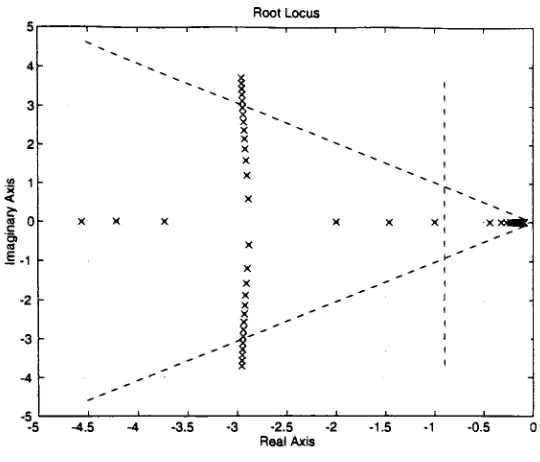
system.The limit lines
are overlaidonthe root
locus
plot which mustbe
activein
the
Root
Locus
windowbefore
this
function
canbe
called.The
desired
regionlimit lines
aredetermined based
ontheconstraints
for
percent overshootandsettling
time
ofthe
system(see Figure
3.18,
Franklin (1994)).
If
the
poles ofthe
systemlie
withinthis region, then
it is
likely
that theperformanceconstraints
for
percent overshootandsettling
time
willbe
met.Root Locus
6-
4-2
w x
<
co
0
c O) 3E
-2
-4
--6
--8 -5.5
: X
X X X X
#
X~~
X X X X
X X XX
x. x x x;:
-4.5 -3.5 -3
Real
Axis
2.5 -1.5 -1 -0.5
Function->Select
Open
Loop
Gain
This
function
was createdto
allowthe
userto
select a particulargainvalue,
from
the
gaininterval,
in
an openloop
system.Because
the
rootlocus
of anopenloop
systemconsists of
only
oneset ofpoles,
it
is
not possibleto
usethe
'Select
Gain'function
to
select an
arbitrary
gain value.By
selecting
this
function,
anarbitrary
gain value canbe
entered
in
the
Command
windowaslong
asit is
containedin
the
gaininterval
defined
by
the
user.Function->Plot 2-D Response
Once
a gainhas been
selectedfrom
the
rootlocus,
this
function
canbe
usedto
highlight
the
response curvefor
the
selected gainin
the
3-D
window.The 3-D
windowis
automatically
made active andthe
response curveis highlighted in
green against a mauvecolormap
ofthe
3-D
surface response plot.The
3-D
response plotthat
waslast
created(Amplitude,
Bode(AR),
orBode(Phase))
is
the
one usedby
this
function.
This
function
helps
theusertodetermine
wheretheresponsecorresponding
to the
selected gain occurswithin
the
3-D
surface plot..1.3.3
2-D
WINDOW
Output->Amplitude
This function
is
usedto
outputthe time
domain
amplitude response at a gain valuepreviously
selectedin
the
Root Locus
window(see
Figure 1.3.3.1). The
time
interval is
the
same as usedfor
the
3-D->Amplitude
response plot.By
plotting
the
amplitudeAmplitude
Response3 4
time
(sec)
Output->Bode(AR)
Figure
1.3.3.1
This
function
creates a2-D
Bode
(Amplitude
Ratio)
plotusing
the
gain valueselected
in
the
Root
Locus
window(see Figure 1.3.3.2). The
frequency
rangeis from
1
rad/sec
to
100
rad/sec.Again,
the
2-D
plotallowsthe
userto
quantitatively
analyzethe
0
-20
BodeAmplitudeResponse
-
^X
'
s -to o
-
\
o
\
-80
\
-100 U.S.
:
. :\
10"' 10" 10'
frequency (rad/sec)
10
Figure 1.3.3.2
Output->Bode(Phase)
This
function
worksthe same asBode(AR)
except aBode(Phase)
plotis
created(see
Figure
1.3.3.3).
Bode Phase Response
10"
10 frequency(rad/sec)
10
Output->Statistics
This function
is
usedto
outputthe
performance statisticsofthe
2-D
response plotthat
is
currently
displayed in
the
2-D
window.A
2-D
response plot mustfirst
be
createdfor
thisfunction
to work.All
the
statistics aredetermined
numerically using
theresponsedata
exceptfor first
and second order systems wherethe
statistics areestimatedanalytically
using
the
naturalfrequency,
damping
ratio,
andtime
constant.For
each ofthe
2-D
response plotsthe
statisticsare asfollows:
First Order;
Gain
Second Order:
Gain
Settling
Time
Higher Order:
Gain
Rise Time
Amplitude
Break
Frequency
Time
constantDC
Gain
DC Gain
Peak
Time
Rise Time
Percent Overshoot
Damping
Ratio
Natural
Frequency
Peak Time
Settling
Time
Percent Overshoot
DC Gain
Bode
(
AR
andPhase)
First Order:
Gain
Second Order:
Gain
Peak
Frequency
Higher Order:
Band Width
Cut-Off Rate
Max Phase Angle
Natural
Frequency
Damping
Ratio
Band Width
Cut-Off Rate
Max Phase Angle
2
Control System Analysis
andDesign
This
sectionis
atutorial
onhow
the
program canbe
used asboth
an educationaland
design
tool.
The design
method usedin
the tutorial
is
an enhanced rootlocus
method.
This
method combinesthe traditional
rootlocus
approach withthreedimensional
visualizationtechniques.
First,
a shortdescription
ofthe
Root
Locus
method.
The
Root
Locus
methodis
an outwarddesign
approach(Chen,
1993). It
startsoutward withan
initial
design
configuration,
and worksinward
by
adjusting
the
parameters of the components of
the
system until a suitable configurationis
achieved.It
is
atrialand errorapproachto
design
which requiresthe
designer
to
"play"withthe
componentsof
the
system.The
method startsby determining
the
overalltransfer
function
ofthe
system.The
roots ofthe
denominator
ofthis transfer
function
are calledpoles,
andarethen
plottedin
the
real-imaginary
plane or s-plane.By
varying
acomponentof this
system,
such as again, the
systempoles will changetheir
s-planelocation. A Root Locus
is
a plot ofthe
changing
polesin
the
s-plane as a gain parameterchanges.
Once
the
Root
Locus
has
been
plotted,
it is
easy
to
determine
a s-plane regionthat the
poles mustfall
withinto
meetthe
design
constraintsonsettling
time
and percentovershoot
(Figure
1
.3.2.2).It
is
thenthe
job
ofthe
designer
to
find
to
a particular gainvalue suchthat
the corresponding
poleslie
withinthe
desired
region.With
the
polesknown,
the
system responsecanbe
simulatedeitheranalytically,
using
inverse Laplace
The
'Visual
'programenhances
the traditional
Root
Locus
methodby
creating
a3
-dimensionallocus
plot ofthe time
responsesover a specified gain range.One
axisis
the
output variableofinterest,
the
secondis time,
andthe third
is
the
varied gainparameter.
The
gain range thatis
usedto
createthethree
dimensional
timeresponseplot,
is
thesame gain range usedto
createthe
Root
Locus
plot.While
using
the
programoffers studentsseveral advantages over
the traditional
Root Locus technique,
it
is
notintended
as a replacementfor it. Students
still needto
learn
the
theory
and mathematicsbehind
the
traditional methods.The
program canthen
serveto
reinforcethese
concepts,
as well as provide an efficient environment
for design.
The
advantages ofusing
the
Visual
program overthetraditional
rootlocus
methods can
be divided into
two
categories: education anddesign. One
ofthe
educational
benefits
ofusing
the
programis
the
ability
to
quickly
flip
back
andforth
between
therootlocus
windowandthe
3
-dimensionaltime
responselocus
window.By
flipping
back
andforth,
students candevelop
anintuitive
feel for how
thechanging
s-domain
polelocations
effectthe time
domain
system response.Another
educationalbenefit
oftheprogramis
that the
3-D
visualizationofthe time
responsesis
morevisually
stimulating
to
studentsthan the
2-D
rootlocus
plot.This
visual stimulation willhelp
to
keep
students attentionfocused
onthe
subject matter.The Visual
program also provides an effective environmentfor
control systemdesign.
Because
the
programinterfaces
with control systemsdefined
asSimulink
block
systemconfiguration.
In
addition, the
Visual
programtakes
care of allthe
mathematicaland computational
work,
allowing
theuserto
concentrate onthe
design
process.This
fascilitates
the
userbeing
ableto
"play" withthe
design,
withoutgetting bogged down in
mathematics at each step.
The Visual
program also overcomes several ofthelimitations
ofthe
rootlocus
design
method.One limitation is
that
the
desired
region onthe
rootlocus
plotis
only
arough estimate
for
systems of orderhigher
than two
(Chen,
1993).
In
these
casesthe
systemresponseshould
be
numerically
simulatedto
ensurethat
thedesign
constraintshave been
met.Since,
the
programautomatically
simulatesthe
responsenumerically, the
user
has
a quickway
to
check whetherthe
desired
regionis
validfor
a paticular system ofpoles.
If
the
useris
dealing
with a complexsystem,
with perhaps4
or morebranches
going
in
variousdirections,
it
may
be difficult
to
interpret how
the
rootlocus
affectsthe
time
domain
response.By
using
the
3-D
timeresponse windowwithinVisual,
it is
easy
to
qualitatively
understandhow
the
systemstime
responseis
affectedby
the
gain change.Another limitation
encounteredin
the
rootlocus
techniqueis
thatthe
design
constraint onthe
steady
state erroris
usually
ommittedfrom
consideration.By
using
the
Visual
programs
3-D
window, the
useris
ableto
visualizehow
the
steady
state error varies withthe gain,
aslong
asthe
responsehas
been
simulatedbeyond
the
steady
state point.A
final design
advantageofusing Visual
is it
allowsthe
userto
specify
thegain range overwhich
to
analyzethe
system.By
specifying
asmallerand smaller gainrange, the
user2.1
Tutorial
Overview
In
this tutorial
we willlook
atthree
different
control scenarios:1)
Proportional
control
2)
Proportional
control withvelocity
feedback
3)
Proportional-Integral
control.The first
scenariois
proportional control withunity
feedback,
of a simpletwo
lag
plant.The
planttransfer
function is:
1
1
G(s)
=(s
+4)(s-.5)
s2+3.5s-2It
couldbe
the transfer
function
of a motordriving
aload. The block diagram for
this
control system was
defined
in
the
Simulink
tutorial
asProp.m.
It
shouldbe
oftheform:
1
+Surr
K
1
1
y
npor
t
s^+3.5s-2Plant
F
igure
2. 1.1
Say,
the
controldesign
mustbe
ableto
meetthefollowing
constraints:Position Error
<=20%
Overshoot
<=20%
Rise Time
<=0.5
sec.Settling
Time
<=3
sec.The
goal ofthe
designer
is
to
find
aproportionalgain(K)
suchthat
allthe
design
Prior
to
launching
the
Visual
program,the
controlsystemdesigner
may
wishto
define
root-locusconstraintsusing
equivalentsecond order system response criteria.The
settling
timeconstraint woulddictate
alower bound for
a)n
andhence,
pole real-axislocation.
Likewise,
the
overshoot constraint woulddictate
a max andhence,
define
anadmissible wedge-shapedregion of
the
s-plane(Figure
1.3.2.2).
The
damping
ratio(Q
thatcorresponds
to
the
design
constraintfor
percentovershoot,
canbe
determined
from
Figure 2.1.2. The
damping
ratiothat
correspondsto
a percent overshoot of20
percentis
approximately 0.46. The Visual
programautomatically
determines
the
desired
poleregion
from
the
user suppliedinformation.
1UU
-
80
c u
i
60
o o-
40
>
O
20
0
0.2
0.4
0.6
0.8
1.0
1.2
Damping
ratioFigure 2.1.2
2.2
Open
Loop
Control
^
Make
the
Visual folder
theactive pathby
opening
the
Visual folder
andthen
hitting
thecancelbutton (or
editthe
Matlab
Path
^
First let's
try
openloop
control ofthe
system.Type
"Visual'
in
the
Command
windowto start
the
program.When
the
dialog
box
appears,
chosethe system"open.m".
Enter
the
correcttransfer
function
G(s),
in
the
plantblock
as shownin
Figure 2.2.1 (Refer
to
thetutorial
in
Appendix
'B' asneeded.)
1
npo
fe.
K
1
>w 1
y
13^+3.58-2
w
Figv
Plant
ire
2.2.1
^
Click
in
theCommand
window.#
Enter
anending
timeof7
seconds,
andatime
increment
of0.025
seconds.^
Enter
astarting
gainof1
, anending
gain of6,
anda gainincrement
of0.5.
^
Enter
thedesign
constraintfor
thedamping
ratio(0.46)
andsettling
time
(3
sec).Three
windows should appearonthe
screen(3-D, 2-D,
andRoot
Locus).
2.2.1
Time-Domain
Response
^
In
the
'3-D'window,
underthe 'Output'menu,
select'Amplitude'
(Abbreviated;
The step
responseis
unstablefor
allthe
gain valuesin
the
selected range.Increasing
gainincreases
the
speed ofreponse,
but does
notimprove
the
system stability.This
is
expectedbecause
the
system contains a polein
the
righthalf
ofthe
s-plane.2.2.2
Root Loci
^
Make
the
'Root
Locus'windowactive
by
clicking
in it
withthe
mouse.^
Root Locus->Function->Plot Root Locus
The
gaindoes
not changethe
roots ofthe
transferfunction
for
an openloop
system.Therefore,
the
rootlocus
consists ofthe
roots ofthe
planttransfer
function.
Because
there
is
one positive real root at0.5,
the
system willalwaysbe
unstable regardless ofthe
gain.
Thus,
we cannot achieveany
of ourdesign
requirementswith openloop
control.2.3
Unity
Feedback
Proportional Control
Let's
try
aunity-feedbackconfiguration,
withproportional control.^
Close
allthree
openwindowsexceptthe
Command
window^
Start
theprogramby
typing
either,
"Visual'
or
"/3"
J3
startsthe
programbypassing
the
coverpage.Choose
"Prop.m",
andenterthe
transferfunction
G(s),
in
the
Plant block
asdefined previously
in
Figure 2.1.1.
^
Click
in
the
Command
window.^
Enter
aending
time
of7
sec,
and atime
increment
0.025
sec.^
Enter
astarting
gain of1,
anending
gain of7,
and a gainincrement
of0.5.
2.3.1
Time-Domain
Response
+
3-D->Output->Amplitude
Here,
the
responsechangesfrom
unstableto
stable overthe
gain range.Hence,
closing
the
loop
in
conjunctionwitha proportional gainhas
affectedthe
system's stability.2.3.2
Root Loci
^
Make
the
'Root
Locus'window active.
^
Root
Locus->Function->Plot Root
Locus
For
a closedloop
system, the
roots change asthe
gain changes.The
rootlocus
starts withone unstable root at
0.5.
However,
asthe
gainis
increased
this
rootis
pulledinto
theleft
half
plane,
making
the
system stable.This stablizing
effect can alsobe
seenin
the
3-D
window.
^
Root Locus->Function->Select
Point
#
Click
on a polethat correspondsto
a gain of1
.5
.When
a polehas
been
selectedit
turns green,
andthe
corresponding
gainvalueis
displayed in
the
lower
left
corner.The
Select Gain
pull-downfunction
canbe
usedrepeatedly
untilthedesired
gainhas been
selected.2.3.3
Performance Assessment
^
Root
Locus->Function->Plot
2-D Reponse
Note
thatthe
responsecorresponding
to the
selected gainis highlighted in
the
3-D
window.
The
systemis
unstablefor
that
gainvalue, thus the
responseis
unbounded.+
2-D->Output->Performance Stats
There
is
no stableDC Gain for
this
rootlocus
selection,
thusallthe
other statistics aremeaningless.
The
program recognizesthat the
responseis
unstable andinforms
the
user.^
Make
theRoot
Locus
window active again.^
Root Locus->Function->Select Gain
^
Click
on a polecorresponding
to
a gain of4.
^
Root Locus->Function->Plot
2-D
Response
+
2-D->Output->Amplitude
The
responseis
now stable andthe
outputis
nowbounded.
+
2-D->Output->Performance Stats
Since
theresponseis
stable, the
DC Gain
and all other stats aredefined.
Increasing
the
gain
has
made adramatic
improvement in
the
performance ofthe
system.However,
the
response
is
stilltoo
slowto
meetthe
performance specifications.Now
let's
seeif
there
is
a
gain,
withinthe
range wespecified, that
willsatisfy
allthe
performance criteria.2.3.4
Proportional Controller
Design
^
Make
the
Root
Locus
windowactive.Notice
that the two
branches
ofthelocus
converge at around a gain of5,
after whichthe
branches
continuein
oppositeimaginary
directions.
Since,
(see Figure
2.3.4.1)
the
settling
time
is
determined
from
the
real part ofthe roots, the
settling
time
reaches aRoot Locus
-2 -1.5
Real Axis
Figure
2.3.4.1
Make
the
3-D
windowactive.As
expectedthe
responsetime
seemsto
level
off at around a gain of5. Also
noticethat
the
response speedincreases
asthe
gainincreases.
+
Click
back
in
theRoot
Locus
window.^
Root
Locus->Function->Select
Gain
+
Click
on a polecorresponding
to
a gain of6
^
Root
Locus->Function->Plot
2-D
Response
+
2-D->Output->AmplUude
+
2-D->Output->Performance
Stats
The DC Gain
is
stilltoo
high
to
meetthespecification.^
Make
the3-D
window activeNotice
that theposition errordecreases
asthegainincreases.
Therefore,
we need a gaingreater
than
6
to
meetthe
specification on position error.^
Close
allthree
openfigure
windows.^
Type
"J3"to
runprogramagain,
and choose"Prop.m"^
Enter
a endtime
of7
sec,
and atime
increment
of0.025
sec.^
Enter
astarting
gainof6,
anending
gainof20,
and a gainincrement
of0.5.
^
Enter
thedesired
damping
ratio(0.46),
andthe
desired
settling
time
(3 sec.)
4.
3-D->Outpui->Amplitude
Notice
thatthe
steady
state errordecreases
asthe
gainincreases.
*
3-D->View->2-Dl
The
responsecurves are pushedoutwardasthe
gainincreases.
Thus
the
responseis
sloweras the gain
is
increased
andcorrespondingly the
risetime
decreases.
4.
3-D->View->3-D
^
Make
Root Locus
windowactive.+
Root
Locus->Function->PlotRoot Locus
+
Root
Locus->Function->PlotDesired Region
All
the
polesfall
withinthe
desired
regionfor
settling
time.
At
a gainless
than16.5
the
^
Root Locus->Function->Gain
vs.DC Gain
From
theperformancecriteria,
theposition error mustbe less
than
20%. From
thegraphit
canbe
seenthatthis
criteriais
met at a proportional gain greaterthan12.
Thus,
tomeetboth
performance criteriathe
gain needstobe between
12
and16.5.
^
Root
Locus->Function->Plot
Root Locus
^
Root Locus->Function->Select Gain
^
Click
on a polecorresponding
to
a gain of12.
^
Root
Locus->Function->Plot
2-D Response
+
2-D->Output->Amplitude
Increasing
the
gainhas
improved
thesteady
state error.#
2-D->Output->Performance
Stats
The
specificationsfor
DC
Gain,
overshoot,
andsettling
time
have
been
met.However
rise
timeis
stilltoo slow.If
youflip
back
to the
3-D
windowyouwill noticethat
asthe
gain
increases,
the
rise
time
decreases.
Therefore,
weneedto
increases
the gainto
decrease
therise
time.^
Make Root Locus
windowactive.^
Root
Locus->Function->SelectGain
+
Click
on a polecorresponding to
a gain of1
6.5.
+
Root
Locus->Function->Plot2-D Response
^
2-D->Output->AmplitudeAll
the
performancespecificationsfor
the
systemhave
nowbeen
met.Thus,
by
using
aunity feedback
controlconfiguration,
with aproportionalgain of16.5
the
systemdesign
is
complete.The
specificationsfor
our system are:Overshoot-
19.68%
Settling
Time
-2.629
sec.Rise
time
-0.4727
sec.DC
Gain
2.4
Proportional
Control
withVelocity
Feedback
The
next example we will consider makes use of aproportional-derivitivecontroller.
The
planttransfer
function
we wishto
controlis:
G(S)=
3
1
2 <s +6s +5s
which
incorporates
afree integrator in
the
plantdynamics.
Let
us assumethe
output ofthe
plantis
a positionsignal.The
following
performance criteriahave been
specifiedfor
the
system response.1. Overshoot
<=5%
2.
Settling
time
<5
sec.3. Rise
time
as smallas possible.4. Position
error as small as possible.First,
weneedtofind
the
damping
ratio thatcorrespondsto
the constraintfor
percentovershoot.
From Figure 2. 1
.2,the
damping
ratiothat
correspondstd
a overshoot of5
percent
is
approximately
0.70. We
will startthe
design
withproportional control.2.4.1
Proportional
Control
withPosition Feedback
+
Make
the
Visual
folder
the
activepath,
andstartthe
programby
typing
"J3"or
"Visual*.
Chose
"Prop.m"
1 + fe.
w nport
Sum
Figure 2.4.1.1
^
Click in
the
Command
window.^
Chose
anending
time
of1 1
sec,
and atime
interval
of0.025
sec.#
Chose
a
starting
gain of1
, anending
gain of1
8,
and a gaininterval
of1
.^
Enter
the
constraints onthedamping
ratio(0.7)
andthesettling
time
(5
sec).+
3-D->Output->Amplitude
As
the
gainincreases
the
systembecomes
increasingly
oscillatory
untilit
eventually
becomes
unstable.#
Make
the
Root
Locus
windowactive.^
Root Locus->Function->Plot Root Locus
At
a gaingreaterthan16,
two
ofthe
system poles arein
theright half
plane whichindicates instability.
^
Root
Locus->Function->Plot
Desired
Region
No
systemof polesfall
into
the
desired
regionfor
settling
time,
andfor
a gain greaterthan
1,
the
polesfall
outsidethe
desired
overshoot region.+
Root
Locus->Function->Select
Gain
+
Root
Locus->Function->Plot 2-D
Response
+
2-D->Output->Amplitude
^
2-D->Output->Performance
Stats
As
expectedfor
again of1
, eventhough the
overshoot meetsthe
specificationthe
settling
time
is
muchtoo
large. We
cannotimprove
the
settling
time
with proportionalcontrol,
sowe need
to
try
adifferent
control configuration.2.4.2
Proportional Control
withPosition
andVelocity
Feedback
Let's
try
avelocity
feedback
controlconfiguration.This
configurationhas
two
possibleparameters
to
be
varied, the
proportional(controller)
andderivitive
(feedback)
gains.For
thisscenario optimal values
for
both
gains needto
be found.
To
accomplishthis
aconstant value will
be
selectedfor
the
proportionalgain,
andthe
derivitive
gain willbe
varied over a specified range.
This
process willbe
repeatedusing
different
constantvalues
for
the proportional gainin
aninterative fashion. The
velocity
feedback
controlconfigurationshould
be
of theform
shownin
Figure 2.4.2.1.
Inport
D>
Sum
Gainl
Sum1
s'+Ss+SPlant
<
Integrator
2.4.2.1 Baseline
Configuration
^
Start
the
programby
typing "73",
andchoose "Velfeed.m"^
Enter
the
correct "Plant"transfer
function block from Figure
2.4.2.
1
.^
Under
the
derivitive
orfeedback
gainblock,
enterthe
label
"K". Under
theproportionalgain
block,
enterthe
label
"Prop".
Inside
the
block
enter a value of1
for
the
proportional gain.+
Enter
anending
time
of1
0
seconds,
and atime
increment
of0.025
sec.^
Enter
astarting
gain of1
, anending
gain of9,
and a gainincrement
of0.5.
^
Specify
the
damping
ratioto
be
0.7
andsettling
time
tobe
5
seconds.^
3-D->Output->Amplitude
Ten
secondsis
notlong
enoughfor
the
systemto
reachsteady
state.We
needto
increase
the
simulationending
time.
Also,
noticethat
increasing
the
derivitive
(feedback)
gainmakes
the
response slower.^
Make
theRoot
Locus
windowactive.^
Root Locus->Function->Plot Root Locus
^
Root
Locus->Function->Plot
Desired
Region
The
polesfall
outsidethe
desired
regionfor
settling
time,
because
there
is
adominant
RootLocus
2.5 -2 Real Axis
[image:41.566.118.388.55.286.2]1 -0.5 0
Figure 2.4.2.2
#
Root Locus->Function->Select Gain
Click
on a polecorresponding
to
a gain of2.5.
^
Root
Locus->Function->Plot
2-D Response
+
2-D->Output->Amplitude
The
responsehas
not reachedsteady
state.The final
time
shouldbe increased.
^
2-D->Output->Performance Stats
The settling
time
could notbe
computednumerically because
the response was notcarried out
to
steady
state.Also
the
risetime
is
muchtoo
large.
2.4.2.2 Improved Configuration
Change
the
proportionalgainto
a value of5.
^
Close
allthree
openfigure
windows.^
Enter
5 in
proportional gainblock
(Prop)
+
Enter
anending
time
of7
sec,
and atime
interval
of0.025
sec.^
Enter
astarting
gain of1
, anending
gain of1
0,
and a gaininterval
of0.
5
.^
Specify
the
constraintsonthe
damping
ratio(0.7)
andthe
settling
time
(5
sec).+
3-D->Output->Amplitude
The
responseis
more stablefor
a proportional gain of5.
Increasing
the
feedback
gaindoes
not maketheresponsebecome
oscillatory.*
3-D->View->2-Dl
From
thistwo
dimensional
perspective,
it
canbe
seenthat
increasing
thefeedback
gainmakes
the
time
response more sluggish sincethe
rise
time
is increasing.
^
Make
the
Root
Locus
window active.^
Root
Locus->Function->Plot
Root Locus
#
Root Locus->Function->Plot Desired
Region
The
polesfall
into
the
desired
overshoot regionif
the
feedback
gainis
greaterthan
3
andless
than6.5. The
polesfall
withinthe
desired
settling
time
regionif
thefeedback
gainis
less
than
5.
Therefore,
to
meetboth
specifications, the
feedback
gain mustbe between
3
and
5.
However,
because
the
systemis
of ahigher
orderthan
2,
we cannotbe
certainthat
the
systemtruly
meetstheconstraints until we simulatethe
systems response.^
Make
the
3-D
windowactive.As
predictedin
the
rootlocus
window, the
overshootstartshigh,
then
decreases,
then
^
Click back in
the
Root
Locus
window.^
Root
Locus->Function->Select Gain
^
Click
on a polecorresponding
to
a gain of3
.^
Root
Locus->Function->Plot
2-D
Response
4
2-D->Output->Amplitude
The
response appearsfast
and stable.4
2-D->Output->Performance
Stats
The
criteriafor
the
settling
time
andthe
overshoothave been
met,
andtherise
timeis
1.4
seconds.
Let's
seeif
the
performance statistics canbe improved.
^
Make
the
Root Locus
window active^
Root Locus->Function->Select Gain
Click
ona polecorresponding
to againof4.
^
Root Locus->Function->Plot 2-D Response
+
2-D->Output->Amplitude
There
is
novisibleovershoot.+
2-D->Output->Performance
Stats
The
statisticsfor
the
overshoot andsettling
time
are stillwithinthe
constraints.However,
the
risetime
has been increased
to
1.75
seconds.There
exists atrade-off
between
the
risetime
andthe
overshootasthe
gainis increased.
If
the
risetime
is
the
more critical statistic thena gain of3
shouldbe
used.However,
if
the
overshootis
the
moreimportant
2.5
Proportional-Integral
Control
Example
The
last
example we willlook
atis
aproportional-integral control scenario withunity
feedback. The
planttransfer
function is:
1
G(s)
=-sz+4s+
3
The
performance criteriafor
the
system are:1)
Position
error <10%
2)
Overshoot
<10%
3) Settling
time
<3
sec.4)
Rise
time
<0.6
sec.From
Figure
2. 1
.2,the
damping
ratiocorresponding
to
an overshoot of10%
is
approximately 0.62.
We
will startthe
design
by
using
a simpleunity
feedback,
proportional control scenario.
2.5.1.1 Baseline Proportional
Control Scenario
^
Make
the
"Visual"folder
the
active path.^
Start
programby
typing "J3",
choose"prop.m"^
Enter
thetransfer
function
G(s)
in
the
Plant block
from Figure 2.5.1.1.1
^
Click in
the
commandwindow+
Enter
a endtime
of7
sec,
and atime
interval
of0.025
sec.^
Enter
astarting
gain of1
, anending
gain of9,
and a gaininterval
of0. 5
.+
Enter
the
settling
time
(3 sec.)
andthe
damping
ratio(0.62)
constraints.4.
3-D->Output->Amplitude
The
responseis
stableand steadies quickly.The steady
state response ofthe
systemincreases
asthe
gaininceases.
^
Make
the
Root Locus
window active.^
Root Locus->Function->Plot Root Locus
^
Root
Locus->Function->Plot
Desired Region
All
the
polesfall into
the
desired
regionfor
settling
time.
For
a gain ofless
than
7.5,
the
poles
fall
withinthe
desired
regionfor
overshoot.This
is
consistantwith whatis
observed
in
the
3-D
window.+
Root
Locus->Function->Select
Gain
^
Click
on a polecorresponding
to
a gain of8
+
Root
Locus->Function->Plot
2-D Response
^
2-D->Output->AmplitudeThere
is
alarge steady
state error atthis
gain value.4
2-D->Output->PerformanceStats
The steady
stateresponseis
0.727. This
is
below
the
requirementof0.9.
However,
all^
Close
allthree
openfigure
windows.2.5.1.2
'Improved'Proportional Control Scenario
Let's
try
proportional controlagain, this time
using
larger
gainsto
eliminatethe
steady
state error.
+
Type
"73"to
startprogram,
choose"prop.m"^
Enter
anending
time
of7
sec,
and atime
interval
of0.025
sec.+
Enter
astarting
gain of1
0,
anending
gain of34,
and a gaininterval
of2
^
Enter
the
constraints onthe
damping
ratio andsettling
time.
4
3-D->Output->Amplitude
The
steady
state erroris
decreasing,
andthe
response settlesfaster
asthe
gainincreases.
However,
the
downside is
the
overshoot alsoincreases
asthe
gainincreases.
^
Make
the
Root
Locus
window active.+
Root Locus->Function->Plot
Root
Locus
^
Root
Locus->Function->Plot
Desired Region
None
ofthe
poleslie
withinthe
desired
regionfor
overshoot.However,
they
do fall
within
the
desired
settling
time
region.^
Root
Locus->Function->Select Pole
Click
on a polecorresponding
to
a gain of32.
+
Root
Locus->Function->Plot 2-D
Response
4
2-D->Output->Amplitude
4>
2-D->Output->Performance
Stats
In
orderto
meetthe
specification on position errorthe
overshoothas
jumped
to
32.35
percent.
Thus,
it is
not possibleto
meet allthe
performance specifications withsimpleproportional control.
2.5.2
P-I
Controller Design
A
different
type
of control configuration mustbe
usedthat
will meet allthe
transientperformance
criteria,
while alsoachieving
goodsteady
state performance.Try
aProportional-Integral
control configuration which eliminatesthe
steady
state error.Figure 2.5.2.1
depicts
the
systemblock diagram.
Figure
2.5.2.1
This
control scenariohas
two
free
parameters,
K
andKi. In
orderto
find
a optimal valuefor both
parameters,
we willarbitrarily
choosea valuefor
the
proportional gain(K)
andvary
theintegral
gain(Ki
)
over some range.This
processwillbe
repeated until valuesfor K
andKi
arefound
that
meetthe
desired
specifications.2.5.2.1 Baseline P-I Control Scenario
4s
Type
"73"to
startprogram,
and choose4
Enter
the
correcttransfer
function
G(s)
in
the
Plant
block
from Figure 2.5.2.
1
4
Name
the
proportionalgainblock
'Prop' and enter avalueof1
.4
Name
the
integral
gainblock
'K'.
4
Enter
anending
time
of12
sec,
and atime
interval
of0.025
sec.4
Enter
astarting
gain of1
, anending
gain of6,
and a gaininterval
of0.5.
4
Enter
the
constraints onthe
damping
ratio(0.62)
andthe
settling
time
(3
sec).4
3-D->Output->Amplitude
The steady
state errorhas been
eliminated.However
asK,
increases
the
responsebecomes
more oscillatory.4
Make
the
Root
Locus
window active4
Root
Locus->Function->Plot Root
Locus
4
Root
Locus->Function->Plot Desired Region
None
ofthe
poles are withinthe
desired
regionfor
settling
time.
The
settling
time
is
increasing
asKi
increases
because
the
dominant
poleis moving
towards the
origin.4
Make
the
3-D
windowactiveAs
K
increases
the
responsebecomes
moreoscillatory
andless
settled.Therefore,
using
a proportional gain of
1,
the
design
criteriacannotbe
met.4
Close
allthree
openfigure
windows.2.5.2.2
'Improved'P-I
Control Scenario
Try increasing
the
proportional gain(Prop).
4
Type
"73"to
startprogram,
and choose4
In
the
proportional gainblock
(Prop),
enter4.
4
Enter
anending
time
of9 sec,
and atime
interval
of0.025
sec.4
Enter
astarting
gain of1
, anending
gain of6,
and a gaininterval
of0.5.
4
Enter
the
constraintsonthe
damping
ratio(0.62)
andsettling
time
(3
sec).4
3-D->Output->Amplitude
The
responseis
more stable andless
oscillatory using
a proportional gain of4.
4
Make
theRoot Locus
window active.4
Root
Locus->Function->Plot
Root
Locus
4
RootLocus->Function->Plot Desired
Region
The
constraint onthe
settling
time
is
not met.By
selecting
a particular gain valuesfor
K
and
plotting
theamplitude responsein
the
2-D
window,
it
canbe
shownthat
asK
increases,
settling
time
first decreases
untilK
=4.5,
then
increases.
The
overshootcontinuously
increases
K,
increases. For
a proportional gain of4,
no value ofK
can meetall
the
performance criteria.4
Close
allthree openfigure
windows.2.5.2.3
'Refined'P-I Control
Scenario
Try
increasing
the
proportionalgainagain.4
Type
"73"to
runprogram,
and choose"Plone.m"4
In
the
proportional gainblock
(Prop
),
enter9.
4
Enter
aending
time
of7
sec,
and atime
increment
of0.02