Steve Martinelli,
Henry Nash & Brad Topol
Identity,
Authentication
& Access
Management
in OpenStack
Steve Martinelli, Henry Nash, and Brad Topol
Boston
Identity, Authentication, and
Access Management in OpenStack
978-1-491-94120-1 [LSI]
Identity, Authentication, and Access Management in OpenStack
by Steve Martinelli, Henry Nash, and Brad Topol
Copyright © 2016 Steve Martinelli, Henry Nash, and Brad Topol. All rights reserved. Printed in the United States of America.
Published by O’Reilly Media, Inc., 1005 Gravenstein Highway North, Sebastopol, CA 95472.
O’Reilly books may be purchased for educational, business, or sales promotional use. Online editions are also available for most titles (http://safaribooksonline.com). For more information, contact our corporate/ institutional sales department: 800-998-9938 or [email protected].
Acquisitions Editor: Rachel Roumeliotis
Editor: Nan Barber
Production Editor: Dan Fauxsmith
Proofreader: Christina Edwards
Indexer: WordCo Indexing Services, Inc.
Interior Designer: David Futato
Cover Designer: Ellie Volckhausen
Illustrator: Rebecca Demarest October 2015: First Edition
Revision History for the First Edition
2015-09-28: First Release 2015-12-07: Second Release
See http://oreilly.com/catalog/errata.csp?isbn=9781449370787 for release details.
To Dini, for your never-ending support and love, and to my parents and grandfather for their patience, selflessness and unwavering support.
—Steve Martinelli
To my wife Susan, for her incredible love and support (and for putting up with a steady stream of my crazy ideas over the years), and to everyone who strives to disrupt the status
quo with new ways of thinking. Remember, if it was easy, someone else would have already done it.
—Henry Nash
I dedicate this book to my wife Janet, my daughter Morgan, and my son Ryan. I could not have done this without your love and support during this process.
Table of Contents
Preface. . . ix
Introduction. . . xv
1. Fundamental Keystone Topics. . . 1
1.1 Keystone Concepts 1
1.1.1 What’s a Project? 1
1.1.2 What’s a Domain? 2
1.1.3 Users and User Groups (Actors) 2
1.1.4 Roles 3
1.1.5 Assignment 3
1.1.6 Targets 3
1.1.7 What’s a Token? 4
1.1.8 What’s a Catalog? 5
1.2 Identity 5
1.2.1 SQL 6
1.2.2 LDAP 6
1.2.3 Multiple Backends 7
1.2.4 Identity Providers 8
1.2.5 Use Cases for Identity Backends 9
1.3 Authentication 9
1.3.1 Password 10
1.3.2 Token 11
1.4 Access Management and Authorization 12
1.5 Backends and Services 13
1.6 FAQs 14
2. Let’s Use Keystone!. . . 17
2.1 Getting DevStack 17
2.2 Basic Keystone Operations Using OpenStackClient 18
2.2.1 Getting a Token 19
2.2.2 Listing Users 21
2.2.3 Listing Projects 22
2.2.4 Listing Groups 24
2.2.5 Listing Roles 25
2.2.6 Listing Domains 26
2.2.7 Creating Another Domain 27
2.2.8 Create a Project within the Domain 27
2.2.9 Create a User within the Domain 28
2.2.10 Assigning a Role to a User for a Project 29
2.2.11 Authenticating as the New User 30
2.3 Basic Keystone Operations Using Horizon 31
2.3.1 What Keystone Operations Are Available through Horizon? 31
2.3.2 Accessing the Identity Operations 32
2.3.3 List, Set, Delete, Create, and View a Project 32
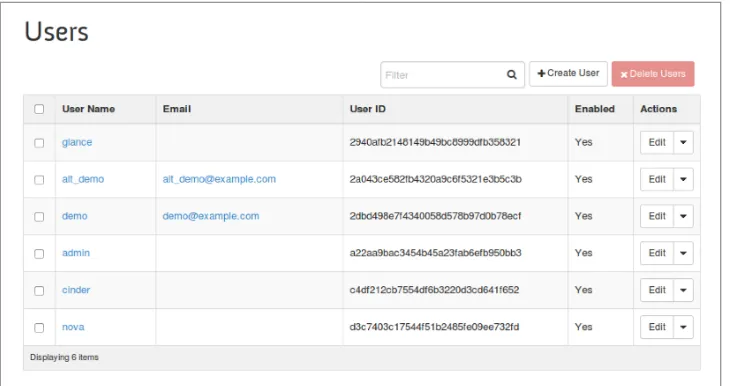
2.3.4 List, Set, Delete, Create, and View a User 32
2.4 Tips, Common Pitfalls, and Troubleshooting 33
Check Your Scope: A Common Authentication Problem 33
Check Your Policy and Role: A Common Authorization Problem 34
Getting Additional Information 34
3. Token Formats. . . 35
3.1 History of Keystone Token Formats 35
3.2 UUID Tokens 37
3.3 PKI Tokens 37
3.4 Fernet Tokens 40
3.5 Tips, Common Pitfalls, and Troubleshooting 42
3.5.1 UUID Token Performance Degradation for Authentication Operations 42
3.5.2 Using PKI Token and Swift or Horizon Not Working? 42
4. LDAP. . . 45
4.1 Approach to LDAP Integration 45
4.2 Configuring Keystone to Integrate with LDAP 46
4.2.1 Other Keystone Configuration Options in Classic LDAP Support 50
4.3 Multiple Domains and LDAP 55
4.3.1 Requirements for Multi-Domain Corporate Directory Support 55
4.3.2 Setting Up Multi-Domain Using the Configuration File–Based Approach 57
4.3.3 Setting Up Multi-Domain Using the Keystone API–Based Approach 58
4.3.4 Restrictions When Using Multi-Domain Identity 61
Use SQL for the Default Domain 62
Use LDAP for All Domains, Except an SQL Service Domain 63
Use LDAP for All Domains 64
4.4 A Practical Guide to Using Multi-Domains and Keystone 64
4.4.1 Setting Up LDAP 64
4.4.2 Running Admin Commands 67
4.4.3 Running LDAP User Commands 68
4.4.4 Authenticating with Horizon 70
4.5 Projects, Roles, and Assignments from LDAP (Just Say NO!) 72
4.6 Tips, Common Pitfalls, and Troubleshooting 73
4.6.1 General LDAP Issues 73
4.6.2 Tips for Using Multi-Domain LDAP 74
5. Federated Identity. . . 77
5.1 Approach to Federation 78
5.1.1 Leveraging Existing Technology 78
5.1.2 Keystone-Specific Federation Concepts 79
5.2 Translating User Attributes to Keystone Concepts 80
5.2.1 OpenID Connect Claims 80
5.2.2 SAML Assertions 81
5.2.3 The Mapping Engine 82
5.2.4 Mapping Rules 83
5.3 Authentication Flow: What’s It Look Like? 85
5.4 Single Sign-On 86
Single Sign-On Flow 86
5.5 A Practical Guide to Federating Identities for IBM WebSphere Liberty and Bluepages 87
5.5.1 Download, Install, and Configure IBM WebSphere Liberty 87
5.5.2 Configuring Keystone to Use OpenID Connect 90
5.5.3 Testing It All Out 92
5.6 A Practical Guide to Setting Up SSO with Google 93
5.6.1 Configure Keystone to Use OpenID Connect 93
5.6.2 Configure Horizon for Single Sign-On 95
5.6.3 Let’s See It with Screenshots! 96
5.7 Tips, Common Pitfalls, and Troubleshooting 99
Ensure All Libraries Are Installed 99
Known Limitations of Social Media Logins 99
Using SAML from the Command Line 99
6. Future Work. . . 101
6.1 Multi-Factor Authentication 101
6.2 Integration with Horizon for Multi-Region Keystone to Keystone Federation Support 102
6.3 Using LDAP as a Federated Identity Provider 102
6.4 Replacement of Service Users with X.509 Certificates and Barbican Integration 102
6.5 Centralized Policy and Distribution 103
6.6 Integrating with Other Technologies 103
Index. . . 105
Preface
Prologue
A key aspect to setting up a cloud, whether it be private, public, or dedicated, is ensuring that access to cloud resources and security are in place. For OpenStack envi‐ ronments, the focal point for securing the cloud is Keystone, OpenStack’s Identity ser‐ vice. Keystone provides many key functions, such as authenticating users and determining what resources users are authorized to access.
Keystone started from humble beginnings. In the early days, it provided basic user management and constructs for organized access to resources. As enterprise custom‐ ers became more interested in OpenStack, it became readily apparent that Keystone needed significant enhancements to meet the demanding needs of enterprise custom‐ ers before it would be adopted in the enterprise.
Early enterprise requirements were focused on improving Keystone’s Lightweight Directory Access Protocol (LDAP) and Microsoft’s Active Directory support. Enter‐ prise customers want to reuse their existing identity-management tools and don’t want a separate new identity tool to manage their OpenStack users. Support was added to ensure Keystone could reuse existing LDAPs and Active Directories that were read only and only contained user and group information. Next, secure connec‐ tions were added so Keystone could connect to LDAP and Active Directories over a TLS connection.
This basic support for ease of integration with existing enterprise identity managers helped OpenStack to distinguish itself from competing cloud infrastructures. It then led to a second phase of advanced enterprise integration where customers demanded support for integration with multiple LDAPs and Active Directories. This feature was critical for large enterprises that, through means such as acquisitions, had multiple identity servers they needed to support. Also as part of this phase, customers started requesting true federated identity support whereby they expected Keystone to inte‐ grate with federated identity-management tools that supported well-known and stan‐
dard identity protocols such as the Security Assertion Markup Language (SAML) and OpenID Connect. Around this time Keystone started to add audit support to better enable it to meet the compliance requirements of many enterprise customers.
With the foundations of federated support, Keystone has moved to its current phase, focusing on federated support for hybrid clouds. With this federation support foun‐ dation in place, multiple Keystones can work together using standard federated pro‐ tocols to support interoperable hybrid clouds. In this book, we describe all of these enhancements. We begin by providing an overview of how to perform basic Keystone operations, and we provide concrete examples using the latest version (v3) of the Keystone Identity API. We then cover Keystone’s support for multiple token formats and describe how its preferred token formats have evolved over time. After we dis‐ cuss these fundamentals, we move on to advanced topics of LDAP integration and federation. We conclude with a discussion on topics of future work for Keystone.
Conventions Used in This Book
The following typographical conventions are used in this book: Italic
Indicates new terms, URLs, email addresses, filenames, and file extensions.
Constant width
Used for program listings, as well as within paragraphs to refer to program ele‐ ments such as variable or function names, databases, data types, environment variables, statements, and keywords.
Constant width bold
Shows commands or other text that should be typed literally by the user.
Constant width italic
Shows text that should be replaced with user-supplied values or by values deter‐ mined by context.
This element signifies a tip or suggestion.
This element signifies a general note.
This element indicates a warning or caution.
Using Code Examples
This book is here to help you get your job done. In general, if example code is listed in this book, you may use it in your programs and documentation. You do not need to contact us for permission unless you’re reproducing a significant portion of the code. For example, writing a program that uses several chunks of code from this book does not require permission. Selling or distributing a CD-ROM of examples from O’Reilly books does require permission. Answering a question by citing this book and quoting example code does not require permission. Incorporating a significant amount of example code from this book into your product’s documentation does require permission.
We appreciate, but do not require, attribution. An attribution usually includes the title, author, publisher, and ISBN. For example: “Identity, Authentication, and Access Management in OpenStack by Steve Martinelli, Henry Nash, and Brad Topol (O’Reilly). Copyright 2015 Steve Martinelli, Henry Nash, and Brad Topol, 978-1-491-94120-1.”
If you feel your use of code examples falls outside fair use or the permission given above, feel free to contact us at [email protected].
Safari® Books Online
Safari Books Online is an on-demand digital library that deliv‐ ers expert content in both book and video form from the world’s leading authors in technology and business.
Technology professionals, software developers, web designers, and business and crea‐ tive professionals use Safari Books Online as their primary resource for research, problem solving, learning, and certification training.
Safari Books Online offers a range of plans and pricing for enterprise, government,
education, and individuals.
Members have access to thousands of books, training videos, and prepublication manuscripts in one fully searchable database from publishers like O’Reilly Media, Prentice Hall Professional, Addison-Wesley Professional, Microsoft Press, Sams, Que, Peachpit Press, Focal Press, Cisco Press, John Wiley & Sons, Syngress, Morgan Kauf‐
mann, IBM Redbooks, Packt, Adobe Press, FT Press, Apress, Manning, New Riders, McGraw-Hill, Jones & Bartlett, Course Technology, and hundreds more. For more information about Safari Books Online, please visit us online.
How to Contact Us
Please address comments and questions concerning this book to the publisher: O’Reilly Media, Inc.
1005 Gravenstein Highway North Sebastopol, CA 95472
800-998-9938 (in the United States or Canada) 707-829-0515 (international or local)
707-829-0104 (fax)
We have a web page for this book, where we list errata, examples, and any additional information. You can access this page at http://www.oreilly.com/catalog/ 0636920045960.
To comment or ask technical questions about this book, send email to bookques‐ [email protected].
For more information about our books, courses, conferences, and news, see our web‐ site at http://www.oreilly.com.
Find us on Facebook: http://facebook.com/oreilly
Follow us on Twitter: http://twitter.com/oreillymedia
Watch us on YouTube: http://www.youtube.com/oreillymedia
Acknowledgments
We would like to thank the entire OpenStack Keystone community for their passion, dedication, and tremendous commitment to the Keystone project. Without the code developers, code reviewers, and operators contributing to the project over the years, Keystone would not have the rich feature set and large adoption it has today.
We would also like to thank our OpenStack Keystone colleagues, Dolph Mathews, Morgan Fainberg, Brant Knudson, Lance Bragstad, Jamie Lennox, David Stanek, Adam Young, Joe Heck, Marek Denis, Nathan Kinder, and Lin Hua Cheng for the wonderful collaboration over the years.
A very special thanks to Dr. Angel Luis Diaz, Todd Moore, and Vince Brunssen for all of their support and encouragement during this endeavor.
—Steve, Henry, and Brad
Introduction
Identity, Authentication, and Access Management
Capabilities of Keystone
Cloud environments at the Infrastructure-as-a-Service layer (IaaS) provide users access to key resources such as virtual machine instances, large amounts of block and object storage, and network bandwidth. A critical feature of any cloud environment is how it provides secure, controlled access to these valuable resources. In OpenStack environments, the Keystone service is responsible for providing secure controlled access to all of the cloud’s resources. Keystone has proven itself to be a vital compo‐ nent for a secure cloud. As shown in Figure P-1, 90% to 95% of OpenStack users report that they utilize Keystone in their deployments.
Figure P-1. Percentage of deployments using Keystone and other OpenStack services (source)
In order to understand how Keystone provides secure and controlled access to Open‐ Stack Cloud resources we need to examine Keystone’s fundamental capabilities for providing Identity, Authentication, and Access Management. The following sections provide short overviews of these core Keystone capabilities.
Identity
Identity refers to the identification of who is trying to access cloud resources. In OpenStack Keystone, identity is typically represented as a user. In simple deploy‐ ments, the identity of a user can be stored in Keystone’s own database. In production or enterprise environments, an external Identity Provider is commonly used. An example of this is IBM’s Tivoli Federated Identity Manager. Keystone should be able to retrieve the user’s identity information from these external Identity Providers.
Authentication
Authentication is the process of validating a user’s identity. In many cases, authentica‐ tion is initially performed by a user performing a login with their user identity and a password. In a very rudimentary OpenStack environment, Keystone is capable of per‐ forming all the authentication steps itself. This is not recommended for production or enterprise environments. For real environments where passwords need to be prop‐
erly protected and managed, Keystone is pluggable such that it easily integrates with an existing hardened production authentication service, such as LDAP or Active Directory.
While a user identity is typically initially authenticated with a password, it is very common as part of this initial authentication to create a token for subsequent authen‐ tications. This reduces the amount of visibility and exposure of the password which needs to be kept hidden and protected as much as possible. Tokens also have a limi‐ ted lifespan and expire so that their usefulness is limited if they are stolen. OpenStack relies heavily on tokens for authentication and other purposes—and Keystone is the one and only OpenStack service that can issue them. Currently, Keystone uses a form of token called a bearer token. This means that whomever has obtained ownership of the token, whether it be properly or improperly (i.e., stolen), is capable of using the token to authenticate and access resources. As a result, when using Keystone it is very important to protect tokens and their contents.
Access Management (Authorization)
Once a user identity has been authenticated and a token has been created and alloca‐ ted, things start to get interesting. This is because we now have enough foundation in place to start performing Access Management. Access Management, also referred to as Authorization, is the process of determining what resources a user is permitted to access. Cloud environments such as OpenStack provide users with access to large amounts of resources. For example, there needs to be a mechanism for determining which users are allowed to create new instances of a particular virtual machine, which users are allowed to attach or delete a volume of block storage, which users are allowed to create virtual networks, etc. In OpenStack, Keystone maps Users to Projects or Domains by associating a Role for the User for that Project or Domain. Other OpenStack subprojects such as Nova, Cinder, and Neutron examine the User’s Project and Role associations and evaluate this information using a policy engine. The policy engine examines this information (particularly the Role value) and makes a determination about what actions the user is allowed to perform.
Keystone’s Primary Benefits
While Keystone is mostly focused on providing Identity, Authentication, and Access Management it does provide a large number of benefits for an OpenStack environ‐ ment. Key benefits include the following:
• Single Authentication and Access Management interface for other OpenStack services. Keystone handles the complex tasks of integrating with external Authentication systems and also provides uniform Access Management for all the other OpenStack services, such as Nova, Glance, Cinder, Neutron, etc., and
thus Keystone isolates all the other services from knowing how to talk to differ‐ ent identity and authorization providers.
• Keystone provides a registry of containers (“Projects”) that other OpenStack services can use to segregate resources (e.g., servers, images, etc.).
• Keystone provides a registry of Domains that are used to define separate name‐ spaces for users, groups, and projects to allow segregation between customers. • A registry of Roles that will be used for authorization between Keystone and the
policy files of each of the OpenStack services.
• An assignment store allowing users and groups to be assigned roles on projects and domains.
• A catalog storing OpenStack services, endpoints, and regions, allowing clients to discover the service or endpoint they need.
The rest of the book is organized as follows. In Chapter 1, we provide an overview of Keystone’s fundamental constructs. Chapter 2 provides the reader with an instruc‐ tional tutorial for interacting with Keystone to invoke its core operational capabilities. In Chapter 3 we provide extensive coverage of the variety of token formats supported by Keystone and highlight the advantages and disadvantages of each format as well describing how each can be configured and utilized. Chapter 4 provides in-depth coverage of how to integrate Keystone with an LDAP Identity Provider. Chapter 5
describes Keystone’s approach to federation and illustrates how to integrate Keystone with a federated identity provider. Finally, in Chapter 6 we conclude with a discussion of areas for future improvement of Keystone.
CHAPTER 1
Fundamental Keystone Topics
In this chapter we provide an introduction to the basic foundations of Keystone. We start with an overview of Keystone Projects and Domains, which are abstractions used to group and isolate resources. We then discuss how Keystone supports Users and User Groups and how Roles can be assigned to Users and User Groups on both a Project and Domain basis. We then introduce how Keystone utilizes Tokens and pro‐ vides Service Catalogs. Next, we describe Keystone’s Identity service and the types of Identity backends that can be leveraged by Keystone. We then conclude this chapter with in-depth descriptions of Keystone’s Authentication and Access Management (Authorization) capabilities.
1.1 Keystone Concepts
Keystone itself has several concepts that are specific to its model and how it relates to OpenStack as a whole. These are Identity and Authorization related concepts, but their focus is on how Keystone implements Authorization, Access Management, and Discovery.
1.1.1 What’s a Project?
In Keystone, a Project is an abstraction used by other OpenStack services to group and isolate resources (e.g., servers, images, etc.). In the early days of OpenStack, Key‐ stone Projects were originally referred to as Tenants but this was changed to Projects, a more intuitive name for this concept. It is probably fair to say that the most funda‐ mental purpose of Keystone is to be the registry of Projects and to be able to articu‐ late who should have access to those Projects. Projects themselves don’t own Users, but Users or User Groups are given access to a Project using the concept of Role Assignments. Having a Role assigned to a User or User Group on a Project denotes that the User or User Group has some kind of access to resources in the Project, and
the specific Role selected determines the type of access and capabilities the User or User Group is entitled to have. Assigning a Role to a User is sometimes referred to as a “grant” in OpenStack documentation. Roles, Users, and User Groups are more thor‐ oughly described in later sections of this chapter.
1.1.2 What’s a Domain?
In the early days of OpenStack, there was no mechanism to limit the visibility of Projects to different user organizations. This could result in unintentional collisions on Project names by different organizations. User names also had global visibility and could also result in undesired collisions on user names if two different organizations both used the same user name. In order for OpenStack clouds to more cleanly sup‐ port multiple user organizations at the same time, Keystone added a new abstraction, called a Domain, that could provide the ability to isolate the visibility of a set of Projects and Users (and User Groups) to a specific organization. A Domain is for‐ mally defined as a collection of users, groups, and projects. Domains enable you to divide the resources in your cloud into silos that are for use by specific organizations. A domain can serve as a logical division between different portions of an enterprise, or each domain can represent completely separate enterprises.
For example, a cloud could have two domains, IBM and Acme Inc. IBM has their own collection of groups, users, and projects and so does Acme Inc.
1.1.3 Users and User Groups (Actors)
In the Keystone realm, Users and User Groups are the entities given access to resour‐ ces that are isolated in Domains and Projects. Groups are a collection of Users. Users are individuals who will end up using your cloud. We refer to Users and Groups as Actors since, when assigning a role, these are the entities to which the role is “assigned to.”
1.1.3.1 Graphical representation
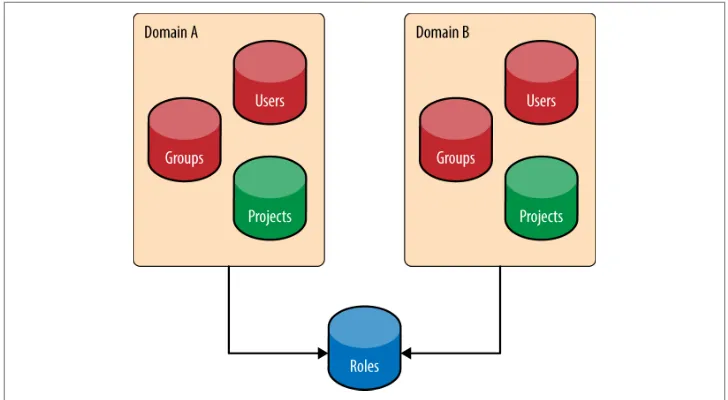
The relationship between domains, projects, users, and groups is shown below. Users, groups, and projects will always be “domain scoped,” meaning that a name for a user, group, and project may be common across domains. Think of this as having a user “Jim” or group “administrators” at both IBM and Acme Inc. However, each entity is guaranteed to have a universally unique identifier (UUID). This implies that trying to find a resource with just the ID will work. However, since names are not guaranteed to be unique, providing the domain is essential to find the resource. As of Liberty, roles are not domain scoped, but this could change in the future.
Figure 1-1. Domains are a collection of Users, Groups, and Projects. Roles are globally unique. Users may have membership in many Groups.
1.1.4 Roles
Roles are used in Keystone to convey a sense of Authorization. An actor may have numerous roles on a target. How the roles are used to determine authorization is cov‐ ered in “1.4 Access Management and Authorization” on page 12. For example, the role of admin is “assigned to” the user “bob” and it is “assigned on” the project “devel‐ opment.”
1.1.5 Assignment
A role assignment is a ternary (or triple): the combination of an actor, a target, and a role. Role assignments are granted and revoked, and may be inherited between groups and users and domains and projects.
1.1.6 Targets
Projects and Domains are very similar in that both are entities where the role is “assigned on.” In other words, a User or User Group is given access to either a Project or Domain by assigning a particular Role value for that User or User Group for a spe‐ cific Project or Domain. Because Projects and Domains have such similar characteris‐ tics, when we need to refer to both entities collectively we refer to them as Targets.
1.1.7 What’s a Token?
In order for a user to call any OpenStack API they need to (a) prove who they are, and (b) that they should be allowed to call the API in question. The way they achieve that is by passing an OpenStack token into the API call—and Keystone is the Open‐ Stack service responsible for generating these tokens. A user receives this token upon successful authentication against Keystone. The token also carries with it authoriza‐ tion. It contains the authorization a user has on the cloud. A token has both an ID and a payload. The ID of a token is guaranteed to be unique per cloud, and the pay‐ load contains data about the user.
The payload can be seen below:
Example 1-1. An Identity V3 Scoped Token consists of many fields that indicate Identity and Authorization attributes about the user on a project
{
"token": {
"issued_at": "201406-10T20:55:16.806027Z", "expires_at": "2014-06-10T2:55:16.806001Z", "roles": [{
"id": "c703057be878458588961ce9a0ce686b", "name": "admin"}
],
"project": {
"domain": { "id": "default", "name": "Default" },
"id": "8538a3f13f9541b28c2620eb19065e45", "name": "admin"
}, "user": {
"domain": { "id": "default", "name": "Default" },
"id": "3ec3164f750146be97f21559ee4d9c51", "name": "admin"
},
"catalog": [ {
"endpoints": [...], "type": "identity",
"id": "bd73972c0e14fb69bae8ff76e112a90", "name": "keystone"
} ] } }
As you can tell, the token payload contains information about when it was created, when it will expire, which user authenticated—and thus is allowed to use the token—
which project the token is valid on, and finally, the catalog, which brings us to our next point. Tokens will be discussed in detail in Chapter 3.
1.1.8 What’s a Catalog?
The service catalog is essential for an OpenStack cloud. It contains the URLs and end‐ points of the different Cloud services. Without the catalog, users and applications would not know where to route requests to create VMs or store objects. The service catalog is broken up into a list of endpoints, and each endpoint is broken down into an admin URL, internal URL, and public URL, which may be the same.
Example 1-2. A simple Catalog of just two services, Identity and Object Storage. Endpoints are essential to allow the user to discover where different services are hosted.
{
"serviceCatalog": [ {
"endpoints": [ {
"adminURL": "http: //swift.admin-nets.local: 8080/", "region": "RegionOne",
"internalURL": "http: //127.0.0.1: 8080/v1/AUTH_1", "publicURL": "http: //swift.publicinternets.com/v1/AUTH_1" }
],
"type": "object-store", "name": "swift"
}, {
"endpoints": [ {
"adminURL": "http: //cdn.admin-nets.local:35357/v2.0", "region": "RegionOne",
"internalURL": " http: //cdn.admin-nets.local:5000/v2.0 ", "publicURL": " http: //cdn.admin-nets.local:5000/v2.0 " }
],
"type": "identity", "name": "keystone" }
] }
1.2 Identity
The Identity Service in Keystone provides the Actors. Identities in the Cloud may come from various locations, including but not limited to SQL, LDAP, and Federated Identity Providers.
1.2.1 SQL
Keystone includes the option to store your actors (Users and Groups) in SQL; sup‐ ported databases include MySQL, PostgreSQL, and DB2. Keystone will store informa‐ tion such as name, password, and description. The settings for the database must be specified in Keystone’s configuration file. Essentially, Keystone is acting as an Identity Provider, which may not be the best case for everyone, and certainly not the best case for enterprise customers. The following provides a brief summary of the advantages and disadvantages of using the SQL Identity option.
Pros:
• Easy to set up
• Management of users and groups through OpenStack APIs Cons:
• Keystone should not be an Identity Provider • Weak password support
— No password rotation — No password recovery
• Most enterprises have an LDAP server they want to use
• Identity silo: yet another username and password users must remember
1.2.2 LDAP
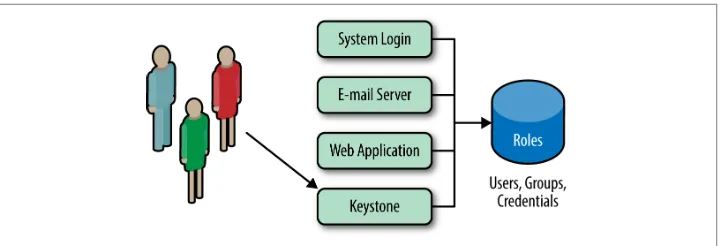
Keystone also has the option to retrieve and store your actors (Users and Groups) in Lightweight Directory Access Protocol (LDAP). Keystone will access the LDAP just like any other application that uses the LDAP (System Login, Email, Web Application, etc.). The settings for connecting to the LDAP are specified in Keystone’s configura‐ tion file. These options also include whether Keystone is able write to LDAP or sim‐ ply read the LDAP data. Ideally, the LDAP should perform only read operations, such as user and group lookup (via search) and authentication (via bind). If using LDAP as a read-only Identity backend, Keystone should need a minimal amount of privilege to use the LDAP. For instance, it needs read access to the user and group attributes defined in keystone.conf, an unprivileged account (anonymous access is preferred), and it does not require access to password hashes. The advantages and disadvantages of the LDAP Identity option are shown below.
Figure 1-2. Keystone should use an internal LDAP just like any other application
Pros:
• No longer need to maintain copies of user accounts. • Keystone does not act as an Identity Provider. Cons:
• Service accounts still need to be stored somewhere, and the LDAP admin may not want these accounts in LDAP.
• Keystone is still “seeing” user passwords, since the passwords are in the authenti‐ cation request. Keystone simply forwards these requests, but ideally Keystone does not want to see a user’s password, ever!
1.2.3 Multiple Backends
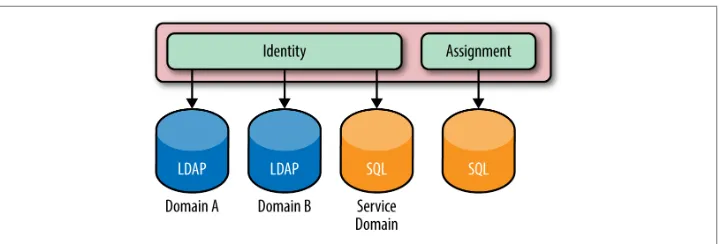
As of the Juno release, Keystone supports multiple Identity backends for the V3 Iden‐ tity API. The impact of this is that a deployment may have one identity source (back‐ end) per Keystone domain. The default domain is usually an SQL backend, as it is used to host service accounts. Service accounts are the accounts that the different OpenStack services use to interact with Keystone. Any additional LDAP backends may be hosted in their own domain. The motivation for supporting multiple Identity backends is that in an enterprise setting, LDAP administrators may not be the same organization as the OpenStack deployment team, so creating service accounts in LDAP is highly unlikely. LDAP is typically restricted to be used only for employee information. Another benefit of a logical split between Identity backends and domains is that now multiple LDAPs can be used. So, in the case of a company merger or different departments having different LDAPs, the same enterprise can still be represented. The advantages and disadvantages of multiple backends are as fol‐ lows.
Figure 1-3. The Identity service may have multiple backends per domain. LDAPs for both Domains A and B, and an SQL-based backend for the service accounts is usual. The Assignment service is also shown to remind readers that the assignment, resource, and identity service may all be backed by various stores.
Pros:
• Able to simultaneously support multiple LDAPs for various user accounts and SQL backends for service accounts
• Leverage existing identity LDAP while not impacting it Cons:
• Slightly more complex to set up
• Authentication for user accounts must be domain scoped
1.2.4 Identity Providers
As of the Icehouse release, Keystone is able to consume federated authentication via Apache modules for multiple trusted Identity Providers. These users are not stored in Keystone, and are treated as ephemeral. The federated users will have their attributes mapped into group-based role assignments. From a Keystone perspective, an identity provider is a source for identities; it may refer to software that is backed by various backends (LDAP, AD, MongoDB) or Social Logins (Google, Facebook, Twitter). Essentially, it is software (IBM’s Tivoli Federated Identity Manager, for instance) that abstracts out the backend and translates user attributes to a standard federated iden‐ tity protocol format (SAML, OpenID Connect). This fits well in Keystone’s greater plan to offload the authentication and identity related portions to a service that already does this in an enterprise. The Identity Provider approach has lots of advan‐ tages and few disadvantages.
Pros:
• Able to leverage existing infrastructure and software to authenticate users and retrieve information about users
• Further separation between Keystone and handling identity information
• Opens the door for new possibilities in the federation realm, such as single sign-on and hybrid cloud
• Keystone does not see any user passwords
• Identity provider handles authentication completely, so whether it is password, certificate, or two-factor based is irrelevant to Keystone
Cons:
• Most complex set up of the identity sources
1.2.5 Use Cases for Identity Backends
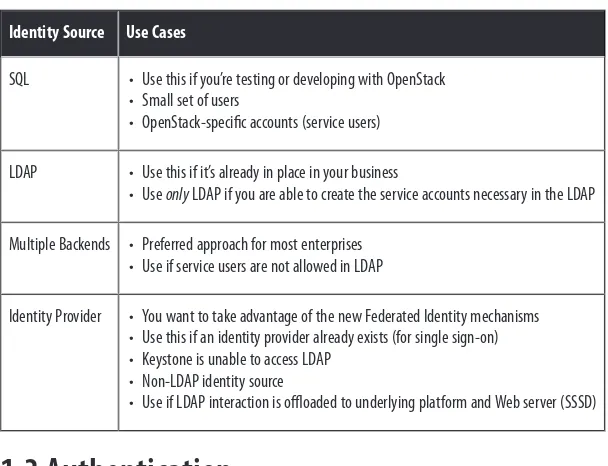
[image:29.504.72.376.275.508.2]The use cases for the different identity backends are organized in Table 1-1.
Table 1-1. List of identity sources and their most common use case
Identity Source Use Cases
SQL • Use this if you’re testing or developing with OpenStack • Small set of users
• OpenStack-specific accounts (service users) LDAP • Use this if it’s already in place in your business
• Use only LDAP if you are able to create the service accounts necessary in the LDAP Multiple Backends • Preferred approach for most enterprises
• Use if service users are not allowed in LDAP
Identity Provider • You want to take advantage of the new Federated Identity mechanisms • Use this if an identity provider already exists (for single sign-on) • Keystone is unable to access LDAP
• Non-LDAP identity source
• Use if LDAP interaction is offloaded to underlying platform and Web server (SSSD)
1.3 Authentication
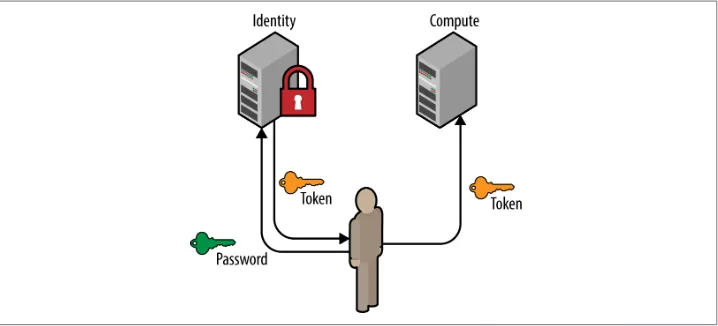
There are various ways to authenticate with the Keystone service—by far the two most common are by supplying a password or by using a token. In this section we will be highlighting those two methods of authentication by showing the data required in a POST request to Keystone and their usual flow between the User, Key‐ stone, and other OpenStack services.
1.3.1 Password
The most common way for a user or service to authenticate is to supply a password. The payload shown below is a sample POST request to Keystone. It is helpful to show the entire payload so the reader recognizes the information that is necessary to authenticate.
Example 1-3. An example of an authentication payload request that contains a scope.
{
"auth": {
"identity": { "methods": [ "password" ],
"password": { "user": { "domain": {
"name": "example.com" },
"name": "Joe",
"password": "secretsecret" }
} },
"scope": { "project": { "domain": {
"name": "example.com" },
"name": "project-x" }
} } }
About the payload, and a note about domains
The payload of the request must contain enough information to find where the user exists, authenticate the user, and optionally, retrieve a service catalog based on the user’s permissions on a scope (project).
The user section that identifies the incoming user should have domain information
(either the domain name or ID), unless a user’s globally unique ID is used, in which case that is sufficient to identify the user. This is because in a multi-domain deploy‐ ment, there may be multiple users with the same name, so proper scoping is neces‐ sary to determine which user is authenticating.
The scope section is optional but is often used, since without a scope a user will not
[image:31.504.74.433.161.324.2]be able to retrieve a service catalog. The scope is used to indicate which project the user wishes to work against. If a user does not have a role on that project, then the request will be rejected. Similar to the user section, the scope section must have enough information about the project to find it, so the owning domain must be speci‐ fied. As in the case of users and groups, project names may also conflict across domains. The project ID, however, is guaranteed to be unique and if specified, no domain information is necessary.
Figure 1-4. A user requests a token by using their username, password, and project scope. The resultant token may then be used at other OpenStack services (such as Com‐ pute or Object Storage).
1.3.2 Token
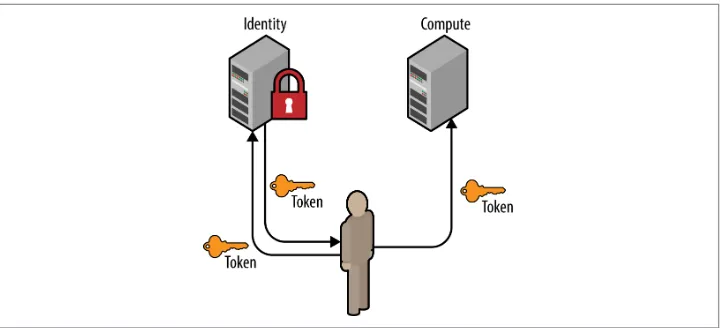
Similar to above, a user may also request a new token by providing a current token. The payload of this POST request is significantly less code than its password counter‐ part. There are many reasons why a token will be used to retrieve another, such as refreshing a token that will soon expire or to change an unscoped token to a scoped token.
{
"auth": {
"identity": { "methods": [ "token" ],
"token": {
"id": "e80b74" }
} } }
Figure 1-5. A user requests a token by using an existing token. The resultant token will have the same scope and roles as the initial token.
1.4 Access Management and Authorization
Managing access and authorizing what APIs a user can use is one of the key reasons Keystone is essential to OpenStack. Keystone’s approach to this problem is to create a Role-Based Access Control (RBAC) policy that is enforced on each public API end‐ point. These policies are stored in a file on disk, commonly named policy.json. To bet‐ ter understand this concept, it’s best to jump right into an example.
The following is a brief example of Keystone’s policy.json file, which is comprised of targets and rules.
Targets refer to the left-hand key, and rules refer to the right-hand value. At the top of the file, targets are established that can be used for evaluation of other targets. It is here that we define what it means to be an admin, an owner, or either.
Example 1-4. Snippet of Keystone’s policy.json file
{
"admin_required": "role:admin or is_admin:1", "owner" : "user_id:%(user_id)s",
"admin_or_owner": "rule:admin_required or rule:owner",
"identity:list_projects": "rule:admin_required", "identity:create_project": "rule:admin_required", "identity:delete_project": "rule:admin_required",
"identity:list_user_projects": "rule:admin_or_owner" }
Each rule that begins with identity: and specifies a protected controller that man‐
[image:33.504.73.345.135.219.2]ages an API. We use the already established targets to protect these new targets. The table below outlines which target protects which API. The full 1:1 mapping for this information can be found in Keystone’s documentation.
Table 1-2. A brief mapping of policy targets and APIs
Policy Target API
identity:list_projects GET /v3/projects
identity:create_project POST /v3/projects
identity:delete_project DELETE /v3/projects/{project_id}
identity:list_user_projects GET /v3/users/{user_id}/projects
It’s important to note the subtle difference between listing all projects and listing a user’s projects. Listing all projects should be an admin-only operation, and its policy is written as such. Listing all projects a user has access to should not only be restricted to admins, but also to the user that has a role on that project.
1.5 Backends and Services
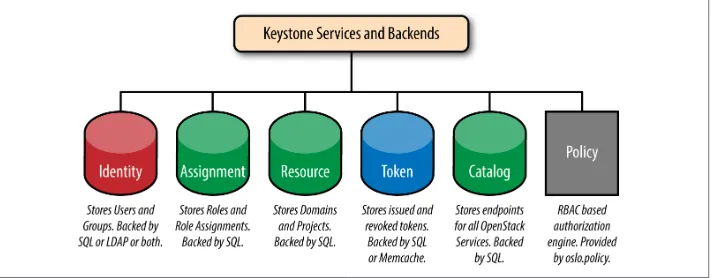
[image:33.504.78.434.389.528.2]It’s worth summarizing backends and services into a handy picture. The green por‐ tions indicate backends that are usually SQL, the pink portions indicate backends that are usually LDAP or SQL, the blue indicates SQL or Memcache, and finally, policy is serviced from a file. There are other Keystone services; however, these are by far the most commonly used.
Figure 1-6. An overview of the different services and backends Keystone supports
1.6 FAQs
What’s the difference between a Domain and a Region?
These terms are often used interchangeably in the OpenStack world, but are very dif‐ ferent concepts. A region is intended to be a geographical representation: an enter‐ prise may have a US-West region and a US-East region. A domain is a logical split between ownership of projects and identity sources.
Can users exist in multiple domains?
In short, no. Each user is owned by a domain. A major point of confusion is that user names may be the same across domains. Meaning there can be a stevemar at the IBM domain and a stevemar at the Acme Inc. domain. Each would have their own unique ID because each stevemar is owned by a different domain, and is considered by Key‐ stone to be a different user.
Why does OpenStack documentation sometimes mention tenants and other times men‐ tion projects? Why mention both? Is there a difference?
In the early days of OpenStack, the term tenant was used by OpenStack services to be the entity for grouping and isolating resources. Over time it was decided that project was a more intuitive term for this. Unfortunately, not all of the projects have fully migrated over from tenant to project. Therefore, in some OpenStack services and documentation you may still run into the term tenant.
What is the difference between a scoped and unscoped token?
An unscoped token is one where the user is authenticated but not for a specific project or domain. This type of token is useful for making queries such as determining what projects a user has access to. A scoped token is created when the user is authenticated for a specific project or domain. Scoped tokens have role information associated with them and are the types of tokens used by the other OpenStack services to determine what types of operations are permitted.
I just authenticated and received a token back but the token doesn’t have any roles in it. Is this a bug? Why are there no roles in the token?
If this happens it is because a user has not submitted a scope in their authentication request. As such, the user gets back an unscoped token, which will not contain any roles, since it does not carry any authorization on a project. So until you authenticate and specify a scope (project or domain) you will not see role information in the token.
What about Active Directory support?
It’s there! Keystone’s LDAP support extends to Active Directory. In its earlier releases, there were bugs in the LDAP backend that were related to AD, but since then multi‐ ple enterprises have been able to configure Keystone to communicate with their AD. What are the other authentication methods?
Keystone also provides support for authenticating through a certificate. The only cav‐ eat here is that the user name associated with the certificate must exist in an Identity backend.
CHAPTER 2
Let’s Use Keystone!
In this chapter we will explain how to use Keystone in a development environment. This involves a few steps. First, we deploy OpenStack with DevStack, then try basic Keystone operations with OpenStackClient (a command line interface), then we per‐ form the same Keystone operations with Horizon (a Web interface). We will also be providing cURL alternatives to the OpenStackClient commands to illustrate the fact that the CLI is simply just a wrapper for a REST call.
2.1 Getting DevStack
The examples shown below were performed on a new Ubuntu 64-bit virtual machine (VM). There are several options available for quickly getting an Ubuntu VM up and running, such as VMWare Fusion or Oracle’s VirtualBox.
To begin, we need to install git and curl, then clone the DevStack repository. It is best to perform these steps from your user’s home directory.
$ sudo apt-get install git curl
$ git clone https://github.com/openstack-dev/devstack/ $ cd devstack
Within the devstack folder, we create a file called local.conf. The settings in this file tell DevStack which components of OpenStack to install and provide a few minor config‐ uration details. We’ll be installing Keystone, Nova, Glance, Cinder, and Horizon. We’ll also be using the latest development branch of OpenStack.
Example 2-1. The local.conf file contents
[[local|localrc]] RECLONE=yes
# Credentials
DATABASE_PASSWORD=openstack ADMIN_PASSWORD=openstack SERVICE_PASSWORD=openstack SERVICE_TOKEN=openstack RABBIT_PASSWORD=openstack
# Services
ENABLED_SERVICES=rabbit,mysql,key ENABLED_SERVICES+=,horizon
ENABLED_SERVICES+=,n-api,n-crt,n-obj,n-cpu,n-cond,n-sch,n-novnc,n-cauth ENABLED_SERVICES+=,n-net
ENABLED_SERVICES+=,g-api,g-reg
ENABLED_SERVICES+=,cinder,c-api,c-vol,c-sch,c-bak
# Enable Logging
LOGFILE=/opt/stack/logs/stack.sh.log VERBOSE=True
LOG_COLOR=True
SCREEN_LOGDIR=/opt/stack/logs
The last step in the process is to kick off the stack.sh script and grab a coffee—the
whole process will take around 25 minutes for the initial setup. $ ./stack.sh
Once completed, the output looks like: This is your host IP address: 10.0.2.15 This is your host IPv6 address: ::1
Horizon is now available at http://10.0.2.15/ Keystone is serving at http://10.0.2.15:5000/ The default users are: admin and demo
The password: openstack
Congratulations, you’ve installed OpenStack!
2.2 Basic Keystone Operations Using OpenStackClient
In this section we will use OpenStackClient to perform basic Keystone operations such as authenticating, listing, and creating users, projects, domains, groups, and roles. For illustrative purposes we also include the cURL alternative to the specific command to show the reader that OpenStackClient performs the equivalent REST call.Before we start executing commands, we should create a few environment variables to make authenticating with our Keystone service easier. Note that most of these val‐ ues should be the same for your deployment, but the hostname or IP address of your VM may be different.
$ export OS_IDENTITY_API_VERSION=3
$ export OS_AUTH_URL=http://10.0.2.15:5000/v3 $ export OS_USERNAME=admin
$ export OS_PROJECT_NAME=admin $ export OS_USER_DOMAIN_NAME=Default $ export OS_PASSWORD=openstack
$ export OS_PROJECT_DOMAIN_NAME=Default
To check that the environment variables are set, perform the following and analyze the output:
$ env | grep OS
OS_IDENTITY_API_VERSION=3
OS_AUTH_URL=http://10.0.2.15:5000/v3 OS_USERNAME=admin
OS_PROJECT_NAME=admin OS_USER_DOMAIN_NAME=Default OS_PASSWORD=openstack
OS_PROJECT_DOMAIN_NAME=Default
2.2.1 Getting a Token
Using OpenStackClient
Since we already set authentication and authorization data as environment variables we simply perform the following to issue a token:
$ openstack token issue
+---+---+ | Field | Value | +---+---+ | expires | 2015-08-27T21:45:41.712853Z | | id | d219ca63fd2548f685fea48623b22a10 | | project_id | 92841d1c386643a08c697c833ed840af | | user_id | 82d7e61f128b4e398bb165f278f45569 | +---+---+
Using cURL
When using cURL to obtain a token, the payload for the authentication request must include information about the user and the project.
$ curl -i -H "Content-Type: application/json" -d ' { "auth": {
"identity": {
"methods": ["password"], "password": {
"user": {
"name": "admin",
"domain": { "name": "Default" }, "password": "openstack"
}
} },
"scope": { "project": { "name": "admin",
"domain": { "name": "Default" } }
} }
}' http://localhost:5000/v3/auth/tokens
HTTP/1.1 201 Created
Date: Thu, 27 Aug 2015 21:57:56 GMT Server: Apache/2.4.7 (Ubuntu)
X-Subject-Token: 2511aaa898ff42158addea8c90ba2622 Vary: X-Auth-Token
x-openstack-request-id: req-ab469b0e-6990-4cca-9b1a-98780ae4108a Content-Length: 5276
Content-Type: application/json
{"token": {"methods": ["password"], "roles": [{"id": "2d357899bd5c430988772eb861f b7a68", "name": "admin"}], "expires_at": "2015-08-27T22:57:58.249918Z",
"project": {"domain": {"id": "default", "name": "Default"}, "id": "ed50269971bc41 ef9f25ce2c7e9b9d11", "name": "admin"}, "catalog": [{"endpoints": [{"region_id": "RegionOne", "url": "http://10.0.2.15:35357/v2.0", "region": "RegionOne", "interface": "admin", "id": "19dfab5f51b24dbe8cfc0e7d5f4677a7"}, {"region_id": "RegionOne", "url": "http://10.0.2.15:5000/v2.0", "region": "RegionOne",
"interface": "internal", "id": "763fef84e9bd43b58733813d5b1f29bb"}, {"region_id": "RegionOne", "url": "http://10.0.2.15:5000/v2.0", "region": "RegionOne",
"interface": "public", "id": "d210b05177b24733b40146f7dcafdb90"}], "type": "identity", "id": "8ae94fc3bb534ef2ae5bc16979e28eaf", "name": "keystone"}], "extras": {}, "user": {"domain": {"id": "default", "name": "Default"}, "id": "9644330bc62542c491179895c6a6d228", "name": "admin"}, "audit_ids": ["2h1Ass48TvKn Oa4u3LR3HA"], "issued_at": "2015-08-27T21:57:58.249944Z"}}
The actual response was trimmed down, since it included the full catalog with all endpoints. For readability, we opted to remove most endpoints in the catalog.
The Token value is set in the X-Subject-Token response header. For the next few examples we will show both CLI and cURL examples. To make the cURL examples easier, set OS_TOKEN to the value seen in X-Subject-Token.
$ OS_TOKEN=2511aaa898ff42158addea8c90ba2622
2.2.2 Listing Users
Using OpenStackClient
After running DevStack, several users will be created automatically. Generally, these are service accounts for other OpenStack services (Cinder, Glance, and Nova), an administrator account (admin), and a non-administrator account (demo).
$ openstack user list
+---+---+ | ID | Name | +---+---+ | 05a77e13219949c59368b99047b6be4b | cinder | | 4da7bd7e25f34ea4aca792055f715fb8 | admin | | 8e30d2d495eb467b8b673fbdfb8be6c7 | glance | | ae760d23927b467e910146e4e9f400c0 | nova | | f6ddb1f6568942cbb85fdbf441c45c05 | demo | +---+---+
Using cURL
The alternative would be to use a token and reach the correct API. $ curl -s -H "X-Auth-Token: $OS_TOKEN" \
http://localhost:5000/v3/users | python -mjson.tool {
"links": { "next": null, "previous": null,
"self": "http://localhost:5000/v3/users" },
"users": [ {
"domain_id": "default", "enabled": true,
"id": "0aa473010af04acb86018125ef71a65e", "links": {
"self": "http://localhost:5000/v3/users/0aa473010a...125ef71a65e" },
"name": "glance" },
{
"domain_id": "default", "enabled": true,
"id": "9644330bc62542c491179895c6a6d228", "links": {
"self": "http://localhost:5000/v3/users/96443...91179895c6a6d228" },
"name": "admin" },
{
"domain_id": "default",
"enabled": true,
"id": "ab7ab1f3fe2745fd91b3d62fd3b7309b", "links": {
"self": "http://localhost:5000/v3/users/ab7a...d91b3d62fd3b7309b" },
"name": "cinder" },
{
"domain_id": "default", "email": "[email protected]", "enabled": true,
"id": "c88b8fa1414e44be918e9e129f04147d", "links": {
"self": "http://localhost:5000/v3/users/c88b8fa...8e9e129f04147d" },
"name": "demo" },
{
"domain_id": "default", "enabled": true,
"id": "cf15631f360c4db18fc95fe95da827f2", "links": {
"self": "http://localhost:5000/v3/users/cf1563...fc95fe95da827f2" },
"name": "nova" }
] }
2.2.3 Listing Projects
Using OpenStackClient
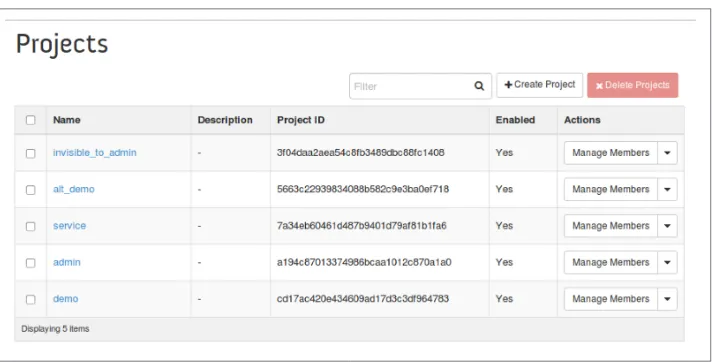
Similar to users, DevStack also creates several projects by default. They can be seen by issuing the following command:
$ openstack project list
+---+---+ | ID | Name | +---+---+ | 10bc96bf62c14d44b02bb5ad8aef57d3 | admin | | 241d8b116a164bcb9c63d75117ed3894 | demo | | 81dc6de893924fbbbf16f272bdfba38d | invisible_to_admin | | ebad3ef327c143bb8e79a52b9b0324e8 | service | +---+---+
Using cURL
Again, similar to the users API, a token is required and we need to reach the proper endpoint.
$ curl -s -H "X-Auth-Token: $OS_TOKEN" \
http://localhost:5000/v3/projects | python -mjson.tool { "links": { "next": null, "previous": null, "self": "http://localhost:5000/v3/projects" }, "projects": [ { "description": "", "domain_id": "default", "enabled": true, "id": "5f198c74b0984566b0a6da26440c5f85", "is_domain": false, "links": { "self": "http://localhost:5000/v3/projects/5f1...0a6da26440c5f85" }, "name": "demo", "parent_id": null }, { "description": "", "domain_id": "default", "enabled": true, "id": "9457bf6cb940453ab92a88219a40a3f7", "is_domain": false, "links": { "self": "http://localhost:5000/v3/projects/9457bf6cb9...9a40a3f7" }, "name": "service", "parent_id": null }, { "description": "", "domain_id": "default", "enabled": true, "id": "dcd882c878bd43188f9758831676559a", "is_domain": false, "links": { "self": "http://localhost:5000/v3/projects/dcd882c878...1676559a" }, "name": "invisible_to_admin", "parent_id": null }, { "description": "", "domain_id": "default", "enabled": true, "id": "ed50269971bc41ef9f25ce2c7e9b9d11", "is_domain": false, "links": {
"self": "http://localhost:5000/v3/projects/ed5026997...c7e9b9d11" },
"name": "admin", "parent_id": null }
] }
2.2.4 Listing Groups
Using OpenStackClient
Similar to users, DevStack also creates two groups by default. Note that the users are not part of either group yet.
$ openstack group list
+---+---+ | ID | Name | +---+---+ | a95873d6a7f54dae90e53de3044b0964 | nonadmins | | e27d8f1c492441888ea4b0a7e836a835 | admins | +---+---+
Using cURL
As with the other commands, simply reuse the token and reach the proper endpoint. $ curl -s -H "X-Auth-Token: $OS_TOKEN" \
http://localhost:5000/v3/groups | python -mjson.tool {
"groups": [ {
"description": "openstack admin group", "domain_id": "default",
"id": "5553cf58254746c8ba615b671dcdc5b2", "links": {
"self": "http://localhost:5000/v3/groups/5553cf582...1dcdc5b2" },
"name": "admins" },
{
"description": "non-admin group", "domain_id": "default",
"id": "8a2e550b2edc4f76bae608e578becf5c", "links": {
"self": "http://localhost:5000/v3/groups/8a2e550b2...8e578becf5c" },
"name": "nonadmins" }
],
"links": { "next": null,
"previous": null,
"self": "http://localhost:5000/v3/groups" }
}
2.2.5 Listing Roles
Using OpenStackClient
In a fashion similar to the previous commands, DevStack also creates a number of roles by default and assigns these roles to various users across the projects.
$ openstack role list
+---+---+ | ID | Name | +---+---+ | 03bdd6d46c2c4f99818bc855872a909e | service | | 4684cf02622f49dd82458852c62f4135 | Member | | 8a5dbcef99274f688effa338db6bf928 | anotherrole | | a22b737940ed4e7588639f1bcb3e3afa | admin | | b5e5224549574edf9ff2caebbda9431d | ResellerAdmin | +---+---+
Using cURL
Again, use a token and hit the correct endpoint. $ curl -s -H "X-Auth-Token: $OS_TOKEN" \
http://localhost:5000/v3/roles | python -mjson.tool {
"links": { "next": null, "previous": null,
"self": "http://localhost:5000/v3/roles" },
"roles": [ {
"id": "20cd9e77e2d44d3490d8c044f508c8f3", "links": {
"self": "http://localhost:5000/v3/roles/20cd9e77e...044f508c8f3" },
"name": "service" },
{
"id": "2d357899bd5c430988772eb861fb7a68", "links": {
"self": "http://localhost:5000/v3/roles/2d357899b...eb861fb7a68" },
"name": "admin" },
{
"id": "40df936c87824fd98b7e39da44f2dbde",
"links": {
"self": "http://localhost:5000/v3/roles/40df936c8...9da44f2dbde" },
"name": "Member" },
{
"id": "d1e7fed5471941b9aeebf15a341edef9", "links": {
"self": "http://localhost:5000/v3/roles/d1e7fed54...15a341edef9" },
"name": "ResellerAdmin" },
{
"id": "face2e488b1c4562bc9f43f8a5e143db", "links": {
"self": "http://localhost:5000/v3/roles/face2e488...3f8a5e143db" },
"name": "anotherrole" }
] }
2.2.6 Listing Domains
Using OpenStackClient
Keystone automatically has a single domain when it is brought up; this is to handle backwards compatibility between Identity API versions.
$ openstack domain list
+---+---+---+---+ | ID | Name | Enabled | Description | +---+---+---+---+ | default | Default | True | Owns users and projects for Identity API v2. | +---+---+---+---+
Using cURL
To list domains, use a valid token and hit the correct endpoint. $ curl -s -H "X-Auth-Token: $OS_TOKEN" \
http://localhost:5000/v3/domains | python -mjson.tool {
"domains": [ {
"description": "Owns users and projects for Identity API v2.", "enabled": true,
"id": "default", "links": {
"self": "http://localhost:5000/v3/domains/default" },
"name": "Default"
} ],
"links": { "next": null, "previous": null,
"self": "http://localhost:5000/v3/domains" }
}
2.2.7 Creating Another Domain
Using OpenStackClient
To get a better sense of v3 of the Identity API, let’s create a domain, and a project and user to be owned by that domain.
$ openstack domain create acme
+---+---+ | Field | Value | +---+---+ | enabled | True | | id | adf547d21ae148aa81c77b36b611d1c3 | | name | acme | +---+---+
Using cURL
Here, we use a POST request with the minimal amount of information in the payload, just the domain name, and by default it’ll be enabled.
$ curl -s -H "X-Auth-Token: $OS_TOKEN" \
-H "Content-Type: application/json" -d '{ "domain": { "name": "acme"}}' http://localhost:5000/v3/domains | python -mjson.tool
{
"domain": {
"enabled": true,
"id": "05a0fcbf796142bfbeb30d0fd3dfa67a", "links": {
"self": "http://localhost:5000/v3/domains/05a0fcbf796142b...d3dfa67a" },
"name": "acme" }
}
2.2.8 Create a Project within the Domain
Using OpenStackClient
To create a project within the domain, we need to specify the domain we created in the previous step, and preferably, give it a fun description.
$ openstack project create tims_project \ --domain acme \
--description "tims dev project"
+---+---+ | Field | Value | +---+---+ | description | tims dev project | | domain_id | adf547d21ae148aa81c77b36b611d1c3 | | enabled | True | | id | 77941c6a73ed452eb65d36d7c962201c | | is_domain | False | | name | tims_project | | parent_id | None | +---+---+
Using cURL
Along with the name of the project, the payload of the POST request must also spec‐ ify the domain ID, which can be found in the previous step. The description of the project is optional.
$ curl -s -H "X-Auth-Token: $OS_TOKEN" \ -H "Content-Type: application/json" \ -d '{ "project": { "name": "tims_project", \ "domain_id": "05a0fcbf796142bfbeb30d0fd3dfa67a", \ "description": "tims dev project"}}' \
http://localhost:5000/v3/projects | python -mjson.tool {
"project": {
"description": "tims dev project",
"domain_id": "05a0fcbf796142bfbeb30d0fd3dfa67a", "enabled": true,
"id": "26436cea94ac4a40b890f05434f15aa4", "is_domain": false,
"links": {
"self": "http://localhost:5000/v3/projects/26436cea94ac4...434f15aa4" },
"name": "tims_project", "parent_id": null }
}
2.2.9 Create a User within the Domain
Using OpenStackClient
To create a user within the domain, we need to specify the domain we created in the previous step. Setting a password and email for the user is optional, but encouraged.
$ openstack user create tim --email [email protected] \
--domain acme --description "tims openstack user account" \ --password s3cr3t