3
C H A P T E R T H R E E
Footprinting and Scanning
This chapter helps you prepare for the EC-Council Certified Ethical Hacker (CEH) Exam by cov-ering footprinting and scanning. A more detailed list of these items includes the following objectives:
Define the seven-step information gathering process
. The EC-Council divides information gathering into seven basic steps. These include gath-ering information, determining the network range, identifying active machines, finding open ports and access points, OS fingerprinting, fingerprinting services, and mapping the network.
Define footprinting
. The process of accumulating data regarding a specific network environment, usually for the purpose of finding ways to intrude into the environment.
Locate the network range
. Locating the network range is needed to know what addresses can be targeted and are available for additional scanning and analysis.
Identify active machines
. The identification of active machines is accomplished by means of ping sweeps and port scans. Both aid in an analysis of understanding if the machine is actively connected to the network and reachable.
Understand how to map open ports and identify their underlying applications
. Ports are tied to applications and, as such, can be registered, random, or dynamic. Describe passive fingerprinting
. Passive fingerprinting is the act of identifying systems without injecting traffic or packets into the network.
State the various ways that active fingerprinting tools work
. Active fingerprinting tools inject strangely crafted packets into the network to measure how systems respond. Specific systems respond in unique ways.
Use tools such as Nmap to perform port scanning and know common Nmap switches
Introduction 92
Determining Assessment Scope 92
The Seven-Step Information Gathering
Process 92
Information Gathering 93 Determining the Network Range 107 Identifying Active Machines 111 Finding Open Ports and Access Points 113
OS Fingerprinting 122
Fingerprinting Services 126
Mapping the Network 127
Summary 130
Key Terms 130
Apply Your Knowledge 131
Exercises 131
Exam Questions 133
a more in-depth understanding of these topics, readers should
. Understand the types of information leakage that organizations can suffer from and list ways to reduce this leakage.
. Review the type of information that a client organization has on its website, and consider how it can be used by a malicious hacker.
. Know the various types of scans such as full, stealth, Null, and Xmas tree. You should also review the various scanning tools, such as Nmap, and understand their operations.
. Be able to identify common ports that are associated with Windows computers.
Introduction
This chapter introduces you to the two of the most important pre-attack phases: footprinting and scanning. Although these steps don’t constitute breaking in, they occur at the point which a hacker will start to get interactive. The goal here is to discover what a hacker or other mali-cious user can uncover about the organization, its technical infrastructure, locations, employ-ees, policies, security stance, and financial situation. Just as most hardened criminals don’t just heist an armored car, elite hackers won’t attack a network before they understand what they are up against. Even script kiddiescan do some amount of pre-attack reconnaissance as they look for a target of opportunity.
This chapter starts off by looking at some general ways that individuals can attempt to gain information about an organization passively and without the organization’s knowledge. Next, it gets interactive and reviews scanning techniques. The goal of scanning is to discover open ports and applications.
Determining Assessment Scope
What’s the goal of the penetration (pen) test? Before starting any ethical hacking job, it’s important that you determine the scope of the assignment. These kinds of details should have been worked out in the written agreement that specifies the scope of the engagement. Is the entire organization, a particular location, or one division to be examined, and will any sub-sidiaries be assessed? These are some questions that need to be answered up front before you begin any activity. Why is this mentioned here? Because you always want to make sure that you have legal written permission before you begin any footprinting or testing. Once an agree-ment is in place, there might still be logistical problems. Scope creepcan be one of the biggest logistical problems you can face. Scope creep is the expansion of the assignment beyond its original specification. The client might want to expand the pen test beyond its original speci-fications; if so, make sure that the new requirements are added to the contract and that prop-er written authorizationhas been obtained.
The Seven-Step Information Gathering
Process
Objectives:
Define the seven-step information gathering process
Define footprinting
attempting to social engineering them out of privileged information is an example of active information gathering. Scanning entails pinging machines, determining network ranges and port scanning individual systems. The EC-Council divides footprinting and scanning into seven basic steps. These include
1. Information gathering
2. Determining the network range
3. Identifying active machines
4. Finding open ports and access points
5. OS fingerprinting
6. Fingerprinting services
7. Mapping the network
Many times, students ask for a step-by-step method of information gathering. Realize that these are just general steps and that ethical hacking is really the process of discovery. Although the material in this book is covered in an ordered approach, real life sometimes varies. When performing these activities, you might find that you are led in a different direction than what you originally envisioned.
Information Gathering
The information gathering steps of footprinting and scanning are of utmost importance. Good information gathering can make the difference between a successful pen test and one that has failed to provide maximum benefit to the client. An amazing amount of information is avail-able about most organizations in business today. This information can be found on the orga-nization’s website, trade papers, Usenet, financial databases, or even from disgruntled employ-ees. Some potential sources are discussed, but first, let’s review documentation.
Documentation
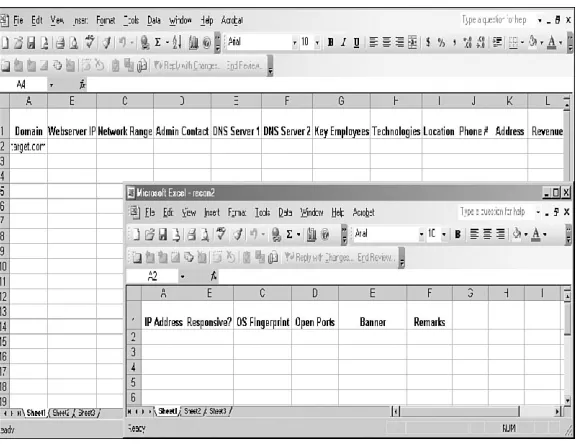
Building this type of information early on will help in mapping the network and planning the best method of attack.
The Organization’s Website
With the initial documentation out of the way, it’s time to get started. The best place to begin is the organization’s website. You want to look for open sourceinformation, which is informa-tion freely provided to clients, customers, or the general public. Let’s look at an example of a local web hosting company. A quick review of its site shows it has a news and updates section. Recent news states the following:
“We are proud to have just updated all of our Cobalt servers to Plesk7 Virtual Site Servers. Anyone logging in to these new servers as admin should use the username of the domain, for example, www.xyz.com. The passwords have been transferred from the old servers, so no pass-word reset should be required. We used the existing domain administrator passpass-word. Our con-tinued alliance with Enterasys has allowed us to complete our transition from Cisco equip-ment. These upgrades, along with our addition of a third connection to the Internet, give us a high degree of fault tolerance.”
[image:6.469.38.329.75.297.2]You might consider this good marketing information to provide potential clients. The prob-lem is that this information is available to anyone who browses the website. This information allows attackers to know that the new systems are Linux-based and that the network equip-ment is all Enterasys. If attackers were planning to launch a denial of service (DoS) attack against the organization, they now know that they must knock out three nodes to the Internet. Even a competitor would benefit from this knowledge as the company is telling the competi-tion everything about its infrastructure.
FIGURE 3.1
Another big information leakage point is the company directories. These usually identify key employees or departments. By combining this information with a little social engineering, an attacker can call the help desk, pretend he works for one of these key employees, and demand that a password be reset or changed. He could also use biographical information about a key employee to perform other types of social engineeringtrickery. Kevin Mitnick used just this type of attack to gain access to restricted code that detailed the operation of Motorola cell phones. During a pen test, you will want to record any such findings and make sure to alert the organ-ization as to what information is available and how it might be used in an attack.
The wayback machine located at www.archive.org can be used to browse archived web pages that date back to 1996. It’s a useful tool for looking for information that no longer exists on a site.
TIP
Gather emails from the target site that can be used for more than just social engineering. One method to gain additional information about the organization’s email server is to send an email that will bounce from the site. If the site is www. xyz.com, send a mail to [email protected]. It will bounce back to you and give you information in its header, including the email server IP address and email server version. Another great reason for bouncing an email message is to find out if they make use of mail scrubber as well. Whatever you find, you will want to copy the information from the headers and make note of it as you con-tinue to gather information.
NOTE
Job Boards
If you’re lucky, the company has a job posting board. Look this over carefully, as you will be surprised at how much information is given here. If no job listings are posted on the organi-zation’s website, get interactive and check out some of the major Internet job boards. Some popular sites are
. Careerbuilder.com
. Monster.com
. Dice.com
. TheITjobboard.com
Once at the job posting site, query for the organization. Here’s an example of the type of infor-mation typically found:
. Interact with the technical support supervisor to resolve issues and evaluate/maintain patch level and security updates.
. Experience necessary in: Active Directory, Microsoft Clustering and Network Load-Balancing, MS Exchange 2000, MS SQL 2000, Citrix MetaFrame XP, EMC CX-400 SAN-related or other enterprise level SAN, Veritas Net Backup, BigBrother, and NetIQ Monitoring SW.
. Maintain, support, and troubleshoot a Windows NT/2000 LAN.
Did these organizations give away any information that might be valuable to an attacker? They actually have told attackers almost everything about their network. Just the knowledge that the organization is still running Windows NT/2000 is extremely valuable.
One method to reduce the information leakage from job postings is to reduce the system specific informa-tion in the job post or to use a company confidential job posting. Company confidential postings hide the true company’s identity and make it harder for attackers to misuse this type of information.
NOTE
Alternative Websites
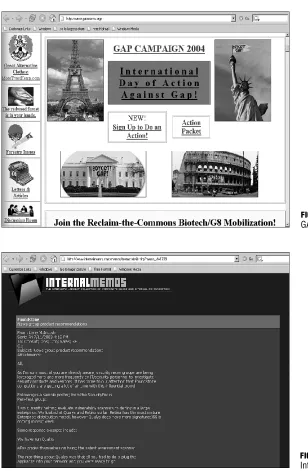
If information is leaked on a company website, it cannot always be quickly removed. So, what if sensitive information is on a website that an organization does not control? There’s always the chance that disgruntled employees might have leaked this information on purpose. That’s why any good information gathering process will include visiting the darker corners of the Internet. Layoffs, reductions in force, and outsourcing are the types of events that don’t nec-essarily put the staff in the best of moods. It could be that the organization’s insiders have posted information that could be rather damaging. These unhappy individuals are potential sources of information leakage. This information might be posted on a blog, some type of “sucks” domain, or other site. Shown in Figure 3.2 is the Gap sucks domain. Although the legality of these domains depends on the type of information provided and their status as a non-commercial entity, their existence is something you should be aware of.
Some other sites that can be used to gather information about the target organization and its employees include
[image:9.469.36.344.68.539.2]. zabasearch.com—Contains names, addresses, phone numbers, date of birth, and other information about individuals.
[image:9.469.38.327.76.299.2]FIGURE 3.2 GAPSucks.org.
FIGURE 3.3
. anywho.com—Phone book offering forward and reverse lookups.
. maps.yahoo.com—Yahoo! map site.
In combination, these sites allow attackers to locate key individuals, identify their home phone numbers, and even create maps to their houses. Attackers can even see the surroundings of the company or the home they are targeting with great quality satellite pictures.
Although some organizations might be relatively secure, gaining the names, addresses, and locations of key employees can allow attackers to war drive their homes and possibly backdoor the organization through an insecure employee’s computer.
NOTE
Free Speech and the Web
As an IT employee of Kmart, I saw firsthand the way internal practice and policies affected the company. That’s why after I was fired, I set up one of the very first “sucks” websites. In less time than it takes to announce a blue light special, my site had attracted more than 9,000 visitors. I felt that the site was non-commercial and complied with the law and while Kmart recognized that the content was either true or opinion, the company did threaten me with legal action for the use of the Kmart logo. Therefore, I changed the logo and the name to “The Mart Sucks.” I believe that the Internet is successful because of its commitment to open standards, freedom of information, and freedom of speech. Any actions that limit these freedoms and make it less hospitable to the average person shouldn’t be tolerated.
This “in the field” segment was contributed by Rodney Fournier, president and lead consultant for Net Working America, Inc. Rodney is an expert in clustering technologies and is a Microsoft MVP.
EDGAR Database
Google Hacking
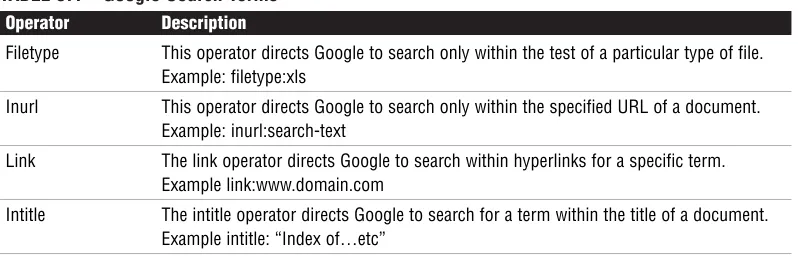
[image:11.469.37.436.208.336.2]Most of us use Google or another search engine to locate information. What you might not know is that search engines, such as Google, have the capability to perform much more pow-erful searches than most people ever dream of. Not only can Google translate documents, per-form news searches, do image searches, but it can also be used by hackers and attackers to do something that has been termed Google hacking. By using basic search techniques combined with advanced operators, Google can become a powerful vulnerability search tool. Some advanced operators include those shown in Table 3.1.
TABLE 3.1 Google Search Terms Operator Description
Filetype This operator directs Google to search only within the test of a particular type of file. Example: filetype:xls
Inurl This operator directs Google to search only within the specified URL of a document. Example: inurl:search-text
Link The link operator directs Google to search within hyperlinks for a specific term. Example link:www.domain.com
Intitle The intitle operator directs Google to search for a term within the title of a document. Example intitle: “Index of…etc”
By using the advanced operators shown in Table 3.1 in combination with key terms, Google can be used to uncover many pieces of sensitive information that shouldn’t be revealed. A term even exists for the people who blindly post this information on the Internet; they are called
google dorks. To see how this works, enter the following phrase into Google:
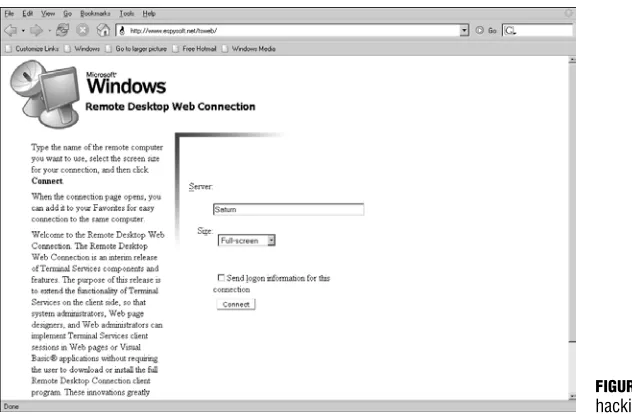
allinurl:tsweb/default.htm
This query will search in a URL for the tsweb/default.htm string. The search found over 200 sites that had the tsweb/default folder. One of these sites is shown in Figure 3.4.
As you can see, this could represent an easy way for a hacker to log directly in to the organi-zation’s servers. Also, notice that there is no warning banner or other notice that unauthorized users should not attempt to connect. Finally, don’t forget that finding a vulnerability using Google is not unethical, but using that vulnerability is unless you have written permission from the domain owner. To learn more about Google hacking, take a look at http://johnny.ihack-stuff.com. The site’s owner, Johnny Long, has also written an excellent book on the subject,
USENET
USENETis a user’s network, which is nothing more than a collection of the thousands of dis-cussion groups that reside on the Internet. Each disdis-cussion group contains information and messages centered on a specific topic. Messages are posted and responded to by readers either as public or private emails. Even without direct access to USENET, a convenient way to browse the content is by using Google Groups. Google Groups allow any Internet user a way to post and read USENET messages. During a penetration test, you will want to review Google Groups for postings from the target company.
One way to search is to use individual’s names you might have uncovered; another is to do a simple search of the company. Searching for @company.com will work. Many times, this will reveal useful information. One company that I performed some work for had listings from the network administrator. He had been asked to set up a new router and was having trouble get-ting it configured properly. The administrator had not only asked the group for help, but had also posted the router configuration to see if someone could help figure out what was wrong. The problem was that the configuration file had not been sanitized and not only contained IP addresses but also the following information:
enable secret 5 $1$2RKf$OMOAcvzpb7j9uhfw6C5Uj1 enable password 7 583132656321654949
[image:12.469.37.353.75.282.2]For those of you who might not be Cisco gurus, those are encrypted passwords. Sure, they are encrypted, but given enough time, there’s the possibility that they might be cracked. Others of
you who say that it’s only router passwords might be right, but let’s hope that the administra-tor doesn’t reuse passwords as many people do. As you can see, you can gain additional infor-mation about an organization and its technical strengths just by uncovering a few USENET posts.
Insecure Applications
Most applications really aren’t bad. Some are more insecure than others, but when deployed with layered controls and properly patched, risk can be minimized. When defense in depth isn’t used, problems start to arise. Defense in depth is the layering of one defensive mechanism after another. A case in point is the program Big Brother (www.bb4.com).
Big Brother is a program that can be used to monitor computer equipment. It can monitor and report the status of items, such as the central processing unit (CPU) utilization, disk usage, ssh status, http status, pop3 status, telnet status, and so on. Unlike Simple Network Monitoring Protocol(SNMP) in which information is just collected and devices polled, Big Brother can col-lect this information and forward it to a central web page or location. This makes it a valuable tool to the administrator in that it provides one central location to review network status and indicates status with a simple red/green interface. Problems are indicated in red, whereas oper-ational systems are indicated in green. You might be asking yourself, okay, so what’s the prob-lem with all this?
The problem is in how the administrator might have set up or configured Big Brother. Big Brother doesn’t need to run as root; therefore, the installation guide recommends that the user create a user named bband configure that user with user privileges. Unless the administrator has changed this, you now know a valid user account on a system. Because the account isn’t used by a human, it might have an easy password or one that is not changed often. The mak-ers of Big Brother also recommend that the web page used to store the information Big Brother generates be password protected. After all, this is extremely sensitive information. If this information has not been protected, all someone must do is go to www.google.com and search for “green:big brother.”If you scroll through the lists of sites and simply click on one, you’ll be taken to a page that displays systems, IP addresses, services, and versions
It’s only taken a few minutes for an attacker to gather this type of information, and it’s com-pletely legal. These pages are posted so that the entire world can read them. Security profes-sionals should always be concerned about what kind of information is posted on the Web and who can access it.
Registrar Query
domain name system management. Its role is really that of overall management, as domain name registration is handled by a number of competing firms that offer various value added services. These include firms such as networksolutions.com, register.com, godaddy.com, and tucows.com. There is also a series of Regional Internet Registries (RIR) that manage, distrib-ute, and register public IP addresses within their respective regions. There are four primary RIRs with a fifth planned to support Africa. These are shown in Table 3.2.
TABLE 3.2 RIRs and Their Area of Control
RIR Region of Control
ARIN North and South America and SubSaharan Africa
APNIC Asia and Pacific
RIPE Europe, Middle East, and parts of Africa
LACNIC Latin America and the Caribbean
AfriNIC Planned RIR to support Africa
The primary tool to navigate these databases is Whois. Whois is a utility that interrogates the Internet domain name administration system and returns the domain ownership, address, loca-tion, phone number, and other details about a specified domain name. Whois is the primary tool used to query Domain Name Services (DNS). If you’re performing this information gath-ering from a Linux computer, the good news is Whois is built in. From the Linux prompt, users can type in whois domainname.comor whois?to get a list of various options. Windows users are not as fortunate as Linux users because Windows does not have a built-in Whois client. Windows users will have to use a third-party tool or website to obtain Whois informa-tion. One tool that a Windows user can use to perform Whois lookups is Sam Spade. It can be downloaded from www.samspade.org/ssw/download.html. Sam Spade contains a lot more util-ities that just Whois, such as ping, finger, and traceroute. There’s also a variety of websites that you can use to obtain Whois information. Some of these include
. www.betterwhois.com
. www.allwhois.com
. http://geektools.com
. www.all-nettools.com
. www.tamos.com/products/smartwhois/
. www.dnsstuff.com
Regardless of the tool, the goal is to obtain registrar information. As an example, the follow-ing listfollow-ing shows the results after www.samspade.org is queried for information on www.exam-cram.com:
Registrant:
Pearson Technology Centre Kenneth Simmons
200 Old Tappan Rd . Old Tappan, NJ 07675 USA
Email: [email protected] Phone: 001-201-7846187
Registrar Name....: REGISTER.COM, INC. Registrar Whois...: whois.register.com
Registrar Homepage: www.register.com DNS Servers:
usrxdns1.pearsontc.com oldtxdns2.pearsontc.com
A domain proxy is one way that organizations can protect their identity while still complying with laws that require domain ownership to be public information. Domain proxies work by applying anonymous contact information as well an anonymous email address. This information is displayed when someone performs a domain Whois. The proxy then forwards any emails or contact information that might come to those addresses on to you.
NOTE
This information provides a contact person, address, phone number, and DNS servers. A hacker skilled in the art of social engineering might use this information to call the organiza-tion and pretend to be Kenneth, or he might use the phone number to war dial a range of phone numbers looking for modems.
DNS Enumeration
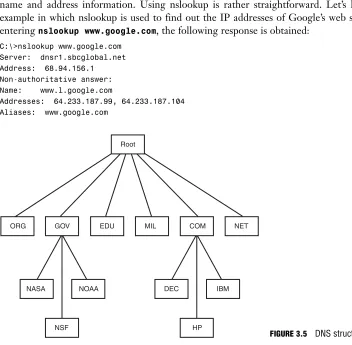
The attacker has also identified the names of the DNS servers. DNS servers might be target-ed for zone transfers. A zone transfer is the mechanism ustarget-ed by DNS servers to update each other by transferring the contents of their database. DNS is structured as a hierarchy so that when you request DNS information, your request is passed up the hierarchy until a DNS server is found that can resolve the domain name request. You can get a better idea of how DNS is structured by examining Figure 3.5. There is a total of 13 DNS root servers.
name and address information. Using nslookup is rather straightforward. Let’s look at an example in which nslookup is used to find out the IP addresses of Google’s web servers. By entering nslookup www.google.com, the following response is obtained:
C:\>nslookup www.google.com Server: dnsr1.sbcglobal.net Address: 68.94.156.1 Non-authoritative answer: Name: www.l.google.com
Addresses: 64.233.187.99, 64.233.187.104 Aliases: www.google.com
Root
NET
ORG GOV
NSF NOAA NASA
EDU MIL COM
HP IBM DEC
FIGURE 3.5 DNS structure.
The first two lines of output say which DNS servers are being queried. In this case, it’s dnsr1.sbcglobal.netin Texas. The non-authoritative answer lists two IP addresses for the Google web servers. Responses from non-authoritative servers do not contain copies of any domains. They have a cache file that is constructed from all the DNS lookups it has performed in the past for which it has gotten an authoritative response.
Nslookup can also be used in an interactive mode by just typing nslookup at the command prompt. In interactive mode, the user will be given a prompt of >; at which point, the user can enter a variety of options, including attempts to perform a zone transfer.
[image:16.469.37.389.78.423.2]are much like the DHCP process in that each is a four-step process. DNS zone transfers func-tion as follows:
1. The secondary name server starts the process by requesting the SOA record from the primary name server.
2. The primary then checks the list of authorized servers, and if the secondary server’s name is on that list, the SOA record is sent.
3. The secondary must then check the SOA record to see if there is a match against the SOA it already maintains. If the SOA is a match, the process stops here; however, if the SOA has a serial number that is higher, the secondary will need an update. The serial number indicates if changes were made since the last time the secondary server syn-chronized with the primary server. If an update is required, the secondary name server will send an All Zone Transfer (AXFR) request to the primary server.
4. Upon receipt of the AXFR, the primary server will send the entire zone file to the sec-ondary name server.
[image:17.469.35.438.333.444.2]Some common DNS resource record names and types are shown in Table 3.3.
TABLE 3.3 DNS Records and Types
Record Name Record Type Purpose
Host A Maps a domain name to an IP address
Pointer PTR Maps an IP address to a domain name
Name Server NS Configures settings for zone transfers and record caching
Start of Authority SOA Configures settings for zone transfers and record caching
Service Locator SRV Used to locate services in the network
Mail MX Used to identify SMTP servers
EXAM ALERT
The SOA contains the timeout value, which can be used by a hacker to tell how long any DNS poison-ing would last. The TTL value is the last value within the SOA.
a DNS server that is the authoritative server for that zone. Remember the nslookup informa-tion we previously gathered? It’s shown here again for your convenience.
Registrant:
Pearson Technology Centre Kenneth Simmons
200 Old Tappan Rd . Old Tappan, NJ 07675 USA Email: [email protected] Phone: 001-201-7846187
Registrar Name....: REGISTER.COM, INC. Registrar Whois...: whois.register.com Registrar Homepage: www.register.com DNS Servers:
usrxdns1.pearsontc.com oldtxdns2.pearsontc.com
Review the last two entries. Both usrxdns1.pearsontc.comand oldtxdns2.pearsontc.com are the DNS authoritative servers for ExamCram.com. These are the addresses that an attack-er will target to attempt a zone transfattack-er. The steps to try and force a zone transfattack-er are shown here:
1. nslookup—Enter nslookupfrom the command line.
2. server <ipaddress>—Enter the IP address of the authoritative server for that zone.
3. set type = any—Tells nslookup to query for any record.
4. ls –d <domain.com>—Domain.com is the name of the targeted domain of the final step that performs the zone transfer.
One of two things will happen at this point; either you will receive an error message indicat-ing that the transfer was unsuccessful, or you will be returned a wealth of information, as shown in the following:
C:\WINNT\system32>nslookup
Default Server: dnsr1.sbcglobal.net Address: 128.112.3.12
server 172.6.1.114 set type=any ls -d example.com
example.com. SOA hostmaster.sbc.net (950849 21600 3600 1728000 3600) example.com. NS auth100.ns.sbc.net
example.com. NS auth110.ns.sbc.net example.com. A 10.14.229.23
example.com. MX 30 lasmtpr1.example.com lasmtpr1 A 192.172.243.240
dallassmtpr1 A 192.172.163.9 dallaslink2 A 192.172.161.4
spamassassin A 192.172.170.49 dallassmtpr2 A 192.172.163.7
dallasextra A 192.172.170.17 dallasgate A 192.172.163.22
lalink A 172.16.208.249 dallassmtp1 A 192.172.170.49
nygate A 192.172.3.250 www A 10.49.229.203
dallassmtp MX 10 dallassmtpr1.example.com dallassmtp MX 20 dallassmtpr2.example.com
dallassmtp MX 30 lasmtpr1.example.com
Dig is another tool that can be used to provide this type of information. It’s available for Linux and for Windows. Dig is a powerful tool that can be used to investigate the DNS system.
NOTE
This type of information should not be made available to just anyone. Hackers can use this to find out what other servers are running on the network, and it can help them map the network and formulate what types of attacks to launch. Notice the first line that has example.com list-ed previously. Observe the final value of 3600on that line. That is the TTL value discussed previously which would inform a hacker as to how long DNS poisoning would last. 3,600 sec-onds is 60 minutes. Zone transfers are intended for use by secondary DNS servers to synchro-nize with their primary DNS server. You should make sure that only specific IP addresses are allowed to request zone transfers. Although most Operating Systems restrict this by default, Windows 2000 did not. So, be aware of this if any 2000 servers are still in your network.
All DNS servers should be tested. It is very often the case in which the primary has tight security, but the secondaries will allow zone transfers.
NOTE
Determining the Network Range
Objective:
Locate the network range
for scanning and further enumeration. If you take the IP address of a web server discovered ear-lier and enter it into the Whois lookup at www.arin.net, the network’s range can be determined. As an example, 192.17.170.17 was entered into the ARIN Whois, and the following informa-tion was received:
OrgName: target network OrgID: Target-2
Address: 1313 Mockingbird Road City: Anytown
StateProv: Tx PostalCode: 72341 Country: US
ReferralServer: rwhois://rwhois.exodus.net:4321/ NetRange: 192.17.12.0 - 192.17.12.255
CIDR: 192.17.0.0/24 NetName: SAVVIS
NetHandle: NET-192-17-12-0-1 Parent: NET-192-0-0-0-0
This means that the target network has 254 total addresses. The attacker can now focus his efforts on the range from 192.17.12.1 to 192.17.12.254 /24. If these results don’t prove satis-factory, traceroute can be used for additional mapping.
Traceroute
Objective:
Specify how traceroute works
Thetracerouteutility is used to determine the path to a target computer. Just as with nslookup, traceroute is available on Windows and UNIX platforms. In Windows, it is known as tracert because of 8.3 legacy filename constraints remaining from DOS. Traceroute was originally developed by Van Jacobson to view the path a packet follows from its source to its destination. Traceroute owes its functionality to the IP header time-to-live(TTL) field. You might remem-ber from the discussion in Chapter 2, “The Technical Foundations of Hacking,” that the TTL field is used to limit IP datagram’s. Without a TTL, some IP datagram’s might travel the Internet forever as there would be no means of timeout. TTL functions as a decrementing counter. Each hop that a datagram passes through reduces the TTL field by one. If the TTL value reaches 0, the datagram is discarded and a time exceeded in transit Internet Control Message Protocol (ICMP) message is created to inform the source of the failure. Linux tracer-oute is based on UDP, whereas Windows uses ICMP.
You will want to be familiar with all the common ICMP types and codes before attempting the CEH exam. They are covered in detail in RFC 792.
To get a better idea of how this works, let’s take a look at how Windows would process a tracer-oute. For this example, say that the target is three hops away. Windows would send out a pack-et with a TTL of 1. Upon reaching the first router, the packpack-et TTL value would be decre-mented to 0, which would illicit a time exceeded in transit error message. This message would be sent back to the sender to indicate that the packet did not reach the remote host. Receipt of the message would inform Windows that it had yet to reach its destination, and the IP of the device in which the datagram timed out would be displayed. Next, Windows would increase the TTL to a value of 2. This datagram would make it through the first router, where the TTL value would be decremented to 1. Then it would make it through the second router; at which time, the TTL value would be decremented to 0 and the packet would expire. Therefore, the second router would create a time exceeded in transit error message and for-ward it to the original source. The IP address of this device would next be displayed on the user’s computer. Finally, the TTL would be increased to 3. This datagram would easily make it past the first and second hop and arrive at the third hop. Because the third hop is the last hop before the target, the router would forward the packet to the destination and the target would issue a normal ICMP ping response. The output of this traceroute can be seen here:
C:\>tracert 192.168.1.200 Tracing route to 192.168.1.200:
1 10 ms <10 ms <10 ms 2 10 ms 10 ms 20 ms
3 20 ms 20 ms 20 ms 192.168.1.200 Trace complete.
Linux-based versions of traceroute work much the same way but use UDP. Traceroute sends these UDP packets targeted to high order port numbers that nothing should be listening on. Just as described previously, the TTL is increased until the target device is reached. Because traceroute is using a high order UDP port, typically 33434, the host should ignore the pack-ets after generating port unreachable messages. These ICMP port unreachable messages are used by traceroute to notify the source that the destination has been reached.
It’s advisable to check out more than one version of traceroute if you don’t get the required results. Some techniques can also be used to try and slip traceroute passed a firewall or filter-ing device. When UDP and ICMP are not allowed on the remote gateway, TCPTraceroute can be used. Another unique technique was developed by Michael Schiffman, who created a patch called traceroute.diff that allows you to specify the port that traceroute will use. With this handy tool, you could easily direct traceroute to use UDP port 53. Because that port is used for DNS queries, there’s a good chance that it could be used to slip past the firewall. If you’re looking for a GUI program to perform traceroute with, several are available, which are described here:
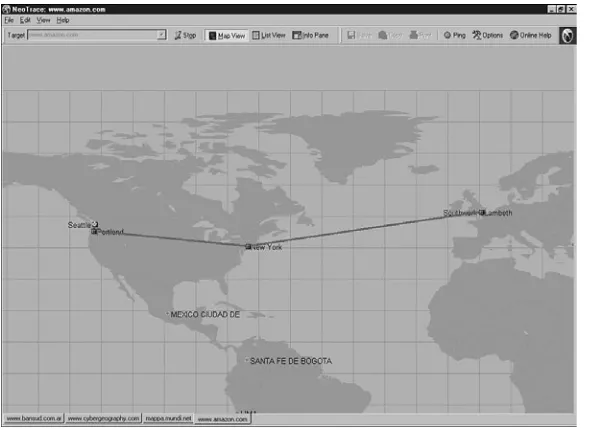
each node such as IP address, contact information, and location. NeoTrace can be seen in Figure 3.6. That trace shows the results of a traceroute to Microsoft.com. Just remember that NeoTrace builds from provided information that is entered into the routers, and it might not always be accurate.
FIGURE 3.6 NeoTrace.
. Trout—Trout is another visual traceroute and Whois program. What’s great about this program is its speed. Unlike traditional traceroute programs, trout performs parallel pinging. By sending packets with more than one TTL at a time, it can quickly deter-mine the path to a targeted device.
. VisualRoute—VisualRoute is another graphical traceroute for Windows. VisualRoute not only shows a graphical world map that displays the path packets are taking, but it also lists information for each hop, including IP address, node name, and geographical location.
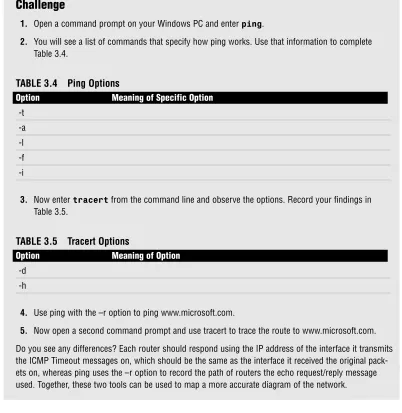
Challenge
1. Open a command prompt on your Windows PC and enter ping.
[image:23.469.33.435.86.499.2]2. You will see a list of commands that specify how ping works. Use that information to complete Table 3.4.
TABLE 3.4 Ping Options
Option Meaning of Specific Option
-t
-a
-l
-f
-i
3. Now enter tracertfrom the command line and observe the options. Record your findings in Table 3.5.
TABLE 3.5 Tracert Options
Option Meaning of Option
-d
-h
4. Use ping with the –r option to ping www.microsoft.com.
5. Now open a second command prompt and use tracert to trace the route to www.microsoft.com.
Do you see any differences? Each router should respond using the IP address of the interface it transmits the ICMP Timeout messages on, which should be the same as the interface it received the original pack-ets on, whereas ping uses the –r option to record the path of routers the echo request/reply message used. Together, these two tools can be used to map a more accurate diagram of the network.
Identifying Active Machines
Objective:
Identify active machines
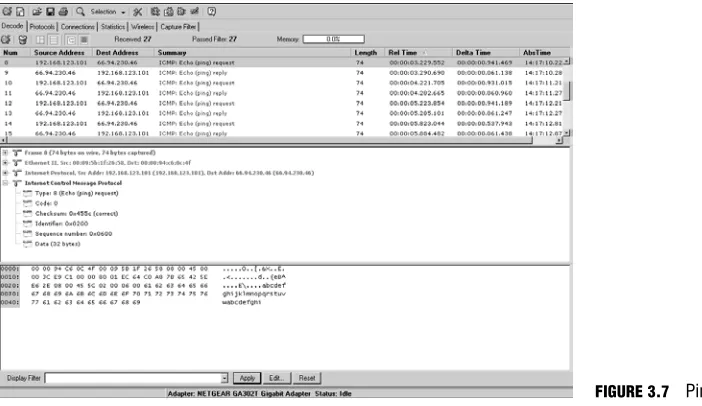
is found on just about every system running TCP/IP, it has been restricted by many organiza-tions. Ping uses ICMP and works by sending an echo requestto a system and waiting for the tar-get to send an echo replyback. If the target device is unreachable, a request time outis returned. Ping is a useful tool to identify active machines and to measure the speed at which packets are moved from one host to another or to get details like the TTL. Figure 3.7 shows a ping cap-ture from a Windows computer. If you take a moment to examine the ASCII decode in the bottom-left corner, you will notice that the data in the ping packet is composed of the alpha-bet, which is unlike a Linux ping, which would contain numeric values. That’s because the RFC that governs ping doesn’t specify what’s carried in the packet as payload. Vendors fill in this padding as they see fit. Unfortunately, this can also serve hackers as a covert channel. However, hackers can use a variety of programs to place their own information in place of the normal padding. Then what appears to be normal pings are actually a series of messages enter-ing and leaventer-ing the network.
FIGURE 3.7 Ping capture.
Ping does have a couple of drawbacks: First, only one system at a time is pinged and second, not all networks allow ping. To ping a large amount of hosts, a ping sweepis usually performed. Programs that perform ping sweeps typically sweep through a range of devices to determine which ones are active. Some of the programs that will perform ping sweeps include
. Angry IP Scanner
. Pinger
. WS_Ping_ProPack
. Super Scan
. Nmap
Finding Open Ports and Access Points
Objective:
Understand how to map open ports and identify their underlying applications
With knowledge of the network range and a list of active devices, the next step is to identify open ports and access points. Identifying open ports will go a long way toward potential attack vectors. There is also the possibility of using war dialing programs to find ways around an organization’s firewall. If the organization is located close by, the attacker might war drive the area to look for open access points.
Port Scanning
Objective:
Describe the differences between TCP and UDP scanning
Port scanningis the process of connecting to TCP and UDP ports for the purpose of finding what services and applications are running on the target device. After running applications, open ports and services are discovered, the hacker can then determine the best way to attack the system.
[image:25.469.39.436.460.605.2]As discussed in Chapter 2, there are a total of 65,535 TCP and UDP ports. These port num-bers are used to identify a specific process that a message is coming from or going to. Some common port numbers are shown in Table 3.6.
TABLE 3.6 Common Ports and Protocols
Port Service Protocol
20/21 FTP TCP
22 SSH TCP
23 Telnet TCP
25 SMTP TCP
53 DNS TCP/UDP
69 TFTP UDP
80 HTTP TCP
110 POP3 TCP
135 RPC TCP
161/162 SNMP UDP
1433/1434 MSSQL TCP
As you have probably noticed, some of these applications run on TCP, whereas others run on UDP. Although it is certainly possible to scan for all 65,535 TCP and 65,535 UDP ports, many hackers will not. They will concentrate on the first 1,024 ports. These well-known ports are where we find most of the commonly used applications. A list of well-known ports can be found at www.iana.org/assignments/port-numbers. Now, this is not to say that high order ports should be totally ignored because hackers might break into a system and open a high order port, such as 31337, to use as a backdoor. So, is one protocol easier to scan for than the other? Well, the answer to that question is yes. TCP offers more opportunity for the hacker to manipulate than UDP. Let’s take a look at why.
TCP offers robust communication and is considered a connection protocol. TCP establishes a connection by using what is called a 3-way handshake. Those three steps proceed as follows:
1. The client sends the server a TCP packet with the sequence number flag(SYN Flag) set and an Initial Sequence Number (ISN).
2. The server replies by sending a packet with the SYN/ACK flag set to the client. The synchronize sequence number flag informs the client that it would like to communicate with it, whereas the acknowledgement flag informs the client that it received its initial packet. The acknowledgement number will be one digit higher than the client’s ISN. The server will generate an ISN as well to keep track of every byte sent to the client.
3. When the client receives the server’s packet, it creates an ACK packet to acknowledge that the data has been received from the server. At this point, communication can begin.
The TCP header contains a one-byte field for the flags. These flags can be seen in Table 3.7.
TABLE 3.7 TCP Flag Types Flag Purpose
SYN Synchronize and Initial Sequence Number (ISN)
ACK Acknowledgement of packets received
FIN Final data flag used during the 4-step shutdown of a session
RST Reset bit used to close an abnormal connection
PSH Push data bit used to signal that data in the packet should be pushed to the beginning of the queue. Usually indicates an urgent message.
[image:26.469.36.432.87.150.2]URG Urgent data bit used to signify that urgent control characters are present in this packet that should have priority.
TABLE 3.6 Continued
At the conclusion of communication, TCP terminates the session by using a 4-step shutdown. Those four steps proceed as follows:
1. The client sends the server a packet with the FIN/ACK flags set.
2. The server sends a packet ACK flag set to acknowledge the clients packet.
3. The server then generates another packet with the FIN/ACK flags set to inform the client that it also is ready to conclude the session.
4. The client sends the server a packet with the ACK flag set to conclude the session.
The TCP system of communication makes for robust communication but also allows a hack-er many ways to craft packets in an attempt to coax a shack-ervhack-er to respond or to try and avoid detection of an intrusion detection system (IDS). Many of these methods are built into Nmap and other port scanning tools, but before taking a look at those tools, some of the more popular port scanning techniques are listed here:
. TCP Connect scan—This type of scan is the most reliable, although it is also the most detectable. It is easily logged and detected because a full connection is established. Open ports reply with a SYN/ACK, whereas closed ports respond with an RST/ACK.
. TCP SYN scan—This type of scan is known as half open because a full TCP three-way connection is not established. This type of scan was originally developed to be stealthy and evade IDS systems although most now detect it. Open ports reply with a SYN/ACK, whereas closed ports respond with a RST/ACK.
. TCP FIN scan—Forget trying to set up a connection; this technique jumps straight to the shutdown. This type of scan sends a FIN packet to the target port. Closed ports should send back an RST. This technique is usually effective only on UNIX devices.
. TCP NULL scan—Sure, there should be some type of flag in the packet, but a NULL scan sends a packet with no flags set. If the OS has implemented TCP per RFC 793, closed ports will return an RST.
. TCP ACK scan—This scan attempts to determine access control list (ACL) rule sets or identify if stateless inspection is being used. If an ICMP destination unreachable, communication administrative prohibited message is returned, the port is considered to be filtered.
. TCP XMAS scan—Sorry, there are no Christmas presents here, just a port scan that has toggled on the FIN, URG, and PSH flags. Closed ports should return an RST.
Certain OSes have taken some liberties when applying the TCP/IP RFCs and do things their own way. Because of this, not all scan types will work against all systems. So, results will vary, but Full Connect scans and SYN scans should work against all systems.
These are not the only types of possible scans; however, they are the more popular types. A few others worth briefly noting include
. IDLE scan—Uses an idle host to bounce packets off of and make the scan harder to trace. It is considered the only totally stealth scan.
. FTP Bounce scan—Uses an FTP server to bounce packets off of and make the scan harder to trace.
. RPC scan—Attempts to determine if open ports are RPC ports.
. Window scan—Similar to an ACK scan, but can sometimes determine open ports.
Now let’s look at UDP scans. UDP is unlike TCP. Although TCP is built on robust connec-tions, UDP is based on speed. With TCP, the hacker has the ability to manipulate flags in an attempt to generate a TCP response or an error message from ICMP. UDP does not have flags, nor does UDP issue responses. It’s a fire and forget protocol! The most you can hope for is a response from ICMP.
If the port is closed, ICMP will attempt to send an ICMP type 3 code 3 port unreachable mes-sage to the source of the UDP scan. But, if the network is blocking ICMP, no error mesmes-sage will be returned. Therefore, the response to the scans might simply be no response. If you are planning on doing UDP scans, plan for unreliable results.
Next some of the programs that can be used for port scanning are discussed.
Is Port Scanning Legal?
Nmap
Objective:
Use tools such as Nmap to perform port scanning and know common Nmap switches
Nmap was developed by a hacker named Fyodor Yarochkin. This popular application is avail-able for Windows and Linux as a GUI and command-line program. It is probably the most widely used port scanner ever developed. It can do many types of scans and OS identification. It also allows you to control the speed of the scan from slow to insane. Its popularity can be seen by the fact that it’s incorporated into other products and was even used in the movie The Matrix. Nmap with the help option is shown here so that you can review some of its many switches.
C:\nmap-3.93>nmap -h
Nmap 3.93 Usage: nmap [Scan Type(s)] [Options] <host or net list> Some Common Scan Types (‘*’ options require root privileges) * -sS TCP SYN stealth port scan (default if privileged (root))
-sT TCP connect() port scan (default for unprivileged users) * -sU UDP port scan
-sP ping scan (Find any reachable machines)
* -sF,-sX,-sN Stealth FIN, Xmas, or Null scan (experts only)
-sV Version scan probes open ports determining service and app names/versions -sR/-I RPC/Identd scan (use with other scan types)
Some Common Options (none are required, most can be combined): * -O Use TCP/IP fingerprinting to guess remote operating system
-p <range> ports to scan. Example range: ‘1-1024,1080,6666,31337’ -F Only scans ports listed in nmap-services
-v Verbose. Its use is recommended. Use twice for greater effect. -P0 Don’t ping hosts (needed to scan www.microsoft.com and others) * -Ddecoy_host1,decoy2[,...] Hide scan using many decoys
-6 scans via IPv6 rather than IPv4
-T <Paranoid|Sneaky|Polite|Normal|Aggressive|Insane> General timing policy -n/-R Never do DNS resolution/Always resolve [default: sometimes resolve] -oN/-oX/-oG <logfile> Output normal/XML/grepable scan logs to <logfile> -iL <inputfile> Get targets from file; Use ‘-’ for stdin
* -S <your_IP>/-e <devicename> Specify source address or network interface --interactive Go into interactive mode (then press h for help)
--win_help Windows-specific features
Example: nmap -v -sS -O www.my.com 192.168.0.0/16 ‘192.88-90.*.*’ SEE THE MAN PAGE FOR MANY MORE OPTIONS, DESCRIPTIONS, AND EXAMPLES
As can be seen from the output of the help menu in the previous listing, Nmap can run many types of scans. Nmap is considered a required tool for all ethical hackers. Nmap’s output pro-vides the open port’s well-known service name, number, and protocol. They can either be open, closed, or filtered. If a port is open, it means that the target device will accept connec-tions on that port. A closed port is not listening for connecconnec-tions, and a filtered port means that a firewall, filter, or other network device is guarding the port and preventing Nmap from fully probing it or determining its status. If a port is reported as unfiltered, it means that the port is closed and no firewall or router appears to be interfering with Nmap’s attempts to determine its status. To run Nmap from the command line, type Nmap, followed by the switch, and then enter a single IP address or a range. For the example shown here, the –sT option was used, which performs a TCP full 3-step connection.
C:\nmap-3.93>nmap -sT 192.168.1.108
Starting nmap 3.93 ( http://www.insecure.org/nmap ) at 2005-10-05 23:42 Central Daylight Time
Interesting ports on Server (192.168.1.108):
(The 1653 ports scanned but not shown below are in state: filtered) PORT STATE SERVICE
80/tcp open http 139/tcp open netbios-ssn 515/tcp open printer 548/tcp open afpovertcp
Nmap run completed -- 1 IP address (1 host up) scanned in 420.475 seconds
Several interesting ports were found on this computer, including 80 and 139. A UDP scan per-formed with the -sUswitch returned the following results:
C:\nmap-3.93>nmap -sU 192.168.1.108
Starting nmap 3.93 ( http://www.insecure.org/nmap ) at 2005-10-05 23:47 Central Daylight Time
Interesting ports on Server (192.168.1.108):
(The 1653 ports scanned but not shown below are in state: filtered) PORT STATE SERVICE
69/udp open tftp 139/udp open netbios-ssn
Nmap run completed -- 1 IP address (1 host up) scanned in 843.713 seconds
SuperScan
Version 4 of SuperScan is written to run on Windows XP and 2000. It’s a versatile TCP/UDP port scanner, pinger, and hostname revolver. It can perform ping scans and port scans using a range of IP addresses, or it can scan a single host. It also has the capability to resolve or reverse-lookup IP addresses. It builds an easy-to-use HTML report that contains a complete breakdown of the hosts that were scanned. This includes information on each port and details about any banners that were found. It’s free; therefore it is another tool that all ethical hack-ers should have. To get a better look at the interface, review Figure 3.9.
THC-Amap
THC-Amap is another example of scanning and banner grabbing. One problem that tradi-tional scanning programs have is that not all services are ready and eager to give up the appro-priate banner. For example, some services, such as SSL, expect a handshake. Amap handles this by storing a collection of responses that it can fire off at the port to interactively elicit it to respond. Another problem is that scanning programs sometimes make basic assumptions that might be flawed. Many port scanners assume that if a particular port is open, the default appli-cation for that port must be present. Amap probes these ports to find out what is really run-ning there. Therefore, this tool excels at allowing a security professional to find services that might have been redirected from their standard ports. One technique is to use this program by taking the greppable format of nmap as an input to scan for those open services. Defeating or blocking Amap is not easy, although one technique would be to use a port knockingtechnique. Port knocking is similar to a secret handshake or combination. Only after inputting a set order of port connections can a connection be made.
Scanrand
Scanrand is part of a suite of tools known as Paketto Keiretsu developed by Dan Kaminsky. Scanrand is a fast scanning tool, and what makes this tool so fast is that it uses a unique method of scanning TCP ports. Most TCP scanners take the approach of scanning one port at a time. After all, TCP is a stateful protocol, so traditional scanners must probe each port, wait for the response, store the connection in memory, and then move on. Traditional scanning is a serial process.
Scanrand implementsstatelessscanning. This parallel approach to scanning breaks the process into two distinct processes. One process sends out the requests at a high rate of speed, while the other independent process is left to sort out the incoming responses and figure out how it all matches up. The secret to the program’s speed is in its use of inverse SYN cookies. Basically, Scanrand builds a hashed sequence number placed in the outgoing packet that can be identi-fied upon return. This value contains information that identifies source IP, source port, desti-nation IP, and destidesti-nation port. If you’re tasked with scanning a large number of IP addresses quickly, this is something you’ll want to check out, as it is much faster than traditional scan-ning programs.
Port Knocking
Port knockingis a method of establishing a connection to a host that does not initially indicate that it has any open ports. Port knocking works by having the remote device send a series of connection attempts to a specific series of ports. It is somewhat analogous to a secret hand-shake. After the proper sequence of port knocking has been detected, the required port is
opened and a connection is established. The advantage of using a port knocking technique is that hackers cannot easily identify open ports. The disadvantages include the fact that the tech-nique does not harden the underlining application. Also, it isn’t useful for publicly accessible services. Finally, anyone who has the ability to sniff the network traffic will be in possession of the appropriate knock sequence. www.portknocking.org is a good site to check out to learn more about this defensive technique.
War Dialers
War dialinghas been around long before the days of broadband access and was actually popu-larized in the 1983 movie War Games. War dialing is the act of using a modem and software to scan for other systems with modems attached. War dialing is accomplished by dialing a range of phone numbers with the hope of getting one to respond with the appropriate tone. Modems are a tempting target for hackers because they offer them the opportunity to bypass the cor-porate firewall. A modem can be seen as a backdoor into the network.
Modems are still popular today with network administrators because they can be used for remote access, and they are useful for out-of-band management. After all, they are a low-cost network access alternative if normal network access goes down. The problem is that many of these modems have no authentication or weak authentication at best. If you’re planning on war dialing as part of a pen test, you want to make sure and check the laws in your area. Some states have laws that make it illegal to place a call without the intent to communicate. Two of the most well-known war dialing tools include
. ToneLoc—A war dialing program that looks for dial tones by randomly dialing num-bers or dialing within a range. It can also look for a carrier frequency of a modem or fax. ToneLoc uses an input file that contains the area codes and number ranges you want to have it dial.
. PhoneSweep—A commercial grade war dialing program that can support multiple lines at once.
. THC-Scan—An older DOS-based program that can use a modem to dial ranges of numbers to search for a carrier frequency from a modem or fax.
Wardriving
can be used to probe wireless equipment. Some basic tools that hackers and legitimate pen testers probably have include
. Kismit—802.11 wireless network detector, sniffer, and intrusion detection system.
. Netstumbler—802.11 wireless network detector, also available for Mac and handhelds.
. Airsnort—802.11b wireless cracking tool.
. Airsnare—An intrusion detection system to help you monitor your 802.11 wireless net-work. It can notify you as soon as a machine connects to your wireless network that is not listed as an approved MAC address.
OS Fingerprinting
Objectives:
Describe passive fingerprinting
State the various ways that active fingerprinting tools work
At this point in the information gathering process, the hacker has made some real headway. IP addresses, active systems, and open ports have been identified. Although the hacker might not yet know the type of systems he is dealing with, he is getting close. There are two ways in which the hacker can attempt to identify the targeted devices. The hacker’s first choice is pas-sive fingerprinting. The hacker’s second choice is to perform active fingerprinting,which basi-cally sends malformed packets to the target in hope of eliciting a response that will identify it. Although active fingerprinting is more accurate, it is not as stealthy as passive fingerprinting.
Passive fingerprinting is really sniffing, as the hacker is sniffing packets as they come by. These packets are examined for certain characteristics that can be pointed out to determine the OS. Four commonly examined items that are used to fingerprint the OS include
. The IP TTL value—Different OSes set the TTL to unique values on outbound packets.
. The TCP Window Size—OS vendors use different values for the initial window size.
. The IP DF Option—Not all OS vendors handle fragmentation in the same way.
. The IP Type of Service (TOS) Option—TOS is a three-bit field that controls the pri-ority of specific packets. Again, not all vendors implement this option in the same way.
Usage in Scanning.” Probably the most up-to-date passive fingerprinting tool is the Linux-based tool P0f. P0f attempts to passively fingerprint the source of all incoming connections after the tool is up and running. Because it’s a truly passive tool, it does so without introduc-ing additional traffic on the network. P0fv2 is available at http://lcamtuf.coredump.cx/p0f.tgz.
Active fingerprinting is more powerful than passive fingerprint scanning because the hacker doesn’t have to wait for random packets, but as with every advantage, there is usually a disad-vantage. This disadvantage is that active fingerprinting is not as stealthy as passive finger-printing. The hacker actually injects the packets into the network. Active fingerprinting has a much higher potential for being discovered or noticed. Like passive OS fingerprinting, active fingerprinting examines the subtle differences that exist between different vendor implemen-tations of the TCP/IP stack. Therefore, if hackers probe for these differences, the version of the OS can most likely be determined. One of the individuals who has been a pioneer in this field of research is Fyodor. His site, www.insecure.org/nmap/nmap-fingerprinting-article.html, has an excellent paper on OS fingerprinting. Listed here are some of the basic methods used in active fingerprinting:
. The FIN probe—A FIN packet is sent to an open port, and the response is recorded. Although RFC 793 states that the required behavior is not to respond, many OSes such as Windows will respond with a RESET.
. Bogus flag probe—As you might remember from Table 3.7, there are only six valid flags in the 1 byte TCP header. A bogus flag probe sets one of the used flags along with the SYN flag in an initial packet. Linux will respond by setting the same flag in the subsequent packet.
. Initial Sequence Number (ISN) sampling—This fingerprinting technique works by looking for patterns in the ISN number. Although some systems use truly random numbers, others, such as Windows, increment the number by a small fixed amount.
. IPID sampling—Many systems increment a systemwide IPID value for each packet they send. Others, such as older versions of Windows, do not put the IPID in network byte order, so they increment the number by 256 for each packet.
. TCP initial window—This fingerprint technique works by tracking the window size in packets returned from the target device. Many OSes use exact sizes that can be
matched against a database to uniquely identify the OS.
. ACK value—Again, vendors differ in the ways they have implemented the TCP/IP stack. Some OSes send back the previous value +1, whereas others send back more ran-dom values.
. TCP options—Here again, different vendors support TCP options in different ways. By sending packets with different options set, the responses will start to reveal the serv-er’s fingerprint.
. Fragmentation handling—This fingerprinting technique takes advantage of the fact that different OS vendors handle fragmented packets differently. RFC 1191 specifies that the MTU is normally set between 68 and 65535 bytes. This technique was origi-nally discovered by Thomas Ptacek and Tim Newsham.
Active Fingerprinting Tools
Objective:
Use tools such as Xprobe2, Winfingerprint, and Amap
One of the first tools to actually be widely used for active fingerprinting back in the late 1990s was Queso. Although no longer updated, it helped move this genre of tools forward. Nmap has supplanted Queso as the tool of choice for active fingerprinting and is one of the most fea-ture-rich free fingerprint tools in existence today. Nmap’s database can fingerprint literally hundreds of different OSes. Fingerprinting with Nmap is initiated by running the tool with the –O option. When started with this command, switch nmap probes port 80 and then ports in the 20–23 range. Nmap needs one open and one closed port to make an accurate determi-nation of what OS a particular system is running. An example is shown in the following:
C:\nmap-3.93>nmap -O 192.168.123.108
Starting nmap 3.93 ( http://www.insecure.org/nmap ) at 2005-10-07 15:47 Central Daylight Time
Interesting ports on 192.168.1.108:
(The 1653 ports scanned but not shown below are in state: closed) PORT STATE SERVICE
80/tcp open http 139/tcp open netbios-ssn 515/tcp open printer 548/tcp open afpovertcp Device type: general purpose Running: Linux 2.4.X|2.5.X
OS details: Linux Kernel 2.4.0 - 2.5.20
Uptime 0.282 days (since Fri Oct 07 09:01:33 2005)
Nmap run completed -- 1 IP address (1 host up) scanned in 4.927 seconds
the -vvswitch. Just remember that with Nmap or any other active fingerprint tool, you are injecting packets into the network. This type of activity can be tracked and monitored by an IDS. Active fingerprinting tools, such as Nmap, can be countered by tweaking the OS’s stack. Anything that tampers with this information can affect the prediction of the target’s OS ver-sion.
Nmap’s dominance of active fingerprinting is being challenged by a new breed of tools. One such tool is Xprobe. Xprobe 2 is a Linux-based active OS fingerprinting tool with a different approach to operating system fingerprinting. Xprobe is unique in that it uses a mixture of TCP, UDP, and ICMPto slip past firewalls and avoid IDS systems. Xprobe2 relies on fuzzy signature matching. In layman’s terms, this means that targets are run through a variety of tests. These results are totaled, and the user is presented with a score that tells the probabili-ty of the targeted machine’s OS—for example, 75 percent Windows XP and 60 percent Windows 2000.
[image:37.469.38.307.360.592.2]Because some of you might actually prefer GUI tools, the final fingerprinting tool for discus-sion is Winfingerprint. This Windows-based tool can harvest a ton of information about Windows servers. It allows scans on a single host or the entire network neighborhood. You can also input a list of IP addresses or specify a custom IP range to be scanned. After a target is found, Winfingerprint can obtain NetBIOS shares, disk information, services, users, groups, detection of Service Pack, and even Hotfixes. A screenshot of Winfingerprint can be seen in Figure 3.10.
Fingerprinting Services
Objective:
Be able to perform banner grabbing with tools such as Telnet and netcat
If there is any doubt left as to what a particular system is running, this next step of informa-tion gathering should serve to answer those quesinforma-tions. Knowing what services are running on specific ports allows the hacker to formulate and launch application specific attacks. Knowing the common default ports and services and using tools such as Telnet, FTP, and Netcat are two techniques that can be used to ensure success at this pre-attack stage.
Default Ports and Services
A certain amount of default information and behavior can be gleamed from any system. For example, if a hacker discovers a Windows 2003 system with port 80 open, he can assume that the system is running IIS 6.0, just as a Linux system with port 25 open is likely to be running sendmail. Although it’s possible that the Windows 2003 machine might be running a version of Apache, that most likely is not a common occurrence.
Just keep in mind that at this point, the attacker is making assumptions. Just because a partic-ular port is active or a known banner is returned, you cannot be certain that information is cor-rect. Ports and banners can be changed and assumptions by themselves can be dangerous. Additional work will need to be done to verify what services are truly being served up by any open ports.
Finding Open Services
The scanning performed earlier in the chapter might have uncovered other ports that were open. Most scanning programs, such as Nmap and SuperScan, will report what common serv-ices are associated with those open ports. This easiest way to determine what servserv-ices are asso-ciated with the open ports that were discovered is by banner grabbing.
Banner grabbing takes nothing more than the Telnet and FTP client built in to the Windows and Linux platforms. Banner grabbing provides important information about what type and version of software is running. Many servers can be exploited with just a few simple steps if the web server is not properly patched. Telnet is an easy way to do this banner grabbing for FTP, SMTP, HTTP, and others. The command issued to banner grab with Telnet would contain the following syntax: Telnet (IP_Address) Port. Any example of this is shown here. This banner grabbing attempt was targeted against a web server.
C:\>telnet 192.168.1.102 80 HTTP/1.1 400 Bad Request Server: Microsoft-IIS/5.0
Content-Length: 87
<html><head><title>Error</title></head><body>The parameter is incorrect. </body>
</html>
Connection to host lost.
After the command was entered, telnet 192.168.1.102 80, the Return key was pressed a couple of times to generate a response. As noted in the Telnet response, this banner indicates that the web server is IIS 5.0.
EXAM ALERT
The Microsoft IIS web server’s default behavior is to return a banner after two carriage returns. This can be used to pinpoint the existence of an IIS server.
Telnet isn’t your only option for grabbing banners; netcat is another option. Netcat is shown here to introduce you to its versatility. Netcat is called the “Swiss army knife of hacking tools” because of its many uses. To banner grab with netcat, you would issue the following command for the command line:
nc -v -n IP_Address Port
This command will give you the banner of the port you asked to check. Netcat is available for Windows and Linux. If you haven’t downloaded netcat, don’t feel totally left behind, as FTP is another choice for banner grabbing. Just FTP to the target server and review the returned banner.
Although changing banner information is not an adequate defense by itself, it might help to slow a hacker. In the Windows environment, you can install the UrlScan security tool. UrlScan contains the
RemoveServerHeader feature, which removes or alters the identity of the server from the “Server” response header in response to the client’s request.
NOTE
Most all port scanners, including those discussed in this chapter, also perform banner grabbing.