Auditor’s
Guide to
Information
Systems
Auditing
RICHARD E. CASCARINO
Auditor’s
Guide to
Information
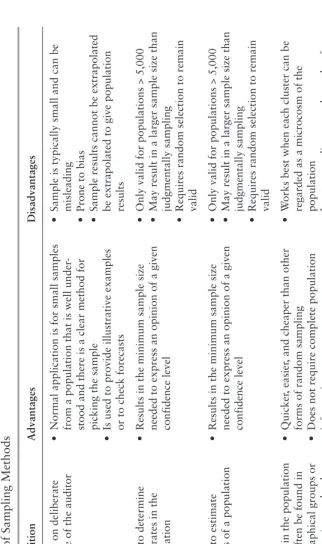
Auditor’s
Guide to
Information
Systems
Auditing
RICHARD E. CASCARINO
This book is printed on acid-free paper.
Copyright © 2007 John Wiley & Sons, Inc. All rights reserved.
Wiley Bicentennial Logo: Richard J. Pacifico.
Published by John Wiley & Sons, Inc., Hoboken, New Jersey.
Published simultaneously in Canada.
No part of this publication may be reproduced, stored in a retrieval system, or transmit-ted in any form or by any means, electronic, mechanical, photocopying, recording, scan-ning, or otherwise, except as permitted under Section 107 or 108 of the 1976 United States Copyright Act, without either the prior written permission of the Publisher, or authoriza-tion through payment of the appropriate per-copy fee to the Copyright Clearance Center, Inc., 222 Rosewood Drive, Danvers, MA 01923, 978-750-8400, fax 978-646-8600, or on the web at www.copyright.com. Requests to the Publisher for permission should be addressed to the Permissions Department, John Wiley & Sons, Inc., 111 River Street, Hoboken, NJ 07030, 201-748-6011, fax 201-748-6008, or online at http://www.wiley .com/go/permissions.
Limit of Liability/Disclaimer of Warranty: While the publisher and author have used their best efforts in preparing this book, they make no representations or warranties with respect to the accuracy or completeness of the contents of this book and specifically dis-claim any implied warranties of merchantability or fitness for a particular purpose. No warranty may be created or extended by sales representatives or written sales materials. The advice and strategies contained herein may not be suitable for your situation. You should consult with a professional where appropriate. Neither the publisher nor author shall be liable for any loss of profit or any other commercial damages, including but not limited to special, incidental, consequential, or other damages.
For general information on our other products and services, or technical support, please contact our Customer Care Department within the United States at 800-762-2974, out-side the United States at 317-572-3993 or fax 317-572-4002.
Wiley also publishes its books in a variety of electronic formats. Some content that appears in print may not be available in electronic books.
For more information about Wiley products, visit our Web site at http://www.wiley.com.
Library of Congress Cataloging-in-Publication Data
Cascarino, Richard.
Auditor’s guide to information systems auditing / Richard E. Cascarino. p. cm.
Includes index.
ISBN: 978-0-470-00989-5 (cloth : alk. paper) 1. Electronic data processing—Auditing. I. Title.
QA76.9.A93C37 2007 658’.0558—dc22
2006033470
v
Dedication
I
wish to take this opportunity to dedicate this book to my wife Max who has, over the last 33 years, put up with my bad temper when the computer would not do what I programmed it to do; my ego when it did eventually work; my despair when the system crashed again and again, and my complacency when the problems were solved.vii
Contents
PREFACE xix
ABOUT THE CD xxxiii
PART I
IS Audit Process 1
CHAPTER 1
Technology and Audit 3
Technology and Audit 4
Batch and On-Line Systems 9
CHAPTER 2
IS Audit Function Knowledge 24
Information Systems Auditing 24
What Is Management? 25
Management Process 25
Understanding the Organization’s Business 26
Establishing the Needs 26
Identifying Key Activities 26
Establish Performance Objectives 27
Decide The Control Strategies 27
Implement and Monitor the Controls 27 Executive Management’s Responsibility and Corporate Governance 28
Audit Role 28
Conceptual Foundation 29
Professionalism within the IS Auditing Function 29 Relationship of Internal IS Audit to the External Auditor 30 Relationship of IS Audit to Other Company Audit Activities 30
Audit Charter 30
Charter Content 31
CHAPTER 3
IS Risk and Fundamental Auditing Concepts 33
Computer Risks and Exposures 33
Effect of Risk 35
Audit and Risk 37
Audit Evidence 39
Reliability of Audit Evidence 39
Audit Evidence Procedures 40
Responsibilities for Fraud Detection and Prevention 41
CHAPTER 4
Standards and Guidelines for IS Auditing 43
IIA Standards 43
Code of Ethics 44
Advisory 46
Aids 46
Standards for the Professional Performance of Internal Auditing 47
ISACA Standards 47
ISACA Code of Ethics 49
COSO: Internal Control Standards 49 BS 7799 and ISO 17799: IT Security 51
NIST 53
BSI Baselines 54
CHAPTER 5
Internal Controls Concepts Knowledge 57
Internal Controls 57
Cost/Benefit Considerations 59
Internal Control Objectives 59
Types Of Internal Controls 61
Systems of Internal Control 62
Elements of Internal Control 63
Manual and Automated Systems 64
Control Procedures 65
Application Controls 65
Control Objectives and Risks 66
General Control Objectives 67
Data and Transactions Objectives 67
Program Control Objectives 68
Corporate IT Governance 69
CHAPTER 6
Risk Management of the IS Function 75
Nature of Risk 75
Elements of Risk Analysis 78
Defining the Audit Universe 79
Computer System Threats 81
Risk Management 83
CHAPTER 7
Audit Planning Process 88
Benefits of an Audit Plan 88
Structure of the Plan 93
Types of Audit 96
CHAPTER 8
Audit Management 98
Planning 98
Audit Mission 99
IS Audit Mission 99
Organization of the Function 100
Staffing 101
IS Audit as a Support Function 103
Planning 103
Business Information Systems 104
Integrated IS Auditor vs Integrated IS Audit 104 Auditees as Part of the Audit Team 106
Application Audit Tools 107
Advanced Systems 107
Specialist Auditor 107
IS Audit Quality Assurance 108
CHAPTER 9
Audit Evidence Process 109
Audit Evidence 109
Audit Evidence Procedures 109
Criteria for Success 110
Statistical Sampling 112
Why Sample? 112
Judgmental (or Non-Statistical) Sampling 113
Statistical Approach 114
Sampling Risk 114
Assessing Sampling Risk 116
Planning a Sampling Application 116
Calculating Sample Size 119
Quantitative Methods 122
Project Scheduling Techniques 125
Simulations 127
Generalized Audit Software 129 Application and Industry-Related Audit Software 130
Customized Audit Software 130
Information Retrieval Software 131
Utilities 131
On-Line Inquiry 131
Conventional Programming Languages 131
Microcomputer-Based Software 132
Test Transaction Techniques 132
CHAPTER 10
Audit Reporting Follow-up 134
Audit Reporting 134
Interim Reporting 135
Closing Conferences 135
Written Reports 135
Clear Writing Techniques 136
Preparing To Write 138
Basic Audit Report 139
Executive Summary 140
Detailed Findings 140
Polishing the Report 142
Distributing the Report 142
Follow-Up Reporting 143
Types of Follow-Up Action 144
PART II
Information Systems/Information Technology Governance 145
CHAPTER 11
Management 147
IS Infrastructures 147
Project-Based Functions 148
Quality Control 154
Operations and Production 155
Technical Services 156
Performance Measurement and Reporting 156
Measurement Implementation 158
CHAPTER 12
Strategic Planning 164
Strategic Management Process 164
Strategic Drivers 165
Leveraging IS 166 Business Process Re-Engineering Motivation 167 IS as an Enabler of Re-Engineering 168
Dangers of Change 168
System Models 169
Information Resource Management 170
Strategic Planning for IS 171
Decision Support Systems 173
Steering Committees 174
Strategic Focus 174
Auditing Strategic Planning 175
Design the Audit Procedures 176
CHAPTER 13
Management Issues 177
Privacy 179
Copyrights, Trademarks, and Patents 180
Ethical Issues 181
Corporate Codes of Conduct 182
IT Governance 184
Sarbanes-Oxley Act 186
Housekeeping 186
CHAPTER 14
Support Tools and Frameworks 188
General Frameworks 188
COSO: Internal Control Standards 192
Other Standards 193
CHAPTER 15
Governance Techniques 196
Change Control 196
Problem Management 198
Auditing Change Control 199
Operational Reviews 199
Performance Measurement 200
ISO 9000 Reviews 201
PART III
Systems and Infrastructure Lifecycle Management 205
CHAPTER 16
Stakeholders 207
Operations 208
Systems Development 209
Technical Support 210
Other System Users 212
Segregation of Duties 212
Personnel Practices 214
Object-Oriented Systems Analysis 215
Enterprise Resource Planning 216
CHAPTER 17
Information Management and Usage 218
What Are Advanced Systems? 218
Service Delivery and Management 221
CHAPTER 18
Development, Acquisition, and Maintenance of Information Systems 227
Programming Computers 227
Program Conversions 229
System Failures 229
Systems Development Exposures 232
Systems Development Controls 233
Systems Development Life Cycle Control: Control Objectives 233
Micro-Based Systems 235
CHAPTER 19
Impact of Information Technology on the Business Processes and Solutions 236
Impact 236
Continuous Monitoring 237
Business Process Outsourcing 238
E-Business 239
CHAPTER 20
Software Development 241
Developing a System 241
Change Control 245
Why Do Systems Fail? 247
Auditor’s Role in Software Development 249
CHAPTER 21
Audit and Control of Purchased Packages 251
Information Systems Vendors 252
Request For Information 253
Requirements Definition 254
Installation 256
Systems Maintenance 257
Systems Maintenance Review 257
Outsourcing 258
CHAPTER 22
Audit Role in Feasibility Studies and Conversions 259
Feasibility Success Factors 259
Conversion Success Factors 263
CHAPTER 23
Audit and Development of Application Controls 264
What Are Systems? 264
Classifying Systems 265
Controlling Systems 266
Control Stages 266
System Models 266
Information Resource Management 267 Control Objectives of Business Systems 268
General Control Objectives 269
CAATS and their Role in Business Systems Auditing 271
Common Problems 274
Audit Procedures 274
CAAT Use in Non-Computerized Areas 275 Designing an Appropriate Audit Program 275
PART IV
Information Technology Service Delivery and Support 277
CHAPTER 24
Technical Infrastructure 279
Auditing the Technical Infrastructure 282
Computer Operations Controls 284
Operations Exposures 285
Operations Controls 286
Personnel Controls 286
Supervisory Controls 286
Operations Audits 287
CHAPTER 25
Service Center Management 289
PART V
Protection of Information Assets 295
CHAPTER 26
Information Assets Security Management 297
What Is Information Systems Security? 297
Control Techniques 300
Workstation Security 301
Physical Security 301
Logical Security 301
User Authentication 302
Communications Security 302
Encryption 302
How Encryption Works 303
Encryption Weaknesses 304
Potential Encryption 305
Data Integrity 305
Double Public Key Encryption 306
Steganography 307
Information Security Policy 308
CHAPTER 27
Logical Information Technology Security 310
Computer Operating Systems 310
Tailoring the Operating System 311
Auditing the Operating System 312
Security 313
Criteria 314
Security Systems: Resource Access Control Facility 314
Auditing RACF 315
Access Control Facility 2 316
Top Secret 317
User Authentication 318
Bypass Mechanisms 319
CHAPTER 28
Applied Information Technology Security 321
Communications and Network Security 321
Network Protection 323
Hardening the Operating Environment 324 Client Server and Other Environments 325 Firewalls and Other Protection Resources 326
CHAPTER 29
Physical and Environmental Security 330
Control Mechanisms 332
Implementing the Controls 336
PART VI
Business Continuity and Disaster Recovery 337
CHAPTER 30
Protection of the Information Technology Architecture and Assets: Disaster Recovery
Planning 339
Risk Reassessment 341
Disaster—Before and After 341
Consequences of Disruption 343
Where to Start 344
Testing the Plan 345
Auditing the Plan 346
CHAPTER 31
Insurance 349
Self-Insurance 353
PART VII
Advanced IS Auditing 355
CHAPTER 32
Auditing E-commerce Systems 357
E-Commerce and Electronic Data Interchange: What Is It? 357
Opportunities and Threats 358
Risk Factors 362
Threat List 363
Security Technology 363
“Layer” Concept 363
Authentication 364
Encryption 364
Trading Partner Agreements 366
Risks and Controls within EDI and E-Commerce 366
Nonrepudiation 367
E-Commerce and Auditability 368
Compliance Auditing 369
Audit Tools and Techniques 371 Auditing Security Control Structures 372 Computer Assisted Audit Techniques 372
CHAPTER 33
Auditing UNIX / Linux 374
History 374
Security and Control in a UNIX/Linux System 377
Architecture 377
UNIX Security 378
Services 379
Daemons 380
Auditing UNIX 380
Scrutiny of Logs 381
Audit Tools in the Public Domain 381
UNIX passwd File 382
Auditing UNIX Passwords 383
CHAPTER 34
Auditing Windows 385
History 385
NT and Its Derivatives 386
Auditing Windows 23 388
Password Protection 389
File Sharing 390
Security Checklist 391
CHAPTER 35
Foiling the System Hackers 393
CHAPTER 36
Investigating Information Technology Fraud 397
Pre-Incident Preparation 399
Detection of Incidents 401
Initial Response 401
Forensic Backups 403
Investigation 404
Network Monitoring 404
APPENDICES
APPENDIX A Ethics and Standards for the IS Auditor 407
ISACA Code of Professional Ethics 407 Relationship of Standards to Guidelines and Procedures 408
APPENDIX B Audit Program for Application Systems Auditing 410
APPENDIX C Logical Access Control Audit Program 432
APPENDIX D Audit Program for Auditing UNIX / Linux Environments 446 APPENDIX E Audit Program for Auditing Windows XP/2000 Environments 454
xix
Preface
I
n today’s business environment, computers are continuing the rev-olution started in the 1950s. Size and capacity of the equipment grows on an exponential curve, with the reduction in cost and size ensuring that organizations take advantage of this to develop more effective and responsive systems, which allow them to seek to gain competitive advantage by interfacing more closely with their cus-tomers.Net technologies such as electronic data interchange (EDI), elec-tronic funds transfers (EFTs), and E-commerce have fundamentally changed the nature of business itself and, as a result, organizations have become more computer dependent. The radical changes to busi-ness are matched only by their impact on society.
It has become impossible for today’s enterprises of any size and in any market sector to exist without computers to assist with their fun-damental business operations. Even the old adage that “we can always go back to manual operations” is today a fallacy. The nature of today’s business environment obviates that option. Even the small-est businesses have found that the advent of personal computers (PCs) with increased capabilities and processing speed, while at the same time reduced pricing and sophisticated PC software, has revolution-ized the concept of what a small business is.
CONTROLS IN MODERN COMPUTER SYSTEMS
The introduction of the computer has brought fundamental changes to the ways organizations process data. Computer systems:
■ Are frequently much more complex than manual systems, the
larger systems at least requiring a number of highly skilled com-puter technicians to develop and maintain them.
■ Process large volumes of data at high speed, and can transmit data
effectively instantaneously over extreme distances, commonly between continents.
■ Hold data in electronic form, which, without the appropriate tools and techniques, is often more complex for the auditor to access than paper records. In addition, modern systems have reduced the volumes of printed outputs by the incorporation of on-line access and on-line inquiry facilities. Indeed, many modern EDI-type systems have no paper audit trail whatsoever.
■ Process data with much less manual intervention than manual
systems. In fact large parts of sophisticated systems now process data with no manual intervention at all. In the past, the main jus-tification for computerization was frequently to reduce the num-ber of staff required to operate the business. With modern decision support and integrated systems, this is becoming a real-ity not at the clerical level, but at the decision-making and con-trol level. This can have the effect that the fundamental business controls previously relied upon by the auditor, such as segrega-tion of duties or management authorizasegrega-tion, may no longer be carried out as previously and must be audited in a different man-ner. In computer systems, the user profile of the member of staff as defined within the system’s access rights will generally control the division of duties while managerial authorities are, in many cases, built into systems themselves.
■ Process consistently in accordance with their programs providing
the computer has been programmed correctly and change control is effective.
sys-tem and must be able to recover from failure or the destruction of their computer system swiftly and with minimal business disruption.
■ Are often subject to different legal constraints and burdens of proof than manual systems.
These changes brought about by computerization can greatly increase the opportunity for auditors to deliver a quality service by concentrating the risk and allowing the auditors to correspondingly concentrate their efforts. For example, harnessing the power of the computer to analyze large volumes of data in the way the auditor requires is commonly now the only practical way of analyzing cor-porate data, and this was not only impractical but also impossible while data was spread around the organization in a myriad of forms. In addition, the use of computer systems with built-in pro-grammed procedures permit the auditor to adopt a systems approach to auditing in that the controls within the computer system process in a more consistent manner than a manual system. In manual systems the quality of the control procedure can change on a day-by-day basis, depending on the quality of the staff and their consistency of working. This can result in the auditor having to undertake a sub-stantial amount of checking of transactions, to confirm transactions have processed correctly.
Controls within computer systems are commonly classified in two main subdivisions:
1. General controls. The controls governing the environment in which the computer system is developed, maintained, and oper-ated, and within which the application controls operate. These controls include the systems development standards operated by the organization, the controls that apply to the operation of the computer installation, and those governing the functioning of systems software. They have a pervasive effect on all application systems.
■ Input controls such as data validation and batching
■ Run-to-run controls to check file totals at key stages in
process-ing, and controls over output
Ultimately, the auditor’s job is to determine if the application sys-tems function as intended, the integrity, accuracy, and completeness of the data is well controlled, and report any significant discrepan-cies. The integrity of the data relies on the adequacy of the applica-tion controls. However, applicaapplica-tion controls are totally dependent on the integrity of the general controls over the environment within which the application is developed and run.
In the past, the auditor has often assumed a considerable degree of reliance on controls around the computer, that is, in the applica-tion controls. This is sometimes referred to as auditing “around” the computer, because the auditor concentrates on the input and output from the computer, rather than what happens in the computer.
This has never been truly justified but has become, over recent years, a lethal assumption.
With the spread of on-line and real-time working, and of the increasing capacity of fixed disks, all of the organization’s data is commonly permanently loaded on the computer system and accessi-ble from a variety of places, with only systems software controls pre-venting access to the data. This system is increasing in technical complexity and the ability to utilize any implemented weaknesses is also growing.
It is critical that the auditor is assured of the integrity of the com-puter operational environment within which the applications systems function. This means that the auditor must become knowledgeable in the facilities provided in key systems software in the organization being audited.
This book is designed for those who need to gain a practical working knowledge of the risks and control opportunities within an IT environment, and the auditing of that environment. Readers who will find the text particularly useful include professionals and stu-dents within the fields of:
■ IT security
■ IT audit
■ External audit
■ Management information systems
■ General business management
Overall, this book contains the information required by anyone who is, or expects to be, accountable to management for the success-ful implementation and control of information systems.
It is intended that the text within this book forms the foundation for learning experience, as well as being your reference manual and student text. The emphasis is therefore on both the principles and techniques as well as the practical implementation through the use of realistic case studies.
OVERALL FRAMEWORK
Within the book the terms Information Technology (IT) and Infor-mation Systems (IS) are both used because both are in common use to mean virtually identical functions. The book is split into eight sec-tions, namely:
Part I —IS Audit Process
This part covers the introduction to the technology and auditing involved with the modern computer systems. It seeks to establish common frames of reference for all IT students by establishing a base-line of technological understanding as well as an understanding of risks, control objectives, and standards, all concepts essential to the audit function. Internal control concepts and the planning and man-agement of the audit process in order to obtain the appropriate evi-dence of the achievement of the control objectives is explained as is the audit reporting process.
Chapter 2 looks at the laws and regulations governing IS Audit and the nature and role of the audit charter. It reviews the varying nature of audit and the demand for audits as well as the need for con-trol and audit of computer-based IS. The types of audit and auditor and range of services to be provided is reviewed together with the standards and codes of ethics of both the Institute of Internal Audi-tors (IIA) and the standards specified by the Information Systems Audit and Control Association (ISACA).
Chapter 3 explores the concepts of materiality within the IS Audit function and contracts materiality as it is commonly applied to finan-cial statement audit such as those performed by independent external auditors. In this context, the quality and types of evidence required to meet the definitions of sufficiency, reliability, and relevancy is exam-ined. The risks involved in examining evidence to arrive at an audit conclusion is reviewed as are the need to maintain the independence and objectivity of the auditor and the auditor’s responsibility for fraud detection in both an IT and non-IT setting.
Chapter 4 explores in detail the ISACA Code of Professional Ethics and the current ISACA IS Auditing Standards and Guidelines Standards as well as the IIA Code of Ethics, Standards for the Pro-fessional Practice of Internal Auditing and Practice Advisories. In addition, standards and guidelines other than the ISACA and IIA models are explored.
Chapter 5 introduces the concepts of corporate governance with particular attention to the implications within an IT environment and the impact on IS Auditors. Criteria of Control (COCO), Committee of Sponsoring Organizations of the Treadway Commission (COSO), King, Sarbanes-Oxley Act of 2002, and other recent legislative impacts are examined together with the structuring of controls to achieve conformity to these structures. Control classifications are examined in detail together with both general and application con-trols. Particular attention is paid to COBIT (Control Objectives for Information and Related Technology) from both a structural and rel-evance perspective.
acceptable management responses to computer risks. One of the most fundamental influencing factors in IT auditing is the issue of rate risk. This chapter examines risk and its nature within the corpo-rate environment and looks at the internal audit need for the appropriate risk analysis to enable risk-based auditing as an inte-grated approach. This includes the effect of computer risks, the com-mon risk factors, and the elements required to complete a computer risk analysis
Chapter 7 examines the Audit Planning Process at both a strate-gic and tactical level. The use of risk-based auditing and risk assess-ment methods and standards are covered. The preliminary evaluation of internal controls via the appropriate information gathering and control evaluation techniques as a fundamental component of the audit plan and the design of the audit plan to achieve a variety of audit scopes is detailed.
Chapter 8 looks at audit management and its resource allocation and prioritization in the planning and execution of assignments. The management of IS Audit quality through techniques such as peer reviews and best practice identification is explored. The human aspects of management in the forms of career development and career path planning, performance assessment, counselling, and feedback as well as professional development through certifications, professional involvement, and training (both internal and external) are reviewed. Chapter 9 exposes the fundamental audit evidence process and the gathering of evidence that may be deemed to be sufficient, reli-able, relevant, and useful. Evidence gathering techniques such as observation, inquiry, interviewing, and testing are examined and the techniques of compliance versus substantive testing are contrasted. The complex area of statistical and nonstatistical sampling techniques and the design and selection of samples and evaluation of sample results is examined. The essential techniques of computer assisted audit techniques (CAATs) are covered and a case study using the soft-ware provided is detailed.
Part II—Information Systems/Information Technology Governance
This part details the processes involved in planning and managing the IS function and the management issues faced in a modern IS depart-ment. The techniques used by management and the support tools and frameworks are examined with respect to the need for control within the processes.
Chapter 11 covers IT project management, risk management including economic, social, cultural, and technology risk management as well as software quality control management, the management of IT infrastructure, alternative IT architectures and configuration, and the management of IT delivery (operations) and support (mainte-nance). Performance measurement and reporting and the IT balanced scorecard are also covered as are the use of outsourcing, the imple-mentation of IT quality assurance, and the sociotechnical and cultural approach to management.
Chapter 12 examines IS/IT strategic planning and looks at com-petitive strategies and business intelligence and their link to corporate strategy. These, in turn, influence the development of strategic infor-mation systems frameworks and applications. Strategic planning also includes the management of IT human resources, employee policies, agreements, contracts, segregation of duties within IT, and the imple-mentation of effective IS/IT training and education.
Chapter 13 looks at the broader IS/IT management issues includ-ing the legal issues relatinclud-ing to the introduction of IT to the enterprise, intellectual property issues in cyberspace: trademarks, copyrights, patents as well as ethical issues, rights to privacy, and the implemen-tation of effective IT governance.
Chapter 14 introduces the need for support tools and frame-works such as COBIT: Management Guidelines, a framework for IT/IS managers and COBIT: Audit’s Use in Support of the Business Support Cycle. International standards and good practices such as ISOI7799, ITIL, privacy standards, COSO, COCO, Cadbury, King, and Sarbanes-Oxley also play a vital role in ensuring the appropri-ate governance.
Part III—Systems and Infrastructure Lifecycle Management
IT is essential to an organization only in so far as it can effectively assist in the achievement of the business objectives. This means that the business application systems need to be appropriate to the busi-ness needs and meet the objectives of the users in an effective and effi-cient manner. Part VI explores the manner in which application systems are planned, acquired externally or developed internally and ultimately implemented and maintained. In all cases such systems have an objective of being auditable in addition to the other unique business objectives. This part also examines the variety of roles that the auditor could be called on to undertake and the circumstances and controls appropriate to each.
Chapter 16 covers the IS planning and managing components and includes developing an understanding of stakeholders and their requirements together with IS planning methods such as system inves-tigation, process integration/reengineering opportunities, risk evalu-ation, cost-benefit analysis, risk assessment, object-oriented systems analysis, and design. Enterprise Resource Planning (ERP) software to facilitate enterprise applications integration is reviewed.
Chapter 17 covers the areas of information management and usage monitoring. Measurement criteria such as evaluating service level performance against service level agreements, quality of service, availability, response time, security and controls, processing integrity, and privacy are examined. The analysis, evaluation, and design infor-mation together with data and application architecture are evaluated as tools for the auditor.
pro-cedures for system changes together with tools to assess risk and con-trol issues and to aid the analysis and evaluation of project charac-teristics and risks are discussed.
Chapter 19 examines the impact of IT on the business processes and solutions, Business process outsourcing (BPO) and applications of e-business issues and trends.
Chapter 20 looks at the software development design process itself and covers the separation of specification and implementation in programming, requirements specification methodologies, and tech-nical process design. In addition database creation and manipulation, principles of good screen and report design, and program language alignment are covered.
Chapter 21 looks at the audit and control of purchased packages to introduce readers to those elements critical to the decision taken to make or buy software. This includes a knowledge of the systems development process and an understanding of the user’s role in train-ing required so that the outsource decision on the factors surround-ing it may be made to best effect.
Chapter 22 looks at the auditor’s role in feasibility studies and conversions. These are perhaps the most critical areas of systems implementation and audit involvement should be compulsory.
Chapter 23 looks at the audit and development of application-level controls including input/origination controls, processing control procedures, output controls, application system documentation, and the appropriate use of audit trails.
Part IV—Information Technology Service Delivery and Support
This part examines the technical infrastructure in a variety of envi-ronments and the influence the infrastructure has on the management and control procedures required to attain the business objectives. The nature and methodologies of service center management are exposed for discussion.
mini-computers, client-servers, routers, switches, communications, and PCs as well as software including operating systems, utility software, and database systems are revealed. Network components including communications equipment and services rendered to provide net-works, network-related hardware, network-related software, and the use of service providers are covered as are security/testing and vali-dation, performance monitoring, and evaluation tools and IT control monitoring and evaluation tools, such as access control systems mon-itoring and intrusion detection systems monmon-itoring tools. In addition, the role of managing information resources and information infra-structure through enterprise management software and the imple-mentation of service center management and operations standards/ guidelines within COBIT, ITIL, and ISO 17799 together with the issues and considerations of service center versus proprietary techni-cal infrastructures are explored.
Chapter 25 introduces the areas of service center management and the maintenance of Information Systems and technical infra-structures. These involve the use of appropriate tools designed to con-trol the introduction of new and changed products into the service center environment and include such aspects as security management, resource/configuration management, and problem and incident man-agement. In addition, the administration of release and versions of automated systems as well as the achievement of service level man-agement through capacity planning and manman-agement of the distribu-tion of automated systems and contingency/backup and recovery management are examined.
The key management principles involved in management of oper-ations of the infrastructure (central and distributed), network man-agement, and risk management are outlined as is both the need for customer liaison as well as the management of suppliers.
Part V—Protection of Information Assets
thought to the application and implementation of an integrated approach designed to lead to the achievement of specific control objectives.
Chapter 26 looks at the area of Information Assets Security Man-agement. This covers information technology and security basics and the fundamental concepts of IS security. The need for securing IS resources and maintaining an adequate policy framework on IS assets security, the management of IS security, and security training stan-dards are examined as are the major compliance and assurance issues in IS security.
Chapter 27 covers the critical area of the components of logical IT security. Logical access control issues and exposures are explored together with access control software. The auditing of logical access to ensure the adequate control of logical security risks using the appropriate logical security features, tools, and procedures is detailed. Chapter 28 looks at the application of IT security including communications and network security. The principles of network security, client-server, Internet and web-based services, and firewall security systems are all detailed together with connectivity protec-tion resources such as cryptography, digital signatures, digital cer-tificates, and key management policies. IT security also encompasses the use of intrusion detection systems and the proper implementa-tion of mainframe security facilities. Security is also a critical ele-ment in the developele-ment of application systems and involves both the systems development and maintenance processes and the data-base design.
Chapter 29 examines the concepts of physical IT security includ-ing physical access exposures and controls.
Part VI—Business Continuity and Disaster Recovery
Chapter 30 introduces the activities required to ensure the pro-tection of the IT architecture and assets. These include backup provi-sions involving business impact analysis and business continuity planning leading to IT disaster recovery planning, obtaining manage-ment support and commitmanage-ment to the process, plan preparation and documentation, obtaining management approval, and distribution of the plan. In addition, the testing, maintenance, and revision of the plan together with audit’s role in all of these activities are investigated. Chapter 31 looks at insurance and the variety of insurance cov-erage that can be obtained. Issues such as the valuation of assets, including equipment, people, information processes, and technology are examined.
Part VII—Advanced IS Auditing
The final part explores the technical auditor’s function and role in auditing specialized areas such as the audit and control of e-com-merce systems, auditing operating systems at both micro and main-frame levels, securing systems against outside penetration, and investigating security breaches.
Chapter 32 examines the tasks required to establish and optimize the IT audit functions including defining the scope of IP auditing, set-ting the objectives, staffing, and training. Measuring of the effective-ness of the IT audit and the role of the specialist are critical in producing an effective IT audit function.
Chapter 33 introduces readers to the concepts of the paperless society inherent in e-commerce, B2B, B2C, and EDI in general. These concepts change the internal control structure required in such an environment as well as changing the sources of what audit and legal evidence is available. The auditor will be required to implement the correct program to bring the contoured auction line with this chang-ing business environment.
Chapter 34 takes the reader through the advanced concepts of auditing within a Linux environment including the major threat cat-egories and control opportunities as well as the use of the appropri-ate audit tools.
This again includes the major control opportunities, controls to be sought, and audit tools to be used.
Chapter 36 addresses the major risk of computer hackers includ-ing definitions of how hackers gain entrance and the design of the appropriate security hierarchy in order to effectively manage this crit-ical risk.
xxxiii
About The CD
A
s part of your purchase of this book, you have been given an edu-cation version of IDEA—Data Analysis Software. This software can improve your audit performance and extend your capabilities with IDEA’s powerful functionality. With IDEA, you can lower your cost of analysis, add more quality to your work and meet the new professional requirements regarding fraud and internal control.IDEA can read, display, analyze, manipulate, sample or extract from data files from almost any source—from SAP to QuickBooks— including reports printed to a file. IDEA adds depth and productivity to audits and helps users meet the requirements of SAS 99 and Sar-banes-Oxley 404. Examples of how IDEA can be used to meet audit objectives include: accuracy—checking totals and calculations; ana-lytical review—comparisons, profiling, stratifying; validity—dupli-cates, exceptions, statistical samples; cut-off-date and number sequence analysis; valuation—A/R and inventory provisions analysis. Included on the CD is a combination of extensive HTML-based Help, Informative User Guide with tutorial, “IDEAssistants”—wiz-ards for key functions, Windows-standard features like right-click and drag and drop, plus a carefully designed user interface make learning and using a breeze.
PART
I
IS Audit Process
3
CHAPTER
1
Technology and Audit
T
his chapter covers the basics of technology and audit. The chapter is intended to provide an understanding of the technology cur-rently in use in business as well as knowledge of the jargon and its meaning. It also covers the components of control within an IT envi-ronment and explains who the main players are and what their roles are within this environment.After reading this chapter you should be able to:
■ Understand the technology currently in use in business
■ Understand the jargon and its meaning
■ Define the components of control in an IT environment
■ Briefly explain who the players are and what their roles are
■ Define the fundamental differences between batch and on-line
systems
■ Explain the principal business risks within each processing type
■ Describe the components that make up the on-line system and the effect these have on control objectives
■ Explain the controls within each type of computer system
■ Contrast the basics of batch and on-line security
■ Demonstrate an ability to:
● Identify the differing types of database structures
● Identify the principal components of each type of Database
Management System (DBMS)
● Identify the primary threats to each of these components
● Relate DBMS components to the operating system
environ-ment in which they operate
● Identify potential control opportunities and select among
con-trol alternatives
● Recognize vulnerabilities in multiple DBMS environments and
make appropriate recommendations
TECHNOLOGY AND AUDIT
Some Computing Jargon
Before we can start to discuss the audit and control of computer sys-tems, we must have a common understanding of the jargon used.
Hardware Hardware consists of those components that can physically be touched and manipulated. Principles among those components are:
■ CPU. The Central Processing Unit is the heart of the computer. This is the logic unit that handles the arithmetic processing of all calculations.
■ Peripherals. Peripheral devices are those devices that attach to the CPU to handle, typically, inputs and outputs. These include: ● Terminals
● Printers
● Disk and tape devices
■ Memory. Memory takes the form in modern computers of silicon chips capable of storing information. In commercial computers, this information takes the form of 1 and 0 in the notation known as binary. Memory comes in various forms including:
● RAM. Random Access Memory whose contents can be changed but which is vulnerable to loss of power where the contents of memory may also be lost. This type of memory is also known as dynamic or volatile memory.
● ROM. Read-Only Memory is a form of memory whereby instructions are “burned-in” and not lost in the event of a power loss. These programs cannot be changed. This is also known as non-volatile memory.
● PROM. Programmable Read-Only Memory is similar to ROM but can have the contents changed.
nonvolatile RAM. This is memory that has been attached to a
battery so that, in the event of a power loss, the contents will not be lost.
■ Mainframe. Mainframe computers are the large (physically as well as in power) computers used by companies to carry out large volume processing and concentrated computing.
■ Mini. Minicomputers are physically smaller than mainframes, although the power of many minicomputers exceeds that of recent mainframes.
■ Micro. Microcomputers are physically small computers with lim-ited processing power and storage. Having said that, the power and capacity of today’s micro is equivalent to that of a mainframe only five years ago.
■ LANs. Local Areas Networks are collections of computers linked together within a comparatively small area.
■ WANs. Wide Area Networks are collections of computers spread over a large geographical area.
Storage Data is stored in a variety of forms for both permanent and temporary retention:
■ Bits. Binary Digits, individual ones and zeros
■ Bytes. Collections of Bits making up individual characters ■ Disks. Large-capacity storage devices containing anything from
10 Mb to 150 Gb of data
■ Diskettes. Small-capacity removable disks containing from 360 k to 100 Mb of data
■ Optical Disks. Laser-encoded disks containing between 650 Mb and 9 GB of data
■ Tapes. Reel-to-Reel or cassette ■ Memory. As above
Communications In order to maximize the potential of the effective use of the information on computers it is essential that isolated comput-ers be able to communicate and share data, programs, and hardware devices.
■ Modem. MOdulator/DEModulator, which translates digital com-puter signals into analog signals for telephone wires and retrans-lates them at the other end.
■ Multiplexer. Combining signals from a variety of devices to max-imize utilization of expensive communication lines.
■ Cable. Metallic cable, usually copper, which can carry the signal between computers. These may come in the form of “twisted pair,” where two or more cables are strung together within a plas-tic sleeve, or in the form of coaxial, where a cable runs within a metallic braiding in the same manner as a television aerial cable. ■ Fiber Optics. These consist of fine strands of fiberglass or plastic filaments that carry light signals without the need for electrical insulation. They have extremely high capacity and transfer rates but are expensive.
■ Microwave. This form of communication involves sending high-power signals from a transmitter to a receiver. They work on a direct line-of-sight basis but require no cabling.
Input Inputs to computer systems have developed rapidly over the years. The IS Auditor will still occasionally encounter some of the ear-lier types:
■ Cards. Rarely seen nowadays, punch cards were among the first input and output media and consisted of cardboard sheets, some 8 inches by 4 inches with 80 columns, where rectangular holes could be punched in combinations to represent numeric, alpha-betic, and special characters.
■ Paper Tape. Another early input/output medium, paper tape was a low-cost alternative to punch cards and consisted of a 1-inch wide paper tape with circular holes punched to form the same range of characters.
■ Keyboards. The most common input device today (although that is changing). Most keyboards are still based on the original typ-ist’s QWERTY keyboard design.
■ Mouse. An electromechanical pointing device used for inputting instructions in real time.
allow the computer to interpret the pictures of data into actual characters.
■ Bar Codes. Optically recognizable printing that can be interpreted by low-cost scanners. Common in retail operations.
■ Voice. Perhaps the future of computer input whereby the com-puter user, programmer, or auditor simply dictates into a micro-phone and the computer responds appropriately.
Output As with inputs, outputs are changing rapidly. In the earliest of computing times, output came in three basic forms. The most com-mon of these was paper; however, quantities of cards and paper tape were output for subsequent reprocessing. Nowadays most outputs are via screens or directly onto magnetic media.
■ Paper. Still a popular output medium, paper may be in continu-ous stationery form, cut sheet form, or preprinted business stock such as invoices or negotiable instruments such as checks. ■ Computer. Output directly to another computer is a growing
trend with the coming of age of electronic data interchange (EDI). ■ Screen. Output to screen is the current norm for the majority of outputs with graphics, tables, and charts, and three-dimensional forms possible.
■ Microfilm/fiche. For permanent, readable recording of outputs with a small storage space required, microfilm is a popular out-put medium. Each frame contains one page of printed outout-put. An alternative is the creation of microfiche measuring approximately 6 inches by 4 inches and containing some 200 pages of printout. ■ Magnetic Media. Output to disks, diskettes, and tapes is
com-monly used to store large volumes of information.
■ Voice. Another new output medium is voice, where a permanent record is not required.
Control Within the computer systems, control is exercised at a variety of points within the overall architecture. At each stage, opportunities exist to vary the manner in which the computer systems perform to meet the needs of the users.
soft-ware runs under the direction of the Operating System and rely on its services for all of the work they undertake.
■ Applications. These systems perform the business functions required of the computer. They run under the direct control of the Operating System but may contain many powerful control ele-ments themselves.
■ Parameters. These are user-defined variations adjusting the man-ner in which programs normally operate.
■ Run Instructions. These are instructions to operators of comput-ers instructing them on the jobs to be run and responses to machine questions to be entered.
■ JCL. Job Control Language is a means of automating the job-run-ning process by giving the computer the instructions in a form of batch programming language.
■ Human Element. Ultimately control is exercised by the people who use, operate, program, and manage computers.
People As pointed out in the Criteria of Control (CoCo) report refer-enced in Chapter 15, control is exercised by people and, as such, the auditor must understand the roles and responsibilities of the individ-uals involved in the development and processing of computer systems.
■ Operators. Run the computers on a day-to-day basis.
■ Programmers. Write the application programs that run on the computer.
■ Systems Designers. Design the overall structure of the application systems and specify the programs required.
■ Systems Analysts. Analyze the business structures, applications, and procedures to determine what, if any, contribution IS can make. They will also design the outline business specifications of new systems.
■ Systems Programmers. Are responsible for the well-being of the Operating Systems and programmers, the related systems soft-ware components.
■ Database Analysts. Are responsible for maintaining the Database Management System (DBMS), which is the systems software con-trolling access to and format of the data.
■ Management. Plan, organize, and direct to ensure corporate objectives are achieved.
Data Data consists of:
■ Fields held in
● Records held in
■ Files held on
● Disks
BATCH AND ON-LINE SYSTEMS
Batch versus On-line
In the early days of commercial computing, and up to the late 1960s, most processing took place on a batch basis only. This meant that all inputs were collected centrally and input together in “batches” of documents. This would typically take place using a centralized data preparation function to convert the data from written form into holes punched into either cards or continuous paper tape. The process was highly error prone and the input medium was fragile. In later batch systems the data was entered via a terminal onto a file, which would later be processed in batch mode. In this type of system, the primary control objectives were the accuracy and completeness of capture.
assumptions were made as to the adequacy of the controls surround-ing the accuracy and completeness of data input.
In today’s systems, capture and processing will normally take place using on-line, real-time data capture with a small batch com-ponent. Input is typically via a terminal with instantaneous update. Overnight report production in batch mode is common. The termi-nals may be local or remote and the remote termitermi-nals may be either dial-up or dedicated. The terminals themselves may be of differing types but the principal control objectives remain:
■ Availability
■ Security
■ Confidentiality
■ Accuracy
In on-line systems there is an additional component to the system that comes complete with its own concerns and that is the
Commu-nications component. This may take the forms of microwave links,
satellite hook-ups, or the more basic cables, which themselves may be either dedicated or dial-up.
Computers communicate in a digital form where a signal is either on or off, whereas normal telephone cables operate in an analog mode where the signal is moderated either by changing the height of the curve (amplitude modulation or AM) or by changing the fre-quency of the signal (frefre-quency modulation or FM). Communications may operate in a Simplex mode where traffic is one way only. This means effectively that a circuit must make a complete circle to get there and get a reply back. This form of circuit is inexpensive but vul-nerable. Half-duplex communications allows two-way traffic, but only one way at a time. This is the type of signal used in CB radio.
Duplex communications involves simultaneous two-way
communi-cation. Computer systems typically use half-duplex communications. Other communication concepts that will be of interest to the audi-tor are:
■ Synchronous communications. High-speed transmission and reception of long groups of characters
■ Encryption. Scrambling of data into unreadable forms such that it can be unscrambled
■ Protocol. A set of rules for message transmission in the network Networks themselves may be of varying types including Private Networks; Public Switched Networks (PSNs), such as the telephone systems; Value Added Networks (VANs), such as Beltel, where the service provider adds on additional services to simply providing point-to-point connection; and Local Area Networks (LANs), where the connections are both private and nearby. Where there is a signif-icant physical distance involved the network may be referred to as a Wide Area Network (WAN). In recent years, the Internet has become of increasing concern as well as use to the Internal Auditor. The Inter-net is a collection of computers worldwide connected together loosely and provides both a source of information as well as a source of exter-nal risk.
Networks may be configured as point-to-point with separate direct links. An alternative configuration could be a multidrop con-figuration with multiple terminals sharing a single line. Ring Net-works have no central computer; each machine is classed as a “node” on the network, and Star Networks have a single, central computer coordinating all communications.
Where an on-line system exists, there may be capabilities for:
■ On-line inquiry, which allows a remote user to retrieve data directly. In this case the primary concern should be
Confidential-ity of information.
■ On-line data entry permits remote entry of data and allows con-current processing of data. In this case the primary concerns would be Transaction Authenticity as well as Accuracy and
Completeness.
■ On-line update is similar to on-line data entry but with immedi-ate effect of transactions. The primary concerns here would be
Concurrency Control (prevention of two users updating the same
record at the same time) and Availability.
The basic on-line concerns are:
■ Availability
■ Unauthorized access
■ Accidental or intentional changes
Security-threatened areas would include the operating system and particularly its management features, intercomputer communication including dial-up access and gateways, as well as poor network per-formance.
In any networked operation, availability is a major concern. This includes availability of the hardware components, the software, the data, the networking capability, and the human resources.
Typical controls in this area to protect against unavailability are the ensuring of:
■ An adequate physical environment
■ Adequate backups
■ Multiple redundancies in equipment to ensure no reliance on a
single piece
■ Peer-to-peer networking to permit mutual back-up
■ Adequate disaster recovery planning
■ Training of the appropriate sort
Security itself is a factor of the hardware, the software, and the human element. Hardware is liable to theft, sabotage, and penetra-tion. On the software side, the operating system software may itself be stolen, corrupted, or bypassed, while applications software may suffer a similar fate and may additionally be substituted by an alter-native application.
Data is one of the organization’s most valuable assets and may be
liable to theft, corruption, substitution, or manipulation.
Such security threats may come from normal users of the systems, deliberately or accidentally, specialist insiders such as the IT staff, legit-imate outsiders such as computer engineers, or even customers and suppliers who have been granted access to the site, or outside hackers who attempt to penetrate the organization’s security for fun or profit.
Database Management Systems
user application system. Given the manner in which the systems developed over the years, it helps to have a clear understanding of what each component is.
Definition of Terms
Access Methods: Software logic procedures used to retrieve,
insert, modify, and delete data on a storage device.
Data Dictionary/Data Directory Systems (DD/DS): The software
that manages a repository of information about data and the database environment.
Data Independence and Data Sharing: Data independence is a
tech-nique allowing diverse users with different logical views to access the same data in different ways. This is achieved by divorcing the definition of the nature and location of the data from the programs using it. The definitions, views, access rules, locations, logical views, and other information describing the actual data are located in one file of Metadata, or data about the data. This enables new users with new logical views to be accommodated as well as chang-ing logical views and changchang-ing physical representation.
Data Structure: The interrelationships of data.
Database: A collection of data logically organized to meet the
information requirements of a universe of users.
Database Administration: A human function involved in the
coor-dination and control of data-related activities.
Database Management System (DBMS): A hardware/software
system that manages data by providing organization, access, and control functions.
Storage Structures: Methods and techniques used to physically
represent data structures on storage devices.
User System Interfaces: Components of the database environment
that request, manipulate, and transform data into information for an end user.
Indexing) and the Navigational Access Methods (Read the First, Read the Next, Embedded Links, Inverted Index).
Principals of Data Structures Data Structures are used to model a business (function) in terms of information and follow the general business structure, namely:
■ Sequential
■ Hierarchical
■ Network
■ Relational Model
Data Structures then become the basis for Database Type selection:
■ Sequential
■ Hierarchical
■ Network
■ Relational Model
All of these database types have generic components although each component is different for each branded product:
■ Data Definition Language (DDL)
■ Storage Structure Definition Language (SSDL)
■ Data Manipulation Language (DML)
■ DBMS Nucleus and Utilities
Database Structuring Approaches Over the years the form in which we have looked at data has evolved from the original sequential approach to today’s relational approach. The auditor may still find examples of all such database approaches in the course of auditing.
Sequential Approach
■ Fundamental Assumption
Hierarchical Approach
■ Fundamental Assumption
There is some Hierarchical Relationship between data
Terminology
■ Root Segment
■ Parent Segment
■ Child Segment
■ Twins
Network Approach
■ Fundamental Assumption
There is some General Relationship between data: Employee
Number
Employee Name
Employee Pay
Employee Deductions
Pay Details January
Pay Details February
Deductions January
Deductions February Employee
Number
Terminology
■ Records
■ Pointers
Note
■ Any structure may be defined
■ Records may contain multiple fields
Relational Model
■ Fundamental Assumption
There is some Mathematical Relationship between data:
Emp No Dept No Name
12 15 F Bloggs
25 43 J Smith
Employee Table
Dept No Dept Name
43 Internal Audit
47 IT
Employee Number
Employee Name
Employee Pay
Employee Deductions
Pay Details January
Pay Details February
Deductions January
Department Table
Data Manipulation
SELECT — All Retrieval UPDATE — Change
INSERT — Create new Tuple DELETE — Delete Tuple FROM — Specifies Table WHERE — Conditions
AND — Conjunction of Conditions OR — Disjunction of Conditions
Example
SELECT — EMPLOYEE = NAME FROM EMPLOYEE-DB WHERE —DEPT = “B03” AND POSITION = “MANAGER”
The result is always a table:
Packages and Vendors
DB2 —IBM
DATACOM —ADR
Inverted List
Record Make Color Model 1 BMW Red 528I
2 Ford Blue Laser
3 Ford Red Laser
4 BMW Blue 328i
Can be indexed by Make, Color, Model Make Records
BMW 1,4
Color Records
Red 1,3
Blue 2,4
Model Records
328I 4 528I 1 Laser 2,3
Terminology
■ Indexes and Pointers
Data Dictionary/Directory Systems The Data Dictionary tells “what” is in a database/file. It deals with the description of the logical view (that is, the partial view of the data that a user has and includes such items as the data Name, Description, Synonym, etc.).
The Data Directory tells “where and how to access” data. It deals with the description of the physical aspects of data such as Location, Address, and Physical Representation.
Entities of the DD/DS are defined by Attributes, which describe data’s:
■ Identification
■ Source
■ Classification
■ Usage
■ Qualification
■ Relationship
Who Looks After the Database System?
Database Administrator
Functions of the DBA include coordinating the information content of the database. This does not mean that the actual data itself is the DBA’s concern, but rather that the DBA is responsible for deciding the storage structure and access strategy. The DBA will liaise with computer users and, following their business requirements, will define authorization checks and validation procedures as well as a strategy for back-up and recovery. The DBA is also responsible for monitor-ing performance and respondmonitor-ing to changes in requirements.
In order to achieve all these objectives DBAs have at their disposal tools specifically designed to facilitate these tasks. These tools include utility programs to permit the loading of raw data onto the database, reorganization routines to keep the database access efficient as well as effective, and statistical analysis to determine when maintenance is required. In addition journaling (e.g., logs) can keep records of who did what and when on the database. Although these logs are optional, they can be of major assistance to the DBA in database recovery in the event of problems. The Data Dictionary itself, in addition to database analyzers, will also assist in recovery.
Database Recovery The objective of database recovery is to reinstate databases to a known state while minimizing lost work. This means that it must permit recovery on a transaction basis and provide fast recovery in order to minimize manual work while ensuring the safety of recovery data. At the same time, it is inevitable in such a process that some data will eventually go missing and recovery must provide a mechanism to inform users of “lost” transactions. Recovery must cater for various types of failures including hardware as well as soft-ware disasters.
Recovery procedures come in various forms to cater for the vari-ous forms of failure and include:
■ Roll Back. The log is processed backward and completed trans-actions are rolled out to the last checkpoint.
■ Roll Forward. Log is processed forward to reinstate the system. ■ Update Back-up copy. (e.g., Media Failure)
■ Compensating Transactions. (e.g., Journal Entries) ■ Salvation Routine.
For effective log recovery, before the database is updated a log of the before image is made to enable undoing the change if necessary (e.g., failure before update). After the database is updated a log of the after image is made to redo change if necessary (e.g., media failure). These logs contain audit trail information—for manual follow-up (e.g., Program Id, Transaction Id).
Auditing Databases With the advent of DBMSs, these have been a migra-tion of controls from individual applicamigra-tion to the general database environment. This migration of controls improves control opportu-nities overall and permits the centralized administration of the con-trol environment.
In order to review relevant database designs, the auditor would:
■ List all the record types
■ Read and analyze their descriptions and names
■ Identify the key of each record and verify requirement for uniqueness
■ Study the relationships (and sets)
■ Identify all the relationships, which are:
● One:Many
● Many:Many
■ Evaluate the strength of each relationship
■ Verify consistency of the design with business information needs
Documentation of the Database Environment The Data Dictionary/Directory system can be used to accept, record, and generate a variety of docu-mentation, including:
■ Requirements and specifications
■ Data documentation