Abstract: With the evolution of mobile devices, Augmented Reality has proved its potential in producing interesting and interactable AR environments in multiple areas. Augmented reality (AR) is an emerging technology where the perceptivity of the user is strengthened by the seamless blending of a real environment with digital virtual objects coexisting in the same physical space. It offers a canvas to imagine new methods of learning and new ways of collaborating with others beyond the frame of the screen. In education and training, AR has proved to have the potential to make learning a reality. AR has been enhanced to mixed reality since the use of Hololens which provides a mixed world to a user, where the advanced spatial mapping is used to anchor digital artifacts in physical space. The goal of this project is to develop an AR application for HoloLens using Unity game engine and Visual Studio based on engineering concepts that will provide students with eye-catching visualizations by rendering holograms for data structures, data mining and engineering chemistry so that they would learn the subjects thoroughly. MR will change how educational institutions outlook learning by delivering learning experiences that no longer depend on lectures to teach concepts or the idea of earning a degree in the course of persons’ lifelong career. It will help those students to develop interests in the subjects who prefer skipping the difficult topics.
Index Terms: Augmented reality, Mixed reality, Hololens, Holograms.
I. INTRODUCTION
Augmented Reality (AR) has become popular within the past couple of years as the AR applications are being merged with mobile applications. Augmented or Mixed reality enriches the physical world around the user with virtual information, thus enhancing the things a user perceive, hear, and feel through computer-generated inputs such as text, video, sound, etc. Augmented reality is tremendously used in various fields such as construction, health-care, entertainment, agriculture, gaming, marketing, etc. However, AR also finds its applications in the field of education. In a classroom, we often get bored and take a long time to understand the engineering topics and to get rid of conventional learning ways [1], AR is one of the advanced and rapidly growing technology that might meet this need and can expand the student learning performances in engineering education. The main point of attraction of this research is Microsoft HoloLens which has enhanced Augmented Reality to Mixed Reality (MR),
Revised Manuscript Received on July 10, 2019.
Prasanna S. Paigude received her Bachelor of Engineering degree in computer field from M. E. S. College of Engineering, University of Pune
Dr. (Mrs.) Nuzhat F. Shaikh obtained her Bachelors in Computer Engineering from Cummins College of Engineering for Women,University of Pune
where advanced spatial mapping is used to anchor digital artifacts in physical space and this enables digital elements to not only overlay the real world but interact with physical objects and respond to changes in the physical space [2]. HoloLens is fully self-contained, untethered, Windows 10 computer that comfortably rests on the user's head [3]. Hololens consists of a high-definition 3D optical head-mounted display, spatial sound projection, and advanced sensors to allow its users to interact with AR applications through head movements, gestures, and voices. It is very likely that it will play a big role in training the students and introducing them to difficult concepts that are more easily explained through immersive and interactive experiences. Augmented Reality in curriculum design, classroom teaching, and learning strategies, is becoming very popular in todays' educational scenario. Current generation students are best known as digital natives, are very much comfortable in using different technologies, hence utilizing AR technology in the learning process will certainly enhance enthusiasm, excitement, and entertainment in their learning activities. Educational technology research confirms that Augmented Reality in educational field has several benefits such as improved concentration, motivation, satisfaction, presentation, interaction, student-centric learning, collaborative learning, creativity, and retention of knowledge [4]. The motivation for this project is to provide students with impressive presentations with the help of an application which will run on Hololens so that they would understand the concepts better, learn the subjects thoroughly and to simplify the learning process with the help of visualizations using Microsoft Hololens because visualizing things makes easier and quicker to understand. It would also help in conducting more effective learning activities, promoting students’ class interaction and participation, and increasing students’ learning performance and experience.
II. LITERATURESURVEY
The potential of AR in educational filed is running at a rapid pace and has proved a boon for digital individuals to improve learning curiosity, develop creativity and a passion for learning [4]. AR has been integrated with HoloLens into the first-year course of engineering on data structures and algorithms for A* algorithm to improve students' engagement and learning outcomes. This approach also helped students in learning the graphs to solve practical problem scenarios and apply shortest-path algorithms to find the shortest paths between graph nodes [1]. AR
has also been used for teaching electrical and
An Augmented Reality application for
Simplifying Engineering Concepts
technological engineering students in their practical classes which has improved students’ interest and involvement. The AR content such as 3D-models, images, and animations, were superimposed on real objects, by using a smartphone, tablet PCs’ or AR glasses for helping students to study specific tasks composed of detailed study material. Students were able to perform their practical lecture interestingly and learn from the materials by visualizing the course [5]. AR has also supported remote interaction for promoting collaboration with the remote users for giving instructions based on the Skype-client and the remote user can engage remotely through Skype-enabled devices such as PCs or tablets. The HoloLens user is able to see a Skype window of the associate user & his view is tethered to what the HoloLens user is looking at, through a "HoloLens Companion" app built on top of Skype. A connection between a HoloLens user and a remote Skype user could be established for sharing and explaining a solution to a problem along with the procedure without moving to the remote location [6]. AR also has an application for solving Poisson’s equation named as HoloFEM with the finite element method (FEM) using HoloLens. It was developed to solve a partial differential equation (PDE) in the real world geometry surrounding the HoloLens user, and then visualize the computed solution on top of the real world in mixed reality [7]. Another application in Mechatronics is developed using Hololens for graduates and specialists in technical study programs using the latest ICT technologies, virtual reality and interactive learning in modeling, simulation, and control. Visualization of the modeling and control processes of complex mechatronic systems, components and devices (e.g. cars, electric vehicles, mechatronic systems in consumer electronics, health care, etc.) in virtual and mixed realities will give students more insight and better understand the studied stuff compared with conventional learning methods [8]. Several holographic UI were implemented and tested for MR applications to find an optimal interface which was not fixed at a position, it was always in front of the user's eyes and along with voice recognition functionality [9].
III. PROPOSEDWORK
The proposed methodology is implemented using Augmented Reality along with Hololens in engineering. The application developed relies on 3D holographic views. This work presents how the augmented reality device, i.e. Microsoft HoloLens can be used for spatial placing and interaction with 3D digital objects. The goal of this work is to design and implement an application for Hololens which is interactive and attractive to make difficult concepts such as the modern periodic table in engineering chemistry, linked list in data structure and scatter plot for learning data mining and analytics tasks quicker and easier to understand. The idea behind the project is to offer a canvas to think about new innovative methods of learning and ways to collaborate with others beyond the frame of the screen for engineering students to make AR technology along with Hololens useful. The device has gaze, gesture, and voice recognition capabilities along with spatial mapping. The intention for proposing this work for students is to provide them with eye-catching presentations hence they would understand better and learn
[image:2.595.313.540.120.336.2]the subjects thoroughly through visualizations of the difficult concepts as the Hololens is best known for providing an interactive environment, hence their results would be appreciable [10].
Fig. 1: Basic implementation steps for a HoloLens application
IV. IMPLEMENTATION
For developing this application in mixed reality we need to follow a procedure:
Create the project in unity using assets, 3D objects and external datasets if required and import HoloToolkit in Unity project which contains various packages used by Hololens. Unity has built-in 3D primitives, lighting and shading features for excellent project management. Audio clips, images, textures, etc. can also be added for interactive and effective visualizations.
The unity project is converted into Visual Studio solution along with the scripts which are in C# language for performing operations on holograms. The project is built and deployed on emulator or
HoloLens by pairing it with the device, Hololens.
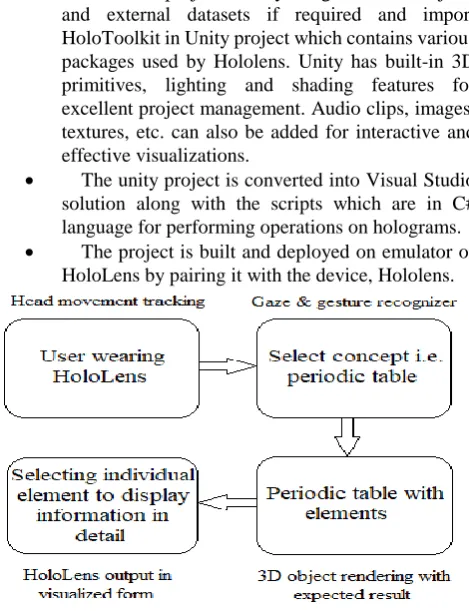
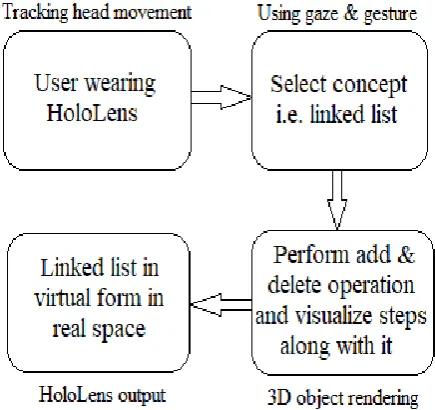
[image:2.595.310.545.421.727.2]1. User's head movement is tracked using various sensors such as cameras, gyroscope, and accelerometer.
2. The user performs a bloom operation to access the application which will run on Hololens using gaze and gesture inputs for performing operations on the linked-list or periodic table holograms.
3. The linked-list or periodic table objects are displayed on the real world using 3D object rendering and hence the result is in virtual form.
[image:3.595.60.278.201.406.2]4. The user is able to visualize the selected concept and interact with it.
Fig. 3: Linked list application workflow
5. In the periodic table, a user can view the table in circular, linear, etc. form and can click on the individual element to visualize the detailed information of the selected element.
6. In a linked list, a user can perform add and delete operations and can view the steps and program for the respective operation simultaneously.
Unity Game Engine and Visual Studio
The fastest way of building a mixed reality app consisting of 3D environments is with Unity. Unity has an Asset Store, where we can download different assets and GameObjects. Various 3D objects, buttons, panels are created using unity followed by various materials, shaders, and textures [11] [12]. The application developed in unity is then built into a Visual Studio solution wherein the scripts are generated and written depending on the design and implementation of an application.
HoloToolkit
The HoloToolkit is a part of MR toolkit that allows a developer to access the HoloLens functionalities. The features used here are “MixedRealityCameraParent” – Prefab which commonly replaces the Unity MainCamera and presents what the user sees through the HoloLens. The prefab “DefaultCursor” also has been used to perform gaze operation along with the “InputHandler” which initiates gesture operation on the selected hologram. Hololens performs the
gaze operation by tracking users’ head movement with the help of a cursor placed on a hologram and hand gesture interaction is built on gaze to target and gesture or voice act upon whichever object is targeted [12].
Scripts
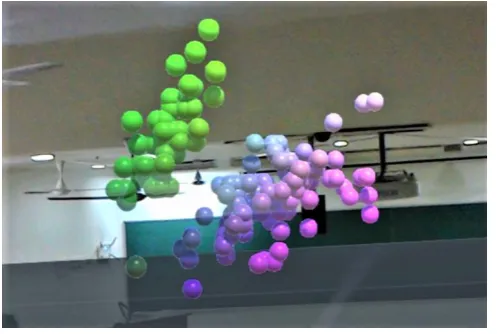
Several scripts have been written and compiled in Visual Studio to be attached to the created GameObjects so that they perform the required specific operations such as add and delete operation in a linked list, clicking an element to view its respective information in physical space, etc. The script is used in the link list application. The script is first added to an empty GameObject then the Prefabs are dropped inside them. The prefabs in this case are the Cube along with the Link. This script creates as well as destroys the links dynamically. The “CSVReader” script is used in the ScatterPlot application. This script is used for reading the CSV file that we wish to plot graphically. The definition of each line is given in the code itself. The “Dataplotter” script is also used in the ScatterPlot application. This script instantiates a GameObject and repeatedly generates it for each individual point on the graph. These help us exhibit data mining and machine learning tasks graphically.
Hololens Emulator or Hololens
The Emulators allows us to test our app without the device in a simulated environment
.
The project developed using Unity and Visual Studio is deployed either on the hardware device, HoloLens or emulator by pairing the device using Visual Studio [12].V. RESULTS
The application developed allows a user to work in HoloLens environment with 3D object positioning in 3D space. The first module implemented is of the modern periodic table used in chemistry which could be viewed in circular, linear and tabular form along with the detailed respective element information by using gaze and gesture features.
[image:3.595.310.544.516.687.2]Using gaze and gesture functionalities of the HoloLens, the desired element can be focused and clicked with the help of air tap or HoloLens clicker which helps to select holograms, zoom, and scroll. The periodic table can also be viewed in cylindrical, spherical and default view. After performing gesture command on an element, the selected element is displayed along with its information such as atomic number, atomic weight, boiling, and melting points.
[image:4.595.51.288.155.325.2]Fig. 5: Individual element information
Fig. 6: Periodic table in circular view
The next module implemented is the linked list in which the students can view the actual program alongside the flow of the program and can perform creation and deletion operation on the linked list. The following linked list can be seen after performing gesture operation on the application.
Fig. 7: Initial linked list visualization
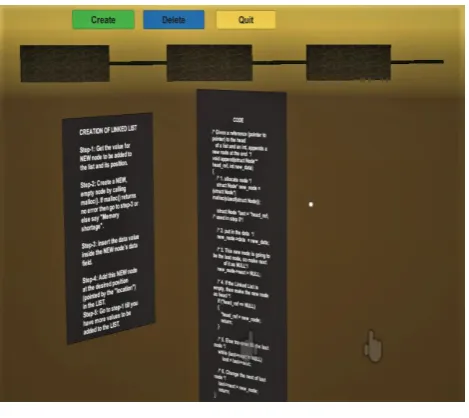
Clicking on the “create” button, adds a node to the list along with code and steps of the operation performed.
Fig. 8: Linked list creation
[image:4.595.311.544.354.558.2]Clicking on the “delete” button deletes the node from the list and also shows the steps and code for deleting the node.
Fig. 9: Deletion in linked list
[image:4.595.46.291.616.758.2]Fig. 10: Scatter plot visualization
VI. FUTUREWORKANDDISCUSSIONS Hololens using augmented reality applications are the innovations wanting to be explored yet in many more areas. The technologies have proved their benefits that how they are efficient and effective when used together in every aspect. Many more difficult concepts can also be implemented for engineering or any other level of education. Mixed reality is undoubtedly poised to change the way teachers deliver and students acquire new information, knowledge, and skills, both in and out of the classroom. MR technology will not only make learning more enjoyable, but it will also increase the efficiency of education by engaging students in a manner with which textbooks and traditional study patterns simply cannot compete. Thus, our future work would be to extend the methods and functionalities which can be used within the application and sharing the Hololens screen between multiple desktop users.
VII. CONCLUSION
Considering AR or MR in higher education, it can be concluded that students would treasure this technology due to its innovative and interactive feature. Hence, using HoloLens in education will contribute for making education more adaptive and customized for technical and educational reasons. As per the technology students can study the simulations in their personally preferred way due to the holographic 3D model projected in the room. It has been observed that the application provides a platform for engineering students to enable better visualization of the difficult concepts for simplified learning and they were more curious while using Microsoft HoloLens. The main objective of the application is to improve the quality of teaching for graduates in technical study programs using the latest MR technology which will motivate them to engage in their curriculum.
REFERENCES
1. Guo, Wenbin. “Improving Engineering Education Using Augmented Reality Environment.” Learning and Collaboration Technologies. Design, Development and Technological Innovation Lecture Notes in Computer Science, 2018, pp. 233-242., doi:10.1007/978-3-319-91743 _18
2. Ivkovic, I., Franch, S. (2018). Using Augmented Reality And Holographic Technology In An Introductory Course On Data Structures And Algorithms. Proceedings of the Canadian Engineering Education Association (CEEA). Doi:10.24908/pceea.v0i0.10356.
3. Keveleigh. (n.d.). Academy - code, tutorials, and lessons - Mixed
Reality. Retrieved from
https://docs.microsoft.com/en-us/windows/mixed-reality/academy.
4. Sunil, Siddharth, and Smitha Sunil Kumaran Nair. “An Educational Augmented Reality App To Facilitate Learning Experience.” 2017 International Conference on Computer and Applications (ICCA), 2017, doi:10.1109/comapp.2017.8079771.
5. Bazarov, S. E., Kholodilin, I. Y., Nesterov, A. S., Sokhina, A. V. (2017). Applying Augmented Reality in practical classes for engineering students. IOP Conference Series: Earth and Environmental Science, 87, 032004. Doi:10. 1088/17551315/87/3/032004. 6. Chen, Henry, et al. "3D collaboration method over HoloLens™ and
Skype™ endpoints." Proceedings of the 3rd International Workshop on Immersive Media Experiences. ACM, 2015.
7. Logg, A., Lundholm, C., & Nordaas, M. (2018). Solving Poisson's Equation on the Microsoft HoloLens. Retrieved from
https://arxiv.org/abs/1711.07790
8. Kucera, E., Haffner, O., Leskovsky, R. (2018). Interactive and virtual/mixed reality applications for mechatronics education developed in unity engine 2018 Cybernetics Informatics. doi:10.1109/cyberi.2018.8337533.
9. Lis-Marciniak, Agata, et al. "Design Rules, Implementation and Testing of User Interfaces for Mixed Reality Applications." 2018 11th International Conference on Human System Interaction (HIS), 2018, doi:10.1109/his.2018.8431347.
10. Paigude, Prasanna Sudhakar. "A Survey On The Effectiveness Of Hololens And Augmented Reality In Education". International Journal For Research In Applied Science And Engineering Technology, vol 7, no. 1, 2019, pp. 293-296. International Journal For Research In Applied Science And Engineering Technology (IJRASET), doi:10.22214/ijraset.2019.1050.
11. Technologies, Unity. “Unity User Manual (2019.1).” Unity, docs.unity3d.com/Manual/index.html
12. Yoyozilla. “Install the Tools – Mixed Reality.” Mixed Reality |
Microsoft Docs,
docs.microsoft.com/en-us/windows/mixed-reality/install-the-tools.
AUTHORSPROFILE
Prasanna S. Paigude received her Bachelor of Engineering degree in computer field from M. E. S. College of Engineering, University of Pune in 2017. She is currently pursuing Masters degree in Engineering in Computers from M. E. S. College of Engineering, University of Pune. She has worked on a project based on Cloud Computing. Currently, she is working on an Augmented Reality project. She published a survey paper based on the current research in IJRASET, a
UGC approved journal and a research paper in a National Level Conference on “Recent Advances in Computer Engineering” held at MESCoE, Pune.