
No Starch Press The Book of SAX pdf
347
0
0
Full text
(2) The Book of SAX The Simple API for XML. W. Scott Means, Michael A. Bodie Publisher: No Starch Press Frist Edition June 15th 2002 ISBN: 1886411778, 293 pages. A tutorial and reference for SAX, the Simple API for XML. Written for XML and Java developers, this tutorial and reference work offers instruction on developing SAX applications, specifically PicoSAX. Chapters concentrate on SAX applications, errors, InputSources, DTD information, namespace support, SAX concepts, migrating applications, parser support, SAX 2.0 API reference, and deprecated Sax 1.0 API. Examples show how SAX can solve XML parsing problems which frustrate tree-based technologies. The authors are software developers.Book News, Inc.®, Portland, OR The Book of SAX includes everything XML and Java developers need to write SAX applications. Specific examples show how to use SAX to solve XML parsing probles that are impractical to address with tree-based technologies--including real-time parsing, very large documents, and high-performance applications. The authors guide readers through the development of picoSAX, a functioning 2.0 XML parser.. http://www.bookofsax.com.
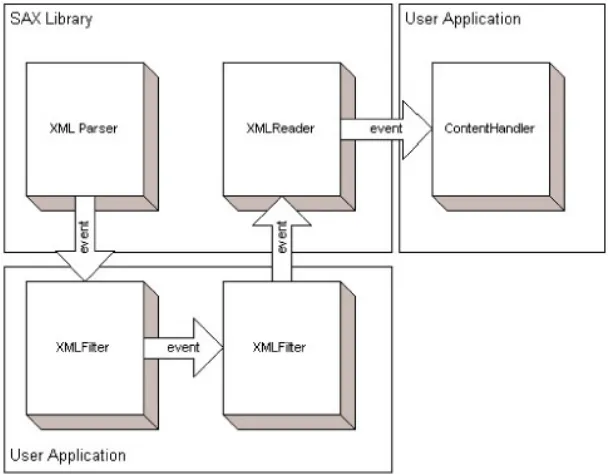
(3) Table of Contents Chapter 1: Introduction ...............................................................................................................................1 Tree-based APIs .....................................................................................................................................................................................1 Simple API for XML (SAX).................................................................................................................................................................2 About This Book ....................................................................................................................................................................................3 How to Use This Book ..........................................................................................................................................................................3. Chapter 2: A Complete SAX Application .................................................................................................4 Overview ................................................................................................................................................................................................4 What Is SAX?.........................................................................................................................................................................................4 Where Do I Get It?.................................................................................................................................................................................4 Configuring Your Environment............................................................................................................................................................5 Basic SAX Application Flow ................................................................................................................................................................5 The XShell Sample Application............................................................................................................................................................6 Using the XMLReader Interface...........................................................................................................................................................7 Implementing the ContentHandler Interface........................................................................................................................................8 Parsing and Processing ..........................................................................................................................................................................8 Accessing Attribute Values Using the Attributes Interface ..............................................................................................................12 Wrapping Up ........................................................................................................................................................................................12. Chapter 3: Handling Errors......................................................................................................................13 Overview ..............................................................................................................................................................................................13 Running the Application......................................................................................................................................................................13 Catching SAXExceptions....................................................................................................................................................................14 The ErrorHandler Interface .................................................................................................................................................................14 SAX Property and Feature Exceptions...............................................................................................................................................16 Handling Multiple Errors.....................................................................................................................................................................17 Moving On............................................................................................................................................................................................17. Chapter 4: Working with InputSources ..................................................................................................18 Highlights .............................................................................................................................................................................................18 InputSource Overview .........................................................................................................................................................................18 Using the InputSource Class ...............................................................................................................................................................19 Public and System IDs.........................................................................................................................................................................19 Character Encoding..............................................................................................................................................................................20 Custom Entity Resolvers .....................................................................................................................................................................20 The Locator Interface...........................................................................................................................................................................22 Moving On............................................................................................................................................................................................23. Chapter 5: Capturing DTD Information.................................................................................................24 Overview ..............................................................................................................................................................................................24 The DTDHandler Interface..................................................................................................................................................................24 Unparsed Entities .................................................................................................................................................................................24 A Typical Application .........................................................................................................................................................................25 Tracking NOTATION and ENTITY Declarations ............................................................................................................................26 Processing Entity References ..............................................................................................................................................................26 Moving On............................................................................................................................................................................................27. Chapter 6: Namespace Support................................................................................................................28 Overview ..............................................................................................................................................................................................28 Namespace Terminology .....................................................................................................................................................................28 Checking Parser Capabilities...............................................................................................................................................................30 Recognizing Namespaces at Parse Time ............................................................................................................................................30 Tracking Namespace Prefixes .............................................................................................................................................................31 Moving On............................................................................................................................................................................................32.
(4) Chapter 7: Advanced SAX Concepts .......................................................................................................33 Overview ..............................................................................................................................................................................................33 The XMLFilter Interface .....................................................................................................................................................................33 Extending XMLFilter ..........................................................................................................................................................................34 Filter Chaining......................................................................................................................................................................................35 Moving On............................................................................................................................................................................................35. Chapter 8: Migrating SAX 1.0 Applications...........................................................................................36 Overview ..............................................................................................................................................................................................36 Differences between SAX 1.0 and 2.0................................................................................................................................................36 Migration Strategies.............................................................................................................................................................................37 The XMLReaderAdapter Class...........................................................................................................................................................38 Replacing Deprecated Code ................................................................................................................................................................39 Using Old Parsers.................................................................................................................................................................................40 Moving On............................................................................................................................................................................................40. Chapter 9: Parser Support ........................................................................................................................41 Overview ..............................................................................................................................................................................................41 Using the DefaultHandler Class..........................................................................................................................................................42 Working with the InputSource Class..................................................................................................................................................43 SAX Features and Properties ..............................................................................................................................................................44 Namespace Tracking............................................................................................................................................................................45 The LocatorImpl Class ........................................................................................................................................................................46 Error Handling......................................................................................................................................................................................46 Where to Go from Here .......................................................................................................................................................................46. Chapter 10: SAX 2.0 API Reference ........................................................................................................47 Overview ..............................................................................................................................................................................................47 Attributes Interface ..............................................................................................................................................................................48 AttributesImpl Class ............................................................................................................................................................................61 ContentHandler Interface ....................................................................................................................................................................86 DefaultHandler Class...........................................................................................................................................................................99 DTDHandler Interface ...................................................................................................................................................................... 118 EntityResolver Interface ................................................................................................................................................................... 121 ErrorHandler Interface ...................................................................................................................................................................... 123 InputSource Class ............................................................................................................................................................................. 127 Locator Interface ............................................................................................................................................................................... 141 LocatorImpl Class............................................................................................................................................................................. 146 NamespaceSupport Class ................................................................................................................................................................. 156 ParserAdapter Class .......................................................................................................................................................................... 168 SAXException Exception ................................................................................................................................................................. 193 SAXNotRecognizedException Exception....................................................................................................................................... 198 SAXNotSupportedException Exception ......................................................................................................................................... 199 SAXParseException Exception........................................................................................................................................................ 200 XMLFilter Interface.......................................................................................................................................................................... 208 XMLFilterImpl Class........................................................................................................................................................................ 211 XMLReader Interface....................................................................................................................................................................... 246 XMLReaderAdapter Class ............................................................................................................................................................... 266 XMLReaderFactory Class................................................................................................................................................................ 286. Chapter 11: Deprecated SAX 1.0 API....................................................................................................289 AttributeList Interface....................................................................................................................................................................... 290 AttributeListImpl Class .................................................................................................................................................................... 297 DocumentHandler Interface ............................................................................................................................................................. 309 HandlerBase Class ............................................................................................................................................................................ 318 Parser Interface.................................................................................................................................................................................. 333 ParserFactory Class........................................................................................................................................................................... 341.
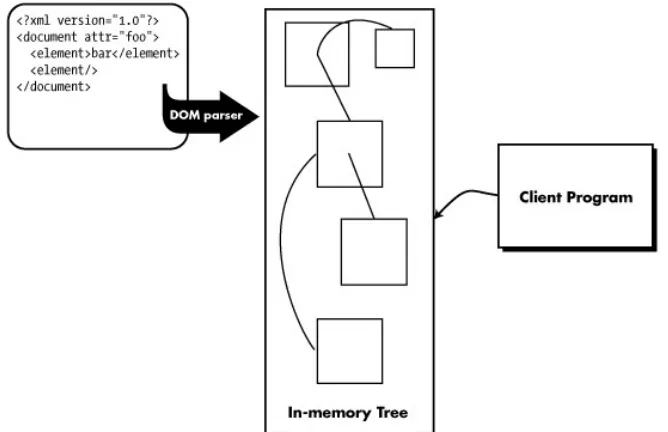
(5) The Book of SAX. Chapter 1: Introduction Unless you've spent the past five years in outer space, XML has probably become a regular part of your programming repertoire. Almost every industry and type of application is starting to use XML for everything from transmitting invoices to drawing pictures. There are many different APIs available for working with XML documents, but if you've never heard of SAX, it might just be the solution to problems you didn't even realize you had (yet). Every day there are more and more ways for programmers to incorporate XML documents into the systems they are building. Unless writing an XML parser sounds appealing, in most cases you will need to use a third-party XML parser and some type of XML API.. Tree-based APIs One of the most popular XML APIs at the moment is the Document Object Model, which is a standard that was developed by the World Wide Web Consortium (www.w3c.org). DOM is what is known as a tree-based API, which means that all of the information and content from the original document must be read into memory and stored in a tree structure before it can be accessed by a client program. Figure 1-1 shows the basic flow of an application that uses a tree-based API (like DOM) to access XML document content.. Figure 1-1: Typical flow of a tree-based XML application Once the document has been parsed and stored as an in-memory tree structure, the client application has full access to its contents. It is simple to follow references from one part of the document to another. It is also easy to modify the document by adding and removing nodes from the tree.. 1.
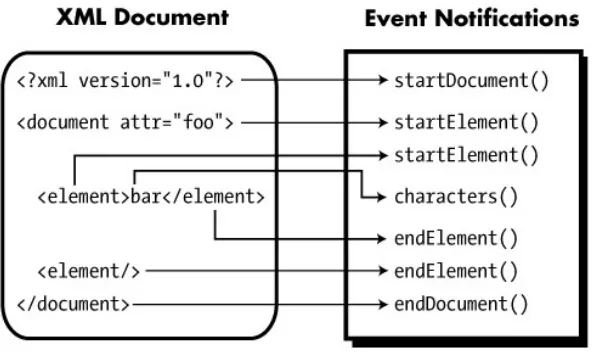
(6) The Book of SAX. While this approach has some obvious advantages, it has some equally obvious disadvantages. The size of the document affects the performance (and memory consumption) of the program. If the document is very large, it may not be possible to store the entire thing in memory at one time. Also, the whole document must be successfully parsed before any information is available to the client program.. Simple API for XML (SAX) It was to solve these and other problems that the members of the XML-DEV mailing list (www.xml.org) developed the Simple API for XML (SAX). Unlike DOM, SAX is an event-driven API. Rather than building an in-memory copy of the document and passing it to the client program, the client program registers itself to receive notifications when the parser recognizes various parts of an XML document. Figure 1-2 shows the flow for a typical event-driven XML application.. Figure 1-2: Event-based XML application flow In the event-driven scenario, the API itself doesn't allocate storage for the contents of the document. The required content is passed to the event notification method, and then forgotten. This means that whether the document was 10 kilobytes or 10 megabytes, the application's memory usage and relative performance will remain constant. Unlike in the tree-based approach, notifications are received as the document is parsed. This means that the client application can begin processing before the entire document has been read. For many Internetbased applications, where bandwidth may be an issue, this can be extremely useful. There are, of course, drawbacks to this approach. The application developer is responsible for creating his own data structures to store any document information he will need to reference later. Since no comprehensive model of the document is available in memory, SAX is unsuitable for sophisticated editing applications. Also, for applications where random access to arbitrary points of the document is required (such as an XSLT implementation), a tree-based API would be more appropriate.. 2.
(7) The Book of SAX. About This Book This book is meant to be a complete introduction, tutorial, and reference for the Simple API for XML. The chapters in Part I progressively introduce the interfaces and classes that make up a standard SAX distribution. They should be read in order, as each chapter builds on the concepts explained in the preceding chapters. This book attempts to introduce concepts in the order that you need to use them in a real-world application. Chapter 2 starts by showing you how to build a complete, functioning SAX application. Chapter 3 explains the SAX error handling process. Chapter 4 introduces the concept of the SAX InputSource class, which enables more sophisticated handling of document content. Chapter 5 explains how to capture the meta-information from the XML document type definition (DTD). Chapter 6 explains the SAX support for the Namespaces in XML standard. Chapter 7 explains advanced SAX concepts, such as the support for SAX filter classes. Chapter 8 is intended to assist programmers who have developed applications for SAX version 1.0 to migrate to the new (and very different) SAX 2.0 API. The final tutorial chapter, Chapter 9, explains the issues that face programmers who want to write their own SAX implementations. Part II is a complete reference to the org.xml.sax and org.xml.sax.helpers packages. Each of the classes, interfaces, and exceptions that make up a standard SAX distribution are documented. Part II is organized into two major sections: Chapter 10, "SAX 2.0 API Reference" and Chapter 11, "Deprecated SAX 1.0 API Reference." SAX is still a very young—though well-supported—API, and the differences between versions 1.0 and 2.0 reflect the changes in XML itself. The one major change between 1.0 and 2.0 is the incorporation of full support for XML namespaces. When writing new SAX applications, only the classes and interfaces in Chapter 10 of Part II should be used. The other section is provided for historical purposes, and includes tips for quickly converting old applications to the new 2.0 API.. How to Use This Book If you are new to SAX and have never written a SAX application before, you will probably want to continue directly to Chapter 2 and build your first application. Since each subsequent chapter introduces progressively more specialized functionality, you may find everything you need within the first two or three chapters you read. Don't feel compelled to read the entire tutorial section at once before getting started. The best way to learn SAX (or any programming concept) is by trying it out. Once you become familiar with SAX, you will probably be more interested in using the reference material in Part II. This book makes sure to include language-specific bindings for both Java and the Microsoft MSXML implementations of SAX for all of the classes and interfaces in Part II. There are also functioning examples that demonstrate the use of each object and method given. Now let's get started and build our first SAX application!. 3.
(8) The Book of SAX. Chapter 2: A Complete SAX Application Overview This chapter walks you through the process of writing your very first SAX application. This chapter discusses the following topics: •. What is SAX?. •. Selecting a SAX implementation.. •. Configuring SAX to work with your environment.. •. Basic SAX application flow.. •. The XShell sample application.. •. Using the XMLReader interface.. •. Implementing the ContentHandler interface.. •. Parsing and processing.. •. Accessing attribute values using the Attributes interface.. What Is SAX? In reality, SAX is nothing more than a set of Java class and interface descriptions that document a system for writing event-driven XML applications. The SAX specification (along with the source code for a set of Java interfaces and classes) lives on its own Web site (www.saxproject.org) and is still maintained and extended by the members of the XML-DEV mailing list. But to actually write a SAX application, you need an XML parser that has a concrete implementation of the various interfaces and classes that make up the org.xml.sax and org.xml.sax.helpers Java packages.. Where Do I Get It? Before we get into the nitty-gritty details of writing a SAX application, you'll need to install an XML parser distribution that supports SAX. Although SAX was originally designed for Java programmers, implementations of the SAX interfaces have been written for many other programming languages such as Perl, C++, and Visual Basic. For the rest of this book, we'll assume that you're writing Java applications that use the Xerces parser distribution that is supported by the Apache Foundation's XML Project (http://xml.apache.org). After downloading the Xerces package from the Apache XML Project Web site, you'll need to follow the installation instructions that go with the specific version you will be using. The examples in this book have been tested with Xerces version 1.4.0, but they should work with any other parser that supports the SAX 2.0 standard.. 4.
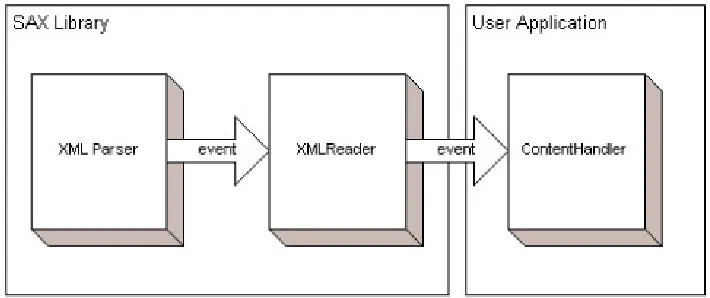
(9) The Book of SAX. The installation process for 1.4.0 amounts to no more than unzipping the package in a directory on the local hard drive using either the Java jar utility or the unzipping program of your choice (we use WinZip 8.0 on our Windows machines). You will also need a copy of the Java 2 SDK to compile and execute your SAX application. The examples in this book were compiled using the JDK version 1.2.2 that is installed by default by the Borland JBuilder version 3.0 Java Integrated Development Environment (IDE).. What Version Number Was That? Observant readers will notice that the version numbers for the products mentioned in this section are (in some cases) one or two major revision numbers out of date. This is actually a conscious decision (if a somewhat unconventional one). After reviewing the additional features and bug fixes that were available for newer versions of these products, the trouble spent upgrading seemed to outweigh the value that would be gained by using the more recent version. Since we may be using an older version of these tools than you are, they should be forward compatible with more recent versions. If we had used the most recent versions, the reverse would probably not have been true.. The examples in this book were developed using the Borland JBuilder Foundation 3.0 IDE. Although it was lacking in a few areas, it is an excellent value for the money (the lowest-end version of JBuilder is available for download from Borland at no cost). It can be obtained from the Borland Web site (www.borland.com). Although an IDE (such as JBuilder) can certainly make software development less tedious, there is no requirement that you use one. The examples in this book could just as well have been developed using a basic text editor and command-line tools.. Configuring Your Environment The following instructions assume that you're using the Xerces parser. If you're not, you'll need to follow the instructions that come with your parser to add the org.xml.sax and org.xml.sax.helpers packages to your system's Java CLASSPATH environment variable. If you are using Xerces, you should add the xerces.jar file in the root of the distribution directory to your system's CLASSPATH environment variable. This can be done through the System applet of the Control Panel for most versions of Windows. This will allow java.exe (the JDK Java runtime) to locate the SAX classes at runtime without your needing to supply their location on the command line.. Basic SAX Application Flow Every SAX application needs to go through the same basic steps to process XML documents: 1. Obtain a reference to an object that implements the XMLReader interface. 2. Create an instance of an application-specific object that implements one or more of the various SAX *Handler (DTDHandler, ContentHandler, and ErrorHandler) interfaces.. 5.
(10) The Book of SAX. 3. Register the object instance with the XMLReader object so that it will receive notifications as XML parsing events occur. 4. Call the XMLReader.parse() method for each XML document that needs to be processed by the application. The object instance that was registered in step 3 will receive notifications progressively as the document is parsed. It is up to the application-specific object (or objects) to track and process the information that is delivered via the various event notification methods that it implements. For example, an application that wants to strip markup out of an XML document and leave only the text content would need to implement the ContentHandler interface and implement its specific processing in the characters() event callback method. Even though the setup for every SAX application is almost identical, the data structures and algorithms that process the event notifications will vary widely depending on what the application is designed to do.. The XShell Sample Application To illustrate the various features (and pitfalls) of SAX, we will be developing a complex example throughout the tutorial chapters. This example will implement a simple command-line shell interface (similar to command.com or cmd.exe) where the commands are encoded as XML elements. Keep in mind that our goal is not to build a full-featured command-line interpreter, but to show off the various features of SAX that make it ideally suited to interactive XML applications. Whenever a trade-off between application functionality and clarity of SAX usage needs to be made, SAX will always come out the winner. note The full source code for this application (as well as other goodies) is available at this book's Web site (www.bookofsax.com). Throughout the book, we will call attention to complementary information that can be found at the Web site through the use of the Web site icon. For now, we will define the XShell application as a Java program that accepts zero or more XML document URIs from the command line, and parses each given document, and executes the recognized batch commands within. If no URIs are given on the command line, the XML commands will be read from the System.in InputStream. Input will be batched one line at a time, until a blank line is detected. The batch will then be parsed using the same algorithm that is used to parse documents read from URIs. Input will be terminated by an empty batch (no XML content). Listing 2-1 shows the basic skeleton of the XShell class, including the main() method that acts as the command-line entry point. Listing 2-1: The XShell class skeleton public class XShell extends DefaultHandler { . . . /** * Command line entry point. */ public static void main(String[] args) { // create a new XShell session object and set the output to go to stdout XShell xbSession = new XShell(System.out); try { if (args.length > 0) {. 6.
(11) The Book of SAX. // user provided document URIs on the command line for (int i = 0; i < args.length; i++) { InputSource is = new InputSource(args[i]); xbSession.doBatch(is); } } else { // no command line argument provided, read from stdin xbSession.doCLI(System.in); } } catch (IOException ioe) { System.err.println(ioe); } catch (SAXException se) { System.err.println(se); } }. Using the XMLReader Interface The primary entry point to any SAX implementation is the XMLReader interface. This interface contains methods for: •. Controlling how the underlying XML parser will operate (validating versus nonvalidating, and so on).. •. Enabling and disabling specific SAX features (such as namespace processing).. •. Registering object instances to receive XML parsing notifications (via the *Handler interfaces).. •. Initiating the parsing process on a specific document URI or input source (via the parse() methods).. Before an application can use the XMLReader interface, it must first obtain a reference to an object that implements it. How the XMLReader interface is supported is a decision that is left up to the implementers of the particular SAX distribution. For instance, the Xerces package supplies a class called org.apache.xerces.parsers.SAXParser that implements the XMLReader interface. Any application that uses Xerces to provide SAX support can simply create a new instance of the SAXParser class and use it immediately. The SAX specification does define a special helper class (from the org.xml.sax.helpers package) called XMLReaderFactory that is intended to act as a class factory for XMLReader instances. It has two static methods for creating a new XMLReader object instance: XMLReaderFactory.createXMLReader(); XMLReaderFactory.createXMLReader(String className);. Of course, both of these methods require that the class name of the class that supports the XMLReader interface be known in advance. Since all that these methods do is use the class name given to create a new object instance, this helper class is, at best, of questionable utility. The XShell constructor obtains a reference to an XMLReader class instance by directly instantiating the SAXParser class from the Xerces package inside its constructor: m_xrShell = (XMLReader)new org.apache.xerces.parsers.SAXParser();. Now that we have an XMLReader object instance to work with, we can register our class to receive XML parse callback notifications.. 7.
(12) The Book of SAX. Implementing the ContentHandler Interface The most interesting interface in the SAX package, from the application author's standpoint, is the ContentHandler interface. This interface provides notification of: •. documents starting and ending. •. element start and end tags recognized. •. character data found. •. namespace prefixes going in and out of scope. •. processing instructions found. •. ignorable whitespace read. For normal XML applications, XML element and text content are the most important types of data that will be processed. That is why almost every SAX application will want to implement the ContentHandler interface and register to receive its notifications. It is a rather large interface, however, and many applications will neither need nor want to receive all of the notifications it offers. To save application writers from having to implement half a dozen methods that they have no intention of using, SAX provides the DefaultHandler class. This class provides a default empty implementation of all of the callback interfaces supported by SAX 2.0, including the EntityResolver, DTDHandler, ContentHandler, and ErrorHandler interfaces. By deriving your SAX application object from DefaultHandler, you can immediately register to receive any of the callback notifications without writing empty methods to satisfy the various Java interface specifications. The XShell class is derived from the DefaultHandler class directly, like this: public class XShell extends DefaultHandler { . . .. Then, in the XShell constructor, it registers itself to receive ContentHandler notifications using the XMLReader object instance it just created: m_xrShell = (XMLReader)new org.apache.xerces.parsers.SAXParser(); m_xrShell.setContentHandler(this);. Now that the XShell instance is ready to receive content notifications, the application is ready to parse an XML document.. Parsing and Processing Whether the XML command-line instructions come from an external document or from System.in, both cases end up calling the doBatch() method: /** * Given an InputSource object, parses and executes the commands given. */ public void doBatch(InputSource is) throws IOException { try { m_xrShell.parse(is); } catch (SAXException se) { // we just eat it, we already notified the user } }. 8.
(13) The Book of SAX. This very simple method calls the parse() method of the XMLReader instance that was created by the XShell constructor. The parse() method does not return until either the document referenced by the passed InputSource has been completely parsed, or a fatal parsing error occurs. In either case, no indication of the result is returned to the application by the parse() method. Error handling is covered thoroughly in Chapter 3. After the XML parser has been invoked, the SAX interface begins calling notification methods for the object instances that were registered by the set*Handler() methods of the XMLReader interface. To help you understand the sequence in which notifications are sent by SAX, we've developed a simple utility called com.bookofsax.SAXAnimate that prints the interface and method names of every SAX callback for a given XML document. Given the following simple XML document: <?xml version="1.0" encoding="UTF-8"?> <root> <element xmlns="http://namespaces.bookofsax.com/null"> <message>Hello, SAX.</message> </element> </root>. The SAXAnimate utility generates the following list of notification calls: ContentHandler.setDocumentLocator() ContentHandler.startDocument() ContentHandler.startElement() ContentHandler.characters() ContentHandler.startPrefixMapping() ContentHandler.startElement() ContentHandler.characters() ContentHandler.startElement() ContentHandler.characters() ContentHandler.endElement() ContentHandler.characters() ContentHandler.endElement() ContentHandler.endPrefixMapping() ContentHandler.characters() ContentHandler.endElement() ContentHandler.endDocument(). By reading through this trace and matching it to the content in the XML document, you should be able to more easily understand how SAX sequences notifications to ensure that your application has an accurate picture of the XML document at any point in time. For instance, the namespace prefix mapping notification is sent before the corresponding element declaration, since elements and attributes can use a namespace as soon as it is declared. Now, given this understanding, how will the XShell application process notifications to ensure that it will have the appropriate information available when it needs it? How much (or how little) information needs to be preserved from the data that is delivered by the ContentHandler interface? To answer this question, we will need to define exactly how the XShell will function. The pseudo-code for the application is: while more-documents-to-process or more-interactive-commands while more-child-elements-of-root read-complete-child-element if element-name-recognized then execute-named-command end if end while end while. 9.
(14) The Book of SAX. It's a bit simplistic, but that's basically all that most command-line interpreters do. The additional complication that we will face is that the read-complete-child-element step is not as straightforward as it seems. As we can see from the output of the SAXAnimate class, the information we need will be passed to us a little bit at a time. It is our job to determine how much and which of the given content we are to keep, and how to store it. The hierarchical nature of XML data makes the stack a very popular structure for storing arbitrary levels of document information. The simplest possible notification sequence for a simple leaf element that contains some character data is: ContentHandler.startElement() ContentHandler.characters() ContentHandler.endElement(). Based on this, our program will need to preserve the data that is passed in by the startElement() and characters() notifications, and act on that data when the corresponding endElement() notification is received. The method signature for the startElement() notification is: public void startElement(java.lang.String namespaceURI, java.lang.String localName, java.lang.String qName, Attributes atts). Of all of this information, the only part we really need to preserve are the attributes. The endElement() method will be given the same namespaceURI, localName, and qName parameters when the element close tag is parsed (or immediately, if it is an empty element). Since elements can be nested, we will need to use the java.util.Stack object to keep track of the attributes that are valid for the element we are currently processing. As long as the attributes are pushed on the stack in the startElement() method and popped off in the endElement() method, the stack is always guaranteed to be accurate. To support this, we will need to add two members to the XShell class and write a startElement() method that looks like this: /** * Attribute stack. */ Stack m_stAtts = new Stack(); /** * Accumulated character data on stack. */ Stack m_stChars = new Stack(); . . . /** * Sets up attribute and character data stacks for processing later by the * endElement() method. */ public void startElement(java.lang.String namespaceURI, java.lang.String localName, java.lang.String qName, Attributes atts) { // save the attributes for this element, for use later in endElement() m_stAtts.push(new AttributesImpl(atts)); // create new, empty string buffer to capture character data m_stChars.push(new StringBuffer()); }. 10.
(15) The Book of SAX. Look at the startElement() method; the first push operation actually pushes a new AttributesImpl object rather than a reference to the object that was passed in as a parameter. The object that was passed in is not guaranteed to be valid outside the scope of the startElement() method. This is generally true for any of the data that is passed to a SAX notification method. Anything that you need to preserve will need to be copied to a new object instance that your program controls. In this case, the AttributesImpl object is an object provided in the org.sax.helpers package. It implements a copy constructor that can be used to duplicate the contents of an object that supports the Attributes interface for later use. The second push operation provides a new, empty Java StringBuffer object instance that will be used to capture any character data this element might contain. Once again, since elements can be nested, a new StringBuffer instance must be created for every element open tag. The characters() notification method appends any character data it receives to the StringBuffer on the top of the m_stChars stack. /** * Appends new characters to the StringBuffer on top of the * character data stack. */ public void characters(char[] ch, int start, int length) { ((StringBuffer)m_stChars.peek()).append(ch, start, length); }. Finally, when the endElement() notification is received, we can examine the element name and decide what action, if any, to take. At this point, we are saving all of the element content for every element we encounter. We are going on the assumption that this content is valid and will be used later. One possible future optimization would be to set flags and ignore attribute and character data for unrecognized elements, but since we will be expanding our application to incorporate additional commands in the future, we will capture everything now and deal with it later. The endElement() notification method looks like this: /** * Pops saved data off of stack and executes the given * command. */ public void endElement(String namespaceURI, String localName, String qName) { Attributes atts = (Attributes)m_stAtts.pop(); String strCharData = ((StringBuffer)m_stChars.pop()).toString(); // dispatch the message, based on the localName (XML tag name) if (localName.equals("echo")) { doEcho(atts, strCharData); } else if (localName.equals("dir")) { doDir(atts, strCharData); } else if (localName.equals("cd")) { doCD(atts, strCharData); } }. This method recognizes the three command elements that the shell currently supports (echo, dir, and cd) and dispatches the cached attribute and character data to the worker methods that implement the actual shell logic. In the interest of space, we will not show the implementations of all three of the doEcho(), doDir(), and doCD() methods here. They are available (along with the rest of the application source code) on this book's Web site. We will show the implementation of the doCD() method because it does show the basic usage of the Attributes interface.. 11.
(16) The Book of SAX. Accessing Attribute Values Using the Attributes Interface The attributes interface provides access to the XML attributes that are included (either directly or through implicit values in the DTD) in an element's open tag. There are two basic methods for accessing attribute values: by name or by index. It is illegal to have two attributes on a single element with the same qualified name (meaning that the namespace URIs and local parts match). Therefore, retrieving attribute values by name is very common when processing XML documents. The Attributes interface provides the getType() method for getting an attribute's type (CDATA, ID, IDREF, and so on), and the getValue() method for getting an attribute's string value. Both methods can use either the attribute's qualified name or its namespace URI and local name. Since no guarantees are made that attribute values will be made available in the same order in which they appear in the element tag, referencing by name is the only safe way to ensure that your application is reading the attribute you intend. When enumerating attributes, however, the getLength(), getQName(), and getValue() methods can be used to get information about all of the attributes that are available for a particular element. The Attributes interface is not completely symmetric, and certain methods are accessible only using an attribute's index (such as the getURI() method for retrieving the attribute's namespace URI). The getIndex() methods are provided to perform a reverse lookup from an attribute's qualified name or namespace/local part to its corresponding index number. Many of these methods are not particularly useful until an application becomes namespace aware. Information about how SAX deals with namespaces and qualified names is thoroughly covered in Chapter 6, "Namespace Support.". Wrapping Up We have now built a completely functional SAX application. It parses documents, handles notification events, and even does (some) useful work. Download the application (complete with source code) from this book's Web site and try the test script you find there. Try running it in interactive mode and enter some invalid XML. You'll probably find that the default error handling leaves something to be desired. We'll tackle that next, in Chapter 3, "Handling Errors.". 12.
(17) The Book of SAX. Chapter 3: Handling Errors Overview In the previous chapter, we built a complete, functioning SAX application. This chapter explains how SAX handles various types of errors, and how to incorporate error handling into your application. This chapter discusses the following topics: •. Catching SAXExceptions.. •. Implementing the ErrorHandler interface.. •. Property and feature exceptions.. •. Handling multiple errors.. Running the Application Now that we've built our application, let's try putting it through its paces to see how it works. Start XShell in interactive mode by executing it without any command-line arguments: java com.bookofsax.xshell.XShell. Before running the application, you must make sure that the root output directory (XShell/classes if you're using JBuilder) of the compiled program is on the system classpath. This is set through the CLASSPATH environment variable when using Windows. If everything has been compiled correctly and the Java CLASSPATH is correct, the application will enter a loop waiting for input from the standard input file. Let's try a simple dir command first (note the second carriage return that is required to submit the batch of commands to the interpreter): <dir>? ?. It seems that, for some reason, the doDir() method was never called. Since our application doesn't yet have any error-handling facilities, the program itself can't give us much help. Implementing basic error handling is certainly a good first step toward finding out what went wrong. Since standard Java programming practice is to throw an exception when something unexpected happens, let's look at the org.xml.sax package. We can see that SAX provides the definitions for four different exceptions. The one called SAXException directly extends the java.lang.Exception class. The other three exceptions are subclasses of the generic SAXException class. This arrangement offers a convenient way to provide a blanket catch statement that deals with any exceptions that come from SAX, without having to provide specialized processing for each different error.. 13.
(18) The Book of SAX. Catching SAXExceptions Let's take a closer look at the code in the XShell.doBatch() method. Since the XMLReader.parse() method is declared to throw a SAXException, we wrapped it in an empty try...catch block. That's not a very good practice, though, so let's modify it to at least print any exceptions we might be getting from the XML parser: public void doBatch(InputSource is) throws IOException { try { m_xrShell.parse(is); } catch (SAXException se) { System.err.println(se); } }. Now let's recompile and try our sample command again: java com.bookofsax.xshell.XShell? <dir>? ? org.xml.sax.SAXParseException: The element type "dir" must be terminated by the matching end-tag "</dir>".. note As a standard convention throughout Part I of this book, program output will always be shown in boldface type. This differentiates it from user input. That's much better. XML doesn't allow unmatched open element tags. When the XML parser notified the SAX implementation about this well-formedness error, SAX threw a SAXParseException back to our application. Let's try the command again, this time with a valid XML fragment: <dir/>? ? <dir path="E:\TheBookOfSAX\BOS-CH3\classes"> <file name="com" size="0"/> <file name="dependency cache" size="0"/> </dir>. This time the XML command batch was parsed correctly, and the endElement() notification method was able to successfully call the doDir() method. Catching the SAXException thrown from the parse() method is certainly better than no error handling at all, but SAX provides a mechanism for receiving error notifications directly during parsing.. The ErrorHandler Interface The ErrorHandler interface is another callback interface provided by SAX that can be implemented by an application to receive information about parsing problems as they occur. The ErrorHandler interface specifies three notification functions to be implemented by a client application, shown in the table on the next page. The process for registering to receive notifications on the ErrorHandler interface is similar to that for registering the ContentHandler interface. First, an object that implements the ErrorHandler interface must be instantiated. The new instance then needs to be passed to the XMLReader.setErrorHandler() method so that the SAX parser will be aware of its existence.. 14.
(19) The Book of SAX. warning(). Called for abnormal events that are not errors or fatal errors.. error(). Called when the XML parser detects a recoverable error. For instance, a validating parser would throw this error when a well-formed XML document violates the structural rules provided in its DTD.. fatalError(). Called when a non-recoverable error is recognized. Non-recoverable errors are generally violations of XML well-formedness rules (for instance, forgetting to terminate an element open tag).. For the XShell DefaultHandler. application, implementing the ErrorHandler interface is not a problem. The helper class already implements ErrorHandler and provides default, do-nothing implementations of the three notification methods. Since the XShell class extends DefaultHandler, we can just register with the setErrorHandler() method and implement the callback methods we are interested in at the time. To register, we add a call to setErrorHandler() to the XShell constructor: public XShell(PrintStream ps) { m_xrShell = (XMLReader) new org.apache.xerces.parsers.SAXParser(); m_xrShell.setContentHandler(this); m_xrShell.setErrorHandler(this); m_psStdout = ps; }. We will also want to implement one of the notification methods as well. Since none of the XML we have been parsing until now has been valid (meaning that it has a DTD or XML schema associated with it), the only type of error we will be receiving is the fatal well-formedness error. So let's implement the fatalError() notification: public void fatalError(SAXParseException exception) throws SAXException { System.err.println("fatal error: line " + exception.getLineNumber() + ": column " + exception.getColumnNumber() + ": " + exception.getMessage()); }. This will print a slightly more informative error message that includes the line and column number from the input document, as well as the exception message text. Let's try it by duplicating the error we had at the beginning of the chapter: E:\TheBookOfSAX\BOS-CH3\classes>java com.bookofsax.xshell.XShell? <dir>? ? fatal error: : line 2: column 10: The element type "dir" must be terminated by the matching end-tag "</dir>". org.xml.sax.SAXException: Stopping after fatal error: The element type "dir" must be terminated by the matching end-tag "</dir>".. It looks like our fatalError() method was called correctly, but that didn't stop SAX from throwing a SAXException back to the XMLReader.parse() method. Since our doBatch() method dumps any SAXException s it sees, we end up with two error messages instead of one. The simplest solution is to remove the output code from the catch() block of the doBatch() method and rely on our notification messages to provide any required feedback to the user.. 15.
(20) The Book of SAX. Dealing with a fatal error is relatively straightforward. Since parsing cannot continue, the only valid option is to abort processing of the offending document. But the strategy for dealing with nonfatal errors isn't as obvious. A common type of nonfatal error is a validity error that is generated when an XML document contains content that doesn't match its DTD.. SAX Property and Feature Exceptions By default, the Xerces SAX parser is nonvalidating. This means that even if a document contains a DTD, the parser doesn't check the document contents to make sure that they conform to its rules. Enabling validation requires the use of the XMLReader.setFeature() method. SAX offers this method to provide different sets of features in an extensible way. To enable validation, we'll add the following line to the XShell object constructor: m_xrShell.setFeature("http://xml.org/sax/features/validation", true);. But checking the API documentation for XMLReader.setFeature() shows that the method may throw two different SAX-specific exceptions:. SAXNotRecognizedException. The SAX implementation doesn't recognize the feature name given.. SAXNotSupportedException. Although the feature name was recognized, this particular SAX implementation doesn't support it.. Before we can compile the application, we need to add a try...catch block that will catch these exceptions (or the blanket SAXException, from which both exceptions are derived). Once those changes have been made and the program has been successfully compiled, it should be possible to validate incoming documents using a DTD. To test this, we'll create a simple DTD (shown in Listing 3-1) called XShellScript.dtd that describes the structure of a valid XShell script. Listing 3-1: XShellScript.dtd <!ELEMENT batch (cd | echo | dir) +> <!ELEMENT cd EMPTY> <!ATTLIST cd path CDATA #IMPLIED > <!ELEMENT echo (#PCDATA) > <!ELEMENT dir EMPTY> <!ATTLIST dir path CDATA #IMPLIED >. To use the new DTD, we'll need to create a test document that includes a <!DOCTYPE> declaration. A simple test script is shown in Listing 3-2, which is available on this book's Web site as XShellTestScript.xml. Listing 3-2: XShellTestScript.xml <?xml version="1.0" encoding="UTF-8"?> <!DOCTYPE batch SYSTEM "XShellScript.dtd"> <batch> <cd path="/"/> <dir/> <bogus/> <echo>Done processing!</echo> </batch>. 16.
(21) The Book of SAX. Handling Multiple Errors Note that the next-to-the-last element in the top-level <batch> element is not valid, according to the DTD. This will cause the SAX parser to call the nonfatal error() notification method, to report the invalid content. To make sure that this happens, we will provide our own error() method implementation for the XShell object: public void error(SAXParseException exception) throws SAXException { System.err.println("error: line " + exception.getLineNumber() + ": column " + exception.getColumnNumber() + ": " + exception.getMessage()); }. After recompiling, let's run XShell in noninteractive mode, by passing in the name of the test script on the command line: E:\TheBookOfSAX\BOS-CH3\classes>java com.bookofsax.xshell.XShell ..\XShellTestScript.xml? <dir path="/"> <file name="TheBookOfSAX" size="0"/> </dir> error: line 6: column 11: Element type "bogus" must be declared. Done processing! error: line 8: column 10: The content of element type "batch" must match "(cd|echo|dir) +".. Note that the SAX parser notified our application of two different validity errors and continued parsing the rest of the document.. Moving On Now that our application is better able to deal with errors both internal and external, it is time to start thinking about the different ways in which the user should be able to submit scripts for execution. The application already supports the entry of scripts by using standard input and execution of scripts from files. To go beyond these basic mechanisms, we need to explore the way in which SAX uses the InputSource class to provide character data to the XML parser.. 17.
(22) The Book of SAX. Chapter 4: Working with InputSources Highlights More sophisticated applications may want more control over the source of the XML content that will be parsed. This chapter discusses the following topics: •. Basic InputSource usage.. •. Public and system IDs.. •. Character encoding issues.. •. Extending the InputSource class.. •. Resolving external entities.. •. Using the Locator interface.. InputSource Overview Although the file and stream handling facilities of Java are extremely rich and flexible, a simple InputStream or Reader class doesn't provide enough information to allow an XML parser to do its job. To provide this additional information, the authors of SAX created the InputSource object. An InputSource object instance can be thought of as a wrapper for an open Java Stream or Reader object. In addition to providing the parser with a source for character input, it also allows the user to provide additional information about the input, such as: •. The public ID. •. The system ID. •. The underlying character encoding (for byte streams). The additional information in an InputSource object allows the parser to produce more accurate error messages, perform correct character translations, and, when possible, automatically retrieve content that is identified by a URL (system ID) or through a directory of well-known documents (using a public ID). Also, having the system and/or public ID available at parse time allows SAX to throw more meaningful error messages when parsing problems occur. If only the Java file I/O object were available, it wouldn't always be possible to identify the original source of the characters being read (due to the frequently used technique of chaining streams and readers together). Another important function is extensibility. SAX application developers may extend the InputSource class directly. This is useful when the source of the characters to be parsed is nonstandard, such as a TCP/IP socket. We will be looking at that functionality later in this chapter.. 18.
(23) The Book of SAX. Using the InputSource Class The two primary uses of InputSource objects in the SAX framework are: •. As an argument to the parse() method of the XMLReader class.. •. As a return value from a custom EntityResolver class.. It is not always necessary to create an InputSource object. If the document your application needs to parse can be read using an http: or file: URL, there is an XMLReader.parse() method that can be called with the system ID as a string. But if you want to provide a custom value for the system ID, a public ID, or a specific character encoding, you'll need to create an InputSource object manually. There are several ways to construct a new InputSource object, depending on what type of underlying Java stream you will be using. The four available constructors are: InputSource() This default, no-argument constructor cannot be used until a byte stream, character stream, or system ID is provided using one of the set*() methods. InputSource (java.io.InputStreambyteStream) This constructor indicates that the underlying source of data is a raw byte stream. The parser will attempt to identify the character encoding if none is given using the setEncoding() method. InputSource (java.io.ReadercharacterStream) Since the Java Reader interface already exposes incoming data as Unicode characters, setting character encoding is not necessary when using this constructor. InputSource (java.lang.StringsystemId) The new InputSource object will attempt to open a connection to the URI given and fetch its content. Depending on which of these options is selected, you should also provide your new InputSource object with a public ID, a system ID, or possibly both.. Public and System IDs The difference between public and system IDs is one of the least clear portions of the XML specification. So, unsurprisingly, it is one of the least understood aspects of XML parsing tools (like SAX). The system ID is the better understood of the two. A system ID is nothing more or less than a Uniform Resource Identifier (as defined in IETF RFC 2396). Although the full URI specification is much more comprehensive, the most common type of URI is the lowly URL (Uniform Resource Locator). A URL is composed of a protocol (such as http:) and a protocol-specific identifier. For HTTP URLs, this is usually a server name (or IP) followed by a path to a specific document on the server. Another popular URL protocol is the file: protocol, which can be used to access documents stored on a computer's local storage devices (hard drives, CDs, floppy drives, and so on).. 19.
(24) The Book of SAX. A public ID is less crisp and well defined. The primary purpose of a public ID is to allow well-known documents to be distributed throughout the Internet without requiring every user to retrieve them from the same location. For example, the public ID for HTML 4.0 is: ~//W3C//DTD HTML 4.0 Transitional//EN. Any HTML document that includes this public ID is testifying that it conforms to the DTD that is associated with this public ID on the W3C Web site (or any other mirrored location). The major problem with public IDs is that no organization seems to have the global authority to manage them. This can lead to confusion when different companies or organizations declare public IDs that match. In operation, an XML parser is supposed to look up the public ID in some sort of directory and map it to a concrete URI that can actually be read. In reality, most documents provide both the public ID and the system ID for a given document because some parsers don't perform this function.. Character Encoding Character encoding is one of those things that is completely invisible to programmers most of the time. Basically, character encoding is the mapping between the binary numbers stored in a text document and the actual human characters they represent. Most modern operating systems support basic ASCII encoding (the characters from 0 to 127 that represent the Latin alphabet, numbers, some diacritics, and punctuation). Since the UTF-8 encoding of Unicode is byte-for-byte compatible with ASCII, authoring XML documents that are portable between different systems is usually not a big problem. But, particularly when dealing with legacy data and older platforms, character encoding can become a significant issue. Many text files were created using Microsoft's special character set (Cp1252, also known as Windows ANSI), which included special box-drawing characters and other symbols in addition to the basic ASCII characters. Attempting to directly include this type of content can cause confusion if the XML parser is not warned in advance. One way to ensure that the parser correctly identifies the character set of a given file is to open the file manually using a Java Reader class and specify the encoding name directly. The resulting reader can then be used to construct an InputSource object that can be parsed. The following code fragment shows how a document that was saved in Cp1252 could be opened and parsed: InputStreamReader isr = new InputStreamReader( new FileInputStream(args[i]), "Cp1252"); InputSource is = new InputSource(isr);. In this case, Java itself is supporting the Cp1252 character set, and the XML parser simply reads Unicode characters that have already been translated. Another way to support alternate character sets is through the use of the XML declaration or text declaration encoding attribute: <?xml version="1.0" encoding="ISO-8859-1"?>. The XML parser would know that the rest of the document had been encoded using the Latin-1 character set, and could convert it to Unicode appropriately.. Custom Entity Resolvers External entities are XML's equivalent of the #include C/C++ preprocessor directive. It is possible to construct an XML document that is contained in multiple separate physical files by declaring and referencing external entities, like so: <!DOCTYPE batch SYSTEM "XShellScript.dtd" [ <!ENTITY ext-command SYSTEM "ext-command.xml"> ]>. 20.
(25) The Book of SAX. <batch> &ext-command; <echo>Done processing!</echo> </batch>. This causes the contents of the file ext-command.xml to be included and parsed as part of the primary script. The <!ENTITY> declaration specifies where the external content is located, in this case by using the SYSTEM keyword and a URI. Most XML parsers support the http: and file: protocols when used in URLs, but through the SAX EntityResolver interface we can implement our own special protocols to make this feature even more useful. For example, what if we could create our own special entity resolver that would allow us to include content from Java system properties? That would be a useful feature for a command-line interpreter. To do this, we'll define our own special URL syntax that we'll recognize in our EntityResolver: x-env:java_system_property_name. Any time an entity is declared with a URL that uses the x-env: protocol, our handler will intercept it and return the corresponding Java property. To provide this functionality, we need to implement our own entityResolver() method that can recognize our "special" protocol and return system properties, yet otherwise provide the default entity resolution behavior: public InputSource resolveEntity(String publicId, String systemId) {. Now, based on our requirement that we only process URIs that use our special protocol, we need to do some simple parsing of the system ID provided: if (systemId == null) { return null; } int iSep = systemId.indexOf(':'); if (iSep < 0) { return null; } String strProtocol = systemId.substring(0, iSep); String strPath = systemId.substring(iSep+1);. Note that if no system ID was provided, or if the system ID doesn't seem to have a protocol, our resolveEntity() method returns null. This causes the SAX parser to go ahead and process the entity normally. Next, the method checks to see if the URL is for us, and if it is, processes it: if (strProtocol.equalsIgnoreCase("x-env")) { StringReader sr = new StringReader(System.getProperty(strPath)); return new InputSource(sr); } else { return null; }. Notice that once again we create a new InputSource object to contain our special Reader instance. Now, before our new method will be called, we need to modify the XShell constructor to call the setEntityResolver() method of our XMLReader object: m_xrShell.setEntityResolver(this);. To test this new functionality, we need to create a simple test script that uses our new entity functionality: <?xml version="1.0" encoding="UTF-8"?> <!DOCTYPE batch SYSTEM "XShellScript.dtd" [ <!ENTITY vendor SYSTEM "x-env:java.vendor"> ]>. 21.
(26) The Book of SAX. <batch> <echo>The vendor of this Java implementation is &vendor;</echo> </batch>. When this script is saved and executed with the newly compiled XShell application, we see the following output: java com.bookofsax.xshell.XShell ..\XShellTestScript.xml? The vendor of this Java implementation is Sun Microsystems Inc.. Obviously this technique could be extended to provide all sorts of interesting entity types such as realtime stock quotes, et cetera.. The Locator Interface One issue that comes up frequently when parsing a document is how to pinpoint a particular location in the source so that it can be communicated to the user. In the case of parsing errors, this information is provided through the SAXParseException class, but during normal parsing there hasn't been any way to retrieve the current location of an element start tag, a section of character data, and the like. Although it is not mandatory, SAX implementers may choose to provide programs with a SAX Locator object instance that can be used to retrieve the current URL, line, and column number in the XML source document being parsed. To get this object instance, it is necessary to implement the setDocumentLocator() callback method of the ContentHandler interface: Locator m_locCur = null; . . . public void setDocumentLocator(Locator locator) { m_locCur = locator; }. Now that we have saved the locator information, we can start reporting problems more accurately. For example, take the case where an invalid path attribute is given to the <dir> command. Currently, the code doesn't check for an error, and a null pointer exception is generated. It would be much friendlier if we could report the file, line, and column number of the offending script line to the user. To do this, we need to make the following changes to the doDir() method: if (files == null) { if (m_locCur != null) { m_psStdout.println("invalid <dir> path: URL " + m_locCur.getSystemId() + ": line " + m_locCur.getLineNumber() + ": column " + m_locCur.getColumnNumber()); } } else { for (int i = 0; i < files.length; i++) { m_psStdout.println(" <file name=\"" + files[i].getName() + "\" size=\"" + files[i].length() + "\"/>"); } }. Now whenever anyone attempts to obtain a directory listing of an invalid path, they'll see an error message like this: <dir path="bogus"> invalid <dir> path: URL file:///C:/BookOfSAX/BOS-CH4/XShellTestScript.xml: line 7: column 22 </dir>. 22.
(27) The Book of SAX. This type of feature is excellent for reporting application-specific errors in an XML document that aren't validity errors, but still must be caught and corrected. It isn't possible to create an XML schema that will check to make sure that the value of an attribute maps to a physical directory on a given machine, but it is possible for the application itself to inform the user about the problem in a friendly fashion.. Moving On Now that you've learned how to extend the power and reach of our SAX application beyond the world of simple file URLs, we can start exploring some of the more advanced features of XML itself. The next chapter introduces the DTDHandler interface and shows how it can be used to further extend the interaction between SAX and your particular application.. 23.
Figure
+2
Related documents
value segment (Class 2) in the LCM, and the mean values of the attributes generated by the MNL model is in the medium level. In the Class 2 segment of the LCM, all mean values of
On September 24, 2009, a three-judge panel in the Virginia Beach Circuit Court imposed a public reprimand with terms on Carl Herman Bundick for violating
1) Physical Delivery: In this mechanism, the forward contract is settled by the physical delivery of the underlying asset by the seller to the buyer on the agreed upon price while
report card scores or improved scores reap report card scores or improved scores reap economic rewards from public reporting. economic rewards from
Meta- reviewing is built into journal review processes that include an Associate Editor (who acts as the meta-reviewer and also handles assignment and reviewer management); it
All returns are calculated at property-level on market value, before deducting investment management fees. Excludes properties acquired through foreclosure and non-directly managed
workers, r=rate of return to physical capital, R= rate of return to educational capital, X= Output of skilled intensive formal sector, Y= output of formal sector, Z= Output of
With all of the data processed above, a line graph can be produced to show the relationship and trend between the increasing carbon chain length in an alcohol and its enthalpy
