RIT Scholar Works
Theses
Thesis/Dissertation Collections
1991
An Object-oriented drawing package in smalltalk/v
Sigrid E. Mortensen
Follow this and additional works at:
http://scholarworks.rit.edu/theses
This Thesis is brought to you for free and open access by the Thesis/Dissertation Collections at RIT Scholar Works. It has been accepted for inclusion in Theses by an authorized administrator of RIT Scholar Works. For more information, please [email protected].
Recommended Citation
An
Object-Oriented
Drawing
Package
in
Smalltalk/V
by
Sigrid E. Mortensen
Thesis, submitted to
The Faculty of Computer Science and Technology
In
partial fulfillment of the requirements for the degree of
Master of Science in Computer Science
Approved
by:
Professor Michael J.
Lutz
Robert T. Gayvert
I, Sigrid E. Mortensen,
hereby deny pennission for the Wallace Memorial Library, of RIT, to
Acknowledgements
First, I would like to thank Rob Gayvert
--who has alternately taken on the
roles of teacher, employer, mentor, advisor and friend -- for the vision and
inspiration that never left me short of
ideas;
for his uncompromising scrutinywhich forced me to
justify
all of my design decisions; and (perhaps mostvaluable) for his time, without which I would never have become so adept at
Smalltalk.
I would like to thank Mike Lutz, both for
keeping
me from attempting anundoable thesis, and for providing the focus for this one. I also benefited
greatly from his confidence in both my concept and my writing his
enthusiasm for these continues to fuel my own, so that publishing seems well
within reach.
Thanks also to Dr. Jim Heliotis for
introducing
me (and a host of others) toobject-oriented languages in a way that made them so
interesting,
I think I'llnever want to program in anything else.
Finally, special thanks go to James
Tracy
Burdick. His professional interestin my subject, and his finely-tuned intuition regarding all aspects of user
interface design, made him an ideal sounding board for my ideas. Without his
personal support, though, and without his encouragement for how and when
to stop writing, this thesis would neither have been as quickly completed, nor
as
"short"
Abstract
Graphics creation applications tend to fall into two categories: bit-mapped
paint packages, and object-oriented
drawing
packages. Although eachinterface has its own unique advantages, few vendors have attempted to
integrate the two into a single package. Those who have tried have, in fact,
poor integration both from the user's perspective and in the underlying
mathematical model.
In this thesis, I have addressed the issue of
integrating
bit-mapped andobject-oriented interfaces
by
creating an object-oriented graphics packagewhich provides the user with a consistent interface for creating and
manipulating both graphical objects and bit-mapped graphics. The
consistency of the interface was facilitated
by
the consistency of the design,the underlying geometric model, and the implementation, all of which are
themselves object-oriented. The thesis is written in Smalltalk/V for the
Macintosh*
.
While the solution for this integration was not derived overnight, the use
of object-oriented design principles sped the development of a complex
graphical user
interface,
while providing fresh insight into the problem ofrepresenting bit-mapped objects. Because Smalltalk enforces the notion that
every element in the system is an object, the Smalltalk developer is forced to
begin
designing
his solution purely in terms of objects. This mind-set allowedme to view the point as no other graphics package has presented it: as a
unique graphical entity (just as ll IS 1R formal geometry) available to the user
as a graphical tool. As a result, users of my package are able to enjoy the
benefits of both bit-mapped and object-oriented editors without ever
*
abandoning an environment in which every graphical element is an object,
in terms of both the interface and the underlying mathematical model.
Kev Words
andPhrases
Object-oriented languages
Object-oriented graphics
(Drawing
packages)Bit-mapped graphics (Paint packages)
Smalltalk
Graphical User Interfaces
Computing
Review Subject
Codes
1.3.4: Graphical Utilities
D.3.2:
Programming
LanguagesH.5.2: User Interfaces
Introduction 1
Object-Oriented Concepts 3
History: The Smalltalk Language 3
Terminology
4Promised Benefits 13
Graphical Interfaces 1 7
Bit-Mapped Graphics 18
Object-Oriented Graphics 21
Study Comparing
the Two Interfaces 23Object-Oriented Graphics for Interfaces 26
Programming
Graphical User Interfaces 28Object-Oriented vs. Classical Standards 36
Related Work 4 1
Object-Oriented Concepts used for GUI's 41
Object-Oriented Concepts used for Graphics Applications 43
Drawing
Packages in Object-Oriented Languages 45Drawing
Packages, Features and Criticisms 50Results 52
Bit-Mapped/Object-Oriented Integration 52
Bit
Editing
53Point objects 54
Freeform objects 54
Point Creation and Manipulation the Bit Editor 55
Stretching
of Objects 63Composite Objects 66
Class Implementation 68
Classes 69
ObjectOrientedDrawing
69GraphicalObject 70
ObjectEditor 71
Supporting
Classes 73New Methods for
Existing
Classes 74Resources 75
Conclusions and Future Extensions 75
Current Features 75
Future Extensions 76
Implementation Alternatives 78
Bibliography
8 0Appendix A: Feature Tables 83
Table 1 ~
Drawing
Package Features 83Table 2 Paint Package Features 84
Introduction
Graphics creation applications tend to fall into two categories: bit-mapped
paint packages, and object-oriented
drawing
packages. Although eachinterface has its own unique advantages, few vendors have attempted to
integrate the two into a single package. Those who have tried have, in fact,
poor integration both from the user's perspective and in the underlying
mathematical model.
In this thesis, I have addressed the issue of
integrating
bit-mapped andobject-oriented interfaces
by
creating an object-oriented graphics packagewhich provides the user with a consistent interface for creating and
manipulating both graphical objects and bit-mapped graphics. The
consistency of the interface was facilitated
by
the consistency of the design,the underlying geometric model, and the implementation, all of which are
themselves object-oriented.
I have implemented my package in Smalltalk/V for the Macintosh. The
reasons for choosing an object-oriented language in general, and Smalltalk/V
in particular, for such a project are numerous. In the
following
section, I givea brief
history
of the object-oriented languagesleading
up toSmalltalk,
thendiscuss object-oriented concepts and terminology, and explain in detail my
own motivations for choosing Smalltalk/V.
In the section titled "Graphical Interfaces,"
I discuss the relative merits of
both bit-mapped and object-oriented graphics packages, and follow with a
discussion of object-oriented graphics as they have been traditionally used in
general-purpose, event-driven graphical user interfaces (GUIs). Due to the
complexity of programming GUIs, there is a growing application of
motivations for using object-oriented techniques for programming GUIs, as
well as some of the drawbacks which still exist in the models used for GUI
creation. I conclude this section with a comparison of the classical graphics
standards (GKS and
PHIGS)
to object-oriented implementations in thebuilding
of object-oriented graphics packages.
Related work falls into four categories: object-oriented concepts used to
simplify programming GUIs; object-oriented concepts for programming
specialized graphics applications (like animation); object-oriented concepts
used to create object-oriented
drawing
packages; and commercialdrawing
andpainting packages written in any paradigm. For the last category, I outline
the features of existing packages, and discuss some of the complaints leveled
against the interfaces of these packages.
In the "Results" section, I describe in detail my own implementation. I
have a running, two-dimensional, black-and-white
drawing
package whichintegrates both bit-mapped and object-oriented
drawing
creation and editing.In particular, I discuss some of the design decisions which led to the high level
of interface consistency in the current version. Object-oriented design and
implementation had a great impact here, and also helped overcome some of the
traditionally cumbersome problems of object management which arise when
programming object-oriented
drawing
packages in procedural or functionallanguages.
Future extensions are numerous.
They
range from simple classes ofgraphical objects which can be easily added to the system, to some rather
complex features, to enhancements of some aspects of the user interface.
Object-Oriented
Concepts
History: The
Smalltalk
LanfiiapeIn
1971,
AlanKay
begandeveloping
a programming environment he calledSmalltalk. This development was two-fold
developing
the language, anddeveloping
a user interface to "match the human communication system tothat of the computer."
[Goldberg
and Robson.1989, p. vii] Both the language and the interface would be object-oriented, although, as we will see, the use of the term "object-oriented" to describe them is coincidental; an object-orientedinterface does not depend upon an object-oriented language.
Simula's Influence
Smalltalk was not the first object-oriented language. These languages have
roots stretching back into the mid-1960's, when Simula-67 was created: a language whose use of classes not only simplified the simulation programs for
which it was designed, but inspired its successors.
Early
Smalltalk was"heavily
influencedby
[Simula's]
idea of classes as an organizingprinciple."
[Deutsch, 1989, p. 74]. In 1976, PARC developers were again
borrowing
fromSimula;
Smalltalk-76 included Simula's new concept of inheritance.Smalltalk-76 also refined much of its earlier user
interface,
creating a classlibrary
ofwindows, scroll bars, menus, lists and text editors "all reusable through subclassing."
[Deutsch, 1989, p.
77]
[Thomas,1989] [Wegner,1989]
SmaIltalk-80
Smalltalk's own impact on the programming community was not
immediately
felt,
in part, perhaps, because of its innovative graphical interface which took the initial spotlight, and partly because it ran only onthe underlying code.) In Xerox's 1979-80 development year, PARC began to
make Smalltalk more portable
by
removing some machine dependent access,and restricting the fonts to conform to the ASCII character set. The resulting
Smalltalk-80 also introduced the ideas of both code
"blocks,"
and classes
themselves as objects, which made the language completely consistent: there
is nothing in Smalltalk which is not an object. Smalltalk/V, the
implementation language used for this project, is a large subset of Smalltalk-80
put out
by
Digitalk Corporation, which has versions for both the IBM PC andthe Macintosh. [Thomas,
1989]
[Seiter,1989]
[Deutsch,1989]
Terminology
There are now many object-oriented, object-based and class-based
languages available. (For the subtle distinctions, see [Wegner,1989].) C++,
Objective-C, Eiffel, and the LISP-based Flavors and CLOS are just a few
examples. The terminology varies slightly a
"class"
in Smalltalk is a
"flavor"
in Flavors but the concepts are
fairly
consistent. Where there aredifferences, this paper will use the terminology of Smalltalk, specifically
Smalltalk/V. Also, the browsers shown in the diagrams are modified
Smalltalk/V browsers.
Objects. Classes and Instances
The basic
building
block of an object-oriented language is the object.Conceptually, objects are animate, autonomous entities, each with its own
specific attributes
(data)
and functionality. Objects are organized into classesthe way individual cats, for example, all
belong
to the classCat;
each cat is saidto be an instance of the class Cat.*
It is the class'
description which defines the
behavior of the class'
members. In this way, we can expect each cat to behave in approximately the same manner as every other cat.
Instance Variables
Besides
behavior,
the class description also includes the instance variablesto potentially hold the attributes of each instance. Each instance has its own
copy of these instance variables, which can be filled with its own particular
attributes. The values of these variables within the instance may, in turn,
affect the behavior of that particular instance. The class Cat, then, may include in its description instance variables for name, color, weight, age, and health.
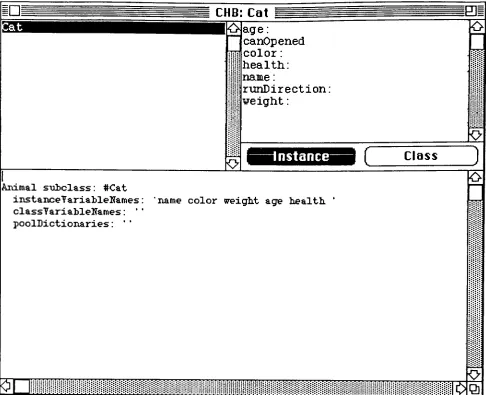
Figure 4 shows a partial Smalltalk browser on the hypothetical class Cat.
The class name is in the upper left pane and the class description is in the
lower pane. The second line, "instance variables,"
shows this list of attributes. One instance of Cat, then, may be Felix, orange, 9 pounds, 2 years old and
healthy. Felix's behavior might differ from that of Puff (white, 12 lbs., 13
years old and weak). When asked to show their pictures on the screen, their colors will obviously be different. When made to respond to the sound of a can
opener, Felix may move faster. That they are able to show themselves on the
CHB: Cat
OJ
o
age:
canOpened
color :
health: name:
runDirection:
weight:
nstance Class
O
O
Animal subclass: #Cat
instanceYariabletfames: classYariahleNames:
' '
poolDictionaries: ' '
name color weight age health
EE
''* ' 'o
o
J.*J.*.ix.-.. ...,.-.. .-.-,.',
OQ
Figure 4 -- Browser
[image:15.538.26.512.64.459.2]Messages
Objects communicate with each other through the passing of messages. In
the upper right-hand pane of figure 4 is a list of some of the messages to
which a cat may react. Some of these (name:, color:, etc) are used to set the
instance variables. There are also messages for
initiating
actions in oreliciting responses from the cat instance. An instance of another class,
CatOwner,
may, in the process offeeding
the cats, send each cat the messagecat canOpened.
and wait to see how it reacts. Such a message may return information back to
the sender (such as how
hungry
the cat feels), or it may initiate some action inthe receiver (or it could do both). Such an action could, in turn, cause the
receiver (the cat) to send further messages to itself, such as
self runDirection: towardFood.
self eat.
where self is a pseudo-instance variable
implicitly
defined for each class. Theabove syntax is that of Smalltalk: the receiver object is written first, then the
message to that receiver.
Methods
How a class of objects reacts to a given message is defined
by
the methodassociated with that message.
Every
message has a corresponding methodwhich tells how the message should be carried out. An object's messages are
the interface between it and any other object that wants to communicate with
it; and the methods are the underlying code. The cat owner knows, then, that
each cat will react somehow to the message canOpened. It is not clear to the
cat owner, though, whether a heavier cat will run faster or slower toward
food; that decision is left to the discretion of whoever created the Cat class and
its methods. If that programmer later decides that health should also play a
while still retaining the same interface
(reacting
to canOpened) andfunctionality (eventually
eating). This allows the cat to be a black box, withobservable inputs and outputs, but hidden "thought This is
information
hiding
in the sense that the methodology employed to carry out amessage is hidden. Public vs. Private
Some object-oriented languages have the concept of public and private
messages and data. In these
languages,
canOpened of the above examplewould be considered a public message: one which any object can send to a cat;
but both running and eating are private: only a cat can tell itself to perform
these actions, no one else can. In Smalltalk, all messages are officially public
and all data is private. A programmer may include comments in a message to
indicate that the message was intended to be private, but anyone actually has
access to that message; the privacy is not enforced
by
the language. On theother hand, if an object chooses either to reveal its
data,
or to allow anotherobject to set the value of one of its instance variables, the object must
explicitly include a message/method pair to return or set it. Message Selectors
The above examples also illustrate that messages may have zero or more
arguments. The message canOpened had no arguments, while the message
runDirection: towardFood had one argument. In
Smalltalk,
argumentsfollow colons. A message with the colons but without the arguments makes up
the message pattern or selector (e.g. runDirection:). A message is paired
with its method
by
matching the message pattern; the method may have anyCHB: Cat
O
j
weightO
age:
canOpened
color: health: name:
runDirection:
O
O
Instance
ClassrunDirection: aDirection
|
speed direction|
speed := 20.
weight >= 9 ifTrue:
[
speed := speed - 10. ]aDirection = #towardFood ifTrue:
[
direction := self findDirectionTo: #food. self moveDirection: direction at: speed. ]
aDirection = #awayFromChild if True:
[
direction := self findDirectionTo: #child. self moveDirection: direction negated at: speed
O
Figure 5 -- Cat
Browser,
method selectedFigure 5 shows the Cat class with one of the message selectors
(runDirection:) in the upper right hand list highlighted. This allows the
code for the method to be visible to the programmer in the lower pane. When
the message runDirection: towardFood is sent to a cat instance,
towardFood gets associated with aDirection at run-time. (In reaction to a
different message, the cat may send itself the message
runDirection: awayFromChild, but the method would remain the same.)
sender, an
(arbitrarily
complex) object may be returned via a returnstatement.
Inheritance
Smalltalk also supports the concept of inheritance, i.e. one class of objects
may be defined in terms of another, enabling it to derive some of its attributes
and behavior from the pre-existing class. The new class, the child, may be
similar to its parent class in some respects, but refine, expand, or restrict the
capabilities of that parent.
=l~l flncestorBrouiser: Kitten =
Obiect
1
o
addDependent:
allDependents
allRef erences
asParameter
at:
at : put :
basicAt : Animal
Cat Kitten
o
I
Instance
nil subclass: #Object instanceYariableNames:
' '
classVariableName s:
'Dependents RecursionlnError Recursive Set '
poolDictionaries:
' '
Figure 6a Object class
The Cat class, then, may be a child (or subclass) of a pre-existing class
Animal, getting its abilities to eat, breath and move from its parent (or
superclass). It may inherit eating and
breathing
without alteration; redefinemoving to accommodate all four legs and the abilities to run, walk, stalk, and
pounce; and add the abilities to purr and react to can openers. Cat may then be
further subclassed
by
Kitten which may add a playfulness attribute. Kittenthe class Object. (Object provides rudimentary
functionality
such as theabilities to create new instances or print an
instance.)
Figures 6a-c show theclass descriptions and
hierarchy
of each of these classes. Each level ofindentation indicates a level of inheritance.
flncestorBrotuser:
KittenObject Animal
O
Cat Kitten
O
breathe
eat move
Instance
Object subclass: #Animal
instanceYariableNames:
classYariableNames : ' '
poolDictionaries : ' '
Figure 6b -- Animal class
HncestorBroLuser: Kitten =
Object Animal
Cat Kitten
Oeat
O
Instance
Cat subclass: #Kitten
instanceYariableNames:
'
playful '
classYariableNames:
poolDictionaries:
The search for methods to match messages always begins in the class of the
receiver, then moves up the hierarchy. When a kitten sends itself the
message to eat, then, the method will first be sought in the Kitten class, then
the Cat class, and
finally
the Animal class, where, in this case, it would befound. If the message were not found in any of the parents
(including
Object),an error would be generated. It is also possible for a method to invoke its
parent's method with another psuedo-instance variable, super. Thus, if
kittens always nap after they eat, the eat method in the Kitten class might look
like:
super eat.
self sleep.
In these examples, the Animal class could be considered an abstract class,
since there are no objects which are instances solely of Animal, without further
being
defined as Cats, Dogs, etc. Animal defines abstract animalbehaviors,
leaving
the specific behavioral refinements to its subclasses. Multiple InheritanceSome object-oriented languages (Smalltalk not
included)
further providethe concept of multiple inheritance where, instead of a single parent, a class
may have one or more parents. A HouseCat class, then, might inherit from both Cat and HomeFurnishing, from whence it derives the need to come in out
of the rain. Whereas single inheritance can be represented
by
a simple treestructure, multiple inheritance requires an acyclic directed graph. Multiple inheritance is further complicated
by
the need to specify in which parenteach inherited behavior is
implemented,
since there is no longer a singlePromised Benpfits
An obvious question this thesis attempts to answer is: why would (or
should) someone use an object-oriented programming language to create an
object-oriented graphics package when such packages have already been
successfully written in other paradigms? In particular, what motivation is
there for using Smalltalk for such a venture?
One of the first and most obvious reasons for writing this package in
Smalltalk/V is that this is the current development and implementation
language for my division at the RIT Research Corporation, and that the
package for this thesis is a small part of a large, integrated software product
we are
developing
there.Buzz Words
Further justification is found throughout the literature for using
object-oriented languages for any application. Here a slew of buzz words and phrases
crop up including: specialization, generalization, abstraction, incremental
evolution, incremental modification, prototyping, code reuse, polymorphism,
integration, consistency, encapsulation, programmer development
environment, modeling the real world, and programmer efficiency. All of
these apply to some aspect of object-oriented programming and all are valid
reasons for using object-oriented languages in general (and Smalltalk in
particular) for program development.
Specialization. Generalization,andAbstraction
Most of the elegance of object-oriented programming comes from
inheritance. It is the existence of parent classes which allows the
programmer to generalize his solution, particularly through the use of
abstract classes. The subclasses then specialize the behaviors of the parent
to fit a particular problem. In practice, abstract classes often grow out of
vaguely-formed subclasses when the programmer recognizes the subclasses
like behaviors. With practice, the programmer learns to recognize these
similarities early, and incorporates them into the design of his class structure.
[Wegner,199]
[Wisskirchen and Rome,1988]
[Fuchsberger and Krasemann,1990]
Code Reuse. Encapsulation. Programmer Efficiency
The benefit of code reuse also applies to inheritance, since any code
inherited without modification can be reused; but code reuse would also be
possible even if inheritance were not available.
Every
time a programmercreates a class within the system, that class and all its methods have the
potential to become available to other programmers. Therefore, if someone
has already written a Stack class, that class is neatly packaged
(encapsulated)
for use
by
other programmers, and no one else has to write algorithms forpushing and popping. [Wisskirchen and Rome, 1988] [Thomas, 1989] [Dodani et.
al.,
1989]
Code reuse naturally leads to programmer efficiency, since all
programmers are not coding the same things repeatedly. In addition,
Smalltalk's automatic garbage collection contributes to programmer
efficiency, since the programmer need not concern himself with allocating
and
deallocating
storage. Smalltalk's rich set of classes also means that Smalltalk code is compact. "Smalltalk source code is the equivalent of five orsix statements in Pascal or C."
[Seiter,
1989, p.192]
"Studies have shownsignificant reductions in both development time
(by
75%)
and size of sourcecode
(by
90%)
when object-oriented techniques wereused."
[Yankelovich et.
Integrationand
Consistency
The availability of code from pre-existing classes also lends both
consistency and ease-of-integration to the programming process. The
library
of existing code means that a programmer can expect all the basic classes to
behave consistently (respond to the same subset of messages) from one
application to the next.
This,
in turn, makes it easier to link the classes createdby
separate programmers into a coherent whole. Also, the ways in whichobjects relate to each other in the Smalltalk kernel often set a precedent for
future applications. Smalltalk's model-view-controller paradigm (see page
33)
is an example of a standard for programming user interfaces that, while not
an explicit part of the language, is used in many Smalltalk programs.
[Mohamed,
1987]
[Thomas,1989]
Polymorphism
Polymorphism
(meaning
"many
forms")
refers to a method's ability toaccept any data type for an argument. This is made possible
by
Smalltalk'srun-time binding. Methods are compiled, but the compiler checks only syntax
and the existence of classes referenced. Data types of instance variables, as
well as the availability of methods to match the messages sent, need not be
resolved until the code is run. Further, the encapsulation of each class means
that different classes can respond to the same messages with no conflict.
Therefore, if both Arrays and OrderedCollections respond to the message
at: anlndex, either can be the argument for a method which sends this
message to its argument. It is also possible, in
Smalltalk,
to react according tothe class of an object with messages such as:
(anObject isKindOf:
ClassName)
ifTrue: [...or to find out if a message is an appropriate one to send to an object with:
This allows the programmer the
flexibility
of reactingdifferently
depending
on the argument's class. [Thomas,
1989]
[Thompson,1989]
[Meyers, 1988] Incremental Evolution.Prototyping
andtheDevelopmentEnvironmentSmalltalk's programming environment provides, as well as the direct
manipulation interface with which it was developed, access, both visual and
actual, to the underlying code of all classes, even those classes which are a
part of the Smalltalk kernel. It also includes workspaces in which to quickly
explore simple algorithms; interactive debuggers; and the ability to find all
the senders or implementors of a given message. Incremental modification,
incremental evolution, and rapid prototyping are made possible just as much
through this environment as they are through inheritance. While
inheritance makes incremental development possible, quick compilation and
the ability to quickly evaluate an expression means that results are readily
available for scrutiny and modification. "In contrast to classical programming
languages
(coding,
compiling, test), programming in object-orientedenvironments is based on the
heavy
use, modification and reuse of availableparts."
[Wisskirchen and Rome, 1988, p.
21] [Wegner.1989]
[Kramer.1984]
[Dodani et. al.,
1989]
Modeling
theRealWorldA final argument for using object-oriented design for general purpose
programming is that, since the real world is made up of objects, such
languages more closely model the world than
do,
say, procedural, functional orlinear languages. To date, there is little evidence that people think more
efficiently or naturally in terms of objects; but objects, both concrete and
abstract, provide a convenient way of grouping together data and behavior,
which in itself is a powerful tool for managing the complexity of any large
of code completely indoctrinates the programmer into this object-oriented
view of the world. Once the programmer has come to think only in terms of
objects, program design takes on its own consistency, where the programmer
can generally ask, "What are the objects?"
"What other objects make up these
objects?"
and "What should these objects do?" [Meyers,
1988]
[Dodani et. al.,1989]
[Haaland andThomas, 1989]
[Tazelaar,1989]
Graphical
Interfaces
There are a number of graphics packages available on the software market
today, ranging in scale from small paint programs on personal computers to
large CADD packages for architects and engineers. Their tools extend from the
barest minimum needed to create a simple drawing, to a wide range of features
for creating and manipulating complex graphical images. Some packages
include color; some even take the user into the third dimension. In spite of
their
differences,
however, they can be grouped into four general categories:paint programs using bit-mapped graphics;
presentation graphics for creating charts, slide shows, and reports
(usually
from spreadsheet data);object-oriented (also called object-based or vector-based) illustration
packages;
CADD packages. [Kerlow,
1989]
Since CADD packages also tend to be object-oriented, the three of these
categories which allow for the creation of original drawings or designs (paint
programs, object-oriented, and CADD packages) can further be lumped into two
distinct classifications: bit-mapped and object-oriented. In spite of the
proliferation of graphics packages, it is rare to find an application which
graphics. [Cox and
Caldeway,
1987]
[Fenton, 1989a] [Kirsh.1988] [McKinstry,1989]
Bit-Mapped Graphics
A
bitmap
is a graphical representation in which each picture element (or"pixel")
takes on a numeric value. In a black-and-white system, for example,the
bitmap
is binary: a black pixel is represented as a 1, and a white pixel as a0.
Ultimately,
all black and white images (even object-oriented graphicalimages)
must appear to the user as a bitmap. [Heid,1989]
Characteristics
In a bit-mapped graphics package, the user creates images as if
by
strokingpaint onto a canvas, where the underlying
bitmap
is the canvas. Because anindividual bit can only have one value, the paint is opaque. In a color system,
for example, if a blue square is drawn on top of an orange square, the blue
square obliterates the orange square. The orange square cannot be selected,
moved, or manipulated because it no longer exists. [Jones,
1989]
[Roth,1989]
Bit-mapped graphics have the
following
characteristics:"1) each pixel is a singular unit,
2) the interface recognizes only pixels and not graphic primitives per se, and
3) portions of a graphic or any pixel(s) may be manipulated independently."
[Mohageg, 1989, p. 385]
Advantages
Because of their pixel-based orientation, bit-mapped graphics packages
have a few advantages.
They
are well-suited to finely-detailed graphics wheremanipulation of individual pixels is important. This includes subtle shading
techniques, smudging effects, graduated
fills,
and (perhaps most covetedby
users of object-oriented graphics packages) the ability to erase part of the
Problems
ResolutionDependent
Unfortunately,
bit-mapped graphics packages are also besetby
a numberof inherent problems.
First,
since a bit-mapped graphics package has noknowledge of graphical elements larger than each individual pixel, the
graphics are resolution dependent. A graphic created on a 72 dots-per-inch
display
screen, even when printed on a 300 dpi laser printer, will have aresolution no finer than 72 dpi. This is also noticeable when an image is
enlarged (or
'stretched")
on the screen. Each square pixel becomes a squareof four or more pixels, so curves and angled lines that once looked relatively
smooth become
jagged,
like stair-steps. In traditional bit-mapped packages,even text is part of the bitmap, making it also subject to jagged lines upon
enlargement. The newer packages have attempted to overcome this problem
with the inclusion of 300 dpi editing (with all the tedium that
implies)
and realtext. [Kerlow,
1989]
[Pogue,1989]
[Roth,1989]
Selection Box
An even more
frustrating
problem, from the user's point of view, concernsthe editing of a bit-mapped picture. Although these packages are well suited to
the manipulation of individual pixels, the user must do considerably more
work to manipulate a larger part of the picture. It is not possible to simply
pick up a circle and move it; instead, the circle must be cut out of the bitmap.
Usually
this is done with a tool popularly known as the selection box. Afterchoosing this tool, the user is able to click the mouse at one corner of the area
to be cut, then
drag
the mouse while a rubber-banding rectangle follows thecursor. When the mouse button is
finally
released, the resulting rectangle ishighlighted to let the user know that it is now manipulable. It can be moved to
packages, rotated, skewed, or flipped
horizontally
or vertically. Note that thisprocess is like cutting a hole in the canvas: no previously applied paint will
appear under what was moved; instead, the blank background color
(usually
white) will remain.
Lasso
While the selection box is an improvement over individual pixel
manipulation, it exhibits a limitation when the portion of the graphic to be
moved is
diagonally
adjacent to another graphic. Figure 1 shows a square thatis supposed to stay where it is, and a circle that the user wishes to move with
the
(dotted-line)
selection box. Notice that part of the square will be cut alongwith the circle, making it necessary to
1)
go back and fill in the parts of thesquare that were supposed to remain and
2)
remove the stow-away squareparts from the circle's ultimate destination.
1
s
\
'
I
Ji
Figure 1 -- Selection Box
Most pixel-based packages offer a partial solution to this problem with
another cutting tool known as the lasso. Like a
free-drawing
or pencil tool,the lasso follows all the pixels in the path of the cursor as
long
as the mousebutton is pressed. When the mouse button is released, the lasso will complete
any pixels that are not part of the background. The bits that make up the
circle in the previous example can now be manipulated
independently
of anyneighboring graphics.
[Busch,
1986]
Overlapping
The lasso is still not a complete solution, however. When graphics are close
together, for example, it requires a steady hand to maneuver the tool cleanly
through tight gaps. This is difficult but not impossible. The ultimate editing
dilemma in a pixel-based package is illustrated in figure 2. When a circle and
square overlap, no amount of
lassoing
will grab only the circle. The user mustlaboriously
cut out first the lower right-hand part of the circle and move it;then, assuming he wants to
keep
the circle, cut out the upper left-hand part,taking care to place it from the lower part a distance the width of the square's
border (because as soon as he releases it and clicks elsewhere, it again
becomes part of the bitmap); then fill in the missing bits. (See figure
3.)
Inan even more complex
drawing
(with,
for example, a fill pattern inside thesquare) this editing becomes very tedious indeed. [Jones,
1989]
[Busch,1986]
Figure 3 After Move
Figure 2
--Overlapping
ObjectsOhiect-Oriented Graphics
Better editing solutions are made possible
by
the very nature of thecreating a collage of either construction-paper cut-outs, or a collection of
differently
shaped rubber-bands to create a picture, instead of painting on acanvas. Of the two, the rubber-band analogy is more accurate, since graphical
objects can be transparent, and can be
freely
selected and resized. {Busch,1986]
[Heid,1989]
{Kerlow,1989]
In an object-oriented package, graphics are not stored as bitmaps; in fact,
there is no recognition of individual pixels. Instead of pixels as the finest
granularity, object-based packages use mathematically defined shapes as their
smallest editable units. Lines, for example, are defined as a
beginning
pointand an ending point; rectangles as an upper left-hand corner and a lower
right-hand corner. Instead of remembering all the bits in the
bitmap
that aparticular graphic covered when it was created, these programs store the
attributes of the graphic. "Draw a circle and the program makes notations in
memory that you drew a circle with radius a at position b with a border width
of c and fill pattern of d." [Heid, 1989, p.
198]
Because these graphics are nottied to a bitmap, they are resolution and device independent. When the user
enlarges a circle with a given border width, only the radius of the circle
changes, not the border width; if he wants a different border width, he may
change that with a menu command.
{Kerlow,
1989]
[Roth,
1989]
[Burns andVenit.1987]
[Mohageg,1989]
Selection of Objects.
Grouping
Because each graphical object is an individual entity in an object-oriented
package, editing becomes a simple matter of selecting
(usually
with a singlemouse-click) the object to be manipulated, and moving, stretching or rotating
that object. (The selection is usually apparent to the user with some sort of
highlighting: the object is a different color,
flashes,
has a dotted border or,most
frequently,
displays "handles:"around the perimeter of the object
-see figure B-10 in Appendix
B.)
If objectsoverlap one another, the objects which are underneath the selected object will
stay in place, undisturbed
by
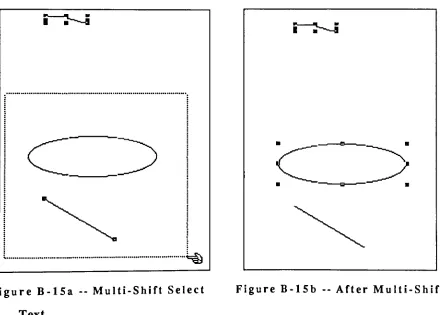
the movement of their neighbor. Mostapplications also include the ability to "group" objectsselect more than one
object at a time, and apply the same transformation to all the objects in the
group. Unlike object selection in the bit-mapped interface, these objects do
not have to be touching or even near each other for the multiple selection to
take place.
Problem. No
Erasing
In the object-oriented packages, then, there is no exacting tracing around
objects, no piecing together of objects, and no
difficulty
with overlappingobjects. There is also no erasing. Bit-mapped packages usually have an eraser
tool with which the user can wipe out larger areas of the
drawing
than hecould
by
manipulating individual pixels. But the eraser is a tool noticeablyabsent in object-oriented packages. This is tied to both the object-oriented
philosophy: that "each graphic primitive is a singular unit...and portions of
graphics are not
editable"
[Mohageg, 1989, p.
385],
and to the underlyingmathematics that describe the images. Although there is a clean and simple
mathematical formula for
defining
a rectangle, for example, it is morecomplicated to define a rectangle with part of one side erased. If it is a filled
rectangle with a path erased through it, the mathematics are harder still. It is,
however, the lack of an erasing feature that draws the most complaints against
object-oriented
drawing
packages. [Busch,1986]
[Mohageg,
1989]
Study
Comparing
the Two InterfacesThe Human Factors
Engineering
Laboratory
at the Virginia PolytechnicInstitute performed a study to compare the differences in both performance
They
queried twenty expert users of the interfaces to determine the mostfrequently
performed tasksduring
normal usage; then tested 24 subjects, halfof whom were novice users, and half experienced. The researchers concluded
that the object-oriented interface was superior to the bit-mapped in terms of
reduced
learning
time, fewer aborted attempts, fewer errors, and faster projectcompletion time. Furthermore, users overwhelmingly preferred the
object-oriented interface. [Mohageg,
1989]
Performance
Although the original creation of graphical objects such as circles and
rectangles was no faster on the object-oriented interface, graphic
manipulations such as scaling, rotating and moving favored this interface.
"The object-oriented interface had significantly smaller task completion times
than the bit-mapped interface for 23 of 29 tasks."
[Mohageg, 1989, p.
387]
Thismay have affected the time it took to learn the respective interfaces, since
even after task completion times had stabilized for novice users of both
interfaces,
they were shorter for the object-oriented interface. Alsosignificant for
learning
time was that while task completion times stabilizedearly for the object-oriented interface (as early as the second trial), they
"continued to decline significantly"
[Mohageg, 1989, p.
388]
for the bit-mappedinterface.
The number of repeated or aborted attempts also affected task completion
times. In 16 of the 29 tasks, the bit-mapped interface showed a significantly
higher
frequency
of repeated and aborted attempts: 58 vs. 310.Further,
therewere fewer errors, defined as deviations in size or position of individual
graphics, in the object-oriented interface. "The interface type had an effect
on size deviation in 10 of the 20 possible errors, and all of these tasks indicated
occurred for graphic manipulation, rather than
drawing,
tasks.... Additionally,there were significantly fewer total
positioning errors for the object-oriented
interface
(9)
than for the bit-mapped interface (32)." [Mohageg, 1989, p.387]
Preferences
The final part of the study measured the subjects'
preferences for the two
interfaces. All three preference measures: absolute, comparative, and overall,
favored the object-oriented interface. "Twenty-four significant differences
were obtained, of which 23 were in favor of the object-oriented interface.... No
differences were found in
drawing
tasks.Additionally
83.3 per cent of subjects[20 out of
24]
selected the object-oriented interface as the overall preferredinterface for performing these tasks."
[Mohageg, 1989, p.
388]
The one featurethat subjects liked in the bit-mapped interface was the ability to erase. Of the
24 differences,
"erasing
graphics was the only action preferred on the bitmapped
interface."
[Mohageg, 1989, p.
388]
Performance and Preference
Conclusions
The author explained the overall superiority of the object-oriented
interface
by
citing the(previously-illustrated)
difficulty
of selection in thebit-mapped interface.
[In the bit-mapped interface,] when using a selection box to
surround the graphic of interest, a user may accidentally include
portions of other graphics, at which point he/she must start the
selection task anew. In contrast, to perform the same operation,
object-oriented users simply point to any part of the graphic with
the cursor. As a result, graphic selection in the bit-mapped
interface tends to be a more time consuming and error prone
operation. [Mohageg, 1989, p 388]
The coarser granularity (objects as the smallest units instead of pixels), and
the ability to overlay graphics and still have them retain their
identity
asobjects were also given as possible explanations:
In the bit-mapped interface once graphics are overlapped or
distinguishable from each other. This factor also contributed to the
significantly longer task completion times and higher error rates for the bit-mapped interface. {Mohageg, 1989, p 388]
The author concluded that for most applications, the object-oriented
interface is superior. The one exception is in a
drawing
or painting situation,such as an art application, where manipulation of individual pixels or parts of
objects is important. Since the object-oriented interface is not designed for
such manipulations, it is predictably not well suited to them. The author
further states that such individual pixel manipulations are rare in most
drawing
situations. [Mohageg,1989]
Object-Oriented Graphics for Interfaces
Object-oriented graphics were originally developed not for
drawing
programs, but for user interfaces. Called graphical user interfaces (GUIs), or
direct manipulation interfaces
(DMIs)
for the user's ability tointeractively
affect the size and position of the visual components, such interfaces are
characterized
by
bit-mappeddisplay
screens, icons, scrollable windows, pulldown or pop-up menus, and some pointing device such as a light pen or mouse.
These interfaces are also generally considered more user-friendly than purely
textual interfaces. Users report positive feelings of confidence, control, and a
willingness to explore the features of the applications which use them. [Jones,
1989]
[Shneiderman,1987]
Some of the earliest development of direct manipulation interfaces was
begun at Xerox's Palo Alto Research Center
(PARC)
in the early 1970's. At thattime, PARC's researchers attempted to predict what technology would be
available ten years into the future and began the software development for
products that would run on that future hardware.
They
realized thebegan
designing
such interfaces even before the hardware that could support them was built. [Smith et. al.,1982] [Kay,1980] [Goldberg
andRobson,1989]
Smalltalk Tntprfacp
As mentioned earlier, Smalltalk was designed to be an entire programming
environment with not only an object-oriented language, but also an
object-oriented user interface. This interface was influenced
by
the "turtlegraphics"
of MIT's LOGO;
by
the DMI of the FLEX machine, on which AlanKay
wrote his Ph.D. thesis; andby
Ivan Sutherland's Sketchpad, a "general purpose graphics system for interactive creation and editing of pictures on a graphicsdisplay."
[Lorensen et. al., 1987, p.
2]
Kay
had to convince his employers at PARC to invest in bit-mapped displays for the project, which, at the time, were"considered expensive and
arcane."
[Deutsch, 1989, p.
75]
It was this step,however, that allowed
Kay
and his co-workers todevelop
bit-mapped text in avariety of fonts and sizes, multiple windows, and the Bit Block Transfers (or
BitBlts)
which make possible the manipulation of large amounts of graphicaldata in real time. [Deutsch, 1989]
Star Interface
The earliest Smalltalk system (for it has had, so
far,
at least fourincarnations)
was developed on Xerox's Alto computer. An immediatesuccessor to this machine was the Star, where the developers also focused
intently
on the interface.They
made a serious attempt to model what would be familiar to the user as much as possible, for which they reliedheavily
on icons. Since it was designed for an office system, there were icons for in- andout- baskets, file folders, printers, and documents.
They
also borrowed some object-oriented programming concepts for grouping similar elements of theinterface together, which lent a high level of consistency to the interface.
Neither machine was a commercial success, however. It was when a fellow from Apple Computer
by
the name of Steve Jobs saw Smalltalk demonstrated atPARC that the seeds for the Macintosh computer were sewn. The Macintosh (which grew out of the less successful Lisa computer) became the first
computer targeted toward the home market to include an DMI. In fact, the
Macintosh interface is exclusively graphical; even at its root level, the user
sees only icons and pull-down menus. It has since set an
industry
standard.Many
machines offer DMIs as at least a part of the interface. Microsoft offersWindows for IBM-compatible machines; Sun and Amiga include graphical
interfaces;
LISP machines offer the object-oriented language Flavors whichincludes a DMI; and both the Atari and NeXT home computers have built-in interfaces with a look and feel similar to that of the Macintosh. [Seiter,
1989]
[Cox and
Caldeway, 1987]
[Giguere,1990]
{Texas Instruments,1987b]
Direct manipulation interfaces are
"object-oriented"
in an intuitive sense.
Windows,
icons,
even the "thumbs" in scroll bars are all objects in the sameway that the graphical objects in an object-oriented
drawing
package are.These objects can be picked up and moved, and whatever objects existed
beneath them will remain where they were, unaffected. Windows can also be
stretched or shrunk, and still retain their
identity
as windows. In spite of thecommon terminology, however, object-oriented graphics (interfaces
included)
are not dependent upon object-oriented languages. It does not require anobject-oriented language to create either an object-oriented interface or an object-oriented
drawing
package; most of the existing ones are written inPascal, assembler code, and C. [Wisskirchen and
Rome, 1988]
Programming
Graphical User InterfacesI have already discussed several reasons for choosing to program in an
object-oriented languages for any
domain,
they are even more compelling
when applied to programming graphical user interfaces. The consistency and ease-of-use of these interfaces is making them
increasingly
popular, a trend that places a demand on software developers to either offer GUIs or watchtheir products become obsolete. Unfortunately, programming GUIs is difficult:
"programming
complexity tends to increase almost exponentially with user friendliness."[Giguere,
1990,
p.43]
"Microsoft Windows and the Macintoshtoolbox each have over 400 function calls, about 10 times as many as there are in MS-DOS.... OS/2 Presentation Manager
[has]
over 1000 functioncalls."
[Urlocker,
p.287] [Thompson,
1989]
Programming
for a GUI with a traditional language is a little like running the Boston Marathon wearing hiking boots and a three-piece suit. Even if you're used to regular jaunts and occasional sprints, be prepared to hit the wall after about 20 miles. Inprogramming terms, that's about 3000 lines of code, or what it might take you to create a half-decent text editor for a GUI." [Urlocker, p. 287]
Availability of Interface Code
In contrast, object-oriented environments have many of these calls already included. Smalltalk's basic Form and BitBlt classes (which are essential to the
real-time bit-mapped graphical displays of a
DMI)
as well as its windows,menus, and scroll bars, are such an integral part of the
interface,
that the basicbuilding
blocks are already in place for other programmers to exploit. It is also tremendously helpful, from a programmer's standpoint, to be able tolook at how the Smalltalk developers created, say, a
browser,
and use the sametechniques for other applications. To some, it is no coincidence that the
Smalltalk language developed along with the graphical
interface,
given thecomplexity of such an interface and the power of object-oriented languages.
Consistency of the Interface
The consistency provided
by
pre-existing classes not only affects theprogrammer, but also extends to the user. If all interfaces are based on the
same classes, then menus, windows, scroll bars, and buttons will have
predictable behavior from one application to the next. [Wisskirchen and
Rome,
1988]
Portability
One advantage of using Smalltalk/V in particular is its portability. GUIs
have traditionally inhibited portability because they are so
machine-dependent (the Mac Toolbox, for example, is embedded in ROM), and are
implemented so differently. There are versions of Smalltalk/V, though, for
IBM-compatible 286 and 386 machines, for IBM's Presentation Manager, and
for running under Microsoft Windows, as well as for the Macintosh. In each
case, only the lowest-possible level of implementation (such as toolbox calls) is
altered to allow the interface to conform to its home environment, providing a
virtual "machine-independent programming
toolkit."
{Udell, 1990, p.
228]
Smalltalk/V for Windows has menus and scroll bars that look and behave like
Microsoft Windows menus and scroll bars; Smalltalk/V for the Macintosh has
an interface with the look and feel of any standard Macintosh application. In
contrast, Smalltalk-80 running on any machine
temporarily
turns themachine into an Alto computer clone. [Udell,
1990] [Giguere, 1990]
Smalltalk/V's adaptability means that the consistency of the interface is
not restricted to programs written in Smalltalk/V. If the user is accustomed to
the Macintosh interface, he won't have to relearn the interface of the
Smalltalk/V application. The importance of such consistency cannot be over
stated. A review of
drawing
applications pointed out one where the interfacearchaic machine in order to create a simple drawing. In contrast, an interface
is more
likely
to feel intuitive if it is based onfamiliar,
well-establishedinterfaces. [Cox and
Caldeway, 1987]
Objects Man
Into Graphical OhjprfsThe elements of GUIs are good examples of "real world"
objects that map
readily into object-oriented programming objects. The physical
(graphical)
notion of a window, for example, is an object with position, size, and several
states: open, closed, enlarged, active, or inactive. Each window also has
functionality
tied to it: a window can move, resize, or scroll. [Urlocker,1990]
[Wisskirchen and Rome,
1988]
Event-Driven Mans Into Message
Passing
GUIs are typically event-driven: the user's actions trigger the next action
for the application to take. This is in contrast to text-based systems where the
programmer imposes his or her own logic on the user, such as: "first choose
from menul, then from menu2,"
and so on. The general outline of a GUI
program is:
"program and GUI initialization
loop
wait for event
process event
until quit event received
program and GUI cleanup."
[Giguere, 1990, p. 44]
"One of the tricks of successful GUI programming is preparing
for the user's unpredictability. A GUI program is by nature
passive, always waiting for the user to initiate some kind of action.
Several windows may be open at one time.... You simply cannot
predict the user's next move, nor should this be attempted. Rather
than simply
ignoring
certain events the cardinal sin of GUIprogramming you must engage in defensive programming:
disabling
menu items, putting updialog
boxes, and so on. Andalways, always leave the user an escape
route."
[Giguere, 1990, p. 44]
The passive, event-driven nature of a GUI maps well into the
detects a mouse or keyboard action from the user, it can forward that input
message to the appropriate object for processing, along with an argument like
the mouse location or the
key
that was pressed. {Cox and Caldeway, 1987][Urlocker,
1990]
Not a Panacea
Unfortunately, Smalltalk is not a panacea for creating user interfaces. It
does have drawbacks, the most notable of which may be the steep
learning
curve a programmer must climb to become competent in the language.
Although its syntax is simple, its collection of classes is not, and in order to
become an efficient programmer, one must become familiar with those
classes what they are, what they do, and more often than not
(contrary
tothe claims of some OOP proponents) how they do what they do. Admittedly, the
environment helps the programmer conquer these obstacles, but due to the
sheer volume of the material, the novice Smalltalk programmer's most
valuable resource is time.
White Boxvs.Black Box
Ideally, all objects would be black
boxes,
like the Cat instances above. Inorder to use an object, one would have to know nothing about it except its
interface,
i.e., the public messages to which it responds. Then the statement,"There is no need to duplicate or even understand the implementation of the
generic behavior in the [superclass],"
[Urlocker,
p.288]
would be trueabsolutely.
The real world diverges from the ideal in two ways.
First,
the interface isnot always clear because the names of messages often aren't descriptive
enough. I am still not entirely sure what Smalltalk/V's StringModel class
intends to do in the message
Every
time I want toknow,
I have to go back to the code and figure out againwhat it is doing. (The last time I
looked,
I convinced myself that it wasn'treally
broadcasting,
and it ultimately ignored the excess.) Part of the problemis certainly
documentation;
if a comment was not only included in eachmethod (as they generally are) but also clearly explained what the method
does (and this was part of the
interface)
comprehension would be improved.In reality, comments are
incomplete,
and method names are poorly chosen,unrepresentative of the method's functionality.
The second problem is related to inheritance: it is nearly impossible to
create a subclass without
intimately
understanding the implementation of thesuperclass. Here the superclass is no longer a black box, because the
programmer is
doing
more than just using its existing functionality; he ischanging it. Even the methods that aren't
being
changed must be understood,because an instance of a subclass will react to its superclass'
messages whether
or not the programmer understands how those messages work. If the message
is somehow inconsistent with the behavior or instance variables of the
subclass, run-time errors will result.
MVCandInheritancevs. PluggableViews
Smalltalk-80's undocumented but widely used Model-View-Controller
(or,
inSmalltalk/V terminology, Model-Pane-Dispatcher) paradigm is an example of
an area where intimate knowledge of classes is required in order to use them.
A window in Smalltalk is made up of one or more views or panes. At the very
least, a window has a top pane, which handles the opening, closing, and
labeling
of the window, and acts as a middle-manager to all of the window'ssubpanes. When the top pane is told to show itself, for example, it in turn tells
are in, or can put themselves in, a state which would enable the window to
close (by, for example, saving modifications). [Wisskirchen and Rome, 1988]
The subviews (or subpanes) are, as the name suggests, different ways of
looking
at an object. One example is a window with two views on a clock: oneanalog and the other digital. The object
being
viewed in more than one way istime. The two views are tied together
by
the object they are viewing, or themodel. When the number of seconds changes, one would expect both the
analog and digital clocks to update. In this way, the two views are obeying a
constraint: that both show the same time. [LaLonde and Pugh, 1989]
The controller, or dispatcher handles the input for each view. There is a
one-to-one correspondence between each pane and its dispatcher. If input
occurs in the pane, (for example, a new hour is typed into the digital clock)
the dispatcher sends the appropriate message to its pane. Panes and
dispatchers know of each other's existence, and the pane knows what the
model is that it is viewing. Models, on the other hand, only change. The model
is set up in such a way that all the views on it are its dependents. When the
model changes, it sends out a self changed message (or if it changes in a
specific way, a self changed: someWay message) which is implemented
by
the Object class. This, in turn, sends out messages to all the dependents (the
views) that the model has changed, and the views update themselves
accordingly. (The more specific message allows the views to look at the
someWay argument to see if they should update at all.) [LaLonde and Pugh,
1989]
If the programmer needs to create new pane classes for his application, he
will have to
fully
understand (without thehelp
of even this muchdocumentation)
the mechanisms of the MVC framework. That meansmodel, panes, and dispatchers; understanding what chain of events will be
triggered on a given input; and understanding what information each component of the framework expects every other component to supply.
(Central to this understanding is comprehension of how the self changed
message reverts up to the Object class and back down to the dependents; how panes are added as
dependents;
and how those dependents in turn getinformation back from the model, none of which is clear.)
A partial solution is the inclusion in Smalltalk of pluggable views. It
eventually became clear to Smalltalk's creators that certain views like lists, buttons and text panes were reused