
Google Maps Hacks pdf
456
0
0
Full text
(2) Google Maps Hacks By Schuyler Erle, Rich Gibson ............................................... Publisher: O'Reilly Pub Date: January 2006 Print ISBN-10: 0-596-10161-9 Print ISBN-13: 978-0-59-610161-9 Pages: 366. Table of Contents | Index. Copyright Dedication Foreword Credits About the Authors Contributors Preface Putting the World in the World Wide Web Why Google Maps Hacks? How to Use This Book How This Book Is Organized Conventions Used in This Book Using Code Examples How to Contact Us Got a Hack? Safari Enabled Chapter 1. You Are Here: Introducing Google Maps Section 1.1. Hacks 19: Introduction Hack 1. Get Around http://maps.google.com Hack 2. Find Yourself (and Others) on Google Maps Hack 3. Navigate the World in Your Web Browser Hack 4. Get the Bird's-Eye View Hack 5. Driven to a Better User Interface Hack 6. Share Google Maps Hack 7. Inside Google Maps URLs Hack 8. Generate Links to Google Maps in a Spreadsheet Hack 9. Use del.icio.us to Keep Up with Google Maps Chapter 2. Introducing the Google Maps API Section 2.1. Hacks 1016: Introduction Hack 10. Add a Google Map to Your Web Site Hack 11. Where Did the User Click? Hack 12. How Far Is That? Go Beyond Driving Directions Hack 13. Create a Route with a Click (or Two) Hack 14. Create Custom Map Markers Hack 15. Map a Slideshow of Your Travels Hack 16. How Big Is the World?.
(3) Chapter 3. Mashing Up Google Maps Section 3.1. Hacks 1728: Introduction Hack 17. Map the News Hack 18. Examine Patterns of Criminal Activity Hack 19. Map Local Weather Conditions Hack 20. Track Official Storm Reporting Hack 21. Track the International Space Station Hack 22. Witness the Effects of a Nuclear Explosion Hack 23. Find a Place to Live Hack 24. Search for Events by Location Hack 25. Track Your UPS Packages Hack 26. Follow Your Packets Across the Internet Hack 27. Add Google Maps to Any Web Site Hack 28. How Big Is That, Exactly? Chapter 4. On the Road with Google Maps Section 4.1. Hacks 2941: Introduction Hack 29. Find the Best Gasoline Prices Hack 30. Stay Out of Traffic Jams Hack 31. Navigate Public Transportation Hack 32. Locate a Phone Number Hack 33. Why Your Cell Phone Doesn't Work There Hack 34. Publish Your Own Hiking Trail Maps Hack 35. Load Driving Directions into Your GPS Hack 36. Get Driving Directions for More Than Two Locations Hack 37. View Your GPS Tracklogs in Google Maps Hack 38. Map Your Wardriving Expeditions Hack 39. Track Your Every Move with Google Earth Hack 40. The Ghost in Google Ride Finder Hack 41. How Google Maps Got Me Out of a Traffic Ticket Chapter 5. Google Maps in Words and Pictures Section 5.1. Hacks 4250: Introduction Hack 42. Get More out of What You Read Hack 43. Don't Believe Everything You Read on a Map Hack 44. You Got Your A9 Local in My Google Maps! Hack 45. Share Pictures with Your Community Hack 46. Browse Photography by Shooting Location Hack 47. Geotag Your Own Photos on Flickr Hack 48. Tell Your Community's Story Hack 49. Generate Geocoded RSS from Any Google Map Hack 50. Geoblog with Google Maps in Thingster Chapter 6. API Tips and Tricks Section 6.1. Hacks 5161: Introduction Hack 51. Make a Fullscreen Map the Right Way Hack 52. Put a Map and HTML into Your Info Windows Hack 53. Add Flash Applets to Your Google Maps Hack 54. Add a Nicer Info Window to Your Map with TLabel Hack 55. Put Photographs on Your Google Maps Hack 56. Pin Your Own Maps to Google Maps with TPhoto Hack 57. Do a Local Zoom with GxMagnifier Hack 58. Find the Right Zoom Level.
(4) Hack 59. Show Lots of StuffQuickly Hack 60. Make Things Happen When the Map Moves Hack 61. Use the Right Developer's Key Automatically Chapter 7. Extreme Google Maps Hacks Section 7.1. Hacks 6270: Introduction Hack 62. Find the Latitude and Longitude of a Street Address Hack 63. Read and Write Markers from a MySQL Database Hack 64. Build Custom Icons on the Fly Hack 65. Add More Imagery with a WMS Interface Hack 66. Add Your Own Custom Map Hack 67. Serve Custom Map Imagery Hack 68. Automatically Cut and Name Custom Map Tiles Hack 69. Cluster Markers at High Zoom Levels Hack 70. Will the Kids Barf? (and Other Cool Ways to Use Google Maps) Colophon Index.
(5) Copyright © 2006 O'Reilly Media, Inc. All rights reserved. Printed in the United States of America. Published by O'Reilly Media, Inc., 1005 Gravenstein Highway North, Sebastopol, CA 95472. O'Reilly books may be purchased for educational, business, or sales promotional use. Online editions are also available for most titles (safari.oreilly.com). For more information, contact our corporate/institutional sales department: (800) 998-9938 or [email protected].. Editor:. Simon St.Laurent. Cover Designer:. Marcia Friedman. Production Editor:. Jamie Peppard. Interior Designer:. David Futato. Copyeditor:. Derek Di Matteo. Cover Illustrator:. Karen Montgomery. Indexer:. Nancy Crumpton. Illustrators:. Robert Romano, Jessamyn Read, and Lesley Borash. Printing History: January 2006:. First Edition.. Nutshell Handbook, the Nutshell Handbook logo, and the O'Reilly logo are registered trademarks of O'Reilly Media, Inc. The Hacks series designations, Google Maps Hacks, the image of an antique globe, and related trade dress are trademarks of O'Reilly Media, Inc. Many of the designations used by manufacturers and sellers to distinguish their products are claimed as trademarks. Where those designations appear in this book, and O'Reilly Media, Inc. was aware of a trademark claim, the designations have been printed in caps or initial caps. While every precaution has been taken in the preparation of this book, the publisher and authors assume no responsibility for errors or omissions, or for damages resulting from the use of the information contained herein. Small print: The technologies discussed in this publication, the limitations on these technologies that technology and content owners seek to impose, and the laws actually limiting the use of these technologies are constantly changing. Thus, some of the hacks described in this publication may not work, may cause unintended harm to systems on which they are used, or may not be consistent with applicable user agreements. Your use of these hacks is at your own risk, and O'Reilly Media, Inc. disclaims responsibility for any damage or expense resulting from their use. In any event, you should take care that your use of these hacks does not violate any applicable laws, including copyright laws. ISBN: 0-596-10161-9 [M].
(6)
(7) Dedication For Heather, Molly, Maddy, and Spencer, for everything. Rich For Jo, who knows. Schuyler.
(8) Foreword When we first entered the exciting world of geography, we brought with us an idea that there could be more to online maps than, well, maps. We hoped to build a Web site not limited to providing maps and driving directions, but one that could serve as a platform for all manners of location-based information and services. Or to put it in Google terms: a starting point for organizing the world's information geographically. For this and other reasons we were thrilled to see "hackers" have a go at Google Maps almost immediately after we launched the site back in early February. Literally within days, their blogs described the inner workings of our maps more accurately than our own design documents did, and soon the most amazing "hacks" started to appear: Philip Lindsay's Google Maps "standalone" mode, Paul Rademacher's Housing Maps, and Chris Smoak's Busmonster, to mention a few. It was an exciting day for our small team when we learned that premier publishing house O'Reilly was considering writing an entire book about Google Maps Hacks, and we were pleased to be able to announce our official maps API program at O'Reilly's Where 2.0 conference in June. It is both humbling and flattering to witness the astounding creativity surrounding our maps as chronicled in this wonderful bookalready a few short months after Where 2.0, thousands of programmers from around the world feature Google Maps in their increasingly impressive and successful creations. Mapping and geography is a wonderful field, and clearly the Web has made it possible to explore and advance the millennia-old field in new and exciting ways. There's so much more to do, and this marvelous book will serve as a great resource for mapping enthusiasts. We hope you will enjoy it as much as we did! Jens Rasmussen and Lars Rasmussen Google Maps team.
(9) Credits About the Authors Contributors.
(10) About the Authors Rich Gibson believes that the world is made of stories, and has unlimited curiosity in the world. He indulges his brilliant, semi-manic children in super-long storytimes, weird science projects, and adventures of many varieties. It is only the steady support of his loving wife that permits him to organize his eccentricity into occasional coherent bursts of creative productivity. Life is very, very good. Schuyler Erle is a linguist by training and a Free Software developer by vocation. He got into GIS and digital cartography with Rich several years ago, while trying to analyze the best lines-ofsight for a rural wireless community network. He actually believes that maps and GIS, properly applied, can tell compelling stories, and help improve people's lives. As of this writing, he lives with his wife near 42.375 N, 71.106 W..
(11) Contributors The following people contributed their writing, code, and inspiration to Google Maps Hacks: Tom Carden ([email protected]) writes passenger flow simulations for YRM Architects, London, and is studying for an EngD in Virtual Environments Imaging and Visualization at University College London's Bartlett School of Graduate Studies. He also gives occasional lectures for the Bartlett's MSc Adaptive Architecture and Computation. Online, he is a contributor to the OpenStreetMap project (openstreetmap.org), an active member of the community formed around the Processing development environment (processing.org) and posts sporadically to his weblog, Random Etc (www.tom-carden.co.uk/weblog). Offline, he can often be found at Islington's Tinderbox coffee shop, staring thoughtfully into a latte and contemplating a world empowered by massively distributed collaborative mapping software. Reverend Daniel Catt resides in Stoke-on-Trent, U.K. (53.013, -2.1756) with his wife, Charlie Catt, and daughter, Modesty B Catt. A long-time keen walker, he first became involved with mapping in 1998, producing 3D views of national parks from map scans and Ordnance Survey data. His interest was foiled for a long time by the lack of open and free mapping data in the U.K. and not living in London. In 2005, preGoogle Maps API, when Google Maps hacking was really scary, this interest was rekindled in the form of www.geobloggers.com an ongoing project to consume, aggregate, visualize and push geoRSS-formatted data. He has a B.A. from Staffordshire University and publishes his thoughts at http://geobloggers.blogspot.com and http://360.yahoo.com/revdancatt. He can be contacted at [email protected] or Yahoo! Instant Messenger at [email protected]. Drew Celley is a giant fire-breathing monster, standing 300 feet tall. He can sometimes be found toppling buildings and knocking over elevated railways, but spends most of his time as a UNIX Systems Administrator in Pittsburgh, Pennsylvania. When he isn't rampaging through the city, Drew likes to tinker with technology and help forge snippets of The Future into existence by writing hacks, software, and letters to certain political officials. He is the cocreator of WiFiMaps.com and has a slew of other experiments and projects he's been working on, which you can read more about at http://www.zhrodague.net/~drew. In his spare time, he can be found gardening, brewing, printing, or searching for his next contract. Steve Coast ([email protected]) started and runs Openstreetmap.org from London (the one in Europe), a project to collaboratively generate free geodata. He consults with two friends through Somethingmodern.com, doing a wide range of heavy-lifting computer work. Jared Cosulich created the CommunityWalk site http://communitywalk.com to let you share your community with the world, after work and on weekends while sitting in his apartment at 37.802565, -122.416051, watching the tourists wander by on their way to the curvy part of Lombard Street. Andru Edwards is a geek entrepreneur whose duties include acting as CEO of Gear Live Media, a technology blog network, and being the primary organizer and planner of the Seattle Mind Camp overnight geek confab event. Andru's goal is to use technology and new media to create community both online and off. Chris Goad is a computer scientist by training (PhD Stanford, 1980). He worked as a research associate at Stanford from 1980 to 1983 and cofounded two companies: Silma in.
(12) 1983 and Map Bureau in 1993. His areas of work have included applications of mathematical logic to computation, computer vision, simulation software for 3D mechanical systems, programming language design, and the semantic web. During the last four years, he has concentrated on applications of semantic web technology to cartography, and on the design and implementation of Fabl, a programming language that represents programs as semantic web objects. Chris lives in Astoria, Oregon and works at Map Bureau. See http://fabl.net/chrisgoad. Michal Guerquin and Zach Frazier calculated the size of the Google Maps cache of the map of the world. Michal's web site is http://michal.guerquin.com. John T. Guthrie experiments with code and mathematical counterexamples at http://counterexample.org. Chris Heathcote is an interaction designer, with a focus on mobile and wireless experiences. He lives in Helsinki, Finland and works on Nokia's Insight and Innovation team. He writes about buildings and food at http://anti-mega.com, and can be emailed at [email protected]. Adrian Holovaty is a web developer/journalist in Chicago. He spends evenings hacking on open source code and side projects that make information accessible to the public. His Chicagocrime.org was one of the original Google Maps hacks. He's also lead developer of Django, an open source Python web framework (Djangoproject.com). By day, Adrian works as editor of editorial innovations for Washingtonpost.com. Anselm Hook is a reformed games developer and social cartographer. He's currently leading the http://platial.com engineering team. Will James is a designer and photographer living in New York City. He created the NYC subway map hack as a cheap stunt to promote his pet project http://onNYTurf.com. It's working. Richard Kagerer is a small business owner in Ottawa, Ontario. His company, Leapbeyond Solutions, provides Outlook-based software and cutting-edge consulting services to small and mid-size companies. In his spare time, he likes to water ski and stargaze. Tom Limoncelli has over 15 years of system administration experience and has been teaching workshops on time management at conferences since 2003. Tom has authored Time Management for System Administrators (O'Reilly) and The Practice of System and Network Administration (Addison Wesley). Outside of work, Tom has won awards for his activism in gay/bi/lesbian rights and now helps progressive causes use technology to further their goals. Robert Lipe, tired of being lost most of the time, bought his first GPS in 2001. Though it was originally justified for his business travels as a software engineer, geocaching quickly consumed itand him. Frustrated with the available tools to talk to the GPS and the difficulty of moving data between programs, he wrote GPSBabel and made it available to the public at http://www.gpsbabel.org. GPSBabel is now used behind the curtains in programs such as Google Earth and GSAK, the Geocaching Swiss Army Knife. He also wrote and maintains a collection of technical GPS articles on the web at http://www.mtgc.org/robertlipe. Robert and his family live outside Nashville, Tennessee. He continues to develop software for GPSrelated technologies for fun and for hire. Tom Longson is a web developer with an interest in cartography and wearable computing, which he often writes about on igargoyle (http://igargoyle.com). He gained an interest in software engineering from his father, who was a pioneer in digital arts and used programming to produce unique 3D constructions and CGI. Tom ultimately wants to develop software that will change the way people think and interact with each other, for better or.
(13) worse, and mucking with maps seems like one of those things that will do so. Mikel Maron is an independent software developer and ecologist. He has built several geographic-oriented projects around the worldKit mapping package, including World as a Blog. Previously, he led development of My Yahoo! in the pre-RSS days. Mikel was awarded a Masters degree from the University of Sussex for building a simulation of the evolution of complexity in food webs. Originally from California, Mikel is presently based mostly in Brighton, U.K., where he lives with his wife Anna. Links to various things can be found at http://brainoff.com. Tom Mangan is a newspaper copy editor and page designer who blogs at http://tommangan.net. He is an avid hiker and photographer. He also maintains the "Banned for Life" of expressions "so hackneyed and insufferable that they should be forever banned from the nation's news reports." Ron Parker is a software engineer from Fort Wayne, Indiana who spends his days writing software for the blind and visually impaired and his evenings hacking on GPSBabel and other free software. He has two dogs, three cats, and four computers. Anthony Petito created the http://www.stormreportmap.com site to support his interest in weather. He is available for Google Maps consulting. Dave Schorr is a weather fan who runs http://www.weatherbonk.com. Chris Smoak runs the http://busmonster.com site that tracks buses on Google Maps. Edwin Soto is an entertainment columnist with http://www.gearlive.com. Mark Torrance is Chief Executive Officer and Principal Consultant at Vinq. He founded Vinq in 2003 to offer services including design, implementation, and support of sophisticated database-backed web applications. In this role, Torrance has grown an effective team of consultants and managers, grown the business in excess of 100% each year, and won new project work for the firm. Torrance was also the lead designer and implementor of KnowledgePlex 2.0, the first version of this web platform developed for Fannie Mae Foundation. KnowledgePlex serves as both a content management framework for its own affordable housing content and as a platform for cobranding and reuse on partner sites. Mark brings consulting expertise in the areas of open source software, rapid application development, design for usability, graphic design and aesthetics of web design, and taxonomy/ontology development. Hans van der Maarel is a self-employed GIS/cartographic engineer from The Netherlands. Maps have been a great passion of his since a young age, and he's very glad he got the opportunity to do cool things with them because he considers it a great field of work that he enjoys every day. Apart from maps, he likes travelling and listening to rock music..
(14) Preface A few years ago, using maps on the Web was hard. The maps were ugly, slow to load, and burdened with a clunky user interfaceand if you think using maps on the Web was hard, imagine trying to make useful and interesting maps on the Web! Today, however, all that has changed. A good measure of the credit for this quantum leap in digital cartography on the Internet is due to Google and their Google Maps service. How did this come about?.
(15) Putting the World in the World Wide Web It has been said that "the network is the computer," and, for most of us, the "network" means the World Wide Web. From its humble origins as a repository of hypertext documents, the Web has become a sort of distributed operating system, one that allows clever programmers (and more than a few random dilettantes) from far-flung places to build new applications by mixing and matching data and services in ways that the original designers of those services never considered. In recent years, "traditional" commercial web sites, such as Amazon, eBay, and Google, have increasingly become platforms that support complex user ecosystems. Using openly published APIs, you can look up an item on Amazon, get a price history from eBay, and find reviews on Googleall at once, and all without Amazon, eBay, or Google ever talking with each other. Until now, a crucial component has been lackinglocation. What's important about location, you may ask? Well, for starters, it's everywhere! Everything has a location, and until now there were few reasonable options for mixing in location. There were expensive and complicated proprietary systems, as well as free and powerfulbut still complicatedopen source options, but they all required you to be part of the cartographer's elite. You had to pay with time, attention, aggravation, and even money! But today, Google Maps has opened mapping to everyone. Ah! Location!. Open APIs + Open Data Formats = Web 2.0 Heaven Let's take Paul Rademacher's HousingMaps site at http://housingmaps.com/ as one example. HousingMaps takes housing rental and for-sale listings from Craigslist and plots them on a Google Map, making it easier to find housing in the area that you're interested in. HousingMaps demonstrates what can happen when you give developers a toolsetand, mind you, developers don't even need a clean, well-documented toolset. The site was originally developed by hacking on Google's (initially) somewhat-obfuscated maps interface. The key is that neither Craigslist nor Google were involved in this endeavor, and that the result was something greater than the parts. In music this is called a mashup, and the term has crossed over and is now used in the world of Web 2.0. Nowhere has this trend been more necessary than digital cartography, of course, for all the aforementioned reasons. Three things set Google Maps apart from what came before: a clean and responsive user interface; fastloading, pre-generated map images; and a client-side API that makes it possible to put a Google Map on any web page. Of these three things, it might not be exaggerating to say that the openly published API behind Google Maps is far and away the most revolutionary of them all.. Who Will Aggregate the Aggregators? A new approach to building web applications using Asynchronous JavaScript + XML (AJAX) has made this much easier. The AJAX approach employed by Google Maps and many other sites means that the web page is running code that dynamically fetches data as needed from a server, and that this data is usually in XML. "Yeah? So what?" you might say. Well, the "so what" is that these data sources are probably open and available for you to scrape. Sometimes they are.
(16) published, and other times they are hidden in a page, but they are there. A lot of new tech is established when developers have something that they can hack on. The Web has shown that the definition of developer is pretty wide! The original Web took off in large part because of the menu item View Source. Suddenly the barrier to entry was nearly microscopic. It was a shock when my own mother asked me for advice on web-authoring software, but that is what happens when you give people access to the tools that they can use to tell compelling stories. Google Maps, AJAX-based apps, and Web 2.0 remixing in general are similarly benefiting from the "View Source" mentality: others can look at your page, learn from your code, figure out where your data lives, and then remix it to make something greater. The consequence is that Paul Rademacher can scrape data published in an open format by Craigslist and then put it on a map using an API openly published by Google. But what's to keep you from scraping Paul's site and a dozen others and putting that data on a map? To paraphrase Juvenal, who can live in our modern age and not write aggregators?. Not Just Where 2.0, But Also Why 2.0 Some people say "why should we give all our hard work to our competitors?" And you know, I'm not sure I have an answer for them. But I've noticed that most of the people and companies that ask that question are, well, boring or lame, while the coolest people and companiesand you probably know who I'm talking abouttend to be those that don't ask that question. Though sometimes good people and good ideas are stuck in environments where secrecy is key, more often it's as Rob Flickenger once said about the then-new copy-protected CD from Celine Dion that would not play on a computer: "Good! They are most of the way there. Now if they can only make a CD of Celine Dion that can't play in any CD player…." Let's look a little bit deeper into this, though: maybe what makes the "open" camp seem interesting is that openness creates a space for interaction, and many interactions allow complex ecologies to form. Just as one example, we should point out that, thanks to Google's approach of offering open access to their mapping service, there is already at least one software development outfit on the Web that advertises Google Maps integration as its primary offering. So why share your code? Why share your data? Ultimately, if there's one lesson that's emerging from the wild world of Web 2.0, it's that sharing and openness make the world a richer and more interesting place to live. Doing so might not make you as much moneybut it might make you moreand the world will be more fun if you share. Our friend Marc Powell says that companies are a lot like kindergartners, and sometimes you just have to smile and say "That is nice, Billy, and would you like to share the crayons now?".
(17) Why Google Maps Hacks? The term hacking has a bad reputation in the press, where it is used to refer to someone who breaks into systems or wreaks havoc with computers as their weapon. Among people who write code, though, the term hack refers to a "quick-and-dirty" solution to a problem, or a clever way to get something done. And the term hacker is taken very much as a compliment, referring to someone as being creative, having the technical chops to get things done. The Hacks series is an attempt to reclaim the word, document the good ways people are hacking, and pass the hacker ethic of creative participation on to the uninitiated. Seeing how others approach systems and problems is often the quickest way to learn about a new technology. Maps are a strange combination of the extremely simple and the extremely complex. Most people are familiar with paper maps, but are only starting to explore the possibilities of electronic maps. With the advent of Google Maps, incredible opportunities have opened up that go well beyond the usual expectations of paper maps. Google Maps Hacks will show you these opportunities and how to take advantage of them..
(18) How to Use This Book You can read this book from cover to cover if you like, but for the most part, each hack stands on its own, so feel free to browse and jump to the different sections that interest you most. If there's a prerequisite you need to know about, a cross-reference will guide you to the right hack. So, feel free to browse, flipping around to whatever sections interest you most..
(19) How This Book Is Organized The book is divided into seven chapters, organized by subject:. Chapter 1, You Are Here: Introducing Google Maps An introduction to http://maps.google.com, how to look up locations, get driving directions, look at satellite pictures, share links to maps in emails and on web pages, generate links to maps from a spreadsheet, and use del.icio.us (http://del.icio.us) to keep up with developments.. Chapter 2, Introducing the Google Maps API Google Maps makes it easy to put a map on your own web page. Learn how to put a map on your page, capture user clicks, create a slideshow connected with a map, create custom icons, and measure distances.. Chapter 3, Mashing Up Google Maps Are you interested in something? Chances are that someone has put some aspect of it on a Google Map. Learn about a variety of mashups, from mapping the news, to seeing where criminals "work," to weather maps, to answering the question: where is the International Space Station right now? You can also examine the blast radius of a nuclear explosion, find a place to live, or see what is roughly the size of Texas.. Chapter 4, On the Road with Google Maps Maps and travel go together like gruel and chipped teeth. Find the cheapest gas near to you, load driving directions into your GPS to take with you, look at your GPS tracklogs, explore hiking trails, figure out why your cell phone doesn't work at home, and even beat a traffic ticket.. Chapter 5, Google Maps in Words and Pictures Pictures and maps are a natural fit. One of the great things about photos is that they are always taken somewhere. Learn how to geocode your photos on Flickr, set up a blog that knows about place, geocode literature, and examine the choices that go into which satellite images are included.. Chapter 6, API Tips and Tricks You now know how to put a map on your own page; in the chapter, learn how to tweak and extend that map. Include a map within your map, overlay photographs and labels where you want them, and create a georeferencer to pin your own scanned or digital maps onto a Google Map..
(20) Chapter 7, Extreme Google Maps Hacks Push the boundaries! Use a clustering algorithm so that your own points fit properly on a map, create your own map tiles, connect to a database, use web standards to display other data (such as Landsat imagery) on your maps, and even figure out if your kids are likely to barf..
(21) Conventions Used in This Book The following is a list of the typographical conventions used in this book:. Italics Used to indicate URLs, filenames, filename extensions, and directory/folder names. For example, a path in the filesystem appears as /Developer/Applications.. Constant width Used to show code examples, the contents of files, console output, as well as the names of variables, commands, and other code excerpts.. Constant width bold Used to highlight portions of code, typically new additions to old code.. Constant width italic. Used in code examples and tables to show sample text to be replaced with your own values.. Gray type Used to indicate a cross-reference within the text. You should pay special attention to notes set apart from the text with the following icons: This is a tip, suggestion, or general note. It contains useful supplementary information about the topic at hand.. This is a warning or note of caution, often indicating that something might break if you're not careful, possibly quite badly.. The thermometer icons, found next to each hack, indicate the relative complexity of the hack: beginner. moderate. expert. Whenever possible, the hacks in this book are not platform-specific, which means you can use them on Linux, Macintosh, and Windows machines. However, some things are possible only on a.
(22) particular platform..
(23) Using Code Examples This book is here to help you get your job done. In general, you may use the code in this book in your programs and documentation. You do not need to contact us for permission unless you're reproducing a significant portion of the code. For example, writing a program that uses several chunks of code from this book does not require permission. Selling or distributing a CD-ROM of examples from O'Reilly books does require permission. Answering a question by citing this book and quoting example code does not require permission. Incorporating a significant amount of example code from this book into your product's documentation does require permission. We appreciate, but do not require, attribution. An attribution usually includes the title, author, publisher, and ISBN. For example: "Google Maps Hacks by Rich Gibson and Schuyler Erle. Copyright © 2006 O'Reilly Media, Inc., 0-596-10161-9." If you feel your use of code examples falls outside fair use or the permission given above, feel free to contact us at [email protected]..
(24) How to Contact Us We have tested and verified the information in this book to the best of our ability, but you may find that features have changed (or even that we have made mistakes!). As a reader of this book, you can help us to improve future editions by sending us your feedback. Please let us know about any errors, inaccuracies, bugs, misleading or confusing statements, and typos that you find anywhere in this book. Please also let us know what we can do to make this book more useful to you. We take your comments seriously and will try to incorporate reasonable suggestions into future editions. You can write to us at: O'Reilly Media, Inc. 1005 Gravenstein Highway North Sebastopol, CA 95472 (800) 998-9938 (in the U.S. or Canada) (707) 829-0515 (international/local) (707) 829-0104 (fax) To ask technical questions or to comment on the book, send email to: [email protected] The web site for Google Maps Hacks lists examples, errata, and plans for future editions. You can find this page at: http://www.oreilly.com/catalog/googlemapshks/ The authors maintain the Mapping Hacks web site, which is related to the latest in digital cartography on the Web. On their site, you can find more information about the topics explored in this book. The Mapping Hacks site can be found at: http://www.mappinghacks.com/ For more information about this book and others, see the O'Reilly web site: http://www.oreilly.com.
(25) Got a Hack? To explore Hacks books online or to contribute a hack for future titles, visit: http://hacks.oreilly.com.
(26) Safari Enabled. When you see a Safari® Enabled icon on the cover of your favorite technology book, that means the book is available online through the O'Reilly Network Safari Bookshelf. Safari offers a solution that's better than e-Books. It's a virtual library that lets you easily search thousands of top tech books, cut and paste code samples, download chapters, and find quick answers when you need the most accurate, current information. Try it for free at http://safari.oreilly.com..
(27) Chapter 1. You Are Here: Introducing Google Maps.
(28) 1.1. Hacks 19: Introduction In February of 2005, Google quietly announced the debut of a new service, Google Maps, that changed the face of mapping and cartography on the Web for an overwhelming number of people. Gone were the tiny, slow-loading, and sometimes ugly digital maps that people were pretty much accustomed to using on the Web, maps that fell below the "fold" of a web page, and were often impossible to navigate. Instead, using the latest in web browser scripting technology, Google Maps offers a fast-loading, tiled map display, a simple yet deep user interface, asynchronous display updates in place of the tiresome click-and-reload routine, and, ultimately, even a rich scripting API. Although many of these features had been seen before in one place or another, no one had seen them all integrated with the attention to detail that we've come to expect from Google. Let's take our first look at how Google Maps changed how people use maps on the Web forever..
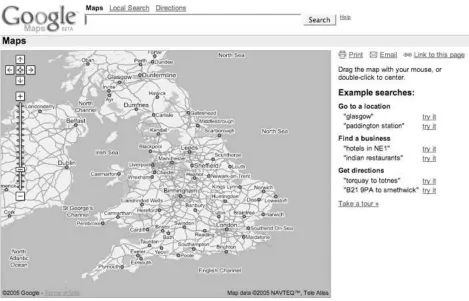
(29) Hack 1. Get Around http://maps.google.com. Sometimes you need a map to the map . Google applied its trademark, carefully designed simplicity, to provide us with its (first) view of place. Go to http://maps.google.com/ , and you'll get the view shown in Figure 1-1 . If you want maps of the United Kingdom, try http://maps.google.co.uk/ , and you'll get the view in Figure 1-2 . A similar map exists for Japan at http://maps.google.co.jp/ . This shows us what appears as a standard Google search box (called the Location Search box), an overview or orientation map of the country in question, and a results area with instructions and sample searches.. Figure 1-1. http://maps.google.com/.
(30) Figure 1-2. http://maps.google.co.uk/. Please remember that this book was written using beta software, and the Google engineers are continually tinkering with the site in order to provide the most compelling possible system. This means that things will change!. 1.2.1. What's Different About Google Maps? Google Maps is a web mapping service that solves the same old problem of online mapping. So why, ten years or more into the web revolution, is Google Maps such a big deal? Some of the excitement comes from the Google name and its philosophy. Google states on its corporate philosophy page at http://www.google.com/corporate/tenthings.html that "you can make money without doing evil." However, more of the interest in Google Maps may stem from other ideas stated on the philosophy pagefor example, "The interface is clear and simple" and "Pages load instantly." Clean pages and fast performance? A commitment to avoid doing evil? Which drives traffic and mind share? Maybe at this moment on the Web you can have it all. In addition to these features, Google Maps also offers a number of innovations in web user interfaces..
(31) Single search box The first thing that draws attention is that Google uses a single search box for location searches. Do you want to look up an address? Just type it in the box. No more tabbing between different fields for street address, city, state, and ZIP Code! (In Internet Explorer, you can even paste multi-line addresses into this box, believe it or not.). Draggable maps The standard in web mapping is the usual web interface, in which you click on a button to pan the map and see more terrain. What if you wanted to just click and drag to navigate the map? Well, now you can!. Integrated local search You can use that single search box to look for the things you want, such as " hotels near Sebastopol," or, for more choices, "hotels near SFO" (SFO is the code for San Francisco International Airport). If you just want to find all the hotels in a given area, zoom into that area, then search for "hotels," and Google Maps will constrain its search to the area shown on the map.. Satellite imagery With a single click you can flip between viewing a map and viewing satellite or aerial photography [Hack #4] . How cool is that?. Keyboard short cuts You don't need to click and drag your mouse, or strive to hit the little Zoom In and Zoom Out icons: you can use the arrow keys to move around in your map [Hack #3] .. 1.2.2. Getting Around Google Maps starts with the overview map shown in Figure 1-1 . You can move around that map by clicking and dragging your mouse on the map, by double-clicking your mouse on the map, or by using the arrow keys. Holding the mouse button down and dragging will cause the whole map to move, as if the web browser is providing a small window onto a much larger map. If you double-click on a spot, the map will smoothly pan until the point you clicked on is centered. Using the arrow keys has the same effect as clicking and dragging with the mouse. We explore the user interface in more detail in "Navigate the World in Your Web Browser" [Hack #3] .. 1.2.3. Entering a Location There are many ways to enter locations [Hack #2] , but let's start off easy. The conventional way of entering a location is a street address. We've come to accept address lookups in online mapping services as commonplace, but there is a great deal of behind-the-scenes work. In order to display a map of a street address, the system must first find a latitude and longitude that corresponds to this address. The process of linking something (e.g., a street address) with a latitude and longitude is called geocoding . When you enter a query into the search box, Google takes your input and does its best to turn it into a location that can be mapped. So let's start close to home and enter the street address of.
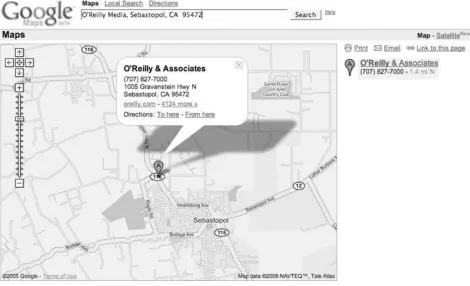
(32) O'Reilly Media headquarters into the search box: 1005 Gravenstein Highway North, Sebastopol, CA 95472. You could also enter the company name and get the same result: O'Reilly Media, Sebastopol, CA 95472. Click Search and you'll get the map shown in Figure 1-3 , which shows the address (as best as Google can determine) and hyperlinks to get directions to or from this spot. The satellite view in Figure 1-4 (zoomed in from the area shown in Figure 1-3 ) clearly shows that the O'Reilly Empire is centered in a parking lot median strip…. You can also enter a street intersection; for example: Hollywood & Vine St, Hollywood, CA 90068. The act of looking up a location has set your search area, or the extents of your search area, and you can now use the search box to get more information. For example, if you first zoom in to San Francisco, you can then search for "great sushi" and return results limited to the San Francisco area.. Figure 1-3. A Google map of O'Reilly Media's headquarters. Figure 1-4. O'Reilly Media, apparently located in a median strip of a parking lot.
(33) The Google Maps tour suggests that a search on "Great Sushi in New York" is useful. It turns out that "great sushi in San Francisco" also brings up a list of restaurants, but for some reason, "great sushi in Sebastopol" just doesn't work. To be fair, "great sushi in Sebastopol, CA" does bring up our two sushi places. But it also brings up the Larkspur Elementary School District, 37 miles from Sebastopol. Varying the adjective usedsay from "great" to "mediocre"brings up a new grouping of restaurants. These are not the same places that show up when you do a Google search on "mediocre sushi in San Francisco," so I'm not sure what the qualifications are. "Cheap but filling sushi in San Francisco" might be a more palatable search! Finding meaningful results for local search is still an unsolved problem. Fortunately, Google is good at searchand getting better all the time..
(34) Hack 2. Find Yourself (and Others) on Google Maps. Google Maps supports many ways to specify location. Using addresses to find a place makes a lot of sense for places that have an address, but what do you do when you don't have an address? Fortunately for you, the Google Maps team has supplied a number of additional ways to find yourself. I suspect that the goal is to create a system in which, if you can imagine a somewhat standard way of representing a location, then Google Maps will support it. The functionality is not quite there yet, but it does support a lot of ways of finding places. As with all of the hacks in this book, and as a general philosophy of life, experimentation is your friend! The number one rule for finding places using Google Maps is that if there is a way of specifying location that makes sense to you, go ahead and try it! As we saw in "Get Around http://maps.google.com" [Hack #1], standard addresses work, but so does entering a city and state, or a ZIP Code alone. Street intersections also work, as long as you add a city and state. You can also enter coordinates as latitude and longitude, like 38, -122, or 38 N, 122 W. Most modern people don't relate to latitude and longitude directly, but it is a compact and precise way to mark a location. Google Maps is good at searching by business name. You can search by business name, city, and statefor example, "O'Reilly Media, Sebastopol, CA"with good results. Entering a business name and a city, or a business name and a state, brings up a list of possible matches. The best Google Maps feature ever is the proximity search, at least for one of my friends, who is a vegetarian and travels a lot. Before Google Maps, he spent a lot of time on other map services planning for trips. A common query was for the closest Whole Foods Market in whatever city he was visiting. Now he can just type his query into the single search box: "whole foods market near Boston, MA." As long as he remembers to change Boston, MA to his current city, he is set. Table 1-1 shows examples of searches that do and don't work.. Table 1-1. The limits of Google Maps' understanding Example. Works?. Description. 1005 Gravenstein Highway N, Sebastopol, CA 95472. Yes. Full street address works great.. 79th St and Broadway, NY 79th St and Broadway, 10024. Yes. Intersection and city, or intersection and ZIP Code..
(35) Example Santa Rosa, CA Santa Rosa, NM. Works?. Description. Yes. City and state works.. San Francisco Moscow. Yes. The bare city name works absurdly often. If the same city appears in more than one state it appears to pick the largest. International cities were added recently, but data quality varies.. CA or California. No. State or state abbreviation alone doesn't work.. 94305. Yes. ZIP Code works. Postal codes for other supported countries, such as Canada and the U.K. work as well.. LAX. Yes. Airport codes work.. Paddington. Yes. In the UK and Japan, subway stations work as locations.. 37, -122. Yes. Latitude and longitude expressed as decimal degrees with to express West longitude or South latitude.. 37 N, 122 W. Yes. The same, but use N and S and E and W.. N 38 24' 08.8" W 122 49' 44.2". No. Latitude and longitude as degrees-minutes-seconds doesn't seem to work, but perhaps after partaking of the magic syntax elixir….. Range and township. No. Google Maps doesn't seem to do range and township. This would be a great feature for genealogy buffs that get records of their forbears' property transactions.. [location] to [location]. Yes. Any of the above locations that work can be mixed and matched with the word to in between them to get driving directions.. [thing] near [location]. Yes. You can use any of the above locations to search for nearby businesses and points of interest.. SFO. 1.3.1. Odd and Surprising Ways to Find Things Not everything is documented! Like Google's search, there are a lot of things that just work that are not documented (or at least they are not documented where you are likely to see them). For example, as of April 30th, 2005, I could find no mention that entering a latitude and longitude in the search box would have any effect, and yet it works! The moral is that when you have a wild idea about a way to search for something, try it first, and then if it doesn't work, enjoy that temporary feeling of satisfaction that comes from being ahead of the curve (well, either ahead of the curve, or plumb crazy, but since there is no reliable way to determine which is which, you might as well enjoy it).. 1.3.2. When Locations Fail: The Importance of Context Unless you specify a location in your searche.g., "edible food near King's Cross"Google Maps.
(36) assumes that the place that you are searching for falls within the area, or extent, that is currently shown in the map. As a result, a search that works on the full extent will sometimes fail if you have a local context set. You can reset that context by adding "near [some location]" to your search, or by clicking on the Google Maps logo in the upper left of the page..
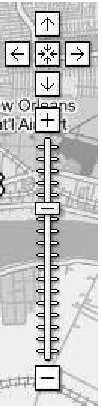
(37) Hack 3. Navigate the World in Your Web Browser. There is no doubt about it: Google has significantly raised the bar for user interfaces to maps on the Web. Here's why. When Google Maps was launched in February 2005, the public response was instant and almost overwhelmingly positive. Although the remarkable speed with which any map appeared, tile by tile, had a great deal to do with people's appreciation of Google Maps, most of the praise and recognition was saved for the browser interface itself. The Google Maps user interface is clean, simple, straightforward, quick loading, and easy to use. In other words, it offers yet another classic Google user experience.. 1.4.1. Just a Click Away… The main thing about the Google Maps user interface that really wows everyone the first time they see it is the drag panning. Go to any location in Google Maps, position the mouse pointer anywhere on the map, click and hold your left mouse button, and then move the mouse itself. Lo and beholdthe map moves with it, and the page in your browser doesn't even reload! Releasing the mouse button, of course, causes the map to stop panning. You'll notice that, in the background, your browser has already loaded many of the tiles outside your original view, so that you don't have to wait for them to load as you're panning aroundthat is, unless you're on a slow Internet connection, or you try to pan very quickly from one edge of the map to the other. If dragging the map feels a bit wild or difficult to control, the Google Maps interface also allows you to double-click your left mouse button anywhere on the map to recenter it at that location. Double-clicking to recenter gives you a more precise, but somewhat less dynamic way to pan around the map. The ability to click and drag the map around in the browser window, while not, strictly speaking, new, has never been seen before in a major mapping service on the Web. Gone are the days when browsing a map on the Web involved a tedious wait for the entire web page to reload every time you tried to recenter or zoom the map! Hooray!. 1.4.2. You Control the Horizontal and the Vertical Over on the left side of the map, you should see a number of controls in gray and black, as shown in Figure 1-5. If panning by dragging or double-clicking doesn't suit you, you can use the four arrow buttons to scroll the map north, south, east, and west. The somewhat less obviously labeled button in the center of the other four, which depicts four arrows pointing inwards, returns you to the original view of the last thing you searched for. This button lets you pan around the map, zoom in and out to your heart's content, and then click the return button to go right back to the place you were originally looking at..
(38) Figure 1-5. The Google Maps navigation controls. Below the pan controls lie the zoom controls. Google Maps features 18 zoom levels, from a view that shows multiple copies of the Earth's surface right down to the individual city block. The button marked with the plus sign (+) zooms in one level, while the button at the bottom marked with the minus sign (-) zooms out. Between them runs a long vertical ruler, marked with a tick for each zoom level, with a "handle" indicating the current zoom. You can click anywhere along this ruler to zoom directly to a given map scale, or click and drag the zoom handle up and down the ruler to zoom in and out dynamically. As you zoom in and out, the scale bar at the bottom left changes accordingly. In the smaller versions of the Google Map interface, the vertical zoom control ruler is omitted, leaving the zoom-in and zoom-out buttons stacked immediately below the pan controls. Last but not least, in the upper right-hand corner of the map, you'll find the map display controls, as shown in Figure 1-6. As of this writing, Google Maps has three modes: Map, Satellite, and a new Hybrid mode that displays streets and labels semi-transparently over a satellite or aerial image. For New Orleans, there is also a "Katrina" view, which is aerial imagery of New Orleans taken August 31, 2005. The user interface features a button for each mode, with the button for the current mode highlighted in bold. Clicking any one of these three buttons changes modes, allowing you to identify features or intersections in one view, and then immediately switch to another to get more information about what's there.. Figure 1-6. The Google Maps modes for New Orleans.
(39) You'll notice that clicking on the map itself with the left mouse button doesn't actually do anything in the plain vanilla Google Maps interface. Instead, the left-click is reserved in order to allow you to perform custom actions at any point on the map. We'll see a number of these custom uses for left-clicking on the map later in the book.. 1.4.3. Economies of Scale On the lower left side of the standard Google Maps view, you'll see a scale bar, which indicates distances horizontally across the center of the map in both miles and kilometers, as shown in Figure 1-7. Not only can this be useful for estimating distances "as the crow flies," but it also gives a sense of how the cartographic projection used in Google Maps distorts and exaggerates the Earth's surface as you head towards the north and south poles. (This is why Greenland looks bigger than Australia on Google Maps, when in fact it is much smaller.). Figure 1-7. The Google Maps scale bar. One cute way to see this in action is to pan up to the islands in northern Canada, zoom in a bit, and then click the map and slowly drag it upwards, thereby panning south. As you move the map, you can watch see the scale bar get smaller and smaller, and then flip over to a larger increment, before continuing to shrink. Not only is this a good example of the dynamic nature of the Google Maps interface, but it also illustrates one of the downsides of using the familiar Mercator projection, as Google Maps does. The reason Google Maps uses the Mercator projection instead of one that might provide less visual distortion is that, as with other rectangular projections, it treats all lines of latitude as being perpendicular to all lines of longitude. This property makes doing any kind of calculation to place things on the map so much easier that it outweighs the aesthetic detriments of having distorted northern and southern extremes on the map. Additionally, over smaller areas, the Mercator projection preserves angles across local areas on the map, making it suitable for guiding navigation. (Indeed, this is one major reason the Mercator projection continues to be used after 500 years, in spite of its tendency to distort the areas around the poles.). 1.4.4. Take the Shortcut But, wait, there's more! With Google's typical thoroughness, the Google Maps user interface makes good use of keyboard shortcuts in the web browser as well. Keyboard shortcuts allow you to accomplish the same tasks that most people use their mouse for without ever taking your hands off your keyboard's home row. (And if you're a command-line jockey like me, you gotta love 'em.) The most immediately useful keyboard shortcuts in Google Maps are, of course, the arrow keys, which allow you to pan the map in much the same way as the aforementioned pan buttons in the upper-left corner of the map, with one difference: if you hold down any arrow key, the map continues to panand fairly smoothly at that, if your computer and 'Net connection are fast.
(40) enoughuntil you let up on the key. With a little practice, you can scoot around a neighborhood in Google Maps like a pro, without ever touching your mouse. If you want to pan around faster at one go, you can use the diagonal arrow keys: PgUp and PgDn pan three-quarters of the way across the map north and south respectively, and Home and End quickly pan west and east by the same amount. Finally, the plus (+) and minus (-) keys zoom in and out by one level, respectively. On some Apple keyboards, such as the one supplied with iBooks, Fn-/ generates a plus sign, Fn-; is minus, and Fn-arrow keys provides the PgUp, PgDn, Home, and End functions. In Mozilla Firefox, you may find that if you just typed something into the search box above the map, your browser's focus is still be on the text box, which means that key presses will show up there, rather than going directly to the map. If this happens, just hit the Tab key (or left-click once anywhere on the map itself) to move the browser's focus away from the search box. Then the keyboard shortcuts should work as advertised.. 1.4.5. Taste the Secret Sauce It is a curious fact that, as of this writing, although all the pan and zoom controls have associated keyboard shortcuts, there do not seem to be keyboard shortcuts for switching modes. One almost wonders if this isn't an inadvertent oversight on Google's part. Fortunately, as the patient and attentive reader will discover, since Google's code is running on your web browser, you the hacker can fix any such oversights yourself by dipping into Google's secret sauce. The secret sauce by which Google offers so much rich functionality with such a seemingly simple interface is referred to by some people as AJAX, which (sometimes) stands for "Asynchronous JavaScript And XML." By using client-side JavaScript to detect user actions and act on them in the background, Google Maps offers a very pleasingly usable interface to a map of the world, all without the interminable wait for the entire page to reload any time something happens. As we'll see later in the book, the deep integration with the browser interface at the JavaScript level is also the source for much of the extreme hackability of Google Maps!.
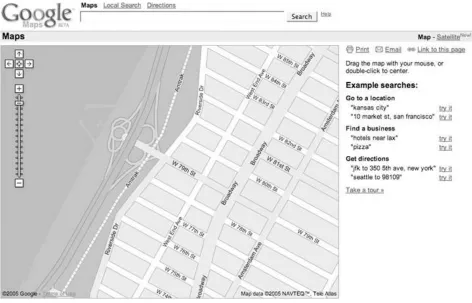
(41) Hack 4. Get the Bird's-Eye View. Maps are good, but a picture is worth… Maps show what the mapmaker chooses to show. Google Maps, like most of the online map services, shows maps that are designed primarily for getting around in a car. In America, we pretend we've (d)evolved into homo automobilious , but despite our best efforts there is more to the world than scenery and billboards flying past the bug-smeared windshield. One neat feature of Google Maps is the ability to flip between viewing a map and viewing satellite imagery. In Figure 1-8 we see a map of the Upper West Side of Manhattan, with an odd little shape sticking into the Hudson River on the left side. By clicking on the Satellite link on the upperright side of the window, you get satellite and aerial imagery.. Figure 1-8. Upper West Side Manhattan. The aerial view in Figure 1-9 provides a lot more context! You can see the buildings and Riverside Drive. You can even make out individual boats at the 79th Street Boat Basin. You can use the same navigation tricks to pan around in satellite and aerial imagery as you can on the map layer.
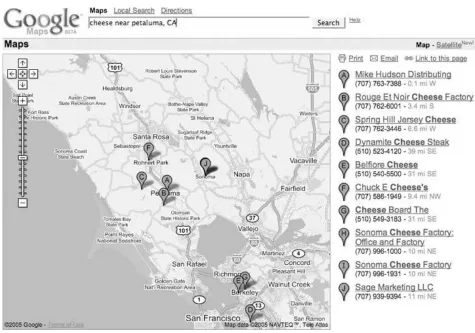
(42) [Hack #3] .. Figure 1-9. Aerial view of the Upper West Side and the 79th Street Boat Basin. The satellite imagery's level of detail varies by where you're looking; some places have much more detail than others.. 1.5.1. Is It Really There? You can use the aerial imagery as a sanity check. For example, let's say you are in the North Bay area and are interested in dairy products. You could search for cheese near Petaluma, CA and get a map like Figure 1-10 .. Figure 1-10. Looking for cheese in all the wrong places.
(43) To visit Rouge et Noir Cheese Factory (http://www.marinfrenchcheese.com/ ), you could click on the link on the right side in the list of results, zoom in a bit, and flip to satellite view to get the view in Figure 1-11 . Where's the cheese? It doesn't look like it is there. Could it be in that circular compound on the right-hand side? Maybe, except I happen to know that this isn't the case. It seems that there's a disconnect between databases at Google. The business listing for Rouge et Noir puts it at 7500 Red Hill Road, Petaluma, CA 94952, but the map pointer is 4.5 miles northeast. Of course, this is beta software! Entering the address, rather than the business name, into the search box rewrites the address as 7500 Point ReyesPetaluma Rd and comes closer to locating the Cheese Factory, as shown in Figure 1-12 . The pointer is still a bit off, but that can be attributed to the difficulty in geocoding locations from street addresses on roads with long patches between intersections.. Figure 1-11. Cheeseless in Marin.
(44) You may sometimes find that the satellite imagery is slightly out of date with respect to the roads and other things shown on the map.. Figure 1-12. Thar be cheese!.
(45) 1.5.2. Hybrid Vigor Now, as if that weren't enough, Google has added a Hybrid mode to Google Maps. The Hybrid mode takes a version of the original street map tiles with transparent backgrounds, and then lays them over the satellite tiles. The result is pretty fantastic, as you can see from Figure 1-13 , making it much easier to identify what's being shown in the satellite image.. Figure 1-13. Manhattan's Upper West Side, in Hybrid mode.
(46) The ability to flip between maps and satellite imagery is amazingly cool, and is just a hint of what (I assume) is coming. There is plenty of room next to the Map, Satellite, and Hybrid hyperlinks for other views or, as we say in Geographic Information Systems, other data layers . One prominent example was the Katrina button that showed up in the map display of the Gulf Coast of the United States in the aftermath of Hurricane Katrina in August 2005. Clicking this button displayed up-todate satellite imagery, allowing you to compare before-and-after views of the hurricane's tragically destructive wake. What could Google add? How about a link to terrain or elevation data? Or a current weather overlay? Thanks, Google, may I have another?.
(47) Hack 5. Driven to a Better User Interface. Driving directions and the single search box . How much work does it take to get driving directions? With MapQuest, you need to click on a link to the Directions page, enter your starting street address, hit Tab (or even worse, take your hands off the keyboard, put them on the mouse, and click on the next field), enter your city, hit Tab, enter your state, hit Tab, enter your ZIP Code, hit Tab, and then repeat that Enter-Tab ballet for your destination. In Google Maps, you enter your starting street address, city, state, and (optional) ZIP Code, then to , and then the street address, city, state, and (optional) ZIP Code of your destinationinto the single search box. Would you trade a click and seven tabs or clicks for a single to? I sure would! In addition, Google Maps provides lots of alternatives for asking directions. The usual way is to enter the beginning and ending destinations into the search box [Hack #2] . To get directions from O'Reilly Media to the San Francisco airport, you can enter the starting address and the airport code: 1005 Gravenstein Hwy N, Sebastopol, CA 95472 to SFO. You can even get directions from one airport to another. For example, for directions from San Francisco International to Oakland International try SFO to OAK . This pulls up the driving directions shown in Figure 1-14 .. Figure 1-14. Driving directions from the San Francisco to the Oakland airports.
(48) When I get driving directions, I'm usually familiar with either the starting or ending location, but not both. Google provides a neat map-within-a-map effect to help navigate that last little bit. If you click on the Start Address or End Address links in the top of the results area on the right of the screen, a mini-map appears in the info window of the starting or ending address (Figure 1-15 ).. Figure 1-15. A detailed map of the destination.
(49) You can also click on the individual steps in the driving directions to get a mini-map for that navigational maneuver. The mini-map that appears is a complete map, with its own zoom (but not pan) controls, so you can position the map, zoom in, and print the map and directions. To add another level of cool, flip the mini-map to satellite view, as shown in Figure 1-16 .. Figure 1-16. The detailed satellite view of the destination.
(50) We have a friend who lives donde el Diablo se perdido su poncho ("where the devil lost his poncho"), and having this imagery makes it a lot easier to understand what is happening as you traverse miles of single-lane former stage coach roads to pay a visit.. 1.6.1. Using the Info Windows When you search for an address or click on a local link, Google Maps produces the (hopefully) now-familiar info window, as shown in Figure 1-17 .. Figure 1-17. You can search in the info window.
(51) You can click on the info window links to get directions to or from that address. When you click on one of those links, you get a mini search box into which you can type a location, as shown in Figure 1-18 .. 1.6.2. Other Ways to Search As mentioned above, you can use any of the methods of entering a location mentioned in "Find Yourself (and Others) on Google Maps" [Hack #2] and probably several more that we haven't found! So you can get the direction from an airport to a city (LAX to Hollywood, CA ) or between two ZIP Codes (94305 to 95472 ), or any combination of the two. You can even get directions to a latitude and longitude. This can be fun if you are interested in the Degree Confluence Project (http://www.confluence.org/ ), which is attempting to collect pictures and stories from each of the latitude and longitude integer degree intersections in the world. So you could search for LAX to 34, -118 and get Figure 1-19 , showing the closest degree confluence to Los Angeles.. Figure 1-18. The search box in the info window.
(52) Figure 1-19. LAX to the nearest Degree Confluence34 N, 118 W.
(53)
(54) Hack 6. Share Google Maps. Found something good? Email a link, bookmark it, or post it on your web site . Are you having a party and needing to let people know where it will be held? Did you find a cool spot that you want to show your friends? Google Maps can create an email with a link that will show your friends (mostly) the same view you seeor generate a link to post on your own web site. Without maps, many of us are reduced to near-incomprehensible grunts if forced to provide directions to our homes. Even if we've lived in the same place for years, our direction-giving process too often includes putting a hand over the phone handset and asking whoever is around, "What is the name of that street?" The problem doesn't end there. Even if we are good at providing directions, our would-be visitor must keep track of fragments of data such as "the red mailbox" and "right after the hilland if you hit the corner, you've gone too far." With online map services, though, most of the time it is enough just to have a street address, and with most, emailing or posting a link to a map helps a visitor find the location quickly. Figure 1-20 shows driving directions from W 88th St and Broadway, NY, NY to W 92nd St and Central Park West, NY, NY . It also includes a destination mini-map.. Figure 1-20. Getting around New York in Google Maps.
(55) Click the Email link just under the line that includes the Map and Satellite links, and Google opens your email client and inserts this link to this map, along with a set of driving directions, in the body of the email:. http://maps.google.com/maps?q=W+88th+St+and+Broadway,+ny,+ny+ to+W+92nd+St+and+Central+Park+West,+ny,+ny&ll=40.789110,-73.966550&spn =0.007782,0.013467&hl=en. All you need to do is fill in the email address of your friend and send it off.. 1.7.1. Bookmark a Google Map or Post It on Your Web Page Google Maps makes deep use of JavaScript to dynamically redraw the map without (apparent) requests to the server. This means that the location bar in your browser does not get updated. This only becomes an issue when you decide to bookmark a map to use later. When you bookmark Google Maps, you find that you've bookmarked the overview map of the whole United Statesalmost certainly not what you intended! Fortunately Google has provided a way out. Next to the Email link, under the Map and Satellite links, is a link to " Link to this page," as shown in Figure 1-21 ..
(56) Figure 1-21. Print, email, or link to this map. Clicking "Link to this page" updates the address bar in your browser. Now you can bookmark the page in your browser or share the link on del.icio.us [Hack #9] or copy the link from the address bar and paste it into your own web page. alternatively, you can right-click on "Link to this page" and select Copy Link Location (in Firefox) or Copy Shortcut (in Internet Explorer) to copy the link directly to the clipboard. To post a link on your web page:. 1. Find a map that you like. 2. Right-click on "Link to this page" and select the Copy option. 3. Paste the link into your web page within an appropriate anchor tag. For example, here is a link to a map of Salina, Kansas: http://maps.google.com/maps? q=Salina,+KS&spn=0.124512,0.215467&hl=en . You could include it in your web page with this HTML:. <a href="http://maps.google.com/maps?q=Salina,+KS&spn =0.124512,0.215467&hl=en">Salina, Kansas</a>. 1.7.2. Shorten That Link! Sometimes, if you just want to paste a URL of a Google Map into an email, you may find that the URLs are just long enough to break in the middle and wrap to the next line in your email client, which may make it more difficult for the recipients of your email to use. Metamark offers a solution to this problem at http://xrl.us/ . There you'll findno kiddinga link- shortening service, which takes unwieldy URLs like those produced by Google Maps and generates a permanent redirect from a much shorter URL to the much longer one you're having trouble with. Here, for example, is Metamark's shortened version of the Central Park driving directions that were shown in Figure 1-20 : http://xrl.us/hu9c When others visit the shortened URL, their browsers will immediately be redirected to the longer URL you started with. You can also choose to use a mnemonic "nickname" in place of the string of random letters after xrl.us in the shortened URL, as well as apply a password to keep your URL under wraps.. 1.7.3. Limits on Email and Links The link generated by Email and "Link to this page" produces almost the same view when clicked.
(57) as you have when you create the links. Sometimes the map is not centered in the same place as when you clicked on the link, as browser window sizes vary, and Google Maps does its best to show the area requested. Occasionally, this may even result in a different zoom level being displayed, in order to make the requested area fit in the available browser window space. Also, it is quite possible, since Google Local searches appear to be regenerated on demand, that someone using your link could see a slightly different list of businesses than you did when you created the link. Currently, the link does not save embedded mini-maps, so if you've created driving directions and opened up a mini-map at the start or end address, it will not be included in the email or link that you generate. Maps help us gather together, and being able to communicate with more precision than "drive past the third gate, then turn right" means more people will show up where they want to be, rather than lost by a frog pond (though searching for "lost by a frog pond" brings up an absurd number of links)..
(58) Hack 7. Inside Google Maps URLs. Gain control of your links to Google Maps by understanding the URLs. "Share Google Maps" [Hack #6] showed how to have Google Maps generate a link (i.e., Uniform Resource Locator or URL) that creates a view of the current map. A little exploration of Google Maps URLs can provide a lot of power! We have no particular inside information, so much of what followsespecially what I think the abbreviated names stand foris just semi-knowledgeable guesses. Let's start with a basic URL. This is what you get if you search for Key West, Fl and then click on "Link to this page." http://maps.google.com/maps?q=Key+West,+Fl&hl=en The http://maps.google.com part should be familiar. This is the basic Google Maps address. Next, /maps is a program running on Google's servers that generates maps. Web programs can accept parameters. The syntax for parameters is to start with a question mark and then put the name of a parameter, an equal sign, and the value of the parameter. If you need a second (or third, or more) parameter, you put an ampersand between the first value and the second parameter's name. So ?q=Key+West,+Fl&hl=en means there is a parameter named q with the value Key+West,+Fl and a parameter named hl with the value en. Note that the spaces in "Key West, Fl" have been replaced with plus signs. This is because spaces aren't allowed in URLs and must be escaped.. The parameter hl is the language for the results, and q is the query, or location that you are searching for. If you speak French, replace the en with fr, and so on. If you leave off the hl parameter, Google Maps will try to display things in whatever language the user's web browser prefers. The q or query parameter can be any of the things that are discussed in "Find Yourself (and Others) on Google Maps" [Hack #2]. For example, here is the URL to a map for latitude 38 degrees north, longitude 122 degrees west: http://maps.google.com/maps?q=38,-122&hl=en? Google Maps follows the convention observed by most web mapping software and Geographic Information Systems, and uses negative values to denote latitude south of the Equator and longitude west of the Prime Meridian.. Here, for example, is ZIP Code 94305:. http://maps.google.com/maps?q=94305&hl=en.
Figure
+7





Outline
Figure 1-7 The Google Maps scale bar
Figure 1-21 Print, email, or link to this map
Figure 2-2 Enter a server and path to generate a developer's key
Figure 2-15 Make a slideshow that will captivate your friends and family
Table 2-2 Approximate area in pixels of North America for each zoom level
Figure 3-4 The most likely places to find bogus checks in Chicago
Figure 3-10 Good night, Irene!
Figure 3-17 The Google Maps representation of a package's travels
Figure 3-18 Whereis correctly places www.google.com in Mountain View, California
Figure 4-18 Directions from JFK to Fifth Avenue
Related documents
Functional and logic minimization, logic fitting and simulation tools Idea Architectural design Logical design Physical design Fabrication New chip!. 7.7C 6% $
In Part II, the main focus will be on examining instructional design considerations as they relate to online, web-based eLearning and the development of hybrid learning systems
Using postings lists stored with skip pointers, with a skip length of √P, as suggested in Section 2.3. (i) using standard postings
It is very important for an organization to seek feed back from its consumers and retailers to know the effectivity of their marketing strategies. Marketing Research
The main criterion used by respondents for selecting source bonds (bond bought back in switch operations) is the maturity profile. Almost all respondent countries (10 out of 13;
© 2008 AGI-Information Management Consultants May be used for personal purporses only or by libraries associated to dandelon.com
As the in fl ation premium increases, the premium increase can be re fl ected as an increase in value of TIPS bonds (reduction of real yield), a decrease in value of nominal
We believe tax-exempt bond investors, who are subject to certain factors unique to the municipal bond market, may outperform their counterparts in other fixed income sectors on
