Theses Thesis/Dissertation Collections
5-19-2015
Digital Museum Consortia: A Prototype for
Interconnected and Accessible Database Design
Ben Heller
Follow this and additional works at:http://scholarworks.rit.edu/theses
This Thesis is brought to you for free and open access by the Thesis/Dissertation Collections at RIT Scholar Works. It has been accepted for inclusion in Theses by an authorized administrator of RIT Scholar Works. For more information, please [email protected].
Recommended Citation
College of Liberal Arts
Digital Museum Consortia:
A Prototype for Interconnected and Accessible Database Design
A Thesis Submitted in Partial Fulfillment
of the Bachelor of Science Degree
In Museum Studies
Performing Arts & Visual Culture Department
By Ben Heller
Juilee Decker, Ph.D. Primary Advisor
��
Secondary Advisor
��
Table of Contents
Abstract ... 1!
Introduction ... 2!
Literature Review ... 3!
Technology in the Home ... 3!
Technology in the Museum ... 4!
Concerns and Complications ... 5!
Visitor Engagement ... 5!
Museum Benefit ... 7!
Hardware and Software Management ... 9!
Temporary Exhibitions ... 10!
Paid Content ... 10!
Accessibility ... 11!
Children’s Access ... 12!
Database Design ... 13!
Importing Data ... 15!
Governing Body for Tables ... 16!
Artifact Entry Sample ... 16!
Application Design ... 17!
User Account ... 17!
Content Access ... 18!
Discussion and Commentary ... 19!
Accessibility ... 19!
Big Data Visualization ... 20!
Web Accessible Version ... 21!
Future of Museums and Expected Impact ... 22!
Design Prototypes ... 24!
Figure 1 – Database Entry Example ... 24!
Figure 4a – Object Page Design ... 27!
Figure 4b – Object Page Template ... 28!
Figure 4c – Object Page Example ... 29!
Figure 5 – Settings Page Design ... 31!
Figure 6 – Badges Page Design ... 32!
Abstract
The evolution of the internet and devices allowing access to it indicate that users trend
toward networking and interconnectivity in their daily lives. Museums have started to tread into
this territory—that is, crafting, managing, and maintaining an effective internet presence and
ancillary content tools—on their own. However, many museums still rely upon the earliest types
of education and interpretation tools, such as audio tours and recordings that address content
from one collection.
Moving beyond a single institution’s holdings, a shared database of museum content
including photos of artifacts and objects, historic documents, and videos would allow users to
examine pieces they enjoy and to find similar works at other locations. A single application
providing museum collection capabilities and visitor access would benefit both sides.
To support this claim, this thesis first provides a literature review of application use in
museums that is supplemented by statistics of visitor use of museum mobile offerings. This
historical overview yields a list of needs, interests, and obstacles to such an interconnective
model. The third section constitutes the building blocks of such a model: database design,
application design, and a web-accessible mirror site which are visualized in the prototyped
content. The fourth section hypothesizes the future and expected impact of a shared network
Introduction
Museums are institutions that have historically made use of technology to better organize,
display, and protect their collections (Bautista 27). In as early as 1952, the Stedelijk Museum had
Short-Wave Ambulatory Lectures in which visitors would carry around a small portable radio
and earphone allowing them to listen to localized radio broadcasts for exhibits. Complications
with radio technology led to the use of portable cassette players for audio tours which became
the standard used worldwide for many decades (Tallon, xiii-xiv, xix). More recently, motion
activated recordings, computer kiosks, personal digital assistant (PDA) tours and other
approaches to use technology for visitor engagement have been tried. These offerings however
tend to focus on just one point of view and may not be appropriate for all visitors. A system
which allows visitors to learn about topics of interest while moving at their own pace is the
necessary next step to increase learning potential and interactivity within the museum.
Beyond the museum, advances in information technology shape the way that people live,
learn, and interact with the world today. In the study “The iPhone Effect,” people rated internet
access to be a necessity just after having a home and a car, showing it to outrank television and
phone (Petrie, 2010). Mobile technology makes that access portable and allows users to access
whatever content they may desire from anywhere. Visitors now expect digital content and access
to it wherever they may be.
Many institutions are offering such content in some form or another. Over 50% offer at
least some sort of audio tour, but visitors want more. Costs, as well as challenges in creating and
designing content, are the biggest issues identified by most museums. Sixty-three percent
surveyed showed a willingness to partner with other institutions. This is the key to creating the
A shared database spanning museums of any type, with any content, would create a
comprehensive system to solve many of these issues. Visitors would have a single point of
access to a variety of institutions and types of content. Costs should be shared and the system
decentralized into a consortium taking much of the load off any one museum. Visitor and curator
alike would be able to access, comment, and improve the experience for others. An application,
available for various device types such as the Apple mobile operating system (iOS), Android,
and Windows would allow for quick and concise content access anytime from anywhere.
Literature Review
Technology in the Home
The advent of the internet and the resulting growth of communication technology has had
a great impact on the daily life. People are now able to access content and research whatever they
may desire from the comfort of their own homes. Many now consider the internet to be a
necessity in everyday life, and even find it hard to remember what times were like before the
“World Wide Web” linked everyone together. Mobile technology took this another step further
and gave users the ability to access the world’s knowledge anytime and anywhere.
The Chicago Museum of Science and Industry’s “Digital Media in Everyday Life” survey
from 2011 shows the growth of ownership and comfort with technology. The survey found that
around 30-40% of adults and around 50% of teens own smartphones. These ownership statistics
have continued to grow. Adults and youths both trend towards mid- to high-comfort levels with
technology. Twenty-two percent of adults and less than 10% of youths rated themselves low.
Over 80% of the adults who rated themselves as having low comfort levels with technology were
likely to own a smartphone; while those who rated low trend away from any sort of technology--
even ATMs or self-checkouts. This group will never be that interested in technology.
Platform-wise, adults trend towards Android and youths towards iOS. This is just a trend
however and supporting both operating systems is a must to cover the greatest audience. On
average, users prefer free apps, but the 2012 report by the American Alliance of Museums
(AAM),“Mobile in Museum’s Study,” found that about a third of the average users’ apps were
purchased. The average number of apps installed was twenty-nine, with about twelve being
actively used monthly. The same survey found that over 50% of smartphone owners used their
device not just as a phone, but as a browser, global positioning system, media player, etc. Over
70% of users had taken photos or browsed the internet on their devices.
Statistics show that the general population is making heavy use of mobile technology in
their daily lives and growth is not slowing down. When a person is able to learn and experience a
multitude of things freely via the internet the impact of a museum is lessened. If a person has
grown a habit to instantly check on the internet when something catches their interest, will the
content that they may expect from a visited museum be there for them?
Technology in the Museum
Technology enhanced experiences at museums have become fairly prevalent with around
50% of both US and UK museums having some sort of offering. Around 23% offer some form of
user owned device, or Bring Your Own Device (BYOD), application. Ten percent have a
museum owned device system and 14% have some of both. Museum owned device systems are
issues in both funding and staff capable of designing such content. However, 25% of those with
no offerings do have plans to begin development.
Over 50% of the museums surveyed believe that such offerings are crucial to visitor
engagement and that visitors expect it. 66% state that engagement is their main goal and 43% are
interested in bringing their collections to a wider audience. Management and content creation is
largely done in-house with about 94% controlling their own BYOD solution (Atkinson 2012).
Concerns and Complications
Visitor Engagement
According to the 2012 “Mobile in Museums” survey, two-thirds of museums state visitor
engagement as their key goal in creating mobile content. What is necessary in an application to
accomplish this? It is the ability for the visitor to control their experience. “It’s Personal: One
Size Does Not Fit All” in TrendsWatch 2015 discusses how each visitor’s needs and interests
will vary. Free choice learning allows users to go at their own pace and focus on their preferred
type of learning. One person may be a hands-on learner and prefer access to small games while
another may be visual and enjoy videos and picture guides. Additional features such as
bookmarks and tags allow for personalizing suggested content and exhibits.
Digital applications also allow visitors to engage in various types of communities.
Museums have always been a community of interest. The institution creates a place for focused
learning and interaction with others over a certain topic of interest. “Modern” art, history, and
science are museums that have existed for their local communities for ages. Local is the key
word. A visitor needs to live nearby or be visiting that area to experience the museum's content.
museum or community related to that subject close enough to visit. Technology and the internet
now allow visitors from anywhere around the globe to join their communities.
The online database along with user generated content and comments allow museums and
users to further evolve into two other types of communities. A community of practice or
knowledge gathers information in an informal, yet organized manner. Users may tag, comment
and edit information within the database much like Wikipedia. The learning experience is
organized and accessible, yet open and inviting. Much of the base content will be administered
and locked by museum personnel to keep things clean and accurate, yet the community will be
overlaid allowing visitors to further engage with content.
Communities of Inquiry will also be able to flourish. This type of community learns by
discussing, questioning and challenging content. This can exist to some extent in the physical
museum between close visitors or discussion groups. However having discussion via an online
forum for each piece allows users to discuss content with other visitors they would have never
met otherwise. Open global discussions bring a whole new depth to inquiry that a local museum
group could never obtain.
All these communities intertwined and easily accessible create a large network of users.
Bautista references Mark Granovetter idea on the strength of weak ties, “A large group of weak
ties is more powerful than a small network of strong ties in relation to innovation” (pg19). This
new open community of many individuals, typically strangers, allows for a collective learning
experience not possible with a simple visit. Being at the museum─experiencing content in person
is key to beginning the experience—but it can go so much further with an application for
Museum Benefit
Moving to a system such as this is a big change and institutions will need reasons to
support it and migrate over. One of the biggest benefits would be the ability to globally showcase
their content. Visitors already using the database for one museum will discover artifacts from
other museums thus creating interest. Every participating institution serves as a sort of
advertisement for the other museums.
Beyond the benefits offered to their visitors though, they will want quantifiable benefits.
By design, the database is a shared entity, with servers hosted both on site as well as at other
museums and off-site locations. This leads to very simple and redundant backups of digital data
thus protecting the institution automatically. In addition, the system is easy to use─allowing both
curators and volunteers to add content quickly and in a well-organized manner.
That simple volunteer work also allows for a major benefit with such a system. Volunteer
work is already commonplace in museums since it allows for reduced costs and increased
community engagement, but requires training and is limited. When used on a broader scale with
multiple users (perhaps at once) and unbound by geography, such a system of group
volunteerism is known as crowdsourcing. A digital system that can be accessed from anywhere
allows visitors to help create content more freely. Simple acts such as tagging, linking related
articles and discussing a piece can be done by any registered visitor. Power users can be selected
for additional access allowing them to edit, organize and correct other visitors’ entries.
Unfortunately a system this large and open can lead to misuse such as incorrect tagging or
unrelated arguments in discussions but trusted volunteers can help maintain the system.
Crowdsourcing could also allow for further visitor engagement and museum benefit by
a global community platform can lead to much more input and interesting results. Media such as
photographs and videos of exhibits and artifacts could be created by visitors and uploaded to the
database after curator approval. All these uses of crowdsourcing alleviate some of the work load
on museum staff while also increasing visitor engagement. This is a win for both sides (Merritt,
2012).
Taking part in a highly visible and global system like this also increases scope and
visibility for grants and funding. An initiative to increase the museum’s scope will help justify
spending to digitize collections and work on new exhibit content. A small museum, which may
have only been receiving local support, can broaden its horizons by supporting online users
nationwide or even across the globe.
The biggest benefit to an online system is to apply big data analysis. This would provide
useful insights. Gauging visitor interest in exhibits or certain artifacts can be difficult on location
but the database creates hard statistics of such data. Favorites, page views, discussions, and so on
provide useful statistics for each exhibit and artifact. Visitors using the system may be actively
discussing and favoriting a piece that is in storage while a physical exhibit is getting rather low
views. This allows curators cater to the audience in ways not easily possible without such
statistics. (Merritt, 2014)
All this data allows museums to better engage and teach their visitors, while also
allowing the visitors to help and contribute to their museums. It becomes a large digital
ecosystem wherein each side evolves along with the other. Instead of stagnating trying to find the
right exhibits and content for their visitors, curators can essentially ask the public directly and
Hardware and Software Management
An undertaking such as this will require a scalable system of dedicated hardware able to
grow as institutions join. A hub and spoke model will be the most efficient way to go about it;
with a data center that contains web access and all the museums’ content, but also local content
hosted at each museum. This creates not only redundant copies of content, but distributes load as
well. Visitors accessing content from the museum itself will be able to quickly and reliably
access the data from local servers, while off-site and online users will receive it from the more
robust data center.
Considering that visitors will be accessing large amounts of data for certain types of
media such as audio and video, a free wireless service at each museum is essential. Requiring a
visitor to use large amounts of mobile data to access content for the museum they are standing in
will lead to disgruntled visitors and lower access. In addition, many youths have tablet devices
with no mobile data plans (Beasely, Part 1). By providing free wireless access classes of students
with tablets or laptops are able to access and research the content without parents worrying about
mobile data usage. To reach the largest possible audience smartphones should not be the only
focus, but tablets and personal computers as well.
With the need for a centralized data center and management of software and hardware, it
is likely a new entity will need to be created solely for this project. Existing examples of such
database consortiums would be the Digital Public Library of America (DPLA) or Google’s
Cultural Institution.By sharing costs among various museums that are partaking in the service, a
separate, small group of technology-focused individuals would be able to host, manage and
troubleshoot the centralized datacenter. Around two-thirds of multimedia offerings are managed
troubleshooting to third parties (Petrie). Doing so likely comes at a rather large cost and slow
support. A dedicated body for technology in museums could provide the needed expertise and
keep it readily available.
Temporary Exhibitions
Temporary exhibits may potentially be a cause for problems since the items included in
such a display may be owned by multiple institutions and may travel to other sites. In this case,
any data entry for such objects and exhibits in the database are up to the owning institution. The
easiest way to input such objects is to input them under the owning institution’s collection and
information, but to allow for it to be linked by other museums and their exhibits when on display
there. If content owned by a museum that does not use the database is displayed in a museum
that does, it is up to the owning institution to determine access. That institution may decide to
have information about related works added, but they will also need to accept that content as
being permanently associated with the database. Since the database and its associated content
will include visitor input and discussions, deleting content is not an option. That is, deleting any
entries related to items on view during a temporary exhibit will not be viable. Works included in
any temporary exhibition may become permanent digitally through this exhibition.
Paid Content
Some museums charge for various types of memberships. Many may also be concerned
that having their content freely available to view online could lead to decreased visitor counts.
database content behind access restrictions making such content members only. This would
create an easy way to control access. An institution could hand out cards or email members a
code to input to their database accounts to unlock the extra access. It would be up to the museum
to decide if codes should have multiple uses for families with multiple user accounts.
Freemium access via in-app purchases is another viable option. Online payment services
such as PayPal or Google Wallet could even make this possible from the web version. The app
and general content is free for users to download and use but certain groups of content could be
accessible only via purchase (Proctor, Chapter 2). Using this system for blockbuster exhibits or
very popular collections could increase a museum’s funding at a modest cost to visitors. When a
user tries to access a piece from an exhibit, they could be prompted to pay a small fee directly
from their phone to gain access to all the pieces from that exhibit or collection. The proceeds
then go to that museum.
Accessibility
Creating a large resource for various types of multimedia also raises the issue of
accessibility. Many visitors wanting to enjoy the content may be unable to hear audio or read
documents. Accessibility features could also allow visitors different ways to interact with the
content in ways they may prefer. Examples include dictation of text files while viewing a piece
or a magnified display. Being a large digital database makes it possible to integrate the system
with services like Google translate to read back text or convert audio into captions automatically.
Providing a standard set of accessibility services will allow the system to provide these features
with reasonable accuracy. Each individual institution is also free to add higher quality captions to
Children’s Access
The largest educational benefit for a system such as this would be the fact it can allow
students from any location access to collections. Young children do not have the freedom to
travel and experience museums even if something catches their interest; having a system to
browse and discover can substantially open a child's horizons. What may start as a class project
with a school owned iPad when visiting a local museum can lead to browsing other institutions
and discovering new points of interest.
Providing ways to keep children engaged and interested also becomes much easier with a
digital system. The addition of gamification can help by providing feedback and concrete goals.
Badge and trophy systems are commonplace in both video games and many online communities.
These systems could be added into the system for everyone but they are especially useful for
children. Browsing pages, posting comments, and visiting physical locations could all be counted
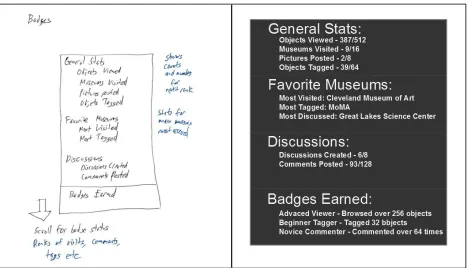
on a per user basis. Every five, ten, twenty, and fifty hits could award the user a badge on their
profile proving their dedication (Figure 6). It may seem rather simple but the added goals and
ability to show and compete with friends typically leads to increased use.
Children’s access to a large online community however comes with many caveats.
Censorship of potentially inappropriate museum content would be one. Many believe that, seeing
as it is art, it should be open for everyone. However many parents do not want their children
seeing anything too sexual or violent. The easiest way to fix this would be to have a setting in the
database for each work of art allowing curators to block the object from child users. The
commenting and forum community is another big concern. Should children and adults share the
16 or so is the best way to go. This version would block the inappropriate content and have its
own forums. Once a child is old enough to swap to the adult version their account will be
upgraded. Having this separate system for children may seem excessive but it allows parents and
teachers the option of bringing their students into the museum world in an open digital way,
while still maintaining a level of safety. Parents can always give their children access to a family
account for the full version if they feel it is appropriate for their use.
Database Design
The database’s design is critical for a project of this scale. In order to achieve high
performance the data must be organized carefully to prevent unnecessary reads and focus on
frequently queried content. The system will have many different types of institutions which have
unique requirements, however, and many fields one uses may not even be considered at another.
To resolve this issue, the database is designed with a tiered approach allowing each object or
artifact to have a great deal of content without being bogged down with fields it does not need.
Each object will initially be catalogued in terms of required fields. These fields will exist
on all objects and nothing can be added without fulfilling each of these. These mandatory fields
state only the base criteria of an object, yet are shared globally for ease of management and
search. Every object must have a name or a title, a creator or source, date of origin, owner, and
location. Some of these fields may have different types of values such as an owner institution or
a person's name, but will have standardized input for each variation to keep entries consistent. A
fossil may simply have an era for its date of origin while a painting may have an exact year.
The final required field exists in predefined forms as object type. This is a list of
predefined values─one to which the object must adhere. Common ones such as painting,
sculpture, or document are easy enough; yet not all objects will be able to be categorized in such
broad, familiar terms. Historical objects and pieces of natural history could be defined as a
simple artifact but a volcanic rock will require different fields than a Civil War-era gun. To keep
the database clean, these initial object types will be a predefined list to choose from that will
seldom, if ever, be changed.
Allowing the database to grow, yet keep existing entries clean and easily searchable,
requires a method of growth that is additive yet separate to maintain performance. The addition
of tags with detailed fields on top of the tiered types is one way to do this. A World War II
ambulance would be listed as a Vehicle - Automobile. This object type would include fields such
as make, model, color, however many users may want to know more about it and be able to
query similar objects. Information related to WW2 Vehicles, such as assigned unit, location of
duty, ID number and so on is desirable but not necessary for every Automobile. By adding a
detailed tag “WW2 Vehicle” to the object which contains its own fields to fill querying becomes
possible.
In the database each object starts off in the master database with required fields and then
is added to an object type table. From there it can be tagged into various subject type tables. Each
table begins with a unique object ID allowing the system to find every instance of an object and
retrieve all known fields. This design supports efficient queries since each query only needs to
check the master table and then related tables for the object.
In addition to the object database, a person database with a similar tiered design will
the person can then be tagged into fields of study, artistic styles, locations of work, and so on.
This allows for users browsing objects to hop over to the creator, or discoverer, and learn more
about that person without having all those fields replicated with each object.
The database alone is not all of the content that needs to be accessed. Users will also
expect pictures, audio files, documents, videos and even interactive game content. These files
will vary widely by format and size. Instead of being part of the database itself these will be
uploaded and tagged to object and person IDs and stored in a separate content management
system. When a user accesses an object, the system queries the fields and prints out all known
tags and information as well as priority marked files such as main thumbnail images and short
video samples. A list of extra content will also be offered allowing the user to choose if they
want to access in-depth videos or more images.
Importing Data
Getting content into the database will be the largest task each museum will face during
the startup phase. Many museums will already have their own collections and databases in one
digital format or another. For these institutions a few options will be possible. The easiest would
be to export their existing database fields into large spreadsheet files which could then be
imported into the new system. The system API could also be used to set criteria and pull content
from existing databases. However, the large problem with this will be variation in table design
and the addition or changes of fields. Generating spreadsheets of collections or object types will
allow for editing before import. While time consuming, this will insure entries start off clean and
For museums that want to start fresh adding content or add new content after initial
imports to the database will have various methods. Large bulk imports via spreadsheets will
allow for multiple entries to be added quickly. A web content system like this shines in its ability
to use the web based tools to edit and add new objects in a quick and simple manner. This will
allow volunteers, even ones not physically at the museum, to add artifacts, upload digital content,
and begin tagging subjects without the need for curator involvement. This will allow a group of
volunteers with power user access to crowd-source database imports and quickly add new
collections or convert large old physical databases into a digital system.
Governing Body for Tables
Once the database is established editing fields and tables that already exist is undesirable
since it would require potential editing of large amounts of data. The best way to deal with this
would be to elect a small governing body to decide the addition of new fields and tables and
potentially changing existing ones. Having a curator or representative from each museum that
uses the database discuss and vote on changes and additions would allow changes to be made in
a controlled process. Most new tag tables will be easy to add in but having a quick vote or check
to make sure they are not duplicated or unnecessary can also help keep things clean and
manageable.
Artifact Entry Sample
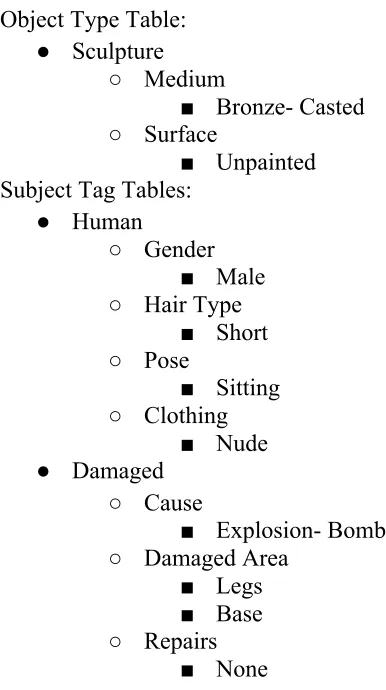
Figure 1 displays a sample entry for an artifact in the database. The object starts out by
generated the object can be linked to other tables. The first major table would be the object
type─ in this case a sculpture. The object type tables include various optional fields to further
describe that item by its basic type such as medium, materials, etc. These are the tables that
would be initially filled on object creation by a curator or volunteer.
After that, however, the tagging begins. All users, from curators to visitors, can tag an
object in various subject tables. This sculpture is of a human figure, so the simple human tag is
an easy choice. That table will have a multitude of optional fields to describe the person in the
painting such as their gender, body features, clothing, pose and so on. Users can freely add
values to the fields if they are untagged and later users can vote those tags up and down allowing
the community to ensure correct information.
Each piece can have an unlimited number of tags as well. Another user may come along
and tag this piece as Impressionist, or perhaps Contemplative. Each of those tags would have its
own optional fields to fill out. Some of them may overlap, but by having different tags for style,
subject, content, etc., users will be able to search and query by certain tags and fields of interest
allowing for all types of discovery from different angles.
Application Design
User Account
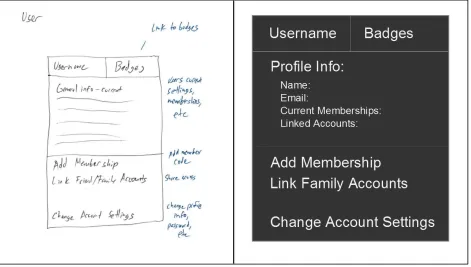
Per user accounts are one of the most important cornerstones of this application. Each
user has their own account to save favorites, post comments and discussions, and obtain badges.
Guest access for demo or quick access could be possible but without a login the user’s
experience is limited. Allowing Facebook, Google, or Microsoft-synced logins with the
user will still want to finish registration by setting up email and other account details. Email will
allow notifications and linking of content to view at home, and profile details will be viewable
on the comment and discussion forums. Having an account is also necessary to associate
museum membership to access members-only content (Figure 2).
Content Access
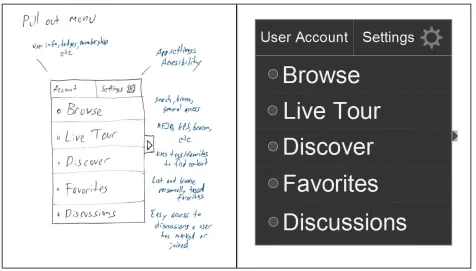
The app will have a variety of ways to access museum content allowing for different
methods of interaction and discovery (Figure 3). Browse, a simple hierarchical system, allows
users to browse through collections in different ways. Starting at the museum level they could
then drill down to exhibits or categories to see all the different artifacts a museum may have. As
they browse they can select a piece to access its information page and favorite it, add comments
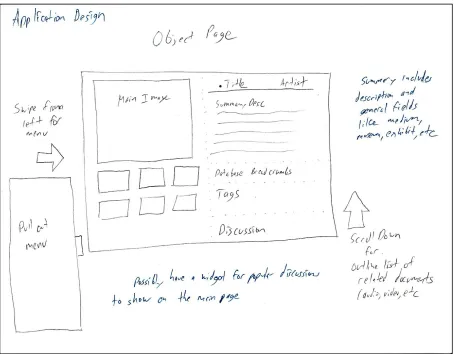
or browse related content. Figures 4a, b and c display the progression of design for the object
page layout.
Manually browsing for objects while at the physical location can be tedious and even
complicated when a user is not sure what piece they may be looking at. Live Tour allows for a
much simplified interaction with the piece via a number of automatic detection options. Simple
Quick Response codes (QR codes) could be posted on labels near a piece allowing the
application user to press a button that will use the device’s camera to scan the code and bring up
the object’s information right in the app. If a museum opts for beacon technology with their
wireless network the application can even use Global Positioning System (GPS) tracking of the
user device to know which piece they are closest to and display its information.
Once a user has started creating favorites and become used to the tagging system they can
constantly visits or comments on. The user can then select a favorite or tag of interest to get
random related pieces. This substantially increases the chance of interesting discoveries the user
would likely have never come in contact with. Museums a great distance away that also use the
database may have similar objects a visitor never would have discovered.
Discussion and Commentary
Each object and artist entry will have its own forum for users to comment on pieces or
discuss related topics of interest. This is not a single thread but open to creating new topics for
discussion. Moderation of these forums will be mostly community controlled with users being
able to report problems and super users, museum volunteers with extra granted rights, who will
be able to delete and clean up posts if necessary.
Accessibility
Optional features for accessibility are key to helping visitors better use the application.
Simple additions such as a read-back mode for text can be useful to everyone. Being able to
listen to content while browsing and viewing an object can provide a more immersive
experience. Subtitles on videos can allow them to browse video content in a quiet gallery without
disturbing other visitors. Adjustable dot-per-inch and font settings could allow for easier reading
on different size devices.
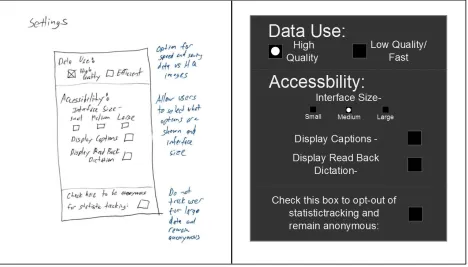
These settings will be accessible from the application menu allowing a user to choose
what accessibility features they want to see on pages (Figure 5). This prevents clutter if someone
should choose not to use them. Having a selection also provides statistics for interest in the
For this reason, the app may leave them anonymous or hidden from statistics when using
accessibility features. Such data is useful for museums to create more content and what types of
content are best suited for these tools. As a matter of privacy, giving users the option to be
excluded is recommended.
Big Data Visualization
Many museums using more modern websites and visitor tracking methods have started to
display visualizations of their big data. For example the Indianapolis Museum of Art’s
Dashboard shows visitors, Facebook fans, endowment data, and more in a visual graph form that
displays not only current data but history and trends. Others, such as SFMOMA’s ArtScope,
show graphical representations of search queries and database content. Views like these are not
exactly necessary to visitors but they are interesting to see and can help display popular trends in
content to aid in discovery. It can even encourage donations by providing concrete numbers and
trends in collection growth.
On the side of a curator, student, or volunteer, this data can be very useful. Trends show
what topics, museum types, locations, etc. are showing increased interest and which need to
evolve to bring in more visitors. This database takes that information a great deal further by
adding many more types of data and trends. These statistics can include hits on certain types of
media such as audio or video recording under specific types of art. The number of visitors using
accessibility features for different kinds of content. Even querying global hits to certain types of
exhibits by nation is possible. A database on this scale can query all kinds of interesting data for
On top of the application and web pages built in search functions the database would
benefit from the release of an Application Program Interface (API) for users. APIs allow tech
savvy users to query and pull content from the database to link to their own related websites or
acquire research statistics. The Natural History Museum in London has a Data Portal for their
specimen collection allowing visitors to search through their data but also includes access to their
API for more extensive access. Many scholarly users would find such a function very useful in a
database this size. However it could potentially run into issues with licensing as far as museum
membership content goes. Using it simply to sift through big data and statistics and not
necessarily content would be a good middle ground.
Web Accessible Version
In addition to the mobile application an HTML5 website to access the content is
recommended. As statistics show many visitors have smartphones now but there is still a large
population that does not, especially among older visitors. Many will also prefer to use a bigger
screen and keyboard/mouse to browse content while at home. Having multiple points of access
to the database that use the same user account and have similar interfaces will allow a larger
audience to gain access while also allowing for preferred mode of access, be it phone, tablet,
laptop or computer.
The use of the relatively new HTML5 technology would allow for fast and interactive
design very similar to the native application but accessed through a web browser. The overall
experience can be very similar, yet be easier to use for some due the physical interfaces of a
computer. A visitor may even elect to bring a laptop for the larger screen and keyboard, allowing
access could also allow for various new views and features which are not as practical on a
touchscreen device. For example big data views, graphs and advanced tag searches with visual
representations can be much easier to view and interact with on a large screen with a mouse.
A web-based version also has some benefits over a native device application even when
accessed from smartphones. For one, the access is live so there is no need to update a local
application to receive new content and fixes. Using the web standards also means that any
relatively recent device will be able to access the content. Blackberry or Ubuntu phones, for
example, would not have a native app developed due to cost constraints but would still be able to
access the web-based version. (Forbes, Proctor Chapter 3)
Future of Museums and Expected Impact
Research shows that visitors are coming to rely on technology in their daily lives at an
ever-increasing pace and younger generations continue that trend. To remain current museums
would benefit from new ways to organize and share their content with technology savvy visitors.
Current web and application offers are a start, but something on a larger and more
comprehensive scale will allow visitors to interact with content and each other instead of simply
browsing small blurbs of information. Creating such a system and maintaining hardware for
large scale internet offerings would be exceedingly costly however. Banding together as a
consortium of museums to create and maintain one shared system would be beneficial to all
organizations involved.
Having access to an application in the museum will get visitors to try it out and
recommend it to friends and family. With the addition of social features and competitive badges
classes using it for school projects will bring it home and expand into the family. Over a short
period of time many visitors from local areas of museums using the database will have
knowledge of or have used the application. Growing interest in these markets will help other
museums adopt the system allowing it to become more comprehensive and add more features.
In the not too distant future it is likely museums will be able to obtain visitor
memberships from people worldwide and not just locally. Opening market focus to everyone
who may be interested in the museum’s community, be it art, science or anything in between,
will increase visitor activity and potentially increase donations and funding. In the digital age
museums do not need to fight to maintain their local visitors and be isolated institutions. Banding
together in this digital age and creating consortia will lead to the creation of the new museum,
Design Prototypes
Figure 1 – Database Entry Example
Main Table (Required Fields):
● Title
○ The Thinker
● Creator/Source of Origin
○ Person: Auguste Rodin
● Date of Origin
○ Range: 1880-1881
● Owned by
○ Institution: Cleveland Museum of Art
● Location
○ Institution: Cleveland Museum of Art
● Object ID
○ Auto-generated value to link tables
Object Type Table:
● Sculpture
○ Medium
■ Bronze- Casted
○ Surface
■ Unpainted Subject Tag Tables:
● Human
○ Gender
■ Male
○ Hair Type
■ Short ○ Pose ■ Sitting ○ Clothing ■ Nude ● Damaged ○ Cause
■ Explosion- Bomb
○ Damaged Area
■ Legs
■ Base
○ Repairs
Figure 2 – User Page Design
The user page provides access to account settings. It lists current profile information
about the user such as name, email, memberships, and so on. It also gives access to adding new
Figure 3 – Pull-out Menu Design
The pull out menu is a quick way to access the various possible sections within the
application. Account and settings bring the user to said pages, while the other options are quick
Figure 4c – Object Page Example
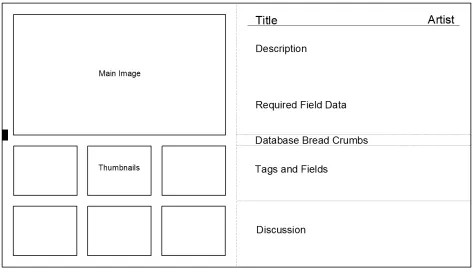
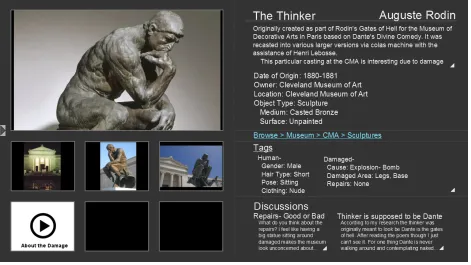
The object page is the main location for all data relating to any one piece in the
collection. As such, it has a great deal of sections all in one page. Keeping things separated
visually with a simple design keeps the information from all of the museums clear and intuitive.
The left side is dedicated to related documents, initially showing those with priority and the main
designated image. Thumbnails at the bottom can be clicked to bring them up to the larger view.
These thumbnails may include videos or text documents by name for quick and easy access to
often-viewed content.
The right of the page is focused on fields and text. Title and artist are easily seen at the
top. Beneath, the simple description and main required fields are listed as well as object type and
its additional fields. A simple breadcrumb menu follows displaying the way the user has reached
the tags that users most voted on and their additional information. Finally, popular discussions
are displayed with a small blurb from the first post.
All these sections are designed for quick general knowledge, but can easily be drilled
down for further access. Clicking the name of the section such as tags or discussions brings a
user further into that information. Clicking on the tag or discussion itself brings up that exact
area. The white arrows listed next to sections are visual cues to the user to expand that section to
take up the full right half of the screen for easier reading and un-displayed content. The right
Figure 5 – Settings Page Design
The settings page allows the user to set various features. Data use allows for the decision
between quick lower quality browsing which will help when on mobile data or high quality for
use on local wireless. The biggest features to control however are the accessibility options. Here,
the user can decide if pages will display extra buttons for read back or captions on videos as well
as the interface size for easier reading. The user may also choose to opt out of named statistics
Figure 6 – Badges Page Design
The badges page is accessed from the user’s account and allows them to see their own
statistics. A user can visualize how many posts they have seen, museums they have visited, and
their discussions record. This page also has rankings for these statistics and gives small visual
rewards on the user profile. This page shows the current number as well as the number required
Bibliography
Atkinson, Rebecca. "Museum Practice: How Are Museums Using Mobile?” October 14,
2013. Accessed February 16, 2015.
http://www.museumsassociation.org/museum-practice/mobile-in-museums-2013/15102013-mobile-survey-2013-results.
Bautista, Susana Smith. Museums in the Digital Age: Changing Meanings of Place,
Community, and Culture. Lanham, MD: Rowman & LIttlefield, 2014.
Beasely, Steven, and Annie Conway. "Digital Media in Everyday Life: A Snapshot of
Devices, Behaviors, and Attitudes." 2011. Accessed February 16, 2015.
http://www.msichicago.org/programs/digital-life.
Bere, Aaron and Patient Rambe. 2013. "Extending Technology Acceptance Model in
Mobile Learning Adoption: South African University of Technology Students' Perspectives."
Academic Conferences International Limited, 06. ProQuest.
"Collection." The Metropolitan Museum of Art. 2000-2015. Accessed February 16, 2015.
http://metmuseum.org/collection.
"Collections Search Center." Smithsonian Institution. 2014. Accessed February 16, 2015.
http://collections.si.edu/search/.
"Dashboard." Indianapolis Museum of Art. 2010. Accessed February 16, 2015.
http://dashboard.imamuseum.org/.
"Data Portal." Natural History Museum. Accessed April 5, 2015.
http://www.nhm.ac.uk/research-curation/research/informatics/creating-digital-infrastructure-science/data-portal/index.html.
"Digital Public Library of America Database." Digital Public Library of America.
Din, Herminia. The Digital Museum: A Think Guide. Washington, DC: American
Association of Museums, 2007.
Drotner, Kirsten. Museum Communication and Social Media: The Connected Museum.
London: Routledge, 2013.
"Explorer." American Museum of Natural History. Accessed February 16, 2015.
http://www.amnh.org/apps/explorer.
Falk, John H., and Lynn D. Dierking. Museum Experience Revisited. Walnut Creek: Left
Coast Press, 2012.
"Guggenheim App." Guggenheim. 2015. Accessed February 16, 2015.
http://www.guggenheim.org/new-york/visit/ap.
Lagoudi, E. and C. Sexton. “Old Masters at Your Fingertips: the Journey of Creating a
Museum App for the iPhone and iTouch.” In J. Trant and D. Bearman (eds). Museums and the
Web 2010: Proceedings. Toronto: Archives & Museum Informatics. March 31, 2010. Accessed
16, 2015. http://www.archimuse.com/mw2010/papers/lagoudi/lagoudi.html.
Leon, Sharon, Sheila Brennan, Dave Lester, and Andrea Odiorne. "Mobile for
Museums." Roy Rosenzweig Center for History and New Media RSS. 2009. Accessed February
16, 2015. http://chnm.gmu.edu/labs/mobile-for-museums/.
Lisney, Eleanor, Jonathan P. Bowen, Kirsten Hearn, and Maria Zedda. "Museums and
Technology: Being Inclusive Helps Accessibility for All." Curator: The Museum Journal 56, no.
3 (2013): 353-61. Accessed March 29, 2015. Art Full Text.
"The Louvre Audio Guide App." Louvre. Accessed February 16, 2015.
"Making Public Art More Public." Public Art Archive. Accessed February 16, 2015.
http://www.publicartarchive.org/.
Merritt, Elizabeth. "TrendsWatch 2014." American Alliance of Museums. 2014.
Accessed February 16, 2015.
http://www.aam-us.org/resources/center-for-the-future-of-museums/projects-and-reports/trendswatch.
"Mobile In Museums Study — 2012." American Alliance of Museums. 2012. Accessed
February 16, 2015. https://aam-us.org/docs/research/mobilemuseums2012-(aam).pdf.
"The MoMA iPhone App." Metropolitan Museum of Art. 2015. Accessed February 16,
2015. http://www.moma.org/explore/mobile/iphoneapp.
Petrie, M., and L. Tallon. “The Iphone Effect? Comparing Visitors’ and Museum
Professionals’ Evolving Expectations of Mobile Interpretation Tools.” In J. Trant and D.
Bearman (eds). Museums and the Web 2010: Proceedings. Toronto: Archives & Museum
Informatics. March 31, 2010. Accessed February 16, 2015.
http://www.archimuse.com/mw2010/papers/petrie/petrie.html.
Proctor, Nancy. Mobile Apps for Museums: The AAM Guide to Planning and Strategy.
Washington, DC: AAM Press, 2011.
Tallon, Loic. Digital Technologies and the Museum Experience: Handheld Guides and
Other Media. Lanham: AltaMira Press, 2008.
Tallon, Loic. "Mobile Strategy in 2013: An Analysis of the Annual Museums & Mobile
Survey." Museum Mobile. 2013. Accessed February 16, 2015.
http://www.museumsmobile.com/wp-content/uploads/2013/07/MMSurvey-2013-report-V2.pdf
Selwyn, Neil. "ICT for All? Access and Use of Public ICT Sites in the UK." Information,
"SFMOMA ArtScope." San Francisco Museum of Modern Art. 1998-2015. Accessed