x86-64
Assembly Language
Programming
with
Ubuntu
Top view of an Intel central processing unit Core i7 Skylake type core, model 6700K, released in June 2015.
Source: Eric Gaba, https://commons.wikimedia.org/wiki/File :
Intel_CPU_Core_i7_6700K_Skylake_top.jpg
Cover background:
By Benjamint444 (Own work)
Source: http://commons.wikimedia.org/wiki/File%3ASwirly_belt444.jpg
Copyright © 2015, 2016, 2017, 2018, 2019 by Ed Jorgensen
You are free:
To Share — to copy, distribute and transmit the work To Remix — to adapt the work
Under the following conditions:
Attribution — you must attribute the work in the manner specified by the author or licensor (but not in any way that suggests that they endorse you or your use of the work).
Noncommercial — you may not use this work for commercial purposes.
Table of Contents
Table of Contents
1.0 Introduction...1
1.1 Prerequisites...1
1.2 What is Assembly Language...2
1.3 Why Learn Assembly Language...2
1.3.1 Gain a Better Understanding of Architecture Issues...3
1.3.2 Understanding the Tool Chain...3
1.3.3 Improve Algorithm Development Skills...3
1.3.4 Improve Understanding of Functions/Procedures...3
1.3.5 Gain an Understanding of I/O Buffering...4
1.3.6 Understand Compiler Scope...4
1.3.7 Introduction Multi-processing Concepts...4
1.3.8 Introduction Interrupt Processing Concepts...4
1.4 Additional References...4
1.4.1 Ubuntu References...5
1.4.2 BASH Command Line References...5
1.4.3 Architecture References...5
1.4.4 Tool Chain References...5
1.4.4.1 YASM References...6
1.4.4.2 DDD Debugger References...6
2.0 Architecture Overview...7
2.1 Architecture Overview...7
2.2 Data Storage Sizes...8
2.3 Central Processing Unit...9
2.3.1 CPU Registers...10
2.3.1.1 General Purpose Registers (GPRs)...10
2.3.1.2 Stack Pointer Register (RSP)...12
2.3.1.3 Base Pointer Register (RBP)...12
2.3.1.4 Instruction Pointer Register (RIP)...12
2.3.1.5 Flag Register (rFlags)...12
2.3.1.6 XMM Registers...13
2.3.2 Cache Memory...14
2.4 Main Memory...15
2.6 Memory Hierarchy...17
2.7 Exercises...19
2.7.1 Quiz Questions...19
3.0 Data Representation...21
3.1 Integer Representation...21
3.1.1 Two's Complement...23
3.1.2 Byte Example...23
3.1.3 Word Example...24
3.2 Unsigned and Signed Addition...24
3.3 Floating-point Representation...24
3.3.1 IEEE 32-bit Representation...25
3.3.1.1 IEEE 32-bit Representation Examples...26
3.3.1.1.1 Example → -7.7510...26
3.3.1.1.2 Example → -0.12510...26
3.3.1.1.3 Example → 4144000016...27
3.3.2 IEEE 64-bit Representation...27
3.3.3 Not a Number (NaN)...27
3.4 Characters and Strings...27
3.4.1 Character Representation...28
3.4.1.1 American Standard Code for Information Interchange...28
3.4.1.2 Unicode...29
3.4.2 String Representation...29
3.5 Exercises...29
3.5.1 Quiz Questions...30
4.0 Program Format...33
4.1 Comments...33
4.2 Numeric Values...33
4.3 Defining Constants...34
4.4 Data Section...34
4.5 BSS Section...35
4.6 Text Section...36
4.7 Example Program...37
4.8 Exercises...39
4.8.1 Quiz Questions...39
5.0 Tool Chain...41
5.1 Assemble/Link/Load Overview...41
Table of Contents
5.2.1 Assemble Commands...43
5.2.2 List File...43
5.2.3 Two-Pass Assembler...45
5.2.3.1 First Pass...46
5.2.3.2 Second Pass...46
5.2.4 Assembler Directives...47
5.3 Linker...47
5.3.1 Linking Multiple Files...48
5.3.2 Linking Process...48
5.3.3 Dynamic Linking...49
5.4 Assemble/Link Script...50
5.5 Loader...51
5.6 Debugger...52
5.7 Exercises...52
5.7.1 Quiz Questions...52
6.0 DDD Debugger...55
6.1 Starting DDD...55
6.1.1 DDD Configuration Settings...57
6.2 Program Execution with DDD...57
6.2.1 Setting Breakpoints...57
6.2.2 Executing Programs...58
6.2.2.1 Run / Continue...60
6.2.2.2 Next / Step...60
6.2.3 Displaying Register Contents...60
6.2.4 DDD/GDB Commands Summary...62
6.2.4.1 DDD/GDB Commands, Examples...63
6.2.5 Displaying Stack Contents...65
6.2.6 Debugger Commands File (interactive)...65
6.2.6.1 Debugger Commands File (non-interactive)...66
6.2.6.2 Debugger Commands File (non-interactive)...66
6.3 Exercises...67
6.3.1 Quiz Questions...67
6.3.2 Suggested Projects...68
7.0 Instruction Set Overview...69
7.1 Notational Conventions...69
7.1.1 Operand Notation...70
7.3 Addresses and Values...73
7.4 Conversion Instructions...74
7.4.1 Narrowing Conversions...74
7.4.2 Widening Conversions...74
7.4.2.1 Unsigned Conversions...74
7.4.2.2 Signed Conversions...76
7.5 Integer Arithmetic Instructions...78
7.5.1 Addition...78
7.5.1.1 Addition with Carry...81
7.5.2 Subtraction...83
7.5.3 Integer Multiplication...87
7.5.3.1 Unsigned Multiplication...87
7.5.3.2 Signed Multiplication...91
7.5.4 Integer Division...94
7.6 Logical Instructions...101
7.6.1 Logical Operations...102
7.6.2 Shift Operations...103
7.6.2.1 Logical Shift...103
7.6.2.2 Arithmetic Shift...105
7.6.3 Rotate Operations...107
7.7 Control Instructions...108
7.7.1 Labels...109
7.7.2 Unconditional Control Instructions...109
7.7.3 Conditional Control Instructions...109
7.7.3.1 Jump Out of Range...112
7.7.4 Iteration...115
7.8 Example Program, Sum of Squares...117
7.9 Exercises...118
7.9.1 Quiz Questions...118
7.9.2 Suggested Projects...122
8.0 Addressing Modes...125
8.1 Addresses and Values...125
8.1.1 Register Mode Addressing...126
8.1.2 Immediate Mode Addressing...126
8.1.3 Memory Mode Addressing...126
8.2 Example Program, List Summation...129
8.3 Example Program, Pyramid Areas and Volumes...131
Table of Contents
8.4.1 Quiz Questions...136
8.4.2 Suggested Projects...139
9.0 Process Stack...141
9.1 Stack Example...141
9.2 Stack Instructions...142
9.3 Stack Implementation...143
9.3.1 Stack Layout...143
9.3.2 Stack Operations...145
9.4 Stack Example...147
9.5 Exercises...148
9.5.1 Quiz Questions...148
9.5.2 Suggested Projects...149
10.0 Program Development...151
10.1 Understand the Problem...151
10.2 Create the Algorithm...152
10.3 Implement the Program...154
10.4 Test/Debug the Program...156
10.5 Error Terminology...157
10.5.1 Assembler Error...157
10.5.2 Run-time Error...157
10.5.3 Logic Error...157
10.6 Exercises...158
10.6.1 Quiz Questions...158
10.6.2 Suggested Projects...158
11.0 Macros...161
11.1 Single-Line Macros...161
11.2 Multi-Line Macros...162
11.2.1 Macro Definition...162
11.2.2 Using a Macro...162
11.3 Macro Example...163
11.4 Debugging Macros...165
11.5 Exercises...165
11.5.1 Quiz Questions...165
11.5.2 Suggested Projects...166
12.0 Functions...167
12.2 Debugger Commands...168
12.2.1 Debugger Command, next...168
12.2.2 Debugger Command, step...168
12.3 Stack Dynamic Local Variables...168
12.4 Function Declaration...169
12.5 Standard Calling Convention...169
12.6 Linkage...170
12.7 Argument Transmission...171
12.8 Calling Convention...171
12.8.1 Parameter Passing...172
12.8.2 Register Usage...173
12.8.3 Call Frame...174
12.8.3.1 Red Zone...176
12.9 Example, Statistical Function 1 (leaf)...176
12.9.1 Caller...177
12.9.2 Callee...177
12.10 Example, Statistical Function2 (non-leaf)...178
12.10.1 Caller...179
12.10.2 Callee...180
12.11 Stack-Based Local Variables...183
12.12 Summary...186
12.13 Exercises...187
12.13.1 Quiz Questions...187
12.13.2 Suggested Projects...188
13.0 System Services...191
13.1 Calling System Services...191
13.2 Newline Character...192
13.3 Console Output...193
13.3.1 Example, Console Output...194
13.4 Console Input...197
13.4.1 Example, Console Input...198
13.5 File Open Operations...202
13.5.1 File Open...202
13.5.2 File Open/Create...203
13.6 File Read...204
13.7 File Write...205
13.8 File Operations Examples...205
Table of Contents
13.8.2 Example, File Read...211
13.9 Exercises...216
13.9.1 Quiz Questions...216
13.9.2 Suggested Projects...217
14.0 Multiple Source Files...219
14.1 Extern Statement...219
14.2 Example, Sum and Average...220
14.2.1 Assembly Main...220
14.2.2 Function Source...222
14.2.3 Assemble and Link...223
14.3 Interfacing with a High-Level Language...224
14.3.1 Example, C++ Main / Assembly Function...224
14.3.2 Compile, Assemble, and Link...225
14.4 Exercises...226
14.4.1 Quiz Questions...226
14.4.2 Suggested Projects...227
15.0 Stack Buffer Overflow...229
15.1 Understanding a Stack Buffer Overflow...230
15.2 Code to Inject...231
15.3 Code Injection...234
15.4 Code Injection Protections...235
15.4.1 Data Stack Smashing Protector (or Canaries)...235
15.4.2 Data Execution Prevention...236
15.4.3 Data Address Space Layout Randomization...236
15.5 Exercises...236
15.5.1 Quiz Questions...236
15.5.2 Suggested Projects...237
16.0 Command Line Arguments...239
16.1 Parsing Command Line Arguments...239
16.2 High-Level Language Example...240
16.3 Argument Count and Argument Vector Table...241
16.4 Assembly Language Example...242
16.5 Exercises...246
16.5.1 Quiz Questions...246
16.5.2 Suggested Projects...246
17.1 Why Buffer...249
17.2 Buffering Algorithm...251
17.3 Exercises...254
17.3.1 Quiz Questions...254
17.3.2 Suggested Projects...255
18.0 Floating-Point Instructions...257
18.1 Floating-Point Values...257
18.2 Floating-Point Registers...258
18.3 Data Movement...258
18.4 Integer / Floating-Point Conversion Instructions...260
18.5 Floating-Point Arithmetic Instructions...262
18.5.1 Floating-Point Addition...262
18.5.2 Floating-Point Subtraction...263
18.5.3 Floating-Point Multiplication...265
18.5.4 Floating-Point Division...267
18.5.5 Floating-Point Square Root...269
18.6 Floating-Point Control Instructions...271
18.6.1 Floating-Point Comparison...271
18.7 Floating-Point Calling Conventions...274
18.8 Example Program, Sum and Average...275
18.9 Example Program, Absolute Value...276
18.10 Exercises...277
18.10.1 Quiz Questions...278
18.10.2 Suggested Projects...278
19.0 Parallel Processing...279
19.1 Distributed Computing...280
19.2 Multiprocessing...280
19.2.1 POSIX Threads...281
19.2.2 Race Conditions...282
19.3 Exercises...285
19.3.1 Quiz Questions...285
19.3.2 Suggested Projects...286
20.0 Interrupts...287
20.1 Multi-user Operating System...287
20.1.1 Interrupt Classification...288
20.1.2 Interrupt Timing...288
Table of Contents
20.1.2.2 Synchronous Interrupts...288
20.1.3 Interrupt Categories...289
20.1.3.1 Hardware Interrupt...289
20.1.3.1.1 Exceptions...289
20.1.3.2 Software Interrupts...290
20.2 Interrupt Types and Levels...290
20.2.1 Interrupt Types...290
20.2.2 Privilege Levels...290
20.3 Interrupt Processing...292
20.3.1 Interrupt Service Routine (ISR)...292
20.3.2 Processing Steps...292
20.3.2.1 Suspension...292
20.3.2.2 Obtaining ISR Address...292
20.3.2.3 Jump to ISR...293
20.3.2.4 Suspension Execute ISR...293
20.3.2.5 Resumption...294
20.4 Suspension Interrupt Processing Summary...294
20.5 Exercises...295
20.5.1 Quiz Questions...295
20.5.2 Suggested Projects...296
21.0 Appendix A – ASCII Table...297
22.0 Appendix B – Instruction Set Summary...299
22.1 Notation...299
22.2 Data Movement Instructions...300
22.3 Data Conversion instructions...300
22.4 Integer Arithmetic Instructions...301
22.5 Logical, Shift, and Rotate Instructions...303
22.6 Control Instructions...305
22.7 Stack Instructions...307
22.8 Function Instructions...307
22.9 Floating-Point Data Movement Instructions...307
22.10 Floating-Point Data Conversion Instructions...308
22.11 Floating-Point Arithmetic Instructions...309
22.12 Floating-Point Control Instructions...313
23.0 Appendix C – System Services...315
23.1 Return Codes...315
23.3 File Modes...317
23.4 Error Codes...318
24.0 Appendix D – Quiz Question Answers...321
24.1 Quiz Question Answers, Chapter 1...321
24.2 Quiz Question Answers, Chapter 2...321
24.3 Quiz Question Answers, Chapter 3...322
24.4 Quiz Question Answers, Chapter 4...324
24.5 Quiz Question Answers, Chapter 5...325
24.6 Quiz Question Answers, Chapter 6...326
24.7 Quiz Question Answers, Chapter 7...327
24.8 Quiz Question Answers, Chapter 8...330
24.9 Quiz Question Answers, Chapter 9...331
24.10 Quiz Question Answers, Chapter 10...331
24.11 Quiz Question Answers, Chapter 11...332
24.12 Quiz Question Answers, Chapter 12...332
24.13 Quiz Question Answers, Chapter 13...333
24.14 Quiz Question Answers, Chapter 14...334
24.15 Quiz Question Answers, Chapter 15...334
24.16 Quiz Question Answers, Chapter 16...334
24.17 Quiz Question Answers, Chapter 17...335
24.18 Quiz Question Answers, Chapter 18...335
24.19 Quiz Question Answers, Chapter 19...336
24.20 Quiz Question Answers, Chapter 20...336
Table of Contents
Illustration Index
Illustration 1: Computer Architecture...7
Illustration 2: CPU Block Diagram...15
Illustration 3: Little-Endian Data Layout...16
Illustration 4: General Memory Layout...17
Illustration 5: Memory Hierarchy...18
Illustration 6: Overview: Assemble, Link, Load...42
Illustration 7: Little-Endian, Multiple Variable Data Layout...44
Illustration 8: Linking Multiple Files...49
Illustration 9: Initial Debugger Screen...56
Illustration 10: Debugger Screen with Breakpoint Set...58
Illustration 11: Debugger Screen with Green Arrow...59
Illustration 12: DDD Command Bar...60
Illustration 13: Register Window...61
Illustration 14: MOV Instruction Overview...71
Illustration 15: Integer Multiplication Overview...88
Illustration 16: Integer Division Overview...96
Illustration 17: Logical Operations...102
Illustration 18: Logical Shift Overview...104
Illustration 19: Logical Shift Operations...104
Illustration 20: Arithmetic Left Shift...106
Illustration 21: Arithmetic Right Shift...106
Illustration 22: Process Memory Layout...144
Illustration 23: Process Memory Layout Example...145
Illustration 24: Stack Frame Layout...175
Illustration 25: Stack Frame Layout with Red Zone...176
Illustration 26: Stack Call Frame Example...230
Illustration 27: Stack Call Frame Corruption...235
Illustration 28: Argument Vector Layout...242
Illustration 29: Privilege Levels...291
1.0 Introduction
The purpose of this text is to provide a reference for University level assembly language and systems programming courses. Specifically, this text addresses the x86-641 instruction set for the popular x86-64 class of processors using the Ubuntu 64-bit Operating System (OS). While the provided code and various examples should work under any Linux-based 64-bit OS, they have only been tested under Ubuntu 14.04 LTS (64-bit).
The x86-64 is a Complex Instruction Set Computing (CISC2) CPU design. This refers to the internal processor design philosophy. CISC processors typically include a wide variety of instructions (sometimes overlapping), varying instructions sizes, and a wide range of addressing modes. The term was retroactively coined in contrast to Reduced Instruction Set Computer (RISC3).
1.1 Prerequisites
It must be noted that the text is not geared toward learning how to program. It is assumed that the reader has already become proficient in a high-level programming language. Specifically, the text is generally geared toward a compiled, C-based high-level language such as C, C++, or Java. Many of the explanations and examples assume the reader is already familiar with programming concepts such as declarations, arithmetic operations, control structures, iteration, function calls, functions, indirection (i.e., pointers), and variable scoping issues.
Additionally, the reader should be comfortable using a Linux-based operating system including using the command line. If the reader is new to Linux, the Additional References section has links to some useful documentation.
1 For more information, refer to: http://en.wikipedia.org/wiki/X86-64
2 For more information, refer to: http://en.wikipedia.org/wiki/Complex_instruction_set_computing
Chapter
1
If you give someone a program, you will1.2 What is Assembly Language
The typical question asked by students is 'why learn assembly?'. Before addressing that question, let's clarify what exactly assembly language is.
Assembly language is machine specific. For example, code written for an x86-64 processor will not run on a different processor such as a RISC processor (popular in tablets and smart-phones).
Assembly language is a “low-level” language and provides the basic instructional interface to the computer processor. Assembly language is as close to the processor as you can get as a programmer. Programs written in a high-level language are translated into assembly language in order for the processor to execute the program. The high-level language is an abstraction between the language and the actual processor instructions. As such, the idea that “assembly is dead” is nonsense.
Assembly language gives you direct control of the system's resources. This involves setting processor registers, accessing memory locations, and interfacing with other hardware elements. This requires a significantly deeper understanding of exactly how the processor and memory work.
1.3 Why Learn Assembly Language
The goal of this text is to provide a comprehensive introduction to programming in assembly language. The reasons for learning assembly language are more about understanding how a computer works instead of developing large programs. Since assembly language is machine specific, the lack of portability is very limiting for programming projects.
The process of actually learning assembly language involves writing non-trivial programs to perform specific low-level actions including arithmetic operations, function calls, using stack-dynamic local variables, and operating system interaction for activities such as input/output. Just looking at small assembly language programs will not be enough.
In the long run, learning the underlying principles, including assembly language, is what makes the difference between a coding technician unable to cope with changing languages and a computer scientist who is able to adapt to the ever-changing technologies.
1.3.1 Gain a Better Understanding of Architecture Issues
Learning and spending some time working at the assembly language level provides a richer understanding of the underlying computer architecture. This includes the basic instruction set, processor registers, memory addressing, hardware interfacing, and Input/ Output. Since ultimately all programs execute at this level, knowing the capabilities of assembly language provides useful insights into what is possible, what is easy, and what might be more difficult or slower.
1.3.2 Understanding the Tool Chain
The tool chain is the name for the process of taking code written by a human and converting it into something that the computer can directly execute. This includes the compiler, or assembler in our case, the linker, the loader, and the debugger. In reference to compiling, beginning programmers are told “just do this” with little explanation of the complexity involved in the process. Working at the low-level can help provide the basis for understanding and appreciating the details of the tool chain.
1.3.3 Improve Algorithm Development Skills
Working with assembly language and writing low-level programs helps programmers improve algorithm development skills by practicing with a language that requires more thought and more attention to detail. In the highly unlikely event that a program does not work the first time, debugging assembly language also provides practice debugging and requires a more nuanced approach since just adding a bunch of output statements is more difficult at the assembly language level. This typically involves a more comprehensive use of a debugger which is a useful skill for any programmer.
1.3.4 Improve Understanding of Functions/Procedures
1.3.5 Gain an Understanding of I/O Buffering
In a high-level language, input/output instructions and the associated buffering operations can appear magical. Working at the assembly language level and performing some low-level input/output operations provides a more detailed understanding of how input/output and buffering really works. This includes the differences between interactive input/output, file input/output, and the associated operating system services. 1.3.6 Understand Compiler Scope
Programming with assembly language, after having already learned a high-level language, helps ensure programmers understand the scope and capabilities of a compiler. Specifically, this means learning what the compiler does and does not do in relation to the computer architecture.
1.3.7 Introduction Multi-processing Concepts
This text will also provide a brief introduction to multi-processing concepts. The general concepts of distributed and multi-core programming are presented with the focus being placed on shared memory, threaded processing. It is the author’s belief that truly understanding the subtle issues associated with threading such as shared memory and race conditions is most easily understood at the low-level.
1.3.8 Introduction Interrupt Processing Concepts
The underlying fundamental mechanism in which modern multi-user computers work is based on interrupts. Working at a low-level is the best place to provide an introduction to the basic concepts associated with interrupt handling, interrupt service handles, and vector interrupts.
1.4 Additional References
Some key references for additional information are noted in the following sections. These references provide much more extensive and detailed information.
1.4.1 Ubuntu References
There is significant documentation available for the Ubuntu OS. The principal user guide is as follows:
◦ Ubuntu Community Wiki
◦ Getting Started with Ubuntu 1 6 .04
In addition, there are many other sites dedicated to providing help using Ubuntu (or other Linux-based OS's).
1.4.2 BASH Command Line References
BASH is the default shell for Ubuntu. The reader should be familiar with basic command line operations. Some additional references are as follows:
◦ Linux Command Line (on-line Tutorial and text)
◦ An Introduction to the Linux Command Shell For Beginners (pdf)
In addition, there are many other sites dedicated to providing information regarding the BASH command shell.
1.4.3 Architecture References
Some key references published by Intel provide a detailed technical description of the architecture and programming environment of Intel processors supporting IA-32 and Intel 64 Architectures.
◦ Intel® 64 and IA-32 Architectures Software Developer's Manual: Basic Architecture.
◦ Intel 64 and IA-32 Architectures Software Developer's Manual: Instruction Set
Reference.
◦ Intel 64 and IA-32 Architectures Software Developer's Manual: System Programming Guide.
If the embedded links do not work, an Internet search can help find the new location. 1.4.4 Tool Chain References
1.4.4.1 YASM References
The YASM assembler is an open source assembler commonly available on Linux-based systems. The YASM references are as follows:
◦ Yasm Web Site ◦ Yasm Documentation
Additional information regarding YASM may be available a number of assembly language sites and can be found through an Internet search.
1.4.4.2 DDD Debugger References
The DDD debugger is an open source debugger capable of supporting assembly language.
◦ DDD Web Site ◦ DDD Documentation
2.0 Architecture Overview
This chapter presents a basic, general overview of the x86-64 architecture. For a more detailed explanation, refer to the additional references noted in Chapter 1, Introduction.
2.1 Architecture Overview
The basic components of a computer include a Central Processing Unit (CPU), Primary Storage or Random Access Memory (RAM), Secondary Storage, Input/Output devices (e.g., screen, keyboard, mouse), and an interconnection referred to as the Bus.
A very basic diagram of the computer architecture is as follows:
Illustration 1: Computer Architecture
Chapter
2
Warning, keyboard not found. Press enterto continue.
Screen / Keyboard /
Mouse Secondary Storage (i.e., SSD / Disk Drive / Other Storage Media)
Primary Storage Random Access Memory (RAM) CPU
BUS
The architecture is typically referred to as the Von Neumann Architecture4, or the Princeton architecture, and was described in 1945 by the mathematician and physicist John von Neumann.
Programs and data are typically stored on secondary storage (e.g., disk drive or solid state drive). When a program is executed, it must be copied from secondary storage into the primary storage or main memory (RAM). The CPU executes the program from primary storage or RAM.
Primary storage or main memory is also referred to as volatile memory since when power is removed, the information is not retained and thus lost. Secondary storage is referred to as non-volatile memory since the information is retained when powered off. For example, consider storing a term paper on secondary storage (i.e., disk). When the user starts to write or edit the term paper, it is copied from the secondary storage medium into primary storage (i.e., RAM or main memory). When done, the updated version is typically stored back to the secondary storage (i.e., disk). If you have ever lost power while editing a document (assuming no battery or uninterruptible power supply), losing the unsaved work will certainly clarify the difference between volatile and non-volatile memory.
2.2 Data Storage Sizes
The x86-64 architecture supports a specific set of data storage size elements, all based on powers of two. The supported storage sizes are as follows:
Storage Size (bits) Size (bytes)
Byte 8-bits 1 byte
Word 16-bits 2 bytes
Double-word 32-bits 4 bytes
Quadword 64-bits 8 bytes
Double quadword 128-bits 16 bytes
Lists or arrays (sets of memory) can be reserved in any of these types.
These storage sizes have a direct correlation to variable declarations in high-level languages (e.g., C, C++, Java, etc.).
For example, C/C++ declarations are mapped as follows:
C/C++ Declaration Storage Size (bits) Size (bytes)
char Byte 8-bits 1 byte
short Word 16-bits 2 bytes
int Double-word 32-bits 4 bytes
unsigned int Double-word 32-bits 4 bytes
long5 Quadword 64-bits 8 bytes
long long Quadword 64-bits 8 bytes
char * Quadword 64-bits 8 bytes
int * Quadword 64-bits 8 bytes
float Double-word 32-bits 4 bytes
double Quadword 64-bits 8 bytes
The asterisk indicates an address variable. For example, int * means the address of an integer. Other high-level languages typically have similar mappings.
2.3 Central Processing Unit
The Central Processing Unit6 (CPU) is typically referred to as the “brains” of the computer since that is where the actual calculations are performed. The CPU is housed in a single chip, sometimes called a processor, chip, or die7. The cover image shows one such CPU.
The CPU chip includes a number of functional units, including the Arithmetic Logic Unit8 (ALU) which is the part of the chip that actually performs the arithmetic and logical calculations. In order to support the ALU, processor registers9 and cache10 memory are also included “on the die” (term for inside the chip). The CPU registers and cache memory are described in subsequent sections.
It should be noted that the internal design of a modern processor is quite complex. This section provides a very simplified, high-level view of some key functional units within a CPU. Refer to the footnotes or additional references for more information.
5 Note, the 'long' type declaration is compiler dependent. Type shown is for gcc and g++ compilers. 6 For more information, refer to: http://en.wikipedia.org/wiki/Central_processing_unit
2.3.1 CPU Registers
A CPU register, or just register, is a temporary storage or working location built into the CPU itself (separate from memory). Computations are typically performed by the CPU using registers.
2.3.1.1 General Purpose Registers (GPRs)
There are sixteen, 64-bit General Purpose Registers (GPRs). The GPRs are described in the following table. A GPR register can be accessed with all 64-bits or some portion or subset accessed.
64-bit register Lowest 32-bits
Lowest 16-bits
Lowest 8-bits
rax eax ax al
rbx ebx bx bl
rcx ecx cx cl
rdx edx dx dl
rsi esi si sil
rdi edi di dil
rbp ebp bp bpl
rsp esp sp spl
r8 r8d r8w r8b
r9 r9d r9w r9b
r10 r10d r10w r10b
r11 r11d r11w r11b
r12 r12d r12w r12b
r13 r13d r13w r13b
r14 r14d r14w r14b
r15 r15d r15w r15b
When using data element sizes less than 64-bits (i.e., 32-bit, 16-bit, or 8-bit), the lower portion of the register can be accessed by using a different register name as shown in the table.
For example, when accessing the lower portions of the 64-bit rax register, the layout is as follows:
← eax → ← ax →
rax = ah al
As shown in the diagram, the first four registers, rax, rbx, rcx, and rdx also allow the bits 8-15 to be accessed with the ah, bh, ch, and dh register names. With the exception of ah, these are provided for legacy support and will not be used in this text.
The ability to access portions of the register means that, if the quadword rax register is set to 50,000,000,00010 (fifty billion), the rax register would contain the following value in hex.
rax = 0000 000B A43B 7400
If a subsequent operation sets the word ax register to 50,00010 (fifty thousand, which is C35016), the rax register would contain the following value in hex.
rax = 0000 000B A43B C350
In this case, when the lower 16-bit ax portion of the 64-bit rax register is set, the upper 48-bits are unaffected. Note the change in AX (from 740016 to C35016).
If a subsequent operation sets the byte sized al register to 5010 (fifty, which is 3216), the
rax register would contain the following value in hex.
rax = 0000 000B A43B C332
When the lower 8-bit al portion of the 64-bit rax register is set, the upper 56-bits are unaffected. Note the change in AL (from 5016 to 3216).
[image:25.540.110.455.119.175.2]2.3.1.2 Stack Pointer Register (RSP)
One of the CPU registers, rsp, is used to point to the current top of the stack. The rsp register should not be used for data or other uses. Additional information regarding the stack and stack operations is provided in Chapter 9, Process Stack.
2.3.1.3 Base Pointer Register (RBP)
One of the CPU registers, rbp, is used as a base pointer during function calls. The rbp register should not be used for data or other uses. Additional information regarding the functions and function calls is provided in Chapter 12, Functions.
2.3.1.4 Instruction Pointer Register (RIP)
In addition to the GPRs, there is a special register, rip, which is used by the CPU to point to the next instruction to be executed. Specifically, since the rip points to the next instruction, that means the instruction being pointed to by rip, and shown in the debugger, has not yet been executed. This is an important distinction which can be confusing when reviewing code in a debugger.
2.3.1.5 Flag Register (rFlags)
The flag register, rFlags, is used for status and CPU control information. The rFlag register is updated by the CPU after each instruction and not directly accessible by programs. This register stores status information about the instruction that was just executed. Of the 64-bits in the rFlag register, many are reserved for future use.
The following table shows some of the status bits in the flag register.
Name Symbol Bit Use
Carry CF 0 Used to indicate if the previous operation
resulted in a carry.
Parity PF 2 Used to indicate if the last byte has an even number of 1's (i.e., even parity).
Adjust AF 4 Used to support Binary Coded Decimal
operations.
Zero ZF 6 Used to indicate if the previous operation
Sign SF 7 Used to indicate if the result of the previous operation resulted in a 1 in the most significant bit (indicating negative in the context of signed data).
Direction DF 10 Used to specify the direction (increment or decrement) for some string operations. Overflow OF 11 Used to indicate if the previous operation
resulted in an overflow.
There are a number of additional bits not specified in this text. More information can be obtained from the additional references noted in Chapter 1, Introduction.
2.3.1.6 XMM Registers
There are a set of dedicated registers used to support 64-bit and 32-bit floating-point operations and Single Instruction Multiple Data (SIMD) instructions. The SIMD instructions allow a single instruction to be applied simultaneously to multiple data items. Used effectively, this can result in a significant performance increase. Typical applications include some graphics processing and digital signal processing.
The XMM registers as follows:
xmm13 xmm14 xmm15
Note, some of the more recent X86-64 processors support 256-bit XMM registers. This will not be an issue for the programs in this text.
Additionally, the XMM registers are used to support the Streaming SIMD Extensions (SSE). The SSE instructions are out of the scope of this text. More information can be obtained from the Intel references (as noted in Chapter 1, Introduction).
2.3.2 Cache Memory
Cache memory is a small subset of the primary storage or RAM located in the CPU chip. If a memory location is accessed, a copy of the value is placed in the cache. Subsequent accesses to that memory location that occur in quick succession are retrieved from the cache location (internal to the CPU chip). A memory read involves sending the address via the bus to the memory controller, which will obtain the value at the requested memory location, and send it back through the bus. Comparatively, if a value is in cache, it would be much faster to access that value.
A block diagram of a typical CPU chip configuration is as follows:
Current chip designs typically include an L1 cache per core and a shared L2 cache. Many of the newer CPU chips will have an additional L3 cache.
As can be noted from the diagram, all memory accesses travel through each level of cache. As such, there is a potential for multiple, duplicate copies of the value (CPU register, L1 cache, L2 cache, and main memory). This complication is managed by the CPU and is not something the programmer can change. Understanding the cache and associated performance gain is useful in understanding how a computer works.
2.4 Main Memory
Memory can be viewed as a series of bytes, one after another. That is, memory is byte addressable. This means each memory address holds one byte of information. To store a double-word, four bytes are required which use four memory addresses.
Additionally, architecture is little-endian. This means that the Least Significant Byte (LSB) is stored in the lowest memory address. The Most Significant Byte (MSB) is stored in the highest memory location.
Illustration 2: CPU Block Diagram
Core 0
L2 Cache
Core 1
L1 Cache L1 Cache
BUS
For a double-word (32-bits), the MSB and LSB are allocated as shown below.
31 30 29 28 27 26 25 24 23 22 21 20 19 18 17 16 15 14 13 12 11 10 9 8 7 6 5 4 3 2 1 0
MSB LSB
For example, assuming the value of, 5,000,00010 (004C4B4016), is to be placed in a double-word variable named var1.
For a little-endian architecture, the memory picture would be as follows:
Based on the little-endian architecture, the LSB is stored in the lowest memory address and the MSB is stored in the highest memory location.
variable name
value Address
(in hex)
? 0100100C
00 0100100B
4C 0100100A
4B 01001009
var1 → 40 01001008
? 01001007
2.5 Memory Layout
The general memory layout for a program is as shown:
The reserved section is not available to user programs. The text (or code) section is where the machine language11 (i.e., the 1's and 0's that represent the code) is stored. The data section is where the initialized data is stored. This includes declared variables that have been provided an initial value at assemble-time. The uninitialized data section, typically called BSS section, is where declared variables that have not been provided an initial value are stored. If accessed before being set, the value will not be meaningful. The heap is where dynamically allocated data will be stored (if requested). The stack starts in high memory and grows downward.
Later sections will provide additional detail for the text and data sections.
2.6 Memory Hierarchy
In order to fully understand the various different memory levels and associated usage, it is useful to review the memory hierarchy12. In general terms, faster memory is more expensive and slower memory blocks are less expensive. The CPU registers are small, fast, and expensive. Secondary storage devices such as disk drives and Solid State
11 For more information, refer to: http://en.wikipedia.org/wiki/Machine_code
high memory stack
. . . heap
BSS – uninitialized data data
text (code)
low memory reserved
Drives (SSD's) are larger, slower, and less expensive. The overall goal is to balance performance with cost.
An overview of the memory hierarchy is as follows:
Where the top of the triangle represents the fastest, smallest, and most expensive memory. As we move down levels, the memory becomes slower, larger, and less expensive. The goal is to use an effective balance between the small, fast, expensive memory and the large, slower, and cheaper memory.
Illustration 5: Memory Hierarchy
CPU Registers
Cache
Primary Storage Main Memory (RAM)
Secondary Storage (disk drives, SSD's, etc.)
Tertiary Storage
(remote storage, optical, backups, etc.) Smaller, faster, and more
expensive
Some typical performance and size characteristics are as follows:
Memory Unit Example Size Typical Speed
Registers 16, 64-bit registers ~1 nanoseconds13
Cache Memory 4 - 8+ Megabytes14
(L1 and L2)
~5-60 nanoseconds
Primary Storage (i.e., main memory)
2 – 32+ Gigabytes15 ~100-150 nanoseconds
Secondary Storage (i.e., disk, SSD's, etc.)
500 Gigabytes – 4+ Terabytes16
~3-15 milliseconds17
Based on this table, a primary storage access at 100 nanoseconds (100 ´ 10-9) is 30,000 times faster than a secondary storage access, at 3 milliseconds (3 ´ 10-3).
The typical speeds improve over time (and these are already out of date). The key point is the relative difference between each memory unit is significant. This difference between the memory units applies even as newer, faster SSDs are being utilized.
2.7 Exercises
Below are some questions based on this chapter. 2.7.1 Quiz Questions
Below are some quiz questions.
1) Draw a picture of the Von Neumann Architecture.
2) What architecture component connects the memory to the CPU? 3) Where are programs stored when the computer is turned off? 4) Where must programs be located when they are executing? 5) How does cache memory help overall performance?
6) How many bytes does a C++ integer declared with the declaration int use? 7) On the Intel X86-64 architecture, how many bytes can be stored at each address?
8) Given the 32-bit hex 004C4B4016 what is the: 1. Least Significant Byte (LSB)
2. Most Significant Byte (MSB)
9) Given the 32-bit hex 004C4B4016, show the little-endian memory layout showing each byte in memory.
10) Draw a picture of the layout for the rax register. 11) How many bits does each of the following represent:
1. al 2. rcx 3. bx 4. edx 5. r11 6. r8b 7. sil 8. r14w
12) Which register points to the next instruction to be executed? 13) Which register points to the current top of the stack?
14) If al is set to 0516 and ax is set to 000716, eax is set to 0000002016, and rax is set to 000000000000000016, and show the final complete contents of the complete
rax register.
15) If the rax register is set to 81,985,529,216,486,89510 (123456789ABCDEF16), what are the contents of the following registers in hex?
3.0 Data Representation
Data representation refers to how information is stored within the computer. There is a specific method for storing integers which is different than storing floating-point values which is different than storing characters. This chapter presents a brief summary of the integer, floating-point, and ASCII representation schemes.
It is assumed the reader is already generally familiar with binary, decimal, and hex numbering systems.
It should be noted that if not specified, a number is in base-10. Additionally, a number preceded by 0x is a hex value. For example, 19 = 1910 = 1316 = 0x13.
3.1 Integer Representation
Representing integer numbers refers to how the computer stores or represents a number in memory. The computer represents numbers in binary (1's and 0's). However, the computer has a limited amount of space that can be used for each number or variable. This directly impacts the size, or range, of the number that can be represented. For example, a byte (8-bits) can be used to represent 28 or 256 different numbers. Those 256 different numbers can be unsigned (all positive) in which case we can represent any number between 0 and 255 (inclusive). If we choose signed (positive and negative values), then we can represent any number between -128 and +127 (inclusive).
If that range is not large enough to handle the intended values, a larger size must be used. For example, a word (16-bits) can be used to represent 216 or 65,536 different values, and a double-word (32-bits) can be used to represent 232 or 4,294,967,296 different numbers. So, if you wanted to store a value of 100,000 then a double-word would be required.
Chapter
3
There are 10 types of people in the world;As you may recall from C, C++, or Java, an integer declaration (e.g., int <variable>) is a single double-word which can be used to represent values between -231 (−2,147,483,648) and +231 - 1 (+2,147,483,647).
The following table shows the ranges associated with typical sizes:
Size Size Unsigned Range Signed Range Bytes (8-bits) 28 0 to 255 -128 to +127
Words (16-bits) 216 0 to 65,535 −32,768 to +32,767
Double-words (32-bits) 232 0 to 4,294,967,295 −2,147,483,648 to
+2,147,483,647
Quadword 264 0 to 264 - 1 -(263) to 263 - 1
Double quadword 2128 0 to 2128 - 1 -(2127) to 2127 - 1
In order to determine if a value can be represented, you will need to know the size of the storage element (byte, word, double-word, quadword, etc.) being used and if the values are signed or unsigned.
• For representing unsigned values within the range of a given storage size,
standard binary is used.
• For representing signed values within the range, two's complement is used.
Specifically, the two's complement encoding process applies to the values in the negative range. For values within the positive range, standard binary is used.
For example, the unsigned byte range can be represented using a number line as follows:
For example, the signed byte range can also be represented using a number line as follows:
The same concept applies to halfwords and words which have larger ranges.
255 0
Since unsigned values have a different, positive only, range than signed values, there is overlap between the values. This can be very confusing when examining variables in memory (with the debugger).
For example, when the unsigned and signed values are within the overlapping positive range (0 to +127):
• A signed byte representation of 1210 is 0x0C16
• An unsigned byte representation of -1210 is also 0x0C16
When the unsigned and signed values are outside the overlapping range: • A signed byte representation of -1510 is 0xF116
• An unsigned byte representation of 24110 is also 0xF116
This overlap can cause confusion unless the data types are clearly and correctly defined.
3.1.1 Two's Complement
The following describes how to find the two's complement representation for negative values (not positive values).
To take the two's complement of a number: 1. take the one's complement (negate) 2. add 1 (in binary)
The same process is used to encode a decimal value into two's complement and from two's complement back to decimal. The following sections provide some examples. 3.1.2 Byte Example
For example, to find the byte size (8bits), two's complement representation of 9 and -12.
9 (8+1) = 00001001 12 (8+4) = 00001100
Step 1 11110110 Step 1: 11110011
Step 2 11110111 11110100
-9 (in hex) = F7 -12 (in hex) = F4
3.1.3 Word Example
To find the word size (16-bits), two's complement representation of -18 and -40.
18 (16+2) = 0000000000010010 40 (32+8) = 0000000000101000
Step 1 1111111111101101 Step 1 1111111111010111
Step 2 1111111111101110 Step 2 1111111111011000
-18 (hex) = 0xFFEE -40 (hex) = 0xFFD8
Note, all bits for the given size, words in these examples, must be specified.
3.2 Unsigned and Signed Addition
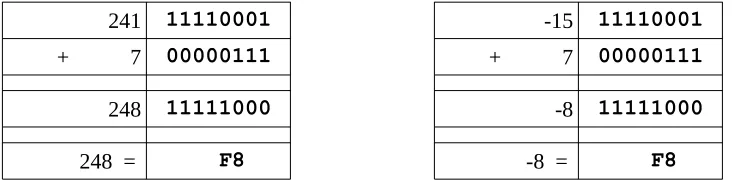
As previously noted, the unsigned and signed representations may provide different interpretations for the final value being represented. However, the addition and subtraction operations are the same. For example:
241 11110001 -15 11110001
+ 7 00000111 + 7 00000111
248 11111000 -8 11111000
248 = F8 -8 = F8
The final result of 0xF8 may be interpreted as 248 for unsigned representation and -8 for a signed representation. Additionally, 0xF816 is the º (degree symbol) in the ASCII table.
As such, it is very important to have a clear definition of the sizes (byte, halfword, word, etc.) and types (signed, unsigned) of data for the operations being performed.
3.3 Floating-point Representation
[image:38.540.92.458.312.405.2]3.3.1 IEEE 32-bit Representation
The IEEE 754 32-bit floating-point standard is defined as follows:
31 30 29 28 27 26 25 24 23 22 21 20 19 18 17 16 15 14 13 12 11 10 9 8 7 6 5 4 3 2 1 0
s biased exponent fraction
Where s is the sign (0 => positive and 1 => negative). More formally, this can be written as;
N = (−1)S × 1.F × 2E−127
When representing floating-point values, the first step is to convert floating-point value into binary. The following table provides a brief reminder of how binary handles fractional components:
23 22 21 20 2-1 2-2 2-3
... 8 4 2 1 . 1/2 1/4 1/8 ...
0 0 0 0 . 0 0 0
For example, 100.1012 would be 4.62510. For repeating decimals, calculating the binary value can be time consuming. However, there is a limit since computers have finite storage sizes (32-bits in this example).
The next step is to show the value in normalized scientific notation in binary. This means that the number should have a single, non-zero leading digit to the left of the decimal point. For example, 8.12510 is 1000.0012 (or 1000.0012 x 20) and in binary normalized scientific notation that would be written as 1.000001 x 23 (since the decimal point was moved three places to the left). Of course, if the number was 0.12510 the binary would be 0.0012 (or 0.0012 x 20) and the normalized scientific notation would be 1.0 x 2-3 (since the decimal point was moved three places to the right). The numbers after the leading 1, not including the leading 1, are stored left-justified in the fraction portion of the double-word.
The next step is to calculate the biased exponent, which is the exponent from the normalized scientific notation plus the bias. The bias for the IEEE 754 32-bit floating-point standard is 12710. The result should be converted to a byte (8-bits) and stored in the biased exponent portion of the word.
3.3.1.1 IEEE 32-bit Representation Examples
This section presents several examples of encoding and decoding floating-point representation for reference.
3.3.1.1.1 Example → -7.7510
For example, to find the IEEE 754 32-bit floating-point representation for -7.7510:
Example 1: -7.75
• determine sign -7.75 => 1 (since negative) • convert to binary -7.75 = -0111.112 • normalized scientific notation = 1.1111 x 22 • compute biased exponent 210 + 12710 = 12910
◦ and convert to binary = 100000012 • write components in binary:
sign exponent mantissa
1 10000001 11110000000000000000000
• convert to hex (split into groups of 4)
11000000111110000000000000000000 1100 0000 1111 1000 0000 0000 0000 0000 C 0 F 8 0 0 0 0 • final result: C0F8 000016
3.3.1.1.2 Example → -0.12510
For example, to find the IEEE 754 32-bit floating-point representation for -0.12510:
Example 2: -0.125
• determine sign -0.125 => 1 (since negative) • convert to binary -0.125 = -0.0012 • normalized scientific notation = 1.0 x 2-3 • compute biased exponent -310 + 12710 = 12410
◦ and convert to binary = 011111002 • write components in binary:
sign exponent mantissa
1 01111100 00000000000000000000000
• convert to hex (split into groups of 4)
3.3.1.1.3 Example → 4144000016
For example, given the IEEE 754 32-bit floating-point representation 4144000016 find the decimal value:
Example 3: 4144000016
• convert to binary
0100 0001 0100 0100 0000 0000 0000 00002 • split into components
0 10000010 100010000000000000000002
• determine exponent 100000102 = 13010 ◦ and remove bias 13010 - 12710 = 310 • determine sign 0 => positive
• write result +1.10001 x 23 = +1100.01 = +12.25
3.3.2 IEEE 64-bit Representation
The IEEE 754 64-bit floating-point standard is defined as follows:
63 62 52 51 0
s biased exponent fraction
The representation process is the same, however the format allows for an 11-bit biased exponent (which support large and smaller values). The 11-bit biased exponent uses a bias of ±1023.
3.3.3 Not a Number (NaN)
When a value is interpreted as a floating-point value and it does not conform to the defined standard (either for 32-bit or 64-bit), then it cannot be used as a floating-point value. This might occur if an integer representation is treated as a floating-point representation or a floating-point arithmetic operation (add, subtract, multiply, or divide) results in a value that is too large or too small to be represented. The incorrect format or unrepresentable number is referred to as a NaN which is an abbreviation for not a number.
3.4 Characters and Strings
Computer memory is designed to store and retrieve numbers. Consequently, the symbols are represented by assigning numeric values to each symbol or character. 3.4.1 Character Representation
In a computer, a character19 is a unit of information that corresponds to a symbol such as a letter in the alphabet. Examples of characters include letters, numerical digits, common punctuation marks (such as "." or "!"), and whitespace. The general concept also includes control characters, which do not correspond to symbols in a particular language, but to other information used to process text. Examples of control characters include carriage return or tab.
3.4.1.1 American Standard Code for Information Interchange
Characters are represented using the American Standard Code for Information Interchange (ASCII20). Based on the ASCII table, each character and control character is assigned a numeric value. When using ASCII, the character displayed is based on the assigned numeric value. This only works if everyone agrees on common values, which is the purpose of the ASCII table. For example, the letter “A” is defined as 6510 (0x41). The 0x41 is stored in computer memory, and when displayed to the console, the letter “A” is shown. Refer to Appendix A for the complete ASCII table.
Additionally, numeric symbols can be represented in ASCII. For example, “9” is represented as 5710 (0x39) in computer memory. The “9” can be displayed as output to the console. If sent to the console, the integer value 910 (0x09) would be interpreted as an ASCII value which in the case would be a tab.
It is very important to understand the difference between characters (such as “2”) and integers (such a 210). Characters can be displayed to the console, but cannot be used for calculations. Integers can be used for calculations, but cannot be displayed to the console (without changing the representation).
A character is typically stored in a byte (8-bits) of space. This works well since memory is byte addressable.
3.4.1.2 Unicode
It should be noted that Unicode21 is a current standard that includes support for different languages. The Unicode Standard provides series of different encoding schemes (UTF-8, UTF-16, UTF-32, etc.) in order to provide a unique number for every character, no matter what platform, device, application or language. In the most common encoding scheme, UTF-8, the ASCII English text looks exactly the same in UTF-8 as it did in ASCII. Additional bytes are used for other characters as needed. Details regarding Unicode representation are not addressed in this text.
3.4.2 String Representation
A string22 is a series of ASCII characters, typically terminated with a NULL. The NULL is a non-printable ASCII control character. Since it is not printable, it can be used to mark the end of a string.
For example, the string “Hello” would be represented as follows:
Character “H” “e” “l” “l” “o” NULL
ASCII Value (decimal) 72 101 108 108 111 0
ASCII Value (hex) 0x48 0x65 0x6C 0x6C 0x6F 0x0
A string may consist partially or completely of numeric symbols. For example, the string “19653” would be represented as follows:
Character “1” “9” “6” “5” “3” NULL
ASCII Value (decimal) 49 57 54 53 51 0
ASCII Value (hex) 0x31 0x39 0x36 0x35 0x33 0x0
Again, it is very important to understand the difference between the string “19653” (using 6 bytes) and the single integer 19,65310 (which can be stored in a single word which is 2 bytes).
3.5 Exercises
Below are some questions based on this chapter.
3.5.1 Quiz Questions Below are some quiz questions.
1) Provide the range for each of the following: 1. signed byte
2. unsigned byte 3. signed word 4. unsigned word 5. signed double-word 6. unsigned double-word
2) Provide the decimal values of the following binary numbers: 1. 00001012
2. 00010012 3. 00011012 4. 00101012
3) Provide the hex, byte size, two's complement values of the following decimal values. Note, two hex digits expected.
1. -310 2. +1110 3. -910 4. -2110
4) Provide the hex, word size, two's complement values of the following decimal values. Note, four hex digits expected.
5) Provide the hex, double-word size, two's complement values of the following decimal values. Note, eight hex digits expected.
1. -1110 2. -2710 3. +710 4. -26110
6) Provide the decimal values of the following hex, double-word sized, two's complement values.
1. FFFFFFFB16 2. FFFFFFEA16 3. FFFFFFF316 4. FFFFFFF816
7) Which of the following decimal values has an exact representation in binary? 1. 0.1
2. 0.2 3. 0.3 4. 0.4 5. 0.5
8) Provide the decimal representation of the following IEEE 32-bit floating-point values.
9) Provide hex, IEEE 32-bit point representation of the following floating-point values.
1. +11.2510 2. -17.12510 3. +21.87510 4. -0.7510
10) What is the ASCII code, in hex, for each of the following characters: 1. “A”
2. “a” 3. “0” 4. “8” 5. tab
11) What are the ASCII values, in hex, for each of the following strings: 1. “World”
4.0 Program Format
This chapter summarizes the formatting requirements for assembly language programs. The formatting requirements are specific to the yasm assembler. Other assemblers may be slightly different. A complete assembly language program is presented to demonstrate the appropriate program formatting.
A properly formatted assembly source file consists of several main parts; • Data section where initialized data is declared and defined. • BSS section where uninitialized data is declared.
• Text section where code is placed.
The following sections summarize the basic formatting requirements. Only the basic formatting and assembler syntax are presented. For additional information, refer to the yasm reference manual (as noted in Chapter 1, Introduction).
4.1 Comments
The semicolon (;) is used to note program comments. Comments (using the ;) may be placed anywhere, including after an instruction. Any characters after the ; are ignored by the assembler. This can be used to explain steps taken in the code or to comment out sections of code.
4.2 Numeric Values
Number values may be specified in decimal, hex, or octal.
When specifying hex, or base-16 values, they are preceded with a 0x. For example, to specify 127 as hex, it would be 0x7f.
When specifying octal, or-base-8 values, they are followed by a q. For example,
Chapter
4
I would love to change the world, but theyto specify 511 as octal, it would be 777q.
The default radix (base) is decimal, so no special notation is required for decimal (base-10) numbers.
4.3 Defining Constants
Constants are defined with equ. The general format is: <name> equ <value>
The value of a constant cannot be changed during program execution.
The constants are substituted for their defined values during the assembly process. As such, a constant is not assigned a memory location. This makes the constant more flexible since it is not assigned a specific type/size (byte, word, double-word, etc.). The values are subject to the range limitations of the intended use. For example, the following constant,
SIZE equ 10000
could be used as a word or a double-word, but not a byte.
4.4 Data Section
The initialized data must be declared in the "section .data" section. There must be a space after the word 'section'. All initialized variables and constants are placed in this section. Variable names must start with a letter, followed by letters or numbers, including some special characters (such as the underscore, "_"). Variable definitions must include the name, the data type, and the initial value for the variable.
The general format is:
<variableName> <dataType> <initialValue>
Refer to the following sections for a series of examples using various data types. The supported data types are as follows:
Declaration
dw 16-bit variable(s)
dd 32-bit variable(s)
dq 64-bit variable(s)
ddq 128-bit variable(s) → integer
dt 128-bit variable(s) → float
These are the primary assembler directives for initialized data declarations. Other directives are referenced in different sections.
Initialized arrays are defined with comma separated values. Some simple examples include:
bVar db 10 ; byte variable
cVar db "H" ; single character
strng db "Hello World" ; string
wVar dw 5000 ; word variable
dVar dd 50000 ; 32-bit variable
arr dd 100, 200, 300 ; 3 element array
flt1 dd 3.14159 ; 32-bit float
qVar dq 1000000000 ; 64-bit variable
The value specified must be able to fit in the specified data type. For example, if the value of a byte sized variables is defined as 500, it would generate an assembler error.
4.5 BSS Section
Uninitialized data is declared in the "section .bss" section. There must be a space after the word 'section'. All uninitialized variables are declared in this section. Variable names start with a letter followed by letters or numbers including some special characters (such as the underscore, "_"). Variable definitions must include the name, the data type, and the count.
The general format is:
<variableName> <resType> <count>
Declaration
resb 8-bit variable(s)
resw 16-bit variable(s)
resd 32-bit variable(s)
resq 64-bit variable(s)
resdq 128-bit variable(s)
These are the primary assembler directives for uninitialized data declarations. Other directives are referenced in different sections.
Some simple examples include:
bArr resb 10 ; 10 element byte array
wArr resw 50 ; 50 element word array
dArr resd 100 ; 100 element double array
qArr resq 200 ; 200 element quad array
The allocated array is not initialized to any specific value.
4.6 Text Section
The code is placed in the "section .text" section. There must be a space after the word 'section'. The instructions are specified one per line and each must be a valid instruction with the appropriate required operands.
The text section will include some headers or labels that define the initial program entry point. For example, assuming a basic program using the standard system linker, the following declarations must be included.
global _start _start:
4.7 Example Program
A very simple assembly language program is presented to demonstrate the appropriate program formatting.
; Simple example demonstrating basic program format and layout.
; Ed Jorgensen ; July 18, 2014
; ************************************************************ ; Some basic data declarations
section .data
;
---; Define constants
EXIT_SUCCESS equ 0 ; successful operation SYS_exit equ 60 ; call code for terminate
;
---; Byte (8-bit) variable declarations
bVar1 db 17 bVar2 db 9 bResult db 0
;
---; Word (16-bit) variable declarations
wVar1 dw 17000 wVar2 dw 9000 wResult dw 0
;
---; Double-word (32-bit) variable declarations
;
---; quadword (64-bit) variable declarations
qVar1 dq 170000000 qVar2 dq 90000000 qResult dq 0
; ************************************************************ ; Code Section
section .text global _start _start:
; Performs a series of very basic addition operations ; to demonstrate basic program format.
; ---; Byte example
; bResult = bVar1 + bVar2
mov al, byte [bVar1] add al, byte [bVar2] mov byte [bResult], al
; ---; Word example
; wResult = wVar1 + wVar2
mov ax, word [wVar1] add ax, word [wVar2] mov word [wResult], ax
;
---; Double-word example ; dResult = dVar1 + dVar2
;
---