Web Based Document Archiving Using Time
Stamp and Barcode Technologies – A Case of
the University of Zambia
Brian M. Mutale1, Jackson Phiri2
P.G. Student, Department of Electrical and Electronic Engineering, School of Engineering, University of Zambia,
Lusaka, Zambia1
Head, Department of Computer Science, School of Natural Sciences, University of Zambia, Lusaka, Zambia2
ABSTRACT: Documents need to be sorted, searched, accessed, copied, modified and sometimes transmitted over a
computer network using a document archiving system. A document archiving system is a system used to manage, store electronic documents and send alarms at given times. Documents in the archives refers to information which is not required on a day to day basis, but which needs to be retained for a certain period, and also information which is retained in perpetuity and referred to infrequently but periodically [17]. In this study, we are proposing a document archiving system which will integrate barcoding, time stamping and mobile technologies to improving on the achieving and retrieval processes. We begin this study with the baseline line study in an effort to establish the challenges faced by institutions of learning in document archiving. The study is based on the University of Zambia (UNZA), a public learning institution. The results from our study indicate that 70% of the offices use the manual box file system in Document achieving. They also lack storage space for box files with 80% having difficulties in retrieving old documents. Based on this study, we designed and implemented a document archiving system. The system was developed in C#. It has time stamp integrated with short messaging system (SMS) for reminders and barcode which is electronically stapled on the soft copies before being archived to improve on the identity of the document.
KEYWORDS:Document, Archive, Barcode, Timestamp, Email, Short Message Service (SMS)
I. INTRODUCTION
Organizations in this digital age deal with large number of papers in their day to day activities. The documents are either confidential or accessible to everyone in an organization. Documents need to be sorted, searched, accessed, copied, modified and sometimes transmitted over a computer network [18]. A document archiving system is a system used to track, manage and store electronic documents. This system would be capable of keeping a record of the various versions created and modified by different users (history tracking). Documents in the archives refers to information which is not required on a day to day basis, but which needs to be retained for a certain period, and also information which is retained in perpetuity and referred to infrequently but periodically. Such data is often removed from the day today processing, thereby reducing the overheadon storage and processing resources. [1], [2].
Changes in technology will ensure that over relatively short periods of time, both the media and the technical format of old digital materials will become unusable. Keeping digital records usable by the future generations requires conscious effort and continual investment. [22]. One of the key issues facing organisations in the digital age is the long-term preservation and management of digital information to support organisational sustainability, accountability and decision-making effectiveness. [4]
II. LITERATURE REVIEW
2.1 Barcode Technology
According to Dr. Neeraj Bhargava in article [5], there is increased interest in the use of barcodes to encode more information per area unit than regular, black and-white barcodes. A barcode is a series of bars and spaces arranged according to a set of rules that determines how data is to be represented
.
On the other hand, Larry Krummel [2] states that barcodes may be added to the document imaging environment to implement various strategies to reduce errors, increase system throughput and save money by more fully utilizing capital equipment and by reducing the cost of labor required for a given document imaging application. The UNZADOC archiving system is able to add barcode on system pages and subsequently documents retrieved when needed using a barcode reader.2.2 Time stamping
A digital timestamp provides evidence about the existence of a document at the time of stamping. The stamping time is linked to a digest (hash) of the document with the help of a digital signature, to ensure the timestamp’s integrity. The time information in the timestamp can be used to keep track of timeliness of critical transactions, e.g. the creation, submission or delivery of a document. The digital signature in the timestamp provides the additional security that the document has not been manipulated or replaced in the process or in the archive after it was time stamped. [7]. When used in the context of electronic archiving, a time-stamp token may be applied to the deposit proving that the document was archived before the date and time included in the time-stamp token. [8]. Electronics reminders would be sent using email and Short Message Service (SMS) to remind employees of certain activities that would need action.
III. RELATED WORK
There are currently a wide range of electronic document archiving systems offered by many providers that vary greatly in terms of simplicity or robustness. Eleven related systems were studied, in this paper, we only review SharePoint, Moodle, OpenKM, docSTAR eclipse and Oracle Data Capture.
3.1 SharePoint (Microsoft)
Microsoft SharePoint is a browser-based collaboration and document management system platform. It is used to host websites that access shared workspaces and documents, as well as specialised applications like wikis and blogs from the browser. [9] SharePoint is a tool to connect people and information. It provides a central site for sharing information with other users. SharePoint is web-based and accessible from anywhere in the world via an internet connection. SharePoint provides places to store and share ideas, information, communication and documents. The sites facilitate team participation. A SharePoint Site can have many subsites. Similar to storing files in folders, you can store them within SharePoint sites. However, SharePoint takes file storage to a new level by providing communities for team collaboration. You can create and use a SharePoint site for any purpose. For example, you can build a site to serve as a primary web site for a team or create a site to facilitate a meeting. [10], [20].
3.2Moodle
collection and organisation of student grades, online questionnaires, online quizzes and tracking tools. This system provides services that enable students to shift from passive to active learners where they can actively participate in the on-line learning process. [11], [12].
3.3 OpenKM
OpenKM is a web base document management application that uses standards and Open Source technologies. OpenKM is a Free/Libre document management system that provides a web interface for managing arbitrary files. OpenKM provides full document management capabilities including version control and file history, metadata, scanning, workflow, search, and more. It also allows the social activities around content to be used to connect people to other people, information to information, and people to information; helping to manage, more efficiently, the collective intelligence of the human resources of the company. OpenKM integrates all essential document management, collaboration and advanced search functionality into one easy to use solution. OpenKM builds a highly valuable repository of corporate information assets to facilitate knowledge creation and improve business decision making. [13]
3.4 docSTAR Eclipse
The docSTAR eclipse is an Enterprise Content Management (ECM) System intended for enterprise initiatives moving from paper-based processes to a fully electronic document system. The solution specializes in accounts payable automation, and best fits HR departments seeking to conform to electronic documents. One other unique feature of eclipse: its right-hand panel within the interface, called the Buzz Space, is a company-customized bulletin board. Companies can place any message, such as announcements, alerts, photos, and more. [14]
3.5 Oracle Document Capture
In [15], Oracle states that organizations lose vast amounts of time and knowledge every day. Employees store files on their laptops, keep paper-based copies of critical information, and fail to document and save critical meeting minutes and other verbal communications. These actions all lead to inefficient processes, inaccurate data, and missing information that costs money; a lot of money. Oracle Document Capture enables organizations to effectively capture, intelligently index, and efficiently archive mission-critical business content. With Oracle Document Capture, you can electronically process important information locked in paper documents. This can help you improve employee productivity and collaboration, reduce transaction times, and increase document security. For both paper-based and electronic document capture, this fully integrated solution automates back-office business processes and complements existing applications. [21]
However, these systems are expensive to purchase and maintain and they also lack combined features of barcode and time stamping (electronic reminders)
IV. METHODOLOGY
4.1 APPLICATION DESIGN
The purpose of this web based document archiving system is to attach barcodes for identifying documents and easy retrieval. The system will also be able to produce reminders through SMS or Email so that users are reminded of schedules for meetings and expiry dates for memorandum of understanding (MoUs) documents with other universities and organizations. The top down approach was used in order to show the modules of the system.
Below is the HIPO Chart:
Figure 1: Application Design
The HIPO Chart shows the modules that the system contain. When a user login, four menus will be displayed, that is; Home, Document, Log in/ out and About menus. The user would be able to perform various activities as shown in the diagram above.
4.2USE CASE DIAGRAM
A use case diagram is a sub class of behavioural diagrams and it is one of the Object Oriented Diagrams. It shows how a system interacts with the external entities. So, it is relatively sparse about the details of how the system behaves internally and how the external environment is configured. Indeed, Use Case Diagram shows what we want the system to do rather than describe how it can be accomplished. Below is a use case diagram for Administrator:
Welcome
Main Form
Home Document Log In/ Out About
Create Save Open Print Scan
Doc Reminder Set Convert
Email Attach
Barcode
Create Doc
Figure 2: Administrator functions
The use case above shows the activities of the Administrator, that is, to add users, manipulate system modules whenever necessary.
Below is a use case diagram for other users:
Secretary
Other User e.g. HoD
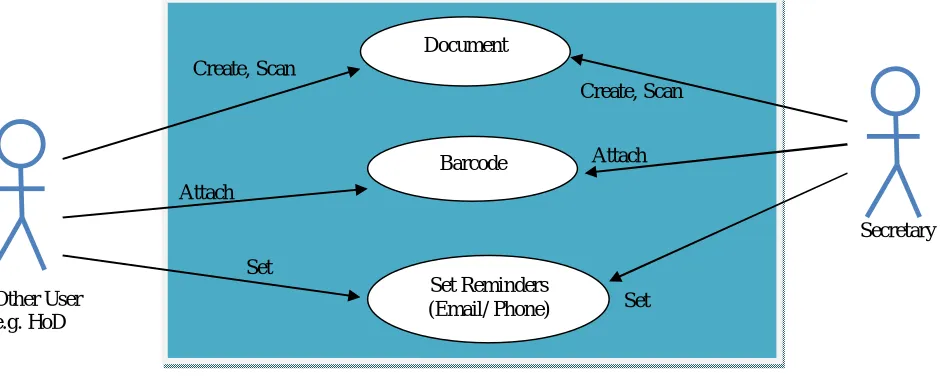
Figure 3: Other users use cases
The use cases above shows the activities which would be performed by a normal user. A normal user would be able to create documents, save them on the computer, attach barcode and set system reminders (alarms) through Emails and Short Message Service (SMS).
4.3 SEQUENCE DIAGRAM
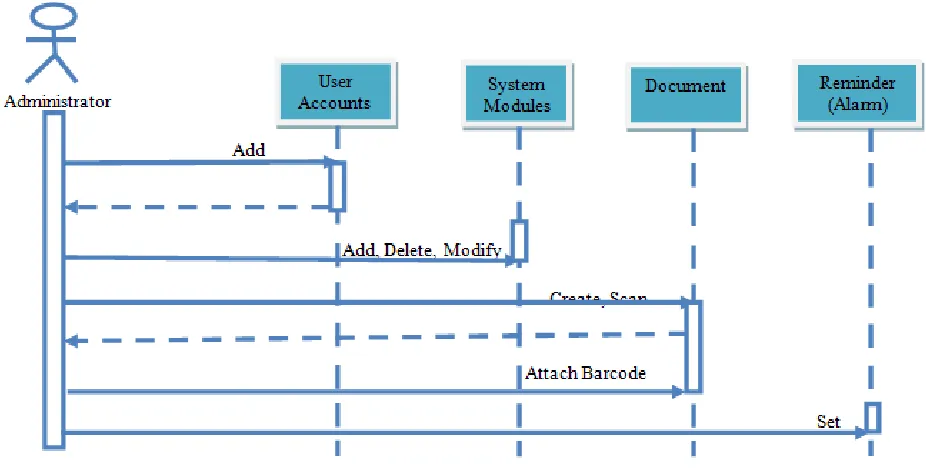
Typically, a sequence diagram captures the behavior of a single scenario. The diagram shows a number of example objects and the messages that are passed between these objects within the use case. Sequence Diagrams are interaction diagrams that detail how operations are carried out and how groups of objects collaborate in some behavior over time. [16]
User
Accounts
System Modules
Document
Set Reminders (Email/ Phone)
Barcode Create, Scan
Create, Scan
Attach
Attach
Set
Set Add, Delete,
Modify Add
IV. EXPERIMENTAL RESULTS
In an attempt to gather useful and reliable information, a quantitative research was conducted using questionnaires and verbal interviews conducted among secretaries and clerks from various schools, departments and units. A manual filing system is used at UNZA. The results indicate that 70% of the offices lack storage space for box files while 50% have difficulties in retrieving old documents. Our baseline study also reviewed that 90% of the staff involved in various ways of arching information are able to use office and basic desktop application software and the Internet effectively. The graph below shows the baseline study that was carried out on the manual system at UNZA.
The baseline study above was undertaken to determine the lack of storage space for box files and folders. It was also carried to determine difficulties that users face to retrieve old record and the ability to use a computer.
The graph below shows the baseline study that was carried on secretaries to determine computer literacy.
Figure 6: Computer Literacy
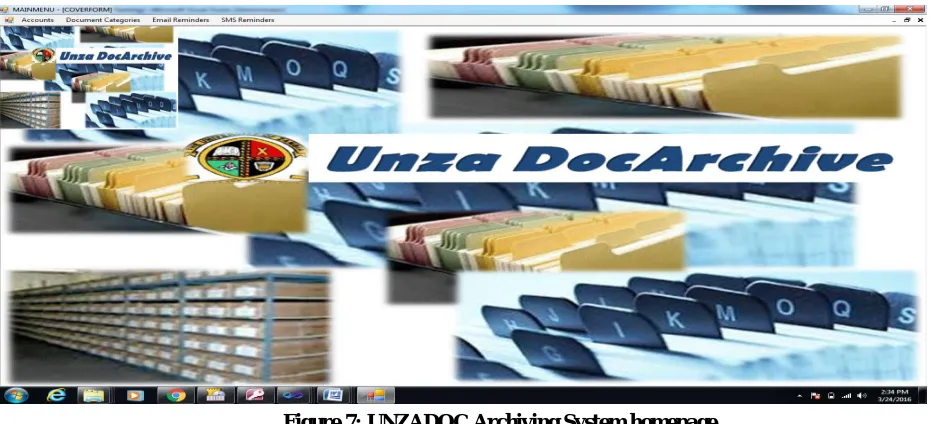
These results were used to come up with a conceptual model for the document achieving. The developed model is a web based document archiving system that integrates bar-coding to improve on identity and retrieval of documents. It will also integrate time stamping for reminders through pop-ups, emails and Short Message Service (SMS) systems. The figure below shows the homepage of the UNZADOC Archiving System after the user login:
Figure 7: UNZADOC Archiving System homepage
Using the model in objective 2, a prototype was developed using the waterfall agile method. The database has been done as well. The functionality for storing and retrieving of the document has been completed. This includes archiving
MS Office Packages, Internet
P
er
ce
n
tage
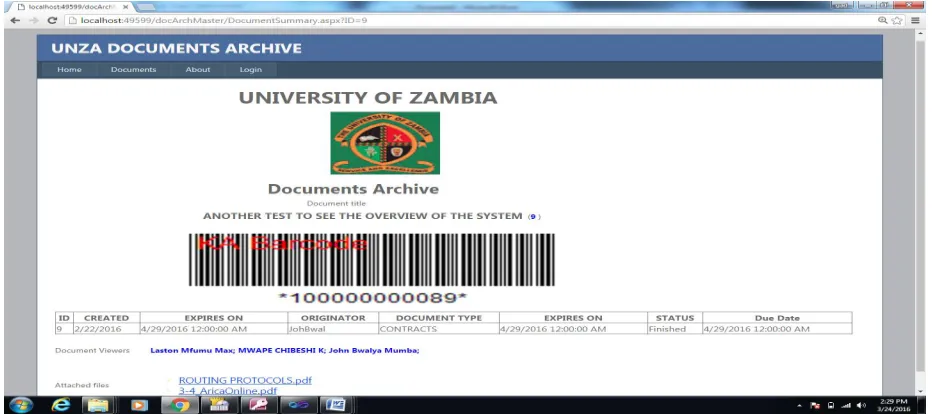
documents such as Memos, Contracts, Minutes and Memorandum of Understanding (MoUs) with other Universities and organizations. The time stamp module has been done using pop up, email and SMS. The time stamp gives notices when a particular document is due. Barcode has also been done. The figure below shows a barcode inserted on a document:
Figure 8: Barcode inserted on document
Each document is stamped with a barcode to improve for identity and quick retrieval. The type of barcode inserted on the documents are of type 1D (one dimension), there being 2D (two dimension) which are QR codes.
Figure 9: Barcode reader - easy access
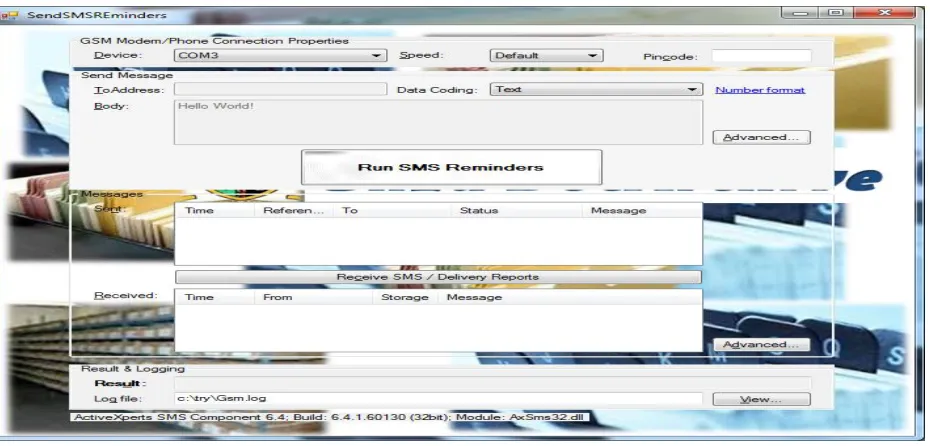
The figure below shows an SMS reminder sent using a Modem:
Figure 10: SMS Reminder
The users would also be able to send reminders through Emails and Short Message Service (SMS). These reminders would serve as alarms as to when activities, events or documents are due for action.
V. Conclusion
Electronic records created by email, word processing, spreadsheet and imaging applications (such as text documents and still and moving images), which are identified to be of business value, should be managed within electronic records management systems that meet the functional requirements. Records managed by an electronic records management system may be stored on a variety of different media formats, and may be managed in hybrid record aggregations that include both electronic and non-electronic elements. Electronic Records Management Systems provide the technological component of a framework for the systematic and structured management of records; they link electronic and non-electronic records to business activities, retain records of past actions, and fix the content and structure of records over time. This ensures that the electronic records (e-records) generated can be preserved while maintaining its authenticity, reliability, integrity, usability, and accessibility at any time.
REFERENCES
[1] Yeh Y. L and Jong G-J, 2D Bar-Code Technology Applications in Medical Information Management, 8th Int. Conf. on Intelligent Systems Design and Applications, Vol 28, page 305 – 308, 2008.
[2] Krummel, L., Bar Codes in Document Imaging, ALLMYPAPERS.INC, pages 1 – 10, 2009. [3] Choudhary, P. and Shokeen, A. Document Management: tools and techniques article, 2012.
[4] Queensland State Archives Digital archiving discussion paper: Informing an approach to the long-term management and preservation of government digital records. Available Online: http://creativecommons.org/licenses/by/_._/au./, 2010.
[5] Neeraj, B., Demonstration of Barcodes to QR Codes through Text Using Document Software, Vol. 3, Issue 9, September 2014. [7] neXus Timestamp Server product sheetneXus journals, Available Online: www.nexusgroup.com, 2014.
[10] Microsoft SharePoint whitepaper, University of New Orleans, United States of America. Available Online: https://sharepoint.uno.edu:26000/default.aspx., 2014.
[11] Martinez, M., Moodle: A Low-Cost Solution for Successful e-Learning, David Holcombe, Santa Rosa, United States of America., 2008. [12] Guenaneche, H. C. and Radigales, F. G., E-learning Platforms: Moodle and Dokeos. Available Online: http://www.elearningworkshops.com,
2008
[13] OpenKM, Open Source Document Management,Online. Available: http://www.openkm.com/en/, 2012 [14] Bunte, M. P ,, docSTAR eclipse, Available online: http://www.docstar.com, 2015.
[15] Oracle Document Capture, white paper, Oracle Data Sheet, Available Online: oracle.com, 2008.
[16] Felici, M., Sequence Diagrams. New Jersey: School of Informatics, 2011.
[17] Neopost, Electronic Document Management System, Online. Available: www.neopost.co.uk., 2013.
[18] Farik, M. Y. S. at.el, Document Imaging Systems Journal: key to electronic government in Malaysia. Available Online: http://www.ibimapublishing.com/journals/JEGSBP/ jegsbp.html Vol., Article ID 813242, 10 pages., 2010
[19] Steffen, W. S. and Andreas, R., Long-term archiving of digital data on microfilm Journal, Int. J. Electronic Governance, Vol. 3, No. 3, 2010.