
Available Online atwww.ijcsmc.com
International Journal of Computer Science and Mobile Computing
A Monthly Journal of Computer Science and Information Technology
ISSN 2320–088X
IMPACT FACTOR: 6.017
IJCSMC, Vol. 6, Issue. 12, December 2017, pg.44 – 54
Survey on Access Control and Management
Issues in Cloud and BYOD Environment
Khalid Almarhabi
1, Kamal Jambi
1, Fathy Eassa
1, Omar Batarfi
11
Department of Computer Science – King Abdul Aziz University, Saudi Arabia {kalmarhabi0004@stu.; kjambi@; feassa@; obatarfi@} kau.edu.sa
Abstract— Bring Your Own Device (BYOD) is growing in popularity. In fact, this inevitable and unstoppable trend poses new security risks and challenges to control and manage corporate networks and data. BYOD may be infected by viruses, spyware or malware that gain access to sensitive data. This unwanted access led to the disclosure of information, modify access policy, disruption of service, loss of productivity, financial issues, and legal implications. This paper provides a review of existing literature concerning the access control and management issues, with a focus on recent trends in the use of BYOD. This article provides an overview of existing research articles which involve access control and management issues, which constitute of the recent rise of usage of BYOD devices. This review explores a broad area concerning information security research, ranging from management to technical solution of access control in BYOD. The main aim for this is to investigate the most recent trends touching on the access control issues in BYOD concerning information security and also to analyze the essential and comprehensive requirements needed to develop an access control framework in the future.
Keywords— Bring Your Own Device, BYOD, access control, policy, security.
I. INTRODUCTION
BYOD is an acronym for the modern concept of Bring Your Own Device. The idea of BYOD simply refers to the recent trend that employees including clients and executive officers practice by bringing their own devices into the workplace for performing office job and taking it to the home [1-3]. In such environment, an organization implement BYOD trend from clients side and use cloud from servers side. A further study indicates that there will be more than one billion devices used in BYOD programs worldwide in 2018 [4]. According to another survey also, 95% of the participants are allowed use their personally owned devices for work in their organization [5]. In addition, the motivation of such paper is the increase in the number of illegitimate access to an enterprise’s resources in the cloud. Some of these illegitimate accesses come from malware on BYOD devices. A Price Waterhouse Coopers (PWC) annual security report [6] stated that 59% of global enterprises have failed to ensure secure access control to keep up with potential cybersecurity attacks. There are virtually limitless benefits of BYOD from an organization perspective, which include financial benefits, better employee satisfaction level, elevated morale obligation, higher job efficiency, mobility and improved flexibility[7].
to do their job [7]. This risk can be called Shadow IT.‖ Some employees also do not focus on their duties and use their devices to access some personal applications such as Facebook in the workplace in defiance of corporate policies. Both individuals and their associated organizations would constantly be facing cyber-threats regarding poor control [8]. Second, malicious apps downloaded by employees can affect corporate network and BYOD devices. ―Keyloggers, malware, and cyber-attacks have greatly increased the potential for unauthorized access to, and information theft from, endpoints‖[9]. Almost all enterprises or their employees reported malicious apps downloaded onto a device [9-11]. This issue increase when users perform jail-breaking and rooting on their devices.
Third, the sensitive data present on a device that is lost, stolen or someone who leaves the company. According to some of the information security Surveys, more than 9 million Smartphones lost or stolen every year [6, 12]. Data erased from most of the recycled, traded, or solid smartphones and tablets can be retrieved since the operating system just simply marks the location as erasable but in real sense the data in the device is very much there and many of the users are not aware of this property [13, 14]. Some organizations have exceeded their rights to monitor user devices. People ought to be concerned since it is within their rights as well [15]. It is very scary for an employee to have the thought that his/her employer can access all his/her data without any permission from the employee. The difference between personal and business use is alarming since most of the parties never seem to agree thus raising lots of questions regarding control [16].
One of the main security measures applied to safeguard computer resources, especially in multi-user and resource-sharing computer environments, is access control. Thus, access control is a collection of rules that stipulate which users can have access to certain resources, and which kinds of access limitations exist. Control the authorization of application and prevents unauthorized usage of device resources or services is an important stage in all security framework. It enhances the security of the device. It seems like an authorization system that used to stop the danger’s application for doing abnormal behaviors [17]. A user can be enhanced, so they have to access system protected resources when a choice of access mechanisms is applied by several operating systems, database management systems (DBMS), or network control systems.
There are two major types of access control, namely: Discretionary Access Control (DAC), and Mandatory Access Control (MAC) [18]. In the case of discretionary access control (DAC), the information owner is enhanced by the DAC policy to allow other users to gain access to information or programs of their own choice without the knowledge of the system administrator. This occurs because every user has the full option to choose their items, for instance, files, records, and programs. A genuine request to change access control information from the actual owner of the information and the same request from a malicious program cannot be differentiated by the system [19, 20]. If a strong system security is required, DAC mechanisms are not the most effective measures to use.
Specific or various types of Trojan horse viruses can be prevented through the employment of Mandatory Access Control (MAC). This protection can be achieved through the process of imposing harsh access limits, which cannot be bypassed unintentionally or intentionally [21]. MAC is the best access control measure when there is a need for a real security system. MAC is effective as it applies a clearance that is owned by every user; it establishes whether a user can have access to a certain file. When compared with the sensitivity or categorization level label on information stored in the system, rather than by the user’s option, the clearance of the user is the determinant of access permission which is set up by a policy administrator only [20].
II. LITERATURE REVIEW
Access control issues need to be classified in the literature review. By looking to the classification of existing research, we can come up with the better classification of access control issues. Intel’s BYOD program classified the elements of the BYOD Security Framework in general as follow [25]:
Device registration
Employee training and usage agreement
Data protection via policies and encryption
Security enforcement policies such as monitoring devices and mandatory wipes
Expected device support levels from Intel
Compliance with Intel’s policies and code of conduct
Software application restriction on devices
Application approval process
Another research classified the issues of access control into three main categories. First, a trust which refers to how much access does an organization provides to their employees connecting to applications from a remote location even with an unknown device. Second, a protection which refers to preserving data even when devices are lost or stolen. Thirds, a control which refers to how an organization enforce compliance with corporate guidelines when the user is on the move [26]. Another pointed the issues of access control in three main points: incorporate secure device management, tracking and careful deployment of mobile applications, and clear guidelines regarding employee and employer collaboration [16]. Bhattacharya and Downer [27] classified the BYOD Security issues to four parts: deployment challenges, technical challenges, policy and regulation challenges, and human aspect challenges. As a result of comparing between these classifications of access control issues, this paper can be classified to five main categories with a slight overlap between them: mobile device security issues, lack of access control enforcement, lack of data and policy protection, platform dependent, and unaware of procedures and rights. We will investigate the main contribution of related work and how these works address access control issues.
A. Mobile device security issues
There are some access issues regarding BYOD devise itself. Mobile devices experience a number of threats which arise from the vulnerabilities present in these devices [28]. Most researchers use Mobile device management (MDM) in their proposed frameworks as a right and suitable solution [3, 29, 30]. Steiner and Ogie [31, 32] mentioned some problems of MDM solution in BYOD trend. Registered devices have an MRM which enables software systems to enforce corporate policies that can range from complex to simple measures regarding control [33]. MDM works with a principle of restricting any access that defeat purposes which allow employees to use their devices. MDM is a good solution for mobile devices owned by employers, as in Choose Your Owen Device (CYOD) trends, not by employees. We concern more about employee’s privacy and their rights to control their device by themselves only because they are the owner. ―Now that corporate networks are becoming dynamic for being adapted to this BYOD philosophy, there is an additional risk as employees’ devices are not always company-owned‖ [24]. It is unwanted to intrude into user privacy and start track user’s device or see their contacts or block some of their own purchased apps.Also, Thomson [34] expressed that access corporate resources should be from any device and anywhere in BYOD environment without restrictions. Location-based access control, using an IP of a specific device, device registration, and waiting for approval of new devices are some examples of restrictions. It is useless to impose access control management on a particular device; otherwise, we will lose some of BYOD feature. This point is especially useful because BYOD allows the user to continue their work from different devices.
Checking the security of apps in the traditional application markets is important. Armando and others [35] build an architecture to verify each apps installed by employees in their BYOD device to insure meeting organization’s security policy. Also, Ali and others [36, 37] proposed a framework that include encrypted container and virtual machine for BYOD apps to isolate and protect an organization’s data that store in employee’s device. To conclude, we agree with this statement as part of the solution ―it is contended that the key to good security of BYOD-enabled environments must rely heavily on the voluntary threats avoidance or protection of personal mobile devices' users‖ [8].
B. Lack of access control enforcement
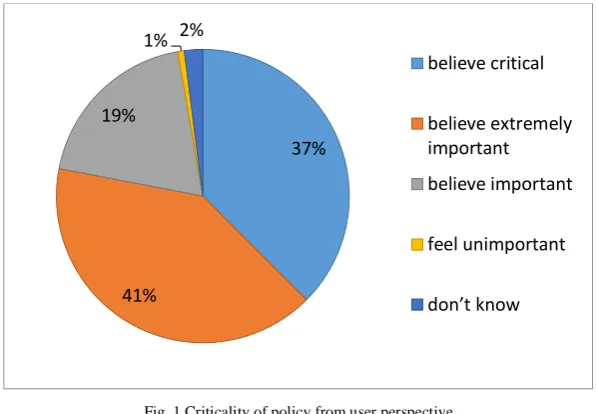
not mean bullying users' devices but rather imposing them in an acceptable and flexible manner. Users have a sense of the importance of policies as mentioned in (Fig. 1) [39].
Fig. 1 Criticality of policy from user perspective
Zahadat and others [13, 40] proposed a BYOD Security Framework as the solution to enforce access control policy to face security concerns. They explained mobile device security lifecycle stages including Register, Provision, Operate, and De-provision. However, BYOD is a different environment, and it has its own nature. They use existing policy enforcement techniques such as Mobile Device Management (MDM) and firewall. These techniques have some vulnerabilities against the concept of BYOD as mentioned in the first point. These techniques will not work effectively, and they need important modifications. ―Trends such as the influx of consumer devices into the workplace will require more flexible and creative solutions from IT staff for maintaining security while enabling access to collaborative technologies‖ [34]. Another research [24] proposed software system named MUSES (Multi-platform Usable Endpoint Security), attempted to enforce access control policy and manage BYOD environment. This system applies machine learning and computational intelligence techniques to increase the defined set of security. Chung and others [41] proposed a good architecture called 2-Tier Access Control (2TAC) to enforce access control policy by built antivirus scanner in BYOD device and set up two types of policies: work and home for employees to use their devices. Each type of these policies allow employee to access specific resources based on their location.
Vignesh and Asha [39] proposed three-tier enhanced policy architecture which specifies the policies to be followed by the device, applications, and organizations. Most of the component of this architecture is an agreement recommended checklist need to be followed by both employers and employees. This paper provides a good guideline for required procedures but is does not enforce access control policy technically. Concepcion and others [42, 43] enforced access control policy by using Network Access Control (NAC) and MDM in BYOD environment. From the results which illustrate the mobile device policy implementation mainly is focusing on the password strength policy and the locking policy of the devices. The limitation of this research is that the added to more restriction rules to BYOD that against its advantages. First, access a corporate network must be from a specific place when NAC implemented. Second, corporate access network must be from a specific device when registered in MDM. According to a study about security threats and dynamic access control technology for BYOD, ―it is insufficient to resolve risk factors occurring in BYOD environment with them (NAC and MDM) due to their limitations and users’ psychological repulsion to the control of personal devices. Thus, it is necessary to establish a flexible security policy considering numerous and diverse types of terminals and various circumstances‖ [44]. Employees should work independently from time and location [45].
C. Lack of data and policy protection
Using BYOD devices explore data to many risks. Data and policy that controls authorization process can be changed by attacks. Employees can install different kinds of applications such as games and social networking apps that can comprise malicious and exposure data to risk during transfer, process, and storage phases. Worse, the organization can’t check if BYOD device already contains malware application or not without against employee's privacy. Dealing with an insecure network is also dangerous, especially if an employee is working
37%
41% 19%
1% 2%
believe critical
believe extremely important
believe important
feel unimportant
from different locations and connected to other different Internet networks. Attacks happen to many different mobile operating system including IOS, Android, and windows mobile as listed in (Table 1) [46].
TABLE 1
LIST OF DIFFERENT TYPES OF ATTACKS IN DIFFERENT OPERATING SYSTEMS
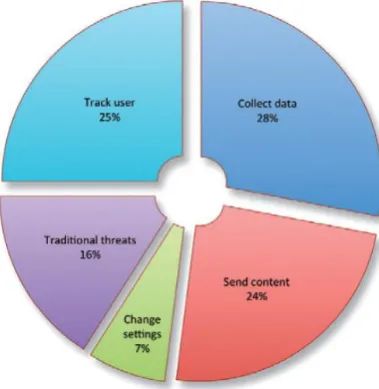
This means almost all operating systems are under attack and there is no exception to some operating systems to prevent the risk of attacks. Solutions must work compatibility will all operating systems. Malware applications designed to do harmful tasks such as collecting data, changing policy, sending content, and tracking the user as shown in (Fig. 2) [47].
Fig. 2 What malwares do with BYOD devices [29]
during transfer only. Data and policy must be protected during all phases: transfer, process, and storage in BYOD environment.
Some researchers [51-54] proposed frameworks for detecting abnormal access by collecting the context data according to the various devices and access environment and establishing the context database policy under the BYOD environment. This information includes user data, device data, and network data collected in access control system on the server side. This is a helpful technique in BYOD environment and detects some kinds of attacks. However, it will not detect the total attack and some attacks such as man-in-the-middle will not be detected. Some studies [41, 55] adopt advance techniques to ensure the basic requirement of BYOD devices and to enforce access control policy of an enterprise. However, most of these studies pay less attention to protect polices. As a result, policies can be changed during transfer, process, or storage phases. As a result, it is difficult to adhere and follow policies as policy’s administrators want.
D. Platform dependent
Firms should come up with solutions that will be compatible with all BYOD devices and implement them; this will help reduce risks in these devices regardless of the operating system one is using. At a bare minimum, the solution should support Android, iOS, and perhaps Windows Phone with all kind of version for mobile and laptop devices. Many mobile devices joined the enterprise network with different types of platforms as well as different types of access control models. This makes the implementation of access control policies in an enterprise’s cloud and BYOD environments more difficult. For example, (Table 2) shows the different types of BYOD devices owned by employees [8].
TABLE 2
DIFFERENT TYPES OF BYOD DEVICES OWNED BY USERS
Romer [56] explained some best practices for enterprises when they adopt BYOD trend to enjoy the benefits and avoid the risks. The first practice was choosing a solution that protects all confidential data on all BYOD devices as much as possible. Otherwise, organizations cannot protect data and enforce access control policies through all BYOD devices. Operating system vendors try to develop a special environment for BYOD trend by building two different virtual machines in mobile devices: personal and corporate. The personal virtual machine has unrestricted access policies to objects. Users can download an application, share pictures, and make call and more. This virtual machine cannot be viewed by corporate. The corporate virtual machine builds based on Security-Enhanced Linux (SELinux) and has restricted access policies to objects managed by enterprise. All data encrypted in this virtual machine and can be added, removed, and updated by enterprise without user’s intervention. This virtual machine also supports user authentication, network data encryption, and time and location-based access controls. For examples of corporate virtual machine are BlackBerry Balance from BlackBerry and KNOX from Samsung. However, not all operating system vendors have this solution, and not all users use a specific operating system. Corporate virtual machines are suitable for Choose Your Owen Device (CYOD) trends only.
E. Unaware of procedures and rights
allowed of people or owed to people, according to some legal system, social convention, or ethical theory‖[57] . This is a general meaning that can apply to all parties in BYOD environment. The right side of an access control field has permissions which are granted to the user, or to an application, to write, read and erase data. Procedures refer to non-technical approaches applied in strengthening policies [58]. The strengths and weakness of a BYOD focuses on the on the preventive approaches which are involved in all parties both the employee and the employer to have an understanding of their rights, policies and sanctions on legal use of BYOD applications Becket [7]. Beckett does not mention exact rights and procedures required to adhere to BYOD environments. We need to refer organization to adhere international standards as possible regarding BYOD trends. The research paper [6] which describes how BYOD users who happen not to be informed on measures or have little knowledge of malware avoidance behaviors. Hovav and other researchers [59] explained the reason which is that employees perceived freedom threat negatively affects compliance intention. Researchers suggest developing a community practice and repeated training to maintain the users' confidence in their own abilities to cope with malware threats. Thomson [34] demonstrated an important point about the responsibility of the user to protect their data. This was based on a study conducted on the primary responsible for data protection. The highest answer was employees with 39%, then 30% for IT and 16% for the service provider as shown (Fig. 3). This is a good indicator. We need to be more clearly articulated regarding procedures and rights of employees.
Fig. 3 employees's opinion about who is the most responsible for securing BYOD devices [21]
As a conclusion of the literature review, (Table 3) summaries access control issues in BYOD environment by explaining their meaning and existing solution as well as their limitation.
TABLE 3
SUMMARY OF THE LITERATURE REVIEW
Access control issues Meaning Solutions Limitation
Mobile device security issues
These are threats that may ditort or destroy data in the mobile devices
- Use Mobile Device
Management solution (MDM)
- Location-based access control
- using an IP device address
- device registration
- Against user privacy.
- Restriction access to
specific place and time.
Lack of access control enforcement
a policy issued by a company are not suitably practiced such that employees comply in effective ways
- Network Access Control (NAC)
- Checklist policy
- Use Mobile Device
Management solution (MDM)
- Impalement Mandatory
Access Control mechanism
-- Few existing enforcement techniques are useful.
- Restriction access to specific place and time.
Lack of data and policy protection
Mobile devices can potentially be malicious from inside or external threats from outside that attacks data and policy
- Use Access Control Policy Tool (ACPT)
- Use Advanced Encryption Standard (AES)
- Use Remote Authentication Dial-In User Service (RADIUS)
- Do not cover all phases: transfer, process, and storage in BYOD environment
- Virtual private networks
- Encrypt or decrypt data
- Back-up and restore
Platform dependent Frameworks work with
specific operating system, so some devices are unprotected
- Operating system vendors developed personal and corporate virtual machines
- Secure Container
- Solutions are suitable for CYOD only.
- Some existing solution targeted specific operating system only.
Unaware of procedures and rights
Some users are unaware of their responsibilities to protect their data
- Guidelines procedures and rights for BYOD users
- More education and training is required
- Available BYOD international standards
III. DISCUSSION AND EVALUATION
Most of the researches attempted to take advantage of the previous technical heritage without understanding the nature of the BYOD environment. If the most of employees (61%) like the concept of BYOD because of mobility as shown in (Fig. 4) [60], then why we restrict access to specific place and time. This means less mobility and it may affect the level of their satisfaction and productivity. BYOD trend is not normal mobile device and not CYOD. Respecting the privacy of employees with BYOD environmental is very substantial and difficult.
Fig. 4 The main advantage of BYOD from employee’s perspective [40]
In addition, we think most of the previous effects regarding access control caused by one main fact. Most of BYOD environment is based on Discretionary Access Control (DAC)[58]. It is not based on trusted systems or MAC. There are many reasons why enterprises might continue to use less secure systems despite the existence of more reliable systems such as Security Enhanced Android (SEAndroid). The first reason is that trusted systems have become more complex and difficult to implement and manage [61]. The second reason is that most people are trained on IOS and Android systems and thus have become more familiar with them since commercial off-the-shelf (COTS) systems such as Android are easily obtained. If we have trusted system, then some access control issues will disappear. As a result, enhance the level of access control in BYOD device is required to meet the specification of trusted systems.
We have explained access control issues in BYOD environment with some details. However, we think that based on the literature review, previous studies do not provide a complete solution to address access control issues and these solutions still insufficient. Much more work is required. Any future solution must include these four requirements:
Building a technique for authenticating BYOD devices
Building a new technique that enforces access control policies in the cloud and BYOD environments regardless existing access control mechanism.
Building a new technique for Platform independently
CONCLUSION
BYOD or commonly known as Bring Your Own Device is here to stay yes it may possess security risks such as viruses, malware and spyware that may distort or completely destroy data but it is an inevitable and unstoppable trend. Denied access to information has led to a disclosure of sensitive information. In this article we have already existing text in access control and management issues and also focuses on recent trends concerning BYOD. In this review a wide research has taken place in both management and technical solution access control of BYOD. Previous studies have yielded insufficient and incomplete solution regarding this issue. Any future solution must build techniques for authenticating, enforces access control policies, and secure access control policies during transfer, process, and storage phases in independently platform for BYOD devices. Our future work will include all of these points in one framework. We will propose in the separate paper a new framework and build an experiment to test and evaluate the results.
R
EFERENCES
[1] Information Commissioner's Office (ICO), "Bring your own device," ed, pp. 1-14.
[2] T. Shumate and M. Ketel, "Bring your own device: benefits, risks and control techniques," in SOUTHEASTCON 2014, IEEE, 2014, pp. 1-6.
[3] A. V. Herrera, M. Ron, and C. Rabadão, "National cyber-security policies oriented to BYOD (bring your own device): Systematic review," in Information Systems and Technologies (CISTI), 2017 12th Iberian Conference on, 2017, pp. 1-4.
[4] M. Dhingra, "Legal issues in secure implementation of bring your own device (BYOD)," Procedia Computer Science, vol. 78, pp. 179-184, 2016.
[5] A. B. Garba, J. Armarego, D. Murray, and W. Kenworthy, "Review of the information security and privacy challenges in Bring Your Own Device (BYOD) environments," Journal of Information privacy and security, vol. 11, pp. 38-54, 2015.
[6] PricewaterhouseCoopers (PWC), "The Global State of Information Security Survey," 2015. [7] P. Beckett, "BYOD–popular and problematic," Network Security, vol. 2014, pp. 7-9, 2014.
[8] D. Dang-Pham and S. Pittayachawan, "Comparing intention to avoid malware across contexts in a BYOD-enabled Australian university: A Protection Motivation Theory approach," Computers & Security, vol. 48, pp. 281-297, 2015.
[9] B. Morrow, "BYOD security challenges: control and protect your most sensitive data," Network Security, vol. 2012, pp. 5-8, 2012.
[10] A. V. R. Herrera, Mario and C. Rabadao, "National Cyber-security Policies oriented to BYOD (Bring Your Own Device): Systematic Review," IEEE 12th Iberian Conference on Information Systems and Technologies (CISTI), 2017.
[11] Checkpoint website. (2015). Security Report. Available:
http://www.checkpoint.com/resources/2015securityreport/CheckPoint-2015-SecurityReport.pdf
[12] B. Yulianto and R. Layona, "An Implementation of Location Based Service (LBS) for Community Tracking," ComTech: Computer, Mathematics and Engineering Applications, vol. 8, pp. 69-75, 2017. [13] N. Zahadat, P. Blessner, T. Blackburn, and B. A. Olson, "BYOD security engineering: A framework and
its analysis," Computers & Security, vol. 55, pp. 81-99, 2015.
[14] J. Girard, "Top Seven Failures in Mobile Device Security," Gartner, 2013.
[15] M. M. Singh, C. W. Chan, and Z. Zulkefli, "Security and Privacy Risks Awareness for Bring Your Own
Device (BYOD) Paradigm," International Journal of Advanced Computer Science and Applications, vol.
8, pp. 53-62, 2017.
[16] S. Blizzard, "Coming full circle: are there benefits to BYOD?," Computer Fraud & Security, vol. 2015, pp. 18-20, 2015.
[17] A. Chaudhari and G. Yadav, "Context Based Remote Access Control System Using Mobile Device for Educational Campus."
[18] R. Sandhu, "Access control: The neglected frontier," in Information Security and Privacy, 1996, pp. 219-227.
[19] M. Benatar, Access control systems: security, identity management, and trust models: Springer Science & Business Media, 2006.
[20] D. Ferraiolo, D. R. Kuhn, and R. Chandramouli, Role-based access control: Artech House, 2003.
[21] M. Gasser, Building a secure computer system: Van Nostrand Reinhold Company New York, NY, 1988.
[23] J. Thielens, "Why APIs are central to a BYOD security strategy," Network Security, vol. 2013, pp. 5-6, 2013.
[24] P. de las Cuevas, A. Mora, J. J. Merelo, P. A. Castillo, P. Garcia-Sanchez, and A. Fernandez-Ares, "Corporate security solutions for BYOD: A novel user-centric and self-adaptive system," Computer Communications, vol. 68, pp. 83-95, 2015.
[25] Intel, "Accelerating Business Growth through IT," 2013.
[26] B. Tokuyoshi, "The security implications of BYOD," Network Security, vol. 2013, pp. 12-13, 2013.
[27] K. Downer and M. Bhattacharya, "BYOD security: A new business challenge," in Smart
City/SocialCom/SustainCom (SmartCity), 2015 IEEE International Conference on, 2015, pp. 1128-1133. [28] P. S. Tekade and C. Shelke, "A Survey on different Attacks on Mobile Devices and its Security,"
International Journal of Application or Innovation in Engineering & Management, vol. 3, pp. 247-251, 2014.
[29] J. M. Chang, P.-C. Ho, and T.-C. Chang, "Securing byod," IT Professional, vol. 16, pp. 9-11, 2014. [30] V. Samaras, S. Daskapan, R. Ahmad, and S. K. Ray, "An enterprise security architecture for accessing
SaaS cloud services with BYOD," in Telecommunication Networks and Applications Conference
(ATNAC), 2014 Australasian, 2014, pp. 129-134.
[31] P. Steiner, "Going beyond mobile device management," Computer Fraud & Security, vol. 2014, pp. 19-20, 2014.
[32] R. Ogie, "Bring your own device: an overview of risk assessment," IEEE Consumer Electronics Magazine, vol. 5, pp. 114-119, 2016.
[33] J. Pinchot and K. Paullet, "BRING YOUR OWN DEVICE TO WORK: BENEFITS, SECURITY RISKS,
AND GOVERNANCE ISSUES," Issues in Information Systems, vol. 16, 2015.
[34] G. Thomson, "BYOD: enabling the chaos," Network Security, vol. 2012, pp. 5-8, 2012.
[35] A. Armando, G. Costa, L. Verderame, and A. Merlo, "Securing the" Bring Your Own Device" Paradigm," Computer, vol. 47, pp. 48-56, 2014.
[36] S. Ali, M. N. Qureshi, and A. G. Abbasi, "Analysis of BYOD security frameworks," in Information Assurance and Cyber Security (CIACS), 2015 Conference on, 2015, pp. 56-61.
[37] S. G. Ocano, B. Ramamurthy, and Y. Wang, "Remote mobile screen (RMS): An approach for secure
BYOD environments," in Computing, Networking and Communications (ICNC), 2015 International
Conference on, 2015, pp. 52-56.
[38] C. Vorakulpipat, S. Sirapaisan, E. Rattanalerdnusorn, and V. Savangsuk, "A Policy-Based Framework for Preserving Confidentiality in BYOD Environments: A Review of Information Security Perspectives," Security and Communication Networks, vol. 2017, 2017.
[39] U. Vignesh and S. Asha, "Modifying security policies towards BYOD," Procedia Computer Science, vol. 50, pp. 511-516, 2015.
[40] M. Eslahi, M. V. Naseri, H. Hashim, N. Tahir, and E. H. M. Saad, "BYOD: Current state and security challenges," in Computer Applications and Industrial Electronics (ISCAIE), 2014 IEEE Symposium on, 2014, pp. 189-192.
[41] S. Chung, S. Chung, T. Escrig, Y. Bai, and B. Endicott-Popovsky, "2TAC: Distributed access control architecture for" Bring Your Own Device" security," in BioMedical Computing (BioMedCom), 2012 ASE/IEEE International Conference on, 2012, pp. 123-126.
[42] J. Concepcion, J. Chua, and G. Siy, "Securing Android BYOD (Bring your Own Device) with Network Access Control (NAC) and MDM (Mobile Device Management)," 2015.
[43] M. Ketel and T. Shumate, "Bring your own device: security technologies," in SoutheastCon 2015, 2015, pp. 1-7.
[44] E. B. Koh, J. Oh, and C. Im, "A study on security threats and dynamic access control technology for
BYOD, smart-work environment," in Proceedings of the International MultiConference of Engineers and
Computer Scientists, 2014, pp. 1-6.
[45] A. Scarfo, "New security perspectives around BYOD," in Broadband, Wireless Computing,
Communication and Applications (BWCCA), 2012 Seventh International Conference on, 2012, pp. 446-451.
[46] M. Eslahi, R. Salleh, and N. B. Anuar, "MoBots: A new generation of botnets on mobile devices and networks," in Computer Applications and Industrial Electronics (ISCAIE), 2012 IEEE Symposium on, 2012, pp. 262-266.
[47] S. Enterprise, "Internet Security Threat Report 2014," ed, 2015.
[48] K. Timms, "BYOD must be met with a wider appreciation of the cyber-security threat," Computer Fraud & Security, vol. 2017, pp. 5-8, 2017.
[50] K. AlHarthy and W. Shawkat, "Implement network security control solutions in BYOD environment," in Control System, Computing and Engineering (ICCSCE), 2013 IEEE International Conference on, 2013, pp. 7-11.
[51] C. Jo, "Study of Measures for Detecting Abnormal Access by Establishing the Context Data-Based Security Policy in the BYOD Environment," in Advanced Multimedia and Ubiquitous Engineering, ed: Springer, 2016, pp. 79-86.
[52] M. A. Muhammad, A. Ayesh, and P. B. Zadeh, "Developing an Intelligent Filtering Technique for Bring Your Own Device Network Access Control," in Proceedings of the International Conference on Future Networks and Distributed Systems, 2017, p. 35.
[53] D. Kang, J. Oh, and C. Im, "Context-based smart access control on BYOD environments," in International Workshop on Information Security Applications, 2014, pp. 165-176.
[54] T. Kim and H. Kim, "A system for detection of abnormal behavior in BYOD based on web usage patterns," in Information and Communication Technology Convergence (ICTC), 2015 International Conference on, 2015, pp. 1288-1293.
[55] G. Costantino, F. Martinelli, A. Saracino, and D. Sgandurra, "Towards enforcing on-the-fly policies in BYOD environments," in Information Assurance and Security (IAS), 2013 9th International Conference on, 2013, pp. 61-65.
[56] H. Romer, "Best practices for BYOD security," Computer Fraud & Security, vol. 2014, pp. 13-15, 2014. [57] The Metaphysics Research Lab, "Stanford Encyclopedia of Philosophy," Stanford University, 2014. [58] B. Ballad, T. Ballad, and E. K. Banks, Access control, authentication, and public key infrastructure.
Sudbury, MA: Jones & Bartlett Learning, 2011.
[59] A. Hovav and F. F. Putri, "This is my device! Why should I follow your rules? Employees’ compliance with BYOD security policy," Pervasive and Mobile Computing, vol. 32, pp. 35-49, 2016.
[60] Crowd Research Partners, "BYOD and Mobile Security," 2016.
![Fig. 3 employees's opinion about who is the most responsible for securing BYOD devices [21]](https://thumb-us.123doks.com/thumbv2/123dok_us/1903310.1249239/7.595.131.466.258.449/fig-employees-s-opinion-responsible-securing-byod-devices.webp)
![Fig. 4 The main advantage of BYOD from employee’s perspective [40]](https://thumb-us.123doks.com/thumbv2/123dok_us/1903310.1249239/8.595.125.472.306.488/fig-main-advantage-byod-employee-s-perspective.webp)