© 2014, IJCSMC All Rights Reserved 1012 Available Online atwww.ijcsmc.com
International Journal of Computer Science and Mobile Computing
A Monthly Journal of Computer Science and Information Technology
ISSN 2320–088X
IJCSMC, Vol. 3, Issue. 3, March 2014, pg.1012 – 1017
RESEARCH ARTICLE
Application for Intra-College Communication
Based on Cloud Computing
Neethuanna Mathew, Namrata Salgar, Pretty Varghese, Mr. Yogesh Pawar
1,2,3Department of Computer Engineering, D.Y.P.I.E.T, Ambi, Talegaon, University Of Pune
4
Professor, Department of Computer Engineering, D.Y.P.I.E.T, Ambi, Talegaon, University Of Pune
Abstract:
Cloud computing is a rapidly growing technology with usage of virtualized resources as a service through the internet. These services prove to be of great use in fields of education by providing educational applications and tools for students and teachers for communication. This system is based on the concept of web services which is implemented as an android mobile application that communicates with android and java client. The proposed system provides a cost effective application for users in their daily life. Cloud based application offer better alternative academic institutions with very less expenses.
Keywords - Web Services, Cloud Computing
I. INTRODUCTION
The Proposed system is an intra college communication system based on the concept of web services and cloud
computing. We are using SAAS (Software as a Service) architecture which can be characterized as “Software deployed as a hosted service and accessed over the internet”. In this system the communication will occur between staff’s and students who use PC’s and mobile phones respectively.
A. Cloud Computing
Cloud computing moves the processing efforts from the local devices to data centric facilities enabling the users to create and edit files online. It differs from the classic client-server model as it provides application that clients can execute and manage through their web browser. This technology allows for much more efficient computing by centralizing data storage, processing and bandwidth. The phrase “software as a service” (SAAS) is sometimes used to describe application programs offered through cloud computing. Cloud computing provides a better security than a
© 2014, IJCSMC All Rights Reserved 1013
Fig 1.1 Representation Of Cloud Computing
SAAS is one of the methodologies of Cloud Computing, which is based on a "one-to-many" model whereby an application is shared across multiple clients. The SAAS model can add efficiency and cost savings for the both the vendor and customer.
B. Web Services
Web service is a software system designed to support interoperable machine-to-machine interaction over a network.
One of the most interesting features of a web service is that they are self describing. This means that once a web service is located we can ask it to describe itself and tell what operations it supports and how to invoke it, which is handled by the Web Service Description Language (WSDL).
Other systems interact with the Web service in a manner prescribed by its description using SOAP messages, typically conveyed using HTTP with an XML serialization in conjunction with other Web-related standards". SOAP (Simple Object Access Protocol) specifies the format in which the requests are sent to the server and how the server should format the responses. There are two major classes of Web services, REST-compliant Web services, in which the primary purpose of the service is to manipulate XML representations of Web resources using a uniform set of "stateless" operations and arbitrary Web services, in which the service may expose an arbitrary set of operations."
© 2014, IJCSMC All Rights Reserved 1014
One of the most common methods to do so is by using the concept of web services. Web Services are platform independent and language independent since they use standard XML languages. Moreover, majority of the web services use Hypertext Transport Protocol (HTTP) for transmitting the messages.
C. SHA (Secured hash algorithm)
Hash algorithms are used to provide information security services. A hash algorithm accepts a random block of data given by the user encodes it and returns a fixed-size bit string which is called the hash value, so if the user modifies the same block of data later then it will simultaneously change its hash value. The encoded data is called "Message" and their hash value is termed as "Message Digest".
SHA1 Description
SHA1 is a hashing algorithm designed by the United States National Security Agency and published by NIST
(National Institute of Standards and Technology). It can have maximum message size of 264 - 1 bits however it accepts
512 bit block size and outputs 160-bit message digest.
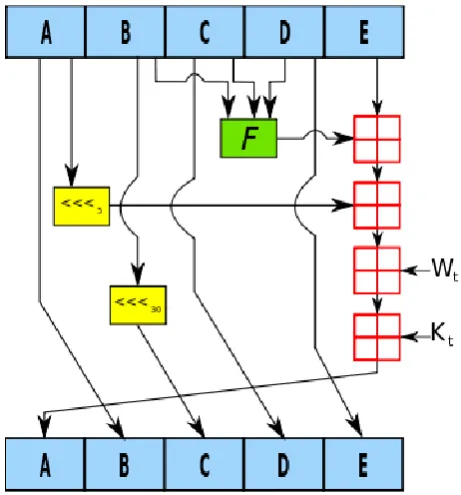
Fig 1.3 Block Diagram Of SHA
SHA1 Algorithm Description
Pad the message with a single one followed by zeroes until the final block has 448 bits.
Append the size of the original message as an unsigned 64 bit integer.
Initialize the 5 hash blocks (h0,h1,h2,h3,h4) to the specific constants defined in the SHA1 standard.
Allocate an 80 word array for the message schedule.
Set the first 16 words to be the 512bit
block split into 16 words.
The rest of the words are generated using the following algorithm:
Word [i-3] XOR word [i-8] XOR word [i-14] XOR word [i-16] then rotated 1 bit to the left.
Loop 80 times doing the following.
■ Calculate SHA function() and the constant K (these are based on the current round number.
© 2014, IJCSMC All Rights Reserved 1015
■ c=b (rotated left 30) ■ b=a
■ a = a (rotated left 5) + SHA function () + e + k + word[i]
Add a, b, c, d and e to the hash output.
Output the concatenation (h0, h1, h2, h3, h4) which is the message digest.
Password verification
A related application is password verification. Passwords are usually not n clear text, but instead in digest form, to improve security. To authenticate a user, the password presented by the user is hashed and compared with the stored hash. This also means that the original passwords cannot be retrieved if forgotten or lost, and they have to be replaced with new ones. The password is often concatenated with a random, non secret salt value that is stored with the password. Because users have different salts, it is not feasible to store tables of precomputed hash values for common passwords.
Example Inputs and Outputs
Input(Text File) Output(SHA1 Hash)
abcd 81fe8bfe87576c3ecb22426f8e57847382917acf
abcdefghijklmnopqrstuvwxyz 32d10c7b8cf96570ca04ce37f2a19d84240d3a89
The Quick Brown Fox Jumps Over The Lazy
Dog
645218467886dd414ea66a09b6cceea806127fb5
II. LITERATURE SURVEY
Traditional Computing Vs. Cloud Computing
Cloud computing is a technology which is similar to the technology in traditional networking. However, the main difference between cloud computing and traditional computing is the execution and in one word that is “virtualization”. Virtualization allows for massive scalability, giving clients virtually unlimited resources.
In a traditional networking setup, the server is fixed in hardware and if you want to scale up to more users than the current hardware can support, you would have to spend more money for upgrades. The cloud computing uses virtualization to provide only the resources that a specific user needs and they just need to pay for the use while in traditional networking they need to pay for hardware plus installations.
It is apparent that cloud computing gains the upper hand in this comparison especially when price is involved. Every move with the traditional network setup will involve some form of installation like laying out wires and installing the necessary software into each workstation. But with a cloud solution, all you need is a browser in each workstation and the work is ready to go as long as there is an internet connection.
III. MODULES
1) SMS:
In this system we are having a feature of intra messaging in which staffs can send a message to a particular
student only.
Students can even send messages to other students.
2) Create groups:
In this, staff can create groups on the basis of their class, practical batches, branches.
© 2014, IJCSMC All Rights Reserved 1016
3) Assign task:
The HOD can assign the daily task to its department staff and manage it.
Similarly teachers can assign their project task and subject assignments to students.
4) Group-wise broadcasting:
Notes and notifications can be broadcasted only to particular group.
For example: class teacher can send a notice only to its class students.
5) Email:
Email service can be used by the staffs and students to mail and transfer information.
The service is used free of cost.
6) Manage notifications:
Staff can send importance notice to all the students with the help of this notification feature.
7) Monitor student group:
Staff can monitor the progress of their respective class or group.
This will help them to schedule their work and assign tasks.
8) Staff-student communication:
Staff-Student communication is the main feature of this system which helps in increasing the bond between
student and teacher by sharing the information between different users.
This feature has maximum priority as communication is the base service of this system.
9) Event creation
Information regarding tech-fest in college or other cultural events can be circulated among the students.
10) Easy Map
In this Top View of every floor will be shown with the names of the allotted classrooms which would help
students to find out a particular class more easily.
11) Request for group join/leave:
Any student or staff can join a particular group.
Staffs and students can even leave a particular group.
IV. CONCLUSION & FUTURE SCOPE
The system provides facilities of SMS, email, notifications, to-do-list, and various other features which give the user
an user friendly interactive communication. The system provides high security, data storage and authentication using hash algorithms. Theft of information and misuse of user’s account is not possible. This creates a feeling of secured and safe communication in the users mind. Cloud based communication system can be implemented in various departments such as healthcare, corporate world, political and social world. It plays an important role in educational institutions by providing a platform for the students and staff for efficient and effective interaction it is cost effective as communication is done using wifi technology.
V. ACKNOWLEDGEMENT
© 2014, IJCSMC All Rights Reserved 1017
REFERENCES
[1] Cloud Computing for Mobile World Chetan S., Gautam Kumar, K. Dinesh, Mathew K. and Abhimanyu M.A., Department of Computer, Science Engineering,National Institute of Technology,Calicut
[2] Aida Ghazizadeh, ”Cloud Computing Benefits and Architecture in E-Learning,” wmute, pp.199-201, 2012 IEEE Seventh International Conference on Wireless, Mobile and Ubiquitous Technology in Education, 2012
[3] International Conference on Information, Electronic and Computer Science (ICIECS 2010 E-BOOK)(pp 1542-1545)
[4] Andreas Klein, Christian Mannweiler, Joerg Schneider, and Hans D. Schotten. Access schemes for mobile cloud computing. In Eleventh International Conference on Mobile Data Management (MDM), 2010, pages 387-392, 2010.
[5] ZHANG GUOLI, LIU WANJUN,” The Applied Research of Cloud Computing Platform Architecture In the E-Learning Area”. IEEE 2010.