Utilizing HUBzero to Create and Test an Educational Hub from CReSIS Educational Data
by
JUSTIN M DELOATCH
A Thesis submitted to the Graduate Faculty of Elizabeth City State University
In partial fulfillment of the requirements for the Degree of Master of Science in Mathematics
Elizabeth City, North Carolina
May
2014
APPROVED BY
__________________________________________________ Linda Hayden Ph.D
Chair of Thesis Committee
Geoffrey Fox Ph.D Committee Member
Malcolm LeCompte Ph.D Committee Member
Yolanda Anderson Ph.D
Copyright by JUSTIN M DELOATCH
Utilizing HUBzero to create and test an Educational Hub from CReSIS Educational Data
The PolarEDHub that is housed at Elizabeth City State University (ECSU) is created with
the software package named HUBzero. The importance of the PolarEDHub is that it
allows K-12 educators to teach students and to motivate them to become more involved
in STEM related fields. HUBzero is an open source software package used to construct
web sites for scientific research and educational activities. HUBzero was originally
created by researchers at Indiana University – Purdue University Indianapolis (IUPUI) in
conjunction with the National Science Foundation (NSF) who sponsored the Network for
Computational Nanotechnology to support nanoHUB.org. The HUBzero platform
currently supports over 40 hubs across a variety of disciplines, including cancer research,
biofuels, climate modeling, water quality, and education.
This project utilized data from the Center for Remote Sensing of Ice Sheets (CReSIS),
which was established by the NSF as a Science and Technology Center in 2005. CReSIS
has a mission of developing new technologies and computer models to measure and
predict the response of sea level change to the mass balance of ice sheets in Greenland
and Antarctica. [5] Their website offers enormous amounts of ice sheet data that includes
thickness, dates, latitudes and longitudes of each ice sheet. The website also offers
educational data sets which this project has utilized.
The goal of the project was to create and test the PolarEDHub that has the ability to
access CReSIS educational data that has been stored on a server on the campus of
have access to this information for the use of education and scientific collaboration.
HUBzero requires that the administer uses Joomla, HTML, CSS and PHP code to create
the template. HUBzero also uses an application called Raptture to create a Graphical User
Interface (GUI) that is capable of deploying new tools without having to rewrite special
code for the web. Tools in the PolarEDHub have been created to be interactive, which
means it is capable of zooming in on a graph, rotating a module, and probing surfaces of
a 3D volume, without having to download the application to the client’s computer. Due to
the fact that HUBzero supports Grid Data management, it is capable of sending jobs off
to TeraGrid, DiaGrid, and RedCloud to process the data faster and more efficiently. This
PolarEDHub is the first science gateway implemented at Elizabeth City State University
Acknowledgments
I would like to thank Dr. Geoffrey Fox, professor of Computer Science, Informatics, and
Physics at Indiana University and director of the Community Grids Laboratory of the
Pervasive Technology Laboratories from Indiana University for his support and guidance
in this project. Data was provided by the Center for the Remote Sensing of Ice Sheets
from the University of Kansas. I would also like to thank Dr. Linda Hayden, Director of
the Center of Excellence in Remote Sensing and Research at Elizabeth City State
University, for the mentorship and guidance during the past six years. I would like to
thank Dr. Yolanda Anderson, in the Mathematics and Computer Science department for
her leadership and assistance. I would like to thank Dr. Malcolm LeCompte, for the great
advice and mentorship. I would like to thank Mr. Jeff Wood for his support throughout
this project. This project has been funded by the National Science Foundation award
1216668, CReSIS award number FY2005-108CMI and AaA REU Site program under
Table of Contents
Page
Acknowledgments...5
Table of Contents...6
List of Figures...10
Chapter 1 Introduction...11
Background...11
Ice Sheet Research...11
What is HUBzero...15
The Value of Education...17
Center for the Remote Sensing of Ice Sheets (CReSIS)...18
Polar Grid...19
Indiana University...20
Center of Excellence in Remote Sensing Education and Research...21
Statement of Purpose...21
Definitions...22
HTML...22
Joomla...23
Cascading Style Sheets...23
PHP: Hypertext Preprocessor...24
Research Overview...24
Chapter II Literature Review...26
SDCI NMI Improvement...27
Using the HUBzero Platform...27
How does a Hub differ from a web site?...28
Features...28
Interactive Simulation Tools...28
Mechanism for Uploading New Resources...29
Tool Development Area...30
Ratings and Citations...30
Content Tagging...30
Usage Statistics...31
News, Events and Feedback...31
HUBzero Projects...31
First Hub Focused on Nanotechnology...32
Network for Earthquake Engineering Simulation (NEES)...32
Accelerating in Healthcare...33
Chapter III Methodology...35
Definition of Goal: Original Tasking...35
Project Data Source...36
Installing HubZero...37
Registering as a User...40
Uploading CReSIS Educational Data to SSH Drive...41
Customizing the Hub...42
Header Section: Opening Lines...44
Creating a Section...45
1st Section...45
2nd Section...45
3rd Section...46
4th Section...46
Ending Sections...47
Templates...47
Database 1.1.2...48
Database 1.2...50
Creating an Excel File...50
Chapter IV Results...52
Overview...52
Visual...52
Connecting the Database to the Server using PHP...53
Mobility of the Hub...56
Testing the PolarEDHub...56
Users Feedback...57
Chapter V Discussion...59
Introduction...59
Discussion...59
Limitations...60
Conclusions...61
Bibliography...62
List of Figures
Figure 1: Greenland Ice Sheet Data...15
Figure 2: HUBzero logo...16
Figure 3: Education Image and Developmental Research...18
Figure 4: PolarGrid Elements...21
Figure 5: Image of VMware installing HUBzero...39
Figure 6: Setting VMware to run host only mode...40
Figure 7: Using the commands “ifconfig eth0” and “nano /etc/hosts”...41
Figure 8: Uploading Educational Data Using FileZilla...43
Figure 9: Image of the Back-End...44
Figure 11: Utilizing the Congratulations Article to change content on the Front-End...45
Figure 12: Basic template from new hub...49
Figure 13: Article in Joomla to replace the database...50
Figure 16: CSV file...55
Figure 17: Database...56
Chapter 1 Introduction Background
Whether it consists of simulating and analyzing ice sheet data, replicating the
formation of hurricanes, using geospatial science to anticipate the spread of fire in a
forest or sharing valuable data to other universities and institutions, the boundaries for
science continue to expand each day. (Bartlett, 2005) Today, scientists and researchers
are searching for new ways of sharing, analyzing, and visualizing large and complex
amounts of data so they have turned to portals and science gateways. Imagine the
existence of science gateways and the sophisticated cyber infrastructure (CI) tools
organized together with an Internet connection to create a powerful open source software
that is capable of solving the most difficult challenges for scientists and researchers.
Ice Sheet Research
An ice sheet is defined as a mass of glacial ice covering more than 20,000 square
miles. There are two known ice sheets on Earth; these cover most of Greenland and
Antarctica. Together, the ice sheets of Antarctic and Greenland contain more than 99% of
the freshwater ice on the planet. These ice sheets contain massive amounts of frozen
water and if melted could cause a number of problems for all of us. If the Greenland Ice
Sheet melted, scientists estimate that the sea level would rise about 20 feet, which would
be a problem for low land areas. However, according to scientist, if the ice sheets of
Antarctic melted, the sea level would rise by about 200 feet, which would do critical
damage to many more people and geography than anyone could imagine. (Brain, 2011)
This would mean massive problems and destruction for most of the planet. The melting
Greenland’s Ice Sheet has already begun to deteriorate as indicated by scientific
research. From 1979 to 2006, melting increased by 30 percent, which reached a record
high. At higher elevations, a growth in winter snow has offset the melting. However, the
decline continues to surpass accumulation because of warmer temperatures that have led
to increased melting and speedier glacier movement. (Brain, 2011)
Global warming and climate change also increases the earth's atmospheric
temperature. Which causes equivalent changes in the climate and that causes a
greenhouse effect. The drastic melting of the ice sheets in Greenland and Antarctica has
scientists examining questions and answers for proof of glacial retreat.
Scientists are always looking for different ways to model and measure the response of ice
sheet changes due to global warming. These extremely technical needs can be fulfilled by
scientific collaborations between research institutions. There is also a huge need to gather
acquired data and, within the position of educators and researchers in a collective effort,
educate the next generation of scientists to study this complex issue. (Brain, 2011)
Much of ice sheet research is currently being accomplished by allowing the data
to be obtained in the field via the Internet education between university faculty and the
public. Once this data is processed it should be available for research experiment by
undergraduate and graduate students. This form of distribution would allow for more
science, technology, engineering and mathematics (STEM) related majors to access
experimental data that will increase their knowledge and persuade students to become
scientists. This method of distribution allows students studying under STEM umbrella a
knowledge experience and persuades them to pursue a field directly related to the STEM
fields.(Brain, 2011)
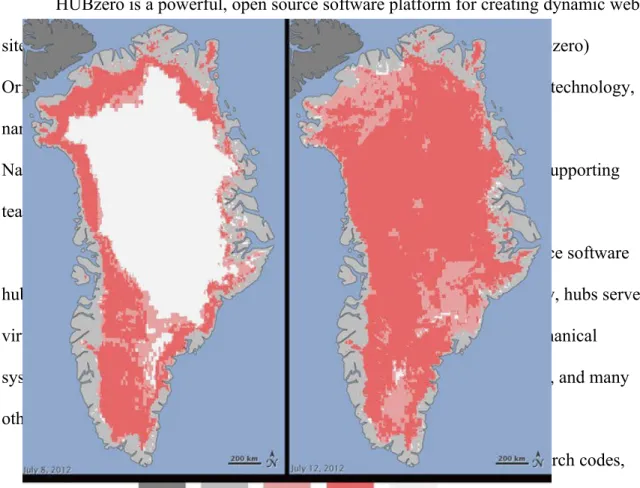
Below in Figure 1: NASA says new satellite measurements indicate extraordinary
Greenland ice sheet surface melt. The images posted below show the degree of surface
melt over Greenland’s ice sheet over just a four-day period. This period was from July 8,
2012 (left) and July 12, 2012 (right). These measurements were from three satellites that
showed that on July 8, about 40% of the ice sheet had experienced melting. Melting
severely quickened to an estimated 97% of the ice sheet surface by July 12. On an
average summer, about half of Greenland's surface ice sheet naturally melts. Lora
Koenig, a Goddard glaciologist and a member of the research team analyzing the satellite
data, says, "Ice cores from Summit show that melting events of this type occur about
once every 150 years on average. With the last one happening in 1889, this event is right
on time. But if we continue to observe melting events like this in upcoming years, it will
Figure 1: Greenland Ice Sheet Data
What is HUBzero
Figure 2: HUBzero logo
HUBzero is a powerful, open source software platform for creating dynamic web
sites that support scientific research, educational activities and training. (hubzero)
Originally developed for nanoHUB for a resource of Nano science and nanotechnology,
nanoHUB.org was created by the NSF-funded Network for Computational
Nanotechnology. Such websites are mostly referred to as “collaboratories” supporting
team science.
HUBzero calls these advance websites produced from the open-source software
hubs because the sites become a crucial contact for user communities. Today, hubs serve
virtual communities in health care, engineering education, microelectromechanical
systems, volcanology, research ethics, environmental modeling and biofuels, and many
other important topics. (hubzero)
A major HUBzero feature is its ability to deploy computational research codes,
posting tools, it goes through an automated system, which makes it easier than other tool
submitting applications. Additionally, the platform has a growing set of data management
tools. HUBzero offers built-in social networking features, the ability to create
communities in almost any field and simplify communication and collaboration,
distribution of research results, training and education.
Annually the HUBbub conference informed people how to utilize HUBzero in
Indianapolis, Indiana. Within the conference there were highlights of a new organization,
the HUBzero Foundation, which promises to make HUBzero even more accessible and to
expand the platform’s already considerable capabilities. HUBzero offers a foundation to
help start up new hubs for researchers that are interested who don’t have the required
experience to create their own. The HUBzero Foundation founded by Purdue University
in 2010 is open to any academic institution, non-profit organization, or corporation. The
HUBzero Foundation offers a number of benefits to members, including access to the
latest HUBzero features and bug fixes, a role in setting the roadmap for future
development and promoting the use of HUBzero, and ensuring ongoing sustainability of
the core software.
HUBzero is a powerful tool that if utilized correctly will benefit the whole
community that has access to it. With the use of HUBzero and its resources the
hypothesis for this paper is that a hub can be created to house existing data from CReSIS
and can visualize this data for the purpose of education, research and scientific
The Value of Education
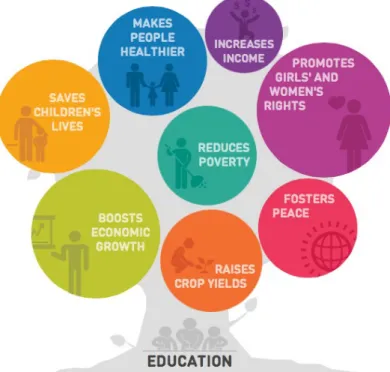
Figure 3: Education Image and Developmental Research
Education is important and a necessity of life. It helps to make people successful
and gives them a sense of accomplishment. Perhaps, it is one of the most important
things in life because it gives a person the ability to give back and contribute to the world
around them. (Schaeffer, 2012) Teaching and sharing knowledge is one of the greatest
ways to promote ones subject and to give to those who are interest in the subject. Many
people consider knowledge to be power, and having the desire to go an additional step or
that extra mile is one of the desirable attributes needed to pursue a career in a STEM
STEM learning is an economic essential and a vital part of our world. “Experts
say that technological innovations accounted for almost half of U.S. economic growth
over the past 50 years. They also conclude that almost all of the 30 fastest-growing
occupations in the next decade will require at least some background in STEM.”
(Schaeffer, 2012)
STEM programs are cultural achievements that are vital to our humanity and to
the control of our economy. These programs embrace and support the necessary aspects
of our lives as citizens, teachers, students, parents, and partners in the workforce.
Providing students with access to quality education in the STEM disciplines is very
important to our nation and the world if we want to keep moving forward in creating new
innovative technologies. (Schaeffer, 2012)
Center for the Remote Sensing of Ice Sheets (CReSIS)
https://www.cresis.ku.edu
The Center for Remote Sensing of Ice Sheets (CReSIS) is a Science and
Technology Center established by the National Science Foundation (NSF) in 2005. The
mission was developing new technologies and computer models to measure and predict
the response of sea level change to the mass balance of ice sheets in Greenland and
Antarctica. The NSF’s Science and Technology Center (STC) program combines the
strengths of scientists and engineers to answer the difficulties of global significance and
was established in response to the need to study and conduct research in understanding
the mass balance of the polar ice sheets. CReSIS uses different types of remote sensing
measure and forecast the response of ice sheets to climate change. CReSIS is comprised
of six partnering institutions with University of Kansas (KU) serving as the lead.
Additional partners include Elizabeth City State University (ECSU), Indiana University
(IU), The Pennsylvania State University (PSU), University of Washington (UW), and the
Association of Computer and Information Science Engineering Departments at Minority
Institutions. (ADMI)
Polar Grid
http://www.polargrid.org
The National Science Foundation Major Research Instrumentation Program
(MRI) has funded a combined mission with Elizabeth City State University and Indiana
University named PolarGrid, NSF CI-Team Award # OCI-0636361. The partnership goal
is to acquire and deploy the computing infrastructure needed to investigate the urgent
problems in glacial melting
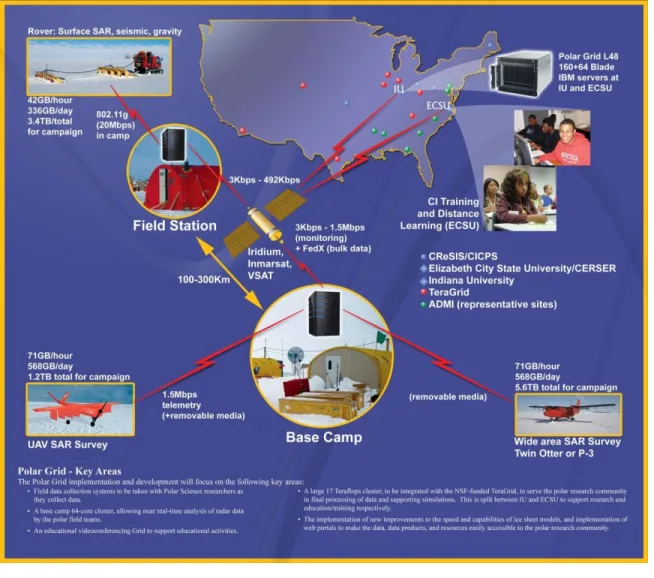
As shown in Figure 4, PolarGrid support ranges from field camps in Greenland
and Antarctica to local educational outreach. Field stations and arranged radar data
assembling tools will provide data to base camps and direct the data to mainland
Figure 4: PolarGrid Elements
Indiana University
http://www.indiana.edu
Cyberinfrastructure (CI) and high-performance computing to focus on the areas of
data management, processing, dissemination, archival, and high-performance computer
modeling requirements will be sustained by Indiana University (IU). IU has a world-wide
is a major public research institution, grounded in sciences, and a world leader in
technological education. Indiana University has a mission to provide broad access to
undergraduate, graduate, and continuing education for students throughout Indiana, the
United States, and the world, as well as outstanding academic and cultural programs and
student services.
Center of Excellence in Remote Sensing Education and Research
http://cerser.ecsu.edu
The Center of Excellence in Remote Sensing Education and Research (CERSER)
manages research, educational outreach, and student activities in geosciences and remote
sensing. Remote sensing is an instrument used to observe the impact of climate change
on and below the surface of the Earth. CERSER, under the direction of Dr. Linda
Hayden, is a founding partner in the NSF funded Center for Remote Sensing of Ice
Sheets (CReSIS) led by The University of Kansas and PolarGrid, an NSF Major Research
Instrumentation (MRI) funded partnership with Indiana University (IU). CERSER
students have travelled to study ice sheets in Greenland, Scotland, Alaska, and
Antarctica. (ECSU Report on Climate Change in NC/Relevant Research at ECSU, 2008)
CERSER is located in Elizabeth City, North Carolina on the campus of Elizabeth City
State University.
Statement of Purpose
The reason this project was undertaken was to allow K-12 educators and learners
to collaborate together to learn more about ice sheets. Additionally, to motivate the
younger generation to become active in a STEM related field. The research question for
educational data for the purposes of education, research and scientific collaboration.”
This project involves acquiring the educational data from the CReSIS website, storing the
information and data on a server and allowing HUBzero to gain access to the server for
visualization purposes. The objectives for this project include:
Installation of HUBzero: This would allow a user to download and install
HUBzero on a virtual machine, which can then be utilized.
Acquiring the Educational Data: This would be to acquire the CReSIS K-12
educational data sets.
Uploading Data: This step is to allow the educational documents to be accessed
by HUBzero.
Test the resulting product with a sample of K-12 students, educators, or
researchers.
Definitions
HTML
HyperText Markup Language (HMTL) is the markup language for creating
websites and other information that can be displayed within a web browser. HTML is
written in a form of elements consisting of tags enclosed in angle brackets such as
(<html>). HTML tags are most commonly joined in pairs like <h2> and </h2>, while
other tags represent empty elements and so are unpaired, for example <br>. The first tag
is called the opening tag, and the second tag is called the closing tag. Between these tags
web developers add text, comments and more information to give the website a unique
The web browser’s job is read the HTML text and compile them into visible web
pages. Most importantly the browser does not display the HTML tags, but uses the tags to
interpret the content of the page. HTML elements form the building blocks of all
websites and allows images to be embedded and can be used to create interactive web
sites. (w3schools.com)
Joomla
Joomla is a free and open-source content management system (CMS) for
distributing web content. It is built on a management web application framework that can
be used separately from the CMS. Joomla is written in PHP: Hypertext Preprocessor, and
uses object-oriented programming (OOP) techniques for software design patterns. It also
stores data in a MySQL database, and involves features such as page caching, RSS feeds,
news flashes, blogs, polls, and search bars.
Cascading Style Sheets
Cascading Style Sheets (CSS) is a style sheet language used for designing the
look and structuring of a document written in a markup language. While CSS is most
commonly used to design web pages and interfaces written in HTML, the language can
be applied to any kind of eXtensible Markup Language (XML) document, including plain
XML. XML is designed to transport and store data and is designed to carry data, not to
display data
CSS is created primarily to allow the parting of content from presentation. The
split has improved on the ability to provide more content accessibility and improved
more flexibility and control in certain characteristics, which allows multiple pages to
PHP: Hypertext Preprocessor
PHP: Hypertext Preprocessor (PHP) is free software released under the PHP
License. PHP can be installed on most web servers and as an individual shell on almost
every operating system and platform, free of charge.
PHP code is understood by a web server with a PHP processor module, which
produces the developing web page. PHP commands can also be embedded directly into
an HTML source document rather than referring to an external file to process data.
PHP is a server-side scripting language meant for web development but is also used by
many as a general programming language. PHP has been installed on more than 244
million websites and 2.1 million web servers.
Research Overview
This thesis focuses on confirming the capability of utilizing CReSIS educational
data to create a science gateway for K-12 students, educators and researchers who would
like to provide educational data to their students.
Chapter 2 focuses on several projects currently utilizing HUBzero as a science
gateway. This chapter will also inform readers about the different types of features that
make HUBzero a powerful product for research, education, and scientific collaboration.
Chapter 3 presents the in-depth description of the application development and
the procedure to implement HUBzero. A step-by-step description of the installation
methods and processes will be described here. Once the data is uploaded and downloaded
the process and the procedure of the outcome will be described here.
In Chapter 4 the final results of the development process are presented. The actual
of development satisfies a particular target of the overall research question. The
conclusion of this chapter exhibits the overall flow of the application from an abstract
view. The results of the testing process will also be apart of this chapter along with some
graphs and readings to show how the users interacted with the PolarEDHub.
Chapter 5 concludes the thesis with a discussion of the results and their impact on
the project as a whole. The chapter also includes a section on the limitations of this
project putting forward shortfalls in skill levels, and software capabilities.
Future recommendations for this research would be to find a method of updating
the hub every time CReSIS updates their site with more educational data. However,
having the ability to make this future proof will need the expertise of those proficient in
using Joomla and PHP, and most importantly people that know how to utilize HUBzero
in and out. This includes proposals, such as coding changes to the hub to allow the hub to
update freely for the ease of the developer and the users. The paper concludes with a
Chapter II Literature Review Background
STEM has been a powerful appliance of success in the US since World War II.
Presently, American students performances and interest in STEM education are
insufficient for the US to uphold its leadership in STEM professions unless the
government and various institutions take additional actions to stimulate a new generation
of US students regarding STEM careers. Despite the consistent actions taken by the
government and various institutions, the US cannot ensure the production of a sufficient
number of experts in STEM fields to meet its national needs. The current situation is that
the US is largely dependent on the foreign-born STEM workforce. (Hossain & Robinson,
2011)
Starting in October 2002, the National Science Foundation formed the Network
for Computational Nanotechnology (NCN), with a mission to create a national resource
for theory, modeling, and simulation in nanotechnology, to connect users in research,
education and design. The NCN created a cyberinfrastructure embodied by their website,
nanoHUB.org. In 2009, nanoHUB.org provided service to over 250,000 visitors from
172 countries worldwide. (G.Klimeck, 2006) Of those, more than 100,000 spent at least
15 minutes on the site viewing seminars, teaching materials, or interacting with
simulation tools. The hub offers groups to provide private collaboration, software
development projects in nano areas, calendars, and many other features designed to
support researchers. Most importantly, nanoHUB.org connects researchers and scientists
170 interactive, graphical tools with visualization and analyzing tools over a regular web
browser. (G.Klimeck, 2006)
This literature review will focus on several projects, their tools and how each
institution implemented their hub. HUBzero is an open source software and can be
deployed on a machine with the right requirements and by a person with the basic
knowledge of computer science.
SDCI NMI Improvement
Volunteer computing is when computer owners donate the use of their processing
and storage resources to scientific research projects. This process can supply more
computing power to scientist at a lower cost and is already being used in areas such as:
medicine, nanotechnology, climate modeling, mathematics, and quantum computing.
Currently there are about one million computers (mainly home PCs) that participate in
volunteer computing, supplying roughly 10 PetaFLOPS of processing power, which is
several times that of the largest supercomputer. (Anderson, 2012)
Few scientists are benefiting from this massive computational resource, which is
why SDCI proposes to close the gap by integrating BOINC (Berkeley Open
Infrastructure for Network Computing), which is the middleware platform for volunteer
computing with HUBzero. This proposed research will take three years to be completed
but once completed HUBzero will become so popular and powerful, scientist and
researchers will start migrating to HUBzero. (Anderson, 2012)
Using the HUBzero Platform
The Rosen Center for Advanced Computing (RCAC), the research division of
its existence. RCAC has a solid record for production and quality. In 2009, they
maintained more than 50 TeraFlops of high-performance computing equipment and kept
nanoHUB.org running with 99.5% uptime. (McLennan M. )
How does a Hub differ from a web site?
HUBzero is a website built with regular tools that a website uses but HUBzero
builds upon the infrastructure to create an environment in which scientists, researches and
students can have access to reliable tools and distribution of their information and
findings. Tools utilized to create a hub are the same ones to create a website and they are
open source packages: Apache web server, PHP web scripting, Joomla content
management system, and a MySQL database for storing content and usage statistics.
(McLennan M. )
Features
HUBzero comes default with many features that users might find exploitable.
Such features enhance the user’s ability to collaborate with one another for the purposes
of research and education. With these collaborative features build into the PolarEDHub,
users will be able to explore the hub with ease and quickly become part of the team
within this online community. (McLennan M. )
Interactive Simulation Tools
The main service of a hub is its capability to distribute interactive, graphical
simulation tools through a web browser. In a world where researchers utilize portals and
cyber-environments, this ability is simply obsolete. HUBzero has access to tools in a hub
analyze isosurfaces of a 3D shape, all without having to refresh the wed page.
Researchers can visualize results without having to reserve time on a supercomputer or
even wait for a batch job to engage. Users can deploy new tools without having to rewrite
codes for the web. (McLennan M. )
The HUBzero substructure includes a tool execution and delivery mechanism
based on Virtual Network Computing (VNC). This means any tool that uses a graphical
user interface can be installed on the hub and deployed within a few hours. For older
tools and codes without a graphical interface, users are able to use the Rappture toolkit
that comes with HUBzero to quickly create an interface. The Rappture interface was
created to assist users in setting up jobs and visualizing results. These jobs can be sent off
to the TeraGrid, the Open Science Grid, and other participating cluster resources.
(McLennan M. )
Mechanism for Uploading New Resources
HUBzero offers a place for users to collaborate together to share information. The
way that HUBzero promotes this feature is to encourage all users to upload their own
presentations, tool, and other materials on the hub. The HUBzero software includes a
self-service area that guides the user through a step by step process. On the first screen,
the user inputs a title and an abstract, uploads associated files, then acknowledges a list of
contributors for that particular project. The last step would be submitting the resources
for posting. The hub is managed by the hub manager who approves all submissions and
maintains the system in order to maintain the system’s integrity. Once an item is
Tool Development Area
When users upload online presentations or a PDF document, the process is pretty
straightforward; however, uploading a tool is a little more complicated. Tools must be
created, uploaded, compiled, tested, fixed, complied again, and tested again until the user
wants to have it published. Also each hub comes with a companion site for source code
development based on the open source package the user selects. Once the tool is
published each tool will have its own project area within the Subversion repository for
source code control, a ticketing system to track bugs and an area for project
documentation. (McLennan M. )
Ratings and Citations
The hub’s philosophy is not to judge a resource before you actually utilize it;
therefore, the hub allows for registered users to post 5 star ratings and comments for each
resource. The hub also allows registered users to post citations that reference the resource
in the literature, so users can see other work that builds upon the resource. Citations and
ratings are combined with web statistics to produce a number from 0 to 10 to measure
popularity. As users would image, the resources with the highest ranking appear at the
top of the list for searches and lower rankings are harder to come by on the hub.
(McLennan M. )
Content Tagging
Each resource on the hub is categorized by tags. Tags are arbitrary strings
meaning is defined and its resources are listed. For example, the tag “K-12” will help
educators and students fine information related to elementary or secondary education.
Tags are defined by the contributor and the hub manager and can be added by others after
they rate the resource. (McLennan M. )
Usage Statistics
The hub reports statistics about each individual hub showing the total number of
users, hits, simulation jobs launched, and even down to the number of CPU hours used.
The hub also reports how many users have accessed a tool, or how many times an online
seminar has been viewed and the numbers are combined to provide an overview of
interesting categories. For example, users can see how many people access a particular
tool, how many are located in the US, and how many are working in education or
industry. These are just some of the categories and statistics that can be found on the hub
but there are many more categories that can be found on the hub. (McLennan M. )
News, Events and Feedback
Every hub comes default with a calendar, which allows any registered user to post
events. This allows the hub to become a focal point of information for the community.
Each hub also has a news area, which allows the hub manager to post short stories that
describe the progress being made by users. The hub also offers the user the opportunity to
provide feedback. Users can complete the feedback area where users can respond to poll
HUBzero Projects
HUBzero projects are composed of building blocks from the lessons learned in
previous and new technologies and the standards of today. In this section we will look at
several projects utilizing Hub technologies, their goals, and their process of
implementation.
First Hub Focused on Nanotechnology
nanoHUB.org
The nanoHUB was created by the NSF-funded NCN. The NCN is a network of
universities with a vision to pioneer the development of nanotechnology from science to
manufacturing through innovative theory, exploratory simulation, and novel
cyberinfrastructure. NCN students, staff, and faculty are developing the nanoHUB
science gateway while making use of it in their own research and education. (nanoHUB,
2013) Collaborators and partners across the world have joined the NCN in this effort. The
nanoHUB is driven by research themes in:
• Nanoelectronics
• NEMS/Nanofluidics
• Nano-Bio Devices
• Nanophotonics
Network for Earthquake Engineering Simulation (NEES)
http://nees.org
NEES is a combined national network of 14 experimental facilities, collaborative
tools, a centralized data repository, and earthquake simulation software. NEES uses these
advanced research based on experimentation and computational simulations. NEES has
revolutionized earthquake engineering research and education. Their research has
allowed engineers to develop superior and more cost-effective ways of moderating
earthquake damage. Their research will also help prevent infrastructure damage from
other natural disasters and from terrorism. (A platform for research, collaboration and
education, 2013)
Accelerating in Healthcare
The Clinical and Translational Sciences Institute (CTSI) supports the entire state of
Indiana, led by health science schools of Indiana (IU) and Purdue Universities (PU). The
CTSI has a mission to:
1. Research: Create accelerated programs and support pilot projects by providing
investigators with planned leadership and mentorship to identify, evaluate, and
upkeep pilot research at each step of the cycle.
2. Education: Train a new team of researchers by strengthening current programs
and forming new ones to educate trainees in the translational sciences.
3. Community: Nurture forceful community engagement by generating novel
programs with bidirectional participation such as the Indiana Community Health
Engagement Program (CHEP) and pilot programs in Rural and Global Health.
4. Technology: Construct comprehensive research resources and technologies by
altering the existing research organization into groundbreaking programs such as
the Participant and Clinical Interaction Resources (PCIR), Translational
5. Partnership: Influence the resources of the Indiana community by connecting to a
wide array of resources from numerous institutions throughout the state of
Indiana. (Institute)
This review has demonstrated HUBzero’s architecture and software, alongside
examples of projects starting with nanoHUB.org for the purpose of nanotechnologies,
and, more details of hubs in general. The implementation of HUBzero is not a simple
undertaking, but is seen as an ever-moving target with constant work to keep up with
technology and scientific needs. HUBzero is a very powerful collaborative software that
a qualified team can use to perform outstanding operations and can also allow small
institutions the opportunity to simply collaborate and share educational data. While the
goal of this thesis is to implement HUBzero for K-12 educators, there is a lot to learn
from past developmental projects and their process of implementation. In the future there
Chapter III Methodology Definition of Goal: Original Tasking
At the University of California, San Diego is the lead institution on a NSF
planning grant for a Science Gateway Institute. This Science Gateway will offer a variety
of services designed at joining many individual groups developing user-friendly,
Web-based portals and tools that enable scientific research. These partner institutions include
the Texas Advanced Computing Center (TACC) at The University of Texas at Austin;
Elizabeth City State University; Indiana University; Purdue University; and the
University of Michigan, Ann Arbor. Partner institutions include a one-year, $500,000
conceptualization award; the team has been asked to develop a tactical plan for a far
larger Science Gateway Institute as part of the NSF's Software Institutes program;
therefore initiating this project. (XSEDE, 2012)
The project target was to create a Hub that has the ability to access CReSIS
educational data that has been stored on a server on the campus of ECSU for the main
audience of educators and students to learn more about polar education. Within the
documents K-12 students and teachers are invited to explore the many learning and
teaching resources available from CReSIS K-12 education page. Users can find lesson
ideas, maps, images, and updates about the research that is being conducted.
The high-level goals for this project were as follows:
1. Install HubZero and set up
a. Install virtual machine
b. Download and install hubzero software 1.1.2
d. Configure settings
2. Customizing Hub
a. Getting to know Joomla
b. Using articles and modules
c. Using HTML to edit default files
3. Download educational data from CReSIS site
4. Upload data to Drive
a. Getting to know commands
b. Using FileZilla
5. Creating Database via HUBzero
a. Creating a project
b. Uploading csv
c. Connecting to the server
6. Connecting Database to Drive
a. Getting to know php
7. Testing the Ice-Ed Hub
a. Gathering data for results
Project Data Source
The CReSIS site offers numerous amounts of educational data such as the many
learning and teaching resources available from CReSIS K-12 education page. Users can
find lesson ideas, maps, images, and updates about the research the team is doing.
Opportunities for talks by scientists and other resources for science teachers can also be
Below is the data that is available on the CReSIS site:
Ice Ice Baby Curriculum
Teacher Professional Development
Book of the Month
CReSIS in the Classroom
Polar Links
However, for this project the Ice Ice Baby Curriculum was the only educational data
used for the purposes of trial and error. The addition of the remaining data has been
added to the future work section.
Installing HubZero
Most computers today are powerful enough to run full operating systems on top
of your main operating system, which means virtual machines are more common place
today than before. Virtual machines allow users to run an operating system emulated
within another operating system. For this project, HUBzero was installed using a virtual
machine called VMware. VMware is the industry-leading virtualization software
company, which empowers organizations to innovate and thrive by streamlining IT
operations. (VMware, 2013)
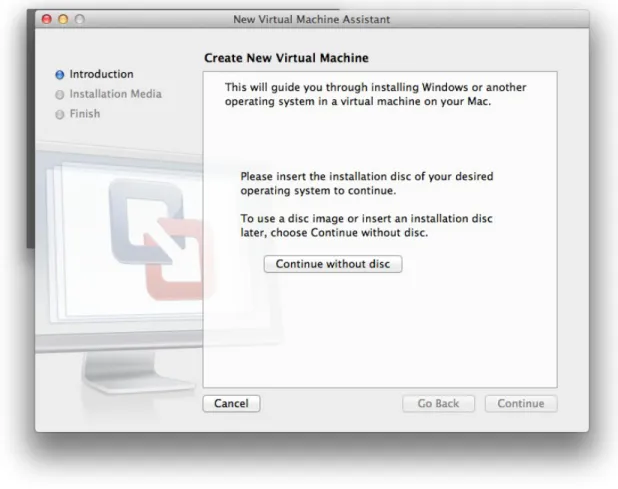
After the installation of VMware was complete the next thing is to install
HUBzero.(Figure 5) HUBzero, can be installed after the open source software is acquired
from http://hubzero.org/download. There were two options to pick from: a 64-BIT VM
IMAGE-TAR.GZ and a 64-BIT VM IMAGE-ZIP. The virtual machine images are 64-bit
Figure 5: Image of VMware installing HUBzero
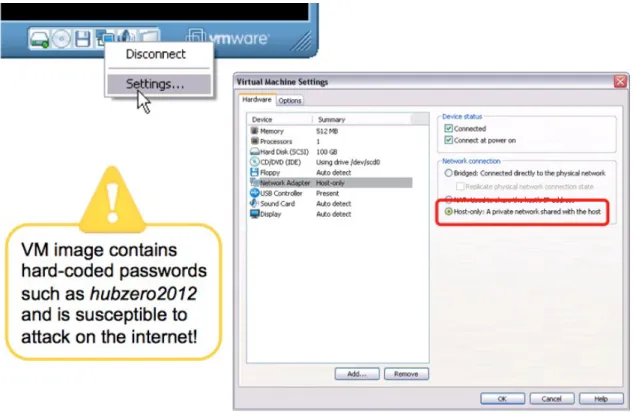
Once the installation is completed the next step is to set the Virtual Machine to
host only mode. The purpose of setting VMware to host only mode is the VM image
contains hard-coded passwords such as “hubzero2012” and is susceptible to attack on the
internet. After inputting the passwords the command “ifconfig eth0” was excuted, thus
showing the users IP address given to the HUBzero virtual machine by the VMware
Figure 6: Setting VMware to run host only mode
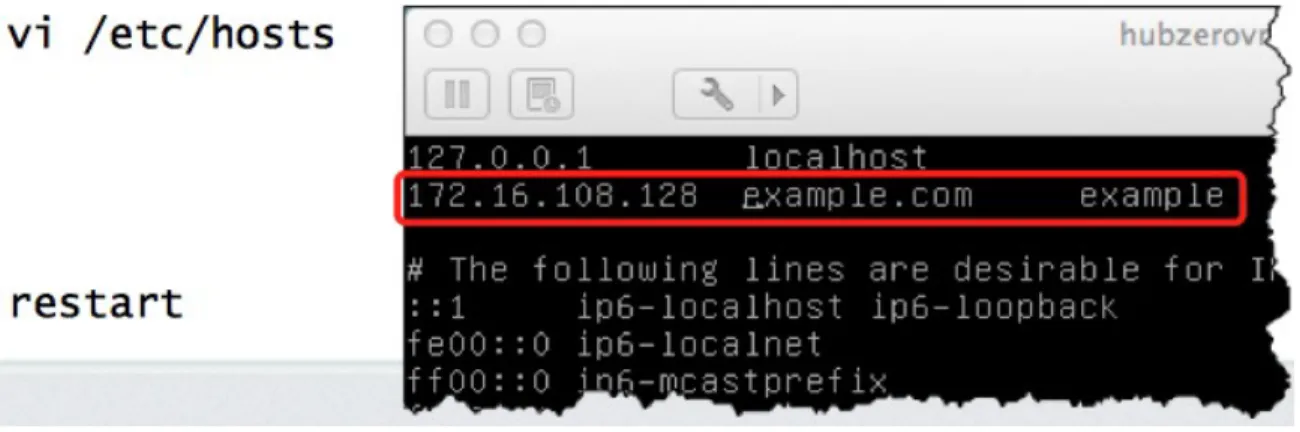
Once the IP address is noted, the command “nano /etc/hosts” was excuted and the
user has to replace the default IP address value with the one noted before. (Figure 7)
After this step pressing Ctrl-O, and Ctr-X will exit the editor. The final step was running
the “reboot” command, logging back in the VM and double-checking the IP address and
Figure 7: Using the commands “ifconfig eth0” and “nano /etc/hosts”
Registering as a User
On the homepage of the new hub, which is accessed by the IP address, the
“Register” button was pushed in the upper-right corner. This page shows required
information that was filled out by the user. Under normal circumstances, an email would
have been sent for confirmation from the user. In this case, the VM is set to local-only,
therefore the confirmation must be done by the administrator. In order to correct this, the
user had to point the browser to http”//XXX.XXX.XXX.XXX/administrator/, where
XXX.XXX.XXX.XXX refers to the IP address. The user had to log in with default
passwords giving in the documentation. Next the pull down “Users” menu was selected
and the “Members” menu was clicked. Next the “Details” button was hit after scrolling
down the page, then, “Confirm”, “Email”, then the large “Save” button in the upper-right
Uploading CReSIS Educational Data to SSH Drive
The CReSIS Educational Data was downloaded from the site
https://www.cresis.ku.edu/education/k-12/ice-ice-baby-lessons. Each file was
downloaded individually due to the fact there was no easier way to download them all.
There were a total of 76 educational documents that were downloaded.
The process of uploading the educational data to the server would have been a
very time consuming job. However, the free software FileZilla was utilized for the
purpose of uploading the educational documents to the server. FileZilla is a free, open
source FTP client, which supports FTP, SFTP, and FTPS . The client is available under
many platforms; binaries for Windows, Linux and Mac OS X were available. (FileZilla,
2013)
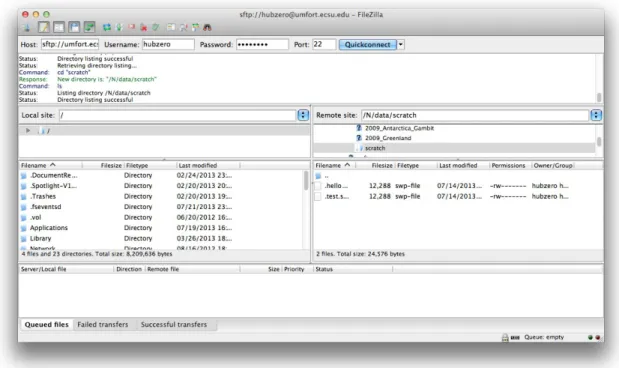
Utilizing FileZilla was relatively simple. The host name was inputted along with
the username, password and port #. After the correct information was inputted FileZilla
should make the connections automatically. (Figure 8) Once connected to the server the
Customizing the Hub
Each new hub requires some configuration and customization based on the needs
of the user. Next originates the information about content configuration (article pages),
home page configuration (modules, news/announcements, banner), member registration
customization (registration options / requirements), and member dashboard
customization. (Huebner, 2013) The hub had to be customized by logging into the
administrator account. Once logged into the administrators account the Joomla interface
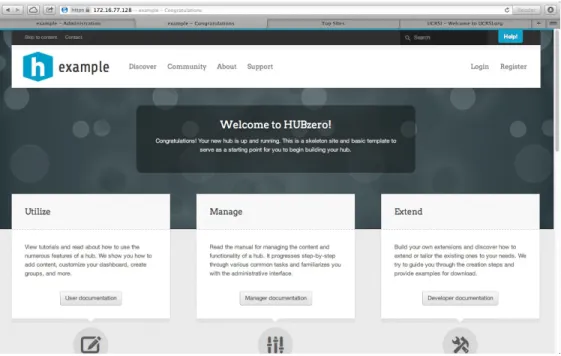
was displayed. This gave full access to the “Back-End” in figure 9, which controls the
appearances of the “Front-End” in figure 10.
Figure 10: Image of “Front-End”
Articles
In Joomla an Article is content consisting of HTML, most likely with links and
other resources such as pictures and banners. Articles are the basic units of information in
the content system. The Article Manager maintains articles, which again is in the
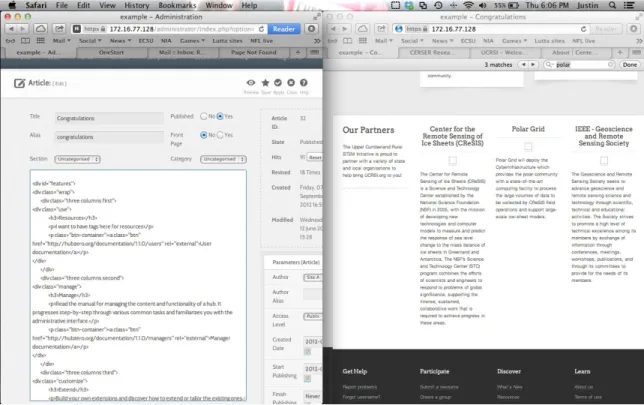
administrator side of the Back-End in figure 11. HTML had to be learned and used to
Figure 11: Utilizing the Congratulations Article to change content on the Front-End
Header Section: Opening Lines
The opening lines of the HTML Congratulations Article (lines 1-3) provide an
opening for the connection with the CSS content.
1. //===============Congratulations Article in Hub=================== 2.
3. {xhub:include type="stylesheet" filename="pages/home.css"}
Creating a Section
This section of code (lines 4 - 7) sets up four different columns and starts to
initiate the first column, which was given the name “Our Partners”. Partners of CERSER
will be placed into each column later in this chapter.
4. <div class="support-section"> 5. <div class="wrap">
7. <h2>Our Partners</h2>
1st Section
Lines 8 -17 are continuing to set up the columns and announces “Elizabeth City
State University is proud to partner with a variety of institutions and organizations to help
bring this educational Hub to you!”
8. <p>
9. Elizabeth City State University is proud to partner with a variety of institutions and organizations to help bring this educational Hub to you!
10. </p> 11. </div>
12. <div class="four columns second third fourth"> 13. <div id="partner_slides">
14. <div class="panes"> 15. <div class="panes-content">
16. <div class="pane" id="partner_slides-pane1"> 17. <div class="pane-wrap" id=“ecsupartners">
2nd Section
Just as the class above is given a title and a description the 2nd section of the class
is dedicated for CReSIS. Lines 18- 26 output the title CReSIS and a brief description.
18. <div class="three columns first">
19. <h3 style='text-align:center;'>Center for the Remote Sensing of Ice Sheets (CReSIS)</h3>
20. <p style='text-align:center;'>
21. <a href='http://www.cresis.ku.edu' rel='external'><img style='max-width:100%; max-height:100px;' src="/templates/hubbasic2012/images/logos/cresis.png" alt="" /></a> 22. </p>
23. <p class='partner_text'>
24. The Center for Remote Sensing of Ice Sheets (CReSIS) is a Science and Technology Center established by the National Science Foundation (NSF) in 2005, with the mission of developing new technologies and computer models to measure and predict the response of sea level change to the mass balance of ice sheets in Greenland and Antarctica. The NSF’s Science and Technology Center (STC) program combines the efforts of scientists and engineers to respond to problems of global significance, supporting the intense, sustained, collaborative work that is required to achieve progress in these areas.
3rd Section
As section one and two were both given space for a title and a description. Section
three is no different and its title is “Polar Grid”. Lines 27 – 35 are allocated to give space
for a title and a description about the Polar Grid.
27. <div class="three columns second">
28. <h3 style='text-align:center;'>Polar Grid</h3> 29. <p style='text-align:center;'>
30. <a href="https://www.grss-ieee.org" rel="external"><img style='width:100%; max-height:100px;' src="/templates/hubbasic2012/images/logos/ieee.png" alt="" /></a> 31. </p>
32. <p class='partner_text'>
33. Polar Grid will deploy the Cyberinfrastructure which provides the polar community with a state-of-the-art computing facility to process the large volumes of data to be collected by CReSIS field operations and support large-scale ice-sheet models.
34. </p> 35. </div>
4th Section
The next section (lines 36 – 44) is allocating space for the last partner on the list
which is IEEE- Geoscience and Remote Sensing Society. Just like previous sections 1-3
the fourth is no different provided a title and a description.
36. <div class="three columns third">
37. <h3 style='text-align:center;'>IEEE - Geoscience and Remote Sensing Society</h3> 38. <p style='text-align:center;'>
39. <a href="http://www.tntech.edu/stem" rel="external"><img style='width:100%; max-height:100px; ' src="/site/media/images/stem logo.jpg" alt="" /></a>
40. </p>
41. <p class='partner_text'>
42. The Geoscience and Remote Sensing Society seeks to advance geoscience and remote sensing science and technology through scientific, technical and educational activities. The Society strives to promote a high level of technical excellence among its members by exchange of information through conferences, meetings, workshops, publications, and through its committees to provide for the needs of its members.
43. </p> 44. </div>
Ending Sections
The final lines (45 - 49) closes the open four columns, places the columns in the
correct alignment and format.
45. <div class="clear"></div>
47. </div><!-- / .pane #partner_slides-pane4 --> 48. </div><!-- / .panes-content -->
49. </div><!-- / .panes --> 50. </div><!-- / #pane-sliders --> 51.
52. </div>
53. <div class="clear"></div> 54. </div>
55. </div><!-- / .inner -->
Templates
A Joomla template is an extension that changes the look of the site. There are two
types of templates utilized by Joomla. Front-end templates: which alters the way the
website is presented to the users viewing the content. The Back-end template alters the
way the administrative tasks are managed by using management functions provided by
Joomla. For this project the Joomla template will be set to the default template, which is
Figure 12: Basic template from new hub
Database 1.1.2
When this project was first initiated the latest version of HUBzero that was
downloadable was 1.1.2, which did not have a database extension built into HUBzero.
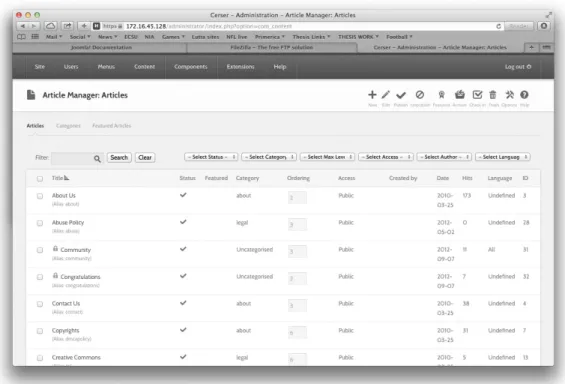
Therefore it was necessary to create an article within Joomla with every educational file
name that was available and make the file name a link. Figure 13 below shows an article
Figure 13: Article in Joomla to replace the database
This section of code (lines 56 - 62) sets up four different columns and starts to
initiate the first column, which was given the name “DATA” which a description
“Connect with k-12 students”
56. <div class="blocks-section wrap"> 57. <div class="four columns first"> 58. <h2>DATA</h2>
59. <p>
60. Connect with k-12 students 61. </p>
62. </div>
The next section (lines 63 - 65) combines the second, third and forth columns and
creates only two columns and starts to initiate the first column. Next, lines 67-76 shows a
list of file names along with the link location for each file.
63. <div class="four columns second third fourth"> 64. <div class="two columns first">
65. <h3>Online Data Portal</h3> 66. <p>
67. <a href="/sites/default/files/images/K-12/OnlineDataPortal/Data_CO2x.pdf">A Historical Record of CO2</a> (PDF)<br />
68. <a href="/sites/default/files/images/K-
69. <p>2. <a
href="/sites/default/files/images/K-12/OnlineDataPortal/Data_GlacierMassBalance_Trial.pdf">Gla cier Mass Balance</a> (PDF)<br />
70. <a
href="/sites/default/files/images/K-12/OnlineDataPortal/Data_GlacierMassBalance_WorkbookKE Y.xlsx">Workbook</a> (XLS)</p>
71. <p> 3. <a
href="/sites/default/files/images/K-12/OnlineDataPortal/Data_GroundingLine_Trial.pdf">Groundin g Line Location (using Echograms)</a> (PDF)</p>
72. <a
href="../../sites/default/files/images/K-12/OnlineDataPortal/EchogramBackground.pdf">Echogram Background</a> (PDF)<br />
73. <a
href="/sites/default/files/images/K-12/OnlineDataPortal/GroundingLine_Student.pdf">Grounding Line Images - Student</a> (PDF)<br />
74. <a
href="/sites/default/files/images/K-12/OnlineDataPortal/GroundingLine_Teacher.pdf">Grounding Line Images - Teacher</a> (PDF)<br />
75. <a
href="/sites/default/files/images/K-12/OnlineDataPortal/PetermannGroundingLines.kmz">Peterm ann Grounding Lines</a>
76. </div>
Database 1.2
Within the newer version of HUBzero (1.2) comes default with many new
features but the main feature this project takes advantage of is the database extension.
The database extension allows users to create a Comma-Separated Value (CSV) file from
an excel file to be uploaded and published into an interactive database.
Creating an Excel File
The HUBzero extension is very selective when it reads data to create an
interactive database. Each column has to state its title and under that cell must come the
type of data that is to be inputted. (Figure 14) Also the word DATASTART must be
written before the data starts. This format was used to input the links to the educational
Chapter IV Results Overview
Since HUBzero offers the ability to keep reports and statistics about each hub
showing the total number of users, and hits, it would be beneficial to show visual results
as well. The PolarEDHub also reports how many users have accessed a tool, or how
many times an online seminar has been viewed and the numbers are combined to provide
an overview of interesting categories. For example, users can see how many people
access a particular tool, how many are located in the US, and how many are working in
education or industry.
Visual
HUBzero allows each hub to be customized by the developer. The final product of
Figure 15: Image of final product
Connecting the Database to the Server using PHP
The database inside the hub needs a link to direct it to the actual file. This process
happens within the CSV file that was used to create the database. Within this file, the link
column offers a link to each individual PDF file that has been accessed with the PHP
Figure 16: CSV file
The final version of the database is interactive, which means it’s searchable and
sortable. Users can start typing in the search bar and the database will automatically start
narrowing down the results based of the input from the user. The database can also show
Figure 17: Database
1. <?php
2. if (!function_exists("GetSQLValueString")) {
3. function GetSQLValueString($theValue, $theType, $theDefinedValue = "", $theNotDefinedValue = "")
4. {
5. if (PHP_VERSION < 6) {
6. $theValue = get_magic_quotes_gpc() ? stripslashes($theValue) : $theValue; 7. }
8.
9. $theValue = function_exists("mysql_real_escape_string") ?
mysql_real_escape_string($theValue) : mysql_escape_string($theValue); 10.
11. switch ($theType) { 12. case "text":
13. $theValue = ($theValue != "") ? "'" . $theValue . "'" : "NULL"; 14. break;
15. case "long": 16. case "int":
17. $theValue = ($theValue != "") ? intval($theValue) : "NULL"; 18. break;
19. case "double":
22. case "date":
23. $theValue = ($theValue != "") ? "'" . $theValue . "'" : "NULL"; 24. break;
25. case "defined":
26. $theValue = ($theValue != "") ? $theDefinedValue : $theNotDefinedValue; 27. break;
28. }
29. return $theValue; 30. }}
31. if (isset($_GET['NAME'])) { 32. $FileName = $_GET['NAME']; 33. }
34. $FileName = "http://nia.ecsu.edu/IceIceBabyLessons/" . $FileName; 35. echo $FileName;
36. ini_set('auto_detect_line_endings', TRUE); 37. header("Location: $FileName");
38. ?>
Mobility of the Hub
Due to the fact that the PolarEDHub was installed into VMware Fusion, which is
a virtual machine, the hub could be copied and shared. The base installation of the hub
was placed on a flash drive and shared to educators for the purposes of gathering
classified feedback.
Testing the PolarEDHub
The PolarEDHub was presented to a group of K-12 educators. After being
presented with the features and use of HUBzero and also knowing that its primary use is
to conduct research and collaborating, each educator was giving a survey. (figure 18) The
questions were ranged from one – five as one being the lowest rating and five being the
Figure 18: Image of survey
Users Feedback
A survey was given to K-12 educators so that the PolarEdHub could be critiqued
Figure 19: Results
The feedback shows that the hub can be improved on its Graphical User Interface
(GUI) and being more user-friendly, however the PolarEDHub shows great potential for
becoming a hub that K-12 educators can utilize for the purpose of collaboration and
Chapter V Discussion Introduction
HUBzero is a powerful, open source software platform for creating dynamic web
sites that support scientific research, educational activities and training. This project has
provided the cyberinfrastructure to support the process of utilizing HUBZero software for
development.
The purpose of this project was to see if HUBZero could be utilized to provide
K-12 educational data for students and educators. This would allow users to sign in and get
access to the data and also users can upload useful data to the hub themselves without
going through a web developer.
Discussion
The results have shown that a hub was created and developed to see if HUBZero
can be utilized to provide CReSIS K-12 educational icesheet data. This model met its
goals in April, 2014 which were to:
Download the educational data sets from the CReSIS website.
Download and install HUBZero.
Upload the educational data to the server
Create a database that would give users a nice visual of the educational data.
Create a php script that gave the database a direct connection to the server.
Limitations
This paper is aimed at K-12 educators, and even developers that would like to
create a hub for the purposes of education and would like to know which direction to turn
in. Implementing a hub is not complicated; although to a non-experienced coder it will
call for an enormous learning curve to surpass, which consumes most of the time.
The learning curve that was needed for this project was greatly affected by the
amount of time needed to construct the hub. The developer was new to PHP, HTML,
Joomla, and coding in java script. A team of experienced developers would have possibly
reduced the production time as well as simplified the application to its most efficient sets
of code. Actually for implementing a hub it is recommended that you have a
collaborating team effort to construct and maintain a hub.
There is also a group called HUBzero Foundation, which is a community-based,
non-profit organization that promotes the use of HUBzero and ensures ongoing
sustainability of the core software. HUBzero Foundation maintains the hub for an
institution for a healthy price.
Recommendations for Future Research
Based on the outcome of this project, there are several recommendations for
future research and development. The first area concerns the action of the CReSIS
website maintenance and updating of new information. Since the method of this project
consisted of downloading the educational files from CReSIS website as of 2013, the risk
of old data comes about when CReSIS decides to add or change their documents in the
future. As it has been noted, obtaining the documents was a relatively a simple task but
help button should be implemented to assist users with an explanation of how to access
the data and can be provided a link to directly access the database of educational files.
Conclusions
This study concludes that it is possible to create a hub utilizing CReSIS
educational data by using VMware as a base, and installing HUBzero v1.2 on it. It has
also been demonstrated that a small institutions such as ECSU can develop this
application with limited resources.
The results of this study illustrated that HUBzero can be developed and
customized using HTML, PHP, CSS and maintain the framework of Joomla. The
feedback shows that the hub can be improved on its Graphical User Interface (GUI) and
being more user-friendly, however the PolarEDHub shows great potential for becoming a
Bibliography
A platform for research, collaboration and education. (2013, 10 5). Retrieved from NEEShub: http://nees.org
Anderson, D. (2012). BOINC Enhancement and Integration with HUBzero . Berkeley. Bartlett. (2005, 5 12). New pressures for growing educational capacity. Retrieved 1 3, 2014, from https://www.wcu.edu/ceap/houghton/readings/technology_trends.html
Brain, M. (2011, 9 12). If the polar ice caps melted, how much would the oceans rise?
Retrieved 1 1, 2014, from HowStuffWorks:
http://science.howstuffworks.com/environmental/earth/geophysics/question473.htm
CReSIS. (n.d.). Retrieved from CReSIS: https://www.cresis.ku.edu/about
DiGirolamo, N. E. (2012, 7 25). Satellite Data Indicates Unprecedented Greenland Ice Sheet Surface Melt. Retrieved 6 12, 2013, from Science, Space and Robots:
http://www.sciencespacerobots.com/satellite-data-indicates-unprecedented-greenland-ice-sheet-surface-melt-72520122
ECSU Report on Climate Change in NC/Relevant Research at ECSU. (2008). Retrieved from http://www.northcarolina.edu/nctomorrow/ECSU_climate_change_report.pdf
FileZilla. (2013, 08 07). FileZilla. Retrieved 09 13, 2013, from FileZilla: https://filezilla-project.org/client_features.php
G.Klimeck, M. L. (2006, Jan). The NCN: Science, Sumulation, and Cyber Services.
Guo, Z., Singh, R., & Pierce, M. (2009). Building the PolarGrid Portal Using Web 2.0
and OpenSocial. GCE '09: Proceedings of the 5th Grid Computing Environments Workshop. Portland: ACM.
Hossain, M. M., & Robinson, M. G. (2011). How to Motivate US Students to Pursue STEM. Nevada : David Publishing.
hubzero. (n.d.). About Us. Retrieved 8 12, 2013, from HUBzero: https://hubzero.org/about
Huebner, E. (2013, 9 14). Configuring and Customizing. Retrieved 10 21, 2013, from HUBZero: http://hubzero.org/resources/1026
Institute, C. a. (n.d.). About Us. Retrieved 9 12, 2013, from Indiana CTSI: https://www.indianactsi.org/about/aboutus
Joolma! (n.d.). Joomla! for Beginners. Retrieved September 12, 2013, from Beginners - Joomla!: docs.joomla.org/Beginners
Joomla! (2013, 06 19). Joomla! Offical Documentation. Retrieved 09 10, 2013, from Joomla!: http://docs.joomla.org/Main_Page
Klimeck, G., McLennan, M., Brophy, S., Adams III, G., & Lundstrom, M. (2008).
nanoHUB.org: Advancing Education and Research in Nanotechnology. Computing in Science and Engineering.
McLennan, M. The Hub Concept for Scientific Collaboration. Rosen Center for Advanced Computing.
Schaeffer, U. (2012, 3 5). Knowledge is power: why education matters. Retrieved 8 12, 2013, from DW:
http://www.dw.de/knowledge-is-power-why-education-matters/a-15880356
VMware. (2013, 10 17). Company. Retrieved from VMware: www.vmware.com
w3schools.com. (n.d.). HTML. Retrieved 10 12, 2013, from w3schools: http://www.w3schools.com/html/html_intro.asp
Why STEM? (n.d.). Retrieved 06 2013, from Change The Equation: http://changetheequation.org/why-stem