The
Connection Machine System
C* User's
Guide
Version 6.0
November 1990First printing, November 1990
The information in this document is subject to change without notice and should not be construed as a commitment by Thinking Machines Corporation. Thinking Machines Corporation reserves the right to
make changes to any products described herein to improve functioning or design. Although the information in this document has been reviewed and is believed to be reliable, Thinking Machines Corporation does not assume responsibility or liability for any errors that may appear in this document. Thinking Machines Corporation does not assume any liability arising from the application or use of any information or product described herein.
C·@ is a registered trademark of Thinking Machines Corporation.
Connection Machine@ is a registered trademark of Thinking Machines Corporation.
CM-2. CM, Paris, CM Fortran, and DataVault are trademarks of Thinking Machines Corporation.
CMFS and CMSSL are trademarks of Thinking Machines Corporation. VAX and ULTRIX are trademarks of Digital Equipment Corporation. Sun, Sun-4, and SunOS are registered trademarks of Sun Microsystems, Inc.
UNIX is a registered trademark of AT&T Bell Laboratories.
Copyright © 1990 by Thinking Machines Corporation. All rights reserved Thinking Machines Corporation
245 First Street
Cambridge, Massachusetts 02142-1264 (617) 234-1000/876-1111
f
I
Contents
About This Manual ... vii
Customer Support ... ix
Chapter 1 Introduction. . .
11.1 Developing a C* Program... .. ... ... .. ... . ... .. .... 1
1.2 Compiling a C* Program . . . 1
1.3 Executing a C* Program ... 2
1.4 Debugging a C* Program. . . 2
"
Chapter 1 Developing a C* Program ...
32.1 C* . C8 Files ... 3
2.1.1 C· Keywords . . . 3
2.1.2 Reserved Identifiers . . . 4
2.1.3 Default Shape ... 4
2.2 Header Files ... S 2.2.1 The <math.h> File... S 2.2.2 The <stdlib.h> File... 6
2.2.3 The <string. h> File ... 6
2.2.4 Header Files and C· Keywords ... 7
2.3 Calling Paris from C· ... 7
2.3.1 The Relationship between Paris and C· ... 7
2.3.2 Calling Paris Functions . . . 8
C· Parallel Variables and Paris Field IDs ... 9
C· Shapes and Paris VP Sets... ... . 10
C· Parallel Arrays and Paris Fields ... 10
C· Memory Layout and Paris Functions ... 11
2.4 Calling CM Libraries ... 11
2.4.1 General Information ... 11
2.4.2 The Graphics and Visualization Library ... 12
2.4.3 The CM I/O Library ... . . . 12
2.4.4 The CM Scientific Software Library ... 13
2.5 Calling CM Fortran ... 13
iv
c·
User:r Guidemm'rmmwmmm"mrm'E,m::::m::: mmwmmmjmi!['mn:mjJjjmm,:::m:;;mI!mmmm,!W.hl~'li;mm':jj: I:! :!:!:!!!::::<"",ml;'"m:!mtl~'tliW!W:~%%~~~
2.5.1 Overview... 13
2.5.2 In Detail. . . 14
Include File ... 14
Calling the Subroutine . . . 14
What Kinds of Variables Can You Pass? ... 15
Passing Parallel Variables ... 16
Passing Scalar Variables ... 16
Freeing the Descriptors ... 17
An Example ... 17
2.6 Using UNIX Utilities ... 18
2.6.1 The Program Maintenance Utility make . . . 18
2.6.2 The Profiling Tools prof and gprof ... 18
Chapter 3 Compiling a C* Program .. . .
193.1 The Basic Compilation Process . . . 19
3.1.1 Basic Options . . . 19
Getting Help: The -help Option ... 21
Changing the Optimization Level: The -0 Option ... 21
Choosing a Specific Version of the Compiler: The -release Option... 21
Choosing a Specific Version of Paris: The -ucode Option .. 22
Printing the Version Number: The -version Option. . . 22
3.1.2 Options in Common with cc: The -c, -D, -g, -I, -1, -L, -0, -pC), and -0 Options ... 22
3.2 A Closer Look at the Compilation Process. ... ... ... ... . 23
3.2.1 Advanced Options .. . . 23
Using Another C Compiler: The -cc Option... 23
Displaying Compilation Steps: The -dryrun Option ... 24
Putting .c Files through the C· Compilation Phase: The -force Option . . . • . . . 24
Keeping the Intermediate File: The -keep Option ... 24
Suppressing Line Directives: The -noline Option ... 24
Displaying Names of Overloaded Functions: The -overload Function ... 24
Turning On Verbose Compilation: The -verbose Option ... 25
Turning Off Warnings: The -warn Option . . . 25
Specifying Options for Other Components: The
-z
Option . . . 253.3 Symbols... 25
3.4 Compiling a C· Program that Calls CM Fortran... ... 26
Contents v
Chapter 4 Executing a C* Program on a CM ...
294.1
Overview...
294.2 Obtaining Direct Access . . . 30
4.2.1 Executing the Program Immediately ... 30
4.2.2 Obtaining an Interactive Subshell . . . 31
4.2.3 Options for cmattach ... 31
Waiting for Resources ... 31
Specifying a Sequencer, an Interface, and a CM . . . 31
Obtaining Exclusive Access ... 32
4.3 Obtaining Batch Access ... 32
4.3.1 Submitting a Batch Request.... ... ... 32
4.3.2 Options for qsub ... 33
Specifying a Queue. .. .. . ... ... . ... .... ... ... 33
Receiving Mail . . . 33
Setting the Priority . . . 33
Specifying Output Files . . . 34
4.4 Other CM Commands ... 34
Chapter 5 Debugging a C* Program.. . .
355.1 Using dbx . . . 35
5.1.1 Invoking Overloaded Functions from within dbx ... 36
5.1.2 Calling C· Debugging Functions from within dbx ... 38
5.2 Defining a Region: The CMC_define_region Function... 38
5.3 Defining Data Types for Parallel Variables: The CMC_default_type and CMC_define_type Functions ... 39
5.4 Printing Values of a Parallel Variable: The CMC""print and CMC""print_region Functions... 40
5.4.1 Printing Values of a Pointer to a Parallel Variable ... 41
5.4.2 Changing the Format: The CMC_define_format, CMC_define_width,andCMC_define_view Functions.. ... ... .... 42
5.5 Setting the Context: The CMC_on, CMC_on_region, CMC_off, and CMC _off_region Functions ... 43
5.5.1 Saving and Restoring Contexts: The CMC""push_context and CMC ""pop_context Functions ... 44
vi
c·
User;Y Guide mwl@ll@!mw,l@i:: I@i I@i§j':§j::::ml::::~::tl"lil@;'; ~mw'I@::I@i'i:ml::: _!I:i~K%!t§jj![mli ~~mw'I@:: §j,§jMml! ml'::-I@'::!lllMi:::~ai!imlAI@': ~§j::-:mli[I@::::,I@:'::§j:: mwl@! 'I@j ~mw~~mWllMi5.7 Obtaining Status Information:
The CMC status Function. . . 45
5.8 Obtaining Help: The CNC_help Function... 46
5.9 Sample Debugging Sessions... 46
5.9.1 The Program ... 46
5.9.2 Compiling the Program . . . 48
5.9.3 The Initial Debugging Session... . ... 49
5.9.4 The Second Session... . ... ... 53
5.9.5 The Third Debugging Session... 57
5.9.6 The Final Debugging Session. . . 60
Appendix A Man Pages. . .
65Index... 79
/ I
About This Manual
Objectives of This Manual
This manual describes how to develop, compile, execute, and debug C· programs ona ConnectionMa-chine system.
Intended Audience
Readers are assumed to have a working knowledge of the C· language and of the UNIX operating system.
Organization of This Manual
Chapter 1 Introduction
Chapter 1 is a brief overview.
Chapter 2 Developing a C* Program
This chapter describes C· libraries and associated header files, and explains how to call Paris functions, CM library functions, and CM Fortran subroutines from a C· program.
Chapter 3 Compiling a C* Program
Chapter 3 describes the C· compiler and its command line options.
Chapter 4 Executing a C* Program on a CM-2 Chapter 4 describes how to run a C· program.
Chapter 5 Debugging a C* Program
This chapter describes functions useful in debugging a C· program, and contains a sample debugging session.
Appendil: A Man Pages
This appendix contains man pages for the ca compiler command and C· libraries.
viii C* User:SO Guide
mmlmlilima :mll mlllm!mi:lm:J[:mmmmmmmm::::I!lll:""'Wj\'0'·i1m~_,w&T¥tmm~'lmlrn~"m-:!mm:m: m" mmmmml!lllml!lll"mimi!!im::i!mm:m;!!:mm:mli.!m:lmillimlilimli::~ililil
Associated Documents
The following document about C* appears in the same volume as this user's guide:
• C* Programming Guide
In addition, a technical report is available that provides a reference description of the C*language.
Information about related aspects of the Connection Machine system is contained in the following vol-umes of the Connection Machine documentation set:
• Connection Machine Front-End Systems
• Connection Machine YO Programming
• Connection Machine Graphics Programming
• Connection Machine Parallel Instruction Set
• Connection Machine Programming in ClParis
Also consult the documentation for your front end (a Sun-4 running SunOS or a VAX runningULTR.IX) for further information about program. development facilities.
Notation Conventions
The table below displays the notation conventions used in this manual:
Convention
bold typell'ri tar
italics
typewriter
% boldface regular
Meaning
C* and C language elements, such as keywords, operators, and function names, when they appear embedded in text. Also UNIX and CM System Software commands, command options, and file names.
Parameter names and placeholders in function and command formats.
Code examples and code fragments.
In interactive examples, user input is shown in boldface
typewri tar and system output is shown in regular
typewri ter font.
---,
Customer Support
Thinking Machines Customer Support encourages customers to report errors in Connection Machine operation and to suggest improvements in our products.
When reporting an error, please provide as much information as possible to help us identify and correct the problem. A code example that failed to execute, a session transcript, the record of a back-trace, or other such information can greatly reduce the time it takes Thinking Machines to respond to the report.
To contact Thinking Machines Customer Support:
U.S. Mail:
Internet
Electronic Mail:
Usenet
Electronic Mall:
Telephone:
For Symbolics Users Only
Thinking Machines Corporation Customer Support
245 First Street
Cambridge, Massachusetts 02142-1264
ames ! think! customer-support
(617) 234-4000 (617) 876-1111
The Symbolics Lisp machine, when connected to the Internet network, provides a special mail
facil-ity for automatic reporting of Connection Machine system errors. When such an error occurs, simply press Ctrl-M to create a report. In the mail window that appears, the To: field should be addressed as follows:
To : [email protected]
Please supplement the automatic report with any further pertinent information.
Chapter 1
Introduction
C* is an extension of the C programming language designed for the Connection Machine data parallel computing system. This chapter presents an overview of the process of devel-oping and executing a C* program. The rest of this manual goes into the process in more detail.
1.1 Developing a C* Program
Develop C* source code in one or more files. You must use the suffix .cs if the file contains parallel code or any other features that C* adds to standard C (for example, the new <?=
and >?= operators). You can use standard UNIX tools like gprof and make. Chapter 2 describes facilities for developing a C* program. It also describes how to call Paris func-tions, functions in the CM graphics, lIO, and scientific software libraries, and CM Fortran subroutines.
1.2 Compiling a C* Program
Compile the files by issuing the command cs from your UNIX front end. The command can take various options, some of which are identical to options for the C compiler cc. Chapter 3 describes the compiler options and the compiling process in detail.
2 C· User:r Guide i&j~!!i::IiEi; ;! ..?~!m:I!~: ilWi ~ilW::;:lli!l! ~~_~L*m'ii;:lli:lrilW:;:iim'milli:::;ilW'::ilm'li!!lli:::::ilWn ~~~:',,~~i! ;m'Eilli:::::ilWE*m'::lli··::"ilW .. ~ilW;!iIlli~"'ilWVTm'iiiilli;;::ilW:::lim:l!l!llil;mm'Ii!Jm:ilililWi!!i;m'::il@l!iiIJl:
1.3 Executing a C* Program
To execute a program, issue the command
cmattachalong with the name of the
executa-ble load module, plus any arguments that the program requires.
Or,use the
qsubcommand
to
submit the executable load module as a batch request to the CM batch system.
The
cmattachand
qsubcommands are discussed in Chapter 4.
1.4 Debugging a C* Program
You can debug a C· program using a standard UNIX debugger like
dbz.C· provides
func-tions you can call to do such things as print out values of a parallel variable, set the context
of a shape, and define a region within a shape on which operations are to take place.
Chap-ter 5 describes the C· debugging functions.
/
(
Chapter 2
Developing a C* Program
A
c·
program can consist of:•
•
•
Standard serial C code.
c·
code; see Section 2.1. Header files; see Section 2.2.•
•
Calls to Paris, the CM parallel instruction set; see Section 2.3.
Calls to CM library functions; see Section 2.4.
•
Calls to CM Fortran subroutines; see Section 2.5.2.1
C* .cs Files
All C· code must appear in files with the suffix . cs. C· code consists of any of the exten-sions that C· adds to standard C. Standard C code can appear in either • c or . cs files; putting it in . c files speeds up compilation, as discussed in Section 3.2 in the next chapter.
2.1.1 C* Keywords
C· adds the following new keywords to standard C:
allocate_detailed_shape allocate_shape
bool
boolsizeof
4
iiill:::: i I II :i1iI~ITjjl!liFm: ":II!I::::::::!!!! ,:!!i::::m i
!Iv,';:-current dimof everywhere overload pcoord physical
physical_index positionsof rankof shape shapeof where with
c·
User ~ Guide::::'::::JJlE.lillliili'I:!!iFr:::!!ir:::r:::'J:Ji:::iiJ!EEliJ .:: II:: II : I: iI: I
c·
code must not use these words, except as prescribed
inthe definition of the language.
2.1.2 Reserved Identifiers
Identifiers beginning with
eMare reserved for use by this implementation of the language.
Do not create identifiers beginning with
eM inyour programs.
2.1.3 Default Shape
Although the language does not define a default shape, this implementation provides one.
If you specify a default geometry via the
-goption to the cmattach or cmcoldboot
com-mand, a VP with this geometry becomes the default shape of the program. If you do not
use this option, the default shape is physical-that is, a l-dimensional shape whose size
is the number of physical processors to which you are attached.
For more information on cmattach and cmcoldboot, see the
eM
User:SO Guide.
To gain access to a default shape specified via the
-goption, you must first declare a shape
that is not fully specified, and assign the current shape
toit while the default shape is
cur-rent.
Inthe following example, the default shape is assigned
toshape
s:
Shape S; main ()
Chapter 2: Developing a C· Program 5
f$'~'t@;~-.liW#i:~'.;.:k:: :.*M@@W'".4il;:@,*%ml:1W;;~7.tlWI.::·::·"~~%"W!!M!:iitit!:~.,;ilitiTitii:::·?@::::ilitiEi ~w.:iliti!i iitii:::::wm::iliti: !litiilrW,ill:Witii· -itii1!l!ilitiE itii:~:::
8 = current; {
float:8 x, y, Z; with (8)
x = y + Z;
NOTE: We do not recommend writing code that relies on the default shape, since this fea-ture is implementation-dependent and may change.
2.2 Header Files
C· substitutes its own header files for <math. h>, <stdlib. h>, and <string. h>, as described below. These files are typically in /usr/include/cs. C· accepts any other standard C libraries and associated header files. Appendix A contains the man pages for these files.
In addition, C· includes the following header files:
• <CSCODllll.h>, which is the header file for the communication functions described in Part
m
of the C· Programming Guide.• <csti.mer . h>, which provides wrappers for the Paris timing functions described in the CM User
s
Guide. Note that the timer functions in <cstimer . h> begin with "CMC" rather than "01". IT you use these versions of the timing functions and in-clude <cstimer.h>,
you need not include the much larger header file <em/paris. h>, as described in the CM Users
Guide.Man pages for these header files are also contained in Appendix A.
2.2.1 The <math.h> File
6 C· User:r Guide ~%M~~%M~%M:!ilii!!!ilW",W' .. :fiWlli®iW1.*,~~r:::FFJ·.:::m:::~~~. :U:::':.·'!!i!!i!!'§@._:Ei· iCFi..i!i~"'~v.ilUiii'j":;[.Im:;::!:J!i!i
2.2.2 The <stdlib.h> File
The fIle <stdlib. h> contains scalar and parallel declarations of the function abs, rand, and srand; the parallel versions of rand and srand are named prand and psrand. The file also contains the declarations of palloc, pfree, and deallocate_shape, which are described in the C·
Programming Guide.
No special library is required to use these func-tions.Note that prand returns a different random number for every element of a parallel variable.
2.2.3 The <string.h> File
The file <string. h> contains parallel declarations of the functions memcpy, memmove, memcmp, and memset. In addition, it contains declarations of boolean versions of these functions, called boolcpy, boolmove, boolcmp, and boolset.
The boolean versions are useful for performing memory operations at the bit level. These functions take pointers to bools for arguments and return pointers to bools (except for boolcmp). If you are dealing with arguments that are not bools, you must cast them to be pointers to bools. Also, note that the size argument for memcpy and related functions is in tenns of chars, while the size argument for the boolean versions is in terms of bools. For example, in the following code fragment, both memcpy and boolcpy copy source to dest:
#include <string.h> /* ... */
int:current source [2] , dest[2];
memcpy(source, dest, 2*sizeof(int:current) ); boolcpy( (bool:current *)source,
(bool:current *)dest, 2*boolsizeof(int:current) );
In this case, both functions accomplish the same thing; you would use boolcpy, however, if the number of bits to be copied was not a multiple of chars.
/
/ I
Chapter 2: Developing a C· Program 7
2.2.4 Header Files and C* Keywords
A difficulty can occur when you want to include a standard header file that also makes use of a C· keyword. For example, the X Window System header fIle <xll/Xlib. h> uses the C· keyword current as a variable name. Including this file would result in a syntax error. In such a situation, you can do the following:
#define current Current #include <Xll/xlib.h> #undef current
This redefmes current to be CUrrent while <Xll/Xlib. h> is being included, then un-defmes it. Of course, if you subsequently want to use the <Xll/Xlib. h> variable in your program, you must refer to it as CUrrent.
2.3 Calling Paris from C·
The header file <em/paris. h> declares the functions in the C· interface to Paris. You might want to use these C functions to obtain Paris features not available with C· syntax. In addition, you need to know the relationship between C· and Paris if you are going to call routines in the CM graphics, 110, or scientific software libraries. These libraries provide a ClParis interface; they do not currently provide a direct C· interface.
For general information about Paris functions, see the manual Introduction to Programming in CIParis. For complete reference information on Paris, see the Paris Reference Manual. Section 2.4, below, discusses the CM libraries.
2.3.1 The Relationship between Paris and C*
This section explains how concepts in C· map onto underlying Paris concepts.
8 C· User ~ Guide ii!WIl@!~ii!:::1l@1 mil ~I ~:iE!@!TIl@r:::j@!fl;:;mi"'~·j~~j mi,:~·~~_::~~1l@1 ~~mi: @!i ~~~!lll@r:@!::IilIl@r:mi!Il@!mi·:.@!i!!!mi::::~@!IIl@I@!!1l@::~1!iW
A parallel variable in C* is a Paris field, with the length specified by the parallel variable's
type.
A pointer to a parallel variable is also a Paris field. Thus:
pvar
==
CM_field_id_t &pvar==
CM_field_id_tWhen you issue the
c:Ibxcommand
printwith the name of the parallel variable as an
argu-ment, it returns the field
IDof a Paris field; see Chapter 5.
When a pointer to a parallel variable is passed to a function, C* passes the field
IDof the
parallel variable. When a parallel variable is passed to a function, C* passes the field
IDof a copy of the parallel variable-this allows the parallel variable to be passed by value.
A position in C* is a
virtualprocessor. Active positions are processors in the current VP
set that have their context flags set.
An element
in C* is the value of a field stored in an individual virtual processor.
Send and get operations in C* are performed by the corresponding Paris calls. Grid
com-munication functions in C* are performed by the corresponding
NEWScalls in Paris.
2.3.2 Calling Paris Functions
In
calling Paris functions within a C* program, there is one essential difference from
ClParis programming: C* does all space allocation. You pass ClParis functions addresses
of C* parallel variables rather than direct machine offsets. Little of the usual ClParis
book-keeping is required-in particular. no initialization or CM stack control is necessary.
Please note the following in calling Paris from C*:
•
•
If you explicitly allocate fields using Paris functions in a C* program, it is
impor-tant to understand that C* automatically deallocates all stack fields when leaving
a block. Therefore. stack fields can exist only within a block. If you want a field
to continue to exist after your program leaves a block, allocate a heap field instead.
Chapter 2: Developing a C* Program 9
C* Parallel Variables and Paris Field IDs
Pass the addresses of parallel variables rather than field IDs to Paris functions that take field IDs as arguments. (You can simply pass the parallel variable itself, but this requires an unnecessary creation of a temporary variable.)
For example, the following ClParis code fragment adds the values in two fields:
*include <cm/paris.h>
/* C/Paris code omitted . . . • */ CM_set_vp_set(S);
CM_field_id_t pl, p2;
/* Stack fields are explicitly allocated: */ pl CM_allocate_stack_field(32);
p2 = CM_allocate_stack_field(32); /* C/Paris code omitted . . . . */
Here is the corresponding C*/Paris program fragment, including a call to
CN
-- --
s add 2 lL:*include <cm/paris.h>
/* C* code omitted . . . . */ with (S)
int:S pl, p2;
/* Addresses of parallel variables are passed: */
10 C* User
s
Guidec·
Shapes and Paris VP SetsA C* shape represents the VP set ID of the corresponding VP set. For example,
returns the geometry associated with shape
s.
You could use this geometry in a call to eM_geometry _axis _ vp _ratio, for example, to obtain the VP ratio of axis 0 of shapes:
c·
Parallel Arrays and Paris FieldsA parallel array in C· is allocated as one large Paris field, and elements within the array are calculated as offsets within this field, using eM_add_offset_to_field_id. If you write a ClParis function that takes a C· parallel array as an argument, you must treat it similarly. For example, here is a C· parallel array:
int:S parray[lO]i
A user-written ClParis function that takes this array as an argument should be prototyped as in the following example:
rather than as:
To access element 3 of the array, the function should do the following:
Chapter 2: Developing a C· Program 11
C* Memory Layout and Paris Functions
Some advanced Paris functions (for example, aref32 and aset32) require that memory for fields be allocated contiguously on the CM. The current implementation of C· does not guarantee that memory for parallel variables will be laid out contiguously. To ensure that you have the correct memory layout, use palloc to allocate the memory yourself for par-allel variables that are to be used with these Paris functions.
2.4 Calling CM Libraries
You can call routines from the standard CM libraries from within a C· program. Specifically:
• Call routines from the CM graphics libraries to perform basic graphics operations and to display images on the CM graphic display system or on an X Wmdow System.
•
•
2.4.1
Call routines from the CM 110 library to perform standard 110 functions-for ex-ample, reading data into the CM from a Data Vault or other 110 device.
Call routines from the Connection Machine Scientific Software Library (CMSSL) to perform data parallel versions of standard mathematical operations such as ma-trix multiply and Fast Fourier Transform.
General Information
CM libraries currently provide a ClParis interface; you can call functions in these libraries as you would any Paris functions. See Section 2.3 for a discussion of the relationship be-tween C· and Paris. Therefore, note the following when consulting the documentation for the libraries:
•
•
When a call requires a field ID as an argument, pass it the address of the corre-sponding parallel variable.
12
c·
User:V Guide. ::ii:::Iii::::::m::r:m: . 'X::UimllVE m:::::m;:::m:::: nmi1l: LUI.: .. ,;wu !iJ!!iilii:m:::: .
•
Since C· initializes the CM automatically, ignore the requirement that the Paris
routine
eM _ ini tmust be called before making any calls to library routines.
2.4.2 The Graphics and Visualization Library
Use the
CMSRlibrary to perform graphics operations and
todisplay images of your data.
For complete information on the calls in this library, consult the volume Connection
Ma-chine Graphic Display System in the Connection MaMa-chine documentation set.
2.4.3 The
eM
1/0 Library
110
operations on the eM are carried out by making calls to functions in the
CMFSlibrary
(CMFS
stands for CMfile system.) For information on
CMFSlibrary calls, consult the CM
I/O System Programming Guide. This
guidedescribes how to use these calls
to dosuch
things as create files in the CM file system, read and write data between a CM and an
110device in the Connection Machine system, and, if necessary, transpose serial data so that
it is in the proper format for parallel operations.
Please note the following, in addition to the information discussed in Section 2.4.1 above:
•
Shapes by default
are
innews order. (You can specify a different order by using
the
allocate_detailed_shapefunction.) When using the
CMFS_trans-pose_alwaysfunction to transpose data between serial and parallel format, you
must include as the final argument one of the provided functions
(CMFS_write_to_row_major, CMFS_write_to_column_major, CMFS_read_from_row_major,
or
eMFS_read_from_column_major)to
make sure that the data is correctly transposed. Do this even if the data is
one-di-mensional. The choice between row-major and column-major order depends on
the way in which the serial data is laid out; note that data
inC is laid out in
row-ma-jor order.
Ifthe data is laid out in an order other
thancolumn-major or row-major,
you must write your own function
tocorrectly rearrange the data.
f
Chapter 2: Developing a C* Program 13
2.4.4 The
eM
Scientific Software Library
A C* program can contain calls to routines in the Connection Machine Scientific Software Library (CMSSL). Currently, C* users must use the ClParis interface to the· CMSSL. For complete information on this interface, see the manual CMSSLjor Paris.
Please note the following, in addition to the information discussed in Section 2.4.1:
•
2.5
CMSSL routines typically run more efficiently when fields are allocated
contigu-ously. Normal stack allocation in C* does not work in this way. To get this behavior, you must call the palloc function to allocate memory individually for each argument to a CMSSL routine.
Calling CM Fortran
You can call CM Fortran subroutines from within a C* program. This section describes how. See Chapter 3 for a discussion of how to link in the CM Fortran program and other required files.
2.5.1
Overview
To call a CM Fortran subroutine, do the following: • Include the file <csfort.h>.
• Use the function CMC CALL FORTRAN
-
-
to call one or more CM Fortran subrou-tines. You must convert the subroutine name to lowercase and add an underscore to the end of it.• To pass a parallel variable to a subroutine, create a scalar variable of type CMC_clescriptor_t. Call the function CMC_wrapJWar, with a pointer to the parallel variable as an argument, and assign the result to the scalar variable you created. Pass this scalar variable to the CM Fortran subroutine when you call it via
CMC CALL FORTRAN.
-
14 C'" User:SO Guide
•
After you are finished with a descriptor, free it by calling CKC _free _ desc with the scalar variable as an argument.2.5.2
In Detail
Include File
As mentioned in the overview, you must include the file <csfort. h> if your program includes a call to a
eM
Fortran subroutine.Calling the Subroutine
To call a
eM
Fortran subroutine, use the following syntax:where:
subroutine
is the name of the subroutine. It must be in lowercase (even if theoriginal subroutine name is in uppercase), and you must add an underscore to the end of the subroutine name.
are the subroutine's arguments, if any.
To call multiple subroutines, separate them with commas within the argument list. For ex-ample:
CMC _CALL_FORTRAN
(subroutinel_ (), subroutine2 _ () ) ;
The subroutine is not constrained by the current shape or the context as established by the
e*
program. When the call to CIIC _ CALL_FORTRAN returns, however, both the shape and the context are what they were before the function was called.VAX
users
only:In addition, if you compile on a VAX, you must create and compile a IDL (Jacket Building Language) file to map the subroutine name used in your
e*
program (plusa preceding
underscore)
to the subroutine name used by theeM
Fortran compiler. TheeM
Fortranunder-~
\ Chapter 2: Developing a C· Program 15
scores. The first line of the file creates the mapping. The second line is a mask of registers to be saved; you need not change the sample line shown below. For example, if the name of the CM Fortran subroutine is TEST, create the following file (it must have the suffix
.jbl):
test :TEST
{pass <r2,r3,r4,rS,r6,r7,r8,r9,rlO,rll>};
Note that you would use the same file if the CM Fortran routine were called "test" (in lowercase), because the eM Fortran compiler converts the name to uppercase.
You can create multiple mappings in a single JBL file.
See Chapter 3 of this manual for information on compiling this file. See the
VAX Fortran
for ULTRIX System User Manual
for more information about JBL.What Kinds of Variables Can You Pass?
You can pass both parallel and scalar variables as arguments to a CM Fortran subroutine. The parallel variables you pass can be of any shape. The variables can be of the following standard types:
bool
signed int signed lonq int float
double lonq double
In addition, <csfort.h> provides typedefs for two new types: Ole_complex and
CMC _double_complex. The typedefs are defined as follows: typedef struct{float real, irnag;} CMC_cornplex;
typedef struct{double real, irnag;} CMC_double_cornplex;
16 C· User 9 Guide
!!IU [!lim; El!L .: i:!!i:1i! . ::tC:::::::III::!!i;::: :!:::::IIIii!:::::i!
Passing Parallel Variables
A two-step process is required to pass a
e·
parallel variable
toa
eM
Fortran subroutine.
First, declare a scalar variable of type
CMC_descriptor_t.For example:
Next, make this variable a descriptor for the parallel variable by calling the function
CMC _wrap J>Var,
with a pointer to the parallel variable as its argument, and assigning the
result
tothe scalar variable. For example, if
plis the parallel variable you want
topass, call
the
CMC _wrap J>Varfunction as follows:
You can wrap a parallel variable of any shape.
You can then pass the descriptor to the
eM
Fortran subroutine. For example:
The descriptor stores the address (field ID) of the parallel variable, and the parallel variable
is passed by reference in this way. The
eM
Fortran subroutine can then operate on the
parallel variable referenced by the descriptor.
e·
code can operate on the parallel variable even after it has been wrapped.
You can reuse a descriptor in a program, but flfSt you must free it; see below.
Passing Scalar Variables
Pass scalar variables to a
eM
Fortran subroutine by reference. For example:
int s1;
CMC CALL_FORTRAN(subroutine_(&s1»;
(
'"
/'
Chapter 2: Developing a C* Program 17
Freeing the Descriptors
When you are through using a descriptor, free it by calling CMC _free _ dese with the des-criptor as the only argument. For example:
You can free a descriptor to a parallel variable of any shape.
An Example
The following is a
e·
program that calls aeM
Fortran subroutine.#include <stdio.h> #include <csfort.h> shape [16384]8;
CMC_descriptor_t desc_a; int sl;
int:8 p1; main ()
{
with (8) { sl = 1; p1 = 1;
desc a
=
CMC_wrap-pvar(&p1);CMC_free_desc(desc_a);
printf("Result for last position is %d\n", [16383]pl);
And here is the simple
eM
Fortran subroutine it calls:subroutine fortran_op(a,s) integer a(16384)
18
hi!! i
return end
iIE
2.6 Using
UNIX
Utilities
C· User:SO Guide
un!! .:CII!II::::!!E::-I!!iJ!i. -lEi!!!1 !IIlrli!i!lir»~ HI[ I iillilliilli!!iliiliilllj!!
You can use standard UNIX utilities like
make. prof. gprof.and
dbzwith C· programs.
dbz
is discussed in Chapter 5.
2.6.1 The Program Maintenance Utility make
The
makeutility makes object (.o) files from C· .
csfiles. just as it does with .
cfiles. The
only requirement is that the following code must appear somewhere in the makefile:
CS = cs
CSFLAGS = $(CFLAGS) . SUFFIXES: .cs .cs.O:
$(CS) -c $(CSFLAGS) $<
2.6.2 The Profiling Tools prof and gprof
Chapter 3
Compiling a C* Program
To compile a C· program, use the
cscommand.
Section 3.1 describes the basics of using
cs,including the most common options. This
section contains
allthe information most programmers need.
Section 3.2 provides a more detailed look at the compilation process and discusses options
more likely to be used by advanced programmers.
Section 3.3 discusses symbols for which
csprovides
#defines.Section 3.4 explains how to compile a C· program that calls a
eM
Fortran subroutine.
3.1 The Basic Compilation Process
The
cscommand takes a C· source file (which must have a .
cs suffix)and produces an
executable load module. The command also accepts
.csource files, .
0output files,
.objJBL
files (VAX only), and . a library files, but all parallel code must be in a .
csfile.
3.1.1 Basic Options
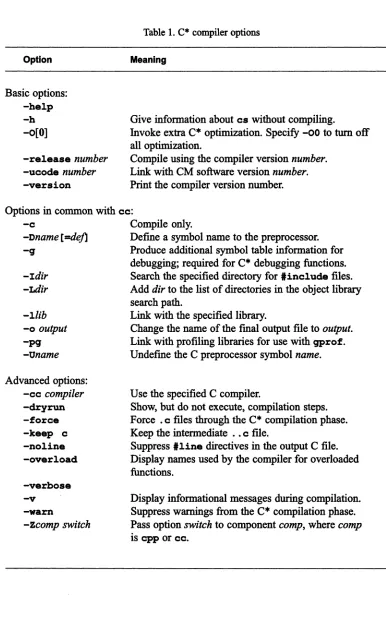
The options accepted by
csinclude some that are specific
toC· and the Connection
Ma-chine system, as well as versions of
ccoptions. This section describes commonly used
options. All options are listed in Table 1.
20 C· User:S Guide ~~~m~!!~F!w.;m'il!:w.i!!!m::~~mm~~~mm~~~mm~~mmmm~::1!iw.iiEm::::~milmlJ~l!!:w.i.~lilmm~iw.Hm!i!:~!!!!!W.:::!~!i~ Option
Basic options:
-help -h -0[0]-release
number
-ucode
number
-version
Table 1. C· compiler options
Meaning
Give information about
cswithout compiling.
Invoke extra C· optimization. Specify
-00to
turnoff
all optimization.
Compile using the compiler version
number.
Link with CM software version
number.
Print the compiler version number.
Options in common with
cc:-c
Compile only.
-Dname [=de./l
Defme a symbol name to the preprocessor.
-q
Produce additional symbol table information for
-Idir
-Ltlir
-llib
-0
output
-pq
-Oname
Advanced options:
-cc
compiler
-dryrun -force -keep c -noline -overload -verbose -v
-warn
-Zcomp switch
debugging; required for C· debugging functions.
Search the specified directory for
'includefiles.
Add
dir to the list of directories in the object library
search path.
Link with the specified library.
Change the name of the final output fIle
tooutput.
Link with profiling libraries for use with
gprof.Undefme the C preprocessor symbol
name.
Use the specified C compiler.
Show, but do not execute, compilation steps.
Force .
cfIles through the C· compilation phase.
Keep the intermediate .•
cfIle.
Suppress
'linedirectives in the output C fIle.
Display names used by the compiler for overloaded
functions.
Display informational messages during compilation.
Suppress warnings from the C· compilation phase.
Pass option
switch to component comp, where comp
is
cppor cc.
/
(
\
Chapter 3: Compiling a C· Program 21
:i: :::l::ii::::::. ? :::~~W.4~t.tn"®,.!:::U:C?Mi!::::::: 1::5 til:: hjl""g~lrmw :::.! i:IICF :I."'! . ;il!
Getting Help: The -help Option
Specify
-helpor
-hto print a summary of available command line options for
CStwithout
compiling.
Changing the Optimization Level: The
-0
OptionUse the
-0option to choose extra optimization for your program, or to
tumoff
optimiza-tion.
If
you do not specify
-0.default optimization includes local copy propagation. dead code
elimination. variable minimization. and some peephole optimizations. You can debug a
program compiled at this level by using
dbxor another debugger.
For more optimization. specify
-0.At this level. the compiler optimizes user variables as
well as compiler-generated temporaries. A program compiled using
-0 istoo highly
opti-mized for use with a debugger.
To
tumoff
alloptimization. specify
-00.This is normally not useful.
Choosing a Specific Version of the Compiler: The -release Option
Use the
-releaseoption to choose a specific version of the compiler. The initial release
of the compiler has two versions: 6.0. which operates with version 5.2 of the CM system
software. and 6.0.1. which operates with version 6.0 of the CM System Software. (Note
that the compiler version and the CM system software version do not coincide.) Either one
of these versions may
beinstalled as the default. To determine which version is the default.
use the
-versionoption. as described below. To compile using a version that is not the
default, use the
-releaseoption. For example.
% cs -release 6.0.1 ~file.cs
compiles with C· Version 6.0.1.
'JYpically. the default C· version will work with the standard installed version of the Paris
library. If that is the case. you will have to specify the
-ucodeoption along with the
22
c·
User ~ GuideIii:::' I " II 1111 IIIII!!II " IllIi;::.:::rIlUii!JlIl:®liiE::::::1l1Ji r m::?;II;;:-:':!!::: :::::!I!!!!IIIii1!!i!W":::::: ::::i:FkW<.ii~::::~m:'W<.!Ii!~E ~~i~:::::~::::~!!!!iW<: :~i!!!lll1!iij
Choosing a Specific Version of Paris: The -ucode Option
By default,
csuses the standard installed version of the Paris library. You might want to
use a different version for your program if. for example. you want to compare execution
time for the standard version against that obtained using an older version. Use the
-ucodeoption. followed by a four-digit number. to specify another version of Paris. Obtain this
four-digit number from your system administrator. Then issue the
cscommand as in the
following example:
% cs -ucode 5211 D¥file.cs
The Paris library 5211 is the version used in Version 5.2 ofCM system software.
IfVersion
6.0.1 is the default version of C·. you would also have to specify the
-releaseoption to
compile your program using this library. For example:
% cs -ucode 5211 -release 6.0 myfile.cs
Note that the version numbers of C· and CM System Software
donot coincide. See above
for more information about the
-releaseoption.
Printing the Version Number: The -version Option
Specify the
-versionoption to cause
csto print its version number before compiling.
If you do not specify a source fIle.
cssimply prints the version number and exits.
3.1.2 Options in Common with cc:
The
-c,
-0,
-g, -I, -I, -L,
-0,-P9, and -U Options
The C· compiler allows you to specify the
ccoptions
-c. -D.-g.
-I. -1. -L,-0.
and-pg
on the
cscommand line. See Table 1 for a brief description of these options; for more
information. consult your documentation for
cc.You must include the -g option if you want to use the C· debugging functions on the
com-piled program..
Use the -pg option if you want to profIle your program using the UNIX
gprofutility. This
option causes the compiler to
linkyour program
withspecial Paris and 110 libraries. These
(
Chapter 3: Compiling a C· Program 23
libraries provide more accurate timings of individual operations, at the expense of de-creased efficiency in the program as a whole.
3.2 A Closer Look at the Compilation Process
The cs command actually has three phases, which normally are transparent to the user:
•
•
•
A preprocessing phase
A C* compilation phase
A C compilation phase (which includes linking)
The C* compilation phase takes a preprocessed C* source fIle and generates an equivalent output fIle, which has the extension .. c. Any parallel code in the . cs fIle is translated into ClParis in this .. c fIle; serial code in the . cs fIle may be somewhat changed. The C com-pilation phase takes this ClParis file and produces an executable load module.
Typically, only . cs files are read during the C* compilation phase; . c, . 0, and . a files are not read until the C compilation phase. This means that putting serial code in . c files speeds up compilation, since these files don't have to go through both compilation phases. You may, however, want a . c file to go through the C* compilation phase if the code includes ANSI features like function prototyping, since the C* compilation phase imple-ments many ANSI features. To accomplish this, specify the -force option to cs, as described below.
3.2.1 Advanced Options
This section describes cs options that would typically be used by an advanced program-mer. All options are listed in Table 1.
Using Another C Compiler: The -cc Option
24 C· User's Guide Mi!I!IilJI!!i~!IilJI!!i!lilJl!!iiii!!! iii!!! W">.J.i~:;iiiWi1Ei!:::TI!, ! ! jj[I[[-W.@t:~iw'-r~!ii!!i!i!!-J!i~:m.i!i!!i:::~1 ~~~i Wi 1i!i!!Wi!i!!! ~! ~: i!i!!! i!i!!Wi!i!!Wi!i!!: !W!i!i!i!!Wii!i!!!~:!ii!i!!ii~11 i!i!!IIBI!I!f
-cc
switch, followed by the name of the compiler. For example, to use the Gnu C compiler,
specify the
-ccoption as in the following example:
% cs -cc qcc myfile.cs
Displaying Compilation Steps: The -dryrun Option
Specify
-dryrunto cause
cs toshow, but not carry out, the steps in the compilation.
Putting .c Files through the C* Compilation Phase: The -force Option
Specify
-forceto put .
cfIles through the C· compilation phase. Otherwise, such fIles are
passed unread to the C compilation phase. You might want to specify
-force totake
ad-vantage of the C· compilation phase's type checking of proto typed function declarations.
Keeping the Intermediate File: The -keep Option
Specify the
-keepoption, followed by the argument
c,to have
cskeep the ..
cfIle
produced by the C· compilation phase.
NOTE: The ..
cfIle is not portable between front ends. You cannot create a ..
cfIle on a
Sun, for example, and execute it on a VAX.
Suppressing Line Directives: The -noline Option
Specify
-nolineto suppress
,linedirectives in the output C fIle.
Thisseriously limits
your ability to debug C· source fIles with
dbxor other debuggers. It does, however, let you
debug at the ClParis level-in other words, you can debug the ..
cfIle rather
thanthe .
csfIle.
Displaying Names of Overloaded Functions: The -overload Function
Use the
-overloadoption
tocause the compiler
todisplay informational messages listing
the names it uses internally for overloaded functions.
Thisis necessary if you want
toChapter 3: Compiling a C· Program
25
1!!1::::::: or:: U!L JiU .. !Wi! .::;: EE!LX J:::::::liE!m:§i.-i"r:!!::.~
Turning On Verbose Compilation: The -verbose Option
Specify
-verboseor
-vto display informational messages as the compilation proceeds.
This can be useful if you want
tosee which part of the compilation process produced an
error message.
Turning Off Warnings: The -warn Option
Specify
-warn tosuppress warnings produced during the C· compilation phase.
Specifying Options for Other Components: The
-Z
Option
Use the
-z
option to specify
cppor
ccoptions that
csdoes not recognize. These options
are passed directly to the specified component without any interpretation by
cs.'JYpe
-z,
followed by the component name, followed by the option. There is no space between
-z
and the component name; leave at least one space between the component name and the
option. For example, specify
% cs -Zcc -w myfile.cs
to suppress
ccwarning messages.
3.3 Symbols
The
cscommand provides
ldefinesfor the symbols
listedbelow:
cstar unix ultrix vax sun sparc
The C· language (as opposed to the C language)
Any UNIX system
ULTRIXonly
VAX only
Sun only
Sun-4only
26
1:::I:::J::J[I:::n: lill::: .... ii:::J:::iiYilil:I:!i!!lIii:: ! . i:! iJ :
c·
User:SO GuideIii!!! : I Ilili!!::::llllllllliIlllli::
the program is running under VAX ULTRIX. Thus, you can use these symbols to ensure that
your code is portable. The
estarsymbol lets you isolate parallel code within a program,
allowing you to share source code between a C and a C* program.
3.4
Compiling a C* Program that Calls CM Fortran
If
your program includes a call
toa CM Fortran subroutine, as described in Chapter 2,
fol-low the instructions in this section.
1.
Compile the C· program, using the
-eoption. For example:
% es -e testes.es
2. Compile the CM Fortran program, also using the
-eoption. For example:
% emf -e testfcm. fcm
3.
For Vax users only:Compile the
JBLfile you created to map the subroutine
name(s) you used in the C· program to those created by the ULTRIX Fortran
com-piler. For example:
% jbl estofortran.jbl
This creates a file with a .
obj suffixthat you must link in with your other files.
4. Use the
emfcompiler
tolink the .
0files, the
.objfile (if you are compiling on a
VAX), and the required libraries. You must also link the following libraries:
•
Iibcsrt.a - the C* runtime library
•
Iibcmcl2.a -
a shared library that is required when calling CM Fortran
andC*
In
addition, include any libraries that you need
toexplicitly link with your
pro-gram.
For example, on a Sun you might issue the
emfcommand as follows:
% emf -noemfmain testes.o testfcm.o -Zld "-lesrt -lcmc12"
Chapter 3: Compiling a C· Program
On
a
VAXyou might issue the
emfcommand as follows:
% emf -nocmfmain testcs.o testfcm.o cstofortran.Obj \ -Zlk "-lcsrt -lcmc12"
The result is an executable load module that you can execute as you normally would.
Chapter 4
Executing a C* Program on a CM
Once a
c·
program has been compiled and linked, you can execute the output file on a
Connection Machine system. This chapter gives an overview of how to execute a program
on a CM system. For complete information, consult the
eM
User:S- Guide.
4.1 Overview
To execute a program on a CM, you must gain access
tosome of its processors; this is
known as attaching to the CM. Your front end has one or more interfaces, each of which
can attach to one or more sequencers within the CM; each sequencer controls a group of
CM processors.
There are two basic methods of attaching
toa CM: direct access and batch access.
•
For direct access, issue the
cmattachcommand
toattach an interface to one or
more sequencers on the CM. Depending on how you issue the command, your
pro-grams
is executed immediately and you are then detached from the CM, or you
enter an interactive subshell from which you can execute the program and other
commands.
•
For batch access, issue the
qsubcommand
tosubmit your program to a queue that
has been set up in the CM batch system. Your program attaches
tothe CM and is
executed when it reaches the head of the queue. Check with your system
adminis-trator
tofind out
ifthe batch system
hasbeen installed at your site.
In
both cases, access
tothe CM can be either exclusive or timeshared, depending on how
your system is configured. With exclusive access, only one user can be attached to an
inter-face and a sequencer at a time. With time shared access, multiple users can be attached at
30 C· User's Guide
: ! :: j: :: . : I : m::: Ii !i I I . ."):::::n I III H E :1 iii II I.:: !ll1I111!
a time, and multiple jobs can be running on the same processors. Neither affects the way
you compile or execute your program. Performance may be somewhat slower under
time-sharing, however.
Direct, exclusive access is ideal when you are developing your program, since it lets you
debug interactively on the
eM.
This kind of access may be relatively difficult to obtain,
however.
4.2 Obtaining Direct Access
Use the
cmattachcommand to obtain direct access
toeM
processors.
4.2.1
Executing the Program Immediately
To execute a program immediately, issue
cmattachwith the name of the executable
pro-gram as an argument. For example,
% cmattach myprogram
attaches to any free interface and sequencer, initializes (cold boots) the sequencer and its
processors, and executes the program. The system displays a message that gives you the
following information:
•
•
•
The name of the
eM,
the number of the sequencer, and the number of processors
to which you are attaching
The version of the
eM
microcode that this sequencer is running
Whether Paris-level safety checking is on
If no sequencers or interfaces are available, you receive an error message.
Chapter 4: Executing a C* Program 31 va!! ~ lJ.{ :H~t.l!lW4MW);M~, IiL.,J·'J![· lkWW!!!!!"!TC!!rX~#I@·:::MSi·· ·WlW!i!I@!!i!im. 1lil!l!l!!"imii! MSi· :mm:mmimJMSiIIIIWlWWlW1lil!l!.!lJim! WlWmimMSi!!I!!.'mMSi
4.2.2 Obtaining an Interactive Subshell
Issue
cmattachwithout the name of an executable program to obtain an interactive
sub-shell. If an interface and a sequencer are available, you are attached
tothem, and the
processors controlled by the sequencer are cold-booted. You are placed in a UNIX subshell,
from which you can execute your program, enter the debugger, or issue any standard UNIX
commands.
To leave the subshell and detach from the
eM,type
exitor the Ctrl-D
keycombination
at the UNIX prompt.
4.2.3 Options for cmattach
This section describes several of the most commonly used options for
cmattach.See its
on-line man page for a discussion of all its options.
Waiting for Resources
Use the
-woption to tell
cmattachto wait if initially it cannot obtain an interface and a
sequencer. If you don't require interactive use of the
eM,it is generally preferable to
sub-mit your program to a batch queue.
Specifying a Sequencer, an Interface, and a
eM
You can control the
eM,the interface, and the sequencer(s) to which
cmattach willattach
you. You might want to specify a particular sequencer if, for example, you want
touse a
framebuffer that is connected
tothat sequencer.
Use the
-c
option, followed by the name of a
eM,
tospecify the
eM
towhich you want
to attach.
Use the
-8option
tospecify number of the sequencer(s)
towhich you want to attach. Valid
values are 0, 1,2, 3,
~1,2-3, and
~3.32
Ilil!! II [I 1 : II iii ill:mEw-mEg]! :::1:11:1111::11 I
Obtaining Exclusive Access
I: :
C· User:r Guide
j II!] :! !Illig;
Use the
-eoption to
cmattachto specify that you require exclusive access to one or more
sequencers. If you use this option, the system will not attach you to a sequencer that is
running under timesharing.
4.3 Obtaining Batch Access
In
the CM batch system, you submit your program as a request
toa queue. The queue may
be associated with a CM and a sequencer, in which case the request is generally executed
when it reaches the head of the queue.
Or,the queue could send the request to another
queue for execution.
The batch system is configured differently at different sites. To find out what queues exist
at your site and when they are active, ask your system administrator, or issue the following
command:
% qstat
-x
4.3.1
Submitting a Batch Request
Use the
qsubcommand to submit a batch request for execution via a queue in the CM
batch system. You can submit multiple programs as one batch request. There are two ways
of specifying the programs
tobe executed:
•
Put their names in a script file, and specify the name of the script file on the
qsubcommand line. For example, the file
myproqruLscriptcould contain the
fol-lowing names of eXeCutable C· programs:
myprograml myprogram2 myprogram3
Chapter 4: Executing a C* Program 33
% qsub myprogram_script
•
Enter the names of the files from standard input. Put the names of the programs on separate lines, and type Ctrl-D at the end to signal that there is no more input. For example:% qsub
myprograml myprogram2 myprogram3
Ctrl-D
You can also issue other commands as part of the request-for example, cmsetsafety to turn Paris run-time safety on or off.
4.3.2 Options for qsub
This section describes several of the most commonly used options for qsub. See its on-line man page for a discussion of all its options.
Specifying a Queue
Use the -q option to specify the name of the queue to which the request is to be submitted. If you omit this, the request is sent to the default queue (if one has been set up).
Receiving Mail
Use the -BIb option to specify that mail is to be sent to you when the request begins execu-tion. Use -me to have mail sent to you when the request ends execution.
Setting the Priority
34
c·
User:S Guide iI!! 1111 i: I!!:II iliiliiill!! II !IIIII! !!iil II II II: lill !]I II I !!II!!I!!III!1II!111111I! 1111111 IIIIII!IIIIIIIIII III I 1111 i 1determines the request's position in the queue.
Ifyou don't set a priority, the request is
assigned a default priority.
Specifying Output Flies
Use the
-0option, followed by a pathname,
tospecify the file
towhich output of the batch
request is
tobe sent. Use the
-aoption to specify the pathname for the standard error
out-put. If you omit these options, the output is sent
todefault files based on an ID number
assigned
tothe request by the batch system.
4.4 Other CM Commands
Other commands are useful in executing programs on the
eM.
For example:
•
Use the
cmfingarcommand to obtain information about the
eM
system: who is
using the interfaces and sequencers, and whether any sequencers are free.
•
Use the
cmdatachcommand
todetach an interface from a sequencer, making it
available for use by another user.
•
Use the CUlpa command
tolist the processes that are running under timesharing on
a sequencer.
•
•
•
•
Use the
cmsatsafatycommand
to turnParis-level safety checking on and off.
Use the
ClDColdbootcommand to reset the state of the
eM
hardware
towhich you
are attached.
Use the
qdelcommand
todelete a batch request from a queue.
Use the
qstatcommand
toobtain information about batch requests in a queue.
See the
eM
User
~Guide
and the on-line man pages for complete information on these
commands.
Chapter 5
Debugging a C* Program
.1Ix •. TI
·~?Omtml¥rLrm.llI':
11; ....
11;·11. 11·
1it'(.}~1it..
S!lIl'~1JI1!lIl1ml1;l1._1it/1itfilllY _.
JI1I'·I1. 1it. 11itnllllr:I1I 11111111itl1itJJ
c·
programs can be debugged using a standard debugger like
dbz.c·
provides a variety
of functions that you can call within a debugger. Among other things, these functions let
you:
•
Defme a region within a shape
touse for debugging.
•
Print values of a parallel variable.
•
Make positions active or inactive.
•
Assign values to a parallel variable.
These functions stay
ineffect during the execution of a program in
dbz.They output their
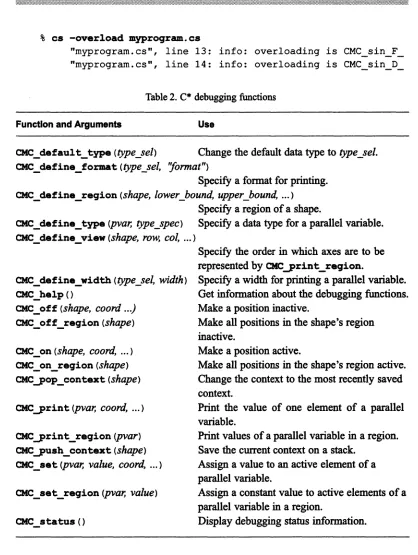
results to the standard error device. Table 2 summarizes the debugging functions discussed
in this chapter.
As described in Chapter
3,note that debugging is difficult when your program is compiled
with the
-0option.
5.1 Using dbx
To use
dbzor another debugger, invoke it from within an interactive subshell spawned by
cmattach.
For example:
% cmattach
Attaching the Connection Machine system name ...
coldbooting ..• done.
Attached to 8192 physical processors on sequencer 0, microcode version 6002
c·
User ~ Guide36
:'iI}WI!IiIii []}! I:m i!::U:: E!!:i::::ili,''::llllli III: 111111::: :. !!iIlI::::!IIilili :~_I!!:_liil~:ii;I!!I::: i_::_I_i.«.~.I!I$;:'l ~~! I!!I! _111_11i_11 ~I ~:_I~~_I_II~I~!11!!I1i 1~lill!
Paris safety is off.
Entering CMATTACH subshell. Type "exit" or control-D to detach the CM.
% dbx a.out
(dbx) [dbx
commands such as
run, step,and
next] (dbx) quit% exit
Detaching •.. done.
%
The
dbxcommands behave with
c·
programs as they do with C programs, with the
exception noted below.
:! j 1111 Ii! ill II :::1111111:::
Note on the VAX version of dbx
c·
programs are translated into ClParis programs as part of the
compilation process. Although
dbxdisplays the C· statements, it
actually operates on this ClParis program.
Inthe VAX version of
dbx,
the result is that you may have
toissue a
stepor
nextcommand more than once before a C· statement is completely
executed; what is happening is that
dbxis stepping through the
underlying ClParis statements.
~um.J.1U[( .1 ;]! II,. ..: I:. . : Ii J!i . ill ; .!. .:: ::;:!!il.!l~;;!!: ii.liii.:i!!II!!:.
5.1.1 Invoking Overloaded Functions from within dbx
To keep track of different versions of an overloaded function within a program, the
compil-er assigns separate names to each vcompil-ersion. If you want to invoke a particular vcompil-ersion of such
a function from within
dbx,you must use this internal name. To obtain these names, use
the
-overloadoption when compiling the program; this causes the compiler
todisplay
the names it uses. For example, if your program contains two versions of the function
sin,% cs -overload myproqram.cs
"myprogram.cs", line 13: info: overloading is CMC sin F "myprogram.cs", line 14: info: overloading is CMC_sin_D_
Table 2. C· debugging functions
Function and Arguments
Use
CMC_default_type
(type_sel)
Change the default data type totype_sel.
CMC_define_fo%1llat
(typeJel, ''format'')
Specify a format for printing. CMC_ define _reqion
(shape, lower _bound, upper_bound, ... )
Specify a region of a shape.
CMC_define_type
(pvar, type_spec)
Specify a data type for a parallel variable. CMC _define_view(shape, row, col, ... )
CMC _define_width
(type _sel, width)
CMC_helpO
CMC _off
(shape, coord ... )
CMC_off_reqion
(shape)
CMC _ on
(shape, coord, ... )
CMC_on_reqion
(shape)
CMCyop_contezt
(shape)
CMC yrint
(pvar, coord, ... )
CMCyrint_reqion
(pvar)
CMCyush_contezt
(shape)
CMC _set
(pvar, value, coord, ... )
Specify the order in which axes are to be represented by CMCyrint_reqion.
Specify a width for printing a parallel variable. Get information about the debugging functions. Make a position inactive.
Make all positions in the shape's region inactive.
Make a position active.
Make all positions in the shape's region active. Change the context to the most recently saved context.
Print the value of one element of a parallel variable.
Print values of a parallel variable in a region. Save the current context on a stack.
Assign a value to an active element of a parallel variable.
Assign a constant value to active elements of a parallel variable in a region.
38
::: .. : t~ Iii! Z:::: . . . RH:- ! TUTIJI.I
5.1.2 Calling C* Debugging Functions from within dbx
c·
User ~ GuideI: :iilil~iII::r: i! : it Ii.
To use one of the C· debugging functions described in this chapter, issue it with the
dbzcommand
call.To lessen the amount of typing this requires, you can use the
dbxcom-mand
aliasto create an abbreviation for the call. For example, issuing the following
command:
% (dbx) alias ppr "call CMC-print_region"
makes
ppran alias for the string
"CMC-print_region".You can then use
ppralong
with the appropriate argument in place of a call to
CMC-print region.For example:
% (dbx) ppr (pl)
To execute these
aliascommands automatically when you start a
dbxsession, put them
in the file .
dbxini tin your current or home directory.
We provide a sample .
dbxini tfile, called
cs-dbxini t,which is located in the directory
that contains sample programs. Ask your system. administrator for the path for this
directo-ry at your site.
5.2 Defining a Region: The CMC_define_region Function
C· debugging functions let you perform operations either on a single element or position,
or on a selected set of positions within a shape; this set of positions is referred to as a
re-gion.
Since shapes usually have thousands of positions, it is easier to focus on a small
subset of them for debugging purposes.
Initially a shape's region consists of all positions in the shape. To change the region, use
the
CMC _define_regionfunction. Its first argument is the name of the shape. Then, for
each dimension, specifY the beginning and ending coordinates that define the region. Start
with axis 0, and include beginning and ending coordinates for each axis in the shape. For
example,
(dbx) call CMC_define_region(ShapeA, 0, 4)
defmes the region of
ShapeAas positions 0 thro