Infiltrate the Vault: Security Analysis and Decryption of Lion Full Disk
Encryption
Omar Choudary
University of Cambridge
Felix Gr¨obert
∗Joachim Metz
∗Abstract
With the launch of Mac OS X 10.7 (Lion), Apple has introduced a volume encryption mechanism known as FileVault 2. Apple only disclosed marketing aspects of the closed-source software, e.g. its use of the AES-XTS tweakable encryption, but a publicly available security evaluation and detailed description was unavailable until now.
We have performed an extensive analysis of FileVault 2 and we have been able to find all the algorithms and parameters needed to successfully read an encrypted volume. This allows us to perform forensic investigations on encrypted volumes using our own tools.
In this paper we present the architecture of FileVault 2, giving details of the key derivation, encryption process and metadata structures needed to perform the volume decryption. Besides the analysis of the system, we have also built a library that can mount a volume encrypted with FileVault 2. As a contribution to the research and forensic communities we have made this library open source.
Additionally, we present an informal security evalua-tion of the system and comment on some of the design and implementation features. Among others we analyze the random number generator used to create the recovery password. We have also analyzed the entropy of each 512-byte block in the encrypted volume and discovered that part of the user data was left unencrypted1.
∗The opinions expressed in this paper are mine alone and do not
reflect the opinions of my employer or affiliates of my employer unless otherwise explicitly stated.
1This was reported to Apple in 2011 and FileVault Disk Encryption
has been altered accordingly. See Apple CVE-2011-3212.
1
Introduction
Since the launch of Mac OS X 10.7, also known as Lion, Apple includes a volume encryption software named FileVault 2 [8] in their operating system. While the pre-vious version of FileVault (introduced with Mac OS X 10.3) only encrypted the home folder, FileVault 2 can en-crypt the entire volume containing the operating system (this is commonly referred to as full disk encryption). This has two major implications: first, there is now a new functional layer between the encrypted volume and the original file system (typically a version of HFS Plus). This new functional layer is actually a full volume man-ager which Apple called CoreStorage [10] Although this full volume manager could be used for more than volume encryption (e.g. mirroring, snapshots or online storage migration) we don’ t currently know of any other appli-cations. Therefore in the rest of this paper we will use the term CoreStorage for the combination of the encrypted volume and the functional layer that links this volume to the actual HFS Plus filesystem.
The second implication is that the boot process is slightly modified since the user password or other token must be retrieved before being able to decrypt the data.
Apple’ s volume encryption is equivalent to solu-tions such as PGP Whole Disk Encryption [12], True-Crypt [13], Sophos SafeGuard [20], Credant [21], Win-Magic SecureDoc [22], or Check Point FDE [23]. All these solutions can be used on corporate laptops, which generally contain sensitive data that must be protected at all times (even when the computer is turned off).
To the best of our knowledge, Apple has not released any documentation or source code on FileVault 2, which obstructs security experts and consumers to assess the security of the system. Also, the missing documentation and interfaces effectively limit the development of any third-party tools that can help in data recovery or forensic investigations.
of FileVault 2: we were able to find most of its algo-rithms and parameters to the extent that we are able to read and mount a CoreStorage volume on a Linux ma-chine. In the following sections we describe in detail the key derivation mechanisms and the encryption pro-cess. There remains unknown information in the volume header and metadata, that we believe is used for verifica-tion routines or other funcverifica-tionality of CoreStorage which does not seem to affect the read of the contents of the en-crypted volume.
Based on these findings, we have developed a cross-platform library that reads and mounts CoreStorage vol-umes. Such a library can be used to analyse the contents of a particular file (or block) from an encrypted volume, without having to use Mac OS or even without having physical access to the Apple computer in question (e.g. by booting from a Linux live CD and connecting to the machine via the network).
Our work provides the security and forensic commu-nity with an open source library that can be used to anal-yse CoreStorage volumes, having the user password or recovery password. It is also possible to recover the data from a CoreStorage volume using a private key but our library does not support this yet. However, this merely involves updating the key derivation process, which we fully describe in this paper.
As part of our analysis we have also done an (informal) assessment of the security of the encryption mechanisms, including the random number generator mechanism used to create the recovery password. We found that some data is unnecessary protected (however weakly) while some other basic mechanisms such as code mangling are not used at all. We have also performed an entropy test on each 512-byte block of the encrypted volume and we found that part of the user data was left unencrypted.
1.1
Goals and motivations
Our primary goal has been to determine how FileVault 2 operates. As we will detail in the next section, this task involves finding how and where the encrypted volume master key is stored, how this key can be obtained from the user password or another token, what other data (the metadata) is available and how is used, and finally how the disk encryption and decryption are performed.
As part of this process we created an open source tool that can read and decrypt a CoreStorage volume.
Our motivation is twofold. First of all we needed a tool for digital forensic investigations. When a computer is suspected of malware or some malicious access we need to obtain certain files from the disk. If the computer is at a distant location it might not be feasible or conve-nient to send the computer or disk (for a Mac Book Air is not even trivial to remove the disk) in order to
anal-yse it at the forensic laboratory. Even if we had physical access to a computer, we would not trust the operating system to extract the necessary files since malware could tamper with the OS. With FileVault 2 enabled, we cannot read the disk contents unless the Mac OS is running. Al-though it is possible to access the disk of a Mac computer with another Mac computer using a FireWire connection, many times we use forensic tools on another operating system than Mac OS and we cannot rely on remote lo-cations having spare Mac computers for this task. Hav-ing cross-platform software to read encrypted volumes solves these problems. We can simply boot the Mac com-puter from a Linux live CD and use the software either locally or remotely to access the necessary files.
The second part of the motivation has been our de-sire to have a security assessment of the system. Since FileVault 2 can be used on corporate machines we needed to make sure that using this system instead of other known encryption solutions will not introduce vul-nerabilities.
The next paragraphs provide a brief background on full disk encryption after which the details of FileVault 2 are discussed.
2
Background
Commonly a hard disk is logically organised in multi-ple sections, often referred to as either partitions or vol-umes. These volumes can be used for various purposes, and they are often structured according to a file system format (e.g. NTFS, FAT, HFS, etc.). It is possible to have a single disk with 3 volumes, where the first volume is formatted with NTFS and contains a Windows operat-ing system, the second volume is formatted with EXT3 and contains an installation of a Linux distribution, while the third volume is formatted with FAT and only contains data (no operating system). The reader is encouraged to check the excellent book by Brian Carrier [28] for more details on the topic.
Volume encryption is a mechanism used to encrypt the contents of an entire volume. This is sometimes referred to asfull disk encryption, which is mis-leading, since a physical disk can actually contain mul-tiple volumes, each encrypted independently. The term
full disk encryptionis incorrectly used in the case of FileVault 2 and other systems such as BitLocker, that in fact perform volume encryption. Nonetheless, due to its popularity, we will continue to use the term full disk encryptionin the remaining of this paper.
Encrypted volume encrypted volume
metadata encrypted key
blob
intermediary key
key derivation
full volume master key
decrypt
Decrypted volume
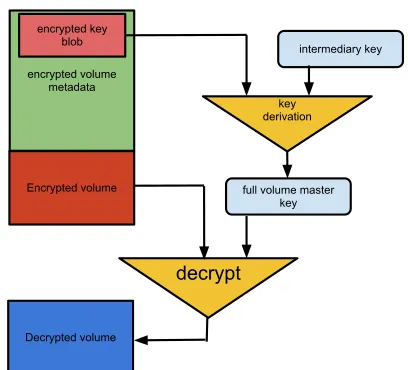
Figure 1: General framework for key derivation used in full disk encryption. The metadata containing the en-crypted version of the volume master key is generally isolated from the actual encrypted volume, although it could exist in the same logical volume.
system (or an initial subset of it, enough to initialise the file system and read the OS) must reside somewhere else. This is a problem that is tackled differently by the many implementations of full disk encryption. In the next sec-tions we describe how FileVault 2 deals with this prob-lem.
Another very important matter is the key derivation. The volume is generally encrypted using some algorithm that relies on AES or other symmetric cipher (asym-metric cryptography would impact the read/write perfor-mance too much). Therefore, there must be a key that can unlock this encrypted volume.
A typical AES key is 128 or 256 bits, too long for users to remember or type every time they boot the ma-chine: 128 bits can be represented with a minimum of 22 characters using base64 although base32 or hexadecimal are more user-friendly, each requiring 26 or 32 charac-ters respectively. As a result, most full disk encryption schemes actually store this key (known as thevolume master key) in an encrypted blob (usually by encrypt-ing or hashencrypt-ing the key along with some additional infor-mation several times). This blob can only be decrypted using an intermediary key that is derived from the user password or another user-trusted input, e.g. a private key stored on a USB stick, a smart card, or a trusted platform module (TPM) linked to the encrypted volume (see Fer-guson’ s paper [1] for a detailed discussion on how to use these methods). This process is depicted in figure 1.
As you can observe from figure 1, the blob containing
the encrypted volume master key is stored in a metadata section. This metadata is generally stored in the same disk as the encrypted volume, but on a different location. In the next sections we will explain exactly how this is done in FileVault 2.
The third important aspect of full disk encryption, per-haps among most important from a security perspective, is the encryption operation itself. It can be tempting to think that simply using AES in a standard mode of oper-ation such as CBC might work. However there are some issues to be taken into consideration.
File systems generally work with disk allocations (known as blocks) of 512 bytes or multiples of this size (e.g. 4096 bytes). This is mainly because traditional disks (those using magnetized platters) have their hard-ware and softhard-ware drivers optimized for accessing blocks of 512 bytes (these are referred to as sectors). Therefore, in order to minimize the access time to a disk (which is probably the slowest operation done by a computer program), we should work with blocks multiple of this size. This requirement might hold even with new tech-nologies such as solid state drive (SSD), since they use the same interface and logical block addressing (LBA) as older disks.
As a consequence of the 512 byte access restriction, full disk encryption is generally performed also on data chunks multiple of 512 bytes. If we decide to apply AES in CBC mode to each chunk we need to deal with a few issues. Using the same initial value (IV) for each en-crypted block would lead to identical enen-crypted blocks for the same data, therefore allowing an attacker to wa-termark the disk and to determine the existence of certain data (i.e. breaking CPA security). We can improve this by using the block number, eventually encrypted under a key, as the IV. Although this approach can work (and is actually used in several full disk encryption implemen-tations such as Linux Unified Key Setup [2]), it has the disadvantage that flipping one bit in the encrypted block will result in one bit flipped in the unencrypted version of the block, along with 16 corrupted bytes. For more details on these problems the reader in encouraged to see the work of Clemens [2] and Ferguson [1].
Bitlocker, the full disk encryption mechanism imple-mented in Windows since the version of Vista, deals with the flipping problem by adding a mechanism called
Elephant Diffuser. FileVault 2 instead uses a tweak-able encryption scheme known as AES-XTS. We detail this method in the next sections but for the moment we mention that it has several advantages over AES in CBC mode with a block-derived IV, and solves most of the problems discussed earlier.
Figure 2: the recovery password shown by Mac OS when FileVault 2 is enabled.
during the boot process the volume master key is derived from the user password or another token. Once this key is derived, the OS stores it in memory in order to read and write blocks efficiently without having to derive this key on every disk access. Halderman et al. [3] explain how an attacker with temporary access to a running sys-tem can scan the memory in order to retrieve the volume master key and therefore decrypt the contents of the disk. As far as we know this problem is still largely unsolved although computer manufacturers may use proprietary methods (such as on-board tamper resistant memories) to mitigate such attacks.
Having discussed the basic concepts used in full disk encryption, we move to the core of this paper, presenting the details of FileVault 2. A summary of the system is given in section 3.6.
3
FileVault 2 architecture
3.1
Enabling FileVault 2
In Mac OS X Lion, after FileVault 2 is enabled, a series of events take place. First of all the user is presented with a 24 character recovery password (see figure 2). This password can be used to access the encrypted volume even if the user password is lost. We comment later on the security of this recovery method.
Next, the file system in the main volume is con-verted from the native HFSPlus type to CoreStorage (en-crypted). During this operation, the user can still use the system at will and theConversionStatusfield in the EncryptedRoot.plist file (details below) contains the stringConverting. After the encryption process is com-plete the string changes toComplete.
At the moment we do not know how the Mac OS keeps track of the encrypted blocks during the conver-sion process, so our tool cannot correctly mount vol-umes that are in aConvertingstate. This information could exist only somewhere in the last blocks of the vol-ume, since all the data before the encrypted volume is zeroed (details in section 4). Comparing data from a par-tially encrypted volume with one fully encrypted we see
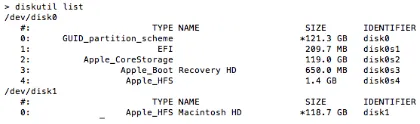
Figure 3: output ofdiskutil listrun on a Mac Book Air with FileVault 2 enabled.
that the encrypted metadata (see details later) is identi-cal, while the Disk Label metadata only differs in some bytes. While these bytes might be related to the encryp-tion status, we believe the informaencryp-tion, if available, is actually found near the encrypted metadata, in one of the encrypted chunks that follow the encrypted volume (see figure 9).
In addition to the encryption itself, a new volume gen-erally calledRecovery HD appears alongside the main
Macintosh HDexisting volume. This new partition con-tains the encrypted volume master key, as described be-low.
3.2
The new volume, boot process and
EncryptedRoot.plist file
Running the commanddiskutil list on a Mac OS installation with FileVault 2 enabled will show an output similar to figure 3.
In figure 3 you can see the encrypted volume (disk0s2), the new volume (disk0s3), the original un-modified EFI volume (disk0s1), and also the unlocked (unencrypted) version of the main volume (disk1). There is also an additional partition (disk0s4) which we created just for testing purposes.
The new Recovery HD volume contains a series of new files, including new EFI boot code to deal with the encrypted volume. The EFI (Extensible Firmware Inter-face), now known as UEFI (Unified EFI) [24], is a recent standard meant to replace the traditional BIOS system to boot a computer. It contains all the necessary POST routines to check the hardware and the necessary code to locate the volume that has an operating system and start booting from there. Around 2006 Apple switched to the Intel architecture and decided to use EFI instead of the traditional BIOS [25]. When FileVault 2 is enabled, the existing EFI code (generally divided between a separate non-volatile memory location on the main board and a volume containing aFATfile system namedEFI) is sup-plemented with code available in the newRecovery HD
volume. This new code allows the system to display a UI where the user can type its password in order to unlock the encrypted volume key and load the actual OS.
the most important for FileVault 2 operation is the
EncryptedRoot.plist.wipekey file 2, which con-tains all the information needed to extract the volume master key from the user’ s password or a recovery to-ken.
The EncryptedRoot.plist.wipekey file is en-crypted using AES-XTS (details later) with an all-zeros tweak key, but the encryption key is easily available in the header (first block) of the CoreStorage volume (see table 2 in Appendix). Among other data, the header block contains also the size of the entire volume (in-cluding metadata), another UUID which is used as a key to decrypt part of the metadata (see details later), and a CRC32 checksum. The actual polynomial that is used for the CRC32 calculation is currently unknown to us. However the open source code contains the precomputed computed CRC table found during the analysis. The CRC32 checksum is used to validate the values in the FileVault 2 metadata structures.
Once decrypted, the fileEncryptedRoot.plisthas an XML structure with the following important entries:
• PassphraseWrappedKEKStruct(1)
– 284 byte structure for recovery password.
• PassphraseWrappedKEKStruct(2)
– 284 byte structure for user password.
• KEKWrappedVolumeKeyStruct(1)
– unused.
• KEKWrappedVolumeKeyStruct(2)
– contains wrapped volume master key.
We mention that if multiple users are registered on the same machine then theEncryptedRoot.plistfile will have a separate PassphraseWrappedKEK structure for each user.
In the following we present the key derivation mecha-nisms.
3.3
Key derivation
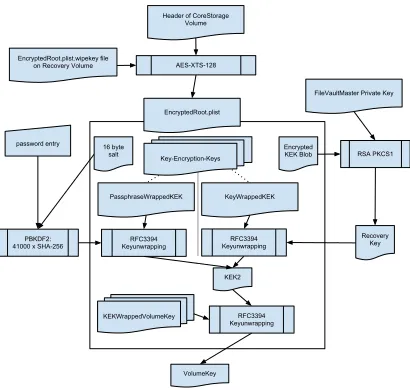
The volume master key is derived from the user pass-word, a private key token or the recovery password. Since the volume master key is the same but the ini-tial input is different, FileVault 2 uses an intermediary key that is decrypted under different inputs: password or recovery token. This intermediary key, which decrypts the volume master key, is called the volume key Key-Encryption-Key (KEK). The overall key derivation pro-cess is depicted in figure 4.
2found in
com.apple.boot.X/System/Library/Caches/com.apple.corestorage/ (whereXchanges randomly betweenR,SandP)
In this section we describe the key derivation process in the case of a volume master key derived from the user password. The first step is to derive the intermediary vol-ume key KEK from the given password; this in turn is ac-complished in two stages. We first need to use PBKDF2 to derive a key from the user password and then we need to decrypt the AES-wrapped version of the volume key KEK with this key.
PBKDF2 [15] is an algorithm used to derive a standard cryptographic key (of any length) from a user password (i.e. a written language text). The main objective of this algorithm is to make it difficult for an attacker to brute-force all possible values of the user password (which could be short or easy to guess). This is done by the use of two counter-measures: a salt and a large number of iterations. A random salt is required to avoid rainbow tables; such tables can be used to create precomputed re-sults of a cryptographic operation on various inputs such as dictionary keywords. The number of iterations speci-fies how many times to apply a pseudo-random function such as HMAC-SHA1 [14] on the user password (and derived results) before creating the final key; this step ef-fectively slows down any attacker trying to brute-force the user password (see section 4 for a discussion on this matter).
The salt value for PBKDF2 is found in the PassphraseWrappedKEK structure (see table 3 in Ap-pendix) related to the user. However the number of PBKDF2 iterations is not defined there. In our analy-sis we initially found that FileVault 2 derived the num-ber of iterations based on the amount of time required to compute a multiple of 1000 PBKDF2 computations. We have later seen there is a default of41000iterations if the precomputed value is lower, and this appears to be always the case on current hardware. Probably the static value will be used most of the time, since a variable value might lead to incompatibility between devices (now you can access the encrypted volume of an Apple computer from another device via FireWire) and even blocked ac-cess to your machine if it performs slower or faster in time. For completeness we mention that the pseudo-random function used by FileVault 2 with PBKDF2 is HMAC-SHA256.
in-Figure 4: FileVault 2 key derivation process.
termediary KEK is again wrapped (instead of deriving it directly from the user password) under different keys to support multiple inputs: password, private key or re-covery password. It could have been possible to simply use different intermediary keys, which represented the volume master key encrypted under different inputs, but (we can only speculate here) Apple probably decided to use this design in order to have more flexibility.
The AES Wrap algorithm has several properties which make it useful to wrap (encrypt) a key under another key. Firstly, we can concatenate other data to the key in question before encryption. Secondly, even if no other data is added, the algorithm uses a somewhat large num-ber of iterations of the cryptographic operation (AES-CBC) to remove any correlation between input and out-put but also to slow down any potential brute-force at-tack. Thirdly, the algorithm uses a standard initial value (generally eight bytes with the value0xA6) which can be used to recognize if the unwrapping operation has been successful.
After deriving the volume key KEK using the AES Wrap algorithm (applying the unwrap operation), we can use this key to unwrap the volume master key from the KEKWrappedVolumeKey structure (see table 4 in Ap-pendix).
In both unwrapping operations (to obtain the interme-diary KEK and the volume master key), the wrapped data has 24 bytes but the unwrapped key has only 16 bytes. That is because the first 8 bytes of the unwrapped data ac-tually contain the initial value of0xA6(a different value indicates a wrong decryption key), leaving only 16 bytes for the actual unwrapped key.
Figure 5: Example of anEncryptedRoot.plistwhen a private key is used.
The key derivation process can be summarised as:
p = get_user_password()
salt = get_salt_from_PassphraseWrappedKEK() iterations = 41000
pk = pbkdf2(p, salt, iterations, HMAC-SHA256) kek_wrapped = get_kek_from_PassphraseWrappedKEK() kek = aes_unwrap(kek_wrapped, pk)
vmk_wrapped = get_vmk_from_KEKWrappedVolumeKey() vmk = aes_unwrap(vmk_wrapped, kek)
The recovery password shown in figure 2 can be used exactly as the user password, with the mention that one must include the dashes as well.
If instead we use a private key from a recovery certificate, we need to get the intermediary KEK from the KeyWrappedKEK structure (instead of the PassphraseWrappedKEK, as depicted in figure 4). In or-der to unwrap the KeyWrappedKEK one needs to ex-tract the recovery key which is used as input to the AES unwrapping algorithm. The recovery key is saved as an encrypted blob in the EncryptedRoot.plist, protected using RSA and PKCS#1 padding. The en-crypted blob is added along the ExternalKeyProps to the EncryptedRoot.plistwhen a certificate is used for recovery (see figure 5 for an example). The re-covery key can be extracted from the encrypted blob using a private key which is stored in a FileVault-Master certificate, installed generally under the path
/Library/Keychains/FileVaultMaster.cer. Next we describe the encryption algorithm, AES-XTS, and present the last missing piece: the tweak key.
3.4
AES-XTS
AES-enc Key_2
i
a^j
T
P
AES-enc PP
Key_1
CC
C
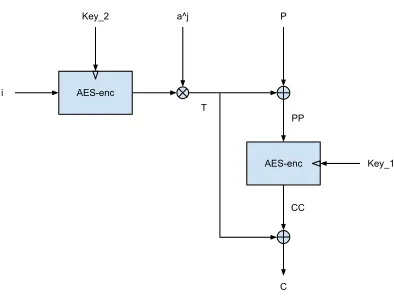
Figure 6: AES-XTS encryption.
the volume to be encrypted differently, even if the plain-text is the same, based on a tweak value.
The AES-XTS encryption operation is performed per block (of arbitrary size, although multiples of 128-bit are generally used). For each data block to be encrypted the algorithm expects two keys namedkey1 andkey2(also known as the tweak key), which can be either 128 or 256 bits long, and a 128-bit tweak valueiwhich is usually derived from the block offset. The input data block is partitioned by the algorithm into 128-bit units (the last unit can have less than 128 bits). Each of these data units is assigned a sequential number jstarting from 0, and is encrypted as follows: first the tweak value is converted to little endian and encrypted underkey2using AES in ECB mode (this only needs to be done once per data block), then each byte of the encrypted tweak value is left shifted byjbits (this is the group multiplication shown in the di-agram) with a possible addition of a carry and a special value of 135 on the first byte. The shifted resultT (the encrypted tweak) is xor-ed into the corresponding input data unitPand the output is then encrypted underkey1 using AES-ECB. The result is then xor-ed with the same encrypted tweak yielding the final encrypted data unit. The complete encrypted data block is simply the con-catenation of all the encrypted data units. Decryption is done similarly, replacing the second AES encryption by decryption.
AES-XTS has several advantages over alternatives such as AES in CBC: there is no requirement for an ini-tialization vector (the tweak key can be derived from the block number); each block is encrypted differently (since the tweak value will be different); and unlike AES-CBC, AES-XTS prevents an attacker from changing one spe-cific bit in a data unit by xor-ing each AES input with a different shifted version of the encrypted tweak.
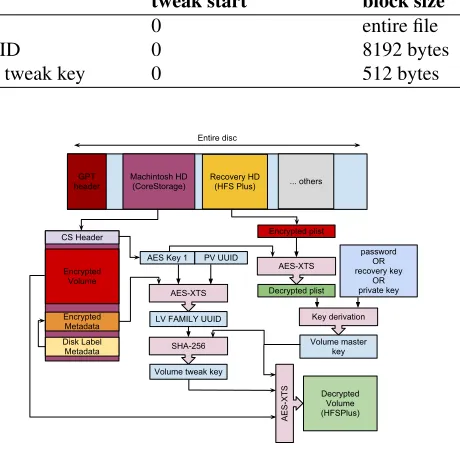
FileVault 2 uses AES-XTS in several places, always
with 128-bit keys, as shown in table 1. It is used to en-crypt the Enen-cryptedRoot.plist file, where key1 is avail-able on the main volume header and key2 is 128 bits of zero (i.e. 16 zero bytes); the tweak value is 0 and the whole file is treated as one large block. AES-XTS is also used to encrypt part of the metadata (details be-low), where key1 is the same key used to encrypt the
EncryptedRoot.plistfile but key2 is another value, known as Physical Volume UUID, also found on the vol-ume header. Finally, perhaps most importantly, AES-XTS is used to encrypt the main volume. In the previous section we have shown how to derive the volume mas-ter key, which is used askey1with AES-XTS. However we have not said anything aboutkey2 (the tweak key). Finding this tweak key was probably one of the most dif-ficult parts in our search. The tweak key turned out to be derived from the volume master key and another value, known as theLogical Volume Family UUID, which is found in the encrypted metadata.
The AES-XTS encryption might be used in other places as well, since we found unknown key values dur-ing live debuggdur-ing for unknown data. We have indica-tions that these keys are used to encrypt paged data or other memory contents.
Next we present the metadata structures used in FileVault 2, how to derive the volume tweak key and how to use these data to decrypt the volume.
3.5
Metadata structures
The structures needed to decrypt the main volume, along with a header and other additional information, are stored inside the CoreStorage volume listed in figure 3. The layout of these structures within the volume is shown in figure 8.
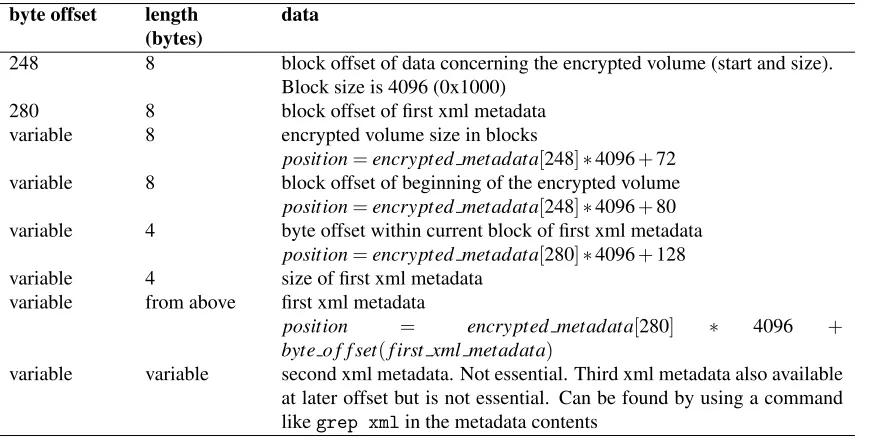
There are two essential metadata structures needed to decrypt the main volume: theDisk Labelmetadata and theencrypted metadata. TheDisk Labelmetadata block offset can be found from the CoreStorage volume header (64-bit little endian value at byte offset 104, see table 2 in Appendix). This offset can be multiplied with the 32-bit block size value at byte offset 96 in the vol-ume header to obtain the byte offset within the volvol-ume. The block size is generally 4096 (0x1000), which is also the standard block size for the HFSPlus file system. The size of theDisk Labelmetadata is given in the volume header, but in our experiments all the data of interest was available within the first 8704 bytes (i.e. seventeen 512-byte blocks).
We show the most important fields of theDisk Label
metadata in table 5 in Appendix. TheDisk Label meta-data provides the offset of the encrypted metameta-data using the formula:
Table 1: Parameters for AES-XTS when used with different parts of FileVault 2.
data key1 key2 tweak start block size
EncryptedRoot.plist offset 176 in CS header 0 0 entire file
Encrypted metadata offset 176 in CS header PV UUID 0 8192 bytes
Main volume volume master key volume tweak key 0 512 bytes
Figure 7: Example of data in the first xml metadata struc-ture.
The encrypted metadata, as our given name im-plies, is encrypted. We found that we can decrypt its contents using AES-XTS with key1 and key2 from the CoreStorage volume header (see table 2 in Appendix), starting with a tweak value of 0 and using an 8192-byte block size.
The contents of the encrypted metadata structure are shown in table 6 in Appendix. The essential details are: the encrypted volume size (which equals the size of the decrypted volume – this is smaller than the size of the entire CoreStorage volume), the encrypted volume off-set, and the offset of the first xml metadata which con-tains the Logical Volume Family UUID (under the xml keycom.apple.corestorage.lv.familyUUID). The first, second and third xml metadata structures contain various UUIDs and other information related to the encrypted volume. However for decryption purposes we only need the lv.familyUUID (i.e. the Logical Volume Family UUID) which is available in both the first and third xml metadata structures. An example of the first xml metadata is shown in figure 7.
Using the Logical Volume Family UUID we can de-rive the full disk encryption tweak key by applying SHA-256 on the concatenation between the volume master key and this UUID, and then retaining only the first 16 bytes:
key2=MSB16(SHA256(volume master key|lv.f amilyUU ID))
GPT header
Recovery HD (HFS Plus) Machintosh HD
(CoreStorage) ... others Entire disc
Encrypted plist CS Header
Encrypted Volume
Encrypted Metadata Disk Label
Metadata
AES Key 1 PV UUID
AES-XTS
Decrypted plist
password OR recovery key
OR private key
Key derivation
Volume master key AES-XTS
LV FAMILY UUID
SHA-256
Volume tweak key
Decrypted Volume (HFSPlus)
AES-XTS
Figure 8: Diagram of FileVault 2 architecture.
3.6
Full disk encryption and decryption
Now that we have presented the building blocks of FileVault 2 we can describe the entire volume decryp-tion process, as depicted in figure 8. Firstly we need to decrypt theEncryptedRoot.plist file using the key from the volume header. Then, using the user’ s pass-word or a recovery token we can extract the volume mas-ter key. We can now derive the full disk encryption tweak key from the encrypted metadata and the volume master key. At this point we can use the volume master key as key1 and the full disk encryption tweak key askey2 with AES-XTS to decrypt the main volume, with a tweak value starting from 0 and a block size of 512 bytes.
4
Security analysis:
problems and solutions
In this section we present the results of our informal se-curity analysis of FileVault 2.
4.1
Random number generator and
recovery password
ex-plained earlier, other keys are randomly generated, for example the recovery password, key encryption keys and volume keys. Using the recovery password, it is possible to mount and decrypt the complete CoreStorage volume. FileVault 2 features two recovery tokens: an RSA key and a recovery password. The asymmetric key recovery for corporate deployments is done using the same mech-anism as in the first FileVault implementation: a File-VaultMaster certificate is installed in the system’ s key-chain and the public key of the certificate is used to en-crypt the intermediary KEK key, which is then added to theEncryptedRoot.plistfile.
In this section we will take a closer look at the sec-ond recovery mechanism, the recovery password, tar-geted at consumers. When activating FileVault 2, the System Preferences application displays a randomly gen-erated 120 bit password, encoded with base32, to the end user and advises them to securely store the password for recovery (see figure 2). The recovery password is read from/dev/random(through libcsfde and SecCreateRe-coveryPassword() in Security.framework).
Therefore, the security of the FileVault 2 system can be reduced to the security of the pseudo random num-ber generator (PRNG) used in Mac OS X Lion for /dev/random. Mac OS relies on Counterpane’ s imple-mentation of the Yarrow PRNG [6] with modifications by Apple available as open source [9]. The Yarrow PRNG design has been obsoleted by Fortuna [11], written by the original authors.
To evaluate the strength of Apple’ s implementation of Yarrow, we evaluated the seeding of the PRNG. Be-cause the state of the PRNG is kept between reboots, we assume a scenario in which the end user activates FileVault 2 right after the first boot after operating sys-tem installation. This is a worst-case scenario, in which the PRNG has only been seeded with the least amount of entropy. During boot-time the PRNG is seeded with 8, 20 and 332 bytes. After boot-time, the PRNG is peri-odically seeded with 332 bytes every 10 minutes. If an attacker could guess the content of the seed, he would be able to recreate the PRNG’ s state and predict its output, and hence determine the recovery password. The sources for the seeding are as follows:
• 8 bytes boot seed: this seed is deterministic because it is the value of the currentmicrotime()during boot.
• 20 bytes boot seed: this is read from the
SystemEntropyCachefile which contains the pre-vious state of the PRNG before reboot. The file is written byEntropyManagerevery 6 hours and during shutdown. It contains 20 byte output from
/dev/random. This seed is deterministic in our
above scenario because the system has booted the first time.
• 328 byte boot and periodic seed: this seed is triggered by securityd and the seed’ s contents are collected in the kernel’ skdbg getentropy()
function. It is the core seed for the PRNG. The data contains 41 samples of mach absolute time(), which returns an 8 byte nano-precision time offset for different kernel threads. During 1000 reboots, we sampled the entropy seed of the PRNG. Our es-timate is that the total seeding entropy is 40 sam-ples of 8 bits ofmach absolute time. This would result in 320 bits of total entropy because the nano-precision timestamps are only unpredictable in the lower bits and higher byte values have clearly re-occurring patterns. Thus, this represents a search space which is suboptimal, i.e. not every input to the seed is unpredictable and the amount of en-tropy input is less than what other operating sys-tems seed [4, 5]. However, the search space is large enough that it is not brute-force-able.
For highly security-critical scenarios, the PRNG should be reseeded by manually writing entropy to
/dev/randombefore activation of FileVault 2.
4.2
Plaintext bits in encrypted volume
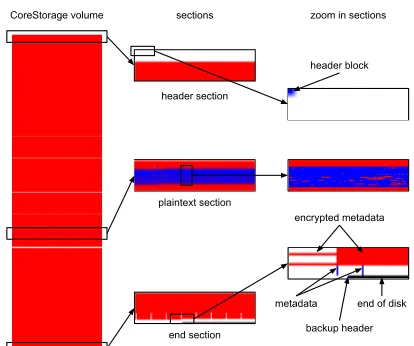
Once we found most of the details about FileVault 2 op-eration we computed the entropy of each 512-byte block of the CoreStorage volume to verify our assumptions and also to make sure we were not missing any data. A bitmap of the volume is shown in figure 9, where blue corresponds to plain text, red to encrypted data and white to data with zero entropy (i.e. all bytes have the same value, such as all bytes 0x00 or 0xFF).
As you can see from the bitmap in figure 9, there is a large block of zero data (with the exception of the first header block) at the beginning of the disk, then a large portion of encrypted data corresponding to the encrypted volume, and at the end there is a mix of plain text, crypted and zero data corresponding to the metadata, en-crypted metadata and related structures, and the backup header (last block).
CoreStorage volume sections
header section
plaintext section
end section
zoom in sections
end of disk metadata
encrypted metadata header block
backup header
Figure 9: Entropy bitmap of the CoreStorage volume cre-ated by Mac OS X 10.7.2. Each pixel corresponds to a 512-byte block. Blue corresponds to plain text (low entropy), white to zero or other constant data (zero en-tropy), and red to encrypted data (very high entropy).
but the extents file was located inside an encrypted area. The plain text allocation file was still of interest and we thought that it may be used to track which blocks are en-crypted (since during initial encryption one can still use the OS, which has to access both encrypted and unen-crypted blocks). However this data turned out to be just a reminder of the original unencrypted volume. We dis-cussed this matter with Judson Powers, Computer Foren-sics Director at ATC-NY, and he later reported this issue to Apple, who has now fixed this issue in the 10.7.2 up-date [26]. After the fix, all the data at the beginning of the volume is zeroed (see figure 9), which invalidates our assumption about the allocation file.
The second interesting fact about the volume data was a significant portion of plaintext (around 250 MB) in the middle of the encrypted volume. The plaintext blob contains code, dictionaries, journal metadata, error mes-sages, debug messages and some user data.
Our best guess is that this is data from the base OS installation which has been encrypted elsewhere, but has not been wiped from the disk. We determined that long-used clear volumes could contain personal data in that part of the encrypted volume after activation of FileVault 2. We think this data should be analysed in more detail, and Apple should scrutinize its functionality, since any plaintext can be easily targeted by an attacker. We have advised Apple about this issue3.
3Apple Product Security was contacted February 9th 2012, ticket id
191364581.
4.3
Possible attacks on the user password
In section 3.3 we mentioned that PBKDF2 is used to slow down an attacker that is trying to brute-force the user password. Let us now analyse the concrete case of FileVault 2. As Raeburn explains [17], for a given number of iterationsN and a known salt, a 2GHz ma-chine can perform approximately 217/N PBKDF2 iter-ations per second. Therefore, this machine would re-quire aboutN·232−17=N·215 seconds to test all pos-sible inputs in a large password set containing 232 pos-sible words. In the case of FileVault 2 we know the salt (from theEncryptedRoot.plist file) and we also knowN=41000 (between 215and 216). WithN=41000 the machine can do about 4 attempts per second and in order to try all the 232 values the machine needs around 230 seconds (or about 34 years). This situation is well above most security requirements.
However, let us look into a more attacker-favorable case, which might be common enough to be consid-ered. Let us assume the password is a weak 6 charac-ter common word thus limiting the search to about 216 possibilities. This effectively reduces the search to only
N·216−17=N/2=20500 seconds, or 5.6 hours (even less with a better machine). This should be taken in con-sideration when trusting the user data is completely se-cure simply because FileVault 2 is enabled.
The details provided in this paper enable an organi-zation to verify that FileVault 2 users have secure words, without requiring them to disclose their pass-word. The site administrator could use a tool that tries to brute-force the user password against a defined set as described above. If the password is revealed then the administrator could request the user to choose a better password and then perform the check again. This step will ensure that users do not employ known weak pass-words with FileVault 2.
The problem described above is inherent when a user password protects the underlying encryption. We are not aware of how we could improve this system without in-creasing the number of PBDKF2 iterations (which would increase the login delay) or requiring additional login to-kens.
4.4
Extracting keys from memory
As we point out in section 2, Halderman et al. [3] have shown that is possible to extract encryption keys from memory under many circumstances. FileVault 2 does not protect against extracting the keys from memory while the system is running: we have been able to retrieve all the necessary keys from memory using the standard GNU debugger (gdb).
Compared to Bitlocker in TPM mode, FileVault 2 is more resistant to key extraction attacks when the com-puter is turned off. That is because the volume master key is never loaded in memory unless the user provides the correct authentication token. On the other hand, Bit-locker loads the volume master key from the TPM with-out the need of the user password. For completeness we mention that Bitlocker can also be used with a recovery key instead of the TPM but this is not very common.
Maximillian Dornseif has shown that it is possible to also extract keys from memory using Firewire in DMA mode [27]. This enables any attacker with physical ac-cess to a running system to easily extract the memory contents, bypassing the OS and CPU since the transfer takes place via DMA. Apple has now blocked this fea-ture with the OS X 10.7.2 update [26].
4.5
Obfuscation features
While analysing FileVault 2 we were a bit con-fused by some design decisions. We are not sure of the real advantage introduced by encrypting the
EncryptedRoot.plistfile. This file contains the keys in an encrypted blob (therefore security measures have already been taken), but the key to decrypt the file is available as plain text in the header of the CoreStorage volume (so any attacker can do that; for a dictionary at-tack, as detailed earlier, an attacker only needs to decrypt this file once). We believe that the main intend of en-crypting theEncryptedRoot.plistfile is obfuscation of the FileVault 2 system’ s working, an approach con-trary to Kerckhoff’ s principle.
5
Conclusions
In this paper we have presented in detail the architecture of FileVault 2, the full disk encryption mechanism de-ployed by Apple with Mac OS X 10.7 (Lion), based on a broad analysis of the system components.
Our work allows any forensic investigator to use ar-bitrary tools to decrypt any data from a FileVault 2 en-crypted volume, when the user password or a recovery token of the system are known. Further more, we have implemented an open source library and tooling to ana-lyze and mount volumes encrypted with FileVault 2.
We have also made an informal security analysis of the system and found, among others, that the entropy of the recovery password can be improved and that part of the user data is available in the clear.
6
Acknowledgements
We are very thankful to Darren Bilby for his support in this work. We also thank Germano Caronni, Michael Cohen, Jan Monsch and Frank Stajano for many useful comments and discussions.
Omar Choudary is a recipient of the Google Europe Fellowship in Mobile Security, and this research is sup-ported in part by this Google Fellowship. The opinions expressed in this paper do not represent the views of Google unless otherwise explicitly stated.
7
Availability
Our library to mount FileVault 2 encrypted volumes is available on Google Code:
http://code.google.com/p/libfvde/
These web pages also contain documents with full specs of the metadata used by FileVault 2.
References
[1] Niels Fergusson, “AES-CBC + Elephant di-fusser: A disk encryption algorithm for Win-dows Vista”,Microsoft Corp, 2006
[2] Clemens Fruhwirth, “New methods in hard disk encryption”,Institute for Computer Languages, Theory and Logic, 2005
[3] Halderman, J. Alex and Schoen, Seth D. and Heninger, Nadia and Clarkson, William and Paul, William and Calandrino, Joseph A. and Feldman, Ariel J. and Appelbaum, Jacob and Felten, Edward W., “Lest we remember: cold boot attacks on encryption keys”, inProceedings of the 17th conference on Security symposium, USENIX Association, pp 45–60, 2008
[4] Zvi Gutterman, Benny Pinkas, Tzachy Reinman, “Analysis of the Linux Random Number Gener-ator”, inIEEE Symposium on Security and Pri-vacy, 2006.
[6] Kelsey, John and Schneier, Bruce and Ferguson, Niels, “Yarrow-160: Notes on the Design and Analysis of the Yarrow Cryptographic Pseudo-random Number Generator”, Selected Areas in Cryptography, 2000, Springer LNCS vol. 1758, pp 13–33
[7] P. Rogaway. “Efficient instantiations of tweak-able blockciphers and refinements to modes OCB and PMAC”, in Advances in Cryptology, ASIACRYPT 2004, Springer LNCS vol. 3329.
[8] Apple, “FileVault 2 features”, at http: //www.apple.com/macosx/whats-new/ features.html#filevault2
[9] “Apple implementation of Yarrow”, at
http://opensource.apple.com/source/ xnu/xnu-1699.24.8/bsd/dev/random/
[10] “Mac OS X Lion Adds CoreStor-age, a Volume Manager ” http: //blog.fosketts.net/2011/08/04/
mac-osx-lion-corestorage-volume-manager/
[11] Niels Ferguson and Bruce Schneier, Practical Cryptography, Wiley 2003.
[12] “PGP Whole Disk Encryption”, at
http://www.symantec.com/business/ whole-disk-encryption
[13] “True Crypt open source project”, at http:// www.truecrypt.org
[14] “HMAC: Keyed-Hashing for Message Authenti-cation”, RFC 2104
[15] “PKCS #5: Password-Based Cryptography Specification Version 2.0”, RFC 2898
[16] “Advanced Encryption Standard (AES) Key Wrap Algorithm”, RFC 3394
[17] “Advanced Encryption Standard (AES) Encryp-tion for Kerberos 5”, RFC 3962
[18] “The XTS-AES Tweakable Block Cipher”, IEEE Std 1619-2007
[19] “Advanced Encryption Standard”, FIPS 197
[20] “Sophos SafeGuard”, athttp://www.sophos. com/de-de/products/encryption/
safeguard-disk-encryption-for-mac. aspx
[21] “Credant”, at http://www.credant.com/ products/cmg-enterprise-edition/ cmg-enterprise-edition-for-mac.html
[22] “WinMagic SecureDoc”, at http: //www.winmagic.com/products/
full-disk-encryption-for-mac
[23] “Check Point FDE”, at http:// www.checkpoint.com/products/
full-disk-encryption/index.html
[24] “Unified Extensible Firmeware Interface”, at
http://www.uefi.org
[25] “A Brief History of Apple and EFI”, at
http://refit.sourceforge.net/info/ apple_efi.html
[26] “Apple OS X 10.7.2 security update”, athttp: //support.apple.com/kb/HT5002
[27] Maximillian Dornseif, “0wned by an iPod”, in
PacSec, 2004
[28] Brian Carrier, “File System Forensic Analysis”,
Appendix
Table 2: CoreStorage volume header structure. All integer values are in little endian. Missing fields are either unknown or not essential and removed for brevity.
byte offset length (bytes)
data
0 8 Checksum CRC32 for bytes 8..511, aligned to 64 bits with CRC32 at first bytes
8 40 Version number and other verification values 48 8 Disk sector size in bytes (generally 512).
64 8 Number of bytes in entire volume (including header and metadata sec-tions)
88 2 Version String (0x43 0x53 =CS)
96 4 block size in bytes (generally 0x1000 = 4096) 100 4 disklabel metadata block size
104 8 block offset for disklabel metadata
168 4 key length (seen 0x10)
172 4 crypto algorithm version (seen 0x02)
176 16 AES-XTSkey1used for the EncryptedRoot.plist file and the encrypted metadata
304 16 PhysicalVolume UUID. AES-XTSkey2 (tweak key) used for the en-crypted metadata
320 16 LogicalVolumeGroup UUID
Table 3: PassphraseWrappedKEK structure, total length is 284 bytes. Integers in little endian.
byte offset length (bytes)
data
0 8 Uncertain. May be tag and len of next field.
8 16 PBKDF2 salt.
24 8 Uncertain. May be tag and len of next field.
32 24 AES-wrapped volume KEK (used to unwrap the volume key).
Table 4: KEKWrappedVolumeKey structure, total length is 256 bytes. Integers in little endian.
byte offset length (bytes)
data
0 8 Uncertain. May be tag and len of next field.
8 24 AES-wrapped volume key.
32 224 Unknown.
Table 5: Disk Label metadata structure. Integers represented in little endian. Missing fields are unknown or removed for brevity.
byte offset length (bytes)
data
0 8 CRC32 padded to 64-bit.
168 1 Block size in bytes as a power of 2 (e.g. 0x0c means 212=4096). 220 4 Offset in this header where to look for the offset of the encrypted
meta-data. Usually 8192 (0x2000).
240 8 CoreStorage Physical volume size in units as defined in offset 168. variable 8 Block offset of encrypted metadata:
position=disk label[220] +32.
Table 6: structure of the encrypted metadata structure. Integer values are in little endian. Omitted fields are unknown or removed for brevity.
byte offset length (bytes)
data
248 8 block offset of data concerning the encrypted volume (start and size). Block size is 4096 (0x1000)
280 8 block offset of first xml metadata variable 8 encrypted volume size in blocks
position=encrypted metadata[248]∗4096+72 variable 8 block offset of beginning of the encrypted volume
position=encrypted metadata[248]∗4096+80 variable 4 byte offset within current block of first xml metadata
position=encrypted metadata[280]∗4096+128 variable 4 size of first xml metadata
variable from above first xml metadata
position = encrypted metadata[280] ∗ 4096 +
byte o f f set(f irst xml metadata)