functions, or features, at any time, without notice.
NEC America, Inc. has prepared this document for use by its em-ployees and customers. The information contained herein is the property of NEC America, Inc. and shall not be reproduced without prior written approval from NEC America, Inc.
Copyright 1999
NEC America, Inc.
NEC America, Inc. VisuaLink 128/VisuaLink 384
TYPE OF SERVICE
The VisuaLink 128 and the VisuaLink 384 are stand-alone devices that allow multimedia conferencing by transmitting video, audio and data to remote locations over the ISDN Basic Rate interface. The VisuaLink 128 and VisuaLink 384 connect to the ISDN digital network through separately-registered NTI equipment. They provide POTS ports which allow a customer-provided 2500-type telephone access to the digital network.
This equipment complies with Part 68 of the FCC Rules. The equipment label will appear on the rear exterior panel of the unit and will provide the FCC Registration Number, NEC trade name, model number, serial number or date of manufacture and the country of origin.
TELEPHONE COMPANY PROCEDURES
The goal of the telephone company is to provide you with the best service it can. In order to do this, it may occasionally be necessary for them to make changes in their equipment, operations, or procedures. If these changes might affect your service or the operation of your equipment, the telephone company will give you notice, in writing, to allow you to make any changes necessary to maintain uninterrupted service.
If you have any questions about your telephone line, such as how many pieces of equipment you can connect to it, the telephone company will give you notice, in writing, to allow you to make any changes necessary to maintain uninterrupted service.
If any of your telephone equipment is not operating properly, you should immediately remove it from your telephone lines, as it may cause harm to the telephone network. If the telephone company notes a problem, they may temporarily discontinue service. When practical, they will notify you in advance of this disconnection. If advance notice is not feasible, you will be notified as soon as possible. When you are notified, you will be given the opportunity to correct the problem and informed of your right to file a complaint with the FCC.
In the event repairs are ever needed on your Visualink 128 or VisuaLink 384, they should be performed by NEC America, Inc. or an authorized representative of NEC America, Inc. For information contact:
NEC America, Inc. 1555 W. Walnut Hill Lane Irving, Texas 75038-3797 USA
972-751-7000
FCC REQUIREMENTS FOR CONNECTION OF TELEPHONE SYSTEMS
In order to connect this system to the telephone network, provide the telephone company with:
• the quantities and USOC numbers of the required jacks (shown below);
• the sequence in which the trunks are to be connected;
• the facility interface codes by position; and
• the ringer equivalence number or service code, as applicable, by position
MFG’s Port ID
USOC Jack Connector
REN/Service Code
Facility Interface Code
# CO
Ports # Stations Registration #
VisuaLink 128 N/A 6.0P 02IS5 1 1 AY5JPN-32617-XD-N
To ensure that certified equipment is attached correctly, and only to the networks of participating carriers, the following statement shall accompany each unit of certified equipment offered for sale. This statement must be included conspicuously in written or electronic format, at or near the front of each copy of the operating manual, or accompany other technical information, or be included as a separate sheet. The required statement is:
CP-01, Issue 8, Part I Section 14.1
NOTICE: The Industry Canada label identifies certified equipment. This certification means that the equipment meets certain telecommunications network protective, operational and safety requirements as prescribed in the appropriate Terminal Equipment Technical Requirements document(s). The Department does not guarantee the equipment will operate to the user's satisfaction.
Before installing this equipment, users should ensure that it is permissible to be connected to the facilities of the local telecommunications company. The equipment must also be installed using an acceptable method of connection. The customer should be aware that compliance with the above conditions may not prevent degradation of service in some situations.
Repairs to certified equipment should be coordinated by a representative designated by the supplier. Any repairs or alterations made by the user to this equipment, or equipment malfunctions, may give the telecommunications company cause to request the user to disconnect the equipment.
Users should ensure for their own protection that the electrical ground connections of the power utility, telephone lines and internal metallic water pipe system, if present, are connected together. This precaution may be particularly important in rural areas.
CAUTION: Users should not attempt to make such connections themselves, but should contact the appropriate electric inspection
MODEL CERTIFICATE NUMBER CERTIFICATION NUMBER
VisuaLink 128 19318 140 9004A
Table of Contents
Chapter 1: VisuaLink Command Fundamentals ... 1-1
Summary ... 1-1 Communication Outline ... 1-1 Physical/Electrical lnterface ... 1-2 Communication Format ... 1-3 Communication Procedure ... 1-5 Connecting and Incoming Call Control Basic Sequence ... 1-7
Chapter 2: Console Command List ... 2-1
Chapter 3: Command Detailed Format ... 3-1
List of Tables
Chapter 1: VisuaLink Command Fundamentals
Preface
Thank you very much for purchasing the VisuaLink 128 or VisuaLink 384.
VisuaLink is suitable for a conference with one to three people on a site, and it is a device to realize a multimedia communication of video, voice, and graphic information by connecting to an ISDN line.
This document explains the external console of the VisuaLink from a console such as a personal computer.
NEC Corporation
Notes to Remember:
(1) It is prohibited to copy a part of or the whole of the contents of this document without permission.
(2) The contents of this document may be modified without notice.
(3) We did our best in creation of this document; however, if you notice any problems, errors, and omissions, please let us know.
(4) We are not responsible for the result of any operation of the device regardless of the above note.
(5) Please prepare countermeasures such as recovery and backup for possible failures on a system side when you use this device in a system in which a superior reliability is expected.
1.1 Summary
VisuaLink is equipped with a serial external control port that enables a control from a console such as a personal computer.
The VisuaLink executes a command and returns a response based on the inputting of a command that consist of 4 characters or one character and three numbers.
1.2 Communication Outline
Communication protocol between the VisuaLink and a console are consisted of the following:
[1] Command: A protocol issued by a console executes a process on VisuaLink.
1.3 Physical/Electrical lnterface
The external control port is at the back of the VisuaLink and uses DIN8 pin connectors. The maximum length of the control cable shall be no more than 20 ft. (6.1 meter) due to electric characteristics. Connector pin positions are as follows:
Note: Directions of signals are output from VisuaLink.
NO Name Direction Features
1 RS OUT Request to Send
2 CS IN Clear to Send
3 SD OUT Send Data
4 GND - Signal Ground
5 RD IN Receive Data
6
7 DTK OUT Data Terminal Ready
1.4 Communication Format
Communication between a console and VisuaLink 128/384 is done in a start-stop synchronization of the following format.
Data Format
Data Length: 7, 8 bit ASCII code Stop Bit: 1 bit
Parity: Even, Odd, NONE parity Baud: 1200, 2400, 4800, 9600bps
Note: Default setting for VisuaLink is 9600, 8, none, 1.
To change the default setting use the SSPR command.
A: Connect terminal to VisuaLink Serial 2 B: Set terminal application to:
Baud: 9600 Parity: Even Bit: 8 Stopbit: 1
C: Calculate the Baud, Parity, and Bit START
1 2 3 4 5 6 7 8 9
STOP
AS CII 8bit PTY
b7 b6 b5 b4 b3 b2 b1 b0
Not in use
00 : 7 bit | EVEN | STOP 01 1 7 bit |ODD | STOP
Command Format
Command: Transmit 4-character commands (only upper case can be used)
Space: More than one space is transmitted between a command and a parameter
Parameter: If a command requires a parameter, a parameter is assigned. (Only upper case can be used) However, if parameters are more than one, more than one space is transmitted between parameters. CR: Transmit Carriage Return Code (ODH).
LF: Transmit Line Field (OAH)
Response Format
When the VisuaLink 128/384 is provisioned and controlled with a console, VisuaLink 128/384 always sends a response. Responses are normal response and error response. When sending a command from a console, please transmit the next command after checking a response. A response is transmitted in the following format.
Normal Ending
Parameter: If a command is inquiring a provisioned value, a response parameter is returned. If there is no. parameter, it is omitted. However, if parameters are more than one, more than one space is transmitted between parameters.
Space: More than one space is transmitted between a command and a parameter. CR: Transmit Carriage Rerun Code (ODH).
LF: Transmit Line Field (OAH)
Error Ending
ERRxx: Three-character ERR and a 2-digit error number are transmitted indicating a failure. CR: Transmit Carriage Return Code (ODH).
LF: Transmit Line Field (OAH)
Report Format
Command: Transmit 4-character reports Command (only upper case can be used) Space: More than one space is transmitted between a command and a parameter
Parameter: If a command requires a parameter, a parameter is assigned. (Only upper case can be used) However, if parameters are more than one, more than one space is transmitted between parameters. Command Name Space Parameter CR+LF
Response Parameter (when required) OK CR+LF
ERRxx CR+LF
1.5 Communication Procedure
There is no procedure for communication between a console and VisuaLink as a rule. Therefore, a communication line is presumed to be error-free. When it is remotely operated with a modem, efficient operation may not be expected when a line error occurs. Because of this, in a remote control, a modem with error correction feature shall be used, or VisuaLink shall be checked for operation.
Command/Response Procedure
VisuaLink transmits a confirmation on whether a command is received and the process is completed. After sending a command, please always analyze the transmitted response before issuing a next command. If the next command is issued before a response, an error response such as ''currently processing'' may be returned.
(1) Command 1 is issued using the external control port rather than a personal computer. (2) Analysis of a received command (parameter error, etc.) is implemented.
(3) After an analysis, if it is normal, a normal response is transmitted to a personal computer after transmitting to the remote in communication. However, if it is error response, the error shall be analyzed, and a command shall be either suspended or re-issued.
(4) After verifying that Response 1 is normal, issue Command 2.
Note: After issuing a command from a console, if an alarm emits in VisuaLink, an alarm report may be
transmitted before a response to the command.
Abnormal Handshake Procedure
When the VisuaLink receives a report command from a remote unit at a time the VisuaLink is sending a command to the remote unit in communication, the VisuaLink transmits an indication to a PC using the external control port and then transmits a command to the remote unit.
PC Console VisuaLink
Command 1
Command 2 Response
Response
Console VisuaLink Remote
(1) Command 1 is issued using the external control port rather than a personal computer.
1.6 Connecting and Incoming Call Control Basic Sequence
Connecting and incoming call control basic sequence (when the incoming call mode of the VisuaLink receiving a call is set to the manual incoming call setting) is shown in the following.
Console VisuaLink ISDN VisuaLink Console NCRN
Call Origination
Incoming Call
NINC NCIC Connecting
Connecting OK
NALT
NONL
Connection
Connection
OK NONL
NDSC
Communicating
Disconnect
Disconnect
NDCI OK
Chapter 2: Console Command List
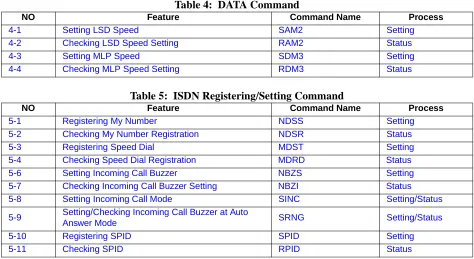
Table 1: VIDEO Command
Table 2: AUDIO Command
Table 3: LINE Setting Command
NO Feature Command Name Process
1-1 Setting Video Format SVFM Setting
1-2 Checking Video Format Setting RVFM Status 1-3 Setting Picture-in-Picture SPIP Setting 1-4 Checking Picture-in-Picture Setting RPIP Status 1-5 Setting Video Input Switch SNDS Setting 1-6 Checking Video Input Setting RSND Status 1-7 Setting Monitor Output Video SDSP Setting 1-8 Checking Monitor Output Video Setting RDSP Status 1-9 Setting/Checking PIP Display Format SPDP Setting/Status 1-10 Setting/Checking PIP During Snapshot SPSW Setting/Status 1-11 Setting/Checking Video Priority SCPI Setting/Status
1-12 Setting H.263 S263 Setting
1-13 Checking H263 Setting R263 Setting
NO Feature Command Name Process
2-1 Setting Audio Mode SAMD Setting
2-2 Checking Audio Mode Setting RAMD Status
2-3 Setting Audio Delay SADL Setting
2-4 Checking Audio Delay Setting RADL Status
2-5 Setting MIC On/Off SMIC Setting
2-6 Checking MIC On/Off Setting RMIC Status
2-7 Setting Volume SVOL Setting
2-8 Checking Volume Setting RVOL Status 2-9 Setting Audio Input/Output Port SASW Setting 2-10 Checking Audio Input/Output Port Setting RASW Status 2-11 Setting Audio Mute Operation at start of
Communications SMMT Setting
2-12 Reads the current Mute mode setting at start of
Communications RMMT Status
2-13 Sets the Audio and Audio/Video Mute mode at start
of Communications SMTC Setting
2-14 Reads the current Mute control at start of
Communications RMTC Status
Table 4: DATA Command
Table 5: ISDN Registering/Setting Command
Table 6: Camera related Registering/Setting Command
Table 7: Communication Status Reading Command
Table 8: Alarm related Command
Table 9: History Reading Command
NO Feature Command Name Process
4-1 Setting LSD Speed SAM2 Setting
4-2 Checking LSD Speed Setting RAM2 Status
4-3 Setting MLP Speed SDM3 Setting
4-4 Checking MLP Speed Setting RDM3 Status
NO Feature Command Name Process
5-1 Registering My Number NDSS Setting 5-2 Checking My Number Registration NDSR Status 5-3 Registering Speed Dial MDST Setting 5-4 Checking Speed Dial Registration MDRD Status 5-6 Setting Incoming Call Buzzer NBZS Setting 5-7 Checking Incoming Call Buzzer Setting NBZI Status 5-8 Setting Incoming Call Mode SINC Setting/Status 5-9 Setting/Checking Incoming Call Buzzer at Auto
Answer Mode SRNG Setting/Status
5-10 Registering SPID SPID Setting
5-11 Checking SPID RPID Status
NO Feature Command Name Process
6-1 Registering Camera Preset Position CPPS Setting 6-2 Registering Talker Name CPNS Setting
6-3 Setting Camera Model SCMK Setting
6-4 Checking Camera Model Setting RCMK Status
NO Feature Command Name Process
7-1 Read Manufacturer Code RMAC Status 7-2 Read Common Mode During Communication RMOD Status 7-3 Read H.221 Synchronous Status R221 Status 7-4 Read Remote Site Name (at Point-to-Point) RPNA Status 7-5 Read Participating Conference Status RCST Status
NO Feature Command Name Process
8-1 Read Alarm Status CALM Status
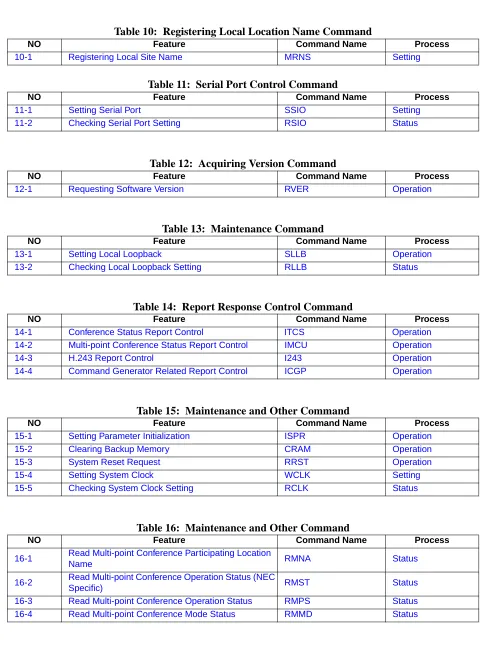
Table 10: Registering Local Location Name Command
Table 11: Serial Port Control Command
Table 12: Acquiring Version Command
Table 13: Maintenance Command
Table 14: Report Response Control Command
Table 15: Maintenance and Other Command
Table 16: Maintenance and Other Command
NO Feature Command Name Process
10-1 Registering Local Site Name MRNS Setting
NO Feature Command Name Process
11-1 Setting Serial Port SSIO Setting
11-2 Checking Serial Port Setting RSIO Status
NO Feature Command Name Process
12-1 Requesting Software Version RVER Operation
NO Feature Command Name Process
13-1 Setting Local Loopback SLLB Operation 13-2 Checking Local Loopback Setting RLLB Status
NO Feature Command Name Process
14-1 Conference Status Report Control ITCS Operation 14-2 Multi-point Conference Status Report Control IMCU Operation 14-3 H.243 Report Control I243 Operation 14-4 Command Generator Related Report Control ICGP Operation
NO Feature Command Name Process
15-1 Setting Parameter Initialization ISPR Operation 15-2 Clearing Backup Memory CRAM Operation 15-3 System Reset Request RRST Operation 15-4 Setting System Clock WCLK Setting 15-5 Checking System Clock Setting RCLK Status
NO Feature Command Name Process
16-1 Read Multi-point Conference Participating Location
Table 17: Model Identification Command
Table 18: Audio Training Command
Table 19: ISDN Control Command
Table 20: Camera Control Command
Table 21: Option Control Command
Table 22: Multi-point Conference Control
Table 23: Opening Message Command
NO Feature Command Name Process
17-1 Read Model Identification RMES Status
NO Feature Command Name Process
18-1 Initiate Audio Training ECTS Operation
NO Feature Command Name Process
19-1 Requesting Connection NCRN Operation 19-2 Request Disconnection NDSC Operation 19-3 Incoming Call Permit/Reject NCIC Operation 19-4 Communication Status Inquiry NSTQ Operation
NO Feature Command Name Process
20-1 Request for Camera Direction Change CAMS Operation
NO Feature Command Name Process
21-1 Pointer Control POCS Operation
21-2 Talker Detection Control VCTS Operation 21-3 SnapShot Transmission Request STPR Operation 21-4 Standard Display Screen Setting Request SXMR Operation 21-5 Request to Acquire Composite Screen Setting SXST Operation
NO Feature Command Name Process
22-1 Request to Chairman Control COPR Operation 22-2 Multiple Address Transmission Request CSPR Operation 22-3 Specific Picture Reception Request CRPR Operation 22-4 Request to Switch Multiple Address Originator
Monitor CMPR Operation
NO Feature Command Name Process
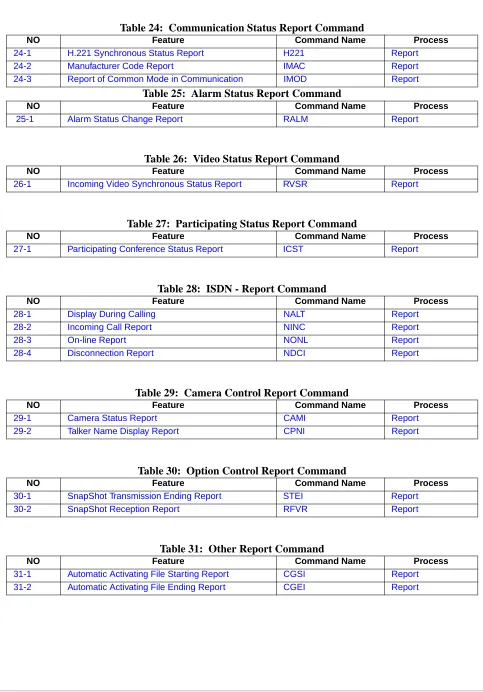
Table 24: Communication Status Report Command
Table 25: Alarm Status Report Command
Table 26: Video Status Report Command
Table 27: Participating Status Report Command
Table 28: ISDN - Report Command
Table 29: Camera Control Report Command
Table 30: Option Control Report Command
Table 31: Other Report Command
NO Feature Command Name Process
24-1 H.221 Synchronous Status Report H221 Report 24-2 Manufacturer Code Report IMAC Report 24-3 Report of Common Mode in Communication IMOD Report
NO Feature Command Name Process
25-1 Alarm Status Change Report RALM Report
NO Feature Command Name Process
26-1 Incoming Video Synchronous Status Report RVSR Report
NO Feature Command Name Process
27-1 Participating Conference Status Report ICST Report
NO Feature Command Name Process
28-1 Display During Calling NALT Report
28-2 Incoming Call Report NINC Report
28-3 On-line Report NONL Report
28-4 Disconnection Report NDCI Report
NO Feature Command Name Process
29-1 Camera Status Report CAMI Report
29-2 Talker Name Display Report CPNI Report
NO Feature Command Name Process
30-1 SnapShot Transmission Ending Report STEI Report 30-2 SnapShot Reception Report RFVR Report
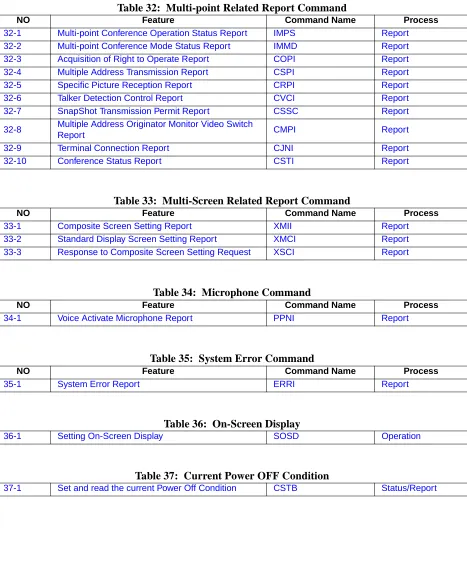
Table 32: Multi-point Related Report Command
Table 33: Multi-Screen Related Report Command
Table 34: Microphone Command
Table 35: System Error Command
Table 36: On-Screen Display
Table 37: Current Power OFF Condition
NO Feature Command Name Process
32-1 Multi-point Conference Operation Status Report IMPS Report 32-2 Multi-point Conference Mode Status Report IMMD Report 32-3 Acquisition of Right to Operate Report COPI Report 32-4 Multiple Address Transmission Report CSPI Report 32-5 Specific Picture Reception Report CRPI Report 32-6 Talker Detection Control Report CVCI Report 32-7 SnapShot Transmission Permit Report CSSC Report 32-8 Multiple Address Originator Monitor Video Switch
Report CMPI Report
32-9 Terminal Connection Report CJNI Report 32-10 Conference Status Report CSTI Report
NO Feature Command Name Process
33-1 Composite Screen Setting Report XMII Report 33-2 Standard Display Screen Setting Report XMCI Report 33-3 Response to Composite Screen Setting Request XSCI Report
NO Feature Command Name Process
34-1 Voice Activate Microphone Report PPNI Report
NO Feature Command Name Process
35-1 System Error Report ERRI Report
36-1 Setting On-Screen Display SOSD Operation
Chapter 3:
Command Detailed Format
Command details are described in this section according to the following format.
Command Name
Command Number
Description: Describe command features.
Command Format: Describe command input format.
3.1 VIDEO Commands
SVFM
Setting Video Format
1-1
RVFM
Checking Video Format Setting
1-2
Description: This sets video format. VisuaLink 128/384 is equipped with a feature to code active video with kinds of resolution. The formats are QCIF and CIF (FICF in parameter) based on the ITU-T Recommendation H.261 and H.263. Resolution setting affects transmitted video. Received video format follows a specification from the transmitting side. If FCIF is specified in the remote unit, it automatically receives with FCIF resolution.
Command Format: SVFM p1
p1: QCIF: QCIF FCIF: FCIF
Response: Normal Response:OK
Error Response: ERR01 ERR07 ERR14 ERR21 ERR87
Description: Checks the current video format setting.
Command Format: RVFM
Response: Normal Response: p1 OK
p1: QCIF: QCIF FCIF: FCIF
SPIP
Setting Picture-in-Picture
1-3
RPIP
Checking Picture-in-Picture Setting
1-4
Description: Sets PIP (small screen) display
Command Format: SPIP p1 p2
p1: ON : PIP output ON OFF : PIP output OFF P2: RT : Display at top right
RB : Display at bottom right LT : Display at top left LB : Display at bottom left
Note: p2 is omitted when p1 = Off
Response: Normal Response: OK
Error Response: ERR01 ERR07 ERR85 ERR87
Description: Checks the current PIP display status
Command Format: RPIP
Response: Normal Response: p1 p2 OK
p1: ON : PIP output ON OFF : PIP output OFF p2: RT : Display at top right
RB : Display at bottom right LT : Display at top left LB : Display at bottom left
SSND
Setting Video Input Switch
1-5
RSND
Checking Video Input Setting
1-6
Description: This sets video input switch.
Command Format: SSND p1 p2
p1: L : local site R : remote site p2: C1 : Camera 1
C2 : Camera 2
Response: Normal Response: OK
Error Response: ERR01 ERR07 ERR20 ERR85 ERR87
Description: Checks the current video input sending status.
Command Format: RSND p1
p1: L: local site R: remote site
Response: Normal Response: p1 OK
p1: C1: Camera 1 C2: Camera 2
SDSP
Setting Monitor Output Video
1-7
Note: User will be unable to switch to STILL PICTURE if STILL PICTURE graphics has not been sent.
RDSP
Checking Monitor Output Video Setting
1-8
Description: Sets output video image.
Command Format: SDSP p1
p1: TX : Transmission Video RX : Reception Video STL : Still-picture
Response: Normal Response: OK
Error Response: ERR01 ERR07 ERR85 ERR87
Description: Checks the current video output setting
Command Format: RDSP
Response: Normal Response: p1 OK
p1: TX : Transmission Video RX : Reception Video STL : Still-picture
SPDP
Setting/Checking PIP Display Format
1-9
SPSW
Setting/Checking PIP Image when Snapshot is Viewed
1-10
Description: Setting the display image seen in the picture-in-picture (PIP) window.
Command Format: SPDP [p1]
p1: M : mirror image is displayed N : non-mirror image is displayed
Note: When p1 is omitted, the current setting is reported.
Response: Normal Response:
If p1 is set: OK
If p1 is omitted: p1 OK
p1: M : mirror display N : non-mirror display
Error Response: ERR01
Description: Setting the display image seen in the picture-in-picture (PIP) window when a snapshot is viewed.
Command Format: SPSW [p1]
p1: 1 : Receiving video 3 : Transmitting video
Note: When p1 is omitted, the current setting is reported.
Response: Normal Response:
If p1 is set: OK
If p1 is omitted: p1 OK
p1: 1 : Receiving video 3 : Transmitting video
SCPI
Setting/Checking Video Priority
1-11
S263
Setting H.263
1-12
Description: The VisuaLink has a function to automatically optimize the picture quality, (e.g., number of frames, resolution, coding, noise, etc.). In low bit rate coding there is characteristic for resolution and frame to oppose each other. If resolution is imposed, the number of frames (motion) becomes less. If however the number of frames increases, resolution quality is degraded. This requires a trade off.
Command Format: SCPI [p1]
p1: R : Resolution M : Motion
Note: When p1 is omitted, the current setting is reported.
Response: Normal Response:
If p1 is set: OK
If p1 is omitted: p1 OK
p1: R : Resolution M : Motion
Error Response: ERR01
Description: Setting video coding mode to ITU-T Recommendation H.263
Command Format: S263 p1
p1: ON : H.263 available OFF : H.263 not available
Response: Normal Response: OK
R263
Checking H.263 Setting
1-13
Description: Reporting the current setting by S263 command
Command Format: R263
Response: Normal Response: p1 OK
p1: ON : H.263 available OFF : H.263 not available
3.2 AUDIO Command
SAMD
Setting Audio Mode
2-1
RAMD
Checking Audio Mode Setting
2-2
Description: Sets the audio coding format. The VisuaLink is capable of µ-Law PCM, SBADPCM and LP-CELP.
Command Format: SAMD p1
p1: OFF : OFF
ULW : G711 (µ-Law PCM) (56 kbps)
SBA : G722 (SB-ADPCM) (48 kbps, 56 kbps) LDC : G728 (LD-CELP) (16 kbps)
Response: Normal Response: OK
Error Response: ERR01 ERR07 ERR14 ERR21 ERR87
Description: Check current audio mode setting
Command Format: RAMD
Response: Normal Response: p1 OK
p1: OFF : OFF
ULW : G711 (µ-Law PCM) (56 kbps)
SBA : G722 (SB-ADPCM) (48 kbps, 56 kbps) LDC : G728 (LD-CELP) (16 kbps)
SADL
Setting Audio Delay
2-3
Description: Sets audio delay (lip sink). Delay is generated when video is coded in transmission, and the amount of delay differs depending on a transmission speed. On the contrary, audio coding delay is about 1/1000 ~ 1/100, so a problem that a person’s lips and audio cannot be synchronized (lip sink). VisuaLink is equipped with a feature to insert a delay in audio to
compensate lip sink by adjusting a mount of delay.
Command Format: SADL p1 p2 p3
p1: 64 : 56/64 kpbs 2x64 : 2x56/2x64 kbps 3B : 168/192 kbps 4B : 224/256 kbps 5B : 280/320 kbps 6B : 336/384 kbps
p2: 000-024 : 3-digit in decimal fixed (10msec step)
p3: TX : Transmission side
Response: Normal Response: OK
RADL
Checking Audio Mode Setting
2-4
SMIC
Setting MIC ON/OFF
2-5
Description: Checks the current audio delay setting
Command Format: RADL p1 p2
p1: 64 : 56/64kpbs 2x64 : 2x56/2x64 kbps 3B : 168/192kbps 4B : 224/256kbps 5B : 280/320kbps 6B : 336/384kbps
p2: TX : Transmission side
Response: Normal Response: p1 OK
p1: 000 - 024: 3-digit in decimal fixed (10msec step)
Error Response: ERR01 ERR05 ERR49 ERR87 Note: If VL128, setting 3B to 6B at p1 results in error.
Description: Sets transmitted audio from a microphone to either ON or OFF
Command Format: SMIC p1
p1: ON : MIC ON OFF : MIC OFF
Response: Normal Response: OK
RMIC
Checking MIC ON/OFF Setting
2-6
SVOL
Setting Volume
2-7
RVOL
Checking Volume Setting
2-8
Description: Checks the current microphone setting
Command Format: RMIC
Response: Normal Response: p1 OK
p1: ON : MIC ON OFF : MIC OFF
Error Response: ERR01 ERR07 ERR87
Description: Sets (adjusts) received volume during a communication.
Command Format: SVOL p1
p1: Volume: 0-F (16 stages) + : Volume up - : Volume down
Response: Normal Response: OK
Error Response: ERR01 ERR07 ERR85 ERR87
Description: Checks the current volume setting.
Command Format: RVOL
Response: Normal Response: p1 OK
p1: Volume: 0-F
SASW
Setting Audio Input/Output Port
2-9
RASW
Checking Audio Input/Output Port Setting
2-10
Description: Sets the audio input port and output port.
Command Format: SASW p1
p1: LINE : LINE HEAD : Headset TEL : Telephone AUTO : Automatic
Response: Normal Response: OK
Error Response: ERR01 ERR07 ERR87
Description: Checks the current audio input and output setting.
Command Format: RASW
Response: Normal Response: p1 OK
p1: LINE : LINE HEAD : Headset TEL : Telephone AUTO : Automatic
SMMT
Sets Audio or Audio/Video Outgoing Mute Setting
2-11
RMMT
Checking Audio or Audio/VideoOutput Mute Setting
2-12
Description: Sets whether the audio or audio and video outgoing is muted or unmuted at the start of communication when the VisuaLink automatically answers or manual answered calls.
Command Format: SMMT p1
p1: ON: Mute outgoing audio or audio and video at the start of communication
OFF: Donot Mute audio at the start of communication (Default)
Response: Normal Response: OK
Description: Reads the current MUTED mode setting.
Command Format: RMMT
Response: Normal Response: p1 OK
p1: ON : Mute outgoing audio or audio and video at the start of communication OFF : Donot Mute audio at the start of
SMTC
Sets Audio or Audio/Video Mute Setting
2-13
RMTC
Checking Audio or Audio/VideoOutput Mute Setting
2-14
Description: Sets whether the audio or audio and video outgoing is muted or unmuted at the start of communication when the VisuaLink automatically answers or manual answered calls.
Command Format: SMTC p1
p1: A: Audio is set to be Muted (Default) AV: Video/Audio is set to be Muted
Response: Normal Response: OK
Description: Reads what is to be MUTED at the start of communication.
Command Format: RMTC
Response: Normal Response: p1 OK
3.3 LINE Setting Command
SNET
Setting Network Type (P x 64/56)
3-1
Note: The command can only be issued when the VisuaLink is not in a call.
RNET
Checking Network Type Setting (P x 64/56)
3-2
Description: Sets a network type (P x 64/56). Some networks use 8 kbps out of the 64 kbps for network control information, so the network available for users may be limited to P x 56 kbps. When connecting to the network, check if it is a limited network (P x 56) or clear network (P x 64).
Command Format: SNET p1
p1: Px64: Clear Network Type Px56: Limited Network Type
Response: Normal Response: OK
Error Response: ERR01 ERR05 ERR07 ERR21 ERR45 ERR87
Description: Checks the current network setting (P x 64/56).
Command Format: RNET
Response: Normal Response: p1 OK
p1: Px64: Unlimited network Px56: Limited network
NNSS
Setting Transmission Line Type
3-3
Note: High Speed digital basic leased lines are currently only available in Japan.
NNSI
Checking Transmission Line Type Setting
3-4
Description: Sets the line interface: High speed digital basic leased line (128k I Interface) or National ISDN-1 Basic Rate Interface
Command Format: NNSS p1
p1: D2B : *High speed digital basic leased line (128k I Interface)
I2B : National ISDN-1 Basic Interface Rate
Response: Normal Response: OK
Error Response: ERR01 ERR05 ERR07 ERR87
Description: Checks the current line interface setting.
Command Format: NNSI
Response: Normal Response: p1 OK
p1: D2B : High speed digital basic leased line (128k Interface)
I2B : National ISDN-1 Basic Interface Rate
SLSP
Setting Transmission Line Speed
3-5
RLSP
Checking Transmission Line Speed Setting
3-6
Description: Sets transmission speed.
Command Format: SLSP p1
p1: B : 56/64 kbps 2B : 2x56/2x64 kbps 3B : 168/192 kbps 4B : 224/256 kbps 5B : 280/320 kbps 6B : 336/384 kbps
Response: Normal Response: OK
Error Response: ERR01 ERR05 ERR07 ERR21 ERR45 ERR87 Note: If VL128, setting 3B to 6B results in error.
Description: Checks the current transmission speed setting.
Command Format: RSLP
Response: Normal Response: p1 OK
p1: 64 : 56/64 kbps 2x64 : 2x56/2x64 kbps 192 : 168/192 kbps 256 : 224/256 kbps 320 : 280/320 kbps 384 : 336/384 kbps
3.4 DATA Command
SDM2
Setting LSD Speed
4-1
Description: Setting Low Speed Data (LSD) port speed • Allows for H.281 far-end camera control • PC-to-PC data transmission
Command Format: SDM2 p1
p1: OFF : OFF 1.2 : 1.2 kbps 4.8 : 4.8 kbps 6.4 : 6.4 kbps 9.6 : 9.6 kbps 14.4 : 14.4 kbps
Response: Normal Response: OK
RDM2
Checking LSD Speed Setting
4-2
SDM3
Setting MLP Speed
4-3
Description: Reporting the current LSD speed by SDM2 command
Command Format: RDM2
Response: Normal Response: p1 OK
p1: OFF : OFF 1.2 : 1.2 kbps 4.8 : 4.8kbps 6.4 : 6.4 kbps 9.6 : 9.6 kbps 14.4 : 14.4 kbps
Error Response: ERR01 ERR05 ERR07 ERR21 ERR87
Description: Sets the Multi Layer Protocol (MLP) data port speed • Allows for NEC far-end camera and system control • Allows for T.120 transmission
Command Format: SDM3 p1
p1: OFF : OFF 4.0 : 4.0 kbps 6.4 : 6.4 kbps 14.4 : 14.4 kbps 24.0 : 24.0 kbps
Response: Normal Response: OK
RDM3
Checking MLP Speed Setting
4-4
Description: Checks the current MLP speed setting.
Command Format: RDM3
Response: Normal Response: p1 OK
p1: OFF : OFF 4.0 : 4.0 kbps 6.4 : 6.4 kbps 14.4 : 14.4 kbps 24.0 : 24.0 kbps
3.5 ISDN Registering/Setting Command
NDSS
Registering My Number
5-1
Description: Registers a local dial number. In a communication, a local dial number is reported to the remote site at a call origination. The local number to report at this time is registered. The number of digit that can be registered is 20 digits for dial number and 8 digits for a sub address at a maximum.
Command Format: NDSS [p1] p2 p3
p1: L11 : line 1 dial No. 1 L12 : line 1 dial No. 2 L21 : line 2 dial No. 1 L22 : line 2 dial No. 2 L31 : line 3 dial No. 1 L32 : line 3 dial No. 2
p2: 0-9 : dial Number (within 20 digits) : sub address (within 8 digits)
* : dial number/sub address separating code Off : Registration Deleted
Local Dial Format: dial number * Sub Address p3: 0-9
Note 1: If p1 is omitted, the default is L11.
Note 2: If VL128, setting L21 to L32 results in error.
Response: Normal Response: OK
NDSR
Checking My Number Registration
5-2
Description: Checks the current local dial number setting. In a communication, a local dial number is reported to the remote site at a call origination. This is used to check a local dial number set by a NDSS command.
Command Format: NDSR [p1]
p1: L11 : line 1 dial No. 1 L12 : line 1 dial No. 2 L21 : line 2 dial No. 1 L22 : line 2 dial No. 2 L31 : line 3 dial No. 1 L32 : line 3 dial No. 2
Response: Normal Response: p1 p2 OK
p1: L11 : line 1 dial No. 1 L12 : line 1 dial No. 2 L21 : line 2 dial No. 1 L22 : line 2 dial No. 2 L31 : line 3 dial No. 1 L32 : line 3 dial No. 2
p2: 0-9 : dial Number (within 20 digits) : sub address (within 8 digits)
* : dial number/sub address separating code No Entry : Registration Deleted
Local Dial Format: dial number * Sub Address
Error Response: ERR01 ERR05 ERR07 ERR41 ERR87
MDST
Registering Speed Dial
5-3
Description: VisuaLink can register a maximum of 130 speed dial numbers. A dial number that can be registered shall be 20-digit at a maximum with a sub address of a maximum of 8 digits, and a line speed must be set.
Command Format: MDST p1 p2 [p3] [p4] [p5]
p1: #xxx : speed dial number (xxx: speed dial number 1-130) p2: 0-9 : dial Number (within 20 digits)
: sub address (within 8 digits) * : address/subaddress ** : Ch1/Ch2 separating code Off : Registration Deleted p3: B : 64 kbps
2B : 2x64 kbps 3B : 192 kbps 4B : 256 kbps 5B : 320 kbps 6B : 384 kbps TEL : Telephone p4: 64 : Px64 Network
56 : Px56 Network
p5: xxx : Remote Site Name (8-character)
Note 1: If p4 is omitted, “64” is set.
Note 2: If p2 = Off, p3, p4 and p5 are omitted. Note 3: If p3 = TEL, p4 is omitted.
Response: Normal Response:OK
Error Response: ERR01 ERR05
MDRD
Checking Speed Dial Registration
5-4
Description: Checks the current registers speed dial number.
Command Format: MDRD p1
p1: #xxx: speed dial number (xxx: speed number)
Response: Normal Response: p1 p2 p3 p4 p5 OK
p1: #xxx : speed dial number (xxx: speed number 1-130) p2: 0-9 : dial Number (within 20 digits)
: sub address (within 8 digits) * : address/subaddress ** : Ch1/Ch2 separating code p3: B : 64 kbps
2B : 2x64 kbps 3B : 192 kbps 4B : 256 kbps 5B : 320 kbps 6B : 384 kbps TEL : Telephone p4: 64 : Px64 Network
56 : Px56 Network
p5: xxx : Remote Site Name (Shift JIS 8-character)
Note 1: If p1 is omitted, all speed dials are displayed. Note 2: If non-registration, only p1 is displayed. Note 3: If p3 = TEL, p4 is omitted.
NBZS
Setting Incoming Call Buzzer
5-6
Note: This command is ineffective when setting incoming mode is set to Automatic. Utilize this command only in the Manual Answer mode.
NBZI
Checking Incoming Call Buzzer Setting
5-7
Description: Sets the incoming call buzzer in a communication using BRI ISDN, this sets an incoming call bell to rumble when a request for a incoming call from a remote office is received. This setting is valid only when the incoming call setting is manual.
Command Format: NBZS p1
p1: ON : ring OFF : no ring
Response: Normal Response: OK
Error Response: ERR01 ERR05
Description: Checks the current incoming call ring indication setting.
Command Format: NBZI
Response: Normal Response: p1 OK
p1: ON : ring OFF : no ring
SINC
Setting Incoming Call Mode
5-8
Description: Sets the incoming call mode. There are three ways to receive an incoming call: manual incoming call mode, automatic incoming call mode, and selective incoming call mode. In a manual incoming call mode, an operation to receive a call is required. In an automatic incoming call mode, a communication starts when a request for an incoming call is received. In a selective incoming call mode, only those calls that are registered are received. All others are rejected.
Command Format: SINC p1
p1: M : manual incoming call mode A : automatic incoming call mode S : selective incoming call mode
Note 1: When p1 is omitted, the current setting status is displayed in a
normal response.
Note 2: When p1 = S, an incoming call from the dial number other than
those ISDN numbers registered as speed dial numbers. Response: Normal Response: If p1 is set:
OK
If p1 is omitted: p1 OK
p1: M : manual incoming call mode A : automatic incoming call mode S : selective incoming call mode
SRNG
Setting/Checking Incoming Call Buzzer at Auto Answer Mode
5-9
SPID
Registering SPID
5-10
Description: Setting ringing times of incoming call buzzer in auto answer mode or selective answer mode
Command Format: SRNG [p1]
p1: 0-9 : 0: not ringing 1-9: ringing times
Note: When p1 is omitted, the current setting is reported.
Response: Normal Response:
If p1 is set: OK
If p1 is omitted: p1 OK
p1: 0: not ringing 1-9: ringing times
Error Response: ERR01
Description: Setting Service Profile ID (SPID)
Command Format: SPID p1 p2
p1: L11 : Line1 Channel1 L12 : Line1 Channel2 L21 : Line2 Channel1 L22 : Line2 Channel2 L31 : Line3 Channel1 L32 : Line3 Channel2
p2 SPID: 0-9 (up to 20 digits) OFF: Delete
Response: Normal Response: OK
Error Response: ERR01
RPID
Checking SPID
5-11
Description: Reporting current SPID
Command Format: RPID p1
p1: L11 : Line1 Channel1 L12 : Line1 Channel2 L21 : Line2 Channel1 L22 : Line2 Channel2 L31 : Line3 Channel1 L32 : Line3 Channel2
Response: Normal Response: p1 p2 OK
p1:L11 : Line1 Channel1 L12 : Line1 Channel2 L21 : Line2 Channel1 L22 : Line2 Channel2 L31 : Line3 Channel1 L32 : Line3 Channel2
p2:SPID
Error Response: ERR01
3.6 Camera Related Registering/Setting Command
CPPS
Registering Camera Preset Position
6-1
CPNS
Registering Talker Name
6-2
Description: Registers a camera preset position.
Command Format: CPPS p1 p2 p3 [p4]
p1: L1-2 : Local Camera Number R1-2 : Remote Camera Number p2: 1-9 : Preset Number
p3) ON : Register OFF : Release
p4: x ... x : Talker Registration (alphabet 16-character)
Note 1: When p3 is OFF, p4 is omitted. Note 2: A talker name is deleted in p4 = “ “
Response: Normal Response: p1 OK
Response: ERR01 ERR10
Description: Registers a preset talker name.
Command Format: CPNS p1 p2 = [p3]
p1: L1-2 : Local Camera Number p2: 1-9 : Talker Name Number
p3: x ... x : Talker Name Registration (alphabet 16-character)
Note 1: When p2 is OFF, the contents of registration of a talker name
number is displayed.
Note 2: A talker name is deleted in p2 = “ “
Note 3: When p1 and p2 are omitted, all the registered contents are
displayed. When a talker name is not registered, No Entry is displayed.
Response: Normal Response: OK
SCMK
Setting Camera Model
6-3
RCMK
Checking Camera Model Setting
6-4
Description: Sets types of camera which will be controlled.
Command Format: SCMK p1
p1: S : EVI-D30 C : VC-C1
Response: Normal Response: OK
Error Response: ERR01
Description: Checks current camera control setting.
Command Format: RCMK
Response: Normal Response: p1 OK
p1: S : EVI-D30 C : VC-C1
3.7 Communication Status Reading Command
RMAC
Read Manufacturer Code
7-1
Description: Acquires manufacturer code of a remote site.
Command Format: RMAC
Response: Normal Response: p1 p2 p3 p4 p5 OK
p1: 00-FF : Manufacturer code 49: NEC
Else: other vendor p2: 00-FF : Division code 00: NEC
Else: other division of NEC p3: 00-FF : Unit code 01: TC5000EX7/10
02: MMVC 03: VL128/384 10: MCU5000A Else: Reserved p4: 00-FF : Own Capability code
D0: Kanji Display Capability 0: Off (option) 1: On (option) D1: Composite Screen Display Capability 0: Off
1: On
D2: H281 Camera Control Capability 0: Off (option) 1: On (option)
p5: 00-FF : Reserved
Error Response: ERR01 ERR07 ERR42 ERR46 ERR47 ERR85 ERR87
RMOD
Read Common Mode During Communication
7-2
Description: Reads negotiated parameter setting.
Command Format: RMOD
Response: Normal Response: p1 p2 p3 p4 p5 p6 p7 p8 OK
p1: 64 : 56/64 kbps 2x64 : 2x56/2x64 kbps 192 : 168/192 kbps 256 : 224/256 kbps 320 : 280/320 kbps 384 : 336/384 kbps p2: 56 : 56 kbps network
64 : 64 kbps network
p3: QCIF/FCIF : video format p4: ULW/ SBA/ LDC/ OFF : audio mode p5: 4.0/6.4/14.4/24.0/VMLP/Off : MLP speed p6: On/Off : MBE capability p7: On/Off : T120 capability p8: 1.2/4.8/9.6/14.4/OFF : LSD speed
R221
Read H.221 Synchronous Status
7-3
RPNA
Read Remote Site Name (at Point-to-Point)
7-4
Description: This reads a status of the H.221 frame specified in ITU-T Recommendation
Command Format: R221
Response: Normal Response: p1 OK
p1: AI : frame synchronization established p2: DI : frame not in synchronization
Error Response: ERR01 ERR07 ERR42 ERR46 ERR47 ERR85 ERR87
Description: This reads the remote site name in Point-to-Point (P-P) connection.
Command Format: RPNA
Response: Normal Response: p1 OK
p1: xx ... xx : alphabet location name (within 16 characters)
RCST
Read Participating Conference Status
7-5
Description: This reads conference participating status.
Command Format: RCST
Response: Normal Response: p1 p2 OK
p1: PP : point to point connection MP : multi-point connection
p2: H243 : multi-point conference based on ITU-T H243 MLP : NEC specific multi-point conference
Note: When p1 = PP, p2 is omitted.
3.8 Alarm Related Command
CALM
Read Alarm Status (1 of 2)
8-1
Description: Acquires alarm status. This is used to check the information of a generated alarm and the loopback status.
Command Format: CALM
Response: Normal Response: p1 p2 p3 p4 p5 p6 OK
p1: 00-FF : CPU/ VIDEO alarm p2: 00-FF : LINE alarm
p3: 00-FF : H221 alarm p4: 00-FF : Bonding alarm p5: 00-FF : TEST status p6: 00-FF : TEST status 2
p1: CPU/VIDEO alarm
D0: CPU alarm 0: normal 1: abnormal D1: FAN alarm 0: normal 1: abnormal D2-3: Unused 0: fixed
D4: VIDEO alarm 0: normal 1: input cut D5-7: Unused 0: fixed
p2: LINE alarm
D0-3: Unused 0: fixed
D4: Line 1 SYNC alarm 0: normal 1: abnormal D5: Line 2 SYNC alarm 0: normal 1: abnormal D6: Line 3 SYNC alarm 0: normal 1: abnormal D7: Unused 0: fixed
p3: H221 alarm
D0: REC alarm 0: normal 1: abnormal D1: CRC alarm 0: normal 1: abnormal D2-7: Unused 0: fixed
D7 D6 D5 D4 D3 D2 D1 D0
D7 D6 D5 D4 D3 D2 D1 D0
CALM
Read Alarm Status (2 of 2)
8-1
Response p4: Bonding alarm
D0: Bonding frame loss 0: normal 1: abnormal D1: Bonding speed negotiation fail 0: normal 1: abnormal D2: Network type negotiation fail 0: normal 1: abnormal D3: Dialing number negotiation fail 0: normal 1: abnormal D4: Additional channel connection fail 0: normal 1: abnormal
D5-7:Unused 0: fixed
p5: TEST status
D0-3: Unused 0: fixed D4-5: Local Loopback 00: Off
01: Video 10: Audio 11: LINE D6-7: Unused 0: fixed
p6: TEST status 2
D0-1: Video mute 0: OFF 1: ON D2-3: Unused 0: Fixed
D4: Audio mute 0: OFF 1: ON D5: Line 1 loopback 0: OFF 1: ON D6: Line 2 loopback 0: OFF 1: ON D7: Line 3 loopback 0: OFF 1: ON
Error Response: ERR01 ERR07 ERR87
D7 D6 D5 D4 D3 D2 D1 D0
D7 D6 D5 D4 D3 D2 D1 D0
3.9 History Reading Command
RLAM
Read Communication/Alarm History
9-1
Description: Acquires communication history and alarm history.
Command Format: RLAM p1 p2 p3
p1: L : communication history
A : alarm history p2: yyyy/mm/dd/hh:mm : starting date p3: yyyy/mm/dd/hh:mm : ending date
yyyy: year mm: month dd: date hh: hour mm: minute
Note: p2 and p3 can be omitted. If so, all the histories are output.
Response: Normal Response: p1 p2 OK
p1: [yyyy/mm/dd hh:mm] : date
p2: xxxxxxxxxx : contents of history (xx is moved to a new line after 50 byte)
Error Response: ERR01
Example 1: Communication history
RLAM L
[1997/10/20/09:46] NALT [1997/10/20/09:47] NONL 2B
[1997/10/20/09:57] NDCI 00:10:00 ¥110#016#016 OK
Example 2:Alarm history
RLAM A
3.10 Registering Local Location Name Command
MRNS
Registering Local Site Name
10-1
Description: Registers a local site location name.
Command Format: MRNS p1 p2
p1: xxxxxxxx : alphabet location name (within 16 characters) p2: XXXXXXXX : character location name (within 16 characters)
Note 1: When p1 is omitted, a location name is deleted. Note 2: When p1 is omitted, p2 is omitted.
Response: Normal Response : when parameter is specified OK : when parameter is omitted p1 p2 OK
p1: xxxxxxxx : alphabet location name (within 16 characters) p2: XXXXXXXX : character location name (within 16 characters)
3.11 Serial Port Control Command
SSIO
Setting Serial Port
11-1
RSIO
Checking Serial Port Setting
11-2
Description: VisuaLink is equipped with two serial ports, and four possible settings: T120 data conference
Camera control
External console control
User data (Not compliant to T.120)
Command Format: SSIO p1
p1: 1 Serial 1 = T120 Serial 2 = Console 2 Serial 1 = Camera Serial 2 = Console 3 Serial 1 = T120 Serial 2 = Camera 4 Serial 1 = Console Serial 2 = Camera 5 Serial 1 = User data Serial 2 = Console 6 Serial 1 = User data Serial 2 = Camera
Response: Normal Response OK
Error Response: ERR01
Description: Checks the current serial port configuration.
Command Format: RSIO
Response: Normal Response p1 OK
p1: 1 Serial 1 = T120 Serial 2 = Console 2 Serial 1 = Camera Serial 2 = Console 3 Serial 1 = T120 Serial 2 = Camera 4 Serial 1 = Console Serial 2 = Camera 5 Serial 1 = User data Serial 2 = Console 6 Serial 1 = User data Serial 2 = Camera
3.12 Acquiring Version Command
RVER
Requesting Software Version
12-1
Description: Acquires the VisuaLink software version.
Command Format: RVER
Response: Normal Response:p1 p2 OK
p1: xxxxxxxx : F/W version p2: xxxxxxxxx : DSP version
3.13 Maintenance Command
SLLB
Setting Local Loopback
13-1
RLLB
Checking Local Loopback Setting
13-2
Description: Sets local loopback process.
VisuaLink is equipped with a loopback test point inside a terminal for autonomous diagnosis as a maintenance feature. Loopback points are as follows:
AUDIO: analog audio section loopback VIDEO: analog video section loopback LINE: line interface section loopback
Command Format: SLLB p1
p1: Off : release
AUDIO : audio loopback VIDEO : video loopback LINE : line loopback
Response: Normal Response OK
Error Response: ERR01 ERR07 ERR13 ERR14 ERR38 ERR45 ERR47 ERR87
Description: Checks the current loopback status.
Command Format: RLLB
Response: Normal Response: p1 OK
p1: Off : release
3.14 Report Response Control Command
ITCS Conference Status Report Control 14-1
IMCU Multi-point Conference Status Report Control 14-2
Description: Activation/deactivation of conference status reporting for thing such as:CAMI/CPNI/STEI
Command Format: ITCS p1
p1: ON : report OFF : not report
Note: p1 can be omitted. If so, the current set value is displayed
Response: Normal Response: When parameter is omitted: p1 OK
p1: ON : report OFF : not report
When parameter is specified: OK
Error Response: ERR01
Description: Activation/deactivation of multipoint conference status reporting for things such as: COPI/CSPI/CRPI/CVCI/CSSC/CMPI/CJNI/CSTI
Command Format: IMCU p1
p1: ON : report OFF : not report
Note: p1 can be omitted. If so, the current set value is displayed.
Response: Normal Response: When parameter is omitted: p1 OK
I243 H.243 Report Control 14-3
ICGP Command Generator Related Report Control 14-4
Description: Activation/deactivation of H.243 multipoint conference status reportingfor such things as: COPI/CSPI/CRPI/CVCI/CSSC/CMPI/CJNI/CSTI
Command Format: I243 p1
p1: ON : report OFF : not report
Note: p1 can be omitted. If so, the current set value is displayed.
Response: Normal Response: When parameter is omitted: p1 OK
p1: ON : report OFF : not report
When parameter is specified: OK
Error Response: ERR01
Description: Activation/deactivation of the command generator status reporting for things such as: CGSI/CGEI
Command Format: ICGP p1
p1: ON : report OFF : not report
Note: p1 can be omitted. If so, the current set value is displayed.
Response: Normal Response: When parameter is omitted: p1 OK
p1: ON : report OFF : not report
When parameter is specified: OK
3.15 Maintenance and Other Command
ISPR
Setting Parameter Initialization
15-1
CRAM
Clearing Backup Memory
15-2
RRST
System Reset Request
15-3
Description: Initializes all VisuaLink values to factory default.
Command Format: ISPR
Response: Normal Response OK
Error Response: ERR01
Description: Initializes registered data.
Command Format: CRAM p1
p1: T : abbreviated speed dial registration S : camera preset registration
Note: If not specified, both registered contents are initialized.
Response: Normal Response OK
Error Response: ERR01
Description: Resets the VisuaLink.
WCLK
Setting System Clock
15-4
RCLK
Checking System Clock Setting
15-5
Description: Sets the VisuaLink built-in system clock, date and time.
Command Format: WCLK p1-p2-p3 p4:p5:p6 (p7)
p1: yyyy : year p2: 01-12 : month p3: 01-31 : date p4: 01-24 : hour p5: 00-59 : minute p6: 00-59 : second
p7: xxx : day of the week
(MON/ TUE/ WED/ THU/ FRI/ SAT/ SUN)
Response: Normal Response OK
Error Response: ERR01
Description: Reads the VisuaLink built-in system clock, date and time.
Command Format: RCLK
Response: Normal Response p1-p2-p3 p4:p5:p6 (p7) OK
p1: yyyy : year p2: 01-12 : month p3: 01-31 : date p4: 01-24 : hour p5: 00-59 : minute p6: 00-59 : second
p7: xxx : day of the week
(MON/ TUE/ WED/ THU/ FRI/ SAT/ SUN)
3.16 Mutli-point Conference Status Command
RMNA
Read Multi-point Conference Participating Location Name
16-1
Description: Acquires location name of all location participating locations in multi-point conference.
Command Format: RMNA p1
p1: 1-255 : conference room number (can be specified in multiple)
Response: Normal Response p1 p2 p3 OK
p1: 1-999 : conference room number p2: xxxxxxxx : location name in alphabet
p3: XXXXXXXX : location name in Japanese character
RMST
Read Multi-point Conference Operation Status (NEC Specific)
16-2
Description: Acquires a status of a multi-point conference status when in activated for NEC specific multi-point conference.
Command Format: RMST p1 p2 p3 p4 p5 p6 ... p18
p1: 1-14 : local site conference number
p2: 0000-FFFF : conference participating status 1: participate 0: not participate
p3: 0000-FFFF : terminal connection status 1: connect 0: not connected
p4: 0000-FFFF : audio switch status 1: switch 0: not switch p5: 0000 : fixed
p6 0000 : fixed
p7: 1-14 : operator conference room number 00: no operator
p8: 1-14 : conference room number of the originator of multiple address transmission
p9: 1-14 : conference room number of a location receiving multiple address transmission. p10: 1-14 : conference room number of the originator of a
transmission at a specify video reception. It is not a specific video reception if it is 00. p11: 0 : fixed
p12: 0 : fixed p13: 0 : fixed p14: 0 : fixed p15: 0 : fixed p16: 0 : fixed p17: 1111 : fixed
p18: 0-1 : local office in transmission 0: not transmitting 1: transmitting
Note 1: When p1 = 0, a local site withdraw from a multi-point conference.
Note 2: Bit assignment of 0000-FFFF is as follows:
X X 14 13 12 11 10 9 8 7 6 5 4 3 2 1
RMPS
Read Multi-point Conference Operation Status
16-3
RMMD
Read Multi-point Conference Mode Status
16-4
Description: Acquires the multi-point conference status.
Command Format: RMPS
Response: Normal Response p1 p2 p3 p4 p5 p6 OK
p1: 1-255 : local site conference room number
p2: 0/1 : status of acquisition of a right to operate in a local site 1: acquired 0: released
p3: 1-255 : location number of a video being received p4: 0/1 : local site video transmitting status 0: OFF 1: ON p5: 1-255 : a number of multi-point conference participants p6: 0/1 : screen composite capability 0: none 1: yes
Error Response: ERR01
Description: Acquires the multi-point conference mode status.
Command Format: RMMD
Response: Normal Response p1 OK
p1: 1 : audio switch
2 : local site video transmission 3 : chairman control
4 : selective receive
5 : a status of multiple address transmission by operator
3.17 Model Identification Command
RMES
Read Model Identification
17-1
Description: Read model identification
Command Format: RMES
Response: Normal Response p1 p2 OK
p1: TC2000_EC : VL128 TC2000_6B : VL384
p2: F/W version: ex. V01.01.01
3.18 Audio Training Command
ECTS
Audio Training Command
18-1
Description: Initiate audio training. White noise is generated while 7 seconds. Command Format: ECTS
Response: Normal Response OK
3.19 ISDN Control Command
NCRN
Requesting Connection
19-1
Description: Placing a BRI ISDN call. A call can be requested by either directly specifying a remote number or using an speed dial number. If using an speed dial number, it must be registered in advance with MDST command.
Command Format: NCRN p1 p2 p3
p1: #xx : speed dial call (xx : speed dial number) 0-9 : dial number (within 20-digit)
Sub address (within 8-digit) * : address/ sub address ** : ch1/ ch2 separating code R : redial
p2: B : 64 kbps 2B : 2x64 kbps 3B : 192 kbps 4B : 256 kbps 5B : 320 kbps 6B : 384 kbps TEL : telephone p3: 64 : P x 64 k network
56 : P x 56 k network
Note 1: With p1: speed dial, p2 and p3 are omitted. Note 2: When p3: is omitted, “64” is set.
Note 3: When p3 = TEL, p4 is omitted.
Response: Normal Response OK
Error Response: ERR01 ERR05 ERR33 ERR34 ERR35 ERR41 ERR43 ERR44 ERR45 ERR47 ERR48 ERR86 ERR87
NDSC
Requesting Disconnection
19-2
NCIC
Incoming Call Permit/Reject
19-3
Description: A disconnect in an BRI ISDN call. This command is used to execute a disconnection request and ending communication.
Command Format: NDSC
Response: Normal Response: OK
Error Response: ERR01 ERR41 ERR46 ERR48 ERR87
Description: Permits or rejects incoming call on the BRI ISDN live. When a manual incoming call mode is selected with a SINC command, NCIC command permits or rejects an incoming call for NINC indication.
Command Format: NCIC p1
p1: YES : permit NO : reject
Response: Normal Response: OK
NSTQ
Communication Status Inquiry
19-4
Description: Gives a status on the ISDN communication.
Command Format: NSTQ
Response: Normal Response p1 p2 p3 p4 p5 p6 p7 OK
p1: B : communication speed B 2B : communication speed 2B 3B : communication speed 3B 4B : communication speed 4B 5B : communication speed 5B 6B : communication speed 6B TEL : communication speed TEL
p2: xx : ch1 communication status (see below) p3: xx : ch2 communication status (see below) p4: xx : ch3 communication status (see below) p5: xx : ch4 communication status (see below) p6: xx : ch5 communication status (see below) p7: xx : ch6 communication status (see below)
Communication Status xx = 01: no communications 02: dialing
03: waiting to connect 04: calling
05: checking a response 06: communicating 07: disconnecting
Error Response: ERR01 ERR05 ERR41 ERR87
3.20 Camera Control Command
CAMS
Request for Camera Direction Change
20-1
Description: Sets camera head swing control. This command is valid only when an preset or auto mode camera is in use. A control of Camera 2 is only valid when the camera is the EVI-D30 type.
Command Format: CMAS p1 p2
p1: L1-2 : local camera 1/ 2 control R1-2 : remote camera 1/ 2 control p2: 1-9 : preset number
Z x : zoom change F x : focus change P x : pan change T x : tilt change
UP x : diagonally upper direction DP x : diagonally lower direction H : center
Note: x: + : positive direction - : negative direction 0 : stop moving (changing)
Response: Normal Response OK
Error Response: ERR01 ERR11
T+
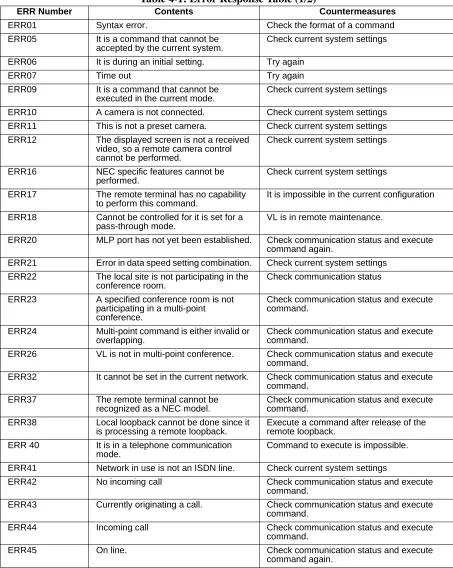
UP+
UP-P+
P- DP-