Available online: https://edupediapublications.org/journals/index.php/IJR/ P a g e | 202
Xen Hypervisor Type 1 Virtualization
Basheer AbdulMutalib Hassoon Haider Ali Mohammed
School of Computer Science and Technology, Hust
[email protected]
[email protected]
Abstract
Virtualization has become a popular way to make more efficient use of hardware resources within both personal or cloud platforms. And it has many advantages over non virtualized solutions, e.g., flexibility, cost and energy savings.
In this paper I talk about Virtualization to give some basic information about it, then I take Xen Hypervisor Type 1 as an example to show how it’s working. And Finally I put two test to show the performance of different Kinds of hypervisor Type 1.
Keywords: Hypervisor, Virtualization, Xen Hypervisor.
1.
Hypervisor
A hypervisor or virtual machine monitor (VMM) is a piece of computer software, firmware or hardware that creates and runs virtual machines[1].
1.1 Why call it a hypervisor
Initially, the problem that the engineers were trying to solve was one of resource allocation, trying to utilize areas of memory that were not normally accessible to programmers. The code they produced successful and was dubbed a hypervisor because, at the time, operating systems were called supervisors and this code cold supersede them.
1.2 Virtual machine
Virtual machine (VM) is a software implementation of machine that execute programs like a physical machine. Virtual machines separate into two major classes, based on their use and degree of correspondence to any real machine.
- A system virtual machine provides a complete system platform which supports the execution of complete operating system (OS). These usually emulate an existing architecture, and are built with the purpose of either providing a platform to run programs where the real hardware is not available for use ( for example, executing on otherwise obsolete platforms), or of having multiple instances of virtual machines leading to more efficient use of computing resources, both in the terms of energy consumption and cost effectiveness ( known as hardware virtualization, the key to cloud computing environment), or both. - A process virtual machine (also,
Available online: https://edupediapublications.org/journals/index.php/IJR/ P a g e | 203 program portability and flexibility
(amongst other things). An essentials characteristic of a virtual machine is that the resources and abstractions provided by the virtual machine—it cannot break out of its virtual environment.
The hypervisor is a layer of software that resides below the virtual machines and above the hardware. Figure(1) illustrates where the
hypervisor resides.
Fig u re(1) wh ere th e h y p erv is o r res id es
Without a hypervisor, an operating system communicates directly with the hardware beneath it. Disk operations go directly to the disk subsystem, and memory calls are fetched directly from the physical memory. Without a hypervisor, more than one operating system from multiple virtual machines would want simultaneous control of the hardware, which would result in chaos. The hypervisor manages the interactions between each virtual machine and the hardware that the guests all share.
The first virtual machine monitors were used for the development and debugging of operating systems because they provided a sandbox for programmers to test rapidly and repeatedly, without using all the resources of the hardware. Later the added the ability to run multiple
environments concurrently, carving the hardware resources into virtual servers that could each run its own operating system. This model is what evolved into today’s hypervisors.
There are two classes of hypervisors, and their names, Type 1 and Type 2, give no clue at all to their differences. The only item of note between them is how they are deployed, but it is enough of a variance to point out.
Type 1 Hypervisors
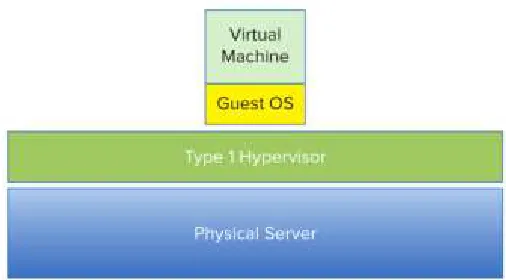
Type 1 hypervisor run directly on the server hardware without an operating system beneath it. Because there is no intervening layer between the hypervisor and the physical hardware, this is also referred to as a bare-metal implementation. Figure (2) illustrate a simple architecture of a Type 1 hypervisor.
Fig u re (2) A Ty p e 1 h y p erv is o r
Available online: https://edupediapublications.org/journals/index.php/IJR/ P a g e | 204 hardware resources in the stack below it, making
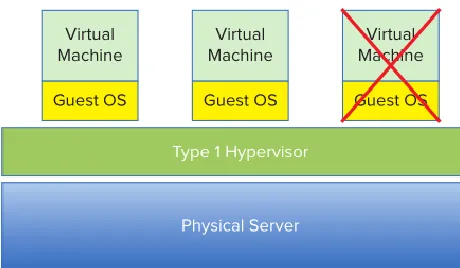
it much more efficient than the Type 2 hypervisor. And also considered to be more secure than Type 2 hypervisors. Guest operations are handled of and, such, a guest cannot affect the hypervisor on which it is supported. A virtual machine can damage only itself, causing a single guest crash, but that event does not escape the boundaries of the VM container. Other guests continue processing, and the hypervisor is unaffected as well. A malicious guest, where code is deliberately trying to interface with the hypervisor or the other guests, would be unable to do so. Figure (3) illustrate a guest failure in Type 1 hypervisor.
Fig u re (3) A g u es t Failu re
Less processing overhead is required for a type 1 hypervisor, which means that more virtual machines can be run on each host. From a pure financial standpoint, a Type 1 Hypervisor would not require the cost of host operating system, although from the practical standpoint, the discussion would be much more complex and involve all the components and facets that comprise a total cost of ownership calculation.
Example of type 1 hypervisors include VMware ESX, Microsoft Hyper-V, and the many Xen variants.
Type 2 Hypervisor
A Type 2 hypervisor itself is an application that runs atop a traditional operating system. The first x86 offerings were Type 2 because that was the quickest path to market—the actual operating system already handled all the hardware resources and the hypervisor would leverage that capability. Figure (4) illustrate a Type 2 hypervisor.
Fig u re (4) A Ty p e 2 h y p erv is o r
One benefit of this model is that it can support a large range of hardware because that is inherited from the operating system it uses. Often Type 2 hypervisors are easy to install and deploy because of the hardware configuration work, such as networking and storage, has already been covered by the operating system.
Available online: https://edupediapublications.org/journals/index.php/IJR/ P a g e | 205 the information back to the hypervisor and then
back to the guest, adding two additional step, time, and processing overhead, to every transaction.
Type 2 hypervisors are also less reliable because there are more point of failure: anything that affects the availability of the underlying operating system also can impact the hypervisor and the guests it supports. For example, standard operating system patches that require a system reboot would also force reboots of all the virtual machines on that host.
Example of Type 2 hypervisors is include VMware Player, VMware Workstation, and Microsoft Virtual Server are example of Type 2 Hypervisors.
2.
Xen Hypervisor
Xen hypervisor is an open-source Type 1 or baremetal hypervisor, which makes it possible to run many instances of an operating system or indeed different operating systems in parallel in a single machine (or host). It is used as the basis for a number of different commercial and open source applications, such as: server virtualization, infrastructure as a Service (IaaS), desktop virtualization, security applications, embedded and hardware appliances. The Xen hypervisor is powering the largest clouds in production today[2].
Here are some of the Xen hypervisor key features :
- Small footprint and interface ( around 1MB in size ). Because it use micro kernel design, with a small memory footprint and limited interface to the guest, it is more robust and secure than other hypervisors.
- Operating system agnostic: Most installation run with Linux as the main control stack (aka “domain0”). But number of other operating systems can be used instead, including NetBSD and OpenSolaris.
- Driver isolation : The Xen hypervisor has the capability to allow the main device driver for a system to run inside of a virtual machine. If the driver crashes, or compromised, the VM containing, the driver can be rebooted and the driver restarted without affecting the rest of the system.
- Paravirtualization: Fully Paravirtualized guests have been optimized to run as a virtual machine. This allows the guests to run much faster than with hardware extensions (HVM). Additionally, the hypervisor can run on hardware that doesn’t support virtualization extensions.
Key aspects of Xen architecture :
Guest types: The Xen hypervisor can run fully fully virtualized (HVM) guests, or paravirtualized (PV) guests. Domian 0: the architecture employs a
special domain called domain0 which contains drivers for the hardware, as well as toolstack to control VMs. Toolstacks: This section covers various
toolstack front-ends available as part of the Xen Project stack and the implications of using each.
2.1 Xen Architecture
Available online: https://edupediapublications.org/journals/index.php/IJR/ P a g e | 206 On top of the hypervisor run a number of
virtual machines. A running instance of a virtual machine is called a domain or guest A special domain called domain 0 contains the driver for the devices for all the devices
in the system. Domain 0 also contains a control stack to manage virtual machine creation, destruction, and configuration. Figure (5) illustrate Xen Project Architecture.
Fig u re (5) Xen Pro ject A rch itectu re
Components in detail:
The Xen Hypervisor is an exceptionally lean (<150,000 lines of code) software layer that runs directly on the hardware and is responsible for managing CPU, memory, and interrupts. It’s the first program running after the bootloader exits. The hypervisor itself has no knowledge of I/O functions such as networking and storage.
Guest Domain/Virtual Machines are virtualized environments, each running their own operating system and applications. The hypervisor supports two different virtualization modes : Paravirtualization (PV) and Hardware-assisted or Full Virtualization (HVM).
Both guests types can be used at the same time on a single hypervisor. It is also possible to use techniques used for Paravirtualization in an HVM guest: essentially creating a continuum between PV and HVM. This approach is called PV on HVM. Guest VMs are totally isolated from the hardware : in other words: they have no privilege to access hardware or I/O functionality. Thus , they also called unprivileged domain (or DomU).
Available online: https://edupediapublications.org/journals/index.php/IJR/ P a g e | 207 Machines. It also exposes a control
interface to the outside world, through which the system is controlled. The Xen hypervisor is not usable without Domain 0, which is the first VM started by the system.
Toolstack and Console : Domain 0 contains a control stack (also called Toolstack) that allows a user to manage virtual machine creation, destruction, and configuration. The toolstack exposes an interface that is either driven by a command line console, by a graphical interface or by a cloud orchestration stack such as OpenStack or CloudStack.
Xen enabled operating systems: Domain 0 requires a Xen enabled kernel. Paravatualized guests require a PV-enabled kernel. Linux distributions that are based on recent Linux kernel are Xen enable and usually include packages that contain the hypervisor and tools (the default Toolstack and Console). All but legacy Linux kernels are PV-enabled, capable of running PV guests.
2.2 Guest Type
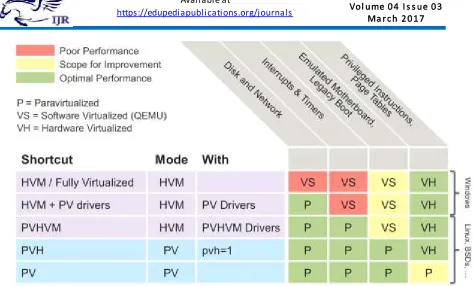
The hypervisor supports running two different types of guests: Paravirtualization (PV) and Full or Hardware Virtualization (HVM). Both guest types can be used at the same time on a single hypervisor. It is also possible to use techniques used for Paravirtualization in an HVM guest and vice versa: essentially creating a continuum between the capabilities of pure PV and HVM. We use different abbreviations to refer to these configuration, called HVM with PV drivers, PVHVM and PVH.
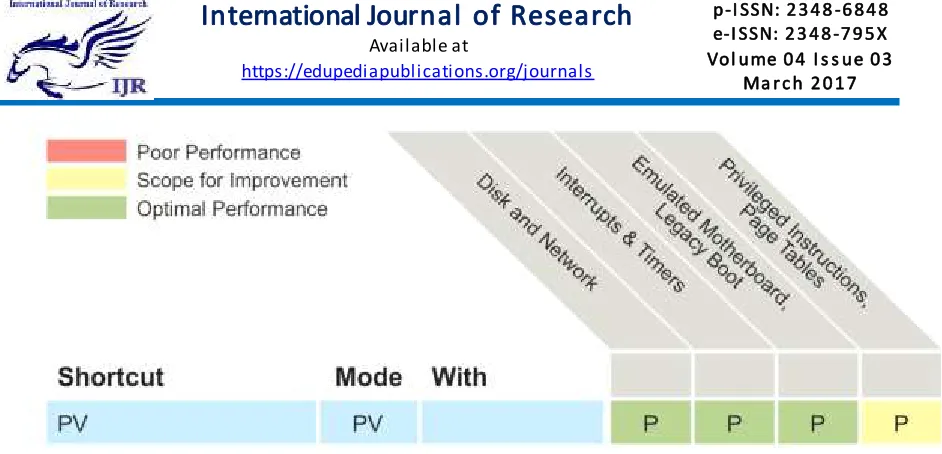
PV
Available online: https://edupediapublications.org/journals/index.php/IJR/ P a g e | 208 Fig ure (6) an overview o f h o w Parav irtu alizatio n is imp lemen ted in th e Xen Pro ject Hy p erv is o r
HVM
Full Virtualization or Hardware-assisted virtualization (HVM) uses virtualization extensions from the host CPU to virtualize guests. HVM requires IntelVT or AMD-V hardware extensions. The Xen software uses Qemu to emulate PC hardware, including BIOS, IDE disk control, VGA graphic adapter, USB controller, network adapter etc. Virtualization hardware extensions are
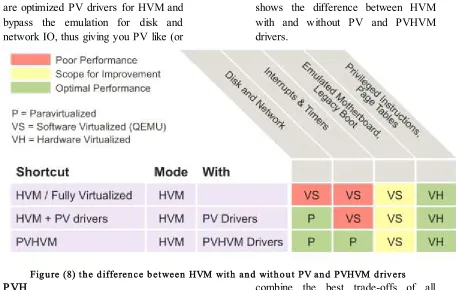
used to boost performance of the emulation. Fully virtualized guests do not require any kernel support. This means that windows operating systems can be used as a Xen HVM guest. Fully virtualized guests are usually slower than paravirtualized guests, because of the required emulation. Figure(7) shows the difference between HVM with and without PV drivers.
Fig u re (7) th e d ifferen ce b etween HVM with an d with o u t PV d riv ers
Available online: https://edupediapublications.org/journals/index.php/IJR/ P a g e | 209 To boost performance, fully virtualized
HVM guests can use special paravirtualized device drivers (PVHVM or PV-on-HVM drivers). These drivers are optimized PV drivers for HVM and bypass the emulation for disk and network IO, thus giving you PV like (or
better) performance on HVM systems. This means that you can get optimal performance on guests operating systems such as windows. Figure (8) shows the difference between HVM with and without PV and PVHVM drivers.
Fig u re (8) th e d ifferen ce b etween HVM with an d with o u t PV an d PVHVM d riv ers
PVH
Xen project 4.4 introduced a virtualization mode called PVH for DomU’s. Xen Project 4.5 introduced PVH for Dom0 (both Linux and some BSD’s). This is essentially a PV guest using PV drivers for boot and I/O. Otherwise it uses HW virtualization extensions, without the need for emulation. PVH is considered experimental in 4.4 and 4.5. It works pretty well, but additional tuning is needed before it should be used in production. PVH has the potential to
combine the best trade-offs of all virtualization modes, while simplifying the Xen architecture.
Available online: https://edupediapublications.org/journals/index.php/IJR/ P a g e | 210 Fig u re (9) th e d ifferen ce b etween HVM ( an d its v arian ts ), PV an d PVH
3.
Performance test 1
They compare the performance of KVM, VMware and XenServer, for two different scenarios: when no VM is migrated and when a VM is migrated from one physical server to another. The work load is for both scenarios, a large real-time telecommunication application. In the case when no VM migrated, they measure the CPU utilization, the disk utilization ( the number of write operations), and the average application response time. When a VM migrated they measure the CPU utilization, the disk utilization (the number of write operations), and the down time due to live migration[3].
3.1
Test Setup
Available online: https://edupediapublications.org/journals/index.php/IJR/ P a g e | 211 Fig u re (10) Netwo rk Plan
3.2
Test cases
A- Performance tests 1
In these tests, They vary the number of CPU cores (logical cores) in the VMs as well as the load towards the application.
They have three different core configurations: 6, 12 and 16 cores. For test cases with 12 cores and 16 cores the RAM for the VM is set to 24 GB, but for test case with 6 cores, the RAM size set to 14 GB for each of the VMs. This is an application specific setting that is recommended by the manufacturer. A single cluster is used for the case with 12 and 16 cores, respectively. Both clusters are used when testing the 6 cores configuration in order to assess the performance of two 6-core systems versus the performance a single 12-core system.
There are five load levels used in this test: 500, 1500, 3000, 4300, and 5300 incoming requests per second (req/s). For each setup the following metrics are measured: CPU utilization, disk utilization and response time.
CPU utilization and disk utilization are measured inside the hypervisor on
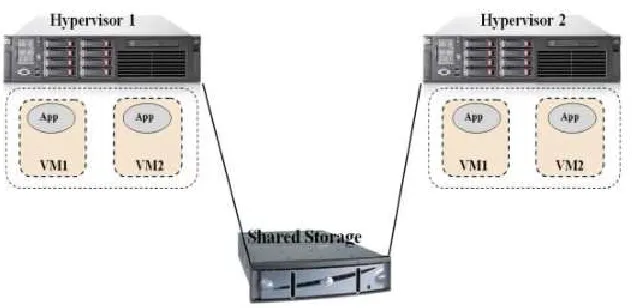
both servers. For disk utilization, they consider only write operations to the shared storage shown in Figure (10). The response time is measured inside the simulator as the duration from the instant a request is sent from the simulator to the application until the simulator receives the corresponding reply.
Live Migration tests
Available online: https://edupediapublications.org/journals/index.php/IJR/ P a g e | 212 In addition to CPU and disk utilization,
They measure the downtime and the total migration time. The total migration time is obtained from the hypervisor for KVM and XenServer, and from vCenter for VMware. Downtime is defined as the time from the instant when the VM is suspended on the source host (Hypervisor1 in Figure (10)) until the VM is restarted on the destination host (Hypervisor2 in Figure 1). We measured the downtime inside the simulator and our results indicate that it corresponds to the maximum response time of the application.
Test Result
The results of the performance tests for different configurations of number of CPU cores show that KVM and VMware CPU utilization is almost identical and similar to CPU utilization on the target machine (non-virtualized) while XenServer has the highest CPU utilization with a maximum around 80%. In terms of disk utilization, the results indicate that KVM and Xen have similar disk utilization while VMware has the highest disk utilization (around 30000 KB/s for the highest load). The response time of the application is the highest when using Xen as hypervisor showing around 25 ms at the highest point. For KVM and VMware, the response time is almost
similar (around 20 ms).
In general, KVM and VMware perform better in terms of CPU utilization while Xen CPU utilization is the highest. In terms of disk utilization KVM and Xen have similar performance while VMware has the highest disk utilization. Further, in terms of response time Xen has the longest response times compared to KVM and VMware.
As the results have shown, the CPU utilization during live migration is lower for KVM than for VMware while Xen had the highest CPU utilization during live migration. The disk utilization when KVM is used is 1000 KB/s lower compared to VMware during the migration.
Available online: https://edupediapublications.org/journals/index.php/IJR/ P a g e | 213
Figure (11) KVM, VMware and Xen CPU utilization for 16cores Figure (12) KVM, VMware and Xen CPU utilization for12 cores
Figure(13) KVM, VMware and Xen CPU utilization for 6 cores Figure(14) KVM, VMware and Xen disk utilizatio n for 16cores
Available online: https://edupediapublications.org/journals/index.php/IJR/ P a g e | 214
Figure(17) KVM, VMware and Xen response time for 16 cores Figure(18) KVM, VMware and Xen response time for 12 cores
Figure(19) KVM, VMware and Xen response time for 6cores Figure(20) KVM, VMware and Xen response time during live migration
Available online: https://edupediapublications.org/journals/index.php/IJR/ P a g e | 215
Figur e( 2 2 ) KVM, VMwar e an d Xen disk ut ilizat io n dur in g liv e m igr at io n
B-
Performance Test 2
The methodology for our performance comparison of hypervisors is to drill down each resource component one by one with a specific benchmark workload. The components include CPU, memory, disk I/O, and network I/O. Each component has different virtualization requirements that need to be tested with different workloads[5].
For a fair comparison, the hardware settings are exactly the same for all the hypervisors by using one server machine, which has two 147GB disks that are divided into three partitions. Hyper-V occupies one partition, VMware vSphere occupies one partition, and KVM and Xen share the same Linux installation that can be booted using either Xen or the KVM kernel. The machine has Intel(R) Xeon (R) 5160 3.00GHz/800MHz four core CPU, 8GB memory, and shared 3MB L2 cache per core (12MB). The disk has LSI logic 1064ESAS 3GBps controller
IBM-ESXS model, and the network is dual Broadcom 5708S gigabit Ethernet. The base guest VM OS is Ubuntu 10.04 LTS Lucid Lynx (Linux kernel 2.6.32), 10GB size disk image, and has 2048MB memory assigned. Each hypervisor has this base guest VM with exactly the same environment setup. Interference generator VMs use the same setting with the base guest VM, but it is assigned only 1024MB of memory.
Test Result
Available online: https://edupediapublications.org/journals/index.php/IJR/ P a g e | 216 and have the largest group of dedicated
developers behind them. However, the other three hypervisors all perform respectably, and each of the tested hypervisors has at least one benchmark for which it outperforms all of the others. In general, we find that CPU and memory related tasks experience the lowest levels of overhead, although KVM experiences higher memory overheads when all of the system’s cores are active. Performance diverges more strongly for IO activities, where Xen exhibits high overheads when
performing small disk operations. Hyper-V also experiences a dramatic slowdown when multiple cores are dedicated to running small, sequential reads and writes. Xen also suffers in network throughput. It is worth noting that we test Xen using hardware-assisted full virtualization, whereas the hypervisor was originally developed for paravirtualization. In practice, public clouds such as Amazon EC2 use Xen in paravirtualized mode for all but their high-end instance types.
Available online: https://edupediapublications.org/journals/index.php/IJR/ P a g e | 217
Figure(25) Bonnie++ Benchmark Figure(26) Filebench Benchmark
Available online: https://edupediapublications.org/journals/index.php/IJR/ P a g e | 218
Conclusion
Virtualization technology become again one of the most technology we need in our new world because of its benefits and the solution that provide by this technology to fix many kind of problems. Virtualization technology benefit is ( Save energy, reduce the data center footprint, QA/lab environments, Faster server provisioning, Reduce Hardware vendor lock-in, Increase uptime, Improve disaster recovery, Isolate applications, Extended the life of older applications, Help move things to cloud, and Hardware Utilization).
Xen hypervisor is one of the best hypervisor type 1 and have good features Fast, simple code, support almost all new hardware and the most important its open source so it give the developer more space to develop their own hypervisor.
According to the two test I show hypervisor performance differences and similarities in a variety of situation. The results indicate that Xen hypervisor has better performance than other type 1 hypervisor but there is no perfect hypervisor, and that different workloads may be best suited for different hypervisors.
Reference
[1] Mathew Potnoy, Virtualization Essentials, John Wiley & Sons,Inc, 2012.
[2] Xen Project,
“http://wiki.xenproject.org/wiki/Xen_O verview”.
[3] Sogand Shirinbab, Lars Lundberg, Dragos llie, Performance Comparison of KVM, VMware and XenServer using a Large Telecommunication Application, The Fifth International Conference on Cloud Computing GRIDS and Virtualization, CLOUD COMPUTING 2014.
[4] Roberto Morabito, Jimmy Kjallman, Miika Komu, Hypervisors vs.
Lightweight Virtualization: a Performance Comparison, 2015.