Preliminary Review of Model-View-Presenter (MVP) and
Usability Design for the Development of Postgraduate Web
Portal
Siti Mashitah Shamsul Anuar a,*, Nurulhuda Firdaus Mohd Azmib, Nurazean Maaropb, Ganthan Narayana Samyb, Suraya
Yaacobb, Doris Wong Hooi Tenb
a Universiti Kuala Lumpur (UniKL), Jalan Sultan Ismail, Kuala Lumpur, Malaysia.
bAdvanced Informatics School (UTM AIS), Universiti Teknologi Malaysia (UTM), Jalan Sultan Yahya Petra, Kuala Lumpur, Malaysia.
Abstract
The process of managing and monitoring postgraduate students should enable mobility to the individuals involved, should not use high human effort and should provide transparent monitoring. Therefore, it needs a solution that could enable mobility, reduce human effort and provide transparent monitoring. A possible of it is through web portal that allows reducing numbers of physical meetings, avoiding double key-in, and allowing authorized personnel to easily access, monitor and analyzing data. Developing a good web portal requires good web pattern design which should be done prior or in earlier stage of a software development as a blueprint of the development. The web design of a web portal development as one of the web dimensions refers to the visualization of the web. Web pattern design has been used to solve commonly occurring problems in web portal development. This paper focuses on the preliminary review of model-view-presenter (MVP) web pattern design and usability heuristics for the development of postgraduate portal. It will discuss some of the existing web pattern design and the selections of the web pattern design which suitable to the development of postgraduate web portal.
Keywords: Web Pattern Design, Model-View-Presenter (MVP), Usability Heuristic, Software Design, Web Portal Content.
1. INTRODUCTION
A good process for postgraduate management system would be based on the following criteria:
a. Enable mobility. This feature allows the students, lecturers or supervisor to perform an activity without the need of being physically available. In other word, the postgraduate management and monitoring system should be accessible from outside the university.
2
b. Reduce human effort. A good postgraduate management and monitoring system should be able to reduce human effort by any means possible. For example, improving on data provision or data access processing, maintain and access the data on students’ progress report data.
c. Provide transparent monitoring. This feature allows authorized personnel to easily access and monitors the data. This is to ensure that there is no missing data and there is no data that is difficult to be retrieved.
One of the potential solutions in implementing postgraduate management and monitoring is through portals. Portals have been widely used in disseminating information. Portal can be classified as web portal and enterprise portal. Web portal is a website that brings information together. Enterprise portal as defined by Gartner: “a Web software infrastructure that provides interaction with relevant information assets (for example, information/content, applications and business processes), knowledge assets and human assets by select targeted audiences, delivered in a highly personalized manner.”
For postgraduate management and monitoring, portals can be used to improve document management, communication and collaboration, information access and sharing, and assessment and reporting. It can be personalized in different type of users such as students, lecturers, supervisors and administrators in a single entry point (the web).
This paper describes the preliminary review of usability heuristics for the web pattern design of the development of postgraduate portal. The first part of the paper introduces the criteria of a good process of postgraduate management and the benefit of implementing portals for postgraduate management and monitoring. A detailed description of techniques and technology aspect of web portal design is presented in Section 2. This includes the fundamental concept of web portal design pattern and the concept of usability design is presented. We then present our discussion on preliminary review of model-view-presenter design pattern and usability heuristic in postgraduate web portal design and it is described under Section 3. Finally, Section 4 concludes this paper.
2. TECHNIQUES AND TECHNOLOGY ASPECT OF WEB PORTAL DESIGN
Chapman and Chapman [1] has defined web as a complex artificial system with three dimensions – software technique and technology, design (usability design), and purpose of the message (web portal content). Each dimension is taken into consideration when implementing the development of postgraduate web portal and discussed further in this section and remaining sections.
2.1 Common Architecture Design for Web Portal Design
implements services related to the user interface. It can combine technologies that perform server-side processing such as Java Server Pages (JSP), Servlets, Active Server Pages (ASP) or common gateway interface (CGI) with technologies that perform client-side processing such as JavaScript. An example of services related are: communicating with business rules layers, generating dynamic content, user interface validations such as checking if the user has filled in the information properly. The content of the user interface can be composed of different kinds of media such as sounds, pictures, images, movies, and hypertext. The presentation layer is distributed between server and client, the server-side is responsible for user input processing and content aggregation, while the client-side (browser) is responsible for content rendering and receiving user input that is sent to a server for processing. The user interface not only allows to access information but also allows a user to publish objects (files, reports, instruction manuals, web links etc) to a repository of a portal.
Figure 1: Common Architecture for Web Portal applications
The communication layer composed of technologies that facilitate the communication of distributed components (e.g., applications, objects) over the network by offering high level application programming interfaces and services to the programmer that hide lower level implementation details. The communication layer is composed of network protocols such as hypertext transfer protocol (HTTP), transmission control protocol (TCP), Internet protocol (IP).
4
In persistence (data) layer, it encompasses technologies that provide a way to persist data such as database management systems like DB2 or MS SQL Server and also application programming interfaces that facilitate database programming such as Java Database Connectivity (JDBC), OLEDB, ADO.NET. The previous technologies serve as a foundation for Web portal development.
2.2 Web Portal Design Pattern
Web design pattern is a reusable solution to commonly recurring issues in software web design [3]. There are 4 types of web design pattern according to Syromiatnikov and Weyns [4]: Widget based user interface (Forms and Controls), Model-View-Controller (MVC), Model-View-View-Model (MVVM) and Model-View-Presenter (MVP). It is important to identify the existing design patterns for a web and their compatibility to the web. Thus, this section will review these design patterns:
2.2.1 Widget based user interface (Forms and Controls)
Forms and Controls is a web design pattern with the concept of the logic, data displaying and data-handling is stored in a predefined form class. In other word, one form class would include the logic for processing, the specific data to be displayed and data-handling from the user input. Thus, each interface would have its own form class. The development using Forms and Controls is easier to maintain as all components of an interface falls in one predefined class. The programmer can simply modify the class to cater any changes required for an interface without concern that the other interfaces may be affected.
However, implementing Forms and Controls would be tedious for the system with rich user interface and complex logic. For example, an interface that requires filtration of select option based on another input from the same interface would require complex logic to handle the processing, and is not a straightforward user interface. This is not likely to be doable for Forms and Controls design pattern. Example of software that uses Forms and Controls pattern is ASP.NET Web Form. Microsoft has provided the documentation on the development up to deployment using ASP.NET Web Form which is very helpful to developers. However, the limitation of ASP.NET Web Form is that the development on Visual Studio requires licensing, and it can only run on a Windows server.
2.2.2 Model-View-Controller (MVC)
The Model component will have coding for the data of the domain object. Further changes to the domain object can be done by manipulating the Model component. Meanwhile, the View holds the code for the user interface. Any changes to the user interface only require modification with the View directly. Lastly, the Controller component’s role is to handle the operating logic. With the codes organized according to the components, it is easier to understand and modify the code.
However, the same View may be used for multiple functionalities. For example, the view that is used for displaying the data may also be used for editing the data. Due to possible overlapping of functionalities, performing unit testing on the system that uses MVC will be difficult. It is difficult to pinpoint on a mistake that occurs for certain functionality, as the fault may be with part of the code for the overlapping functionality. Example of software that uses MVC concept is Spring MVC and ASP.NET MVC. Both Spring MVC and ASP.NET MVC are frameworks released with Apache 2.0 license. While Spring MVC runs on JVM, ASP.NET MVC runs on Windows server. There are many tutorials available on getting started with Spring MVC such as the ones provided by Jain et.al [5], Mak. G [6] and CodeJava [7]. The development and compilation of Spring MVC application can be done with Eclipse, a free IDE.
Figure 2: MVC Representation Model [4]
2.2.3 Model-View-View-Model (MVVM)
6
Figure 3: MVVM Representative Model [4]
The advantage of MVVM is that it is able to handle view states. With this feature, the view can vary according to different states. For example, if there is an error with the data input by user, different View-Model can be used to handle the view state with error and the other without error. This feature enables unit testing as there is no overlapping of functionalities and states in the Views. Each functionality and sate can each be tested according to their respective View-Model.
However, as the size of the project grows, so does the size of View-Models. If the project contains multiple modules, each module may contain multiple states and functionalities, and may even cross another module. The number of the View-Models grows exponentially as the size of the project grows. Due to too many View-Models, managing and writing the code will not be an easy task. Example of software that uses MVVM design pattern is WinRT. WinRT is an API introduced in Windows 8. Similar to ASP.NET MVC, WinRT application only runs on Windows server. However, according to Pragmateek [8], WinRT application is not an option for majority of mobile and tablet users as it is not compatible with Android and IOS.
2.2.4 Model-View-Presenter (MVP)
MVP is a web design pattern that uses Model, View and Presenter components. Similar to MVC and MVVM, the Model represents the domain object and the View is the interface to be displayed to the user. The Presenter component however is used to process user input, to synchronize the Model and View, and to modify the View whenever necessary as shown in Figure 4. The advantage of implementing MVP is the Presenter has complete control over Model and View. Thus, the Presenter is able to modify the View according to different states and functionalities. For instance, as the Presenter detects the error in the Model, the Presenter can control the View to handle the error state of the Model. Due to this, implementing MVP enables unit testing as the main focus of the test would be on the Presenter.
becomes difficult as the user interface becomes rich or the synchronization logic becomes complex.
Figure 4: MVP Representation Model [4]
2.3 Usability Design for Web Portal
Wenxia [9] has defined usability design as a design that is easy to use, easy to discover and easy to be learnt. Gong [10] has highlighted the importance of usability design to a web portal as it can indicate the quality of a product. As a guideline for designing the postgraduate web portal’s usability, the eleven (11) usability heuristics by Mahmud et al. [11] were referred to. These heuristics were adjusted based on the Ten Nielsen Usability Heuristic by Nielsen [12] and revised by Levi and Conrad [13]. The discussion is further described in the preceding section.
4. DISCUSSION ON MODEL-VIEW-PRESENTER (MVP) AND USABILITY DESIGN FOR POSTGRADUATE WEB PORTAL DEVELOPMENT
8
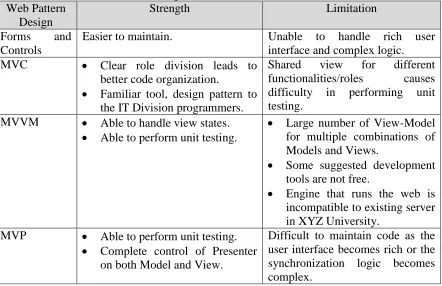
Table 1: Strength and Limitation of web portal design pattern for the development of Postgraduate Web Portal.
Web Pattern Design
Strength Limitation
Forms and
Controls
Easier to maintain. Unable to handle rich user
interface and complex logic.
MVC Clear role division leads to
better code organization.
Familiar tool, design pattern to the IT Division programmers.
Shared view for different functionalities/roles causes difficulty in performing unit testing.
MVVM Able to handle view states.
Able to perform unit testing.
Large number of View-Model for multiple combinations of Models and Views.
Some suggested development tools are not free.
Engine that runs the web is incompatible to existing server in XYZ University.
MVP Able to perform unit testing.
Complete control of Presenter on both Model and View.
Difficult to maintain code as the user interface becomes rich or the synchronization logic becomes complex.
From the review in Table 1, it shows that for the organization whose face the experience in developing web-based application using Spring MVC framework with JAVA language, the MVP design pattern would be much convenient. This is because changing into a different tool, language or design pattern requires high learning curve from the programmers’. Meanwhile, change of server environment, platform, and licensed software may cost budget.
As a guideline for designing the postgraduate web portal’s usability, the eleven (11) usability heuristics by Mahmud et al. [11] were referred to. The implementation of the eleven (11) heuristics is shown in Table 2.
Table 2: Postgraduate Web Portal Implementation of Eleven (11) Usability Heuristics
Heuristic Description Implementation in
Postgraduate Web Portal? (Yes/No) Visibility of system
status.
Let user knows what is going on by provide feedback.
Yes
Match between system and the real world.
Familiar and consistent with the user’s real world knowledge.
Yes
freedom. around a portal freely and mistakes are recoverable.
Consistency and standards.
Words, colors, design elements and phrases used throughout a portal need to mean the same thing regardless of where those elements are used.
Yes
Error prevention. Careful design which prevents a problem from occurring in the first place.
Yes
Recognition rather than recall.
Users can recognize where they are by looking at the current page, without having to recall their path from the home page and minimize user memory load.
Yes
Flexibility and efficiency of use.
The portal can cater to both inexperienced and experienced users.
Yes
Aesthetic and minimalist design.
The portal should not contain information which is irrelevant or rarely needed.
Yes
Help and documentation.
The portal should provide help and online documentation.
Yes
Help users recognize, diagnose, and recover from errors.
Error messages should be expressed in plain language (no codes), indicate the problem, and suggest a solution.
Yes
Use chunking. Improve information retrieval. Yes
These heuristics serve as a guideline in developing a portal with friendly and intuitive user interface. Despite all the heuristics mentioned, some heuristic could not be implemented due to time constraint and prevention of data overflow. The third heuristic – user control and freedom – requires keeping track of history for each record in the postgraduate web portal modules. This operation is expensive in terms of data storage and complex in terms of development. Plus, these modules consist of notification through e-mail which is undoable. As an alternative, a confirmation popup appears before each action is being completed as an effort to prevent accidental clicks.
5. CONCLUSION
10
deciding on which approach to use for the software development. When some approach may be suitable for certain condition, some may not. This paper discuss about the design and development of postgraduate web portal. It covers on selection of suitable design pattern and identification of usability design for the postgraduate web portal development. Our next plan is to conduct internal testing and reviews with the clients and come up with the formal testing report. This is to reduce the possibility of error to be experienced by the user when they use the portal. Furthermore, enhancement of the postgraduate web portal can be implemented based on the testing to ensure that the product is of good quality.
ACKNOWLEDGEMENT
The author would like to express the acknowledgement to Advanced Informatics School (UTM AIS) and Universiti Kuala Lumpur (UniKL) for the opportunity given to conduct the project on postgraduate web portal development.
REFERENCES
[1] Chapman, N., & Chapman, J. (2007). Web design: a complete introduction. John Wiley & Sons.
[2] Sampaio, A., & Rashid, A. (2005). Report on tools for web portal construction. Technical Report AOSD-Europe-ULANC-3, AOSD-Europe.
[3] Khwaja, S., & Alshayeb, M. (2013). A framework for evaluating software design pattern specification languages. In Computer and Information Science (ICIS), 2013 IEEE/ACIS 12th International Conference on (pp. 41-45). IEEE.
[4] Syromiatnikov, A., & Weyns, D. (2014, April). A journey through the land of Model-View-Design patterns. In Software Architecture (WICSA), 2014 IEEE/IFIP Conference on (pp. 21-30). IEEE.
[5] Jain, N., Mangal, P., & Mehta, D. (2015). AngularJS: A modern MVC framework in JavaScript. Journal of Global Research in Computer Science, 5(12), 17-23.
[6] Mak, G. (2008). Spring MVC framework. Spring Recipes, 321-393.
[7] CodeJava (2014). Spring MVC beginner tutorial with Spring Tool Suite IDE. Retrieved on 15 May, 2015,http://www.codejava.net/frameworks/spring/spring-mvc-beginner-tutorial-with-spring-tool-suite-ide.
[8] Pragmateek (2014). Is WPF dead: the present and future of WPF. Retrieved on 23 May, 2015, from http://www.codeproject.com/Articles/818281/Is-WPF-dead-the-present-and-future-of-WPF
[9] Li, W. (2008). An era of Usability Design--perspectives on the realistic significance of “Usability” Design research. In Computer-Aided Industrial Design and Conceptual Design, 2008. CAID/CD 2008. 9th International Conference on (pp. 145-148). IEEE. [10] Gong, C. (2009). Human-computer interaction: The usability test methods and design
[11] Mahmud, M., Othman, N. K., & Dahlan, H. M. (2010). Evaluating heuristic for EG portal design model. In Information Technology (ITSim), 2010 International Symposium in (Vol. 3, pp. 1555-1560). IEEE.
[12] Nielsen, J. (2005). Ten usability heuristics.
![Figure 2: MVC Representation Model [4]](https://thumb-us.123doks.com/thumbv2/123dok_us/1360145.1168839/5.545.97.447.325.486/figure-mvc-representation-model.webp)
![Figure 3: MVVM Representative Model [4]](https://thumb-us.123doks.com/thumbv2/123dok_us/1360145.1168839/6.545.96.451.61.206/figure-mvvm-representative-model.webp)
![Figure 4: MVP Representation Model [4]](https://thumb-us.123doks.com/thumbv2/123dok_us/1360145.1168839/7.545.95.449.103.297/figure-mvp-representation-model.webp)