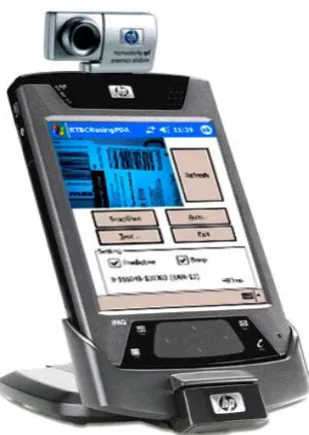
REAL-TIME BARCODE READER USING PERSONAL DIGITAL ASSISTANCE (PDA)
OSAMA SALEM ELSHERAIRI
A project report submitted in partial fulfillment of the requirements for the award of the degree
of Master Engineering
(Electrical-Electronics & Telecommunication)
Faculty of Electrical Engineering Universiti Teknologi Malaysia
iii
In the name of Allah, Most Gracious, Most Merciful
All praise and thanks are due to Allah Almighty and peace and blessings be upon His Messenger
The results of this effort are truly dedicated to my mother and father whose example as devoted professionals, as well as, parents taught
me to be perseverant, responsible and loyal to my belief.
To my brothers, and sisters, and my best friend my uncle for all their support, encouragement, sacrifice, and especially for their love.
iv
ACKNOWLEDGEMENTS
First and foremost, I thank Allah for giving me the strength to complete my project. I would like to thank especially supervisor ASSOC. PROF. DR. SYED ABD
RAHMAN AL-ATTAS for his constant support and guidance during my graduate
studies at Universiti Teknologi Malaysia. I would also like to convey my deepest gratitude to Mr. Usman Ullah Sheikh for his guidance to complete this research.
v
ABSTRACT
vi
ABSTRAK
vii
LIST OF CONTENTS
CHAPTERS TITAL PAGE
DECLARATION ii
DEDICATION iii
ACKNOWLEDGEMENTS iv
ABSTRACT v
ABSTRAK vi
TABLE OF CONTENTS vii
LIST OF TABLES xi
LIST OF FIGURES xii
LIST OF ABBREVIATIONS xv
LIST OF APPENDICES xvii
CHAPTER 1 INTRODUCTION 1
1.1 Overview 1
1.2 Personal Digital Assistant (PDA) 2
1.2.1 Pocket PC 3
1.3 Plam 4
1.4 Smartphones 4
1.5 Camera used with PDA 5
1.6 Windows Mobile 5
1.7 PDA using a camera 6
viii
1.9 Objective of Project 8
1.10 Scope of Project 8
1.11 Project outline 8
CHAPTER 2 LITERATURE REVIEW 10
2.1 Introduction 10
2.2 A bit of history 11
2.3 Types of Barcodes 11 2.3.1 One Dimensional barcodes 12 2.3.2 Two - Dimensional barcodes 13
2.4 The Physical Reader 13
2.4.1 Input Device 14
2.4.2 Decoder 18
2.4.3 Barcode Reading 19 2.5 The Barcode Recognition System 21
2.5.1 EAN-13 Barcode Image Recognition 21 2.5.2 Barcode symbologies 21 2.5.3 Barcode Size and Color 22 2.6 Encoding Rule of Structure of an EAN barcode 23
2.6.1 The X-dimension 24
2.6.2 Quiet zone 24
2.6.3 Guard bars 25
2.6.4 Right & left hand side digits 26 2.6.5 How to calculate the checksum 27
2.6.6 Encoding 28
2.6.7 Decoding 31
CHAPTER 3 METHODOLOGY 32
3.1 Introduction 32
ix
3.3 Image Capturing 33
3.4 Barcode processing in PDA 34 3.4.1 Searching for barcode image
automatically
35
3.4.2 Identification of the Bars and Spaces 36 3.4.3 Estimating How Correctly the Elements
Have Been Identified
36
3.4.4 Decoding the Barcode 37
3.5 Pre-Processing 38
3.5.1 The RGB color model 39
3.5.2 Gray scaling 40
3.5.3 Image Enhancement 41
3.6 Scanning Direction 42
3.7 Barcode Identification & Extraction 44
3.8 Program Architecture 45
3.8.1 Overview of Programming Languages
Used For PDA
45
3.8.2 Program Build on PDA 46
3.9 Program screenshot 46
3.9.1 Program interface 47
3.9.2 Using the HP Photosmart Mobile Camera 48
CHAPTER 4 RESULT 50
4.1 Introduction 50
4.2 Uneven Resolution, Shadow, Shake and Illumination
50
x
4.7 Show scan horizontal read rotated barcode (online)
55
4.8 Time Consumption 56
4.9 Performance Comparison 56
CHAPTER 5 CONCLUSION 58
5.1 Conclusion 58
5.2 Recommendations for Future Work 58
REFERENCE 59
xi
LIST OF TABLES
TABLE TITAL PAGE
2.1 Specification for EAN-13 barcode 22 2.2 Total number of bars and modules for EAN-13 barcode 28 2.3 The list of oriented-modules on logic of 0-9 for A, B, C,
types
29
2.4 Result for example 30
xii
LIST OF FIGURES
Figure TITAL PAGE
1.1 Symbol barcode 2
1.2 HP iPAQ hx4700 Pocket PC 3
1.3 Palm 4
1.4 Smartphone 4
1.5 Digital camera card (HP Photosmart mobile camera) 5 1.6 Different devices used windows CE 6
1.7 Interfaces for windows CE 6
1.8 PDA build-in camera 7
2.1 A scheme of a bar code reading system 10
2.2 Numeric barcode, 1D 12
2.3 Alphanumeric barcode, 1D 13
2.4 Some types of barcode, 2D 13 2.5 Reader (a), Laser scanner, (b) CCD scanner, (c) CCD
sensor by a lens.
15
2.6 Pen-Type readers 15
2.7 Some cameras can used to read barcode 16 2.8 These are some digital camera card (Photosmart mobile
camera)
16
2.9 The barcode reader with PDA in the shopping 17
2.10 Barcode EAN-13 21
2.11 (a) equivalent EAN-13 barcode, with the first character set to zero, and (b) an EAN-13 with an additional digit used, with the first character set to not zero
xiii
2.12 X-dimension barcode 23
2.13 Barcode Structure 24
2.14 Actual size of EAN-13 25
2.15 EAN-13, left and right hand 29
2.16 Barcode EAN-13 Parity Encoding 30
3.1 Architectural Overview: Our EAN-13 barcode and resolution system consists of a PDA using camera and load from file application for decodes barcode
33
3.2 There are some progress used to read barcode 33
3.3 Image processing in PDA 34
3.4 Some symbolsbarcode image 35 3.5 Schematic of the RGB color cube 39 3.6 Illustrating difference between a general RGB color
image and a general gray scale image.
40
3.7 Original gray-scale image 40 3.8 A 3x3 window, for use in a windowing function, where
the z-values corresponds to the gray-scale values of the original image
42
3.9 Spatial filters (a) Gaussian Blur, (b) Laplacian (c) Sharpen
(d) Unsharpen Mask
42
3.10 Scan 4 directions implemented 43
3.11 These are some direction of a barcode at different angles, (a) Horizontal (b). Vertical (c) Diagonal (d) invest
horizontal
43
3.12 Illustrating how the barcode's angle µ is derived using the vector displacement, k, the distance d between two vectors, and basic trigonometry.
44
3.13 Steps to identify and extract the EAN-13 barcodes 44
3.14 program interface 47
xiv
4.1 These are some samples for barcodes image are not clear, all of them (uneven resolution and shake)
51
4.2 Some types of barcode all of them very clear 51 4.3 Some types of barcode all of them not clear 51 4.4 Shows the output from the localization algorithm. Angle
α is the angle of the bar code. The angle is also given by 90 - β
52
4.5 Rotation 53
4.6 Diagonal (+45, - 45), (a) scan consume operation 93ms,(b) scan consume 1482ms, (c) scan consume operation 617ms
53
4.7 Horizontal, (a) scan consume operation 531ms,(b) scan consume 492ms, (c) scan consume operation 462ms
54
4.8 Vertical, (a) scan consume operation 435ms,(b) scan consume 336ms, (c) scan consume operation 515ms
55
4.9 some tests from camera (online), (a) scan consume operation 203ms,(b) scan consume 270ms, (c) scan consume operation 272ms
55
xv
LIST OF ABREVIATIONS
PDA - Personal Digital Assistants GPS - Global Positioning System
PC - Personal computer
MS - Microsoft
RAM - Random access memory CPU - Central processing unit
GSM - Gold Standard Multimedia GPRS - General Packet Radio Service CDMA - Code division multiple access WCDMA - Wideband Code Division Multiple Access 3G - 3-Generation
SD - Secure Digital MP - Micro Pixel
D - One- or Two- Dimensional BMP - Windows Bitmap
EAN - European Article Number UPC - Universal Product Code CCD - Charge-Coupled Devices PSA - Personal Shopping Assistant PIM - personal information manager JPEG - Joint Photographic Experts Group RGB - Red, Green and Blue
SD - Secure Digital
xvi
PCB - Printed Circuit Boards CD - Compact Disc; conjugate directions
xvii
LIST OF APPENDICES
APPENDIX TITAL PAGE
A Camera SDIO SDK Specification 63 B Visual Studio 2005 C++ CLASS DECLARATION 70 C Some Types of digital camera card 75 D SOME BARCODE IMAGE ARE VERY CLEAR 79 E SCREENSHOTS OF COMMERCIAL TEST
PROGRAMS
80
CHAPTER 1
INTRODUCTION
1.1 Overview
Today barcodes are present all around us not only for use on groceries in the super-market, but also in industries for example in a car assembly plant most the car parts are marked with barcodes for identification purposes. Similarly, and for the same reasons, most electronic circuits and microchips have barcodes on them.
Why is that? Why are barcodes used?
The main reason is the convenience and effectiveness barcodes provide since they are designed for automated reading and interpretation. Leading to a rationalization when a machine does the job instead of a human operator. Further, a product can be given a fix barcode, only linking the barcode’s number to a database containing attributes such as price, manufacturing date, adjacent bars and spaces etcetera. Hence, attributes can easily be changed in the database, without actually re-labeling the product.
Barcodes are standardized, as shown in figure 1.1, which leads to that they are consistently shaped and used, and that they have a well defined structure wherever they are found.
2
barcodes are wide-spread over the world there has naturally evolved many different ways to read them – using for example laser scanners, so called wands, CCD-scanners, or digital cameras. If it could be possible to use personal digital assistant (PDA) build in camera to read barcodes image much could be gained. Naturally, the first advantage compared to, for example, a laser scanner is that the object with the barcode is visible in the image, and thus that the operator can see whether the object is for example intact or damaged, which means that the system easily could be expanded with additional cameras. This is due to the fact that the PDA using a camera downloads the images with ease could be connected to the network via the internet such as the World Wide Web.
Figure 1.1: symbol barcode
1.2 Personal Digital Assistants (PDA)
3
1.2.1 Pocket PC
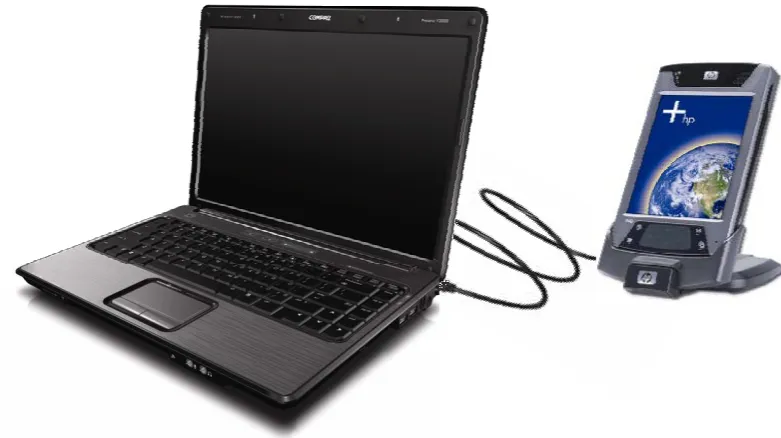
This project will use Pocket PC (HP iPAQ hx4700 series as shown in Figure 1.3). The main reason for choosing Pocket PC rather than Palm is that Pocket PC is a handheld computer with a subset of the capabilities of a PC and provides the basic functionality those users need when they are traveling. Pocket PC also has a longer battery life than a notebook PC, therefore, offers 320 x 240 color display or more, moreover it can use touch screen for data entry. The pocket PC uses a cable serial & USB sync port to connect with PC or other devices. It is an available compact flash and/or Secure Digital (SD) Card for secondary storage. The pocket PC is better than palm because the palm is just an organizer but the Pocket PC is a small computer that uses a windows interface which is already user-friendly. The Pocket PCs are more popular and used by many people because it can use Microsoft Word, Excel, and Outlook. The Pocket PC uses high resolution color screens.
Pocket PCs come with mobile versions of office applications in addition to Microsoft Outlook Mobile. Though there are different Pocket PCs, all of them can compose e-mail messages and send them by synchronizing with desktop computer or wirelessly.
4
1.3 Palm
The palm has some applications with an easy to use interface, as shown in figure 1.3
Figure 1.3: Palm
1.4 Smartphones
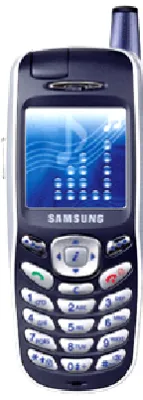
Mobile phones use Windows Mobile or Symbian as operating system developed by the Palm Company. The smartphone is different with PDA’s, as shown in figure 1.4.
5
Therefore, the smartphone has something like a PDA (storage on flash, multimedia features, pocket outlook, pocket internet explorer, GSM/GPRS, CDMA, WCDMA, 3G Radio, SD Card.
1.5 Camera used with PDA
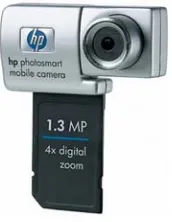
There are many kinds of camera for PDA. They include; built–in camera, wireless camera and digital card camera. The recent models of smartphone’s and PDA’s have built-in camera, as shown in figure 1.5, which is digital camera card that can be used in a PDA’s and other dives.
Figure 1.5: Digital camera card (HP Photosmart mobile camera)
1.6 Windows Mobile
6
Figure 1.6: Different devices that use windows CE
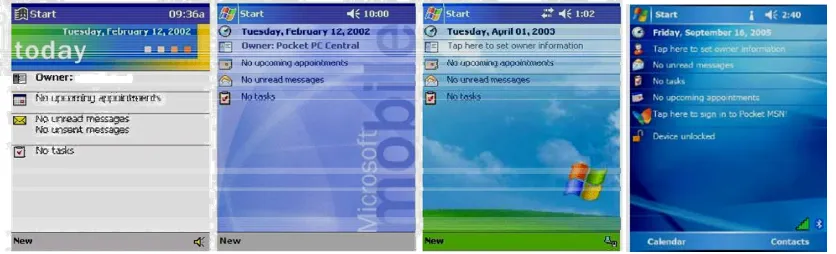
Windows CE (WCE) is a Windows like operating system for various handheld devices, including Personal Digital Assistants (PDA’s) and Mobile Phones. While at the API level, many of the function calls and interfaces are the same as the standard version of Windows as shown in figure 1.7, much of the internals have been altered to accommodate many different types of CPUs and architectures.
Figure 1.7: Interfaces for windows CE
1.7 PDA using a camera
7
Figure 1.8: PDA build-in camera
This project can perform either in real-time (online) or load from a file (offline). The application revolution has been made possible by the added extra processor called an application processor into the newer PDA's. The software used is Embedded Visual Studio 2005 C++ and the hardware system processing will be done in real-time by PDA using camera. See figure 1.8, PDA with camera.
1.8 Limitations of Conventional Barcode Readers
In real time (online) phase, the capturing of barcodes image depends on the following:
a) Resolution of the camera, for build-in camera in real time, the resolution of the camera must be more than 3.0 MP.
b) Light intensity is very important to camera.
8
1.9 Objective of Project
The main objective of this project is to develop a system comprising of a PDA using camera and software for the purpose of capturing 1-D barcodes and decoding them in real-time (online) as well as offline (reading from a file). Suitable image processing techniques must be implemented in the software to accommodate inaccuracies or environmental changes during the acquiring process.
1.10 Scope of Project
The project is mainly to develop a Windows Mobile (windows CE) based software in Embedded Visual Studio 2005 C++, which is to be run on HP Ipaq hx 4700 series PDA.
a. The program obtains images barcode from offline windows bitmap (BMP) files or in real-time from a camera that is either attached or built in the PDA. b. The image barcode is obtained from a camera that is either attached or built
in the PDA.
c. Barcode symbologies that will be considered in the project will be mainly the
EAN -13 (Very common in consumer products).
1.11 Project Outline
This project is organized into five chapters. The outline is as follows;
Chapter 1-Introduction
9
Chapter 2-Review of Literature Studies
This chapter reviews the relevant literature and previous work regarding PDA using camera barcode readers. In addition to that, explain of EAN-13 symbologies are given.
Chapter 3- Methodology
This chapter elaborates on the principles behind good quality image acquisition and the factors that must be taken into consideration to obtain readable barcodes. This includes camera selection, determination of field of view, resolution, light intensity and shake. The algorithms to initiate barcode detection and decoding are also described and justified in this chapter.
Chapter 4-Result
The final results of this project are shown in this chapter.
Chapter 5-Conclusion